Businesses in ChatGPT, launched in beta on 10 November 2026, lets an eligible business claim its profile in Business Hub, keep its details current and see how often ChatGPT mentions it. You verify by business phone, business email, a DNS TXT record or Shopify, then pass a Persona identity check. Insights show mentions, website clicks and discovery topics over 28 days. Online businesses can claim now; local stores and restaurants can currently claim only existing US listings, and Business Agents are US only.
Run a business with a website? Do three things this week:
1. Record a Search Console baseline. Google started its November 2026 core update on 10 November. Note your last 28 days now, so you can see what moved.
2. Check if you can claim. Open Business Hub from the ChatGPT sidebar and search your business name. Eligible online businesses should be able to claim now; local shopfronts will likely have to wait.
3. Line up verification. You'll need access to your business phone, email, domain DNS or Shopify, and later a government ID for the Persona check.
TL;DR
- What it is: Businesses in ChatGPT, launched in beta on 10 November 2026, lets you claim your business in Business Hub, keep its details current and see how ChatGPT mentions you (OpenAI).
- Not the same as: the paid ChatGPT Business plan, which is a team workspace (formerly ChatGPT Team) (OpenAI Help).
- Who can claim: any eligible business located where ChatGPT is available can claim, starting with businesses that have a website, subject to OpenAI's industry, verification and integrity checks. Local stores and restaurants can currently claim only an existing US listing (OpenAI Help).
- Verification: business phone, business email, a DNS TXT record or Shopify, then a Persona identity check before you see insights (OpenAI Help).
- What you see: mentions, website clicks and discovery topics, aggregated, with no individual prompts (OpenAI Help).
- What it won't do: claiming doesn't guarantee more visibility, and ads don't influence ChatGPT's independent answers (OpenAI Help).
- Business Agents: US ecommerce and online service businesses only, for now (OpenAI).
Jump to: What Businesses in ChatGPT is, and what it isn't · Who can claim yet? · How to get your business on ChatGPT: 8 steps · The four ways to verify your claim · Write a profile ChatGPT can use · How to read your ChatGPT insights · Business Agents and sponsored agents · Same day: Google's November 2026 core update · Is Google Business Profile dead? · The honest part: what claiming won't do · Get it set up for your business
Picture an online homewares store. For two years the owner has asked the same question: does ChatGPT even know we exist? Prompt-tracking tools gave guesses. As of this week, OpenAI gives a first-party answer.
I posted about this on LinkedIn the day it launched, because it is the closest thing ChatGPT has to Google Search Console. In its first day the post drew 378 reactions, 251 comments and 16 reposts, mostly people asking for the full setup. This guide is the full version for business owners: what it is, who can claim it today, every step, and what the numbers mean. The store above is an illustration, not a client.
A note on evidence: product facts come from OpenAI's announcement, business page, policy, help centre and launch video, plus Google's Search Status Dashboard, all read on 11 November 2026. The DNS tips and the action lists are my advice. The product is in beta, so check the linked pages before you rely on a detail.
OpenAI's short launch video, Introducing Businesses in ChatGPT in beta, shows the claim, the profile, an agent and the insights.
What Businesses in ChatGPT is, and what it isn't
Two products share almost the same name. Most "ChatGPT Business" searches, and the questions Google shows under them, are about the paid plan. Here's the difference.
Businesses in ChatGPT (Business Hub)
- Claim and verify your business profile in ChatGPT
- Edit your description, category, logo and policies
- Add a product feed if you sell online
- See mentions, website clicks and discovery topics
- No Ads account or Enterprise deal needed to claim
ChatGPT Business (the paid plan)
- A shared ChatGPT workspace for your team
- Renamed from ChatGPT Team on 29 August 2025
- Standard seats: US$25 per user a month billed monthly, or US$20 billed annually
- Premium seats: US$125, or US$100 annually; at least 2 paid seats, and prices vary by country
- Nothing to do with how ChatGPT shows your business
So if you searched "ChatGPT Business" wanting customers to find you, the thing you want is Business Hub. The plan prices come from OpenAI's ChatGPT Business FAQ; check chatgpt.com/pricing for the price where you are, since OpenAI says pricing varies by country and currency.
Who can claim yet?
Partly. OpenAI's rule is that "any eligible business located where ChatGPT is available" can claim (OpenAI), claiming starts with businesses that have a website, and eligibility depends on industry, location and verification checks (OpenAI). So if ChatGPT is available in your country, the door is open in principle.
In practice, it depends on your type of business:
- Online stores and online services: eligible ones should be able to claim now, subject to OpenAI's checks. If you can't find your listing, OpenAI says an eligible online business may see an option to add it.
- Shopfronts, clinics, cafés and restaurants: OpenAI's help centre says local stores and restaurants "can currently claim only an existing U.S. listing". Outside the US, that most likely means waiting. This is my reading of the help text; OpenAI hasn't named other countries either way.
- Business Agents: US only for now, for eligible ecommerce and online service businesses.
- ChatGPT Ads: self-serve Ads Manager is already open in many countries (OpenAI Help). My ChatGPT Ads Manager guide covers the setup.
If you're a local business that can't claim yet, don't wait idle. The work that earns mentions is the same either way, and it's covered below.
How to get your business on ChatGPT: 8 steps
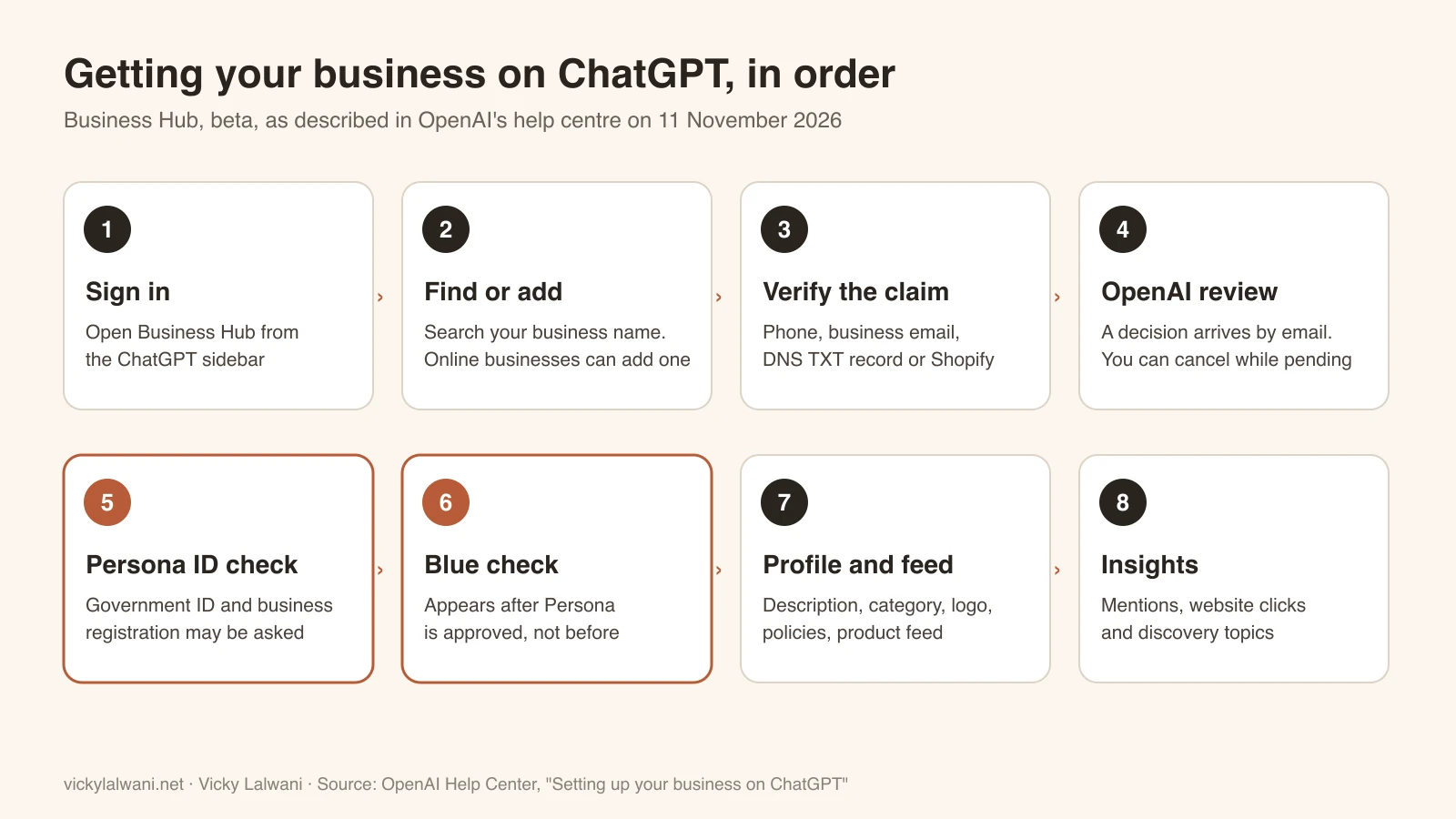
- Sign in to ChatGPT and open Business Hub from the sidebar. Use an account you'll keep for the business, not a personal throwaway.
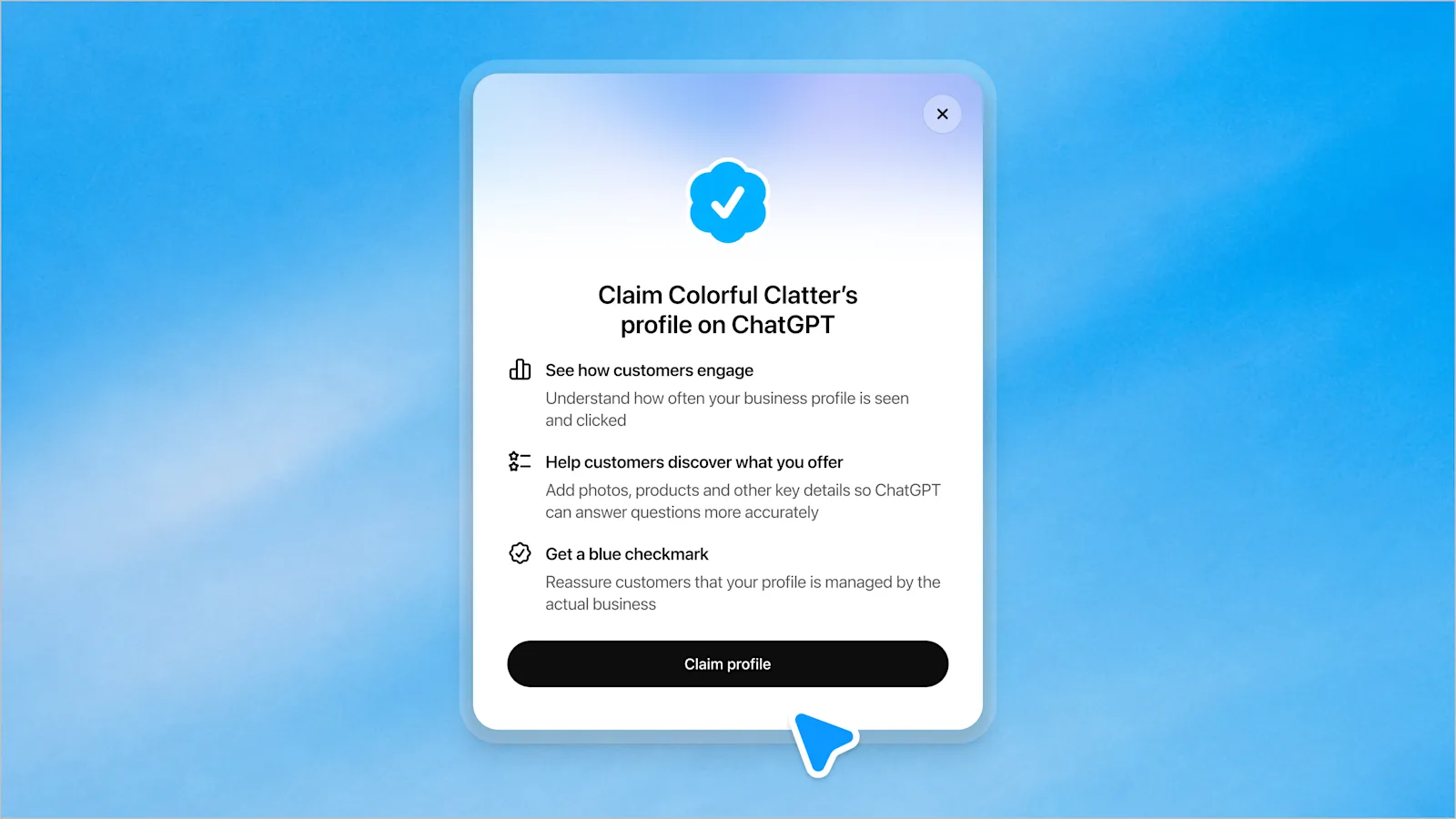
- Search for your business name and select the matching listing. If you run an eligible online business and it's not there, you may be able to add it.
- Verify your claim with one of the methods ChatGPT offers you: business phone, business email, website domain (DNS) or Shopify.
- Wait for OpenAI's review. The decision, or a request for more information, arrives by email. You can cancel while it's pending.
- Complete the Persona identity check. You may need a government-issued ID, business registration details such as a company number, and proof you're authorised to represent the business. The business name, address and registration number must match your official records. If you create a new profile through Persona, approval publishes it automatically.
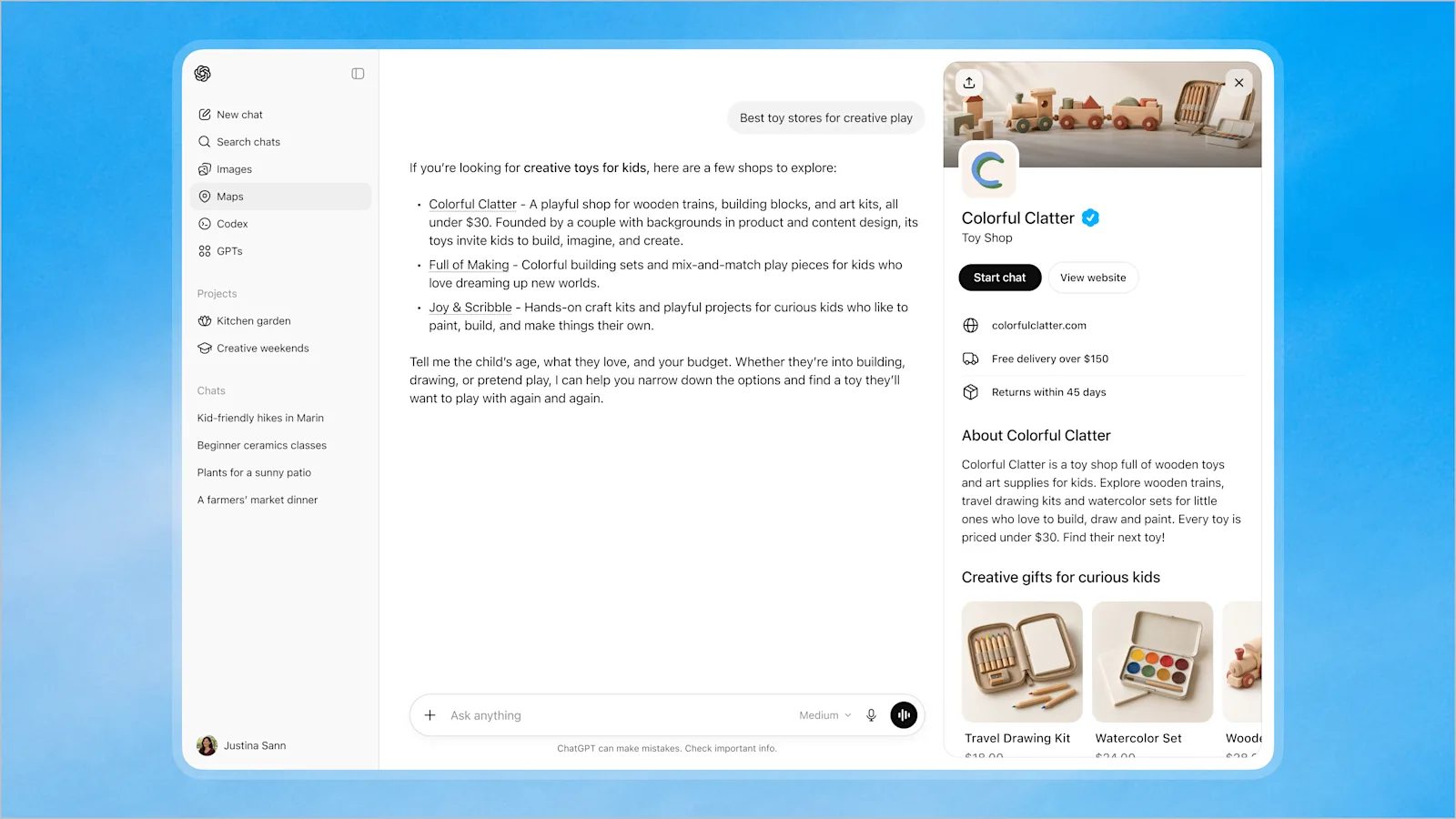
- Get the blue check. OpenAI's help centre says it appears once your Persona verification is approved, not when you first claim.
- Fill in your profile and, if you sell online, connect a product feed (CSV, hosted URL or Shopify).
- Open Insights and note your first mentions, website clicks and discovery topics.
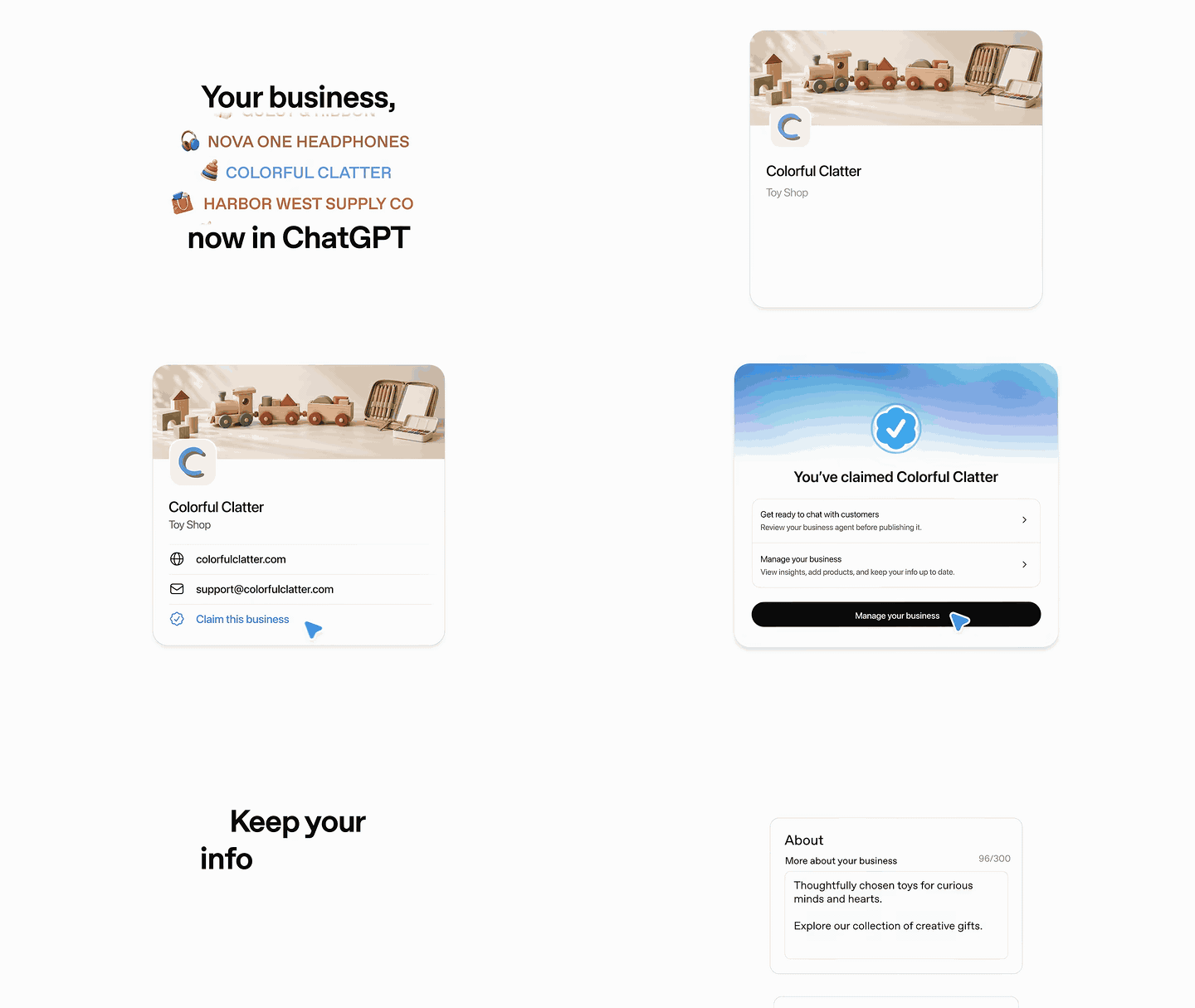
The steps come from OpenAI's help article Setting up your business on ChatGPT. If your listing shows Contact support, it's locked; select it to ask for access. If someone else has already claimed it, use Dispute ownership from the ••• menu.
The four ways to verify your claim
- Business phone. Get a code by SMS or automated call to the number shown on the listing.
- Business email. The code goes to the email already linked to the business, so check you can get into that inbox.
- Website domain. Add the TXT record ChatGPT shows you to your domain's DNS, then select Verify domain. Available if ChatGPT offers it for your business.
- Shopify store. Select Connect Shopify and sign in to the store. The same connection can feed your products later.
Adding the DNS TXT record. Log in wherever your domain's DNS is managed. That's often the registrar you bought your domain from, or Cloudflare if you moved it there. Add a new TXT record and copy the type, name or host, and value exactly as ChatGPT shows them. DNS changes can take time, so give it a while before you press Verify.
Common mistakes: pasting extra quotes or spaces, adding the record to the wrong host, deleting an existing TXT record (Google, Microsoft and email records sit side by side, so just add a new one), and pressing Verify before the change has spread. If an IT person or agency manages your domain, send them the record rather than your login.
Write a profile ChatGPT can use
After Persona approval you can edit your website, business description, product or service category, logo, delivery policy, return policy, cover photo and other details (OpenAI Help). OpenAI reviews and publishes the changes, so updates can take time to show.
The "More about your business" box in OpenAI's launch video shows a 300-character counter, so write it tight. Keep it consistent with your website's About page and your Google Business Profile: the same name, services, areas and facts everywhere. OpenAI's Businesses in ChatGPT policy requires the information to be accurate, so no invented offers, prices or reviews.
Write the "More about your business" text for my ChatGPT Business Hub profile.
Business: [name]
Website: [URL]
What we sell or do: [products or services]
Who it's for: [ideal customer]
Where we serve: [suburbs, cities, countries or "worldwide"]
What makes us different: [2 or 3 true facts]
Rules:
- Max 300 characters, plain English, no hype
- Name the business, what it offers and who it's for in the first sentence
- Use the words customers would type into ChatGPT
- Only use facts I gave you. No prices, offers or claims I didn't mention
- Give me 3 versions
A good answer names the business and what it does in the first sentence, includes the suburbs or cities customers would mention, and fits in 300 characters. Pick one, then paste the same facts into your About page and Google Business Profile.
How to read your ChatGPT insights
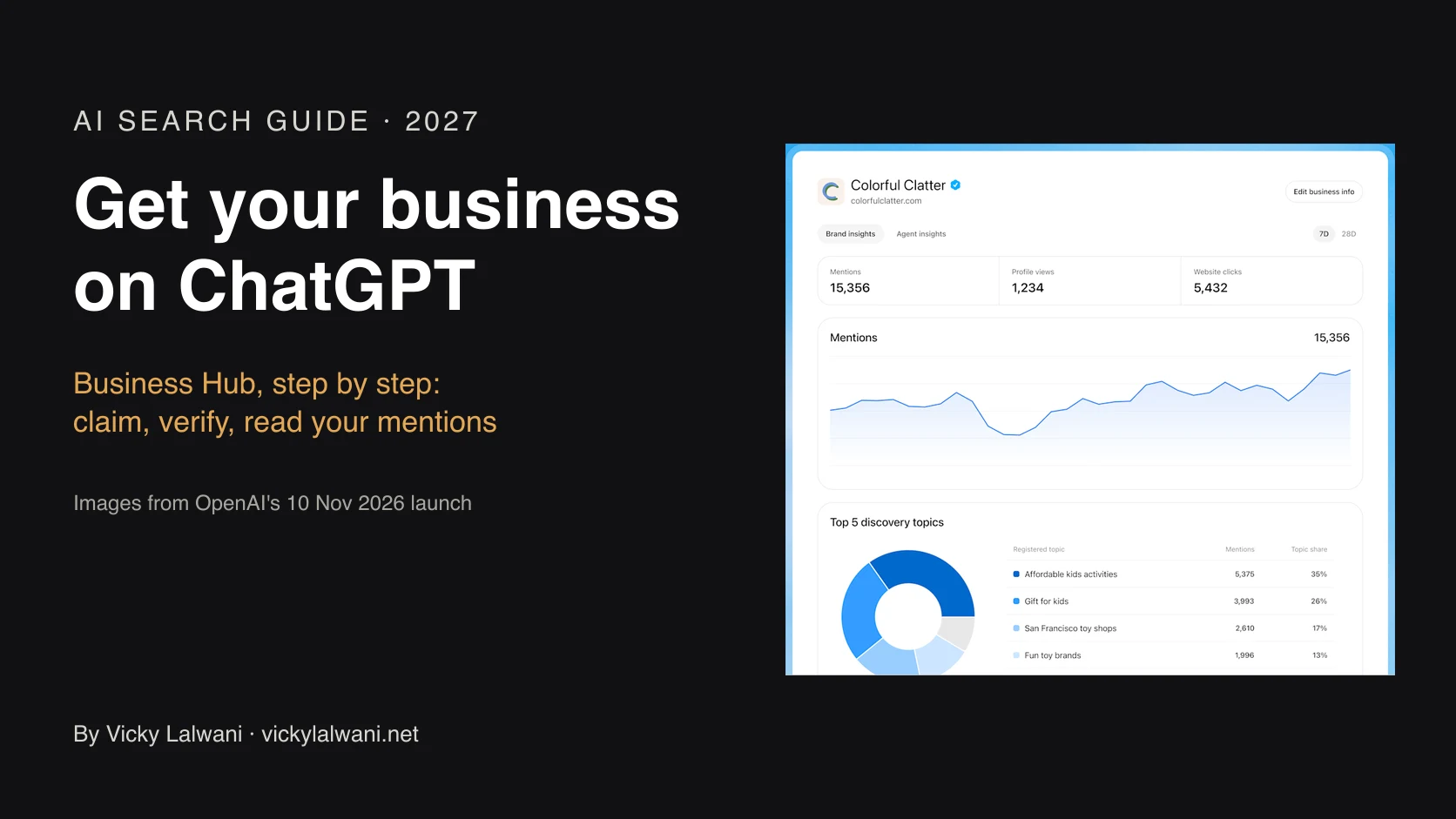
Insights show aggregate activity over the past 28 days (OpenAI Help). OpenAI's own screenshot also shows profile views and a 7-day view, so expect the layout to change during the beta.
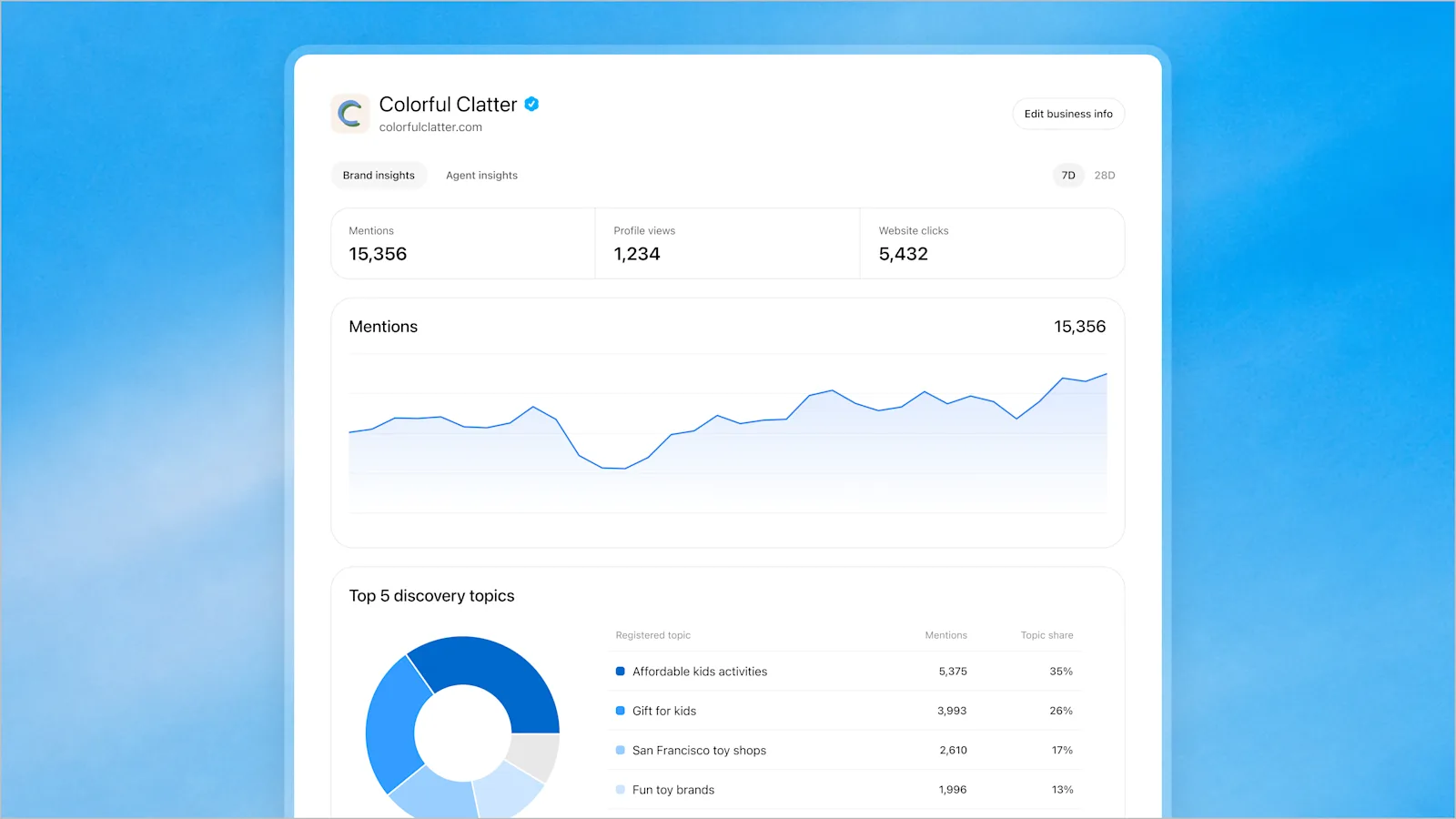
- Mentions. For an online business, a mention counts when ChatGPT references your website. Your brand name alone doesn't count. For a local business, it counts when ChatGPT shows a result for that location.
- Website clicks. How often people click through to your site. Compare it with the ChatGPT referral traffic in GA4.
- Discovery topics. Themes in ChatGPT answers that mentioned or cited you. They're grouped topics, not the prompts people typed.
- Blank charts. A blank metric can mean activity is below the reporting threshold, or data is still being collected. It doesn't necessarily mean zero.
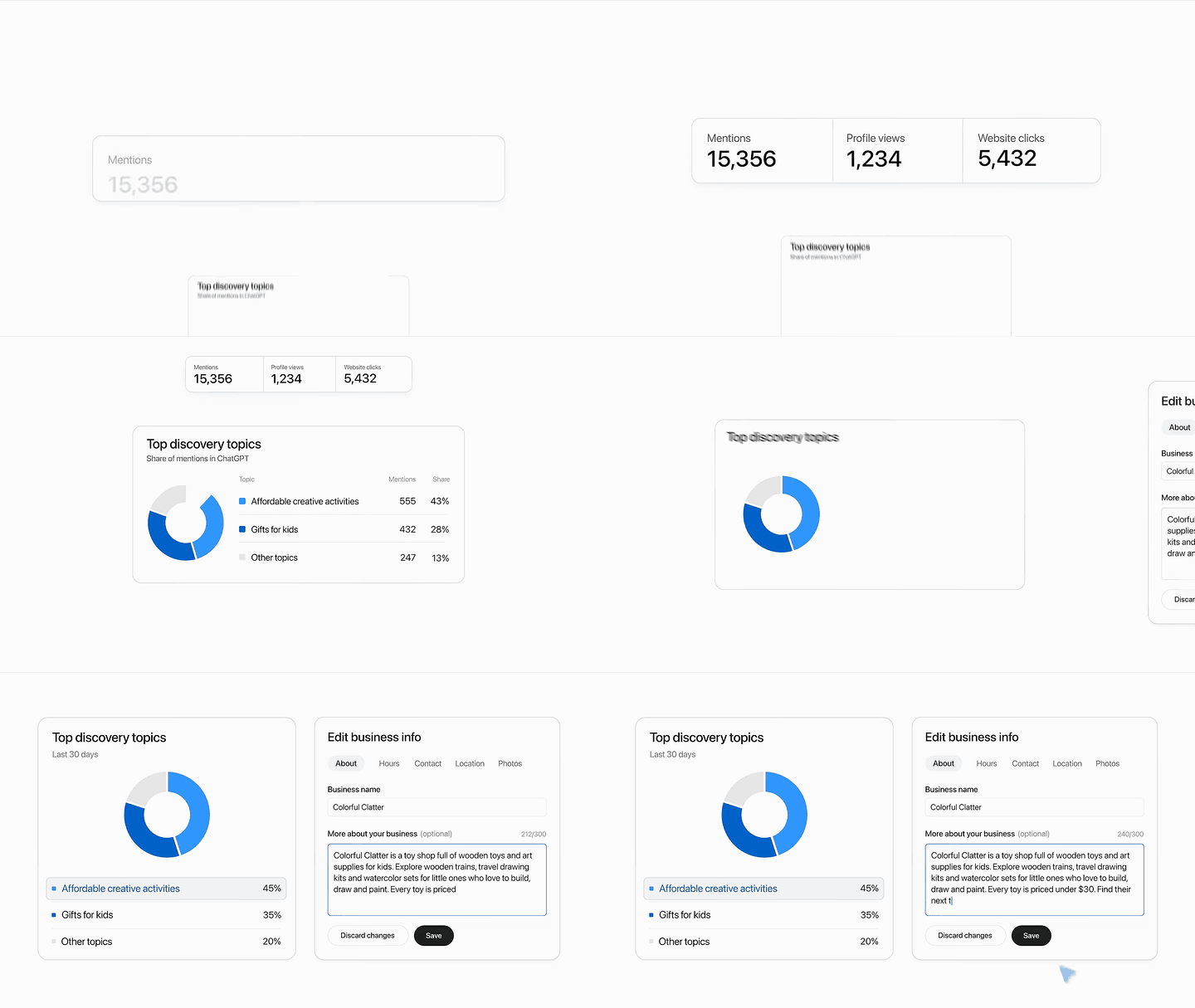
The useful bit is the topics. They tell you which themes ChatGPT already connects to your site, so you can work out which pages are missing. Turn them into content with this:
Here are my top ChatGPT discovery topics from Business Hub (last 28 days):
[paste topics]
My website pages: [paste URLs or sitemap]
1. Match each topic to the page that best answers it
2. Flag topics where I have no strong page
3. For each gap, suggest one page or FAQ with a clear answer in the first 2 sentences
4. List 5 questions per topic a customer would likely ask ChatGPT
Keep it practical.
What a good answer looks like: a short table of topic, matching page and gap, then one page or FAQ idea per gap with a clear two-sentence answer at the top. Build the gaps first, then check the topics again in four weeks. My guide on how to get recommended by ChatGPT covers the page work in detail.
Business Agents and sponsored agents
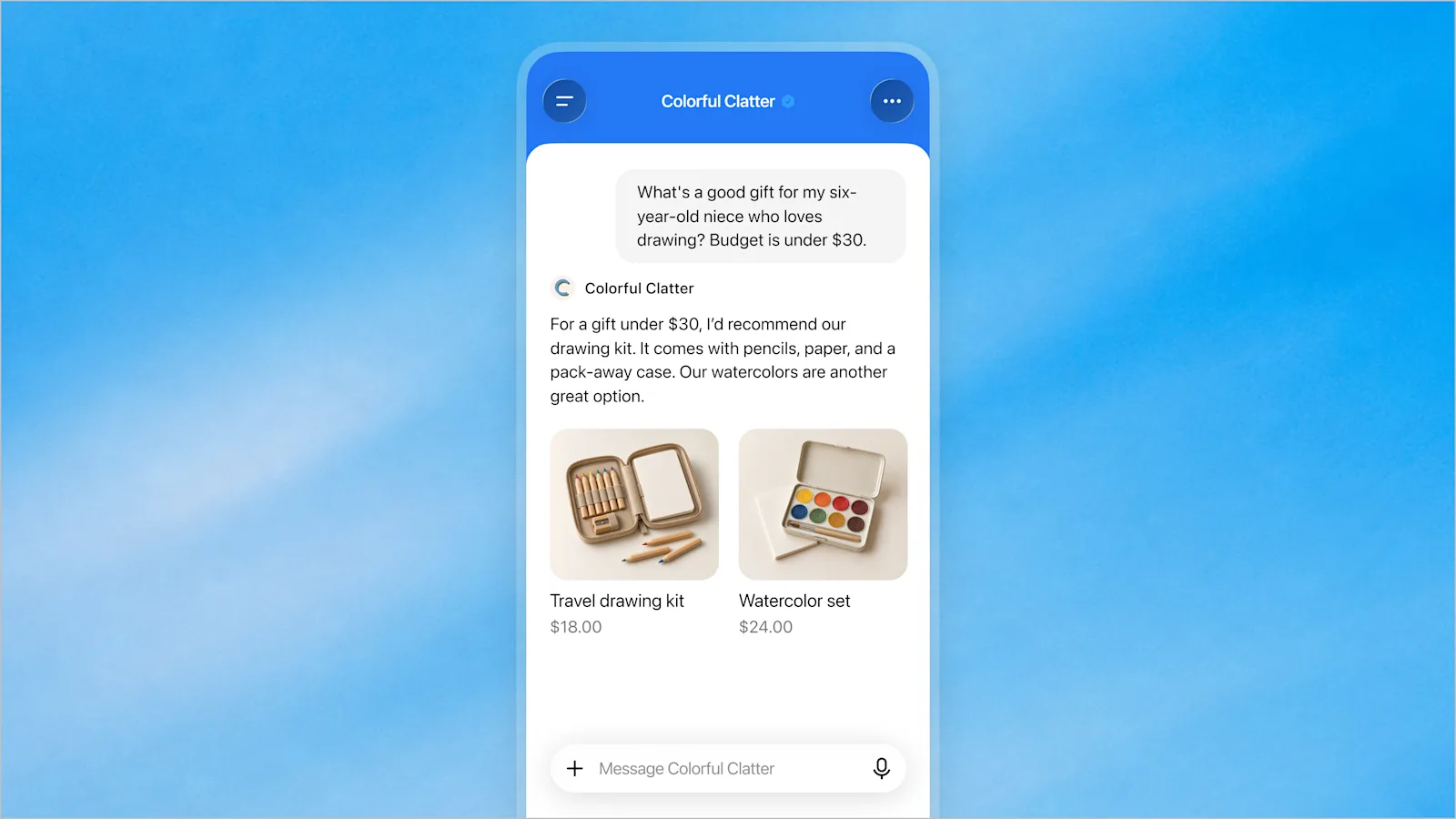
After the claim and Persona verification are approved, eligible businesses can build a Business Agent: an AI that answers customer questions about your products and policies, in a clearly labelled chat that's separate from ChatGPT's own answer (OpenAI). For now it's limited to eligible ecommerce and online service businesses in the US with a website, in industries the Business Agents Policy allows.
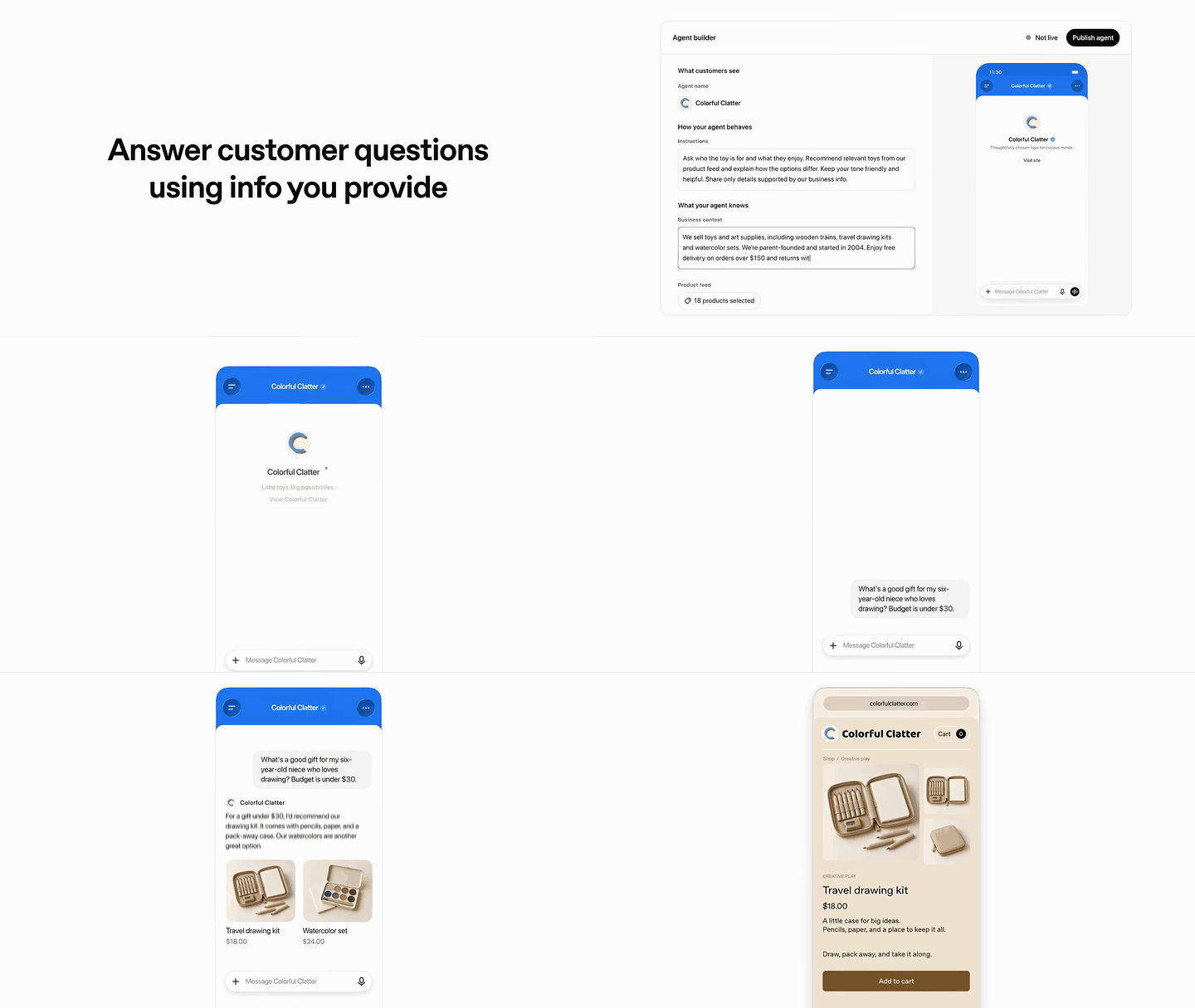
- It can't complete a sale. Agents can't take purchases, bookings or order look-ups. They explain and link to your website.
- Sponsored agents are set up in Ads Manager on Conversion campaigns, rolling out over the coming weeks, and settings don't sync with Business Hub yet (OpenAI Help).
- Check your country: sponsored agents may not be open to advertisers where you are yet, so check Ads Manager before you plan around them.
Same day: Google's November 2026 core update
Google released the November 2026 core update on 10 November 2026 at 18:06 UTC. It applies globally and may take up to two weeks (Google Search Status Dashboard).
Two big changes on one day is a measurement problem: if traffic moves next week, you need to know which one moved it.
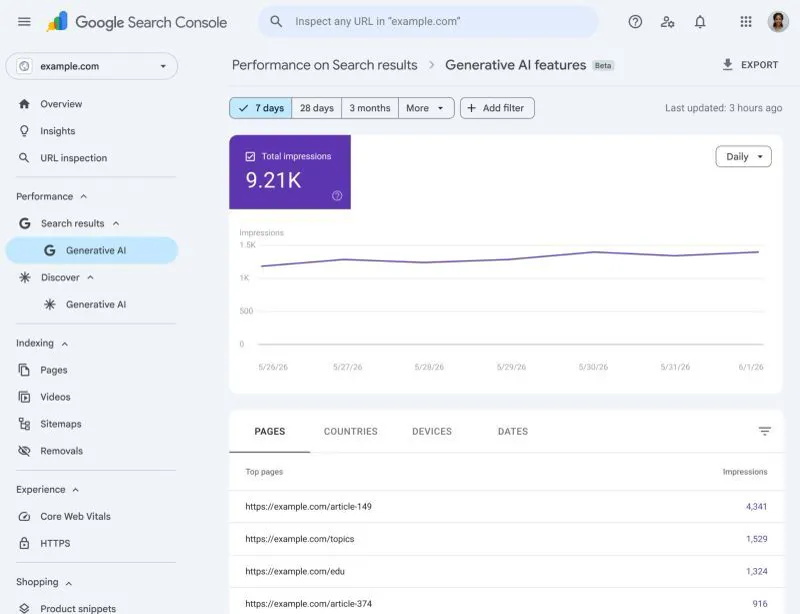
- Today: export 28 days of Search Console queries, pages, clicks and position. Claim Business Hub and note your first numbers.
- During the rollout: don't rebuild pages because rankings wobble. Fix only real errors.
- Once Google marks the rollout complete: compare Google and ChatGPT side by side and act on what both agree on.
Compare my last 28 days:
- Google Search Console export: [paste or attach]
- ChatGPT Business Hub: mentions [x], website clicks [x], topics [list]
Tell me:
1. Pages that gained or lost the most Google clicks since the November 2026 core update
2. Topics where ChatGPT mentions us but Google doesn't rank us, and the reverse
3. The 5 fixes that help both, ranked by effort versus impact
My guide to the Search Console generative AI report shows how to pull the Google side.
Is Google Business Profile dead?
No. I opened my LinkedIn post with "RIP Google Business Profile" to make a point, then answered no in the same post. Google Business Profile still drives Maps, calls and directions for local businesses.
What Business Hub adds
- A count of how often ChatGPT mentions your website
- Clicks sent from ChatGPT answers
- Topics behind those mentions
What Google Business Profile still does better
- Maps, directions and calls
- Google reviews
- Open to local shopfronts today
Run both, and keep the details identical: name, category, phone, hours, services and description. ChatGPT may also draw on other sources when it describes your business, so consistency matters.
Questions from my LinkedIn post
Most of the 251 comments on my LinkedIn post asked for the step-by-step guide, which is the free PDF below. Two questions came up that agencies and business owners should know the answer to before they claim.
I manage several clients. Can they add me, like a Google Business Profile manager?
Yes. OpenAI says the admin who claimed the business can add teammates in Business Hub and grant an agency access to manage the business or its agent, with each person signing in with their own ChatGPT account (OpenAI Help). So let each client claim and verify their own business, then invite you. Never ask a client to forward their personal claim invitation.
- Workspaces: if the business was claimed inside a ChatGPT workspace, invitees may need to be members of that workspace. If an agency invite is blocked, OpenAI Support can check the options.
- One brand at a time: each brand is managed separately. There is no central view across a group's brands or locations yet, and claiming the main brand doesn't claim its locations.
Does it work with Claude as well?
No. Business Hub is an OpenAI product, so the profile, the insights and the Business Agent all live inside ChatGPT. When Claude, Gemini or Perplexity search the web for an answer, they work from what they find there, so the groundwork is the same: pages that answer real questions clearly, identical business details everywhere, and reviews and mentions on sites people trust. My guide to generative engine optimisation covers that work across all of them.
The honest part: what claiming won't do
- Claiming doesn't boost you. OpenAI says it doesn't guarantee increased visibility or give you control over ChatGPT's independent recommendations.
- Small brands may see nothing. Insights need enough activity to pass a threshold. Empty doesn't mean broken.
- You won't see the prompts. You get topics, not questions or conversations.
- Locations and brands are separate. Claiming the main brand doesn't claim its locations, and there's no central management across brands yet.
- It's a beta. Countries, categories and features may change. Recheck your profile monthly.
What moves mentions is the same work as always: clear pages that answer real questions, consistent business details everywhere, reviews and mentions on other reputable sites, and content that matches your discovery topics.
Get it set up for your business
If you'd rather have help, I set up Business Hub for businesses. I walk you through claiming and verifying (the Persona check must be done by someone authorised to represent the business), then work in Business Hub with agency access: the profile copy, the product feed, a baseline report, and the pages and FAQs that give ChatGPT more reasons to mention you. For local shopfronts that can't claim yet, I get everything ready so you can claim the day it opens.
Want the free guide?
- My 11-page ChatGPT Business Hub setup guide
- The steps, DNS and Shopify verification walkthroughs, and 3 prompts
- Fill in the form and download it straight away
Want to talk it through?
- Contact me directly for a free 30-minute call
- Bring your website and goals
- Or see ChatGPT marketing and GEO services
Sources
| Source | What it covers | Date | Link |
|---|---|---|---|
| OpenAI | Launch announcement | 10 Nov 2026 | openai.com |
| OpenAI | Businesses in ChatGPT overview | Read 11 Nov 2026 | openai.com |
| OpenAI Help | Setting up your business | Read 11 Nov 2026 | help.openai.com |
| OpenAI | Businesses in ChatGPT policy | 10 Nov 2026 | openai.com |
| OpenAI Help | Sponsored Business Agents | Read 11 Nov 2026 | help.openai.com |
| OpenAI Help | Ads Manager availability | Read 11 Nov 2026 | help.openai.com |
| OpenAI Help | ChatGPT Business plan | Read 11 Nov 2026 | help.openai.com |
| OpenAI Help | ChatGPT Business pricing FAQ | Read 11 Nov 2026 | help.openai.com |
| November 2026 core update | 10 Nov 2026 | status.search.google.com | |
| OpenAI on YouTube | Launch video | 10 Nov 2026 | youtube.com |
Keep reading: how to get recommended by ChatGPT, setting up ChatGPT Ads Manager and what generative engine optimisation is.
FAQ
What is ChatGPT Business?
ChatGPT Business is OpenAI's paid team workspace plan, renamed from ChatGPT Team on 29 August 2025. It's different from Businesses in ChatGPT, the Business Hub where you claim your business profile and see how ChatGPT mentions it.
How much does a ChatGPT Business account cost?
OpenAI lists ChatGPT Business Standard seats at US$25 per user a month billed monthly, or US$20 billed annually, and Premium seats at US$125, or US$100 annually, with at least 2 paid seats. Prices vary by country and currency, so check chatgpt.com/pricing for yours. Claiming your business in Business Hub is separate and doesn't need an Ads account or a ChatGPT Enterprise agreement.
Is it worth getting ChatGPT Business?
If your team uses ChatGPT for work, the ChatGPT Business plan gives a shared workspace and admin controls. If your goal is for customers to find your business in ChatGPT, you don't need the plan: you need to claim your business in Business Hub.
How do I get my business on ChatGPT?
Open Business Hub from the ChatGPT sidebar, search for your business, verify your claim by business phone, business email, a DNS TXT record or Shopify, wait for OpenAI's review, then complete the Persona identity check. After approval you can edit your profile and see insights.
Which businesses can claim their business in ChatGPT?
Eligible online businesses should be able to claim now, because OpenAI allows eligible businesses wherever ChatGPT is available, starting with businesses that have a website, subject to its industry, verification and integrity checks. OpenAI's help centre says local stores and restaurants can currently claim only an existing US listing, so shopfronts outside the US will likely need to wait.
What is ChatGPT Business Hub?
Business Hub is the part of ChatGPT where a business owner claims and verifies their business, edits its details, adds a product feed and sees insights such as mentions, website clicks and discovery topics. OpenAI launched it in beta on 10 November 2026.
Does claiming my business make ChatGPT recommend it more?
No. OpenAI says claiming lets you manage the information you provide but doesn't guarantee increased visibility or give you control over ChatGPT's independent recommendations, and advertising doesn't influence those answers.
What counts as a mention in Business Hub?
For an online business, a mention counts when ChatGPT references your website; the brand name alone doesn't count. For a local business, it counts when ChatGPT shows a result for that location, even if the customer doesn't open it.
When do I get the blue check in ChatGPT?
The blue check appears after OpenAI approves your Persona identity verification, not when you first claim. Persona may ask for a government-issued ID, business registration details and proof you're authorised to represent the business.
Are Business Agents available outside the US?
Not yet. OpenAI's Business Agents are available to eligible ecommerce and online service businesses in the United States. OpenAI says it plans to expand Business Agents to more markets and business categories over time, but hasn't named new countries.
Is ChatGPT Business Hub the same as Google Search Console?
Not exactly, but it's the closest thing ChatGPT has. Business Hub shows mentions, website clicks and discovery topics over the past 28 days, aggregated, without the individual prompts. Search Console shows queries, clicks and positions for Google Search.
Is Google Business Profile dead?
No. Google Business Profile still powers Maps, calls, directions and reviews for local businesses. Businesses in ChatGPT adds a second profile worth claiming once it opens to local businesses where you are, so keep the details consistent on both.
Can an agency manage my ChatGPT Business Hub profile?
Yes. The admin who claimed the business can add teammates in Business Hub and grant an agency access to manage the business or its agent. Each person uses their own ChatGPT account, and each brand is managed separately.