To optimize website for AI agents, fix the pages where agents complete tasks: booking, enquiry, basket and checkout. Agents read pages through screenshots, the HTML and the accessibility tree, so use real buttons and labelled fields, remove overlays, let verified agents such as Google-Agent past bot protection, and test each task end to end.
TL;DR
AI agents now visit websites to do things for people: compare products, book a table, fill in a form, add to a basket and, with approval, pay. To optimise your website for AI agents, make sure they can get in, can tell what every field and button does, and can finish the task.
Google's guidance, checked on 17 November 2026, says browser agents read your site three ways: screenshots, the HTML and the accessibility tree. So the biggest wins are ordinary accessibility fixes: real buttons and links, labelled form fields, no hidden overlays and a stable layout.
Then check that your firewall does not block verified agents such as Google-Agent, and decide whether WebMCP tools or agentic checkout (Google's Universal Commerce Protocol) are worth it for your business. Both are early.
Short answer: to optimize website for AI agents, fix the pages where money changes hands first: booking, enquiry, basket and checkout. Use semantic HTML and labels so an agent can identify each control, let verified agents past your bot protection, and test the real task end to end with a person approving the final step.
This article is about agents that act on your site. If your question is how to get your pages cited in AI Overviews, AI Mode, ChatGPT search or Perplexity answers, that is a different job, covered in how to optimise your website for AI search. If you want your booking or checkout flow reviewed for agents, it is part of my generative engine optimisation (GEO) service.
What is an AI agent, and how is it different from AI search?
Short answer: an AI agent is software that carries out a task for someone, such as booking a reservation or comparing products, by visiting websites and using them. AI search reads your page to answer a question. An agent clicks, types and submits on your page to get something done.
Google's guide to generative AI features in Search (updated 10 July 2026) defines agents as autonomous systems that perform tasks on behalf of people. It gives booking a reservation and comparing product specifications as examples.
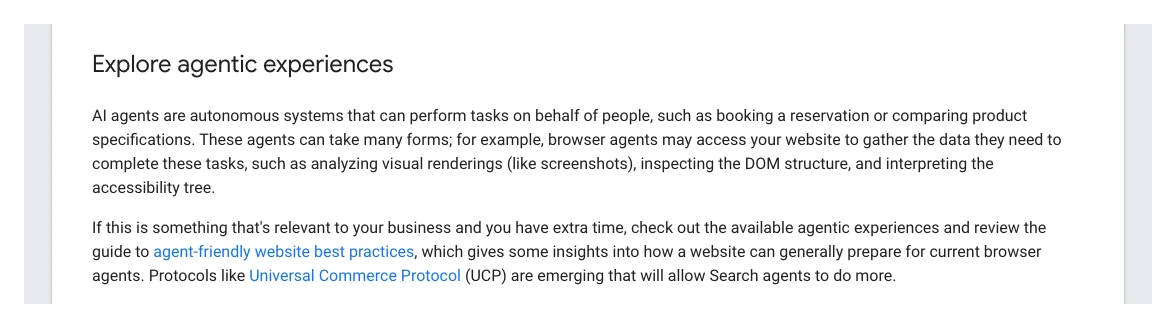
Note Google's tone. It frames agent readiness as something to explore if it is relevant to your business and you have extra time. For a restaurant, a clinic with online booking or a shop, it is relevant now. For a site whose main goal is a phone call, it is a lower priority than the basics.
| AI search | AI agent | |
|---|---|---|
| What it does | Answers a question | Completes a task |
| Uses your page to | Read and cite | Click, type, submit |
| What you want | A source link | A finished booking or sale |
| Main fixes | Crawl access, clear answers | Controls, forms, bot rules |
| Measure in | Search Console | Logs, forms, CRM |
Which AI agents can act on websites in November 2026?
Short answer: the main ones are Gemini in Chrome's auto browse, Google's booking and checkout features in AI Mode, ChatGPT's desktop browser and its always-on "dots" agents. Most are limited to paid plans and a few countries, and all ask the person to confirm sensitive steps.
| Agent | What it does on sites | Status |
|---|---|---|
| Gemini in Chrome auto browse | Multi-step tasks, forms, baskets | Paid plans, US, desktop |
| Google-Agent | Google-hosted agents browsing | Live, documented |
| AI Mode bookings | Restaurants, tickets, appointments | Some countries, partners |
| UCP checkout | Buy in AI Mode and Gemini | Select merchants |
| ChatGPT desktop browser | Browser tasks, site tools | Plan-dependent |
| ChatGPT dots and Wallet | Buys with approval | Rolling out, Pro |
| ChatGPT Atlas | AI browser | Retired |
The details matter. Chrome's auto browse help page says it can compare products, add items to a basket, book travel and make reservations. It is for adults in the US on Google AI Plus, Pro or Ultra, desktop only. It asks for confirmation before submitting web forms or contacting anyone, and hands control back to the person to finalise payments, accept terms or create accounts.
In Search, AI Mode gained agentic restaurant reservations in August 2025, working with booking partners such as OpenTable, Resy, Ticketmaster and Booksy. Google's own post says restaurant bookings in AI Mode reached the UK on 10 April 2026, again finishing the booking through partner platforms. If you take bookings, being listed on the booking platform you already use matters alongside your own form.
On the OpenAI side, the picture changed in 2026. ChatGPT Atlas, OpenAI's browser, has been retired. Agent work now runs through ChatGPT's desktop app and its built-in browser, and through "dots", always-on agents introduced on 29 September 2026. On 13 November 2026 the ChatGPT release notes added ChatGPT Wallet, which lets a dot pay on a merchant's site after the person approves. The same note warns that some websites may not support purchases made by agents. I cover dots in more detail in ChatGPT Dots.
How do AI agents read your website?
Short answer: through screenshots, the raw HTML and the accessibility tree, usually combined. The accessibility tree is the browser's summary of every control's role, name and state, the same map screen readers use, so a page that works well with a screen reader is already most of the way there.
Chrome's team sets this out in Build agent-friendly websites on web.dev (updated 1 April 2026), which Google's Search guide links to. Screenshots let a vision model spot a search box or a big green button, but they are slow and expensive. The HTML shows how elements are nested, so a "Buy now" button inside a product block belongs to that product. The accessibility tree strips the styling and leaves the function.
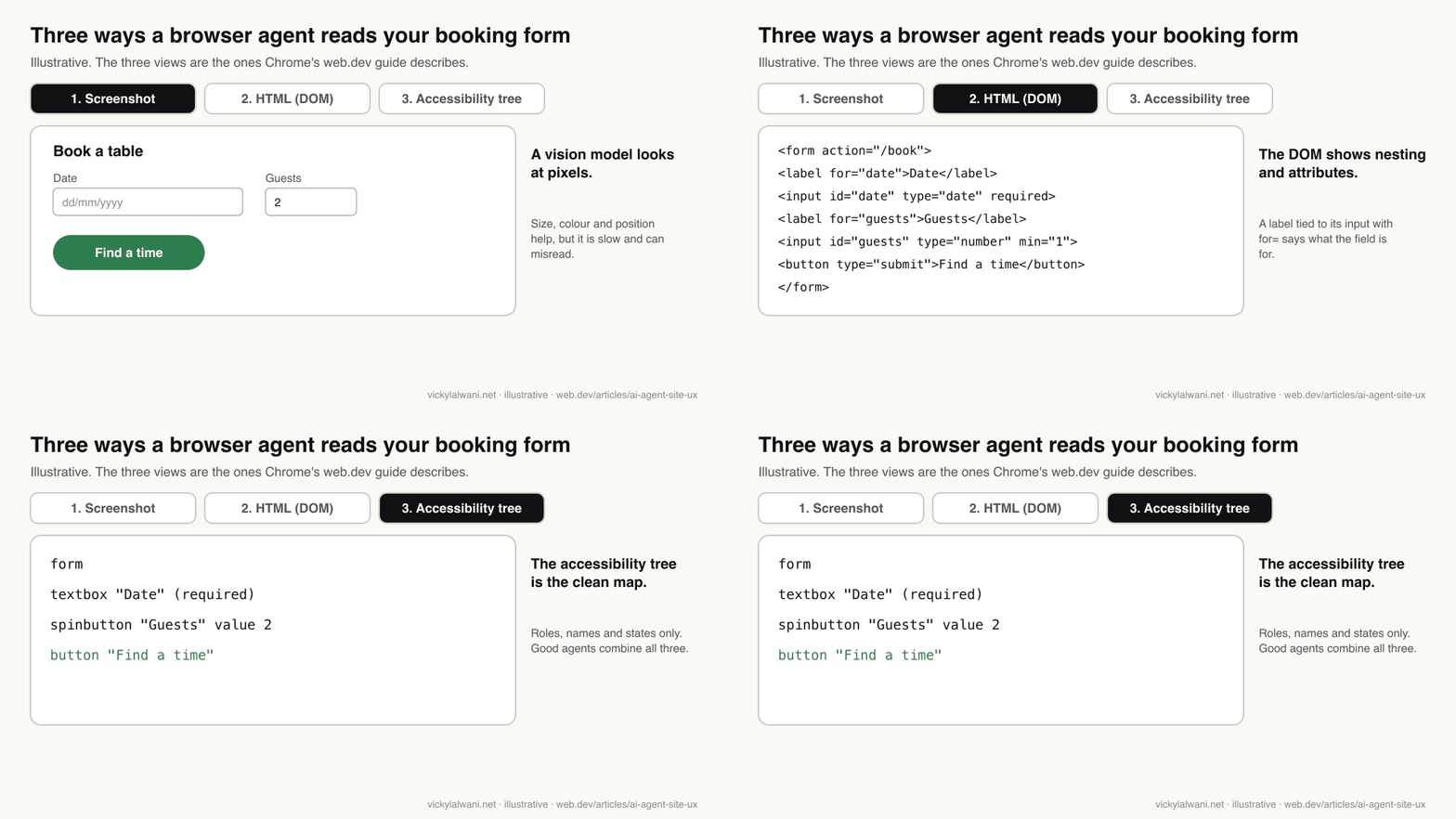
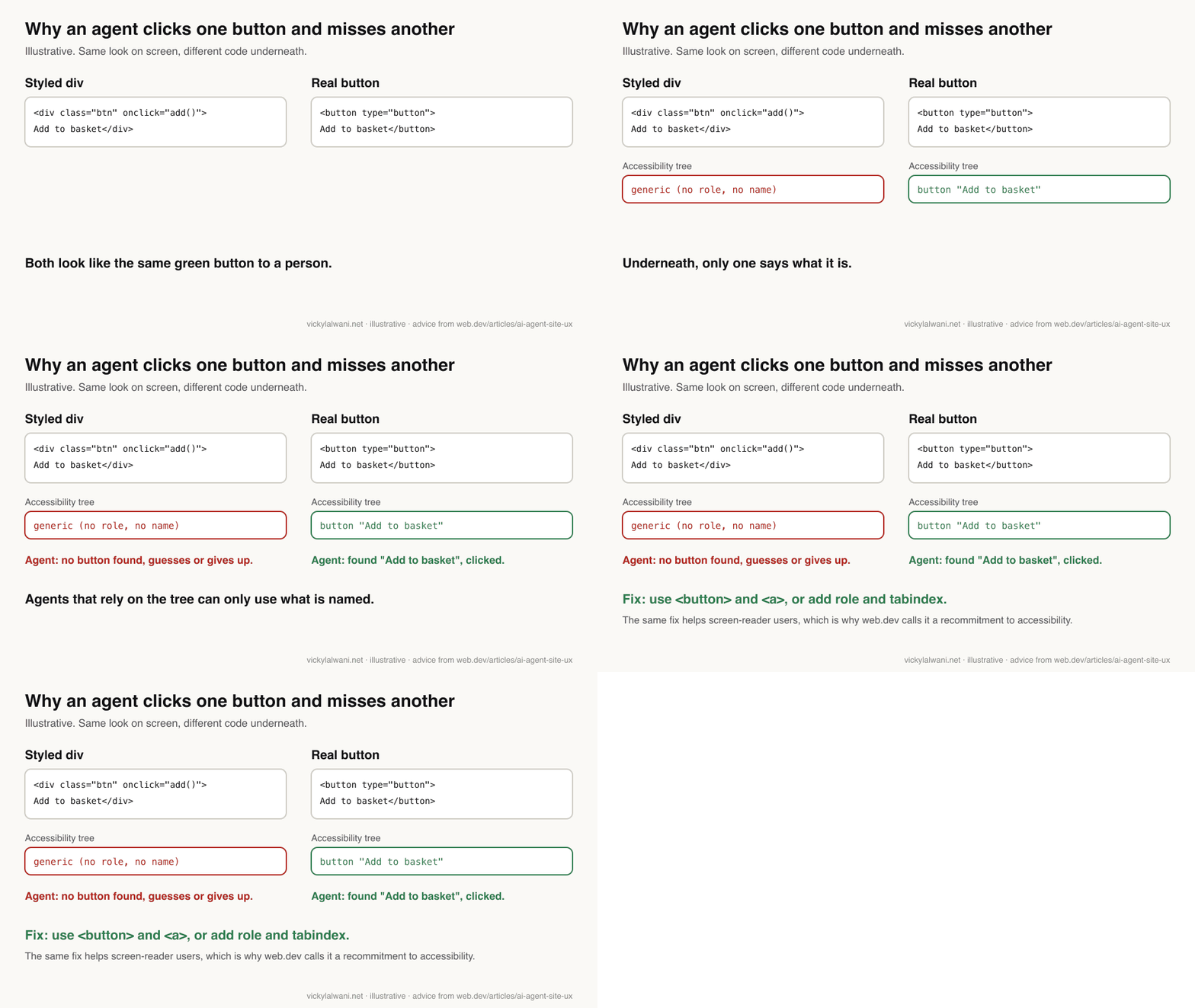
You can look at your own accessibility tree today. In Chrome, open DevTools, select an element and open the Accessibility pane. If your "Book now" control shows up as a generic element with no name, an agent relying on the tree has nothing to go on.
Paste into Chrome DevTools Console on your booking or enquiry page.
It lists buttons, links and form fields that have no accessible name.

[...document.querySelectorAll('a,button,input,select,textarea,[role=button],[onclick]')]
  .filter(el => !(el.getAttribute('aria-label') || el.labels?.length || el.innerText?.trim()
     || el.getAttribute('title') || el.getAttribute('alt') || el.getAttribute('placeholder')))
  .forEach(el => console.log(el.tagName, el.className, el));
This quick check is rough: it misses names given by aria-labelledby and can flag hidden elements. Use it to find the obvious gaps, then confirm in the Accessibility pane.
What stops an agent from completing a task on your site?
Short answer: controls that are not real buttons or links, form fields without labels, overlays that cover the page, tiny or moving targets, and steps that need an account, a CAPTCHA or a hover. Web.dev lists most of these, and they are the same faults that block disabled visitors.
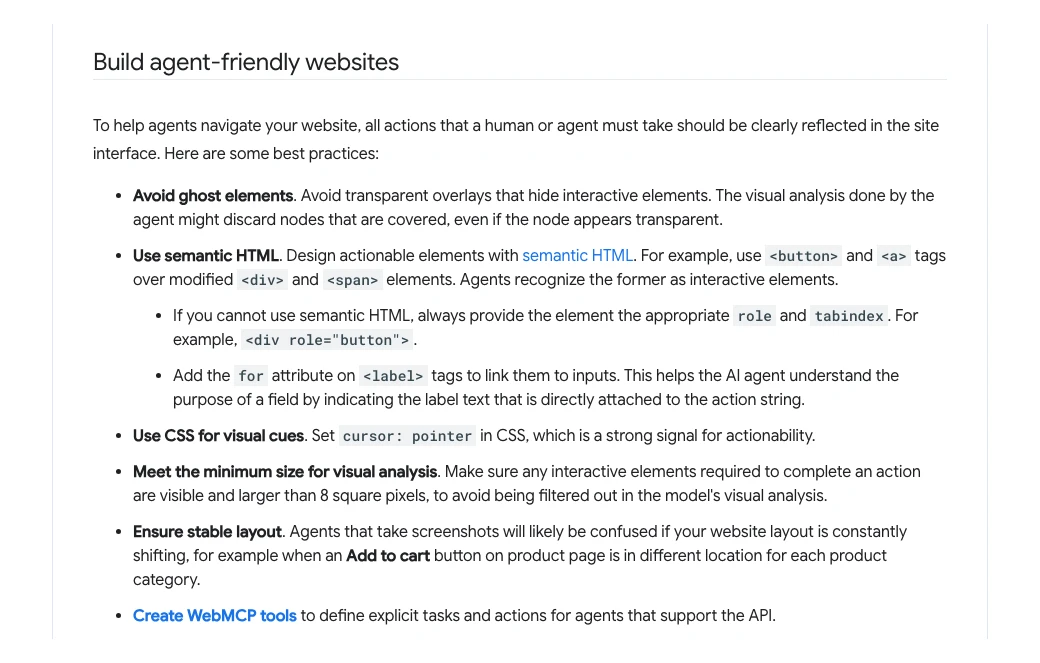
| Problem | Why the agent fails | Fix |
|---|---|---|
| div styled as a button | No role, no name | Use <button> or <a> |
| Unlabelled input | Field purpose unclear | <label for> on every field |
| Transparent overlay | Covered controls ignored | Remove ghost layers |
| Tiny icon buttons | Filtered out visually | Visible, sized targets |
| Shifting layout | Screenshot and DOM disagree | Stable positions |
| Hover-only menus | Agent never sees options | Click or visible links |
| Forced sign-up | Agent must hand back | Guest option where possible |
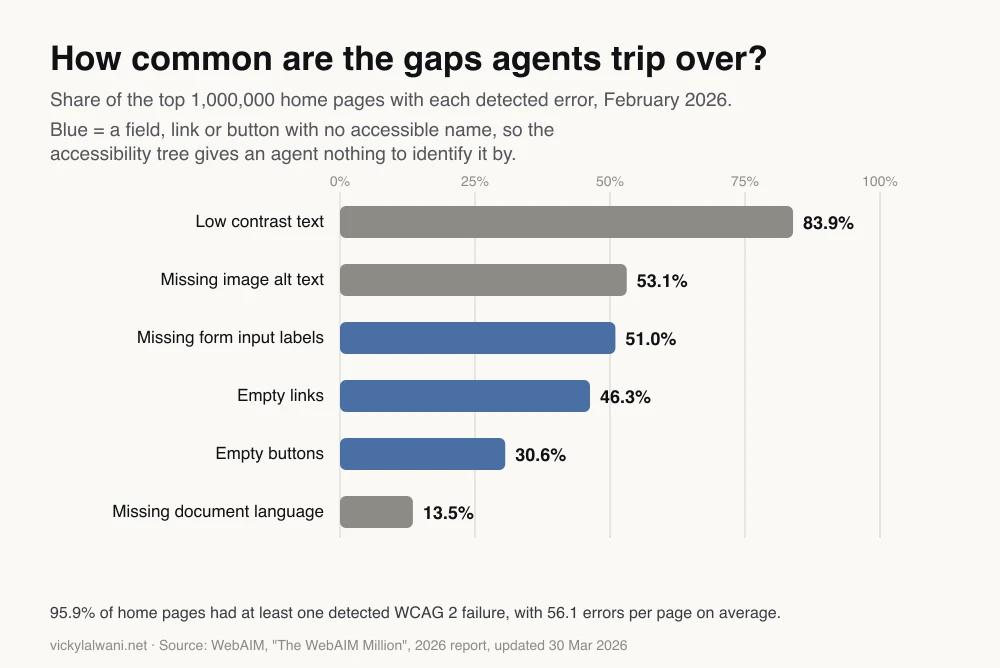
These faults are common. WebAIM's annual scan of the top million home pages found missing form labels on 51% of them and empty buttons on 30.6% in February 2026. If your home page has them, your booking form probably does too.
A word on ARIA, the attributes that add roles and names to custom elements. Web.dev says to add role and tabindex if you cannot use a real button. But WebAIM found pages using ARIA averaged more errors (59.1) than pages without it (42), partly because those pages are more complex. Native HTML first; ARIA only where you must.
Is your firewall or bot protection blocking good agents?
Short answer: it may be. Google now documents Google-Agent, the name its hosted agents use, and asks site owners to let verified Google-Agent requests skip bot challenges. Check that your CDN, firewall and rate limits do not block it on search, basket, booking and API steps.
Google's page Allow Google-Agent traffic (updated 17 November 2026) says each request carries "Google-Agent" in the user agent and comes from IP addresses listed in user-triggered-agents.json. Some requests are also signed with Web Bot Auth, a cryptographic method still at the draft standard stage, using the identity agent.bot.goog.
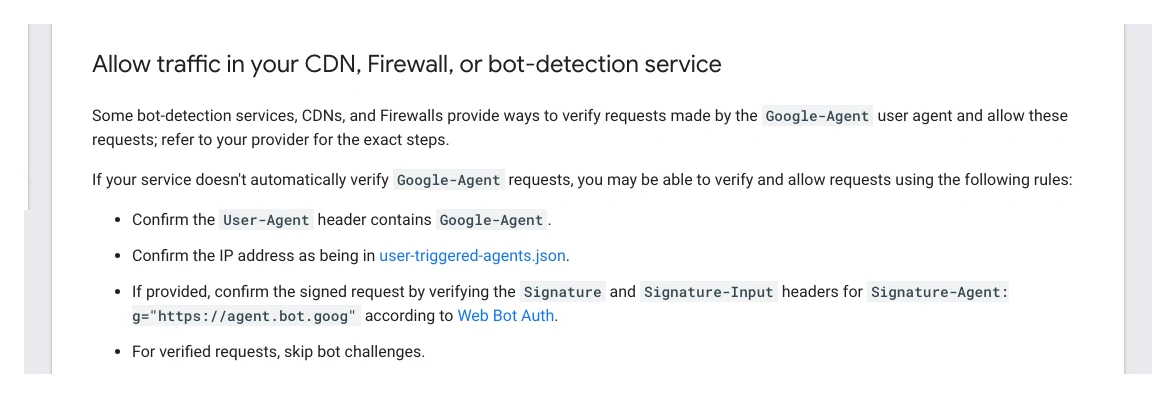
The troubleshooting list on that page is the useful part. An allow rule only works if it runs before broad data-centre blocks and "AI agent" category blocks, skips CAPTCHAs and JavaScript challenges, and covers the whole journey: on-site search, filters, detail pages, add-to-basket, booking and the API calls behind them. Many people share the same agent IP addresses, so per-IP rate limits can also trip.
Agent access checklist for your developer or hosting provider

1. Does our CDN or WAF verify Google-Agent (user agent + user-triggered-agents.json IPs)?
2. Does it support Web Bot Auth (Signature-Agent: g="https://agent.bot.goog")?
3. Does the allow rule run BEFORE data-centre, bot-category and "AI agent" block rules?
4. Are CAPTCHA and JS challenges skipped for verified agents, including on search and form submit?
5. Does the rule cover /cart, /checkout, /booking and our api.* or GraphQL endpoints?
6. Are per-IP rate limits safe for a shared agent IP pool?
7. Do our proxies keep the original IP, User-Agent and Signature headers?
8. Which other agents do we allow, and who signed that off?
Robots.txt is not the lever here. OpenAI says robots.txt rules may not apply to ChatGPT-User, its fetcher for actions a person asks for, and Perplexity says its user-triggered fetcher generally ignores robots.txt. Letting agents in, or keeping them out, is a decision for your security settings, and worth agreeing with whoever owns them.
Should you add WebMCP tools to your site?
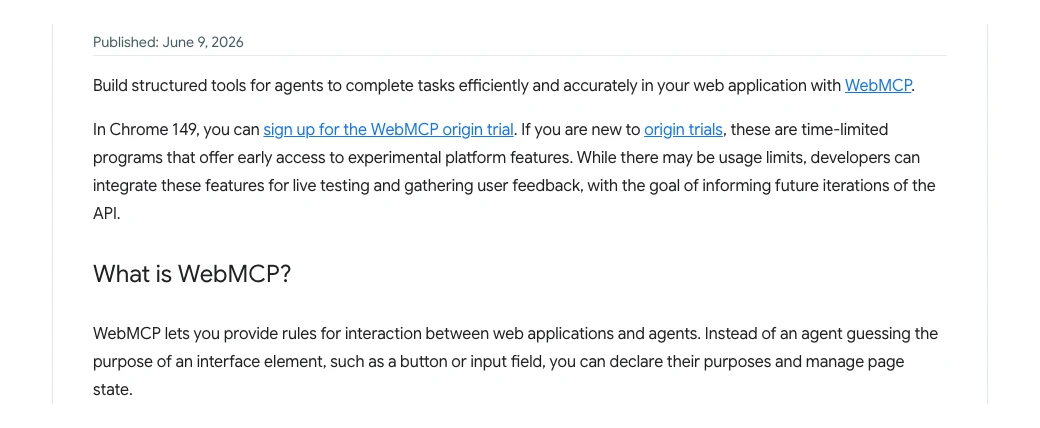
Short answer: only if you have complex forms, bookings or a shop, and a developer with time to experiment. WebMCP is a proposed web standard that lets a page hand agents named tools, such as "search availability" or "add to cart", instead of making them guess. Chrome runs it as an origin trial, and ChatGPT's desktop browser already uses it.
Chrome opened the WebMCP origin trial in Chrome 149, announced on 9 June 2026. An origin trial is a time-limited programme that lets sites use an experimental feature for real visitors. The API may still change.
It is no longer Chrome-only in practice. OpenAI's help page on site tools in the ChatGPT desktop app says they use WebMCP, that each website decides which tools to provide, and that tools can read information or make changes. ChatGPT still asks the person before purchases, deletions or sharing personal data, and instructions from a site tool cannot authorise those steps.
That last point is the security catch. A tool that can change data is a new door into your site. Expose read and search tools first, keep anything that spends money behind the person's confirmation, and treat tool descriptions as public. For the SEO angle and set-up detail, see WebMCP for SEO.
How does agentic checkout work, and do you need it?
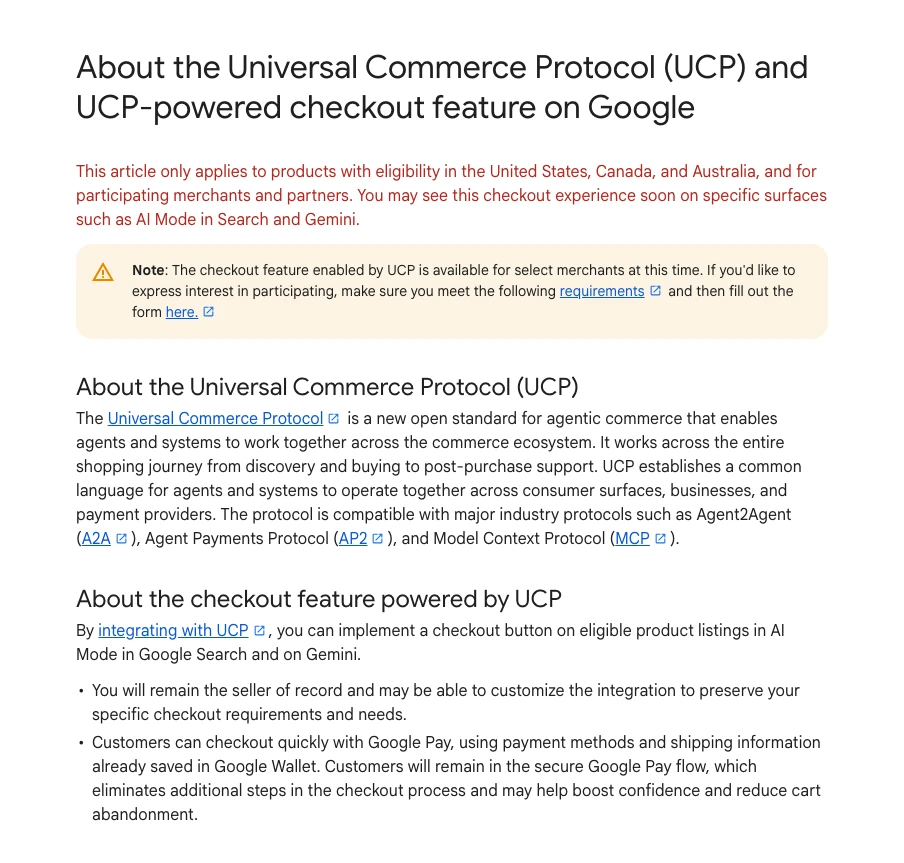
Short answer: there are two routes. Google's Universal Commerce Protocol (UCP) puts a buy button inside AI Mode and Gemini for selected merchants, with you as merchant of record. OpenAI has stepped back from in-chat checkout, so ChatGPT now sends shoppers, or a paying agent, to your own checkout.
Google launched UCP on 11 January 2026 as an open standard for agentic commerce, built with large retailers and platforms. The Merchant Center help page says checkout is available to select merchants, applies to products eligible in the United States, Canada and Australia, uses Google Pay and Google Wallet details, and starts with an interest form.
OpenAI went the other way. Its merchants page says it is moving away from a standalone Instant Checkout experience: customers complete the purchase on your site or app, shopping in ChatGPT is live for US users, and product feeds use the Agentic Commerce Protocol (ACP) for discovery.
| Route | Where the sale completes | What you need | Status |
|---|---|---|---|
| Google UCP | Inside AI Mode or Gemini | Merchant Center, Google Pay | Select merchants |
| ChatGPT shopping | Your site or app | Product feed (ACP) | Waitlist, US shoppers |
| ChatGPT Wallet | Your checkout, by an agent | A checkout agents can use | Rolling out |
| Browser agents | Your checkout | Clean forms, no blocks | Growing |
Most businesses do not need a protocol integration yet. Every route except UCP ends on your own checkout, so the useful work is making that checkout clear for a person and for an agent: labelled fields, visible totals, error messages in text, and no step that only works with a mouse hover. For product feeds and ads in AI Mode, see ads in AI Mode.
How do you test your site with an AI agent?
Short answer: pick the three tasks that make you money, such as booking, enquiring and buying, and run each one the way an agent would: check the accessibility tree, run an agent if you have access, stop before payment, and confirm the result reached your inbox or CRM.
- Write the tasks. "Book a table for two on Friday at 7pm", "request a quote for a boiler service", "add the medium blue jumper to the basket".
- Read the tree. In DevTools, check every control on that path has a role and a name.
- Run Lighthouse. Chrome 150 and later add an experimental Agentic Browsing category in Lighthouse. It reports a pass ratio, not a score out of 100, across accessible names, tree structure, layout shift, WebMCP tools and an llms.txt check.
- Run an agent. If you have Gemini in Chrome's auto browse or ChatGPT's desktop browser, give it the task and watch where it hesitates. Stop before any payment or real booking.
- Check your logs. Look for Google-Agent, ChatGPT-User and Perplexity-User requests, and for blocks or challenges served to them.
- Follow the lead. A form an agent submits still has to reach your CRM and get a reply. Check it arrived and was tagged correctly.
Test after every change to a form, not just once. Two lessons from my client work apply here: campaigns stay in draft until every form and call button is measured, and a tracking tag once broke a live form. Agent fixes touch the same forms, so change, test the full task, then publish.
A coding assistant speeds this up. I build and maintain this site with Claude Code, and the same approach works for an agent-readiness review: have it fetch the page, list the problems, propose the code, and review every change before it goes live.
You are reviewing one page for AI browser agents (Gemini in Chrome, ChatGPT's browser).
Page: [URL]   Task an agent should complete: [e.g. book a table for 2 on Friday 7pm]

1. Fetch the page HTML. List every control on the task path (links, buttons, inputs, selects).
2. For each: its accessible role and name, and whether it is a native element.
3. Flag: unlabelled fields, div or span "buttons", overlays covering controls,
   hover-only menus, controls under 8x8 px, steps that require sign-up or a CAPTCHA.
4. Rank the fixes by how likely they are to stop the task.
5. Propose minimal HTML changes for the top five. Do not change copy, prices or design.
I will review every change before it goes live.
Which pages should you fix first?
Short answer: the pages where an agent would finish a task that earns you money: booking or appointment forms, enquiry and quote forms, product pages with the basket, and checkout. Fix those before blog posts or the about page.
| Page | Agent task | First fix |
|---|---|---|
| Booking form | Pick date, time, people | Labelled date and time fields |
| Quote form | Describe job, send | Real submit button, clear errors |
| Product page | Choose size, add | Named variant options |
| Basket and checkout | Review, pay | Visible totals, guest path |
| Location page | Check hours, area | Hours and area in text |
Two things from the earlier version of this article still hold. Keep business facts consistent across your site and profiles, because an agent comparing options will notice when they disagree. And name an owner for each fix: developers for code, a content owner for wording, whoever runs your listings for business details.
What people say on X and Reddit
Short answer: the news people share is mostly about checkout: UCP buy buttons appearing in AI Mode and Merchant Center, and ChatGPT agents paying with Wallet. Developers focus on WebMCP and on whether bot protection blocks legitimate agents.
| Who | What they said | Take it as | Link |
|---|---|---|---|
| OpenAI Developers (official) | WebMCP support in the ChatGPT desktop app's built-in browser (25 Aug 2026) | Official | X post |
| ChatGPT (official) | Dots can complete purchases with approval; agents never see the real card (13 Nov 2026) | Official | X post |
| A Shopify engineering lead | ChatGPT's browser speaks WebMCP and Shopify storefronts are ready for it (25 Aug 2026) | Vendor | X post |
| An SEO consultant | UCP buy button and checkout live inside AI Mode (11 Feb 2026) | First-hand | X post |
| A Google Ads practitioner | Merchant Center notice: products now eligible for native checkout (22 Sep 2026) | First-hand | X post |
| An ecommerce SEO consultant | UCP integration hub appeared in a client's Merchant Center (3 Nov 2026) | First-hand | X post |
| r/SEO | PageSpeed now shows an "Agentic Browsing" result; one site scored 2 of 3, then 1 of 3, and asks how to fix it (25 Jun 2026) | First-hand | Thread |
| r/webdev | Is anyone consuming WebMCP tools yet, or is it all supply with almost no agents calling them? (30 Jul 2026) | Opinion | Thread |
| r/webdev | Is anyone building WebMCP tools into their site yet, or waiting for a full release? (9 Nov 2026) | Question | Thread |
| r/ecommerce | Has any merchant changed feeds, checkout or refunds for AI shopping agents, or is demand still too small? (22 Jul 2026) | Question | Thread |
| r/ecommerce | An ecommerce developer's essay on what agent shoppers mean for traffic-driven stores (14 Nov 2026) | Opinion | Thread |
The pattern across these threads: the tools for site owners (WebMCP, Lighthouse audits, UCP) arrived before most shoppers use agents. That supports fixing accessibility and access first, and treating protocols as experiments.
Videos worth watching
Short answer: Chrome for Developers has the clearest material on how agents see pages and on WebMCP, and OpenAI's own demo shows the same standard in ChatGPT. The checkout talk is useful but comes from a payments company.
Made by Chrome for Developers, a Google I/O 2026 session published 22 May 2026. It does not sell anything. It covers how agents use pages, how to prepare them, WebMCP and testing.
Made by Chrome for Developers, 27 October 2026. It does not sell anything. A short explainer of WebMCP tools for search, forms and booking.
Made by OpenAI, 25 August 2026. It promotes OpenAI's own apps. It shows ChatGPT and Codex discovering a site's WebMCP tools.
| Video | Channel | Date | What it covers |
|---|---|---|---|
| Build your website for the agentic era | Chrome for Developers | 22 May 2026 | Preparing pages for agents |
| What is WebMCP? | Chrome for Developers | 27 Oct 2026 | WebMCP in brief |
| Build agent-ready sites with WebMCP | OpenAI | 25 Aug 2026 | Site tools in ChatGPT |
| Make your website agent-ready | Chrome for Developers | 2 Jul 2026 | Workshop, DevTools, audits |
| Lighthouse audits for agents | Chrome for Developers | 6 Aug 2026 | The agentic Lighthouse audits |
| How AI agents pay | AI Engineer (payments vendor talk) | 5 Oct 2026 | UCP, ACP and agent payments |
Where this advice is weak
Short answer: agent features are young, mostly limited to paid plans and a few countries, and change month to month. Measured evidence that agent fixes raise bookings or sales does not exist yet, so treat this as risk reduction, not a growth promise.
- Small audience today. Auto browse, dots and UCP checkout are limited by plan, country and merchant. Your share of agent visitors may be tiny.
- No outcome data. I have not seen published studies showing agent-readiness fixes increase conversions. The accessibility benefit is well documented; the agent benefit is reasoned from how the tools work.
- Standards are drafts. WebMCP is an origin trial and Web Bot Auth is an internet draft. Code you write now may need changing.
- Security trade-offs. Letting agents past bot protection, or exposing tools, opens new paths. Agree it with whoever owns security.
- Analytics blind spots. Agents running inside a person's own browser can look like ordinary visits, while hosted agents identify themselves. Do not expect a clean "agent" channel in GA4.
Want a second pair of eyes on your booking or checkout flow?
If you want your money pages checked for AI agents, from bot rules and accessibility gaps to forms that reach your CRM, that review sits within my generative engine optimisation service, and form and lead tracking within analytics and tracking. Rates are on the pricing page.
If your next question is how to get cited in AI answers rather than used by agents, read how to optimise your website for AI search.
Keep reading: WebMCP for SEO, ChatGPT Dots and how to get your business on ChatGPT.
Sources
| Source | What it supports | Date |
|---|---|---|
| Google: generative AI features guide | Agent definition, three ways agents read sites, UCP | Updated 10 Jul 2026 |
| web.dev: Build agent-friendly websites | Screenshots, HTML, accessibility tree; best practices | Updated 1 Apr 2026 |
| Google: Allow Google-Agent traffic | Identification, allow rules, troubleshooting | Updated 17 Nov 2026 |
| Google: Web Bot Auth | Experimental request signing | Updated 13 Oct 2026 |
| Chrome Help: auto browse | Tasks, eligibility, confirmations | Read 17 Nov 2026 |
| Google blog: AI Mode agentic features | Reservations with partners | 21 Aug 2025 |
| Google blog: AI Mode restaurant bookings | Agentic bookings expand | 10 Apr 2026 |
| Google blog: UCP launch | Universal Commerce Protocol | 11 Jan 2026 |
| Merchant Center: UCP checkout | Eligibility, select merchants | Read 17 Nov 2026 |
| Lighthouse: Agentic Browsing | Experimental audit category | Updated 5 May 2026 |
| Chrome: WebMCP origin trial | Chrome 149 trial | 9 Jun 2026 |
| OpenAI: site tools | WebMCP in ChatGPT, confirmations | Read 17 Nov 2026 |
| ChatGPT release notes | Dots, Wallet, site tools | 29 Sep to 13 Nov 2026 |
| OpenAI: Atlas retirement | Atlas retired | Read 17 Nov 2026 |
| ChatGPT merchants page | Checkout on merchant site, ACP | Read 17 Nov 2026 |
| OpenAI crawlers | ChatGPT-User and robots.txt | Read 17 Nov 2026 |
| Perplexity crawlers | Perplexity-User and robots.txt | Read 17 Nov 2026 |
| WebAIM Million 2026 | Error rates (chart), ARIA finding | Updated 30 Mar 2026 |
| X and Reddit posts | Practitioner reports, linked in the table above | Feb to Nov 2026 |
| YouTube videos | Linked in the videos table | May to Oct 2026 |
This article expands on my post on LinkedIn ↗.
FAQ
How do I optimize my website for AI agents?
Start with the pages where money changes hands: booking, enquiry, basket and checkout. Use real buttons and links, label every form field, remove overlays that cover controls, let verified agents past your bot protection, and test each task end to end with a person approving the final step.
What is the difference between AI agents and AI search?
AI search reads your page to answer a question and may cite it as a source. An AI agent uses your page to complete a task, such as booking a table or adding a product to a basket, by clicking, typing and submitting forms.
How do AI agents read a website?
Google and Chrome's web.dev guidance says browser agents use screenshots, the HTML and the accessibility tree, often combined. The accessibility tree lists each control's role, name and state, which is why accessible sites are easier for agents to use.
What is Google-Agent?
Google-Agent is the user agent name Google uses for agents hosted on its infrastructure that browse the web and take actions when a person asks. Google documents its IP ranges and asks site owners to let verified Google-Agent requests skip bot challenges.
Does robots.txt control AI agents?
Not reliably. OpenAI says robots.txt may not apply to ChatGPT-User, which acts on a person's request, and Perplexity says its user-triggered fetcher generally ignores robots.txt. Access for agents is usually managed in your CDN, firewall or bot-protection settings.
Do I need WebMCP on my website?
Not yet for most sites. WebMCP is a proposed web standard in a Chrome origin trial that lets a page offer named tools to agents, and the ChatGPT desktop browser already uses it. It is worth testing if you run complex forms, bookings or a shop and have developer time.
What is agentic checkout?
Agentic checkout lets an AI agent complete a purchase for a person, usually with their approval at the end. Google's Universal Commerce Protocol puts a checkout inside AI Mode and Gemini for selected merchants, while ChatGPT sends shoppers and paying agents to the merchant's own checkout.
Which pages should I make agent-ready first?
Fix the pages where an agent would finish a task that earns you money: booking or appointment forms, quote and enquiry forms, product pages with the basket, and checkout. Blog posts and about pages can wait.