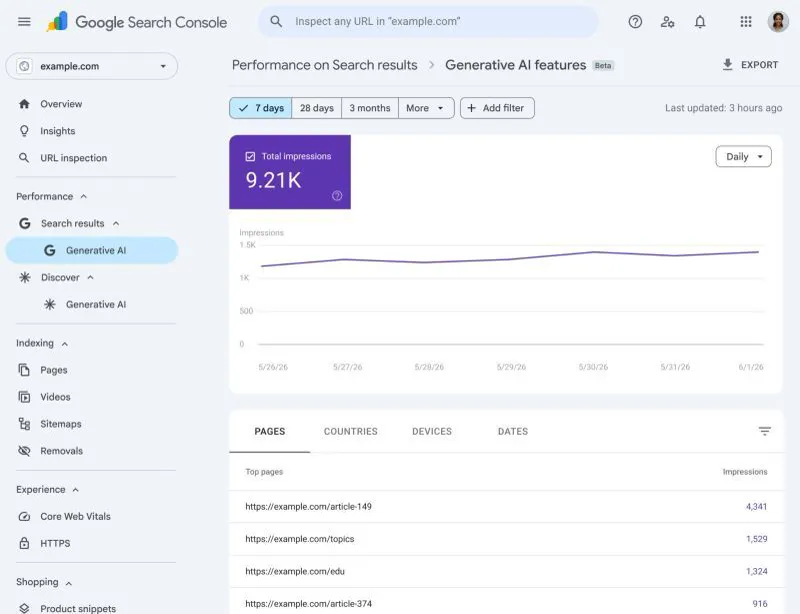
The Search Console generative AI report gives site owners their first view of how often their pages appear in AI features on Search and Discover. It reports impressions, pages, countries, devices and dates. Per Google's current documentation, check whether click data is included for your property.
For two years, AI search has been a black box for most SEOs. Your content might appear in AI Overviews or be cited in AI Mode, and you had no clean way to measure it. The data was lumped into your overall numbers or missing entirely. That blind spot is starting to close, and the Search Console generative AI report is the clearest sign so far. If you are building your 2027 search plan, learning to read this report is now part of the job.
New: the generative AI report had a logging error on 9 to 11 November 2026. Website traffic dropped suddenly? shows how to tell a reporting error from a real loss.
What the new reporting shows
Google has described dedicated reports for generative AI features in Search Console. Because Google changes these reports as they develop, confirm the exact options in the live documentation and in your own property. In general terms, the report covers:
- Impressions: how often your URLs appear in AI features on Search and Discover.
- Pages: which of your URLs actually show up in AI answers.
- Countries: where you are visible.
- Devices: what people use when they see you.
- Dates: performance over time, potentially at a fine-grained level.
This is the first real window into whether AEO and GEO work is landing, which until now has been judged mostly through manual prompt testing and third-party trackers.
Read the fine print on clicks
The part many people will miss is that visibility and traffic are not the same thing. At launch, the reporting was described as showing how often you appeared, not how many people clicked through. So you can measure visibility, but you cannot directly measure traffic from it.
That is not a complaint. It reflects a strategic shift: in AI search, being cited is the win even when the click never comes. A brand that appears repeatedly in answers builds familiarity, which can show up later as branded searches, direct visits and sales conversations.
How to use the Search Console generative AI report
Once it is available on your property, work through a routine.
- Record a baseline. Note impressions by page and country for a clean starting period.
- Find your cited pages. Look at which URLs appear most often. What do they have in common? Format, depth, structure, freshness, topic?
- Compare with traditional performance. Pages that rank well but rarely appear in AI features may need clearer direct answers, better structure or stronger entity signals.
- Watch branded demand. Track branded search impressions and direct traffic over time as an indirect check on whether AI visibility is building awareness.
- Log content changes. When you update a page to improve answer quality, note the date so you can compare impressions before and after.
What to do if you do not have access yet
Google often rolls out new reports to a subset of sites first. Do not panic if you cannot see it. Check the Search results section of your property for generative AI entries from time to time. In the meantime, keep testing key prompts by hand, record which sources are cited, and keep a simple tracker. Pair that with strong fundamentals: clear answers near the top of the page, accurate structured data, well-organized headings, and genuine expertise.
Optimizing for the click or the citation
The question I ask clients is whether they are optimizing for the click or for the citation. The honest answer is both, but they need different measures. Clicks tie to traffic and conversions. Citations tie to awareness and trust. Build a dashboard that shows both, and avoid judging AI visibility purely by sessions.
I would be careful about promising results from any of this. AI features change quickly, and reporting is still maturing. But reading this data early, the day you get it, builds a baseline that your competitors will not have. If you want help turning those signals into a plan, my generative engine optimization service covers measurement and content strategy. You can also browse my free guides for checklists.
This article expands on my post on LinkedIn ↗.
FAQ
What does the generative AI report measure?
It reports how often your URLs appear in AI features on Search and Discover, with breakdowns by page, country, device and date. Check Google's current documentation for the exact metrics available.
Does the report tell me how much traffic AI answers send?
Not necessarily. The point in the original rollout was that visibility is measured, but clicks from AI answers are not clearly reported. Verify against the live documentation and your own analytics.
Why don't I see the report yet?
Google often rolls new reports out to a subset of properties first. Check the Search results area of your property periodically, and do not assume something is wrong with your site.