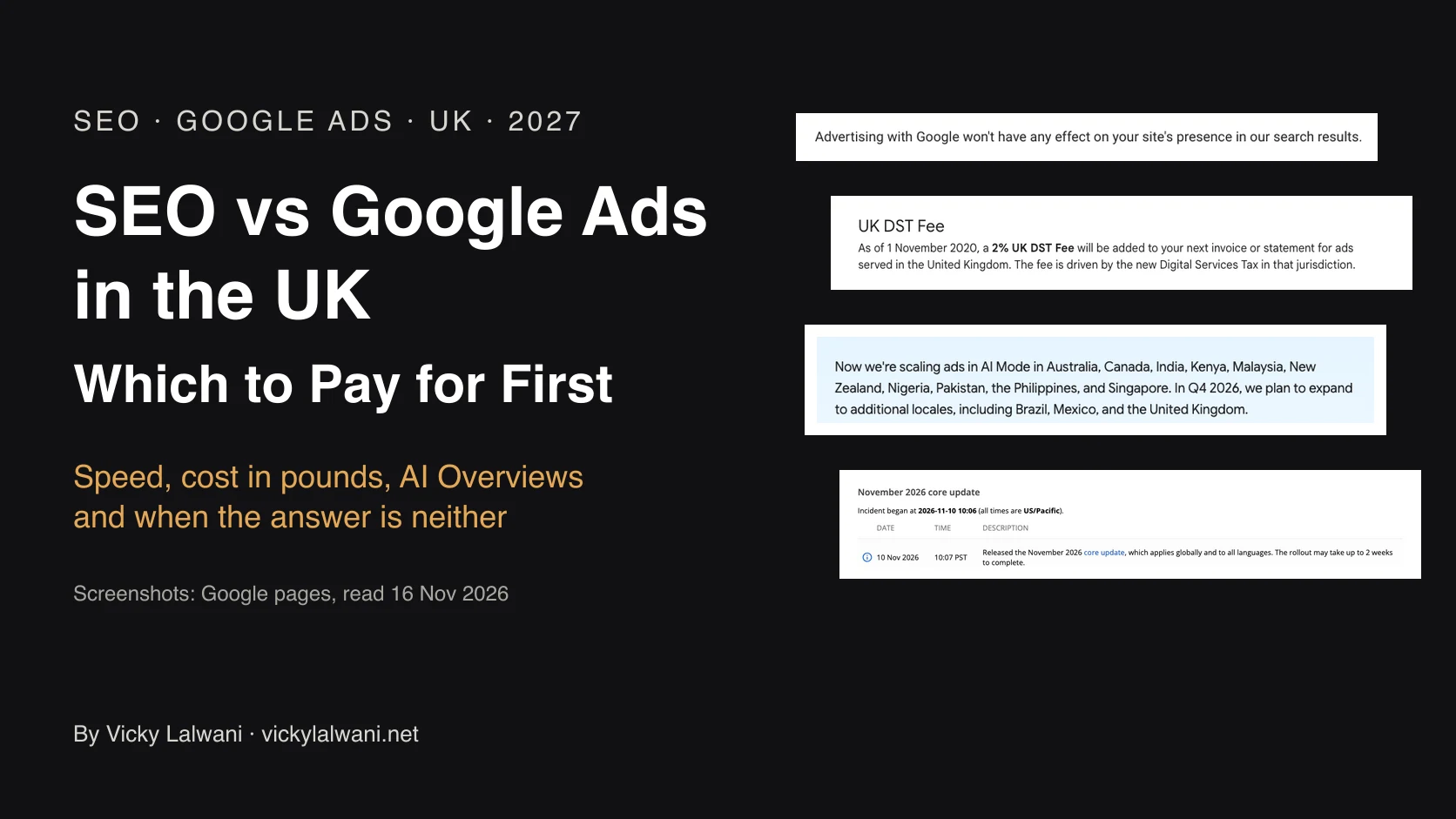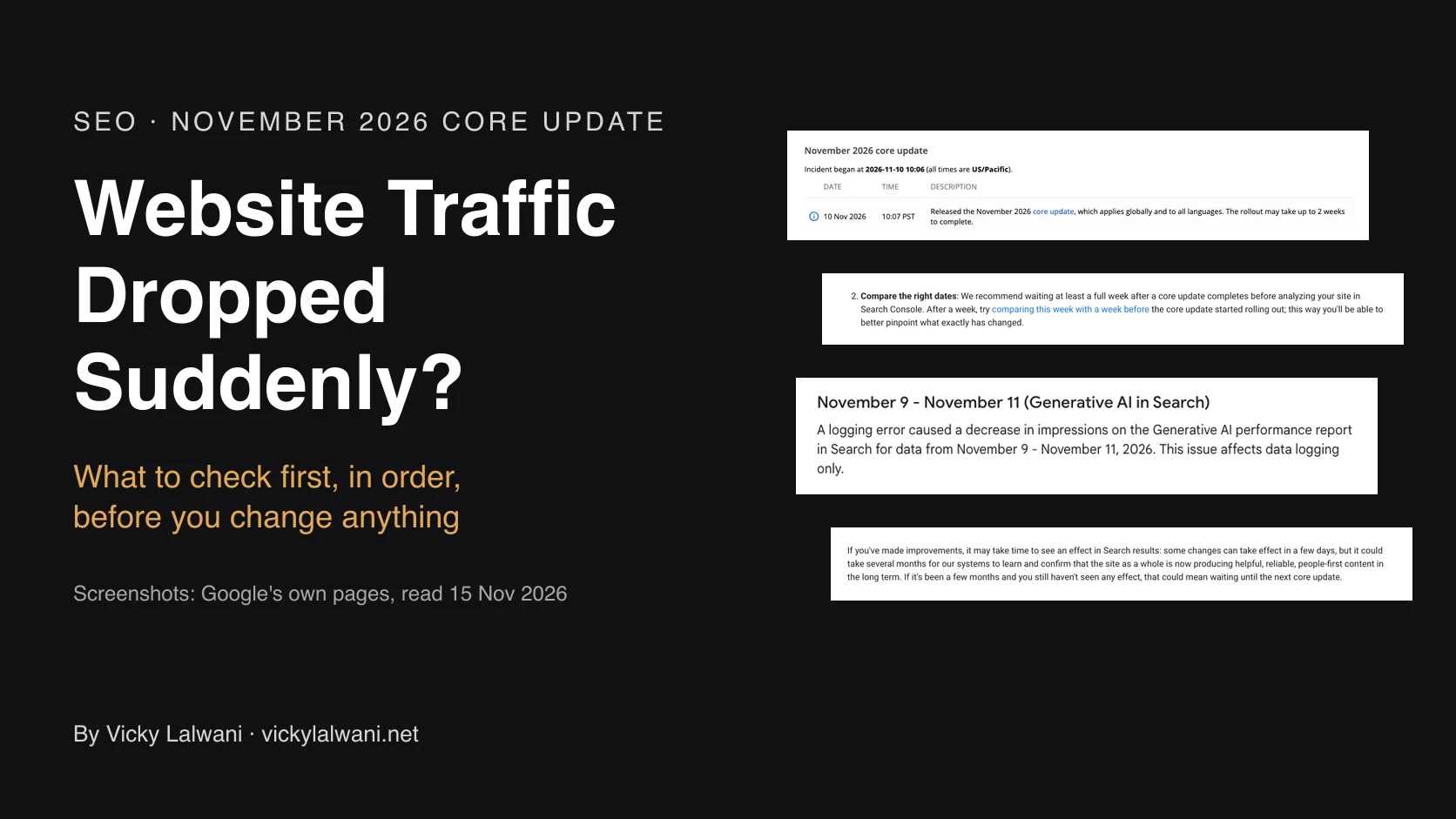
A sudden drop in website traffic has six usual causes: broken tracking, a seasonal dip, a Google update, clicks lost to AI answers, a technical fault, or a problem on one key page. Check them in that order. First compare Google Search Console clicks with Google Analytics visits, because a cookie consent banner or a broken tag can look like a ranking loss. Then check Google's Search Status Dashboard: the November 2026 core update began on 10 November 2026 and was still rolling out on 15 November. Google recommends waiting at least a full week after an update completes before analysing your site, and gives no guarantee of recovery.
Do these three things first:
1. Open Search Console, not only your analytics. In the Performance report, compare the weeks since the drop with the same number of weeks before. If clicks from Google are level, Google Search is not the cause. Check your tracking, then check whether another channel such as ads, email or social fell.
2. Check the date. Google's November 2026 core update began on 10 November and was still rolling out on 15 November. If your drop started on or after that date, do not rebuild anything yet.
3. Write down what changed on your side. A site release, a new cookie banner, a plugin update, a redesign or a domain change in the two weeks before the drop.
TL;DR
- Start with the data, not the panic. Analytics tools miss visits when a tag breaks or a visitor declines cookies. Google says Search Console and Google Analytics never match exactly, so compare the trend, not the totals.
- The update is live. Google released the November 2026 core update on 10 November and said the rollout may take up to 2 weeks. On 15 November it had no end date.
- Do not judge it yet. Google recommends waiting at least a full week after a core update completes before you analyse your site.
- Lost rankings and lost clicks are different problems. If your position held and only clicks fell, the results page changed above you. Rewriting the page may not fix that.
- Recovery has no fixed time. Google says improvements can show in a few days or take several months, and that there is no guarantee.
Jump to: The six causes · Tracking · Seasonality · Core update · During the rollout · AI answers · Technical faults · Page or site · Recovery · When to get help
You open your analytics on a Monday and the line has fallen off a ledge. Enquiries feel slower. Someone asks whether Google has penalised the site, and someone else wants to rewrite the homepage by Friday.
Before anyone touches the site, work out which problem you have. There are six common ones, and they need different fixes. This guide gives you the order to check them in, the exact report to open for each, and what the answer means. If you would rather hand the diagnosis over, that is a service I offer as an SEO consultant.
A note on evidence. The facts about Google come from Google's own pages, read on 14 and 15 November 2026 and linked where I use them. The numbers come from named studies, with their limits. Where I write "I", it is a check I have run in set-up, audit and troubleshooting work for service businesses and agencies in several countries. None of those lines is a recovery from a Google update, and I do not claim one. I share no client names or numbers.
Why has my website traffic dropped suddenly?
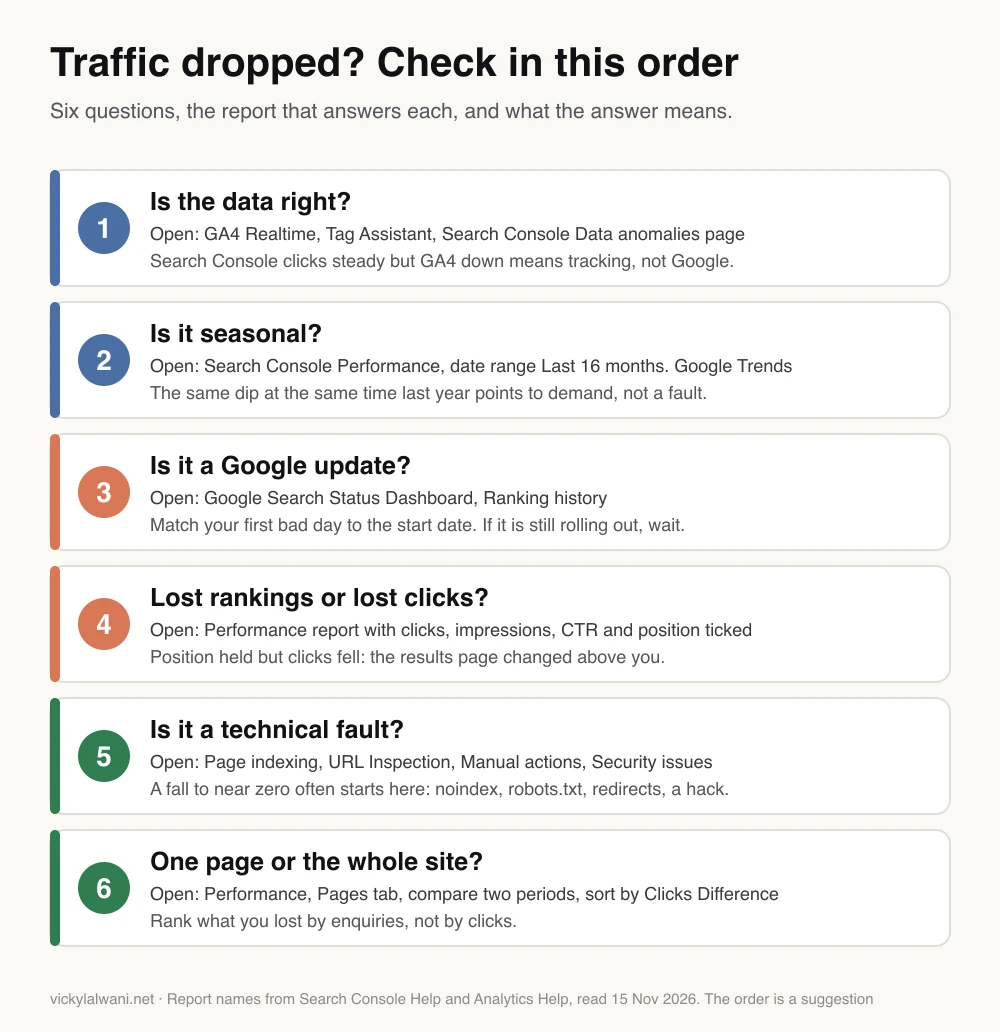
A sudden drop in website traffic has six usual causes: broken tracking, a seasonal dip, a Google update, clicks lost to AI answers, a technical fault, or a problem on one important page. Check them in that order. The first two cost nothing to rule out, and a wrong number sends every later step the wrong way.
Two terms first. Organic traffic means visits from unpaid search results. Search Console is Google's free tool that shows how your site appears in Google Search. GA4 (Google Analytics 4) is Google's free tool that counts what visitors do once they arrive.
| Check | Open | What a "yes" looks like |
|---|---|---|
| 1. Tracking | GA4 Realtime, Search Console | GA4 fell, Search Console did not |
| 2. Seasonality | Search Console, Last 16 months | Same dip last year |
| 3. Google update | Search Status Dashboard | Drop starts on or after the start date |
| 4. AI answers | Performance report, all four metrics | Position held, clicks fell |
| 5. Technical fault | Page indexing, Manual actions | Indexed pages falling, or a warning |
| 6. One page | Performance report, Pages tab | One or two URLs carry the loss |
Step 1: is the drop real, or is it your tracking?
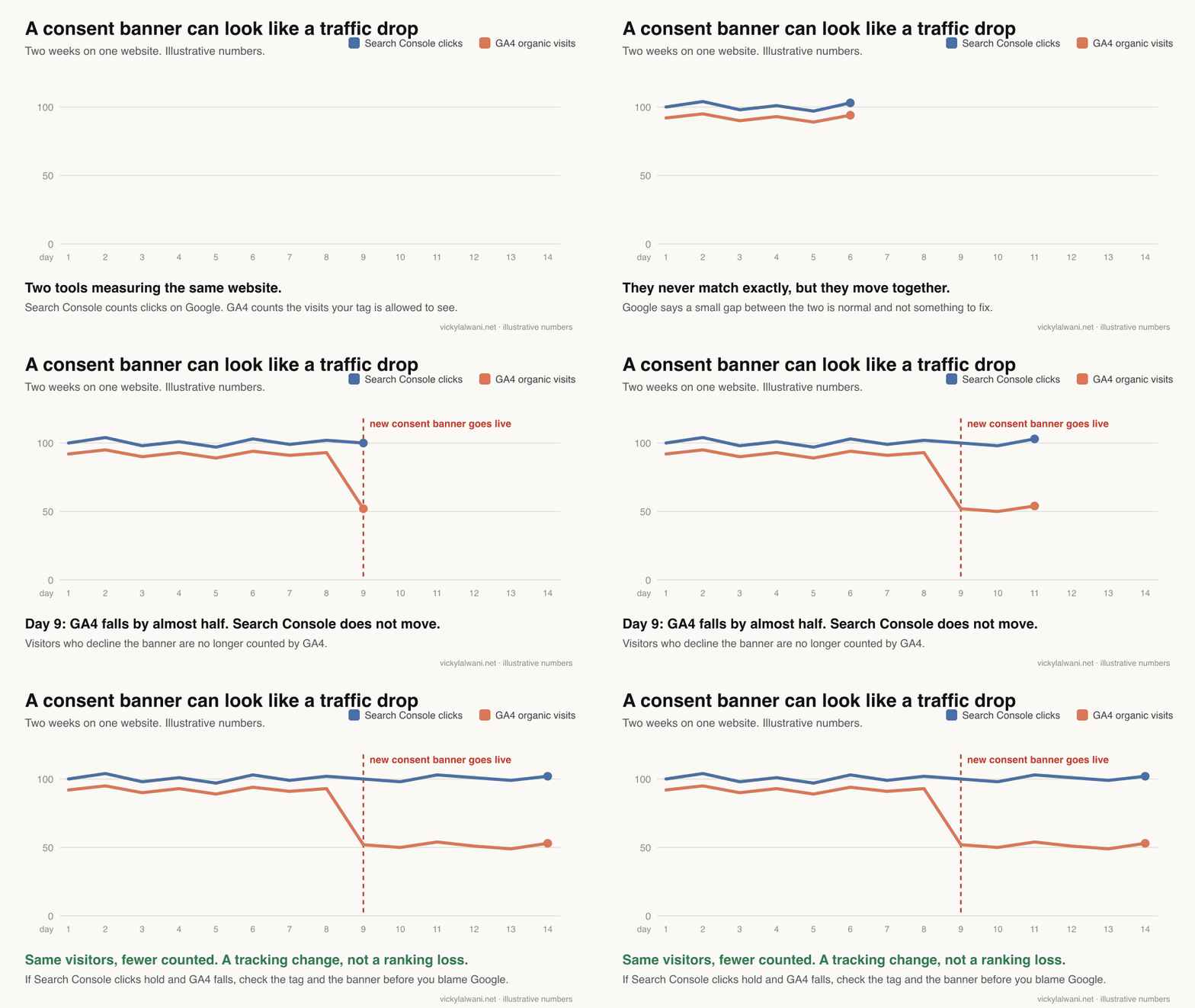
Check tracking first. If Search Console shows the same number of clicks from Google as before, but GA4 shows fewer organic visits, people are still arriving and your analytics has stopped counting some of them. It is quick to confirm, and it rules out the most embarrassing mistake.
When two reports disagree, I suspect the tracking first.
Compare the two tools.
- In Search Console, open Performance. A click is counted when someone selects your link on Google.
- In GA4, go to Reports, then Acquisition, then Traffic acquisition. Search for google / organic to see visits from Google's unpaid results.
- GA4 records a visit only after the page loads and its code runs. So the two never match, but the lines should move together.
- Leave out the last two days. GA4 says processing can take 24 to 48 hours, and Search Console marks its newest data as preliminary.
Check that the tag still fires. A tag is the small piece of code that sends each visit to GA4.
- Open GA4, then Reports, then Realtime. Click around your own site and wait about a minute. Google suggests this exact test.
- Test a page from each template: the homepage, a service page, a blog post, the contact page. A redesign can drop the tag from one template only.
- If you use Google Tag Manager, check the last change was published. Unpublished changes send no data.
Check the cookie consent banner. A consent banner is the pop-up that asks visitors to accept cookies.
- Google states that GA4 will be missing data for users who decline consent.
- GA4 can estimate those visits, but only with the advanced consent mode set-up, at least 1,000 daily users who accept and at least 1,000 daily events from users who decline. Most small sites are below that.
- So a new or redesigned banner can cut reported traffic overnight with no change in real visits.
Check against enquiries. I have compared GA4 with CRM leads by date. The gap was a form that had stopped tracking, plus social lead forms GA4 never sees. Your inbox and your CRM (where enquiries are logged) count enquiries whatever your analytics recorded. Use them as the tie-breaker.
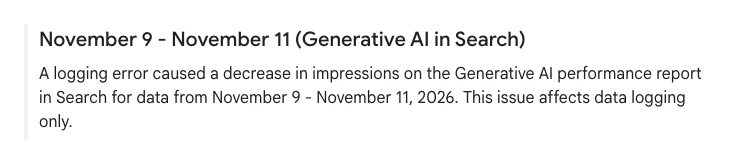
Check Google's own error log. Google keeps a page called Data anomalies in Search Console. Two entries matter in November 2026.
- A logging error cut impressions in the Generative AI performance report for 9 to 11 November 2026. It overlaps the start of the core update, but Google says it affects data logging only.
- Google also logged impressions inaccurately from 13 May 2025 until 27 April 2026. CTR and average position were affected too. Clicks were not. So compare clicks year on year, not impressions, CTR or position.
Do not trust a rank tracker on its own right now. A rank tracker is a paid tool that checks where your pages appear for chosen searches.
- One rank tracking firm reported that 5% to 11% of the results pages it collected each day since 1 October 2026 had been altered. A second firm put its own figure at about 11%.
- Neither published its method, and Google has not commented. Treat a fall in a tracker as a prompt to open Search Console, not as proof.
- I check rankings in a private window, because Google says results depend on the place, device and recent history of the person searching.
If the fault is in the tracking, your rankings are intact. Fixing it is the core of my analytics and tracking work.
Step 2: is it seasonal?
Rule out seasonality next. In Search Console, set the date range to the last 16 months and look at the same weeks a year ago. If clicks dipped then too, you are looking at a yearly pattern in demand, not a fault on your site.
- Open the long view. In the Performance report, choose the Date filter and select Last 16 months. Google recommends this to check the drop does not happen every year.
- Compare like with like. In the Date filter, open the Compare tab and pick a year-over-year option. Google suggests weekly or monthly granularity so that weekends do not distort the picture.
- Read clicks, not impressions. Because of the logging error above, last year's impressions are not a fair baseline.
- Check demand outside your site. Take your two or three biggest search terms and look them up in Google Trends. Google's example: people search for diets in January and turkey in November.
Analyzing drops in Google Search traffic is a six-minute training video from Google Search Central, published on 29 March 2023. It sells nothing. The Search Console screens have changed since then, but the method has not.
I could not find a published benchmark, with a sample, for how much organic traffic moves by season in any sector. Your own last 16 months are the only baseline that counts.
Step 3: is it the November 2026 Google core update?
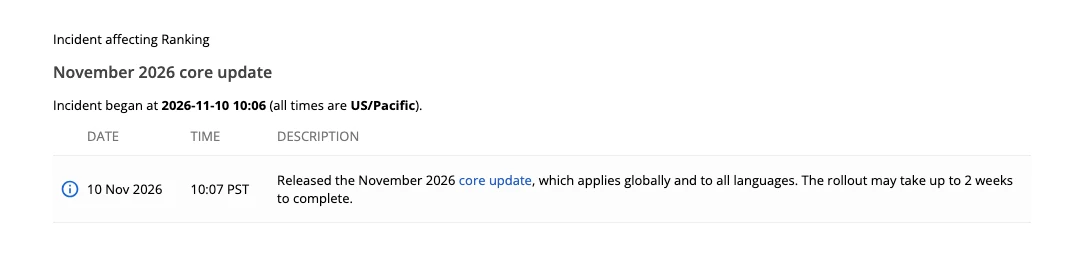
The November 2026 core update is a suspect only if your clicks began falling on or after 10 November 2026. Google released it that day at 18:06 UTC and said the rollout may take up to 2 weeks. On 15 November it was still running. If your drop began earlier, look elsewhere.
A core update is a broad change to how Google ranks pages. It happens several times a year and affects all kinds of site.
How to line up your dates.
- Open the Google Search Status Dashboard and note the start date of anything under Ranking. It is the official record, and it lists core, spam and Discover updates.
- In Search Console, open Performance and find the first day your clicks fell. Daily data is in Pacific Time, so a drop can look a day early or late depending on where you are.
- If the first bad day is before the start date, the update did not cause it. Go back to steps 1 and 2, then on to step 5.
| Core and spam updates in 2026 | Started | Rollout took |
|---|---|---|
| November core update | 10 Nov | Still running on 15 Nov |
| September spam update | 24 Sep | 13 days 16 hours |
| August spam update | 18 Aug | 2 days 16 hours |
| June spam update | 24 Jun | 2 days 1 hour |
| May core update | 21 May | 11 days 21 hours |
| March core update | 27 Mar | 12 days 4 hours |
| March spam update | 24 Mar | 19 hours 30 minutes |
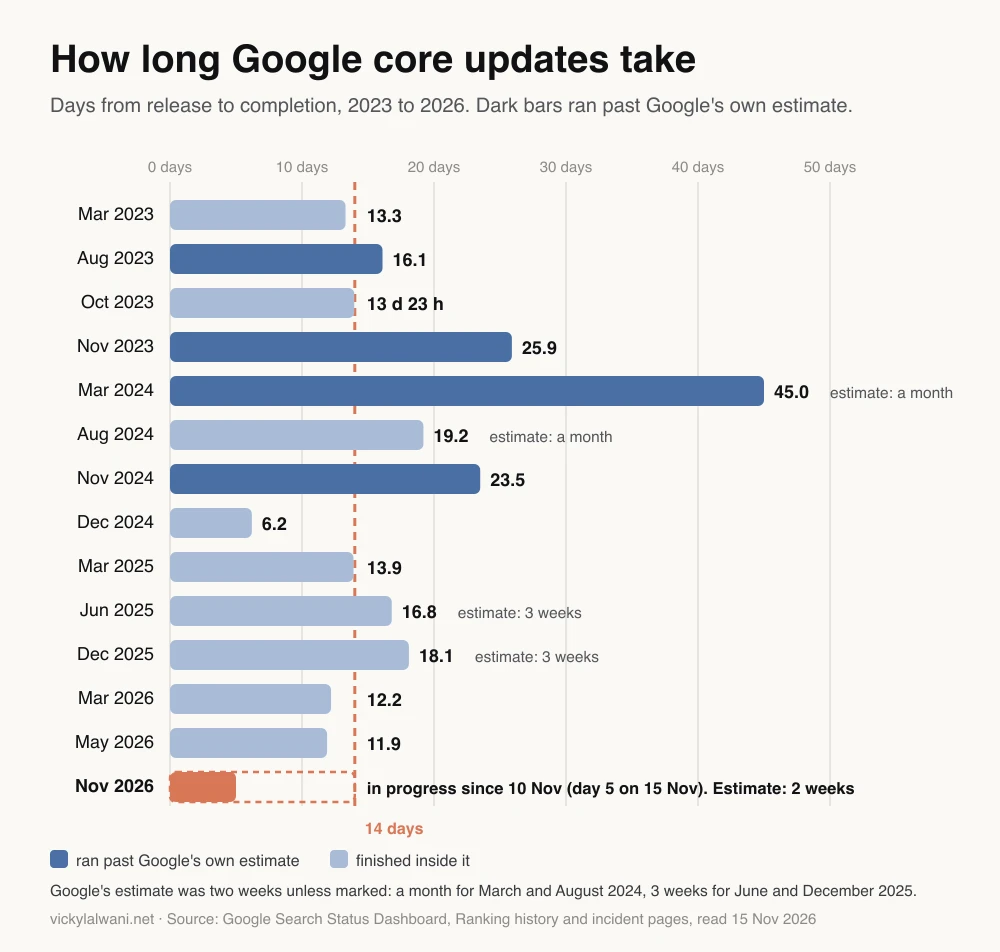
"Up to 2 weeks" is an estimate. I took every Search core update since 2023 from the dashboard's ranking history. Google gave a two-week estimate for nine of the 13 finished ones, and three of those nine ran over. The last to run over was November 2024. All six since then finished inside Google's estimate. Across all 13 the middle value was about 16 days. The longest, in March 2024, took 45 days against an estimate of up to a month.
Breaking News: Google's November Core Update rolls out is a 90-second news clip from Search Engine Land, published on 10 November 2026. Search Engine Land is a search marketing trade publication, and the clip is news, not guidance.
What Google has not said. There is no blog post about this update. The dashboard notice is one line. Google's LinkedIn post adds only that this is a regular update, meant to surface relevant and satisfying content from all types of sites. That is a general aim, not a list of what the update rewards. Its standing guidance is that core updates do not target specific sites or pages. Anyone who tells you what this update "is about" is guessing.
A core update is not a penalty. Penalties are called manual actions, and they show up in their own report (step 5). Google's wording for a core update drop is that there might not be anything fundamentally wrong with your content.
What to do, and not do, while the update is still rolling out
While a core update is rolling out, keep running the business and avoid big structural changes. Fix real faults, keep publishing, and leave titles, URLs and page layouts alone on pages that were doing well. Google's advice is to wait until the rollout is complete, then at least one more full week, before you analyse anything.
Fine to do now
- Fix a broken tag, form or page
- Correct facts and prices that are wrong
- Publish what was already planned
- Note the dates and export your Search Console data
- Check the other five causes in this guide
Wait until it is over
- Mass rewrites of pages that still rank
- Deleting or noindexing "weak" pages in bulk
- Changing URLs, titles and layout together
- A redesign or a platform move
- Declaring winners and losers
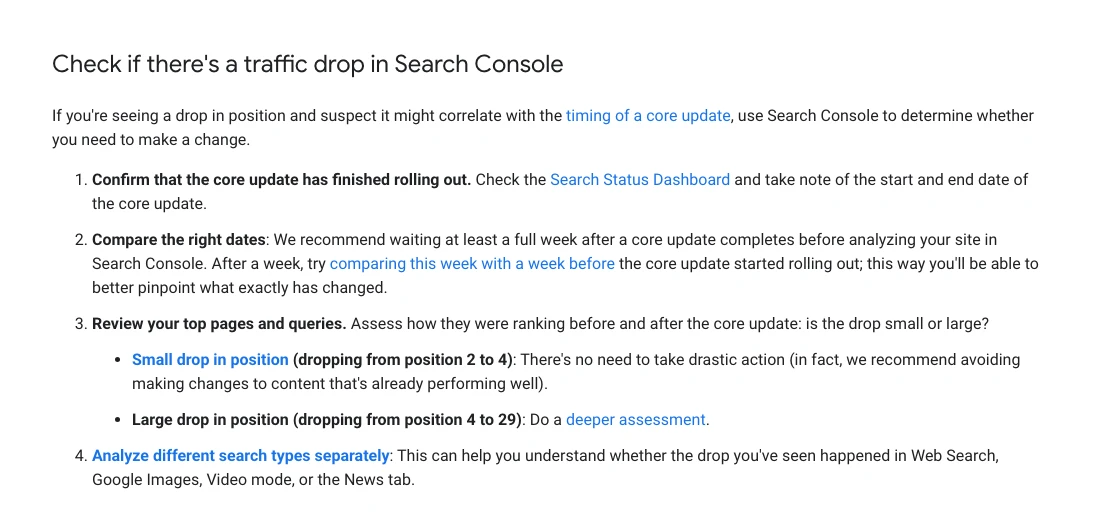
Google's four steps, in its order.
- Confirm the update has finished on the Search Status Dashboard, and note the start and end dates.
- Wait at least a full week after it completes, then compare that week with a week before the update began.
- Review your top pages and searches. Is the drop small or large?
- Check each search type (web, image, video, news) on its own.
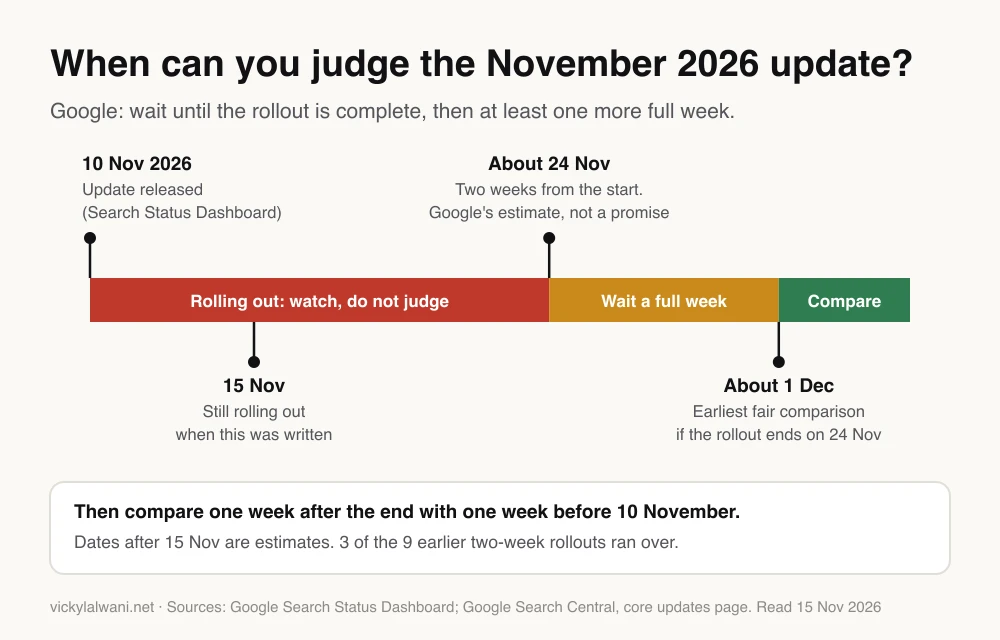
Doing the sum. Two weeks from 10 November is 24 November. Add Google's full week and the earliest fair comparison is about 1 December, or a day or two later once the data has settled. For shops that week includes Black Friday, so check the same week last year as well, using clicks. If the rollout runs over, as three of the nine earlier two-week rollouts did, that date moves with it. Check the dashboard, not the calendar.
For shops this is awkward timing. Trade press noted that a full two weeks ends three days before Black Friday. That is a reason to protect what is selling, not to rebuild it.
Why not just act? Because you would be adding a second variable. In one r/SEO thread, a client wanted to move platform mid-rollout. Several replies said the update would not care. One added the useful point: afterwards nobody could tell whether the rebuild or the update had moved the numbers.
Step 4: did you lose rankings, or lose clicks to AI answers?
Open Search Console's Performance report and tick all four boxes: clicks, impressions, CTR and average position. If average position got worse, you lost rankings, even if impressions barely moved. If position held and only clicks fell, you lost clicks on the results page, often to an AI answer above you.
The four terms, in Google's definitions:
- Impressions: how many times your site appeared in search results.
- Clicks: how many times someone clicked through to your site.
- CTR (click-through rate): clicks divided by impressions.
- Average position: the average place of your highest result.
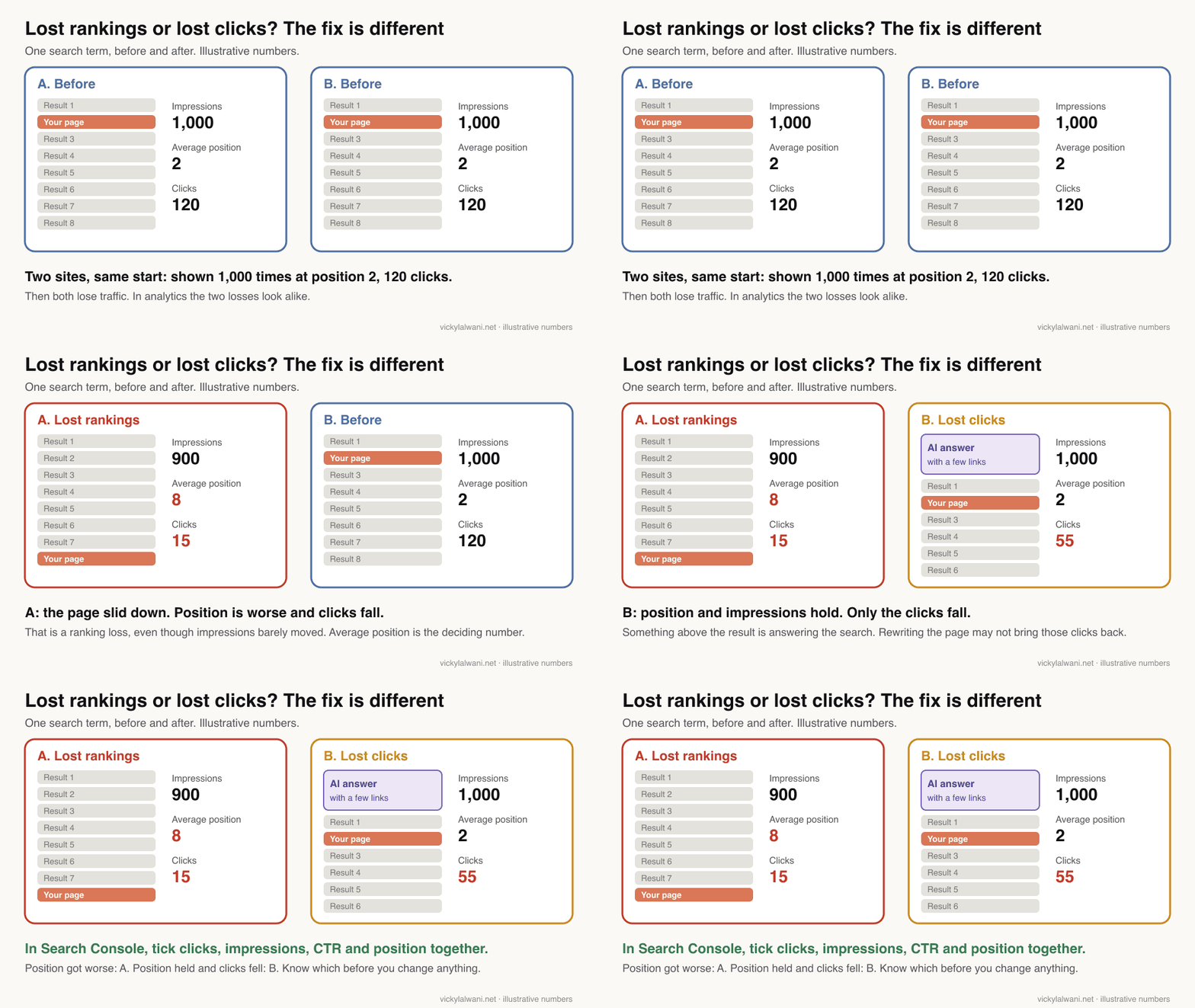
An AI Overview is the AI-written summary Google shows above the normal results for some searches. AI Mode is Google's chat-style search. Both can answer the question on Google's own page, with a few links to sources.
What Google's tools can and cannot show you.
- Clicks and impressions from AI Overviews and AI Mode are counted inside the normal Web totals in the Performance report. You cannot split them out there.
- The Generative AI performance report is the only separate view. It shows impressions only: no clicks, no CTR, no search terms. More in my guide to the Search Console generative AI report.
- An AI Overview counts as one position, and every link inside it shares that position.
- GA4 does not separate them either. Its Organic Search channel includes AI Overviews and AI Mode.
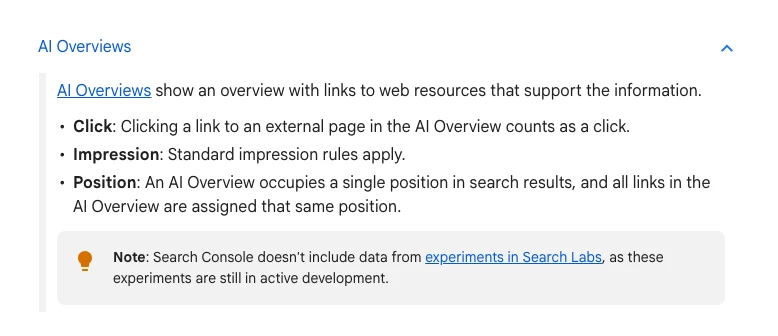

So no report will tell you "you lost this many clicks to AI". You have to read it from the pattern.
What the studies say. They agree on the direction and disagree on the size.
- Ahrefs compared 300,000 keywords between December 2023 and December 2025: 150,000 that show an AI Overview and 150,000 informational keywords that do not. For the page ranked first, the click rate fell from 7.6% to 3.9% in the group with no AI Overview, and from 7.3% to 1.6% in the group with one. It is a correlation, on desktop.
- Pew Research Center tracked 900 US adults in March 2025. They clicked a result on 8% of visits when an AI summary appeared and 15% when it did not. That is one country, early on.
- Seer Interactive's data from 53 brands shows a partial rebound: organic CTR on searches with an AI Overview rose from 1.3% in December 2025 to 2.4% in February 2026.
- Google said in August 2025 that total organic clicks were relatively stable year over year. It published no figures with that statement.
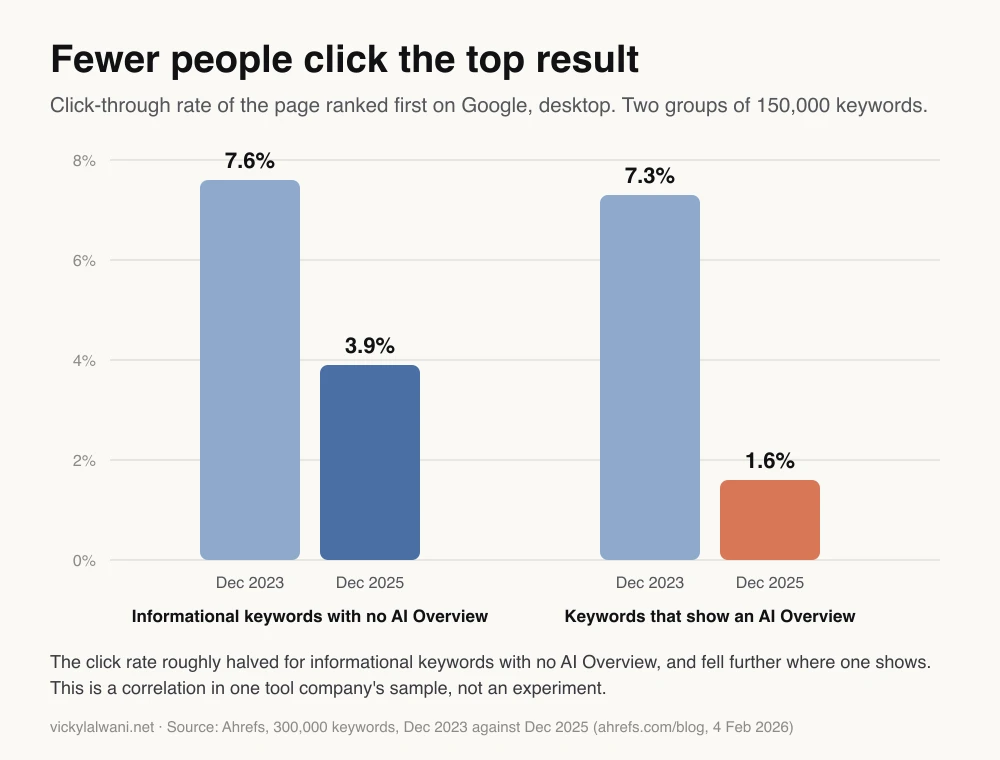
For "impressions level, clicks down", Google's debugging guide points at your page title and snippet, or a competitor's richer result. It does not mention AI answers. Check both.
If it is lost clicks, what then?
- Split the drop by device and by search term. In Seer Interactive's data, AI Overviews appeared on 36% of informational searches ("what is", "how to") and 5% of transactional ones, where the searcher is ready to buy.
- Count enquiries, not visits. A small agency on r/SEO reported traffic down, rankings level and leads flat or up. One account, not a rule, but the right question.
- See whether you are named in the answers. I run a client's questions in ChatGPT, Perplexity and Claude and note where the brand appears.
- Make the pages easier to quote. That is generative engine optimisation. See my guides to appearing in Google AI Overviews and Google AI Mode.
Not sure which pattern you have? That is a good question to bring to an SEO consultant, with your Search Console open.
Step 5: is it a technical fault?
A technical fault is the likely cause when traffic falls to near zero within days, or when the number of indexed pages drops. Open four Search Console reports: Page indexing, URL Inspection, Manual actions and Security issues. Each is quick to read, and two of them show a green tick if all is well.
Indexed means Google has stored a page and can show it. Three small things can get in the way. A noindex tag tells Google to leave a page out. A robots.txt file tells Google which pages it may read. It does not remove a page from Google on its own. A redirect forwards an old address to a new one.
| Fault | Where to check | What you see |
|---|---|---|
| noindex left on | Page indexing | Indexed pages fall |
| robots.txt blocks pages | Page indexing, Crawl stats | Not indexed pages spike |
| Server errors | Crawl stats | 5xx errors rise |
| Redirects missing | URL Inspection | Old URLs not found |
| Hacked site | Security issues | Warning in results |
| Manual action | Manual actions | A notice from Google |
- Page indexing. Look for a fall in indexed pages with a matching rise in "not indexed". Google's first suspects are a robots.txt rule, a noindex tag or a login wall. I use Search Console's page indexing report to find noindex tags, canonical errors (pages that point Google at the wrong address), redirects and 404s (missing pages).
- URL Inspection. Paste one affected address into the bar at the top of Search Console. The first result is Google's stored copy, not the live page, so press "Test live URL" as well.
- Manual actions. A manual action is a penalty applied by a human reviewer at Google for breaking its spam rules. If you have one, this report says so. If it shows a green tick, you have not been penalised.
- Security issues. A hacked site can carry a warning label in search results, which cuts clicks at once.
Changes on your side are the usual trigger.
- I have found pages blocked before a launch and never unblocked. A staging site is usually set to keep Google out, and that setting can travel to the live site.
- A noindex tag removes a page from Google entirely once Google next fetches it, so the fall is gradual, not instant.
- I stopped a client changing name servers before the new site and forms were ready. Set any change like that against the date your drop began.
If you moved or redesigned the site.
- Google says to expect temporary ranking changes during a move. A medium-sized site can take a few weeks or more, and redirects should stay for at least a year.
- It can take far longer. A study of 892 domain changes found an average of 523 days for estimated traffic to return, and 17% had not returned after 1,000 days. It covers domain changes only, and uses tool estimates.
- A redesign can lose traffic with no error showing. In an r/TechSEO thread, the advice was to compare what changed on key pages: titles, headings, text and internal links.
One lesson on guessing. I once blamed domain age for a site not ranking. The registrar dates proved me wrong. Check the dull facts before the clever theory.
For the full list of crawl checks, see my guide to running a technical SEO audit.
Step 6: is it one page or the whole site?
Find out where the loss sits before you decide how big the problem is. In the Performance report, compare the weeks after the drop with the weeks before, open the Pages tab and sort by the difference in clicks. Often one or two pages carry most of the loss.
- Search Console, Performance, Date filter, Compare tab. Pick two equal periods, both ending before the last two days.
- Click the Pages tab, then sort by Clicks Difference so the biggest losers come first.
- Do the same on the Queries tab (search terms), then Countries and Devices.
- Google's rule: if the drop is site-wide, open the Page indexing report. If it is a group of pages, inspect a few with URL Inspection.
Then rank the loss by money, not by clicks.
- As an example, a blog post that lost 500 visits may have brought no enquiries, while a service page that lost 40 may have brought half of them.
- For each losing page, count the enquiries it produced before and after: forms, calls and bookings in your inbox or CRM.
- Work on the pages that feed enquiries first. Leave the rest until the rollout is over.
Find where users are coming from using Acquisition Reports in Google Analytics is a 12-minute walkthrough from Google's own Analytics channel, published on 23 January 2024. It sells nothing. It shows the Traffic acquisition report used in step 1.
I put a short note on every report: where we are, what we are doing, what comes next. Write the same three lines for your own team now. It helps to head off the Friday homepage rewrite.
How to recover from a Google core update: what Google says
Google's position is that there is no specific fix for a core update drop. It asks you to assess the whole site honestly, improve the pages that lost most, avoid quick fixes, and wait. Changes can show in a few days or take several months, and Google gives no guarantee.
| Question | What Google says |
|---|---|
| Was I penalised? | No. Core updates do not target specific sites |
| Small drop, say position 2 to 4? | No drastic action needed |
| Large drop, say position 4 to 29? | Assess the whole site |
| Should I delete pages? | A last resort |
| Quick fixes? | Avoid them |
| How long to see an effect? | A few days to several months |
| Must I wait for the next update? | Not necessarily |
| Is recovery guaranteed? | No |
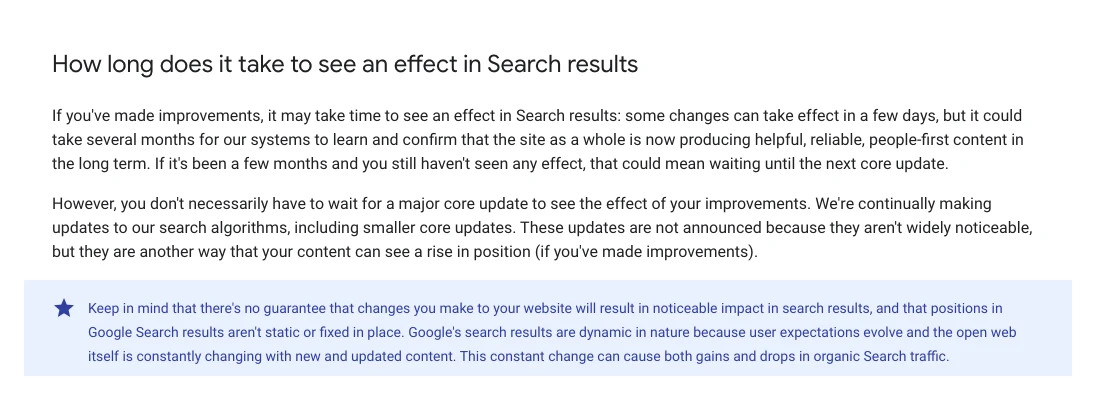
All of those answers come from Google's core updates page. In practice they mean three things.
- Assess the site, not one page. Google points to its self-assessment questions. Does the page offer original information? Was it written by someone who knows the subject? Would you bookmark it?
- Look at who replaced you. Google's phrase is that other pages may be doing a better job of helping the searcher. Open them and compare.
- Do not delete in a hurry. Google's one exception: whole sections written for search engines first. Removing those can help the rest.
How often do sites recover? Nobody has published a sampled recovery rate, and I will not invent one.
- An ad network that looked at 3,400 publisher sites in 2024 found those hit by about 90% showed no recovery at the time, while those hit by 10% to 30% were starting to.
- One consultant's list of about 400 sites hit by Google's September 2023 helpful content update showed 22% up by a fifth or more since the August 2024 core update, as of November 2024. Most had not returned to their earlier traffic. That is a watch list, not a sample.
- On Reddit, an r/TechSEO site owner who cleaned up thin pages after the May 2026 update still had no recovery almost three months on. A reply made a fair point: the next core update is not a booked recovery date.
So plan for months, not weeks, and judge the work by whether the pages are better for the reader. That is the only part you control.
What people say on X and Reddit
A recurring theme in the X posts and Reddit threads I read from October and November 2026 is not the core update. It is whether the numbers can be trusted: rank trackers, Search Console charts and analytics have all misled people in those weeks. That is why step 1 of this guide is the data.
On X. None of these five posts is a reaction to the core update itself. They are about data in October and November 2026. I describe people by what they do and link each post.
| Who | What they reported | Take it as | Post |
|---|---|---|---|
| SE Ranking, a rank tracking company | Told its customers that Google has been returning incomplete results to rank trackers, which can show false drops | Vendor | 16 Oct 2026 |
| A search trade journalist | Reported Google's logging error in the Generative AI report for 9 to 11 November | Trade press | 12 Nov 2026 |
| An SEO practitioner | Saw huge traffic spikes in Search Console on a few sites and doubted they were real visits | First-hand | 3 Nov 2026 |
| An SEO consultant | Checked more sites with the same spike and thought it looked like AI agents or bots | First-hand, opinion | 3 Nov 2026 |
| A second SEO practitioner | Could not share findings because rank trackers were too unreliable | First-hand | 8 Oct 2026 |
Trade press covering the spike said it faded within a day or two and that Google had not commented, so nobody outside Google knows what caused it.
On Reddit. I read these threads through a public archive, because Reddit blocks automated readers. Many replies come from people who sell SEO services, so treat single comments as opinion.
| Thread | Where and when | What it shows | Take it as |
|---|---|---|---|
| November 2026 Core Update | r/SEO, 10 Nov 2026 | The top reply says rankings were already moving in mid October. One poster never regained a page lost in May | Opinion |
| Is it okay to update an article during a rollout? | r/SEO, 13 Nov 2026 | Most say routine edits are fine. One warns against changing URL, title and structure together | Opinion |
| Traffic dropped after my team broke our own tracking | r/bigseo, 9 Sep 2026 | A new consent banner blocked analytics on half the site | First-hand |
| Your GA4 traffic probably did not drop, your consent rate did | r/GoogleAnalytics, 12 Sep 2026 | Split the fall by region to tell a broken tag from consent | Opinion |
| Lost about 90% of traffic overnight after AI Overview changes | r/SEO, 31 Oct 2026 | Position still in the top 5. Clicks and impressions down | First-hand |
| Traffic dropped after a website redesign | r/TechSEO, 30 Sep 2026 | No errors showing. Replies say compare what changed on key pages | First-hand |
Where they disagree.
- Whether to keep editing during a rollout. "Just publish, there is always an update" against "do not add a second variable". Nobody argued for freezing all work.
- When the update began. The top reply in the r/SEO announcement thread says rankings were moving from mid October. Google's dashboard records 10 November, and Google says it also runs smaller updates it does not announce.
Videos worth watching
These six videos cover the reports used in this guide. Four are from Google's own channels and sell nothing. Three of the six are embedded in the steps above.
| Video | Channel | Date | What it covers |
|---|---|---|---|
| Analyzing drops in Google Search traffic | Google Search Central | 29 Mar 2023 | The main causes and how to read the chart |
| Analyzing performance on Google Search | Google Search Central | 4 Dec 2025 | The Performance report in depth |
| Find where users are coming from using Acquisition Reports | Google Analytics | 23 Jan 2024 | GA4 Traffic acquisition |
| Google Search Gen AI Reports, Search Profiles and more | Google Search Central | 18 Jun 2026 | The Generative AI report launch |
| Breaking News: Google's November Core Update rolls out | Search Engine Land | 10 Nov 2026 | A 90-second news summary |
| How to track and report AI traffic in Google Analytics 4 | Analytics Mania | 10 Feb 2026 | Finding AI assistant visits in GA4 |
Search Engine Land is a search marketing trade publication. Analytics Mania is a training business that sells analytics courses. Neither endorses this site. I left out creator videos on what the November update "targets", because Google has not said.
When is it time to bring in an SEO consultant?
Bring in an SEO consultant when the drop has lasted past the end of the rollout plus a week, enquiries have fallen as well as clicks, and the reports above do not point to one clear cause. Before that point, most of this guide is work you can do yourself in an afternoon.
It is also worth a second opinion when:
- a redesign, a move or a platform change sits in the same weeks as the drop;
- Search Console and GA4 disagree and nobody can say why;
- the loss is on the few pages that bring most of your enquiries;
- your current agency's only answer is "it is the algorithm".
What a first audit should cover. Ask any consultant, me included, for these six things in writing:
- Proof the data is right: tag, consent banner, Google's anomalies page.
- Your drop dates set against the Search Status Dashboard.
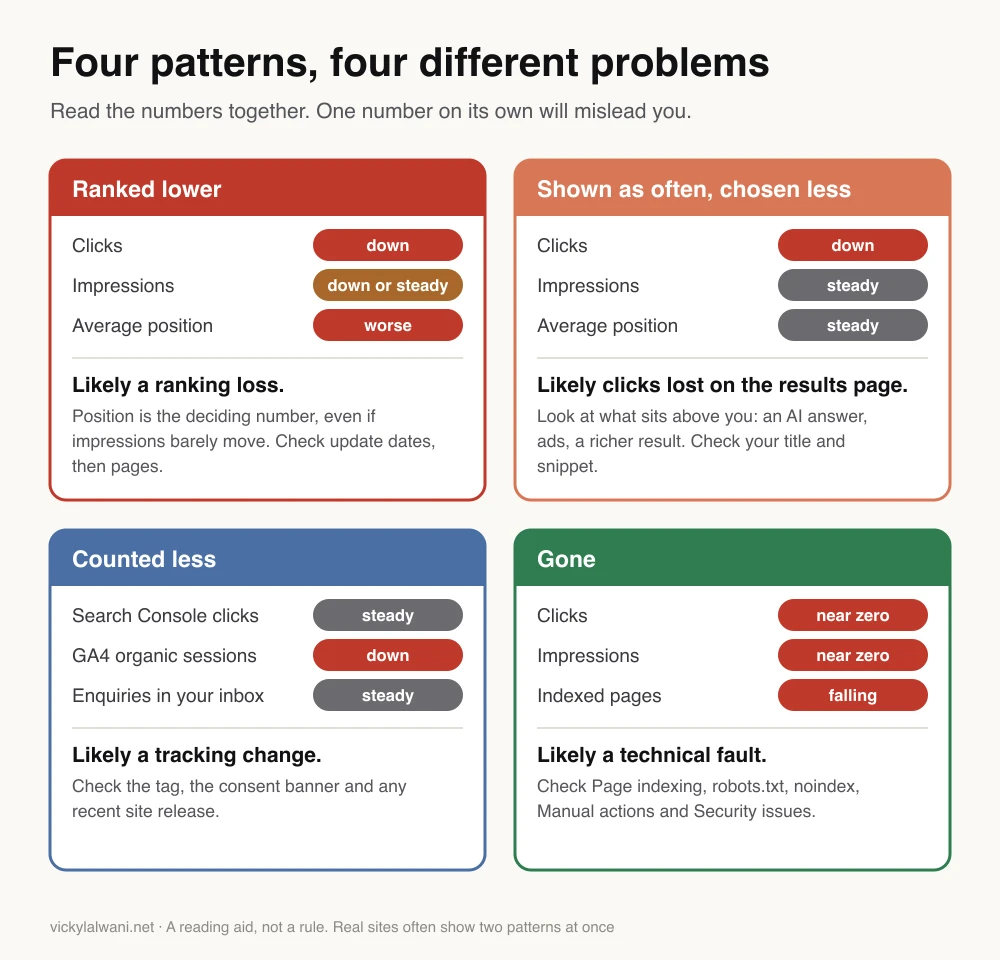
- Which pattern you have: ranked lower, chosen less, counted less or gone.
- The pages and search terms that lost most, ranked by enquiries.
- The technical checks: indexing, redirects, manual actions, security.
- A plain note on what to change, what to leave alone, and when to look again.
Be wary of anyone who promises a recovery date or says they know what the update targeted. Google has published neither. My own first steps with a new client are set out in what an SEO consultant does from day one.
Where this advice is weak
- I have no recovery story to show you. My first-person lines come from set-up, audit and troubleshooting work. None is a recorded recovery from a core update, so the recovery section rests on Google's documentation alone.
- The update is not finished. Everything about the November 2026 update is true as of 15 November 2026. The end date, and any lessons from it, are still to come.
- AI click loss cannot be measured on your own site. Google folds those clicks into its totals. The studies are correlations from different samples, and they give different sizes.
- The patterns overlap. A site can lose rankings in an update and lose clicks to AI answers in the same month. The four-pattern diagram is a starting point.
- The Reddit and X items are anecdotes. Many replies come from people who sell SEO services. I read the Reddit threads through a public archive, not on Reddit itself.
Want a second pair of eyes on your traffic drop?
If you want a second opinion, I will go through the data check, the dates, the pattern and the pages with you, and write a plain note on what to do and what to leave alone. Send me the date the drop began and what changed on your side through the contact page. How I work is on the SEO consultant page.
Sources
| Source | What it supports | Date | Link |
|---|---|---|---|
| Google Search Status Dashboard | November 2026 core update dates; rollout lengths since 2023 | Read 15 Nov 2026 | Incident, ranking history, about the dashboard |
| Google Search Central | What to do after a core update; recovery | Updated 10 Dec 2025 | Core updates |
| Google Search Central | Causes of a drop; 16 months; Trends | Updated 10 Dec 2025 | Debugging drops |
| Google Search Central | Why analytics and Search Console differ | Updated 12 Nov 2026; 7 Jan 2026 | Identify Search traffic, Search Console and Analytics |
| Google Search Central | Self-assessment questions | Updated 5 Oct 2026 | Helpful content |
| Google Search Central | AI features; site moves; robots.txt; noindex | Read 15 Nov 2026 | AI features, site moves, robots.txt, noindex |
| Search Console Help | Performance report, comparing dates, annotations | Read 15 Nov 2026 | Overview, comparison, annotations |
| Search Console Help | Known reporting errors | Read 15 Nov 2026 | Data anomalies |
| Search Console Help | How AI Overviews and AI Mode are counted | Read 15 Nov 2026 | Clicks and position, Generative AI report |
| Search Console Help | Technical reports | Read 15 Nov 2026 | Page indexing, URL Inspection, manual actions, security, crawl stats |
| Analytics Help | GA4 reports, channels, freshness, consent | Read 15 Nov 2026 | Traffic acquisition, channels, freshness, consent modelling, tag checks, unassigned |
| Its statement on click volume | 6 Aug 2025 | The Keyword, Trends FAQ | |
| Ahrefs | Top result click rate, 300,000 keywords | 4 Feb 2026 | Study |
| Pew Research Center | Clicks with and without an AI summary, 900 US adults | 22 Jul 2025 | Study |
| Seer Interactive | CTR by month, 53 brands | 24 Apr 2026 | Study |
| Search Engine Journal; PPC Land | Rank tracker reliability | 14 and 13 Oct 2026 | SEJ, PPC Land |
| Search Engine Journal | Domain migration study, 892 moves | 8 Jan 2025 | Study |
| Raptive; Search Engine Roundtable | Recovery after earlier updates | 13 Aug 2024; 6 Nov 2024 | Raptive, Roundtable |
| Google on LinkedIn; Search Engine Roundtable; PPC Land | November 2026 update announcement and coverage; traffic spike | 3 to 12 Nov 2026 | Google on LinkedIn, update, spike, report error, timing |
| X and Reddit | First-hand reports and opinion | Sept to Nov 2026 | Linked in the tables above |
| YouTube | Six videos, checked by oEmbed | Read 15 Nov 2026 | Linked in the videos table |
FAQ
Why has my website traffic dropped suddenly?
Website traffic usually drops suddenly for one of six reasons: broken tracking, a seasonal dip, a Google update, clicks lost to AI answers, a technical fault, or a problem on one key page. Check them in that order. Start in Google Search Console: if clicks from Google are level while organic visits in Google Analytics fall, the cause is tracking, not rankings.
What should I check first when my website traffic drops?
When website traffic drops, check first whether the drop is real. Compare clicks in Google Search Console with organic visits in Google Analytics 4 for the same dates. Then look at Google's Search Status Dashboard for an update, and list what changed on your site in the two weeks before the drop. Those three checks rule out the most common false alarms.
How do I check whether a website traffic drop is real?
To check whether a website traffic drop is real, open Google Analytics 4, go to Reports then Realtime, and click around your own site to confirm visits are recorded. Then compare Google Search Console clicks with GA4 organic visits. If Search Console is level and GA4 fell, look at your tracking tag and cookie consent banner. Google lists known reporting errors on its Data anomalies page.
Why is my organic traffic dropping?
Organic traffic drops when your site is ranked lower, chosen less or counted less. Ranked lower means your average position got worse, often after a Google update or a technical fault. Chosen less means your position held but fewer people clicked, which can happen when an AI answer appears above the results. Counted less means your analytics stopped recording some visits. Google Search Console's Performance report separates the three.
Why did my Google ranking drop suddenly?
A Google ranking can drop suddenly because of a core update, a spam update, a technical fault such as a noindex tag or a blocked page, a site move, or a manual action. Check the dates on Google's Search Status Dashboard first, then the Page indexing and Manual actions reports in Search Console. Several rank tracking firms have reported faulty Google data since late September 2026, so confirm any fall in Search Console.
Is the Google core update still rolling out?
As of 15 November 2026, Google's November 2026 core update was still rolling out. It began on 10 November 2026, and Google said the rollout may take up to 2 weeks. Google marks the end on its Search Status Dashboard with a line saying the rollout is complete, so check that page for the current status.
How long does a Google core update take to roll out?
Google usually says a core update may take up to two weeks, and sometimes three weeks or a month. Its Search Status Dashboard shows the 13 core updates completed from 2023 to May 2026 took between about 6 days and 45 days, with a middle value of about 16 days. Four of the 13 ran past Google's own estimate. Google's estimate for the November 2026 core update was up to 2 weeks.
How do I recover from a Google core update?
To recover from a Google core update, wait until the rollout is complete and then at least one more week, compare your pages before and after, and improve the ones that lost most. Google advises assessing the whole site against its helpful content questions, avoiding quick fixes, and deleting content only as a last resort. Google gives no guarantee that changes will restore rankings.
How long does it take to recover from a Google core update?
Recovery from a Google core update has no fixed time. Google says some improvements take effect in a few days, while it can take several months for its systems to confirm that a site has improved. If nothing changes after a few months, Google says that could mean waiting until the next core update. It also says nothing is guaranteed.
Should I change my site while a core update is rolling out?
You can keep making routine improvements while a Google core update is rolling out, such as fixing errors and correcting facts. Hold back large changes: mass rewrites, bulk deletions, URL changes, a redesign or a platform move. Google recommends waiting until at least a full week after the update completes before analysing its effect, and big changes in that window make the cause hard to isolate.
Can AI Overviews cause my website traffic to drop?
Yes, AI Overviews can reduce website traffic by answering a search on Google's own results page. An Ahrefs study of 300,000 keywords found the top-ranked page had a click rate of 1.6% in December 2025 on searches showing an AI Overview, against 3.9% on informational searches without one. Google Search Console does not show clicks lost to AI answers, so the sign is a steady position with falling clicks.
Why are my impressions up but my clicks down?
Impressions can rise while clicks fall when your pages are shown as often, or more often, but fewer people choose them. Common causes are an AI answer or a richer result above your listing, or a weak page title and snippet. Check click-through rate and average position together in Google Search Console. Be careful with older data: Google logged impressions inaccurately from 13 May 2025 to 27 April 2026, which also affected CTR and average position.
Why do Google Analytics and Search Console show different numbers?
Google Analytics and Search Console show different numbers because they measure different things. Search Console counts a click when someone selects your link on Google. Google Analytics counts a visit only after the page loads and its tracking code runs, so it misses visitors who decline cookies or block scripts. Google says a small gap is normal. What matters is that both lines move the same way.
How do I know if Google has penalised my site?
To find out whether Google has penalised your site, open the Manual actions report in Google Search Console. A penalty, which Google calls a manual action, is listed there and sent to your Search Console messages. A green tick means there is none. A drop after a core update is not a penalty: Google says core updates do not target specific sites.
When should I hire an SEO consultant after a traffic drop?
Hire an SEO consultant after a traffic drop when the fall has lasted beyond the end of a Google update plus a week, enquiries have fallen as well as clicks, and Search Console does not point to one clear cause. A redesign or site move in the same weeks is another reason. Vicky Lalwani, an SEO consultant, offers a written diagnosis covering data, dates, pages and technical checks.