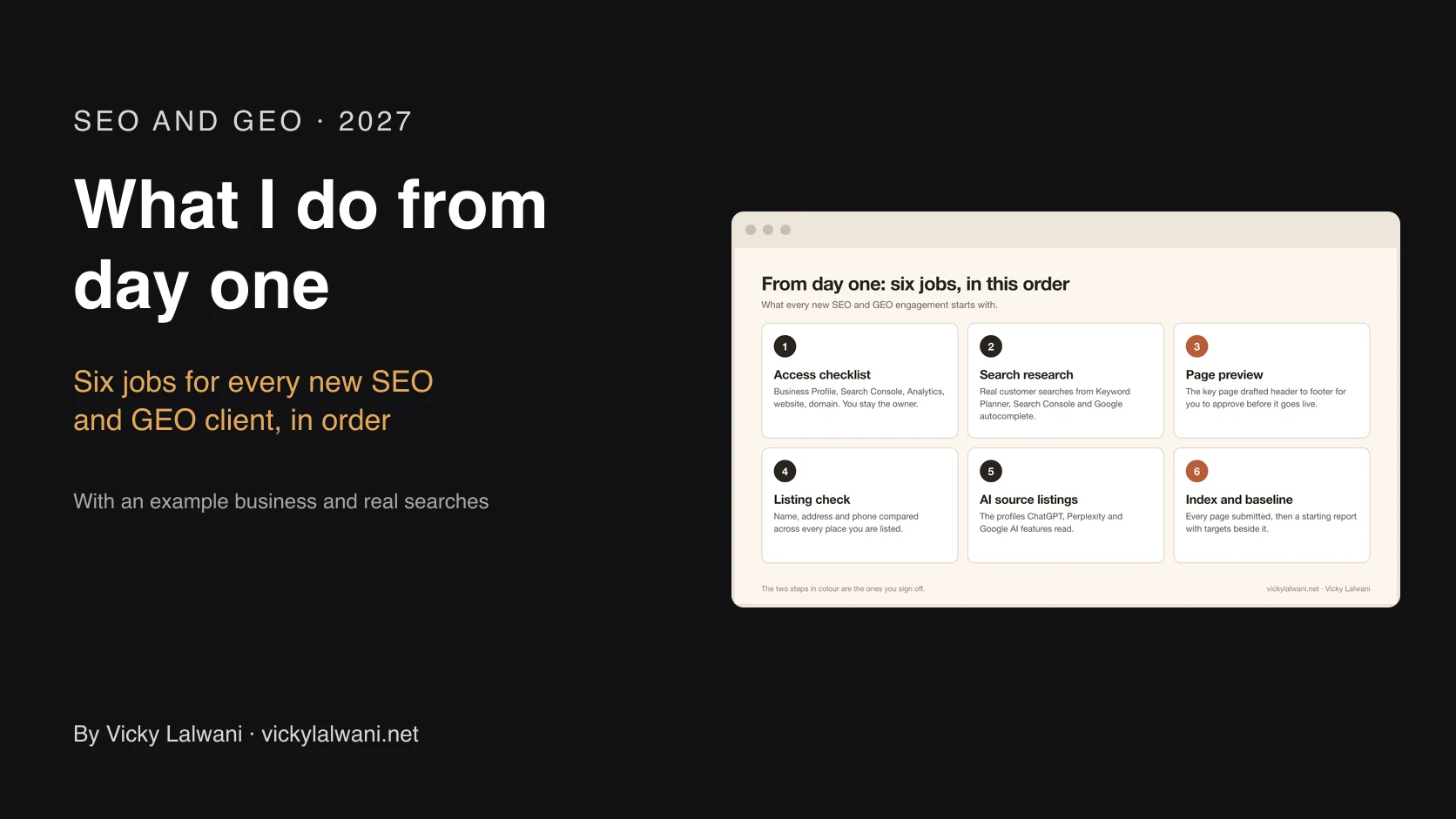
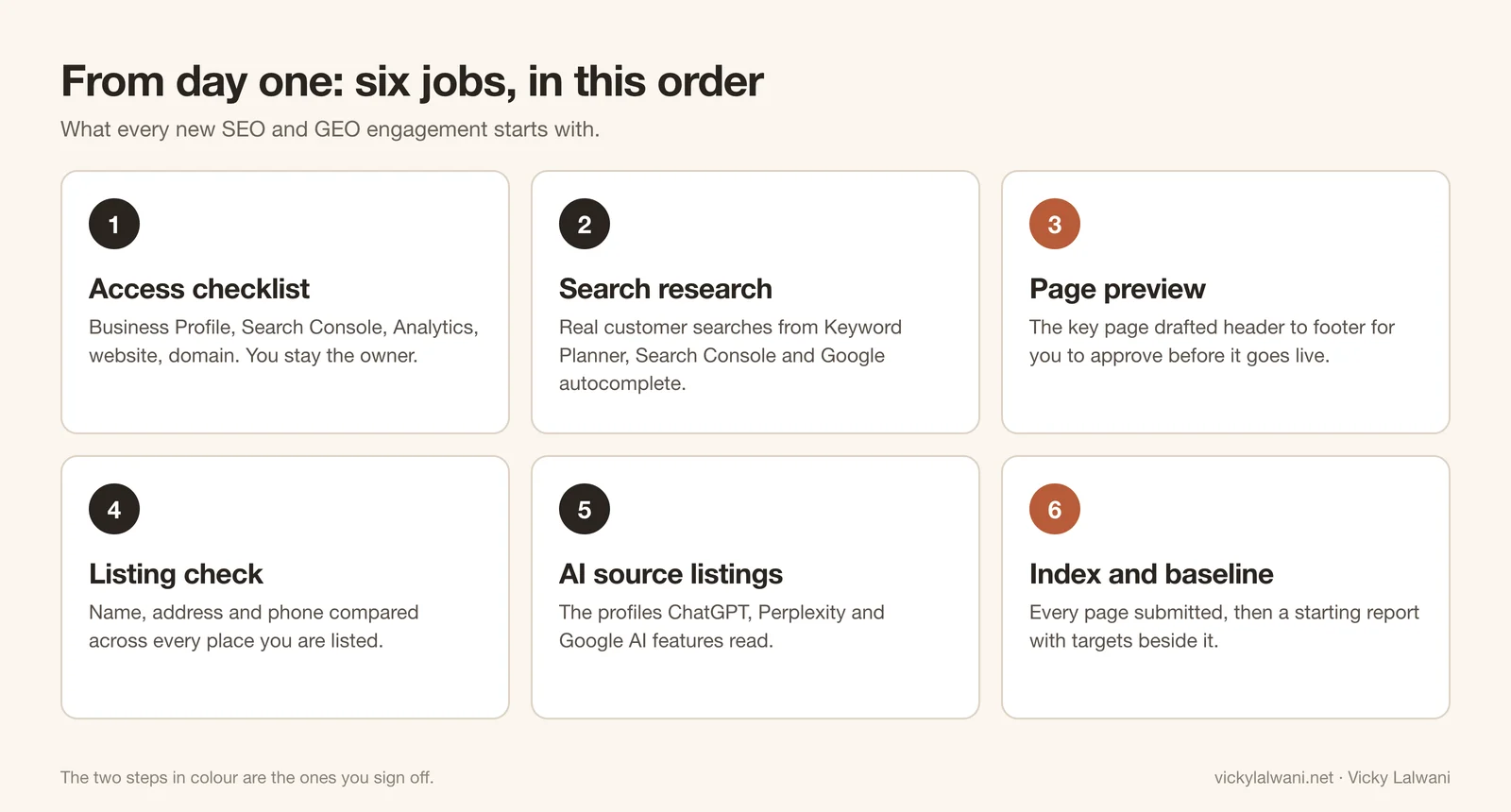
From day one, Vicky Lalwani starts every SEO and GEO engagement with six jobs in a fixed order: an access checklist where the client stays the owner of every account, research into the searches customers really use, a page preview drafted from header to footer, a name, address and phone check across every listing, profiles on the sources AI assistants read, and indexing plus a starting report with targets. The article shows each step on a fictional example business, using real Google suggestions.
You sign an SEO consultant. Two weeks later you have an invoice and a long audit PDF, and nothing on your website has changed. You can't tell whether work has started, what they can see in your accounts, or what "good" will look like in three months.
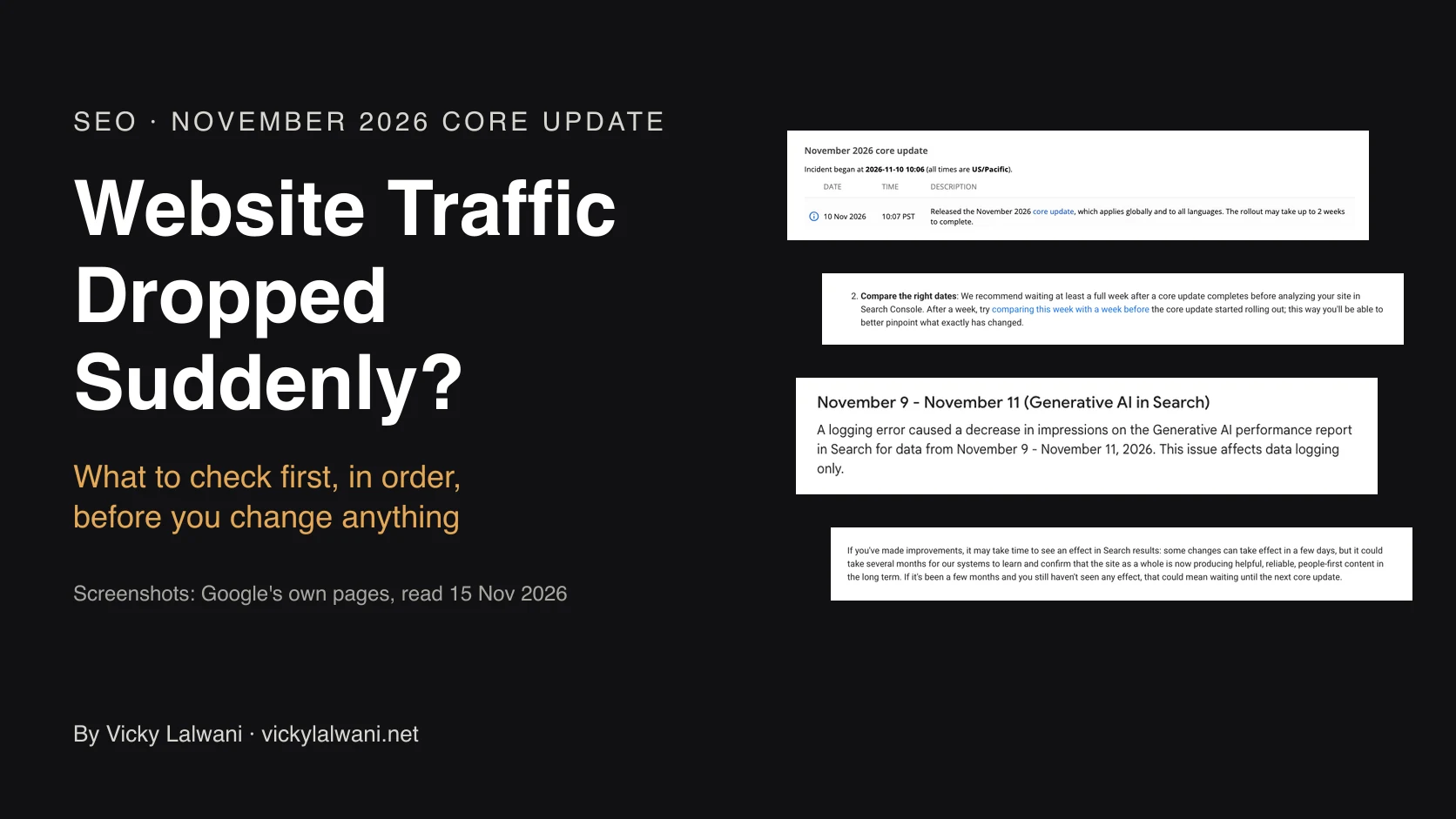
New: traffic fallen since Google's November 2026 update? What to check first when website traffic drops suddenly gives the order of checks and what Google says about recovery.
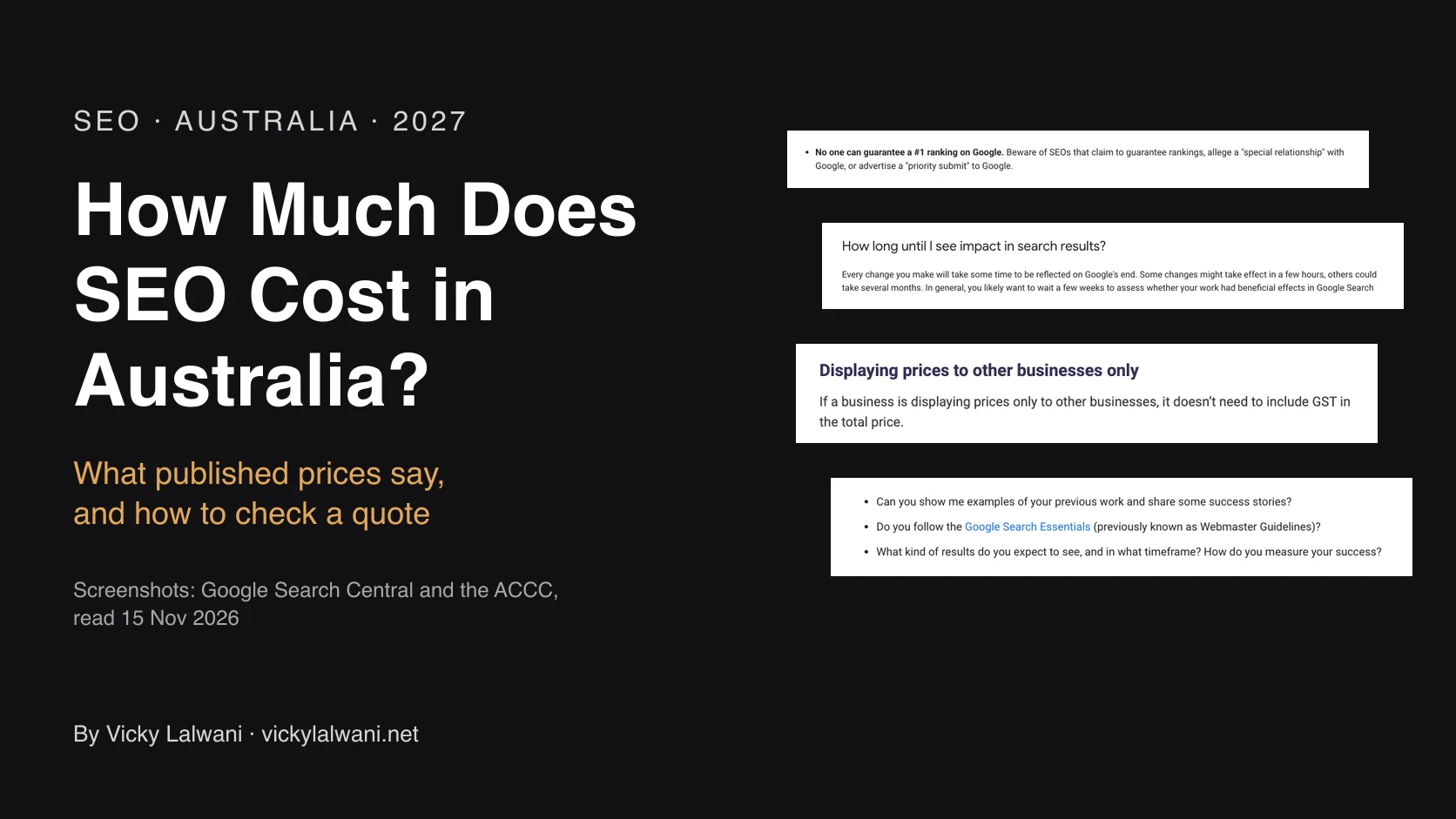
New: comparing quotes? How much SEO costs in Australia shows what published price pages print and how to check a quote line by line.
That gap is why I work in a fixed order from day one, and why you can see each step. This page walks through the six jobs every new SEO and GEO engagement starts with, using an example business so you can judge the work for yourself.
TL;DR
| Step | What I do | What you get |
|---|---|---|
| 1. Access checklist | Ask for user access to Business Profile, Search Console, Analytics and your website | One list to work through. You stay the owner of every account |
| 2. Search research | Pull the words your customers really type, from Keyword Planner, Search Console and Google autocomplete | A keyword map: which search goes to which page |
| 3. Page preview | Draft the key page from header to footer around those searches | A page you can read and approve before anything goes live |
| 4. Listing check | Compare your name, address and phone across every place you're listed | A table of what matches, what's wrong and what's missing |
| 5. AI source listings | Claim or fix the profiles that ChatGPT, Perplexity and Google's AI features read | Accurate profiles on the sources that studies show get cited |
| 6. Index and baseline | Submit every page, then record where you stand today | A starting report with targets beside each number |
Jump to: About the example · Access · Research · Page preview · Listing check · AI sources · Starting report · Limits · Do it yourself
About the example in this article
I don't publish client names or client screens. So the example here is a business I made up: Bayline Removals, a furniture removals business in one city. The pages and reports below were built for this article, and the numbers in the example report are illustrative.
Two things are real. The searches come from Google autocomplete for that city, collected on 12 November 2026. The method is the same wherever your business is. And every claim about how Google and AI assistants work links to its source in the table at the end.
Step 1: one access checklist, and you stay the owner
A slow start usually comes down to access. The consultant asks for one login, then another a week later, and the first month disappears. So on day one I send a single checklist with every account I need and the exact level of access for each.
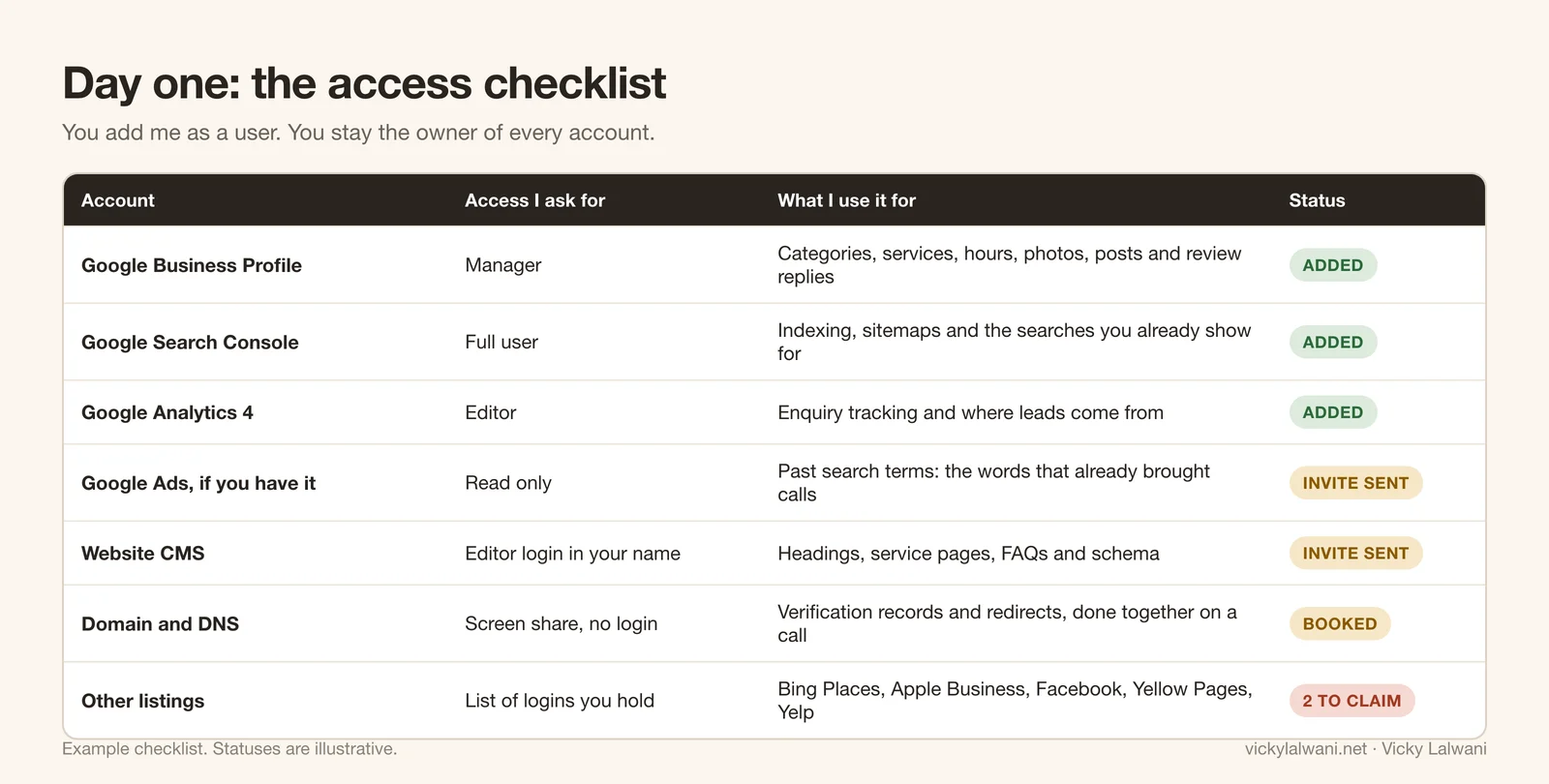
The rule behind the list is simple: you add me as a user, and you stay the owner. I don't create your accounts under my email, and I don't ask for your passwords. If we stop working together, you remove one user and keep your history, your data and your listings.
| Account | Access I ask for | Why |
|---|---|---|
| Google Business Profile | Manager | Categories, services, hours, photos, posts and review replies |
| Google Search Console | Full user | Indexing, sitemaps and the searches you already appear for |
| Google Analytics 4 | Editor | Enquiry tracking, so we count calls and forms, not just visits |
| Google Ads, if you run it | Read only | The search terms that have already produced enquiries |
| Website | An editor login in your name | Headings, service pages, FAQs and schema |
| Domain and DNS | A shared screen, no login | Verification records and redirects, done together on a call |
If you don't have Search Console or Analytics yet, that becomes the first job: I set them up inside your Google account, with you as owner.
Step 2: research what your customers really search
A common mistake on small business sites is wording that comes from inside the business, or from a template. The page says "Our Services". The customer typed "piano removalists" and the name of their city.
So before anything is written, I collect the real searches from three places:
- Google Keyword Planner, which shows average monthly searches for a phrase and its close variants. Google rounds these figures, so I treat them as a guide to size, not an exact count (Google Ads Help).
- Your Search Console, which shows the searches your site already appears for, including the ones sitting on page two.
- Google autocomplete, which shows how people finish a phrase. It gives no volumes, but it's a fast, free check of real wording.
Here's what Google suggested for the example trade on 12 November 2026, and where each phrase belongs.
| What I typed | What Google suggested | Where it goes |
|---|---|---|
| removalists brisbane | removalists brisbane northside, removalists brisbane southside, removalists brisbane city, removalists brisbane cost | Home page H1, plus an areas section using "northside" and "southside" |
| removalists brisbane to | to melbourne, to sunshine coast, to gold coast, to mackay, to townsville, to cairns, to canberra | One route page for each, linked from the home page |
| piano removalists brisbane | piano removalists brisbane northside, piano removalists brisbane cost, piano removals brisbane | A piano removals service page with a pricing explanation |
| small removalists brisbane | small removals brisbane, small removals brisbane prices, mini removalists brisbane | A small removals service page |
| are removalists | are removalists cheaper on weekdays, are removalists more expensive on weekends, are removalists liable for damage | FAQ section, answered in two or three sentences each |
| do removalists | do removalists disassemble furniture, do removalists work on weekends, do removalists pack for you, do removalists take pot plants | FAQ section and the packing service page |
| how much do removalists cost | how much do removalists cost brisbane, how much do removalists cost melbourne, how much do removalists cost sydney | A pricing page that explains how quotes work |
One finding worth a second look: Google suggests both "removalists brisbane" and "movers brisbane". Autocomplete can't tell you which is bigger. That's what Keyword Planner is for, and it's why I check volumes before choosing the heading instead of guessing. Wording also changes by country: the same trade is searched as “removalists”, “movers” or “removals” depending on where your customers are. Google's own starter guide gives the same advice in plainer words: think about the words a person might type to find your content (Google SEO Starter Guide).
Step 3: the page preview, header to footer
Research is only useful once it's on the page. So the next thing you get is a preview of your most important page, drafted from the first line to the footer, that you can read and mark up before anything goes live.
Here's the difference it makes. Both versions below belong to the same example business.
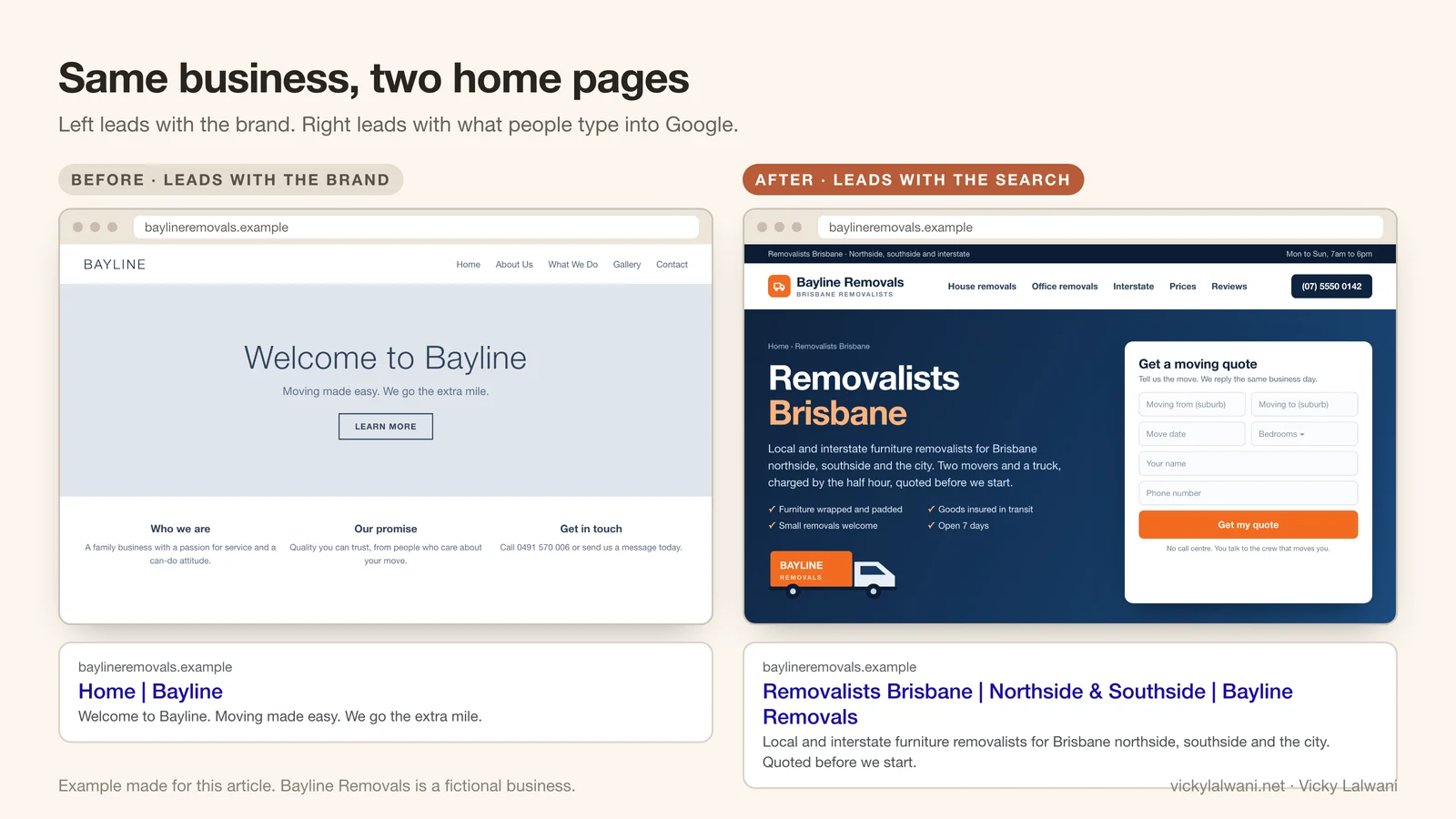
The left page leads with the brand: "Welcome to Bayline". Nobody searches for that unless they already know the business. The right page leads with the search: the service, then the city. Your brand name still appears in the logo, the title and the footer. It just stops taking the one line that matters most.
The full preview looks like this. Each numbered block has a job.
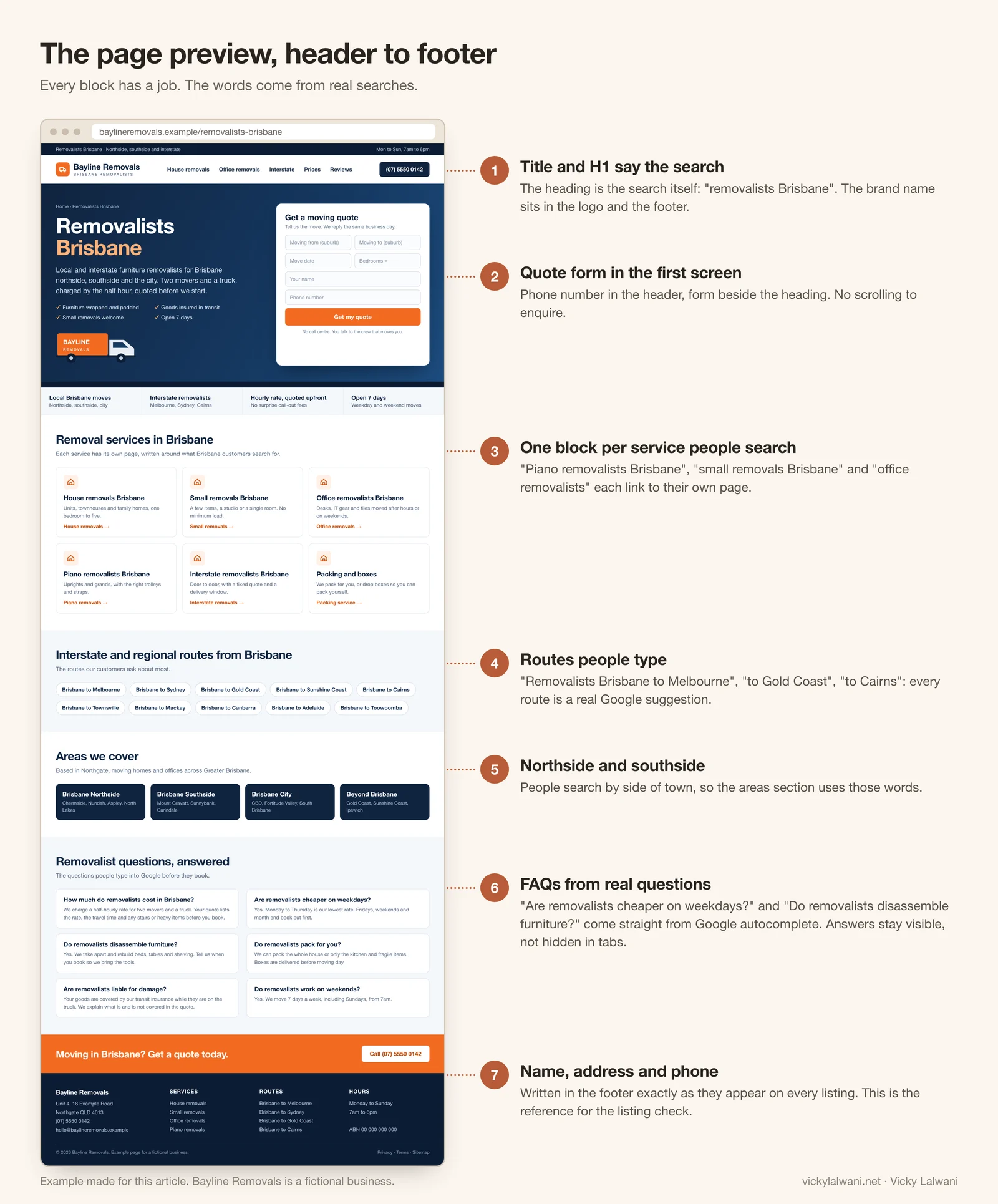
- Title and H1 say the service and the place.
- The enquiry form and phone number sit in the first screen.
- Each service people search for gets its own block and its own page.
- Routes and areas use the words from autocomplete: the side of town, and the routes people type.
- FAQs answer the questions Google suggests, and the answers stay visible on the page instead of hiding in tabs.
- The footer carries the business name, address and phone exactly as they should appear everywhere else.
Who builds it? If your site runs on WordPress, Shopify, Webflow or similar, I make the changes with the editor login from step 1. If you have a developer, they get the preview plus a written hand-off, and I check the live page afterwards.
I did the same thing on this site. On 12 November 2026 I changed my own location page headings from the pattern "consultant for [city] businesses" to "consultant [city]", and my footer links from the city name alone to the service plus the city. It's too early to report a result. I'll add the Search Console numbers here once there are 28 days of data.
Step 4: the listing check
Your business is described in more places than you remember: Google, Bing, Apple Maps, Facebook, directories you signed up for years ago. If one adds "Ltd" or "LLC" to the name, another has your old address and a third shows a mobile number you no longer answer, customers get confused, and so do the systems that read those listings.
So I compare every listing against one reference: the name, address and phone in your website footer.
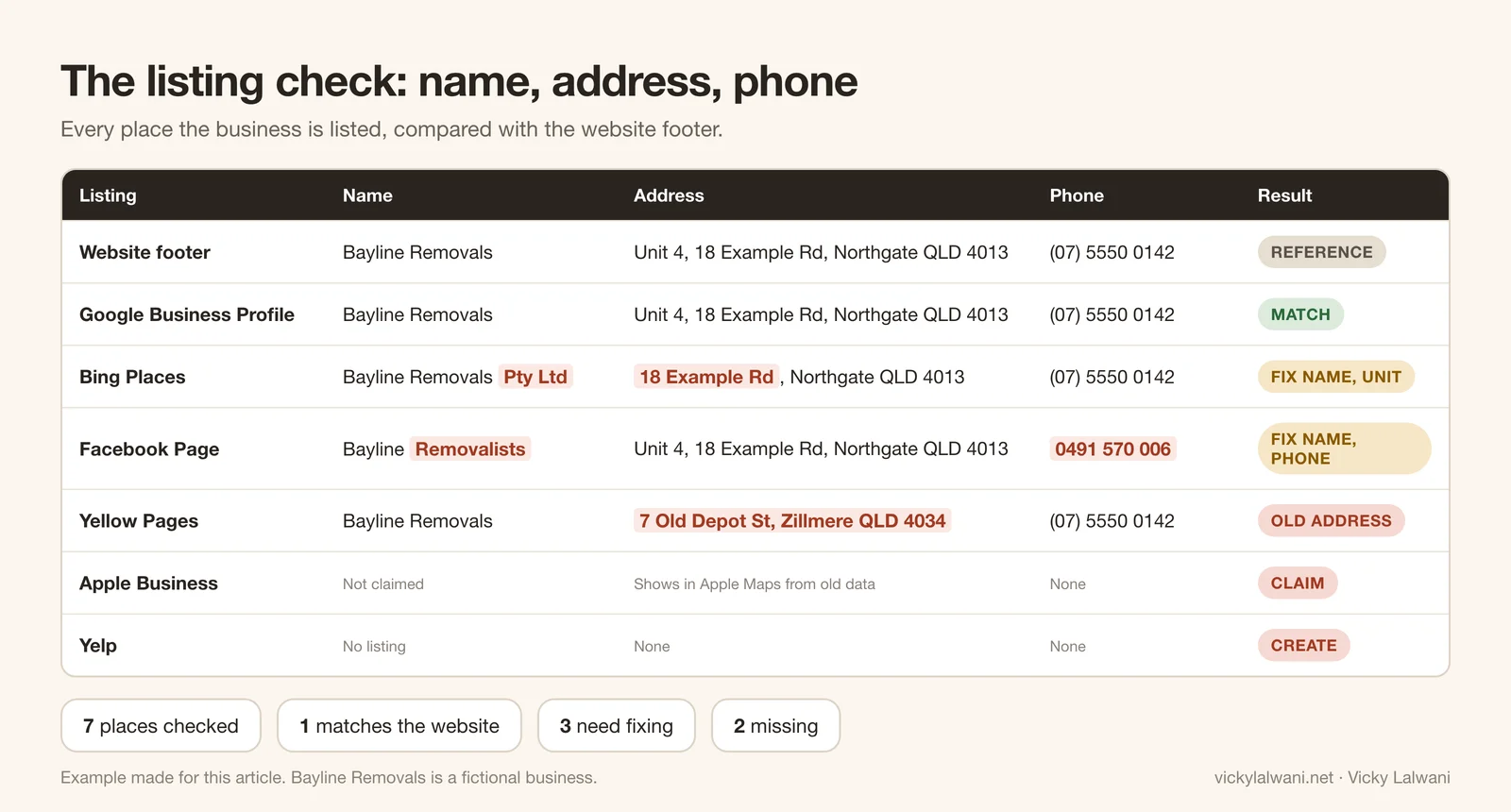
What the sources say about why this matters:
- Google says businesses with complete and accurate information are more likely to show up in local results (Google Business Profile Help).
- Google's guidelines ask you to represent the business the way it's consistently represented in the real world: signage, stationery, branding (Google guidelines).
- For the legal name, the reference is your country's official business register. I check your trading name against it before fixing anything.
The honest limit: matching listings won't rank you by themselves. In Whitespark's 2026 Local Search Ranking Factors survey, published in November 2025, experts again gave citations slightly less weight than the year before. The same survey found that three of the top five factors for AI search visibility are citation factors, and the experts quoted in it disagree on how much weight to give them (Whitespark). My read: it's cheap hygiene, it removes a real source of customer confusion, and it feeds step 5. It isn't a growth strategy.
Step 5: get listed where AI assistants look
When someone asks ChatGPT for "a good removalist near me", the answer is assembled from sources. If your business is missing from those sources, or described wrongly in them, you're unlikely to be named.
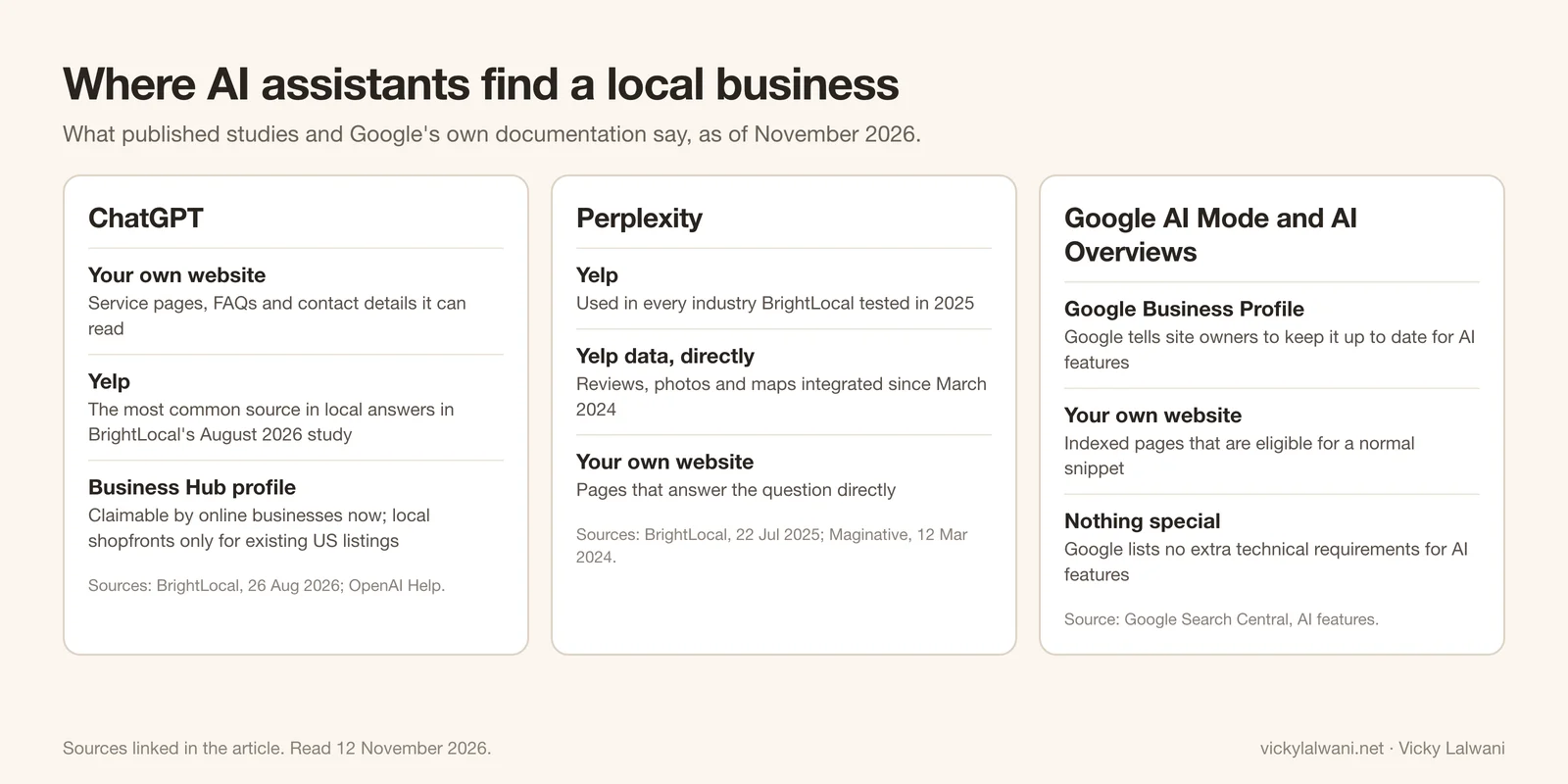
| Assistant | What the evidence says | Source |
|---|---|---|
| ChatGPT | Yelp was the most common source in local answers, in a study of 1,355 business locations across three countries. Tripadvisor and OpenTable followed | BrightLocal, 26 Aug 2026 |
| Perplexity | Used Yelp in every industry tested. Perplexity has pulled Yelp reviews, photos and maps directly since March 2024 | BrightLocal, 22 Jul 2025; Maginative |
| Google AI Mode and AI Overviews | Google tells site owners to keep Business Profile information up to date, and lists no extra technical requirements for AI features | Google Search Central |
From that, the listing set I work through is:
- Google Business Profile, fully filled in: categories, services, hours, photos.
- Bing Places, which Bing said in October 2025 is moving to bing.com/forbusiness (Bing).
- Apple Business, the new name for Apple Business Connect since April 2026, which feeds Apple Maps (Apple).
- Yelp, because of how often the studies above found it cited.
- Your Facebook Page, plus the one or two directories that matter in your country and your trade.
- ChatGPT Business Hub, where you qualify. Online businesses can claim a profile now. Local shops can currently claim only existing US listings, so local businesses elsewhere will need to wait. I've covered that in how to get your business on ChatGPT.
The honest limit: no listing guarantees a mention. These studies describe which sources were cited, not a formula. Your own website is still the source you control, which is why step 3 comes first. And I publish my own numbers: when I first tested this site, vickylalwani.net appeared in 0 of 21 ChatGPT answers. That baseline is in my Claude desktop guide, and it's the kind of starting number you'll get in step 6.
Step 6: index every page and send the starting report
A new page does nothing until search engines know it exists. Once the pages are live and the listings are fixed, I submit everything:
- A sitemap in Search Console and Bing Webmaster Tools. Google says a sitemap doesn't guarantee every page gets crawled and indexed, but most sites benefit from one (Google).
- URL Inspection requests in Search Console for the key pages. There's a daily limit, a request doesn't guarantee indexing, and crawling can take from a few days to a few weeks (Search Console Help; Google).
- IndexNow for Bing and the other engines that support it, which include Yandex, Naver, Seznam and Yep. Google isn't on the list (IndexNow).
I use the same setup on this site. On 12 November 2026, after the heading change in step 3, I sent 73 changed pages through IndexNow in one request and the endpoint accepted all of them. Accepted means received, not ranked. It does mean Bing isn't waiting to stumble on the change.
Then comes the part that makes the work measurable: a starting report. It records where you stand before the work has had time to do anything, with a target beside each number.
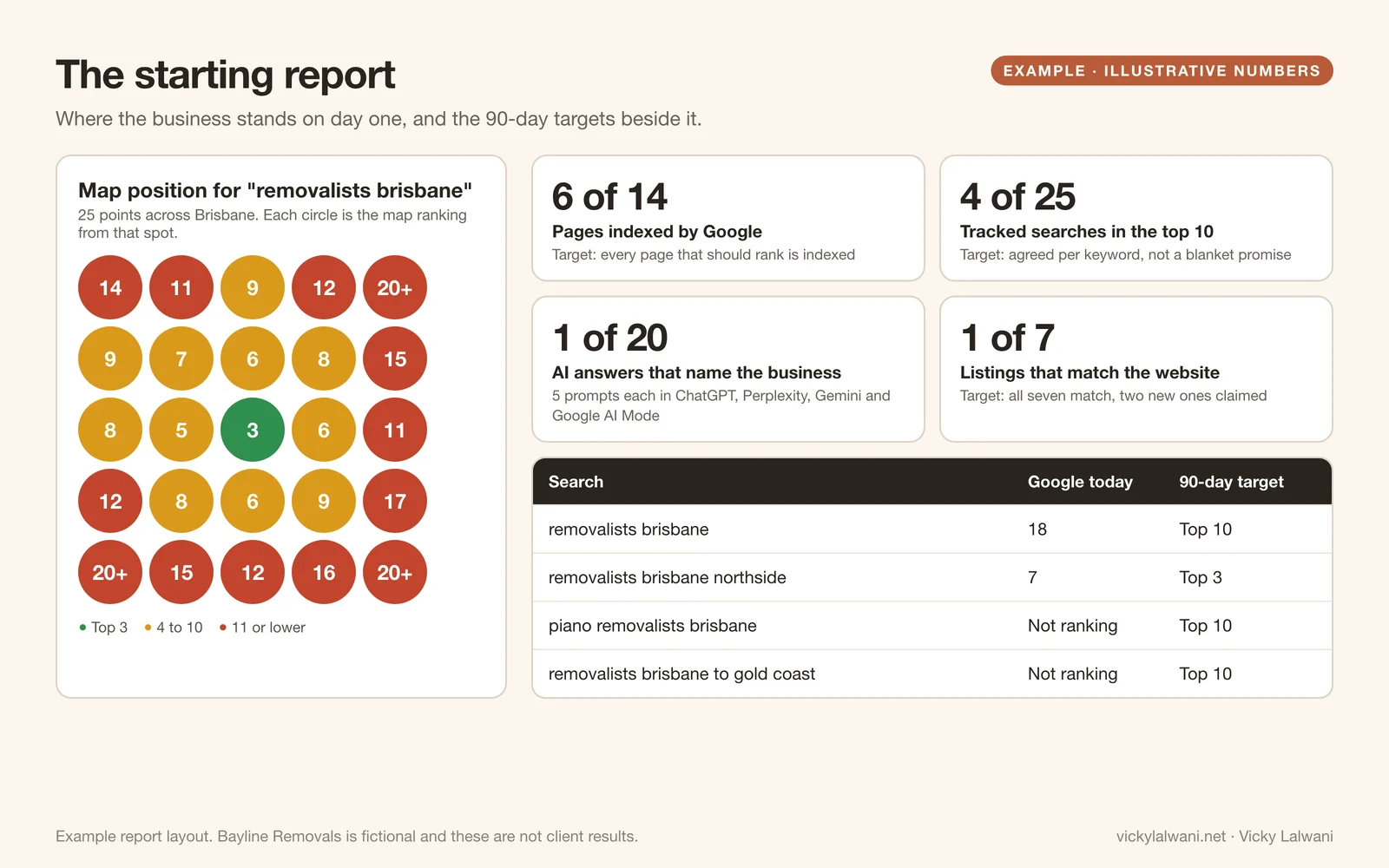
It covers five things:
- Map positions for your main search, checked from points across your service area, because map rankings change from one area to the next.
- Pages indexed against pages that should be.
- Tracked searches and today's position for each.
- AI answers: a fixed set of prompts run in ChatGPT, Perplexity, Gemini and Google AI Mode, counting how often the business is named.
- Listings that match the website.
The targets are targets. I agree them with you per search, and I don't promise positions, because nobody controls Google. What the report gives you is a fair way to judge the work: the same checks, run again, against the same starting line.
What day one can't do
- It can't rank you this week. Google's starter guide says some changes take effect in a few hours and others can take several months (Google). A Google video from 2017 put it at four months to a year for an SEO to implement improvements and for you to see the benefit (Search Engine Roundtable).
- It can't replace reviews, links and reputation. A clear page and clean listings make you eligible. Being chosen over a competitor still depends on how well known and well reviewed you are.
- It can't fix tracking that doesn't exist. If calls and forms aren't measured, the first report can show rankings but not enquiries. That's why Analytics is on the checklist.
- It can't make AI assistants name you. The sources are known. The selection isn't yours or mine to control.
After the first six jobs, the work moves to the long part: more service and area pages, reviews, links, and weekly improvements with plain-English reporting. My engagements run for a minimum of three months, then month to month.
Do it yourself: the short version
You can run the same sequence without me. In order:
- List every account that touches your search presence, and confirm you are the owner of each.
- Type your main service and city into Google and write down every suggestion. Repeat with "to", "cost", "are" and "do" after your trade.
- Rewrite your main page so the title and H1 say the service and the place. Add a visible FAQ using the questions you found.
- Put your name, address and phone in the footer, then make every listing match it.
- Claim Google Business Profile, Bing Places, Apple Business and Yelp.
- Submit your sitemap, request indexing for the key pages, and write down today's positions before you change anything else.
Want this done for your business?
This is the start of every engagement I take on, for SEO, for GEO or for both. If you'd like the checklist, the page preview and the starting report for your own business, book a free strategy call, or choose "Quick call with Vicky" on the form and I'll ring you. You keep every account and everything I build.
Related services: SEO consultant, GEO and AI search, marketing for home services and analytics and tracking.
Sources
| Source | What it covers | Date | Link |
|---|---|---|---|
| Google autocomplete | The searches in the step 2 table, for the example city | Collected 12 Nov 2026 | google.com |
| Google Ads Help | What average monthly searches means in Keyword Planner | Read 12 Nov 2026 | support.google.com |
| Google Search Central | SEO Starter Guide: wording, titles, how long changes take | Read 12 Nov 2026 | developers.google.com |
| Google Business Profile Help | Local ranking and accurate business information | Read 12 Nov 2026 | support.google.com |
| Google Business Profile Help | Guidelines for representing your business | Read 12 Nov 2026 | support.google.com |
| Whitespark | 2026 Local Search Ranking Factors survey | 6 Nov 2025 | whitespark.ca |
| BrightLocal | Which directories AI tools cite for local businesses | 26 Aug 2026 | brightlocal.com |
| BrightLocal | Listing sources used by AI search tools | 22 Jul 2025 | brightlocal.com |
| Maginative | Perplexity's Yelp data integration | 12 Mar 2024 | maginative.com |
| Google Search Central | AI features and your website | Read 12 Nov 2026 | developers.google.com |
| Bing | Bing Places moving to bing.com/forbusiness | 3 Oct 2025 | blogs.bing.com |
| Apple | Apple Business replacing Apple Business Connect | 25 Mar 2026 | apple.com |
| Search Console Help | URL Inspection limits and no indexing guarantee | Read 12 Nov 2026 | support.google.com |
| Google Search Central | Asking Google to recrawl, and sitemaps | Read 12 Nov 2026 | developers.google.com |
| IndexNow | Which search engines take part | Read 12 Nov 2026 | indexnow.org |
| Search Engine Roundtable | Google's "four months to a year" video, 2017 | 16 Feb 2017 | seroundtable.com |
Keep reading: how to get your business on ChatGPT, how to get recommended by ChatGPT and what generative engine optimisation is.
FAQ
What does an SEO consultant do?
An SEO consultant finds the searches your customers use, rebuilds your pages and listings around them, makes sure search engines can index the result, and reports on positions and enquiries. In the first weeks that means access, research, a page preview, a listing check and a starting report.
What does an SEO consultant do on day one?
On day one I send a single access checklist so you can add me as a user to Google Business Profile, Search Console, Analytics and your website while you stay the owner. Research into the searches your customers really use starts the same day.
How long does SEO take to work?
Google's starter guide says some changes take effect in a few hours and others can take several months. A Google video from 2017 put it at four months to a year for a business to see the benefit. The starting report gives you a fixed line to measure against.
What is included in SEO services?
Mine start with six jobs: an access checklist, search research, a page preview, a name, address and phone check across your listings, profiles on the sources AI assistants read, and indexing plus a starting report. After that it's new pages, reviews, links and weekly improvements.
What is the difference between GEO and SEO?
SEO is about ranking in search results. GEO, generative engine optimisation, is about being named or cited in answers from ChatGPT, Perplexity, Gemini and Google's AI features. They share most of the groundwork, which is why I set up both together.
Do I keep ownership of my accounts and website?
Yes. You add me as a user on your Google Business Profile, Search Console, Analytics and website, and you remain the owner. If we stop working together you remove one user and keep everything, including the pages I built.
Is Bayline Removals a real business?
No. Bayline Removals is a fictional removals business made up for this article, and the numbers in its example report are illustrative. The searches shown are real Google suggestions collected on 12 November 2026.
Can you guarantee a number one ranking?
No, and nobody honestly can, because nobody controls Google or the AI assistants. What I commit to is the work in a fixed order, targets agreed per search, and a report that runs the same checks against the same starting line.