An AI SEO system is one connected workflow where research feeds briefs, briefs feed content and internal links, and a weekly report shows what to do next. Build it in Claude with a Project for context, Skills for repeat jobs and connectors to Search Console and GA4. Google says optimising for AI Overviews and AI Mode is still SEO, so no separate AEO track is needed.
TL;DR
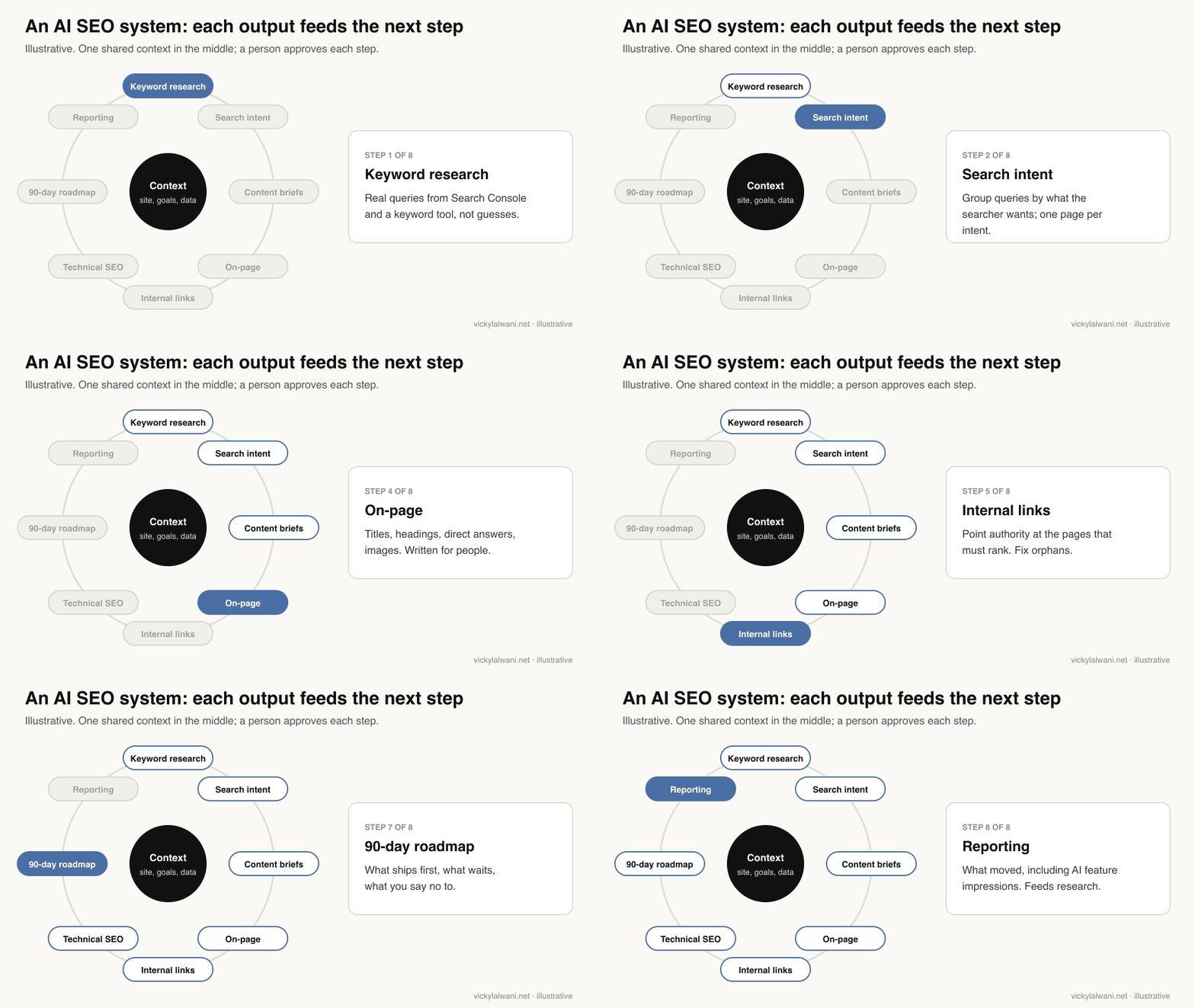
An AI SEO system is one connected workflow, not a pile of tools: keyword research feeds intent, intent feeds briefs, briefs feed on-page work and internal links, technical fixes keep it crawlable, and a weekly report feeds the next round. Claude does the reading, sorting and drafting; a person makes every decision that changes the site.
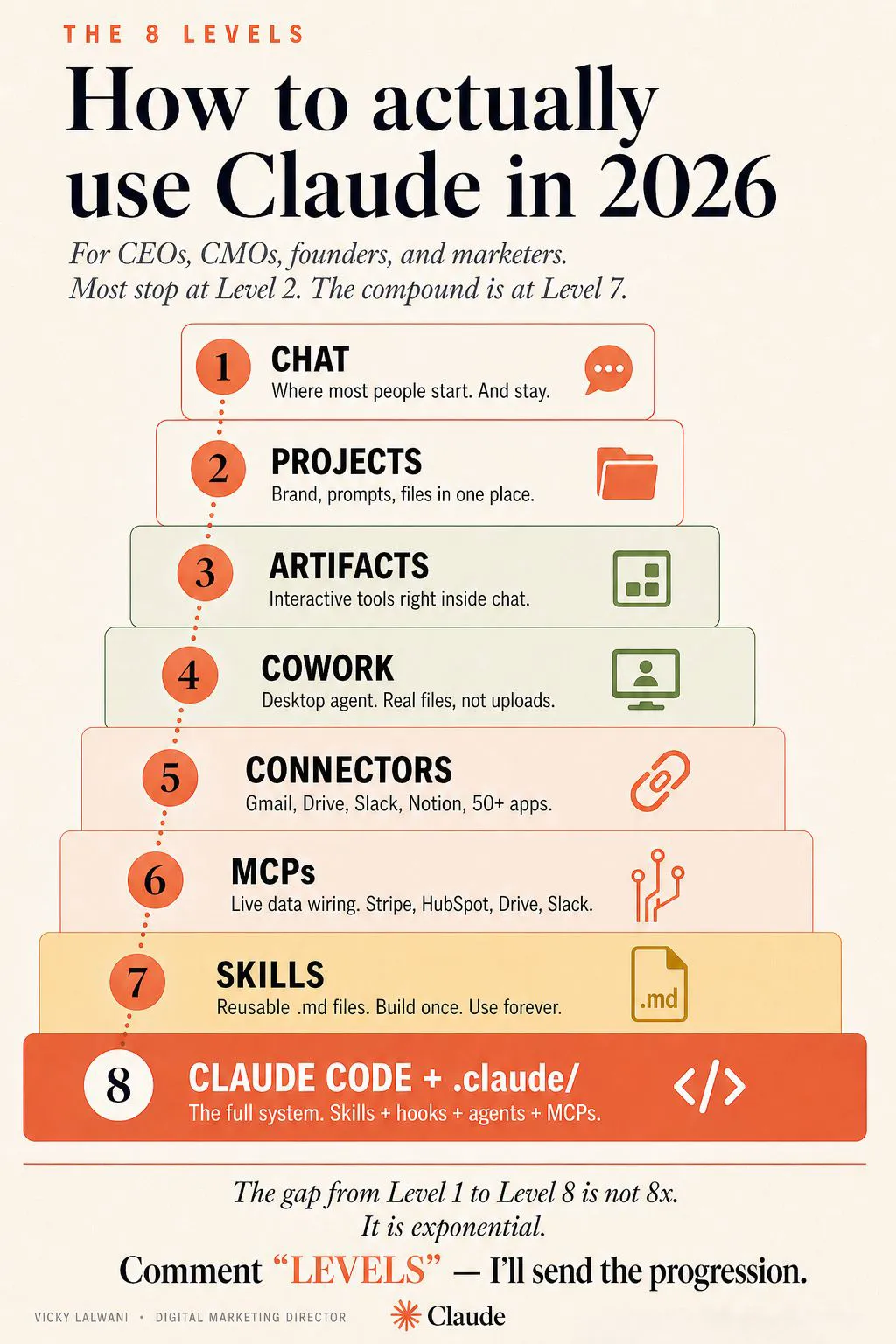
Build it in Claude with three pieces: a Project holding your site context, Skills for repeatable jobs, and connectors (MCP) to Search Console and GA4 data. Then add a weekly scheduled task that writes the report and changes nothing.
Google's own guide, published in May 2026, says optimising for AI Overviews and AI Mode "is still SEO". So the system does not need a separate AEO or GEO track. It needs good SEO, plus a way to measure AI feature impressions, which Search Console now reports.
Short answer: to build an AI SEO system, put one AI workspace at the centre of eight connected functions (keyword research, search intent, content briefs, on-page, internal linking, technical SEO, a 90-day roadmap and reporting), give it your real Search Console and analytics data, and run the reporting step on a schedule. Each function feeds the next, so the work adds up instead of restarting every month.
I wrote the first version of this after 8+ years in search and paid media, and the core view has not changed: the tool stopped being the edge the day everyone got the same one. What has changed since then is the evidence. Google has published guidance on AI search, retired FAQ rich results, and added AI reports to Search Console, and Claude has added scheduled tasks. This update brings the method in line with all of that, checked on 18 November 2026.
If you would rather have the system built and run for your site, that is the work I do as an SEO consultant. If you want the skill files first, see Claude skills for SEO.
What is an AI SEO system?
Short answer: one workflow where the output of each SEO job becomes the input of the next, with an AI assistant doing the manual reading and drafting and a person approving the decisions. The opposite is a stack of separate tools whose exports you stitch together by hand every month.
Picture the usual month. You export queries from Search Console, paste them into a keyword tool, copy a list into a brief, write the page, forget to link to it, and in the next report nobody remembers why the page exists. Every step works; the chain does not. A system fixes the chain.
| Function | Takes in | Hands on | AI does | You decide |
|---|---|---|---|---|
| Keyword research | Search Console, keyword tool | Query list | Pulls, cleans, groups | Which terms matter |
| Search intent | Query list | Clusters, one page each | Reads the results pages | Page type per cluster |
| Content briefs | Cluster, top results | Brief | Finds gaps | The angle |
| On-page | Brief, draft | Published page | Checks titles, headings | What goes live |
| Internal links | Crawl, money pages | Link plan | Finds orphans | Anchors and targets |
| Technical SEO | Crawl, Core Web Vitals | Ranked fix list | Sorts by impact | What developers do |
| 90-day roadmap | All of the above | Plan | Drafts the order | What you say no to |
| Reporting | Search Console, GA4 | Weekly note | Writes the summary | Next week's priority |
Do you need separate AEO and GEO work in 2026?
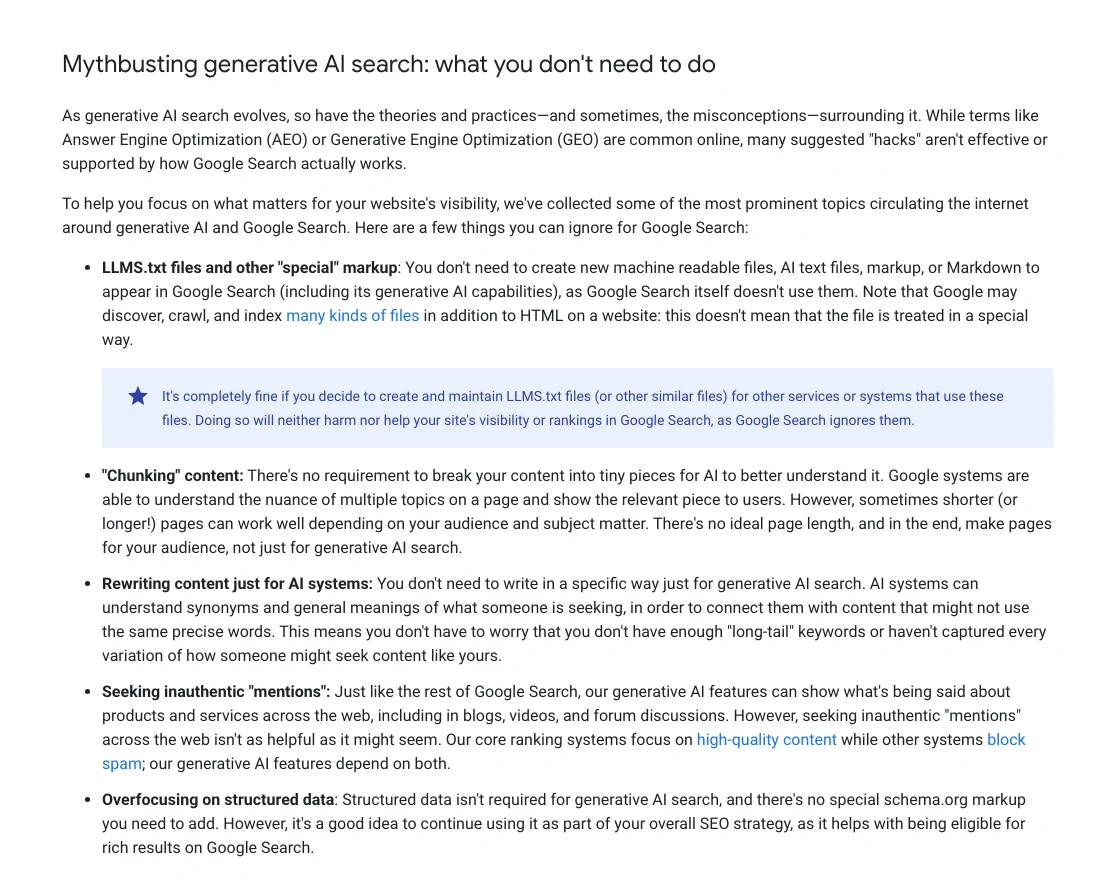
Short answer: not for Google. Its May 2026 guide says AI Overviews and AI Mode are built on the same ranking and quality systems as normal Search, that optimising for them "is still SEO", and that llms.txt files, content "chunking" and special AI markup are not needed. Other AI assistants have their own rules, but the same fundamentals help there too.
My earlier version of this article split the work into three layers: SEO for classic results, AEO for being the cited answer, GEO for visibility inside generative results. That framing was common, and plenty of vendors still sell it. Google has since answered it directly.
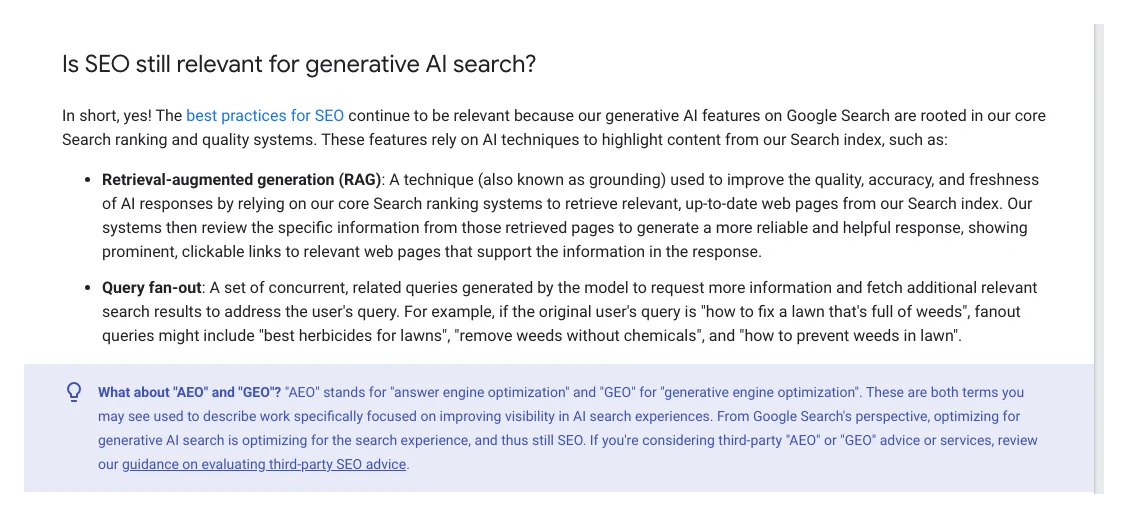
So I would still use the words AEO and GEO with clients, because buyers search for them, but I no longer run them as a separate track in the system. What changes is measurement and emphasis, not the method.
| Common advice | Google's position, Nov 2026 | What the system does |
|---|---|---|
| Add an llms.txt file | Google Search ignores it | Optional, for other tools only |
| Chunk pages for AI | Not needed; no ideal length | Write for the reader |
| Special AI schema | None exists | Normal structured data |
| Add FAQ markup | FAQ rich results ended 7 May 2026 | FAQs for readers only |
| Pages for every fan-out query | Can be scaled content abuse | One strong page per intent |
| Chase brand mentions | Inauthentic mentions help less than you think | Earn them with useful work |

Why does AI search still deserve a place in the system, then? Because it changes what people do on the results page. Pew Research tracked the browsing of 900 US adults and found they clicked a normal result on 8% of visits when an AI summary appeared, against 15% when it did not, and rarely clicked the links inside the summary.
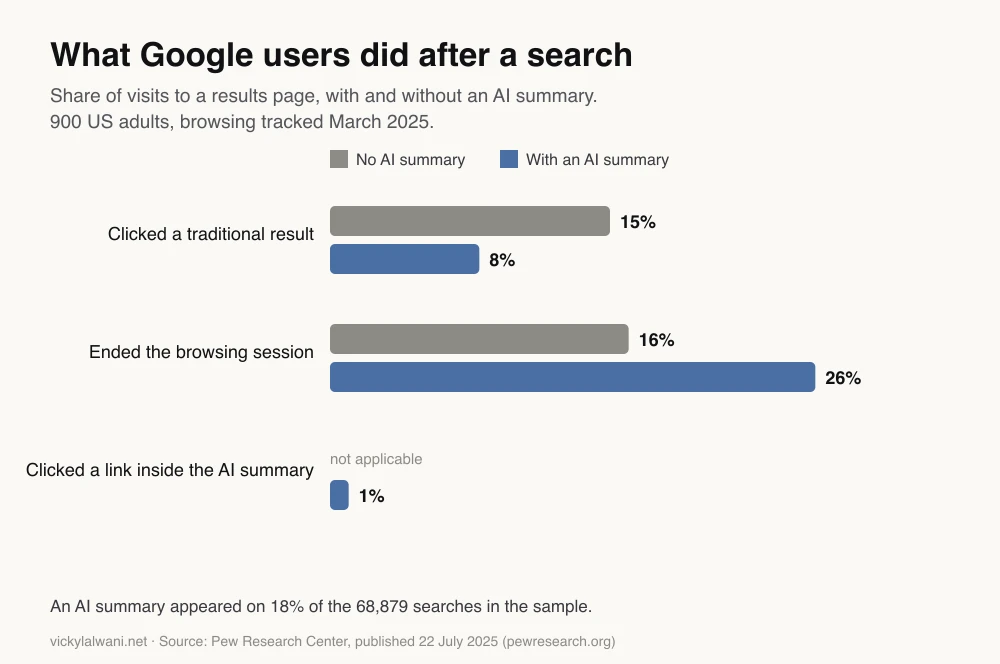
That is the real reason to build a system rather than chase rankings one page at a time: fewer clicks per search means each page has to earn more, and you need to see impressions in AI features, not only clicks, to know whether the work is landing.
What do you need in Claude before you start?
Short answer: a Project with a short context block about your site, a few Skills for jobs you repeat, and connectors to your data: Search Console (through a community MCP server or exports, since Google has not published an official one) and GA4 (Google publishes an official MCP server). Projects and Skills work on every plan; scheduled tasks need a paid plan.
| Layer | Claude feature | Plans (Nov 2026) | What it holds |
|---|---|---|---|
| Context | Projects | All; Free up to 5 | Site facts, goals, rules |
| Method | Skills | All, with code execution on | How each job is done |
| Data | Custom connectors (MCP) | All; Free limited to 1 | Search Console, GA4, tools |
| Rhythm | Scheduled tasks | Paid plans | The weekly report |
The biggest quality jump comes from the context block, and most people skip it. Generic SEO advice and a plan for your site differ mainly in what the AI knows before you ask. Keep it short and factual:
SITE CONTEXT (keep this in the Project instructions)
Domain and platform: [example.com, WordPress / Shopify / Next.js]
Market and language: [country, British or US English]
Business goal: [enquiries / sales / sign-ups], tracked as [GA4 key event name]
Money pages that must rank: [5 to 10 URLs]
Top competitors in search (not just in business): [3 to 5 domains]
Connected data: [Search Console property, GA4 property, keyword tool, crawler]
House rules: never invent search volumes or rankings; show the source and date range for every number; never publish or change the site without my approval.
Then connect your data. Live data is what turns advice into decisions. For GA4, Google's official Google Analytics MCP server is read-only by default. For Search Console there is no official Google server, so you either use a community server built on the Search Console API or work from exports. My MCP servers for SEO guide compares the options and how to keep them read-only.
In what order should you build the eight functions?
Short answer: technical foundations and reporting first, because they tell you what is broken and what is already close to winning; then research and intent, briefs and on-page, and internal links; then the roadmap that ties it together. The eight functions are not a menu. Each depends on the one before it.
| Stage | Build | First useful output |
|---|---|---|
| Week 1 | Context, data, reporting | Pages on page two; orphan pages |
| Week 2 | Technical audit | Top 10 fixes ranked by impact |
| Weeks 3 to 4 | Research and intent | Clusters mapped to pages |
| Weeks 5 to 6 | Briefs and on-page | Two improved money pages |
| Week 7 | Internal links | Link plan to money pages |
| Week 8 | 90-day roadmap | Ranked plan for the quarter |
Research and intent
Good keyword research is not a list of high-volume words. You want terms with intent, opportunity and a realistic path to ranking, grouped by intent and filtered against your actual authority. Start from queries Search Console already shows for your site; they are proof Google connects you with the topic. A rule I hold the AI to: no search volume without a named source, because language models will produce confident numbers that nobody measured.
Then map intent. Group the terms into pillars and clusters, and give each intent one page. Google's guide warns that making separate pages for every variation of a query, including the related searches its AI runs behind the scenes ("query fan-out"), can count as scaled content abuse. One strong page per intent is both safer and usually better.
Using the Search Console data for the last 3 months, list queries where we rank between positions 8 and 20 with at least [100] impressions. Group them by search intent. For each group, name the page on our site that should rank, or say "no page yet". Show the exact date range and do not add any query or volume that is not in the data.
Briefs and on-page
A brief should aim to beat what is already on page one, not match it. Have Claude study the current top results and find the gap first, then build the angle, outline, questions to answer and the examples only you can give. Google's guide is blunt that commodity content, the kind a model could write from what already exists, is not what it wants; first-hand experience is.
On-page checks still matter: titles written for clicks and rankings together, a clean H1 to H3 structure, a direct answer near the top of each section, useful images, and FAQs that answer real People Also Ask questions. Keep the FAQs for readers. Since 7 May 2026 FAQ markup no longer earns a rich result in Google.
Technical SEO and internal links
Technical SEO is the foundation: crawling and indexing, duplicate URLs, redirects and canonicals, structured data that is valid, and Core Web Vitals. Google's "good" thresholds are a Largest Contentful Paint within 2.5 seconds, an Interaction to Next Paint of 200 milliseconds or less, and a Cumulative Layout Shift of 0.1 or less, as web.dev sets out. Rank the fixes by impact so developers get a short list rather than a long report. The technical SEO audit automation article covers that step in detail.
Internal linking is the most under-used lever I know of. Links pass authority to the pages that need to rank, and they cost nothing. Map the site, find orphan pages with no internal links, and decide which pages should link to your money pages and with what anchor text.
How do you keep the system running after you publish?
Short answer: schedule a weekly task in Claude that reads Search Console and GA4, compares the last 28 days with the 28 before, and writes a short report with three lists: queries close to page one, pages losing clicks, and pages with no internal links. It drafts actions and changes nothing. A person approves what ships.
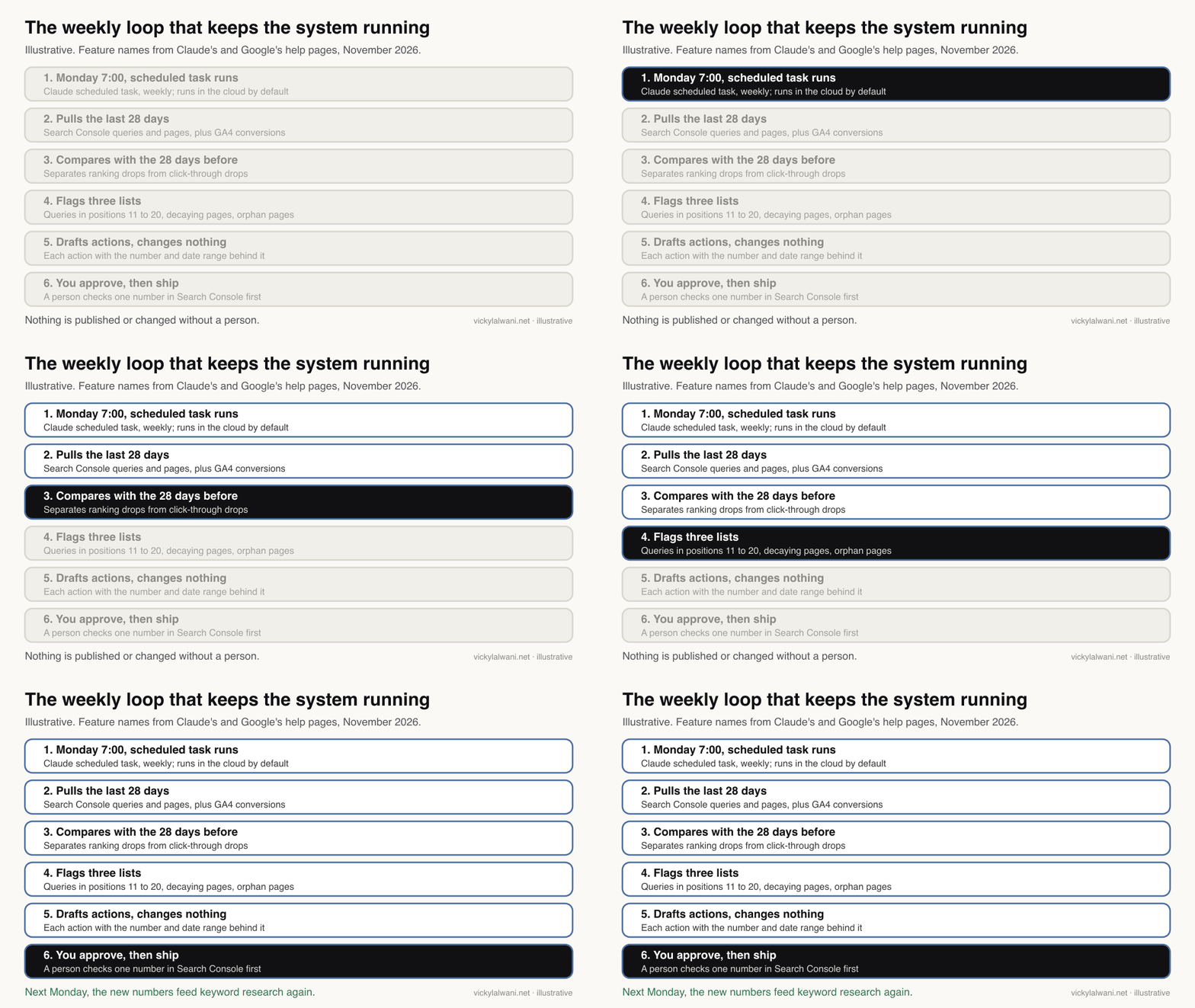
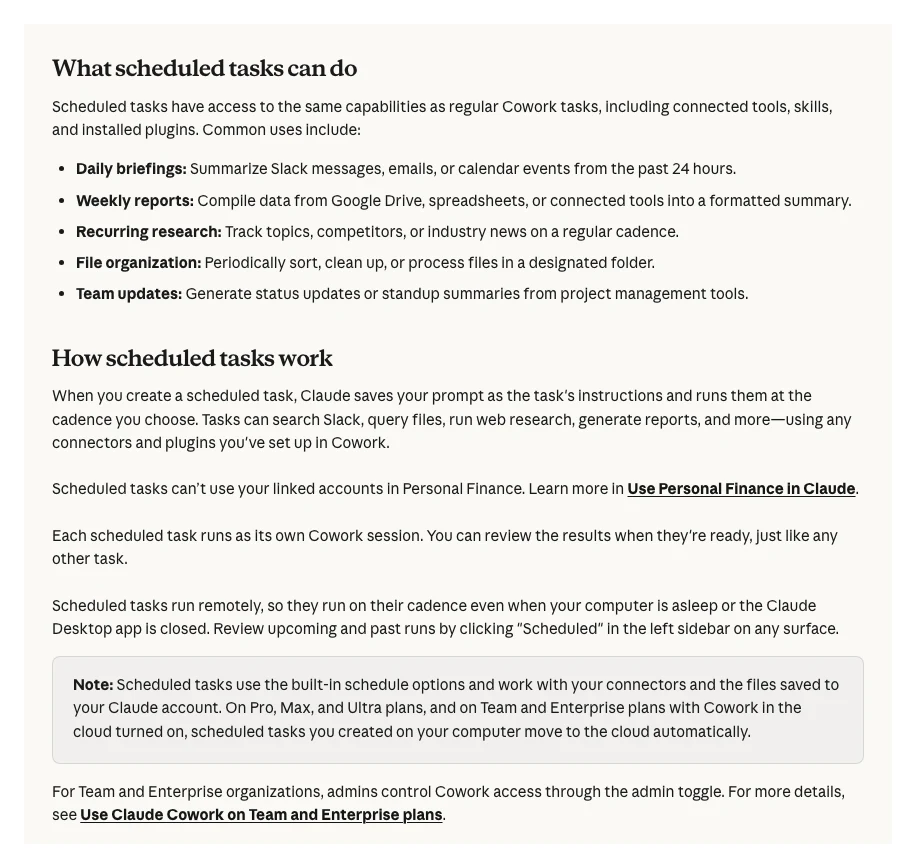
Claude's scheduled tasks can run hourly, daily, weekly or on weekdays, and on paid plans they run in the cloud by default, so the report is ready even if your laptop is closed. A task can use your connectors, skills and saved files.
Every Monday at 7:00, using the Search Console and GA4 connectors:
1. Compare the last 28 days with the previous 28 days for clicks, impressions and key events.
2. List pages that lost more than 20% of clicks, and say whether position or click-through rate fell.
3. List queries in positions 11 to 20 with rising impressions.
4. List published pages with no internal links pointing to them.
5. Draft up to 5 actions, each with the number and date range that supports it.
Do not edit, publish or change anything. End with one line: where we are, what to do this week, what is next.
For AI search, add Search Console's own data. AI Overviews and AI Mode are counted in the normal Performance report under the "Web" search type, and since 31 August 2026 Google has rolled out a Generative AI performance report to all sites, showing how often your pages appeared in AI features on Search and Discover (it appears once a site has enough impressions). It reports impressions, not clicks, so read it as visibility. My guide to the Search Console generative AI report explains the fields.
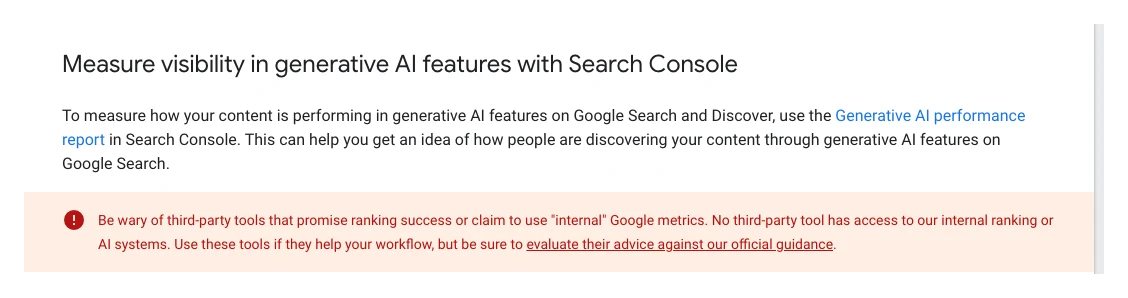
Note the warning in that screenshot. No third-party tool, and no AI assistant, can see inside Google's ranking systems. The system's job is to read your first-party data faster and more consistently than you could by hand, not to predict rankings.
Once a quarter, turn the reports into a 90-day roadmap: the fixes to ship first, the content to build, the clusters to complete. A ranked plan beats a vague instruction to "do more SEO", and it makes it obvious what you are saying no to.
Where does AI help, and where should a person decide?
Short answer: AI is good at pulling, sorting, comparing and drafting. People should own anything that changes the live site, any number that goes to a client or a boss, and the judgement about what is worth doing. My rule on client work is audit first, put it in a sheet, check it by hand, and change nothing before approval.
| Task | Let AI do it | Keep it human |
|---|---|---|
| Pulling and comparing data | Yes | Spot-check one number |
| Grouping keywords by intent | Yes | Approve the page map |
| First draft of a brief | Yes | Choose the angle |
| Writing the page | Draft only | Experience, examples, final edit |
| Search volumes | Only from a named tool | Reject any unsourced figure |
| Publishing, redirects, deletions | No | Always |
| Client report summary | Draft | The short human note on top |
Set expectations honestly too. I tell clients SEO takes six to nine months at minimum before the results are clear, and a system does not change that. What it changes is that every week's work builds on the last, instead of being redone. Nothing here guarantees a ranking, and anyone who promises one is overselling; Google's own guidance on third-party SEO tools and advice says the same.
Where should you start this week?
Short answer: write the context block, connect Search Console (or export a report), and ask for the pages on page two and the orphan pages. Fix one of each. That small loop shows you whether the setup gives you specifics or generic advice.
- Write the context block and save it in a Claude Project.
- Connect Search Console, or export the last three months of queries and pages if you cannot connect it yet.
- Ask for the pages sitting on page two and the orphan pages on your site, then fix one of each.
- When that works, turn the request into a weekly scheduled task.
If the answers are generic, the context block usually needs more detail, or the data connection is not really being used. Ask Claude to quote the date range and source for each number; if it cannot, it is guessing.
What people say on X and Reddit
Short answer: SEO practitioners read Google's May 2026 guide as confirmation that AEO and GEO are SEO under new names, and the people getting real value from Claude for SEO are the ones who connect it to Search Console data rather than asking it for generic tips. On Reddit, the recurring worry is clicks lost to AI Overviews, and the recurring advice is to answer fast and then go deeper than a summary can.
| Who | What they said | Take it as | Link |
|---|---|---|---|
| An SEO consultant on X | Quoted Google: optimising for generative AI search "is still SEO" (16 May 2026) | Expert | X post |
| A Japanese SEO practitioner | Summed up the guide: skip llms.txt, AI rewrites and excess markup (15 May 2026) | Expert | X post |
| An SEO consultant on X | Google's "Do you need an SEO" page now tells owners to check AEO/GEO advice (6 Jun 2026) | Expert | X post |
| An Italian SEO publisher | Google explains how to optimise for GEO, but calls it SEO (26 May 2026) | Opinion | X post |
| A growth marketer on X | Claude Code becomes powerful for SEO once it has keyword APIs, Search Console data and CMS access (2 Mar 2026) | First-hand | X post |
| An SEO tool founder on X | A set of Claude skills built on Search Console data, run weekly (19 Aug 2026) | Vendor | X post |
| r/SEO | Pages holding traffic answer fast, then go deeper than the AI Overview can summarise; thin answer pages got flattened (8 Nov 2026) | First-hand | Thread |
| r/SEO | A SaaS team asks whether "urgent" AI-readiness fixes from a site checker are worth doing (10 Nov 2026) | Question | Thread |
| r/SEO | Is the much-starred Claude SEO plugin on GitHub any good? (10 Nov 2026) | Question | Thread |
| r/bigseo | An original case study was summarised in an AI Overview with no click-through (23 Oct 2026) | First-hand | Thread |
Videos worth watching
Short answer: start with Google's own quarterly Search news for the official view of AI features and Search Console, then a tutorial on connecting Search Console to Claude.
Made by Google Search Central, 26 October 2026. It does not sell anything. The quarterly round-up of Search Console, Search and AI feature updates.
Made by Markifact, a marketing connector vendor, 26 August 2026. It uses the vendor's own connector, so expect a pitch. Useful to see the analysis and audit prompts in action.
| Video | Channel | Date | What it covers |
|---|---|---|---|
| Google Search news with platform properties, multimodal Search & AI Features (Q4 '26) | Google Search Central | 26 Oct 2026 | Official Search and Search Console updates |
| Search data for creators in Search Console (New!) | Google Search Central | 5 Nov 2026 | New Search Console data views |
| Your tools are now interactive in Claude | Anthropic | 26 Jan 2026 | Connected tools inside Claude |
| How to Use Google Search Console MCP in Claude (AI SEO Agent) | Markifact (vendor) | 26 Aug 2026 | Search Console analysis in Claude |
| How to Use Google Search Console MCP in Claude (Full Tutorial) | InsightfulPipe (vendor) | 17 Oct 2026 | Setup and a 30-day audit prompt |
| Google's AEO/GEO Guide: How to Rank in AI Mode & AI Overviews (2026) | An SEO tips channel | 20 May 2026 | Walk-through of Google's May 2026 guide |
Want the system built for your site?
Short answer: start with the context block and the weekly report yourself. If you want the whole system set up, connected and run, with a person checking every change, that is a standard engagement.
I build and run this for businesses as an independent SEO consultant: context, data connections, the weekly report, the technical list and the 90-day roadmap, with every change approved before it ships. Rates are on the pricing page. For the parts in more depth, read Claude skills for SEO, technical SEO audit automation and MCP servers for SEO.
Sources
| Source | What it supports | Date |
|---|---|---|
| Google: optimising for generative AI features | "Still SEO", mythbusting, fan-out, measurement | May 2026, read 18 Nov 2026 |
| Google Search Central updates log | FAQ rich results ended 7 May 2026; llms.txt note | Read 18 Nov 2026 |
| Google: AI features and your website | No extra requirements for AI features | Read 18 Nov 2026 |
| Google: Generative AI performance reports | Impressions, dimensions, rollout | 3 Jun 2026 |
| Search Console Help: Generative AI performance report | All sites since 31 Aug 2026 | Read 18 Nov 2026 |
| Google: third-party SEO tools and advice | No tool can guarantee rankings | Jun 2026 |
| web.dev: Web Vitals | LCP, INP and CLS thresholds | Read 18 Nov 2026 |
| Pew Research Center | Click behaviour with AI summaries (chart) | 22 Jul 2025 |
| Claude Help: Projects | Plans, Free limit of 5 | Read 18 Nov 2026 |
| Claude Help: Skills | Plans, custom skills | Read 18 Nov 2026 |
| Claude Help: custom connectors | Remote MCP, Free limit of 1 | Read 18 Nov 2026 |
| Claude Help: scheduled tasks | Paid plans, frequencies, cloud runs | Read 18 Nov 2026 |
| Google Analytics MCP (GitHub) | Official GA4 MCP server | Read 18 Nov 2026 |
| Reddit threads in r/SEO and r/bigseo listed above | Practitioner views, read through the Arctic Shift archive | Oct to Nov 2026 |
| X posts and YouTube videos listed above | Practitioner views, verified with oEmbed | Jan to Nov 2026 |
FAQ
What is an AI SEO system?
It is one connected workflow where keyword research feeds intent, intent feeds briefs, briefs feed on-page work and internal links, and a weekly report shows what to do next. An AI assistant such as Claude does the reading, sorting and drafting, and a person makes every decision that changes the site.
Is AEO or GEO different from SEO?
For Google, no. Its May 2026 guide says AI Overviews and AI Mode run on the same ranking and quality systems as Search, and that optimising for them is still SEO. The terms are still useful for describing visibility in AI answers, but the work is the same fundamentals.
Do I need an llms.txt file for AI search?
Not for Google. Google says Search ignores llms.txt files and that creating one neither helps nor harms your visibility. It is fine to keep one if another service you care about uses it.
Should I still add FAQ schema to my pages?
Not for rich results. Google stopped showing FAQ rich results on 7 May 2026 and removed the documentation in June 2026. Keep FAQs on the page if they answer real questions for readers, because that content can still rank and be cited.
Do I need live data connected to Claude?
You can start with exports from Search Console and GA4, but a live connection means Claude works from your real queries and pages instead of guessing. Google publishes an official, read-only by default GA4 MCP server; for Search Console you need a community server or exports, because Google has not published one.
Which SEO function should I build first?
Start with the context block, your data and a basic report, then the technical audit, because they show what is broken and what is already close to page one. Internal linking comes soon after: most teams skip it, and it needs no extra budget.
Can Claude run SEO reports automatically?
Yes. On paid plans you can schedule a task to run hourly, daily, weekly or on weekdays, and it runs in the cloud by default using your connectors and skills. Keep scheduled tasks read-only and have a person approve anything that changes the site.
How do I measure visibility in AI Overviews and AI Mode?
Use Search Console. AI Overviews and AI Mode are counted in the normal Performance report under Web, and the Generative AI performance report, rolled out to all sites by 31 August 2026, shows impressions in AI features on Search and Discover. It reports impressions, not clicks.
Can an AI SEO system guarantee rankings?
No. Google says no third-party tool has access to its internal ranking or AI systems, and using a tool does not guarantee ranking success. A system makes the work faster and more consistent; results still depend on the quality of the pages and the site.