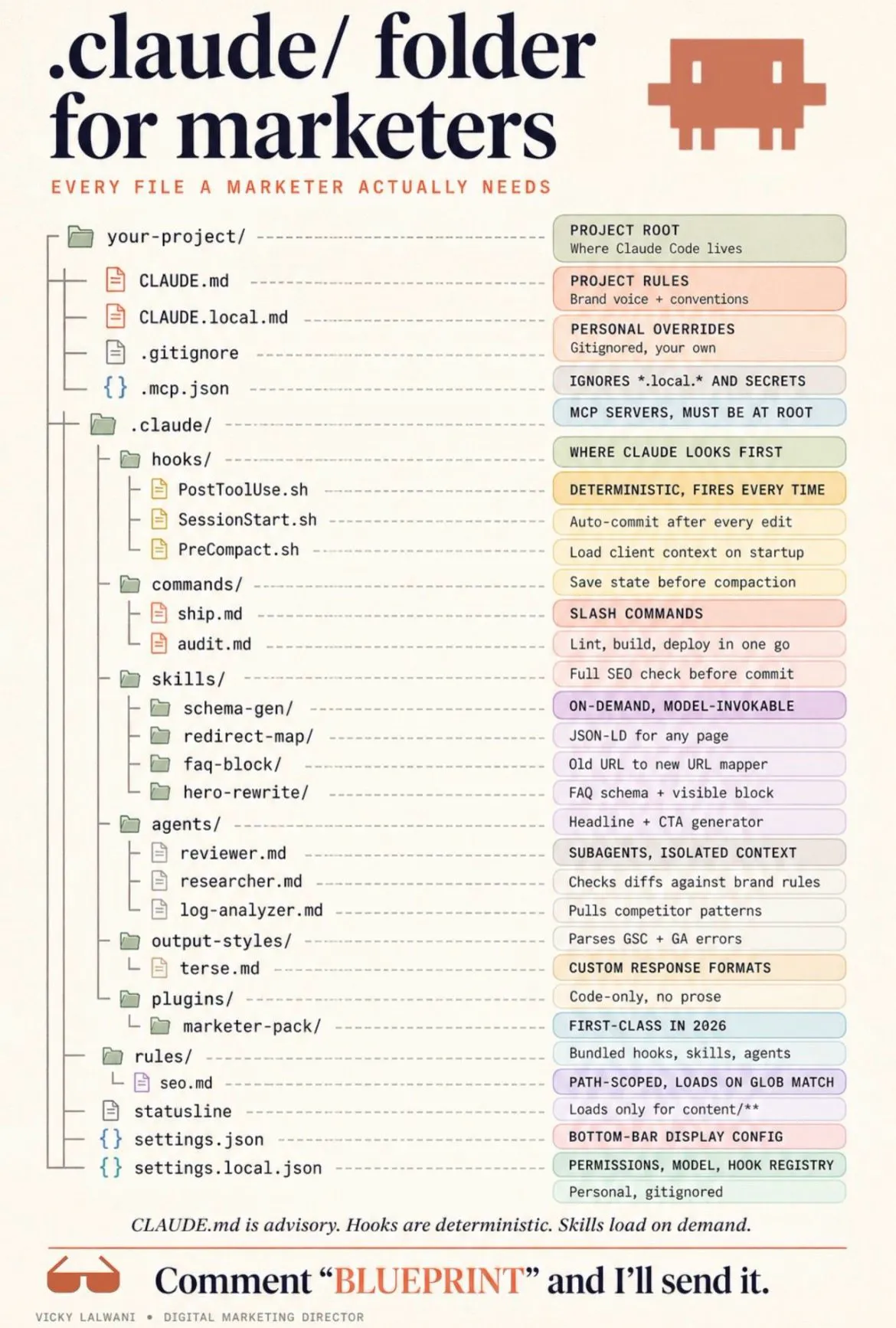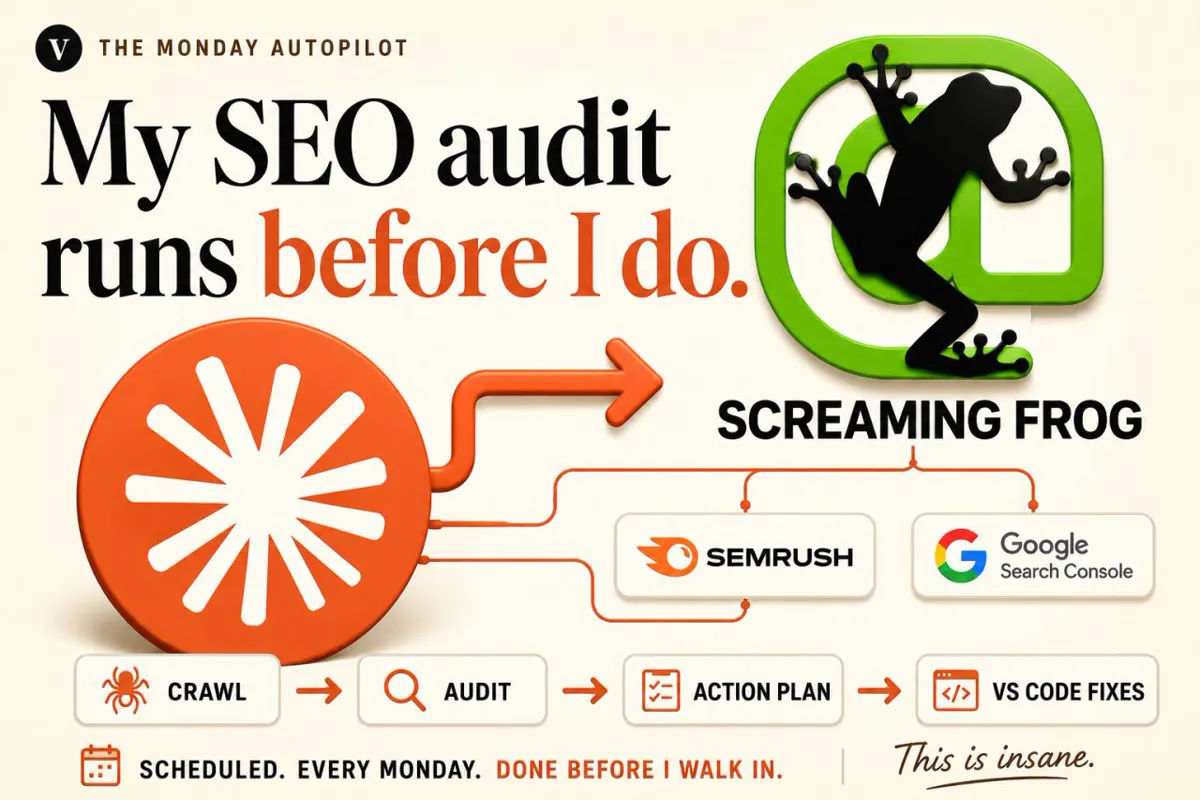
An automated technical SEO audit checks fast-breaking things daily and slow things monthly, joins a crawl with Search Console and Chrome UX Report data on each URL, ranks issues by severity, reach and confidence, and hands a person a short plan to approve.
A technical SEO audit used to be a project: crawl the site, export everything, spend two days in spreadsheets, hand over a long PDF. Most of the findings were already stale by the time anyone fixed them. The better model in 2027 is a technical SEO audit that runs itself on a schedule, checks the fast-breaking things often and the slow things rarely, and hands a person a short, ranked list with the evidence attached.
This guide is the system design: what to check and how often, which data to join, where the schedule should run, how to rank issues, and where a human has to sign off. It does not repeat the tool guides. For Screaming Frog with Claude see the Screaming Frog and Claude Code audit and the Screaming Frog MCP set-up; for connecting Search Console and other data see MCP servers for SEO. If you would rather have the system built and reviewed for you, that is part of my SEO consultant service.
TL;DR
- Automate the collecting, joining and ranking. Keep the decision and the release with a person.
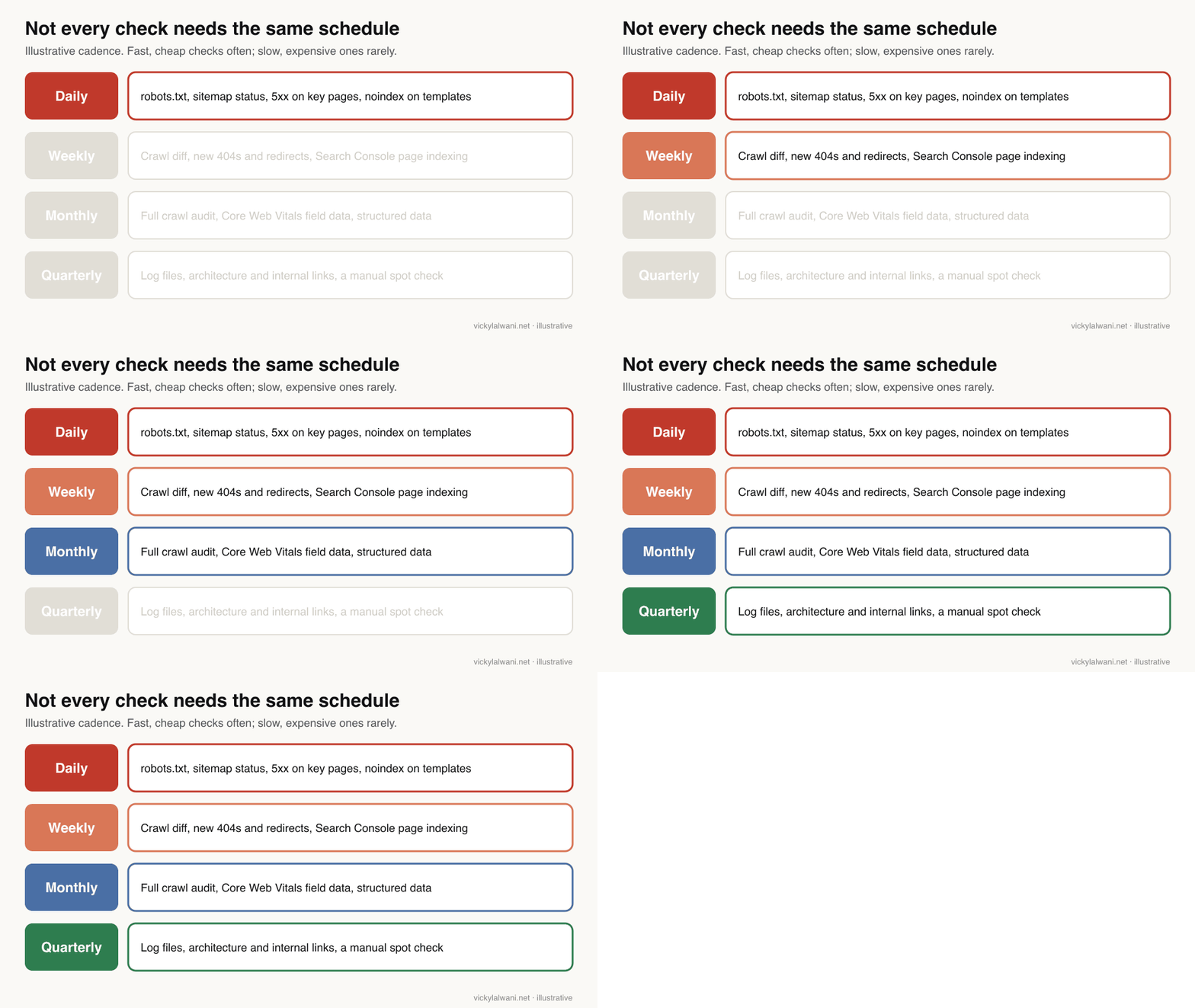
- Run checks at different speeds: robots.txt, sitemaps and server errors daily; a crawl comparison weekly; a full audit and Core Web Vitals monthly; logs and architecture quarterly.
- Join three sources per URL: a crawl, Search Console and Chrome UX Report field data. Rank by severity, reach and confidence, not by issue count.
- Know the limits: the URL Inspection API allows 2,000 calls a day per site and only shows Google's indexed version; Google plans to drop field data from the PageSpeed Insights API.
- Pick where the schedule runs on purpose. A desktop crawler needs the machine on; a cloud task has no local files and a limited network by default.
What is a technical SEO audit, and which parts can you automate?
Short answer: A technical SEO audit checks whether search engines can crawl, render and index your pages, and whether they load well for users. Most of the checks can be collected and compared automatically. What cannot be automated is judging which findings matter for this business and approving the fix.
Google's own Search Essentials and SEO starter material frames the technical side simply: Google has to be able to find the page, read it and decide to index it. An audit turns that into checks. The table shows which ones suit a schedule.
| Check | Main source | Automate? | How often |
|---|---|---|---|
| robots.txt and blocked paths | Live file, crawler | Yes, with a diff | Daily |
| XML sitemaps | Search Console, crawler | Yes | Daily |
| Server errors, 404s, redirects | Crawler, logs | Yes | Weekly |
| Indexing status | Page indexing report | Collect, then read | Weekly |
| Canonicals and noindex | Crawler | Yes, flag changes | Weekly |
| Rendering of JavaScript | Rendered crawl | Partly | Monthly |
| Core Web Vitals | CrUX API | Yes | Monthly |
| Structured data | Crawler, rich results | Yes | Monthly |
| Internal links, architecture | Crawler, logs | Collect only | Quarterly |
Google Search Central published a short talk on this in November 2025. Its points line up with the design here: understand the site's technology first, use audit tools properly, and prioritise fixes by impact rather than by the length of the tool's list.
Made by Google Search Central (November 2025). Official and short; it covers the thinking behind an audit rather than a specific tool, and sells nothing.
Which data does an automated audit need?
Short answer: Three sources joined on the URL: a crawl of the site, Search Console for indexing and search performance, and Chrome UX Report field data for Core Web Vitals. Server logs are a useful fourth on larger sites. Each source has quotas and blind spots that shape the design.
| Source | What it gives | Limit to design around |
|---|---|---|
| Crawler | Every URL, status, tags, links | Paid licence for scheduling |
| Search Analytics API | Clicks, impressions by page | Up to 25,000 rows a request |
| URL Inspection API | Index status, canonical | 2,000 a day per site |
| CrUX API | LCP, INP, CLS field data | Only pages with enough traffic |
| Server logs | What Googlebot actually fetched | Access and volume |
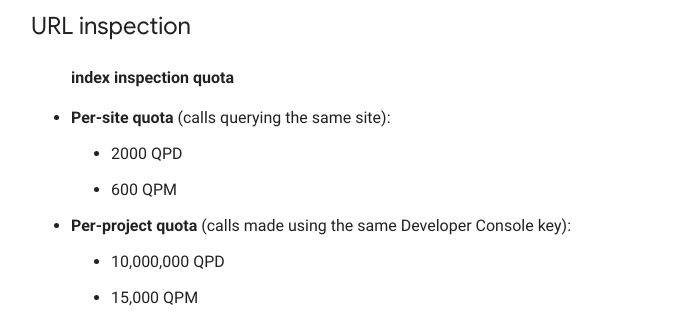
Two limits change the design. The URL Inspection API allows 2,000 calls a day and 600 a minute per site, so on a site with 50,000 URLs you inspect a rotating sample or your top pages, not everything. And it shows only the version in Google's index; you cannot use it to test a live URL. A crawler covers the live side.
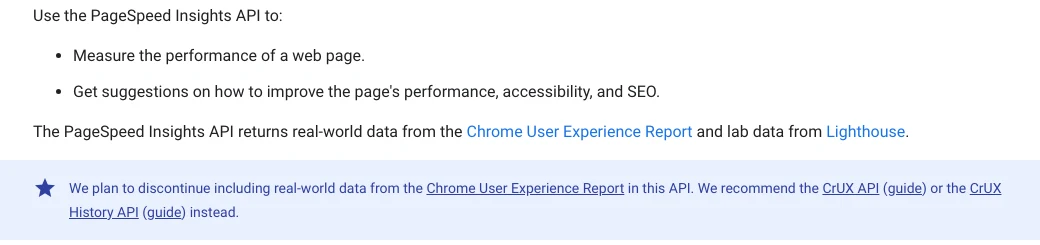
The second change is on performance data. Google says it plans to stop including real-world Chrome UX Report data in the PageSpeed Insights API and recommends the CrUX API or the CrUX History API instead. If an older script reads field data from PageSpeed Insights, move it now rather than when it breaks. Field data covers a rolling 28-day window, so a monthly check is the natural cadence.
How you connect each source to Claude, and which MCP servers are worth running, is covered in MCP servers for SEO. A practitioner on X summed up why the data step comes first: most AI assistants are "guessing at their SEO" because nobody gave them the real data.
How often should each check run?
Short answer: Match the cadence to how fast the problem can hurt you. A robots.txt mistake or a noindex on a template can remove pages within days, so check those daily. Crawl comparisons suit a weekly run, Core Web Vitals and structured data a monthly one, and log analysis a quarterly one. Run a full manual audit after migrations, redesigns and platform changes.
This is also the answer to a common question on r/TechSEO. A store owner asked whether a technical audit is needed "every year, or only when something changes". The most useful replies split it in two: a cheap monthly routine (compare the Search Console page indexing reasons with last month, run a crawl and compare) plus a full audit only after something big changes. An agency reply said it runs site audits weekly because it catches problems faster.
| Trigger | What to run | Why |
|---|---|---|
| Site migration or redesign | Full audit before and after | Redirects, canonicals, templates |
| CMS, theme or plugin update | Crawl diff | Tags change silently |
| Traffic or indexing drop | Drop checks | Rule out tracking first |
| New section or subdomain | Targeted crawl | Staging and duplicates |
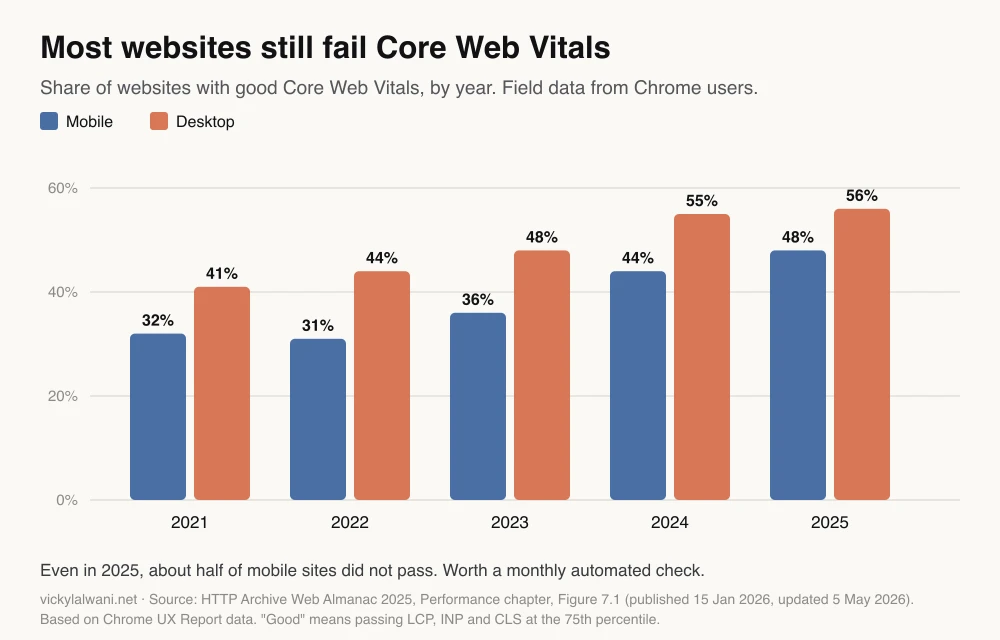
Core Web Vitals deserve the monthly slot. Google's thresholds are LCP within 2.5 seconds, INP of 200 milliseconds or less and CLS of 0.1 or less, measured at the 75th percentile of visits, and many sites still miss them.
Where should the scheduled audit run?
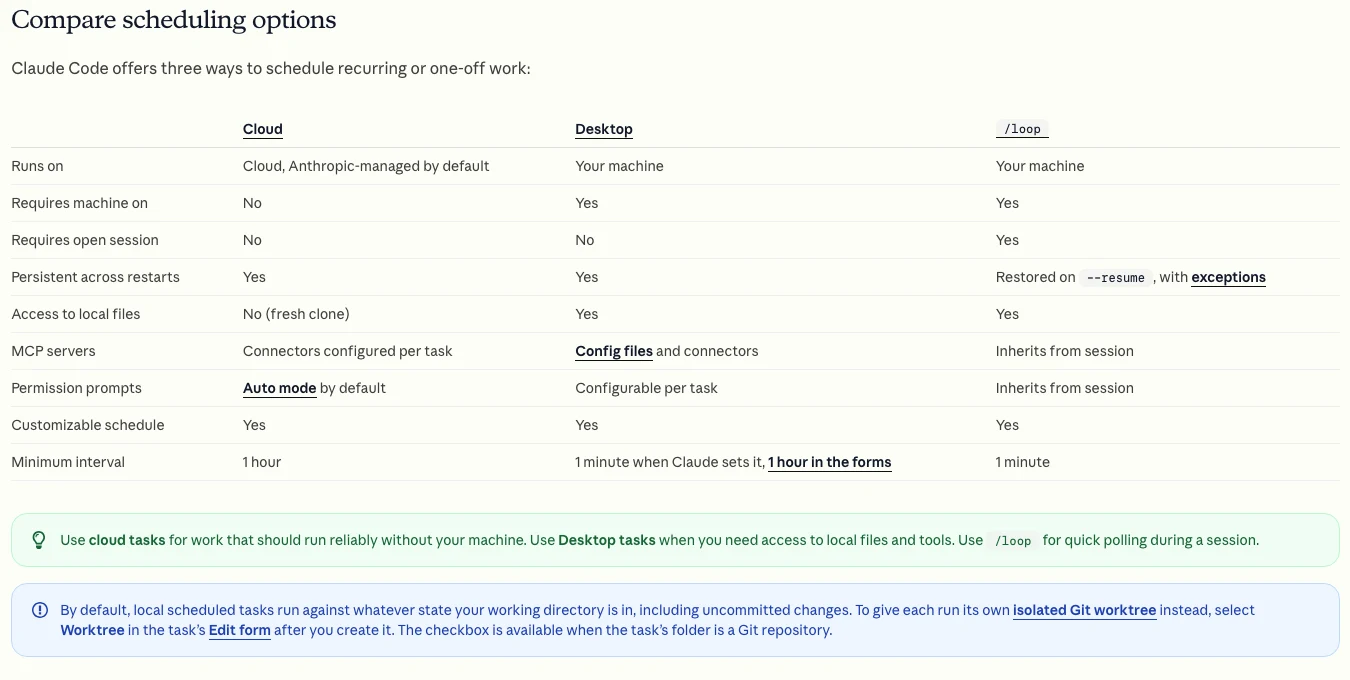
Short answer: Where the tools it needs can actually run. A desktop crawler such as Screaming Frog needs the machine on. A Claude Code desktop task can use local files and MCP servers but only runs while the app is open and the computer is awake. A Claude cloud task runs with the laptop closed, but has no local files and limited network access by default.
This is where many "fully automated" set-ups quietly fail. Anthropic's documentation compares the options clearly: cloud scheduled tasks run on Anthropic-managed infrastructure with no access to local files and a one hour minimum interval, while desktop tasks need the computer on. The cloud environment starts with limited network access to an allowlist, so a step that fetches your own site may need its network settings changed.
| Where it runs | Good for | Watch out for |
|---|---|---|
| Crawler's own scheduler | Crawls and exports | Paid licence, machine on |
| Claude Code desktop task | Local crawl files, MCP | App open, computer awake |
| Claude cloud task | API data, reports | No local files, network allowlist |
| CI job or server cron | Large sites, APIs | Needs a developer |
| SEO platform site audit | Simple teams | Their checks, their scores |
A common working pattern is to let the crawler's own scheduler run the crawl and export to a shared folder, then have Claude read the exports and Search Console data to draft the plan. The exact Screaming Frog and Claude version of that routine, with its limits, is in the Screaming Frog MCP guide. Teams without a crawler licence ask for the same thing on r/TechSEO: a tool that audits on a schedule and alerts a team lead weekly, for example when a key page's LCP jumps.
Made by Google Search Central (April 2023). Older, but still the clearest official explanation of what the Search Console APIs can return; it sells nothing.
How should an automated audit rank technical SEO issues?
Short answer: Score each issue on three things: severity (does it block crawling or indexing?), reach (how many pages and how many impressions it touches) and confidence (is the evidence solid, or a tool guess?). An indexing blocker on high-impression pages beats a thousand missing alt attributes on pages nobody visits.
| Factor | High | Low |
|---|---|---|
| Severity | Blocks crawl or index | Cosmetic or best practice |
| Reach | Templates, top pages | One orphan page |
| Confidence | Confirmed in two sources | One tool's guess |
| Effort | One template change | Page by page edits |
Google's page indexing help gives a useful filter: fix issues where the source is "Website" and validation has failed or not started first, because those are the ones you control. On r/SEO, the top reply to someone drowning in crawl data was to connect Search Console and GA4 so issues rank by traffic. That join is what turns a list of errors into a priority list.
Watch for checks that contradict each other. If a page is blocked in robots.txt, Google never sees its noindex rule and the page can still appear in results, so "blocked and noindexed" is a finding to fix, not two separate passes. Robots.txt controls crawling, not indexing.
Here is a prompt for the ranking step. It assumes the crawl export, Search Console data and CrUX data are already in a folder or connected:
You are preparing this week's technical SEO action plan. You do not change anything.

Inputs: this week's crawl export, last week's crawl export, Search Console page indexing and performance data (last 28 days), CrUX field data for the top 100 URLs.

1. Join the data on URL. Ignore URLs with no impressions unless they are templates or in the XML sitemap.
2. List what changed since last week: new 4xx/5xx, new redirects, canonical or noindex changes, robots.txt changes, pages dropped from the sitemap.
3. Score each issue: severity (1 to 3), reach (pages affected and impressions), confidence (confirmed in two sources or one).
4. Output a table: issue, example URLs (max 5), evidence, likely cause, suggested fix, effort, score.
5. Put anything that could remove pages from Google at the top and mark it URGENT.
Say "not enough data" rather than guessing. Do not list more than 15 items.
What should trigger an alert instead of waiting for the weekly plan?
Short answer: Only changes that can remove pages or revenue quickly: robots.txt blocking important paths, noindex appearing on a template, a spike in server errors, the XML sitemap failing, or a staging site being indexed. Everything else waits for the weekly plan, or alert fatigue sets in and the real alert gets ignored.
| Alert now | Example threshold | Weekly plan instead |
|---|---|---|
| robots.txt change | Any change to Disallow | Crawl budget ideas |
| noindex on templates | Any key template | Thin page noindex |
| 5xx errors | Above your normal range | Single 404s |
| Sitemap fetch fails | Two days running | Missing lastmod |
| Staging indexed | Any staging URL in Google | Duplicate titles |
The staging case is real and common. On r/TechSEO in October 2026, a site owner found a staging subdomain with about 40 indexed pages and editorial backlinks pointing at it, because it was never blocked or protected. A daily check for indexed staging URLs is cheap insurance; protecting staging with a login is the fix.
How do findings become fixes?
Short answer: Turn each approved item into a ticket with the issue, example URLs, evidence, the proposed fix and how to verify it. If the site lives in a code repository, an AI coding assistant can draft the change as a pull request with a preview. A person reviews and approves before release, and Search Console's Validate fix confirms it afterwards.
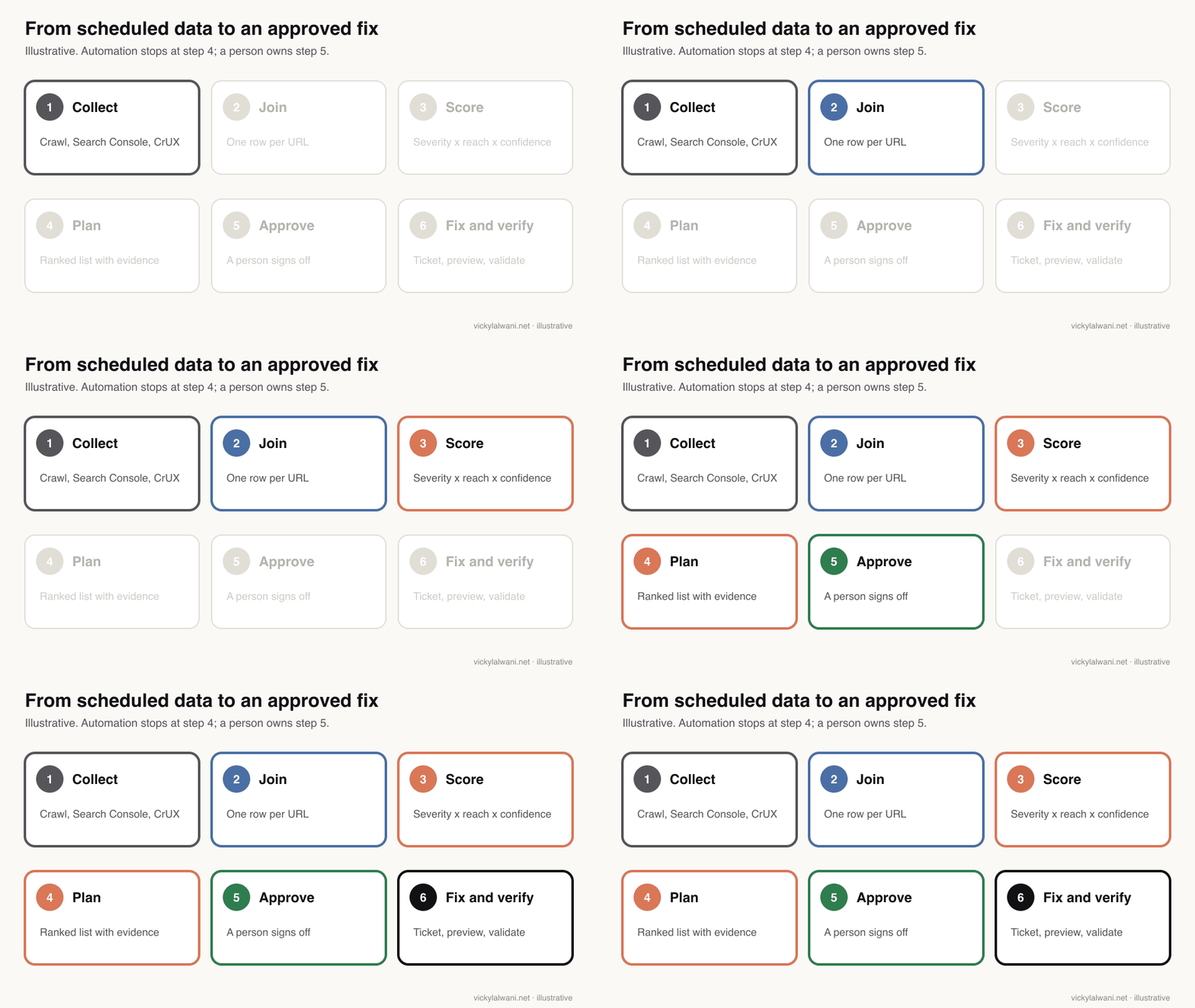
On client sites I audit first, put the findings in a sheet, check them by hand and change nothing before approval. The same rule applies when the audit is automated, because an automated suggestion can be wrong, can miss business context, or can break a template that affects thousands of pages. For a tracker format, see how to turn the audit into a tracker.
| Stage | Who | Done when |
|---|---|---|
| Plan drafted | Scheduled task | Ranked list with evidence |
| Approved | SEO lead | Items accepted or rejected |
| Fix built | Developer or AI with review | Pull request and preview |
| Released | Developer | Change log updated |
| Verified | SEO lead | Validate fix passed |
Keep a change log. When indexing or traffic moves a month later, it is the only way to connect a result to a fix rather than to a Google update or a seasonal swing.
How do you audit the audit?
Short answer: Once a month, take a sample of the automated findings and check them by hand in the live page, the crawler and Search Console. Look for the usual false positives: lab speed scores treated as field data, intentional noindex pages flagged as errors, parameter URLs that are already canonicalised, and pages that render differently for Googlebot.
| False positive | Why it happens | How to check |
|---|---|---|
| Slow page alert | Lab test, not field data | CrUX at the 75th percentile |
| Noindex error | Intentional noindex | Allowlist those URLs |
| Duplicate content | Parameters canonicalised | Inspect the canonical |
| Missing content | JavaScript not rendered | Rendered crawl, URL Inspection |
Ask the model to cite its source for every item, and reject any item without one. AI analysis is good at spotting patterns across thousands of rows and poor at knowing that the "duplicate" pages are deliberate regional versions. That second part is the specialist's job, and it does not go away when the crawl runs itself.
Made by Screaming Frog (January 2020). Old, and made by the vendor, but the crawl analysis step it shows is still how the comparison data is produced.
What do people say on X and Reddit?
Short answer: Practitioners like automation for the repetitive pulling and combining of data, and stay sceptical of tools that produce long lists without priorities. The recurring advice is to connect real data first, run cheap checks often and save the full human audit for when something changes.
| Source | Date | What it says | Type |
|---|---|---|---|
| Semrush on X | 10 Nov 2026 | Turn a site audit into an action plan with Claude | Vendor |
| An international SEO consultant on X | 19 May 2026 | Crawler MCP cuts repetitive data pulling | Opinion |
| Screaming Frog on X | 3 Nov 2026 | v25: JSON config, MCP debugging, configurable issues | Vendor |
| An SEO agency founder on X | 17 Oct 2026 | Assistants guess without real data | Opinion |
| Screaming Frog on X | 5 Aug 2026 | Start crawls from a phone through Claude | Vendor |
| r/TechSEO | 11 Nov 2026 | Monthly routine plus audits on change | First-hand |
| r/TechSEO | 26 Oct 2026 | Wants scheduled audits with weekly alerts | Question |
| r/TechSEO | 6 Oct 2026 | Staging subdomain indexed for years | First-hand |
| r/SEO | 28 Sep 2026 | Rank crawl issues by traffic | First-hand |
The vendor posts show where the tools are heading: crawlers and SEO platforms are adding direct connections to Claude so the data step gets easier. The Reddit threads show the part that stays hard, which is deciding what matters on a particular site.
Which videos are worth watching?
Short answer: Start with Google's own talk on technical audits and its Search Console API training, then watch the vendor and practitioner videos for set-up detail. Treat the "full audit in one prompt" videos as demos, not a method.
| Video | Channel | Date | What it covers |
|---|---|---|---|
| How to perform a technical SEO audit | Google Search Central | Nov 2025 | Audit thinking |
| Intro to Search Console APIs | Google Search Central | Apr 2023 | What the APIs return |
| Crawl Analysis Guide | Screaming Frog | Jan 2020 | Crawl analysis |
| Scheduled Crawls to Google Drive | An SEO consultant's channel | Oct 2024 | Scheduling exports |
| SEO Audit with Claude Code | An SEO software vendor | Apr 2026 | Claude Code demo |
| Automated Technical SEO Audits in Claude Code | A developer channel | Nov 2026 | Open-source skill |
Where is this advice weak?
Short answer: The tools and quotas change often, the cadence is a starting point rather than a rule, and some of the routine is untested end to end. Check the vendor documentation before you build, and expect to tune thresholds for your own site.
- The cadence and alert thresholds are my recommendations, not a standard. A news site and a 20-page service site need very different settings.
- Claude scheduled tasks are in research preview, and their limits may change.
- Google has said it plans to drop field data from the PageSpeed Insights API but has not given a date on that page.
- The Web Almanac figures describe the web as a whole, not your site or your sector.
- Reddit and X posts are individual views; several X posts come from vendors selling the tools discussed.
Want an automated technical SEO audit built for your site?
Short answer: I can design the checks, the schedule and the ranking rules for your site, and review the plan with you each week, with nothing changed before you approve it.
As an SEO consultant I set this up around the tools you already have: a crawler, Search Console and, where it helps, Claude for the analysis and the plan. See my SEO consultant service and pricing. Related reading: how to build an AI SEO system and Claude skills for SEO.
Sources
| Source | What it supports | Date |
|---|---|---|
| Google Search Central: get started | Crawl, index basics | Read 18 Nov 2026 |
| Search Console Help: page indexing | Source, validation, priorities | Read 18 Nov 2026 |
| Google: block indexing | noindex and robots.txt | Read 18 Nov 2026 |
| Google: robots.txt | Crawling, not indexing | Read 18 Nov 2026 |
| Google: JavaScript SEO basics | Rendering | Read 18 Nov 2026 |
| Google: structured data | Structured data checks | Read 18 Nov 2026 |
| Search Console API limits | 2,000 a day, 600 a minute | Upd. 28 Aug 2025 |
| URL Inspection API | Indexed version only | Read 18 Nov 2026 |
| Search Analytics API | 25,000 rows a request | Read 18 Nov 2026 |
| PageSpeed Insights API | Field data to be dropped | Read 18 Nov 2026 |
| CrUX API | Field data, 28-day window | Read 18 Nov 2026 |
| CrUX History API | Historical field data | Upd. 11 Apr 2025 |
| web.dev: Web Vitals | LCP, INP, CLS thresholds | Read 18 Nov 2026 |
| Web Almanac 2025: Performance | CWV pass rates | 15 Jan 2026 |
| Screaming Frog user guide | Scheduling | Read 18 Nov 2026 |
| Screaming Frog pricing | Scheduling is paid | Read 18 Nov 2026 |
| Claude Code: desktop tasks | Cloud vs desktop comparison | Read 18 Nov 2026 |
| Claude Code: cloud tasks | Research preview, network | Read 18 Nov 2026 |
| X and Reddit posts above | Practitioner views | May to Nov 2026 |
This article expands on my post on LinkedIn ↗.
FAQ
What is a technical SEO audit?
A technical SEO audit checks whether search engines can crawl, render and index your pages, and whether those pages load well for users. It covers robots.txt, sitemaps, status codes, redirects, canonicals, noindex, JavaScript rendering, Core Web Vitals, structured data and internal links.
How often should you run a technical SEO audit?
Run cheap automated checks continuously: robots.txt, sitemaps and server errors daily, a crawl comparison weekly, and Core Web Vitals and structured data monthly. Do a full manual audit after migrations, redesigns, platform changes or an unexplained drop in traffic or indexing.
Can you automate a technical SEO audit with Claude?
Yes, for the collecting, joining and ranking. Claude can read crawl exports and Search Console data, compare them with last week and draft a ranked plan on a schedule. A person should still decide which fixes matter and approve every change before release.
Do I need Screaming Frog to automate a technical SEO audit?
No, but you need a crawler of some kind. Screaming Frog's scheduling needs a paid licence and a machine that is switched on; SEO platforms with scheduled site audits, or a crawl script in a CI job, are alternatives.
What are the Search Console API limits for an automated audit?
The URL Inspection API allows 2,000 calls a day and 600 a minute per site, and only shows the version in Google's index, not the live page. The Search Analytics API returns up to 25,000 rows per request, with per-site and per-project quotas.
Should I still use the PageSpeed Insights API for Core Web Vitals?
For lab tests, yes. For real-user field data, Google says it plans to stop including Chrome UX Report data in the PageSpeed Insights API and recommends the CrUX API or CrUX History API instead.
Can a Claude scheduled task run Screaming Frog overnight?
Not from the cloud. Claude cloud scheduled tasks run on Anthropic's infrastructure with no access to local files, so they cannot drive a desktop crawler. A Claude Code desktop task can, but only while the app is open and the computer is awake.
How do you stop an automated audit producing too many alerts?
Alert only on changes that can remove pages quickly, such as robots.txt changes, noindex on templates, server error spikes, sitemap failures and indexed staging URLs. Send everything else to a weekly ranked plan with a limit of about 15 items.