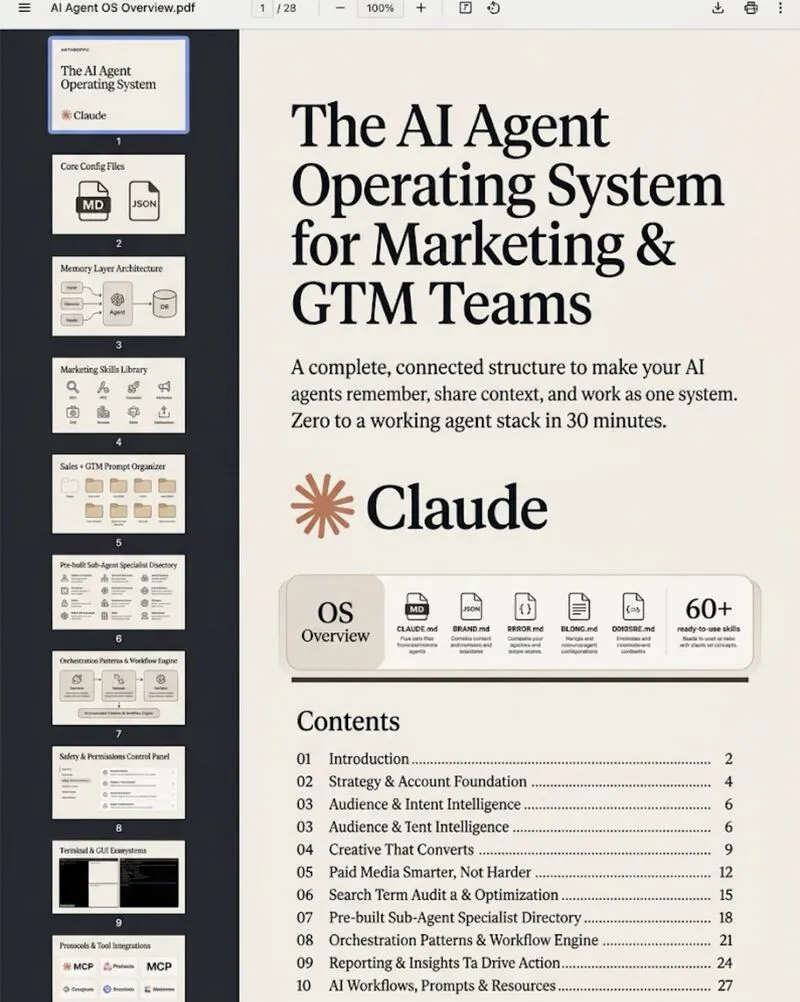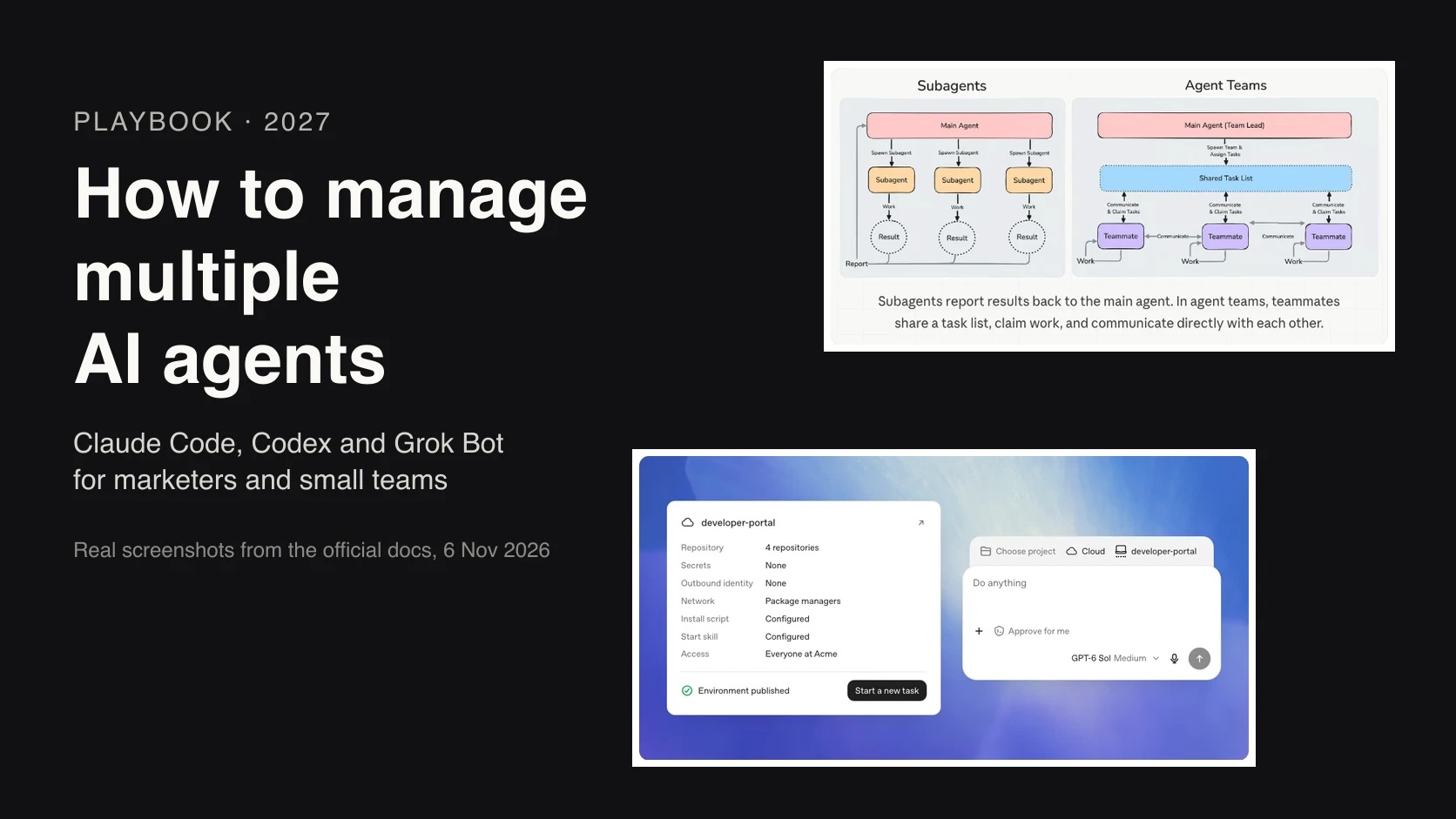
To manage multiple AI agents, start with one and add more only when work splits cleanly by data, tools or context; two or three is the right start for most marketers. Give each task one owner on a shared board, a separate copy of the files, a fresh reviewer and caps on turns and spend, and keep spending, publishing and client messages behind a person.
TL;DR
To manage multiple AI agents, run fewer than you think: two or three is the right start for most marketers, because the limit is how much output you can review, not how many agents a tool can start. Add an agent only when the work splits into pieces that need their own data, tools or a clean slate.
Then run them like a control room: one owner per task on a shared board, a separate copy of the files for each agent, a fresh reviewer that didn't do the work, caps on turns and spend, and a kill switch you have tested. Spending, publishing and client messages stay behind a person. Product facts were checked against Anthropic, OpenAI, SpaceXSI, Google and Meta docs on 18 November 2026.
Picture this. You run four Google Ads accounts, two websites and a content calendar. You hand it all to one AI agent with a long instruction file, and for a week it's brilliant.
Then it drifts. It mixes up which client has which target. It forgets you never mention prices. It redoes analysis it already finished. So you add more agents, and now five agents are drifting instead of one, and they're overwriting each other.
The model is usually fine. The structure is the problem: nobody decided who owns what, what each agent can see, how its work gets checked, or where a person says yes. This guide is about running several agents at once in Claude Code, OpenAI Codex and Grok Bot, using the Google Ads, SEO and reporting jobs I know best. If you'd rather have it set up and checked on your accounts, that's what my AI marketing agents service does.
New to agents? Start with tasks to delegate to AI agents, which covers what to hand off and how to brief it. For the files and settings every agent reads, see the AI agent operating system. This page picks up once you have more than one agent running.
Verified 18 November 2026 against code.claude.com, learn.chatgpt.com, docs.x.ai, developers.google.com and developers.facebook.com. Several features here are research previews or experimental, so check the live pages before you build on them. Next check: 18 December 2026.
Jump to: How many · One or several · Claude Code, Codex, Grok Bot · Which tool for which job · Marketing team · Handoffs · Parallel · Monitoring · Failures · Cost · Approvals · Setups · First week
How many AI agents can one person manage?
Short answer: two or three for most marketers: one main agent, one reviewer and one read-only helper. In METR's January 2026 data, six of seven staff averaged 1.05 to 1.52 main agents at once, and the heaviest user about 2.3. The real limit is how much output you can review.
An agent whose work you can't check adds risk, not capacity. Social media posts about "running 20 agents" rarely show who reviewed the output.
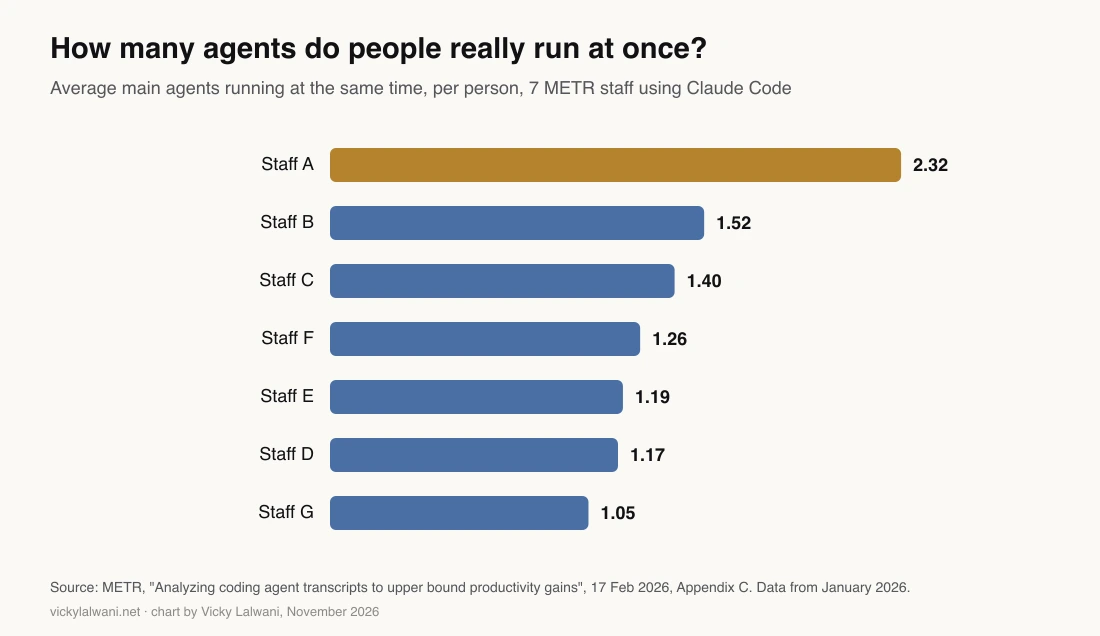
What the evidence supports
- Know-how matters. In Anthropic's June 2026 study, sessions rated intermediate or above reached verified success 28% to 33% of the time, against 15% for novices.
- Parallel helpers work for research. Anthropic's multi-agent research system beat a single agent by 90.2% on its own evaluation.
- More agents can mean more done. METR found higher concurrency went with bigger estimated time savings, though it can't show cause.
What it doesn't support
- Huge teams. Anthropic suggests starting with 3 to 5 teammates for Claude Code agent teams, even with 15 independent tasks.
- Easy wins. In METR's 2025 trial, experienced developers were 19% slower with AI while feeling faster.
- Agents by default. A study of 260 set-ups found multi-agent designs ranged from 80.8% better to 70.0% worse than one agent, depending on the task.
Practitioners land in the same range. One well-known developer runs one background agent by choice, and in an r/ClaudeAI thread a Claude Code user put their limit at three active chats.
One caveat: almost all of this evidence comes from coding. Marketing has first-hand stories, but no independent measurement yet.
Should you run one AI agent or several?
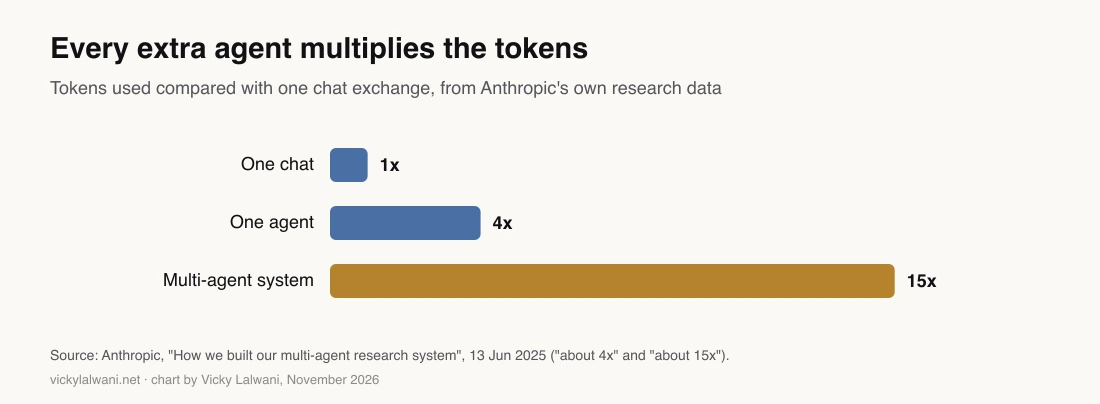
Short answer: one, until it fails for a reason a second agent would fix. Split by context, not by job title: a job gets its own agent when it needs its own data, tools or a clean slate. Anthropic measures multi-agent set-ups at 3 to 10 times the tokens of one agent for the same task.
Anthropic, OpenAI and Google Cloud all say start with one agent (OpenAI's guide, Anthropic, Google Cloud).
And when you do split, don't copy an org chart. Anthropic found splits like planner, writer and tester spent more tokens coordinating than executing (January 2026). Its advice is to split by context, and its most reliable pattern is a verifier that only checks results.
Cognition, the company behind Devin, changed its view in public. In 2025 it said don't build multi-agent systems. In 2026 it said one pattern works: one agent writes, the others review or advise.
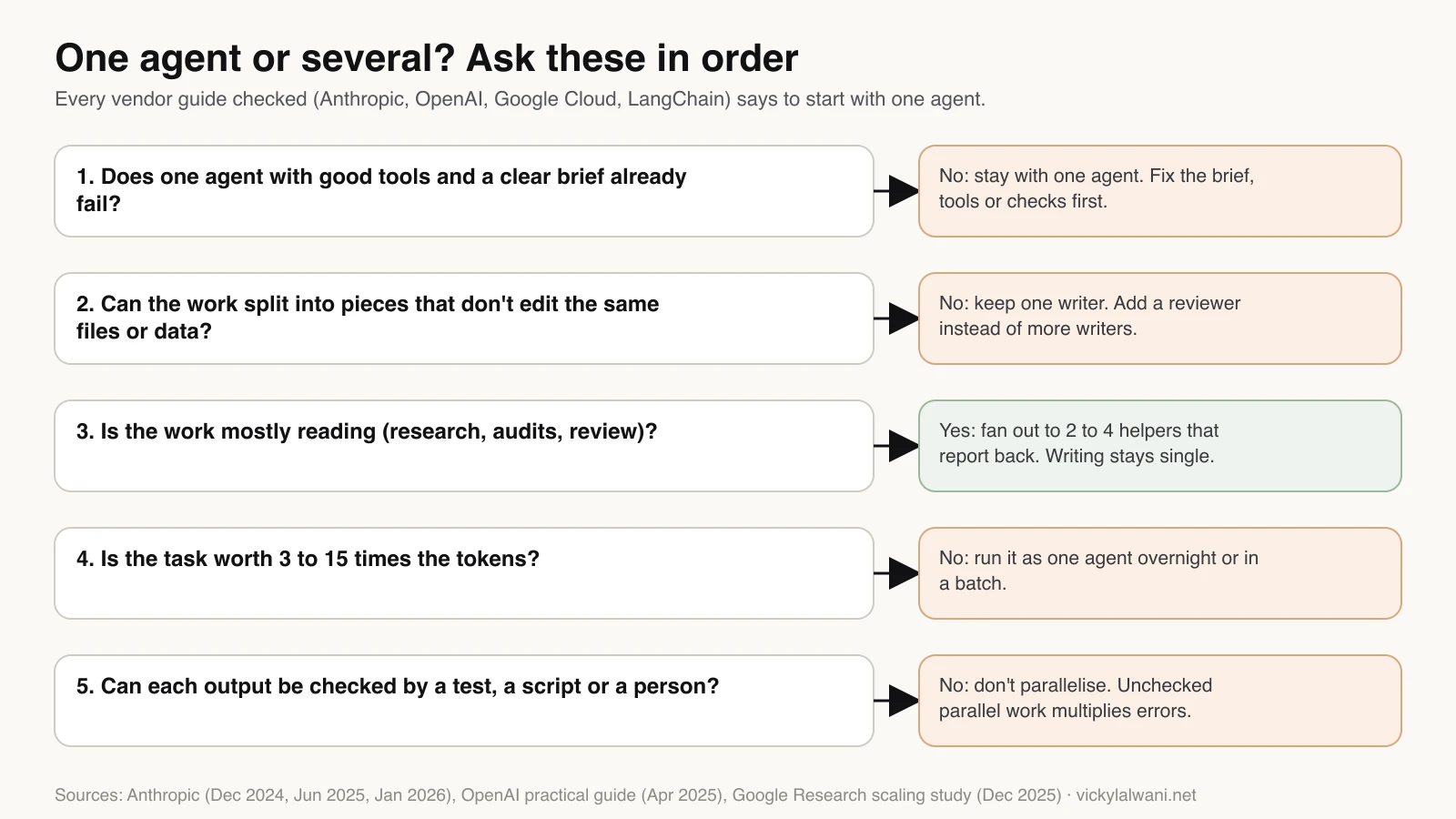
Ask these five questions before adding an agent:
- Does one agent with good tools and a clear brief already fail? If not, fix the brief.
- Can the work split without two agents editing the same files or data? If not, add a reviewer, not a writer.
- Is it mostly reading, like research, audits or review? Then 2 to 4 helpers can report back.
- Is the result worth 3 to 15 times the tokens? If not, run it as one agent overnight.
- Can each output be checked by a test, a script or a person? If not, don't parallelise.
How do Claude Code, Codex and Grok Bot handle multiple agents?
Short answer: all three can run several agents, very differently. Claude Code has the most options, from stable subagents to experimental agent teams. Codex has stable subagents, managed worktrees and a command centre, but custom agents inherit the parent's permissions and MCP servers. Grok Bot's Bots share one cloud computer, so they aren't a security boundary.
| Claude Code | Codex | Grok Bot | |
|---|---|---|---|
| Define a specialist | Subagent file | Custom agent file | A named Bot |
| Agents talk to each other | Agent teams (experimental) | Not documented | Group chats of 2 to 6 Bots |
| Keep edits apart | Git worktrees | Git worktrees | No: one shared computer |
| Different access per agent | Yes | No: inherits permissions and MCP | No |
| See what's running | claude agents, /usage | codex agents | Routine run history |
| Scheduled runs | Yes (cloud in preview) | Yes | Routines |
Claude Code
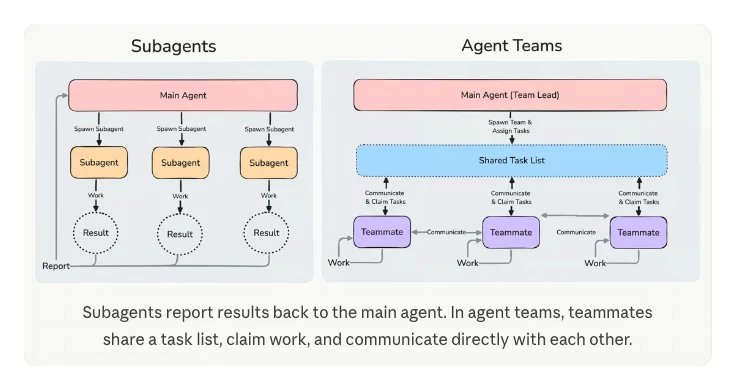
Claude Code now lists five ways to work on several tasks at once: subagents, agent view, agent teams, dynamic workflows and projects.
- Subagents are the everyday option. Each works in its own context and returns a summary, which suits "read these 40 pages and tell me what matters". They start in the background by default and can spawn their own, up to three layers below the main conversation (docs).
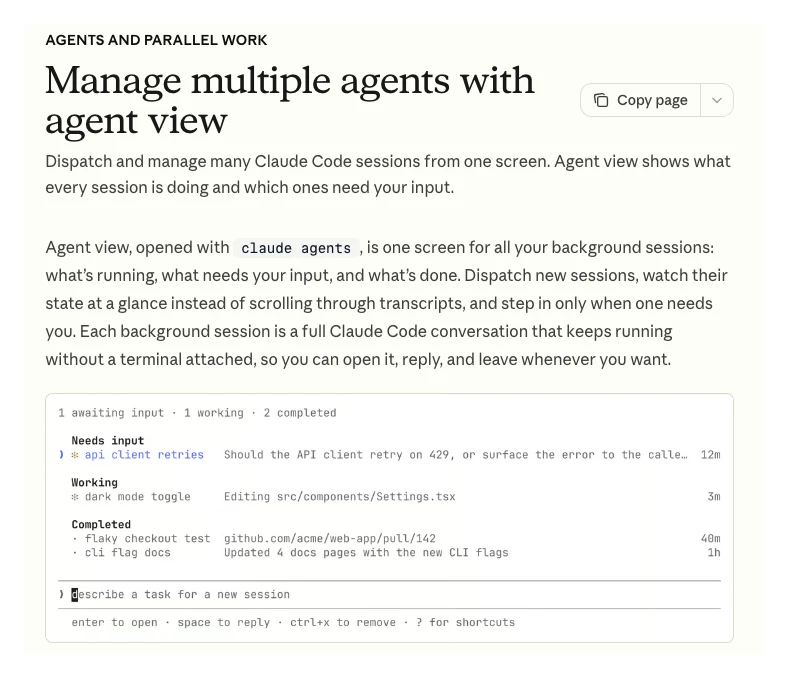
- Agent view, opened with
claude agents, shows every background session: working, waiting for you, or done. It's a research preview. - Agent teams add a lead, teammates that message each other and a shared task list. They're experimental, off by default, and use about 7 times the tokens of a standard session when teammates run in plan mode (costs docs).
- Dynamic workflows are scripts Claude writes to run many subagents at once, for jobs too big for one conversation (docs).
- Projects run parallel threads in the cloud from one conversation, in public beta on Pro, Max and Ultra, not yet on Team or Enterprise (docs).
OpenAI Codex
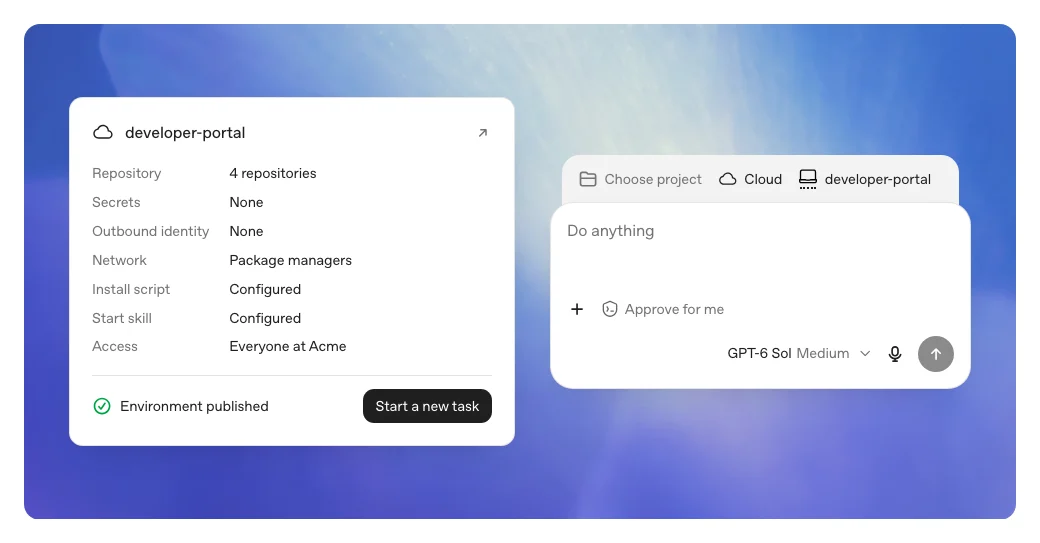
Current Codex releases turn subagents on by default, and OpenAI suggests starting parallel agents on read-heavy work such as exploration, tests, triage and summaries, because agents editing at once "can create conflicts" (Codex subagents). Parallel chats can each run in their own worktree, and codex agents opens a stable "agent command center" (Codex manual).
Two gotchas. Custom agents can change their model and instructions and switch some features off, but they inherit the parent's permissions, provider and MCP servers; a custom agent file can't override those. And Codex can no longer run as an MCP server, so older "Claude Code calls Codex" set-ups break (removal notice). OpenAI's route now is a plugin that runs Codex from Claude Code.
Grok Bot
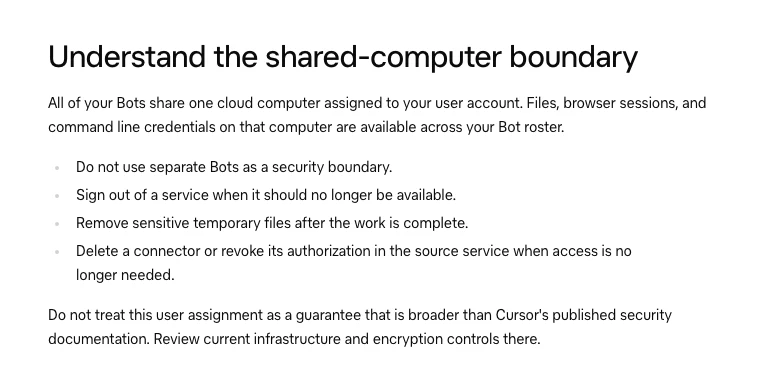
Grok Bot, from SpaceXSI (formerly xAI), feels the most like a team out of the box: Bots have names, jobs and memory, and group chats hold two to six Bots. But all your Bots share one cloud computer, so files, browser sessions and logins are available across the roster, and SpaceXSI says not to use separate Bots as a security boundary (docs). Every Bot reply counts toward your usage, including messages between Bots, and the docs advise "a single owner at each stage" (docs). More in my Grok for marketing guide.
Building your own?
If you code, LangGraph gives the most control, with checkpoints and human interrupts, and the OpenAI Agents SDK covers handoffs, guardrails and tracing. If you don't, n8n builds visual workflows with approval steps. Check the lifecycle first: AutoGen is in maintenance mode with Microsoft Agent Framework as its successor, and OpenAI's Agent Builder shuts down on 30 November 2026.
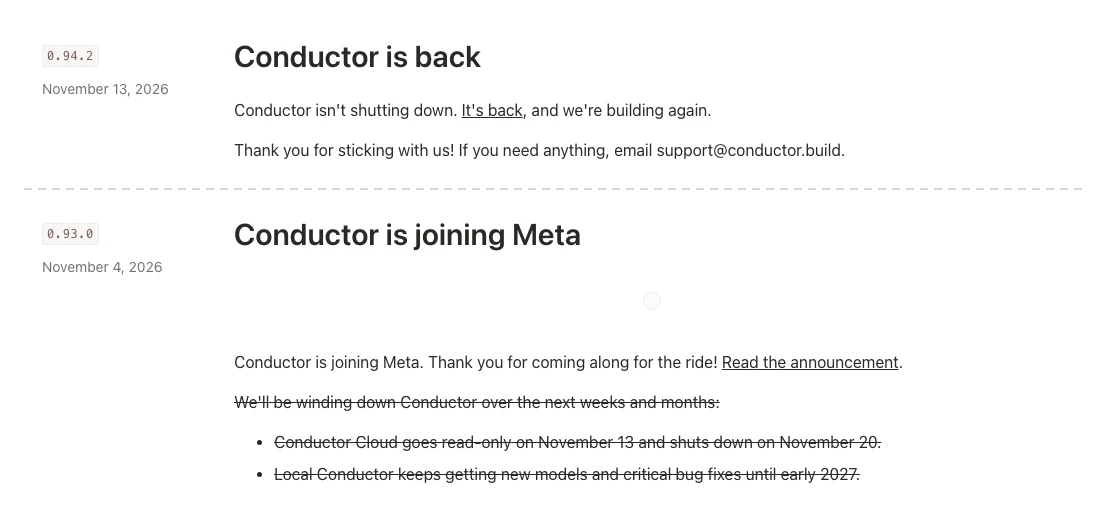
Be wary of building your process on a small "agent manager" app. Conductor, a popular one, announced on 4 November 2026 that it was joining Meta and closing its cloud service on 20 November. On 13 November it reversed course: "Conductor isn't shutting down" (changelog). Nine days of uncertainty is a good reason to keep your task board, briefs and logs in your own files and git.
Which tool should get which job?
Short answer: a practical split is Claude Code as the lead that plans and writes, Codex as a second-opinion reviewer and number checker, Grok Bot for scheduled drafts and monitoring with exports rather than logins, and a task board outside every tool as the record of who owns what.
This is a reference split built from what each tool documents, not a benchmark. The "one writer, others review" pattern is the one Cognition and Anthropic both report working, and using a different model as the reviewer makes it less likely the reviewer shares the author's blind spots.
| Job | Agent | Access | Who approves |
|---|---|---|---|
| Search terms review | Codex or Claude subagent | Exported reports | You add negatives |
| Ad copy drafts | Claude Code | Brief and past ads | Reviewer, then you |
| Search Console decay check | Claude subagent | Read-only export | You pick pages |
| Weekly report draft | Grok Bot routine | Exports folder | You send it |
| Competitor ad research | Read-only helper | Web, ad libraries | Nobody (notes only) |
| Number check | Codex reviewer | Output plus sources | Fails or passes |
One PPC practitioner on Reddit landed on a similar split in April 2026, running both tools on Google and Meta accounts. In their r/PPC post, Codex was better on the data side (search terms, wasted spend, conversion checks), Claude Code was better on language (ads, landing pages), and "Google Ads alone is not enough context" without CRM lead quality. The top reply: use the model as an analyst, not a buyer, with a person approving every change.
How should you structure a team of AI agents for marketing?
Short answer: give each agent one area and only the access that area needs: a Google Ads agent that reads and proposes, an SEO agent that writes tickets, a research agent with no write tools, a QA agent with fresh eyes, and a person at the approval queue. None of the three tools gives you a multi-client board or audit log out of the box.
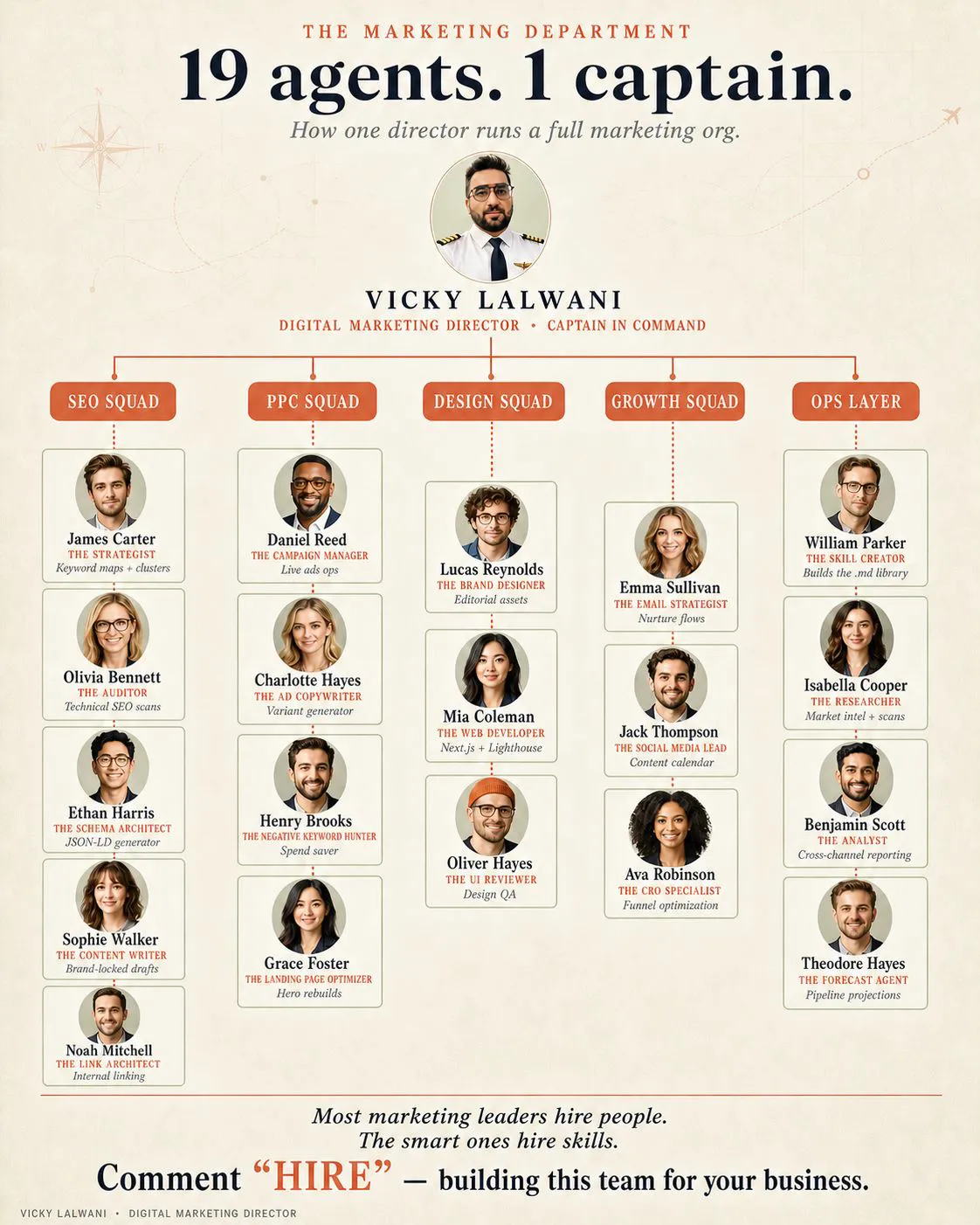
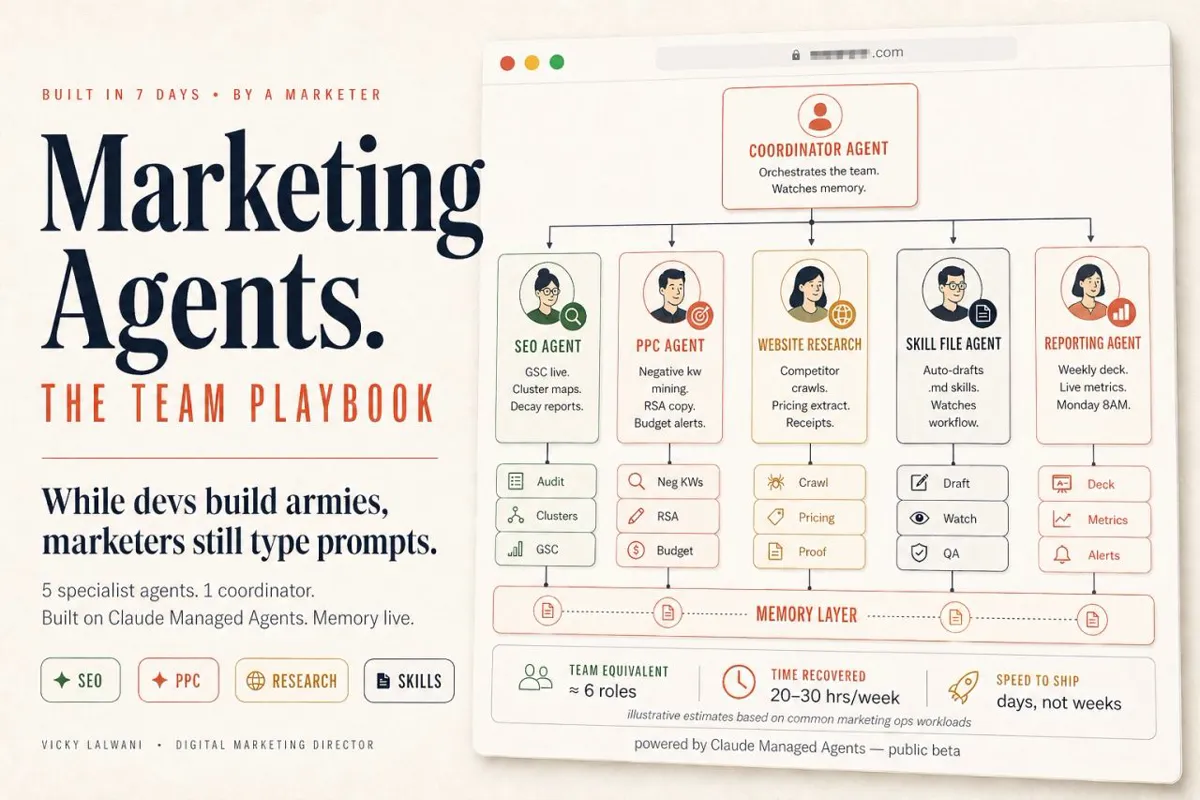
My own practice describes its set-up as 19 AI agents alongside three people: agents handle repetitive audits, reporting and research, and people set strategy and approve work. The diagram below is a general version for this guide, not a copy of that set-up.
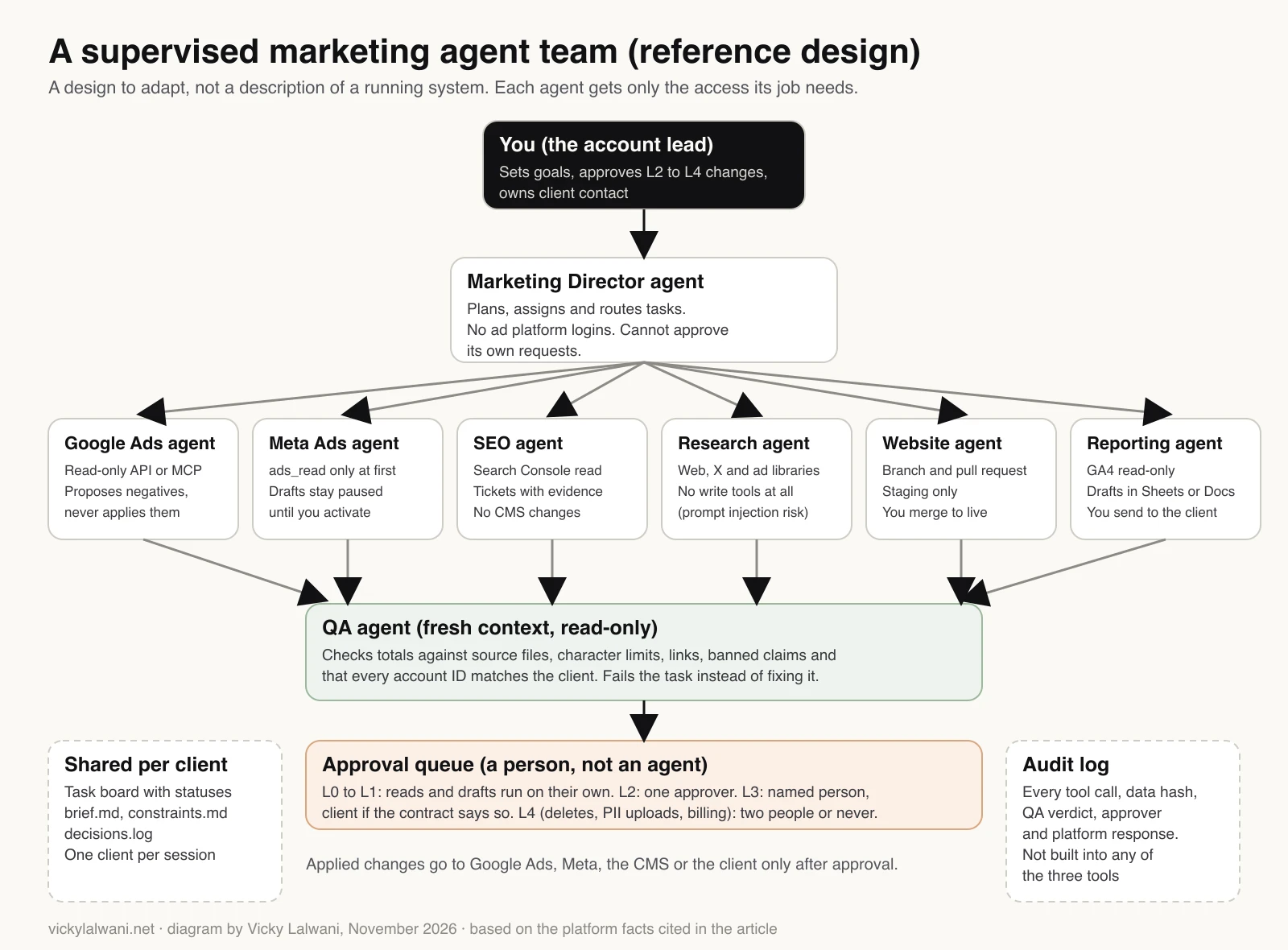
The point isn't the job titles. Each agent exists because it needs different data and access:
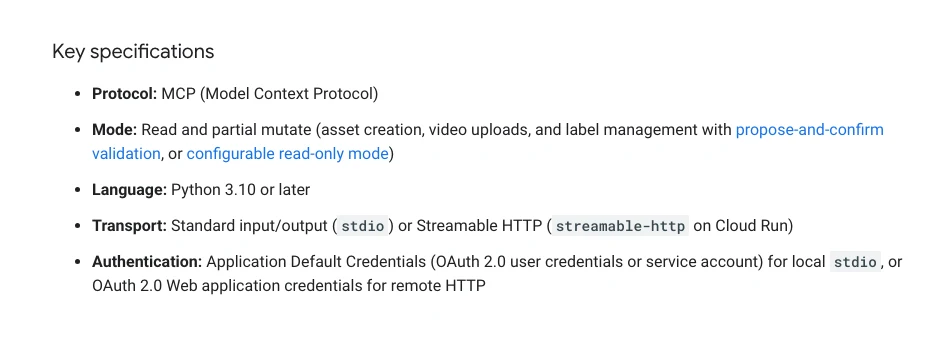
- Google Ads agent: reads reports through Google's Google Ads MCP server. That server can create assets, upload videos and manage labels with a propose-and-confirm step, or run in read-only mode, but it can't create, change, pause or enable campaigns, ads, budgets or bids. The agent proposes; you apply.
- Meta Ads agent: read access first. Meta's ads MCP server creates campaigns, ad sets and ads paused and asks before activation. You turn ads on.
- SEO agent: Search Console exports and crawl files. Writes tickets, never touches the CMS.
- Research agent: web, X and ad libraries. No write tools at all, because it reads untrusted pages.
- Website agent: works on a branch in staging. You merge to live.
- Reporting agent: GA4 read-only. Drafts reports. You send them.
- QA agent: checks everything with fresh eyes. It can fail work but never approve platform changes.
What it really takes: Google Ads API access through a Google Cloud project (developer tokens were sunset on 9 September 2026), read-only users wherever writing isn't needed, a task board, a folder per client, client agreements that cover AI vendors, and a person for every approval. If you want the Google Ads side run by a person who uses this set-up, see my Google Ads management; for the search side, SEO consulting. More on roles in AI agent marketing teams.
How should agents hand work to each other?
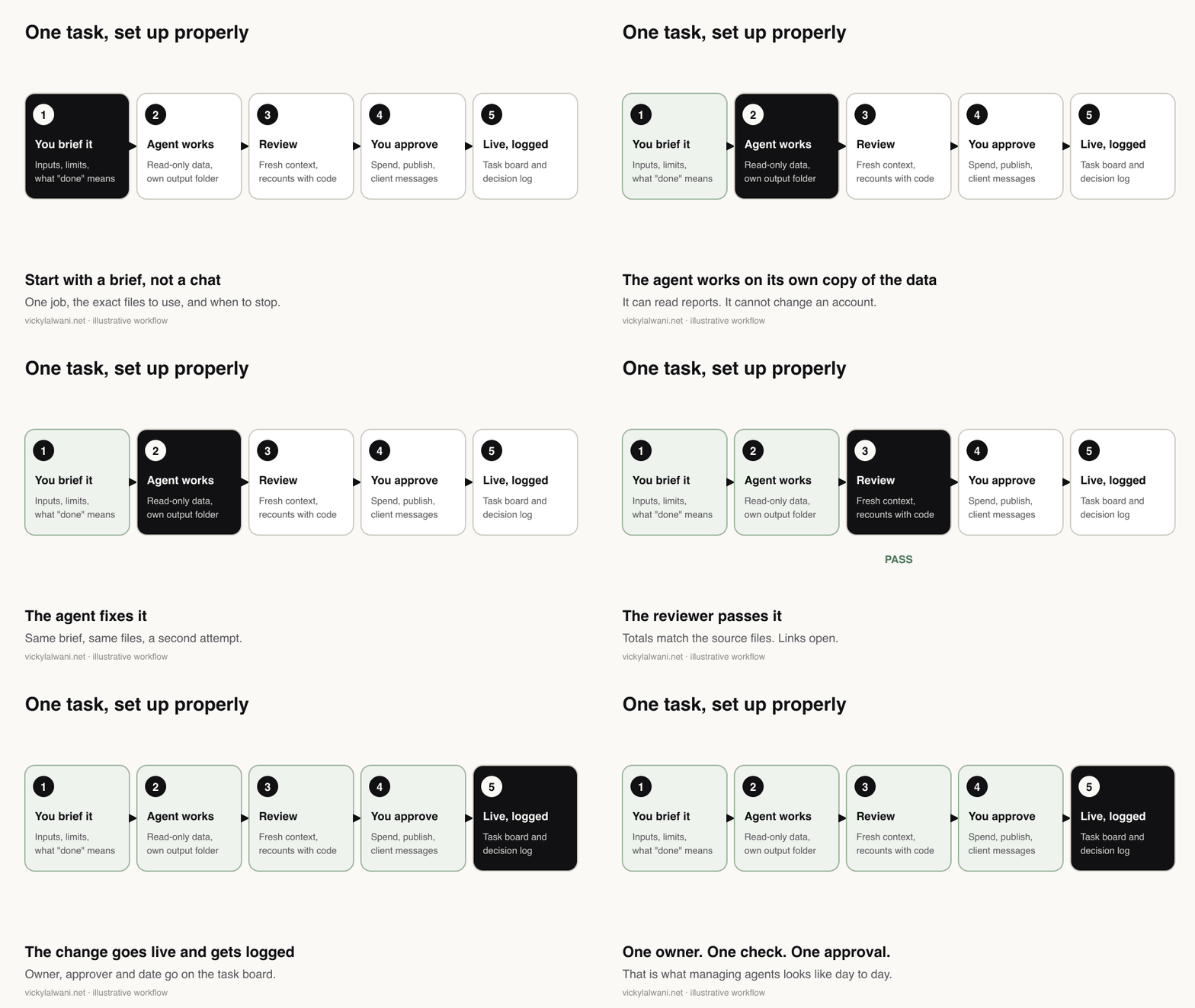
Short answer: through files, not chat. Each agent writes its findings to a file and passes a short structured handoff naming the task, the client, the inputs, the proposed change and its status. The next agent reads the file, not the conversation, and shared facts live in files every agent loads.
Vague briefs cause most agent mistakes. Anthropic's early research system spawned 50 subagents for simple queries until it added rules about effort. Brief each agent like a new contractor: outcome, inputs, limits, what "done" means and when to stop. The full brief template, with a Search Console example, is in tasks to delegate to AI agents.
Shared facts (offer, targets, banned claims) belong in files every agent reads, such as CLAUDE.md for Claude Code and AGENTS.md for Codex. Those files are guidance, not enforcement, so rules that must never break go in permissions. Where each file lives is covered in Claude folder setup for marketers.
When I handed approved Google Ads work from Claude to Grok Bot, the second agent had none of the context, so I asked for a hand-off pack: the task list with expected outcomes, the files and a summary. That pack is now the habit. A minimal handoff looks like this:
task_id: CLIENT-A-2026-11-18-014
client: client-a          # must match the credentials in use
from: google-ads-agent
to: qa-agent
objective: Cut spend on search terms with no conversions
inputs:
  - search_terms_last_30d.csv (exported 18 Nov 07:02)
findings_file: findings/CLIENT-A-2026-11-18-014.md
proposed_change: add phrase-match negatives to the "Waste" list
reversible: true
computed_by: code           # QA rejects anything marked model_estimate
caveats: last 3 days excluded for conversion lag
status: awaiting_qa
Two hard rules: one client per session, and no passwords or tokens in any file an agent reads. In Grok Bot, give it exports rather than logins, because every Bot can reach what any Bot signed in to.
How do you run multiple AI agents in parallel without collisions?
Short answer: give each agent its own copy of the files with git worktrees, give every file and task one owner, agree shared changes before fanning out, and check the combined result, because worktrees isolate writes but not assumptions. For marketing work, a folder per task does the same job.
Two agents edit the same header file. Whoever saves last wins, and the other change vanishes without a word.
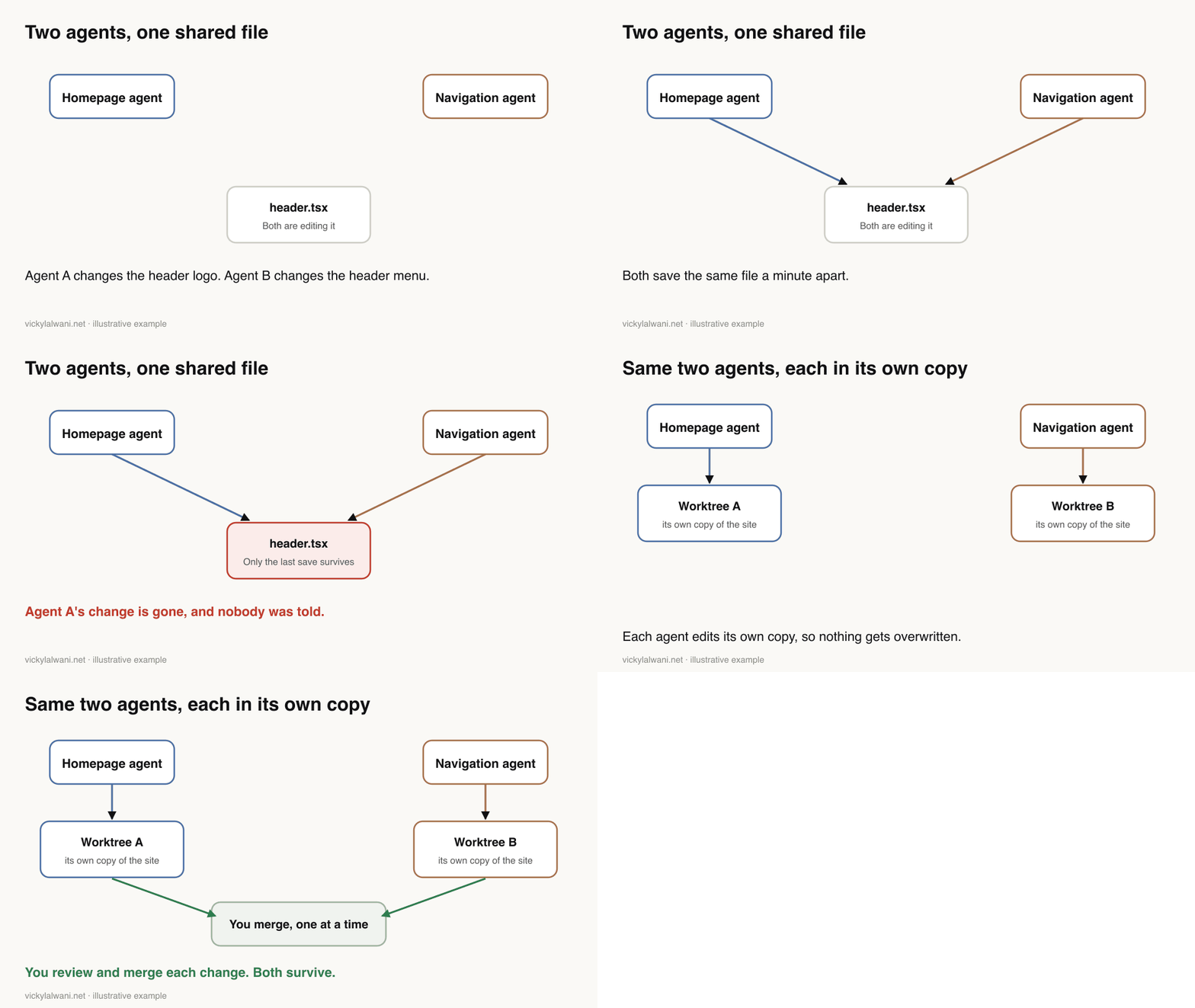
I've hit the deploy version of this on my own site. I typed the same "check it and push it" request into two sessions a minute apart, and both nearly shipped the same change. The rule since then: check git status first, commit only your own files, and deploy from a clean worktree.
- Own copy each. Git worktrees, in both Claude Code and Codex. incident.io ran several Claude Code sessions this way.
- One owner per file. Agent teams don't isolate edits, so split by file.
- Shared changes first. Agree the structure before fanning out.
- Check the merge. A reply on r/ClaudeAI put it well: worktrees isolate writes, not assumptions. Two branches can each pass their own checks and still break together.
- Or just don't. A developer who writes widely on AI tools finds review is the bottleneck, so research and small tasks run in parallel while big changes go one at a time.
The commands:
# Claude Code: start a session in its own git worktree
claude --worktree homepage-copy

# Codex CLI: start in a new managed worktree
codex --worktree

# Claude Code agent teams (experimental, off by default):
# add this to .claude/settings.json
{ "env": { "CLAUDE_CODE_EXPERIMENTAL_AGENT_TEAMS": "1" } }
Worktrees need a git repository, and gitignored files like .env aren't copied unless you list them in .worktreeinclude (docs). Interactive Claude Code runs also need the folder trusted first. If your settings file already has an env block, add the line inside it.
The marketing version: a folder per task. Agents read the shared client files but write only to their own folder. The marketing "merge conflict" is two agents proposing different negatives for one campaign, and one owner per task prevents it.
How do you monitor several AI agents at once?
Short answer: use each tool's own view for status and cost: Claude Code's agent view and /usage, Codex's command centre, Grok Bot's routine run history. Then keep a task board for what dashboards can't show: who owns each task, whether it was right, and who approved it.
Two agents keep suggesting the same keywords. Another has been "working" for an hour. Without visibility, the client finds out before you do.
- Claude Code:
claude agentslists background sessions by state, with the ones waiting for you at the top. On subscription plans,/usageattributes recent usage to skills, subagents, plugins and MCP servers (docs), and OpenTelemetry exports the metrics (docs). - Codex:
codex agentsopens the agent command centre; cloud tasks have their own list. - Grok Bot: each routine shows its schedule, next run and a run history of running, succeeded or failed, with the reason for failures (docs).
Watch for the idle agent too. One Claude Code user on r/ClaudeAI tried five sessions and found two had sat waiting on a permission prompt while they worked in a third. My own scheduled daily run did the same for days: it stalled on permission prompts with nobody there to answer. The workaround was one self-contained session per day with a shared brief file, which is a workaround, not a fix.
The cheapest fix for visibility is a task board. Mine is a shared sheet that Claude and Grok Bot both read and write. Every task has:
| Field | Why it's there |
|---|---|
| Owner | One agent or person, never two |
| Claim expiry | Abandoned work frees itself |
| Status | Proposed, in progress, in QA, awaiting approval, live |
| Output link | The file and the data behind it |
| Cost and review time | What the task really cost |
| Approved by | Recorded by a person, not an agent |
Make every agent check the board before starting. That alone stops the most common duplicate: two agents grabbing the same task. SaaStr, which runs about 30 agents in production, puts the human side bluntly: you'll have a one-on-one with every agent every day, not weekly.
What goes wrong when you run several agents, and how do you stop it?
Short answer: most failures come from structure, not the model: agents that misread each other, weak checking, and work reported "done" that isn't. Fix them with one owner per task, checks the agent can't edit, code for every number, caps on turns and spend, read-only defaults and a tested kill switch.
Researchers who built the MAST failure taxonomy annotated over 1,600 multi-agent traces across seven frameworks and grouped 14 failure modes into three families: system design, misalignment between agents, and task verification. Here's what that looks like in marketing work:
| Symptom | Likely cause | Fix |
|---|---|---|
| "Done" but it isn't | It graded itself | A check it can't edit |
| Same work twice | No owner | Board first, one owner |
| Edits disappear | Shared files | Worktrees, owner per file |
| Endless loops | No stop rule | Turn and spend caps |
| Confident wrong numbers | Model maths | Code for every number |
| Wrong goal optimised | Ads data only | CRM data, or analysis only |
| Something deleted | Too much access | Read-only, list then you act |
METR found models sometimes game their scoring, more so when they can see the grader, which is why the reviewer's checks sit where the author can't touch them. And when an agent keeps getting it wrong, Anthropic's advice is to stop after two failed corrections, run /clear and write a better prompt (best practices).
The destructive cases are real. In July 2025 a Replit agent deleted a production database during a code freeze. SaaStr described four marketing agent incidents in one week, including an unauthorised test that gave away free tickets. And on 10 November 2026 a Claude Code user on r/ClaudeAI reported that a clean-up of old worktrees deleted about 230 GB of files; the agent's own explanation was links it hadn't checked for. The top reply's habit is a good one: have the agent list what it would delete, then delete it yourself.
On my own client work the pattern is similar on a smaller scale. When an agent's Google Ads audit flagged changes, some didn't match the account, such as a converting keyword marked for pausing. That's why client accounts get an audit first, findings in a sheet I check by hand, and no changes before approval.
Keep a kill switch. Before running anything unattended, write down how to stop it all in two minutes: stop background sessions in agent view, pause Grok Bot routines, stop Codex tasks, and remove the agent's access to each ad account. Test it once.
What does it cost to run several AI agents?
Short answer: the model bill is usually small next to your review time. An example of eight agent runs a day for one client comes to about US$36 a month on Claude Sonnet 5.5 and about US$72 on Opus 5.5 at November 2026 API prices. Judge each agent by cost per task that passed review.
Every agent multiplies tokens: Anthropic puts multi-agent set-ups at 3 to 10 times a single agent for the same task. The example below assumes 8 runs a day for 30 days, 50,000 input and 5,000 output tokens per run and no caching, so 12 million input and 1.2 million output tokens a month. Prices are from Anthropic's pricing page on 18 November 2026.
| Model | Input / output per million | Example month |
|---|---|---|
| Haiku 5.5 | US$0.10 / US$0.50 | about US$1.80 |
| Sonnet 5.5 | US$2 / US$10 | about US$36 |
| Opus 5.5 | US$4 / US$20 | about US$72 |
| Fable 5.2 | US$8 / US$40 | about US$144 |
These are example sums, not quotes. Real runs often use more tokens, and caching cuts the input cost, so measure your own. Two hours of your review time a month can cost more than any line above, which is why the number that matters is:
Cost per task = (model cost + review minutes × your hourly rate) ÷ tasks that passed review.
- Cap unattended runs with
--max-turnsand--max-budget-usdin Claude Code's print mode. Subagent spend counts toward the budget cap, and spend can pass it slightly, so leave headroom (CLI reference). - Use cheaper models for helpers. Anthropic's developer account recommends putting subagents on smaller models to save cost. See AI model routing and reducing Claude token costs.
- Shut idle agents down. Each active agent team teammate keeps using tokens until it exits.
- Watch plan limits. Claude's Pro and Max plans have a five-hour session limit and a weekly limit; Ultra has a weekly limit (Claude Help Centre). For overnight work, see always-on AI agents.
On access, follow the "lethal trifecta" rule: never let one agent combine private data, untrusted content and a way to send data out. Your research agent reads competitor pages, so it shouldn't also hold your Google Ads login.
Where should a person approve agent work?
Short answer: at the moments that cost money or can't be undone: spending, publishing, client messages and deletes. Reads and drafts can run on their own. Approving every step backfires, because Anthropic found Claude Code users approve 93% of permission prompts.
Approval prompts wear off (Anthropic), and experienced users turn on full auto-approve more often than new ones (Anthropic). So sort actions into three groups: the agent does it alone (reading, analysis, notes), the agent prepares and you approve (negatives, budget moves, page changes), and never an agent (deletes, customer lists, billing). The full tiers with SEO and Google Ads examples are in tasks to delegate to AI agents.
Then back it with platform limits, so a mistake has a ceiling: a spending limit in Meta, capped budgets in Google Ads, read-only users wherever writing isn't needed. Record approvals on the board under your own login; an agent writing "approved" doesn't count. More in human in the loop for Google Ads.
Which copy-paste set-ups help most?
Short answer: four: a supervisor brief for parallel research, a fresh-context reviewer, one specialist saved as a Claude Code subagent or Codex custom agent, and a Grok Bot routine with a stale-data rule. Each is below, with search terms as the worked example.
1. A supervisor brief for parallel research
You're coordinating a research task. Don't do the research yourself.
Goal: [e.g. "Compare how five competitors position their emergency plumbing offer"]
1. Split the work into 2 to 4 independent pieces that don't depend on each other's results. Write the split to plan.md first, with one owner per piece.
2. For each piece, start a helper with a brief that states: the question, the sources it may use, the output file it must write, and what "done" means.
3. Helpers write full findings to files and return only a short summary and the file path.
4. When all helpers finish, read their files, note where they disagree, and check the disagreements yourself against the primary source.
5. Then hand everything to a fresh reviewer using the reviewer brief, and fix what it fails.
Budget: no more than [N] helpers and [N] tool calls each. If a helper hasn't finished after [N] minutes, stop it and report what it found.
2. A fresh-context reviewer
In my own test on 3 November 2026, two of Grok's ad descriptions came to 93 and 94 characters, over Google's 90 limit (the test). That's why this reviewer counts with code.
You are the reviewer, not the author. You haven't seen how this work was produced, and you shouldn't try to fix it.
Inputs: the original task brief, the author's output, and the source files it used.
Check, and report pass or fail for each:
1. Every number in the output can be recomputed from the source files. Recompute the five most important ones with code.
2. Every claim about the client (offers, hours, prices, credentials) appears in the brief or the source files.
3. Character limits, formats and naming rules in the brief are met. Count with code, not by eye.
4. Every link opens and says what the output claims.
5. Account IDs, client names and dates match the brief.
Return FAIL with the exact line and reason if anything fails. Don't soften it, and don't pass work after checking only one or two items.
3. A Claude Code subagent
Save as .claude/agents/search-terms-analyst.md, then ask: "Use the search-terms-analyst subagent on these two exports." (docs)
---
name: search-terms-analyst
description: Reviews Google Ads search terms exports and proposes negative keywords. Use when asked to audit search terms or wasted spend.
tools: Read, Grep, Glob, Bash, Write
model: sonnet
---
You analyse exported Google Ads reports. You never have account access.
Use only the files named in the task. Run code for every total.
Write findings to findings/<task-id>.md: proposed negatives with match type,
level, spend affected and the rows behind each one, plus a "protect" list
of any term that converted. Return a 5-line summary and the file path.
If a file is missing or totals don't match, stop and say so.
4. The same specialist in Codex
Save as .codex/agents/search_terms_analyst.toml. It inherits the parent session's permissions and MCP servers, so start that session read-only (docs).
name = "search_terms_analyst"
description = "Reviews Google Ads search terms exports and proposes negatives. Use for search term or wasted spend audits."
developer_instructions = """
You analyse exported Google Ads reports and never have account access.
Use only the files named in the task and run code for every total.
Write findings to findings/<task-id>.md with a protect list of converting terms.
If a file is missing or totals don't match, stop and report it.
"""
5. A Grok Bot routine
Do the report once with the Bot and save it as a skill, then ask that Bot to create the routine and confirm the schedule, time zone, input source and approval boundary (docs).
Every Monday at 8:00 AM, run the "Weekly paid media report" skill on the exports in the Reports folder.
Post a draft summary in this conversation. Don't send anything to clients and don't change any ad account.
If an export is missing or older than 7 days, report the failure instead of using old data.
What should your first week look like?
Short answer: one checkable job, one agent, then a reviewer, then a saved specialist with caps, then one read-only helper. On day seven, compare time saved, errors caught and cost, and decide to keep, change or stop.
| Day | Do this |
|---|---|
| 1 | Pick one checkable job, like a weekly search terms review |
| 2 | Set up the client folder and a read-only export |
| 3 | Run it with one agent. Re-add the totals yourself |
| 4 | Add the reviewer. Did it catch anything? |
| 5 | Save it as a subagent or custom agent, with caps |
| 6 | Add one read-only helper on a separate job |
| 7 | Review time saved, errors caught and cost |
Then a short daily review:
- What finished, what's waiting on me, what failed?
- Did the reviewer fail anything, and was it right?
- Any task claimed but untouched for a day?
- Anything running that shouldn't be?
- One rule to add, based on today's mistakes.
What do people say on X and Reddit?
Short answer: vendors are making parallel agents the default, while practitioners report a limit of two or three active sessions, idle agents nobody noticed, merges that break despite worktrees, and a firm line in PPC that agents analyse and people approve.
| Source | Date | Point | Type |
|---|---|---|---|
| Claude developers on X | 14 Oct 2026 | Parallel tasks start a nested session each and report back to the main thread | Official |
| A Claude Code team member on X | 29 Jun 2026 | Subagents now run in the background by default while you keep talking | Vendor staff |
| A Claude Code team member on X | 31 Jan 2026 | Offload tasks to subagents to keep the main context clean | Vendor staff |
| Claude developers on X | 9 Nov 2026 | Model guide: put subagents on smaller models to save cost | Official |
| Grok Bot on X | 26 Aug 2026 | Access widened to more plans; weekly usage limits reset for all users | Official |
| A business school professor on X | 2 Mar 2026 | Confused how subagents, skills and plugins differ after the switch to plugins | Opinion |
| A Google Ads practitioner on X | 14 Sep 2026 | Staged Claude Code workflow for landing pages, starting with a "project brain" | First-hand |
| r/PPC | 28 Apr 2026 | Codex for account data, Claude Code for copy; top reply: analyst, not buyer | First-hand |
| r/ClaudeAI | 18 Sep 2026 | Too many parallel tasks; replies: a worktree per agent, three chats as a limit | First-hand |
| r/ClaudeAI | 8 Nov 2026 | Merges that break; a reviewer from the other model sees only the diff | First-hand |
| r/ClaudeAI | 10 Nov 2026 | Worktree clean-up deleted about 230 GB; reply: list it, delete it yourself | First-hand |
| r/PPC | 26 Oct 2026 | Rules vs agents: agents may just move the digging to a review screen | Opinion, first-hand replies |
| r/codex | 30 Oct 2026 | Raising the subagent limit; one reply: keep 3 to 4 with separate scopes | Opinion |
Credited by account type or community, not by name. Every X post was checked through X's embed service and every Reddit thread read with its replies on 18 November 2026.
Videos worth watching
Made by Claude (Anthropic), 11 May 2026. The official launch demo of agent view, the one screen for background sessions. It promotes Claude Code.
Made by OpenAI, 6 February 2026. How parallel chats and worktrees work in the Codex app. It promotes Codex.
Made by Claude (Anthropic), 22 May 2026. When a job should become a tool, a skill or a separate subagent, which is the "one or several" question in practice. It sells nothing directly.
| Video | Channel | Date | What it covers |
|---|---|---|---|
| Introducing agent view in Claude Code | Claude | 11 May 2026 | Monitoring background sessions |
| Multitasking with the Codex app | OpenAI | 6 Feb 2026 | Parallel chats, worktrees |
| Tool, skill, or subagent? | Claude | 22 May 2026 | When to split an agent |
| How the Claude Code team uses Claude Code | Claude | 2 Sep 2026 | Parallel sessions in daily work |
| New Ways of Working with Codex | AI Engineer (OpenAI talk) | 17 Nov 2026 | OpenAI staff on working with Codex |
| Introducing the Google Ads MCP Server | Google Advertising and Measurement Developers | 29 Oct 2025 | Connecting agents to Google Ads |
Where this advice is weak
Short answer: most of the evidence on running several agents comes from software teams, the marketing team design is a reference rather than a measured system, and agent features change monthly.
- METR's concurrency data covers seven coding staff, and Anthropic's studies are mostly about software work. Marketing tasks may behave differently.
- The tool split and team diagram are designs built from documented features and common SEO and Google Ads jobs, not benchmarks.
- Agent view, cloud scheduled tasks and projects are previews or betas, and agent teams are experimental. Defaults and limits may change; recheck the linked pages.
- The cost example uses fixed token counts and no caching. Your real runs will differ.
- Reddit and X posts are individual reports, and the 230 GB deletion is the agent's own account of what happened, not a confirmed root cause.
Want your agents set up and checked?
If you want this run on your accounts, with read-only access first, owners on a board and a reviewer before anything goes live, that's what my AI marketing agents service covers. If you'd rather hand over the account work itself, see Google Ads management or SEO consulting. Rates are on the pricing page.
Free guide: The AI Team Playbook covers the roles, model routing, briefs and checks for running AI agents as a team, plus a five-step daily loop.
Keep reading: tasks to delegate to AI agents, the AI agent operating system and human in the loop for Google Ads.
Sources
Last checked 18 November 2026.
| Source | What it supports | Date |
|---|---|---|
| Claude Code: run agents in parallel | Five ways to run tasks at once | Read 18 Nov 2026 |
| Claude Code: subagents | Background default, three-layer depth, subagent files | Read 18 Nov 2026 |
| Claude Code: agent teams | Experimental, off by default, 3 to 5 teammates | Read 18 Nov 2026 |
| Claude Code: agent view | claude agents, research preview | Read 18 Nov 2026 |
| Claude Code: costs | About 7x tokens for teams, /usage attribution | Read 18 Nov 2026 |
| Claude Code: dynamic workflows | Scripts that run many subagents | Read 18 Nov 2026 |
| Claude Code: projects | Public beta, plans | Read 18 Nov 2026 |
| Claude Code: worktrees | --worktree, .worktreeinclude, trust | Read 18 Nov 2026 |
| Claude Code: CLI reference | --max-turns, --max-budget-usd | Read 18 Nov 2026 |
| Claude Code: best practices | Two failed corrections, then /clear | Read 18 Nov 2026 |
| Claude Code: monitoring | OpenTelemetry export | Read 18 Nov 2026 |
| Claude Help Centre: Claude Code on paid plans | Five-hour and weekly limits | Read 18 Nov 2026 |
| Anthropic: API pricing | Model prices in the cost example | Read 18 Nov 2026 |
| Codex: subagents | On by default, inheritance, custom agents | Read 18 Nov 2026 |
| Codex manual | codex agents, --worktree | Read 18 Nov 2026 |
| Codex: worktrees | Parallel chats in worktrees | Read 18 Nov 2026 |
| Codex: MCP server removal | Codex no longer runs as an MCP server | Read 18 Nov 2026 |
| OpenAI: Codex plugin for Claude Code | Using both together | Read 18 Nov 2026 |
| OpenAI: Agent Builder | Shuts down 30 Nov 2026 | Read 18 Nov 2026 |
| Grok Bot: approvals, security and privacy | One shared cloud computer | Read 18 Nov 2026 |
| Grok Bot: chat and collaboration | Groups of 2 to 6, usage, single owner | Read 18 Nov 2026 |
| Grok Bot: skills and routines | Routines and run history | Read 18 Nov 2026 |
| Google Ads MCP server | Read and partial mutate, limits | Read 18 Nov 2026 |
| Google Ads API: developer token sunset | Sunset 9 Sep 2026 | Read 18 Nov 2026 |
| Meta ads MCP: creation tools | Entities created paused | Read 18 Nov 2026 |
| Conductor changelog | Shutdown notice 4 Nov, reversed 13 Nov | Read 18 Nov 2026 |
| AutoGen repository | Maintenance mode | Read 18 Nov 2026 |
| METR: transcript analysis | Agents at once, 7 staff (chart) | 17 Feb 2026 |
| METR: developer trial | 19% slower | 10 Jul 2025 |
| METR: reward hacking | Gaming the scoring | 5 Jun 2025 |
| Anthropic: agentic coding and expertise | 28% to 33% vs 15% | 16 Jun 2026 |
| Anthropic: multi-agent research system | 4x and 15x tokens, 90.2%, 50 subagents (chart) | 13 Jun 2025 |
| Anthropic: when to use multi-agent systems | Split by context, 3 to 10x tokens | 23 Jan 2026 |
| Anthropic: building effective agents | Start simple | 19 Dec 2024 |
| Anthropic: Claude Code auto mode | 93% of prompts approved | Read 18 Nov 2026 |
| Anthropic: measuring agent autonomy | Auto-approve by experience | 18 Feb 2026 |
| OpenAI: practical guide to building agents | Single agent first | Read 18 Nov 2026 |
| Google Cloud: agent design patterns | Patterns | Read 18 Nov 2026 |
| Towards a Science of Scaling Agent Systems | 260 set-ups, +80.8% to -70.0% | Dec 2025 |
| Why Do Multi-Agent LLM Systems Fail? (MAST) | 1,600+ traces, 14 failure modes | Read 18 Nov 2026 |
| Cognition: Don't Build Multi-Agents | Earlier view | Read 18 Nov 2026 |
| Cognition: multi-agents that work | One writer plus reviewers | Read 18 Nov 2026 |
| incident.io: Claude Code and worktrees | Parallel sessions | Read 18 Nov 2026 |
| A developer's blog: parallel coding agents | Review is the bottleneck | 5 Oct 2025 |
| A developer's blog: the lethal trifecta | Access rule | 16 Jun 2025 |
| A developer's write-up: AI adoption | One background agent | Read 18 Nov 2026 |
| SaaStr: 30 AI agents in production | Daily check-ins | Read 18 Nov 2026 |
| SaaStr: an AI VP of Marketing | Four incidents in a week | Read 18 Nov 2026 |
| The Register: Replit incident | Deleted database | 22 Jul 2025 |
| X and Reddit posts | Listed in the table above | Read 18 Nov 2026 |
| YouTube videos | Listed under Videos worth watching | Checked 18 Nov 2026 |
FAQ
How many AI agents can one person manage?
Start with two or three: one main agent, one reviewer and one read-only helper. In METR's January 2026 data, six of seven staff averaged 1.05 to 1.52 main agents at once and the heaviest user about 2.3. The real limit is how much output you can review, not how many agents a tool can start.
What is the best way to manage multiple AI agents?
Start with one agent and add more only when work splits cleanly by data, tools or context. Give each agent one owned job, track every task on a shared board with one owner, check output with a fresh reviewer, cap turns and spend, and keep spending, publishing and client messages behind a person.
How do you run multiple AI agents in parallel?
Give each agent its own copy of the files with git worktrees, which both Claude Code and Codex support, and give each file and task one owner. Agree shared changes first and check the combined result, because worktrees keep edits apart but not the assumptions behind them.
Should I use Claude Code subagents or agent teams?
Use subagents for most work: they work in their own context, run in the background by default and return a summary. Agent teams are experimental and off by default, use about 7 times the tokens of a standard session when teammates run in plan mode, and suit work where teammates need to talk to each other.
Can OpenAI Codex run multiple agents in parallel?
Yes. Current Codex releases turn subagents on by default, parallel chats can each use a git worktree, and the codex agents command opens an agent command centre. Custom agents inherit the parent session's permissions, provider and MCP servers, so you can't give one specialist narrower access than its parent.
How do you monitor AI agents and their costs?
Use each tool's own views: Claude Code's agent view and /usage, the codex agents command centre, and Grok Bot's routine run history. Dashboards show status and cost but not whether the work was right, so also keep a task board with each task's owner, status, output and approver.
How much does it cost to run several AI agents?
Less than most people expect in model fees. An example of eight runs a day for one client, at 50,000 input and 5,000 output tokens each, comes to about US$36 a month on Claude Sonnet 5.5 at November 2026 API prices. Your review time usually costs more, so measure cost per task that passed review.
How do I stop AI agents duplicating work?
Give every task one owner on a shared task board, make agents check the board before starting, let claims expire so abandoned work is freed, and have agents write findings to files rather than chat. Grok Bot's own docs advise a single owner at each stage for the same reason.
Do I need an AI agent management platform?
Not for two to five agents. Files, git, a task board and the vendors' own features are enough. Small agent-manager tools change fast: Conductor announced in November 2026 that it would close its cloud service, then reversed the decision nine days later.