An AI agent for Google Ads works best as a small team: one lead agent that plans and checks, two or three specialists with one job each, such as search terms or tracking, and a person who approves every change. Give each agent the narrowest access its job needs; Google's own MCP server cannot change campaigns, budgets or bids. Run proposals through a shared sheet with evidence, a manual check and a decision column, and add agents only when the work splits cleanly, because multi-agent systems use about 15 times the tokens of a chat.
TL;DR
- An AI agent for Google Ads works best as a small team: one lead agent that plans and checks, two or three specialists with one job each, and a person who approves every change.
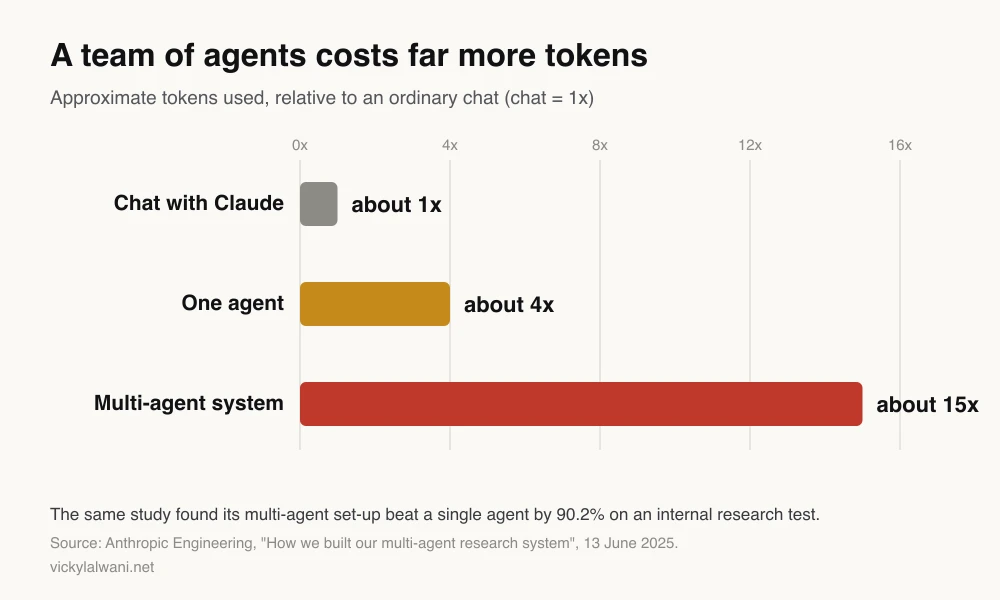
- A team is not free. Anthropic measured multi-agent systems using about 15 times the tokens of a chat, against about 4 times for one agent. Add agents only when the work splits cleanly.
- Permissions do the real safety work. Google's own Google Ads MCP server cannot create, pause or edit campaigns, ads, budgets or bids; give each agent the narrowest access its job needs.
- A shared sheet is the control layer: every proposal arrives with its evidence, a manual check column and a decision column, and a person applies what is approved.
You ask one AI tool to "look after the Google Ads account". It reads the search terms, rewrites three headlines, suggests a bid strategy change and drafts a report, all in one long reply. Some of it is good. Some of it is confidently wrong, and you cannot tell which part without redoing the work yourself.
That is the problem a team of agents solves. Instead of one giant prompt, you give each agent one job, one brief and one level of access, and a lead agent checks the work before it reaches you. The idea is the same as a well-run agency: clear roles, standing rules and a visible approval step.
This guide covers which roles to create, what the lead agent does, what access each role should get in Google Ads, how a shared sheet works as the approval layer, what a team costs to run, and where these set-ups fail. If you would rather have an experienced person run the account, my Google Ads management service uses the same approval-first habits.
A note on evidence. Platform facts come from Google Ads Help, the Google Ads API docs and Anthropic's docs, read on 18 November 2026 and linked where used. Anything written as "I" is a working habit from my own client and site work. I do not share client names or client numbers, so every worked example here is illustrative.
Jump to: Meaning · Team or one agent · Roles · Access · Shared sheet · Build it · X and Reddit · FAQs
What is an AI agent for Google Ads?
Short answer: An AI agent for Google Ads is a language model, such as Claude, that can call tools in a loop: it reads account data, decides what to look at next, and drafts findings or changes. A Google Ads agent team splits that work across several agents with narrow jobs, a lead that coordinates them, and a person who approves anything that would change the account.
Anthropic's own guide to building effective agents draws a useful line. A workflow follows steps you wrote in advance. An agent decides its own next step. Most good Google Ads set-ups mix the two: fixed steps for the parts you know, such as "pull last week's search terms", and agent judgement for the parts you do not, such as "which of these terms are off-topic?"
A team adds structure on top. Each agent gets a short job description: what it reads, what it returns, and what it must never do. That makes failures easier to find, because when a proposal is wrong you know which job produced it.
| One general agent | A small agent team | |
|---|---|---|
| Context | One long conversation | Each agent has its own |
| When it fails | Hard to see where | You know which job failed |
| Token use | Lower | Much higher |
| Best for | Quick questions | Weekly routines with clear jobs |
| Main risk | Overconfident mixed advice | Bad handoffs between agents |
Does a team of agents beat one agent?
Short answer: Only when the work splits into independent pieces. Anthropic found its multi-agent research set-up beat a single agent by 90.2% on an internal test, but used about 15 times the tokens of a chat. Google Ads work is often sequential and shares the same data, so most accounts need one lead agent and two or three specialists, not a dozen.
The best public evidence comes from Anthropic's write-up of how it built its multi-agent research system (13 June 2025). A lead agent split research questions into parts and sent each to a subagent with its own context window. On research, that worked very well. The same article is clear about the cost and the limits: agents use about 4 times the tokens of a chat, multi-agent systems about 15 times, and set-ups where every agent needs the same context or where tasks depend on each other are a poor fit.
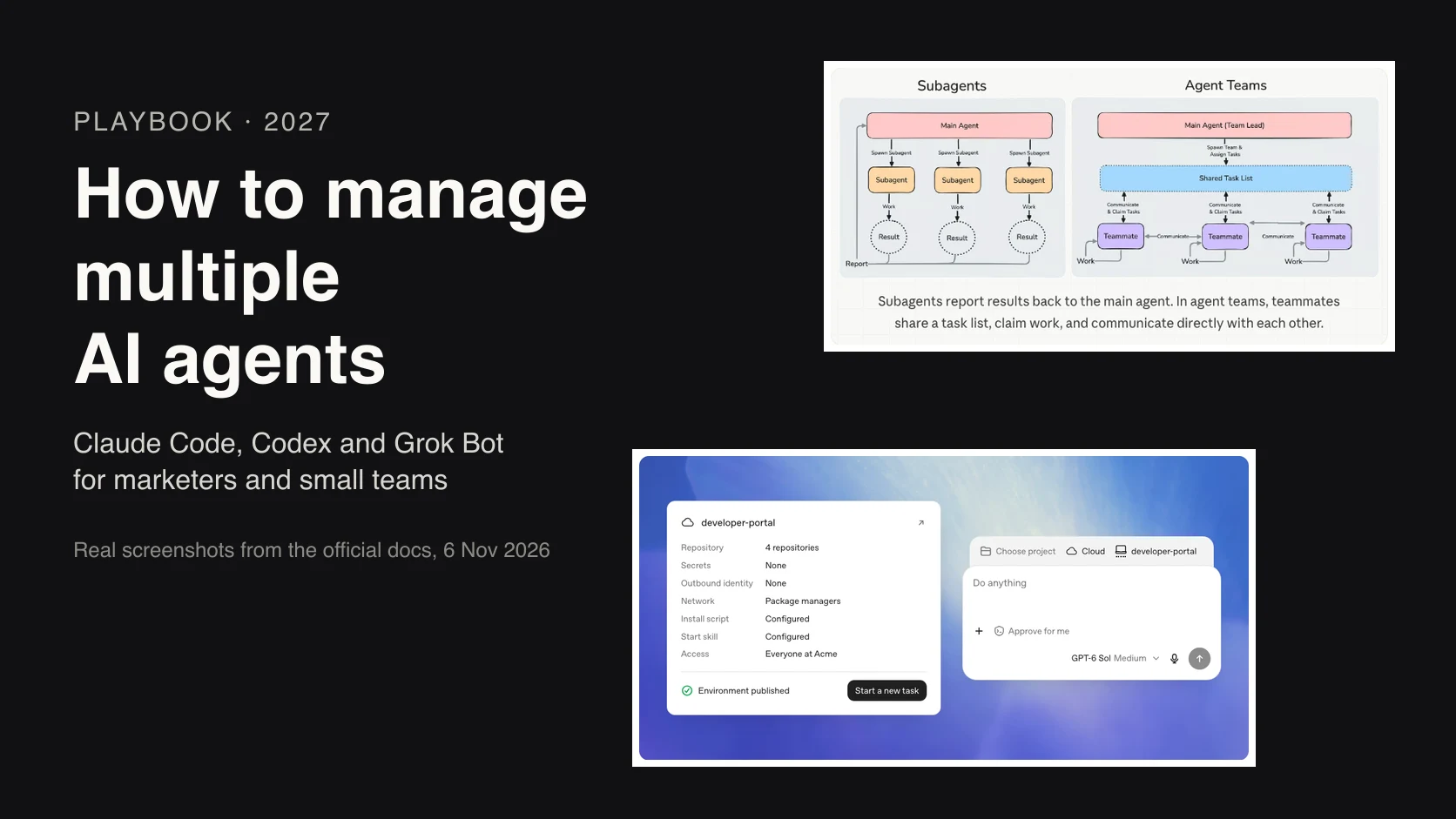
Claude Code's documentation says the same thing in practical terms. Its agent teams feature is experimental and off by default, uses "significantly more tokens than a single session", and works best when teammates can operate independently. For sequential work or tasks with many dependencies, the docs point you to a single session or to subagents instead.
For Google Ads, that means:
- Split by data source, not by opinion. Search terms, conversion tracking and budget pacing read different reports, so they parallelise well.
- Do not split one decision across agents. "Should we raise the target CPA?" needs the whole picture in one place.
- Start with three agents, not ten. Claude Code's docs suggest three to five teammates for most workflows and note that three focused teammates often beat five scattered ones.
Which roles should a Google Ads agent team have?
Short answer: Start with a lead, a search terms analyst and a tracking checker, then add a pacing watcher and a reporter once those are reliable. Ad copy and landing page review come later. Campaign builds, bid strategy and budget moves stay with a person, because they need context that is not in the account data.
A paid search account has distinct areas of work, and each maps to a role. The original version of this article listed eight departments. In practice, fewer roles that each do one job well are easier to check than eight that overlap.
| Role | Its one job | Reads | Returns |
|---|---|---|---|
| Lead | Plan, brief, review, report | Briefs and answers | One summary for you |
| Search terms | Find off-topic terms | Search terms report | Draft negatives with reasons |
| Tracking check | Confirm conversions still fire | Conversion actions, recent counts | Pass or a named problem |
| Pacing | Spot under or overspend | Spend vs monthly budget | Flags, not budget changes |
| Reporter | Write the weekly summary | Agreed metrics only | Draft report |
| Ad copy | Draft headline tests | Asset performance, offer | Drafts for review |
Google now ships an agent of its own inside the account. Ask Advisor is a beta, conversational assistant that can answer account questions, troubleshoot policy issues, suggest creatives and make some campaign setting updates with your approval. It is not available in manager (MCC) accounts. Treat it as one more specialist that works inside the interface, not as the lead of your team.
Search terms first, because it is weekly, easy to check and cheap to undo. If you want the reasoning behind which jobs to hand over and which to keep, my guide on what to automate in PPC scores each task with five questions.
What does the lead agent do?
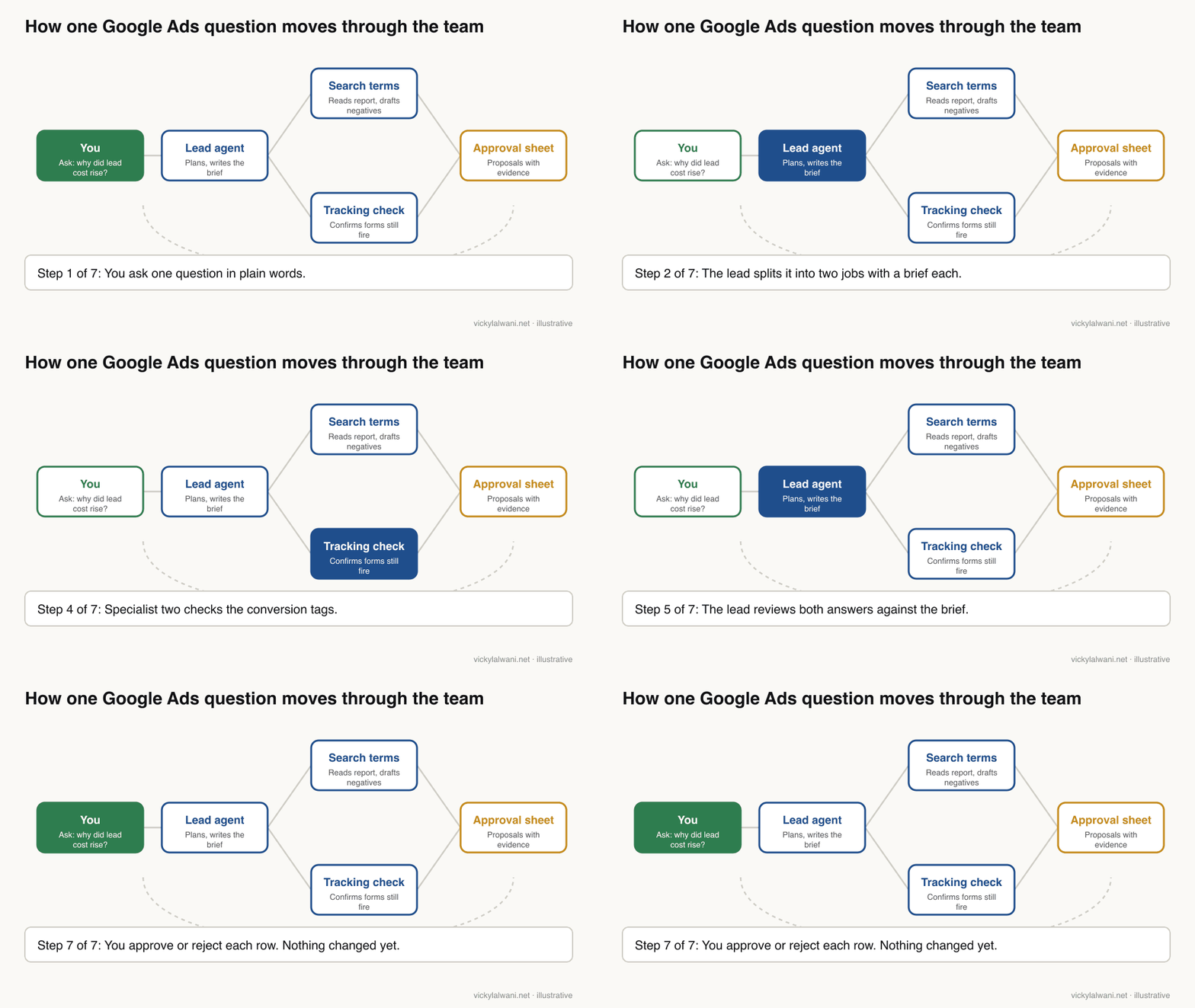
Short answer: The lead agent turns your question into small jobs, writes a brief for each specialist, checks what comes back against the brief, and sends you one summary with the evidence attached. It never changes the account itself. Its value is catching bad handoffs, which is where multi-agent systems usually fail.
Anthropic found that each subagent needs "an objective, an output format, guidance on the tools and sources to use, and clear task boundaries". Without that, its subagents duplicated work or left gaps. The same write-up warns that small issues compound in agents: one failed step can send the whole run in a different direction.
So the lead's brief is the most important thing you write. Here is a brief template built on those four parts, adapted for Google Ads:
You are the lead for a Google Ads review. Do not change the account.

Question from the owner: [one sentence]

For each job you hand to a specialist, write:
1. Objective: one sentence, one outcome.
2. Data: which report, which date range, which campaigns.
3. Output: a table with columns Proposal, Evidence, Risk (low, medium, high).
4. Boundaries: what it must not touch or assume (budgets, bids, bid strategy,
   anything outside the named campaigns).

When the answers come back:
- Reject any proposal without evidence from the account.
- Flag any two proposals that conflict.
- Write one summary for the owner: what you found, what you propose,
  what you could not check. Put every proposal in the approval sheet.
One habit from my own work matters here. When I hand approved work from a planning model to a separate agent that executes it, I give that agent a hand-off pack: the task list, the expected outcome of each task, and the context files it needs. A second agent with no context guesses, and guesses are what the lead is there to stop.
What access should each agent get in Google Ads?
Short answer: Give each agent the least access its job needs. Reading agents get read-only routes, such as Google's MCP server with its write tools switched off. No agent gets Admin. Changes to campaigns, ads, budgets and bids go through a person, because Google's own MCP server cannot make them and other routes can.
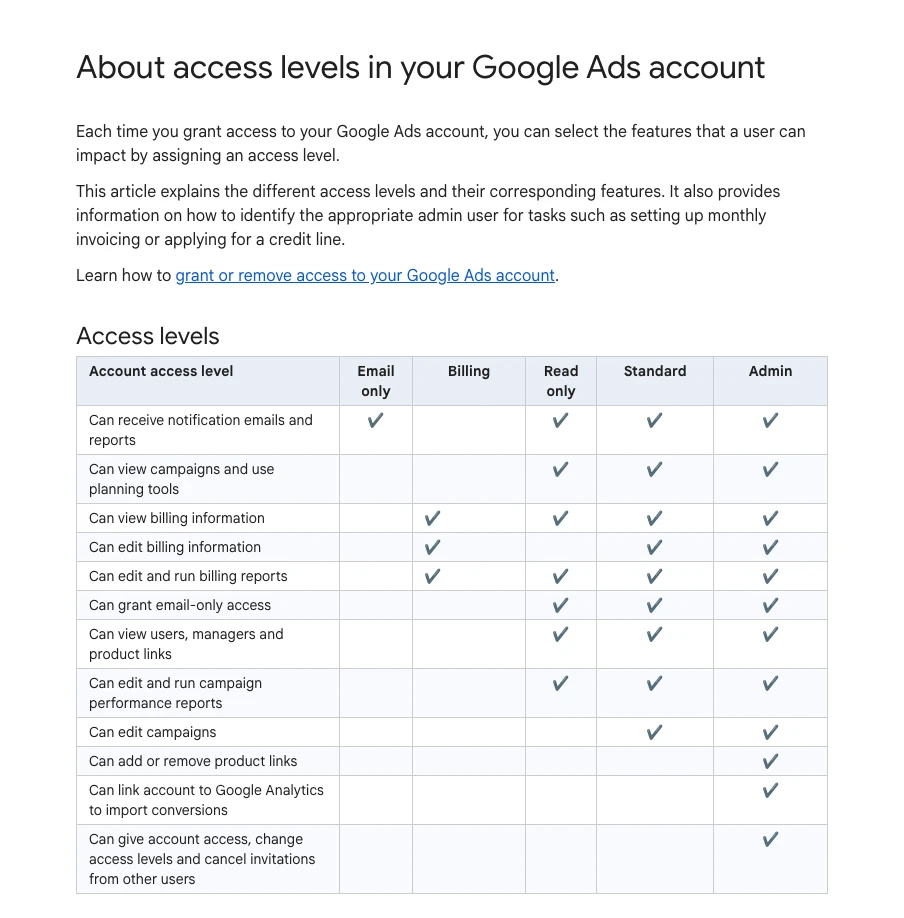
Google Ads has five account access levels: Email only, Billing, Read only, Standard and Admin. Read only can view campaigns and run reports but cannot edit. Standard can edit campaigns. Admin can also grant access to other users, which is the one level no agent should ever hold.
Most agents reach Google Ads through the API rather than the interface. The official Google Ads MCP server (MCP, the Model Context Protocol, is the standard way AI tools connect to outside systems) reads data with GAQL queries. Since version 0.0.6 on 2 November 2026 it can also create standalone assets, upload videos and manage labels. Its documentation is explicit that it cannot create, modify, pause or enable campaigns, ad groups, ads, budgets or bids.
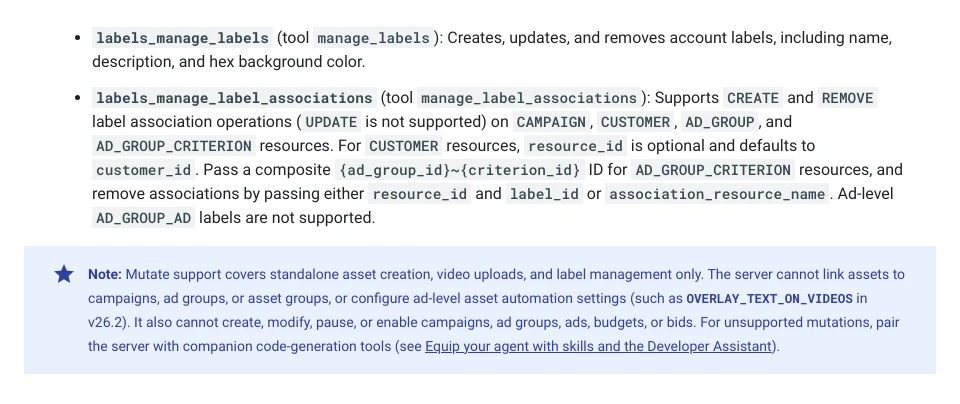
Its write tools use a propose-and-confirm step: the first call only validates and returns a checksum, and the change goes through only when the agent calls again with the same checksum after approval. The docs note that the checksum "does not replace access control". To run it strictly read-only, switch off the labels and assets tool groups in its configuration file.
| Role | Route | Write access | Why |
|---|---|---|---|
| Lead | None directly | None | It only reads answers |
| Search terms | MCP, read-only | None | A person adds negatives |
| Tracking check | MCP, read-only | None | Fixes need tag access |
| Pacing | MCP, read-only | None | Flags only |
| Ad copy | MCP, assets only | Standalone assets | It cannot link them to ads |
| A person | Interface, Standard | Yes | Applies what is approved |
Two account settings help. Multi-party approval makes a second admin approve sensitive actions such as adding users or changing roles, for accounts with more than three admins; requests expire after 20 days, and API users are exempt. And change history records who changed what, so you can check every applied proposal against the log. Most changes can be undone within 30 days, but spend that has already happened cannot.
Also check what Google may already be changing for you. Auto-apply recommendations can add keywords or adjust targets without your agents or you touching anything. An agent team that reviews changes is pointless if another system is making them unreviewed.
How does a shared sheet control the team?
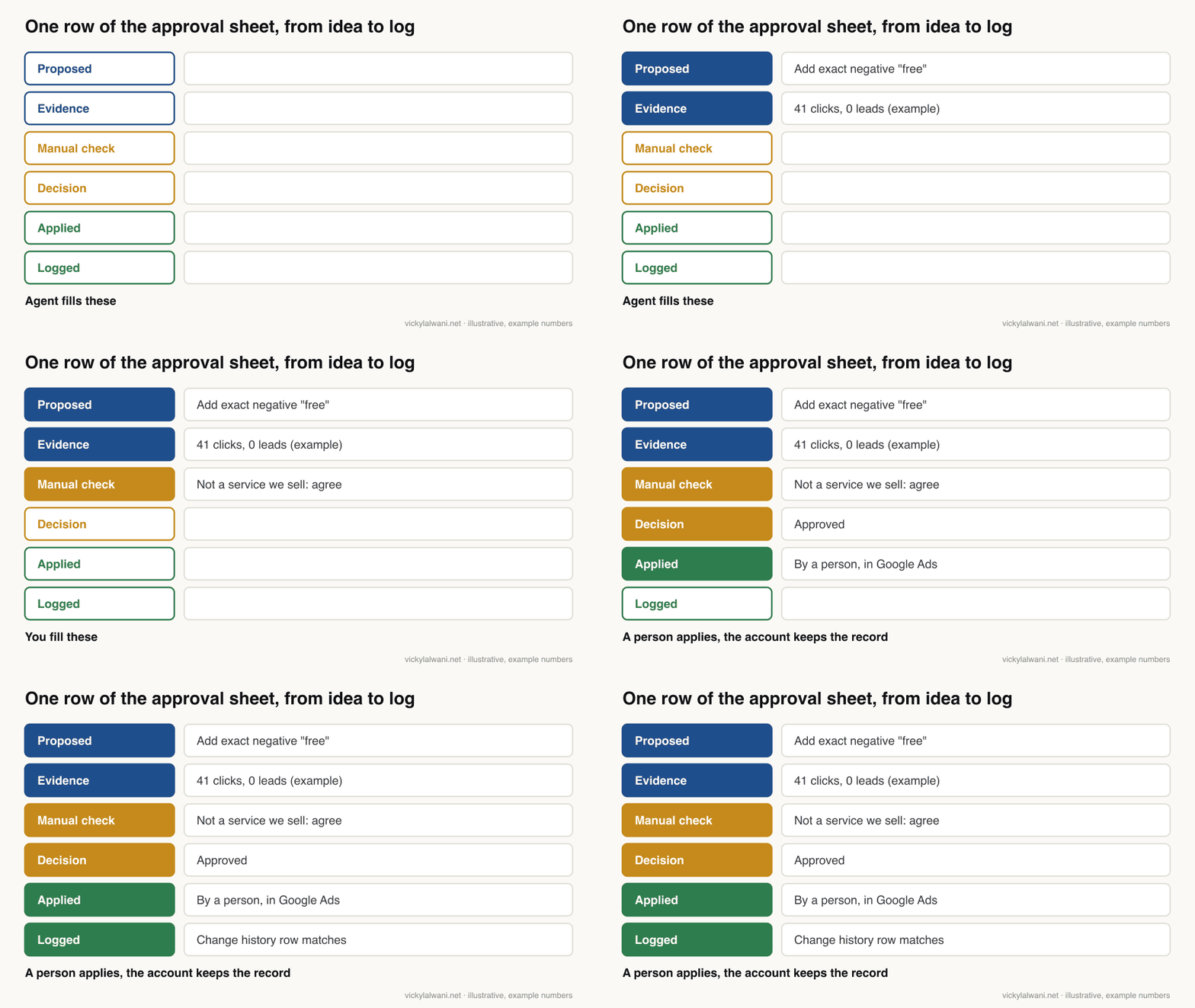
Short answer: A shared sheet holds three things: the jobs (who does what, with which inputs), the standing rules (what agents must never do), and the approval list. Every proposal lands as a row with its evidence, a manual check column and a decision column. A person fills those two columns and applies what is approved.
I like a sheet because everyone can read it and it needs no special software. When I built my own hub for running work with several AI tools, a Google Sheet task board was the ledger and the approval gate between them. On client ad accounts I work the same way: audit first, findings in a sheet, my own manual check, sign-off, and only then changes.
| Column | Filled by | Example |
|---|---|---|
| Job ID and owner | Lead | ST-14, search terms |
| Proposal | Specialist | Exact negative "free" |
| Evidence | Specialist | Clicks, cost, 0 leads |
| Risk | Specialist | Low: reversible |
| Manual check | You | Not a service we sell |
| Decision | You | Approve, reject, note |
| Applied and date | Person applying | Matches change history |
Three standing rules make the sheet work:
- No evidence, no row. The lead rejects any proposal without account data behind it.
- Rejections become rules. If you reject the same kind of proposal twice, write it into the standing rules so agents stop making it.
- Read before you approve. Approving a sheet you did not read is the same as giving the agents write access.
For a fuller design of the morning approval list and which jobs suit overnight runs, see my guide to human in the loop Google Ads.
How do you build the team in Claude?
Short answer: In Claude Code, write each specialist as a subagent file in .claude/agents with a short description, a tool list and instructions; the main session acts as lead. Agent teams, where teammates message each other, are experimental and cost more. To share the set-up with colleagues, package the subagents and skills as a plugin.
A Claude Code subagent runs in its own context window with its own system prompt, tool access and permissions. You define one as a Markdown file with a small header. Only the name and description are required; a tools line restricts what it can use. Here is a search terms specialist:
---
name: search-terms-analyst
description: Reviews a Google Ads search terms export and drafts negative
  keywords with evidence. Use when asked about wasted spend or search terms.
tools: Read, Grep, Glob
---
You review search terms. You never change the account.
Input: the CSV export named in the brief.
For each term that is clearly off-topic, return: term, clicks, cost,
conversions, suggested negative and match type, one-line reason.
Never suggest a negative that would block a term with conversions.
If the brief is missing a date range or campaign, stop and say so.
Because this agent only has read and search tools, it cannot reach an API at all. Feed it exports, or give the lead read-only MCP access and let it pass data down. Subagents can also spawn their own subagents, up to three layers below the main conversation by default.
Agent teams go a step further: separate Claude Code sessions with a shared task list and a mailbox, so teammates can message each other. They are experimental and switched off by default, and they come with limits you should know. Every teammate starts with the lead's permission mode, so a lead running with permissions bypassed passes that to every teammate. A teammate cannot approve a permission prompt on your behalf, and its permission prompts appear in the lead's session.
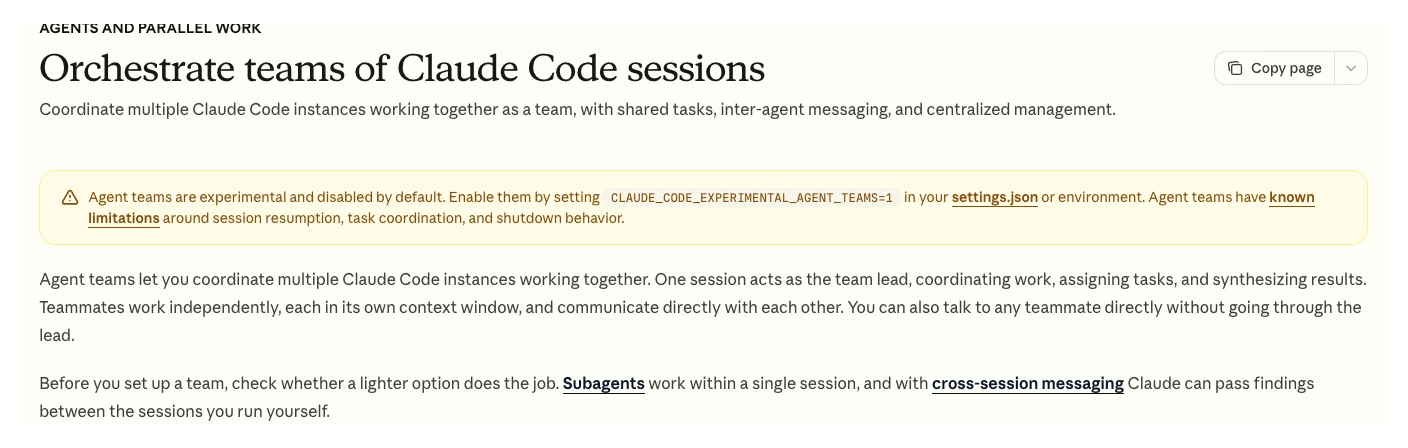
For most Google Ads accounts, subagents are enough. They report back to the lead, cost less, and keep the main thread readable. When you want the same roles on several machines, bundle them as a plugin; my guide to Claude plugins for marketing shows the folder layout.
Where do Google Ads agent teams go wrong?
Short answer: Most failures happen between agents, not inside them: a vague brief, a specialist working from stale data, a lead that rewrites instead of checks, and an owner who approves without reading. Bad tracking makes every one of these worse, because agents optimise towards whatever the account counts as a conversion.
| Failure | What you see | Fix |
|---|---|---|
| Vague brief | Overlapping or missing work | Objective, data, output, limits |
| Stale data | Advice about paused campaigns | Date range in every brief |
| Lead rewrites | You approve text nobody checked | Lead annotates and blocks only |
| Broken tracking | Confident advice on bad numbers | Tracking check runs first |
| Rubber stamping | Approvals in seconds | Manual check column is required |
| Hidden automation | Changes nobody proposed | Review auto-apply settings |
Tracking deserves its own line. I keep new campaigns in draft until every form and call button is measured, and the tracking checker is the first agent I would build for the same reason. An agent team optimising towards a broken conversion count will be fast and wrong. If you are not sure your tracking is sound, my PPC tracking audit checklist is the place to start.
How much does an AI agent team cost to run?
Short answer: It depends on your Claude plan or API usage, but the shape is predictable: one agent uses about 4 times the tokens of a chat and a multi-agent system about 15 times, per Anthropic. Running a team weekly with subagents costs far less than running agent teams every hour.
Three choices keep cost in check without hurting quality:
- Schedule, do not poll. Search terms and pacing change slowly. A weekly run with a mid-week pacing check covers most accounts.
- Use subagents before agent teams. Subagents summarise their results back to the lead, so less text moves around. Claude Code's docs describe their token cost as lower.
- Send exports, not whole accounts. A filtered export of last week's search terms is cheaper and easier to check than letting an agent explore.
No figures here are client figures, and I do not quote a monthly cost because it varies too much by plan, model and account size. Measure your own usage for two weeks before you add a role.
What should stay human in a Google Ads agent team?
Short answer: Bid strategy switches, budget moves between campaigns, account structure, offers, tracking fixes and anything a client sees. These depend on margins, sales feedback and business context that is not in the account data, and their mistakes are slow to show and expensive to undo.
| Keep human | Why |
|---|---|
| Bid strategy and targets | Resets learning, changes spend |
| Budgets between campaigns | Needs margin and stock context |
| Account structure | Hard to undo, slow feedback |
| Offers and landing pages | Business decisions |
| Tracking changes | A broken tag breaks everything |
| Client messages | Trust and context |
I also add a short human note to every report: where we are, what we are doing, what is next. Agents can draft the numbers; the note is where judgement shows.
How do you start building your own?
Short answer: Build one specialist, run it in shadow for two weeks next to your own review, fix what breaks, then add the next. A sensible first month is search terms, then tracking, then pacing, with the lead and approval sheet in place from day one.
| Week | Add | Check |
|---|---|---|
| 1 | Lead, sheet, search terms agent | Compare with your own review |
| 2 | Same, in shadow | Agree with nearly every row? |
| 3 | Tracking check agent | Does it catch a test break? |
| 4 | Pacing agent, weekly report | Is the summary readable? |
Resist the urge to build everything at once. Untested complexity creates errors you will not see until money has been spent. For the wider system around these agents, including skills, schedules and connectors, see my guide to AI agents for PPC.
What do people say on X and Reddit?
Short answer: Practitioners are positive about agents for analysis and wary of agents that change bids or budgets, and several warn that messy conversion data is the real ceiling. Official accounts from Google and Anthropic are shipping more agent features, each with an approval step.
| Source | Date | What it says | Type |
|---|---|---|---|
| Google Ads Liaison on X | 12 Nov 2025 | Introduces Ads Advisor and Analytics Advisor as conversational agents | Official |
| Google Ads Liaison on X | 21 Apr 2026 | New Ads Advisor capabilities to launch in the coming months | Official |
| Claude developers account | 14 Oct 2026 | Parallel tasks run as nested sessions that report back to the main one | Official |
| Claude developers account | 9 Oct 2026 | Managed Agents dynamic workflows: a lead plans across many agents | Official |
| A startup operator on X | 19 Jul 2026 | Gave each business agent its own inbox and scoped API key | First-hand |
| An AI tools account on X | 18 Oct 2026 | Google and Meta both shipped official agent access to ad accounts | Opinion |
| Thread | Date | What it says | Type |
|---|---|---|---|
| r/PPC: agents for paid media | 5 May 2026 | Replies: AI as analyst only; fix CRM and conversion data first | First-hand |
| r/PPC: rules engines vs agents | 27 Oct 2026 | Do agents remove the "why did this move" digging, or move it to review? | Question |
| r/PPC: can I just use agents | 1 Nov 2026 | Owner wants AI to run the account; top replies: fix tracking first | Opinion |
| r/ClaudeAI: controllable AI system | 22 Oct 2026 | A reviewer agent that rewrote copy turned approval into rubber stamping | First-hand |
| r/PPC: Claude Code for accounts | 19 Sep 2026 | Set-up with APIs and guardrails was hard, then useful for checks | First-hand |
The r/ClaudeAI thread has the most useful single lesson for an agent team: once the reviewer could only annotate and block, not rewrite, the owner was back to approving text they had actually read. That is why the lead in this guide checks and flags rather than edits.
Videos worth watching
Anthropic's official channel, 17 October 2025: a talk on when to use workflows, single agents or multiple agents. It promotes Anthropic's own products.
Google Ads' official channel, 21 May 2026: a short introduction to Ask Advisor, Google's own agent inside the account. It promotes Google's product.
| Video | Channel | Date | What it covers |
|---|---|---|---|
| Building more effective AI agents | Anthropic | 17 Oct 2025 | Workflows vs agents |
| Introducing Ask Advisor | Google Ads | 21 May 2026 | Google's in-account agent |
| Streamline your workflow with Ask Advisor | Google Ads | 9 Jul 2026 | Advisor tasks |
| Introducing the Google Ads MCP Server | Google Ads developers | 29 Oct 2025 | The official MCP server |
| Claude Subagents vs Agent Teams | An AI educator channel | 1 Mar 2026 | When to use each |
| Claude Code NEW Sub Agents in 7 Minutes | Developers Digest | 25 Jul 2025 | Subagent set-up |
Where this advice is weak
- The role list is my judgement. Google and Anthropic do not publish a recommended Google Ads team. The roles here follow the jobs that repeat weekly in most accounts.
- The token figures come from research tasks. Anthropic measured them on its research system in 2025; Google Ads runs may differ, and newer models change the numbers.
- Agent teams are experimental. Claude Code's docs list known limits around resuming sessions, task status and shutdown. Features may change.
- Write access is moving. Google's MCP server gained write tools in November 2026 and Google's Ask Advisor can change some settings with approval. Recheck the docs before you rely on any limit described here.
- I share no client results. The habits described are real; the examples and numbers are illustrative.
Want a second pair of eyes before agents touch your account?
Short answer: I can review your tracking, access levels and automation settings, map which jobs suit an agent and which stay with a person, and run the account with an approval step on every change.
My Google Ads management service covers the audit, the set-up and the ongoing work, and the pricing page shows the rates. If you mainly want the agents built for your own team, see my AI marketing agents service, or start with the free 35 Claude skills for Google Ads guide.
Sources
| Source | What it supports | Date | Link |
|---|---|---|---|
| Anthropic Engineering | 90.2%, 4x and 15x tokens, brief contents, compounding errors | 13 Jun 2025 | Multi-agent research |
| Anthropic Engineering | Workflows vs agents | 19 Dec 2024 | Building effective agents |
| Claude Code docs | Agent teams: experimental, tokens, 3 to 5 teammates, permissions | Read 18 Nov 2026 | Agent teams |
| Claude Code docs | Subagents: own context, tools, nesting depth | Read 18 Nov 2026 | Subagents |
| Google Ads API docs | MCP tools, cannot change campaigns or bids, checksum, read-only | Read 18 Nov 2026 | MCP server |
| GitHub | MCP server v0.0.6, 2 Nov 2026 | Read 18 Nov 2026 | Releases |
| Google Ads Help | Five access levels | Read 18 Nov 2026 | Access levels |
| Google Ads Help | Multi-party approval: 3 admins, 20 days | Read 18 Nov 2026 | MPA |
| Google Ads Help | Ask Advisor beta, approval, not in MCC | Read 18 Nov 2026 | Ask Advisor |
| Google Ads Help | Change history; undo within 30 days; auto-apply | Read 18 Nov 2026 | History, undo, auto-apply |
| X, Reddit, YouTube | Practitioner and official views | Jul 2025 to Nov 2026 | Linked above |
This article expands on my post on LinkedIn ↗.
FAQ
What is an AI agent for Google Ads?
It is a language model such as Claude that can call tools in a loop to read Google Ads data, decide what to check next and draft findings or changes. Used safely, it proposes changes with evidence and a person approves them before anything goes live.
Do I need a team of agents or just one?
Most accounts need one lead agent and two or three specialists, such as search terms and tracking. Anthropic found multi-agent systems use about 15 times the tokens of a chat, so add agents only when work splits into independent pieces.
Can an AI agent change my Google Ads campaigns?
It depends on the route. Google's official Google Ads MCP server cannot create, pause or edit campaigns, ads, budgets or bids, but other API tools and Google's own Ask Advisor can change some settings, so control access and keep an approval step.
What access level should an AI agent have in Google Ads?
Give reading agents read-only routes and never give any agent Admin, which can add users and change access levels. A person with Standard access should apply approved changes so every edit is checked and appears in change history.
What should the lead agent do?
The lead agent splits your question into small jobs, writes a brief for each specialist with an objective, data, output format and limits, checks the answers and sends you one summary. It should never change the account itself.
Why use a shared sheet for an AI agent team?
A sheet gives every agent the same jobs, rules and approval list in a place a person can read and edit. Each proposal arrives with evidence, a manual check column and a decision column, which keeps the system easy to audit.
Are Claude Code agent teams ready for Google Ads work?
Claude Code agent teams are experimental, off by default and use significantly more tokens than one session. For most Google Ads routines, subagents that report back to one lead session are cheaper and easier to control.
What should I build first in a Google Ads agent team?
Start with a search terms agent, the approval sheet and a lead, then add a tracking checker and a pacing agent. Run each new role in shadow for about two weeks against your own review before trusting it.