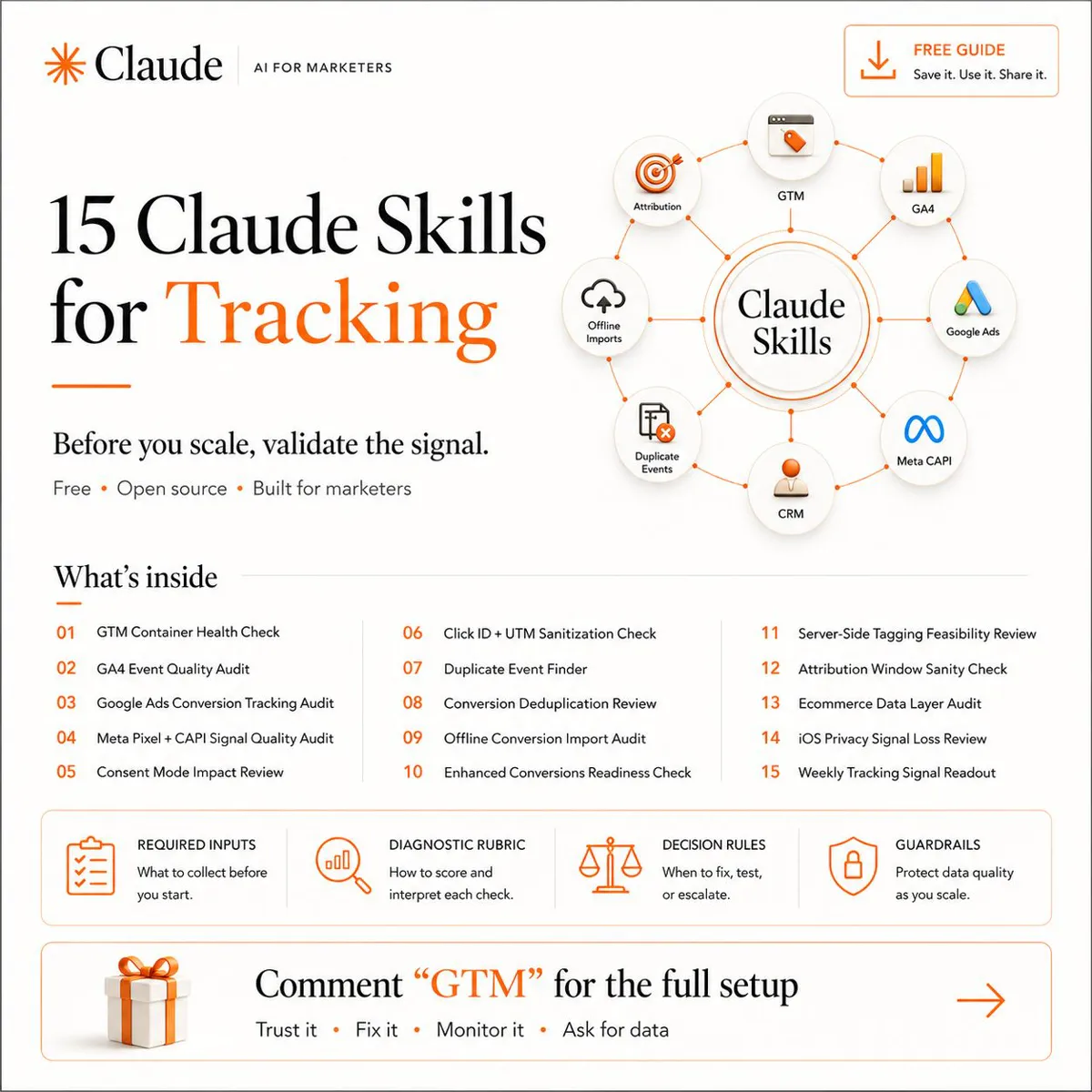
A conversion tracking audit checks that every conversion your ad platforms report really happened, is counted once and is the action bidding should chase. Run 15 checks in order: tag container, GA4 key events, Google Ads primary actions, Meta Pixel and Conversions API deduplication, consent mode, click IDs, offline imports, enhanced conversions and windows. Score each pass, attention or fail, reconcile with your CRM, and fix the fails that feed bidding first.
TL;DR
- A conversion tracking audit checks whether the numbers your bidding learns from are true: each conversion counted once, from the right event, with consent and click IDs intact.
- Run 15 checks in order, from the tag container to the weekly readout, score each pass, attention or fail, then fix the fails that feed bidding first.
- Two 2026 changes to know: enhanced conversions for web and leads became one setting from April 2026, and offline and lead uploads moved to the Data Manager API from 15 June 2026.
- The answer is in your CRM, not the ad platform. Reconcile tracked conversions with real enquiries or orders before you trust any dashboard.
Everyone optimises creative. Everyone tests bids. Almost nobody validates the signal underneath. Smart Bidding learns from your conversion data, so if that data is duplicated, delayed or missing, the algorithm scales the wrong thing with real money behind it. Bad tracking does not look broken. It looks like good ROAS.
This is the conversion tracking audit I run before any budget goes up: 15 checks across Google Tag Manager (GTM), Google Analytics 4 (GA4), Google Ads, the Meta Pixel and Conversions API, and consent. It is for tracking that already exists. If you are starting from nothing, plan an event map first instead. If you would rather hand the audit over, it is the first step of my analytics and tracking service.
A note on evidence. Platform rules come from Google's Tag Manager, Analytics and Google Ads Help Centres, Google for Developers and Meta for Developers, read on 17 and 18 November 2026 and linked where used. Anything written as "I" is a working habit from my own client work or something I did on my own site. I do not share client names or figures, so other examples are illustrative.
Jump to: The 15 checks · Tags and GA4 · Google Ads · Meta · Consent · CRM check · My own audit · FAQs
New: before you trust a Performance Max cost per lead, see Performance Max for lead generation in the USA for the CRM fields that separate real leads from form fills.
What is a conversion tracking audit?
Short answer: A conversion tracking audit is a structured check that every conversion your ad platforms report really happened, is counted once, and is the action you want bidding to chase. It covers the tags, the analytics events, the ad platform settings, consent and the gap to your own sales records.
A conversion is the action you count as a result: a form sent, a call, a booking, a purchase. Smart Bidding, Google's automated bidding, sets bids from those conversions, and Meta's delivery works the same way.
An audit is different from a setup. A setup decides what to track. An audit tests whether what is already running matches that decision, and whether anything has drifted since. Sites change and tracking quietly breaks.
What do you need before you start?
Short answer: Read access to GTM, GA4, Google Ads and Meta Events Manager, a list of your real business outcomes, and backend or CRM counts for the same period. Without the backend numbers you can only check that tags fire, not that they are right.
| Input | Why it matters | Minimum access |
|---|---|---|
| Tag Manager container | Shows what fires and when | Read on the container |
| GA4 property | Events, key events, settings | Viewer, Editor to fix |
| Google Ads account | Conversion actions, goals | Read only to audit |
| Meta Events Manager | Pixel, CAPI, dedup, match quality | Dataset view access |
| CRM or backend counts | The real number to compare | An export for 30 days |
| Change log | Explains sudden shifts | Site and tag changes |
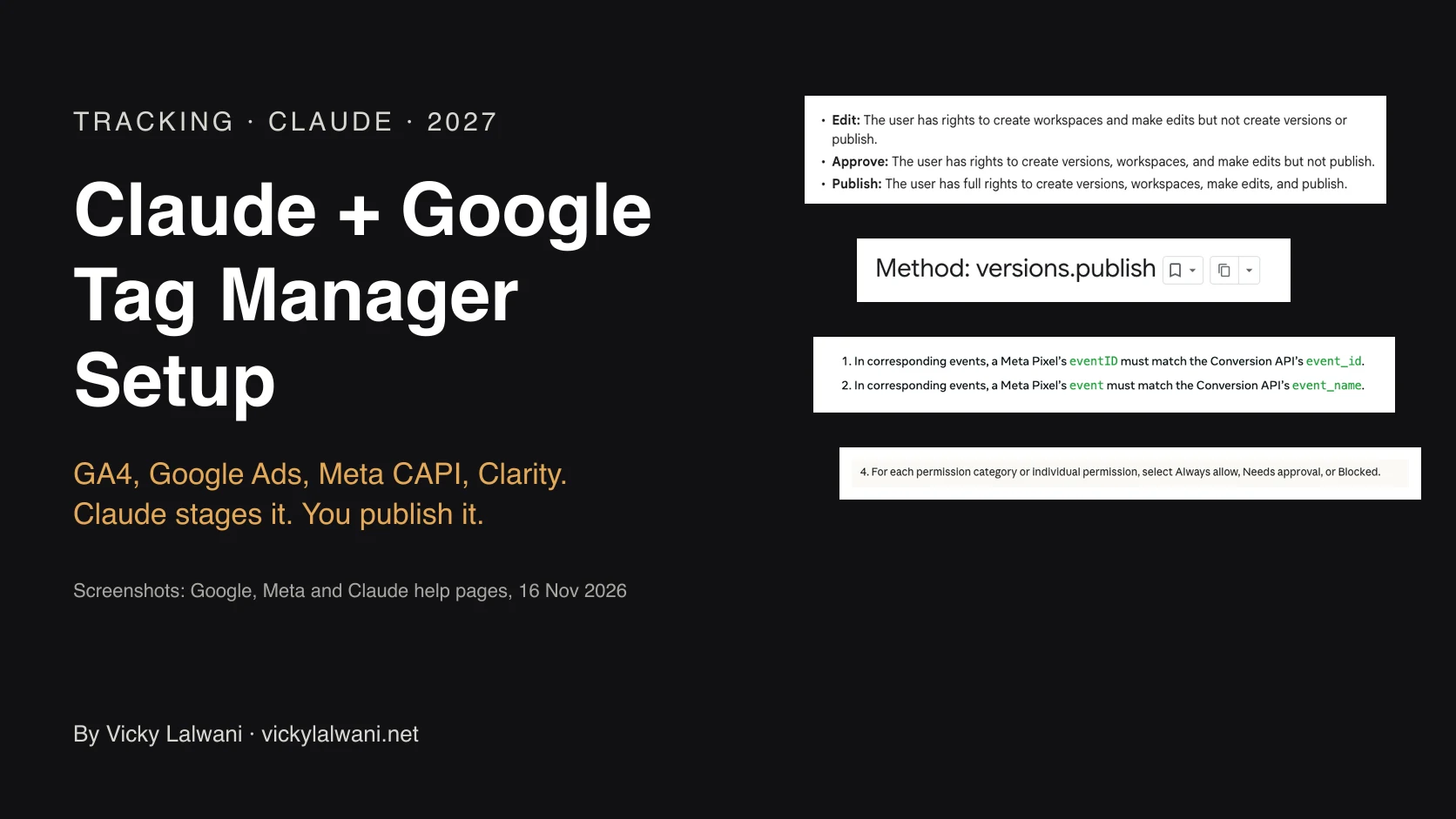
The first thing I ask for is the exact role on each platform, in one written request, because "we shared access" often turns out to be view only, or access to the wrong container. In GTM, Read is enough to audit; only Publish can push a fix live.
The 15 checks at a glance
Short answer: Fifteen checks in five groups: tags and GA4, Google Ads settings, Meta deduplication, consent, and how clicks and offline sales flow back. Run them in this order, because a duplicate tag found in check one changes what every later check shows.
| # | Check | The question it answers |
|---|---|---|
| 1 | Tag container health | What fires, and is anything unused? |
| 2 | GA4 event quality | Do key events fire once, named right? |
| 3 | Google Ads conversions | Which actions does bidding use? |
| 4 | Meta Pixel and CAPI | Are server events matched well? |
| 5 | Consent mode | Do tags respect the visitor's choice? |
| 6 | Click IDs and UTMs | Do they survive redirects and forms? |
| 7 | Duplicate events | Is one action reported twice? |
| 8 | Browser vs server dedup | Do event IDs match? |
| 9 | Offline imports | Do won leads get back to the ads? |
| 10 | Enhanced conversions | Is hashed first-party data sent? |
| 11 | Server-side feasibility | Would a server container help? |
| 12 | Conversion windows | Do they fit the sales cycle? |
| 13 | Ecommerce dataLayer | Are value, currency, ID right? |
| 14 | Mobile and browser loss | How much is never seen? |
| 15 | Weekly readout | Who catches drift, and when? |
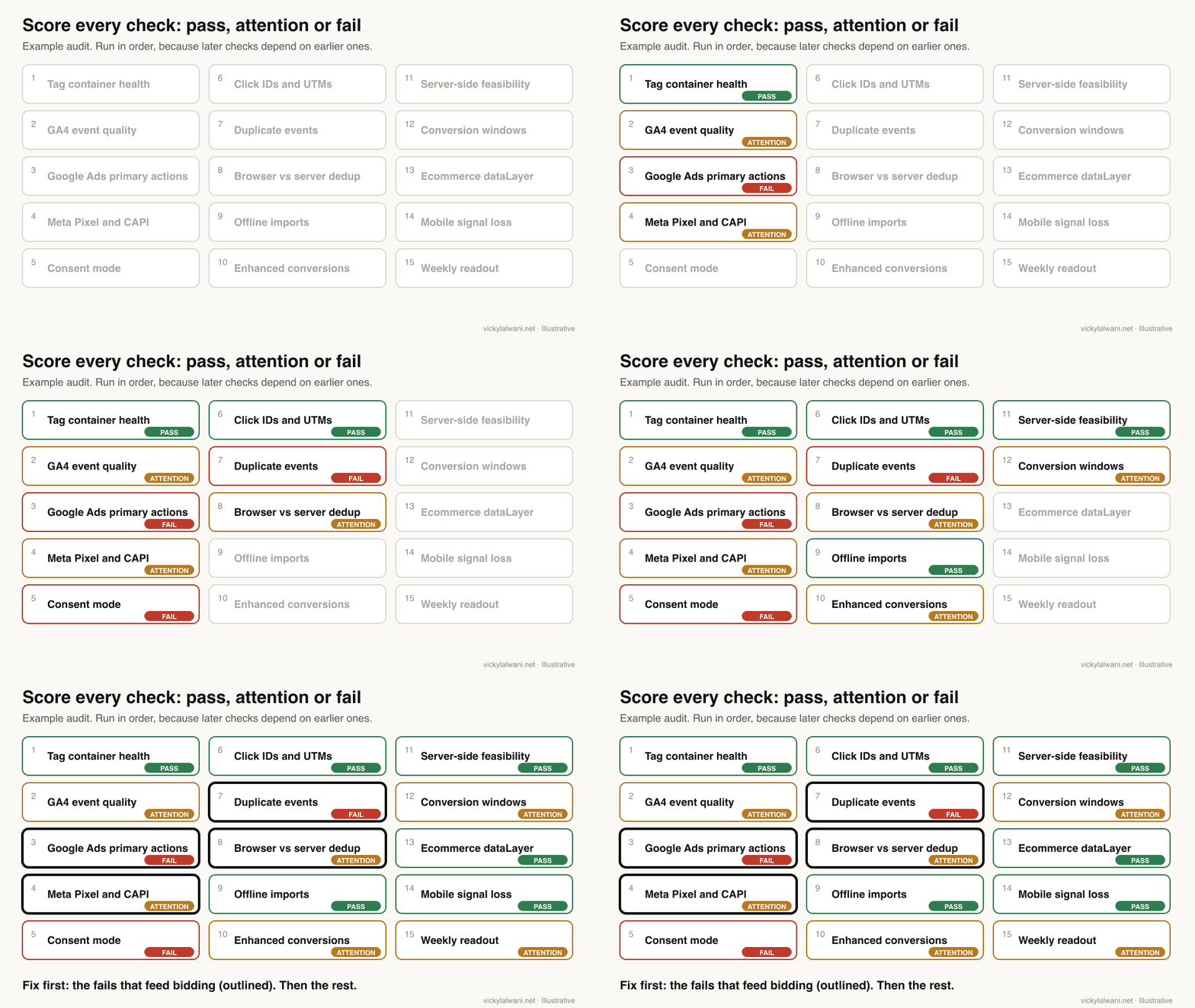
Checks 1, 2, 7 and 13: which tags fire, and do they fire once?
Short answer: Open GTM Preview, walk through every conversion path, and confirm each key event fires exactly once with the parameters it needs. Then compare GA4 event counts with real submissions. Duplicate tags and events built from page views are the two faults I find most often.
1. Tag container health. List every tag, trigger and variable. Look for paused or orphaned tags, two tags sending the same event, and names nobody can explain. GTM Preview opens Tag Assistant so you can browse the site as if the draft were live and see which tags fired on each click.
2. GA4 event quality. A key event is what GA4 now calls a conversion. Check each one against its rules: event names up to 40 characters and up to 25 parameters per event. Google notes that a key event name over 40 characters stops being reported as a key event at all. Use DebugView to watch events arrive, but know it hides events from visitors who refused analytics cookies.
7. Duplicate events. The usual causes are a GA4 tag installed twice (once in the site code and once in GTM), a form tag on both the click and the thank-you page, and a key event created in GA4 from a page view. A key event built from "page view where the URL contains thank-you" counts a refresh, a bookmark or a direct visit as a new lead.
13. Ecommerce dataLayer. For shops, check that every purchase sends value, currency and a unique transaction ID. Google's recommended events reference uses transaction_id to help avoid duplicate purchase events. In r/GoogleTagManager, a practitioner reminded a poster that GA4 records ecommerce data only on its standard event names, such as purchase.
| What you see | Likely cause | How to confirm |
|---|---|---|
| GA4 leads above CRM | Duplicate tag or page-view key event | Preview, then refresh thank-you |
| GA4 leads far below CRM | Consent, blockers, missing path | Test each form and button |
| Purchases doubled | Tag in code and in GTM | Check page source for two IDs |
| Event with no parameters | dataLayer key missing | Preview, Variables tab |
Checks 3, 10 and 12: what does Google Ads actually bid on?
Short answer: Open Goals, then Conversions, and list every primary action, because primary actions are the ones bidding uses. Check counting (one or every), the conversion window, and that enhanced conversions is on. A page view or a secondary micro action set as primary is the costliest fault in most accounts.
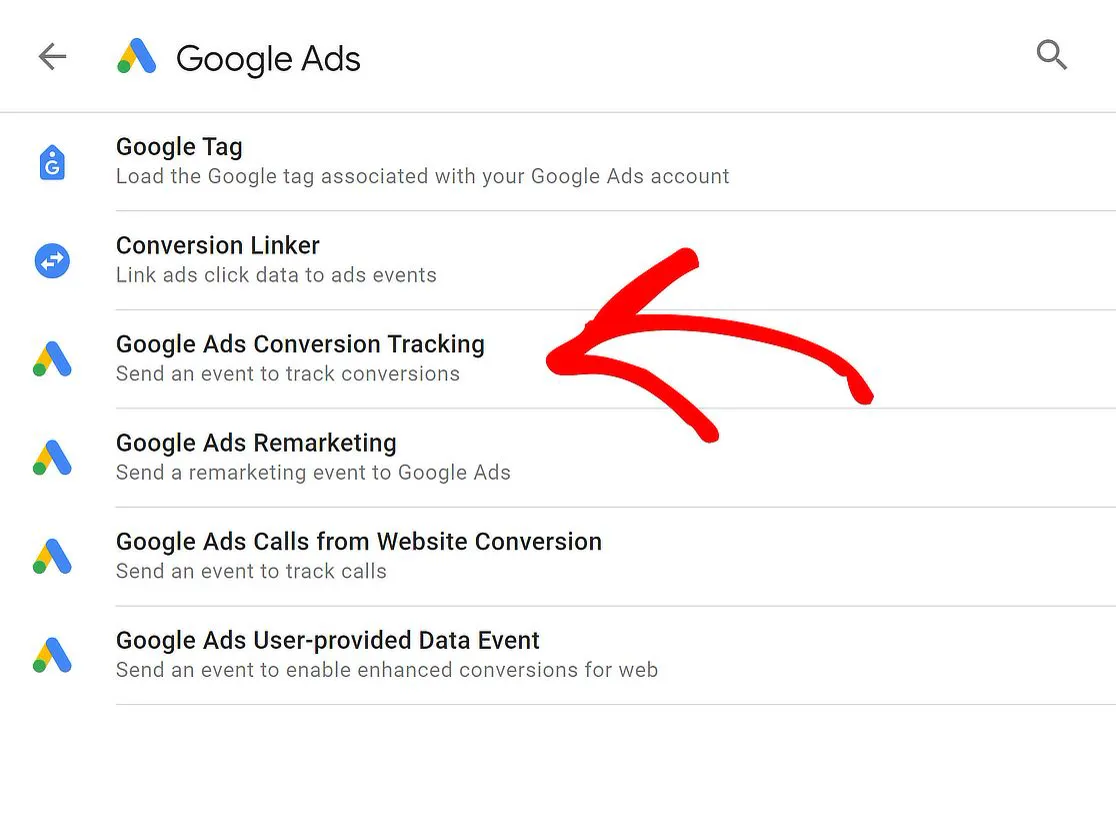
3. Primary and secondary actions. Primary actions appear in the Conversions column and are used for bidding. Secondary actions are for observation, with one exception: a secondary action inside a custom goal is used for bidding. If an account has both a native Google Ads tag and an imported GA4 key event for the same lead, only one should be primary.
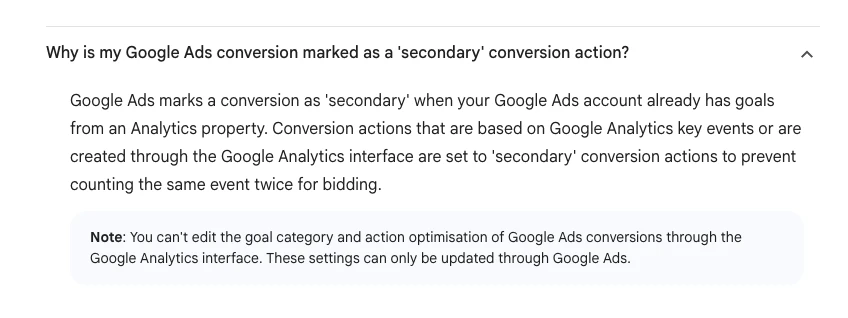
Google already guards against one version of this. Conversions based on GA4 key events are set to secondary when the account already has goals from Analytics. Someone can still switch them to primary by hand, so check.
Counting. Google offers two counting options: every conversion after an ad click, or one per click. Every suits sales. One usually suits leads, because three forms from one person are still one lead.
12. Conversion windows. The click-through window can be set from 1 day up to 30, 60 or 90 days depending on the source, and Google recommends at least seven. Match it to how long your customers take to decide, not to a default.
10. Enhanced conversions. These send hashed first-party data, such as an email address from a form, so Google can match more conversions to ad clicks. Since April 2026, enhanced conversions for web and for leads are one on or off setting, and Google accepts the data from tags, Data Manager and API connections at the same time. Older audit templates that ask "web or leads?" are out of date.
| Setting | Common fault | What good looks like |
|---|---|---|
| Primary actions | Page views, micro actions | Real leads or sales only |
| Counting | Every, on lead forms | One per click for leads |
| Window | Default, unchecked | Matches the sales cycle |
| Enhanced conversions | Off, or diagnostics warn | On, no warnings |
| Tag status | Unverified or inactive | Tested in Tag Assistant |
Checks 4 and 8: is Meta counting each conversion once?
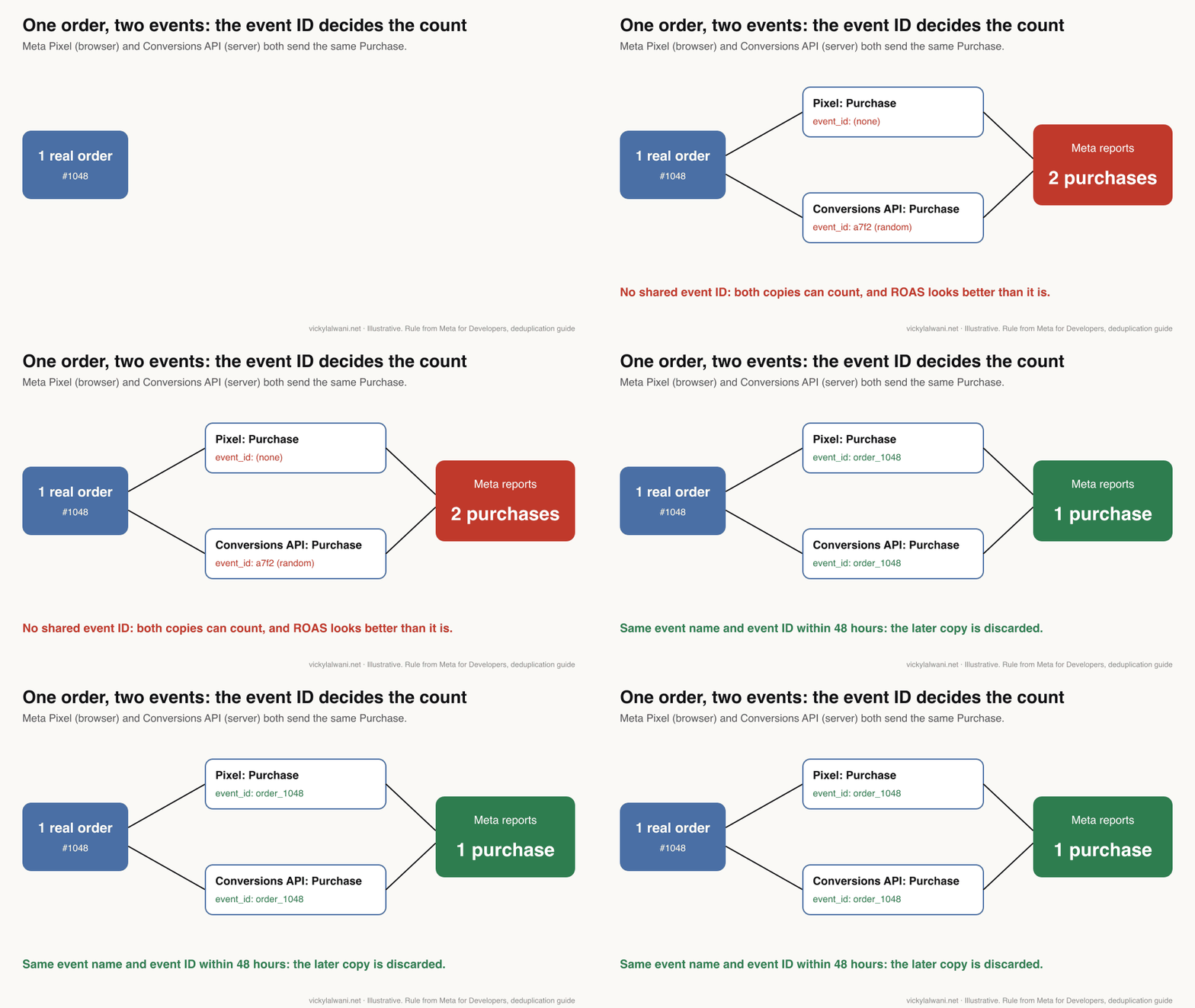
Short answer: If the same event goes from the Meta Pixel and the Conversions API, both copies must share the event name and the same event ID. Meta discards the later copy when a matching pair reaches the same pixel within 48 hours. Then check Event Match Quality and event coverage in Events Manager.
The Conversions API (CAPI) sends events to Meta from your server instead of the browser. Meta recommends sending the same events from both, which is why deduplication matters: without it, one order can count twice.
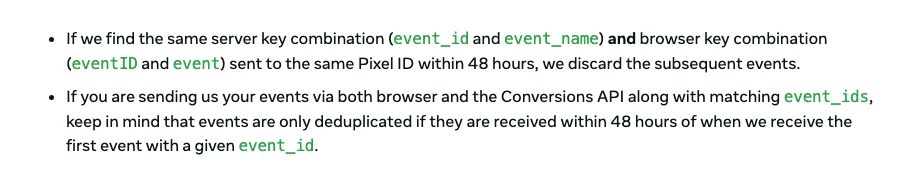
8. Browser and server deduplication. Meta's deduplication guide gives two methods. The reliable one is a matching event_id and event name. The fallback, matching fbp or external_id, generally works only when the browser event arrives first, and it does not deduplicate events sent twice from the same source.
4. Signal quality. Event Match Quality is a score from 0 to 10 for server events, worked out from the customer information you send and the share of events Meta could match, using the last 48 hours of data. Meta also advises aiming for a 75% event coverage ratio of Conversions API events to Pixel events.
| Events Manager signal | What it tells you | Action if weak |
|---|---|---|
| Deduplication | Pairs matched by event ID | Pass one ID to both |
| Event coverage | Server events vs Pixel | Send all key events via CAPI |
| Event Match Quality | 0 to 10 match score | Add hashed email, phone |
| Test Events | Live events as they arrive | Test every path |
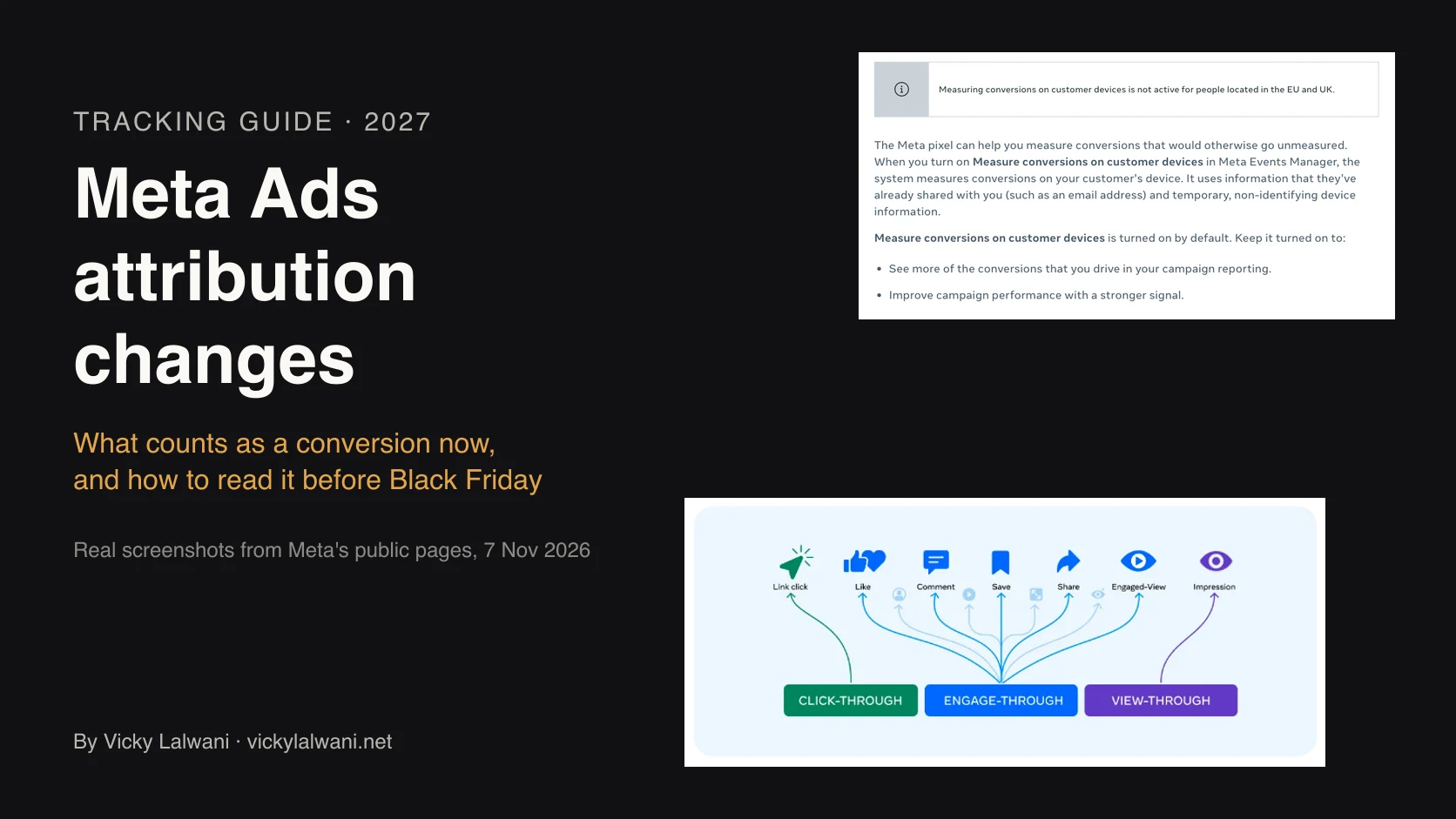
A paid media practitioner on X traced poor coverage and deduplication scores to events added with Meta's codeless Event Setup Tool. If the numbers look off, check how each event was created before you rebuild anything. For the reporting side, see Meta ads attribution changes.
Checks 5 and 14: does consent mode work the way you think?
Short answer: Load the site as a new visitor, refuse cookies, and check what your Google tags send. Consent mode v2 needs four signals: ad_storage, analytics_storage, ad_user_data and ad_personalization. A tag that sends "granted" before anyone clicks is a fail, whatever the banner looks like.
Consent mode is Google's way for tags to adjust to a visitor's cookie choice. Version 2 added two parameters, ad_user_data and ad_personalization, and Google requires consent to be collected and passed on for visitors in the European Economic Area. The defaults are set with a gtag consent default command before any tag fires, and in GTM that tag belongs on the Consent Initialisation trigger.
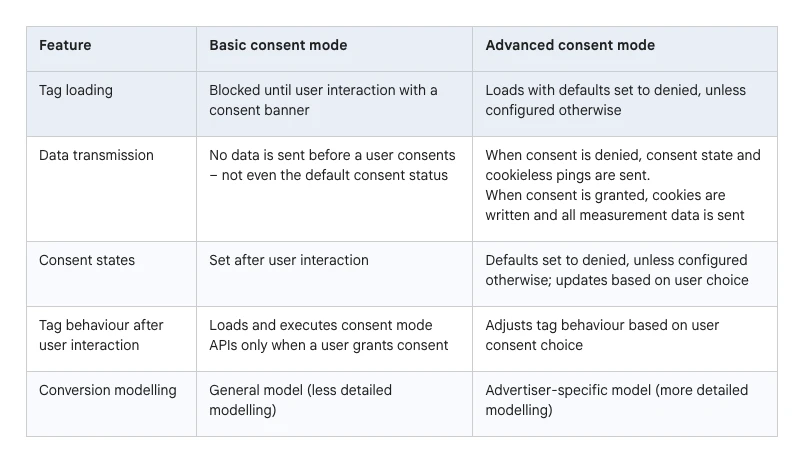
Know which mode you run. In basic mode nothing is sent until the visitor chooses. In advanced mode tags load with defaults set to denied and send cookieless pings. Conversion modelling then fills some gaps, but only with volume: Google Ads needs about 100 ad clicks a day per country and domain, and GA4 behavioural modelling needs at least 1,000 denied events a day for seven days. Most small sites never qualify.
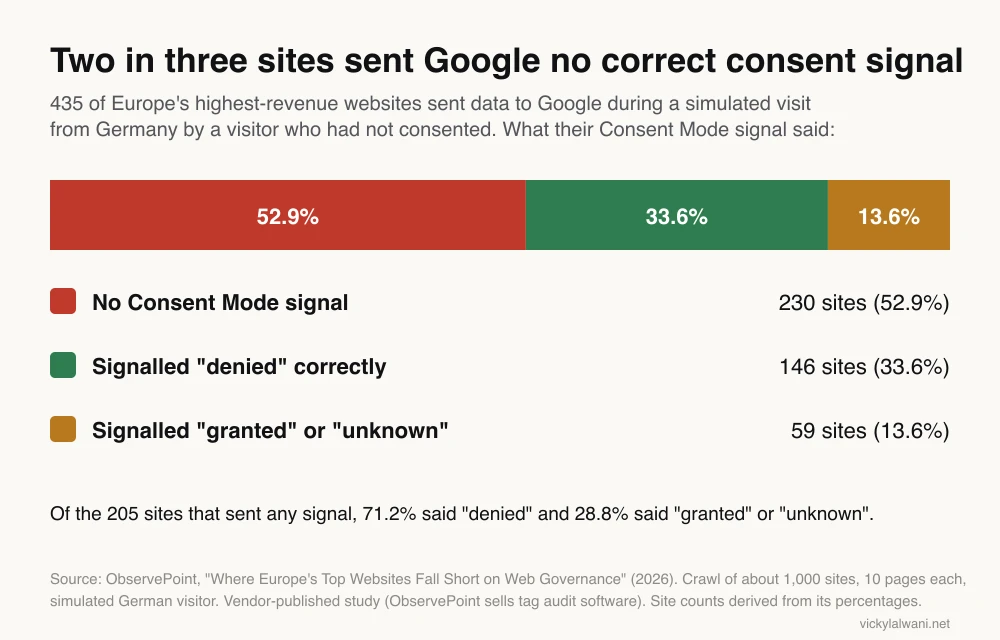
In ObservePoint's 2026 crawl of Europe's highest-revenue websites, only 205 of 435 sites sending data to Google sent any Consent Mode signal for a visitor who had not consented, and 28.8% of those said "granted" or "unknown". ObservePoint sells tag audit software, so read it as a vendor study, but the method is published.
14. Mobile and browser signal loss. Consent refusals, ad blockers, in-app browsers and short cookie lifetimes all hide conversions from the platforms. You cannot see the loss directly. You can size it: the gap between CRM leads and tracked leads, checked every month, is your loss rate.
Consent rules are law, not just settings. This article describes what Google's pages say. For what your site must do in your market, ask a privacy professional.
Checks 6, 9 and 11: do clicks and offline sales get back to the platforms?
Short answer: Click an ad, follow every redirect and form step, and confirm the click ID is still there at the end. Then check that won leads are sent back to Google Ads and Meta, and decide whether a server-side container would fix a real gap or just add cost.
6. Click IDs and UTMs. Auto-tagging adds a GCLID, Google's click identifier, to your landing page URL. Google warns that if your site redirects, the GCLID must reach the final landing page or conversions are lost. Test with a real click: landing page, any redirect, the form, the thank-you page. Check UTM tags on Meta ads too: Meta clicks carry no Google click ID, so GA4 needs UTM tags to credit them.
9. Offline conversion import. For lead generation, the sale happens later, in a CRM. Sending qualified leads and sales back lets bidding learn from customers, not form fills. Since 15 June 2026, offline conversion import and enhanced conversions for leads uploads go through the Data Manager API, and the Google Ads API route is blocked for them. Check that any scheduled upload still runs. In r/PPC, one reply to an advertiser with a messy call-tracking setup advised one persistent primary action for qualified sales, calls as secondary, and a single upload path.
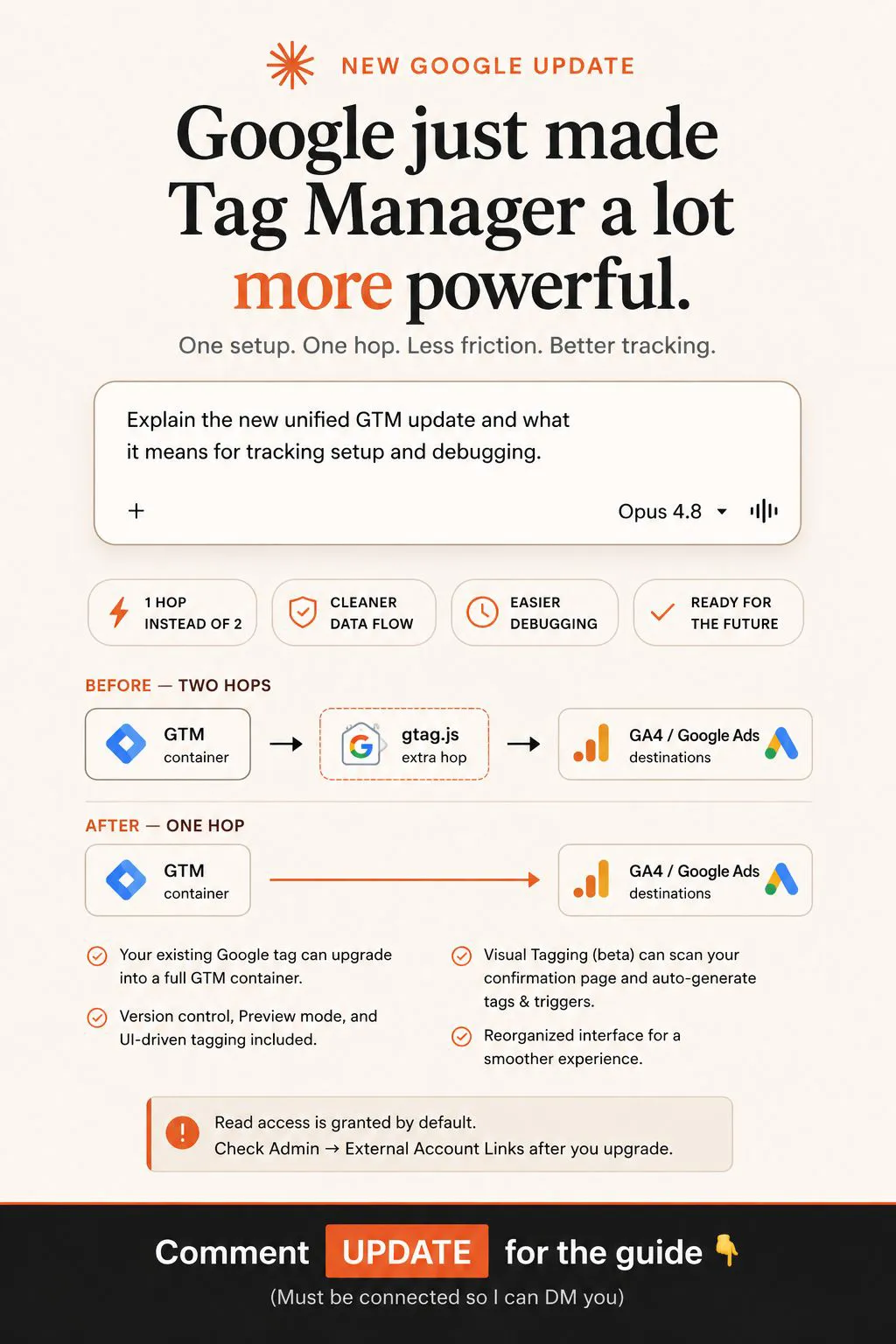
11. Server-side feasibility. Server-side tagging moves tags from the browser to a server container you control. Meta documents a Conversions API tag for server-side GTM. It can improve data quality and page speed, but it costs hosting and upkeep, and it does not replace consent. I score this check as "worth it or not yet", not pass or fail.
| Check | Test | Pass looks like |
|---|---|---|
| Click IDs | Real ad click to thank-you | GCLID kept to the end |
| UTMs on Meta | Ad URL parameters | Source and medium set |
| Offline import | Last upload date | Recent, no errors |
| Lead to sale | One won lead traced back | Click ID stored on the lead |
| Server-side | Gap vs cost | A clear reason to build |
How do you reconcile platform numbers with the CRM?
Short answer: Take one period, list conversions from Google Ads, Meta, GA4 and the CRM side by side, and explain each gap. The platforms will never match each other, because each uses its own windows and credit rules. The test is whether each is close to reality and stable over time.
| Source | What it counts | Why it differs |
|---|---|---|
| Google Ads | Conversions after its ad clicks | Own window, click date |
| Meta | Conversions after its ads | Own window, includes views |
| GA4 | Key events by its attribution | Consent, blockers, model |
| CRM | Real leads and sales | The number to trust |
Never add the platform numbers together. Both Google and Meta can claim the same sale. In r/PPC, a June 2026 thread made the same point: Google Ads, Meta and GA4 disagree by design, and the CRM is the anchor. One reply noted Meta's default window is 7-day click and 1-day view, against Google's 30-day click default.
What I look for is a stable gap. A steady shortfall is consent and blockers. A sudden jump means something broke.
Here are conversion counts for the same 30 days from four sources: Google Ads (primary conversions by action), Meta (results by event), GA4 (key events by name) and our CRM (new leads and won sales by date).

1. Put them in one table by week.
2. For each source, show the gap to the CRM as a percentage.
3. Flag any week where a gap moved by more than 10 percentage points.
4. List the likely causes for each flagged week from this list only: duplicate tag, consent change, form change, attribution window, offline upload delay, site release.
5. Say what evidence would confirm each cause.
Do not invent numbers. Do not recommend bid or budget changes.
How do you score the audit and decide what to fix?
Short answer: Score each check pass, attention or fail, then sort every finding into fix, test or escalate. Fix the fails closest to money first: the conversions your bidding strategy optimises towards. A perfect dataLayer matters little if the primary action counts the wrong event.
| Decision | When | Example |
|---|---|---|
| Fix | Clearly wrong, low risk | Delete a duplicate tag |
| Test | Cause unclear, touches live data | New trigger in Preview first |
| Escalate | Consent, legal, developer work | Consent defaults, server code |
Expect the numbers to get worse before they get better. Removing a duplicate makes reported conversions fall, and cost per conversion rise, overnight. Tell the client or your manager before you publish the fix, and note the date in the change log so nobody reads it as a performance drop.
Then protect the fix: test every change in Preview, compare platforms with the CRM weekly against an agreed tolerance, and freeze big tag changes in peak weeks. I do not call a fix done until the data shows it.
What did an audit of my own site's tracking find?
Short answer: On 17 November 2026 I audited the live tracking on my own site before adding new events. The container was clean, but two lead counts were wrong: one key event counted thank-you page views, and email, phone and LinkedIn clicks were counted as leads.
I read the published GTM container, the one visitors actually load, and the GA4 settings, and scored them the way I score client audits.
| Finding | Score | Fix |
|---|---|---|
| One Google tag, no duplicates | Pass | None |
| Key event from thank-you URL views | Fail | Lead event from real submits |
| Contact clicks counted as leads | Fail | Split into contact_click |
| Form service took referral credit | Attention | Unwanted referral added |
| Internal visits in the data | Attention | Internal traffic filter |
The thank-you key event over-counted because a refresh or a direct visit to that URL also counted. The fix was a generate_lead event pushed only when a submission is accepted. I un-marked the old key event the same day but left it running for two weeks, so the two counts can be compared. The form fallback service sent visitors back to the site and took credit for their real source, so it went on the unwanted referrals list. Internal visits are now marked with an internal traffic filter, which Google warns is permanent once applied.
The plan that replaced it is in my event map guide. The lesson for an audit: a "conversion" that has looked fine for months can still be the wrong event.
Can AI run a conversion tracking audit?
Short answer: AI can read a GTM container export, GA4 settings and conversion lists faster than a person, and flag likely faults against a checklist. It cannot see what happens in a real browser, and it should not publish fixes. Use it for the first pass, then confirm every finding in Preview.
A GTM container export is a JSON file of every tag, trigger and variable, which makes it a good input for a model such as Claude. I follow the same order every time: audit first into a sheet, check each finding by hand, and change nothing before approval.
Attached is my Google Tag Manager container export (JSON) and a list of my Google Ads conversion actions with their primary or secondary status.

Audit it against these checks and return one table (check, finding, evidence, score: pass, attention or fail):
1. Tags that send the same GA4 event or Google Ads conversion twice.
2. Tags with no trigger, paused tags and tags whose names do not say what they do.
3. Key conversions that fire on a page view rather than a confirmed action.
4. Whether a consent default tag fires on the Consent Initialisation trigger, and which tags have no consent settings.
5. Meta tags that send events without an event ID.
Quote the tag or trigger name as evidence for every finding. If you cannot tell from the export, say "needs Preview". Do not suggest changes yet.
Expect it to miss things a browser shows: a hard-coded tag in the site, a form that never loads the thank-you page, a redirect that drops the GCLID. In r/GoogleTagManager, one shop owner said Claude spotted GA4 loading twice once it had API access, and the top reply was sceptical that a tool was needed to see it. For a reviewed rebuild where Claude stages changes and you publish, see Claude Google Tag Manager setup.
Videos worth watching
A four-minute explainer on key events and conversions from the official Google Analytics channel, April 2024, made when GA4 renamed conversions to key events. It sells nothing and is the clearest version of the difference.
A short Meta clip on raising Event Match Quality with extra customer information parameters, from Meta for Business, February 2026. It promotes Meta's own Conversions API.
| Video | Channel | Date | What it covers |
|---|---|---|---|
| Key Events and Conversions in Google Analytics | Google Analytics (official) | Apr 2024 | Key events vs conversions |
| Increase your event match quality score by adding additional high-quality parameters | Meta for Business (official) | Feb 2026 | Event Match Quality |
| Attribution, incrementality & MMM: The modern measurement trifecta | Google Ads (official) | Sep 2026 | Why platforms credit differently |
| Why your Meta Ads & Google Analytics numbers don't match | An analytics consultant's channel | Jun 2025 | Meta vs GA4 gaps |
| Cookiebot Tutorial: Set Up Consent Mode v2 with GTM | Loves Data (training company) | Apr 2026 | Consent mode v2 in GTM |
| Meta Ads Showing Double Conversions? Fix CAPI Deduplication (event_id Guide) | A tracking tutorial channel | May 2026 | event_id deduplication |
What people say on X and Reddit
Short answer: Practitioners agree that Google Ads, Meta and GA4 will never match each other and that the CRM is the anchor. The faults they report most are double counting: a GA4 tag loaded twice, Pixel and Conversions API without a shared event ID, and GA4 imports sitting next to native Google Ads tags.
| Source | Where | Date | What it says | Type |
|---|---|---|---|---|
| Post | A paid media practitioner, X | 3 Dec 2025 | Poor Meta coverage or dedup often traced to the codeless Event Setup Tool | First-hand |
| Post | An analytics consultant, X | 27 Nov 2024 | Set up native Google Ads conversions before importing GA4 purchases | Opinion |
| Post | An analytics consultant, X | 5 Sep 2023 | GA4 ecommerce events often inflated by duplicate sends | Opinion |
| Post | A GTM freelancer, X | 7 Jul 2025 | GA4 purchases missing for three months; the tag was broken | First-hand, self-promotional |
| Thread | r/PPC | 18 Jun 2026 | Ads, Meta and GA4 disagree by design; CRM is the anchor | Opinion |
| Thread | r/PPC | 7 Sep 2026 | An auditor ranks broken conversion tracking as the top issue | First-hand |
| Thread | r/GoogleTagManager | 25 Dec 2025 | One order counted twice; replies: matching event ID, one Purchase | First-hand |
| Thread | r/PPC | 26 Oct 2025 | Offline uploads: one primary sale action, calls secondary | First-hand |
| Thread | r/GoogleTagManager | 4 Oct 2026 | Claude spotted GA4 loading twice; a reply was sceptical | Demo, own tool |
The most useful thread is the September 2026 r/PPC post from someone who audits accounts for a living: broken or double-counted conversion tracking was the first issue on their list, and their test was the same as check zero here, Google Ads against GA4 against the backend. Their percentage of broken accounts is their own estimate, not a study. The December 2025 r/GoogleTagManager thread shows why event IDs alone are not enough: replies warned that firing Purchase at two different stages of a funnel can still double count, so make sure only one confirmed purchase is sent. Several X accounts quoted here sell tracking services, so treat their posts as opinion.
Where this advice is weak
- Fifteen checks is a lot for a small site. A lead generation site with one form and Google Ads only can run checks 1, 2, 3, 6 and 15 and stop there.
- The chart covers large European sites. ObservePoint crawled about 1,000 big organisations as a German visitor. It does not tell you how a small site elsewhere behaves.
- Modelling hides part of the answer. Google and Meta model some conversions you cannot see. You can audit what is sent, not exactly what the platforms then estimate.
- Platform pages change. Enhanced conversions and offline imports both changed in 2026. Recheck the linked sources before each audit.
- My own audit is one small site. It shows the method, not a typical result.
Want your tracking audited before you scale?
A conversion tracking audit is where my analytics and tracking service starts: the 15 checks, a scored sheet, and fixes tested in Preview before anything goes live. If the audit shows the setup needs rebuilding, the event map method is how I plan it, and Claude can stage the build for your approval. Rates are on the pricing page, or get in touch through the contact page.
Keep reading: Google Ads not tracking conversions and the weekly PPC audit checklist.
Sources
| Source | What it supports | Date | Link |
|---|---|---|---|
| Tag Manager Help: user permissions | Read, Edit, Approve, Publish | Read 17 Nov 2026 | Link |
| Tag Manager Help: Preview mode | Tag Assistant preview | Read 17 Nov 2026 | Link |
| Tag Manager Help: consent mode support | Consent Initialisation trigger | Read 17 Nov 2026 | Link |
| Tag Manager Help: EU user consent | Consent mode v2 parameters | Read 17 Nov 2026 | Link |
| Google for Developers: consent mode | gtag consent default | Read 17 Nov 2026 | Link |
| Google Ads Help: consent mode | Basic vs advanced | Read 17 Nov 2026 | Link |
| Google Ads Help: conversion modelling | 100 clicks a day threshold | Read 17 Nov 2026 | Link |
| Analytics Help: behavioural modelling | 1,000 events thresholds | Read 17 Nov 2026 | Link |
| Google Ads Help: enhanced conversions | One setting from April 2026 | Read 17 Nov 2026 | Link |
| Google Ads Help: enhanced conversions for leads | Data Manager API from 15 June 2026 | Read 17 Nov 2026 | Link |
| Google Ads Help: primary and secondary | Which actions bid | Read 17 Nov 2026 | Link |
| Google Ads Help: GA4-based conversions | Secondary to avoid double counting | Read 17 Nov 2026 | Link |
| Google Ads Help: counting options | One vs every | Read 17 Nov 2026 | Link |
| Google Ads Help: conversion windows | 1 to 90 days, 7+ advised | Read 17 Nov 2026 | Link |
| Google Ads Help: Tag Assistant | Unverified, inactive actions | Read 17 Nov 2026 | Link |
| Google Ads Help: auto-tagging | GCLID through redirects | Read 17 Nov 2026 | Link |
| Analytics Help: event collection limits | 40 characters, 25 parameters | Read 17 Nov 2026 | Link |
| Analytics Help: DebugView | Hidden when consent denied | Read 17 Nov 2026 | Link |
| Analytics Help: unwanted referrals | Referral exclusions | Read 17 Nov 2026 | Link |
| Analytics Help: internal traffic | Filters are permanent | Read 17 Nov 2026 | Link |
| Google for Developers: recommended events | transaction_id, purchase | Read 17 Nov 2026 | Link |
| Google for Developers: server-side tagging | Server containers | Read 17 Nov 2026 | Link |
| Meta for Developers: deduplication | event_id, 48 hours | Updated Jun 2026, read 17 Nov 2026 | Link |
| Meta for Developers: CAPI for server-side GTM | Server GTM route | Read 16 Nov 2026 | Link |
| Meta Business Help: CAPI best practices | 75% event coverage | Read 18 Nov 2026 | Link |
| Meta Business Help: Event Match Quality | 0 to 10, last 48 hours | Read 18 Nov 2026 | Link |
| ObservePoint EU1000 whitepaper | Chart: consent signals | 2026, read 17 Nov 2026 | |
| YouTube, X and Reddit | Videos and practitioner views | Checked 17 and 18 Nov 2026 | Linked in the tables above |
This article expands on my post on LinkedIn ↗.
FAQ
What is a conversion tracking audit?
A conversion tracking audit checks that every conversion your ad platforms report really happened, is counted once and is the action you want bidding to optimise for. It covers Google Tag Manager, GA4 key events, Google Ads conversion settings, the Meta Pixel and Conversions API, consent mode and the gap to your CRM.
How do I audit conversion tracking in Google Ads?
Open Goals, then Conversions, and list every primary action, because primary actions are the ones Smart Bidding uses. Check each action's status, counting setting (one or every), conversion window and whether enhanced conversions is on, then click a real ad and test each conversion path in Tag Assistant.
Why do Google Ads, GA4 and Meta show different conversion numbers?
Each platform counts with its own attribution rules and windows, and Google Ads and Meta can both claim the same sale. GA4 also loses visitors who refuse cookies or block scripts. Compare each platform with your CRM over the same period and watch whether the gap stays stable.
How often should I audit conversion tracking?
Run the full audit before any big budget increase and after any site, form, tag or consent change. Between audits, a weekly check of platform conversions against CRM leads or orders catches most drift within days.
How do I stop Meta Pixel and the Conversions API counting twice?
Send the same event name and the same event ID from the Meta Pixel and the Conversions API. Meta discards the later copy when a matching pair reaches the same pixel within 48 hours. Check the result in Events Manager under deduplication and Test Events.
Should I import GA4 key events into Google Ads or use the Google Ads tag?
Either can work, but only one should be primary for the same action, or bidding counts it twice. Google sets GA4-based conversions to secondary by default when the account already has goals from Analytics. Many advertisers keep the native Google Ads tag as primary for leads and sales.
What changed in enhanced conversions in 2026?
From April 2026, enhanced conversions for web and for leads became one on or off setting in Google Ads, which accepts data from tags, Data Manager and API connections together. From 15 June 2026, offline conversion and enhanced conversions for leads uploads moved to the Data Manager API.
How do I check consent mode is working?
Visit the site as a new visitor, refuse cookies and inspect what the Google tags send in Tag Assistant. Consent mode v2 needs ad_storage, analytics_storage, ad_user_data and ad_personalization, with defaults set on the Consent Initialisation trigger before other tags fire.
Can Claude or ChatGPT audit my tracking?
An AI model can read a GTM container export and a list of conversion actions and flag duplicates, page-view conversions and missing consent settings quickly. It cannot see what a real browser does, so confirm each finding in GTM Preview and keep publishing with a person.