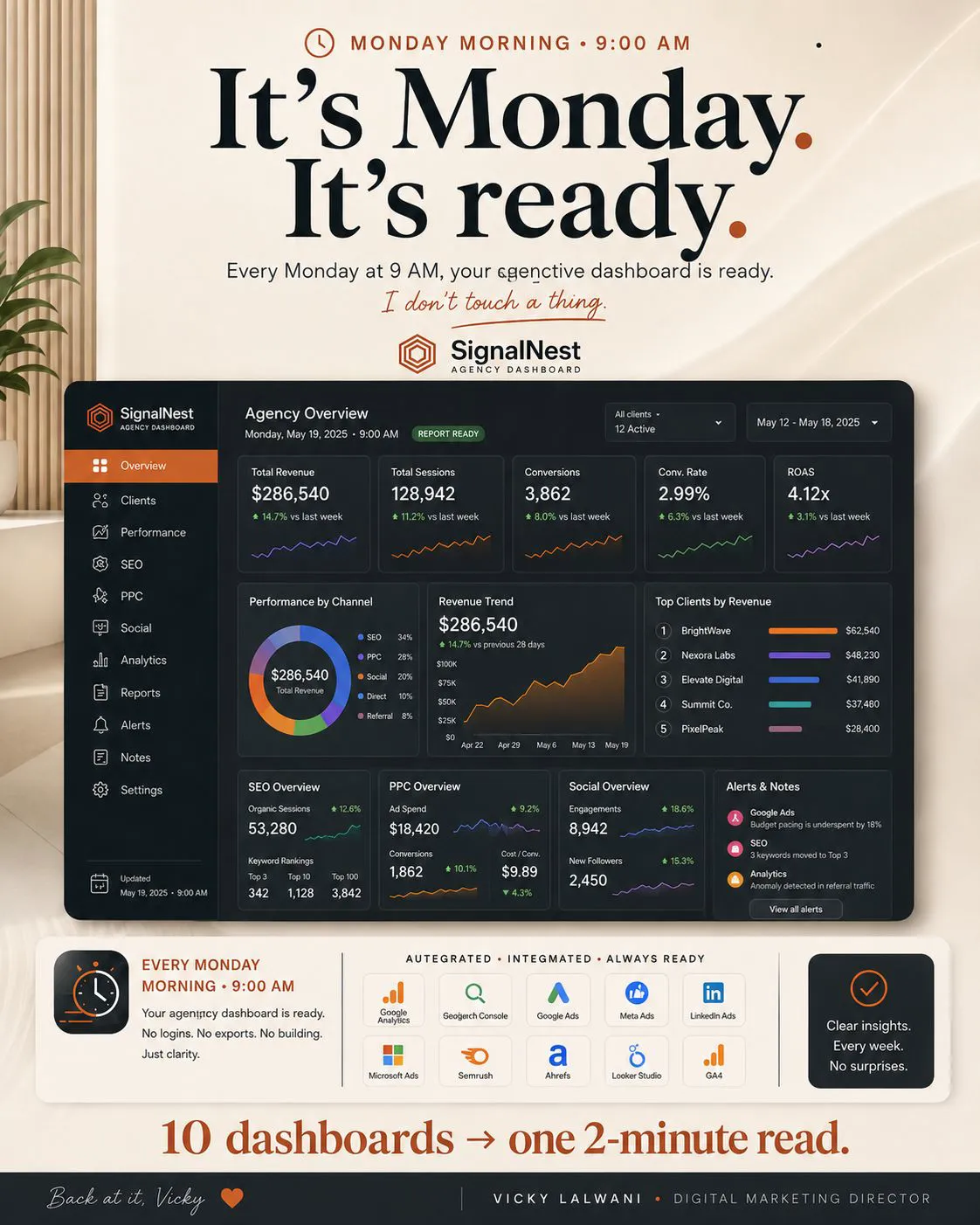
A Claude morning briefing is a scheduled task that reads your marketing sources before you start and returns one short briefing with the actions that matter. For most marketers, a Cowork scheduled task on a paid plan is the right home: it runs in the cloud with the laptop shut. Connect Gmail and Calendar first, add ads and search data, keep every tool read-only, and fix the format with a skill.
TL;DR
What it is: a Claude scheduled task that reads your ads, search, analytics, inbox and calendar before you start, then writes one short briefing with the actions that matter today.
Where to run it: for most marketers, a Cowork scheduled task. It runs in the cloud on paid plans, so the laptop can be shut. Use a desktop task only if the briefing needs files or MCP servers on your own computer.
What to connect: Gmail and Google Calendar first (Anthropic builds those connectors). Then ads and analytics data, through Google's and Meta's own MCP servers or a third-party connector.
Keep it read-only: a scheduled run has no one watching. Remove connectors the task does not need, block or gate write tools, and let the briefing propose actions that you take.
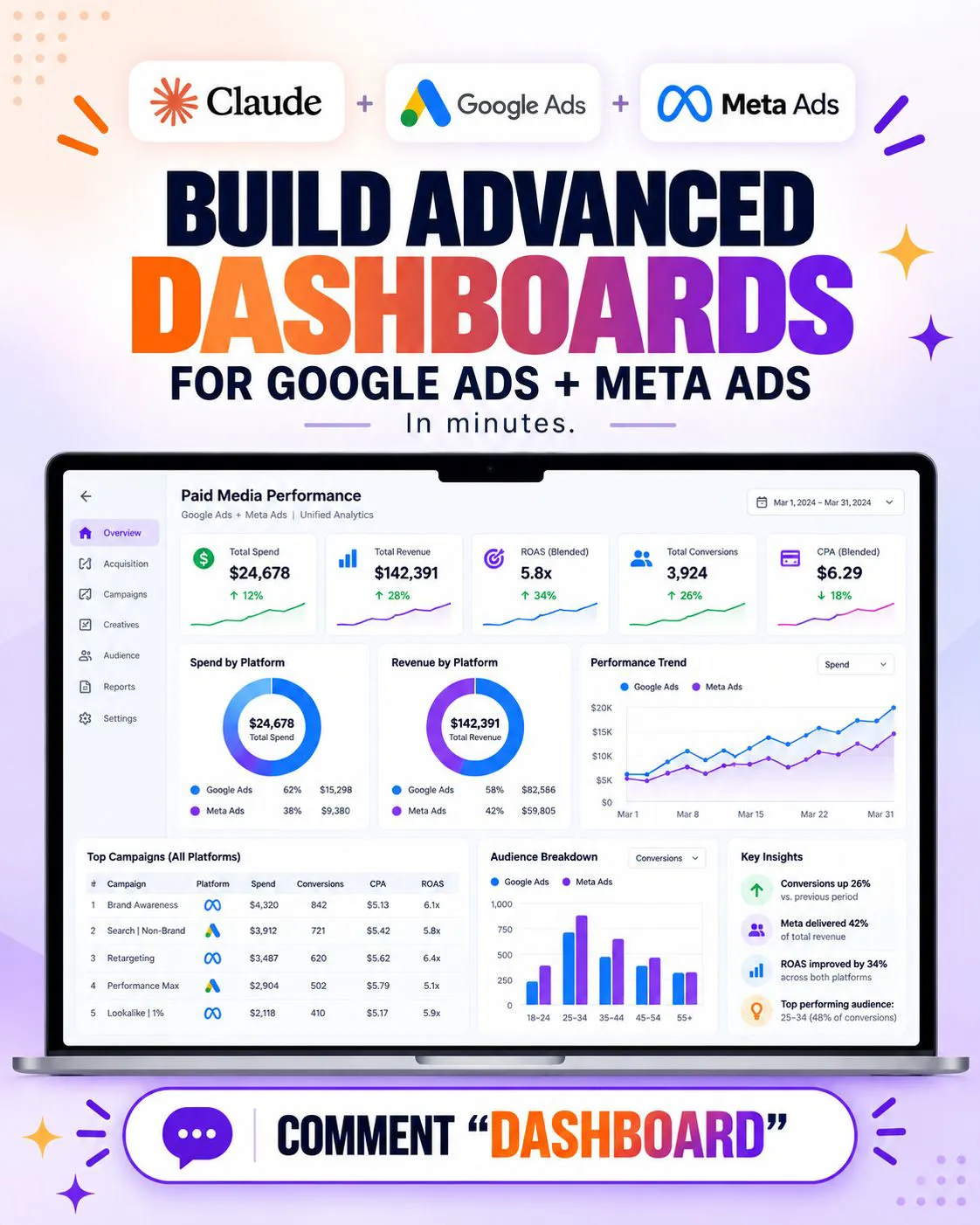
Not a client report: the briefing is for you, daily. The weekly Google Ads and Meta cross-channel report is for clients and managers.
A Claude morning briefing replaces the first hour of tab-hopping with one document that is waiting when you sit down. You save a prompt as a scheduled task, give it read-only access to the tools you check every morning, and Claude writes the same short briefing each day: what moved, what is broken, who needs a reply and what to do first. If you want this built around your own accounts and clients, it is part of my AI automation work.
How this was checked. Product facts come from Anthropic's Help Centre and Claude Code docs, Google's and Meta's developer pages, read on 17 and 18 November 2026. Scheduled tasks are still labelled research preview in Anthropic's docs, so screens and limits can change. The examples and GIFs are illustrative, not client results.
What is a Claude morning briefing, and what is it not?
Short answer: It is a short daily document for you, written by a scheduled Claude task from live connector data, that lists what changed overnight and what to do first. It is not a client report, a monthly deck or a dashboard; those have other readers and other jobs.
The test of a briefing is simple. Could you read it in three minutes and know your first three moves? If it needs a scroll and a coffee, it is a report, and reports belong on a different schedule.
It helps to keep the four reporting jobs apart, because each one fails when it tries to do another's work:
| Output | Reader | Cadence | Job |
|---|---|---|---|
| Morning briefing (this article) | You | Every weekday | What needs action today |
| Cross-channel report | Client or manager | Weekly | What happened across Google and Meta, and why |
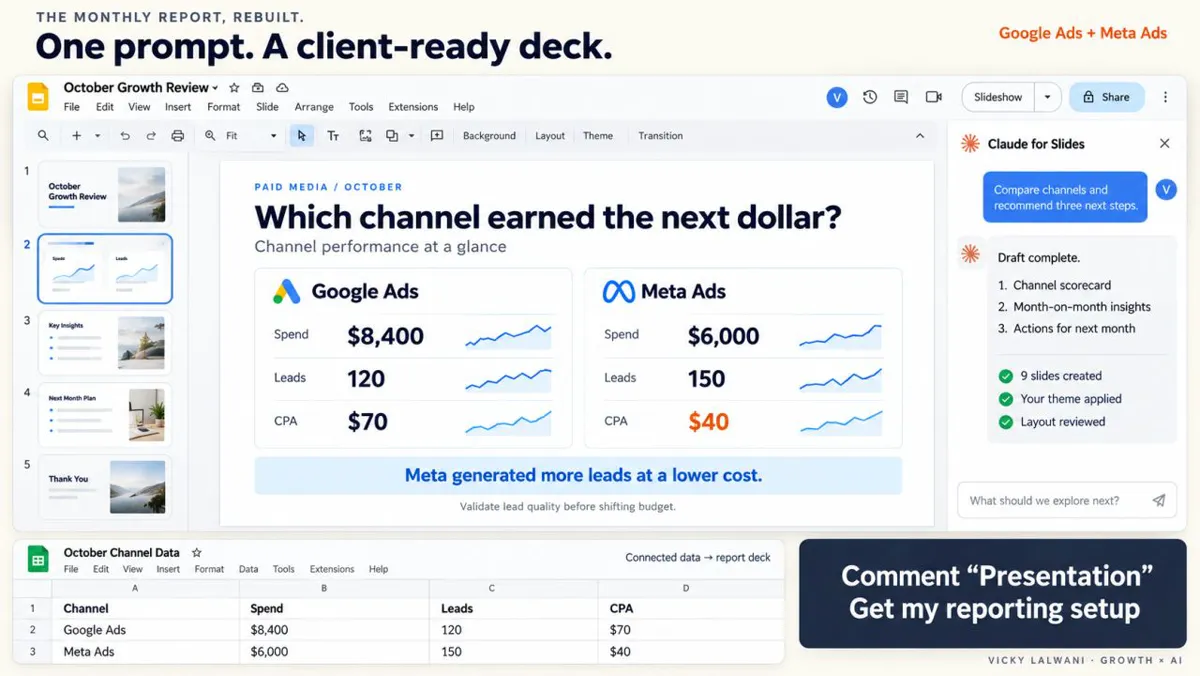
| Monthly PPC deck | Client | Monthly | Results, story and next month's plan |
| Executive dashboard | Leadership | On demand | A few top-line numbers to explore |
The briefing is the rawest of the four. It can name a broken tag, a client email nobody answered or a campaign that spent all night without a lead. Most of that should never reach a client in that form.
Why does the six-tab morning waste more than time?
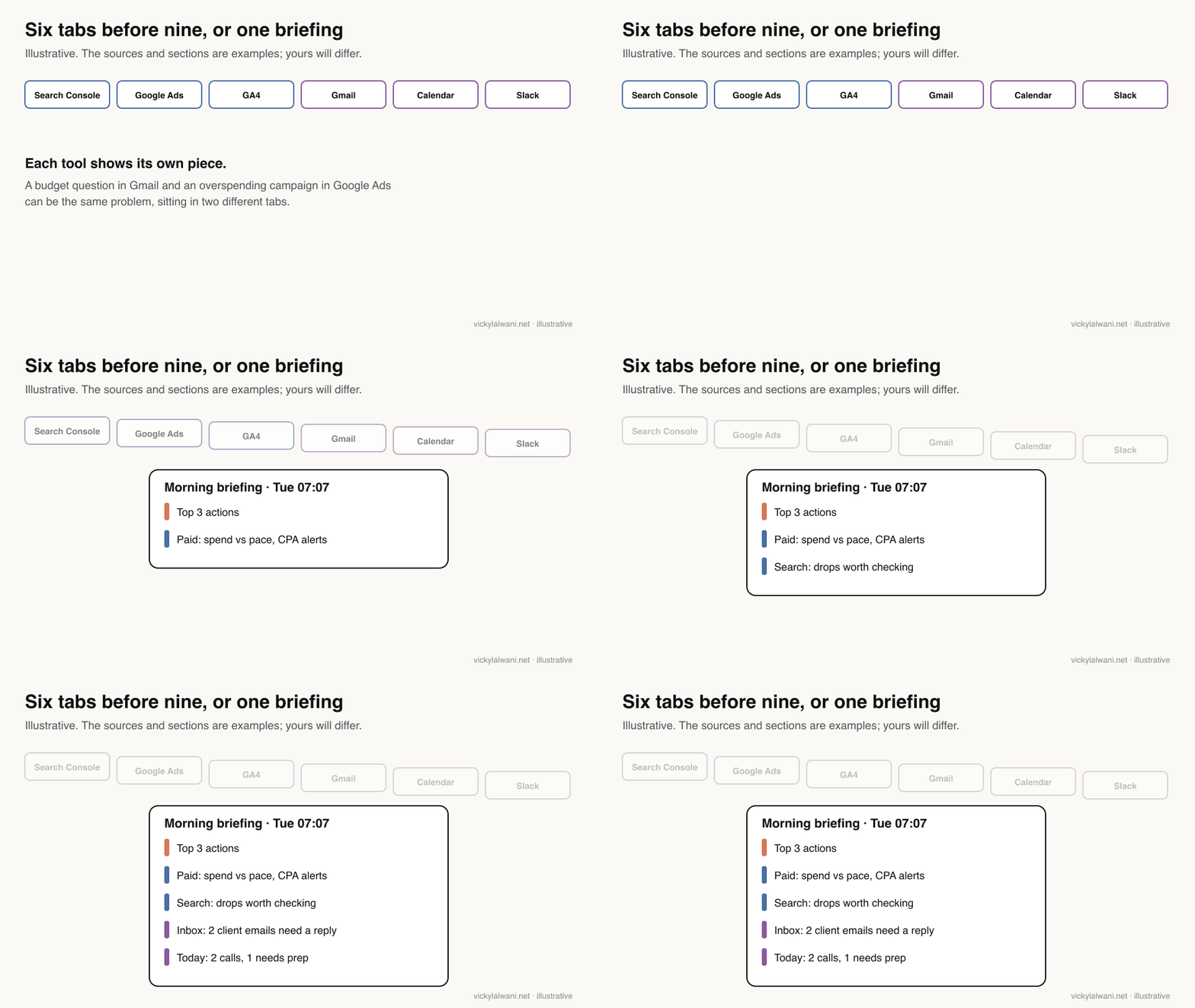
Short answer: Because you spend the first part of the day gathering context instead of deciding, and each tool shows only its own piece. Problems that span two tools, such as a budget email and an overspending campaign, stay invisible until you join them yourself.
Most marketers start in Search Console, Google Ads, GA4, Gmail, Calendar and Slack. Time it against your own morning; the minutes are only part of the cost.
The bigger cost is the joins. A client asking about budget and a campaign pacing ahead of its month may be the same problem. A drop in leads and a form change on the website may be the same problem. No single tab knows both halves.
In client and team calls, the reporting request I hear most is some version of "can it show a summary, not a list?", with a benchmark behind every label. A briefing built well does exactly that: it compares each number with something and tells you which comparisons matter.
Which Claude feature should run the briefing?
Short answer: Use a Cowork scheduled task (or the same feature in the new combined Claude app) on a paid plan; it runs in the cloud, even with your computer asleep. Use a Claude Code cloud task if your briefing lives in a code repository, a desktop local task only if it needs local files or servers, and never /loop.
Anthropic now has four ways to put Claude on a timer. They share a name, "scheduled tasks", which makes the choice confusing. The old name for the Claude Code cloud version, routines, still appears in some screens.
| Option | Runs on | Laptop shut? | Best for |
|---|---|---|---|
| Cowork scheduled task | Anthropic's cloud | Yes, unless a local folder is picked | Most marketing briefings |
| Claude Code cloud task | Anthropic's cloud | Yes | Briefings kept in a repo |
| Desktop local task | Your computer | No: app open, computer awake | Local files or MCP servers |
| /loop | Your open session | No, and it expires in 7 days | Short polling, not briefings |
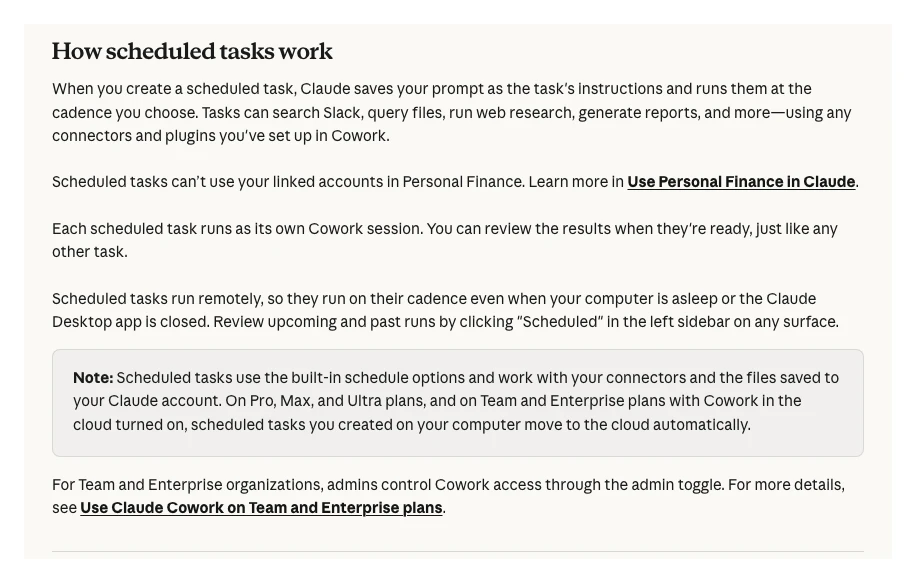
Cowork scheduled tasks are on all paid plans (Pro, Max, Ultra, Team and Enterprise). Frequencies are hourly, daily, weekly, weekdays or manual, and each run is its own Cowork session that you can open and review. Anthropic's page also says tasks created on your computer move to the cloud automatically on Pro, Max and Ultra plans, and on Team and Enterprise plans with Cowork in the cloud turned on.
Claude Code users get the same idea from the terminal. Cloud scheduled tasks run on Anthropic-managed infrastructure on a schedule, from an API call or on a GitHub event, and you create them at claude.ai/code/routines or with /schedule. The docs mark them as research preview, and runs draw down your subscription usage the same way an interactive session does.
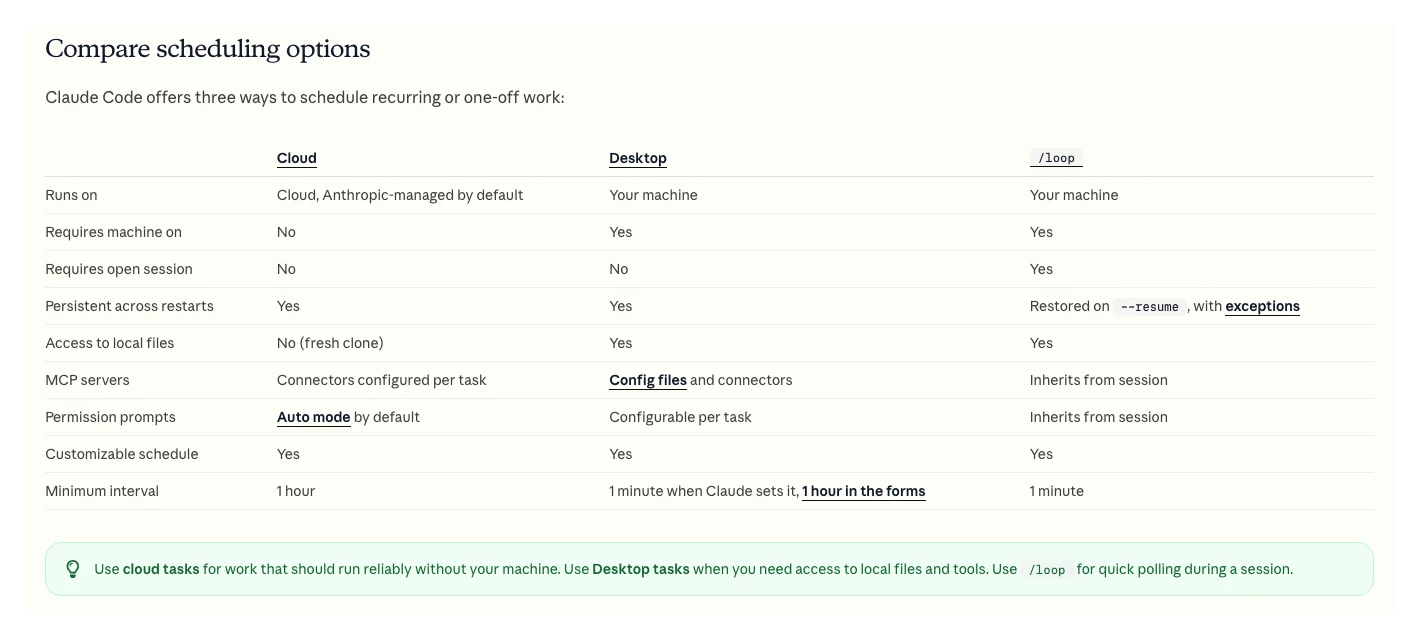
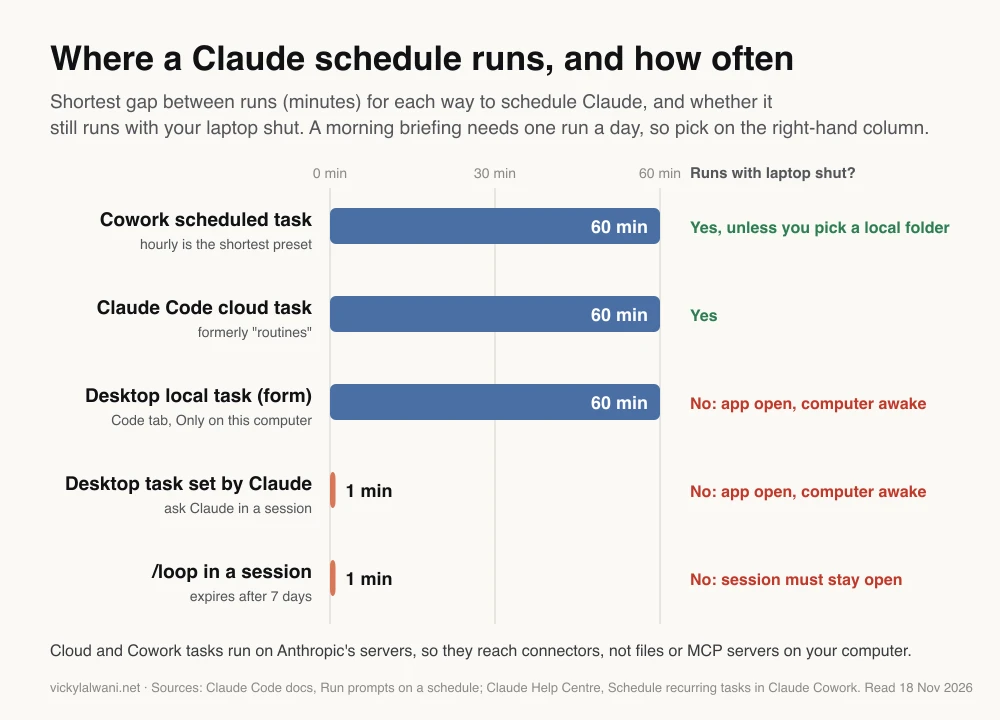
Why not /loop? It only fires while your session is open and idle, and recurring loop tasks expire seven days after creation. It is built for watching a deploy, not for a job that should run every weekday for a year.
Which connectors does a morning briefing need?
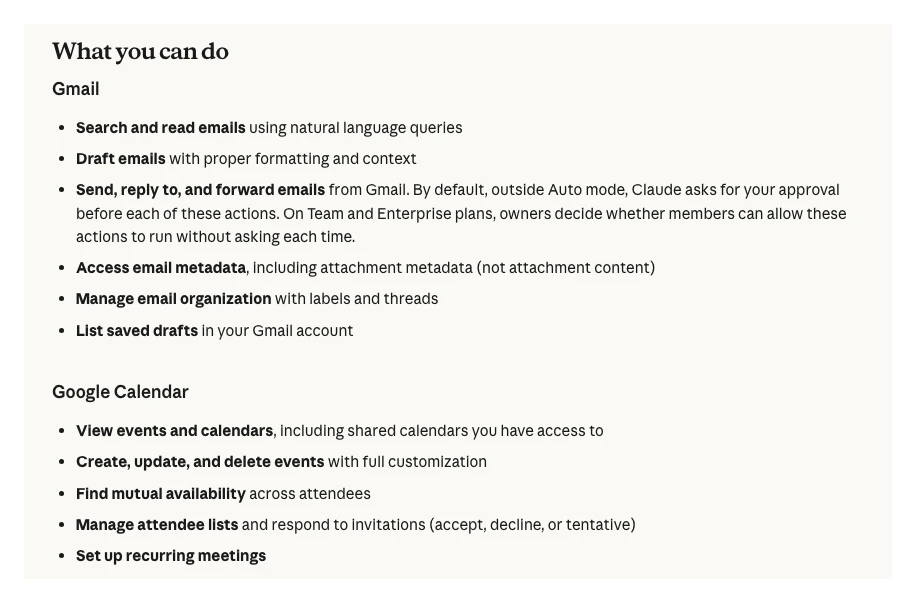
Short answer: Start with Gmail and Google Calendar, which Anthropic builds and which work on every plan. Add ads and analytics data next: Google publishes MCP servers for Google Ads and GA4 that run on your machine, Meta hosts its own ads server, and third-party connectors in Claude's directory cover the rest, including Search Console.
A connector is how Claude reaches another app. Anthropic's connectors guide says Claude inherits your permissions in each service, so a connector can never see more than your own login can. Here is what exists for a marketing briefing as of 18 November 2026:
| Source | Route | Built by | Can it write? |
|---|---|---|---|
| Gmail | Gmail connector | Anthropic | Yes; sends ask first outside Auto mode |
| Google Calendar | Calendar connector | Anthropic | Yes: creates and deletes events |
| Google Drive, Sheets | Drive, Sheets connectors | Anthropic | Yes; share and trash ask first |
| GA4 | Analytics MCP server | Google (open source) | Read-only unless write is switched on |
| Google Ads | Google Ads MCP server | Google (open source) | Reads; assets and labels after confirm |
| Meta Ads | Ads MCP server | Meta (hosted) | Yes: campaigns, budgets, audiences |
| Search Console | Third-party connector | Vendors | Depends on the vendor |
Two notes on that table. Google's Ads server added its first write tools in version 0.0.6 on 2 November 2026: asset creation, video uploads and labels, each behind a two-step propose and confirm. And Google's own list of official MCP servers has Analytics but no Search Console server, so for search data you either use the Search Console API yourself or a third-party connector. In Claude's directory, data vendors such as Supermetrics and Windsor.ai list Search Console among their sources.
The trap that breaks most first attempts: where the server runs. Google's Ads and Analytics servers run on your own computer by default. A cloud scheduled task cannot see them.
Anthropic says it plainly: local servers set up in Claude Desktop's claude_desktop_config.json are not available to Cowork sessions that run in the cloud, while a local session can use them. So you have three honest options for ads data in a cloud briefing:
- Run that task locally. A desktop local task can use local servers, but only fires while the app is open and the computer is awake.
- Host the server. Google's Ads server supports a remote mode with an OAuth proxy, and you can add it as a custom connector. Anthropic connects from its own cloud, so the server must be reachable on the public internet on port 443.
- Use a directory connector from a data vendor that already hosts Google Ads, GA4 and Search Console. Read what it can write before you connect it.
Before you schedule anything, run the briefing by hand and check that every source actually returned data. The most common failure I see on access is not a broken tool: it is access that turned out to be view-only, the wrong Google account, or an invite nobody accepted.
How do you set up the scheduled task, step by step?
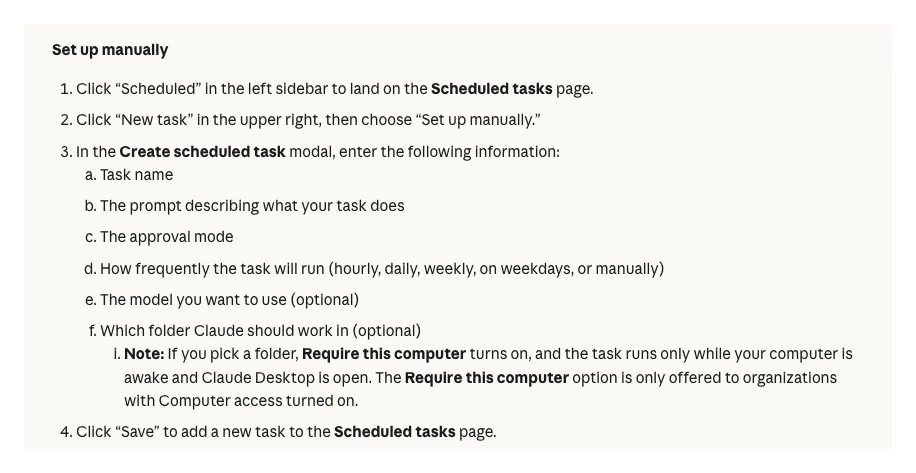
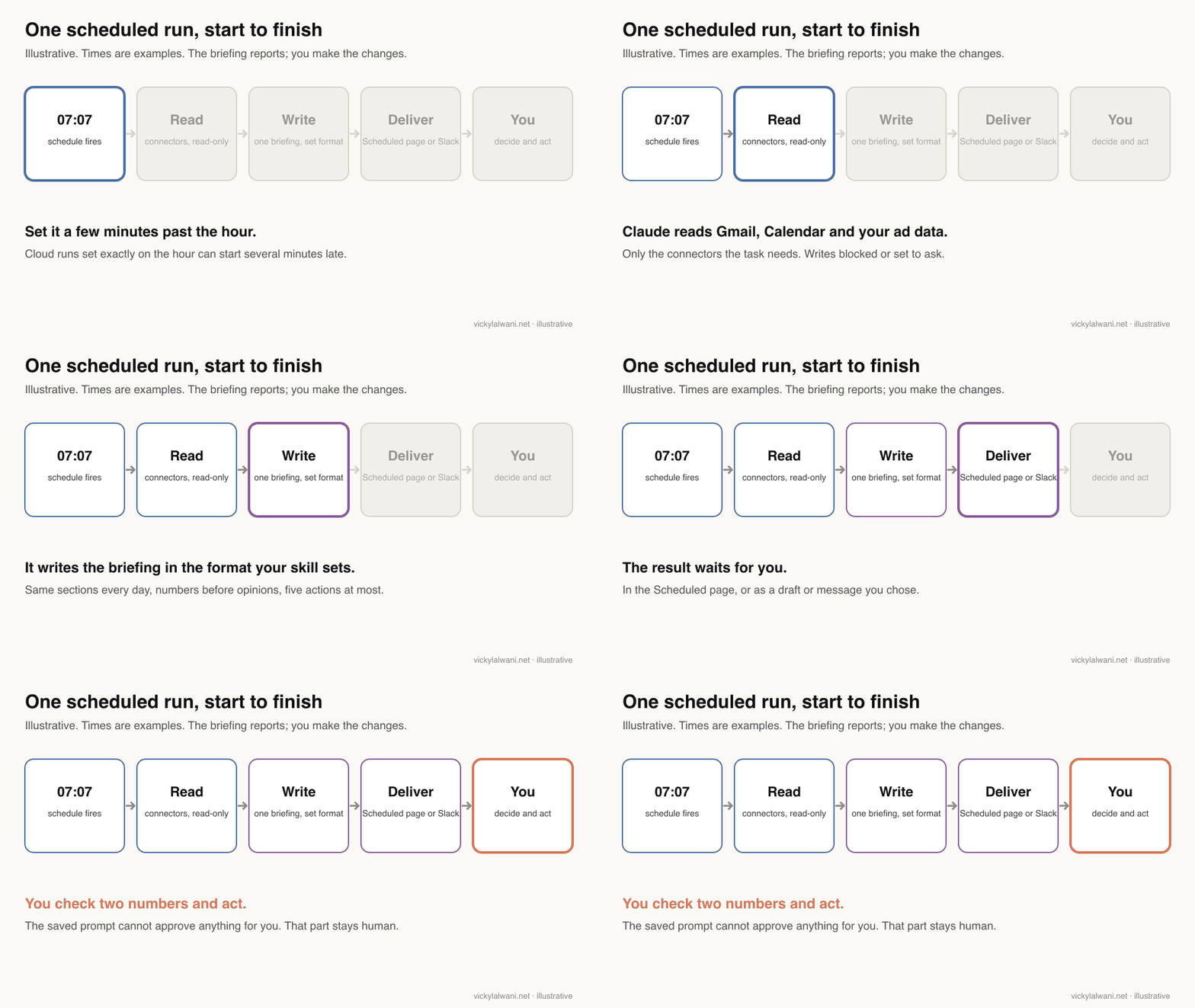
Short answer: Connect your sources, run the prompt by hand for a few mornings and check the numbers, save the format as a skill, then create a weekday scheduled task a few minutes past the hour, with no local folder so it runs in the cloud. Press Run now once and read the result before you trust it.
- Connect the sources in Customize, then Connectors. On Team and Enterprise plans an owner has to add each connector for the organisation first, then each person signs in.
- Run the prompt by hand on three to five mornings. Compare two or three numbers with the platforms each time. Fix the prompt, not the output.
- Save the format as a skill (next sections), so every run produces the same headings in the same order.
- Create the task. In Cowork, open Scheduled, choose New task, then Set up manually: name, prompt, approval mode, frequency (Weekdays), and optionally a model. Leave the folder empty unless you need local files, because picking one ties the task to your computer.
- Pick 07:07, not 07:00. Anthropic's docs for cloud tasks say runs set exactly on the hour can start several minutes late, and suggest a few minutes past instead.
- Press Run now and read the first output end to end before the first real morning.
- Review it every Friday for the first month. Delete sections you never act on.
If you have the new combined Claude app (your message box no longer shows Chat and Cowork), you can also describe the schedule in any conversation, answer Claude's questions and press Schedule. In Claude Code, /schedule does the same from the terminal. One catch there: a bare five-field cron expression is read in UTC, not your local time, so a 9am task written as 0 9 * * 1-5 runs at 9am UTC.
What should the briefing prompt say?
Short answer: Say what to read from each source, what counts as worth flagging, the order of the output and a word limit. End with an instruction to list actions, sorted by impact, with the number behind each one. Without that, you get a tidy summary instead of a to-do list.
Here is a starting prompt. Change the thresholds to suit your accounts; a small account can swing 15% on an ordinary Tuesday.
You are my morning marketing analyst. Today is {date}. Use only the connected tools.
Never send, delete, pause, publish or change anything. If a step needs a change, list it under "For me to do".

1. Paid (Google Ads, Meta): yesterday's spend against the daily pace for this month, conversions and cost per conversion by campaign. Flag any campaign more than 15% off its 7-day average, and any keyword or ad set that spent without a conversion for 14 days.
2. Search (Search Console): clicks and impressions for the last 7 days against the 7 days before. List pages that lost more than 20% of clicks, with the top query for each.
3. Analytics (GA4): yesterday's key events against the same weekday last week. Say if any key event dropped to zero, because that usually means tracking, not demand.
4. Inbox (Gmail): unread messages from client or team addresses in the last 24 hours. One line each: who, what they need, how urgent.
5. Today (Calendar): each meeting, who is in it and what I need to prepare, including any report that is due.

Output, in this order and under 450 words:
- Top actions (at most five, revenue first, each with the number behind it)
- Paid, Search, Analytics, Inbox, Today
- "Could not check": any source that returned no data, and why
Mark every cause you suggest as "to check", not as fact.
Three parts of it do most of the work:
| Line | Why it is there |
|---|---|
| "Never send, delete, pause..." | A scheduled run has nobody watching |
| "Key event dropped to zero" | Zero usually means tracking, not demand |
| "Could not check" | Stops gaps being filled with guesses |
| "Mark causes as to check" | A cause is a lead, not a fact |
| At most five actions | A long list is a list nobody finishes |
You will probably want two versions: this daily one, and a deeper Monday edition that looks at the full previous week. Keep them as separate tasks rather than one prompt with "if it is Monday" logic.
How do you lock the format with a skill?
Short answer: Save the briefing's rules and headings as a skill: a folder with a SKILL.md file that you upload in Customize, then Skills. Scheduled tasks can use your skills, so every run follows the same format without a long prompt.
Skills replaced the old habit of pasting a long instruction file into a Project. According to Anthropic's skills guide, you upload a ZIP of the skill folder in Customize, then Skills; the feature needs code execution and file creation switched on. The Cowork help page confirms scheduled tasks have the same skills, connectors and plugins as a normal task.
---
name: morning-briefing
description: Writes the daily marketing briefing from Google Ads, Meta, Search Console, GA4, Gmail and Calendar. Use for the scheduled morning briefing or when asked for "today's briefing".
---

# Morning briefing

## Rules
- Read only. Never send, delete, pause, publish or change anything.
- Numbers before opinions. Every flag shows the figure and the comparison period.
- Flag changes over 15% against the 7-day average. (Raise this for small, noisy accounts.)
- Any key event at zero for a full day goes to the top: check tracking first.
- Wasted spend: keywords or ad sets with spend and no conversions for 14 days, with the total.
- At most five actions, sorted by likely revenue impact.
- Under 450 words. Same headings every day.
- If a source returns nothing, say so under "Could not check". Never fill the gap with a guess.

## Headings
Top actions / Paid / Search / Analytics / Inbox / Today / Could not check
The word limit is the rule people delete first and regret. A briefing you skim every day is worth more than a thorough one you stop opening by the second week.
How do you keep a scheduled briefing read-only?
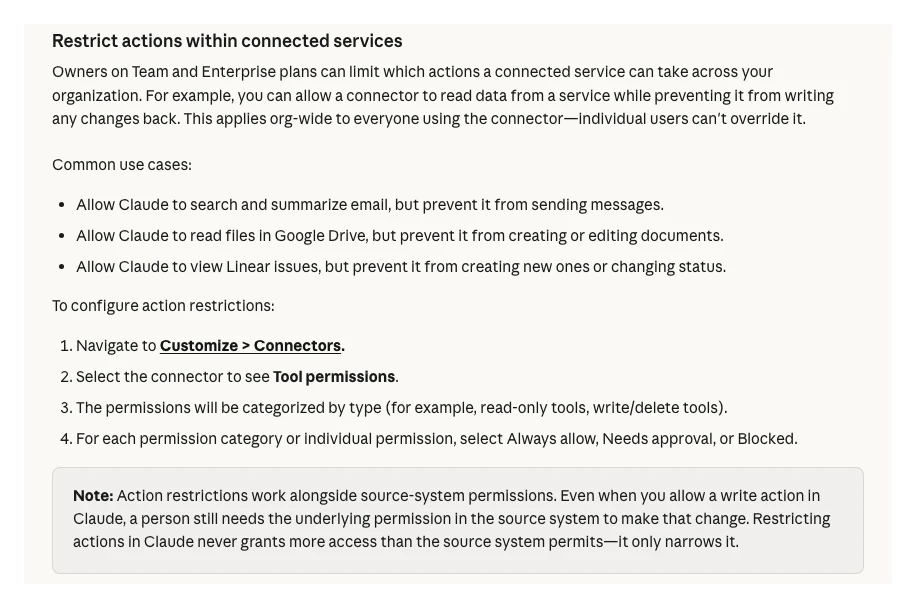
Short answer: Give the task only the connectors it needs, block or gate every write tool, and choose an approval mode that asks. Anthropic's docs say a stored prompt cannot act as approval for actions during a run, so the safest briefing simply has nothing it can change.
This matters more for scheduled runs than for chat. For Claude Code cloud tasks, all your connected connectors are included by default and Claude can use them during a run, including writes; the docs tell you to remove the ones the task does not need. Cloud runs also start in auto mode, where a classifier rather than you allows or blocks most actions.
| Risk | Setting | Where |
|---|---|---|
| Briefing sends an email | Gmail send set to ask or blocked | Connector tool permissions |
| Briefing edits a calendar | Calendar connector off for the task | Task settings |
| Agent changes a Meta budget | Edit or set budget: Blocked | Meta Business Suite rules |
| Agent edits Google Ads | Write tools left disabled | Google Ads MCP config |
| Too many tools loaded | Remove unused connectors | Task or Customize page |
On Team and Enterprise plans, owners can set each connector's tools to Always allow, Needs approval or Blocked, organisation-wide. Meta has its own layer: anyone with full control of a business portfolio can block actions such as creating campaigns or editing budgets for agents using its ads server, in Meta Business Suite settings.
My rule is the same one I use for any agent near an ad account: approval before anything goes live, and a short human note with every report. The briefing writes "for me to do"; a person does it.
What should a good briefing catch?
Short answer: The things no single dashboard catches: spend without results, sudden drops on pages or key events that point to tracking, urgent messages buried in a full inbox, and a meeting today that depends on work that is not finished.
Illustrative examples of flags worth waking up to:
- A keyword that spent every day for two weeks without a conversion, with the total and a suggestion to review it.
- A top lead-generating page that lost most of its clicks, with the query that fell and a note to check rankings or the page itself.
- Form leads at zero yesterday on an account that normally gets several. That is usually a broken tag or form, not a bad day.
- Two client emails asking for decisions, sitting under a pile of newsletters.
- A call with a client this afternoon while that client's monthly report is still a draft.
The last one shows why joining sources helps. Neither your calendar nor your reporting folder knows about the other.
Treat every cause in the briefing as a lead to check. If it says a competitor probably caused a ranking drop, that is a guess. Spot-check two numbers against the platforms each morning for the first few weeks, and keep doing it weekly after that.
Why does a briefing miss data or stop running?
Short answer: Usually because the task cannot reach a local server, the computer was asleep for a local task, a property or account ID is in the wrong format, or the run hit a usage limit. The run history and the "Could not check" section will tell you which.
| Symptom | Likely cause | Fix |
|---|---|---|
| Ads section empty in cloud runs | Server runs on your laptop | Local task or hosted connector |
| Desktop briefing arrives late | Computer was asleep | Time guard in the prompt |
| Local tools not in Claude Desktop | Bad JSON or app not quit | Validate config, quit fully |
| Search data empty | Wrong property format | Use sc-domain:example.com |
| Run stopped mid-way | Usage limit reached | Check Settings, Usage |
| Started late | Set on the hour | Move to 07:07 |
| Ran at the wrong hour | Cron read as UTC | Use CRON_TZ or UTC |
For Search Console, a Domain property is written sc-domain:example.com in the API, while a URL-prefix property is the full URL with a trailing slash. If you use a service account, add its email as a user on the property, or it will see nothing.
For local servers in Claude Desktop, Anthropic now prefers one-click desktop extensions over hand-edited JSON. If you still edit the config file, one missing comma stops every server loading, and closing the window is not quitting the app.
Desktop local tasks only fire while the app is open and the computer is awake. If the laptop slept through 7am, Desktop starts one catch-up run when it wakes, so a morning briefing can arrive at night. Anthropic suggests putting a time guard in the prompt, for example: if it is after 11am, label the briefing as late.
What people say on X and Reddit
Short answer: Official posts confirm the building blocks: cloud scheduling, Cowork, and Google's Analytics MCP server. Practitioners report the same pattern as for any agent: the morning brief works once access, context and guardrails are sorted, and the hard part is the set-up, not the writing.
Each post below was checked through X's embed service, and each Reddit thread through the Arctic Shift archive, on 18 November 2026. Accounts named after a person are described by type.
| Post | Who | Date | Type |
|---|---|---|---|
| Routines (now cloud scheduled tasks) run on Anthropic's servers | Claude (official) | 14 Apr 2026 | Official |
| Cowork launches: Claude Code for non-technical work | Claude (official) | 12 Jan 2026 | Official |
| Open-source MCP server connects GA data to LLMs | Google Analytics | 8 Jan 2026 | Official |
| Managing Google Ads with a Cowork plugin, MCP and skills | A performance marketer at Anthropic | 24 Mar 2026 | First-hand, vendor staff |
| Thread | Community | Date | Type |
|---|---|---|---|
| How are you using Claude Cowork in performance marketing? | r/PPC | 19 Apr 2026 | First-hand replies: morning monitoring, human decides |
| How are you using Claude Code to help you manage accounts? | r/PPC | 19 Sep 2026 | First-hand: set-up hard, briefs easy |
| Most helpful use cases for Claude Cowork and Claude Code | r/PPC | 14 Apr 2026 | Opinion and first-hand |
| A campaign run by Cowork, with a daily change report | r/ClaudeAI | 24 Apr 2026 | First-hand, one campaign, early |
The most useful reply in the r/PPC Cowork thread says monitoring beats reporting "by a distance": a scheduled run that checks every account each morning shows what is breaking now, while reports show last week. The most upvoted reply frames Claude as an analyst, not a media buyer, and others repeat the rule that Claude surfaces and a human decides.
Two warnings recur. Several practitioners say set-up (APIs, guardrails, account context) is the painful part, and the September r/PPC thread adds stories of accounts suspended after automations spammed requests. And one reply describes an agent trusting its own notes ("paused") over the live account ("live"). That is a good reason for the briefing to read the platform every morning instead of yesterday's summary.
The r/ClaudeAI post about a campaign run by Cowork is the opposite approach: changes allowed, with a daily report of what changed. It is one campaign over five days, so read it as an experiment, not a result.
Videos worth watching
Short answer: Start with Claude's own short demo of scheduled tasks in Cowork, then its longer walkthrough. The third is Claude's marketing ops example, which shows a weekly metrics review saved as a skill.
Claude (official channel), 18 March 2026. A 25-second demo of the Scheduled page. Sells only Claude.
Claude (official channel), 21 June 2026. A four-minute walkthrough of handing off and scheduling work in Cowork. Sells only Claude.
Claude (official channel), 18 May 2026. A marketing ops role runs a weekly metrics review; Claude gathers and checks the numbers, a person decides. Sells only Claude.
| Video | Channel | Date | What it covers |
|---|---|---|---|
| Scheduled Tasks in Cowork | Claude (official) | 18 Mar 2026 | The Scheduled page, in 25 seconds |
| Delegate and schedule tasks | Claude (official) | 21 Jun 2026 | Set-up walkthrough |
| Claude Cowork for marketing ops | Claude (official) | 18 May 2026 | Weekly metrics review as a skill |
| Build a proactive agent workflow | Claude (official) | 20 May 2026 | Claude Code /schedule, end to end |
| Set Up a Daily Morning Brief | An AI productivity channel | 28 May 2026 | Gmail and Calendar brief prompt |
| Cowork Scheduled Tasks tutorial | A data science channel | 27 Mar 2026 | Step-by-step set-up |
Where this advice is weak
Short answer: Scheduled tasks are still a research preview, the connector landscape for ads data changes monthly, and third-party connectors are vendors with their own terms. I also have no first-hand benchmark showing how much time a briefing saves, so measure your own.
- Anthropic labels scheduled tasks research preview, so names, limits and screens may change. Check the linked pages before you rely on a detail.
- Google's Ads server only gained write tools on 2 November 2026, and Meta's server can already change budgets. Re-check what each connector can do every few months.
- Vendor connectors are convenient, but they put a third party between Claude and your ad accounts. Read their data terms, and remember that clients may need to know.
- Nothing here is a measured result. The time saved depends on how many sources you check and how disciplined the format stays.
Want this set up for your accounts?
Short answer: If you would rather not wire the connectors, permissions and skill yourself, I build morning briefings around your own tools and clients as part of AI automation and Claude consulting. Rates are on the pricing page.
For the weekly version your clients see, read the Google Ads and Meta cross-channel report guide, and for the monthly client deck, PPC reporting in Google Slides. If you are still connecting your tools, start with connecting Claude to Google Analytics, Ads and your CRM, and for the app itself, the Claude desktop app for marketing.
Sources
| Source | What it supports | Date | Link |
|---|---|---|---|
| Claude Help Centre | Cowork scheduled tasks, plans, cloud runs | Read 18 Nov 2026 | Schedule recurring tasks |
| Claude Code docs | Cloud, desktop, /loop compared; 7-day expiry | Read 18 Nov 2026 | Run prompts on a schedule |
| Claude Code docs | Cloud tasks: preview, connectors, UTC cron, late starts | Read 18 Nov 2026 | Scheduled tasks (routines) |
| Claude Code docs | Desktop local tasks, sleep skips runs | Read 18 Nov 2026 | Desktop scheduled tasks |
| Claude Help Centre | Gmail, Calendar, Drive connectors | Read 18 Nov 2026 | Google Workspace connectors |
| Claude Help Centre | Connectors, tool permissions | Read 18 Nov 2026 | Use connectors |
| Claude Help Centre | Local servers not in cloud sessions | Read 18 Nov 2026 | Custom connectors |
| Claude Help Centre | Desktop extensions for local servers | Read 18 Nov 2026 | Local MCP servers |
| Claude Help Centre | Uploading skills | Read 18 Nov 2026 | Use skills |
| GitHub (Google) | Ads MCP: reads, propose and confirm | 2 Nov 2026 | google-ads-mcp releases |
| GitHub (Google) | Analytics MCP: read-only by default | Read 18 Nov 2026 | google-analytics-mcp |
| GitHub (Google) | Official Google MCP server list | Read 18 Nov 2026 | google/mcp |
| Meta Business Help | Ads MCP server abilities and rules | Read 18 Nov 2026 | Meta ads AI connectors |
| Meta for Developers | Ads MCP server overview | Updated 14 Jul 2026 | Ads MCP server |
| Google for Developers | sc-domain property format | Read 18 Nov 2026 | Search Console API |
| X and Reddit | Practitioner and official posts | Jan to Nov 2026 | Linked in the tables above |
FAQ
What is a Claude morning briefing?
A Claude morning briefing is a scheduled Claude task that reads your marketing tools before you start work and writes one short document with what changed and what to do first. It usually covers paid ads, search, analytics, inbox and calendar, in under 500 words.
Do Claude scheduled tasks run when my computer is off?
Cowork scheduled tasks and Claude Code cloud tasks run on Anthropic's cloud, so they run with your computer asleep or the app closed. Desktop local tasks and /loop only run while your computer is awake and the app or session is open.
Which Claude plans include scheduled tasks?
Anthropic lists scheduled tasks on all paid plans: Pro, Max, Ultra, Team and Enterprise. On Team and Enterprise plans an admin controls access to Cowork, and connectors must be enabled for the organisation first.
Can a Claude scheduled task use my Google Ads data?
Yes, through a connector. Google's open-source Google Ads MCP server runs on your computer by default, so a cloud task cannot reach it unless you host it or use a desktop local task; a third-party connector from Claude's directory is the other route.
Is there an official Search Console connector for Claude?
Google's list of official MCP servers includes Google Analytics but not Search Console, as of 18 November 2026. You can use a third-party connector from Claude's directory, or call the Search Console API yourself.
Can the briefing send emails or change campaigns by itself?
It can if you give it connectors with write tools, which is why you should not. Remove connectors the task does not need, set Gmail send and ad changes to blocked or needs approval, and let the briefing list actions that a person takes.
What time should I schedule a morning briefing?
Pick a few minutes past the hour, such as 07:07, because Anthropic's docs say cloud runs set exactly on the hour can start several minutes late. Leave enough time before you start work for the run to finish.
Why did my Claude scheduled briefing come back empty?
The usual causes are a local MCP server the cloud task cannot reach, a sleeping computer for a desktop task, a wrong property format such as a Search Console domain written without sc-domain:, or a usage limit. Ask the briefing to list every source it could not check.