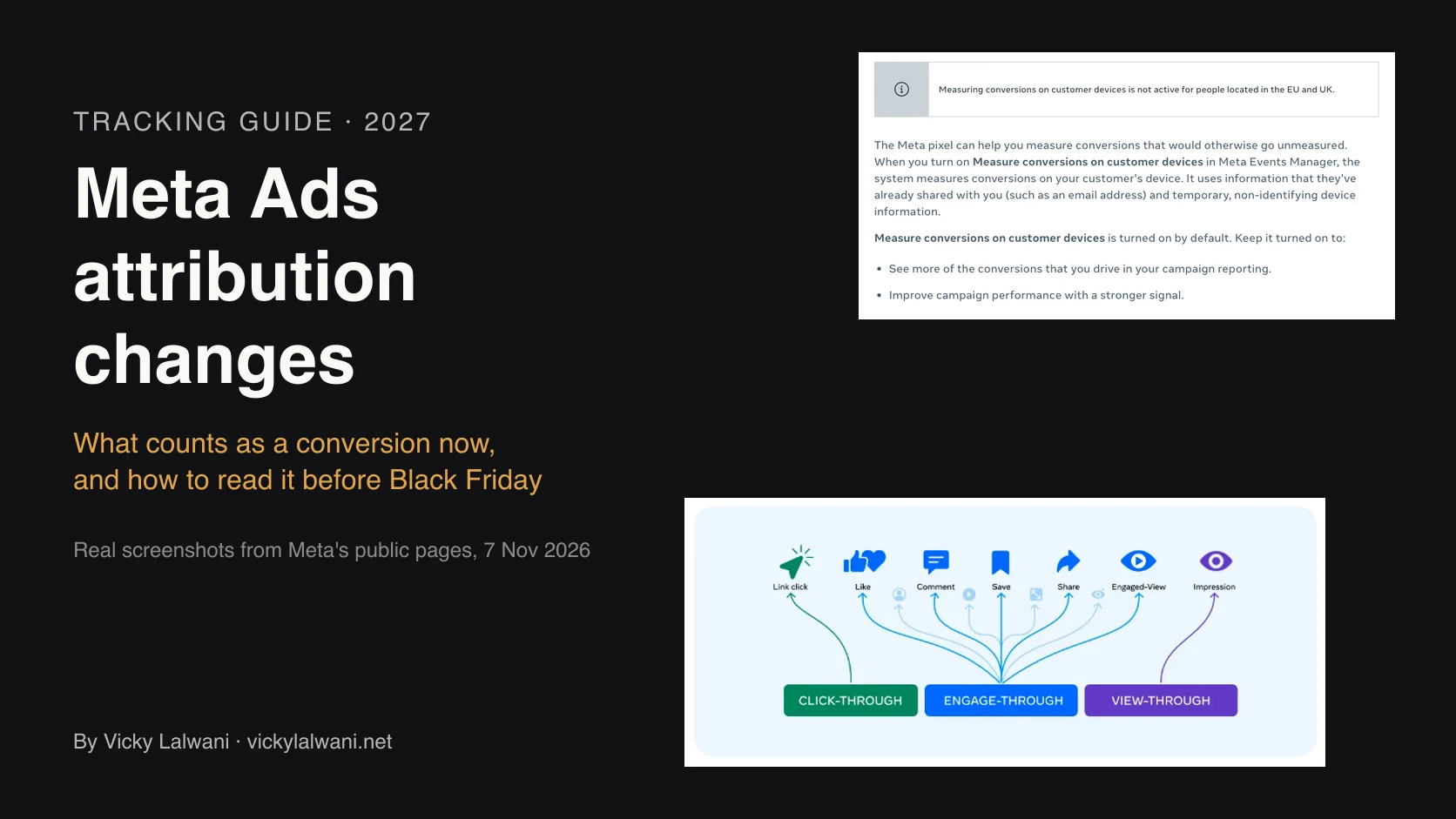
Meta changed what it counts as a conversion four times since 2025. A click now means a link click. The 7-day and 28-day view windows are gone from the Ads Insights API. Incremental attribution is an optional model. And since 12 November 2026, a default-on pixel setting called Measure conversions on customer devices can report more sales for eligible pixels, except for people in the EU and UK. Rechecked on 18 November 2026, Meta's pages show no newer change. Check that setting on every pixel, record your decision and compare Meta with real orders as a ratio through peak.
The setting started on 12 November. If you haven't yet, do three things now:
1. Check every pixel. In Events Manager, open each pixel's Settings and find Measure conversions on customer devices. Screenshot it with the date. No toggle? Note that too.
2. Record the decision. On or off, per pixel, with who decided and why. If you switch it now, note the date, because every switch adds noise.
3. Save a baseline. Export the four full weeks before the change (15 October to 11 November 2026) of Meta purchases next to your store or CRM orders. That's your before picture.
TL;DR
Rechecked 18 November 2026 against Meta's own help pages and announcements: no new attribution change since 7 November. The on-device setting below started on 12 November.
- What started 12 November: a default-on pixel setting, Measure conversions on customer devices, that lets Meta match more sales on the shopper's device (Meta help).
- Who gets it: eligible pixels on sites that require a login. Not active for people in the EU or UK (Meta help).
- Your sales: the setting changes what Meta can count, not your orders. Meta also says it gives campaigns "a stronger signal", so delivery may shift too.
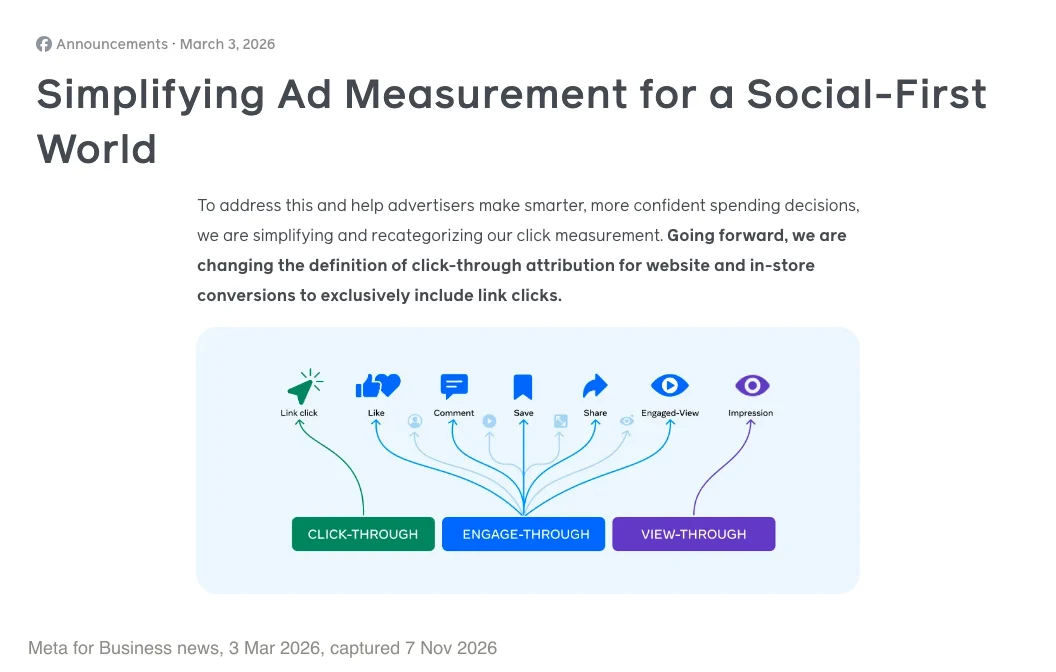
- Clicks: since March 2026, for website and in-store conversions, a click means a link click. Likes, shares and saves count as engage-through (Meta, 3 Mar 2026).
- Windows: for website conversions, 1-day or 7-day click, 1-day engage-through and 1-day view (Meta help). The default is 7-day click, 1-day view and 1-day engagement (Meta help). 7-day and 28-day view have been gone from the Ads Insights API since 12 January 2026.
- Incremental attribution: an optional model that counts only the conversions Meta predicts the ad caused (Meta help).
- Through peak: judge November on store orders, and compare Meta with them as a ratio, not a total. If you want that reconciliation set up for you, it is part of my analytics and tracking work; for campaign decisions, see Meta Ads management.
Jump to: Timeline · What counts now · Attribution settings · 12 November setting · Incremental attribution · AU, UK, US · Annotate · Weekly check · Black Friday rules · Evidence
Picture Thursday 19 November. Your Meta report for 12 to 18 November shows purchases up and ROAS at a high for the year. Nobody changed a campaign. Then you open Shopify and the order count for the week is flat.
Nothing is broken. Meta changed what it can count, again. It's the fourth big change to Meta attribution since 2025, and it landed 15 days before Black Friday.
How this was checked. Product facts come from Meta's help pages and announcements, first read on 7 November 2026 and rechecked on 18 November 2026. Every attribution window, rule and date below still matched Meta's pages on that day. Meta's pages still give no start date for the on-device setting, and I found no published post-launch data yet. Numbers in the GIFs and examples are illustrative.
Meta ads attribution changes: the 2025 to 2026 timeline
Meta changed what it counts four times between 2025 and November 2026. A trend line that crosses any of these dates isn't comparing like with like.
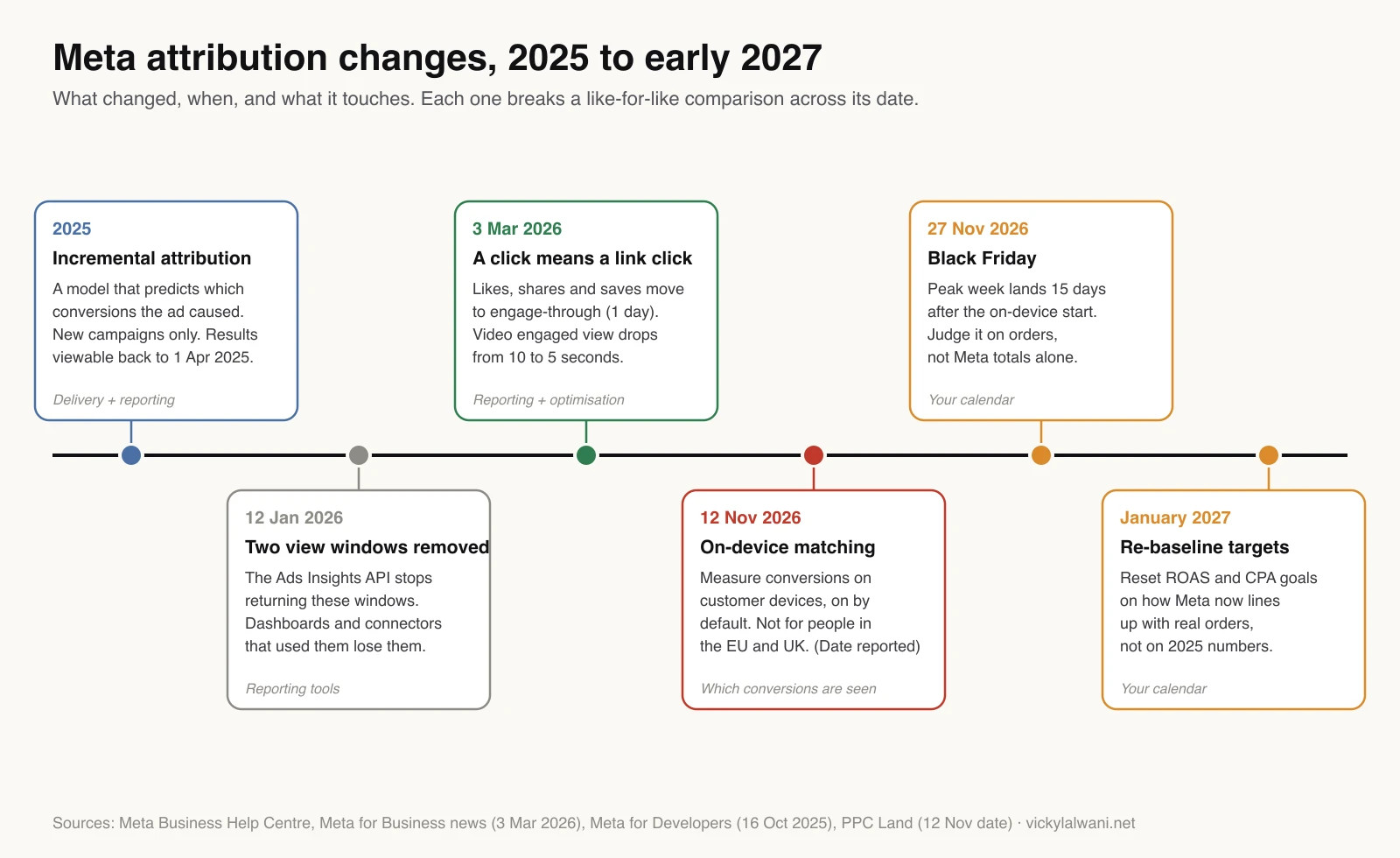
- 2025: incremental attribution. An optional model that counts only the conversions Meta predicts the ad caused. Meta help.
- 12 January 2026: two view windows removed. The Ads Insights API stopped returning 7-day view and 28-day view data. Meta for Developers.
- 3 March 2026: a click means a link click. Meta announced that shares, saves and likes would move into engage-through and a video engaged view would drop from 10 seconds to 5. Common Thread Collective saw it land on 18 March, and some accounts may still be on the old definitions. Meta announcement.
- 12 November 2026: on-device matching. A default-on pixel setting called Measure conversions on customer devices. Meta help.
If you pull Meta data into Looker Studio or a sheet, check any chart that used 7-day or 28-day view. Since 12 January those queries return empty data rather than an error (PPC Land).
Click-through, engage-through and view-through: what counts now
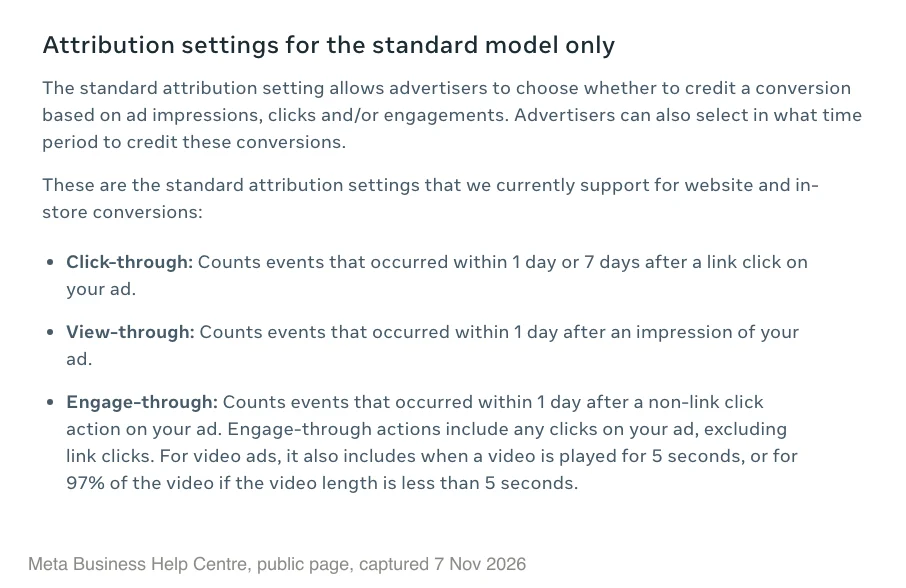
For website and in-store conversions under standard attribution, Meta now sorts each conversion into three buckets. Here they are in Meta's terms, as of November 2026 (Meta help):
- Click-through: a conversion within 1 or 7 days after someone clicks a link in your ad.
- Engage-through: a conversion within 1 day after a non-link click on the ad, such as a like, share or save. For video, a 5-second play also counts.
- View-through: a conversion within 1 day after someone saw the ad without clicking.
What does 7-day click, 1-day view mean?
Meta credits a sale to your ad if it happened within 7 days of a link click or within 1 day of a view. Meta's Results glossary now gives the default as 7-day click, 1-day view and 1-day engagement (Meta help).
One detail trips people up. If an ad set uses all three, the Results column adds click-through and view-through only. Engage-through shows in its own column. Meta's example: 5 click, 15 view and 3 engagement conversions show as 20 results (Meta help).
So some of March's "lost" results had only moved columns. In Ads Manager, open Columns, choose Compare attribution settings and tick 1-day engagement next to the click and view windows. Meta's help page still says 1-day engagement won't show for campaigns without video assets, so check yours.
Meta ads attribution settings: how to change them and which to use
In Meta Ads Manager (formerly Facebook Ads Manager), the attribution setting is the window Meta uses to credit a conversion to your ad, such as 7 days after a link click. You set it per ad set, and a different setting changes what Meta counts in Results (Meta help).
To change it: in the ad set's Conversion section, click Show more options, hover Standard attribution selections and click Edit. Then pick your click-through, engage-through and view-through windows (Meta help).
Which to use:
- Most purchase campaigns: keep Meta's default. A Meta ads educator recommends this for most accounts (Meta ads educator, Mar 2026).
- Retargeting and non-purchase events: consider removing 1-day view (same guide).
- Leads: consider turning off engage-through and view-through. The same guide says first-conversion counting can help when people submit a form twice.
- Ran a lift test? Benchmark on the window that matched it. Scalability School found 1-day click matched theirs (YouTube, Jul 2026).
Optimise on one setting and use Compare attribution settings to see the rest. Other settings worth checking are in the Meta ads settings checklist.
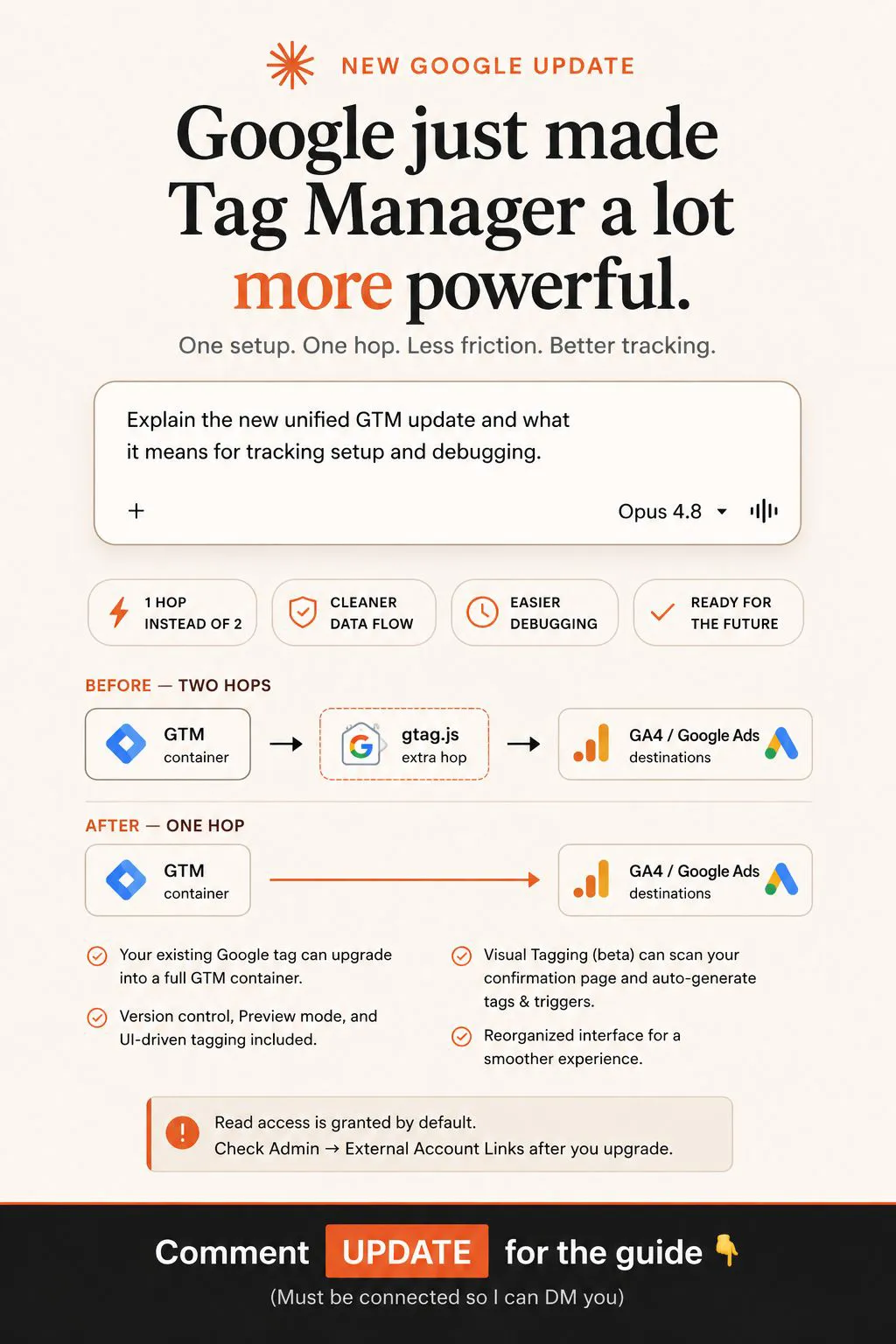
Measure conversions on customer devices: what changed on 12 November
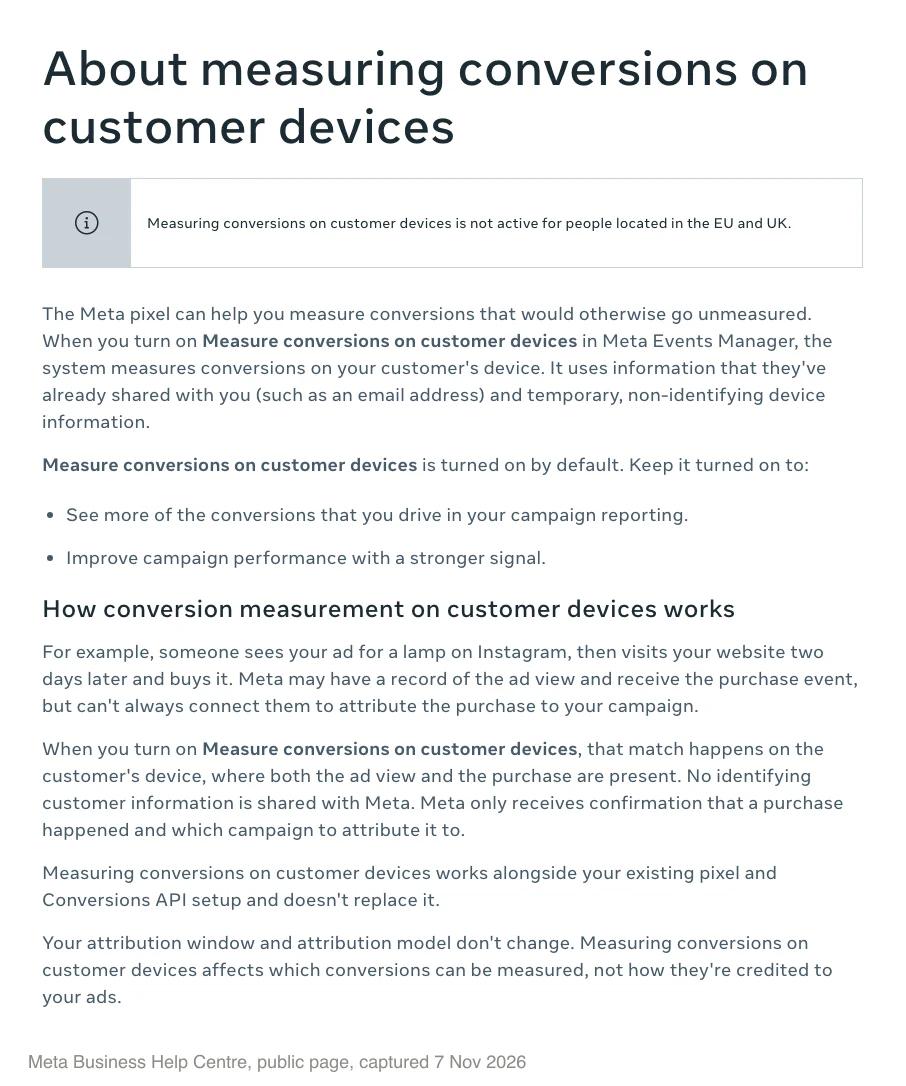
Measure conversions on customer devices is a Meta pixel setting in Events Manager. It lets Meta match an ad to a later purchase on the customer's own device, using information the customer already gave you, such as an email address, plus temporary device information that doesn't identify them (Meta help). It's on by default for eligible pixels.
Why it exists. Meta's example: someone sees a lamp ad on Instagram and buys on your site two days later. Meta may hold both records but can't always connect them. The setting makes that match on the device, and Meta only receives the purchase and the campaign. Under default windows, that sale counts only if they also clicked a link within 7 days.
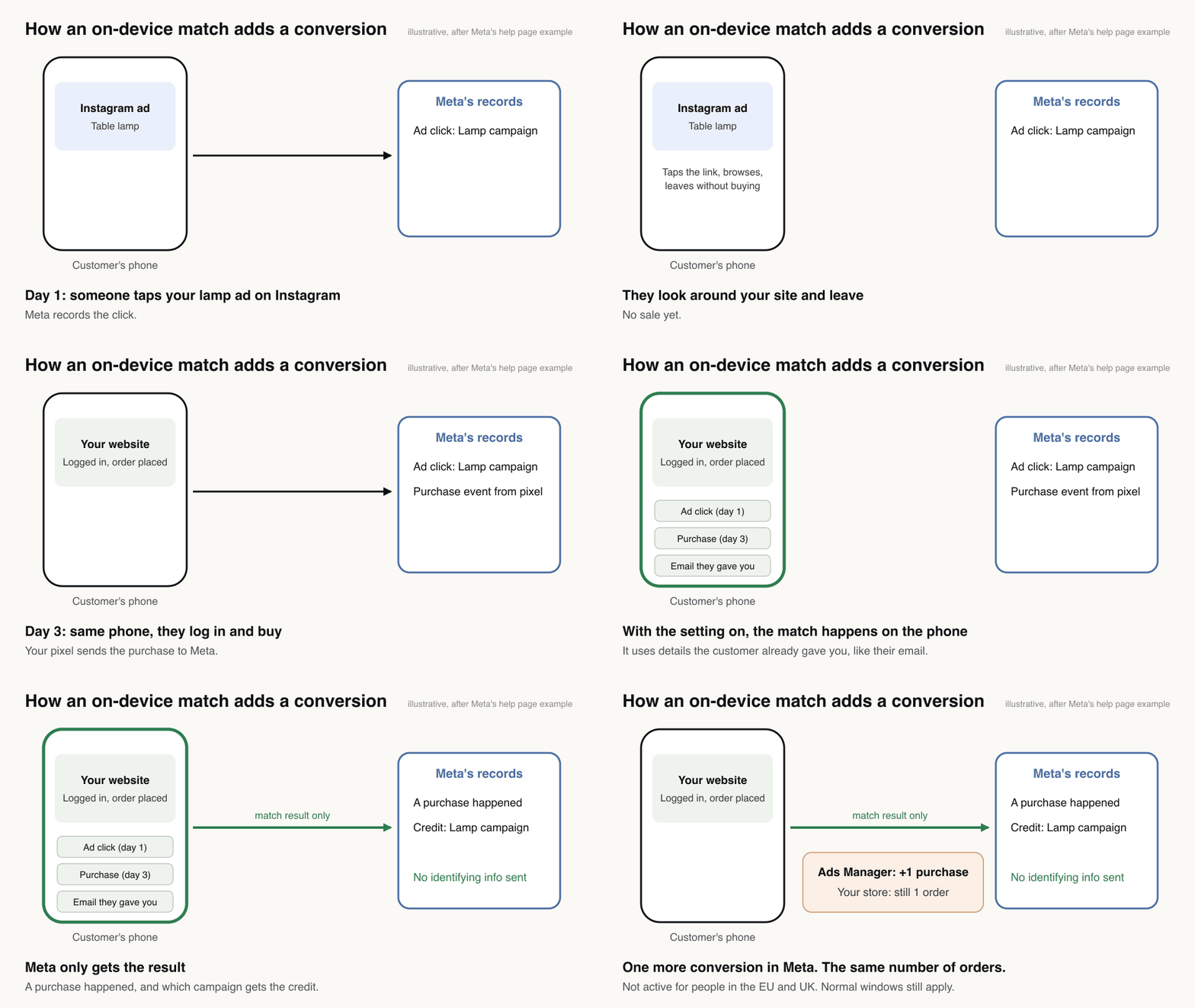
What doesn't change. Your attribution window and model. It works alongside your pixel and Conversions API and doesn't replace either.
Who gets it. Meta's turn-on page lists two conditions (Meta help):
- The pixel is installed directly on your page, not inside an iframe and not as an image-only pixel.
- Your website requires people to log in to an account with an email address or mobile phone number.
That second rule matters. If shoppers can check out as guests, the setting may not apply to you at all. Three quick checks:
- Pixel on the page? Meta excludes pixels inside an iframe and image-only pixels.
- Server only? If you send only Conversions API events with no pixel on the page, you don't meet the first rule.
- Platform app pixel, such as Shopify's? Meta hasn't said how these count. Look for the toggle and note what you see.
The date. Events Manager shows "Measurement starting November 12, 2026", as reported by PPC Land. Meta's help pages still give no date (checked 18 November 2026).
What Meta hasn't said yet
As of 18 November 2026, Meta's pages still don't say:
- Which events it covers, including app events. Website purchases are the only example.
- Whether order value comes through, which decides whether ROAS rises or only the count.
- Whether matched conversions get their own column or breakdown.
- How they're deduplicated against Conversions API events.
- How consent choices are handled.
- Whether they feed bidding. Meta only says to keep it on to "improve campaign performance with a stronger signal".
That last line is the one to plan around. It suggests an effect on delivery, so a cost cap or ROAS goal set before 12 November may not mean the same thing after it.
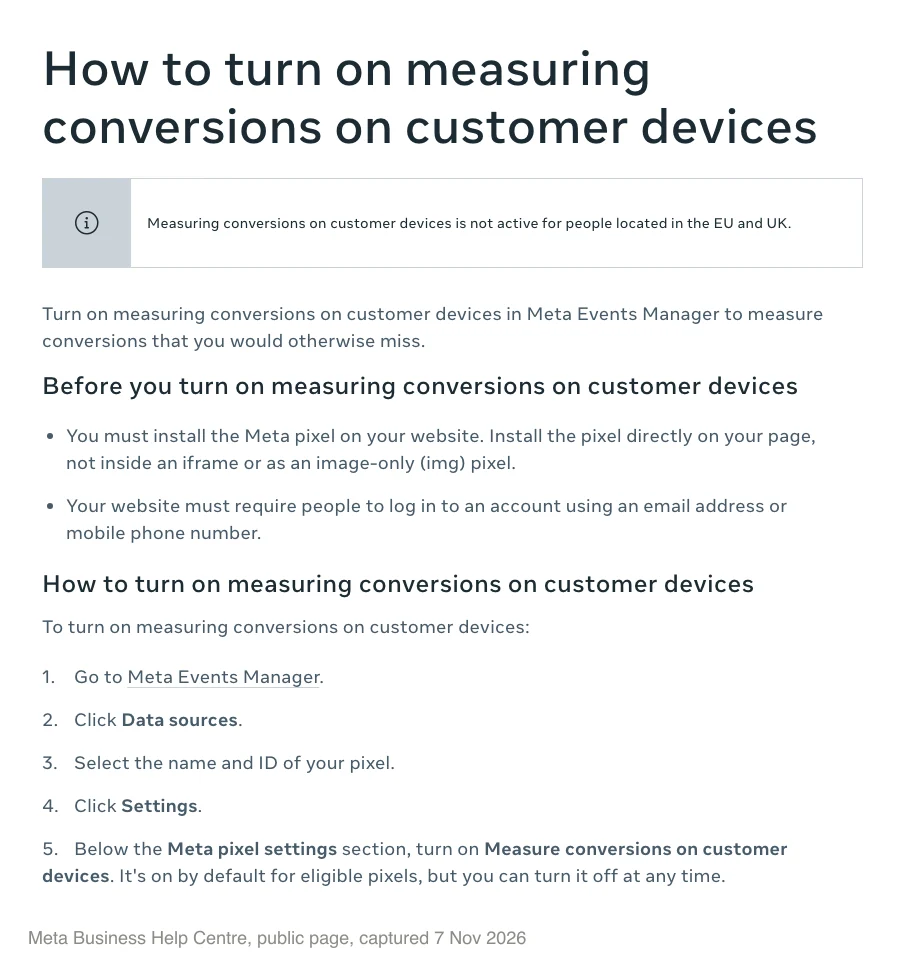
How to turn off Measure conversions on customer devices
Meta gives the path on its help page (Meta help):
- Open Meta Events Manager.
- Click Data sources.
- Select the name and ID of your pixel.
- Click Settings.
- Below the Meta pixel settings section, switch Measure conversions on customer devices off. You can turn it back on at any time.
It's set per pixel, so check every one you manage.
Should you leave it on?
Leave it on if
- Your site requires a login, so the setting actually applies.
- You already compare Meta with store orders every week.
- You've annotated reports and told whoever reads them.
- You want the "stronger signal" Meta says the setting gives campaigns.
Turn it off for now if
- You can't explain a jump to a client or boss before Black Friday.
- You work in health, finance or another sensitive sector and need consent handling documented first.
- Your cost caps or ROAS goals are tight and you can't re-baseline them in time.
- You want clean comparisons through peak and plan to revisit in January.
Either way, record the decision per pixel and don't flip it during peak. Every switch adds noise.
Meta incremental attribution: what it is and when to use it
Your finance lead asks how much of Meta's ROAS is real. Incremental attribution is Meta's model-based answer: it counts only the conversions Meta predicts the ad caused. Meta says it is used for both optimisation and reporting (Meta help).
Meta's example: 100 conversions under standard attribution might show as 70 under incremental. Cost per result rises to match. That's why the incremental column looks worse than standard, even when nothing else changed.
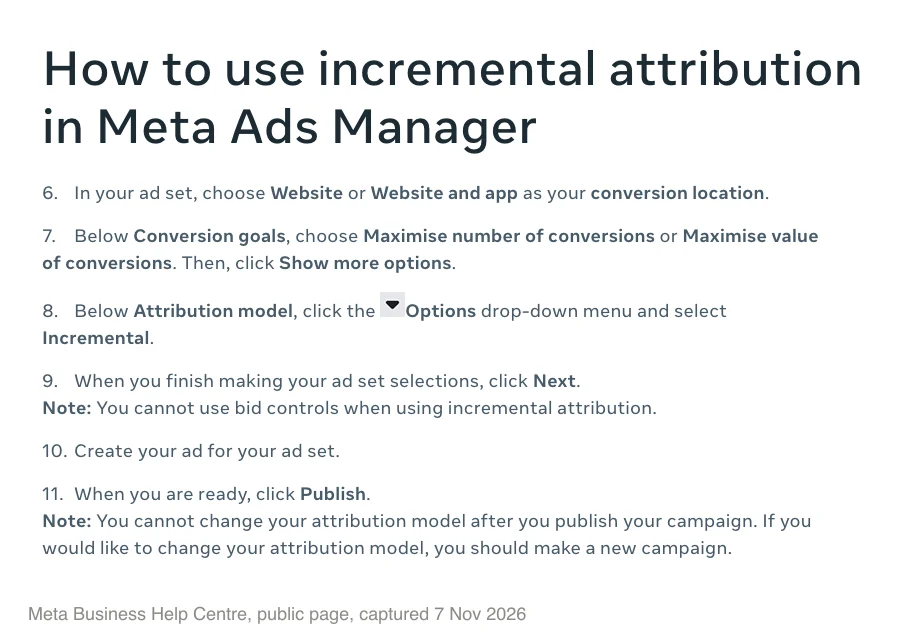
The rules, from Meta's how-to page (Meta help):
- Sales, Engagement or Leads objective.
- Conversion location: Website, or Website and app.
- Goal: maximise number of conversions or maximise value of conversions.
- No bid controls.
- You can't change the model after you publish. Switching means a new campaign.
You can view incremental results on any campaign without switching it. Open the Columns dropdown, choose Compare attribution models, then Incremental. Data goes back to 1 April 2025 (Meta help).
A third model, custom attribution, optimises toward an outside tool such as Northbeam or Triple Whale, and may not be available to you yet (Meta help).
Standard vs incremental attribution: which is better?
The evidence is mixed. Meta says its Q4 2025 model rollout drove 24% more incremental conversions than standard attribution (Meta newsroom, Jan 2026). That's Meta grading its own product. Outside results:
- Seer Interactive read the column for six accounts and about $1.05M of spend in April 2025. Meta rated 87% of conversions incremental; Seer's GA4 comparison, not an experiment, suggested 67% (Seer, Jul 2025).
- Haus, which sells incrementality testing, found it did worse than standard from July 2024 to June 2025 (0.80x) and better from July 2025 to June 2026 (1.26x), on a modest number of tests, mostly in DTC-only brands (Haus, Jul 2026).
- Scalability School tested it on a $150K to $200K a month apparel account. It beat 1-day click in weeks two and three of a lift-tested comparison, then drifted after the March change, so they went back to 1-day click (YouTube, Jul 2026).
Try it if
- You have the volume to start a new campaign and sit through learning.
- Retargeting or view-through make up a big share of your results.
- Leadership already doubts Meta's numbers.
- You can check it against a lift test or holdout.
Wait if
- Volume is low or ad sets are stuck in learning.
- You rely on cost caps or bid caps.
- It's November. Don't restart learning before peak.
- You'd judge it only on Ads Manager numbers.
The safe first step for most accounts: add the incremental column and watch how campaigns rank against each other for four to eight weeks. Meta says the column is modelled and advises against reading it directly against standard results. Then test optimising for it after the holidays.
Does it apply in Australia, the UK and the US?
Say you sell to Australia and the UK from one pixel. From 12 November, Meta can match more of your Australian sales but not your UK ones, because the setting "is not active for people located in the EU and UK" (Meta help). The rule follows where the customer is, not where your business is.
- Australia and the US: Meta names no exclusion, so sales from customers there can be matched when the pixel is eligible.
- UK businesses: sales from UK and EU customers won't be matched this way. Sales from customers elsewhere may be.
- Mixed accounts: add a Country breakdown so you can see the split.
- Time zones: 12 November started about 11 hours earlier in Sydney than in London. Annotate in your ad account's time zone.
That gives mixed-market advertisers a rough check: if Meta's share of orders jumps for AU or US buyers but not UK buyers, it's likely counting, not demand.
If you run Meta for one market, see how I work in Australia, the UK and the US.
Why Meta conversions don't match Shopify or GA4
Meta, GA4 and Shopify count different things, so they never matched, and from 12 November the gap can widen for eligible pixels.
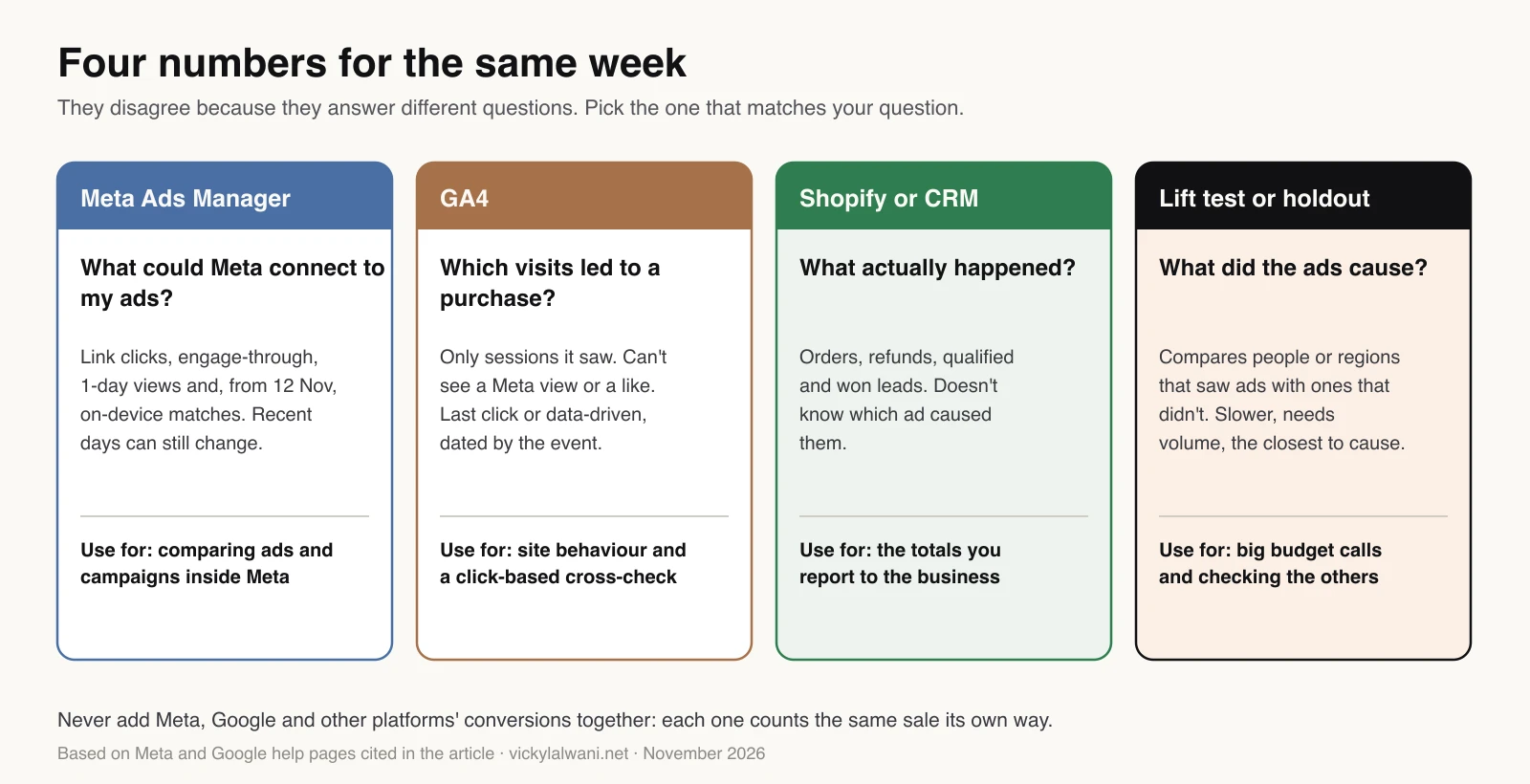
The usual causes, as quick fixes:
- Meta counts views and engagement; GA4 can't. GA4 only credits sessions it recorded, so it tends to under-credit Meta prospecting (GA4 help).
- Different dates and clocks. Ads Manager dates website purchases by the day they happened, but on-Meta actions such as Instant Form leads by the impression (Meta for Developers). Your store uses its own time zone, so compare full weeks, not single days.
- Late data. Recent days can still change as delayed and modelled conversions arrive, and Conversions API events can be sent up to 7 days after they happen (Meta for Developers). Call a week final about 8 days after it ends.
- Duplicates. If one order shows as two Meta purchases, your pixel and Conversions API events need the same event ID and event name (Meta for Developers). A store owner reported exactly this on Reddit in April 2026 (r/FacebookAds). An event map makes it easy to check.
- UTMs that miss Paid Social. GA4 only puts traffic in Paid Social when the source is on its list of social sites, such as facebook or instagram, and the medium matches its paid pattern, such as cpc or paid_social (GA4 help).
For the full tracking checklist, see the 15-point conversion tracking audit, or run a Meta ads audit alongside your Google data.
Workflow 1: annotate 12 November in every report
The problem. In January someone will compare November with October and see a jump. If nobody wrote down why, they'll call it a win.
The fix. Mark the date everywhere people read reports. If you missed it before 12 November, add it now; a past date saves like any other annotation.
- GA4. Open any report with a line graph, right-click a data point and choose Add annotation. You need the Analyst role or above. Titles are capped at 60 characters and descriptions at 150 (GA4 help).
- Looker Studio or your sheet. Keep a change log tab with one row per change.
- Events Manager. Screenshot each pixel's setting with the date visible, and file it with the change log.
- Ads Manager. Save a column preset with Compare attribution settings, named with the date.
Here's an annotation you can paste into GA4. It fits both limits:
Title: Meta on-device conversion measurement started
Description: Meta setting on by default from 12 Nov (not EU/UK). Meta-reported conversions may rise. GA4 and store orders should not.
A change log row needs only short entries:
| Field | Example (illustrative) |
|---|---|
| Date | 12 Nov 2026 |
| Time zone | Ad account (AEDT) |
| Change | On-device conversion measurement |
| Type | Measurement, not performance |
| Scope | Pixel [ID], AU and US buyers |
| Expected in Meta | Purchases may rise |
| Expected in GA4 and store | No direct change expected |
| Decision | Left on, by [name] |
| Review | 14 Dec 2026 |
For the client or manager note, paste this into Claude or ChatGPT:
Use only the facts below. Don't add any others.
Facts: Meta's setting "Measure conversions on customer devices" is on by default for eligible pixels. Events Manager shows measurement starting 12 November 2026. Meta says it is not active for people located in the EU and UK, and that attribution windows and models don't change. Meta also says keeping it on can improve campaign performance with a stronger signal. Meta has not said whether these conversions get their own column. Source: https://www.facebook.com/business/help/4237575203200036
Our decision: [left on / turned off] on [date] by [name]. Our markets: [AU / US / UK]. Our promo dates: [dates].

Write three things:
1) A GA4 annotation. Title of 60 characters or fewer, description of 150 characters or fewer. Show the character counts.
2) One change log row with: date, time zone, platform, change, type (measurement or performance), scope, expected effect in Meta, expected effect in GA4 and the store, decision, owner, source link.
3) A note of about 120 words for a client or manager. Explain why Meta's numbers may rise from 12 November and which numbers we'll judge results on instead. Don't promise results.
Workflow 2: a weekly check that catches a counting change
The problem. Meta's total goes up. You can't tell if that's Black Friday demand or the new setting.
The fix. Stop comparing totals. Compare ratios, because a counting change moves Meta's number without moving your orders.
- Export the four full weeks before 12 November (15 October to 11 November): Meta purchases by attribution column, store orders and GA4 Paid Social purchases.
- Each Monday, add last week and mark it provisional. Mark the week before it final.
- Track Meta purchases divided by store orders. This is the one that moves when counting changes.
- Track Meta 7-day click purchases divided by GA4 Paid Social purchases. Both are click-based, so it's the closest like-for-like.
- Track the share of Meta purchases from engage-through and view-through.
- Read it: Meta's share up while orders and GA4 stay flat means counting. Everything up together means demand.
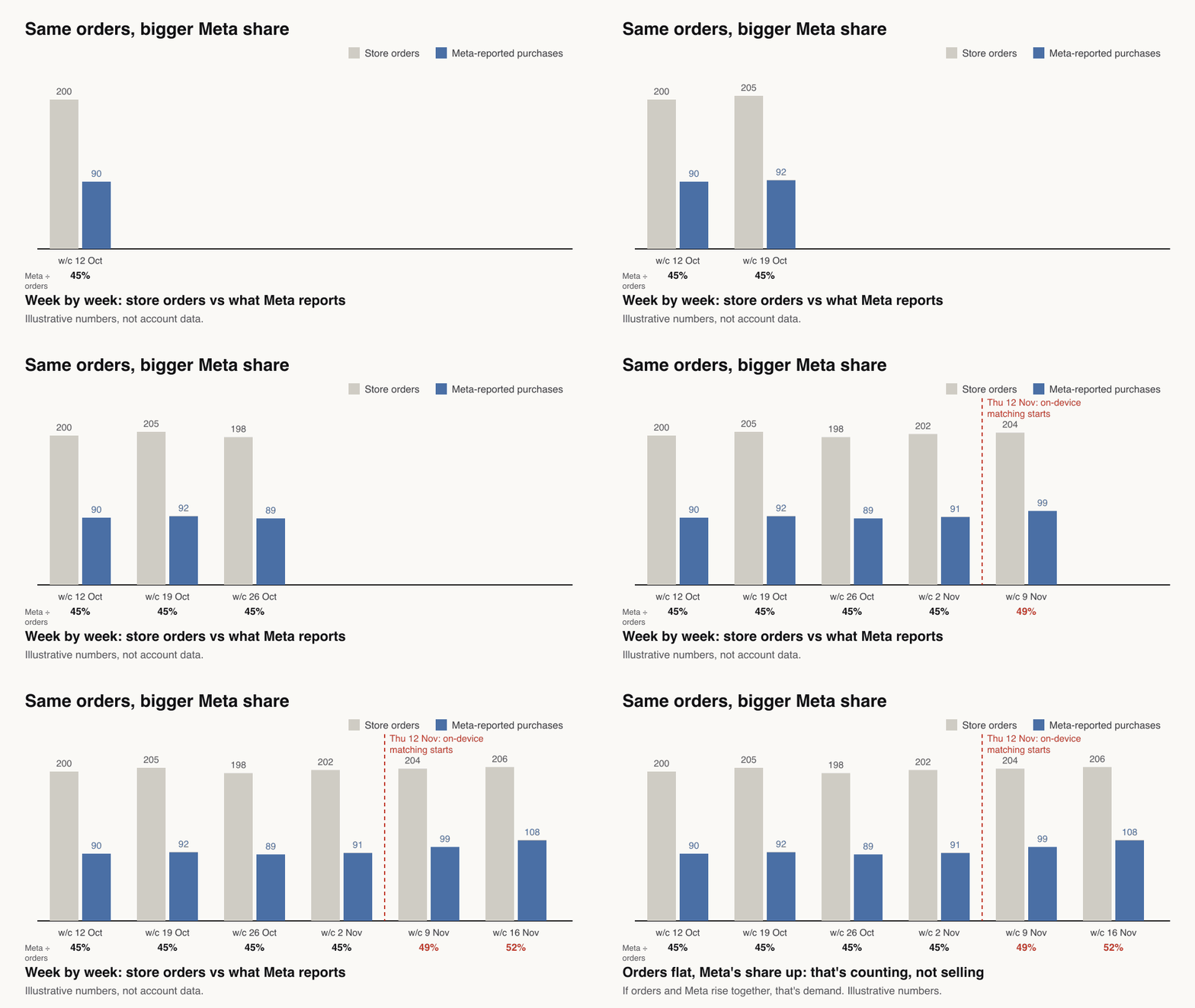
This prompt checks the files before doing any maths:
I'm attaching three CSV files for the same dates. Personal details have been removed.
1) Meta Ads Manager export, daily, campaign level: amount spent, purchases, purchase value, and the attribution columns 1-day click, 7-day click, 1-day engagement and 1-day view.
2) Store orders by day from [Shopify / WooCommerce]: orders, gross sales, refunds, net sales. Test and draft orders removed.
3) GA4 export by day for Session default channel group = Paid Social: purchases and purchase revenue.
Time zones: Meta [zone], store [zone], GA4 [zone].

0. First check that every column exists and the date ranges match. List anything missing and stop if a file is wrong. Don't guess missing numbers.
1. Using code, calculate for each week:
   A = Meta 7-day click purchases / GA4 Paid Social purchases
   B = Meta purchases at our attribution setting / store orders
   C = (Meta 1-day engagement + 1-day view purchases) / (Meta 7-day click + 1-day engagement + 1-day view purchases)
   MER = store net sales / Meta spend (say that this ignores other channels)
2. Compare weeks before Thursday 12 November 2026 with the weeks after. Meta turned on a default setting called "Measure conversions on customer devices" for eligible pixels, which can raise Meta-reported conversions without changing real sales. Our setting: [on / off].
3. Tell me whether the pattern looks like a counting change (B rises while store orders and GA4 stay flat) or a demand change (all three rise together). Give your confidence and what would change your mind.
4. Remind me that Meta's figures for the last 7 days can still change as late events and modelled conversions arrive, so the latest week is provisional.
Output: one small table, then five plain-English bullet points.
How to tell it worked. You can say in one sentence how much of November's Meta lift was counting and how much was demand. For a reporting format that keeps platforms separate, see the Google Ads and Meta cross-channel report.
Workflow 3: rules through Black Friday and Cyber Monday
Black Friday is 27 November. Hold these steady until early December:
- Record the setting per pixel. If it is still undecided, decide once and leave it until December.
- Don't scale on Meta's ROAS alone after 12 November. Hold budgets, ROAS goals and cost caps until the ratio check and your store's revenue per ad dollar agree.
- Don't switch attribution settings or models in peak.
- Don't change UTMs. Two changes at once make the ratios unreadable.
- Judge on store orders and margin. Use Meta's numbers to compare ads with each other, not to report sales.
- Book a January re-baseline. Reset targets using how Meta's results now line up with real orders.
The wider peak plan is in the late-start Black Friday strategy.
Meta attribution changes for lead gen
Lead gen accounts differ in three ways.
- Instant Form leads happen on Meta. They don't go through your pixel, so the on-device setting shouldn't touch them. Meta hasn't said either way.
- Website lead forms rarely need a login. Under Meta's eligibility rule, many lead-gen sites may not qualify for the setting at all.
- Engage-through can flatter lead counts. See the lead settings in the attribution settings section.
If you use Instant Forms, the bigger win is sending CRM stages back through the Conversions API. Meta's CRM integration guide suggests at least 200 leads a month, daily uploads and a target stage within 28 days, and says the conversion leads goal currently works only with Instant Forms (Meta for Developers). Then judge Meta on qualified leads, not form fills. This prompt checks the gap:
Attached: a Meta Ads Manager export of lead counts by day and campaign, an Instant Form leads download with lead IDs, and a CRM export of leads with created date, source, Meta lead ID where stored, stage and won date. Personal details have been removed.
0. First report the match rate between the Instant Form download and the CRM on lead ID, and why unmatched leads didn't match (no ID, outside dates, duplicates). For website leads, compare counts by campaign and day only, because they have no Meta lead ID.
1. By campaign, calculate: CRM leads / Meta leads, qualified / CRM leads, won / qualified. Show the formulas.
2. Flag campaigns where Meta's lead count rose after 12 November 2026 but CRM qualified leads didn't.
3. List stages that usually happen more than 28 days after the lead, because Meta's conversion leads optimisation expects the stage within 28 days.
Don't invent missing values.
What the evidence says: more conversions isn't more sales
Attribution makes two errors at once, and this change only works on one.
- It claims sales that would have happened anyway. In 839 Meta lift experiments from 2019 and 2020, 7-day last-click conversions per dollar overstated incremental conversions by about 1.33 times, and about 2 times in travel. The data predates Apple's tracking changes and Meta's 2026 click definition (an academic working paper with a Meta co-author).
- Models don't fix that easily. In 663 Facebook experiments, the median true lift for lower-funnel outcomes such as purchases was 5%, while two non-experimental methods estimated 24% and 64% (Marketing Science, 2023, with a Meta co-author). Incremental attribution is a model too.
- It also misses sales it caused. Haus, a testing vendor, reported $115 of incremental DTC revenue for every $100 Meta attributed on 7-day click, in a 640-experiment dataset run before the March 2026 click change (Haus, Aug 2025).
On-device matching may shrink the second error, the sales Meta caused but couldn't see. It does nothing to fix the first and could add to it, because some newly matched sales would have happened anyway. Google reports a median 19% lower CPA from its own on-device measurement for iOS app campaigns, among advertisers whose users mostly log in (Google Ads help), but counting more conversions lowers reported CPA by itself.
Only an experiment tells you what the ads caused. After peak, run a Conversion Lift test if you qualify: as a guide, a campaign started in the past year with US$5,000 of spend and 500 conversions, plus Conversions API events with an event match quality above 5 (Meta help). If you don't, Meta's open-source GeoLift runs region-based tests, or you can switch Meta off in a few regions for two to four weeks.
What practitioners report. As of 18 November 2026 I found no published post-launch data on the 12 November setting; the early commentary is prediction, not measurement. After the March click change, Common Thread Collective measured about 13% lower 7-day click ROAS across 50 accounts and advised lowering targets, not cutting spend (CTC, 1 Apr 2026). And one advertiser who paused a campaign Meta rated at 4x ROAS saw revenue barely move, which commenters called an accidental holdout (r/PPC, Jun 2026).
This guide will be updated once Meta documents more or the first post-launch reports appear. If you want help setting up the reconciliation or a lift test, that's what my GA4 and tracking setup work covers, and Meta ads management covers campaign decisions through peak. Related: Meta Ads Manager AI reporting limits.
Sources
All Meta and Google pages below were rechecked on 18 November 2026.
FAQ
What are the Meta ads attribution changes for 2026 and 2027?
Meta made four changes: an optional incremental attribution model (2025), no 7-day or 28-day view data in the Ads Insights API (12 January 2026), click-through counting link clicks only from March 2026, and a default-on pixel setting, Measure conversions on customer devices, which started on 12 November 2026. No dated 2027 change had been announced as of 18 November 2026.
What is the attribution setting in Meta (Facebook) ads?
The attribution setting in Meta Ads Manager is the window Meta uses to credit a conversion to an ad, such as 7 days after a link click or 1 day after a view. You choose it per ad set. Meta's default is 7-day click, 1-day view and 1-day engagement.
What is "Measure conversions on customer devices" in Meta?
It is a Meta pixel setting in Events Manager that matches an ad to a later conversion on the customer's device, using details they already gave the business, such as an email address. It is on by default for eligible pixels. It started on 12 November 2026, the date Events Manager showed, as reported by PPC Land; Meta's help pages still give no date.
How do I turn off Measure conversions on customer devices?
In Meta Events Manager, click Data sources, select your pixel, click Settings, then switch off Measure conversions on customer devices below the Meta pixel settings section. It is set per pixel and can be turned back on at any time.
Why did my Meta purchases go up after 12 November 2026?
One likely reason is that Measure conversions on customer devices started matching more sales for eligible pixels outside the EU and UK on 12 November 2026. That changes what Meta counts, not your orders, and Black Friday demand rises in the same weeks. Divide Meta purchases by store orders each week: if the ratio rises while orders stay flat, it is counting.
Can I still turn off Measure conversions on customer devices after 12 November?
Yes. Meta says the setting is on by default for eligible pixels and you can turn it off at any time in Events Manager: Data sources, your pixel, Settings. It is set per pixel, so note the date of any switch, because changing it mid-period makes before and after comparisons harder.
Does Meta's on-device measurement apply in the UK, the EU, Australia and the US?
Meta says Measure conversions on customer devices is not active for people located in the EU and UK. Australia and the US are not excluded, so sales from customers there can be matched by default when the pixel is eligible. The rule follows the customer's location, not the advertiser's.
Which websites qualify for Meta's on-device conversion measurement?
Meta lists two conditions: the Meta pixel must be installed directly on the page, not in an iframe or as an image-only pixel, and the website must require people to log in with an email address or mobile phone number. Guest-checkout stores may not qualify.
Will on-device measurement change my Meta bidding?
Meta has not said directly. Its help page says keeping Measure conversions on customer devices on can improve campaign performance with a stronger signal, which suggests an effect on delivery. Review cost caps and ROAS goals set before 12 November 2026.
What does 7-day click, 1-day view mean in Meta Ads?
Meta credits a website conversion to an ad if it happened within 7 days of a link click on the ad or within 1 day of someone seeing it. Meta's Results glossary now gives the default as 7-day click, 1-day view and 1-day engagement.
What is engaged view attribution in Meta, and is it engage-through now?
Yes. In March 2026 Meta renamed engaged-view attribution to engage-through. It counts conversions within 1 day after a non-link click on an ad, such as a like, share or save, or after a 5-second video play.
What is Meta incremental attribution?
Incremental attribution is a Meta Ads Manager model that optimises delivery and reports results using machine learning that predicts whether an ad caused each conversion. It is available for new Sales, Engagement and Leads campaigns with a Website or Website and app conversion location and a goal of maximising the number or value of conversions. It can't be used with bid controls or changed after publishing.
Is Meta incremental attribution available in Australia and the UK?
Meta's help pages for incremental attribution list no country limits, as of 18 November 2026. The limits are per campaign: a Sales, Engagement or Leads objective, a Website or Website and app conversion location, a maximise conversions or value goal, and no bid controls.
Standard or incremental attribution in Meta: which is better?
Neither wins everywhere. Meta says its Q4 2025 incremental attribution model drove 24% more incremental conversions than standard. Haus, an incrementality testing company, found it did worse than standard from July 2024 to June 2025 and better from July 2025 to June 2026. Test it outside peak season.
Can I still use 7-day view or 28-day view attribution in Meta?
No. Since 12 January 2026 the Meta Ads Insights API returns no data for 7-day view or 28-day view, and Meta says this matches how Ads Manager already works. For website conversions, Ads Manager offers 1-day or 7-day click, 1-day engage-through and 1-day view.
Why don't Meta conversions match Shopify or GA4?
Meta Ads Manager counts conversions after views and engagement that GA4 and Shopify can't see, and its figures for recent days can still change as late events arrive. GA4 only credits sessions it recorded, and each tool may use a different time zone. Compare ratios over full weeks, not daily totals.