A Meta ads settings checklist starts in Advertising settings, where account placement controls, audience controls, audience segments and the Test new creative features box apply to every campaign. Then check what is not inherited: limited spend on excluded placements, location expansion, creative enhancements and multi-advertiser ads on each ad, the attribution setting on each ad set, Conversions API deduplication and match quality, special ad categories and value rules. Repeat it every quarter, because Meta changes defaults.
TL;DR
Meta now decides more by default. Leads, App promotion and Sales campaigns are losing placement choice in the ad set, some creative enhancements start switched on, and an excluded placement can still get about 5% of the budget.
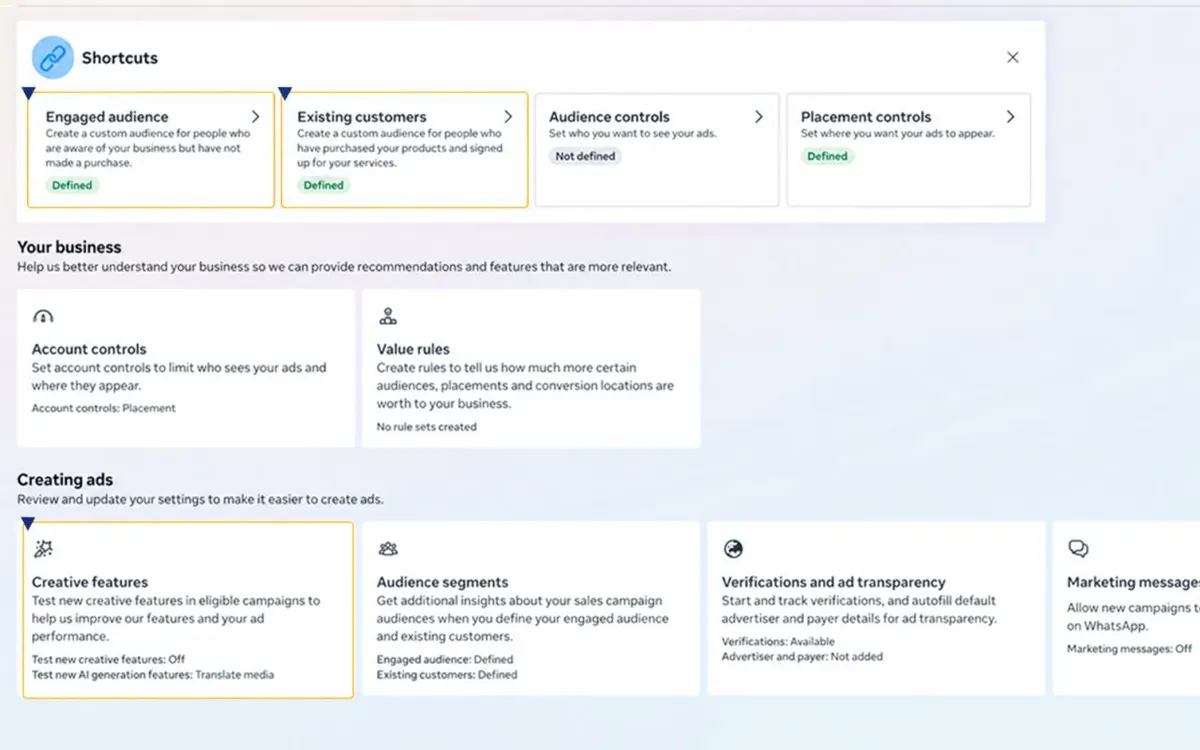
Your controls moved up a level. Advertising settings holds what applies to every campaign: placement controls, audience controls, audience segments and creative features. Set those once, then check what is not inherited.
Measurement is part of it. A click now means a link click, on-device measurement started on 12 November outside the EU and UK, and a deduplicated Conversions API keeps the data honest. Fourteen checks, once a quarter.
Jump to: What changed · Placements · Audience controls · Existing customers · Creative enhancements · Attribution · Conversions API · Special ad categories · Value rules · The 14 checks · X and Reddit
You open last month's campaign and find a product carousel you never built, an AI summary under the ad, and spend on a placement you excluded. Nobody changed anything. Meta's defaults did.
Most Meta accounts leak money through settings nobody revisits, not through bad creative. This checklist covers fourteen of them, each checked on Meta's own help pages on 18 November 2026. If you would rather hand the review to someone, it is part of my Meta ads consultant service.
How this was checked. Names, defaults and figures come from the Meta Business Help Centre and Meta for Developers, read with a clean browser and no login. Meta rolls features out gradually, so your screens may differ.
What changed in Meta ads settings in 2026?
Short answer: placement choice is leaving the ad set for Leads, App promotion and Sales campaigns, account controls replace it, click attribution now means link clicks, value rules are replacing bid multipliers, and a new pixel setting started counting more conversions on 12 November.
| Change | When | What to do |
|---|---|---|
| Financial products and services category required (US) | 21 Jan 2025 | Tick it for any finance ad |
| Click-through means link clicks only | From Mar 2026 | Add engage-through to reports |
| Ad set placement choice removed for Leads, App, Sales | Rolling out, 2026 | Use account placement controls |
| On-device conversion measurement, on by default | 12 Nov 2026 | Decide on or off per pixel |
| Bid multipliers must move to value rules | By 2027 | Rebuild rules before then |
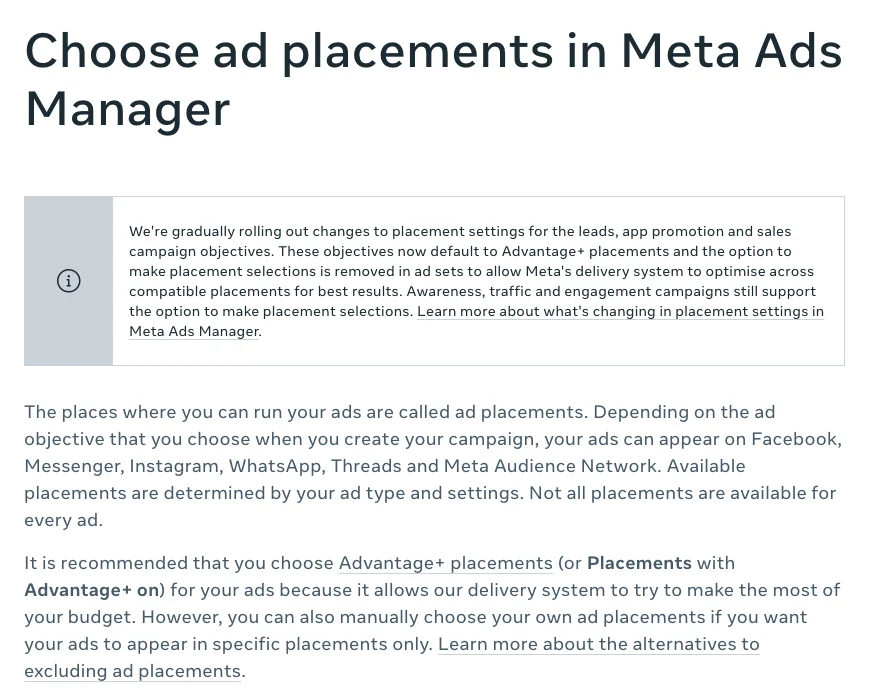
The placement change is the one most people notice. Leads, App promotion and Sales now "default to Advantage+ placements" with no placement choice in the ad set; Awareness, Traffic and Engagement still let you choose. The rollout is gradual.
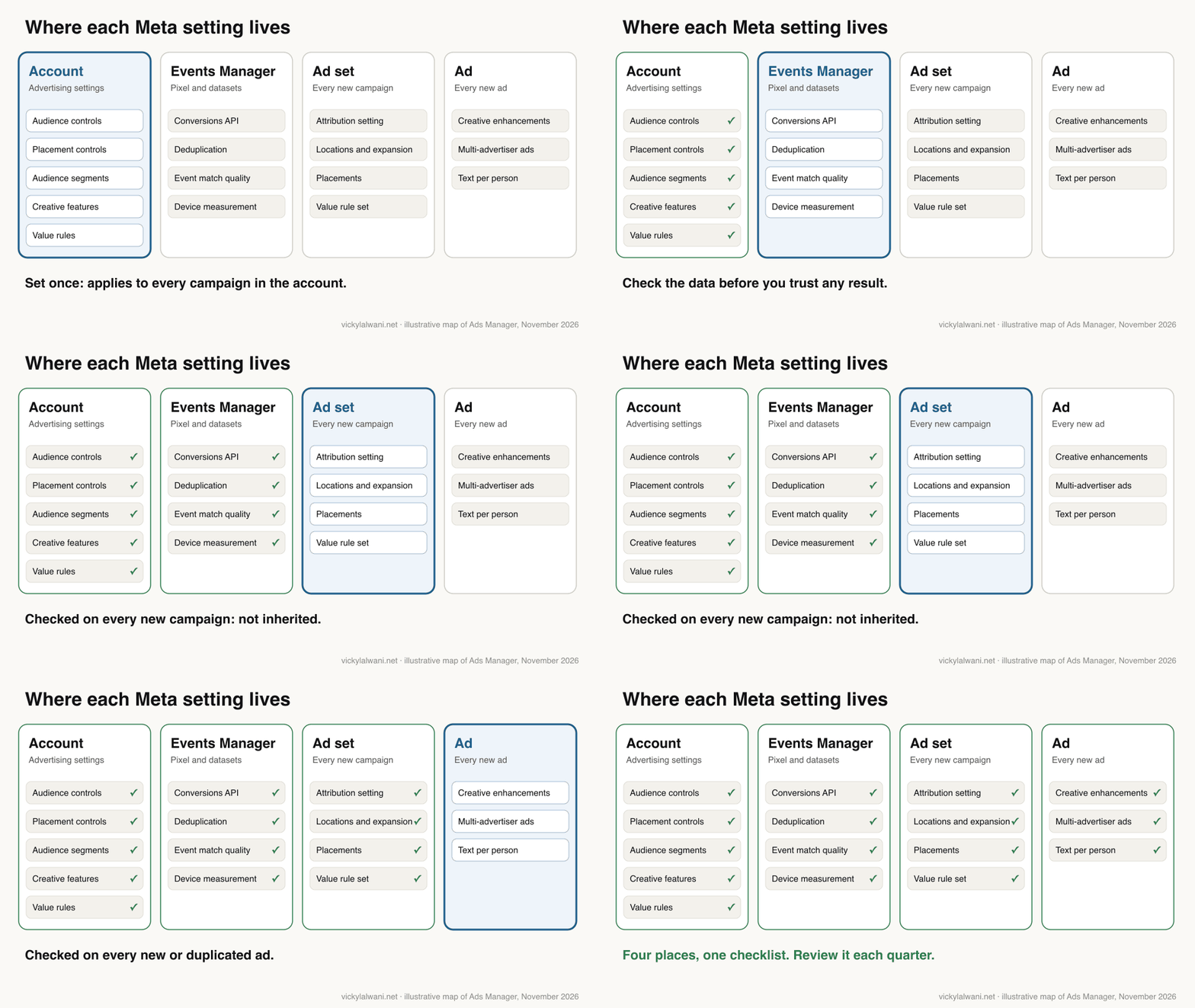
The settings sit in four places, and only one is inherited by every new campaign.
To open the account level settings: in Ads Manager, open the left navigation, choose All tools, then Advertising settings under Advertise. You need access to Advertising settings, so confirm your own role first. On my calls, "I gave you access" often turns out to be view-only access, and one invite that never arrived came down to a business that required a second person to approve anyone new.
1 to 3. Which Meta placement settings should you check?
Short answer: set account placement controls for placements your business must never use, check whether limited spend is still sending money to placements you excluded, and set brand safety inventory filters. Leave everything else open unless your own placement data says otherwise.
Check 1: account placement controls
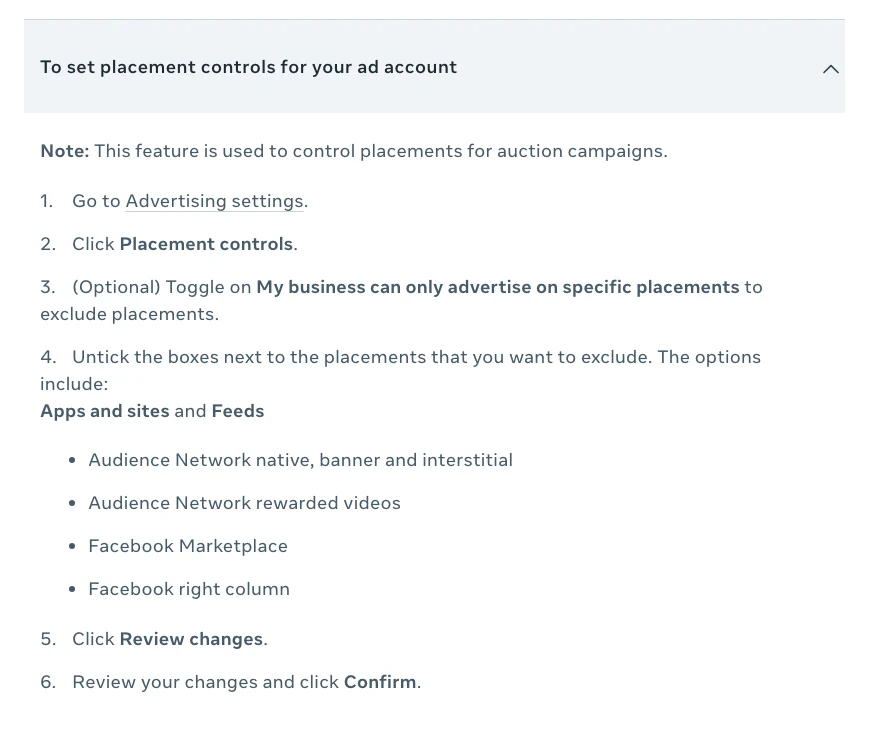
In Advertising settings, click Placement controls, toggle on My business can only advertise on specific placements and untick what you want to exclude. Meta's list is short: Audience Network native, banner and interstitial; Audience Network rewarded videos; Facebook Marketplace; and the Facebook right column. These controls apply to every campaign, including ones that use Advantage+ placements, and changes to existing campaigns can take up to 48 hours.
Do not switch things off by habit. Audience Network and Marketplace are common candidates, but pull a 90-day placement breakdown first and compare cost per result and lead or customer quality. Exclude what has wasted money in your account; keep what works.
Check 2: limited spend on excluded placements
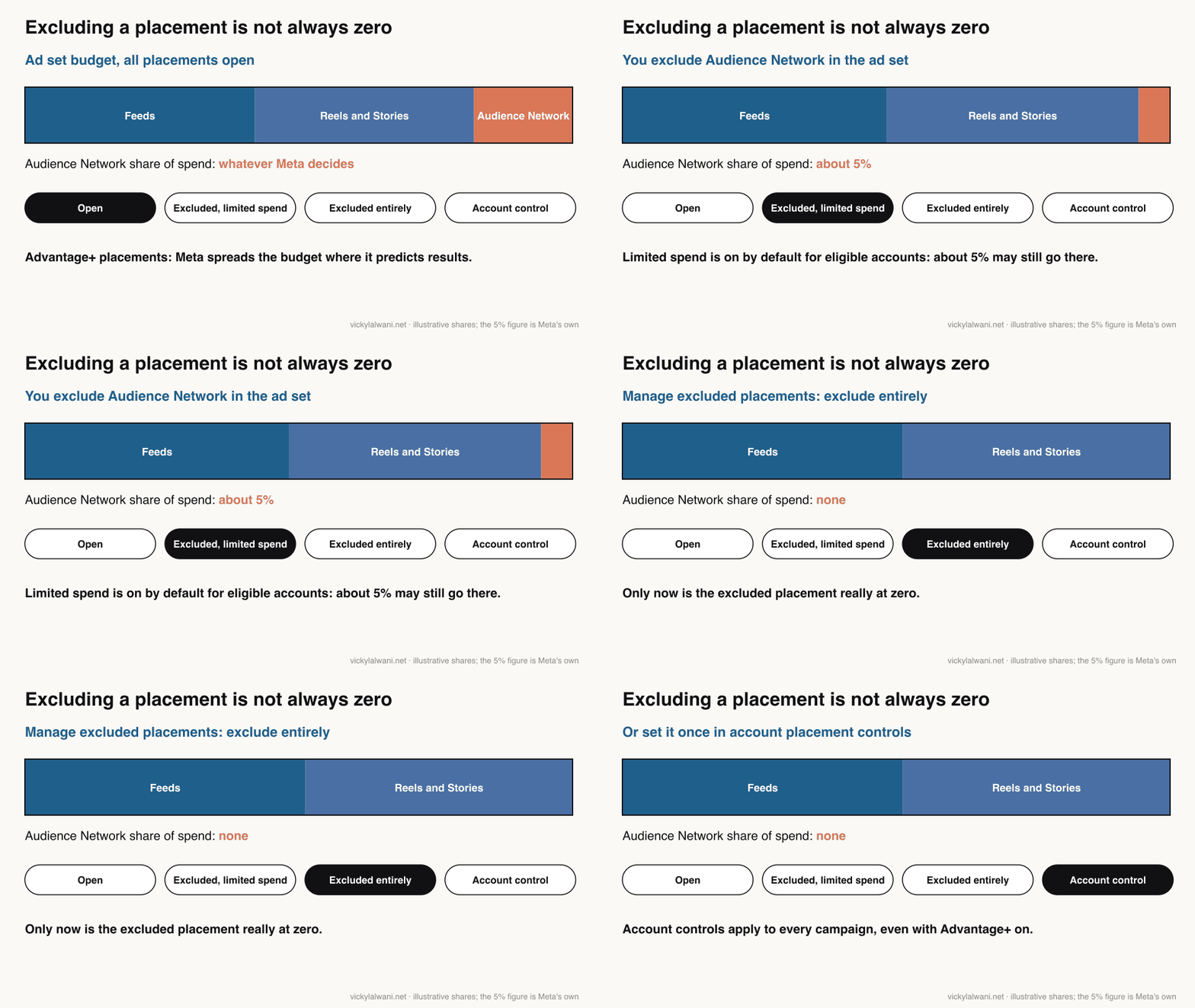
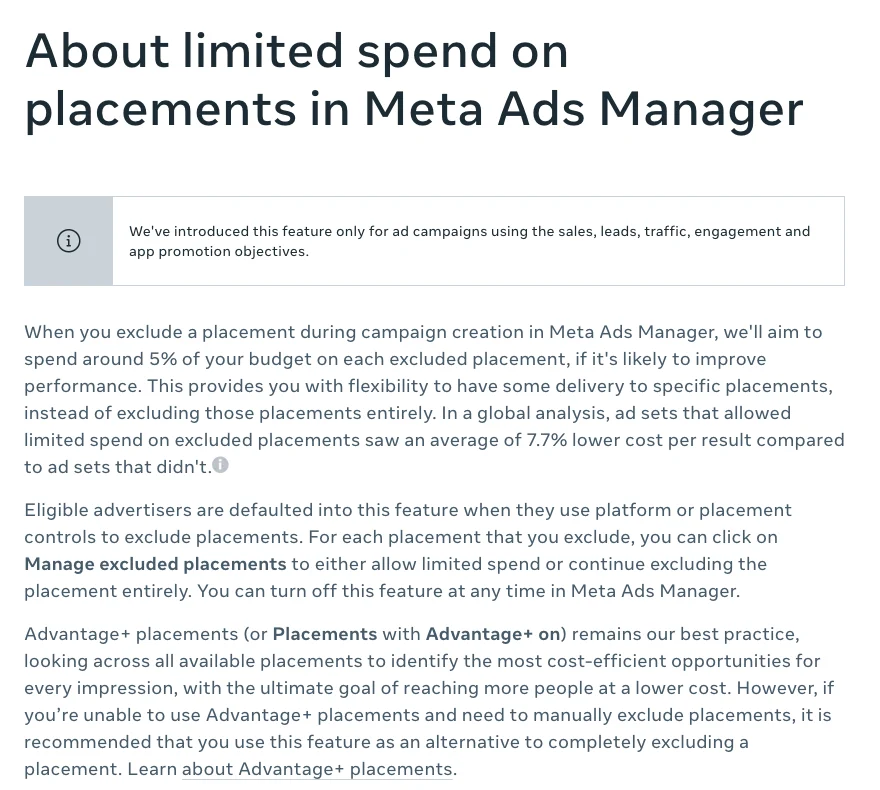
This is the setting most people miss. When you exclude a placement during campaign creation, Meta says it will "aim to spend around 5% of your budget on each excluded placement" if it predicts better performance. Eligible advertisers are defaulted into it. For each excluded placement, click Manage excluded placements and choose whether to allow limited spend or keep excluding it entirely.
Device choice works the same way: Reach more people across other mobile devices is on by default for Sales and can show ads on Android when you chose iOS only.
Check 3: brand safety inventory filters
Inventory filters decide what content your ads sit next to. In the Meta Brand Safety and Suitability Centre, under Controls, set filters for feed ads, in-content ads and Audience Network, plus publisher block lists and topic exclusions.
| Setting | Where | Default | My starting point |
|---|---|---|---|
| Placement controls | Advertising settings | Off | Exclude only proven losers |
| Limited spend on exclusions | Ad set placements | On, if eligible | Decide per placement |
| Other mobile devices | Ad set, Sales | On | Off if devices matter |
| Inventory filters | Brand Safety Centre | Varies | Set once, review yearly |
4 and 5. How do you stop Meta ads reaching the wrong people?
Short answer: use account audience controls for hard limits (countries, minimum age, brand protection exclusions, your own staff), then check each ad set for location expansion, because Advantage+ audience treats most of your targeting as a suggestion.
Check 4: account audience controls
In Advertising settings, click Audience controls. Four optional toggles: My business can only advertise in specific locations (include or exclude countries), My business sells or advertises age-restricted goods or services (set a minimum age), My business restricts advertising to some audiences to protect its brand (a limited set of exclusions) and My business doesn't show ads to its own employees (exclude by employer). Account controls do not apply to special ad category campaigns, and using them does not switch Advantage+ off.
Check 5: location and audience expansion
Advantage+ audience splits your inputs into controls and suggestions. Controls are hard limits: locations, minimum age, excluded custom audiences and languages. Suggestions, such as age ranges, gender and interests, can be overridden when Meta predicts a better result. Meta's own example: suggest women, and the ads may still reach men.
The one to look for is Reach more people likely to respond to your ads next to locations. Meta says it will not target beyond your locations unless you select it. When an agency partner asked me why a project's traffic was arriving from a far-away country, the first fix was to stop that expansion and set locations manually. You can raise the minimum age up to 25 or exclude a custom audience without turning Advantage+ off; unticking Use as a suggestion to make age, gender or interests hard limits usually turns it off.
| Input | Hard limit or hint? | Check |
|---|---|---|
| Locations | Hard limit | Expansion box unticked |
| Minimum age | Hard limit | Matches your product |
| Excluded custom audiences | Hard limit | Customers excluded where needed |
| Age range, gender | Suggestion | Do not rely on it |
| Detailed targeting | Suggestion | Do not rely on it |
6. How should you define existing customers and engaged audience in Meta?
Short answer: in Advertising settings, open Audience segments and define both groups from custom audiences, using several sources for existing customers. Meta applies these definitions to all sales campaigns in the account and uses them for reporting.
Meta defines three groups: new audience (no interaction yet), engaged audience (aware or interacted, not bought) and existing customers (bought or signed up).
No single source catches every customer, because people use different emails, browsers and devices, so stack overlapping sources. Meta accepts website, app, catalogue, customer list, offline, shopping and lead form sources.
| Source | Catches | Misses |
|---|---|---|
| Customer list (CSV or CRM sync) | All-time buyers | Anyone not matched |
| Website purchasers (pixel) | Recent online buyers | Older and offline buyers |
| Offline activity (Conversions API) | Store and phone sales | Unmatched records |
| Lead form submitters | Signed-up leads | Leads who never bought |
For the engaged audience, write down what "engaged" means: a like and a two-minute product page visit are very different signals. My working rule, not Meta's: higher priced products need stricter intent, such as product views or add to basket over 30 to 90 days; cheaper impulse products can use a lighter, shorter definition.
Then use it: for sales campaigns, choose Breakdown, then Audience segments. If most "prospecting" spend lands on existing customers, you have found the leak.
7 to 9. Which Meta creative enhancements should you turn off?
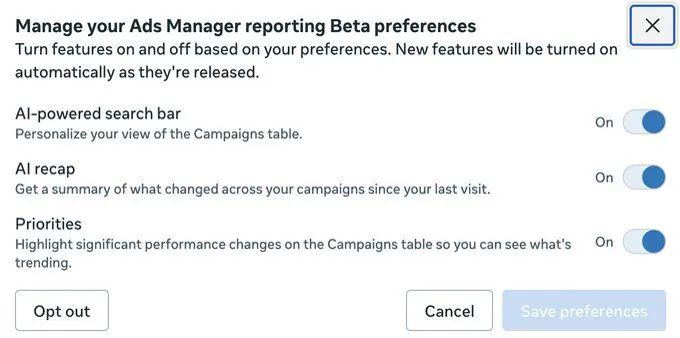
Short answer: untick Test new creative features in Advertising settings so experiments are not applied without you, then review the enhancements on every new or duplicated ad, keep the ones that only adapt format, and switch off the ones that rewrite your message.
Check 7: test new creative features (account)
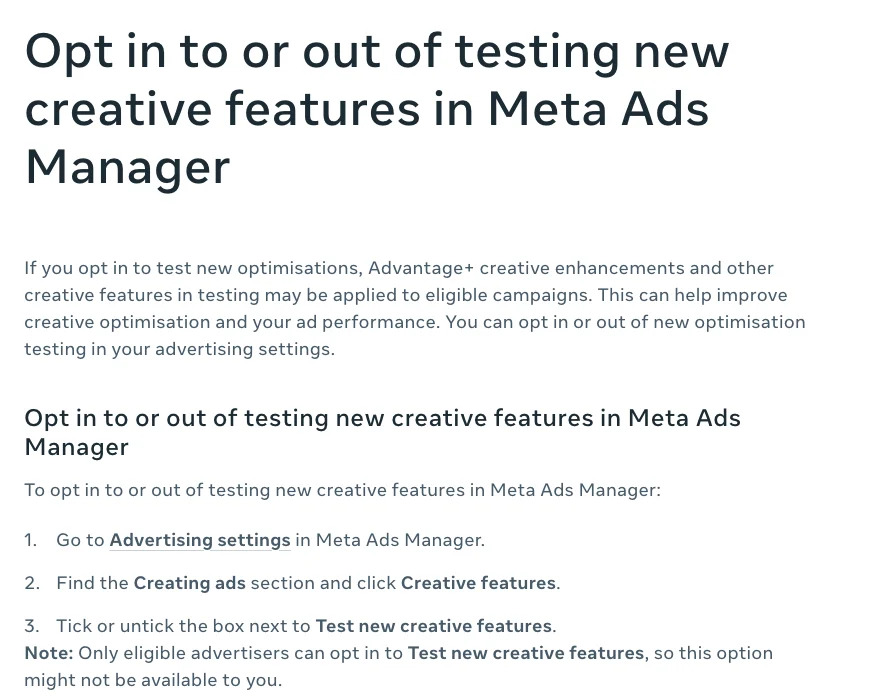
Meta says that if you opt in, "Advantage+ creative enhancements and other creative features in testing may be applied to eligible campaigns". To check: Advertising settings, Creating ads, Creative features, then tick or untick Test new creative features. Not every account sees the option.
Check 8: enhancements on each ad
The account box does not cover everything. Meta says "some enhancements may be turned on by default" and lists more than 25. Sort them by one test: does it only fit the ad to a placement, or does it change what the ad says?
| Enhancement | What it changes | Starting point |
|---|---|---|
| Visual or video touch-ups (AI) | Crops or expands media | Test |
| Text improvements (AI) | Moves your copy into overlays | Off for claims |
| Enhance CTA (AI) | Can add "X% off" promotions | Off unless offer is current |
| Show summaries (AI) | AI summary under the ad | Off in regulated sectors |
| Reveal details over time | Pulls details from your site | Test |
| Add product tags or browsing | Adds catalogue products | Off if catalogue is messy |
| Add music (AI) | Adds library or AI music | Check brand fit |
| Translations (AI) | Translates text and voice | On only if reviewed |
The Enhance CTA line matters more than it looks. Meta says Shop now, Learn more and See details buttons "may also have additional, dynamically personalised information added, such as X% off or Free delivery". Before any sale goes live, I read the offer off the creative and the ad text side by side, because I have seen an AI-assisted plan carry an out-of-date discount forward from old context. An automated promotion line is the same risk at a larger scale.
Also check Optimise text per person. When it is on, any text you provide "may appear in any location of your ad and may appear with any other text". To turn it off for image ads, switch off visual touch-ups, relevant comments, add overlays and text improvements; for video, switch off video touch-ups, relevant comments and text improvements; or toggle off All optimisations.
Check 9: multi-advertiser ads
Multi-advertiser ads place your ad in a unit with other businesses' ads, and your creative "may be resized or cropped to fit". Meta says the feature may be turned on automatically for existing ads unless they were explicitly opted out, and ads created by boosting a post are opted in by default. The checkbox is in Ad setup at ad level. If your account still has a history of boosted posts, review those too: repeated boosts of the same offer are the most common budget leak I find in small retail accounts.
A copy-paste prompt for a quick pre-launch check, if you use Claude or ChatGPT with a screenshot of the ad preview and enhancements panel:
You are checking a Meta ad before it goes live. I will paste screenshots of the ad preview, the Advantage+ creative enhancements panel and the ad text.

1. List every enhancement that is switched on.
2. For each one, say whether it only adapts format (crop, resize, placement) or changes the message (text, offer, summary, products, music).
3. Read the offer, price and claims from the creative and from the ad text. Flag any mismatch, any discount that is not in this list of current offers: [paste offers], and any claim not in this list of approved claims: [paste claims].
4. Output a table: enhancement, on or off, format or message, keep or turn off, reason.
Do not guess what a setting does. If a panel is not visible in the screenshot, say so.
10 and 11. Which Meta attribution settings should you use?
Short answer: keep standard attribution with a 7-day click window for most purchase campaigns, add engage-through to your reports, never compare ad sets with different attribution models, and decide on purpose whether to keep the new on-device measurement setting.
Check 10: the attribution setting on each ad set
Attribution is set per ad set, in the Conversion section under Show more options, then Standard attribution selections. Meta now offers three buckets for website and in-store conversions: click-through (1 or 7 days after a link click), engage-through (1 day after a non-link click such as a like, share or save, or a 5-second video play) and view-through (1 day after an impression). Some accounts may still be on the older definitions while the March 2026 change rolls out.
Two traps: with all three on, the Results column adds only click-through and view-through, and Meta says results "cannot be compared" across ad sets using different models, such as standard and incremental. Use Compare attribution settings instead. The full timeline and the window choices are in Meta ads attribution changes.
| Window | Counts | Use for |
|---|---|---|
| 7-day click | Link clicks only | Most purchase campaigns |
| 1-day click | Link clicks only | Strict, fast decisions |
| 1-day engage-through | Likes, saves, 5s plays | Video and Reels |
| 1-day view | Impressions | Awareness to sale |
| Incremental model | Predicted caused sales | Its own comparison |
Check 11: measure conversions on customer devices
From 12 November 2026, a pixel setting called Measure conversions on customer devices is on by default for eligible pixels. It matches an ad to a later purchase on the customer's own device, using details they already gave you, such as an email address. Meta says it does not change your attribution window or model, and it is not active for people in the EU and UK. Eligible means the pixel is installed directly on the page and your site requires people to log in with an email address or phone number. Find it in Events Manager, Data sources, your pixel, Settings. Decide on purpose, and note the date in your reports, because counts may rise without any change in orders.
12. Is your Meta Conversions API set up properly?
Short answer: send key events from both the pixel and the Conversions API, give each event the same event_id and event_name so Meta can deduplicate, and watch event match quality, which Meta scores from 0 to 10 using the last 48 hours of data.
The Conversions API sends events from your server, platform, app or CRM directly to Meta. Meta says it is "less affected than the Meta pixel by browser loading errors, connectivity issues and ad blockers" and recommends it alongside the pixel. It also carries offline and in-store sales.
If you send the same event both ways, deduplication is not optional. Meta's developer docs say a pixel event's eventID must match the server event's event_id, and the event names must match. The alternative method, matching on fbp or external ID, generally only works when the browser event arrives first: a server event is kept if no matching browser event came in during the previous 48 hours, so a broken pixel can quietly inflate your count.
| Parameter | Meta's priority |
|---|---|
| Email address | High |
| Click ID | High |
| Phone number | Medium |
| External ID | Medium |
| Browser ID | Medium |
| Name, town, postcode | Low |
Match quality is also a gate: self-serve Conversion Lift tests need Conversions API events scoring above 5 (or another supported data source). Contact details must be hashed and shared lawfully, with consent.
For lead generation, the question I hear most is whether Meta can be told which leads were bad. The workable route is sending lead stages back from your CRM through the conversion leads integration and optimising towards the stage you want, which needs steady volume. I keep campaigns in draft until every form and call button is measured; see my analytics and tracking service.
13. Do you need a Meta special ad category?
Short answer: yes if your ads are about housing, employment, financial products and services, or social issues, elections or politics. Choose it at the start of the campaign; if you do not and Meta decides it applies, the ads can be rejected.
Financial products and services replaced the old Credit category, and it has been required since 21 January 2025 for advertisers based in or targeting the United States. For housing, employment and financial products in the US, Canada and certain European countries, Meta limits or removes age, gender, postcode, exclusion targeting, lookalike audiences and saved audiences, and city or pin locations get an expanded radius.
| Feature | In special categories |
|---|---|
| Account controls | Do not apply |
| Advantage+ audience | Not available |
| Age, gender, postcode | Limited or removed |
| Lookalikes, saved audiences | Limited or removed |
| Value rules by age or gender | Rejected |
| Some generative AI features | May be unavailable |
Political and social issue ads need authorisation and a "Paid for by" disclaimer, and Meta no longer lets advertisers create or edit them in the European Union, in response to the EU's political advertising regulation.
14. Should you use value rules instead of exclusions?
Short answer: use them when you want less of something rather than none of it. Value rules raise bids by up to 1,000% or lower them by up to 90% for chosen audiences, placements or conversion locations, so they can make a placement expensive to win but cannot block it.
You can create value rules in Advertising settings or in an ad set and apply them per ad set. Criteria include age, gender, location, operating system, device platform and selected placements and conversion locations. Rules apply in order and only the first match counts. They do not work with ROAS goal or bid cap strategies, and Meta warns that "your overall cost per result may increase". If you still use bid multipliers, Meta says you will need to move to value rules by 2027.
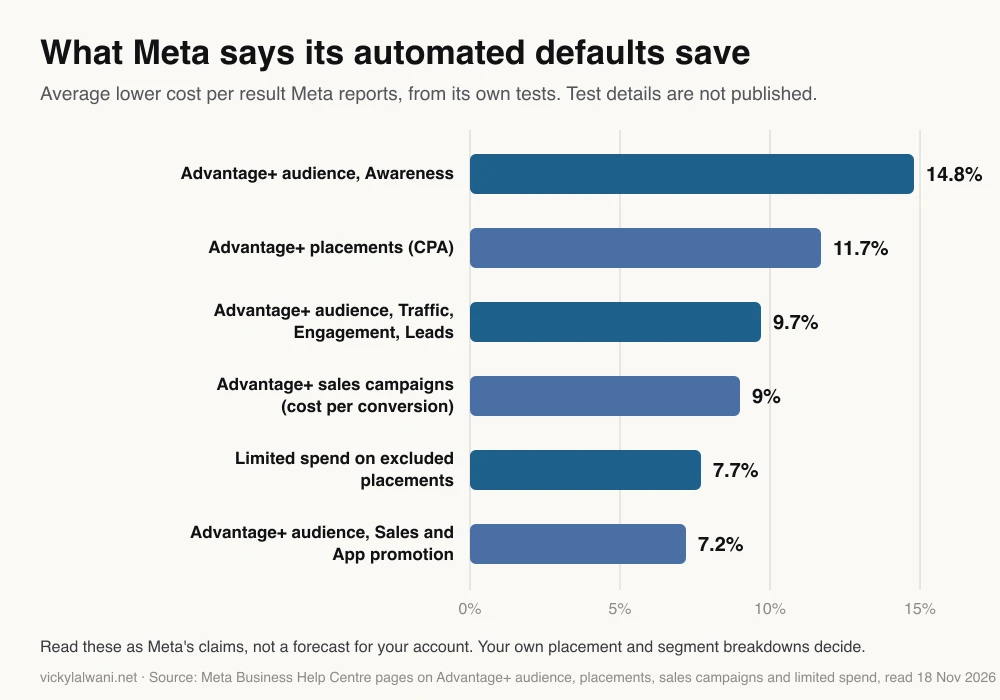
A clean split: account controls for what must never happen, value rules for preferences, nothing where you have no evidence. Meta's own savings figures are below; the test details are not published.
How do you run the Meta ads settings checklist?
Short answer: work top down, account first, then data, then a sample of ad sets and ads, record what you chose and why, and repeat every quarter because defaults change.
| # | Check | Where | How often |
|---|---|---|---|
| 1 | Placement controls | Advertising settings | Quarterly |
| 2 | Limited spend on exclusions | Ad set | Each launch |
| 3 | Inventory filters | Brand Safety Centre | Yearly |
| 4 | Audience controls | Advertising settings | Quarterly |
| 5 | Location and device expansion | Ad set | Each launch |
| 6 | Audience segments | Advertising settings | Quarterly |
| 7 | Test new creative features | Advertising settings | Quarterly |
| 8 | Creative enhancements | Ad | Each new or copied ad |
| 9 | Multi-advertiser ads | Ad | Each new or copied ad |
| 10 | Attribution setting | Ad set | Each launch |
| 11 | On-device measurement | Events Manager | Once, then note |
| 12 | Conversions API and match quality | Events Manager | Monthly |
| 13 | Special ad category | Campaign | Each launch |
| 14 | Value rules | Settings or ad set | Quarterly |
- Export placement and audience segment breakdowns for the last 90 days.
- Set account controls and audience segments from that data.
- Untick test new creative features, then record the enhancements on five recent ads.
- Check attribution and the on-device decision; annotate reports with dates.
- In Events Manager, check deduplication, match quality and server event volume.
- Write a one-page log: setting, choice, reason, date, who decided.
Then watch cost per result and new customer share for a few weeks. I will not promise a saving, because it depends on how much the account was leaking, and every change goes for approval before anything goes live.
Which videos explain these Meta changes?
Short answer: Meta's channel covers value rules and the Conversions API; an independent educator explains the placement change best.
Guide AI to reach your preferred audiences with value rules, from the official Meta for Business channel, 3 November 2026. Value rules as preferences instead of hard exclusions; Meta on its own product.
Get started with the Meta Conversions API to optimize your ad performance, from Meta for Business, 3 February 2026. Why to send server events alongside the pixel; Meta's own product.
What Does the Removal of Placement Control Mean?, from a Meta ads educator's channel, 9 September 2026. What is left to control after the change; the channel sells training.
| Video | Channel | Date | What it covers |
|---|---|---|---|
| Advantage+ sales campaigns | Meta for Business | 10 Feb 2026 | Audience segments for new customers |
| Conversions API with Google Tag Manager | Meta for Business | 3 Dec 2024 | Server events without a developer |
| You Can Control Lead Quality From Meta Ads | A Meta ads educator | 27 Jan 2026 | Settings that shape lead quality |
| Placement Controls Changed | Madgicx (vendor) | 21 Oct 2026 | What still works after the change |
| Meta Ads Special Ad Categories | Paid Media Pros | 10 Jul 2025 | Which ads need a category |
What people say on X and Reddit
Short answer: the loudest complaint is creative enhancements switching on, or back on, without anyone choosing them. Practitioners who use them treat each one as a creative test, not a free upgrade.
| Where | Date | What they say | Type |
|---|---|---|---|
| A Meta ads practitioner on X | 10 Nov 2026 | November updates, some switched on unasked | Opinion |
| An agency owner on X | 14 Oct 2026 | Product browsing turned ads into carousels | First-hand |
| A media buyer on X | 28 Apr 2026 | Ad level AI should not be the default | Opinion |
| A Meta ads consultant on X | 25 Nov 2025 | Enhancements rewrite headlines and add motion | Opinion |
| An advertiser on X | 13 Nov 2025 | New enhancement on despite account toggle | First-hand |
| An agency founder on X | 29 Oct 2025 | Checks enhancements several mornings a week | First-hand |
| r/FacebookAds | 20 Aug 2026 | Switched off, back on; worse on copied ads | First-hand |
| r/FacebookAds | 28 Aug 2026 | Most turn all off; some test one at a time | First-hand |
| r/FacebookAds | 15 Sep 2026 | No real test data for two enhancements | Question |
| r/FacebookAds | 25 Aug 2026 | Server event coverage halved after a date | First-hand |
| r/FacebookAds | 19 Aug 2026 | Conversions API is both oversold and dismissed | Opinion |
The most useful reply in the r/FacebookAds enhancements thread treats each enhancement as a new creative variant: some only improve placement coverage, others change the claim or the brand presentation enough to deserve their own test. That is the same split as the table in check 8. Another reply notes enhancements reappear when ads are duplicated, which is why the checklist says "each new or copied ad".
The drop-off thread shows why Events Manager is a monthly check: a steady server event feed fell by about half after a date, and only someone watching noticed.
Where is this advice weak?
Short answer: Meta changes screens faster than any checklist, rollouts differ by account, and most of Meta's performance figures cannot be checked independently.
- Rollouts are uneven. If a menu is missing, search Meta's help centre for the setting name before assuming it is gone.
- Meta's numbers are Meta's. The chart's savings have no published method; treat them as a reason to test.
- Some defaults are reported, not documented. Meta does not list which enhancements start on, so check each ad.
- Regional differences. On-device measurement is not active in the EU and UK, special category limits vary by country, and political ads cannot run in the EU.
Sources
| Source | What it supports | Date |
|---|---|---|
| Meta: choose ad placements | Ad set placement choice removed for 3 objectives | Read 18 Nov 2026 |
| Meta: what's new in placement settings | Gradual rollout notice | Read 18 Nov 2026 |
| Meta: account controls | Placement and audience controls, 48 hours | Read 18 Nov 2026 |
| Meta: limited spend on placements | About 5% on excluded placements; 7.7% | Read 18 Nov 2026 |
| Meta: Advantage+ placements | 11.7% lower CPA claim | Read 18 Nov 2026 |
| Meta: alternatives to excluding placements | No exclusions equals Advantage+ | Read 18 Nov 2026 |
| Meta: other mobile devices | On by default for Sales | Read 18 Nov 2026 |
| Meta: brand suitability controls | Inventory filters, block lists | Read 18 Nov 2026 |
| Meta: audience controls and suggestions | Location expansion, suggestions | Read 18 Nov 2026 |
| Meta: Advantage+ on and off | Minimum age up to 25 | Read 18 Nov 2026 |
| Meta: Advantage+ audience | 14.8%, 9.7%, 7.2% claims | Read 18 Nov 2026 |
| Meta: Advantage+ sales campaigns | 9% claim | Read 18 Nov 2026 |
| Meta: create audience segments | Sources and definitions | Read 18 Nov 2026 |
| Meta: audience segment breakdown | New, engaged, existing | Read 18 Nov 2026 |
| Meta: Advantage+ creative | Enhancements, some on by default | Read 18 Nov 2026 |
| Meta: test new creative features | Account opt-out path | Read 18 Nov 2026 |
| Meta: optimise text per person | How to turn it off | Read 18 Nov 2026 |
| Meta: multi-advertiser ads | Auto opt-in, boosted posts | Read 18 Nov 2026 |
| Meta: attribution models and settings | Click, engage, view windows | Read 18 Nov 2026 |
| Meta: engage-through | Results column adds click and view | Read 18 Nov 2026 |
| Meta: click attribution announcement | Link clicks only | 3 Mar 2026 |
| Meta: conversions on customer devices | On by default; not EU or UK | Read 18 Nov 2026 |
| Meta: turn on device measurement | Eligibility, where to find it | Read 18 Nov 2026 |
| Meta: about Conversions API | Pixel plus server events | Read 18 Nov 2026 |
| Meta for Developers: deduplication | event_id, event_name, 48 hours | Read 18 Nov 2026 |
| Meta: event match quality | 0 to 10, parameter priority | Read 18 Nov 2026 |
| Meta: Conversion Lift | Match quality above 5 | Read 18 Nov 2026 |
| Meta for Developers: conversion leads | CRM lead stages | Read 18 Nov 2026 |
| Meta: special ad categories | Limits, 21 Jan 2025, EU political ads | Read 18 Nov 2026 |
| Meta: value rules | +1,000% / -90%, bid multipliers by 2027 | Read 18 Nov 2026 |
| X, Reddit, YouTube | Practitioner views, tables above | Oct 2025 to Nov 2026 |
Want the settings checked for you?
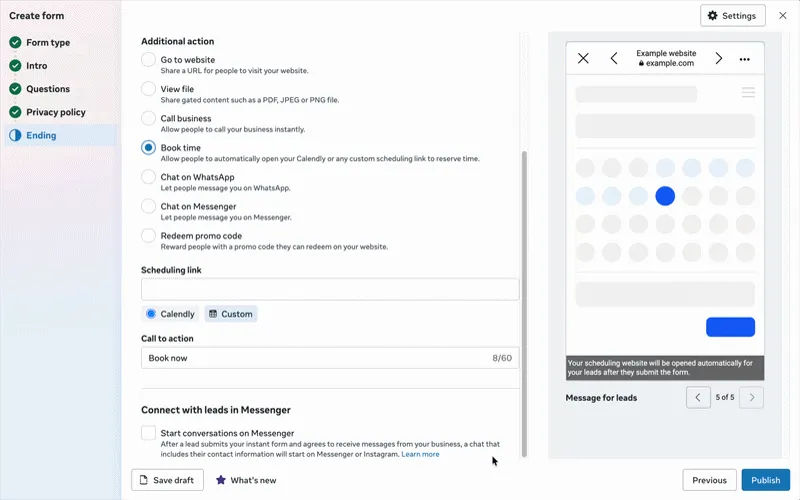
A settings review is the first thing I do on any Meta account, before creative or budgets, written up as a log you keep. It is part of my Meta ads consultant service, with fixed prices on the pricing page. If the tracking side needs rebuilding, that sits with analytics and tracking. For the creative side, see how I brief Meta ad creative, and for lead forms, Meta lead ads with appointment booking.
This article expands on my post on LinkedIn ↗.
FAQ
Where are Meta ads settings in Ads Manager?
Account level settings are in Advertising settings: open the left navigation in Ads Manager, choose All tools, then Advertising settings under Advertise. Placement controls, audience controls, audience segments and creative features all live there and apply to every campaign.
Can I still choose placements in Meta Ads Manager?
For Awareness, Traffic and Engagement campaigns, yes. Meta is gradually removing placement selection from the ad set for Leads, App promotion and Sales, which default to Advantage+ placements; use account placement controls or value rules instead.
Does excluding a placement stop all spend there?
Not always. With limited spend, which eligible advertisers are defaulted into, Meta aims to spend around 5% of the budget on each excluded placement when it predicts better results. Use Manage excluded placements to exclude it entirely, or set an account placement control.
How do I exclude existing customers in Meta ads?
Define an Existing customers segment in Advertising settings, Audience segments, using several sources such as a customer list, website purchasers and offline events. For a hard exclusion, add a customer custom audience as an excluded audience in the ad set audience controls.
How do I turn off Advantage+ creative enhancements?
Untick Test new creative features in Advertising settings, then open each new or duplicated ad and switch off individual enhancements, or toggle off All optimisations in the Advantage+ creative tab. Some enhancements are on by default, so check every ad.
What attribution setting should I use in Meta?
For most purchase campaigns, standard attribution with a 7-day click window is a sensible default, with engage-through added to reports. Do not compare ad sets that use different attribution models; use Compare attribution settings instead.
Do I need the Conversions API if I have the Meta pixel?
Meta recommends using both. Server events are less affected by ad blockers and browser errors, but you must deduplicate by sending the same event_id and event_name from the pixel and the server.
What is a good event match quality score?
Meta scores it from 0 to 10 using the last 48 hours of data, and higher is better. Meta asks for a score above 5 on Conversions API events before you can run a self-serve Conversion Lift test.
Which ads need a Meta special ad category?
Ads about housing, employment, financial products and services, or social issues, elections or politics. These campaigns get limited targeting options, account controls do not apply, and political ads cannot be created in the EU.