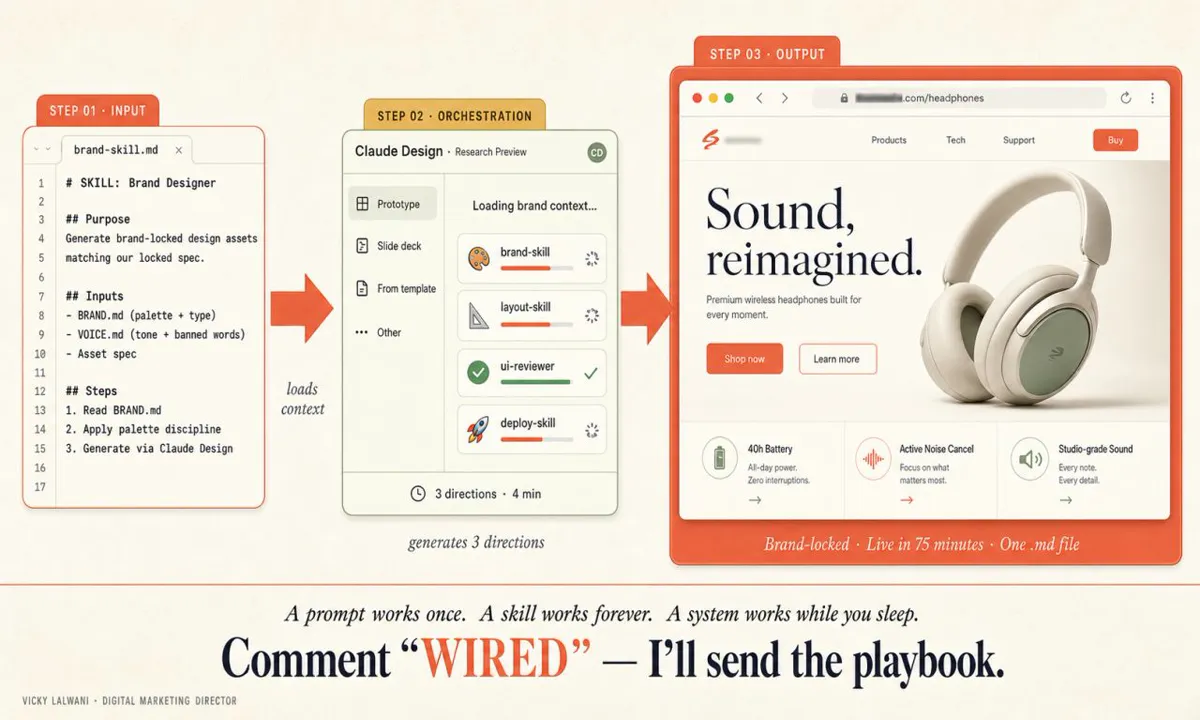
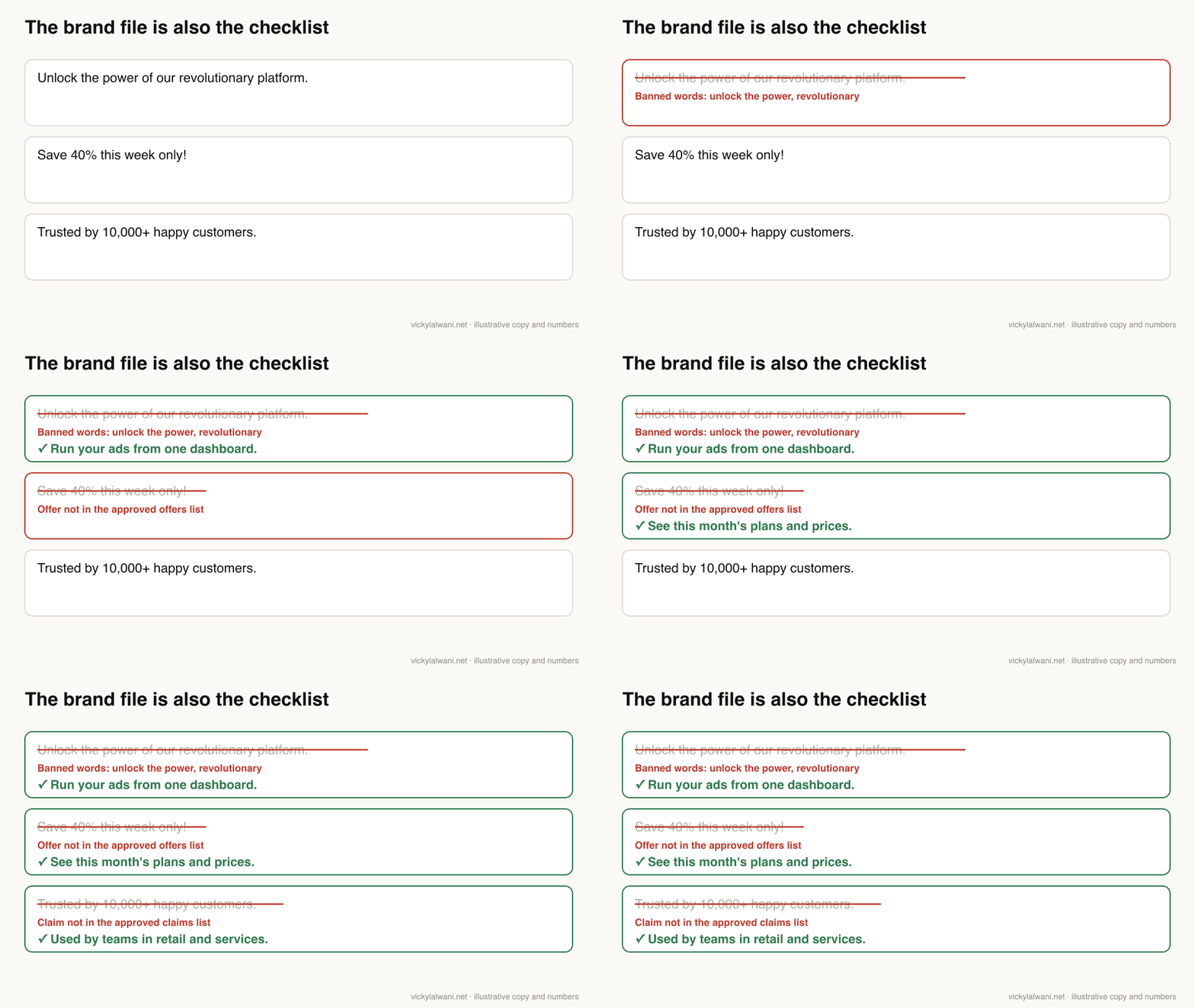
An AI brand guidelines file is one short markdown document that holds your voice rules with real examples, approved claims and offers, banned words and visual tokens. Load the same file into a Claude skill, Claude project knowledge or a Claude Design design system, and into a ChatGPT project or skill, with a short version in custom instructions. Every draft starts on-brand and is checked against the same file before a person signs it off.
TL;DR
An AI brand guidelines file is one short markdown document that holds your voice, approved claims and offers, banned words and visual rules, written so an AI tool can follow it. You write it once and load the same file everywhere.
In Claude it works best as a skill (Customize, then Skills), in project knowledge, or as a design system for Claude Design. In ChatGPT it goes into project instructions and files, a skill on business plans, and a short version in custom instructions. Custom GPTs retire on 11 December 2026, so do not build a new one.
The file is also your checklist. Every draft is checked against it before a person signs it off. It speeds up first drafts; it does not replace a designer or a compliance review.
Jump to: What it is · What goes in it · Claude · ChatGPT · One source of truth · The workflow · Testing · Limits · X and Reddit
Three people on your team use AI tools to write. One gets copy that sounds like an advert, one gets a landing page in the wrong colours, and one gets a confident headline with a discount that ended last month. None of them did anything wrong. Each tool simply started without your brand.
The fix is a single AI brand guidelines file that every tool reads before it writes or designs. This guide covers what goes in it, where it lives in Claude and ChatGPT as of November 2026, how to keep one version true across tools, and how to test it. If you want it built and wired into your team's tools, that is part of my Claude consultant service and my AI automation work.
How this was checked. Product features, menu paths, plans and limits come from the Claude Help Center, Claude Platform Docs and the OpenAI Help Center, read on 18 November 2026. Both vendors change these pages often, so check your own menus. Examples in the GIFs are illustrative.
What is an AI brand guidelines file?
Short answer: a short, plain-text version of your brand rules written for an AI tool to follow: voice with real examples, approved claims and offers, banned words, colours, type and layout rules. It is not your brand book; it is the part of it a machine can apply.
A traditional brand book is written for people. It explains the story behind the logo and shows mood boards. An AI tool needs something different: exact values, short rules, and examples of good and bad output. Anthropic's own Help Center uses a "Brand Guidelines" skill as its example of a custom skill, with hex colour codes, font names and sizes, and a list of when to apply it.
| Brand book | AI brand file | |
|---|---|---|
| Reader | People | AI tools, then people |
| Format | PDF, slides | Plain markdown |
| Length | Dozens of pages | One to three pages |
| Voice | Adjectives | Rules plus examples |
| Claims | Rarely listed | Approved list only |
| Updated | Every few years | Whenever output goes wrong |
The point is speed with control. The old loop was brief, wait, second round, wait, ship. With the brand rules loaded, the loop becomes brief, pick, refine, ship, because the tool starts closer to the answer. The strategy was always yours; with the right file, the first execution can be too, as long as you review it.
What goes in an AI brand guidelines file?
Short answer: seven sections: who you are and who you write for, voice rules with real examples, banned words, approved claims and offers, visual tokens, layout rules, and a pre-publish checklist. Keep it short enough to read in five minutes and link to longer documents.
| Section | What to write | Example line |
|---|---|---|
| Who and for whom | One paragraph | "We sell to clinic owners, not patients" |
| Voice | 5 to 8 rules | "Plain words; one idea per sentence" |
| Examples | 3 good, 3 bad | Real past copy, labelled |
| Banned words | A flat list | "revolutionary", "unlock" |
| Claims and offers | Approved list only | Current offer, end date, source |
| Visual tokens | Exact values | Hex codes, fonts, sizes |
| Layout | Must and never | "One primary button per screen" |
| Checklist | Yes or no questions | "Is every number sourced?" |
Real examples beat adjectives. "Friendly, confident, clear" could describe a thousand brands. Three short pieces of copy you approved, and three you rejected with the reason, tell a model far more. Anthropic gives the same advice for design systems: include real examples, not just specs.
The claims section is the one most files skip. When I was asked where the warranty figures on an AI-drafted page came from, the answer was the client's old website. The fix was a folder of current company material (welcome pack, FAQs, credentials, process) for the AI to work from, and a rule that no number appears unless it is in that list. Put your approved claims and live offers, with end dates, in the file itself.
A starting template you can copy:
# BRAND.md  (owner: [name or role] · version: [1.0] · updated: [date])

## Who we are and who we write for
[One paragraph: what we sell, to whom, and what they care about.]

## Voice rules
- [Plain words. One idea per sentence.]
- [Write to one reader: "you", not "users".]
- [Say what we do; do not describe how we feel about it.]

## Good examples (approved)
1. [Paste a real line or paragraph we published, and why it works.]
2. ...
3. ...

## Bad examples (rejected)
1. [Paste a rejected line, and what is wrong with it.]
2. ...

## Banned words and phrases
[revolutionary, unlock, game-changer, seamless, ...]

## Approved claims and offers (use nothing else)
| Claim or offer | Exact wording | Source | Valid until |
|---|---|---|---|

## Visual tokens
- Colours: primary [#hex], secondary [#hex], accent [#hex], text [#hex]
- Type: headings [font, weight], body [font, size]
- Logo: [rules for light and dark backgrounds]

## Layout rules
- Must: [...]
- Never: [...]

## Before anything is published
- Every number and claim is in the approved list.
- No banned words.
- Colours and fonts match the tokens.
- A person has signed it off.
Where should the brand file live in Claude?
Short answer: as a skill if you want Claude to apply it across chats, in project knowledge for a single client or brand, and as a design system if you make pages, decks or prototypes in Claude Design. Use account-wide instructions only for rules that are true for everything you do.
| Claude feature | Plans | Best for |
|---|---|---|
| Skill | All, incl. Free | One brand, many chats |
| Project knowledge | All (Free: 5 projects) | One client per project |
| Design system | Pro and above (beta) | Pages, decks, prototypes |
| Instructions for Claude | All | Your personal defaults |
As a skill
A skill is a folder with a SKILL.md file. Skills are available on Free, Pro, Max, Ultra, Team and Enterprise plans and need code execution switched on (Settings, Capabilities). To add yours: zip the folder, go to Customize, then Skills, click +, then Create skill, and choose Upload a skill. On Team and Enterprise plans you can share it with colleagues (they get a view-only copy that updates when you do) or publish it to the organisation. Skills you enable also load in Claude Code when you sign in with the same account.
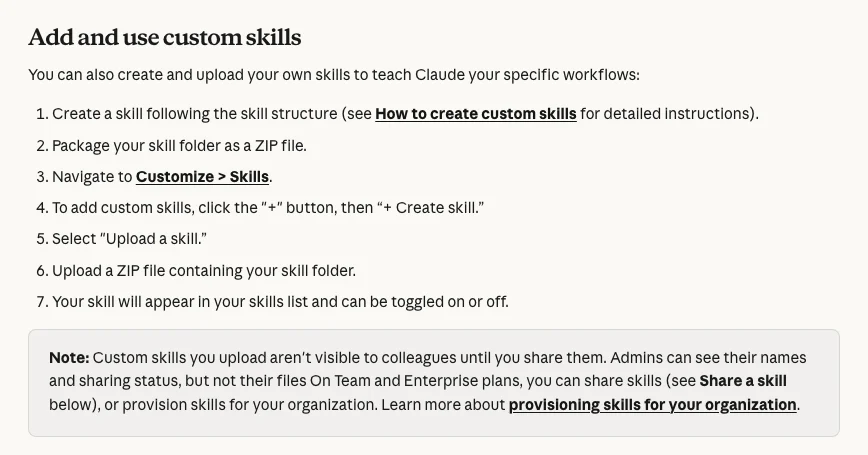
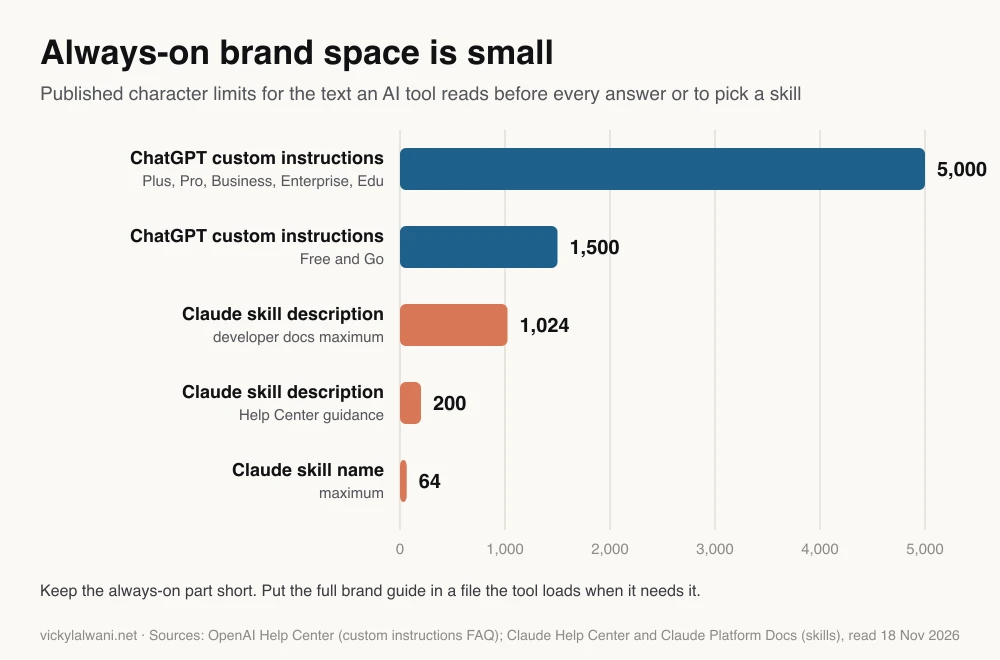
The two fields that matter are the name and the description. The name can be up to 64 characters and, per Anthropic's developer docs, cannot contain the words "anthropic" or "claude". The description is how Claude decides when to use the skill: the Help Center asks for 200 characters at most, while the developer docs allow 1,024. Write it in the third person and say exactly when to apply it. Anthropic's docs suggest keeping the body under 500 lines and moving detail into reference files. The same structure works for methods as well as brands, as in Claude skills for consultants.
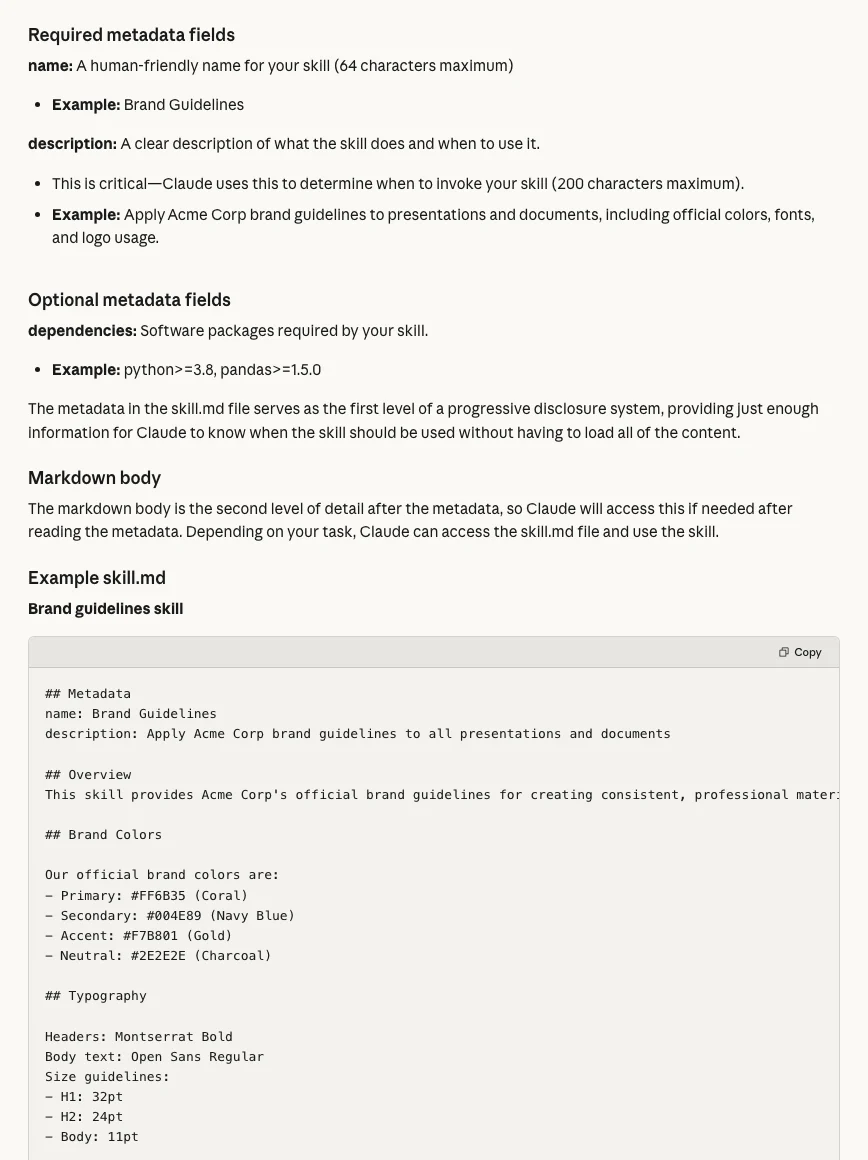
---
name: acme-brand-voice
description: Applies Acme brand voice, approved claims and visual rules to any external copy, page, deck or ad. Use whenever writing or designing something a customer will see.
---
# Acme brand voice
Read BRAND.md in this folder before writing.
1. Follow the voice rules and match the good examples.
2. Use only claims and offers from the approved table; if a claim is needed and missing, ask.
3. Never use a banned word.
4. Before returning the draft, run the "Before anything is published" checklist and list any rule you could not meet.
In a project
Projects are workspaces with their own chats, instructions and knowledge. They are available to all users, and free accounts can create up to five. Paid plans switch on retrieval automatically when knowledge gets large, expanding capacity by up to ten times. Put the brand file in project knowledge and one line in the project instructions: "Follow BRAND.md for anything external." I keep one Claude project per client for exactly this reason: the client's brand file, offers and past approved work travel with every chat. Anthropic is also rolling out a new version of projects in beta, starting with Claude Code, so the screen may change.
As a design system for Claude Design
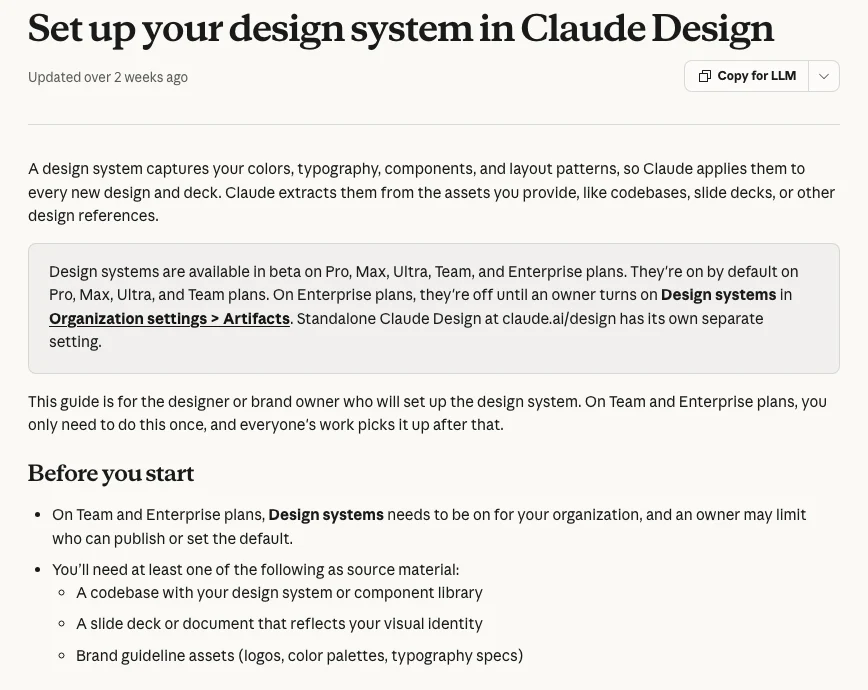
If you make landing pages, decks or dashboards, the visual half of the file belongs in a design system. Claude extracts colours, typography, components and layout patterns from what you give it: a codebase, a slide deck that reflects your identity, or brand guideline assets such as logos, palettes and type specs. Design systems are in beta on Pro, Max, Ultra, Team and Enterprise plans; manage them in Settings, Capabilities. Claude Design itself is now part of Claude on every plan, and the standalone site at claude.ai/design closes on 14 December 2026, so move any design systems from there before then.
Where should the brand file live in ChatGPT?
Short answer: in a project (instructions plus the file) for most people, as a skill on Business, Enterprise, Healthcare and Edu plans, and as a short summary in custom instructions. Do not start a new custom GPT: they retire on 11 December 2026.
| ChatGPT feature | Plans | Limit to know |
|---|---|---|
| Custom instructions | All | 1,500 chars Free and Go; 5,000 paid |
| Projects | Signed-in users | Files: 5 Free, 25 Plus, 40 Pro |
| Skills | Business, Enterprise, Healthcare, Edu | Uploads scanned first |
| Plugins | Directory on all plans | Skills plus apps |
| Custom GPTs | Retiring 11 Dec 2026 | No new GPTs on personal plans |
Projects. Add the brand file to the project's files and a short instruction in Project settings. OpenAI says project instructions "apply only within that project and override your global custom instructions", which is what you want for a client or brand. Shared projects keep tone consistent across contributors; OpenAI lists project limits of 5 files on Free, 25 on Plus and Go, and 40 on Pro and business plans.
Skills. ChatGPT skills are reusable instructions, examples and code that ChatGPT can use automatically. They live under Plugins, on the Skills tab, and can be created in chat, in an editor, or uploaded; uploads are scanned before use. They are available to eligible Business, Enterprise, Healthcare and Edu users, so a brand skill is a team tool, not a personal one.
Custom instructions. They apply to all chats, so keep only the rules that are true everywhere. Free and Go accounts get 1,500 characters; Plus, Pro, Business, Enterprise and Edu get 5,000. That is enough for voice rules and banned words, not for a full brand file.
Custom GPTs. OpenAI is retiring custom GPTs on 11 December 2026 (some Enterprise and FedRAMP workspaces have until 11 February 2027) and moving creators to plugins. Personal accounts, including Free, Go, Plus and Pro, can no longer create new GPTs. If your brand lives in a GPT today, migration turns its instructions into a skill and its knowledge files into reference files; custom actions do not transfer. A project is the simpler replacement for most marketing teams.
How do you keep one brand file true across tools?
Short answer: keep one master file with an owner, a version number and a date, copy it into each tool without rewriting, and update every copy on the same day. Most brand drift comes from a second version someone edited by hand.
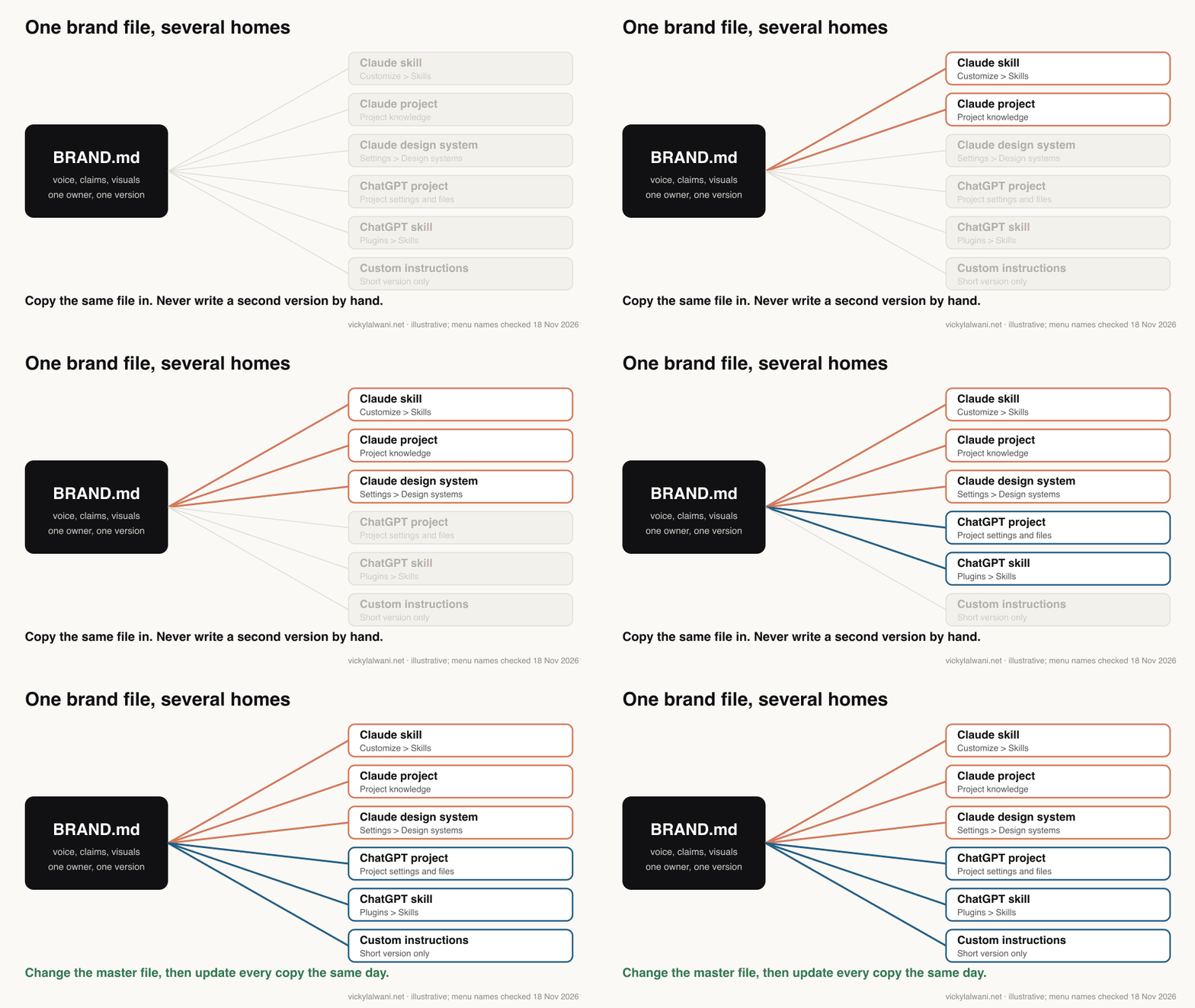
- One master. Store BRAND.md in a shared folder the whole team can read, next to any Claude MD file you already use. Put the owner, version and date at the top.
- Copy, do not rewrite. Upload the same file to the skill, the project and the design system. The custom instructions version is a trimmed extract, labelled with the same version number.
- Know where each copy is installed. A skill installed on one laptop is not the same as one shared in the team workspace. I have seen a skill look "missing" because it was installed locally, and another installed under a different name from its folder, so check the installed list against your master list.
- Log changes. When output goes wrong, fix the master file first, note what changed and why, then update every copy.
| Failure | Cause | Fix |
|---|---|---|
| Two tools, two voices | Hand-edited copies | One master, versioned |
| Skill never fires | Vague description | Say exactly when to use it |
| Teammate cannot see it | Installed locally | Share or publish it |
| Old offer in new copy | No end dates | Offers table with dates |
| File ignored | Too long | Short core, linked detail |
What does the brand file workflow look like?
Short answer: write the file once, ask the tool for three directions from a plain-English brief, pick one, refine it with specific feedback, and publish only after a person checks it against the file.
Step one: write the brand file once
This is the step most people skip, and it decides everything. A vague brand file produces vague output. Use the template above and fill it with real examples.
Step two: ask for three directions
Describe the asset in plain English: goal, layout, content and audience. Always ask for three options, because comparing is faster than describing. Claude Design's own guidance suggests the same kind of prompt, such as asking for two or three alternative layouts.
Using our brand file, create three different directions for [asset: landing page / one-pager / deck opening / ad set].
Goal: [what it must achieve]. Audience: [who]. Must include: [content]. Must not include: [anything].
For each direction: one line on the idea, then the draft.
Use only claims and offers from the approved table. After the three drafts, list any brand rule you could not follow and why.
Step three: refine and ship
Choose one direction, refine it with specific feedback ("shorter headline", "use the primary colour on the button"), and publish after review. The output can be a dashboard, landing page, deck, A/B variants or a proposal. Because it is live, you can show it in a meeting instead of a static mock-up. Keep a project with the brand file, component rules and a few approved examples, and update it whenever you learn something, such as a layout that converts better.
How do you test an AI brand guidelines file?
Short answer: run five real tasks you have done before, compare the output with what you actually published, and fix the file where it misses. Then use the file as a checklist on every draft.
Pick five recent jobs: an email, an ad, a landing page section, a social post and a slide. Give the tool the same brief you used then, and compare. Where the voice is off, add a good and a bad example rather than another adjective.
Keep each skill to one job. On one project, website pages kept reading like adverts because a skill written for offers was being applied to every page. The fix was to call that skill only when it was asked for, and to keep the brand file as the general rule. Even then, two copywriting skills produced similar, wrong-angle copy, and a person had to check it. That is normal, not a failure of the method.
Check this draft against BRAND.md. Do not rewrite it yet.
Return a table: rule, pass or fail, the exact words that break it, suggested fix.
Check: banned words; every number, claim and offer against the approved table (flag anything not listed); voice rules; colour and font tokens if visual; the pre-publish checklist.
If you are unsure whether something breaks a rule, mark it "check" and say why.
Draft:
[paste]
What is an AI brand file not ready for?
Short answer: brand creation, polished final design, regulated claims and anything published without a human check. It speeds up first drafts, variants and internal assets.
| Use | Ready? | Note |
|---|---|---|
| Internal dashboards, deck outlines | Yes | Start here |
| Landing page drafts to test | Yes, with review | Test, do not publish blind |
| Ad copy variants | Yes, with review | Check claims and offers |
| Final brand visuals | No | Designer's job |
| Regulated claims | No | Compliance review stays |
| Accessibility sign-off | No | Test with real tools |
A design tool can write a confident headline your compliance team would reject, so keep that review in place. Start with internal assets, move to drafts you will test, run accessibility, legal and brand checks before anything goes live, and keep human sign-off on public work.
Which videos explain these features?
Short answer: the official Claude and OpenAI channels explain skills, Claude Design and ChatGPT plugins clearly; watch them for the mechanics, then come back to the brand file for the content.
What are skills?, from the official Claude channel, 26 February 2026. A short explainer of how skills load only when needed. Anthropic's own product.
Introducing Claude Design by Anthropic Labs, from the Claude channel, 17 April 2026. The launch video, including how a design system shapes output. Note that Claude Design has since moved inside Claude.
Plugins & Skills, from the official OpenAI channel, 28 August 2026. How ChatGPT plugins bundle skills and apps, the replacement for custom GPTs. OpenAI's own product.
| Video | Channel | Date | What it covers |
|---|---|---|---|
| Creating custom Skills with Claude | Anthropic | 16 Oct 2025 | Writing and uploading a skill |
| Designing with Claude | Claude | 21 May 2026 | From prompt to production |
| Introducing Agent Plugins | OpenAI | 6 Aug 2026 | Plugins launch |
| An AI Marketing Team With 5 Claude Skills | HubSpot Marketing (vendor) | 14 Sep 2026 | Marketing skills, brand voice |
| Migrating Custom GPTs to Plugins | Agent Machine | 25 Sep 2026 | GPT to plugin walkthrough |
| Claude Skills for Brand and Marketing Design | A brand designer's channel | 4 Nov 2026 | Design-focused skills |
What people say on X and Reddit
Short answer: practitioners who get on-brand output feed the tool many real examples and one shared context file; the complaints are generic copy from thin inputs, and custom GPTs that worked worse after moving to plugins.
| Where | Date | What they say | Type |
|---|---|---|---|
| A head of copy on X | 12 Oct 2026 | Voice skills built from 15 to 30 real pieces | First-hand |
| A marketing skills author on X | 4 Apr 2026 | One context document every skill reads | First-hand |
| A DTC ads marketer on X | 7 Apr 2026 | Skill fed reviews and winners, in brand voice | Opinion |
| An AI news tracker on X | 10 Sep 2026 | GPTs to be retired on 11 December | News |
| An AI commentator on X | 12 Sep 2026 | Replace custom GPTs with plugins | Opinion |
| r/copywriting | 17 Nov 2026 | Generic AI copy; what did the agent know? | First-hand |
| r/ClaudeAI | 10 Oct 2026 | Always-loaded files grow; keep them short | First-hand |
| r/ChatGPT | 13 Oct 2026 | Migrated GPT worse; projects work better | First-hand |
| r/ChatGPT | 29 Sep 2026 | After migration the prompt editor was gone | First-hand |
The r/copywriting thread is the best argument for this article. A business owner had tried every major model and still got landing page copy that "could be used for any business". The sharpest reply asked what the agent actually had on the business: real customer objections and past sales calls, or just a list of services. That is the difference between a brand file and a description.
The r/ClaudeAI thread makes the size point from the other side: files that load on every session "grow quietly", and one reply keeps skill descriptions under 200 characters because they are always loaded. On ChatGPT, the most practical reply to the migration complaint was to move the GPT's instructions and reference files into a project, which matches OpenAI's own advice.
Where is this advice weak?
Short answer: the products move fast, some features are beta or plan-limited, and there is no independent study of how much a brand file improves output.
- Moving targets. Claude projects, Claude Design and ChatGPT GPTs were all changing in November 2026. Menu paths here were checked on 18 November.
- Two description limits. Anthropic's Help Center says 200 characters for a skill description; its developer docs say 1,024. Short is safe either way.
- Plan limits. ChatGPT skills are for business plans only; Claude design systems are beta and not on Free.
- No hard evidence. I found no independent measurement of brand consistency with and without a brand file. The method rests on vendor guidance and practitioner experience, including mine.
Sources
| Source | What it supports | Date |
|---|---|---|
| Claude Help: use skills | Plans, Customize > Skills, upload, share, Claude Code sync | Read 18 Nov 2026 |
| Claude Help: create custom skills | Brand guidelines example; name 64, description 200 | Read 18 Nov 2026 |
| Claude Docs: Agent Skills | Name and description rules, reserved words | Read 18 Nov 2026 |
| Claude Docs: skill best practices | Third person, under 500 lines | Read 18 Nov 2026 |
| Claude Help: projects | Free plan five projects; RAG up to 10x; new projects beta | Read 18 Nov 2026 |
| Claude Help: personalisation | Instructions, project instructions, skills | Read 18 Nov 2026 |
| Claude Help: design systems | Beta plans, sources, real examples tip | Read 18 Nov 2026 |
| Claude Help: Claude Design | All plans; prompts; 2 to 3 layouts | Read 18 Nov 2026 |
| Claude Help: move from standalone | claude.ai/design closes 14 Dec 2026 | Read 18 Nov 2026 |
| OpenAI Help: custom instructions | 1,500 and 5,000 character limits | Read 18 Nov 2026 |
| OpenAI Help: projects | Instructions override global; file limits | Read 18 Nov 2026 |
| OpenAI Help: skills in ChatGPT | Business, Enterprise, Healthcare, Edu | Read 18 Nov 2026 |
| OpenAI Help: plugins | Skills plus apps; directory on all plans | Read 18 Nov 2026 |
| OpenAI Help: creating GPTs | No new GPTs on personal plans | Read 18 Nov 2026 |
| OpenAI Help: GPT retirement FAQ | 11 Dec 2026; what transfers | Read 18 Nov 2026 |
| X, Reddit, YouTube | Practitioner views, tables above | Oct 2025 to Nov 2026 |
Want the brand file built for you?
I write the brand file with your team, load it into the Claude or ChatGPT set-up you already use, and test it on real past work before anyone relies on it. That sits in my Claude consultant service, and wiring it into wider workflows is part of AI automation; prices are on the pricing page. For the voice side in more depth, see how to train Claude on your writing style, and for design work, Claude Design for marketers.
This article expands on my post on LinkedIn ↗.
FAQ
What is an AI brand guidelines file?
It is a short markdown document that tells AI tools how your brand writes and looks: voice rules with real examples, approved claims and offers, banned words, colours, fonts and layout rules. Tools load it before they draft, and people use it as the checklist afterwards.
What should an AI brand guidelines file include?
Who you are and who you write for, voice rules, three good and three bad examples, banned words, an approved list of claims and offers with end dates, visual tokens such as hex codes and fonts, layout rules and a pre-publish checklist. Keep it to one to three pages.
How do I add brand guidelines to Claude?
Package the file as a skill and upload it in Customize, then Skills, or add it to a project's knowledge. For pages and decks, set up a design system from your brand assets so Claude Design applies your colours, type and components.
Are Claude skills available on the free plan?
Yes. Anthropic's Help Center lists skills on Free, Pro, Max, Ultra, Team and Enterprise plans, with code execution switched on. Design systems for Claude Design are in beta on Pro and above.
How do I give ChatGPT my brand voice?
Put the brand file in a ChatGPT project and add a short instruction in Project settings; project instructions override your global custom instructions. Business, Enterprise, Healthcare and Edu users can also turn it into a skill.
How long can ChatGPT custom instructions be?
OpenAI allows 1,500 characters on Free and Go plans and 5,000 on Plus, Pro, Business, Enterprise and Edu. That fits voice rules and banned words, not a full brand guide.
Should I build a custom GPT for my brand?
No. OpenAI is retiring custom GPTs on 11 December 2026 and personal accounts can no longer create new ones. Use a project, or a plugin with a skill on business plans.
Does an AI brand file replace a designer?
No. It speeds up first drafts, variants and internal assets. Brand creation, final visual polish, regulated claims and accessibility sign-off still need people.