Claude Sheets is a spreadsheet built into Claude, launched in beta by Anthropic on 10 November 2026 alongside Claude Whiteboards (beta) and Claude Data, the new name for Claude Dashboards. All three are on paid plans (Pro, Max, Ultra, Team, Enterprise) at no extra fee. Sheets holds up to 100,000 cells with 144 functions, but has no pivot tables, no live data from connected apps and read-only mobile access, so it suits light shared sheets such as campaign trackers. Claude Data needs a warehouse or CRM connector and adds certified queries and live sharing inside your organisation. Claude Meetings is announced as coming soon.
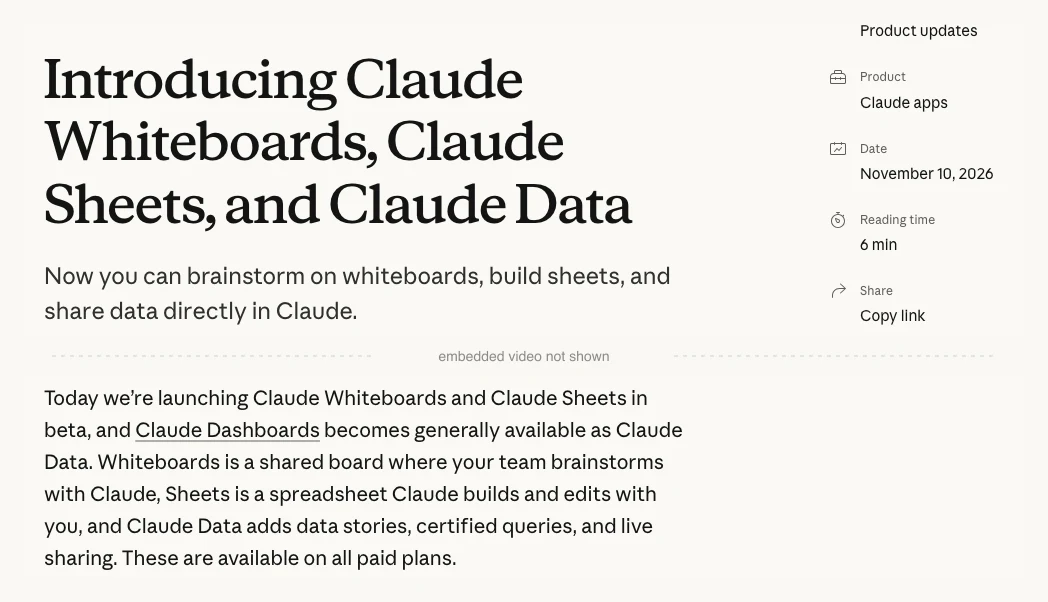
Claude Sheets is a spreadsheet built into Claude, launched in beta by Anthropic on 10 November 2026 for paid Claude plans. It arrived with Claude Whiteboards (beta) and Claude Data, the new name for Claude Dashboards (Anthropic).
It is not Claude for Google Workspace, the add-on that puts Claude inside Google Sheets. It is not Claude for Excel, or the older "Claude for Sheets" add-on with its CLAUDE() cell function. Those bring Claude to files you keep elsewhere. Claude Sheets keeps the file inside Claude.
Run Claude on a Team or Enterprise plan? Check three settings before 20 November 2026:
1. Claude Data. On Enterprise it turns on by default on 20 November 2026, unless an owner has already saved a setting. On Team it is already on.
2. Sheets and Whiteboards. On by default on Team, off on Enterprise. Decide who should have them during the beta.
3. Sharing. Check external sharing, email invitations and Claude Data live sharing in Organization settings > Artifacts before anyone shares client numbers.
TL;DR
- What launched: Claude Sheets and Claude Whiteboards in beta, and Claude Data generally available, on 10 November 2026 (Anthropic).
- Not to be confused with: Claude for Google Workspace (Claude inside Google Sheets), Claude for Excel, or the older Claude for Sheets add-on.
- Who gets it: Pro, Max, Ultra, Team and Enterprise. Not Free. No extra fee; it counts toward your plan's usage (Claude Help).
- Main limits: 100,000 cells, 144 functions, no pivot tables, no live data from connected apps, read-only on mobile (Claude Help).
- Claude Data: dashboards from a warehouse or CRM connector, with certified metrics and live sharing (beta) (Claude Help).
- Claude Meetings: Anthropic's post says "coming soon". TechCrunch reported a Team and Enterprise beta on Google Meet (TechCrunch).
Jump to: What launched · Which tool · Plans · Five sheets · Sheets vs Excel · Whiteboards · Claude Data · Meetings · Early reports · Checks · Client data · Move or keep · Start here
Picture a launch week. The plan sits on a Miro board. The task tracker is a Google Sheet that three people edit. The weekly numbers live in a report nobody fully trusts.
You use Claude to think the plan through, then copy its answers into each of those tools by hand. By Thursday the board, the tracker and the report disagree.
Anthropic's pitch is to keep the board, the sheet and the dashboard inside Claude, where Claude can see what changed. Should you move your trackers over? Some of them. This guide shows which.
How this was checked. Facts and screenshots come from Anthropic's posts, the Claude Help Center, claude.com/pricing and Anthropic's launch video, read on 12 November 2026 without logging in. The products weren't used hands-on, and the prompts are untested starting points. Example campaigns and numbers are illustrative. Sheets and Whiteboards are in beta, so limits will change.
What Anthropic launched on 10 November 2026
Anthropic announced four things across three posts (launch post, companion post, connectors post), and said Claude Meetings is coming soon:
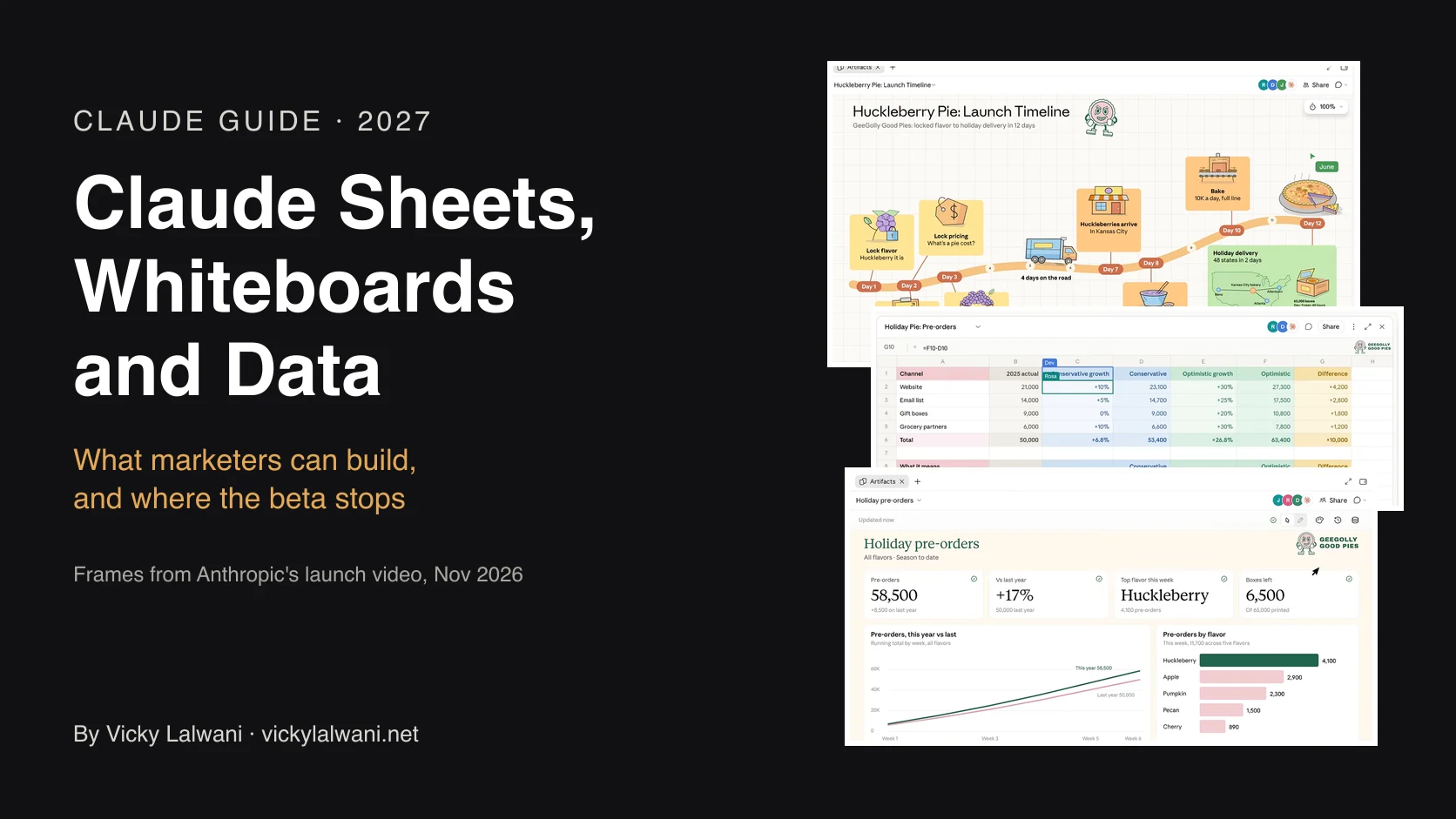
- Claude Sheets (beta). A spreadsheet Claude builds and edits with you: tabs, formulas, formatting, drop-downs, checkboxes and charts, plus cell comments for your team. Each edit Claude makes is outlined so you can see it.
- Claude Whiteboards (beta). A shared board. You talk through a messy plan and Claude lays it out as groups, flows or a timeline with owners and dates.
- Claude Data (generally available). Claude Dashboards, launched in beta in October, renamed. It adds certified queries, live sharing and data stories.
- Interactive connectors. Apps such as Asana, monday.com, Smartsheet and HubSpot can open full size beside your chat, rolling out on web and desktop (Anthropic).
Press framed it as an office suite to rival Microsoft 365 and Google Workspace (Engadget), and Microsoft's shares fell more than 2% that day (Fortune) and 2% the next (CNBC). For marketers, the beta limits matter more.
Which Claude spreadsheet tool do you need?
Search results and AI answers mix these names up. Here are the Claude tools that touch spreadsheets and data:
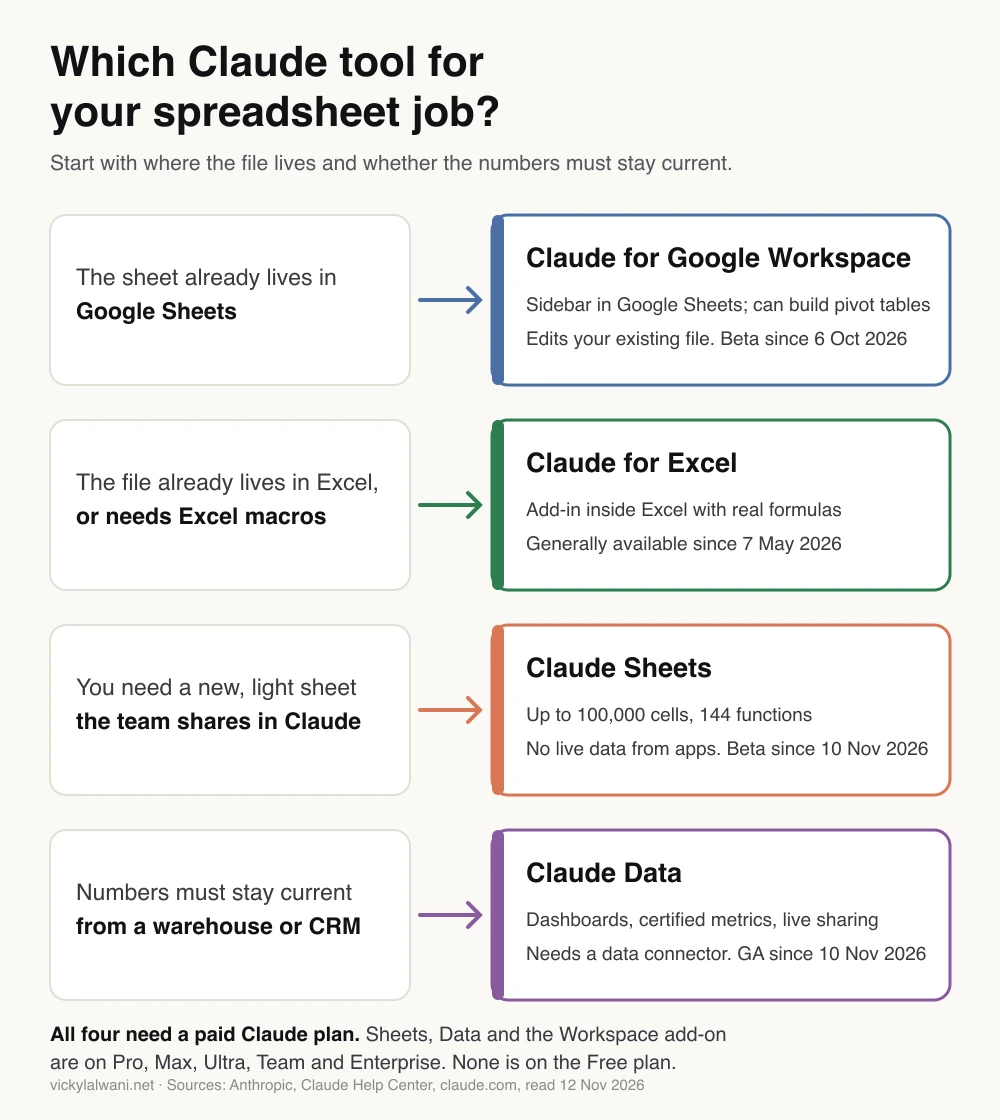
| Tool | Runs in | Best for |
|---|---|---|
| Claude Sheets | Claude (beta) | New shared sheets |
| Claude for Google Workspace | Google Sheets (beta) | Existing files, pivots |
| Claude for Excel | Excel | Files already in Excel |
| Claude Data | Claude | Warehouse or CRM numbers |
Sources: Claude Sheets help, Google Workspace launch, Microsoft 365 launch, Claude Data help. Claude can also create and edit Google Sheets from a chat through Anthropic's Google Sheets connector (beta).
Anthropic's help page puts it plainly:
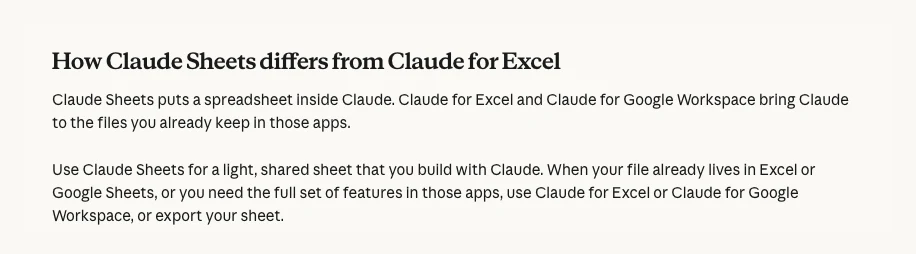
Older guides also describe "Claude for Sheets", an API-key add-on with a CLAUDE() cell function. That is a different, older product. If your team already works in Google Sheets, read how to use Claude in Google Sheets instead.
Is Claude Sheets free? Plans for Sheets, Whiteboards and Data
Sheets, Whiteboards and Data are on every paid plan: Pro, Max, Ultra, Team and Enterprise. They are not on Free (claude.com/pricing).
- Price: no add-on fee. On 12 November 2026 Pro was listed at US$17 a month billed yearly or US$20 monthly, and a Team standard seat at US$20 a month billed yearly or US$25 monthly, before tax.
- Usage: building and editing counts toward your plan's usage limits, like any chat (Claude Help). Ask for targeted edits rather than full rebuilds.
- After the beta: Anthropic hasn't said whether Sheets and Whiteboards will stay included or change price.
Admin defaults differ by plan, and Enterprise has a date coming up:
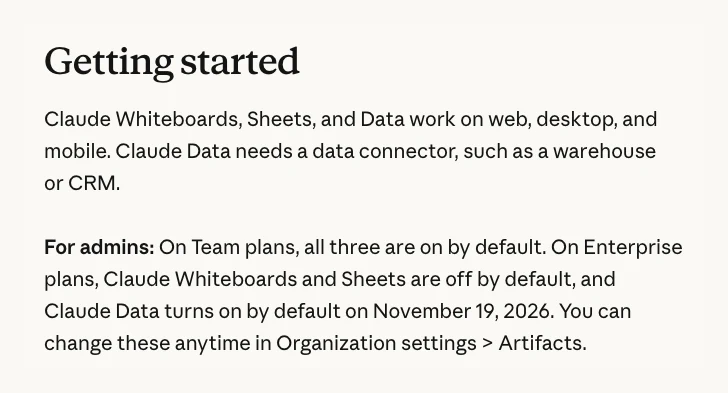
| Setting | Team | Enterprise |
|---|---|---|
| Claude Sheets | On | Off |
| Claude Whiteboards | On | Off |
| Claude Data | On | On from 20 Nov |
| Certified queries, live sharing | On | Off |
| Outside email invites | On | Off |
Owners change these in Organization settings > Artifacts. On Enterprise, custom roles can limit a tool to some groups, but only once it is on for the organisation (admin guide). In HIPAA-enabled and zero data retention organisations, nothing turns on by default (claude.com).
Five marketing sheets to build first in Claude Sheets
Anthropic's own example is "Build a campaign tracker with owners, dates, and status" (Claude Help). Its tip: say what the sheet is for and paste your own data.
To start, ask for a sheet in any chat, or open the Artifacts tab and pick the Sheets tile. If Claude replies with a table in chat instead of a sheet, check that file creation is on under Settings > Capabilities (labelled "Create and edit files" or "Code execution and file creation"). On Team or Enterprise, an owner also has to have Sheets turned on (Claude Help).
1. Campaign tracker. One place for every task, owner and deadline in a launch.
Build a campaign tracker for [campaign name]. The launch date goes in one cell: [date].
Tabs: Tasks, People, Summary.
Tasks columns: task, channel, owner (drop-down from People), due date, status, blocker.
Status is a drop-down: Not started, In progress, Blocked, Done.
Pre-fill the usual checklist: tracking QA, UTM sign-off, creative approval, budget sign-off,
landing page QA, ads submitted for review, launch day checks, day 3 review.
Make every due date a formula relative to the launch date cell.
Colour overdue tasks that aren't Done in red.
On Summary, count tasks by status and by owner with formulas, not typed numbers.
Check: change the launch date and watch every due date move. Then click two Summary numbers and read their formulas.
2. Channel forecast. This is the sheet in Anthropic's own demo: last year's results by channel, with conservative and optimistic growth.
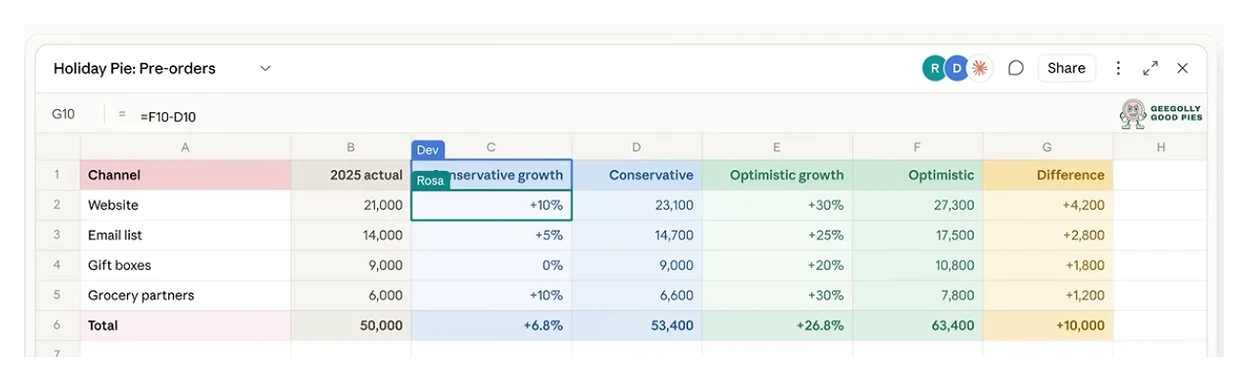
Here are last year's results by channel: [paste channel, leads, revenue].
Build a forecast tab with a conservative and an optimistic growth rate per channel,
the resulting totals, and the difference between the two.
Keep every growth rate in its own input cell so I can change it,
and show me which cells are inputs and which are formulas.
Check: change one growth rate and watch the totals move. If they don't, a number was typed in, not calculated.
3. Budget pacing. Will each campaign land on budget this month?
I've pasted this month's daily spend by campaign from Google Ads [paste date, campaign, cost].
The monthly budget per campaign is in the second table [paste].
Build a pacing tab: spend to date, expected spend to date for the days elapsed,
projected month-end spend, and percent over or under pace.
Flag any campaign more than 10% off pace. Put a "data through" date in its own input cell
and pace against that date, not today's date.
Check: the sheet won't refresh itself, so this suits a mid-month check, not daily pacing. If your pacing sheet already refreshes from a connector in Google Sheets, keep it there.
4. UTM builder. Stop typos splitting one campaign into three rows in your analytics.
Build a UTM builder. Columns: base URL, source, medium, campaign, content, final URL.
Source and medium are drop-downs with this list: [paste your naming rules].
The final URL is a formula that lower-cases the UTM values (not the base URL)
and replaces spaces with hyphens. If the base URL already has a "?", join the tags with "&".
Add a second tab that lists every campaign name used so far.
Check: open three final URLs in a browser. Google says UTM values are case sensitive, so "Google" and "google" become two sources in GA4 (Google Analytics Help). Claude Sheets has 144 functions, so if the one you expect is missing, Claude may use a workaround. Read the formula before you trust it.
5. Ad copy review sheet. Draft responsive search ad headlines and descriptions where a reviewer can comment and approve, with character counts that update as you edit.
Build a sheet for Google Ads responsive search ad copy for [product], theme [keyword theme].
Rows: 15 headlines, 4 descriptions, Path 1 and Path 2.
Columns: asset type, text, character count (formula), limit (30 for headlines, 90 for descriptions,
15 for paths), over limit (formula), angle (drop-down: benefit, proof, offer, call to action, brand),
reviewer comment, approved (checkbox).
Colour any row over its limit in red. Draft the copy from the brief below,
and don't invent prices, guarantees or awards.
[paste brief]
Check: edit one headline and watch the count change. A sheet can't push ads, so upload approved copy through Google Ads Editor or the Google Ads interface. For the copy itself, see ad copywriting frameworks.
Claude Sheets vs Excel: where the beta stops
Next to Excel or Google Sheets, Claude Sheets is deliberately simple. Anthropic says sheets have "simple spreadsheet functionality" for now and points heavier work to Excel (Anthropic). The help centre lists what is missing:
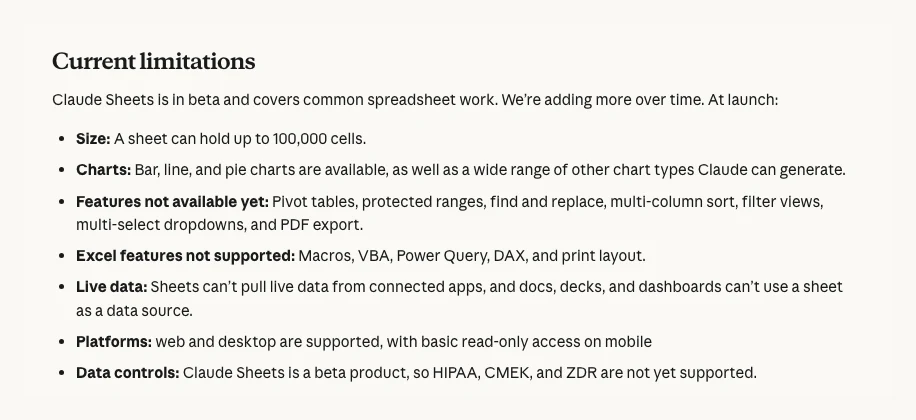
Here is what those limits mean for everyday marketing files:
- Big exports. 100,000 cells is a cell limit, not a row limit. A 20-column search terms export fills it at about 5,000 rows. Trim columns or filter before you import.
- No live data. A sheet can't pull from Google Ads, GA4 or any connected app, and a dashboard can't read from a sheet. Paste or import fresh exports each time.
- No pivot tables or filter views. Ask Claude for summary formulas such as SUMIFS by campaign, or keep the file in Google Sheets or Excel.
- No protected ranges. Anyone with edit access can change any cell. Version history lets you restore an earlier version, which also removes later edits.
- Phones. You can read a sheet on mobile, not edit it.
You can move files in and out. Import CSV, Excel or Google Sheets files, or paste cells, then export .xlsx or CSV, or send the sheet to Airtable, Asana, monday.com or Smartsheet (Claude Help, Anthropic). One early tester found .xlsx and CSV export kept only the active tab, so open your export and check every tab.
Claude Whiteboards for campaign plans and retros
A whiteboard suits the messy start of a campaign: the launch plan, the retro, the "what are our options" session. You talk, type or sketch, and Claude arranges the ideas into groups, flows or a timeline (Claude Help).
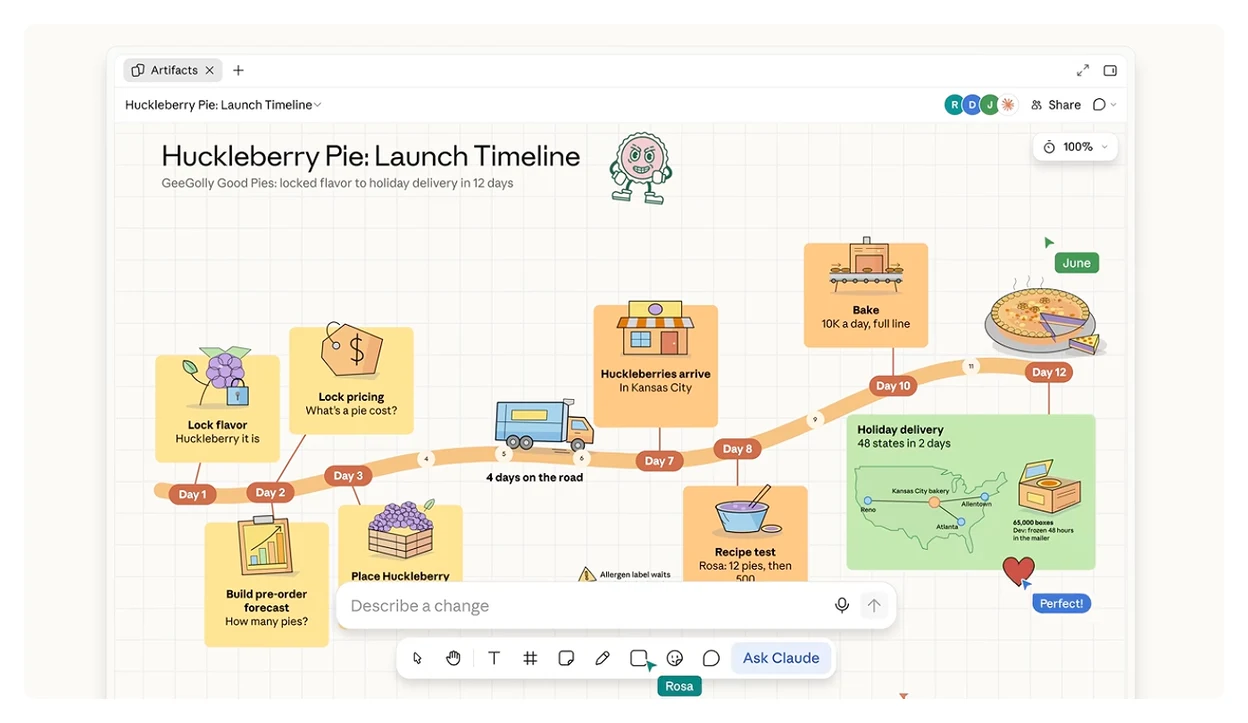
Two marketing uses stand out:
- Launch plans. Say the plan out loud in a kick-off and ask Claude to turn it into a timeline with owners and dates. Drag a box around one stage and ask what is missing.
- Campaign retros. Everyone adds notes. Claude groups them by theme and drafts the actions for each person. That example comes from Anthropic's own post.
Turn this board into a launch timeline for [campaign name].
Columns: week 1 to week 6. Rows: email, paid search, paid social, landing page, reporting.
Use only owners and dates already on the board. Mark any card with no owner or date in red instead of guessing.
Then list the three biggest gaps between steps, for example a creative deadline after the launch date.
Know the edges before you rely on it:
- It only knows the board. Whiteboards don't use context from your connected apps, so paste in the brief or numbers it needs.
- Export: PNG, a doc or deck, or "Send to" Lucid, Miro or Vani by Zoho. You can't import an existing board from a file.
- Guests: people outside your organisation can join by email invite if they have a Claude account with that address. It is on by default on Team and off on Enterprise, so check it before a client workshop.
Claude Data for marketing reporting
Claude Data answers questions about your company's numbers with dashboards, scrolling data stories, short narrated videos or written summaries. Claude writes a SQL query for each chart and shows it, with the time the data was last refreshed (Claude Help).
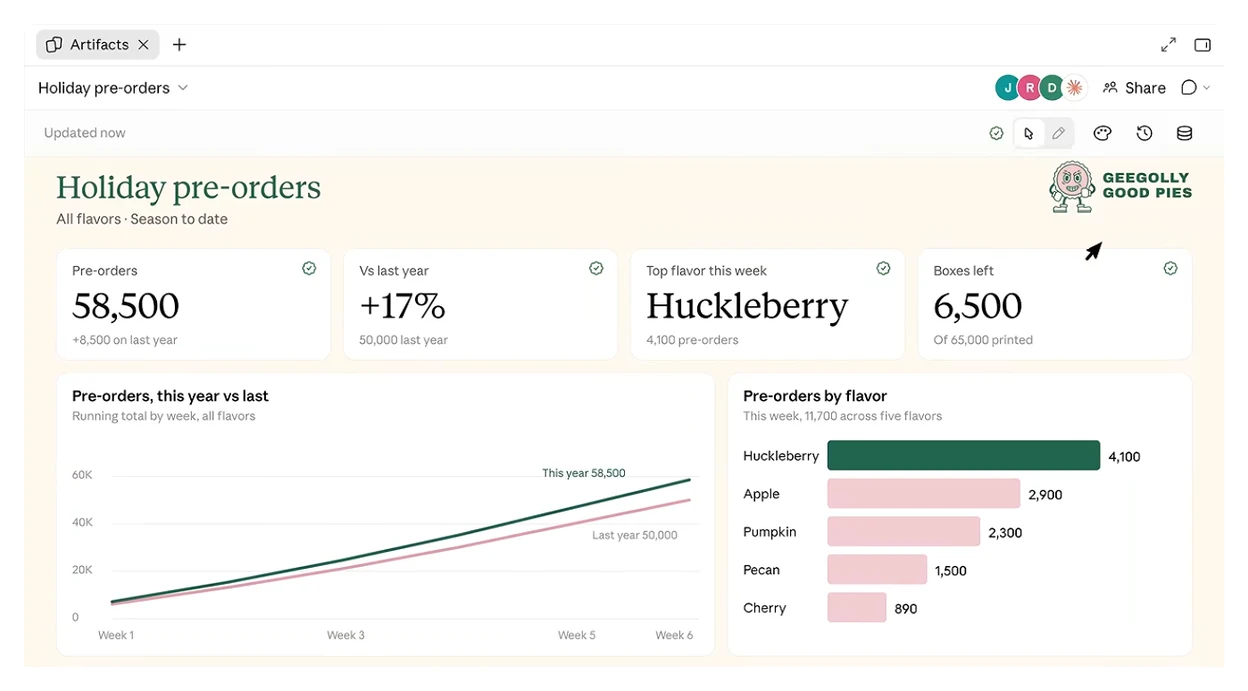
The catch for marketers is the data source. Claude Data needs a data connector, such as a warehouse or a CRM:
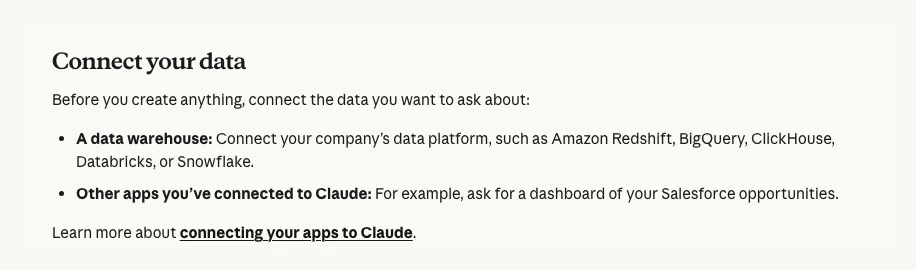
Most marketing numbers don't start in a warehouse. They start in Google Ads, Meta and GA4. In the Claude directory listings checked on 12 November 2026, there was no Google Ads, GA4, Search Console or Meta Ads connector published by Google or Meta (Claude directory). Google does publish an open-source Google Analytics MCP server, but you host it yourself (GitHub). That leaves two main routes:
- Through BigQuery. GA4 can export raw events to BigQuery, up to 1 million events a day for a standard property (Google Analytics Help). The free BigQuery sandbox deletes tables after 60 days and can't run data transfers (Google Cloud). With billing on, Google Ads and Facebook Ads data can follow through BigQuery's Data Transfer Service (Google Ads, Facebook Ads). Then connect Google's own BigQuery connector to Claude (Claude directory).
- Through a third-party connector. Supermetrics, Windsor.ai and Funnel list Claude connectors that cover the big ad platforms. Anthropic says Claude Data can use other apps connected to Claude, such as Salesforce, but it doesn't mention these vendors, so test with one account before you build on it. Check each vendor's privacy terms before you connect client accounts.
For the connector setup itself, see connecting Claude to Google Analytics, Ads and your CRM.
Link the GA4 export before you need it. Google says data starts flowing within 24 hours of linking, and its setup guide describes no way to pull in earlier history (Google Analytics Help).
Two beta features matter most for reporting:
- Certified queries (beta). Mark the agreed query for a metric such as "qualified lead" or "cost per acquisition" as certified, and charts built on it carry a badge. It isn't locked: anyone with write access can certify or edit a query, and editing removes the certification.
- Live sharing (beta). Colleagues see current numbers through your access, even without their own connection. It works only for people in your organisation.
Agree the definitions before you build anything:
Using the BigQuery connector, look at our GA4 export dataset [analytics_XXXXXXX]
and our Google Ads dataset [google_ads].
Before you build anything, list the tables and fields you plan to use, and propose written definitions
for lead, qualified lead, cost per lead and paid conversion.
Show the SQL for each definition and every assumption (time zone, attribution, deduplication).
Wait for me to confirm before you build the dashboard.
Then certify the agreed queries. BigQuery query costs land on your own Google Cloud project, not on Claude.
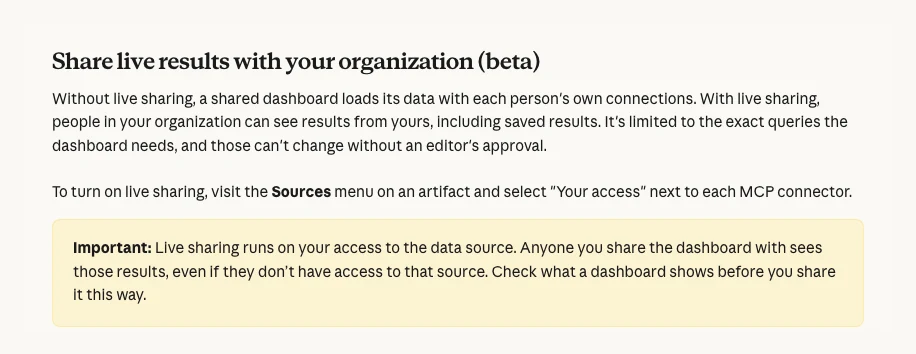
On refresh, each dashboard can have its own cadence, but Claude only re-queries when someone opens it and the data is due, not on a timer (Claude Help). Treat it as "fresh when opened", not real time.
For a step-by-step build with ad data, read how to build a live ads dashboard in Claude. Anthropic's own FAQ says Claude Data does not replace your BI tools (claude.com).
Claude Meetings: what is confirmed so far
- Anthropic's post: "Claude Meetings is coming soon." It will let you add Claude to a call to take notes and update your team's documents during the conversation (Anthropic).
- TechCrunch, same day: Meetings is "launching in beta on Team and Enterprise plans", working with Google Meet at launch. Claude joins as a visible participant, won't join calls with outside guests unless an admin allows it, and leaves if one joins (TechCrunch). Fortune reported the same beta (Fortune).
- Help centre: no Claude Meetings article as of 12 November 2026.
- Teams or Zoom: press reports name Google Meet only. Nothing official mentions Microsoft Teams or Zoom yet.
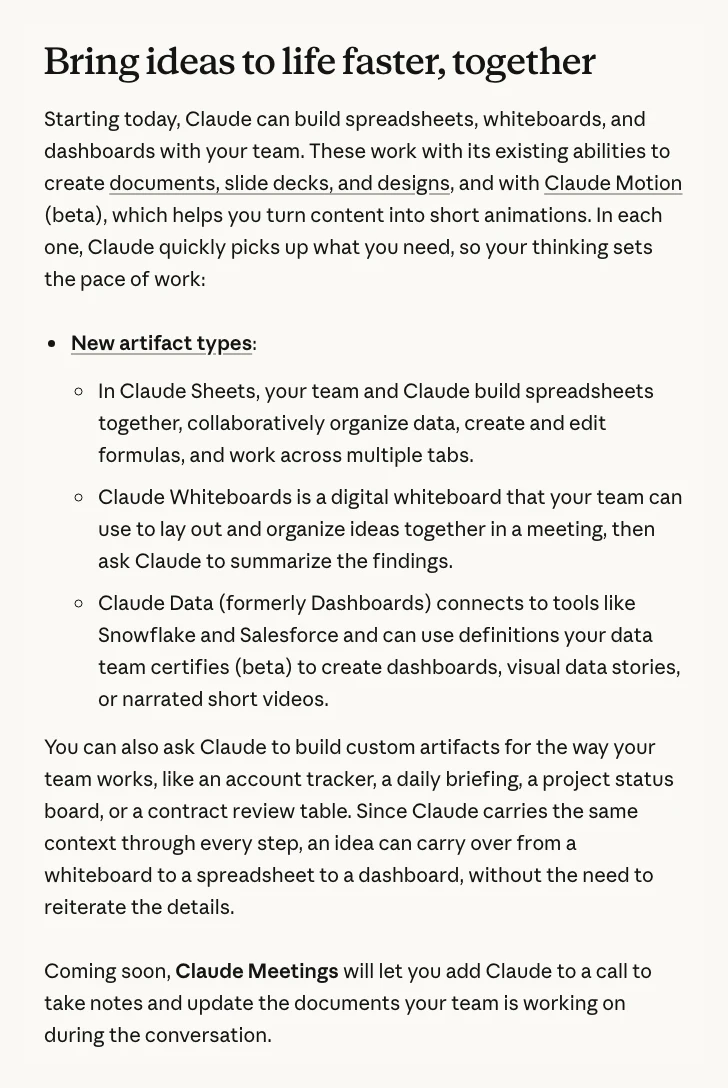
For client calls, wait for Anthropic's help article on recording, consent and guests. Recording rules also differ by country and state, so check yours before Claude joins any client call.
How the three fit together on one campaign
Anthropic says an idea can carry from a whiteboard to a spreadsheet to a dashboard "without the need to reiterate the details" (Anthropic). For a campaign, that looks like this:
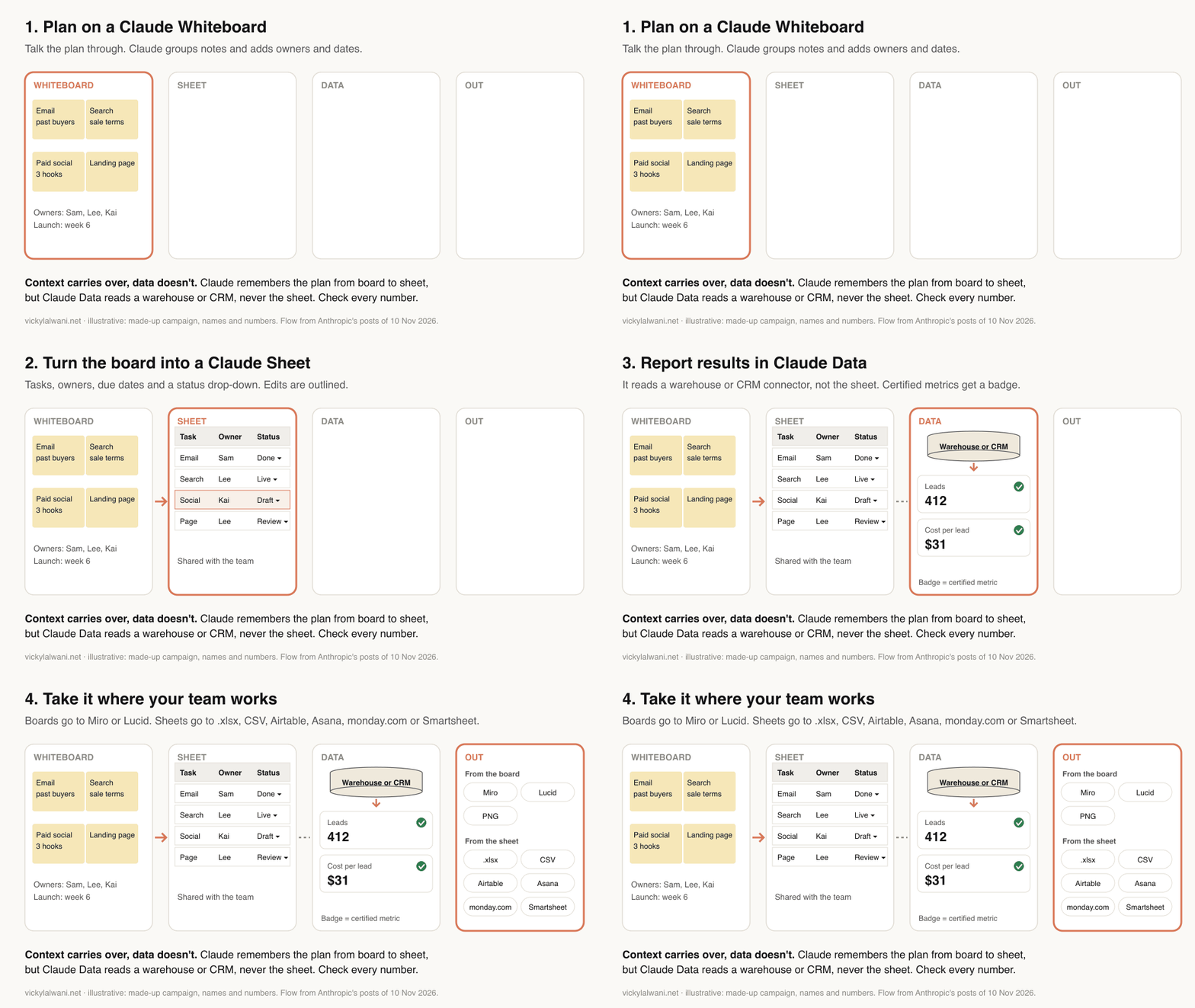
- Board. Run the kick-off on a whiteboard and agree stages, owners and dates.
- Sheet. In the same chat, ask Claude to build the campaign tracker from the board. The context carries over; the board itself doesn't feed the sheet.
- Report. Build the results view in Claude Data from your warehouse or CRM, not from the sheet.
- Out. Export the sheet as .xlsx or CSV, or send the board to Miro or Lucid, for anyone outside Claude.
That workflow is illustrative, not tested. The weak link is between sheet and report: a Claude Sheet can't feed a Claude Data dashboard (Claude Help).
What early users and reviewers say
Two days in, hands-on evidence is thin, and we found no marketer who had published a real campaign test by 12 November. These reports are worth reading:
| Source | What it shows | Type |
|---|---|---|
| Yiannis Antoniou | All three tested; export bugs | First-hand |
| vanja.io | Context carries, data doesn't | First-hand |
| @Drake5112 on X | Whiteboards in meetings (Japanese) | First-hand |
| The Next Web | Anthropic: "fairly basic" | Press |
| Hacker News | Lock-in and trust debate | Opinion |
All published 10 or 11 November 2026.
Three themes repeat:
- Good for trackers, not models. Antoniou's verdict was to keep trackers and team budgets in Sheets and models with history in Excel. An Anthropic product lead told Bloomberg Sheets is "fairly basic" and not meant for financial modelling (via The Next Web).
- The tools share context, not data. Vanja Petreski calls it the seam: Claude remembers the conversation from board to sheet to dashboard, but the files don't feed each other.
- Beta bugs. Antoniou reported that .xlsx and CSV export saved only the active tab, while export to Google Sheets kept the whole workbook. That is one report, so test your own export.
Before you trust the numbers: five checks
No one has published a systematic accuracy test of Claude Sheets or Claude Data yet; the posts above are first looks. The closest evidence says: check before you share.
- Multi-tab work is still hard for AI. SpreadsheetBench 2 tested AI models on 321 real business spreadsheet workflows. The best model tested, Claude Opus 4.6 (older than today's models), got 34.89% of tasks fully right and 12% of the debugging tasks. Most misses came from not inspecting the workbook enough or editing the wrong cells (arXiv, revised 7 Nov 2026).
- Human sheets aren't clean either. Raymond Panko's review of spreadsheet research (posted 2008) found errors are common, and that cell-by-cell inspection was the only check then shown to work (arXiv).
- Imported files can carry instructions. In November 2025, during Claude for Excel's beta, PromptArmor showed a hidden instruction in an untrusted data file getting it to leak data through an IMAGE formula; Anthropic then added a stronger approval warning (PromptArmor). Claude Sheets wasn't tested, but treat files from outsiders with care.
Five checks before any number leaves Claude:
- Match one total to the platform. Same date range, time zone, currency, conversion action and attribution setting. If spend matches but conversions don't, suspect the definition before the maths. See why ad platforms miss conversions.
- Read the formula or query behind every shared number. Then change one input and confirm the outputs move.
- Count rows after every import. The sheet should have as many rows as the export. A silent cut is easy to miss.
- Check the timestamp. Claude Data shows when each chart last refreshed, and GA4 says its own processing can take 24 to 48 hours (Google Analytics Help).
- Review who can see and edit. Live sharing, write access (anyone with it can certify a query) and any file that came from outside.
For the tracking side of this, see conversion tracking setup with an event map.
Client data in a beta: what to check
- Training. Team and Enterprise chats aren't used to train models by default. The exception is feedback: a thumbs up or down stores that whole conversation for up to 5 years and it may be used for training (Anthropic Privacy Center). On Pro, Max and Ultra it depends on your model improvement setting (Anthropic Privacy Center, pricing).
- Regulated data. Claude Sheets doesn't yet support HIPAA, CMEK or zero data retention, and Whiteboards isn't available to HIPAA-ready organisations (Sheets help, Whiteboards help). Keep patient data out.
- Sharing starts private. Nothing is shared until you click Share. On Team and Enterprise, the default is people inside your organisation (Claude Help).
- Client dashboards. Live sharing runs on your access and reaches only your own organisation, and outside viewers can't use connector-backed parts. For a live client view, use a tool built for it, such as Data Studio (formerly Looker Studio), which can share reports on the owner's credentials (Google Cloud). See Looker Studio alternatives for PPC reporting.
- Contracts. Check that your client agreement or data processing terms allow their data in a third-party AI tool, and in a beta. If in doubt, work from exports with names and emails removed.
For agencies, the simplest rule is one client per sheet and per board, shared only with the people on that account.
Should you move your trackers into Claude?
Good fits for Claude Sheets now
- New campaign trackers and launch checklists
- Quick forecasts and budget scenarios
- One-off analysis of a CSV export
- Sheets you build with Claude and share with a small team
Keep in Google Sheets or Excel
- Files with pivot tables, macros or Apps Script
- Sheets that pull live data, such as IMPORTRANGE or connectors
- Big exports beyond 100,000 cells
- Client-facing files with protected ranges or filter views
- Sheets people update from their phones, or that feed a report
Already track work in Asana, monday.com or Smartsheet, or live in Excel or Google Sheets? Interactive connectors, Claude for Excel and Claude for Google Workspace bring Claude to those files, so you may not need to move at all.
What to try first this week
- Check the settings. On Team or Enterprise, decide on Sheets, Whiteboards, Data and sharing before 20 November 2026.
- Build one tracker. Use the campaign tracker prompt above for a live campaign. Compare it with your current sheet after a week.
- Run one retro on a whiteboard. Use the next campaign review. Export the actions to the tool your team already uses.
If the tracker saved time and nobody missed a pivot table, keep going. If not, keep Claude in your existing files.
Related guides: the Claude desktop app for marketing, Claude Design for marketers and Claude features for marketing leaders. Want help setting Claude up for your team? See Claude consulting.
Sources
| Source | What it supports | Date | Link |
|---|---|---|---|
| Anthropic | Launch: Sheets, Whiteboards, Data; plans; admin defaults | 10 Nov 2026 | claude.com |
| Anthropic | Companion post: Meetings "coming soon" | 10 Nov 2026 | claude.com |
| Anthropic | Interactive connectors open as full apps | 10 Nov 2026 | claude.com |
| Anthropic | Launch video (fictional pie brand demo) | 10 Nov 2026 | youtube.com |
| Claude Help Center | Claude Sheets: limits, import, export | Updated 10 Nov 2026 | support.claude.com |
| Claude Help Center | Claude Whiteboards | Updated 10 Nov 2026 | support.claude.com |
| Claude Help Center | Claude Data: connectors, certified queries, live sharing | Updated 10 Nov 2026 | support.claude.com |
| Claude Help Center | Artifacts admin guide | Updated 10 Nov 2026 | support.claude.com |
| Claude Help Center | Share artifacts | Updated 10 Nov 2026 | support.claude.com |
| Claude Help Center | What are artifacts | Updated 10 Nov 2026 | support.claude.com |
| Claude Help Center | Interactive connectors | Updated 10 Nov 2026 | support.claude.com |
| Claude Help Center | Claude in Google Docs, Sheets, Slides | Updated 30 Oct 2026 | support.claude.com |
| Anthropic | Pricing and plan features | Read 12 Nov 2026 | claude.com |
| Anthropic | Artifacts page and FAQ | Read 12 Nov 2026 | claude.com |
| Anthropic | Dashboards and Motion launch | 8 Oct 2026 | claude.com |
| Anthropic | Claude for Google Workspace launch | 6 Oct 2026 | claude.com |
| Anthropic | Claude for Excel and Microsoft 365 | 7 May 2026 | claude.com |
| Claude directory | Listings checked for Google, Meta ads | Read 12 Nov 2026 | claude.com |
| Claude directory | Google BigQuery connector | Read 12 Nov 2026 | claude.com |
| Google Analytics Help | GA4 BigQuery export and limits | Read 12 Nov 2026 | support.google.com |
| Google Analytics Help | Set up BigQuery export | Read 12 Nov 2026 | support.google.com |
| Google Cloud | Google Ads transfers to BigQuery | Read 12 Nov 2026 | cloud.google.com |
| Google Cloud | Facebook Ads transfers to BigQuery | Read 12 Nov 2026 | cloud.google.com |
| Google Cloud | BigQuery sandbox limits | Read 12 Nov 2026 | cloud.google.com |
| Google Analytics | Open-source GA MCP server | Read 12 Nov 2026 | github.com |
| Google Analytics Help | UTM values are case sensitive | Read 12 Nov 2026 | support.google.com |
| Google Cloud | Data Studio owner's credentials | Read 12 Nov 2026 | cloud.google.com |
| Anthropic Privacy Center | Training: commercial plans | 18 Aug 2026 | privacy.claude.com |
| Anthropic Privacy Center | Training: consumer plans | 16 Mar 2026 | privacy.claude.com |
| SpreadsheetBench 2 | AI accuracy on business spreadsheets | Rev. 7 Nov 2026 | arxiv.org |
| Raymond Panko | Spreadsheet error research | Feb 2008 | arxiv.org |
| PromptArmor | Prompt injection in Claude for Excel | Nov 2025 | promptarmor.com |
| Google Analytics Help | GA4 processing takes 24 to 48 hours | Read 12 Nov 2026 | support.google.com |
| TechCrunch | Claude Meetings beta report | 10 Nov 2026 | techcrunch.com |
| Engadget | Office suite framing | 10 Nov 2026 | engadget.com |
| Fortune | Meetings beta, token cost warning, shares | 10 Nov 2026 | fortune.com |
| The Next Web | Sheets "fairly basic" (via Bloomberg) | 10 Nov 2026 | thenextweb.com |
| CNBC | Microsoft shares fall a second day | 11 Nov 2026 | cnbc.com |
| Yiannis Antoniou | Hands-on test, export bug | 11 Nov 2026 | substack.com |
| Vanja Petreski | Hands-on test, "the seam" | 11 Nov 2026 | vanja.io |
| @Drake5112 | Whiteboards in meetings | 10 Nov 2026 | x.com |
| Hacker News | Launch discussion | 10 Nov 2026 | news.ycombinator.com |
FAQ
What is Claude Sheets?
Claude Sheets is a spreadsheet built into Claude, launched in beta by Anthropic on 10 November 2026. You describe the sheet you need and Claude builds it, with tabs, formulas, formatting, drop-downs and charts, outlining each edit it makes. Your team can work in the same sheet at the same time. It is available on paid Claude plans, and it is not the Claude for Google Workspace add-on or the older Claude for Sheets add-on.
Is Claude Sheets the same as Claude for Sheets or Claude in Google Sheets?
No. Claude Sheets keeps the spreadsheet inside Claude. Claude for Google Workspace is a separate Anthropic add-on that puts a Claude sidebar inside Google Sheets, Docs and Slides so it can edit files you already have there. "Claude for Sheets" is an older API-key add-on with a CLAUDE() cell function, a different product again.
Can Claude create spreadsheets?
Yes. On paid plans (Pro, Max, Ultra, Team and Enterprise), Claude can build a spreadsheet from a prompt as a Claude Sheet, the spreadsheet Anthropic added inside Claude in beta on 10 November 2026. It adds tabs, formulas, formatting, drop-downs and charts, and you can export the result as .xlsx or CSV to open in Excel or Google Sheets. To work on a file that stays in Google Sheets or Excel, use Anthropic's Claude for Google Workspace or Claude for Excel instead.
Is Claude Sheets free, and which Claude plans include it?
Claude Sheets is not on the Free plan. Claude Sheets, Claude Whiteboards and Claude Data are included with the paid Claude plans: Pro, Max, Ultra, Team and Enterprise. Anthropic charges no extra fee during the beta, but building and editing counts toward your plan's usage limits. It has not said what happens to pricing after the beta.
Can Claude Sheets replace Excel or Google Sheets?
Not for heavy work yet. Anthropic says Claude Sheets has simple spreadsheet functionality: 144 functions, up to 100,000 cells, and no pivot tables, macros, filter views, protected ranges or live data connections. It suits light, shared sheets such as campaign trackers. For big models or files already in Excel or Google Sheets, Anthropic points to Claude for Excel or Claude for Google Workspace.
How big can a Claude Sheet be?
Anthropic's Claude Help Center says a Claude Sheet can hold up to 100,000 cells. That is a cell limit, not a row limit, so a marketing export with 20 columns reaches it at about 5,000 rows. Trim columns or filter rows before importing large ad or search exports.
Can Claude Sheets pull live data from Google Ads or GA4?
No. Anthropic's Claude Help Center says Claude Sheets can't pull live data from connected apps, and docs, decks and dashboards can't use a sheet as a data source. You import or paste fresh exports. For numbers that stay current, use Claude Data, which reads from a warehouse or CRM connector and refreshes when a dashboard is opened.
Can I import a Google Sheet or Excel file into Claude Sheets?
Yes. Anthropic's Claude Help Center says Claude Sheets can start from a CSV, Excel or Google Sheets file, or from cells pasted in from either app. You can export a Claude Sheet as .xlsx or CSV, or send it to partner apps such as Airtable, Asana, monday.com and Smartsheet. One early tester reported that .xlsx export kept only the active tab, so check exported files.
Does Claude Sheets have pivot tables?
Not yet. Anthropic lists pivot tables among the features not available in the Claude Sheets beta, along with protected ranges, find and replace, multi-column sort, filter views, multi-select dropdowns and PDF export. You can ask Claude for summary formulas such as SUMIFS instead, or use Claude for Google Workspace, which Anthropic says can build pivot tables in Google Sheets.
Does Claude Sheets work on mobile?
Only for viewing. Anthropic's Claude Help Center says Claude Sheets works on web and desktop with basic read-only access on mobile, even though the launch post says all three tools work on mobile. Claude Whiteboards does work on Claude's mobile apps.
What can marketers use Claude Whiteboards for?
Anthropic's Claude Whiteboards suits the planning stage of a campaign. You can turn a spoken launch plan into a timeline with owners and dates, or run a retro where Claude groups notes by theme and drafts actions. The board only uses what is on it, not your connected apps. You can export it as a PNG, send it to Lucid, Miro or Vani by Zoho, or have Claude turn it into a doc or deck, but you can't import an existing board from a file.
What is Claude Data, and is it the same as Claude Dashboards?
Yes, Claude Data is the new name for Claude Dashboards, made generally available by Anthropic on 10 November 2026. It turns questions about company data into dashboards, data stories, short narrated videos or written summaries. It needs a data connector such as BigQuery, Snowflake, Redshift, ClickHouse, Databricks or a CRM like Salesforce, and adds certified queries and live sharing in beta. Dashboards made under the old name keep working.
Can Claude Data connect to Google Ads or GA4?
Not directly, as of 12 November 2026. In the Claude directory listings checked that day there was no Google Ads, GA4, Search Console or Meta Ads connector published by Google or Meta. Marketers can export GA4 to BigQuery, load Google Ads data with BigQuery's Data Transfer Service (which needs billing on, not the free sandbox), and connect Google's BigQuery connector to Claude. Third-party connectors such as Supermetrics, Windsor.ai and Funnel are another option, but Anthropic doesn't document them as Claude Data sources, so test one account first.
Is Claude Data live sharing safe for client reports?
Not for external clients. Anthropic says live sharing only shows results to people inside your organisation, and outside invitees can't use connector-backed parts. Inside your organisation, anyone you share with sees results through your own access to the data source, even without their own access, so Anthropic advises checking what a dashboard shows before sharing it. For client reports, a tool such as Data Studio is still the better fit.
Is Claude Meetings available yet?
Anthropic's own post on 10 November 2026 says Claude Meetings is coming soon. TechCrunch reported the same day that it is launching in beta on Team and Enterprise plans, working with Google Meet first. As of 12 November 2026 there is no Claude Help Center article for it, and nothing official mentions Microsoft Teams or Zoom. Treat it as announced, not generally available, until Anthropic publishes a help article or admin setting for it.