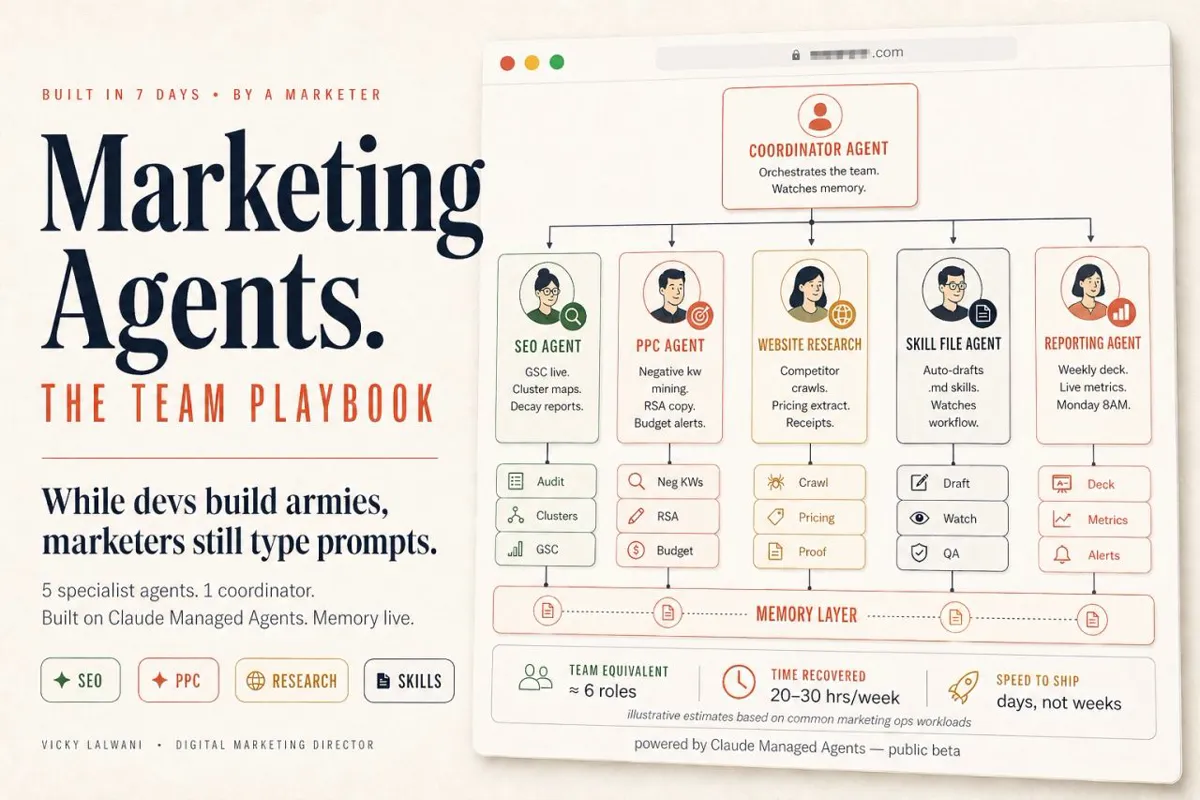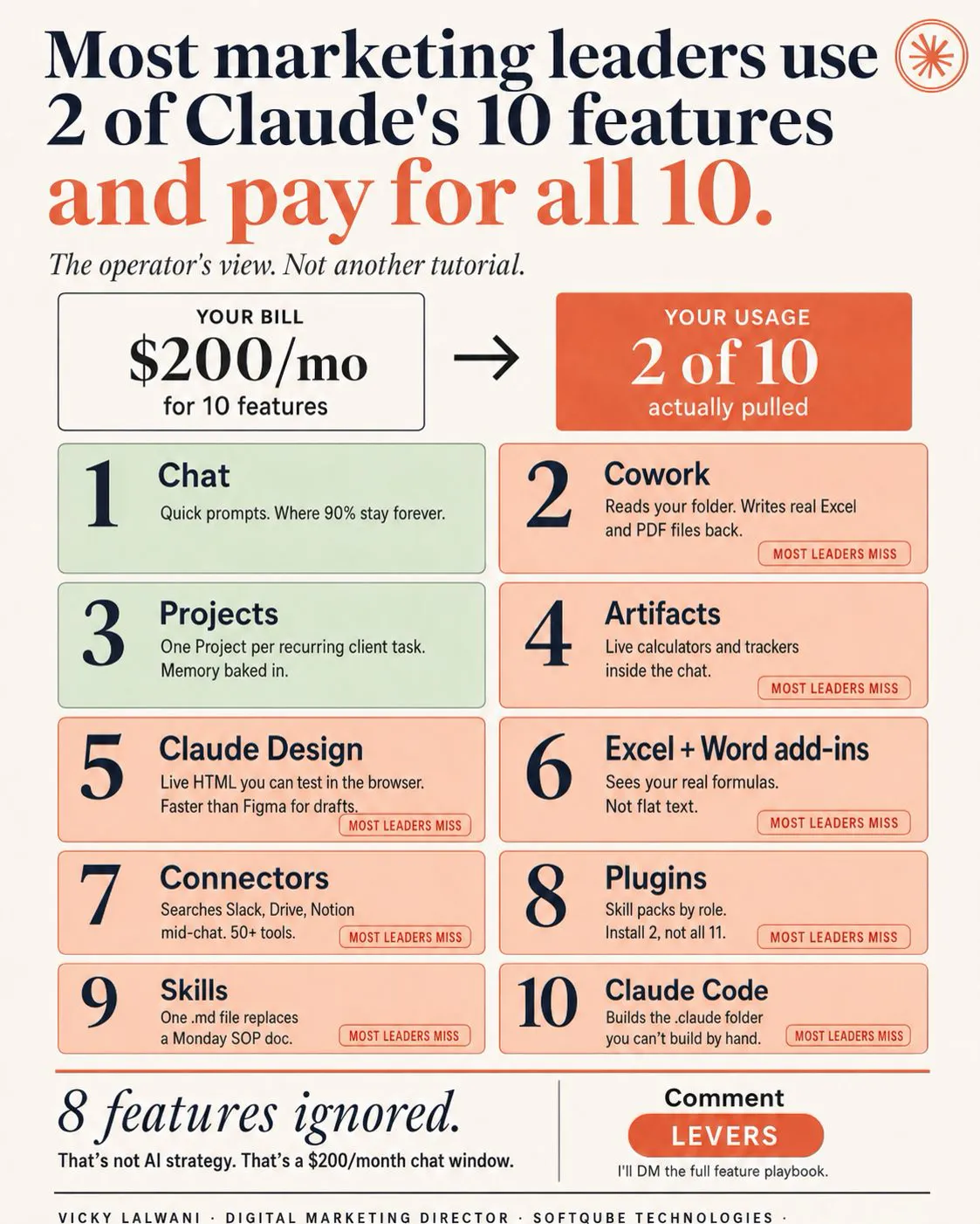
The Claude features that matter most to marketing leaders are Projects, Skills, connectors and scheduled tasks, now all inside one Claude app after the September 2026 merge of Cowork and chat. Adopt them in that order: Projects first, then Skills for repeat jobs, one connector, then a scheduled report a person reviews.
Many marketing leaders use two of Claude's features and pay for all of them. They live in chat and Projects, and the rest sits idle. The gap is rarely capability. It is knowing which feature solves which problem, and in what order to bring them in.
This guide is the leader's view, updated for November 2026: what each Claude feature does for a marketing team, which plan it needs, what changed this year, and the order I would adopt them. If you would rather have the setup and training done for your team, my Claude consulting covers exactly this.
TL;DR
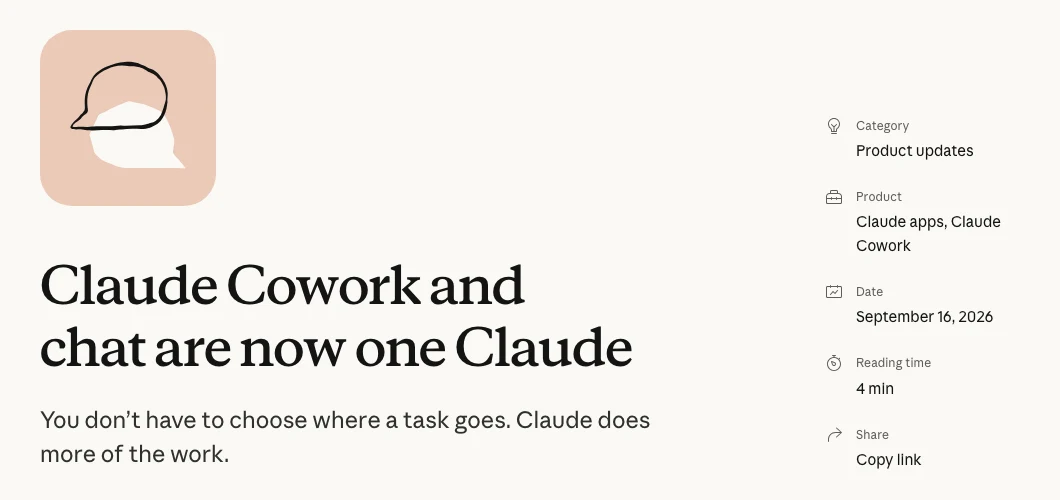
Claude is one app now. On 16 September 2026 Anthropic merged Cowork and chat into one Claude: quick questions and longer jobs run in the same conversation, and existing projects, connectors and skills carry over.
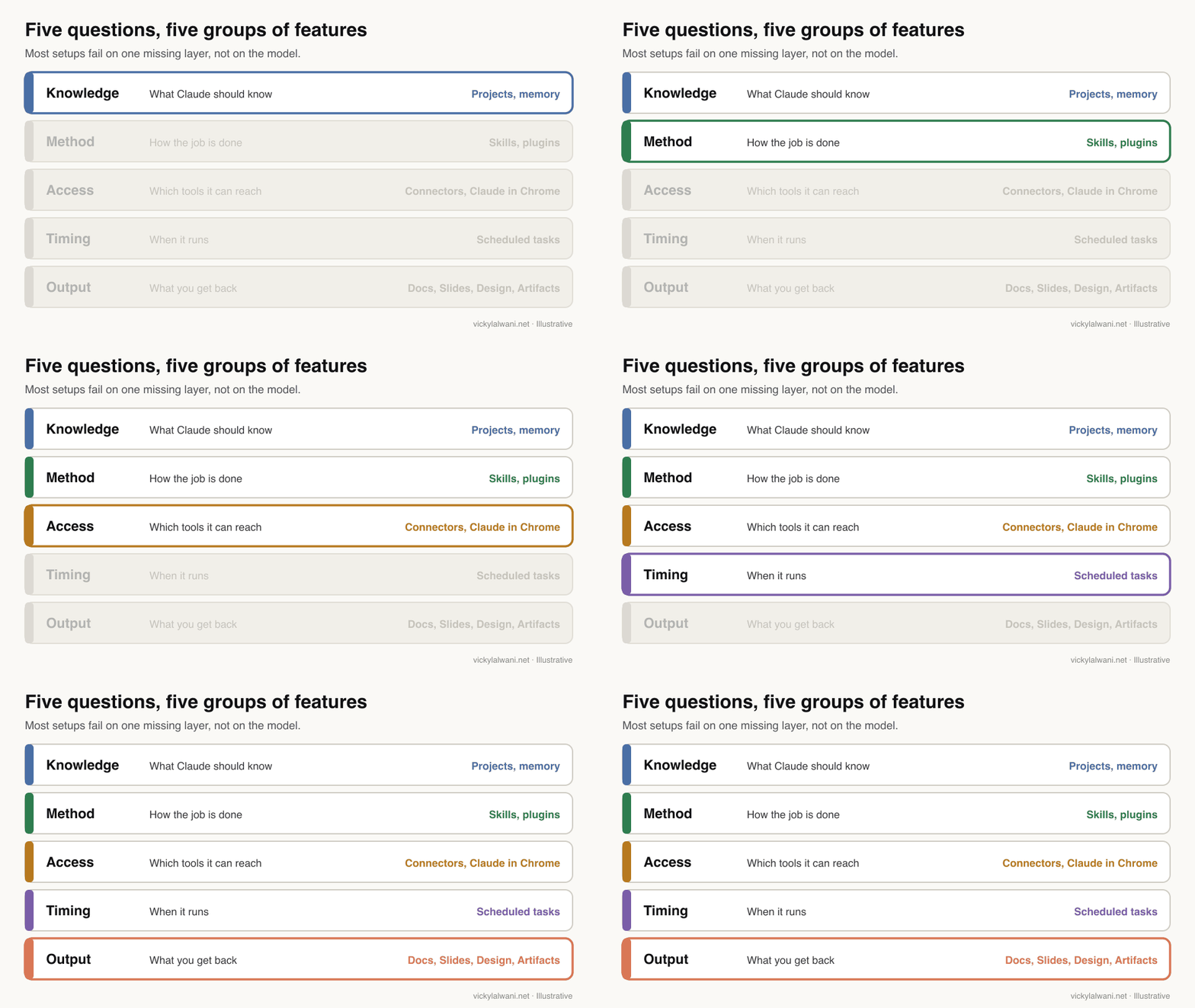
Five features do most of the work for marketing teams: Projects (what Claude knows), Skills (how the job is done), connectors (which tools it reaches), scheduled tasks (when it runs) and Docs or Slides (what you get back).
Most of it is on cheap plans. Projects, memory, Skills and connectors are on Free; scheduled tasks, Research and Claude Code start at Pro, $20 a month; Team seats are $25 a month or $20 billed yearly (Anthropic pricing).
Adopt in order: Projects, then Skills, then one connector, then a scheduled report. Each step depends on the habit before it.
What are the main Claude features in 2026?
Short answer: The features a marketing team uses are Projects, memory, Skills, plugins, connectors, scheduled tasks, Research, Docs, Slides and Design, Artifacts, Claude for Google Workspace and Microsoft 365, Claude in Chrome and Claude Code. Most of them answer one of five questions: what Claude knows, how it does the job, what it can reach, when it runs and what it hands back.
| Feature | What it does | Plans |
|---|---|---|
| Projects | Files, instructions and memory for one area of work | All (Free: 5) |
| Memory | Remembers preferences across chats | All |
| Skills | Reusable instructions loaded when a task matches | All |
| Plugins | Skills plus connectors, packaged by role | Paid |
| Connectors | Reach Drive, Slack, CRM and other tools | All |
| Scheduled tasks | Recurring work that runs on its own | Paid |
| Research | Multi-source reports with citations | Pro and up |
| Docs, Slides, Design | Shareable documents, decks and pages | All |
| Google Workspace add-on | Claude inside Docs, Sheets, Slides | Paid, beta |
| Claude in Chrome | Works in your signed-in browser | Pro and up |
| Claude Code | Builds scripts, sites and tools | Pro and up |
Plan details come from Anthropic's pricing page and the linked help articles, read on 18 November 2026. One gap to know before you plan a content workflow around Claude: it does not generate photos or illustrations, though it builds charts, diagrams and interactive visuals.
What changed in Claude features this year?
Short answer: The big change is the September 2026 merge of Cowork and chat into one Claude, which reached Enterprise on 23 October and Team on 12 November. Memory came to the Free plan in March 2026 with an import tool for other assistants, Docs and Slides launched alongside the merge, and Fable became Anthropic's top model line.
| When | Change | Why a leader cares |
|---|---|---|
| Mar 2026 | Memory on Free, import tool | Switchers keep context |
| Mar 2026 | Projects inside Cowork | One place per client |
| 16 Sep 2026 | Cowork and chat merge | No more choosing a mode |
| Sep 2026 | Docs and Slides launch | Shareable outputs by link |
| 31 Oct 2026 | Memory on by default | New Team orgs only |
| 12 Nov 2026 | Merge reaches Team | Whole team on one Claude |
The merge matters more than it sounds. Before it, people had to decide whether a task belonged in chat or in Cowork, and work started in one did not carry to the other. Now Claude decides what the task needs and, by default, asks before taking an action. Many of the older guides your team will find, including tutorials from early 2026, still show separate Chat and Cowork tabs.
Anthropic is also rolling out a new version of Projects in beta, starting with Claude Code users on Pro, Max and Ultra, where one project runs parallel threads in the cloud. Treat it as early; plan around the current Projects.
Which Claude features matter most to a marketing leader?
Short answer: Projects, Skills, connectors and scheduled tasks, in that order. Projects stop people repeating context, Skills make output consistent across the team, connectors remove manual exports, and scheduled tasks turn a weekly report into something you review rather than build.
Projects. A Project is a workspace with its own chats, files, instructions and memory. The setup I use and recommend is one Project per client or brand, with chats named by service. Each Project keeps its own memory, and Claude does not pull memory from other Projects into it, which is what stops one client's details leaking into another's work.
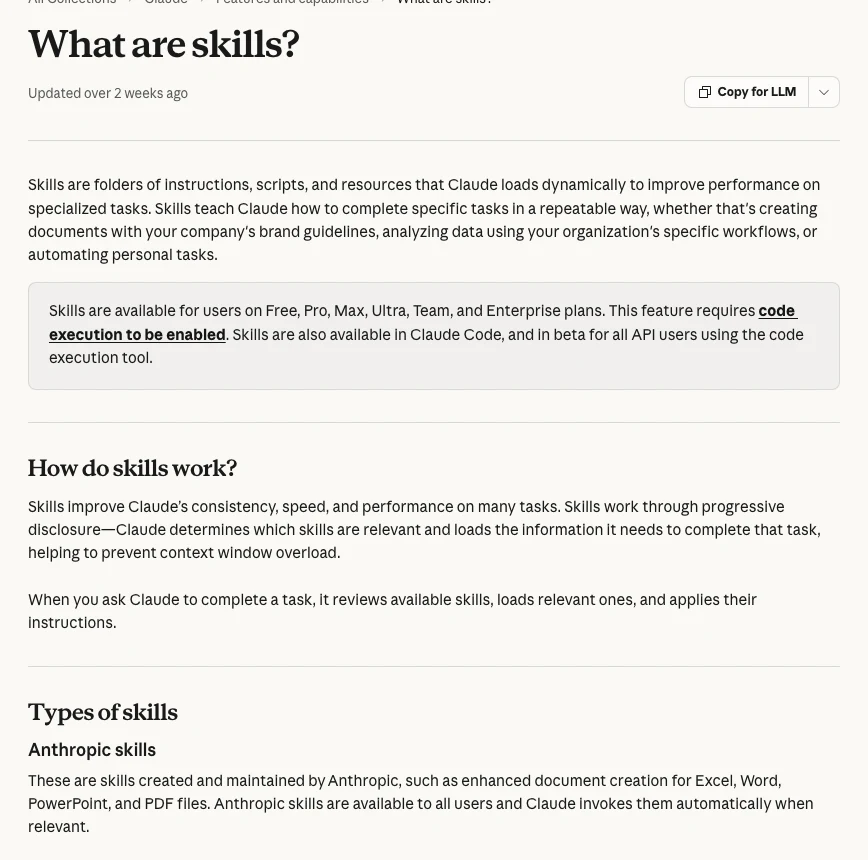
Skills. A skill is a folder of instructions, scripts and resources that Claude loads when a task matches. It is the closest thing Claude has to a standard operating procedure that runs itself. A monthly report format, a brand voice checklist or an ad copy brief can each be one skill, and on Team and Enterprise an owner can provision them so they appear for every member.
Connectors. Connectors let Claude search and act in tools such as Google Drive, Gmail, Slack and your CRM during a conversation. They give access; they do not copy everything into one database. My guide to Claude connectors for marketing lists the ones worth starting with.
Scheduled tasks. Covered in its own section below. It is the feature that turns Claude from a tool you consult into one that does work on a calendar.
Docs and Slides. Claude Docs drafts a shareable document in the conversation, asks clarifying questions first and leaves comments explaining its choices. For a leader, that means status reports and briefs your team can comment on without copying text into another tool.
Claude for Google Workspace. The add-on puts Claude in a sidebar inside Docs, Sheets and Slides, where it reads the open file and edits it in place with every change in version history. It is in beta on paid plans and needs your Google admin to allow Marketplace apps.
How do Skills and plugins work for a marketing team?
Short answer: A skill teaches Claude one job; a plugin bundles several skills with the connectors and sub-agents that job needs. Skills are on every plan, Free included, and need code execution switched on. Plugins are on all paid plans, and Anthropic's library includes a marketing plugin alongside sales, finance and others.
| Skill | Plugin | |
|---|---|---|
| Contains | Instructions, scripts, files | Skills, connectors, sub-agents |
| Plans | All, incl. Free | All paid plans |
| Made by | Anthropic, you or your org | Anthropic, partners or you |
| Team sharing | Owner provisions | Org marketplace |
| Edit a library one? | Copy it first | Copy it first |
Skills you add from the directory are view-only; to change one, download a copy, edit it and upload it as your own. That is a sensible default for a team: the library skill stays clean, and your version carries your rules.
The failure I see most is a skill used outside the job it was written for. A skill built to write sales offers will make your web pages read like adverts. Name skills by job, keep each one short, and review the first outputs by hand. A prompt like this gets a first draft of a skill from a process you already follow:
Turn the process below into a Claude skill for my marketing team.
Write: a one-line description that says exactly when to use it and when not to,
the inputs it needs, the steps in order, the output format, and three checks to run before handing the output over.
Keep it under 400 words. Ask me questions first if a step is unclear.

Process:
[paste your current checklist or SOP here]
What can scheduled tasks do for marketing reporting?
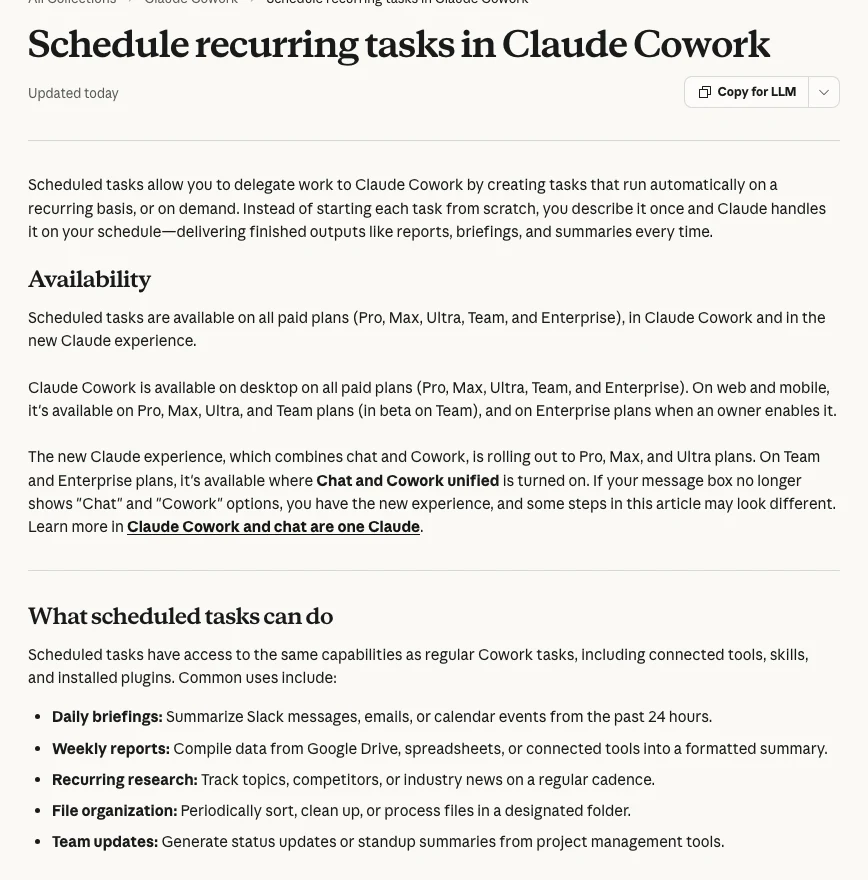
Short answer: A scheduled task runs a saved prompt hourly, daily, on weekdays, weekly or on demand, with the same connectors, skills and plugins as a normal task. Anthropic's help page says scheduled tasks are on all paid plans and run remotely, so they keep their schedule even when your computer is asleep.
| Task | Schedule | You still own |
|---|---|---|
| Weekly performance summary | Monday, weekly | What it means |
| Competitor and news watch | Weekdays | What to act on |
| Team status from project tools | Friday, weekly | Priorities |
| Inbox and calendar briefing | Daily | Replies and decisions |
| Content calendar check | Weekly | What gets published |
One setting to watch: if you point a task at a folder on your computer, "Require this computer" switches on and the task only runs while the machine is awake and the desktop app is open. On Team and Enterprise, admins control access through the Cowork toggle.
I treat a scheduled report the same way as one a person writes: it does not go to a client or a board until someone has read it and added a short note on where things stand, what we are doing and what is next. Approval before anything goes live is the rule, whoever drafted it.
Which Claude plan does a marketing team need?
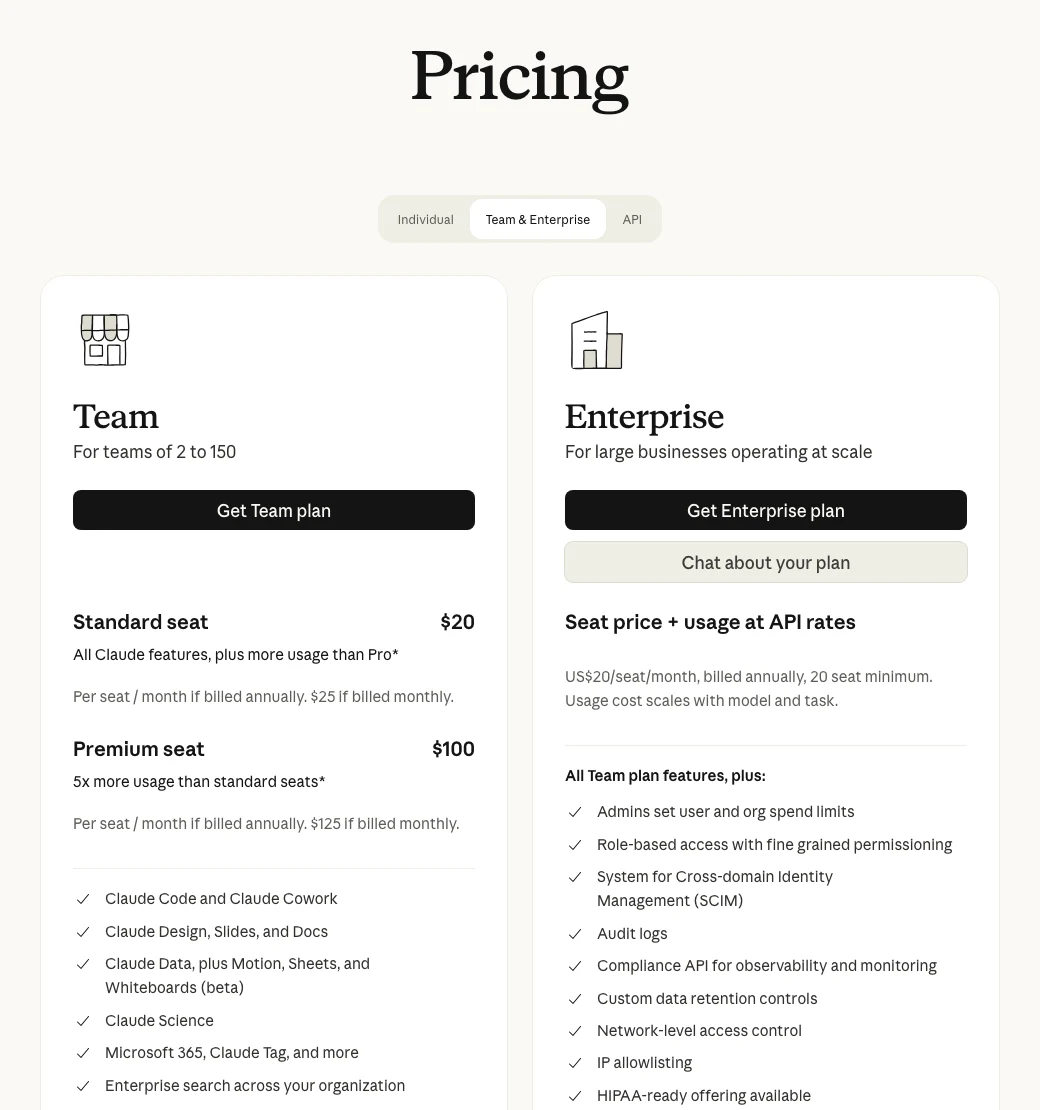
Short answer: Most marketing teams of 2 to 150 people fit the Team plan: standard seats at $25 a month or $20 billed yearly, and premium seats with five times the usage at $125 or $100 yearly. Enterprise is $20 per seat a month billed yearly, plus usage at API rates, with a 20-seat minimum, per Anthropic's pricing page.
| Need | Plan | Monthly cost |
|---|---|---|
| One person trying it | Pro | $20 ($17 yearly) |
| Heavy daily user | Max | $100 |
| Small team, shared setup | Team standard | $25 a seat ($20 yearly) |
| Team members on Fable | Team premium | $125 a seat ($100 yearly) |
| SCIM, audit logs, roles | Enterprise | $20 a seat plus usage |
Team includes central billing, single sign-on, admin controls for connectors and organisation-wide skills, and up to $500 a month in pooled API credits. Mix seat types: give premium seats to the people who run long analysis, because Fable models are included only on premium seats (up to half the weekly limit); on standard seats Fable is paid with usage credits.
If your team is coming from ChatGPT, the prices line up closely at every tier. My guide to switching from ChatGPT to Claude covers the plan mapping, the memory import and a two-week test before you cancel anything.
Which model should each feature run on?
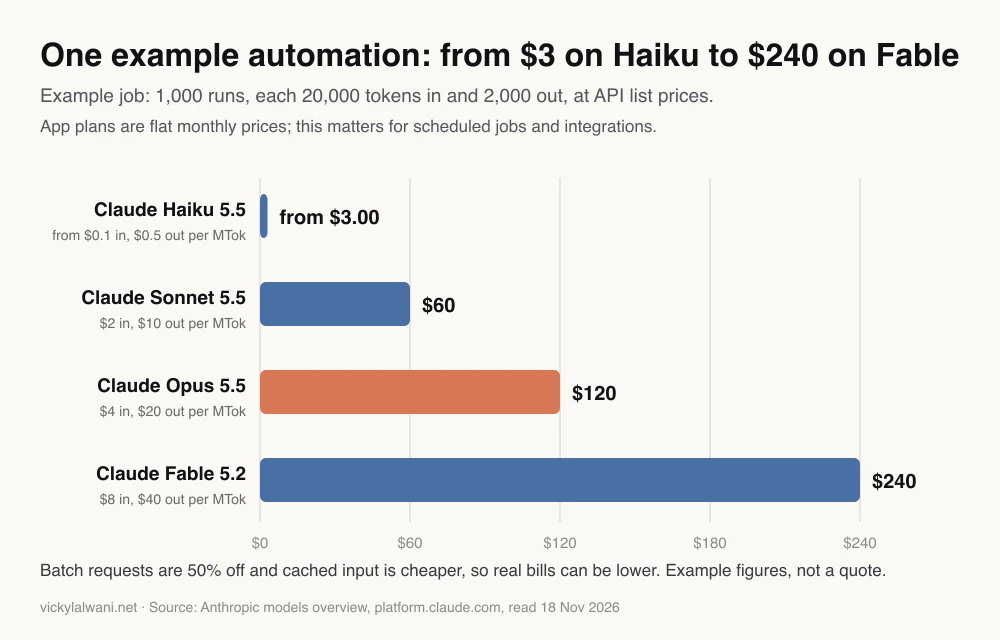
Short answer: In the app, start on Claude Opus 5.5, which Anthropic suggests for most work. For automations that run often, such as scheduled tasks or integrations built on the API, the model choice changes the bill sharply: Haiku 5.5 costs from $0.10 per million input tokens and Fable 5.2 costs $8, per Anthropic's models overview.
| Model | Best for | Default effort |
|---|---|---|
| Haiku 5.5 | Sorting, tagging, routing | Medium |
| Sonnet 5.5 | Fast drafts | High |
| Opus 5.5 | Most marketing work | Medium |
| Fable 5.2 | Hardest analysis | High |
The sum in the chart: 1,000 runs times 20,000 input tokens is 20 million tokens in, and 2 million out. On Opus 5.5 that is 20 times $4 plus 2 times $20, or $120. On a flat app plan none of this applies until you hit your usage limit. My guide on which Claude model to use goes deeper on matching model to task.
In what order should you adopt Claude features?
Short answer: Projects and memory in weeks one and two, Skills in weeks three and four, one connector in month two, a scheduled report in month three, and Claude Code or plugins later. Each step depends on the habit built in the one before, so skipping ahead usually means rework.
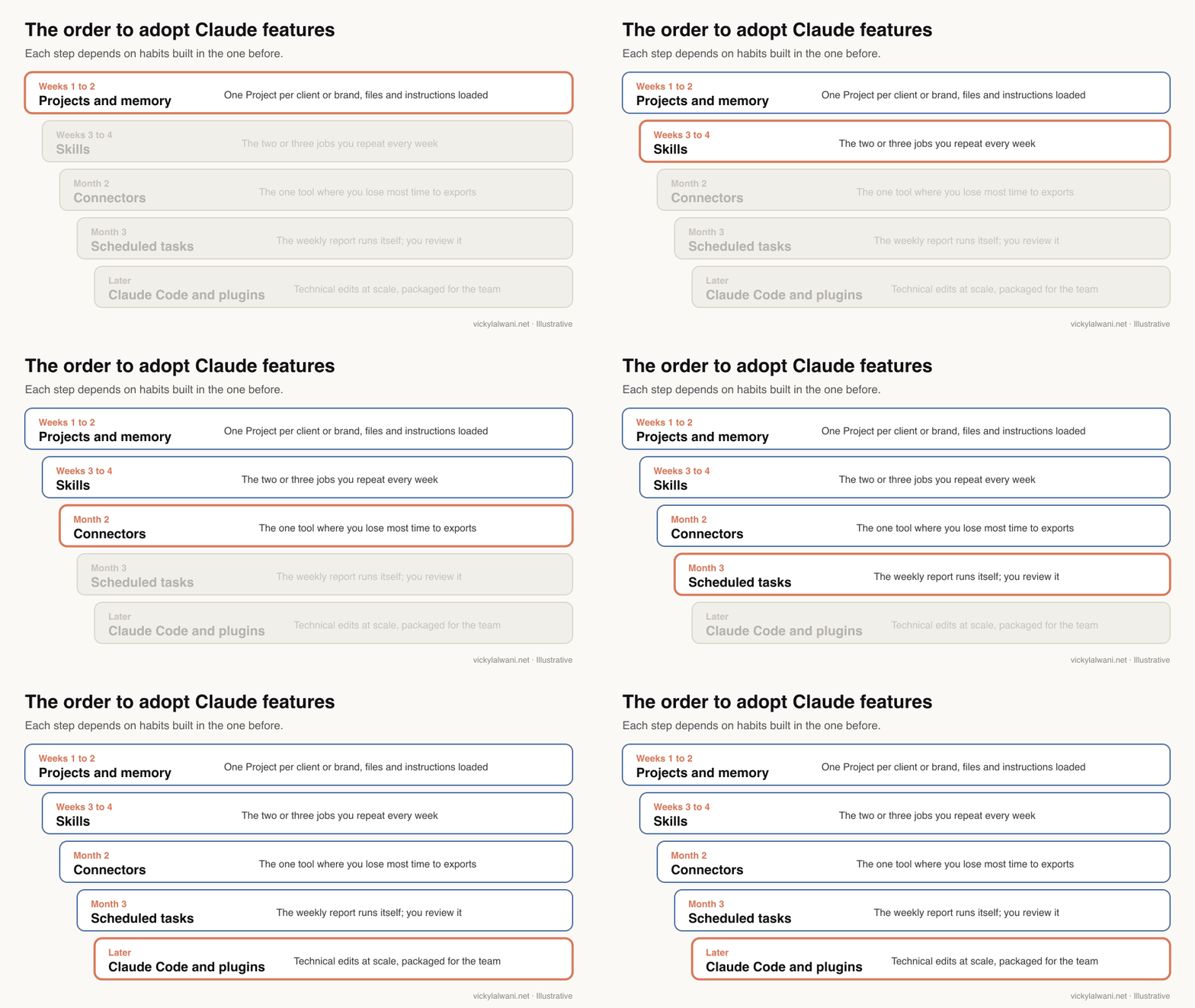
- Weeks 1 to 2: one Project per client or brand, with the brief, style guide and past examples loaded. Import memory if people are coming from another assistant.
- Weeks 3 to 4: Skills for the two or three jobs you do every week. Test each one on real work before sharing it.
- Month 2: one connector, starting with the tool where you lose the most time to exports.
- Month 3: a scheduled weekly report, reviewed by a person before it goes anywhere.
- Later: Claude Code for technical edits at scale, and plugins once your skills and connectors are stable enough to package.
For a full rollout plan with training and governance, see my Claude adoption roadmap. A useful division of labour I rely on: a thinking model plans the work and a separate agent executes it, so planning mistakes are caught before anything is built.
How do you know the features are paying off?
Short answer: Ask one question every Friday: what work did Claude do this week that a person used to do by hand? Then track a few plain measures per feature, such as hours saved on the weekly report, how many edits outputs need, and which paid tools Claude has replaced.
| Feature | Measure | Warning sign |
|---|---|---|
| Projects | Context re-typed per week | People paste the brief again |
| Skills | Edits needed per output | Each person has their own version |
| Connectors | Exports done by hand | Numbers differ from the tool |
| Scheduled tasks | Reports reviewed on time | Nobody reads them |
| Docs and Slides | Drafts shared by link | Copied into another tool |
By the end of a quarter you should be able to name which paid tools these features have replaced, and which they have not. If the answer is none, the features are being used without a real task in mind.
What mistakes do teams make with Claude features?
Short answer: The common ones are one giant Project for every client, installing every plugin, treating connectors as a synced database, scheduling reports nobody reviews, and trusting polished output without checking the numbers.
- One Project for everything, so context from one brand bleeds into another.
- Installing every plugin, then trusting none of them.
- Expecting a connector to behave like a synced database rather than live access.
- Scheduling a report and never reading it.
- Skipping review because the output looks finished. I have seen an agent-built plan go out with search volumes that were badly wrong because nobody checked the source.
- Planning around an old tutorial that still shows separate Chat and Cowork tabs.
Videos worth watching
Short answer: Anthropic's own short videos are the quickest way to see the current app: the merge announcement, what skills are, and Projects. The table adds two marketing-focused walkthroughs.
Made by Anthropic's Claude channel, published 16 September 2026. A 71-second look at the merged app; it promotes Claude itself.
Made by Anthropic's Claude channel, published 27 February 2026. Under three minutes on how a skill teaches Claude a job once; it points to Anthropic's free courses.
| Video | Channel | Date | What it covers |
|---|---|---|---|
| Claude Cowork and chat are now one Claude | Claude | 16 Sep 2026 | The merged app |
| What are skills? | Claude | 27 Feb 2026 | Skills in brief |
| Getting started with projects in Claude.ai | Anthropic | 2 Dec 2025 | Projects setup |
| Claude AI for Business: The Complete Marketing Tutorial | HubSpot Marketing | 20 Apr 2026 | Marketing workflows |
| Claude Chat vs Cowork vs Code: Which One Should You Use? | Futurepedia | 27 Jul 2026 | Pre-merge comparison |
What people say on X and Reddit
Short answer: Anthropic's own posts track the features as they ship. Practitioners mostly talk about setup: one Project per job, skills that trigger reliably, and the confusion between chat, Cowork and Claude Code that the September merge was meant to end.
| Post | Date | Point | Type |
|---|---|---|---|
| Claude on X | 30 Jan 2026 | Plugins bundle skills and connectors by role | Vendor |
| Claude on X | 16 Sep 2026 | Cowork and chat merge into one Claude | Vendor |
| Claude on X | 12 Aug 2026 | Skills and connectors work in the browser | Vendor |
| A marketing educator | 9 Feb 2026 | Confusion between chat, Cowork and Code | Opinion |
| A performance marketer at Anthropic | 24 Mar 2026 | Paid search workflows saved as skills | First-hand |
| A writer and content creator | 15 Nov 2026 | One Project per job, like a dedicated employee | Opinion |
| Reddit thread | Date | Recurring theme | Type |
|---|---|---|---|
| r/ClaudeAI: am I missing out by not using skills? | 27 Oct 2026 | Replies: skills load themselves and share easily | First-hand |
| r/ClaudeAI: why your skills may not trigger | 8 Dec 2025 | The description decides when a skill loads | First-hand |
| r/PPC: use cases for Cowork and Code | 14 Apr 2026 | A compliance skill reviews ad copy | First-hand |
| r/AI_Agents: a marketing team moved to Claude | 13 Nov 2026 | Rules, connectors, then skills | First-hand, vendor |
| r/AI_Agents: one agent with skills or many bots? | 30 Oct 2026 | Skills versus one bot per job | Opinion |
Every X post above was checked through X's own embed service on 18 November 2026, and Reddit threads through the Arctic Shift archive. Accounts named after a person are described by role, and Reddit is credited by community.
Where this advice is weak
Short answer: Anthropic ships Claude features every few weeks and renames some of them, so plan details here can date quickly. The adoption order is my working method for marketing teams, not a tested benchmark, and the cost chart is an example, not a quote.
- Plans and features were read on Anthropic's pages on 18 November 2026. Recheck anything you will budget for.
- Some features are in beta (Google Workspace add-on, new Projects) and may change or be limited by plan.
- Usage limits are not published as message counts, so "five times the usage" is Anthropic's relative measure, not a number of tasks.
- Social posts are anecdotes; vendor accounts naturally present their own features well.
Want help choosing and rolling out Claude features?
Short answer: If you want your team on the right features in the right order, with Projects, Skills and a scheduled report built around your real work, my Claude consulting covers the setup, the skills and the training.
Typical work: one Project per client, the first three skills for your weekly jobs, one connector to your main data source and a reviewed weekly report. Rates are on my pricing page. If you are still deciding whether to move from ChatGPT at all, start with how to switch from ChatGPT to Claude, and for model choice read which Claude model to use.
Sources
| Source | What it supports | Date | Link |
|---|---|---|---|
| Anthropic | Plan prices and features | Read 18 Nov 2026 | claude.com/pricing |
| Anthropic | Cowork and chat merge, rollout | 16 Sep 2026 | One Claude |
| Anthropic Help Centre | Projects; new Projects beta | Read 18 Nov 2026 | Article 9517075 |
| Anthropic Help Centre | Memory defaults, per-Project memory | Read 18 Nov 2026 | Article 11817273 |
| Anthropic Help Centre | Memory import plans | Read 18 Nov 2026 | Article 12123587 |
| Anthropic Help Centre | Skills, plans, provisioning | Read 18 Nov 2026 | Article 12512176 |
| Anthropic Help Centre | Plugins on paid plans | Read 18 Nov 2026 | Article 13837440 |
| Anthropic Help Centre | Directory; view-only skills | Read 18 Nov 2026 | Article 14328846 |
| Anthropic Help Centre | Scheduled tasks | Read 18 Nov 2026 | Article 13854387 |
| Anthropic Help Centre | Claude Docs | Read 18 Nov 2026 | Article 16923645 |
| Anthropic Help Centre | Google Workspace add-on | Read 18 Nov 2026 | Article 16951679 |
| Anthropic Help Centre | Fable on each seat type | Read 18 Nov 2026 | Article 15424964 |
| Anthropic Help Centre | No image generation | Read 18 Nov 2026 | Article 9002504 |
| Anthropic docs | Model prices and defaults | Read 18 Nov 2026 | Models overview |
| YouTube (oEmbed checked) | Videos table | 2025 to 2026 | See videos section |
| X (oEmbed checked) | Six posts | Jan to Nov 2026 | See social section |
| Reddit (Arctic Shift) | Threads | 2026 | See social section |
This article expands on my post on LinkedIn ↗.
FAQ
What are the most useful Claude features for marketing?
Projects, Skills, connectors and scheduled tasks. Projects hold each client's context, Skills make repeat work consistent, connectors remove manual exports, and scheduled tasks run recurring reports for you to review.
Which Claude feature should a marketing team adopt first?
Projects, with one Project per client or brand and the brief, style guide and examples loaded. Then add Skills for the two or three jobs the team repeats every week.
Is Claude Cowork still a separate feature?
No. Anthropic merged Cowork and chat into one Claude from 16 September 2026, reaching Enterprise on 23 October and Team on 12 November. You hand over longer tasks in the same conversation where you ask questions.
Are Claude Skills free?
Yes. Anthropic says Skills are available on Free, Pro, Max, Ultra, Team and Enterprise plans, with code execution switched on. Plugins, which bundle skills and connectors, need a paid plan.
Which Claude plans include scheduled tasks?
All paid plans: Pro, Max, Ultra, Team and Enterprise. Tasks run remotely on their schedule, unless you tie one to a folder on your computer, in which case it only runs while that computer is awake.
How much does Claude Team cost?
A standard seat is $25 a month, or $20 billed yearly, and a premium seat with five times the usage is $125, or $100 billed yearly. The Team plan covers 2 to 150 people.
Should I install every Claude plugin?
No. Pick the few that match your team's jobs and review what they contain. A crowded setup is harder to trust, and library skills are view-only, so you will copy and edit the ones you keep anyway.
Can Claude create images for marketing?
Not photos or illustrations. Anthropic says Claude builds charts, diagrams and interactive visuals with HTML and SVG, and creates documents, decks and pages with Docs, Slides and Design.
Does Claude Design replace Figma?
For quick first drafts of live pages it can be faster, but a dedicated design tool is usually still better for polish. Use each for what it does best.