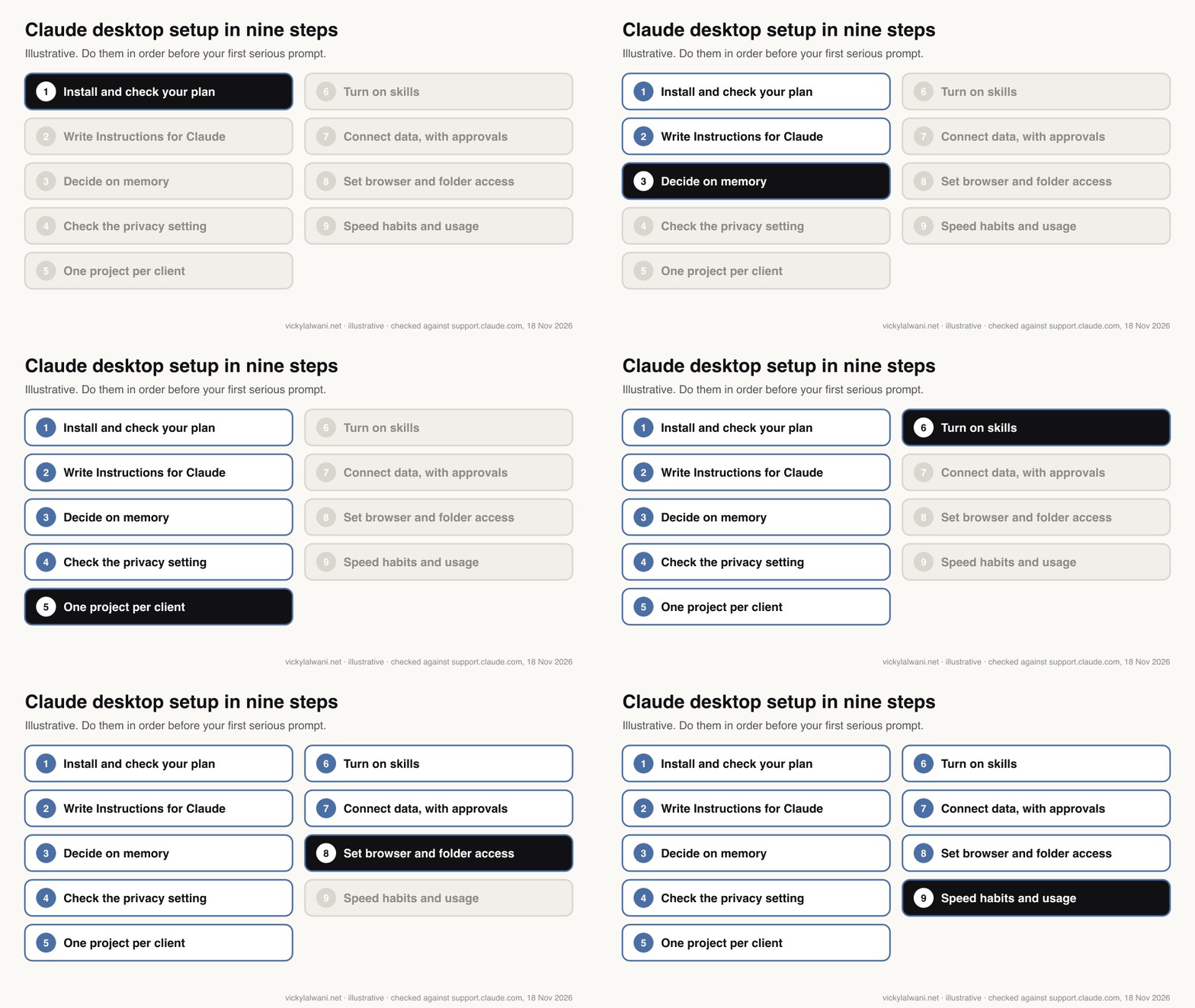
A Claude desktop setup guide for marketers in November 2026 covers nine steps before your first serious prompt: install the app and check your plan, write Instructions for Claude, decide on memory, check the privacy setting, make one project per client, turn on skills, connect data with approval on write tools, limit browser and folder access, and build speed habits such as Quick Entry.
TL;DR
Set Claude up before your first serious prompt. In the November 2026 desktop app that means nine things, in this order: install and check your plan, write Instructions for Claude, decide on memory, check the privacy setting, make one project per client, turn on skills, connect your data with approvals, set browser and folder access, and build a few speed habits.
Several settings moved in 2026. Instructions and memory now sit in Settings, then Your Claude. Connectors and skills sit under Customize. Desktop extensions sit in Settings, then Desktop app. Chat and Cowork are merging into one conversation, so Cowork's global instructions now live inside Instructions for Claude.
For marketers, the two settings that matter most are connector tool permissions (set anything that can send, edit or spend to ask first) and the permission mode in the message box (Manual for client accounts).
Short answer: a good Claude desktop setup takes about an afternoon. Install the app, tell Claude how you work in Instructions for Claude, give each client its own project, add the skills you repeat, connect your data with approval on every write action, and only then start prompting. The order matters, because each step makes the next one more useful.
I lost months using Claude the wrong way: open a chat, type a prompt, copy the answer, repeat tomorrow. Results only became consistent once the setup came first. This guide is the setup checklist, updated for the Claude desktop app as it stands on 18 November 2026, with every menu path checked against Anthropic's help centre that day.
It does not explain what the rebuilt app is or what each feature does. For that, read what changed in the Claude desktop app for marketers. If you would rather have the whole setup done for you or your team, that is what my Claude consultant service covers.
Step 1: which plan and computer do you need for the Claude desktop app?
Short answer: any plan can install the app on macOS 13 or later, Windows 10 or later, or Linux (beta). Chat works on Free. The Code tab, Cowork tasks, scheduled tasks and Claude in Chrome need a paid plan: Pro, Max, Ultra, Team or Enterprise.
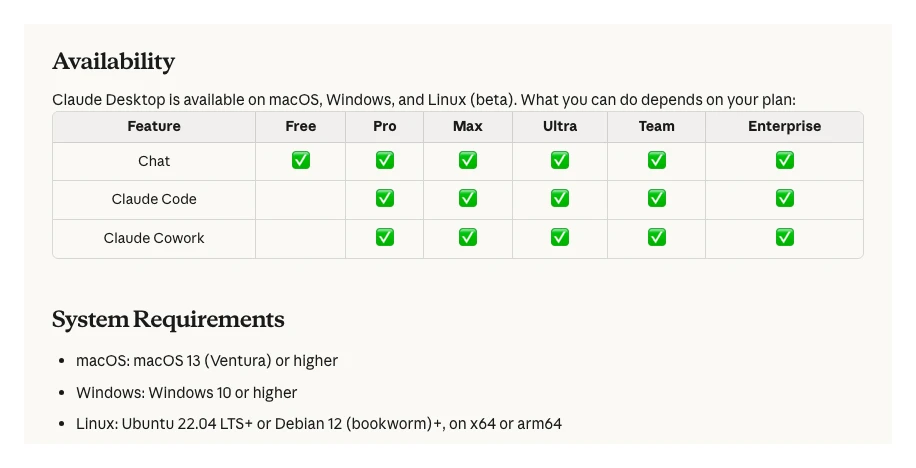
Download from Claude's downloads page and sign in. On Linux, Anthropic recommends installing from its apt repository so updates arrive with your normal system updates; the Linux app has no computer use or dictation yet.
One setting to leave alone: Settings, then Desktop app, then Release channel. Stable is the default. Latest gets a new version about once a day. Anthropic warns that switching back from Latest does not roll you back, and that you can miss Stable fixes until a newer Stable version arrives. For a work machine, stay on Stable.
| Need | Free | Pro, Max, Ultra |
|---|---|---|
| Chat, projects, skills, memory | Yes (5 projects) | Yes |
| Connectors | Yes (1 custom) | Yes |
| Search past chats | No | Yes |
| Code tab and Cowork tasks | No | Yes |
| Scheduled tasks | No | Yes |
| Claude in Chrome | No | Yes |
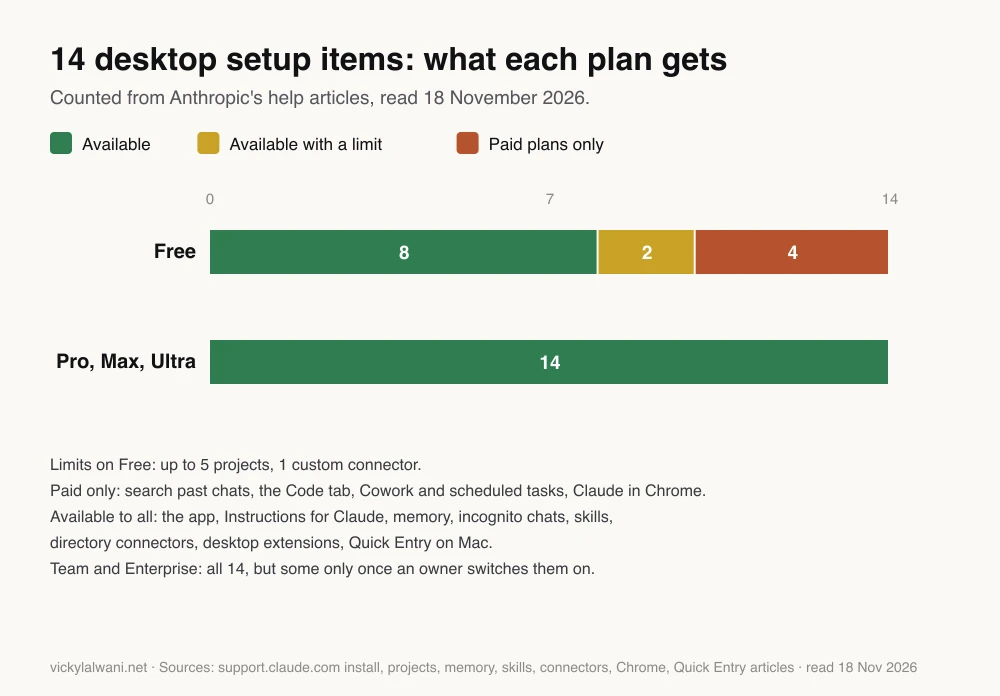
If you do client work most days, a paid plan is the realistic starting point. Prices are on Claude's pricing page.
Step 2: what should you put in Instructions for Claude?
Short answer: how you work, not who you are. Add your role, the markets you work in, your spelling, the format you want answers in and the things you dislike in AI writing. It lives in Settings, then Your Claude, then Instructions, and applies to every conversation.
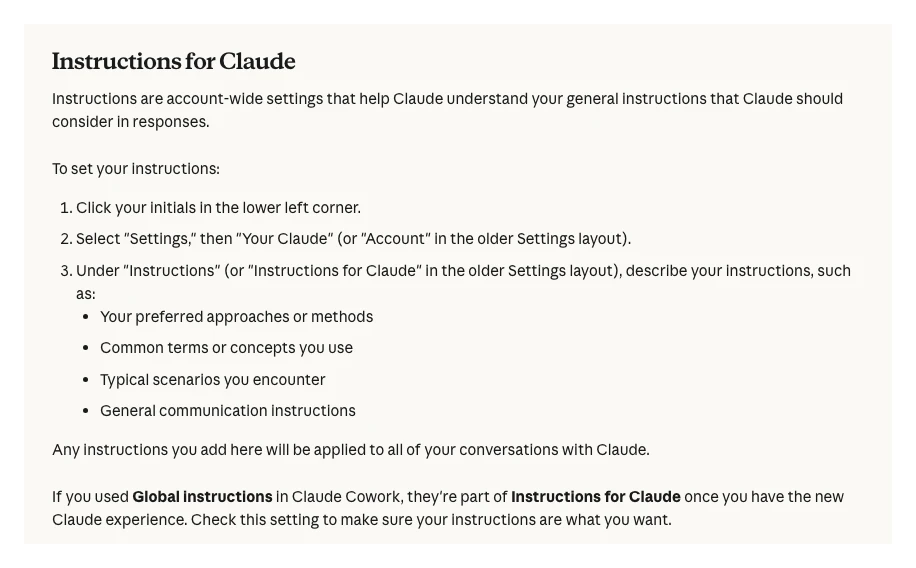
The older layout called this Settings, then Account. If you used Global instructions in Cowork, Anthropic says they become part of Instructions for Claude once your account has the merged experience, so read them again after the switch.
Keep it short. A thread on r/ClaudeAI found that one line asking for concise answers cut response length a lot, and that long lists of rules get diluted. Something like this is enough to start:
I am a [role] working on SEO and Google Ads for [type of clients] in [market].
Use [British/American] spelling. Answer first, then the reasoning, in short paragraphs.
When facts about Google Ads, Search Console or GA4 matter, say if you are unsure or if a feature may have changed.
Never invent numbers. Label any example figure as an example.
Before a long task, ask me up to three clarifying questions.
Avoid filler openings, hype words and closing summaries.
The clarifying questions line is the habit from the original version of this checklist, and it still earns its place: asking for clarifying questions first surfaces missing context before Claude writes anything. For a deeper version of this step, see how to train Claude on your writing style.
Step 3: should you turn memory on?
Short answer: yes for your own work, with care for client work. Memory is on by default on Free, Pro, Max and Ultra. Each project keeps its own memory, and you can switch memory off for a single chat before the first message.
The memory article lists three controls in Settings, then Your Claude (Settings, then Memory, in the older layout):
| Control | What it does | Marketing use |
|---|---|---|
| Generate memory from chats | Saves topics as you chat | Keep on for your own work |
| Search and reference chats | Finds past chats (paid plans) | "What did we decide on brand terms?" |
| Pause or Reset memory | Stops use, or deletes everything | Reset cannot be undone |
| Memory off for one chat | "+" in the message box, before sending | One-off sensitive exports |
| Incognito chat | Not saved to history | Quick tests you do not want kept |
Project memory is the useful part for client work. Anthropic says Claude uses a project's memory with your general memory, but not memory from other projects. So client A's details stay out of client B's project, as long as you keep each client in its own project (step 5).
Step 4: which privacy setting should you check?
Short answer: on a Free, Pro or Max account, open Settings, then Privacy, and decide on "Help improve our AI models". Turning it off stops new chats and coding sessions being used for future training. Team and Enterprise are covered by commercial terms instead.
Anthropic's privacy article is clear on what the switch does: it applies to new chats, not to training that has already happened, and chats flagged by safety classifiers may still be used for safety work. If you paste client exports into a personal plan, check this switch and your client contracts before you do. This is not legal advice; ask your own adviser about client data.
Step 5: how should you organise projects for clients?
Short answer: one project per client, with that client's instructions and files inside it. Name chats by service (SEO, Google Ads, reporting) so they are easy to find. Free plans allow five projects; paid plans also get larger project knowledge.
This is how I organise my own work: one Claude project per client, threads named by service, and skills kept in one known place. A project holds its own instructions, files and memory, so every chat inside it starts with the context already loaded. The original checklist called this "Projects, not chats", and that still holds.
Two November 2026 details. Paid plans switch project knowledge to retrieval when files near the context limit, which Anthropic says expands capacity by up to ten times. And a new version of projects is in beta, starting in the Code tab, where one project runs parallel threads in the cloud. If your projects move, Anthropic says instructions, files, history and scheduled tasks come with them.
Project instructions for [Client]:
Client: [what they sell], market: [country], main goal: [leads/sales].
Ad accounts and sites: [names only, no logins].
Brand terms we never exclude: [list].
Competitors: [list]. Words the client dislikes: [list].
Default output: a short summary first, then a table, then next steps for a person to approve.
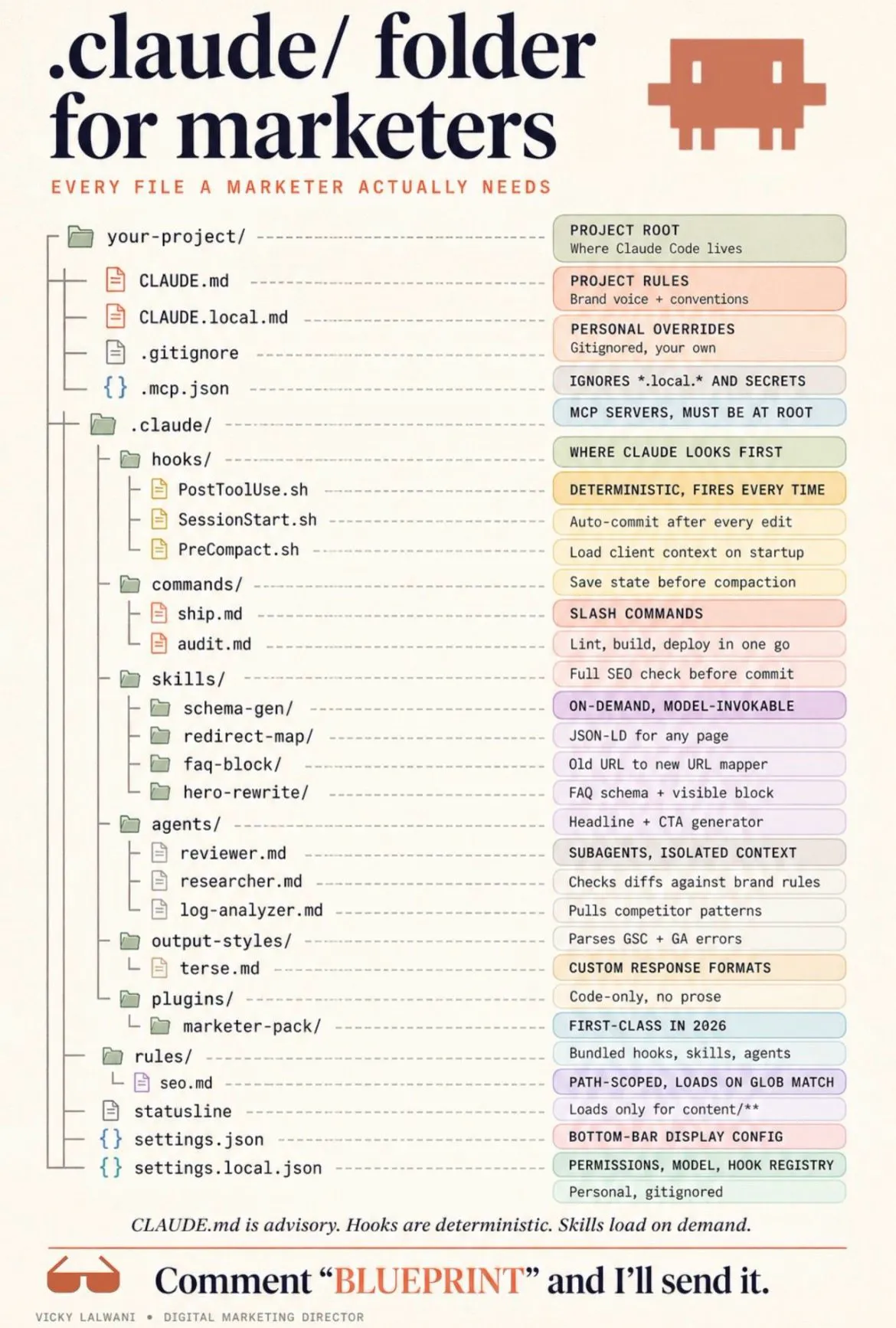
For a fuller folder structure around projects, see Claude folder setup for marketers.
Step 6: how do you turn on skills?
Short answer: switch on file creation in Settings, then Capabilities (called "Create and edit files" in the updated layout), then open Customize, then Skills. Anthropic's Excel, Word, PowerPoint and PDF skills work automatically; your own skills are uploaded as a ZIP.
A skill is a written method for a task you repeat, such as a weekly search terms review or a page brief. A prompt works once; a skill works every time and improves when you refine it. Anthropic's skills article says skills work on every plan, need code execution switched on, and on Team and Enterprise can be shared with colleagues or published to the organisation.
Start with one skill for the task you repeat most. For examples, see Claude skills for Google Ads.
Step 7: how do you connect your data safely?
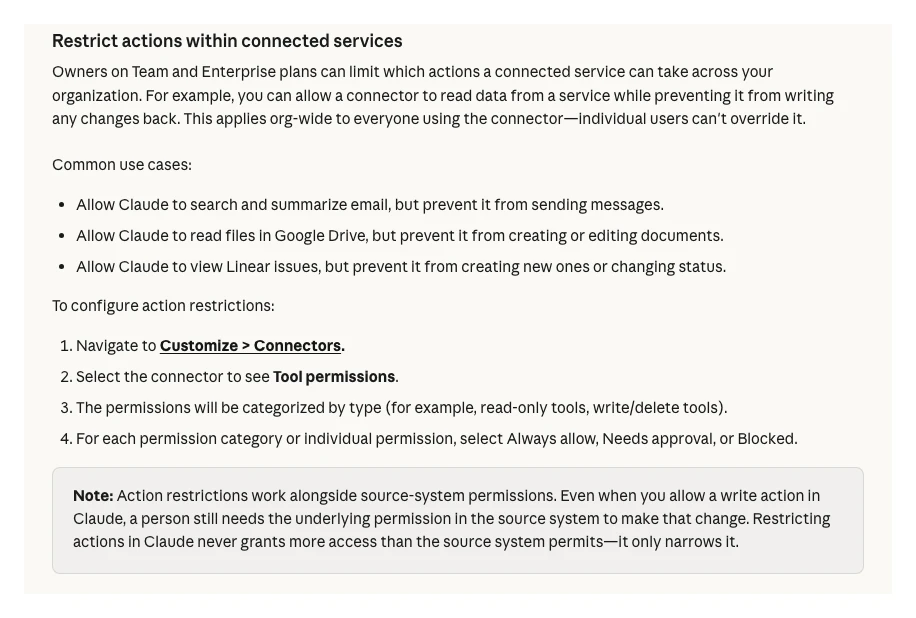
Short answer: add connectors in Customize, then Connectors, and set every tool that can send, edit or delete to ask first. Local tools come as desktop extensions in Settings, then Desktop app, then Manage next to Extensions.
Connectors are how Claude reads your Drive, CRM or SEO tools instead of you pasting exports. Anthropic's connectors article says Claude inherits each person's permissions in the connected service, so a connector signed in as an admin can reach everything an admin can.
| Type | Where | Use it for |
|---|---|---|
| Directory connector | Customize, then Connectors | Drive, Gmail, HubSpot, SEO tools |
| Custom connector | Customize, then Connectors, then Add | A remote MCP server URL |
| Desktop extension | Settings, then Desktop app, then Manage | Local files and local tools |
| Team action limits | Owners, in Tool permissions | Read-only for everyone |
The original checklist said to connect Search Console, analytics and research tools. That is still the goal, but connect one source, test it on a real question, then add the next. Google Ads, GA4 and Search Console have no Google-made connector in Claude's directory; my catalogue of Claude MCP connectors for marketing lists what exists and the routes around the gaps.
Step 8: how much browser and computer access should Claude get?
Short answer: as little as the job needs. Give Claude specific folders, not your whole drive. Use the browser only for public research at first. And for client accounts, set the permission mode in the message box to Manual, so Claude asks before each action.
Anthropic's merged experience article describes a permission setting in the message box. Auto is rolling out as the default on Pro, Max, Ultra and Team: Claude keeps working and runs automated safety checks before acting. Manual, the Enterprise default, asks before each action. Folders you grant are listed under Trusted folders in Settings, and by default Claude asks before permanently deleting files.
| Access | How to set it | My default |
|---|---|---|
| Folders | Grant a folder in a task | One working folder per client |
| Built-in browser | Cowork, nothing to install | Public pages only |
| Claude in Chrome | Connectors, then Configure | Off unless needed |
| Permission mode | Message box | Manual on client work |
| Connector tool | Set to Always ask | Anything that sends or edits |
One r/ClaudeAI thread from 5 November 2026 is a useful warning: a user found the desktop app could list folder names outside the folder they granted. The replies advise testing limits yourself rather than trusting the model's own account of them. Claude in Chrome is disabled per conversation by default, which is the right default to keep.
Step 9: which habits make the setup pay off?
Short answer: open Claude with Quick Entry on a Mac (double-tap Option), choose the model per task, start a fresh conversation with a better brief instead of piling on follow-ups, and check Settings, then Usage, weekly.
- Quick Entry. On Mac, double-tapping Option opens Claude from any app, and Caps Lock starts dictation. Change it in Settings, then Desktop app (Quick Entry article).
- Model per task. Use the model picker in the message box. A stronger model for planning and analysis, a lighter one for routine drafts. That matches how I split work: one model plans, a separate run executes.
- Fresh start over follow-ups. The original checklist said to edit your first message rather than add follow-ups. In the merged experience, Anthropic lists branching from an earlier point as not available, so the cleaner move is a new conversation with a better brief.
- Watch usage. Long agentic tasks use more of your plan than quick questions. Settings, then Usage, shows where you stand.
Where did each setting move in 2026?
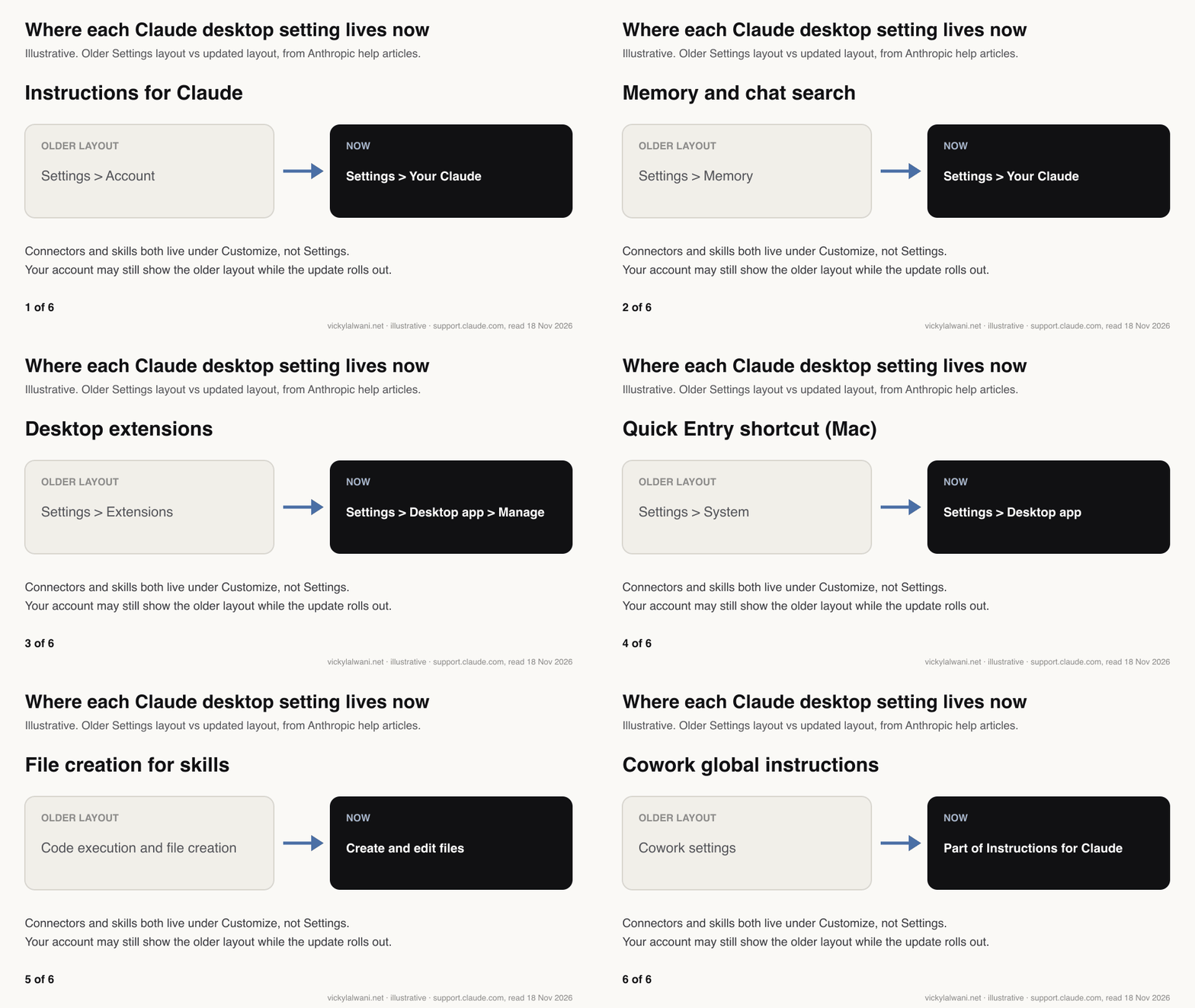
Short answer: personal settings moved into Settings, then Your Claude; app settings into Settings, then Desktop app; connectors and skills into Customize. Accounts still on the older layout see the old names until the update reaches them.
| Setting | Older layout | Now |
|---|---|---|
| Instructions for Claude | Settings, Account | Settings, Your Claude |
| Memory and chat search | Settings, Memory | Settings, Your Claude |
| Desktop extensions | Settings, Extensions | Settings, Desktop app, Manage |
| Quick Entry shortcut | Settings, System | Settings, Desktop app |
| File creation toggle | Code execution and file creation | Create and edit files |
| Web search toggle | In the chat | Gone: Claude searches when useful |
A first week with the setup
Short answer: spread it over five short sessions so each step is tested on real work before the next one goes in.
| Day | Do | Test it with |
|---|---|---|
| 1 | Install, Instructions, privacy | A short client email draft |
| 2 | One project for your main client | A question that needs its files |
| 3 | One skill for a weekly task | Last week's real data |
| 4 | One connector, writes on ask | A real question about that data |
| 5 | Review and tidy | Ask Claude what is missing |
Videos worth watching
Short answer: Anthropic's own short videos show the merged chat and Cowork experience, computer use and Claude in Chrome. They are under two minutes each except the computer use one.
Made by Anthropic's Claude channel, 16 September 2026. It sells nothing beyond Claude itself. Shows one conversation handling quick questions and bigger tasks.
Made by Anthropic's Claude channel, 12 August 2026. It sells nothing beyond Claude itself. Shows Claude in Chrome reading, clicking and filling forms with your skills and connectors.
| Video | Channel | Date | What it covers |
|---|---|---|---|
| Claude Cowork and chat are now one Claude | Claude | 16 Sep 2026 | One Claude for quick questions and bigger tasks, pulling in what each task needs |
| Put Claude to work on your computer, from anywhere | Claude | 23 Mar 2026 | Computer use on your desktop, plus sending tasks from your phone |
| Claude Cowork is now your Chrome side panel | Claude | 12 Aug 2026 | Claude in Chrome reads, clicks and fills forms, with your skills and connectors |
| What are skills? | Claude | 26 Feb 2026 | Teach Claude a task once and it applies it when relevant |
| Getting started with projects in Claude.ai | Anthropic | 2 Dec 2025 | Setting up a project with persistent context and custom instructions |
| Claude Desktop Tutorial: How to Use Claude Beyond the Basics (Web vs Desktop) | AI Master | 4 Jul 2026 | Web versus desktop, with connectors and skills; sponsored, and recorded before the chat and Cowork merge |
What people say on X and Reddit
Short answer: official posts explain the merge and what carried over; Reddit users focus on where instructions now live, how short profile instructions should be, and testing folder access yourself.
Paraphrased, dated and labelled. Reddit is credited by community, not by user.
| Account | What they said | Type | Link |
|---|---|---|---|
| @claudeai (official) | Cowork and chat merge into one Claude that keeps working after you close the laptop, rolling out to Pro and Max (16 Sep 2026) | Official | Post |
| @claudeai (official) | Your Cowork chats, projects, artifacts, connectors and skills carry over after the merge (16 Sep 2026) | Official | Post |
| An Anthropic staff account | The merge means no more choosing a product first, and slides, designs and docs without switching apps (16 Sep 2026) | Official | Post |
| An AI education creator | Before the merge you picked chat or Cowork up front; now there is one Claude and no choice to make (16 Sep 2026) | Opinion | Post |
| @claudeai (official) | Claude in Chrome sessions now carry over to desktop, web and mobile, with skills and connectors in the browser (12 Aug 2026) | Official | Post |
| @claudeai (official) | Memory reaches the free plan, with easier import of saved memories and export at any time (2 Mar 2026) | Official | Post |
| An AI creator account | Tip: import memory from another assistant in the desktop app settings; the menu path has moved since (3 Mar 2026) | First-hand | Post |
| @AnthropicAI (official) | Desktop extensions install local MCP servers in one click, with dependencies and setup handled (26 Jun 2025) | Official | Post |
| Community | What the thread found | Type | Link |
|---|---|---|---|
| r/ClaudeAI | The desktop app listed folder names outside any granted folder; replies say test it yourself and use a sandbox if isolation matters (5 Nov 2026) | First-hand | Thread |
| r/ClaudeAI | Chat or Claude Code in the desktop app? Replies: chat covers one-off work across files and connectors, Code adds CLAUDE.md and hooks (4 Nov 2026) | Question | Thread |
| r/ClaudeAI | After the merge, what replaces the CLAUDE.md that steered Cowork projects? Replies share workarounds and say a brand file has the same issue (25 Sep 2026) | Question | Thread |
| r/ClaudeAI | A user shares their profile instructions; replies say one line asking for concise answers cut length a lot, and long lists get diluted (17 May 2026) | Opinion | Thread |
| r/digital_marketing | How marketers use Claude: synthesis and competitor research, with Google Drive, Notion and ClickUp connected, but it does not know your campaign history (14 May 2026) | Question | Thread |
Where this checklist is weak
- Rollouts differ. The merged experience and the updated Settings layout reach accounts at different times, so your menus may still use the older names.
- No measurement. I have not timed a set-up workflow against an unset one. The case for setup first is practice, not a test.
- Linux and Windows. Quick Entry is documented for Mac. I have not checked the Windows and Linux menus by hand.
- Plans change. The plan table reflects Anthropic's help articles on 18 November 2026.
Want your Claude setup done for you?
The nine steps are simple, but getting the instructions, projects, skills and connector permissions right for a whole team takes time. As a Claude consultant, I set this up around your real SEO, Google Ads and reporting work, with approvals on anything that sends or spends. Rates are on the pricing page. If the work you want Claude to support is the ad account itself, see Google Ads management.
Keep reading: what changed in the Claude desktop app, Claude folder setup for marketers, Claude MCP connectors for marketing and Claude skills for Google Ads.
Sources
| Source | What it supports | Date |
|---|---|---|
| Install Claude Desktop | Plans, requirements, Linux, release channel, extensions | Read 18 Nov 2026 |
| Personalisation features | Instructions for Claude, project instructions | Read 18 Nov 2026 |
| Chat search and memory | Memory defaults, project memory, controls | Read 18 Nov 2026 |
| Model improvement setting | Privacy switch and its scope | Read 18 Nov 2026 |
| What are projects | Free limit, retrieval, new projects beta | Read 18 Nov 2026 |
| Use skills in Claude | Enabling, uploading and sharing skills | Read 18 Nov 2026 |
| Connectors | Where to add, tool permissions, Free limit | Read 18 Nov 2026 |
| Desktop extensions | Installing local MCP servers | Read 18 Nov 2026 |
| Cowork and chat are one Claude | Merge, permission mode, moved settings, limits | Read 18 Nov 2026 |
| Claude in Chrome | Plans, setup, off by default per chat | Read 18 Nov 2026 |
| Quick Entry on Mac | Shortcut, dictation, settings path | Read 18 Nov 2026 |
| X posts and Reddit threads | Release dates, user experience | Listed in the tables above |
This article expands on my post on LinkedIn ↗.
FAQ
How do I set up the Claude desktop app?
Install it from Claude's downloads page on macOS 13 or later, Windows 10 or later, or Linux (beta), and sign in. Then write Instructions for Claude, decide on memory and privacy, make one project per client, turn on skills and add connectors with approval on write tools, in that order.
Is the Claude desktop app free?
Yes, the app is free to download and chat works on the Free plan. The Code tab, Cowork tasks, scheduled tasks, search of past chats and Claude in Chrome need a paid plan: Pro, Max, Ultra, Team or Enterprise.
Where are global instructions in the Claude desktop app?
They are called Instructions for Claude and live in Settings, then Your Claude, then Instructions (Settings, then Account, in the older layout). If you used Global instructions in Cowork, Anthropic says they become part of Instructions for Claude after the chat and Cowork merge.
Should I use Claude in the browser or the desktop app?
The browser is fine for quick questions. The desktop app adds desktop extensions for local tools, access to folders on your computer, Quick Entry on Mac and the Code tab, so it suits regular marketing work.
What is the difference between Claude projects and chats?
A chat stands alone, while a project keeps its own instructions, files and memory, so every chat inside it starts with that context. For client work, use one project per client so details from one client stay out of another.
How do I stop Claude sending emails or changing files without asking?
In Customize, then Connectors, set tools that send, edit or delete to Needs approval or Always ask, and set the permission mode in the message box to Manual. Claude also asks before permanently deleting files by default.
Where are desktop extensions in Claude?
Open Settings, then Desktop app, and select Manage next to Extensions (Settings, then Extensions, in the older layout). Browse the directory of Anthropic-reviewed extensions, or install your own .mcpb file under Advanced settings.
Does Claude use my chats for training?
On Free, Pro and Max accounts it can, if "Help improve our AI models" is on in Settings, then Privacy. Turning it off stops new chats and coding sessions being used for future training. Team, Enterprise and API use are covered by commercial terms.
How do I open Claude quickly on a Mac?
Use Quick Entry: double-tap the Option key from any app to open a Claude prompt, and press Caps Lock to dictate. You can change the shortcut in Settings, then Desktop app.