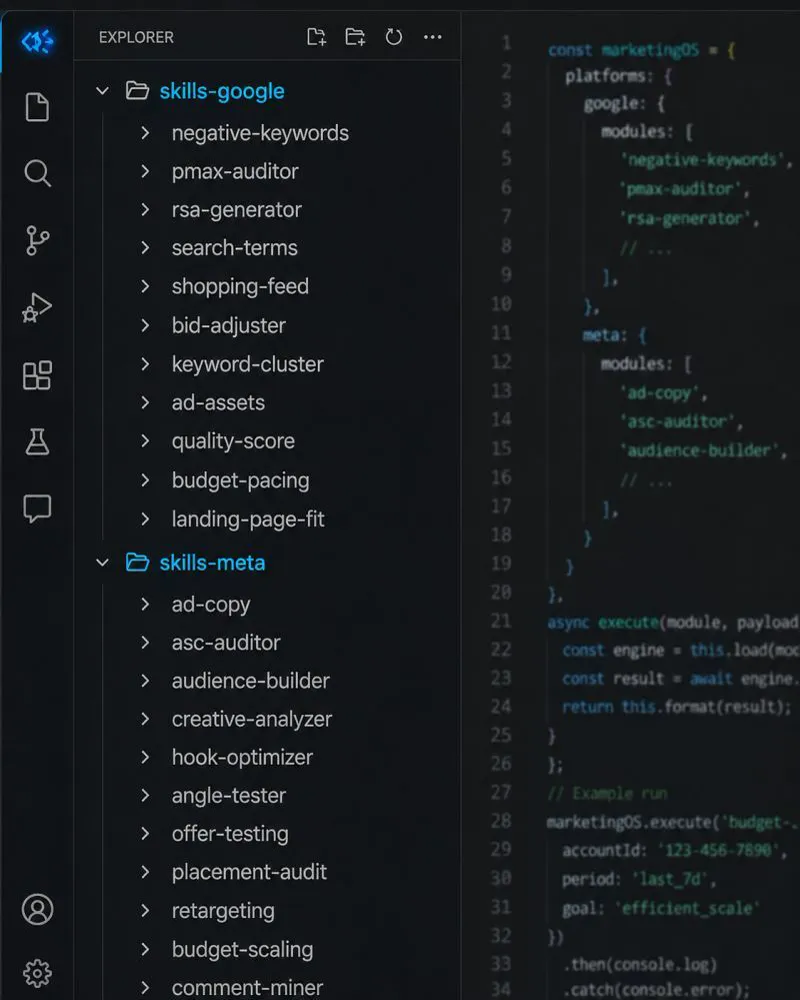
Claude skills for Google Ads are folders with a SKILL.md file that teach Claude one job, such as a search term audit. Upload them in Customize, Skills or place them in Claude Code, then run one a day on an export you already have. Idle skills cost about 100 tokens each.
You have written the perfect search term prompt three times this month, each time from memory, each time slightly different. A colleague wrote their own version, and the client got two standards. A Claude skill fixes that: you write the method once and Claude follows it every time. If you would rather have the skills built around your accounts, that fits within my Google Ads management work.
TL;DR
What a skill is: a folder with a SKILL.md file that teaches Claude one job, such as a search term audit. Claude loads only its name and description until a request matches, so you can keep many installed.
How to add one: zip the folder and upload it in Customize, Skills with code execution switched on, or place it in ~/.claude/skills/ for Claude Code. Skills are no longer set up through Project knowledge.
The routine: five skills, one a day: search terms Monday, wasted spend Tuesday, ads Wednesday, ROAS or CPA Thursday, anomalies Friday. Each one turns an export into a list you review.
New in 2026: Google publishes its own Google Ads API skills, including an account diagnostics skill, and Cowork can run skills on a schedule.
Jump to: What a skill is · Set-up · SKILL.md · Weekly routine · Ready-made skills · Troubleshooting · X and Reddit
A note on evidence. How skills work comes from Anthropic's help centre and developer docs; Google Ads rules come from Google Ads Help and Google's developer docs, all read on 17 November 2026 and linked. Practitioner views come from X and Reddit and are labelled. Where I write "I", it describes how I work in general. I do not share client names or results.
What is a Claude skill for Google Ads?
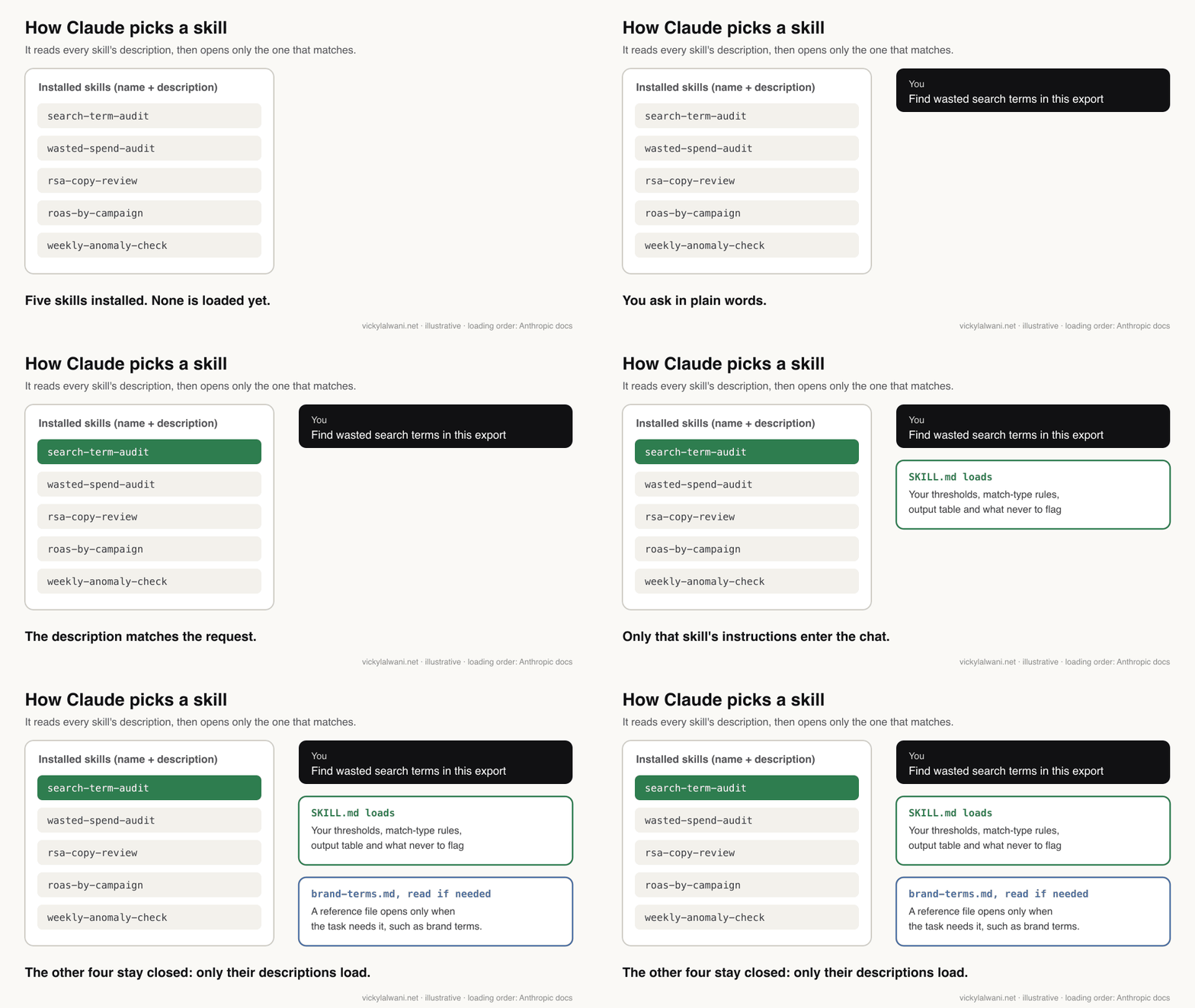
Short answer: a skill is a folder of instructions, with optional reference files and scripts, that teaches Claude one Google Ads job and how to do it your way. The folder must contain a SKILL.md file that starts with a name and a description. Claude reads the description to decide when the skill applies.
Think of it as a standard operating procedure Claude can find on its own. You do not paste it in. When you ask for something that matches the description, Claude reads SKILL.md and only then does its content enter the chat. Until that moment, each installed skill costs only its one-line description.
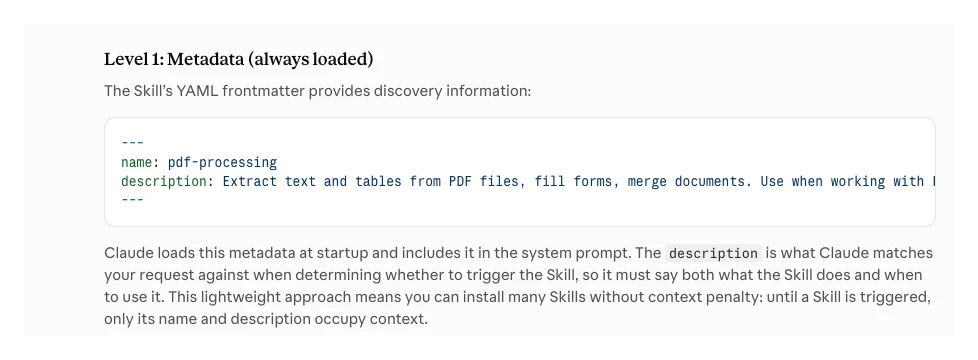
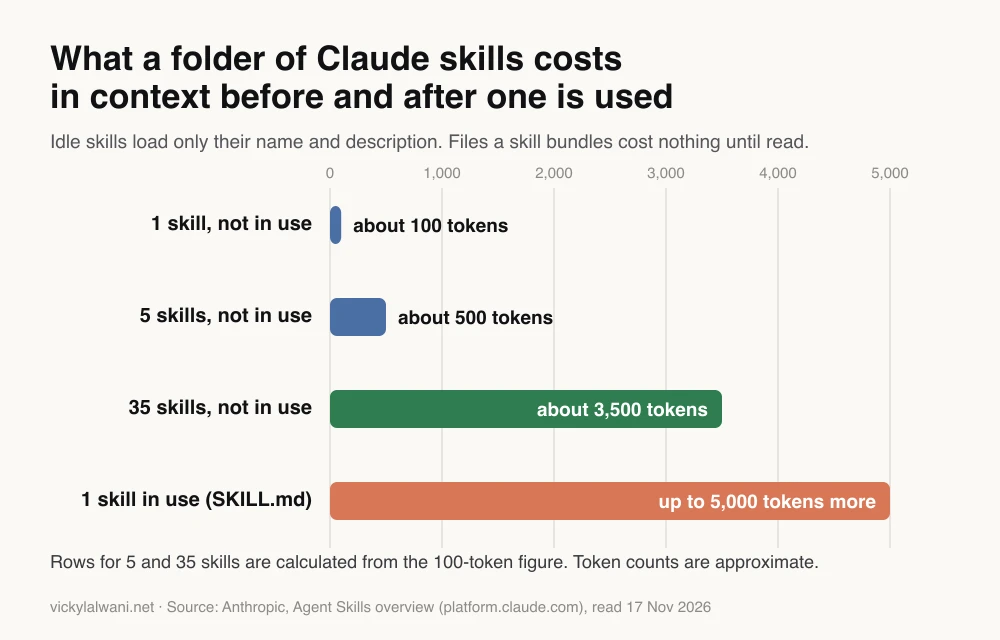
That is why a folder of 35 Google Ads skills is practical. Thirty-five idle skills cost about 3,500 tokens, a token being roughly a short word. The one you use adds up to 5,000 more. Reference files, such as your brand terms or a list of negative themes, cost nothing until the task needs them.
| Tool | What it holds | Loads when | Best for |
|---|---|---|---|
| Prompt | One request | You paste it | One-off questions |
| Skill | A method | Request matches | Repeated jobs |
| Project | Files and context | You open it | One client's data |
| Connector (MCP) | Live access | A tool is called | Fresh account data |
The four work together. I keep one Claude project per client, with threads named by service and skills kept in one known place. The project holds that account's context, the skill holds the method, and a connector or an export brings the numbers.
Why do skills work better than prompts for Google Ads?
Short answer: because the method stays the same whoever runs it and however tired they are. A prompt is retyped and drifts. A skill fixes the thresholds, the match type rules, the output table and the list of things never to flag, so the same export gets the same quality of review every week.
That matters most on a team. If you write strong prompts and a colleague does not, the client gets two standards. When you both run the same skill, the method is the same. On Team and Enterprise plans you can share a skill with colleagues or publish it to the organisation, and shared skills are view-only and update for everyone when you change them.
Skills also force you to write the method down. That is useful in its own right: most "the AI gave a bad answer" problems turn out to be "nobody wrote down what a good answer looks like".
How do you set up Claude skills for Google Ads?
Short answer: in the Claude apps, switch on code execution in Settings, Capabilities, then go to Customize, Skills, click +, choose Create skill and upload a ZIP of your skill folder. Skills are available on Free, Pro, Max, Ultra, Team and Enterprise plans. In Claude Code, place the folder in ~/.claude/skills/ for yourself or .claude/skills/ in a project.
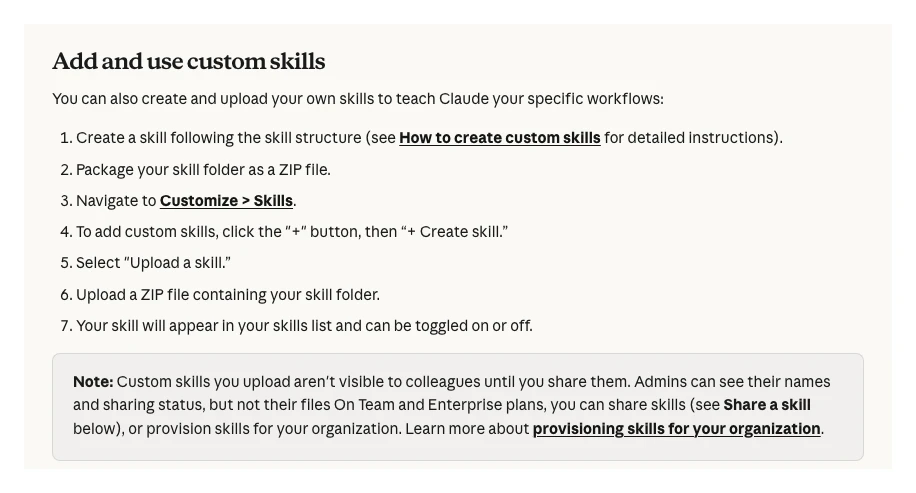
This replaces the older advice, including the first version of this article, to upload skills into Project knowledge. Files in a project are context, not skills, and Claude does not treat them as a method to trigger on its own.
| Where | How you add it | Who can use it |
|---|---|---|
| Claude apps | Upload ZIP in Customize, Skills | You, until shared |
| Team or Enterprise | Share or publish to org | People you choose |
| Claude Code | ~/.claude/skills/ or .claude/skills/ | You or the repo |
| Claude API | Skills API upload | The whole workspace |
Two details catch people out. Skills uploaded to the Claude apps now sync one way into Claude Code when you sign in with the same account, but skills uploaded through the API are separate and must be uploaded again on each surface. And if the Skills section is missing, code execution is usually off.
You do not have to write the first one by hand. You can ask Claude to draft a skill from a conversation, or, in Cowork on a Mac, record yourself doing the task for up to about 10 minutes and let Claude propose a skill from it. The guide to recording a skill covers that route.
What goes inside a Google Ads skill?
Short answer: a short description that says what the skill does and when to use it, then the method: inputs, rules, thresholds, output format and what never to do. Anthropic's docs set a 64-character limit on the name, lowercase letters, numbers and hyphens only, and the Claude apps allow 200 characters for the description.
Here is a starting SKILL.md for the Monday search term audit. Replace the bracketed parts with your own numbers.
---
name: search-term-audit
description: Audits a Google Ads search terms report. Use when the user pastes a search terms export or asks to find wasted search terms or new negative keywords.
---

# Search term audit

## Input
A search terms report with Search term, Campaign, Ad group, Match type,
Clicks, Cost, Conversions. Ask for it if missing. Ask for the date range.

## Rules
- Flag terms with cost above [threshold] and 0 conversions.
- If the range is shorter than our usual time to convert ([days]), say so
  and mark flags as "watch", not "cut".
- Never flag terms containing our brand or products: see brand-terms.md.
- Group flagged terms into themes. One negative per theme.
- Suggest exact or phrase match, never broad, for negatives.
- Flag converting terms that are not yet keywords as "promote".

## Output
Table: Theme | Negative | Match type | Campaign | Cost | Why
Then: terms to promote. Then: anything you were unsure about.

## Never
Do not change the account. This skill drafts; a person applies.
A few rules from Anthropic's authoring best practices make a big difference. Write the description in the third person and include the words people actually type, such as "search terms" and "negative keywords". Keep the SKILL.md body under 500 lines and move long lists, like brand terms, into a reference file one link away.
Keep each skill to one job. A skill written for offer copy will make page copy read like an advert if it is used for pages, because it does exactly what it was told. If two jobs share a step, give each its own skill and let them share a reference file.
Which five skills should you run each week?
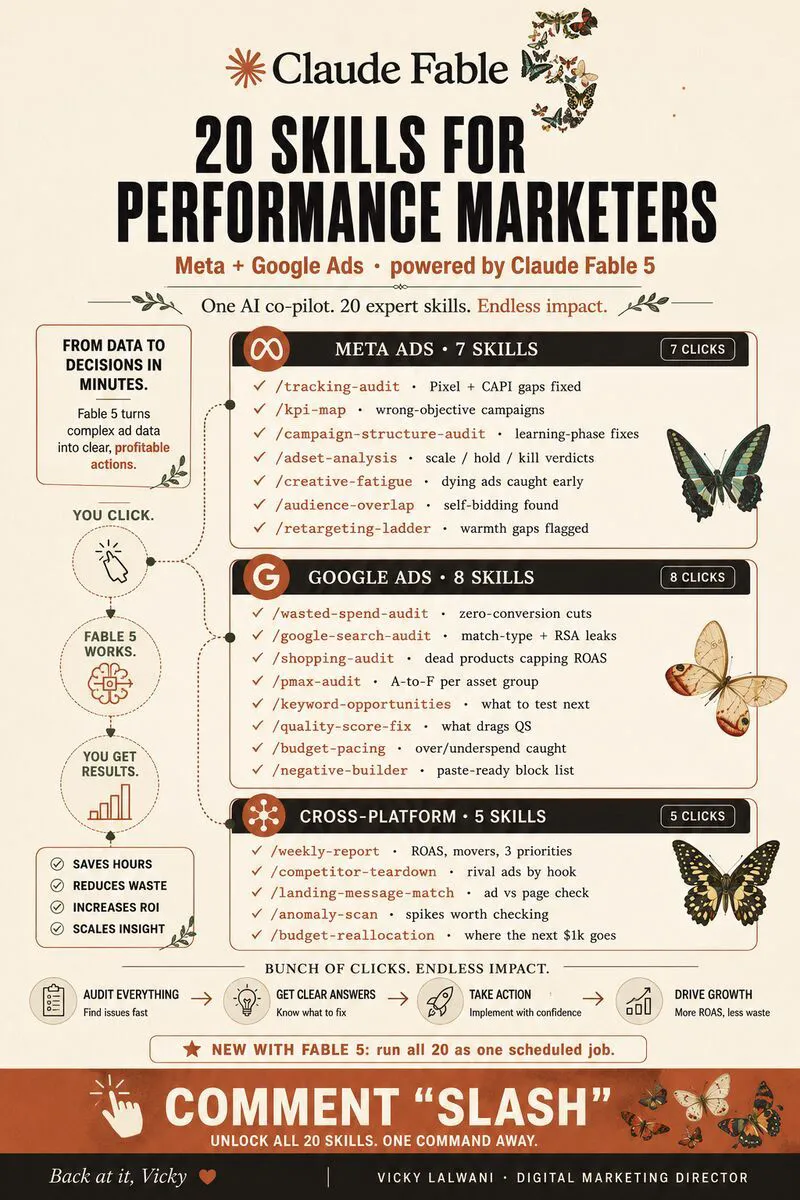
Short answer: one a day, each on an export you already have: a search term audit on Monday, a wasted spend audit on Tuesday, an ads and CTR review on Wednesday, ROAS or CPA by campaign on Thursday and an anomaly check on Friday. Together they cover most routine account health checks in about an hour a week.
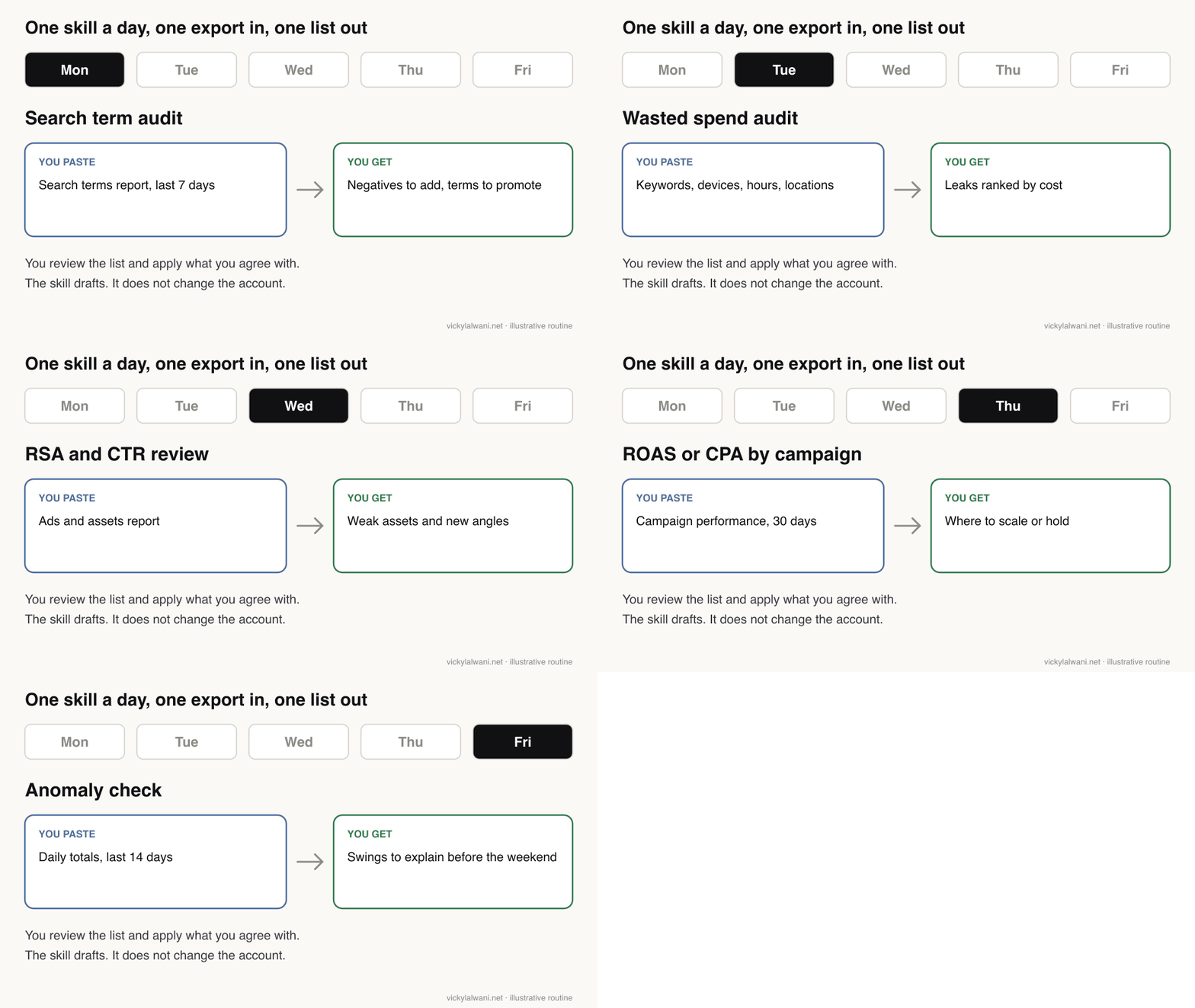
| Day | Skill | You paste | You get |
|---|---|---|---|
| Mon | Search term audit | Search terms, 7 days | Negatives, terms to promote |
| Tue | Wasted spend audit | Keywords, devices, hours | Leaks ranked by cost |
| Wed | Ads and CTR review | Ads and assets report | Weak assets, new angles |
| Thu | ROAS or CPA review | Campaigns, 30 days | Where to scale or hold |
| Fri | Anomaly check | Daily totals, 14 days | Swings to explain |
Always ask for the actions ranked by impact. It is a small instruction, but it turns a long report into a list you can act on. Keep the rest of your folder for when the situation calls for it: a campaign build skill for new launches, a full account audit monthly, and a bid strategy review when you change how you bid.
Once a skill runs well by hand, scheduled tasks in Cowork can run it for you, with your skills, connectors and plugins, even when your computer is asleep. Keep scheduled skills to drafting. What Claude may change without you is a separate decision, covered in Google Ads automation with Claude.
Are there ready-made Google Ads skills?
Short answer: yes. Google publishes three Google Ads API skills in its official skills repository: account diagnostics, MCP server set-up and an API quickstart. Anthropic's skills repository has examples and a skill for writing skills. Community folders exist too, but read every file before you install one.
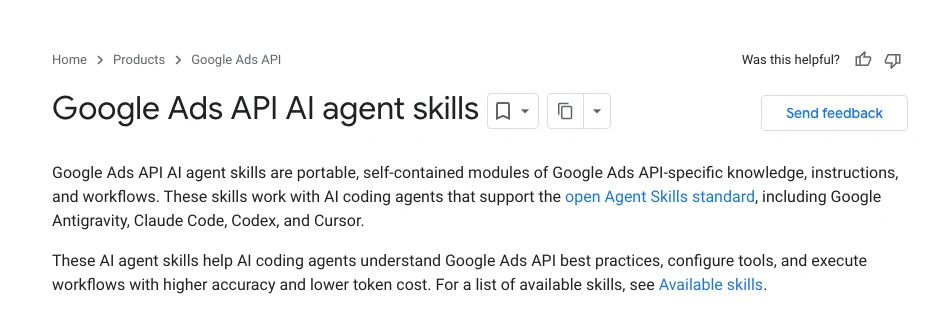
Google's diagnostics skill looks at problems such as lost conversions, low lead volume and impression share lost to rank or budget, using Google's Google Ads MCP server for live data. For Claude Code, Google gives one install command: npx skills add google/skills/skills/ads --agent=claude-code. These are built for developers, so expect some set-up.
Anthropic's advice on outside skills is blunt: use skills only from trusted sources, because a skill can tell Claude to run code or call tools. Its help centre names prompt injection and data exfiltration as the main risks. For a folder that will see your clients' account data, read every file, check any script, and look for instructions that send data to an outside address. The GitHub repos guide lists the better-known skill collections if you want to compare.
What should you check before you trust the output?
Short answer: anything that touches bidding, conversions or Performance Max. Skills speed up the review but do not know your sales cycle, your brand rules or what changed in the account yesterday. These five situations are where a quick human check saves the most.
Bid strategy changes
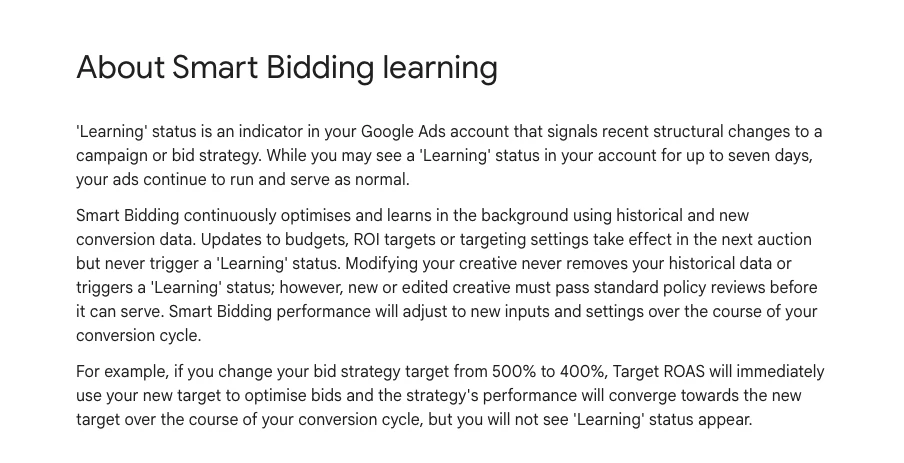
Smart Bidding is only as good as your tracking, so confirm conversions are firing before acting on any bidding suggestion. Then give it time. Google says the Learning status never lasts more than seven days, but recommends judging over two conversion cycles or two weeks, whichever is longer.
Keywords with zero conversions
A keyword can look dead because your date range is shorter than your sales cycle. A 14-day cycle judged on 7 days of data will mislead you. Put your usual time to convert in the skill, as in the SKILL.md above, so recent spend is marked "watch" instead of "cut".
Responsive Search Ad strength stuck
An RSA takes up to 15 headlines and 4 descriptions. Google says pinning can affect Ad Strength and suggests pinning two or three unique options per position if you must pin. Ask the skill to check pins before it writes new headlines.
Performance Max results that look too good
Check whether brand searches are inflating the numbers. Brand exclusions stop Performance Max serving on brands you list, including your own. Tell the skill whether exclusions are set before it reads ROAS.
A sudden overnight drop
Suspect tracking first, then change history. A broken tag or a site change can wipe out reported conversions in a day. Have the Friday skill ask "what changed?" before it suggests any bid move.
| Situation | Check first | Source |
|---|---|---|
| New bid strategy | Two cycles or 2 weeks | |
| Zero conversions | Time to convert | Your data |
| RSA strength | Pins per position | |
| PMax ROAS | Brand exclusions | |
| Overnight drop | Tags, change history |
Why does Claude ignore my skill?
Short answer: usually because the skill is switched off, code execution is off, or the description does not match how you asked. Anthropic's help centre suggests checking the toggle, making the description say clearly when to use the skill, and naming the skill in your request.
- Check the toggle in Customize, Skills, and that code execution is on.
- Rewrite the description with the words you type: "search terms", "negatives", "wasted spend".
- Name the skill the first few times: "Use search-term-audit on this export."
- Check the surface. A skill uploaded through the API will not appear in the app.
- Trim the body if Claude skips steps. Long, mixed instructions get followed loosely.
Output quality still depends on input. Ask a skill to audit an account with no data and you get generic advice. Hand it the search terms report and ask it to find waste, and you get specifics.
How do you make the routine stick?
Short answer: start smaller than feels necessary: one skill, at one fixed time, for two weeks. The common failure is not technical. People drift back to old habits after the first week, so add the second skill only when the first is a habit.
| Days | What to do | What to track |
|---|---|---|
| 1 to 30 | Search terms and waste weekly | Waste cut, CPA |
| 31 to 60 | All five days | Fixes applied per week |
| 61 to 90 | Share skills, write a one-page SOP | Same output, any person |
By day 90 the skills should produce the same review whoever runs them. That is the test. If two people get different answers from the same export, the skill is missing a rule, and the fix belongs in the SKILL.md, not in a cleverer prompt.
What people say on X and Reddit
Short answer: the official accounts sell skills as "your way of working, packaged"; users mostly ask why a skill did not trigger or was not followed. The useful pattern in the replies is the same every time: the description decides whether a skill runs.
On r/ClaudeAI, someone who uses Claude daily asked whether skipping skills was a mistake. The most useful replies made two points: a skill loads itself when the request matches, so you do not have to remember it, and on a team it is far easier to share and update than a prompt in a notepad. Others report a skill's output rule being ignored, and one user fixed skills that would not trigger by firming up the description.
A longer deep dive on the anatomy of a skill reached the same conclusion: the description is sent with every message, so it must be explicit. And in February 2026 users reported uploaded skills missing for a day, a reminder to keep your own copy of every skill folder.
On X, Anthropic's Claude account launched skills in October 2025 as packaged instructions, and said they work across the apps, Claude Code and the API. An Anthropic staff account explained that skills load on demand. In October 2026 the Claude account described a media company's team sharing skills through one company agent, the team use case in practice.
| Source | Date | Type | Point |
|---|---|---|---|
| r/ClaudeAI thread | Oct 2026 | Question | Why bother with skills |
| r/ClaudeAI thread | Mar 2026 | First-hand | Rule ignored |
| r/ClaudeAI thread | Jan 2026 | First-hand | Description fix |
| r/ClaudeAI thread | Dec 2025 | Analysis | Why skills do not trigger |
| r/ClaudeAI thread | Feb 2026 | First-hand | Skills missing for a day |
| Claude on X | Oct 2025 | Official | Skills launch |
| Claude on X | Oct 2025 | Official | Works across surfaces |
| Anthropic staff on X | Oct 2025 | Vendor | Loads on demand |
| Claude on X | Oct 2025 | Vendor | Early examples |
| Claude on X | Oct 2026 | Vendor | Team sharing skills |
Videos worth watching
Short answer: start with Anthropic's own short explainers, then one Google Ads specific walkthrough from a practitioner. The official videos explain the mechanics; the practitioner one shows the PPC use, though it may also promote the creator's own offers.
Anthropic's Claude channel, February 2026. A short explainer of what skills are. Nothing for sale beyond Claude itself.
Anthropic, October 2025. Walks through creating a custom skill. Nothing for sale beyond Claude itself.
| Video | Channel | Date | What it covers |
|---|---|---|---|
| What are skills? | Claude (official) | Feb 2026 | What skills are |
| Creating custom Skills with Claude | Anthropic (official) | Oct 2025 | Building one |
| Claude Agent Skills Explained | Anthropic (official) | Nov 2025 | Skills vs MCP, subagents |
| Claude Skills for Google Ads [Complete Guide] | PPC practitioner channel | Jan 2026 | Google Ads use |
| Claude Skills Explained in 23 Minutes | AI educator channel | Dec 2025 | Mechanics in depth |
Where this advice is weak
- Limits differ between Anthropic pages. The help centre gives 200 characters for a description; the developer docs give 1,024. Writing under 200 keeps you safe everywhere.
- Token figures are approximate. Anthropic gives about 100 tokens per idle skill and under 5,000 for instructions; the chart's 5 and 35 skill rows are my arithmetic.
- The routine is a starting point. An online shop may swap the Wednesday ads review for a product feed check. Keep the shape, change the jobs.
- Google's skills are developer tools. They assume the Google Ads API and MCP server, which take some set-up; I have not run them on an account for this article.
Want your Google Ads skills built and checked?
If you want a skill folder written around your accounts, your thresholds and your reporting, that fits within my Google Ads management. For rolling skills out across a team, see Claude consulting. Rates are on the pricing page.
Free guide: 35 Claude skills for Google Ads lists all 35 skills across seven clusters, with the exact request for each and fixes for common snags.
Keep reading: Google Ads automation with Claude, Claude Code PPC workflows, PPC audit with Claude and 30 GitHub repos for AI in business.
Sources
| Source | What it supports | Date | Link |
|---|---|---|---|
| Claude Help Center | Plans, upload, sharing, sync, risks | Read 17 Nov 2026 | Use skills |
| Claude Help Center | SKILL.md, 200 characters, recording | Read 17 Nov 2026 | Create skills |
| Anthropic docs | Loading levels, tokens, limits | Read 17 Nov 2026 | Overview |
| Anthropic docs | 500 lines, third person | Read 17 Nov 2026 | Best practices |
| Claude Code docs | Skills in Claude Code | Read 17 Nov 2026 | Skills |
| Claude Help Center | Scheduled tasks use skills | Read 17 Nov 2026 | Scheduled tasks |
| GitHub, Anthropic | Example skills | Read 17 Nov 2026 | anthropics/skills |
| Google for Developers | Google Ads API skills | Read 17 Nov 2026 | Agent skills |
| GitHub, Google | Skills repository | Read 17 Nov 2026 | google/skills |
| GitHub, Google Ads | MCP server | Read 17 Nov 2026 | google-ads-mcp |
| Google Ads Help | Learning, 2 cycles or 2 weeks | Read 17 Nov 2026 | Smart Bidding |
| Google Ads Help | 15 headlines, pinning | Read 17 Nov 2026 | RSA |
| Google Ads Help | Brand exclusions | Read 17 Nov 2026 | Brand exclusions |
| Google Ads Help | Change history, undo | Read 17 Nov 2026 | Account history |
| X, Reddit, YouTube | Practitioner views, videos | Oct 2025 to Oct 2026 | Linked above |
This article expands on my post on LinkedIn ↗.
FAQ
What is a Claude skill for Google Ads?
It is a folder with a SKILL.md file that teaches Claude one Google Ads job, such as auditing search terms. Claude reads the skill's description, loads the full instructions when your request matches, and follows the same method every time.
How do I add a skill to Claude?
Switch on code execution in Settings, Capabilities, then go to Customize, Skills, click the plus button, choose Create skill and upload a ZIP of the skill folder. In Claude Code, put the folder in ~/.claude/skills/ instead.
Are Claude skills free?
Skills are available on the Free plan as well as Pro, Max, Ultra, Team and Enterprise, according to Anthropic's help centre. They need code execution switched on. Your usage limits still apply when a skill runs.
Do Claude skills need a live Google Ads connection?
No. Most Google Ads skills work from a pasted export, such as a search terms report. For live data you can add Google's Google Ads MCP server, which Google's own diagnostics skill is built to use.
Does Google make official Google Ads skills?
Yes. Google publishes Google Ads API skills in its google/skills repository, including account diagnostics, MCP server set-up and an API quickstart. They are aimed at developers and install in Claude Code with one npx command.
Why does Claude ignore my skill?
Usually the skill is switched off, code execution is off, or the description does not match how you asked. Rewrite the description with the words you type, check the toggle in Customize, Skills, and name the skill in your request.
How many Claude skills can I install?
Anthropic's docs say you can install many skills without a context penalty, because each idle skill costs only about 100 tokens for its name and description. Thirty-five skills cost roughly 3,500 tokens before one is used, so a large folder is practical.
Which Google Ads skill should I start with?
A search term audit. Run only that skill at one fixed time, such as Monday morning, on last week's search terms export for two weeks. Add the next skill once the first is a habit.