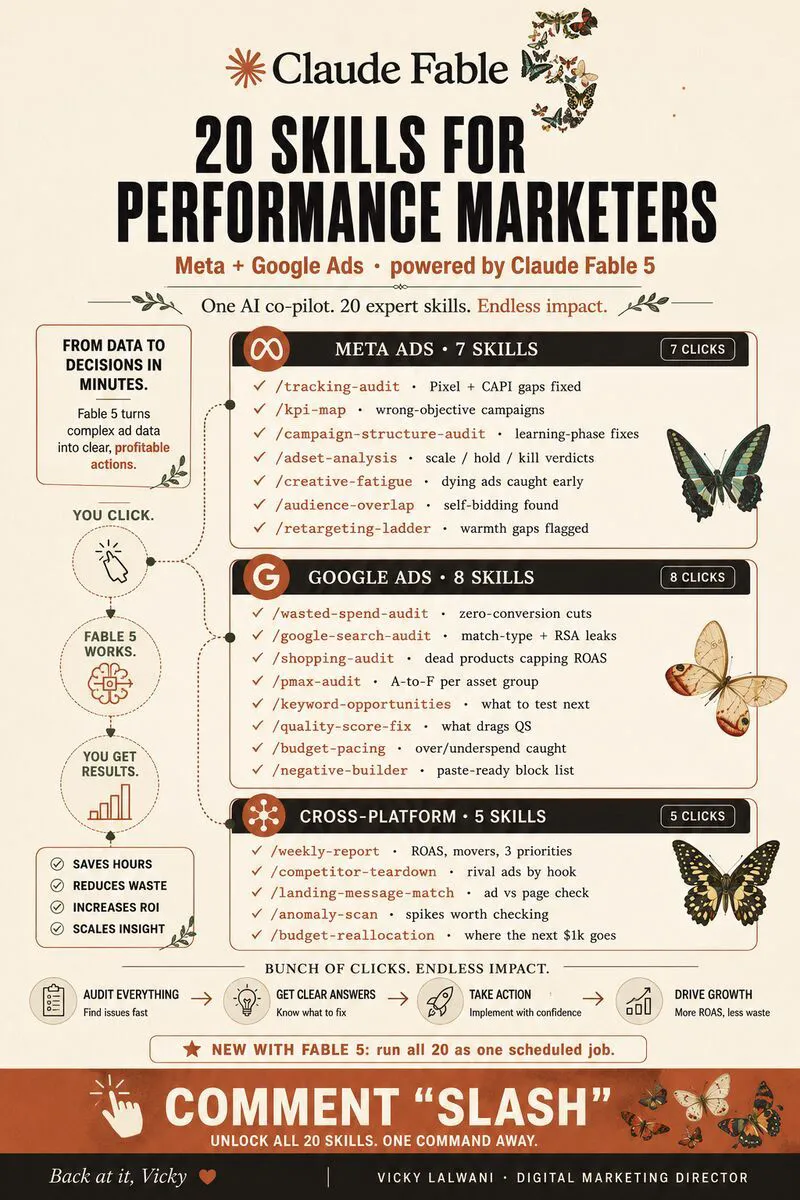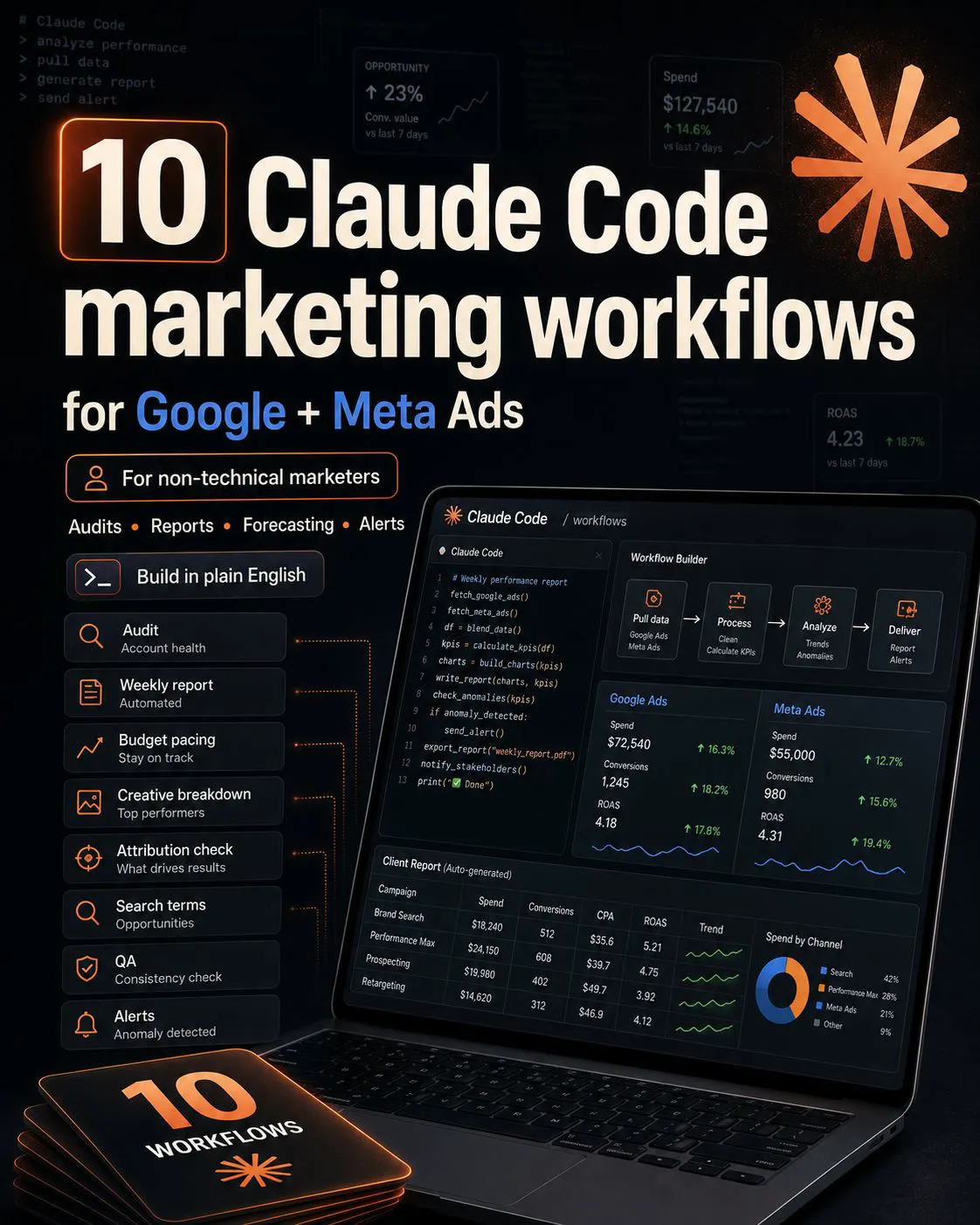
Claude Code PPC workflows turn weekly ad jobs into scripts you can rerun: audits, reports, budget pacing, negative keyword mining, tracking checks and alerts. Start with exports, move to Google Ads Scripts or the API, keep scripts read only until checked, and approve every budget or bid change.
You run Google and Meta ads, you are not a developer, and you are tired of rebuilding the same spreadsheet every Monday. Claude Code lets you describe a job in plain English and get a script you can rerun, check and keep. This guide covers the ten PPC workflows worth building, the data routes and limits behind them, and the settings that stop a script touching what it should not. If you would rather have them built for you, see my Google Ads management and AI automation services.
TL;DR
Claude Code writes and runs code in a folder you control. It works in the terminal, an IDE, the desktop app and the browser, and needs a paid Claude plan or an Anthropic Console account (Anthropic docs).
Start from exports, then scripts, then the API. A CSV export needs no setup. Google Ads Scripts run inside the account. The API needs a Google Cloud project with an approved access level.
Keep it read only until the output is right. Use Plan or Manual permission mode, deny access to credential files, and keep budget and bid changes as recommendations you approve.
Watch three quiet bugs: money in micros, date ranges that exclude today, and conversions versus all conversions (Google Ads API fields).
What is Claude Code, and why use it for PPC?
Short answer: Claude Code is Anthropic's agentic coding tool: it reads files, writes code and runs commands in a project folder. For PPC that means turning a weekly manual job into a script you can rerun, inspect and schedule. Most surfaces need a paid Claude plan or an Anthropic Console account.
Anthropic's overview lists the surfaces: the terminal, VS Code and JetBrains, the desktop app (its Code tab) and the web. The same project settings, instructions file and connectors work across all of them. You type what you want in plain English; you never have to write the code yourself, though you should understand what it does.
The difference from Claude Cowork in Google Ads is the output. Cowork does a task for you, often by clicking. Claude Code leaves you a script and a log, so next week's run is the same as this week's and you can see exactly what it did. For reporting and audits across many accounts, that repeatability is the point.
Made by Anthropic's Claude channel, published 5 May 2026. A short explainer of what the tool does; it promotes Claude itself.
Which data route should your scripts use?
Short answer: Start with exports you already download, because they need no setup and are easy to check. Move to Google Ads Scripts when you want the job to run inside the account, and to the Google Ads API when you need many accounts or Claude to query data directly. For Meta, use Meta's own ads connectors.
| Route | Setup | Can it change ads? | Watch for |
|---|---|---|---|
| CSV or sheet exports | None | No | Export format changes |
| Google Ads Scripts | Paste into the account | Yes, via code | 30-minute run limit |
| Google Ads API | Cloud project and OAuth | Yes, via code | Daily operation limits |
| Google Ads MCP server | Cloud project and OAuth | Assets and labels only | Not campaigns or bids |
| Meta ads connectors | Sign in and pick accounts | Yes, create and edit | Set governance rules |
Google Ads Scripts are JavaScript that runs inside Google Ads. Google's limits page says a single-account script stops after 30 minutes, and each account can hold 250 authorised scripts. Scripts can be scheduled hourly, daily, weekly or monthly, and preview mode lets you see changes before they happen. One catch: preview only simulates Google Ads changes, so emails and spreadsheet writes still run.
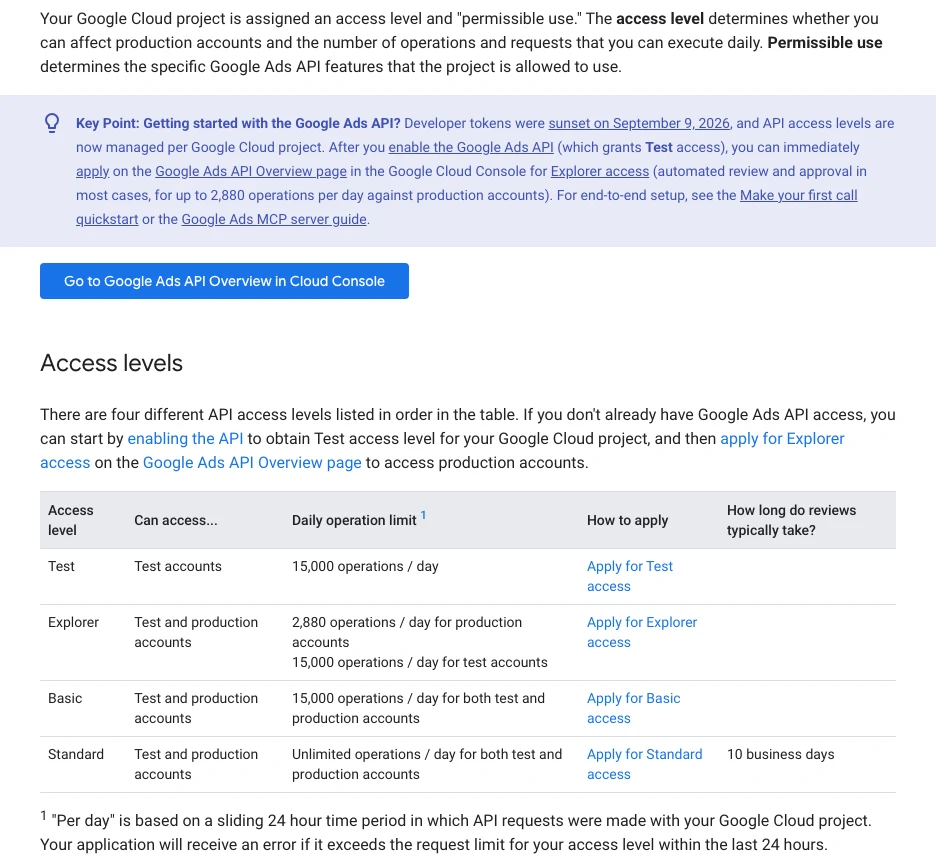
The API changed in September 2026. Google sunset developer tokens; access now belongs to the Google Cloud project you use for sign-in. New projects get Test access, then apply for Explorer, Basic or Standard. Older guides that start with "apply for a developer token in your manager account" are out of date.
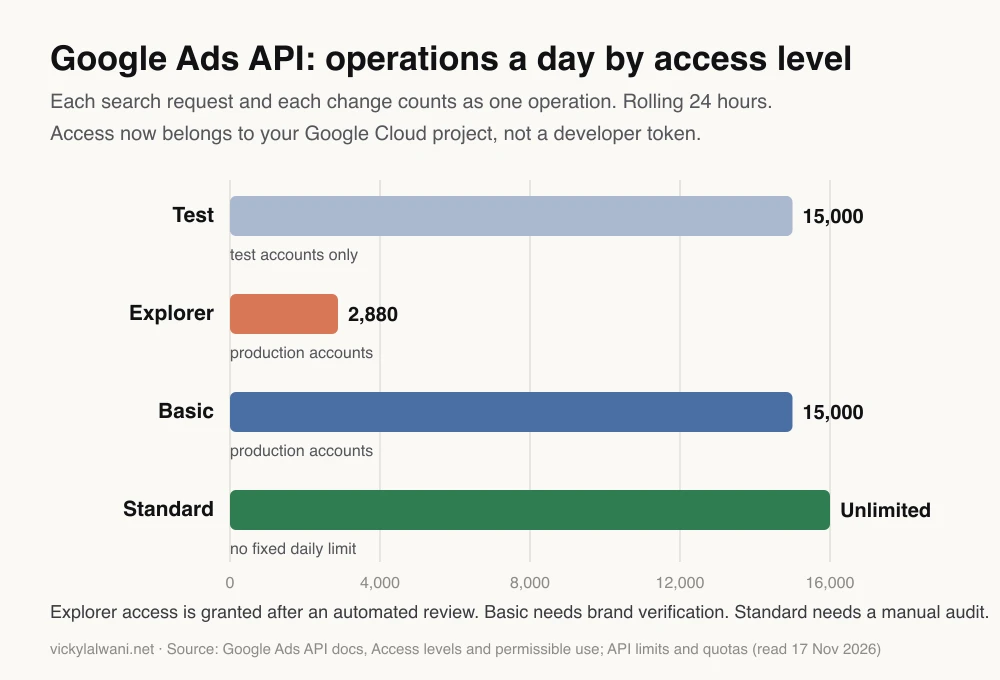
An operation is each search request plus each individual change, according to Google's quota page. A request with a valid page token is not counted, and failed requests with a Google Ads error are. For one or two accounts, Explorer's 2,880 a day is plenty for reporting; an agency running hourly checks across many accounts will need Basic.
On Meta, the ads AI connectors (an MCP server and a command line tool) went into open beta on 29 April 2026 and can create and edit campaigns, not only read them. A July update added rules that let the business portfolio owner limit what AI agents can change, from budgets to catalogues. Set those before you connect anything.
Which ten Claude Code PPC workflows are worth building?
Short answer: The ten that pay back fastest are: account audit, weekly report, budget pacing, creative breakdown, conversion reconciliation, search term overlap, negative keyword mining, landing page and tracking checks, competitor ad notes, and anomaly alerts. All ten can run read only; only two ever need to propose changes.
| Workflow | Input | Output | Risk |
|---|---|---|---|
| 1. Account audit | Exports or API | Findings in a sheet | Low |
| 2. Weekly report | Exports or API | Tables and a summary | Low |
| 3. Budget pacing | Spend to date, target | On track or off track | Low |
| 4. Creative breakdown | Ad-level data | Ranked ads | Low |
| 5. Conversion reconciliation | Ads data and CRM | Gaps and duplicates | Low |
| 6. Search term overlap | Search terms report | Terms in two campaigns | Low |
| 7. Negative keyword mining | Search terms report | Draft negatives | Medium |
| 8. Landing page and tracking QA | Final URLs | Broken pages, missing tags | Low |
| 9. Competitor ad notes | Ad library notes | Weekly digest | Low |
| 10. Anomaly alerts | Daily metrics | Same-day email | Medium |
1 and 2, audits and reports. Feed last month's data and ask for a findings sheet or a client-ready table. On client accounts my rule is audit first, put the findings in a sheet, check them by hand and change nothing before approval; Claude Code is very good at the first two steps. See PPC audit with Claude for the checks to include.
3, budget pacing. Compare spend to date with the monthly target and project the month end at the current daily rate. Flag anything more than a set percentage off. This is the most useful daily script for most accounts, and it never needs to change anything.
4, creative breakdown. Rank ads by cost per conversion and click-through rate, with a minimum click count so that small numbers do not top the list.
5, conversion reconciliation. Compare what Google Ads and Meta each report with the leads in your CRM, by week. When the platforms together claim more conversions than the CRM holds, you have double counting or a tracking fault. I reconcile tracked conversions against CRM leads on every account, and this script makes it a weekly habit. For the tracking itself, see Claude and Google Tag Manager setup.
6, search term overlap. List search terms that triggered ads in more than one campaign or ad group, so you can decide which one should own the term.
7, negative keyword mining. Flag search terms with spend and no conversions above a threshold you choose, grouped by theme. Output a draft list; you approve each negative.
8, landing page and tracking QA. Visit every final URL, record the status code and redirect chain, and check that your tag loads. Broken pages after a site update are common and expensive.
9, competitor ad notes. Review competitors in the Google Ads Transparency Center and the Meta Ad Library, save your notes or exports to the folder, and let Claude summarise what changed. Check each site's terms before automating collection.
10, anomaly alerts. Compare yesterday with the same weekday over recent weeks and email you when spend jumps or conversions drop past a threshold. Start with a loose threshold, or you will get an alert every day.
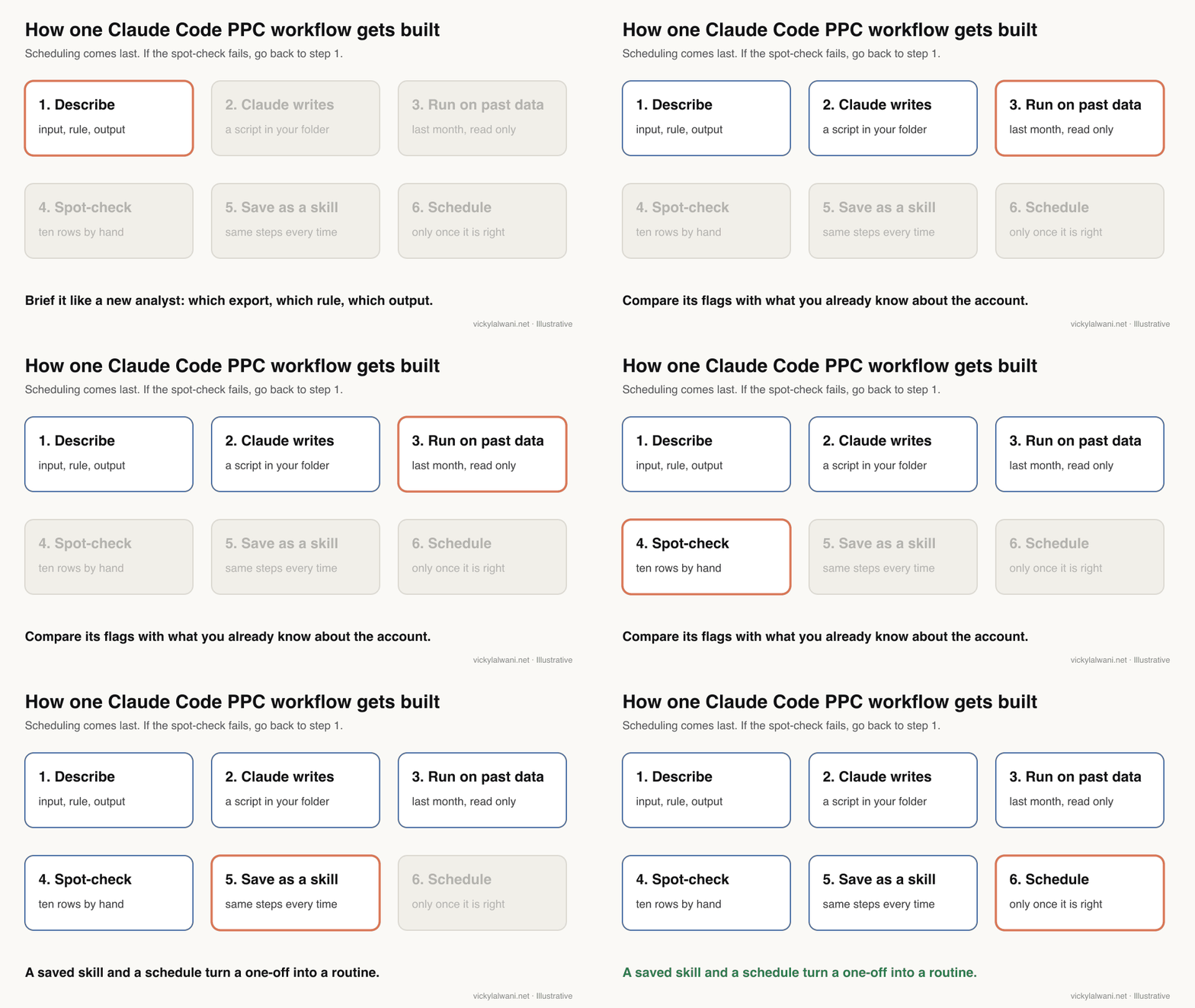
How do you build your first workflow?
Short answer: Pick a job that uses data you already export, brief Claude Code like a new analyst (input, rule, output), run it on last month, and check ten results by hand. Only when it matches what you know do you save it as a skill and schedule it.
Create one folder per account or client, with the exports in a data folder and a short instructions file saying what the account sells and what never to touch. Then open Claude Code in that folder and paste a brief like this:
Build a search term review script for this folder. Do not change anything in any ad account.

Input: data/search_terms_last_30_days.csv (Google Ads export). Columns I care about:
search term, campaign, ad group, match type, clicks, cost, conversions.

Rule:
1. Flag every search term with cost above [your threshold] and zero conversions.
2. Group flagged terms by theme (for example: jobs, free, DIY, wrong location).
3. Never flag terms that contain our brand name or these product words: [list].

Output:
- output/negatives_draft.csv with term, campaign, cost, clicks, theme, suggested match type.
- A short summary: how many terms were flagged and total cost, by theme.

Before you finish, print ten flagged rows so I can check them by hand,
and tell me any column you could not find.
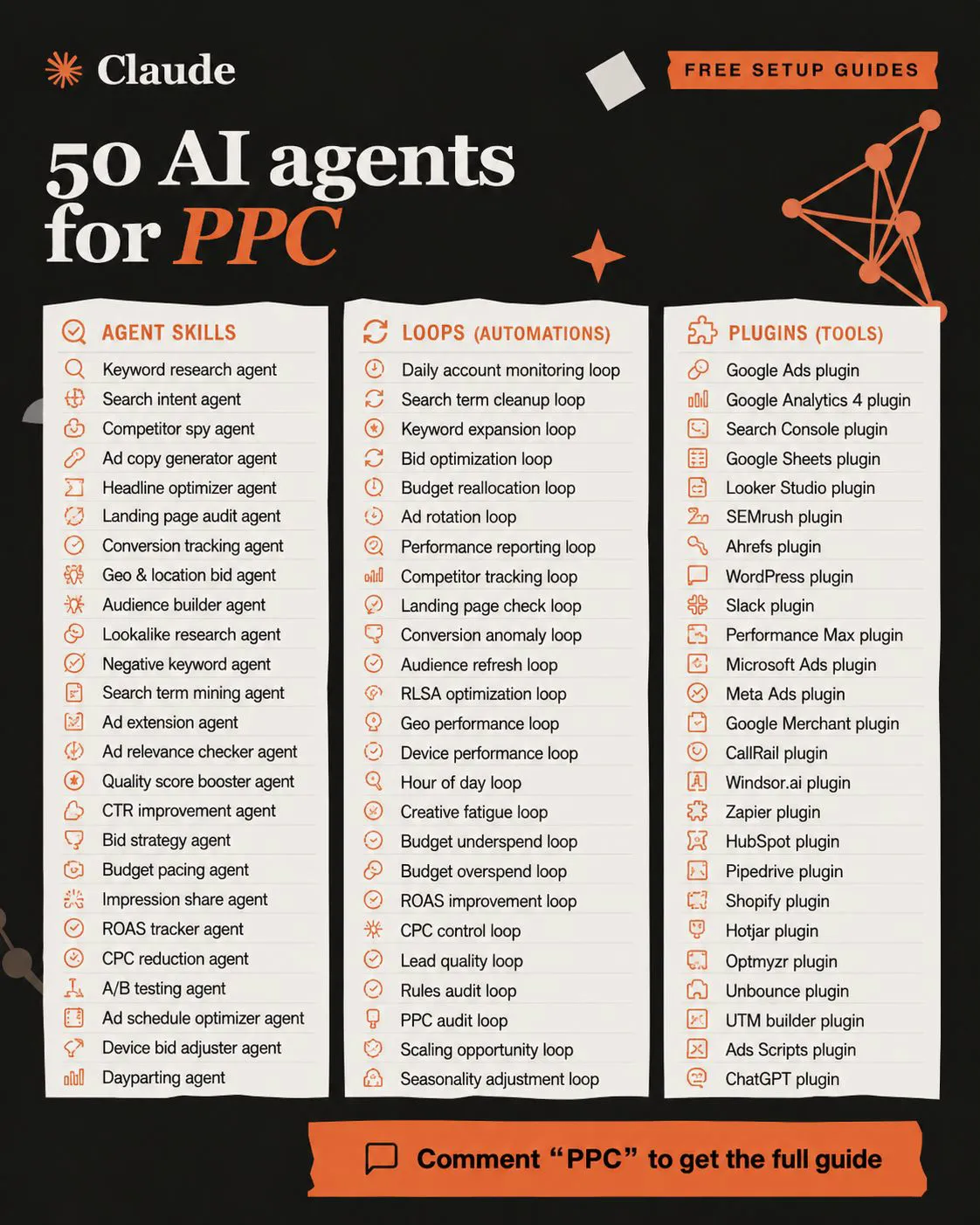
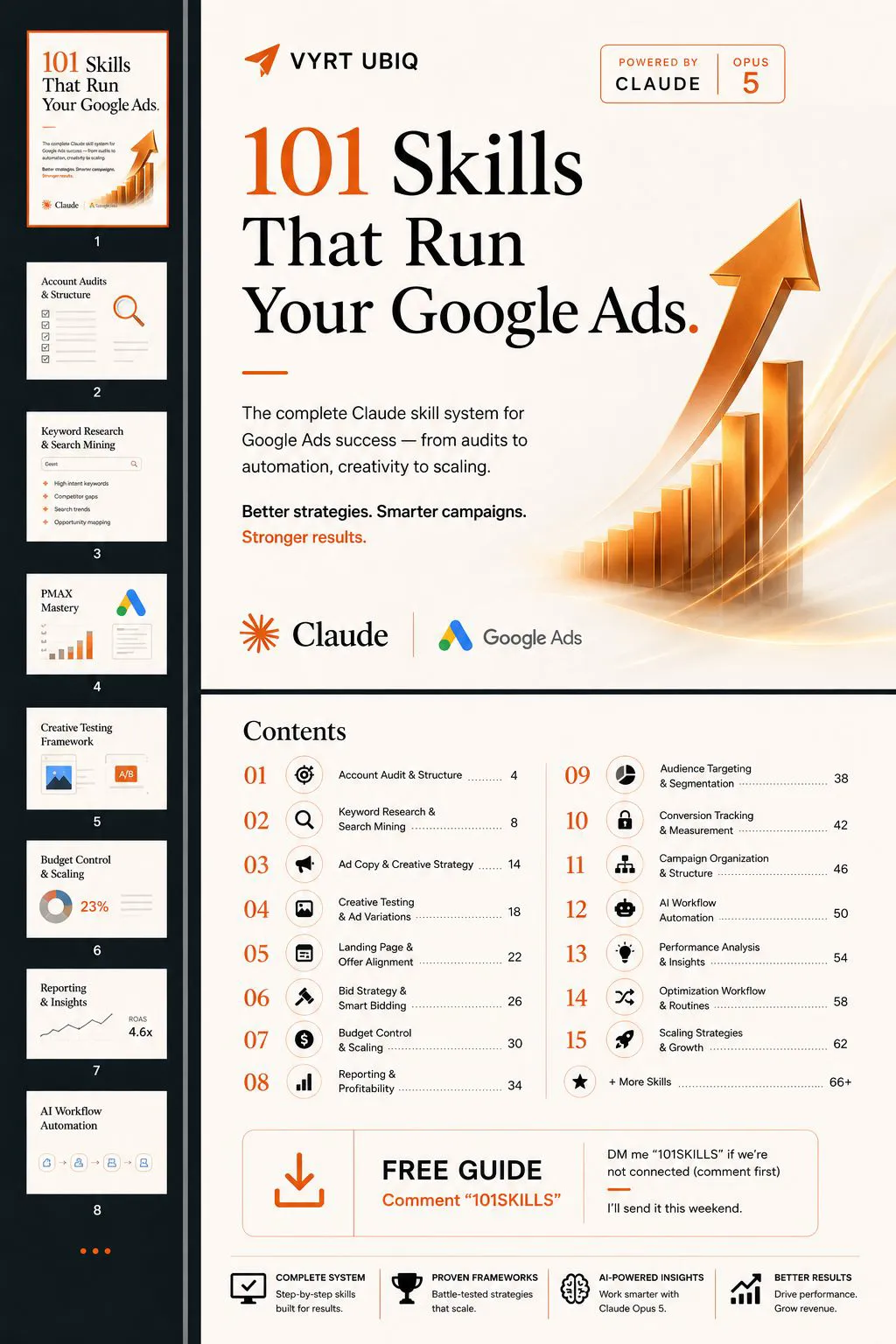
When the output is right three weeks running, ask Claude Code to turn the brief into a skill: a saved set of instructions it follows the same way each time. My free guide 35 Claude skills for Google Ads has versions of most of these workflows, and Claude skills for Google Ads shows how they fit a weekly routine.
Two more prompts worth keeping:
Budget pacing check, read only.
Input: data/spend_month_to_date.csv (campaign, date, cost) and data/targets.csv (campaign, monthly budget).
For each campaign: spend to date, daily average, projected month-end spend at the current rate,
and the percentage over or under target. Flag anything more than 10% off.
Output a table sorted by the biggest gap, and one sentence per flagged campaign.
Landing page and tracking QA, read only.
Input: data/final_urls.csv (campaign, ad group, final URL).
For each unique URL: HTTP status, number of redirects, final URL after redirects,
and whether the page source contains our tag ID [your tag ID].
Output output/url_check.csv and list anything that is not a 200 or is missing the tag.
How do you set Claude Code up safely for ad accounts?
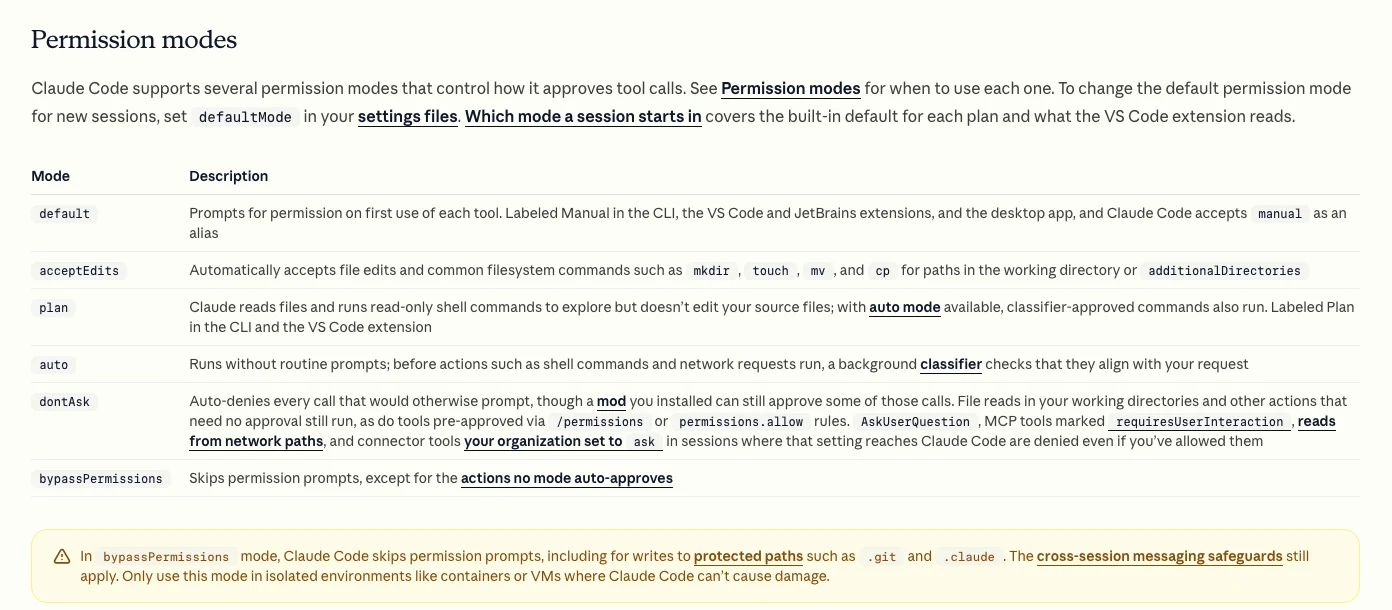
Short answer: Run in Manual or Plan mode until you trust the workflow, add deny rules for credential files, keep account access read only where you can, and never let a script change budgets, bids or live ads without your approval. Anthropic says the mode that skips permission prompts belongs only in isolated environments.
Claude Code has six permission modes. These are the ones that matter for PPC work:
| Mode | What it does | Use for PPC |
|---|---|---|
| Manual (default) | Asks the first time each tool runs | Building and testing |
| Plan | Reads and explores, no edits | Auditing a new folder |
| Accept edits | Edits files without asking | Iterating on a script |
| Auto | A classifier checks actions | Trusted, read-only jobs |
| Bypass permissions | Skips prompts | Not for ad accounts |
Keep credentials out of the conversation. Store API secrets in a file Claude cannot read, and add a deny rule such as Read(./.env), which the permissions docs give as the way to block a file. You can also deny a single connector tool by its name, in the form mcp__server__tool, so a write tool stays off even if the connector offers it.
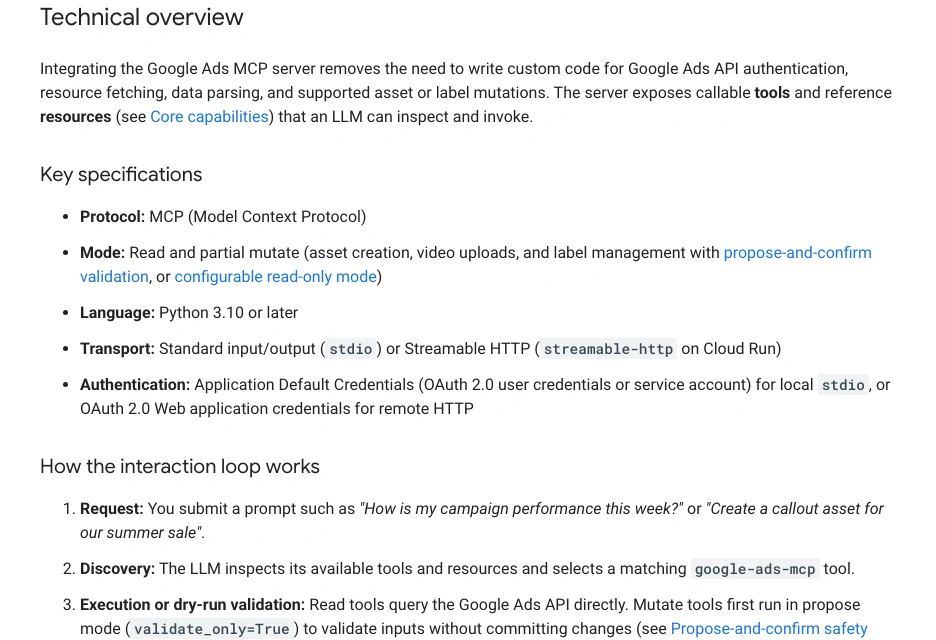
On the Google side, Google's MCP server reads account data and can only create assets, upload videos and manage labels. Its write tools first run in a propose mode that validates without committing, and you can switch the asset and label tools off for a fully read-only setup. That makes it a sensible default for workflows 1 to 6.
Account safety is the other risk. In an r/PPC thread practitioners warn that accounts were suspended for hammering the API or breaking terms with unofficial tools. Use official routes, keep batch sizes small and respect the quota.
How do you schedule a workflow?
Short answer: Use a cloud scheduled task when the job must run with your computer off, a Desktop scheduled task when it needs local files, or a Google Ads Script schedule when the logic should live inside the account. Schedule only workflows you have already checked by hand.
| Option | Runs where | Machine on? | Minimum gap |
|---|---|---|---|
| Cloud scheduled task | Anthropic's cloud | No | 1 hour |
| Desktop scheduled task | Your computer | Yes, awake | 1 hour in the form |
| /loop in a session | Open session | Yes | 1 minute |
| Google Ads Script | Inside Google Ads | No | Hourly |
Cloud scheduled tasks, formerly called routines, are in research preview on Pro, Max, Ultra, Team and Enterprise plans. They start from a fresh copy of your repository, so they cannot see local files, and they run in auto mode by default (Anthropic docs). Desktop tasks only run while the app is open and the computer awake; if it sleeps, the docs say you get one catch-up run for the most recent missed time.
That catch-up behaviour matters for pacing: a 9am check can fire at 11pm. Put the date logic in the prompt, for example "report on yesterday only, and say which dates you used".
Made by Anthropic's Claude channel, published 13 May 2026. Explains the agent loop, tools and permission modes; it promotes Claude itself.
What goes wrong in Claude Code PPC scripts?
Short answer: Most errors are quiet ones: money read in micros, a date range that silently excludes today, the wrong conversion metric, or a field name that does not exist. The script runs, the numbers look plausible, and they are wrong. Spot-checking ten rows against the interface catches most of them.
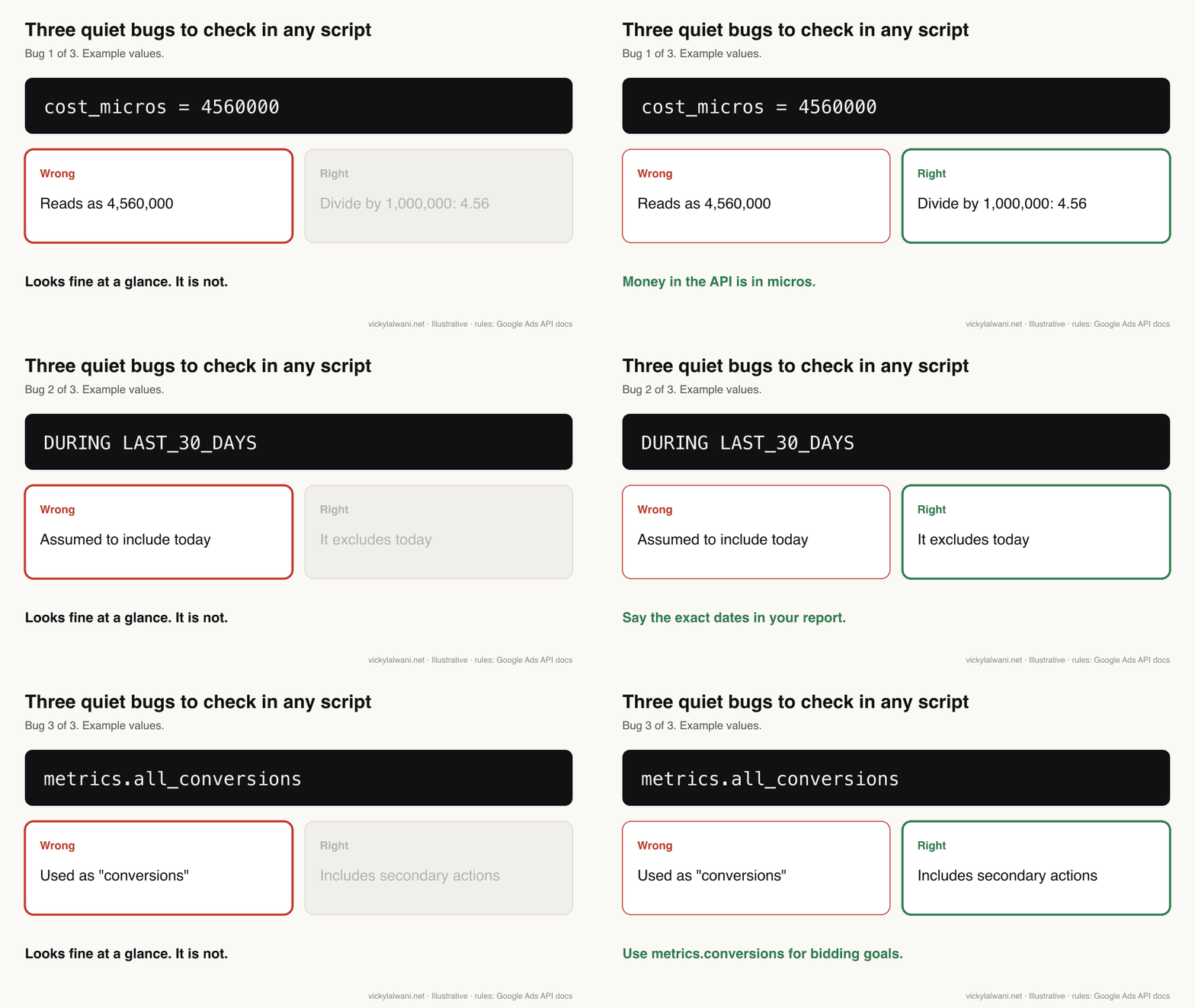
| Bug | What happens | Fix |
|---|---|---|
| Micros | Cost looks a million times too big | Divide by 1,000,000 |
| LAST_30_DAYS | Today is left out | Report exact dates |
| all_conversions | Secondary actions counted | Use conversions for goals |
| Wrong field name | Query fails or returns nothing | Ask it to check the field list |
| Manager account ID | Permission errors | Set the login customer ID |
Google's field reference says metrics.conversions only counts actions included in the conversions column, while all conversions counts everything. A report that mixes them will disagree with the interface. The builder of a paid Google Ads connector, posting in r/ClaudeCode, measured raw query failures on a Google Ads connector at close to one in five, mostly invalid field names, a missing manager ID, micros and date filters. Write those rules into your skill so they stop recurring.
Context is the other gap. One practitioner in r/PPC put it plainly: with only Google Ads data, the model optimises the wrong thing with confidence. Give the folder your margins, lead quality notes and anything that must never change.
What does a first week look like?
Short answer: Build one read-only workflow a day, check each against what you already know, and schedule only the one that saved the most time by Friday. Keep the rest as scripts you run on demand until they have proved themselves.
| Day | Build | Check |
|---|---|---|
| Monday | Search term review | Ten flagged terms by hand |
| Tuesday | Weekly report | Against your usual report |
| Wednesday | Budget pacing | Against the billing page |
| Thursday | Landing page QA | Open three URLs yourself |
| Friday | Schedule the best one | First scheduled run |
Keep every script in the account folder with a note saying what it does, what data it expects and when you last checked it. That folder becomes your team's library, and the first place to look when an export format changes.
Videos worth watching
Short answer: Anthropic's two short Claude Code explainers cover the basics; Google's developer channel covers the official Google Ads MCP server; and a PPC training channel shows a non-coder running Google Ads work from Claude Code.
Made by a PPC training channel, published 26 January 2026. A practitioner walkthrough; a free setup document is offered in exchange for an email.
| Video | Channel | Date | What it covers |
|---|---|---|---|
| What is Claude Code? | Claude | 5 May 2026 | What the tool does |
| How Claude Code Works | Claude | 13 May 2026 | Agent loop and permissions |
| Build a proactive agent workflow | Claude | 20 May 2026 | Scheduling with /schedule |
| Introducing the Google Ads MCP Server | Google Ads developers | 29 Oct 2025 | Official connector |
| How I Use Claude Code to Automate Google Ads | PPC training channel | 26 Jan 2026 | Non-coder walkthrough |
| AI-first in 6 weeks | PPC training brand | 12 Nov 2026 | A freelancer's routine |
What people say on X and Reddit
Short answer: Practitioners agree on three things: setup (API access, sign-in, limits) is the hard part, destructive changes should stay as approved recommendations, and Google Ads data alone is not enough context. Anthropic's posts focus on scheduling and browser features.
| Post | Date | Point | Type |
|---|---|---|---|
| Claude on X | 18 Dec 2025 | Claude in Chrome works with Claude Code | Vendor |
| Claude on X | 23 Mar 2026 | Computer use in Claude Code | Vendor |
| Claude on X | 14 Apr 2026 | Routines run on a schedule | Vendor |
| A Google Ads practitioner | 14 Sep 2026 | Staged landing page workflow | Opinion |
| A growth marketer | 6 Oct 2026 | Long guide to paid media from Claude Code | Opinion |
| Reddit thread | Date | Recurring theme | Type |
|---|---|---|---|
| r/PPC: managing Google and Meta with Claude Code | 28 Apr 2026 | Needs CRM data, not just ads data | First-hand |
| r/PPC: Ads API with Claude Code | 12 Mar 2026 | Useful once access and limits are sorted | Opinion |
| r/PPC: using Claude to manage Google Ads | 21 Apr 2026 | Suits people who know paid search | First-hand |
| r/PPC: Claude Code for account management | 19 Sep 2026 | Keep changes behind approval | First-hand |
| r/ClaudeCode: failing queries on a Google Ads connector | 13 Oct 2026 | Field names, micros, dates | Vendor |
The X posts were checked through X's own embed service on 17 November 2026. Two practitioner posts are long-form X articles; I checked that they exist and what they are titled, not every claim inside them.
Where this advice is weak
Short answer: Both Anthropic and Google changed key details in 2026, including how API access works and what scheduled tasks are called, so check the linked pages before you rely on a setting. The social evidence is anecdotal, and I have not measured how much time each workflow saves.
- Facts were read on Anthropic, Google and Meta pages on 17 November 2026. Cloud scheduled tasks are in research preview and may change.
- Meta's connectors are in open beta; tool names and limits may change.
- The ten workflows are a starting list, not a measured ranking. Time saved depends on your accounts and exports.
- Competitor monitoring depends on what each ad library shows and allows; I have kept that workflow to summarising your own notes.
Want these workflows built for your accounts?
Claude Code removes the copy and paste. It does not decide what a good account looks like or notice that tracking broke last Tuesday unless you tell it to check. If you want the workflows built and checked against your own accounts, my Google Ads management and AI automation services cover it, and Claude consulting sets up skills and permissions for a team. Rates are on the pricing page.
Related reading: what to delegate to Claude Cowork in Google Ads, Claude Cowork for Google Ads lab notes, what a marketing MCP server is, Claude Code commands and what the rebuilt Claude desktop app changes. I also work as a Google Ads consultant in Australia, the UK and the USA.
Sources
| Source | What it supports | Date | Link |
|---|---|---|---|
| Anthropic docs | Surfaces, plans, scheduling options | Read 17 Nov 2026 | Overview |
| Anthropic docs | Permission modes, deny rules | Read 17 Nov 2026 | Permissions |
| Anthropic docs | Cloud scheduled tasks | Read 17 Nov 2026 | Scheduled tasks |
| Anthropic docs | Desktop tasks, missed runs | Read 17 Nov 2026 | Desktop tasks |
| Google Ads API docs | Access levels, daily limits | Read 17 Nov 2026 | Access levels |
| Google Ads API docs | What counts as an operation | Read 17 Nov 2026 | Quotas |
| Google Ads Developer Blog | Developer tokens sunset | 10 Sep 2026 | Onboarding post |
| Google Ads API docs | MCP server read and partial write | Read 17 Nov 2026 | MCP server |
| Google Ads API docs | Date ranges, metrics, micros | Read 17 Nov 2026 | Date ranges |
| Google Ads Scripts docs | 30 minutes, 250 scripts | Read 17 Nov 2026 | Limits |
| Google Ads Scripts docs | Preview mode | Read 17 Nov 2026 | Preview |
| Meta for Business | Ads AI connectors, governance rules | 29 Apr 2026, updated 16 Jul | Announcement |
| X and Reddit | Practitioner reports above | 2025 to 2026 | Linked in tables |
This article expands on my post on LinkedIn ↗.
FAQ
Do I need to know how to code to use Claude Code for PPC?
No. You describe the task in plain English and Claude Code writes and runs the script. You do need to understand what the script does and check its output against the Google Ads or Meta interface before you trust it.
What is the easiest Claude Code PPC workflow to start with?
A search term review or a budget pacing check. Both use exports you already have, change nothing in the account, and give an answer you can check by hand in a few minutes.
Can Claude Code change my Google Ads campaigns?
Yes, if you give a script write access through the Google Ads API or Google Ads Scripts. Keep budget, bid and status changes as a list you approve, because a script will repeat a mistake on every run.
Do I still need a Google Ads developer token?
No. Google sunset developer tokens in September 2026, and Google Ads API access now belongs to the Google Cloud project you use for sign-in. New projects start with Test access and apply for Explorer or Basic.
How many Google Ads API calls can a Claude Code script make?
It depends on your access level: Explorer allows 2,880 operations a day on live accounts, Basic 15,000 and Standard has no fixed daily limit. Each search request and each individual change counts as one operation.
Can Claude Code run PPC reports on a schedule?
Yes. Cloud scheduled tasks run on Anthropic's servers at least an hour apart, even with your computer off, while Desktop scheduled tasks run on your machine when it is awake. Google Ads Scripts can also run hourly inside the account.
Does Claude Code work with Meta ads?
Yes, through exports or Meta's ads AI connectors, which went into open beta in April 2026 and can create and edit campaigns. Set Meta's governance rules first so an agent cannot change budgets you have not approved.
Is Claude Code or Claude Cowork better for Google Ads?
Claude Code is better for repeatable scripts across many accounts, because you keep the code and a log. Cowork is better for one-off tasks that span files, sheets and the browser. Many teams use both.