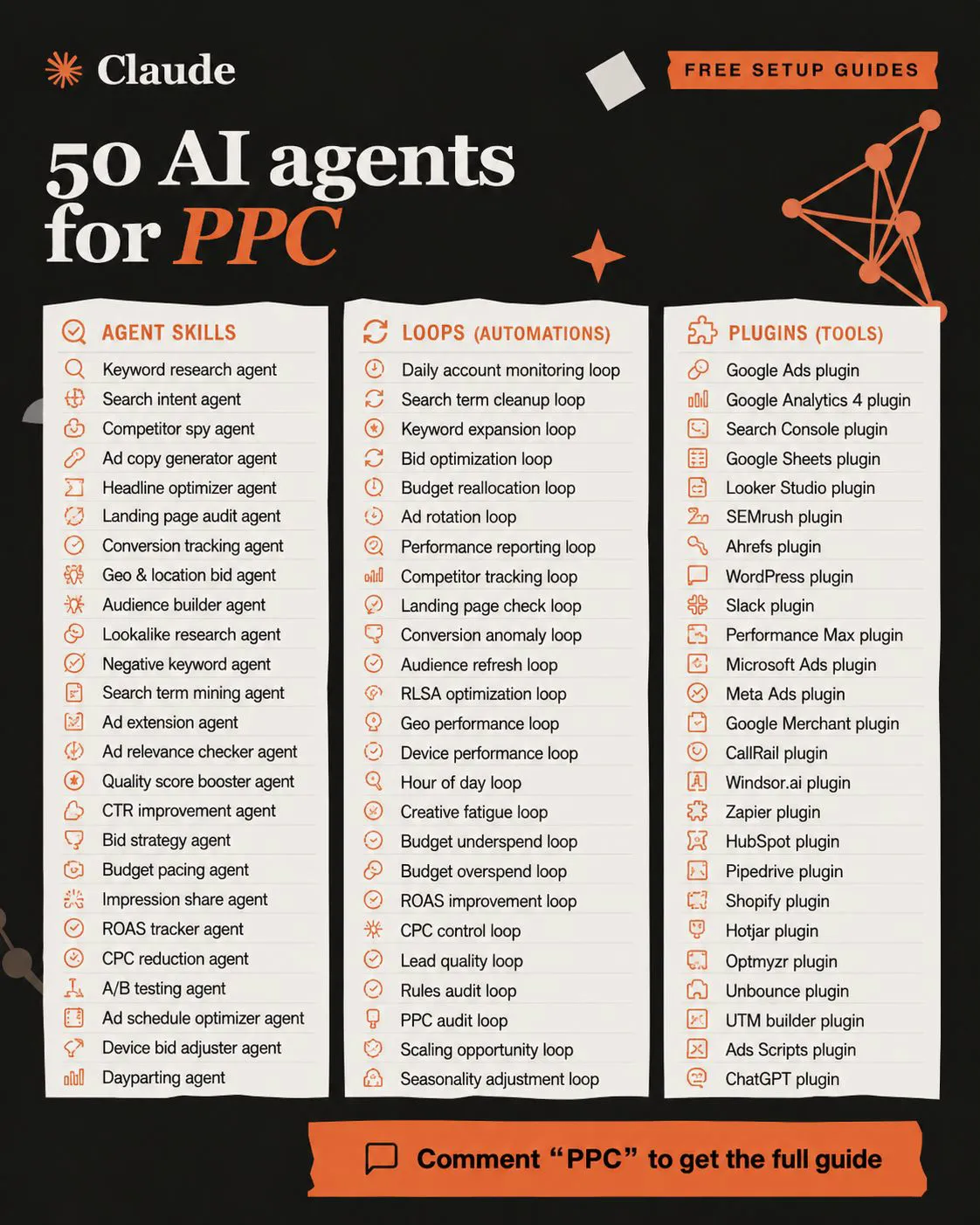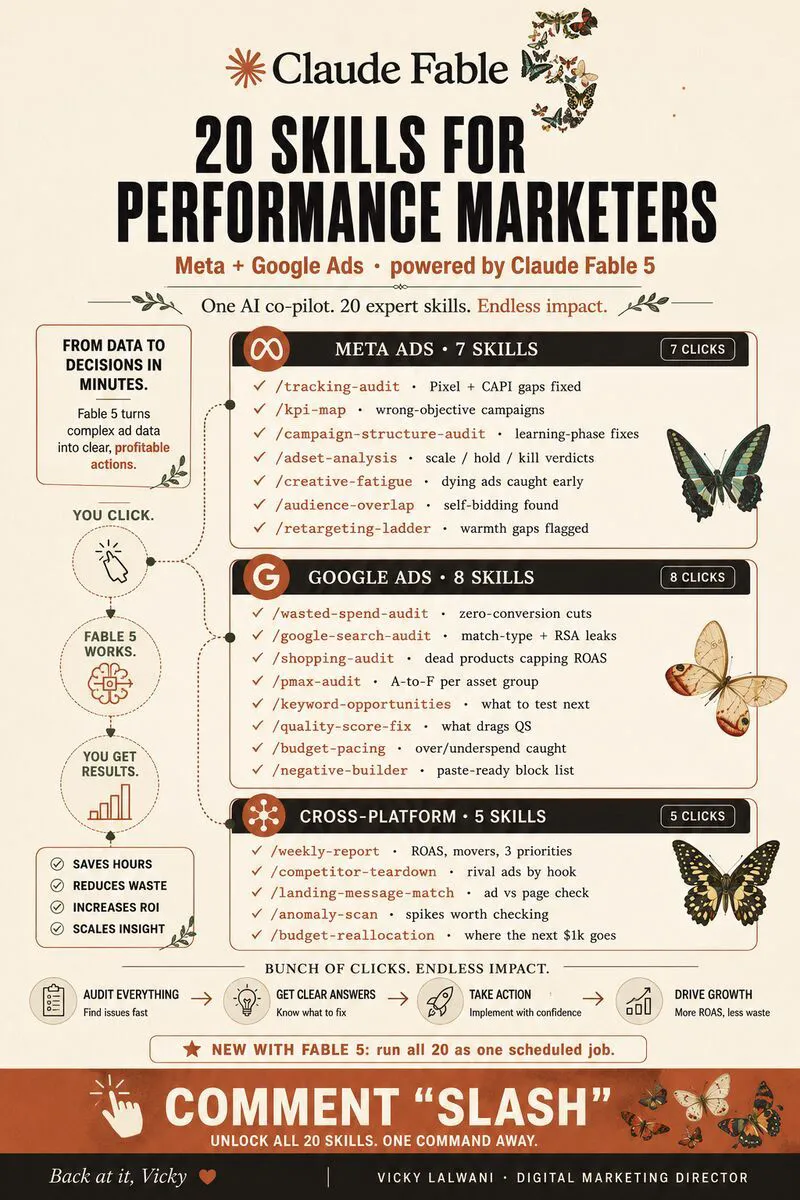
Claude Cowork for Google Ads now means a Claude conversation that reads your account through a connector such as Google's Google Ads MCP server, or works in the Google Ads interface through a browser or computer use. It is good at rule-based checks, search term sorting and reports. It misreads rows and columns, mixes up conversion columns and date ranges, and suggests pausing things that work, so every change needs a read-back check and your approval.
TL;DR
Claude Cowork is no longer a separate desktop mode. Since 16 September 2026 Anthropic has been folding it into every Claude conversation, rolling out to Pro, Max and Ultra (and to Team and Enterprise where an owner turns it on). Since 6 October, new Cowork tasks on Pro, Max and Ultra run in the cloud. Claude reaches Google Ads in three ways: a connector such as Google's official Google Ads MCP server, a browser (built-in, cloud or your own Chrome), or computer use on your screen.
What it gets right: rule-based reading and summarising, such as ad groups with spend and no conversions, search term themes, draft negatives and weekly reports. What it gets wrong: misread rows and columns, the wrong conversion column or date range, recent days that are not complete yet, and confident advice to pause things that are working.
Read data through a connector where you can, make every change behind your approval, and run a read-back check: Claude quotes the row, column, date range and value it used before anything changes.
Short answer: Claude Cowork for Google Ads, in its November 2026 form, is a Claude conversation that can read your account data and work in the Google Ads interface for you. It is good at repetitive, rule-based checks and at turning exports into reports. It is weak wherever a number is read off a screen, a column is ambiguous or judgement is needed, so it needs a written brief, approval before changes and a person checking its numbers.
The first version of this page described a desktop agent clicking through a live account. That product has changed. Cowork is being merged into Claude, tasks moved to the cloud, and Claude gained a built-in browser and a cloud browser. This version covers what Claude does well and badly in a Google Ads account today, with every Anthropic and Google detail checked against their help pages on 18 November 2026.
It is the "right and wrong" page. For what to delegate, which access level to grant and a four-week rollout, read what to delegate to Claude Cowork in Google Ads. If you want someone to set this up and keep watching the account, that is part of my Google Ads management work.
What is Claude Cowork for Google Ads now?
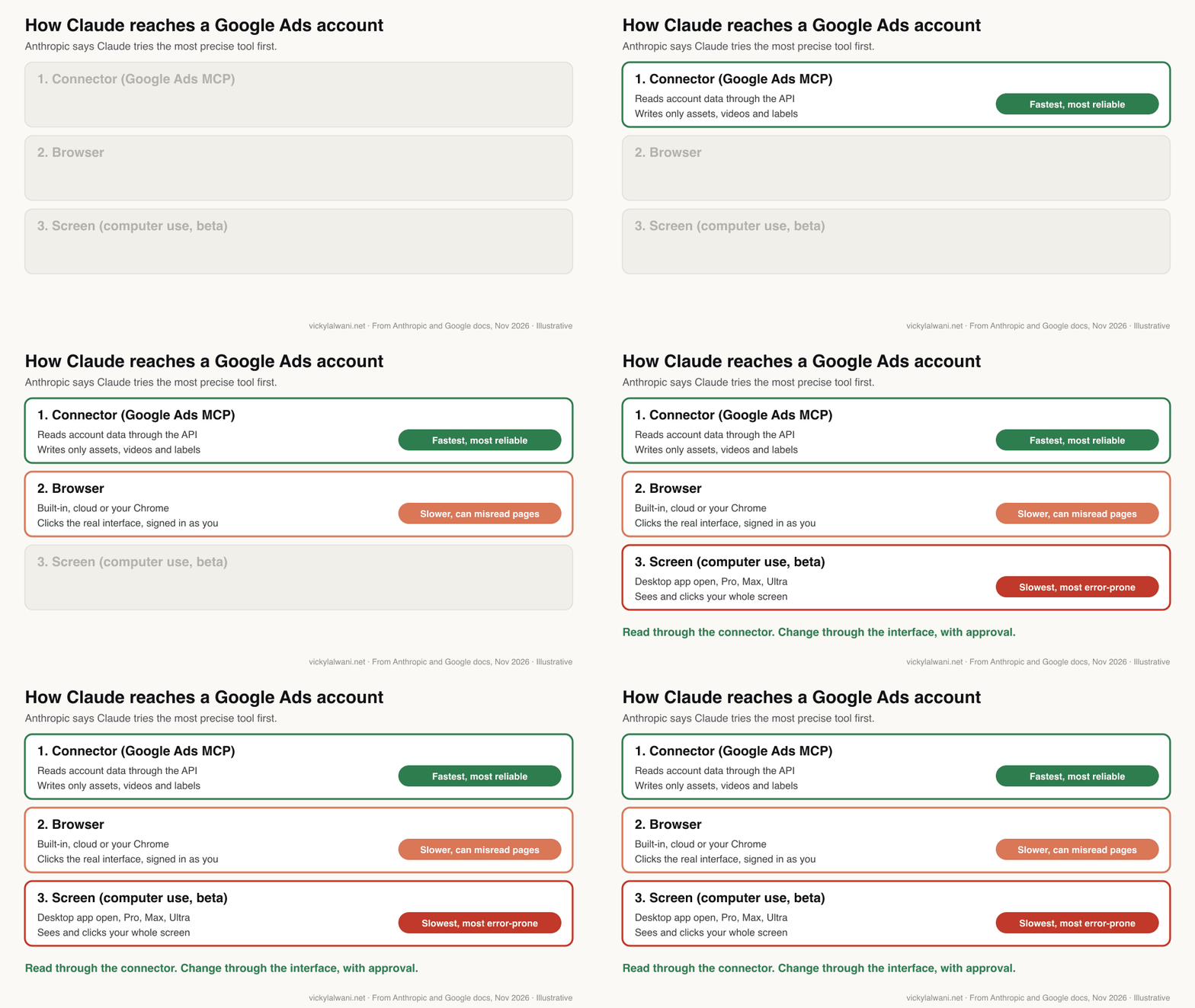
Short answer: a Claude conversation that takes on a whole task. On accounts that have the new Claude there is no Cowork switch to pick. Claude picks a route into Google Ads in this order: a connector if one exists, then a browser, then computer use on your screen. Each route behaves very differently in an ad account.
Anthropic's Help Centre is explicit about the order. Claude uses the most precise tool first: connectors, then the browser, then screen interaction. It also says screen work "takes much longer and is more error-prone" than a connector.
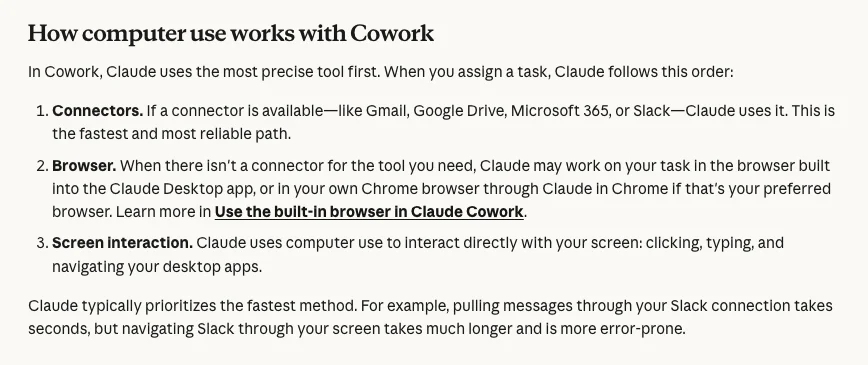
| Route | Plans | In Google Ads it can | Watch for |
|---|---|---|---|
| Google Ads MCP server | Your own setup | Read data; make assets and labels | Needs API access |
| Built-in browser | Paid plans | Click the interface | Desktop app open; logins kept |
| Claude in Chrome | Paid plans | Work in your signed-in Chrome | Acts as you |
| Cloud browser (beta) | Pro, Max, Ultra | Click the interface in the cloud | Sign out before handing back |
| Computer use (beta) | Pro, Max, Ultra | Use any app on screen | Slowest; no sandbox |
Google's official Google Ads MCP server (MCP is the standard that lets AI tools call other software) is described by Google as "read and partial mutate". It reads account data and can create assets, upload videos and manage labels, each change proposed first and committed only after you confirm. Google states that it cannot create, modify, pause or enable campaigns, ad groups, ads, budgets or bids, and cannot link the assets it creates to campaigns or ad groups. It also needs a Google Cloud project with Google Ads API access.
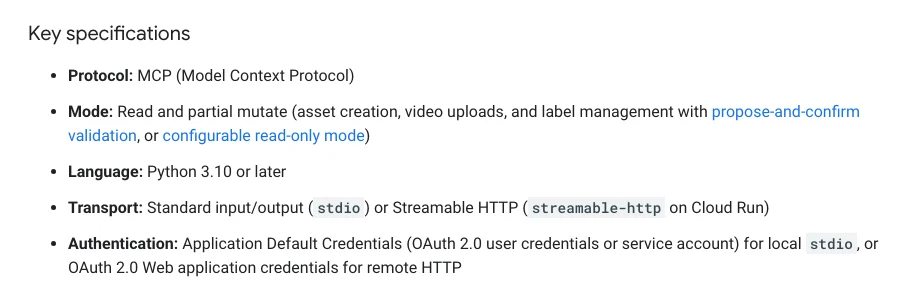
So anything beyond reading and assets, such as pausing a keyword or moving budget, happens through a browser or the screen. That is exactly where most of the mistakes below come from.
What does Claude get right in a Google Ads account?
Short answer: jobs with a clear rule and no taste involved. Listing ad groups or keywords with spend and no conversions, grouping search terms by theme, drafting negative keyword lists, comparing this week with last, and turning exports into a finished report or sheet are all strong uses.
The common thread is that you can state the rule in one sentence and check the answer in a minute. Claude reads faster than you do and does not get bored on the fortieth row.
| Task | Why it suits Claude | Best route |
|---|---|---|
| Spend with zero conversions | One clear rule | Connector or export |
| Search terms by theme | Tedious sorting | Connector or export |
| Draft negative keywords | Pattern spotting | Export, you apply |
| Weekly or monthly report | Finished doc or sheet | Scheduled task |
| Settings against a checklist | Repetitive reading | Browser, read only |
| Ad copy options | Volume within limits | Any; you choose |
Reporting is where people on Reddit describe the clearest win: Claude drafts the report, a person reviews it, adds their own view and sends it. A performance marketer at Anthropic described on X managing Google Ads through a custom plugin that connects to the Google Ads API through MCP, with paid search workflows saved as skills. That is a connector-first setup, not screen clicking.
For the skills behind a weekly routine like this, see Claude skills for Google Ads.
What does Claude get wrong in Google Ads?
Short answer: two kinds of mistake. Reading mistakes: the wrong row, column or date range, recent days treated as complete, ratios averaged. Context mistakes: advice to pause things that are working, because it cannot see what you know about the business.
When I had Claude audit a client's Google Ads account from exported reports, several recommendations did not match the account. It flagged a keyword that was converting for pausing, marked broad match terms that were bringing in business as waste, listed an ad group that was already switched off, and suggested unpinning a headline, which I questioned. None of these were applied, because nothing changed before I checked each one against Google Ads by hand.
| Mistake | Why it happens | Check |
|---|---|---|
| Value from the wrong row | Reading a dense table on screen | Quote row name and value |
| Wrong conversion column | Conversions vs All conv. | Name the column in the brief |
| Wrong date range | Default range, account time zone | State the dates |
| Recent days look weak | Conversions still arriving | Exclude the last few days |
| Averaged ROAS | Mean of ratios, not totals | Sum value, divide by cost |
| Pause a converting term | No business context | Show the numbers first |
| Wrong account | Manager account lists many | Quote the account name |
| Too many small changes | Acts on every signal | Batch changes weekly |
Several of these are about Google Ads itself, not Claude. Google Ads Help says the "Conversions" column covers your primary conversion actions while "All conv." adds secondary actions and view-through conversions, so the two disagree by design. The primary columns are reported by the time of the click, not the conversion, so recent days fill in later. Google's data freshness page puts standard conversion tracking data at around 3 hours for last click and 15 hours for other attribution models.
The ratio mistake is easy to make and easy to miss. Conv. value / cost, Google's ROAS column, is total conversion value divided by total cost. The average of three campaigns' ROAS is not the account's ROAS; you have to add up value and cost first.
Change frequency matters too. Google's conversion tracking help page warns that frequent manual changes to budgets, CPA or ROAS targets, or conversion goals reset a 7 to 14 day learning period. An agent that "nudges" budgets every day can keep a campaign permanently learning.
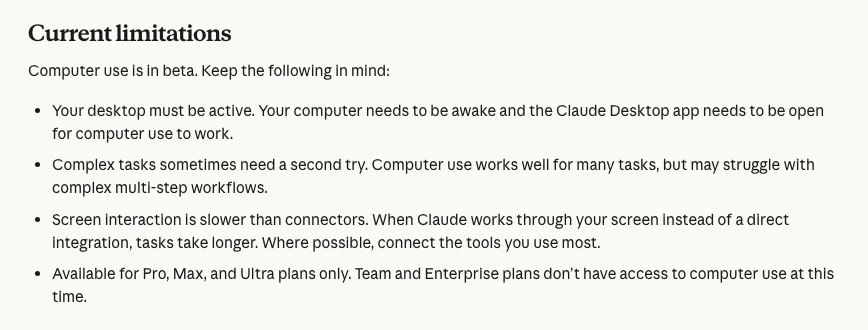
Anthropic is candid about the screen route. Its computer use page lists the limits: the computer must be awake with the desktop app open, complex multi-step workflows sometimes need a second try, and screen work is slower than connectors.
How do you catch Claude's mistakes before they cost money?
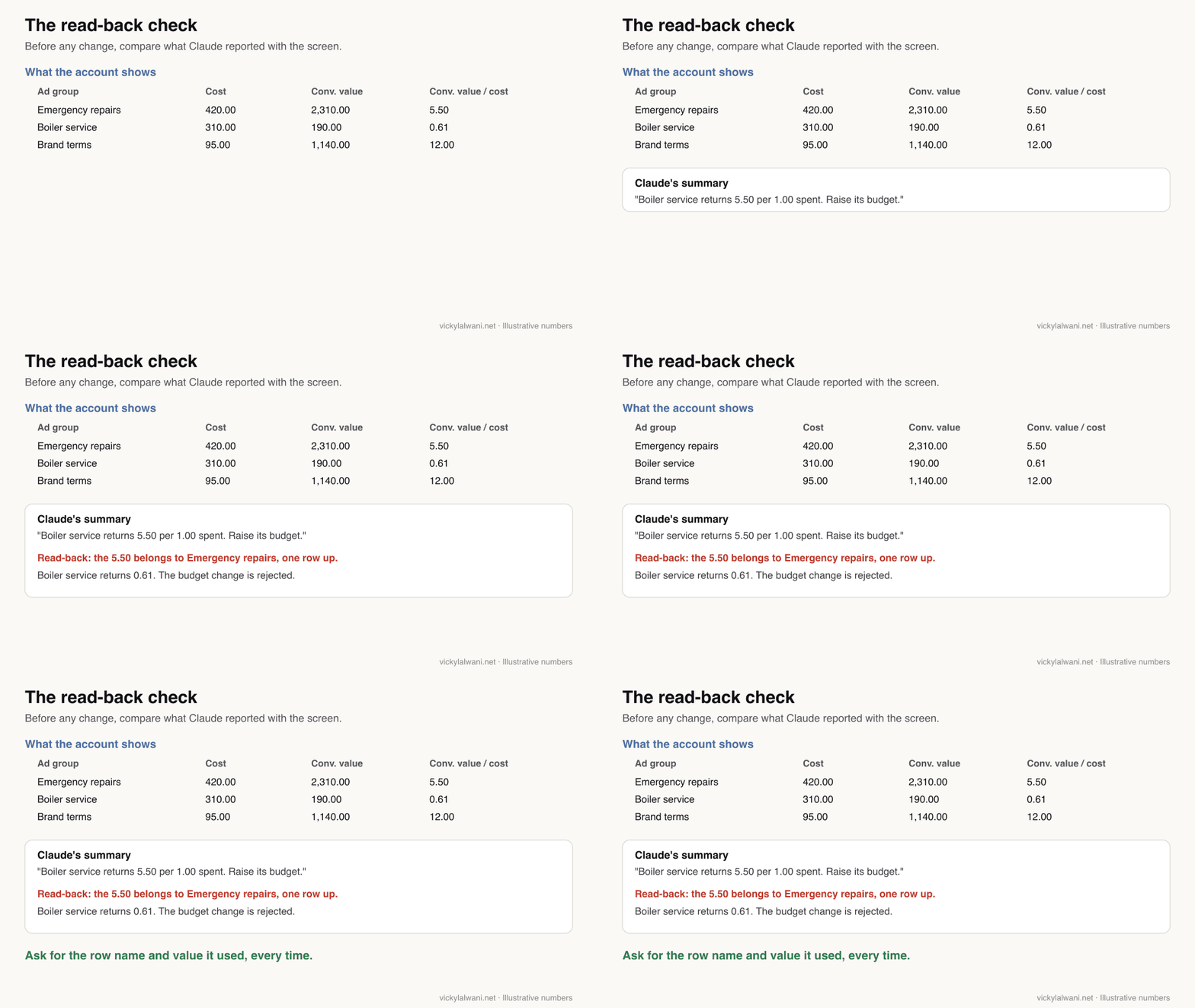
Short answer: make Claude show its working in a form you can check in a minute. Before any change, it quotes the account, row, column, date range and value it used. After any change, it reads the setting back. Then you review change history weekly, inside the 30 days Google lets you undo most changes.
Before you change anything in Google Ads:
1. Name the account, campaign and ad group you are looking at.
2. For every number you rely on, give the column name exactly as shown,
   the date range, and the value.
3. Use "Conversions", not "All conv.", unless I say otherwise.
4. Ignore the last 3 days when judging conversions or ROAS.
5. Work out ROAS as total conv. value divided by total cost. Never average ratios.
6. List the changes you propose in a table and wait for my approval.
After each approved change, open the setting again and confirm it matches.
The three-day buffer is my own rule of thumb, not a Google figure; Google says conversions can take hours to process and some arrive days after the click, especially with longer conversion windows. The last line comes from a tip on Reddit that is worth adopting: after each change, have Claude pull the settings again and compare them with what it says it did, because a browser click can quietly miss a field such as location targeting or bid strategy.
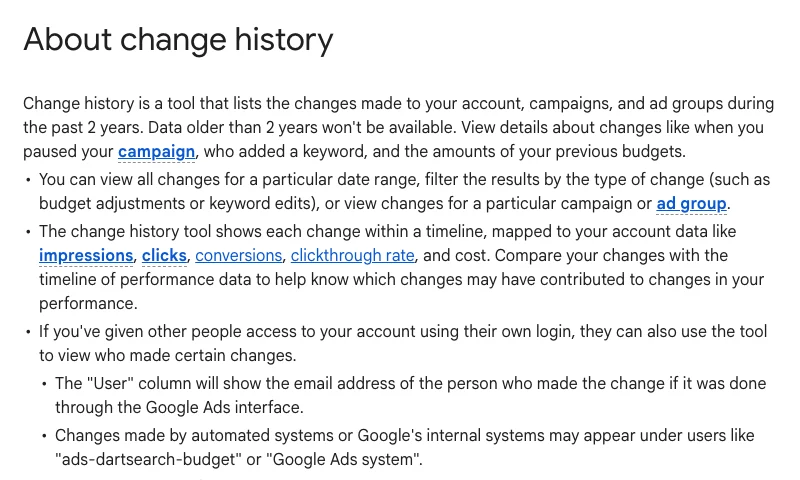
Change history is your audit trail. Google Ads keeps two years of it, and the User column shows the email of whoever made a change through the interface. Changes through the Google Ads API may show "Google Ads API" or a tool's name. So a change Claude makes by clicking in your signed-in browser is likely to sit under your own email, not under a label that says an agent did it. Keep your own log of what you approved.
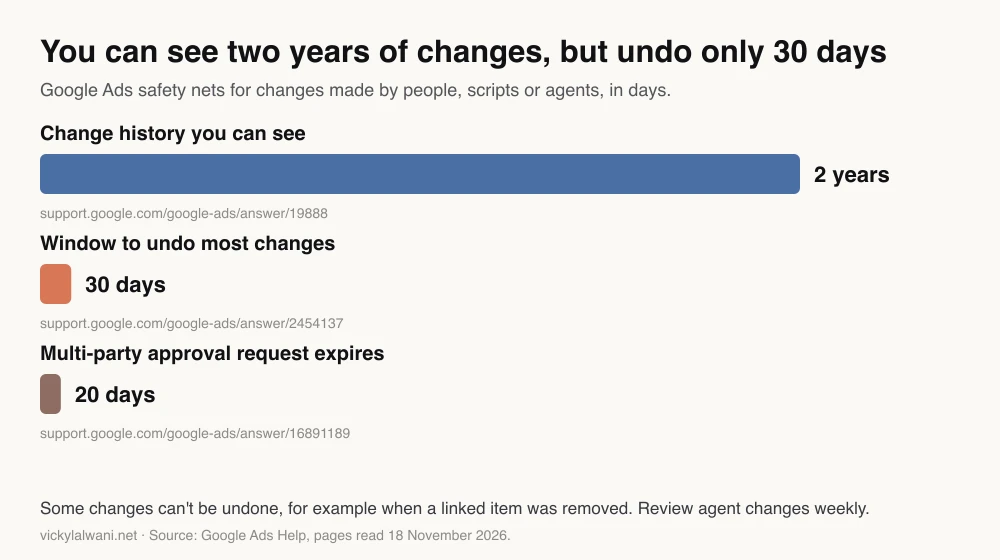
Google's undo has limits. You can undo most changes from the last 30 days, but not when a linked item has since been removed or someone else already undid it. Review weekly, not monthly.
How should you brief Claude for a Google Ads task?
Short answer: write it like an instruction to a careful junior analyst: the metric and exact column, the date range, the threshold, the action, what must never be touched, the output format and when to stop and ask. The brief is now the bottleneck, not the clicking.
On client accounts my standing instruction is that Claude performs nothing on the account. It audits first, puts the findings in a sheet, I check them by hand against Google Ads, and changes wait for approval.
| Brief field | Example |
|---|---|
| Metric and column | Cost and "Conversions" |
| Date range | Last 30 days, excluding the last 3 |
| Threshold | Cost above twice the target CPA |
| Action | List only; no changes |
| Never touch | Brand campaigns, anything labelled "test" |
| Output | Sheet: item, numbers, reason, suggestion |
| Stop and ask | Any figure it cannot read clearly |
CPA means cost per acquisition: what you pay, on average, for one conversion. The threshold above is an example; set yours from your own margins. For the full approval loop and a sample brief, the delegation guide goes further, and the weekly PPC audit checklist gives you the checks to brief against.
Is it safe to let Claude sign in to Google Ads?
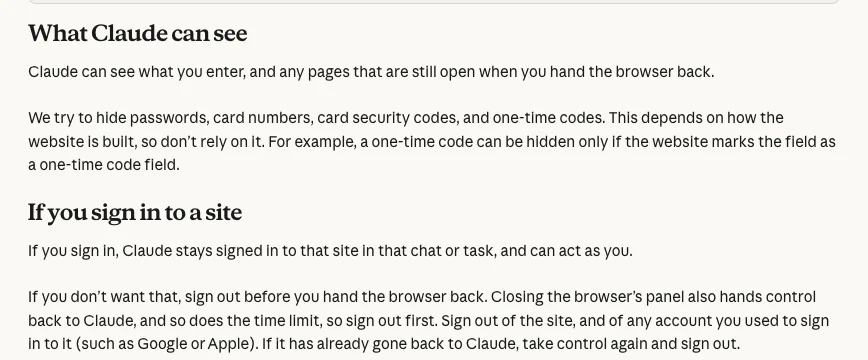
Short answer: only with care. Google Ads holds billing and payment settings. Anthropic asks you to be deliberate about sites where you are signed in or that handle money, and advises against using its browsers for financial accounts. Use a login with the lowest access level the task needs, approve every change, and sign out of the cloud browser before handing it back.
Anthropic's safety page names the main risk: prompt injection, where instructions hidden in a page or email try to redirect Claude. It needs two things at once, Claude reading untrusted content and Claude being able to act. A Google Ads session with edit rights gives it the second.
| Task | Google Ads access level | Claude setting |
|---|---|---|
| Reports and audits | Read-only | Auto is fine |
| Drafting changes | Read-only | Auto, output to a sheet |
| Making approved changes | Standard | Manual |
| Users, billing, account links | Admin | Do it yourself |
Google's access levels page says Read-only users can view campaigns and run reports but cannot edit campaigns; Standard users can edit campaigns, but can also edit billing information, so a Standard login is not a billing-safe login. Logins also persist: Anthropic says the built-in browser remembers your sign-ins across sessions on that computer. Scheduled tasks run while you are away, so Anthropic advises against scheduling anything that takes actions that are hard to undo. Keep scheduled Google Ads tasks to reports.
Where does Claude fit next to Ask Advisor and Claude Code?
Short answer: Google's Ask Advisor works inside one Google Ads account and can make changes with your approval. A Claude conversation suits reports and analysis across tools. Claude Code suits repeatable scripts and audits on files. Many accounts will use more than one.
| Tool | Best at | Limit |
|---|---|---|
| Ask Advisor (beta) | In-account questions and changes | Not in manager accounts |
| Claude conversation | Reports across tools, documents | Screen work is slow |
| Claude Code | Scripts, repeatable file audits | More setup |
For when a job belongs in Claude or Claude Code, read Claude chat vs Code vs Cowork after the merge; for the desktop settings that limit browser and folder access, the Claude desktop setup checklist. Code-based PPC workflows are in Claude Code PPC workflows.
Videos worth watching
Short answer: Google's own introduction to the Google Ads MCP server explains the connector route, and Anthropic's short computer use video shows the screen route. Practitioner videos are useful for setups but often sell something.
Made by Google Advertising and Measurement Developers, Google's official developer channel, October 2025. Introduces the MCP server that lets an AI model ask questions of Google Ads data. Sells nothing. Today's server also has asset and label tools.
Made by Claude, Anthropic's official channel, March 2026. About a minute on computer use in Cowork and Claude Code. It also shows Dispatch, which Anthropic says is no longer open to new users.
| Video | Channel | Date | What it covers |
|---|---|---|---|
| Claude Cowork is now your Chrome side panel | Claude | Aug 2026 | Claude working in your signed-in Chrome |
| Claude Cowork for marketing ops | Claude | May 2026 | A weekly metrics review saved as a skill |
| How I use Claude as a Google Ads specialist | A PPC agency founder's channel | Aug 2026 | Claude around the account; offers a free playbook |
| How to Install the OFFICIAL GOOGLE ADS MCP | Porter Metrics | Aug 2026 | Setting up Google's server; vendor channel |
| Google Marketing Live 2026 in under 15 minutes | Google Ads | May 2026 | What Google now automates itself |
What people say on X and Reddit
Short answer: official posts show the browser and computer use routes arriving through 2026, and an Anthropic marketer describes a connector-first Google Ads setup. On Reddit, the practitioners in these threads who report good results approve changes first, and one useful tip is to read settings back after every change.
Paraphrased, dated and labelled. Reddit is credited by community, not by user.
| Account | What they said | Type | Link |
|---|---|---|---|
| @claudeai (23 Mar 2026) | Computer use arrives as a research preview in Cowork and Claude Code, Mac only at launch | Official | Post |
| A performance marketer at Anthropic (24 Mar 2026) | Manages Google Ads with a custom Cowork plugin: Google Ads API via MCP, workflows as skills | First-hand | Post |
| Same account (24 Mar 2026) | A search terms skill queries campaigns through MCP and judges each term against a written method | First-hand | Post |
| @claudeai (26 Aug 2026) | Cowork gets a built-in browser in the side panel that navigates sites and fills forms | Official | Post |
| @claudeai (26 Aug 2026) | Claude in Chrome, in your own signed-in browser, generally available on paid plans | Official | Post |
| @GoogleAds (12 Nov 2025) | Introduces Ads Advisor, Google's agent inside Google Ads; Google's Help Centre now documents it as Ask Advisor | Official | Post |
| A PPC practitioner (7 Aug 2026) | Google Ads suggested cutting a budget, and the suggestion did not make sense | First-hand | Post |
| Community | What the thread found | Type | Link |
|---|---|---|---|
| r/ClaudeAI (20 Oct 2026) | An agency user runs client accounts through Claude in Chrome and approves everything before it goes live. One reply: read settings back, as clicks can miss fields | First-hand | Thread |
| r/ClaudeAI (12 Nov 2026) | How to connect Claude to Google Ads. Replies point to Google's official MCP server and API approval; one reply is a vendor plug | Question | Thread |
| r/ClaudeAI (28 Oct 2026) | A performance marketer asks what can be automated. Replies: feed ad data into a sheet on a schedule, then have Claude summarise | Question | Thread |
| r/PPC (14 Apr 2026) | PPC uses for Cowork and Code. Replies: drafted reports a person reviews, daily red, yellow, green checks, data privacy worries | Opinion | Thread |
| r/googleads (4 Apr 2026) | A plugin author claims big savings; top replies doubt the claims and correct one of them | Vendor | Thread |
Where this advice is weak
Short answer: the product is changing monthly, the browser routes are new, and my own experience is with Claude auditing exports, not with long unsupervised runs inside a live account. Treat the mistake list as a checklist to test, not a measured failure rate.
- No failure rates. I have not measured how often Claude misreads a table. The mistakes listed are the kinds reported by Anthropic, Google's own column definitions, Reddit users and my own audit work.
- Change history attribution is an inference. Google says interface changes show the user's email. That browser clicks by Claude appear under your email is my reading of that, not something Google states about Claude.
- Rollouts differ. The cloud browser is in beta and rolling out gradually; computer use is beta on Pro, Max and Ultra only. Your account may not have both.
- The MCP server will change. Google lists mutate tools as partial support today. Check its page before assuming what it can or cannot change.
- Platform terms. Anthropic reminds users they must respect a site's terms on automated access. Read Google Ads terms for your account type before automating clicks.
- The read-back GIF uses made-up numbers. It shows the method, not a real account.
Want a second pair of eyes on your account?
If you are thinking of letting Claude into a Google Ads account, the safest first step is a human audit of tracking and structure, so the agent does not act on bad data. My Google Ads management service covers that audit, the written briefs and the approval routine, and I keep watching the change history afterwards. Rates are on the pricing page.
Free guide: 35 Claude skills for Google Ads sets up a free folder of skills for campaign builds, keywords, ad copy, landing pages and reporting, plus a five-skill weekly routine.
Sources
| Source | What it supports | Date |
|---|---|---|
| Claude Cowork and chat are one Claude | Merge; Auto and Manual; browsers; computer use | Read 18 Nov 2026 |
| Cowork on web, desktop and mobile | Cloud tasks from 6 Oct 2026; what needs the desktop app | Read 18 Nov 2026 |
| Let Claude use your computer | Route order; computer use plans and limits | Read 18 Nov 2026 |
| Built-in browser | Plans; logins kept across sessions | Read 18 Nov 2026 |
| Cloud browser | Beta plans; signing in and out | Read 18 Nov 2026 |
| Claude in Chrome | Paid plans; side panel | Read 18 Nov 2026 |
| Use Cowork safely | Prompt injection; scheduled task advice | Read 18 Nov 2026 |
| Google Ads MCP server | Read and partial mutate; propose and confirm | Read 18 Nov 2026 |
| Understand conversion tracking data | Conversions vs All conv.; Conv. value / cost; learning period | Read 18 Nov 2026 |
| About data freshness | Hourly stats; conversion delays | Read 18 Nov 2026 |
| About change history | Two years; User column | Read 18 Nov 2026 |
| Review your account history | Undo within 30 days and its limits | Read 18 Nov 2026 |
| Access levels | Read-only, Standard, Admin | Read 18 Nov 2026 |
| Multi-party approval | 20-day expiry | Read 18 Nov 2026 |
| Ask Advisor (beta) | Changes with approval; not in MCC | Read 18 Nov 2026 |
| X (@claudeai, @GoogleAds, practitioners) | Posts in the table above | Nov 2025 to Aug 2026 |
| Reddit (r/ClaudeAI, r/PPC, r/googleads) | Threads in the table above | Apr to Nov 2026 |
| YouTube (Google, Claude, practitioners) | Videos above, checked by oEmbed | Oct 2025 to Aug 2026 |
This article expands on my post on LinkedIn ↗.
FAQ
Can Claude Cowork manage a Google Ads account on its own?
It can carry out routine, well-specified tasks such as listing ad groups with spend and no conversions, sorting search terms or drafting a weekly report. It should not run unsupervised, because it misreads screens and lacks business context. Keep every change behind your approval and check its numbers.
Is Claude Cowork still a separate app?
Not for long. On 16 September 2026 Anthropic began merging Cowork and chat into one Claude conversation, rolling out to Pro, Max and Ultra and to Team and Enterprise where enabled. Since 6 October 2026, new Cowork tasks on Pro, Max and Ultra run in the cloud; the desktop app is still needed for local files, local connectors, the built-in browser and computer use.
How does Claude connect to Google Ads?
Claude tries a connector first, such as Google's official Google Ads MCP server, which needs a Google Cloud project with Google Ads API access. Without one, it works in the Google Ads interface through its built-in browser, the cloud browser or Claude in Chrome. Computer use on your screen is the last and slowest route.
Can the Google Ads MCP server change campaigns or budgets?
No. Google says the server cannot create, modify, pause or enable campaigns, ad groups, ads, budgets or bids as of November 2026. It reads account data and can create standalone assets, upload videos and manage labels, each change proposed first and confirmed by you.
What mistakes does Claude make in Google Ads?
The common ones are reading a value from the wrong row, using All conv. instead of Conversions, judging recent days before conversions arrive, averaging ROAS across campaigns and suggesting pauses for terms that convert. A brief that names the column and dates, plus a read-back check, catches most of them.
Is it safe to let Claude sign in to Google Ads?
Only with care, because Google Ads holds billing settings and a signed-in session lets Claude act as you. Use a Read-only login for reports, approve every change in Manual mode, and sign out of the cloud browser before handing control back. Keep scheduled tasks to reports.
Will I see Claude's changes in Google Ads change history?
Yes, change history lists changes from the past two years. Google says changes made in the interface show the user's email, so clicks Claude makes in your signed-in browser will most likely appear under your own name. Keep your own log of what you approved, and undo mistakes within 30 days.
Is Claude faster than doing Google Ads tasks by hand?
Not when it works through the screen. Anthropic says screen interaction is slower and more error-prone than a connector. The gain is that a task keeps running in the cloud while you do something else, and that reading exports or API data is fast.