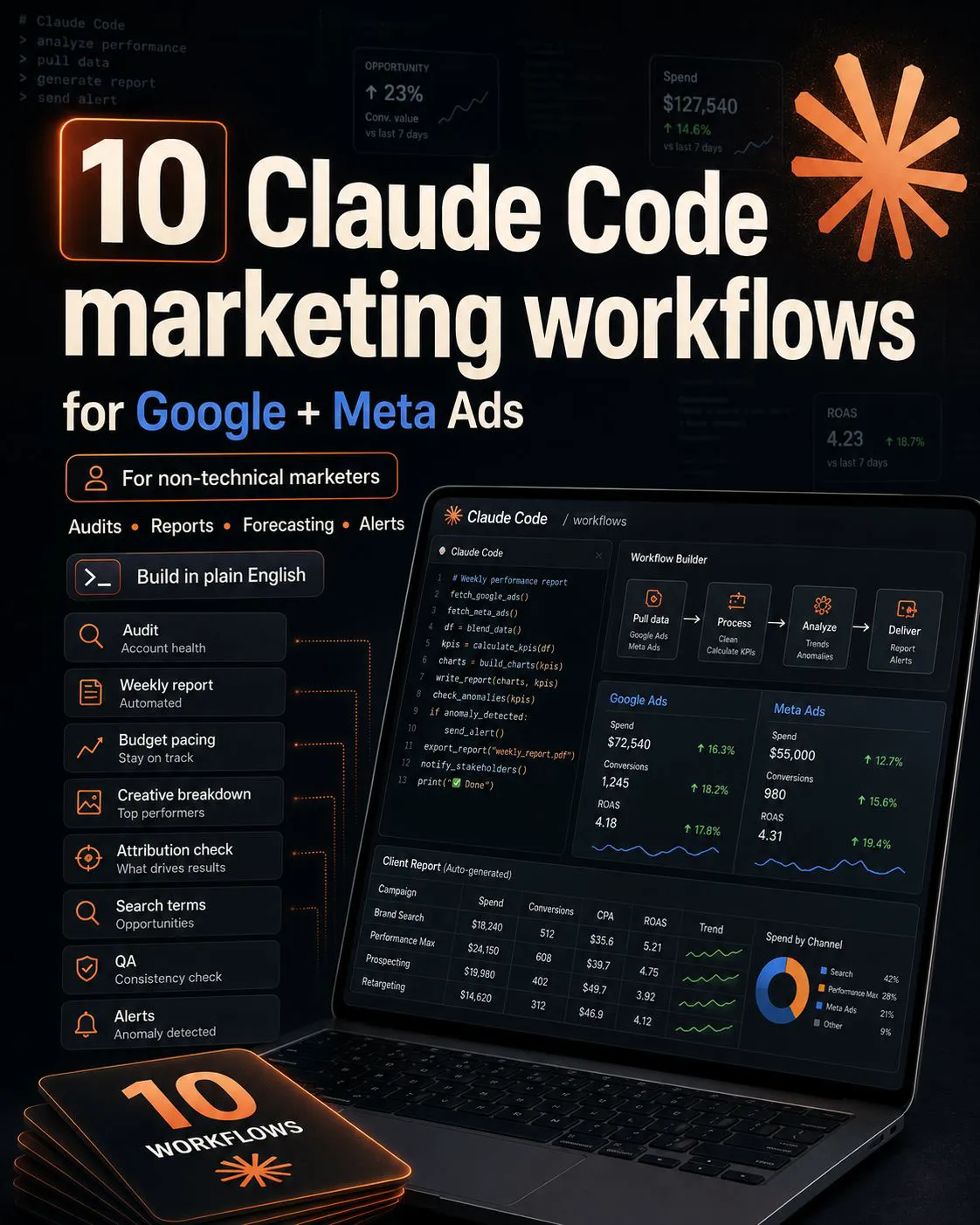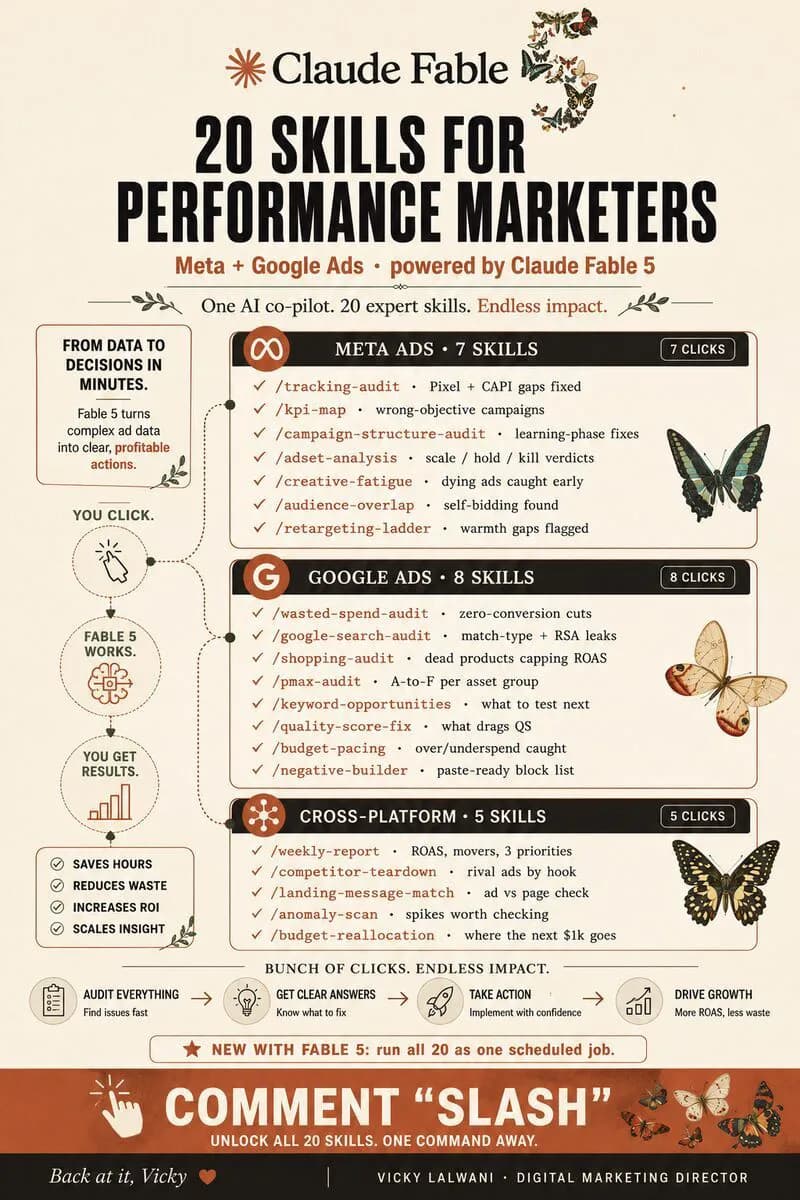
A Meta ads audit that reads Google Ads data alongside it checks tracking first, then Meta delivery, creative and audiences, then Google search terms, Performance Max and pacing, and compares both against real sales or leads. The result is one ranked list of fixes, scale, hold, pause, test or rebuild, that a person approves.
Most ad accounts get audited in pieces. One person reviews Meta, another reviews Google, and nobody compares the two. You end up with two lists of recommendations and no answer to the question that matters: where should the next budget increase go? A Meta ads audit that reads Google Ads data alongside it fixes that. It returns one ranked list of actions, with a clear verdict on each: scale, hold, pause, test or rebuild. If you would rather have the audit done for you, see my Meta Ads management and Google Ads consulting.
TL;DR
Run tracking checks first. Meta and Google each count conversions their own way and each removes duplicates only inside its own data, so summed platform totals usually overstate real sales. Audit against your store or CRM numbers.
On Meta, check the learning phase (about 50 results in the week after a significant edit), creative fatigue, audience overlap and the attribution setting. On Google, check search terms, negatives, Performance Max reporting, Quality Score and budget pacing.
Write each check once as a reusable Claude skill, chain them into one weekly run, and keep a person approving every change. Official Meta and Google connectors can now make changes, so the approval rule has to live in your workflow.
| Audit layer | Checks | Main question |
|---|---|---|
| Tracking | 5 | Can we trust the numbers? |
| Meta Ads | 7 | Is delivery stable and the creative fresh? |
| Google Ads | 8 | Is money going on searches that sell? |
| Cross-platform | 5 | Where should the next dollar go? |
Platform facts below were checked against Meta, Google and Anthropic's own pages on 17 November 2026, with links throughout and a sources table at the end. Numbers in the GIFs are illustrative.
What is a Meta ads audit, and why read Google alongside it?
Short answer: A Meta ads audit is a structured review of tracking, account structure, delivery, creative and budget in Meta Ads Manager, ending in a ranked list of fixes. Reading Google Ads data alongside it lets you compare cost per real sale or lead across both platforms, which a single-platform audit cannot do.
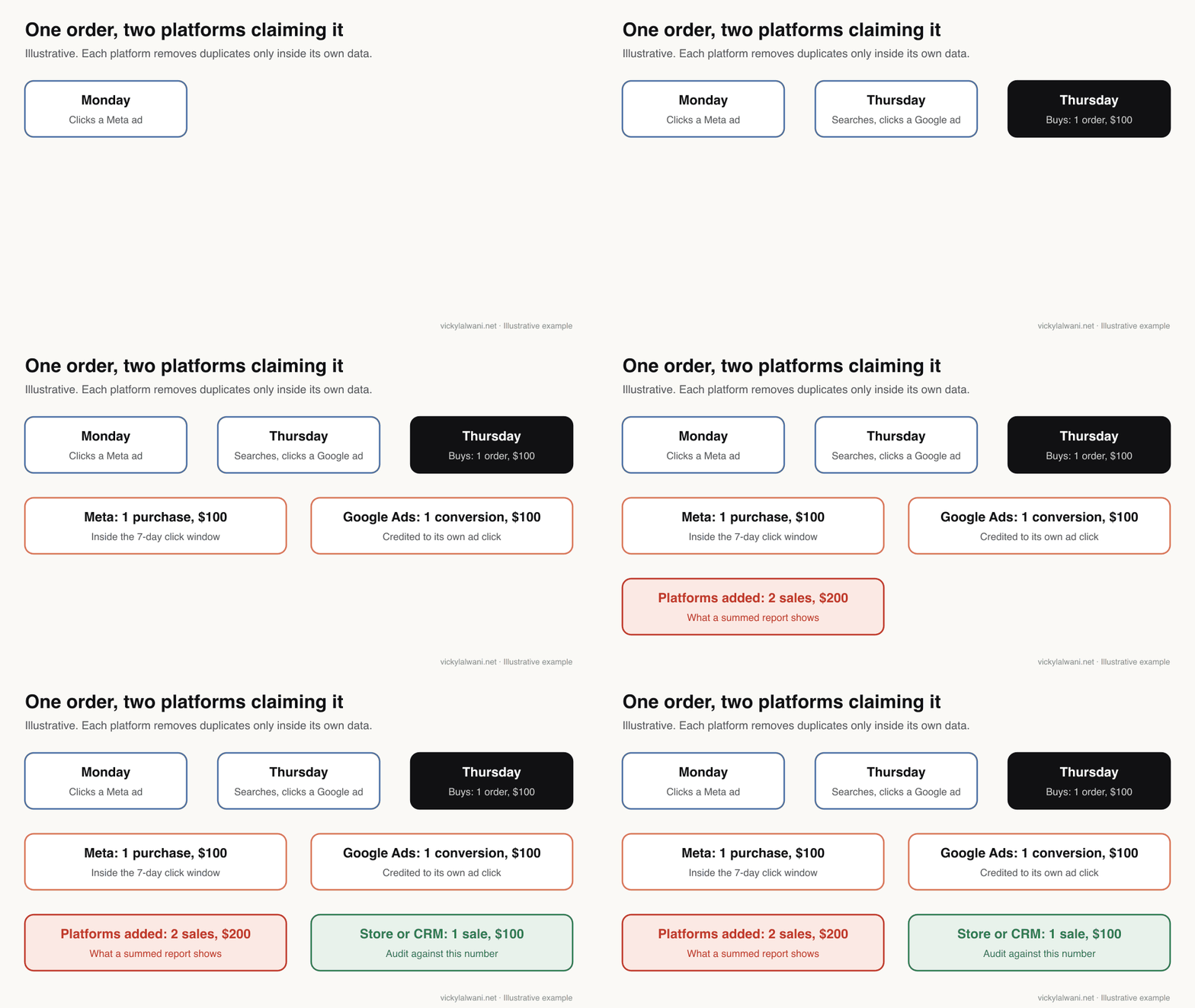
The problem with auditing one platform at a time is that each one grades itself. Meta reports results through its own attribution settings, and Google Ads reports conversions credited to its own ads. Both can be right on their own terms and still add up to more sales than you made. A cross-platform audit puts both next to the number that pays the bills: orders in your store or qualified leads in your CRM.
If you already run a weekly check on one platform, this extends it. For a lighter weekly routine, see the seven weekly PPC checks. For a single report across both platforms, see one cross-channel report for Google and Meta.
What do you need before you start the audit?
Short answer: Read access to Meta Ads Manager, Events Manager, Google Ads and GA4; a fixed date range of at least four weeks; and the real number of orders or qualified leads for the same dates from your store or CRM. Note each platform's attribution setting and time zone before you compare anything.
| You need | Why | Where |
|---|---|---|
| Read-only access | Audit without changing anything | Each platform's user settings |
| Same date range | Platforms report on different days | Pick whole weeks |
| Store or CRM totals | The number both platforms are judged on | Shop admin or CRM export |
| Attribution settings | Different windows count different sales | Meta ad sets; Google conversion actions |
| Time zones | GA4 and Google Ads can differ | Account and property settings |
| Change history | Explains sudden jumps | Both platforms' history logs |
On client accounts I audit first, put the findings in a sheet, and check them by hand before anything changes. Access is often the first blocker: "I gave you access" regularly turns out to mean view-only on the wrong account, so confirm the role on a shared screen before the audit starts.
Tracking checks: can you trust the numbers?
Short answer: Only after five checks: pixel and Conversions API deduplication, Event Match Quality, the attribution setting in use, any recent changes to what Meta counts, and Google Ads against GA4 and your CRM. If tracking fails, every later finding is unreliable, so this layer always runs first.
| Check | What the platform says | Pass when |
|---|---|---|
| Pixel and CAPI deduplication | event_id must match, within 48 hours | One purchase counts once |
| Event Match Quality | Scored from 0 to 10 | Score known and trending up |
| Attribution setting | API default is 7-day click, 1-day view | Same setting across compared ad sets |
| Customer devices setting | On by default; not active in EU and UK | You know if it is on |
| Google Ads vs GA4 | Different default attribution | Gap explained, not ignored |
Deduplication. If you send purchases from both the browser pixel and the server (Conversions API), Meta only counts them once when the pixel's eventID matches the server's event_id and the event names match. Meta's developer page says events are only deduplicated if they arrive within 48 hours of each other. Without it, purchase counts and ROAS are inflated.
Event Match Quality. Meta scores how well the customer details sent with server events match Meta accounts, from 0 to 10, using the last 48 hours of data. Email and click ID are listed as high-priority details.
What Meta counts has changed. Since a 3 March 2026 announcement, a click means a link click for website conversions, and likes, shares and saves moved to a separate engage-through bucket. The 7-day view and 28-day view windows stopped being returned by the Ads Insights API on 12 January 2026. And the Measure conversions on customer devices pixel setting, on by default outside the EU and UK, lets Meta match more purchases. A trend line that crosses any of these changes is not comparing like with like. The full timeline is in Meta Ads attribution changes for 2027.
Google Ads against GA4. Google's GA4 help says GA4 reports default to paid and organic channels, while Google Ads reports default to Google paid channels, and that different time zones cause discrepancies. So a gap between the two is expected. The audit question is whether you can explain it. If conversions are missing entirely, start with why Google Ads is not tracking conversions and the 15-point tracking audit.
Meta Ads checks: delivery, creative and audiences
Short answer: Seven checks: learning phase status, recent significant edits, creative fatigue, ad relevance rankings, audience overlap, results judged at the right level (the breakdown effect), and how far opportunity score recommendations are worth following. Each one ends in a verdict per ad set or ad.
| Meta check | Meta's rule | Typical verdict |
|---|---|---|
| Learning phase | About 50 results in a week | Hold; stop editing |
| Learning limited | Not a penalty; too few results | Consolidate or widen |
| Significant edits | Targeting, creative, event, bid strategy | Batch changes weekly |
| Creative fatigue | Cost per result 2x past ads or more | Test a new concept |
| Relevance rankings | Need 500 impressions | Rebuild low-ranked ads |
| Audience overlap | Compare up to 5 audiences | Merge overlapping ad sets |
| Breakdown effect | Judge at the level automation works | Do not cut "expensive" placements |
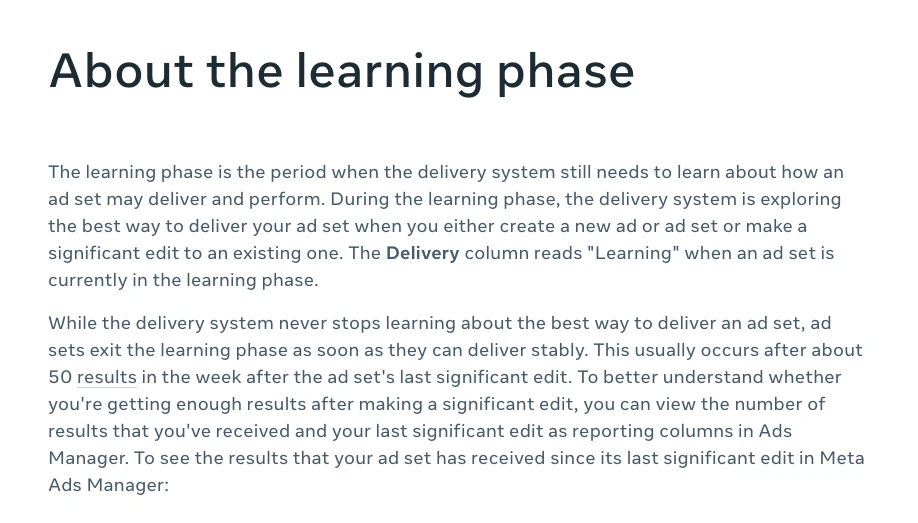
Learning and edits. Meta says an ad set usually leaves the learning phase after about 50 results in the week after its last significant edit. Significant edits always include changes to targeting, creative, the optimisation event, adding a new ad, pausing for seven days or more, and changing the bid strategy. Budget and bid changes count only when large: Meta's own example is $100 to $1,000, not $100 to $101. An audit that finds ad sets edited every few days usually recommends batching changes into one weekly session.
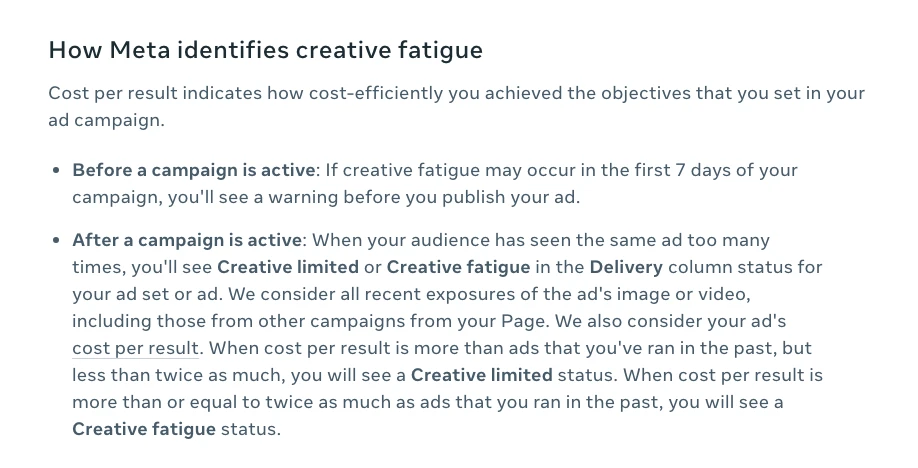
Creative fatigue. Meta shows Creative limited in the Delivery column when cost per result is higher than your past ads but less than twice as high, and Creative fatigue when it is twice as high or more (Meta help). It only covers ad sets with one creative. Ad relevance diagnostics (quality, engagement rate and conversion rate rankings) need at least 500 impressions and are not inputs to the auction, so treat them as clues, not scores to chase. For building replacement concepts, see the Meta ad creative brief process.
Audiences and automation. The audience overlap tool still compares up to five saved audiences. When ad sets from one advertiser would enter the same auction, Meta enters the one with the best history and holds the others back. Most new campaigns now start in the Advantage+ setup, so check which settings turn it off. And judge results where the automation works: Meta's breakdown effect page says to evaluate at campaign level when you use Advantage+ campaign budget.
Opportunity score. Meta's opportunity score runs from 0 to 100 and rises as you apply its recommendations. Meta itself says it "does not reflect your actual or future performance". Review each recommendation on its merits; do not apply them to raise the score. Account-level settings that quietly waste money are in the Meta Ads settings checklist.
Google Ads checks: search terms, Performance Max and pacing
Short answer: Eight checks: wasted spend on terms with no conversions, the search terms report, Performance Max negatives, the Performance Max search terms report, Quality Score, budget pacing, auto-applied recommendations and Smart Bidding learning. Together they show whether money is going on searches that sell.
| Google check | Google's rule | Typical verdict |
|---|---|---|
| Wasted spend | Spend on terms with no conversions | Pause or add as negatives |
| Search terms | Real searches that triggered ads | Add irrelevant terms as negatives |
| PMax negatives | Apply to Search and Shopping only; up to 10,000 | Add campaign-level negatives |
| PMax search terms | Prioritise conversion data | Judge terms on conversions |
| Quality Score | 1 to 10; not an auction input | Fix the weakest component |
| Budget pacing | Up to 2x a day, 30.4x a month | Flag over and under spend |
| Auto-applied recommendations | Can be switched off any time | Review the History tab |
| Smart Bidding learning | Never lasts more than seven days | Hold judgement during learning |
Search terms and negatives. The search terms report shows the real searches behind your clicks, and Google's own advice for an irrelevant one is to add it as a negative keyword. Performance Max now has campaign-level negative keywords, which apply to Search and Shopping inventory only, and Google raised the limit to 10,000 per campaign in April 2025. Its search terms report for Performance Max tells you to prioritise conversion data over clicks and impressions. For the full method, see the wasted spend audit.
Quality Score and optimisation score. Quality Score runs from 1 to 10 and is built from expected click-through rate, ad relevance and landing page experience. Google calls it a diagnostic and says it is not an input in the ad auction. Optimisation score estimates how well the account is set up, from 0 to 100%. Like Meta's opportunity score, it rises when you accept recommendations, so it measures agreement with Google, not results. If auto-apply is on, the History tab shows what Google changed for you.
Pacing and learning. A campaign can spend up to twice its average daily budget in a day but no more than 30.4 times it in a month, so daily spikes alone are not a finding. Google's current learning page says a Smart Bidding learning status never lasts more than seven days and that budget and target changes do not trigger it. An older Google page still lists setting changes as a trigger, so the two disagree; the audit should simply avoid judging a bid strategy in its first week.
The cross-platform layer: where should the next dollar go?
Short answer: Five checks that only work with both platforms side by side: a weekly summary of spend, real conversions and movers; an anomaly scan; landing page message match; a competitor teardown; and a budget reallocation check that compares cost per real sale or lead, not each platform's own cost per conversion.
| Cross-platform check | Compares | Output |
|---|---|---|
| Weekly summary | Spend, real conversions, top movers | Three priorities for the week |
| Anomaly scan | Day-on-day spikes and drops | Items worth a look, with dates |
| Message match | Ad promise vs landing page | Pages to fix |
| Competitor teardown | Rival ads grouped by hook | Angles to test |
| Budget reallocation | Cost per real sale or lead | Where to move budget, if anywhere |
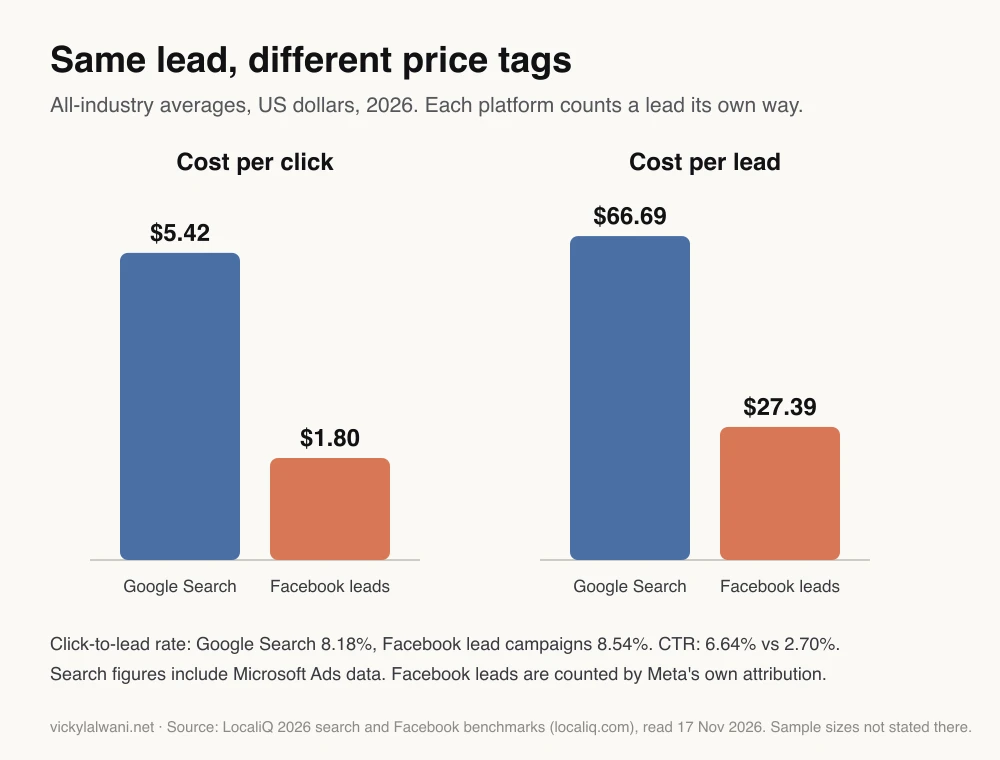
Why not just compare cost per lead in each platform? Look at published averages. In LocaliQ's 2026 benchmarks, the average Google Search lead costs $66.69 and the average Facebook lead campaign lead costs $27.39. That gap says as much about definitions as about performance. A search lead is usually someone who went looking; a Facebook lead form is filled in without leaving the app, and Meta counts it under its own attribution. The pages do not publish sample sizes, so treat the figures as a rough guide. The audit should replace both numbers with cost per qualified lead or cost per sale from your CRM.
I run platforms side by side with a set review date, then move budget away from the one that loses on cost per real sale. The reallocation check exists to make that decision on evidence. It can also catch leads from AI chat answers or other sources that reports label as paid traffic, which flatters whichever platform claims them.
How should the audit findings be ranked?
Short answer: As one short list, not a report. Each finding names the platform, the evidence, the proposed action, the effort and the likely effect on cost or revenue, sorted by impact. Use a fixed verdict vocabulary (scale, hold, pause, test, rebuild) so the list can be read in minutes.
| Verdict | Use when | Example |
|---|---|---|
| Scale | Cost per real sale beats target | Raise budget in steps |
| Hold | In learning or too little data | No edits this week |
| Pause | Spend with no real conversions | Zero-conversion search terms |
| Test | A plausible fix, unproven | New creative concept |
| Rebuild | Structure blocks results | Merge overlapping ad sets |
You are ranking findings from a weekly Meta Ads and Google Ads audit. Use only the data and findings I paste. Do not estimate numbers that are not in the data. If tracking checks failed, put that first and mark every other finding "unreliable until tracking is fixed".

For each finding, give:
- Platform (Meta, Google or both)
- Evidence (the metric, date range and value)
- Verdict: scale, hold, pause, test or rebuild
- Action in one sentence
- Effort: low, medium or high
- Likely effect on cost or revenue, with your reasoning

Sort by likely effect, highest first. Return a table of no more than 10 rows, then three priorities for this week. Do not make any change to either account.
Track which recommendations you accepted and what happened after. After a few weeks you will know which checks reliably find money and which add noise, and you can trim the set.
How do you run the audit as Claude skills on a schedule?
Short answer: Write each check as a Claude Code skill (a SKILL.md file you run by typing /its-name), chain the checks into one audit skill, then schedule it as a cloud, desktop or Cowork scheduled task. Scheduled tasks are on paid Claude plans; cloud scheduled tasks are still a research preview.
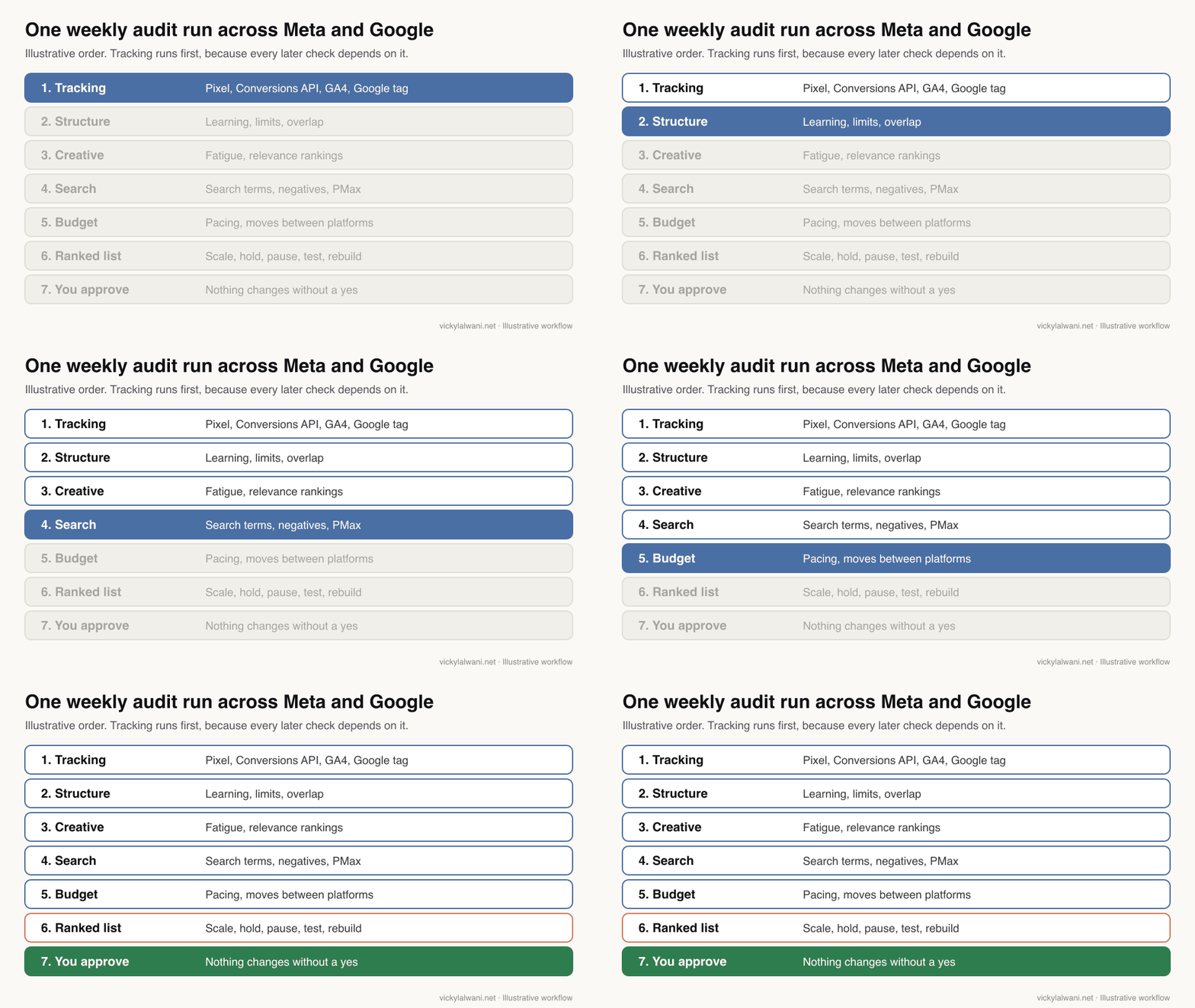
I package each check as a separate command. In Claude Code, custom commands have been merged into skills: a folder with a SKILL.md file of instructions, which you run by typing a slash and its name. Project skills live in .claude/skills and can be shared with a team. Setting disable-model-invocation: true means a skill only runs when someone types it, which suits audits.
---
name: meta-creative-fatigue
description: Weekly Meta creative fatigue check. Read-only.
disable-model-invocation: true
---
Read ad-level data for the last 28 days from the export or connector I name.
For each active ad, report: spend, results, cost per result, delivery status,
and quality, engagement and conversion rate rankings (only if 500+ impressions).
Flag "Creative limited" and "Creative fatigue" statuses as Meta reports them.
Verdict per ad: hold, test or pause, with one line of evidence.
Never change, pause or create anything in the ad account.
| Way to schedule | Runs where | Note |
|---|---|---|
| Cloud scheduled tasks | Anthropic's cloud | Research preview; hourly at most |
| Desktop scheduled tasks | Your computer | Only while the app is open and awake |
| Cowork scheduled tasks | Claude app | Hourly, daily or weekly; paid plans |
| /loop | An open session | Recurring tasks expire after 7 days |
Anthropic's cloud scheduled task docs add a useful safeguard: the stored prompt cannot act as approval for actions during the run. That fits the rule this audit is built on: the audit recommends, a person decides. For a wider view of the plugins and skills that already exist for ad accounts, see Claude plugins for Google and Meta PPC.
Connecting the data: read-only first
Short answer: Start with exports or a read-only connection. Google's official Google Ads MCP server is read and partial mutate: it can create assets, upload videos and manage labels, with a confirm step, and can be set to read-only. Meta's official Ads MCP server can create and edit campaigns, ad sets and ads. Lock writing off, or enforce approval in the skill.
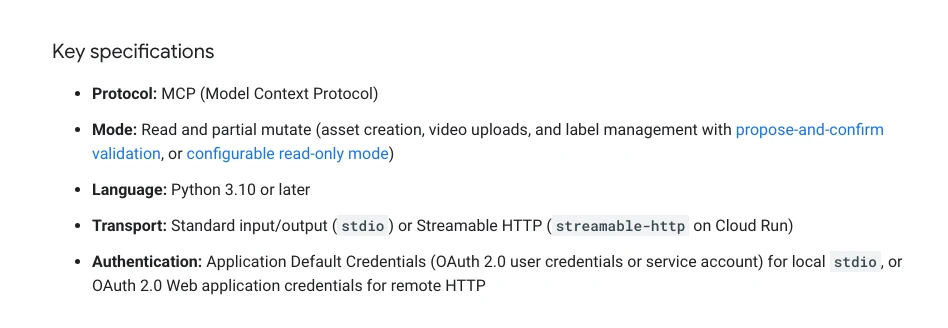
An MCP server (Model Context Protocol, a standard way for AI tools to connect to other software) is how Claude reads ad data directly. Google's page lists the mode as read and partial mutate, with a configurable read-only mode. Meta's Ads MCP server describes itself as a Meta-hosted server that lets you manage Meta ads from an AI agent, including creating and editing campaigns. Neither page promises a human approval step for every change, so build it in: read-only credentials for scheduled audits, and changes made by a person after reviewing the list.
I have had an AI agent hand me a Google Ads plan with search volumes that were badly wrong, and it went further than it should have before anyone checked. That is why no AI-pulled number goes into a recommendation of mine without a human check, and why the audit skills above are read-only.
Videos worth watching
Short answer: Start with Google Ads' own episode on attribution, incrementality and media mix modelling, then a short explainer on why Meta and GA4 numbers never match. Meta's own clips on creative fatigue and Event Match Quality are under two minutes each.
Attribution, incrementality & MMM: The modern measurement trifecta, from the official Google Ads channel, 2 September 2026. Google's Ads product liaison and a measurement product lead argue that attribution, incrementality tests and media mix models answer different questions, and that last click does not tell the whole story. It is Google's view, so it points to Google's own tools.
Why your Meta Ads & Google Analytics numbers don't match, from an analytics consultant's channel, June 2025. Explains view-through counting and in-app browsers as two reasons Meta and GA4 disagree, and says there is no single source of truth. The channel sells analytics services.
| Video | From | What it covers |
|---|---|---|
| Attribution, incrementality & MMM: The modern measurement trifecta | Google Ads, Sep 2026, 30 min | Attribution vs incrementality vs MMM |
| Why your Meta Ads & Google Analytics numbers don't match | Analytics consultant channel, Jun 2025, 9 min | Meta vs GA4 gaps, in-app browsers |
| Solving creative fatigue with strategies to refresh your ads | Meta for Business, Feb 2026, 1 min | Refreshing concepts, not just pausing |
| Increase your event match quality score by adding additional high-quality parameters | Meta for Business, Feb 2026, 2 min | Conversions API parameters, Event Match Quality |
| How I Audit Meta Ad Accounts That Spend $100K+/Month in 2025 (Full Breakdown) | Meta ads agency channel, Nov 2025, 29 min | Goal first, funnel structure, hygiene checks |
| Automate Your Meta Creative Audit with Claude (Meta Ads MCP + Skills) | AI marketing training channel, Jul 2026, 11 min | A creative audit as a Claude skill |
Every video was checked on 17 November 2026. The non-official channels sell services or training, so weigh their advice with that in mind.
What people say on X and Reddit
Short answer: Practitioners agree that Meta, Google Ads and GA4 will never match one to one, that platform numbers should never be added together, and that store or CRM revenue is the anchor. They are split on how much to trust AI to run the audit itself.
| Where | Date | What it says |
|---|---|---|
| r/PPC | 19 Sep 2026 | Meta 22, Google 45, GA4 far lower: which to report? |
| r/PPC | 20 Apr 2026 | Meta shows 9x ROAS, GA4 almost nothing; anchor on the store |
| r/PPC | 28 Jul 2026 | Ads books the click date, GA4 the conversion date |
| r/PPC | 21 May 2026 | Use platform data to optimise, blended numbers to judge |
| r/PPC | 30 Oct 2026 | AI audits weak; scripts plus AI on flagged rows work better |
| A Google Ads freelancer, X | 4 Jun 2026 | Google Ads and GA4 differ; both right, different models |
| A growth practitioner, X | 31 Jan 2026 | Standard attribution over-credits Meta on email days |
| Search Engine Roundtable, X | 16 Sep 2026 | Google documents multi-source conversions (beta) |
| An AI-for-ads course creator, X | 19 Aug 2026 | Claude Code can score a Meta account weekly |
The most useful thread is an r/PPC post from September 2026 where Meta reported 22 purchases and Google Ads 45, but GA4 credited far fewer. Replies said never to add the platform numbers together, and one pointed out that Google conversions survive in GA4 through auto-tagging while Meta only shows up if the ad URLs carry UTM tags, so check tagging first. On AI, an October 2026 r/PPC thread found AI weak at judging accounts on its own; practitioners reported better results from scripts that flag anomalies and pass only those rows to the model. That matches the approach here: rules in the skill, judgement with a person. Several of these sources sell training or services, and Reddit replies are opinions, not tests.
How to set up your own version in five steps
Short answer: Connect read-only data, write each check as its own skill with defined inputs and outputs, test the set against an audit you trust, chain and schedule it, and keep approval manual. Expect to trim checks after a few weeks.
- Connect your data. Give the tool read-only access to exports or an approved connector. Note attribution settings and time zones.
- Write each check separately. Define the input, the rule, the threshold and the output format. Cite the platform rule in the skill.
- Test on a known account. Compare the results with an audit you trust, and fix checks that disagree.
- Chain and schedule. Combine the checks into one run with one ranked summary, tracking first.
- Keep approval manual. The audit recommends; a person decides and makes the change.
If you would rather start from a checklist than build skills, the PPC audit with Claude covers seven checks for live accounts.
Where this advice is weak
- The benchmark chart uses averages that LocaliQ publishes without sample sizes, and the search figures include Microsoft Ads data.
- Meta's help pages do not give a start date for the customer devices setting, and some accounts may still be on older click definitions.
- Two Google pages disagree on what triggers a Smart Bidding learning status.
- Cloud scheduled tasks are a research preview, and connector features change often. Check current docs before relying on them.
- No independent study I could find measures how far summed platform conversions exceed real sales. The double-counting example is illustrative.
Want a second pair of eyes on your accounts?
I have run paid media for over 35 accounts, and the audits that help most are the ones repeated on a schedule, with tracking checked first. If you want one built around your Meta and Google accounts, see Meta Ads management, Google Ads and PPC consulting or analytics and tracking. If you want the skills themselves, see Claude consulting. Audit prices are on the pricing page, and the first call is free.
Keep reading: Meta Ads attribution changes, the wasted spend audit and one cross-channel report.
Sources
| Source | What it supports | Link |
|---|---|---|
| Meta Business Help | Learning phase; significant edits; learning limited | Learning, edits, limited |
| Meta Business Help | Attribution settings and models | Attribution |
| Meta for Developers | Default 7-day click, 1-day view | Insights API reference |
| Meta | Link clicks and engage-through, 3 Mar 2026 | Announcement |
| Meta for Developers | View windows removed 12 Jan 2026 | Blog, 16 Oct 2025 |
| Meta Business Help | Customer devices setting | Meta help |
| Meta for Developers | Pixel and CAPI deduplication | Deduplication |
| Meta Business Help | Event Match Quality 0 to 10 | EMQ |
| Meta Business Help | Creative limited and fatigue | Creative fatigue |
| Meta Business Help | Relevance diagnostics; overlap | Relevance, overlap |
| Meta Business Help | Advantage+ setup; breakdown effect | Advantage+, breakdown |
| Meta Business Help | Opportunity score | Opportunity score |
| Meta for Developers | Ads MCP server | Ads MCP |
| Google Ads Help | Search terms; PMax negatives and terms | Search terms, PMax negatives, PMax terms |
| PMax 10,000 negatives, April 2025 | Announcement | |
| Google Ads Help | Quality Score; optimisation score; auto-apply | Quality Score, optimisation, auto-apply |
| Google Ads Help | Budget pacing; learning | Overdelivery, learning |
| Google for Developers | Google Ads MCP server mode | MCP server |
| Google Analytics Help | GA4 attribution defaults, time zones | Settings, attribution |
| Anthropic | Skills; scheduled tasks | Skills, cloud, desktop, /loop, Cowork |
| LocaliQ | 2026 search and Facebook benchmarks | Search, Facebook |
| YouTube (Google Ads channel) | Attribution, incrementality and MMM | Video |
| X and Reddit | Practitioner views | Linked in the table above |
All pages read on 17 November 2026. Social posts and videos were checked the same day.
This article expands on my post on LinkedIn ↗.
FAQ
What is a Meta ads audit?
A Meta ads audit is a structured review of tracking, account structure, delivery, creative and budget in Meta Ads Manager. It ends in a ranked list of fixes, each with a verdict such as scale, hold, pause, test or rebuild.
How do you audit Meta Ads and Google Ads together?
Check tracking on both first, then run platform checks on each, then compare cost per real sale or qualified lead from your store or CRM. Platform-reported conversions use different attribution, so do not add them together or compare them directly.
What should a Meta ads audit check first?
Tracking. Confirm pixel and Conversions API events are deduplicated with a matching event_id, check Event Match Quality, and note the attribution setting. If tracking is wrong, every later finding in the audit is unreliable.
How long is the Meta learning phase?
Meta says an ad set usually leaves the learning phase after about 50 results in the week after its last significant edit. Changes to targeting, creative, the optimisation event or bid strategy, and large budget changes, can restart it.
How do you spot creative fatigue in Meta Ads?
Meta Ads Manager shows Creative limited when cost per result is above your past ads but less than twice as high, and Creative fatigue when it is twice as high or more. The status appears in the Delivery column for ad sets with one creative.
Why do Meta and Google report more conversions than my store?
Each platform credits a sale to its own ads under its own attribution window and removes duplicates only inside its own data. A shopper who clicked both a Meta ad and a Google ad can be counted by both, so compare against store or CRM totals.
Can Claude run a Meta ads audit automatically every week?
Yes. Each check can be written as a Claude Code skill and run as a scheduled task on a paid Claude plan. Keep the run read-only and have a person approve every change, because the official Meta and Google connectors can make edits.
Is the Google Ads MCP server read-only?
Not fully. Google lists its mode as read and partial mutate: it can create assets, upload videos and manage labels with a confirm step. It can be configured as read-only, which suits scheduled audits.
How often should you audit Meta and Google Ads?
A short scheduled audit weekly, with a deeper review monthly or before big budget changes. Avoid judging ad sets or bid strategies while they are still learning, and batch changes so you do not reset learning every few days.