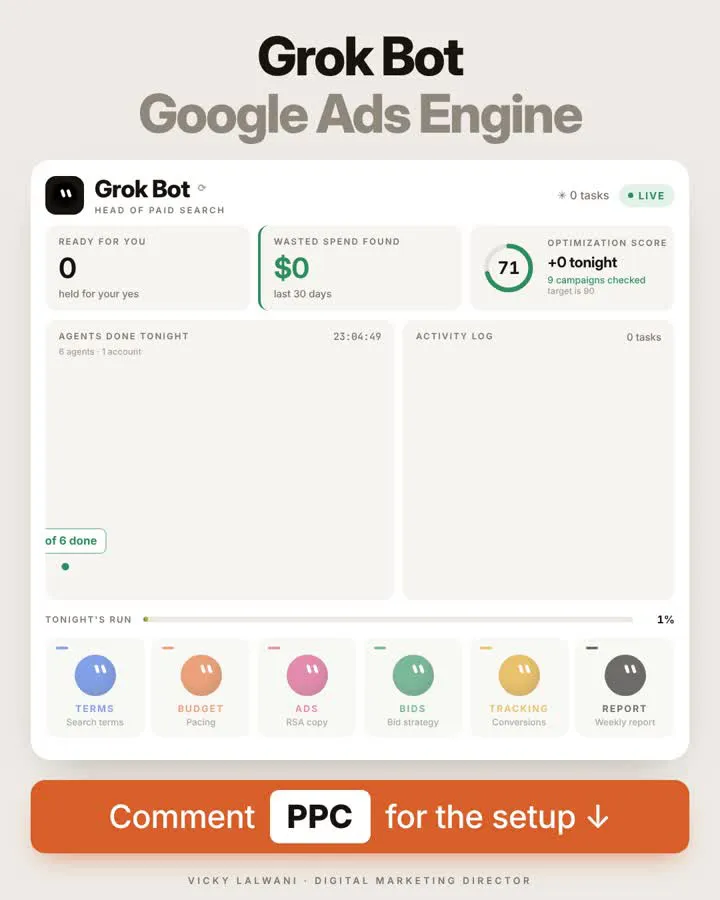
Human in the loop AI for Google Ads means agents read the account and draft changes overnight, and a person approves each change before it goes live. Google designed its own tools this way: Ads Advisor asks for approval before acting, and the official Google Ads MCP server cannot change campaigns, budgets or bids. Give agents read-only access, cap the morning list at about ten ranked items with evidence, and start with one job, usually search terms.
TL;DR
- What it is: AI agents read your Google Ads account and draft changes overnight. A person approves or rejects each change before anything goes live.
- Google built the same rule into its own tools. Ads Advisor asks for approval before taking action, and the official Google Ads MCP server cannot change campaigns, budgets or bids.
- The risky part is access, not intelligence. Give agents read-only access and apply approved changes yourself, or use a propose-and-confirm step.
- Start with one job. Search terms first. Run it beside your own review for a few weeks before you add the next agent.
Most Google Ads work is not hard. It is repetitive. Pulling reports, scanning search terms, checking pacing, drafting ad variations and confirming tags all take hours and are easy to put off on a busy week.
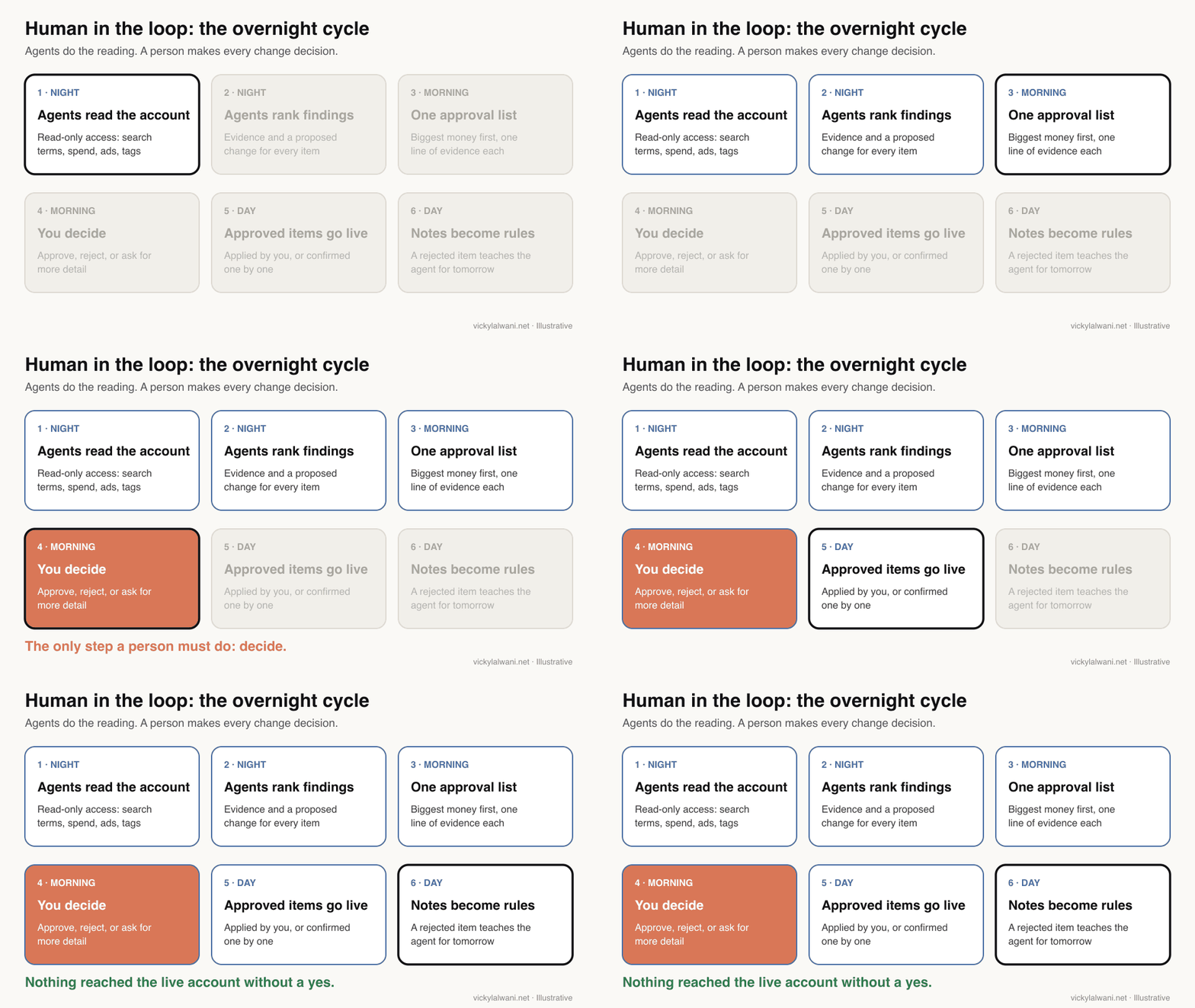
Human in the loop AI for Google Ads splits that work in two. Agents do the reading and drafting overnight. A person makes every decision that touches the live account, from one ranked approval list each morning.
That is how I run the analysis side of my own account work, and it is the model I would plan around for 2027. If you want it built for your account, my AI automation service sets up the agents and the approval step, and my Google Ads management covers the decisions themselves.
A note on evidence. Platform facts come from Google Ads Help, Google's developer documentation, the Google blog and Anthropic's documentation, read on 17 November 2026 and linked where used. The survey figures come from a StackAdapt study. Anything written as "I" is a working habit from my own client work. I do not share client names or client numbers, so every example item here is illustrative.
Jump to: Meaning · What tools can change · Six jobs · Approval list · Access · X and Reddit · FAQs
What does human in the loop AI mean in Google Ads?
Short answer: It means an AI agent can read, analyse and propose, but a named person approves every change to keywords, budgets, bids, ads or settings before it reaches the live account. The agent saves time on the reading. The person keeps the judgement and the accountability.
An agent here is a program, often a large language model such as Claude or Gemini with tools attached, that can pull data and work through a task in several steps without a person typing each one.
The idea is not new to AI. Anthropic's guide to building agents, published in December 2024, says agents can "pause for human feedback at checkpoints" and recommends testing in sandboxed environments with guardrails. Google Ads is a good place to apply it, because a wrong change spends real money within minutes.
| Step | Agent does | Person does |
|---|---|---|
| Read the data | Pulls reports and search terms | Sets what it may read |
| Analyse | Finds waste and gaps | Gives business context |
| Propose | Drafts a change with evidence | Nothing yet |
| Decide | Waits | Approves, rejects or asks |
| Apply | Only after a yes, if allowed | Applies or confirms |
| Learn | Reads the notes on rejections | Writes the note |
The step that matters is the fourth one. Everything else can be automated. The decision cannot, because the agent does not know your margins, your stock, your sales team's capacity or the call your client made yesterday.
What can AI tools change in a Google Ads account in 2026?
Short answer: Less than social media suggests. Google's own MCP server cannot touch campaigns, budgets or bids. Ads Advisor asks before it acts. The Google Ads API can change anything, but only through code you or a vendor write, and it can validate a change without applying it.
MCP (Model Context Protocol) is an open standard that lets an AI assistant such as Claude call outside tools. A Google Ads MCP server is the bridge between the assistant and your account data.
| Tool | Can read | Can change | Approval step |
|---|---|---|---|
| Google Ads MCP server | Yes, all reports | Assets and labels only | Propose, then confirm |
| Ads Advisor | Yes | Some fixes | Asks before acting |
| Ask Advisor (beta) | Ads, Analytics | Can set up campaigns | Not stated by Google |
| Google Ads API | Yes | Everything | Only what you build |
| Google Ads scripts | Yes | Everything scripted | Preview mode first |
| Auto-apply | N/A | Opted-in types | None per change |
Three details from those pages are worth knowing before you build anything.
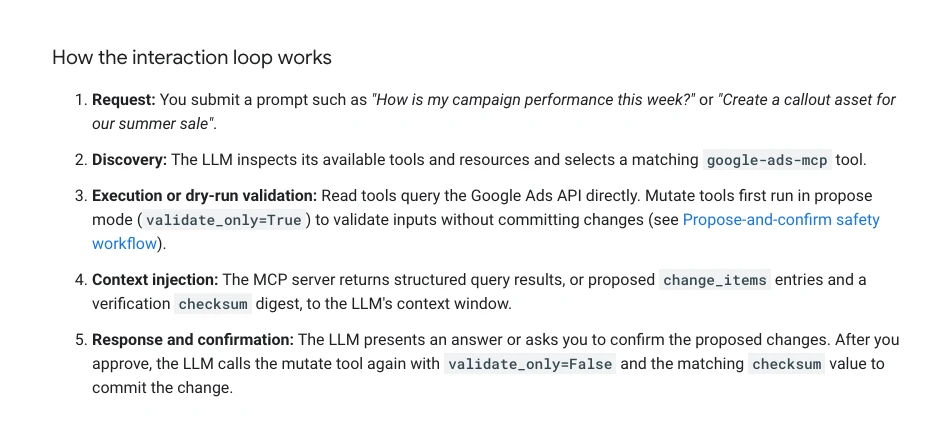
- The official MCP server has a built-in approval loop. Its write tools first run with
validate_only=True, which checks a change without committing it, and return the proposed change with a checksum. Only after you approve does the assistant call the tool again to commit. It can also be set to a strictly read-only deployment. - Developer tokens are gone. Google sunset Google Ads API developer tokens in September 2026. API access levels now come from the Google Cloud project that owns your sign-in credentials. Setup videos made before then still show the old token step.
- Auto-apply is the opposite of human in the loop. Google identifies eligible recommendations daily and applies the types you opted into. You can review the queue and see what was applied in change history, but nobody approves each change first.
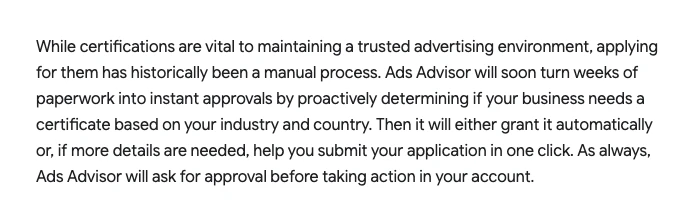
Google's own agents follow the same principle. In April 2026 Google added troubleshooting, security monitoring and certification features to Ads Advisor, and its post says the agent will ask for approval before taking action in your account. Search Engine Roundtable's write-up adds that it keeps a change history of what it did.
Ask Advisor, announced at Google Marketing Live in May 2026, goes further: Google says it can pull product details from Merchant Center to set up a new campaign. The post does not say whether each step needs your confirmation, so check before you let it build anything in a live account.
Which six jobs should run overnight?
Short answer: Search terms, budget pacing, ad copy, bid review, tracking checks and reporting. Each is narrow, has a clear output and can return evidence, which makes it easy to check. None of them needs write access to do its work.
| Job | Agent reads | Agent proposes | Risk if auto-applied |
|---|---|---|---|
| Search terms | Search terms report | Negative keywords | Blocks good traffic |
| Budget | Spend vs monthly plan | Budget shifts | Starves a winner |
| Ads | Ad strength, CTR | New headlines | Off-brand claims |
| Bids | Targets, CPA, brand | A target to review | Volume collapses |
| Tracking | Conversion actions | Fixes to check | Breaks a live form |
| Reporting | Spend, CPA, ROAS | Top movers, notes | Low: read-only |
CPA is cost per acquisition, what you pay for each lead or sale. ROAS is return on ad spend, revenue divided by ad cost. CTR is click-through rate, the share of people who click after seeing an ad.
Order matters. Make tracking the first agent, not the last. If conversion tracking counts the wrong thing, every other agent will optimise towards it. Before any campaign spends, I want every form and call button measured, and an agent that rechecks that each week is cheap insurance.
Here is the brief I would give a search terms agent. It reads, ranks and stops. It never writes to the account.
You are the search terms agent for one Google Ads account. You can read data. You cannot change anything.

Inputs: the search terms report for the last 30 days (campaign, ad group, search term, match type, clicks, cost, conversions), our current negative keyword lists, and this business context: [what we sell, what we do not sell, areas we serve].

1. List search terms with cost above [threshold] and zero conversions.
2. Group them by theme (jobs, free, competitor, wrong service, wrong area).
3. For each theme, propose a negative keyword and a match type, and say which good queries it could block.
4. Rank by cost, highest first.
5. Output a table: theme, example terms, cost, proposed negative, match type, risk.

Do not guess conversion values. If a number is missing, say so.
How do you design the approval list?
Short answer: Keep it short, ranked by money at stake, and binary. Every item should say what was found, the evidence, the exact change and the risk, so a person can approve or reject it in under a minute without opening the account.
The approval list is where this works or fails. A weak list is a wall of suggestions that takes longer to read than doing the job yourself. A good one reads like a decision sheet.
| Field | Example | Why it is there |
|---|---|---|
| Rank | 1 of 9 | Biggest money first |
| Agent | Search terms | Who to blame or tune |
| Finding | Job-seeker queries | What happened |
| Evidence | Cost, clicks, 0 leads | So you trust it |
| Change | Add 6 phrase negatives | Exactly what goes live |
| Risk | May block "careers" page | What could go wrong |
| Decision | Yes, no, more detail | Binary, fast |
| Note | Why it was rejected | Becomes a rule |
On client accounts my rule is the same every time: audit first, put the findings in a sheet, check them by hand, and change nothing before approval. A sheet works well as the approval list because it keeps a history. Over a few weeks you can see which agents are reliable and which keep getting rejected.
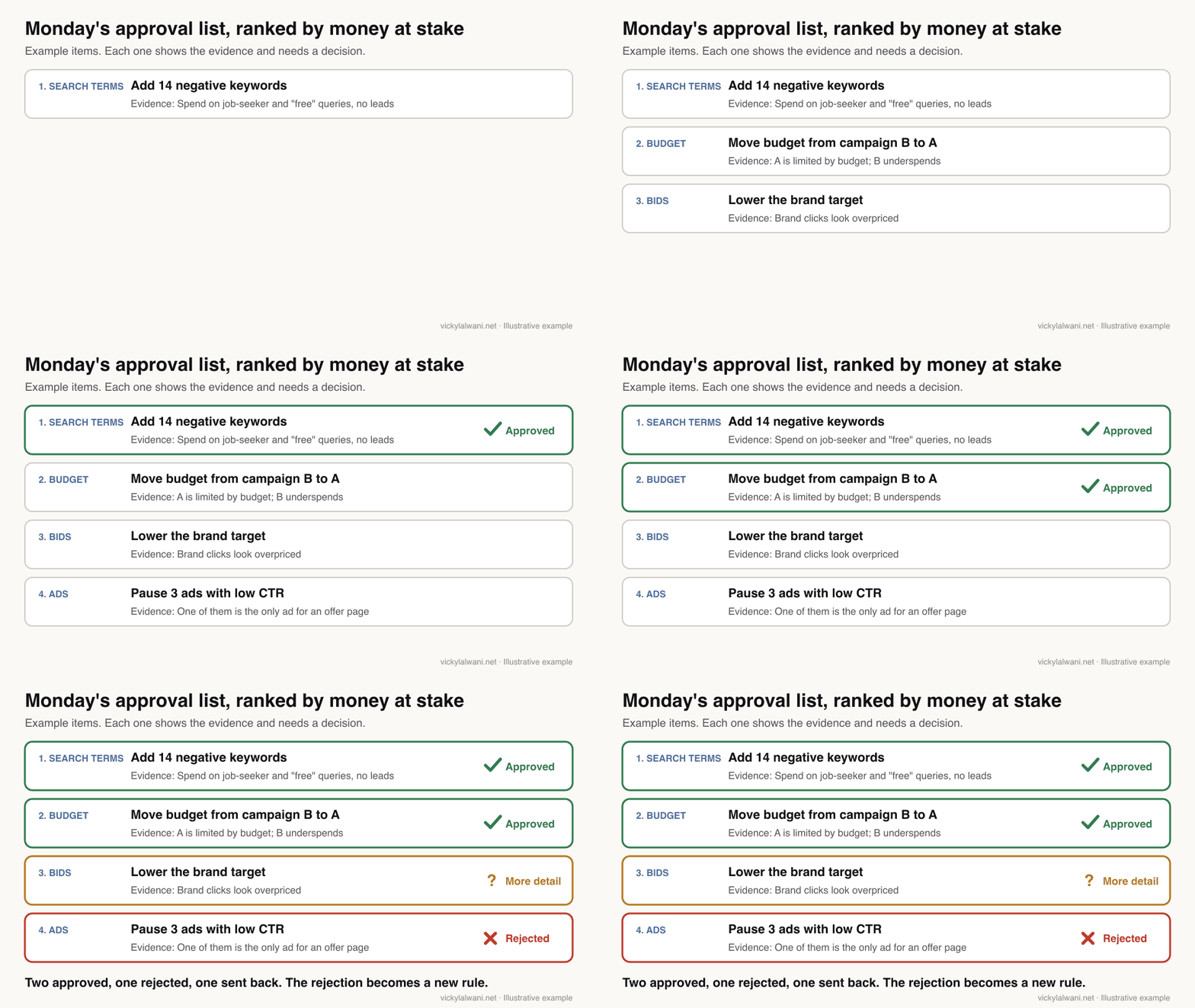
Notice the rejected item in that example. Pausing low-performing ads looks sensible in the data. It would also have left one offer page with no ad at all. That is the kind of context an agent misses and a person catches.
To make the agents produce a list like this, give them one shared output format.
Combine the findings from all agents into one approval list.

Rules
- Maximum 10 items. Drop anything with low money at stake.
- Rank by estimated monthly cost saved or revenue gained, highest first. Show how you estimated it.
- One row per change: rank, agent, finding, evidence (numbers and date range), exact change, risk, decision (leave blank), note (leave blank).
- Write the change so a person could apply it in Google Ads without further work.
- If two items conflict, flag both and say why.
- Never mark anything as approved.
How much access should an agent get?
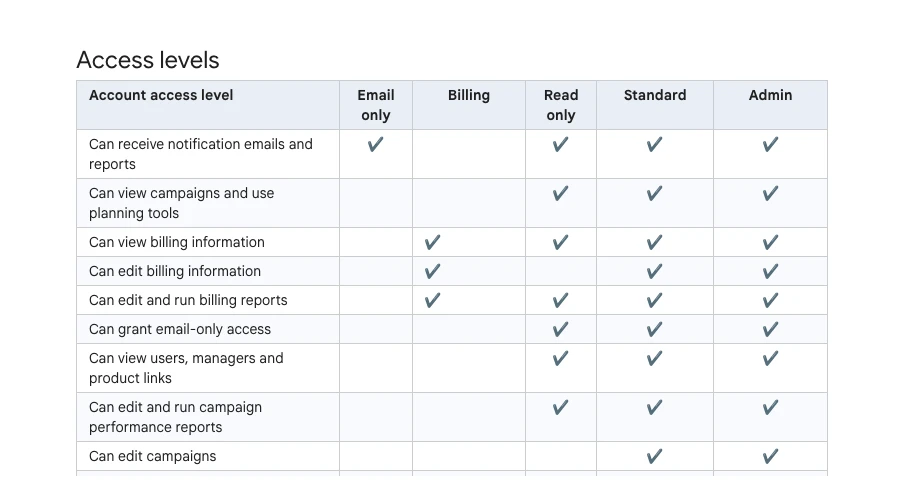
Short answer: The least it needs: read-only for analysis. Give write access only to a tool with a confirm step, and keep budget and bid changes with a person. Google Ads, its API, its scripts and Claude all have a setting that supports this.
| Layer | Setting | Effect |
|---|---|---|
| Google Ads user | Read only | Can see, cannot edit |
| MCP server | Read-only config | No write tools |
| Google Ads API | validate_only | Checks, does not apply |
| Google Ads scripts | Preview | Simulates changes |
| Claude Code | Deny rules | Blocks named tools |
| Auto-apply | Off, or narrow | No silent changes |
A few practical points:
- Give the agent its own login. A separate user with Read only access means anything it does shows up under its own name in change history, and you can remove it in one click.
- Block write tools in the assistant too. In Claude Code, deny rules are checked before ask and allow rules, so a deny rule on a write tool holds even if another setting allows it.
- Use preview for scripts. Preview mode runs a Google Ads script without changing campaign data, though it still writes to spreadsheets and sends emails.
- Check auto-apply at every level. Practitioners on Reddit report settings that seemed to switch back on. Look at the account's auto-apply page and its change history each week.
I also keep planning and doing apart. A thinking model plans the work and a separate agent executes it, so the plan can be read and questioned before anything runs.
Do marketers trust AI to change campaigns on its own?
Short answer: Mostly not yet. In a 2026 survey of 500 marketing and advertising professionals, 89% were comfortable with AI preparing actions for their approval, but only 50% with AI acting alone, even once its performance is proven.
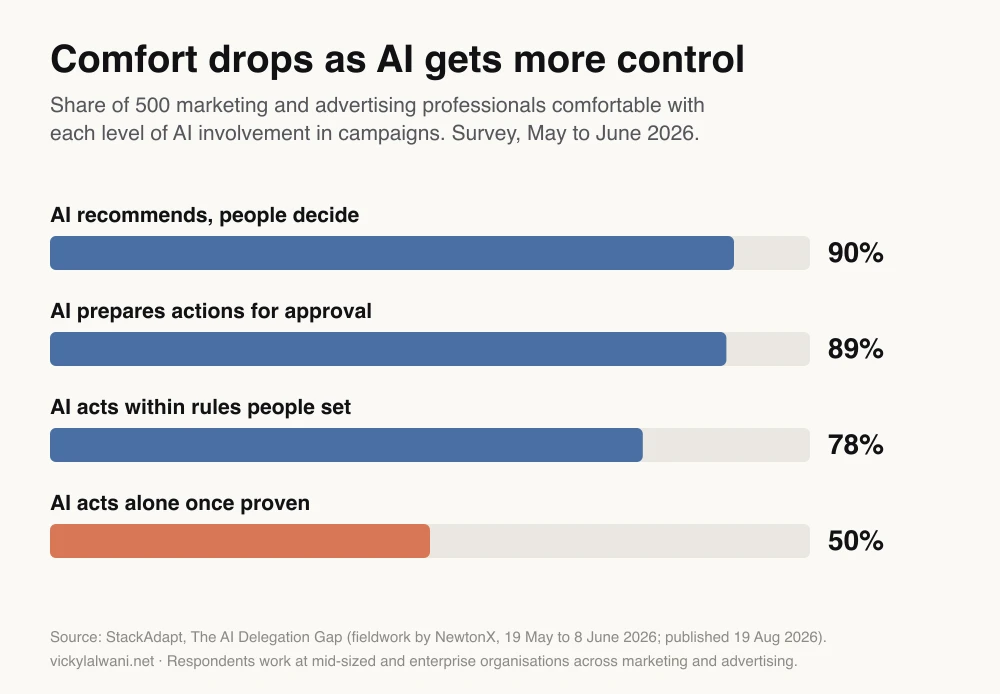
The StackAdapt study, reported by PPC Land, surveyed 500 professionals at mid-sized and enterprise organisations between May and June 2026. It also found that only 6% almost always act on the recommendations their ad platforms show them, and 42% ignore them because they feel generic.
That 6% is the useful number. If people rarely act on suggestions from the platform itself, an agent's list will be ignored too unless it is shorter, more specific and better evidenced. The approval list design above is the answer to that problem, not a nice extra.
The survey covers marketing and advertising broadly, not Google Ads alone, and it was run for a company that sells advertising technology. Treat it as a direction, not a precise measure.
Where does human in the loop Google Ads go wrong?
Short answer: In four places: bad tracking data, a person who approves in bulk without reading, agents with more access than they need, and agents that drift as the account changes. Each has a simple control.
| Failure | What it looks like | Control |
|---|---|---|
| Bad data in | Agents chase fake leads | Tracking agent first |
| Rubber stamping | All 20 items approved | Cap the list at 10 |
| Too much access | Agent edits live bids | Read-only login |
| Silent drift | Old rules, new account | Review agents monthly |
| Missing context | Strategy ignored | Give it a brief |
The last row comes up again and again in practitioner discussions. An agent told only to "audit this account" has no idea why the account is built the way it is. A short brief with your goals, margins, what you do not sell and recent changes does more for the quality of the list than a better model.
Agents also write with confidence about settings that have changed. Language models learn from older articles, and Google Ads changes often. Ask every agent to link the Google Ads Help page behind any setting it recommends, and check the date.
What does the morning review look like?
Short answer: A short session with the list: read the top items first, check the evidence on anything that moves budget, approve the clear wins, reject what does not fit the business, and write one line explaining each rejection so it becomes a rule.
- Read the top three. They carry most of the money.
- Open the evidence for budget and bid items. Spot-check one number in Google Ads itself.
- Approve or reject. If you need more than a minute, mark it "more detail" and move on.
- Write the note. "Do not pause the only ad on an offer page" is a rule an agent can follow tomorrow.
- Apply the approved items. Yourself, or through a tool that asks you to confirm each one.
- Send a short human note. Where we are, what changed, what is next.
Over time the list gets shorter and sharper, because the notes keep the same mistake from coming back.
How should you start?
Short answer: With one agent on one job, usually search terms, run beside your own review for a few weeks. When its list matches what you would have done, add the next job. Never start with budget or bids.
| Stage | Agent does | You do | Move on when |
|---|---|---|---|
| 1. Shadow | Drafts a list | Your usual review too | Lists match |
| 2. Assist | Drafts a list | Approve from the list | Few rejections |
| 3. Add jobs | One new job at a time | Same review | Each job is stable |
| 4. Confirm step | Proposes in the tool | Confirm each change | Only for low-risk items |
This is slower than building six agents in a weekend. It avoids the expensive mistake of automating a job before you understand how the agent gets it wrong.
If you are deciding which agents to build first, my guide to building an AI agent team for Google Ads covers the roles, and Google Ads automation with Claude covers what to automate and what to leave alone.
Videos worth watching
A six-minute walkthrough of deploying the official Google Ads MCP server from Google's own advertising developer channel, published May 2026. It sells nothing. It still shows the developer token step, which Google retired in September 2026.
Anthropic's product and engineering team on how agents are built with Claude, published October 2025. It is general, not about Google Ads, and it promotes Anthropic's developer platform.
| Video | Channel | Date | What it covers |
|---|---|---|---|
| Deploy the Google Ads MCP server | Google developers | May 2026 | Official server setup |
| Building agents with Claude | Anthropic | Oct 2025 | How agents work |
| How Anthropic builds effective agents | AI Engineer | Apr 2025 | When to use agents |
| Install the official Google Ads MCP | Tool vendor | Aug 2026 | Claude Code setup |
| Google Ads MCP in Claude | Tool vendor | May 2026 | Limits of the official server |
The two vendor videos end by selling their own connectors with write access. Watch them for the setup steps, and apply the access rules above before you connect anything that can change campaigns.
What people say on X and Reddit
Posts and threads from 2025 and 2026, each opened and checked on 17 November 2026. Many replies come from people who sell tools or services, so treat single comments as opinion.
| Where | Date | What it says |
|---|---|---|
| Google Ads liaison, X | 12 Nov 2025 | Ads Advisor launches |
| Google Ads liaison, X | 21 Apr 2026 | New Advisor features coming |
| Search Engine Roundtable, X | 24 Dec 2025 | Advisor prompts in reports |
| A developer, X | 21 Mar 2025 | Built a Google Ads MCP |
| A Google Ads creator, X | 23 Sep 2026 | "Automate 80%" claim |
| r/PPC | Sep 2026 | Claude Code with guardrails |
| r/PPC | Sep 2026 | Good at analysis, not settings |
| r/PPC | May 2026 | Auto-apply broadened campaigns |
| r/googleads | May 2026 | Does anyone let AI execute? |
| r/PPC | Jun 2026 | Scripted morning report |
On X: Google is building agents, and keeping the approval step.
- Google's ads liaison account introduced Ads Advisor in November 2025 as a conversational agent for moving from question to analysis. In April 2026 it said new capabilities would launch in the following months, the same release in which Google repeated that the agent asks for approval first.
- Search Engine Roundtable's account reported Google testing Advisor suggestions at the top of reporting screens, which puts the agent in front of more advertisers by default.
- On the builder side, a developer posted their first custom MCP connector for querying Google Ads in March 2025, months before Google shipped its own. By late 2026 creator accounts were promising to automate 80% of Google Ads. Those posts sell courses or tools, and none shows an approval step.
On Reddit: practitioners use agents to read, and keep the changes.
- Analysis yes, settings no. In an r/PPC thread comparing Claude and Gemini, the most upvoted reply said the models analyse well but recommend outdated settings. Another said the fix was giving the model what the export leaves out: conversion lag, attribution model and bid targets.
- Guardrails first. A practitioner who set up Claude Code said APIs, guardrails and account context were the hard part. One reply said their team uses agents to monitor and build dashboards, but is "not making changes" yet.
- Automation without a person costs money. A solo founder reported that broadened match types and network settings, plus auto-apply defaults, sent spend to junk clicks. Replies said to pull change history and keep auto-apply off.
- Scepticism about the hype. An r/googleads thread asked whether anyone really lets AI run accounts. Replies were split: some let AI make creative assets, others use tools that only flag problems.
- Simple beats clever. One manager scripted a morning report emailed for every account. The top reply: push beats pull. That is the approval list idea in its simplest form.
Where this advice is weak
- No controlled study. I found no published test comparing approved and fully automated Google Ads changes on the same accounts. The case for human approval rests on platform design, survey data and practitioner reports.
- The survey is broad. The StackAdapt figures cover marketing and advertising in general, at larger organisations, and come from a vendor.
- Tools are moving fast. The MCP server gained write tools during 2026, developer tokens were retired in September 2026 and Ask Advisor is in beta. Recheck the tool table every few months.
- Approval costs time. On a very large account, reviewing every change may not scale. Some teams let low-risk items, such as labels, go through a confirm step and keep a person on money decisions only.
- My method is not a proven formula. It is how I work. I have not published outcomes, because client numbers stay private.
Want help setting this up?
I build agent workflows for Google Ads with read-only access, one ranked approval list and clear limits. The setup is part of my AI automation service, and the decisions on the list are what my Google Ads management covers. Rates are on the pricing page.
Related reading: the weekly PPC audit checklist is the human version of these jobs, and connecting Claude to Google Ads and analytics covers the plumbing.
Sources
| Source | What it supports | Date | Link |
|---|---|---|---|
| Google Ads API docs | MCP server limits, propose and confirm | Read 17 Nov 2026 | MCP server, GitHub |
| Google Ads Developer Blog | Developer tokens sunset | 10 Sep 2026 | Onboarding post |
| Google Ads API reference | validate_only | Read 17 Nov 2026 | MutateGoogleAdsRequest |
| Google Ads scripts docs | Preview mode | Read 17 Nov 2026 | Preview |
| Google blog | Ads Advisor asks for approval | 21 Apr 2026 | Ads Advisor |
| Google blog | Ask Advisor beta | 20 May 2026 | Ask Advisor |
| Search Engine Roundtable | Advisor features, change history | 22 Apr 2026 | Article |
| Google Ads Help | Access levels, auto-apply, change history | Read 17 Nov 2026 | Access, auto-apply, change history |
| Anthropic | Agent checkpoints, permissions | Dec 2024; read 17 Nov 2026 | Building agents, Claude Code permissions |
| StackAdapt via PPC Land | Survey figures for the chart | 19 Aug 2026 | PPC Land, report |
| X | Google Ads liaison, trade press, practitioners | Mar 2025 to Sep 2026 | Linked in the text |
| First-hand reports and opinion | 2025 to 2026 | Linked in the text | |
| YouTube | Five videos, titles checked by oEmbed | Apr 2025 to Aug 2026 | Linked in the videos table |
This article expands on my post on LinkedIn ↗.
FAQ
What is human in the loop AI in Google Ads?
Human in the loop AI in Google Ads means AI agents read the account and draft changes, but a person approves each change before it goes live. The agent does the analysis and the person keeps the decision on keywords, budgets, bids and ads.
Can Claude make changes in my Google Ads account?
Only if you connect it through a tool with write access. Google's official Google Ads MCP server cannot change campaigns, budgets or bids, and its asset and label tools ask you to confirm first. Third-party connectors can write, so check their permissions before connecting.
Does Google Ads Advisor make changes without asking?
Google says Ads Advisor will ask for approval before taking action in your account. That statement is in Google's April 2026 post on its new features. Ask Advisor, the newer beta agent, has no such statement in its launch post, so check each step.
What can AI agents safely do overnight in Google Ads?
Read-only analysis and drafting: search term review, budget pacing, ad copy drafts, bid review, tracking checks and reporting. None of these needs write access. Changes should wait for a person to approve them the next morning.
How do I stop an AI agent making bad changes in Google Ads?
Give it a separate login with Read only access, block write tools in the assistant, and apply approved changes yourself. Turn off auto-apply recommendations or limit them to types you trust. Check change history weekly.
Is auto-apply recommendations the same as using an AI agent?
No. Auto-apply lets Google apply the recommendation types you opted into without approving each one. A human in the loop setup does the opposite: every change waits for a person. You can switch auto-apply off at any time in Google Ads.
Do I still need a developer token for the Google Ads API?
No. Google sunset Google Ads API developer tokens in September 2026. Your API access level now comes from the Google Cloud project that owns your OAuth credentials, and existing code keeps working.
How long does the morning approval review take?
It depends on the account, but a list capped at about ten ranked items should take a short session. If it takes longer than doing the work yourself, the list is too long or the evidence is too thin.