Google Ads automation with Claude works by sorting changes by what a mistake costs to undo. Reversible, contained tasks such as adding a negative keyword can run alone. Wide changes pass hard checks. Budget rises and removals need you, since a removed campaign cannot be restored.
It is Monday morning. Claude has already read last week's search terms, flagged forty wasted queries and drafted a negative keyword list. The question is not whether it can do the work. The question is which of its changes should go live without you looking. That is what this guide answers. If you would rather have someone set the rules up with you, that is part of my Google Ads management work.
TL;DR
The rule: sort every change by what a mistake would cost to undo, not by how sure the model sounds. Small, reversible changes can run on their own. Wide changes pass hard checks first. Anything that moves money or cannot be undone waits for you.
Your safety net: Google Ads lets you undo most changes made in the last 30 days from change history, but a removed campaign cannot be restored.
What changed by November 2026: Google's official Google Ads MCP server can now create assets and labels behind a propose and confirm step, developer tokens are no longer needed for the API, and Google's own agent, Ads Advisor, can complete tasks in your account.
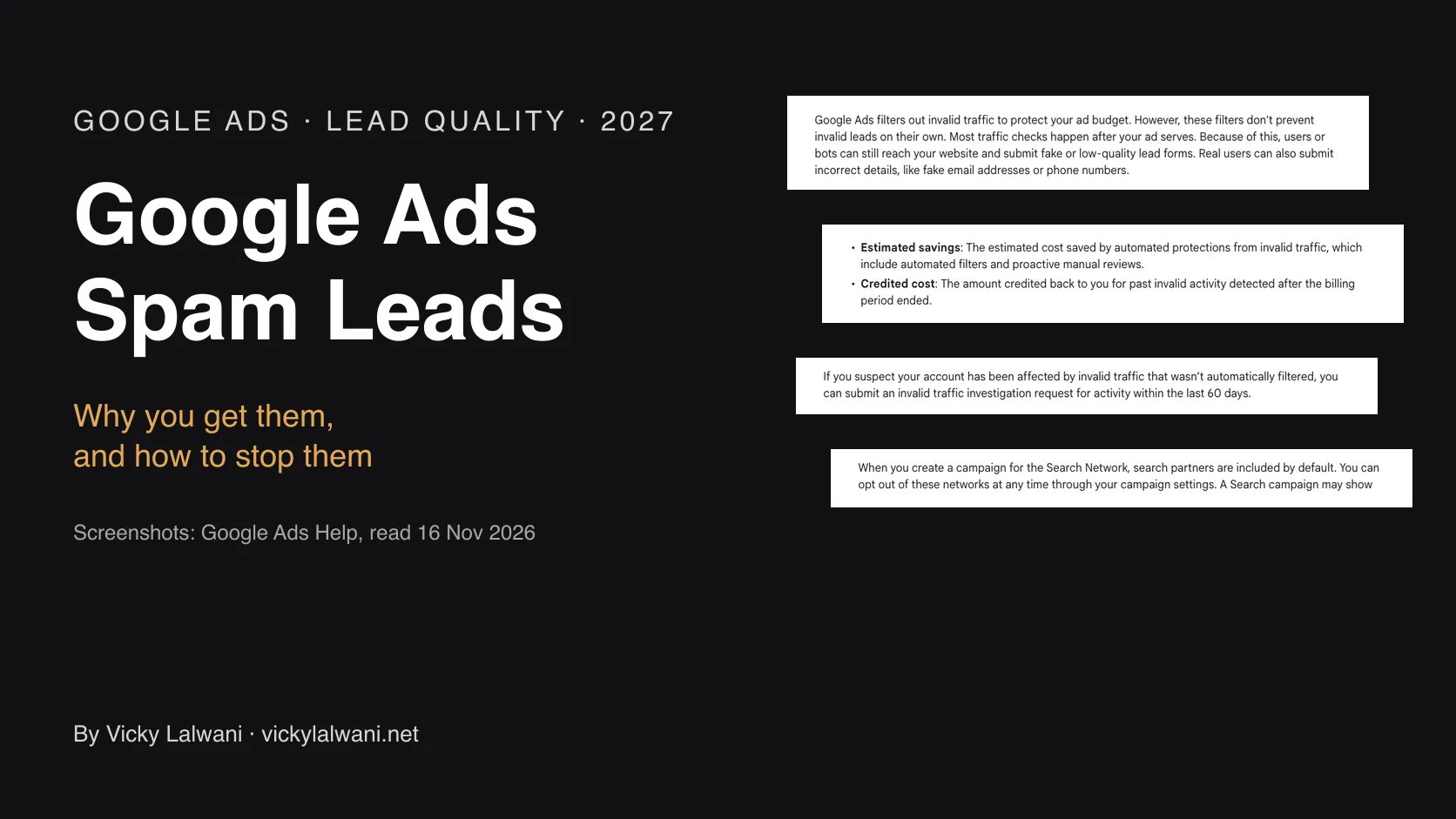
Before you connect anything: check what Google already changes for you. Auto-apply recommendations and the AI Max auto-upgrade can change an account without anyone opening it.
Jump to: The four routes · The three lanes · Undo · What Google automates · Safe connection · Weekly loops · X and Reddit
A note on evidence. Platform rules come from Google Ads Help, Google's developer documentation and Anthropic's help centre, read on 17 November 2026 and linked where I use them. Practitioner views come from X and Reddit and are labelled. Where I write "I", it describes how I work on accounts in general. I do not share client names or client results, so any number without a source link is an example.
What does Google Ads automation with Claude mean in 2027?
Short answer: it means one of four set-ups, and they differ in one way that matters: whether Claude can change the account. Claude can work from exports you paste in, read the account through Google's MCP server, write scripts that run on a schedule, or click through the Google Ads interface for you. Pick the route before you pick the tasks.
MCP, the Model Context Protocol, is a standard way to plug a tool into an AI assistant. A script is a small program that Google Ads runs on a schedule. The interface route uses Claude Cowork, Anthropic's desktop agent, which works in apps and browsers the way a person would.
| Route | Can it change the account? | Best for | Read more |
|---|---|---|---|
| Claude with pasted exports | No | Audits, reports, drafts | This guide |
| Claude plus Google's MCP server | Reads; adds assets and labels after you confirm | Live questions, diagnosis | GitHub |
| Claude Code writing scripts | Yes, whatever the code does | Scheduled checks, bulk jobs | Claude Code PPC |
| Claude Cowork in the browser | Yes, through the interface | Click-heavy set-up | Claude Cowork |
The first route is where most people should start, because nothing can go wrong in the account. You export a report, paste it in, and get back a list to review. The other three can all act, so they need the rules in the rest of this guide.
Two newer pieces make the acting routes more common. Scheduled tasks in Claude Cowork run remotely, so they keep running when your computer is asleep, and they can use your connectors, skills and plugins. And Google now ships its own agent. Ads Advisor launched in November 2025 as an agent inside Google Ads, and Search Engine Roundtable reported that it can complete tasks for you, with a record of its changes and a way to revert them. In May 2026 Google said Ads Advisor and Analytics Advisor will merge into Ask Advisor, in beta for English-language accounts.
The biggest change for anyone using Claude is Google's own MCP server. It launched in October 2025 as read-only. Version 0.0.6, released on 2 November 2026, added four tools that change the account: creating assets, uploading videos and managing labels. PPC Land noted that the new write tools are switched on in default installs and still cannot touch budgets. Every one of them now goes through a two-step check.
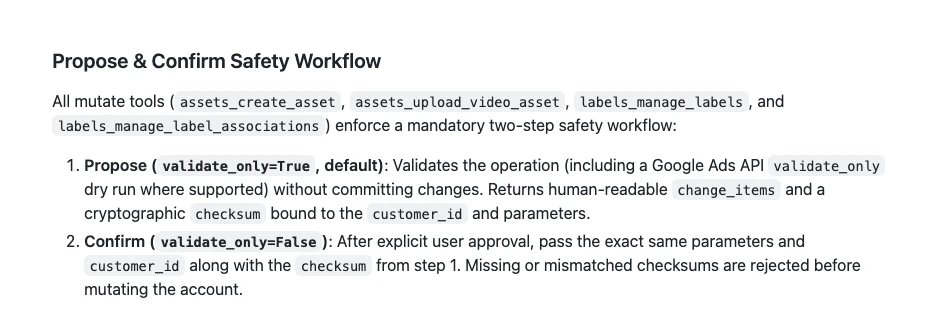
That two-step check is the right shape for any automation, not just this one. The tool proposes, shows you exactly what will change, and commits only after a person says yes. The rest of this guide is about deciding where that "yes" is needed and where it is not.
Why is the model's confidence the wrong filter?
Short answer: because confidence is the one input the model produces about itself. A wrong answer can arrive sounding exactly as sure as a right one. Filter on things the model cannot talk itself into: how much of the account a change touches, and how hard it is to undo.
The tempting set-up is to let Claude act when it says it is confident. I do not treat that as a safety control. Ask two questions about any change instead. How many campaigns, ad groups or keywords does it touch? And if it is wrong, what does it take to put back? Neither answer depends on how the model feels about its own work.
The Reddit thread later in this guide shows why. One team found that their paid media agent was doing its job well, and still drifting, because it was chasing a cheap signal that did not match what the business wanted. Nothing in the agent's own report said anything was wrong.
Which Google Ads changes can run without you?
Short answer: only changes that are both reversible and contained, such as adding an exact match negative keyword or pausing one weak ad. Wide changes, like a new bid strategy, go ahead only when hard checks pass. Anything that moves money or cannot be undone, like a budget rise or removing a campaign, needs a person every time.
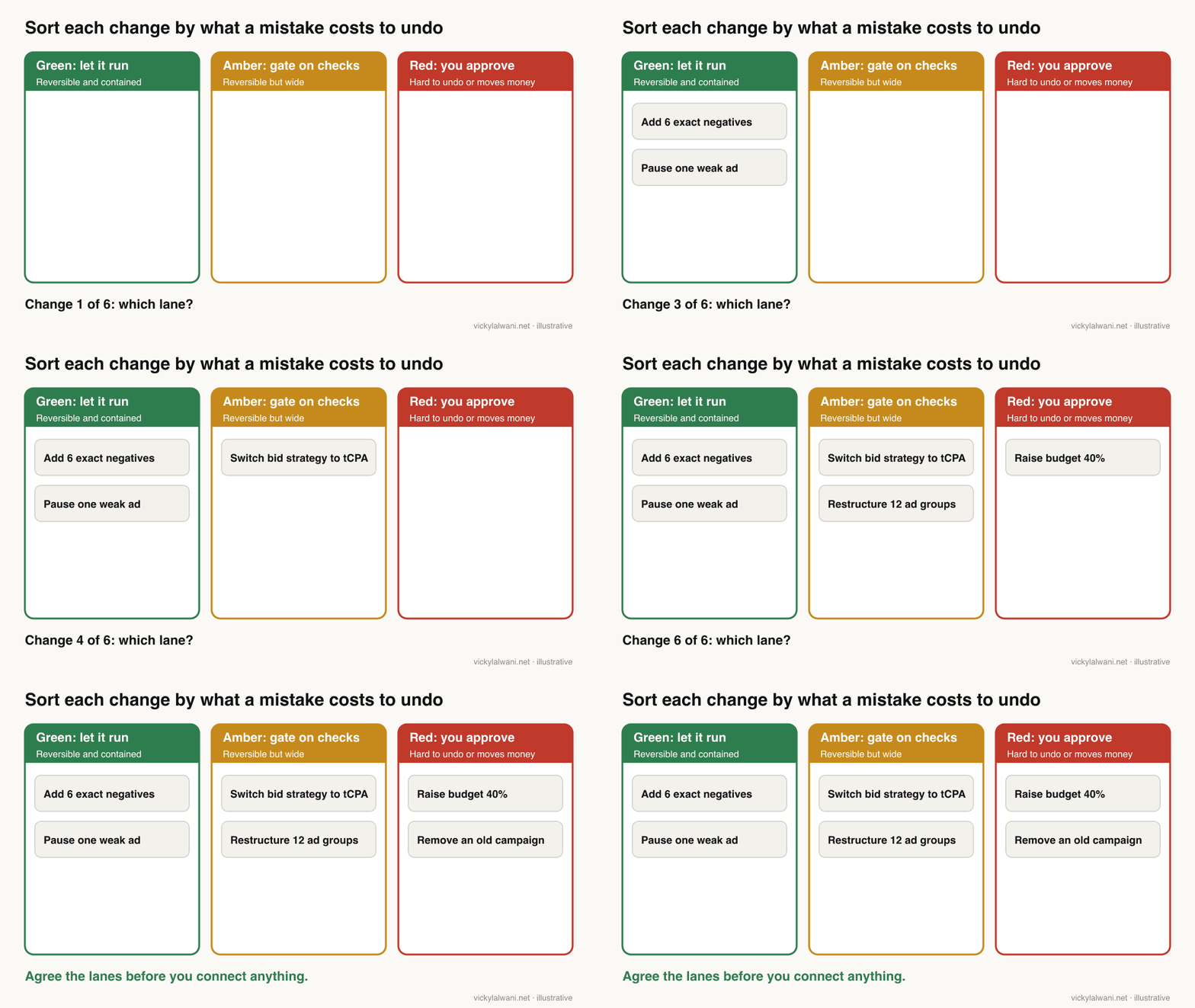
Green: let it run
These changes are reversible and contained. A bad call costs a couple of clicks to put back, so there is little point holding the work for a review. Keep a log anyway, because "contained" is only true if you can see what happened.
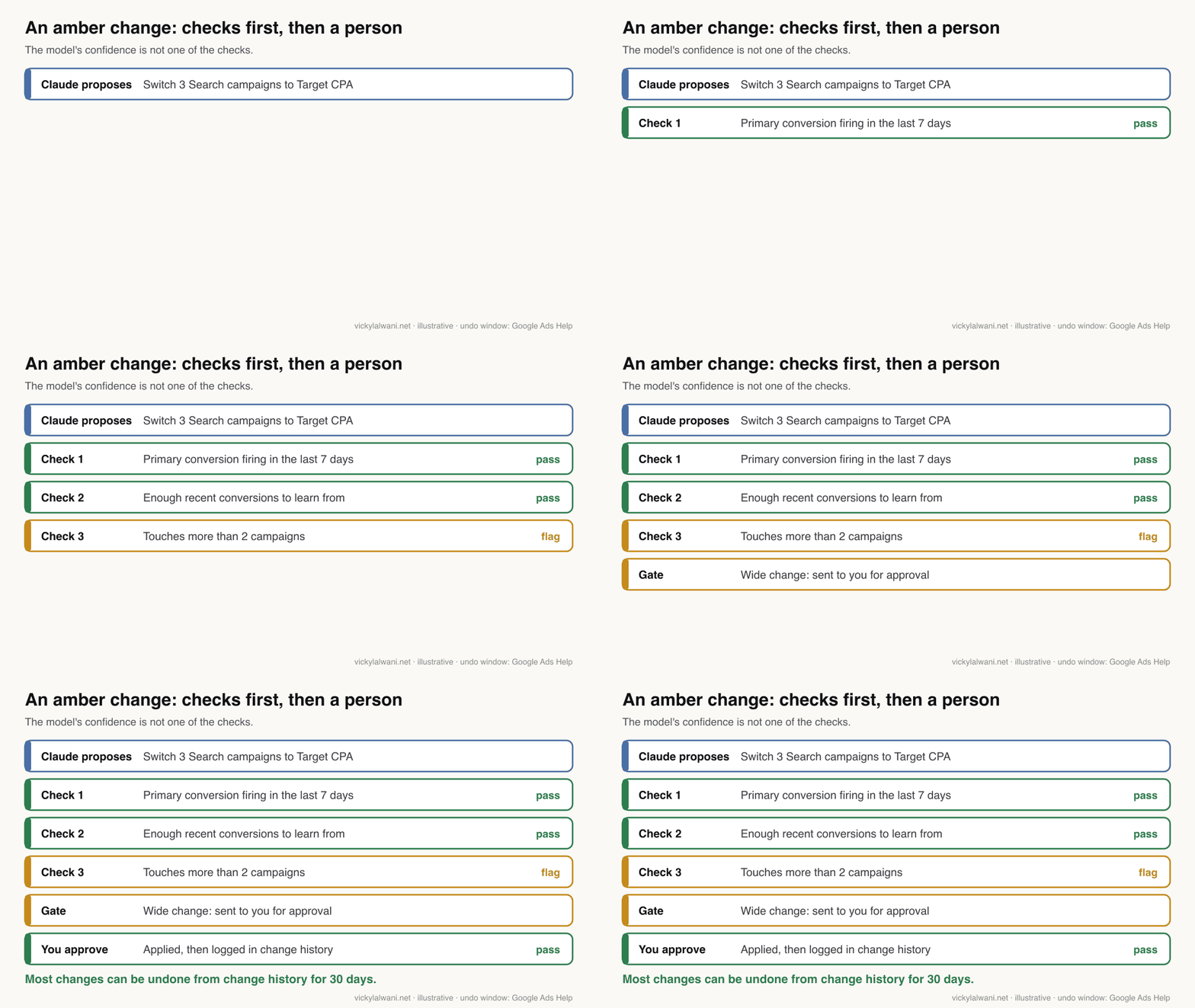
Amber: gate it on hard checks
These are reversible but wide. A new bid strategy, a restructure, or anything a dozen campaigns would feel. Let them through only when checks you can measure pass: is the main conversion firing, is there enough recent data, how many campaigns does it touch? A bid strategy change also has a cost the undo button does not cover. Google says the Learning status never lasts more than seven days, but performance can take one to two conversion cycles to settle.
Red: never without you
These are hard to reverse or they move money: raising a budget, widening Performance Max, removing a campaign. Google is clear that you can't resume or restore a removed campaign; you can only build a new one. Some actions are already gated by Google: a passkey is needed for sensitive actions such as managing users and billing.
| Change | Lane | If it was wrong |
|---|---|---|
| Add an exact negative keyword | Green | Remove it |
| Pause one weak ad | Green | Turn it back on |
| Fix a broken sitelink | Green | Edit it back |
| New bid strategy | Amber | Undo, then wait for it to settle |
| Turn on broad match or AI Max | Amber | Switch off; clicks already bought |
| Restructure ad groups | Amber | Undo row by row |
| Raise a budget | Red | Lower it; spend is gone |
| Remove a campaign | Red | Cannot restore it |
Write your own version of this table before you connect anything. Your lanes may differ from mine, depending on the size of the account and what a day of mistakes would cost. What matters is that they are agreed in advance, not during an incident. A practical first step: take last month's change history and sort each change into green, amber or red.
How do you undo a change in Google Ads?
Short answer: open change history, find the row and click Undo. Google lets you undo most types of changes made in the last 30 days, and change history itself goes back two years. Some changes cannot be undone, for example when a related item has since been removed, and removed campaigns cannot be restored at all.
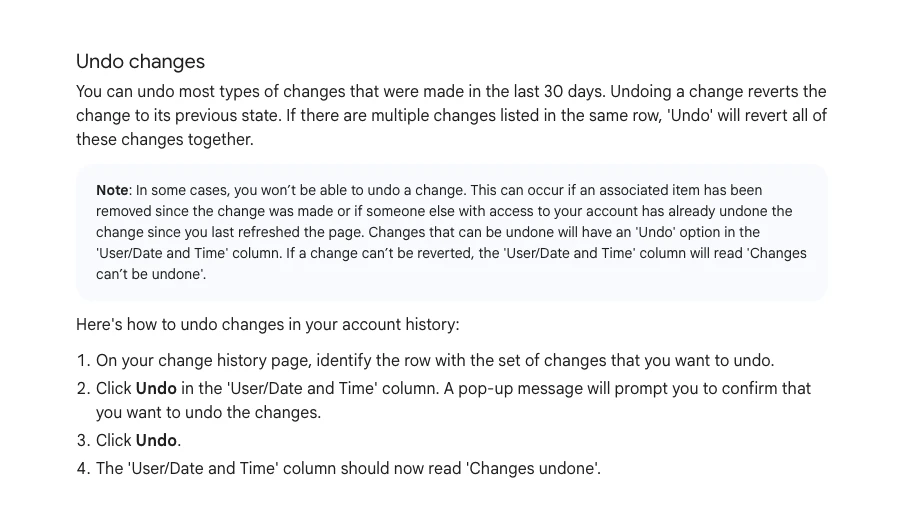
Undo puts a setting back. It does not give back the clicks, the spend or the learning time in between. That is why the lanes are built on cost, not just on whether an undo button exists. Google also advises making smaller changes, ideally affecting fewer than 2,000 items, so change history can show every detail.
Each route to the account has its own safety net. Use the one that fits how the change is made.
| Tool | What it gives you | Limit |
|---|---|---|
| Change history | Who changed what, and Undo | 30 days for undo |
| Google Ads Editor | Review edits before posting | Revert only before posting |
| Script preview | See results before a live run | 30 minutes per run |
| MCP propose step | A dry run you approve | Assets and labels only |
On client accounts my own habit is plain: audit first, put the findings in a sheet, check them by hand, and change nothing before approval. The sheet doubles as the log. If something moves later, there is a record of what was proposed, who said yes and when.
What does Google already automate in your account?
Short answer: more than most people think. Auto-apply recommendations can change ads, bids, keywords, targeting and measurement on a regular schedule if they are switched on. Automated rules, scripts and Ads Advisor can act too, and from 1 September 2026 Google began upgrading some Search campaigns to AI Max automatically.
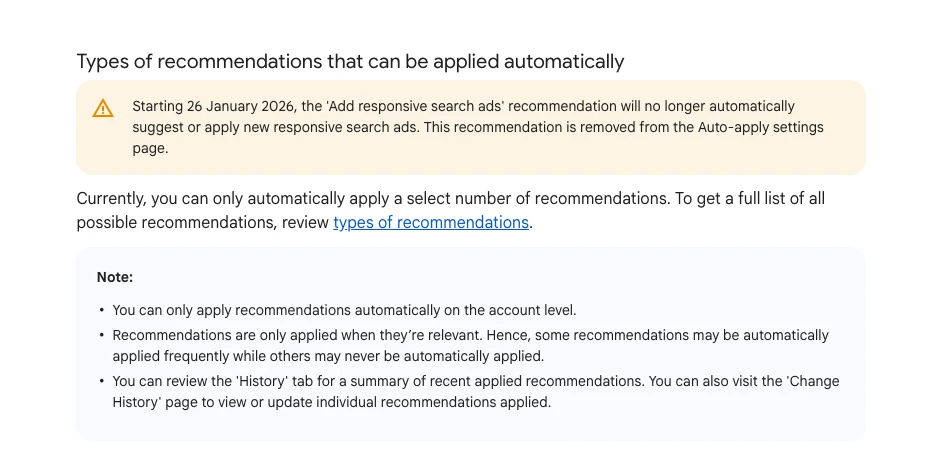
Auto-apply is the one to check first. Google lists four groups that can apply on their own: ads and assets, bidding, keywords and targeting, and measurement. That includes adding broad match keywords and expanding to search partners or Display. From 26 January 2026 the Add responsive search ads recommendation no longer auto-applies. You can see when auto-apply was turned on, and who opted the account in, through change history.
| Google feature | What it can change | Check |
|---|---|---|
| Auto-apply | Ads, bids, keywords, reach | Recommendations, Auto-apply |
| Automated rules | Status, budgets, bids | Tools, Rules |
| Scripts | Anything the code does | Tools, Scripts |
| Ads Advisor | Tasks you accept | Change history |
| AI Max upgrade | Search term matching | Campaign settings |
Why this matters for Claude: if Google and Claude can both change an account, you cannot tell whose change caused a result. Turn off any auto-apply types you have not chosen on purpose, note which rules and scripts exist, and only then add Claude to the mix. One cause per change makes every later review easier.
How do you connect Claude to Google Ads safely?
Short answer: start read-only and widen access one step at a time. Begin with exports, then Google's MCP server with its write tools switched off, which its own documentation shows how to do. Since September 2026 API access belongs to your Google Cloud project and developer tokens are ignored, and Explorer, the first access level that reaches live accounts, allows 2,880 operations a day.
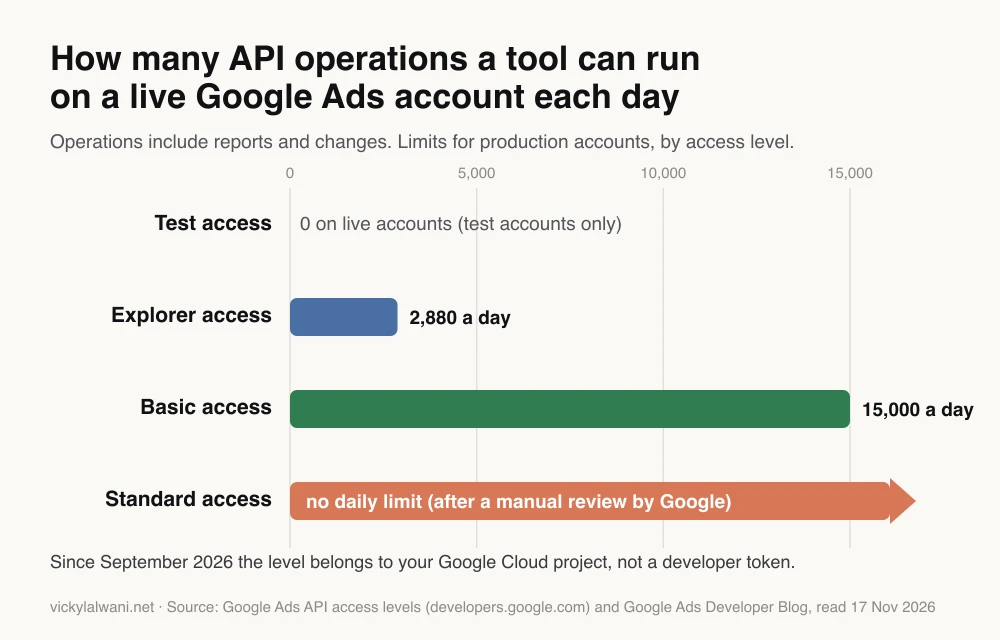
An operation is a single report request or a single change. Explorer is enough for one account's daily checks. A tool that loops over many accounts every hour will need more, and Basic or Standard access asks for brand verification and, for Standard, a manual review by Google.
- Exports first. Run each loop by hand on pasted reports for two weeks. Compare Claude's list with your own.
- Read access next. Connect the MCP server with the assets and labels namespaces set to false in its config file, which makes it read-only.
- One write at a time. Turn on a single green-lane action, keep the propose step, and log every approval.
- Least access. Use a Google Ads user with the lowest role that does the job, never admin.
- One project per account. I keep one Claude project per client, with skills in a known place, so data never crosses between accounts.
The same order applies to Claude Code scripts and to Cowork. Scripts can do anything their code says, so read the code before the first live run. Cowork works through the interface, so it can click anything you can. The Claude Cowork guide covers that route, and the GitHub repos guide lists the open-source connectors if you want to compare them.
Which weekly loops are worth handing over?
Short answer: the jobs that repeat, run on data you already export, and end in a list you can check in a few minutes. Search term clean-up, a negative keyword list, budget pacing, ad fatigue and a Monday report cover most of the routine work in a typical account.
| Loop | How often | Lane | Output |
|---|---|---|---|
| Search term clean-up | Weekly | Green | Exact negatives to add |
| Negative keyword list | Monthly | Green | Shared list by theme |
| Budget pacing | Daily or weekly | Red if it moves money | Spend vs plan, proposal |
| Ad fatigue | Weekly | Green to pause one ad | Refresh brief |
| Monday report | Weekly | No change | Summary and three priorities |
Notice that most of these end in a recommendation, not a change. Claude finds the problem and drafts the fix, and you apply it in Google Ads Editor or approve it. The review is quick, and it keeps blind changes out of the account. Every report I send gets a short human note on top: where we are, what we are doing next, and why.
If you run the same loop every week, package it as a skill so the method stays fixed. The Claude skills for Google Ads guide shows how to set one up and a five-day routine. Here is a prompt for the first loop that keeps Claude in the green lane:
You are reviewing a Google Ads search terms report (pasted below, last 7 days).

Rules:
- Do not change anything. Output a proposal only.
- Flag terms with spend above [your threshold] and zero conversions.
- Never flag a term that contains our brand name or a product we sell: [list].
- Group flagged terms into themes and suggest one exact or phrase negative per theme.
- For each, say which campaign it belongs to and what it cost.

Output: a table with columns Theme | Negative | Match type | Campaign | Cost | Why.
Then list anything you were unsure about, so a person can check it.
What should you check before you automate anything?
Short answer: conversion tracking, before anything else. Automation scales whatever is already in the account, including its errors. If conversions are miscounted, a tireless system will optimise towards the wrong thing faster than a person would.
If you have inherited an account, audit it first. These are the failures I look for straight away:
- Conversion tracking that fires but counts the wrong actions, or double counts with GA4 imports.
- Search partners and Display expansion left on by default rather than by choice.
- Broad match running without a tight negative list behind it.
- Ad groups with no single theme, so ads match the product but not the keyword.
- Auto-apply recommendations switched on with nobody watching.
Rank whatever fails by how much it distorts results or wastes budget today, and fix tracking first. I keep new campaigns in draft until every form and call button is measured, because every later decision, by a person or by Claude, depends on that one. If tracking is the weak spot, my analytics and tracking service starts there.
What stays yours?
Short answer: the offer, the strategy, and the call on what to scale or stop. Claude can take on research, builds, clean-up, drafts and reports. It does not know your margins, your capacity or which client is about to churn.
Anyone can run the same prompts, so the prompts are not much of an advantage. The advantage belongs to the person who knows which task matters most this week and can tell when an answer should not be trusted. A useful split is the one many teams land on: a model that plans and a separate agent that executes, with a person between the two.
What people say on X and Reddit
Short answer: practitioners worry less about Claude and more about automation they did not choose. The loudest complaints are about auto-apply and settings that changed quietly; the most useful ones are about agents that did their job well and still chased the wrong goal.
On r/PPC, a solo founder described how a narrow, exact match campaign was broadened after a call with a Google rep, with clicks rising and no conversions. The top replies all said the same thing: pull change history to see when each setting flipped, and keep auto-apply off. Another r/PPC poster claimed reps stopped pushing auto-apply in early 2026; that is an unverified claim, but the advice to audit the setting stands either way.
The most useful thread was quieter. A team running a paid media agent found it handled small tasks well but optimised to an easy signal: cheaper conversions that did not turn into better pipeline. Their fix was to change what the agent is fed, not the agent. And when someone asked for one AI agent to run six ad platforms, the replies said the platforms differ too much for that, and suggested pulling the data into one place instead.
On X, Google itself is pushing agents. The Google Ads account introduced Ads Advisor as an agent that can take action, and the Google Ads liaison added policy troubleshooting and security monitoring to it in April 2026. A practitioner spotted the beta quoting third-party sources and thought that was a bad idea. Another posted Google's email about the AI Max auto-upgrade, a reminder that Google changes settings for you too.
| Source | Date | Type | Point |
|---|---|---|---|
| r/PPC thread | May 2026 | First-hand | Auto-apply broadened a campaign |
| r/PPC thread | Jan 2026 | Opinion | Audit auto-apply settings |
| r/PPC thread | Sep 2026 | First-hand | Agent chased the wrong signal |
| r/PPC thread | Nov 2026 | Question | No one agent for six platforms |
| Google Ads on X | Nov 2025 | Official | Ads Advisor launch |
| Ads liaison on X | Apr 2026 | Official | Advisor adds security checks |
| Ads liaison on X | Jul 2026 | Official | Passkeys for sensitive actions |
| Practitioner on X | Aug 2026 | First-hand | AI Max auto-upgrade email |
| Practitioner on X | Nov 2025 | Opinion | Advisor quoted third parties |
Videos worth watching
Short answer: start with Google's own developer channel for the MCP server, then one practitioner walkthrough to see a real negative keyword loop. Agency videos are useful for the workflow, but check any setting they show against Google's current help pages.
Google's ads developer channel, October 2025. Explains the MCP server at launch, when it was read-only. Nothing for sale.
Google's ads developer channel, March 2026. A developer podcast on MCP, agents and ads. Nothing for sale.
| Video | Channel | Date | What it covers |
|---|---|---|---|
| Introducing the Google Ads MCP Server | Google ads developers | Oct 2025 | The MCP server at launch |
| Ads DevCast E1: MCPs, Agents, and Ads | Google ads developers | Mar 2026 | Agents and the API |
| Google Ads MCP Servers Compared | B2B agency channel | Nov 2026 | Read-only vs write |
| Automated Negative Keywords (With Claude) | PPC agency channel | Apr 2026 | A negatives loop |
| How I use Claude as a Google Ads specialist | PPC practitioner podcast | Aug 2026 | Daily use of Claude |
Where this advice is weak
- The lanes are a judgement, not a standard. Google publishes no list of "safe" changes. My examples fit a typical lead generation account; an online shop with a large catalogue may put feed changes in a different lane.
- The MCP server is moving fast. Version 0.0.6 is two weeks old at the time of writing, and PPC Land found Google's own guide still called it read-only. Check the repository before you rely on any tool list here.
- Ads Advisor details come from trade press. The revert behaviour is as reported by Search Engine Roundtable; I have not tested it on an account for this article.
- Undo has gaps. Google says some changes cannot be undone and gives examples, not a full list. Treat Undo as a backstop, not a plan.
Want a second pair of eyes on your automation plan?
If you want help sorting your account's changes into lanes, setting up a read-only connection, or checking what Google already changes without you, that is the kind of work in my Google Ads management. For Claude set-up across a team, see Claude consulting. Rates are on the pricing page.
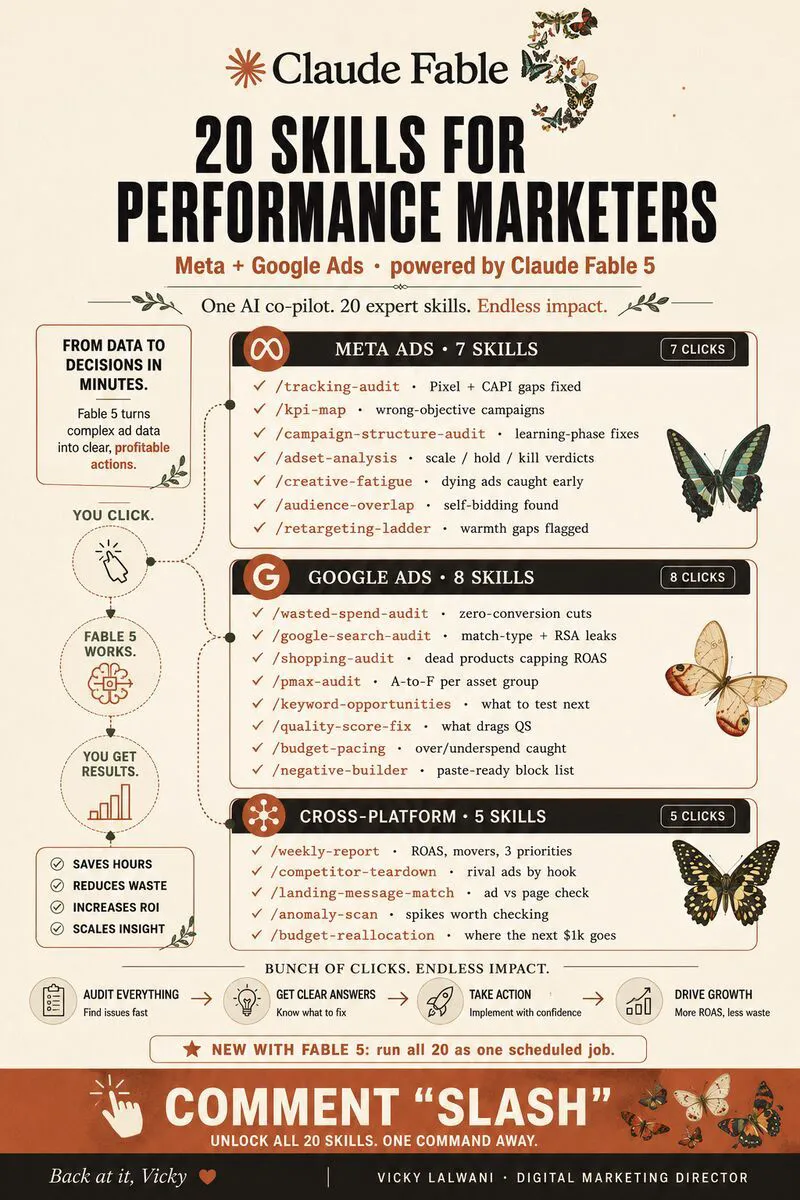
Free guide: 35 Claude skills for Google Ads sets up a free folder of skills for campaign builds, keywords, ad copy, landing pages and reporting, plus a five-skill weekly routine.
Keep reading: Claude skills for Google Ads, Claude Code PPC workflows, Claude Cowork for Google Ads and 30 GitHub repos for AI in business.
Sources
| Source | What it supports | Date | Link |
|---|---|---|---|
| Google Ads Help | Auto-apply types, RSA change | Read 17 Nov 2026 | Auto-apply |
| Google Ads Help | Who opted in | Read 17 Nov 2026 | Manage auto-apply |
| Google Ads Help | Undo within 30 days | Read 17 Nov 2026 | Account history |
| Google Ads Help | Two years, 2,000 items | Read 17 Nov 2026 | Change history |
| Google Ads Help | Removed campaigns | Read 17 Nov 2026 | Campaign status |
| Google Ads Help | Learning up to 7 days | Read 17 Nov 2026 | Smart Bidding learning |
| Google Ads Help | Automated rules | Read 17 Nov 2026 | Rules |
| Google Ads Help | Script preview, schedule | Read 17 Nov 2026 | Scripts |
| Google developers | Script limits | Read 17 Nov 2026 | Limits |
| Google Ads Editor Help | Revert before posting | Read 17 Nov 2026 | Revert |
| Google developers | Operations by access level | Read 17 Nov 2026 | Access levels |
| Google Ads Developer Blog | Tokens ignored | 10 Sep 2026 | Onboarding |
| Google Ads Developer Blog | MCP launch, read-only | Oct 2025 | MCP launch |
| GitHub, googleads | Tools, propose and confirm | Read 17 Nov 2026 | google-ads-mcp |
| PyPI | Version 0.0.6, 2 Nov 2026 | Read 17 Nov 2026 | Release history |
| PPC Land | Write tools on by default | 9 Nov 2026 | Article |
| Anthropic help centre | Scheduled tasks | Read 17 Nov 2026 | Cowork |
| Search Engine Roundtable | Ads Advisor tasks, revert | 13 Nov 2025 | Article |
| Search Engine Roundtable | Ask Advisor beta | 21 May 2026 | Article |
| Search Engine Roundtable | AI Max auto-upgrade | 7 Aug 2026 | Article |
| X, Reddit, YouTube | Practitioner views, videos | Nov 2025 to Nov 2026 | Linked above |
FAQ
Can Claude run a Google Ads account on its own?
It should not. Claude can audit, draft and, through Google's MCP server or scripts, make some changes, but anything wide or hard to reverse should wait for a person. The offer, strategy and decisions to scale stay with you.
What is safe to automate in Google Ads?
Changes that are both reversible and contained, such as adding an exact match negative keyword, pausing one weak ad or fixing a broken sitelink. If the call is wrong, it takes a moment to put back and touches very little of the account.
What should never be automated without approval?
Anything that moves money or cannot be undone: raising budgets, widening Performance Max, or removing a campaign. Google says a removed campaign cannot be resumed or restored, so a mistake there means rebuilding from scratch.
Can you undo changes in Google Ads?
Yes, for most changes. Google Ads lets you undo most types of changes made in the last 30 days from the change history page. Some changes cannot be undone, and undoing a setting does not give back the spend in between.
Is the official Google Ads MCP server read-only?
Not any more by default. Since version 0.0.6 in November 2026 it can create assets, upload videos and manage labels, each behind a propose and confirm step. You can switch those tools off in its configuration file to keep it read-only.
Do I still need a Google Ads developer token?
No. Since September 2026 Google says API access is set by the Google Cloud project behind your sign-in, and developer tokens sent in requests are ignored. A new project starts with test access only; Explorer access, the first level for live accounts, allows 2,880 operations a day.
Should auto-apply recommendations be on if I use Claude?
Usually not, unless you chose each type on purpose. If Google and Claude can both change an account, you cannot tell which one caused a result. Check the Auto-apply settings and History tab before connecting anything.
What is the best first Google Ads task to automate with Claude?
A weekly search term review run on a pasted export. It needs no account access, it ends in a list you can check in minutes, and it shows you how well Claude follows your rules before you give it any write access.