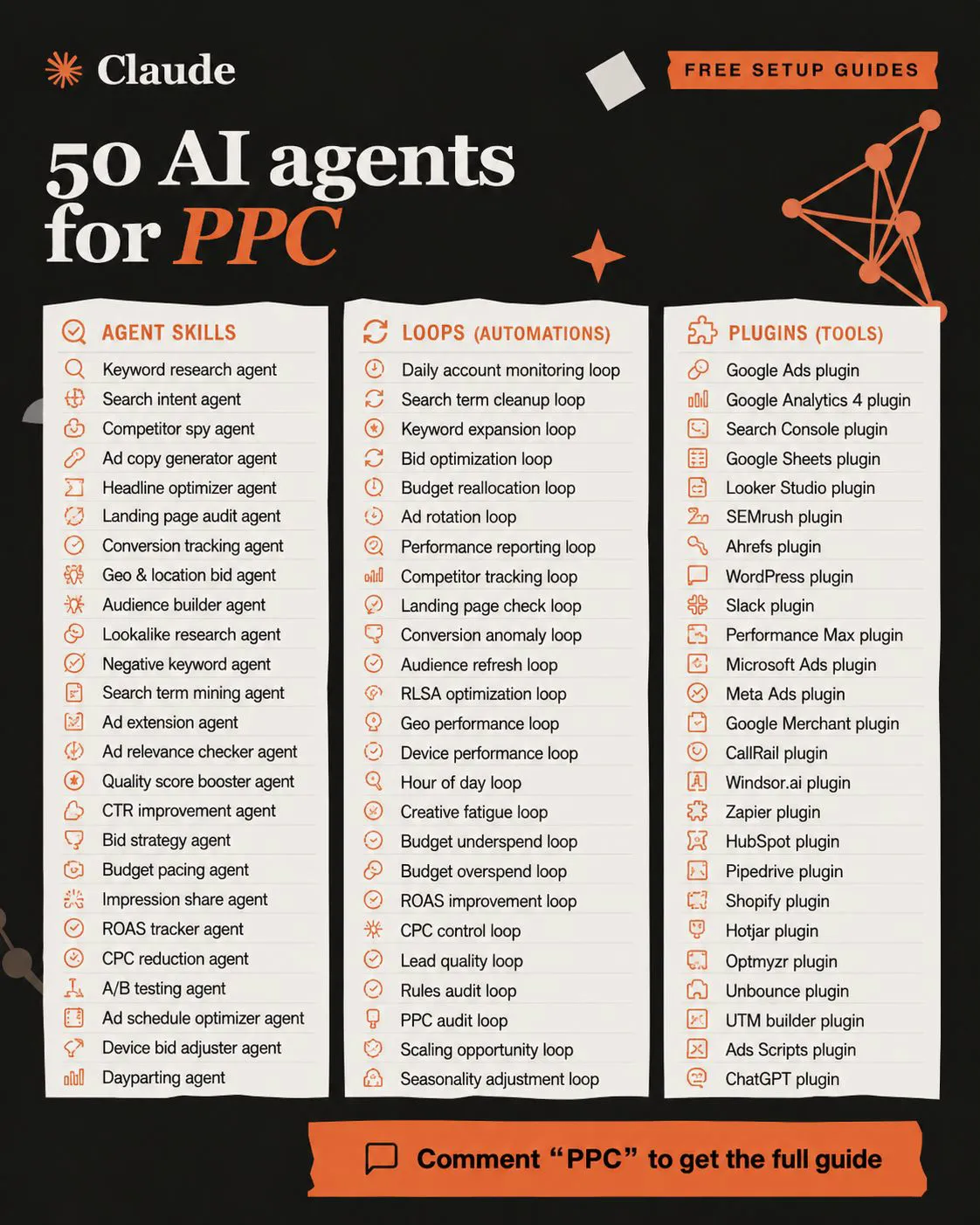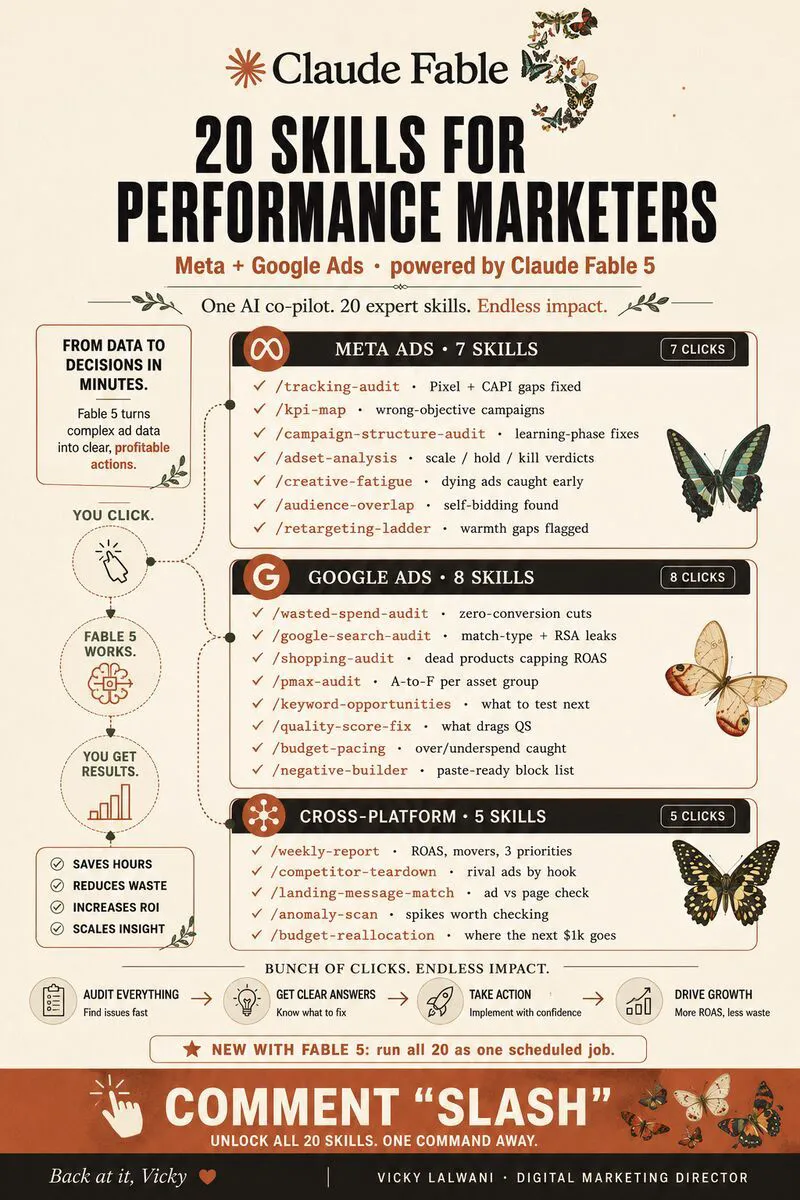
Claude Cowork Google Ads work means letting Claude read reports, audit the account and draft change lists across connectors and a browser, while you approve every change. Since September 2026 Cowork is part of the Claude app. Keep bids, budgets, billing and user access with a person.
You manage a Google Ads account, you have heard that Claude can now click through software for you, and you want to know which parts of the week you can actually hand over. This guide answers that: what Claude Cowork is in November 2026, which Google Ads jobs to delegate, which to keep, what access to give it and how to check its work. If you would rather have the setup done for you, my Google Ads management and Claude consulting cover exactly this.
TL;DR
Cowork is now part of the Claude app. On 16 September 2026 Anthropic started merging Cowork and chat into one Claude. People still search for "Claude Cowork", and the capabilities are the same: it works across your files, connectors and a browser, and asks before acting by default.
Delegate the reading, keep the deciding. Reports, audits, search term reviews and change lists are good first jobs. Bids, budgets, strategy, policy appeals, billing and user access stay with you.
Review everything. On Anthropic's own long-task test the best model met every checkpoint in fewer than half of tasks (48.7% strict pass). Plan for a careful junior, not an autopilot.
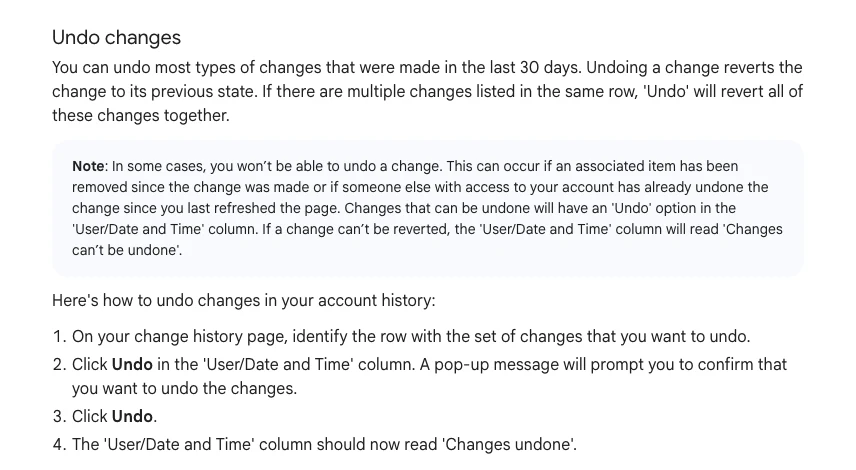
Your safety net is in Google Ads. Change history keeps two years of edits and you can undo most changes made in the last 30 days.
What is Claude Cowork now, and can it work in Google Ads?
Short answer: Cowork is the part of Claude that carries out multi-step tasks across your files, connectors and a browser, and since September 2026 it lives inside the main Claude app rather than a separate tab. It can work in Google Ads in three ways: through a connector, through a browser where you are signed in, or through computer use on your desktop.
Anthropic's Cowork page describes it as a way to give Claude a goal and come back to finished work for review. The 16 September announcement said Cowork and chat were merging into one Claude, rolling out first to Pro, Max and Ultra, with Enterprise generally available on 23 October and Team on 12 November 2026. Your existing chats, projects, connectors and skills carry over.
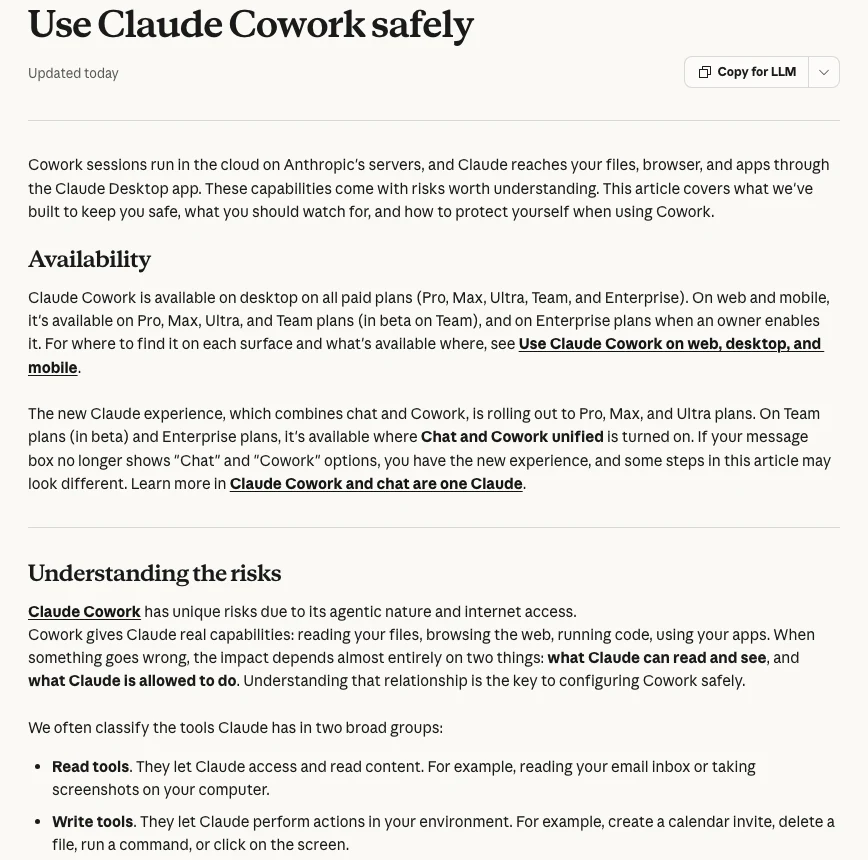
Under the hood, Anthropic's safety page says Cowork sessions run in the cloud on Anthropic's servers and reach your files, browser and apps through the Claude Desktop app. Cowork is available on desktop on all paid plans. The product page also warns that Cowork uses your plan limits faster than chat.
For a Google Ads account, the route matters more than the brand name. Each one touches the account differently:
| Route | What it touches | Can it edit campaigns? | Best for |
|---|---|---|---|
| Google Ads MCP server (a connector) | Account data through the Google Ads API | No. Reads data; writes only assets and labels | Reports, audits, questions |
| Built-in browser in Cowork | The Google Ads website, in a separate browser | Yes, by clicking | Guided edits you approve |
| Claude in Chrome | Your own signed-in Chrome | Yes, by clicking | Work in tabs you already use |
| Computer use | Desktop apps such as Google Ads Editor | Yes, by clicking | Last resort; beta |
Anthropic says Claude tries connectors first and uses your screen as a last resort. That suits Google Ads well: the official MCP server is described by Google as "read and partial mutate". It can create standalone assets and manage labels, but it cannot change campaigns, ad groups, ads, budgets or bids. Anything beyond that means Claude clicking the interface, which is where the risk sits.
One more fact that trips people up: computer use is a beta on Pro, Max and Ultra, in the desktop app on macOS and Windows. Anthropic's page says Team and Enterprise plans do not have it at this time. For the connector route, Google has also sunset developer tokens; API access now sits with your Google Cloud project.
Which Google Ads tasks should you delegate to Cowork?
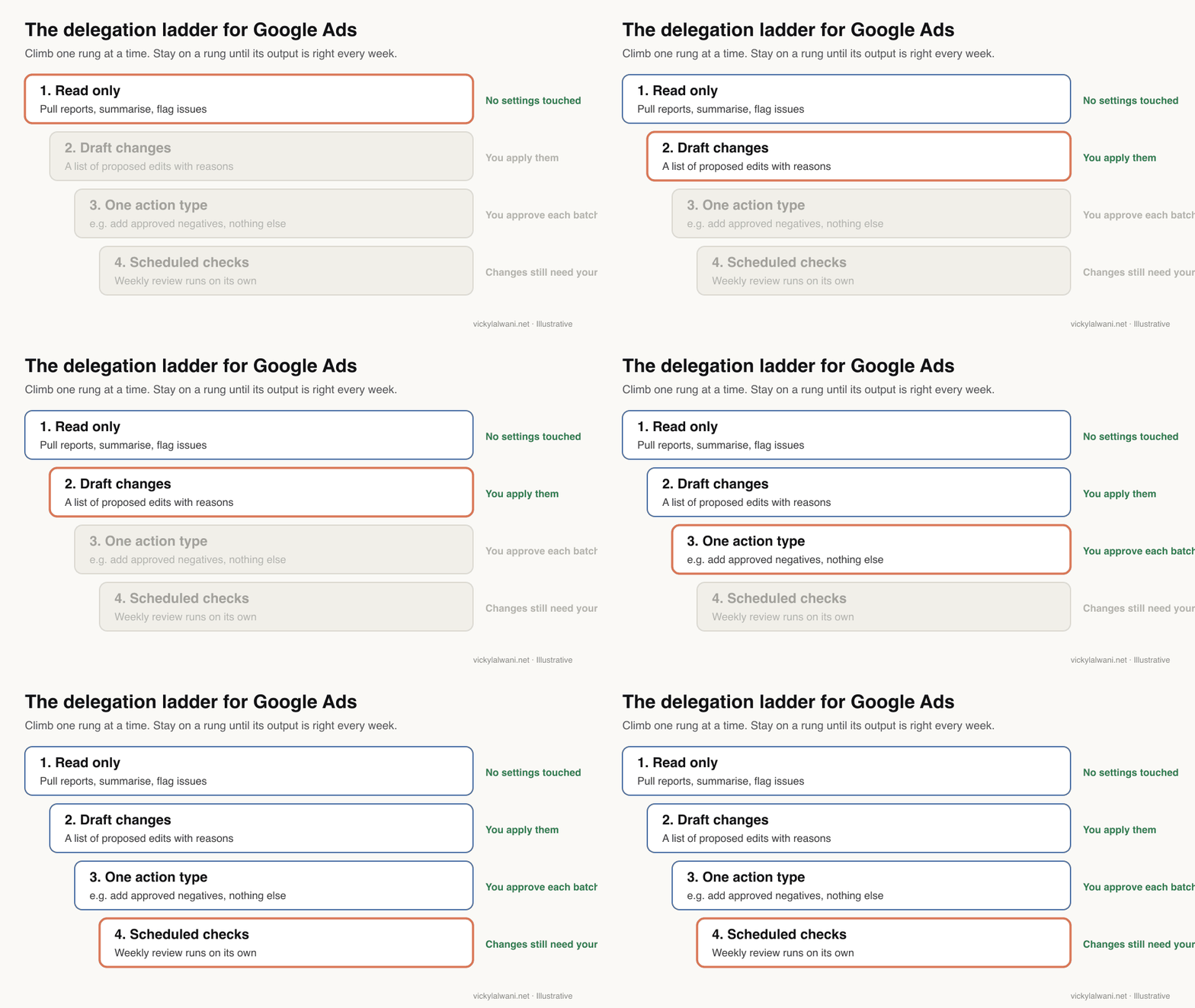
Short answer: Delegate jobs with clear rules and a checkable output: performance summaries, account audits, search term reviews, naming and hygiene checks, and draft change lists. Start with tasks that read the account, then move to tasks that propose changes, and only then to tasks that apply a narrow, approved change.
A good test is whether you could write the rule on one line and check the result in ten minutes. "List search terms with spend and no conversions in the last 30 days" passes. "Improve the account" does not.
| Task | Delegate? | Why |
|---|---|---|
| Weekly performance summary | Yes | Read only, easy to check |
| Account audit into a sheet | Yes | Findings, not changes |
| Search term review | Yes, as a draft | You approve the negatives |
| Naming and label clean-up | Yes, after a test | Low risk, reversible |
| Ad copy variants | Draft only | You own brand and claims |
| Pausing ads or keywords | Approved list only | Easy to undo, easy to overdo |
| Bids, budgets, targets | No | Money and learning periods |
| Policy appeals, billing, users | No | Account safety |
On client accounts my own rule is the same with or without AI: audit first, put the findings in a sheet, check them by hand, and change nothing before approval. Cowork fits that rule well because it is good at the first two steps. Anthropic's official marketing ops demo makes the same split: Claude gathers and checks the numbers, a person decides what they mean.
Which tasks should stay with you?
Short answer: Keep anything that spends money, changes how Google's bidding learns, affects account security or needs judgement about the business: budgets, bid strategies and targets, conversion settings, strategy, final ad claims, policy appeals, billing and user access.
Hand over
- Pulling and summarising reports
- Spotting outliers and odd search terms
- Drafting change lists with reasons
- Checking final URLs and naming
- Repeating a saved weekly routine
Keep
- Budgets, bids and targets
- Conversion actions and goals
- What the business should sell harder
- Final ad text and legal claims
- Billing, users and policy appeals
The reason is not that Claude cannot click those buttons. It is that a wrong click there is expensive or slow to recover from. A budget change shows up on the invoice. A bid strategy change can restart learning. A removed admin can lock you out. Those are decisions, not tasks.
Business context is the other gap. Practitioners on Reddit make the point repeatedly: with only ad platform data, a model optimises the wrong thing with confidence. It does not know that one product line has a better margin or that sales calls from one region never close. You do.
How reliable is Claude on long computer tasks?
Short answer: Better than a year ago, but not reliable enough to run unchecked. On OSWorld 2.0, a test of 108 long tasks on a live computer, Anthropic reports that Claude Opus 5.5 met 81.8% of checkpoints but completed every checkpoint in only 48.7% of tasks (system card, 22 September 2026).
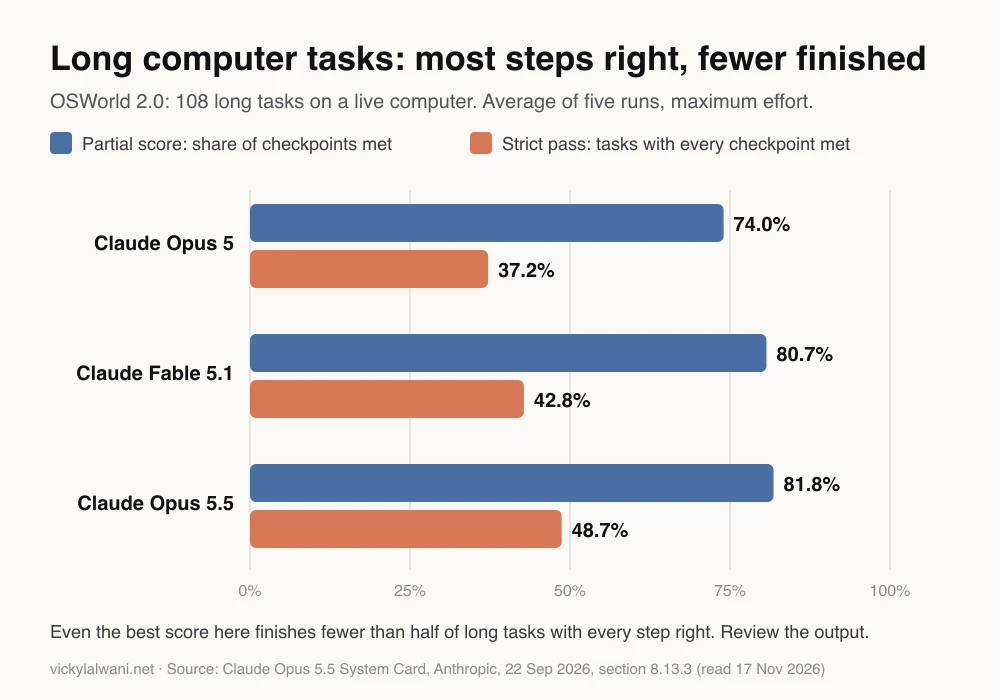
The gap between the two bars is the practical lesson. "Partial" means most steps were right. "Strict" means the whole task was right. In an ad account, a task that is 80% right can still mean one campaign with the wrong location setting or one ROAS column misread.
Benchmarks are not your account, and Anthropic notes these scores are not comparable with earlier versions of the test. Practitioners report the same pattern in real accounts: one r/ClaudeAI thread on Claude in Chrome and Google Ads recommends a read-back step, because browser clicks can quietly miss fields. The hands-on side, including a misread column, is in my Claude Cowork for Google Ads lab notes.
What access should Cowork get in your Google Ads account?
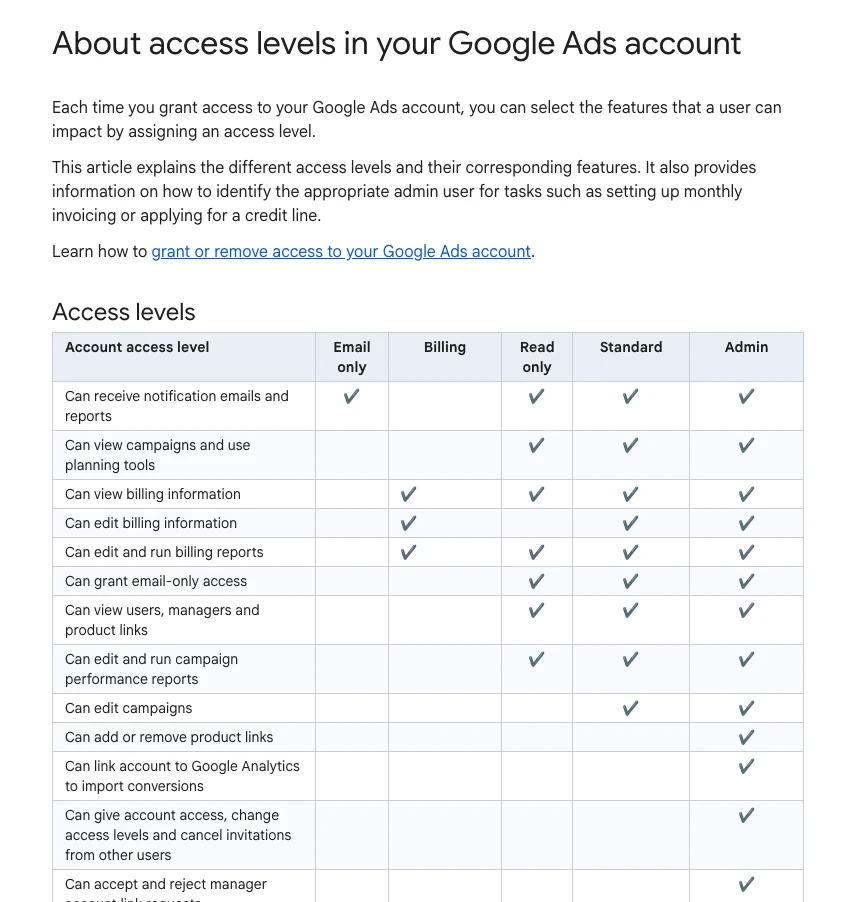
Short answer: As little as the task needs. For reports and audits, the connector route or a Read only login is enough. When Claude clicks inside your own signed-in browser it has whatever access you have, so do browser work from a login with Standard access, never from an Admin login, and keep billing and user management out of reach.
Google Ads has five access levels. Here is how I would map them to agent work:
| Access level | What it allows | For agent work |
|---|---|---|
| Email only | Notification emails and reports | Not useful |
| Read only | View campaigns and reports, no edits | Best for audits |
| Standard | Edit campaigns, no users or links | Ceiling for edits |
| Admin | Everything, including users | Never for an agent |
| Billing | Billing only, no campaigns | Never for an agent |
Check the role yourself before you trust it. On calls, "I gave you access" often turns out to mean view only, or the wrong account, so I open the account and look at the user list. Accounts with more than three admins now also need multi-party approval from a second admin to add or remove users or change roles, and requests expire after 20 days. Google says read-only roles and API users are exempt.
If you use the built-in Cowork browser, Anthropic says it runs separately from your own browser, logins and tabs; you sign in once per session or import cookies. Treat that sign-in like handing over a key.
How do you brief Cowork for a Google Ads task?
Short answer: Write the brief the way you would brief a new analyst: the account and date range, the exact rule, what to output, what never to touch, and when to stop and ask. Ask for a change list first, not a change. Then save the brief as a skill so it runs the same way next week.
Most bad agent runs I see come from vague briefs, not weak models. Spell out the metric, the window, the threshold and the action. Here is a template you can paste and edit:
Task: weekly search term review for the Google Ads account [account name and ID].
Date range: last 30 days, ending yesterday.
Read only. Do not change anything in the account.

1. Pull the search terms report for all Search campaigns.
2. List every search term with cost above [your threshold] and zero conversions.
3. For each one, say which campaign and ad group it came from and why it looks irrelevant.
4. Group the list into: clearly irrelevant, possibly relevant, unsure.
5. Suggest a match type for each proposed negative and the level (campaign or list).

Never touch: budgets, bids, bid strategies, conversion settings, billing, users, anything labelled TEST.
Stop and ask me if: a term mentions our brand, a competitor or a product we sell.
Output: a table with term, campaign, ad group, cost, clicks, reason, proposed negative, match type.
Then list anything you could not read or were unsure about.
When a brief works three weeks in a row, turn it into a skill so the steps and thresholds stay fixed. My free guide 35 Claude skills for Google Ads has ready-made versions, and Claude skills for Google Ads shows a weekly routine built from them.
How do you check and undo what it changed?
Short answer: Use the approval loop: Claude drafts a list, you approve it, Claude applies only that list, then reads the settings back. Afterwards, change history shows two years of edits, and you can undo most changes made in the last 30 days from the same page.
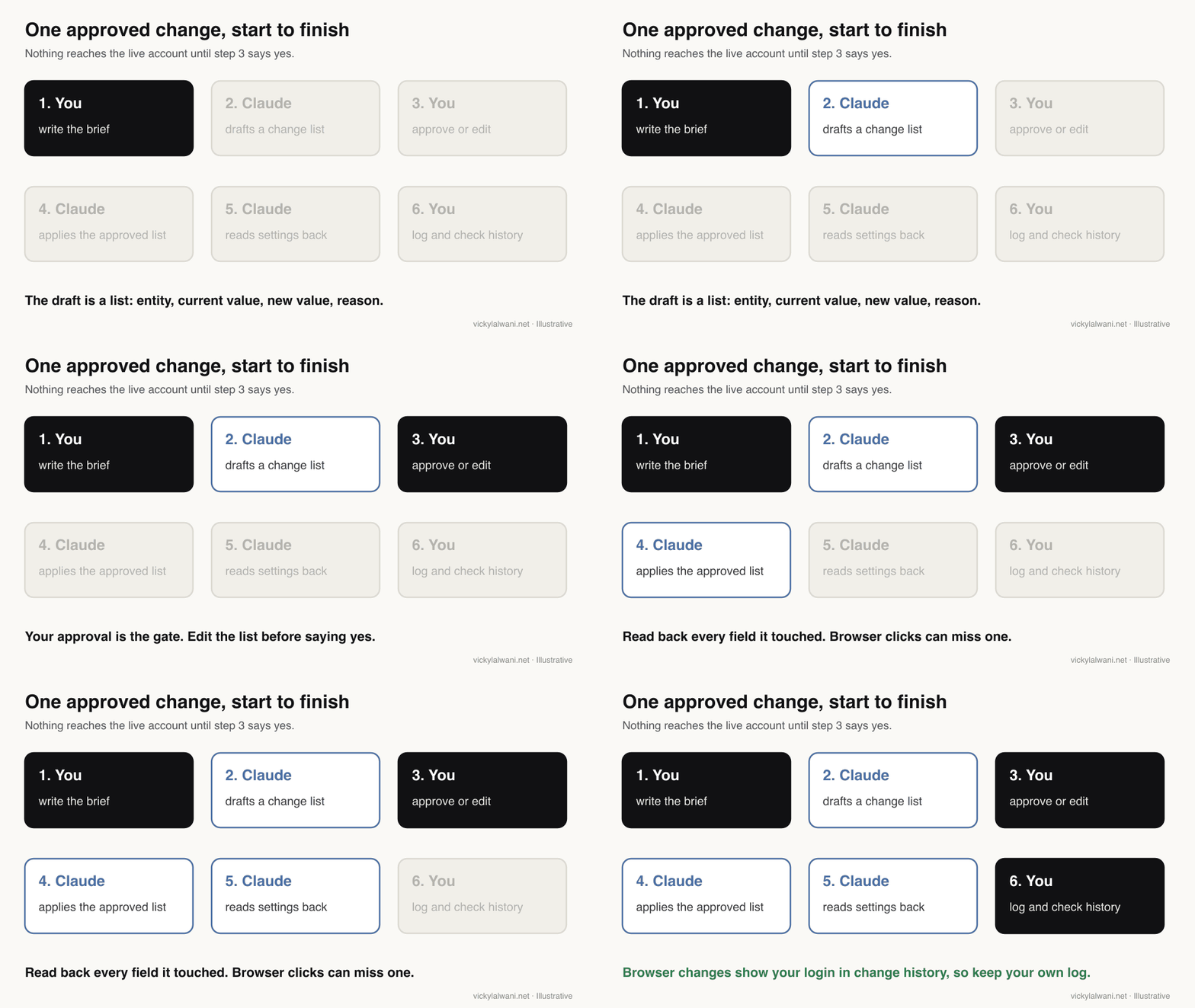
Two details matter. First, Google says changes made through the API may show "Google Ads API" or a tool name in the user column. Changes Claude makes by clicking in your signed-in browser happen inside your session, so expect them to show your own login. That is why your own change log matters: date, task, what was approved, what was applied.
Second, undo has limits. Google's help page says some changes cannot be undone, for example when a related item has since been removed. Changes posted from Google Ads Editor cannot be undone automatically either; you restore from an Editor archive file. So keep the first edits small, and do them where you can see them.
What are the safety risks of letting Claude into an ad account?
Short answer: The main risks are prompt injection (hidden instructions in a page Claude reads), acting on bad data, and too much access. Anthropic's own safety guidance says the risk is not zero and recommends limiting what Claude can see and do, using trusted connectors only, and staying out of sensitive sites.
Anthropic defines prompt injection as malicious instructions embedded in content Claude reads during a normal task. A landing page, a competitor ad or an email could carry one. Claude is trained to spot them and classifiers scan untrusted content, but the safety page is clear that this lowers the risk rather than removing it.
| Risk | What can happen | Control |
|---|---|---|
| Prompt injection | A page steers Claude off task | Narrow brief, trusted sites |
| Bad data | Confident action on wrong numbers | Fix tracking first |
| Too much access | Edits to billing or users | Standard login at most |
| Silent misses | A field left unchanged | Read back every setting |
| Unofficial connectors | Account warnings or bans | Official MCP or API only |
| Usage limits | Task stops halfway | Small batches, check status |
For Claude in Chrome, Anthropic strongly advises against using it to manage or act on sensitive information, and notes the side panel can see pages you are logged into. The Chrome guide says the side panel starts in a mode where Claude works continuously and pauses only when it needs approval. For an ad account, I would switch to asking before each action until you trust the routine.
Team and Enterprise admins get extra controls: turning web search off, managing Claude in Chrome for the organisation and streaming Cowork events to monitoring tools. If you run an agency, set those before anyone connects a client account.
Cowork, Google's Ask Advisor or Claude Code: which should you use?
Short answer: Use Google's Ask Advisor for quick questions inside one account, Cowork for cross-tool work that needs files, sheets and the browser, and Claude Code when you want a script you can rerun and inspect. Many teams end up using all three for different jobs.
| Tool | Where it works | Changes | Good for |
|---|---|---|---|
| Ask Advisor (beta) | Inside Google Ads | With your approval | Quick fixes, one account |
| Claude Cowork | Files, connectors, browser | Asks first by default | Audits, reports, drafts |
| Claude Code | Scripts and the API | What your code does | Repeatable automations |
Google says Ask Advisor can implement suggested changes with your approval and is not available in manager (MCC) accounts. That makes it useful for single accounts but not for agency-wide routines. If you manage many accounts, the repeatable route is code: my Claude Code PPC workflows guide covers the ten automations worth building, and what a marketing MCP server is explains the connector side.
What does a safe four-week rollout look like?
Short answer: Spend one week on each step: read-only reports, draft change lists, one approved action type, then a scheduled weekly check. Move on only when the previous step produced correct output every time, and keep the approval gate on every change.
| Week | What Claude does | What you check |
|---|---|---|
| 1 | Weekly summary, read only | Numbers match the interface |
| 2 | Search term draft list | Every proposed negative |
| 3 | Adds approved negatives only | Read-back and change history |
| 4 | Scheduled weekly review | The run log and outliers |
Cowork can schedule a task for any cadence, and scheduled runs appear on a Scheduled page you can review. Keep scheduled work to reading and drafting. In one r/ClaudeAI thread, a marketer who handed a whole campaign to Cowork described a daily budget cap and a daily change report as the guardrails, and called the results early. That is the right level of caution.
If you want this designed around your own account and risk tolerance, see Google Ads management or AI automation. Hourly rates and audit prices are on the pricing page.
Videos worth watching
Short answer: Start with Anthropic's 69-second Cowork introduction, then the official marketing ops demo, which shows the split between Claude gathering numbers and a person deciding what they mean.
Made by Anthropic, published 12 January 2026. A short launch film; it promotes Claude itself.
Made by Anthropic's Claude channel, published 18 May 2026. A weekly metrics review saved as a skill; nothing else is sold.
| Video | Channel | Date | What it covers |
|---|---|---|---|
| Introducing Cowork | Anthropic | 12 Jan 2026 | What Cowork is |
| Claude Cowork for marketing ops | Claude | 18 May 2026 | Weekly metrics review |
| Cowork is now your Chrome side panel | Claude | 12 Aug 2026 | Working in signed-in pages |
| Introducing the Google Ads MCP Server | Google Ads developers | 29 Oct 2025 | The official connector |
| How I use Claude as a Google Ads specialist | PPC agency channel | 18 Aug 2026 | Practitioner habits |
What people say on X and Reddit
Short answer: Anthropic's posts focus on new capabilities. Practitioners focus on control: keep a human approval on every change, read settings back after browser clicks, distrust the maths, and stay away from unofficial connectors that can put an account at risk.
| Post | Date | Point | Type |
|---|---|---|---|
| Claude on X | 12 Jan 2026 | Cowork launches for non-coding work | Vendor |
| Claude on X | 23 Mar 2026 | Computer use arrives in Cowork | Vendor |
| Claude on X | 26 Aug 2026 | Cowork gets a built-in browser | Vendor |
| Claude on X | 26 Aug 2026 | Claude in Chrome on all paid plans | Vendor |
| A performance marketer at Anthropic | 24 Mar 2026 | Google Ads via a Cowork plugin and skills | First-hand |
| A paid ads creator | 11 Apr 2026 | Plain-language account questions | Vendor |
| Reddit thread | Date | Recurring theme | Type |
|---|---|---|---|
| r/googleads: a Cowork plugin for Google Ads | 4 Apr 2026 | Replies doubt the savings claims | Vendor |
| r/PPC: using Cowork in performance marketing | 19 Apr 2026 | Most are still learning | Opinion |
| r/PPC: Cowork and Code use cases | 14 Apr 2026 | Do not trust its ROAS and CPA maths | Opinion |
| r/ClaudeAI: a campaign run by Cowork | 24 Apr 2026 | Budget cap and daily change report | First-hand |
| r/ClaudeAI: Claude in Chrome and Google Ads | 20 Oct 2026 | Approve each step, read back fields | First-hand |
Two caveats. Several popular posts sell a plugin, template or course, so I have labelled them as vendor. And the X posts above were checked through X's own embed service on 17 November 2026; I have not cited any post I could not verify.
Where this advice is weak
Short answer: Anthropic changes Cowork every few weeks, so plan names, settings and limits here can go out of date quickly. The reliability figures come from a benchmark, not from Google Ads accounts, and the social evidence is anecdotal.
- Product facts were checked on Anthropic's and Google's pages on 17 November 2026. Check them again before you rely on a specific setting.
- I have not seen independent measurements of Claude's error rate inside Google Ads. The OSWorld figures are the closest public evidence.
- The point about browser changes showing your own login is my reading of how change history records interface edits, not something Google states for Claude.
- Team and Enterprise plans do not have computer use at the time of writing, so some routes in this guide may not be open to you.
Want a second pair of eyes on your account?
Cowork can take a lot of reading and clicking off your week. It cannot tell you whether the account is pointed at the right customers, and it will act confidently on broken tracking. If you want both checked before you hand anything over, my Google Ads management includes AI-assisted routines with approval steps, and Claude consulting sets up the skills and permissions for your team.
Related reading: Claude Cowork for Google Ads lab notes, Claude Code PPC workflows, what the rebuilt Claude desktop app changes and tasks to delegate to AI agents. I also work with accounts as a Google Ads consultant in Australia, the UK and the USA.
Sources
| Source | What it supports | Date | Link |
|---|---|---|---|
| Anthropic | Cowork features, plans, limits | Read 17 Nov 2026 | Cowork page |
| Anthropic | Cowork and chat merge | 16 Sep 2026 | Announcement |
| Anthropic Help Centre | Safety, prompt injection, availability | Read 17 Nov 2026 | Use Cowork safely |
| Anthropic Help Centre | Computer use plans and permissions | Read 17 Nov 2026 | Computer use |
| Anthropic Help Centre | Claude in Chrome modes | Read 17 Nov 2026 | Claude in Chrome |
| Anthropic | OSWorld 2.0 scores | 22 Sep 2026 | Opus 5.5 System Card |
| Google Ads API docs | MCP server read and partial write | Read 17 Nov 2026 | MCP server guide |
| Google Ads Developer Blog | Developer tokens sunset | 10 Sep 2026 | Onboarding post |
| Google Ads Help | Access levels | Read 17 Nov 2026 | Access levels |
| Google Ads Help | Multi-party approval | Read 17 Nov 2026 | Multi-party approval |
| Google Ads Help | Change history, API rows | Read 17 Nov 2026 | Change history |
| Google Ads Help | Undo within 30 days | Read 17 Nov 2026 | Account history |
| Google Ads Editor Help | Editor changes and archives | Read 17 Nov 2026 | Revert changes |
| Google Ads Help | Ask Advisor approval, no MCC | Read 17 Nov 2026 | Ask Advisor |
| X and Reddit | Practitioner reports above | 2026 | Linked in tables |
This article expands on my post on LinkedIn ↗.
FAQ
What is Claude Cowork for Google Ads?
It is Claude working on Google Ads tasks across your files, connectors and a browser, such as pulling reports, auditing an account or drafting a list of changes. Since September 2026 Cowork has been part of the main Claude app rather than a separate tab, and it asks before acting by default.
Can Claude Cowork change my Google Ads campaigns?
It can, by clicking in a browser where you are signed in, but Google's official Google Ads MCP connector cannot change campaigns, budgets or bids. Have Claude draft a change list, approve it yourself and check the result in change history.
Is Claude Cowork included in my Claude plan?
Anthropic says Cowork is available on desktop on all paid plans: Pro, Max, Ultra, Team and Enterprise. It uses your usage limits faster than chat, and computer use is a beta on Pro, Max and Ultra only.
What access level should I give an AI agent in Google Ads?
Read only for reports and audits, and Standard at most for edits. Never let an agent work from an Admin or Billing login, because Admin can manage users and Billing can change payment details.
How do I undo a change Claude made in Google Ads?
Open change history, find the row and click Undo in the User and Date column. Google lets you undo most changes made in the last 30 days, though some cannot be undone and Editor changes need an archive file.
Is it safe to use Claude in Chrome on a Google Ads account?
It can be, with care. Anthropic strongly advises against using Claude in Chrome for sensitive information, so use a login with limited access, ask Claude to check before each action and keep billing pages out of the task.
Will Claude Cowork replace a PPC manager?
No. It cuts the time spent reading reports and clicking through checks, but it does not know your margins, your sales process or which leads close, and on long tasks it still makes mistakes. The judgement stays with a person.
Should I use Cowork or Google's Ask Advisor?
Use Ask Advisor for quick questions and fixes inside a single Google Ads account, since it is built in and asks for approval. Use Cowork when the job spans sheets, files and several tools, or when you want a saved routine.