Claude 2.0 means two things. The original Claude 2.0 was an Anthropic AI model released in July 2023 and retired on 21 July 2025, so you can no longer use it. In 2026, people use Claude 2.0 as a nickname for the rebuilt Claude desktop app, which gained split view, nested sessions, a new Code tab and mods between September and November 2026. Anthropic doesn't use that name. The app is free to download, but the Code tab needs a paid plan.
In 2026, Claude 2.0 is a nickname, not a new AI model. It's what users and creators call Anthropic's rebuilt Claude desktop app, or Claude desktop 2.0, which gained split view, nested sessions, a new Code tab and mods between September and November 2026. Anthropic doesn't use the name. The app is free to download; the Code tab needs a paid plan.
TL;DR: what actually matters
| Question | Short answer | Source |
|---|---|---|
| Is Claude 2.0 a new model? | No. It's a nickname for the rebuilt desktop app. Anthropic doesn't use it in the announcements and docs checked. | Anthropic's announcement |
| Can I still use the 2023 Claude 2.0 model? | No. Anthropic retired it on 21 July 2025. Requests to it fail. | Model deprecations |
| When did it ship? | In stages, from September to November 2026. There was no single launch. | Desktop changelog |
| Do marketers need the Code tab? | For parallel work, yes. You type plain English and never have to read code. | Desktop docs |
| Biggest change for SEO and PPC? | Nested sessions: one main chat runs separate jobs and collects the results. | 15 Oct changelog entry |
| Can it change my ad accounts? | Depends on the connector. Google's own Google Ads server is strictly read-only. Check each third-party tool. | Google's guide |
| Biggest risk? | Unattended changes and client data. Mods run with your permissions and aren't sandboxed. | Mods docs |
Everything below is split into what Anthropic documents and what I suggest. I checked product facts against Anthropic's pages on 5 November 2026 and again on 15 November 2026. Where something is my own idea, or hasn't been measured, I say so. If you'd rather have this set up for your team, see my Claude consulting.
New: Claude now has its own spreadsheet, whiteboard and data tools. See Claude Sheets, Whiteboards and Data for marketers.
Updated 15 November 2026. I re-checked every product fact against Anthropic's own pages today. Here's what changed since 5 November:
- Dashboards is now Claude Data. It became generally available on paid plans on 10 November, with certified queries and live sharing still in beta. Claude Sheets and Whiteboards arrived in beta the same day (Anthropic).
- The rollout wording changed. Anthropic's help page now says the merged chat and Cowork home is rolling out gradually to Pro, Max and Ultra, and reaches Team and Enterprise where the unified setting is on. It no longer gives a Free date or an Enterprise default date (help page).
- Linux. The desktop docs now list a Linux beta of the app for Ubuntu and Debian (Linux docs).
- Two more changelog steps. The new Code tab with environments and a session rail on 20 October, and a new Claude visual design on 3 November (changelog).
What is Claude 2.0? Three things share the name
The name causes real confusion. When I ran the prompt what is Claude 2.0 in ChatGPT twice, one answer described the retired 2023 model and the other described the desktop app. So here are the meanings side by side.
| Name | What it means | Status | Source |
|---|---|---|---|
| Claude 2.0 (nickname) | The rebuilt Claude desktop app | Informal. Used by creators and some users | Futurepedia video |
| Claude 2 (model) | An AI model released in July 2023 | Retired 21 July 2025 | Launch post, retirement table |
| Version 2.0 of Claude Code's terminal interface | A terminal update from September 2025 | Separate from the desktop rebuild | Anthropic post |
Where did the nickname come from? Futurepedia's video says an engineer who worked on Claude Code called the rebuild basically a v2. The engineer isn't named, and I couldn't find the original remark. My research found the same claim relayed in one post on X, also without a name. Treat it as an unverified story.
Creator terms vs Anthropic's terms
| You may hear | Anthropic calls it | Official feature? | Source |
|---|---|---|---|
| Claude 2.0 | Nothing. No Anthropic use found | No | Announcement |
| Task chip | A suggested task card | Yes, under another name | Desktop docs |
| Master session | Work across sessions | The capability is. The term isn't | Desktop docs |
| Nested session | Nested session | Yes | Changelog |
| Mods | Mods | Yes | Anthropic post |
Claude Chat vs Cowork vs Code: which part does what
The rebuilt app gives you three ways in. People search for the difference more than for any single feature, so here it is in one table.
| Part | Best for | Marketing example | Source |
|---|---|---|---|
| Chat | Thinking, drafts, quick questions, Docs and Slides | Draft a client update | Pricing page |
| Cowork | Dispatch and longer agentic work | Work through a folder of reports | Desktop docs |
| Code | Claude Code sessions, each with its own project folder | Split an SEO audit into nested sessions | Desktop docs |
Anthropic is merging Chat and Cowork into one home, rolling out gradually (help page). The Code tab needs a paid plan: Pro, Max, Ultra, Team or Enterprise (desktop docs). For a full side-by-side, read my Claude Chat vs Code vs Cowork guide.
What changed in the Claude desktop app: the timeline
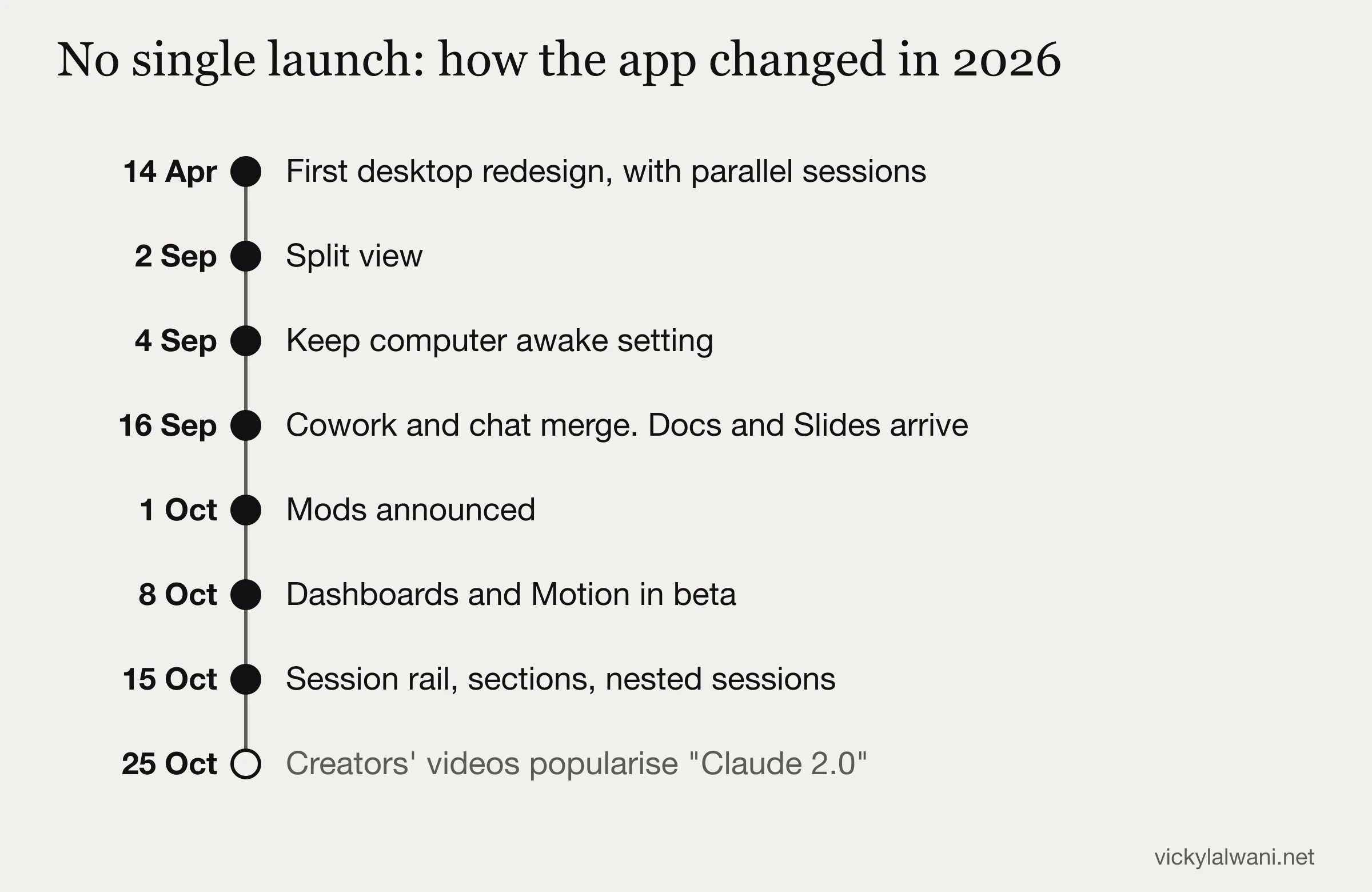
| Date (2026) | What shipped | Source |
|---|---|---|
| 14 April | First redesign of the Code desktop app, built around parallel sessions | Anthropic post |
| 2 September | Split view | Changelog v1.44121.1 |
| 4 September | Keep computer awake setting | Changelog v1.46388.1 |
| 16 September | Chat and Cowork begin merging. Docs and Slides arrive | Anthropic post |
| 1 October | Mods announced | Anthropic post |
| 8 October | Dashboards and Motion enter beta. Docs, Slides and Design leave beta | Anthropic post |
| 15 October | Session rail, sections and nested sessions | Changelog v2.42304.0 |
| 20 October | New Code tab with environments and a session rail | Changelog v3.1623.0 |
| 25 October | Creator videos spread the Claude 2.0 label | Ben AI, then RoboNuggets and Futurepedia |
| 3 November | New Claude visual design | Changelog v4.16336.0 |
| 10 November | Dashboards becomes Claude Data and leaves beta. Sheets and Whiteboards arrive in beta | Anthropic post |
The rollout is staged, so two accounts can look different on the same day. Anthropic's help page now says the merged chat and Cowork home is rolling out gradually to Pro, Max and Ultra, and reaches Team and Enterprise organisations where the Chat and Cowork unified setting is on. On 5 November the same page also described Free as coming soon and named a 16 November default date for existing Enterprise organisations. Both lines are gone, so don't plan around them.
Futurepedia's 15-minute walkthrough is the most recent full tour I found. It also promotes a free setup kit through a tracking link, which I haven't reviewed.
How the new Claude desktop app is laid out
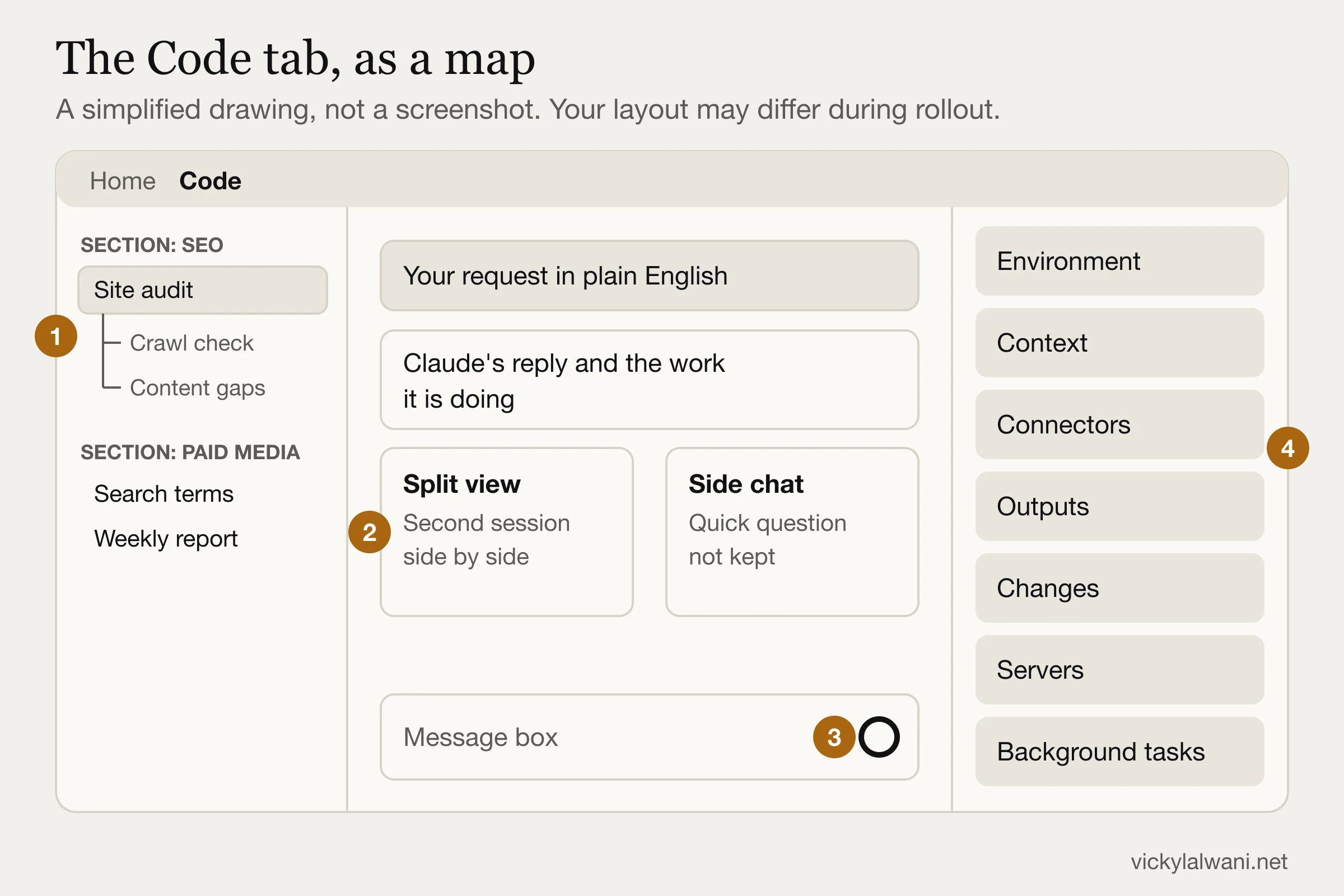
| # | Area | What to use it for | Source |
|---|---|---|---|
| 1 | Sidebar sections and nested sessions | One section per client or channel. Child jobs sit under the main session | Changelog |
| 2 | Split view and side chat | Compare two jobs. Ask a quick question without touching the main thread | Desktop docs |
| 3 | Ring under the message box | On plans with limits it now shows plan usage, not context | Changelog |
| 4 | Session rail cards | Environment, context, connectors, outputs, changes, servers and background tasks | Changelog |
Exact shortcuts and commands
| Action | How | Source |
|---|---|---|
| Open split view | Option or Alt and click a session, or right-click, Open in, Split view | Desktop docs |
| Exit split view | Cmd+Ctrl+W on Mac, Ctrl+Alt+W on Windows | Desktop docs |
| Open a side chat | Cmd+; on Mac, Ctrl+; on Windows, or type /btw | Desktop docs |
| Set a finish line | /goal plus your condition. /goal clear stops it | Goal docs |
| See context use | Open the Context card, or run /context | Desktop docs |
| Try a different direction | /branch or /fork | Commands docs |
Every new feature, status and plan
This is the table I wish the videos had included. Beta status and plans change, so check the source before you buy anything.
| Feature | What it does | Status | Plans | Source |
|---|---|---|---|---|
| Docs | Collaborative documents. Word, PDF, Markdown or Google Docs export | Out of beta | All, including Free | Help page |
| Slides | Decks. PowerPoint, PDF or Google Slides | Out of beta | All, including Free | Help page |
| Design | Mockups, prototypes and landing pages. Old standalone site closes on 14 December 2026 | Out of beta | All, including Free | Move guide |
| Claude Data (was Dashboards) | Dashboards, data stories and summaries from warehouses, CRMs and connectors. Each chart shows its query and last refresh | Generally available since 10 November. Certified queries and live sharing in beta | Paid plans. On by default for Enterprise from 20 November 2026 | Help page |
| Sheets and Whiteboards | A spreadsheet and a whiteboard inside Claude | Beta since 10 November | Paid plans | Anthropic post |
| Motion | Animated explainers and charts, MP4 export | Beta | Team and Enterprise only | Anthropic post |
| Nested sessions | Separate child sessions that report back | Live | Local and SSH sessions in the Code tab | Changelog |
| Work across sessions | List, read, message, rename and archive other sessions. Sees the 20 most recently active | Live | Desktop local, SSH and WSL only | Desktop docs |
| Code projects | A coordinator starts parallel threads with shared instructions and memory | Public beta | Pro, Max, Ultra, rolling out. Not Team or Enterprise yet | Projects docs |
| Remote Control | Steer a local session from your phone while it runs on your machine | Live | Paid plans. Off by default on Team and Enterprise | Remote Control docs |
| Keep awake | Prevents idle sleep. Closing the lid still sleeps the machine | Live | Desktop app | Anthropic Academy |
| Cloud sessions | Runs on Anthropic's machines after you close the laptop. Counts toward plan limits | Live | Paid plans. Enterprise needs an eligible seat | Cloud docs |
| /goal | A separate model checks your condition after each turn | Live | CLI, Desktop, Remote Control | Goal docs |
| Mods | Your own panes, commands and rules for tool calls | Live | Desktop v2.1.286+, CLI v2.1.287+, VS Code | Mods docs |
| 1M context | Depends on the model and surface | Live | Current default models | Help page |
Where the popular explanations need correcting
I like the Futurepedia video, and it's why this article exists. But a few of its points differ from Anthropic's pages, and those are the details people repeat.
| What's commonly said | What the source says | Source |
|---|---|---|
| Side chat is Cmd or Ctrl plus | It's Cmd+; or Ctrl+;. The difference may just be how the key was spoken or transcribed | Desktop docs |
| The context ring shows your context | On plans with limits it shows plan usage. Context moved to the card | Changelog |
| Motion will reach all paid plans | It's on Team and Enterprise. I found no promise of wider release | Anthropic post |
| /goal checks its own work | The evaluator runs no commands and reads no files. It judges what appears in the conversation | Goal docs |
| Keep awake lets you walk away | True for idle sleep only. For lid-closed work use cloud sessions | Anthropic Academy |
| Everything rolls out to everyone | Code projects aren't offered on Team or Enterprise yet | Projects docs |
Nested sessions vs master session vs projects
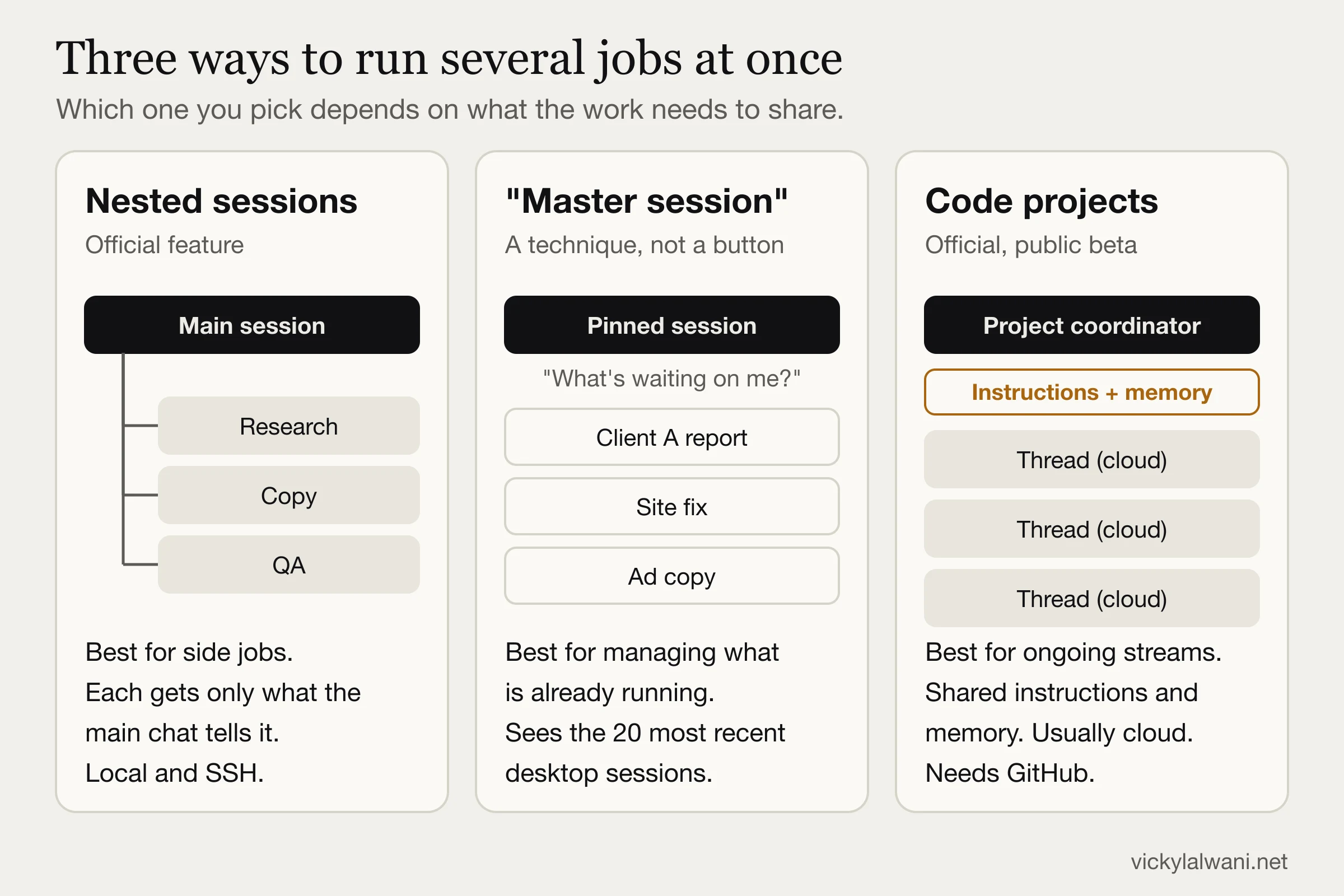
| If you need to... | Use | Marketing example | Why | Source |
|---|---|---|---|---|
| Ask something quickly mid-job | Side chat | What does this Quality Score column mean? | Adds nothing back, isn't saved | Desktop docs |
| Split one job into parts | Nested sessions | One competitor per session | You can open any child and follow up there | ClaudeDevs |
| Track work already running | Master session (technique) | What's waiting on me across all clients? | Sessions can read and message each other | Desktop docs |
| Run an ongoing stream with shared rules | Code projects (beta) | Editorial queue using one style guide | Each thread starts with project instructions and memory | Projects docs |
| Finish with the laptop closed | Cloud session | Fix a landing page from a GitHub repo | Runs on Anthropic's machines, but can't see your local files | Cloud docs |
| Try two directions | Fork | Two account structures from one audit | The original stays untouched | Commands docs |
One warning from the docs: Worktree is off by default, so sessions work in the same project folder unless you turn it on. If two sessions may edit the same files, give each its own worktree. For a Claude Code primer on helpers, read my subagents tutorial.
15 ways to use the Claude desktop app for marketing
The videos explain the features, but the marketer guides I found were mostly written before October. This list is the join between them. None of these are measured results, so the status line tells you what each one is. Plan limits from the table above still apply.
| # | Job | Feature | Discipline | Can it change live things? |
|---|---|---|---|---|
| 1 | Technical and content audit in parts | Nested sessions | SEO | No, if you work from exports |
| 2 | Competitor content gaps | Nested sessions | SEO | No |
| 3 | Title and meta fixes to a finish line | /goal | SEO | Only if you let it edit the site |
| 4 | Crawl, cannibalisation and internal links | 1M context | SEO | No |
| 5 | AI citation tracking | Nested sessions, Claude Data | GEO | No |
| 6 | JSON-LD across a site | /goal | GEO, web | Only in your repo |
| 7 | Google Ads read-only audit | Google's server | PPC | No, it's read-only |
| 8 | Search terms to a negative list | Code session | PPC | No, a person applies it |
| 9 | Ad copy variants | Nested sessions | PPC, Meta | No |
| 10 | Meta creative fatigue from exports | Code session | Meta | No |
| 11 | Blended reporting | Claude Data | Reporting | No |
| 12 | Weekly pacing summary | Recurring tasks | Reporting | No |
| 13 | Client review decks | Slides | Reporting | No |
| 14 | Landing page to approved design | Design, /goal | Web dev | Only in your repo |
| 15 | Client switching guardrails | Mods | Operations | Depends on the mod |
Claude for SEO in the desktop app
Yes, Claude is good for SEO work that reads and compares a lot of material. It doesn't know your search volumes unless you connect a data source, so never let it invent them. Ahrefs lists 35 Claude Code uses, tied mostly to its own tools. My focus here is what the new app adds.
1. How do I split an SEO audit across sessions?
Run technical, content and link reviews as children of one main session, then merge them.
- Use: Nested sessions, split view.
- Prompt to adapt: Audit this crawl export in three separate sessions: technical, content and internal links. Each reports its top 10 issues with URLs. Then merge them into one priority list.
- Guardrail: Give each child the same export and the same output format. Check a sample of URLs yourself.
- Status: My suggested use. Not tested as a measured experiment.
2. How do I research competitors in parallel?
Give each competitor its own session, so you can ask follow-ups without cluttering the main thread.
- Use: Nested sessions. The competitor example comes from Futurepedia.
- Prompt to adapt: Start one session per competitor. List what each covers on this topic and what it misses. Report back in one table, with a URL for every claim.
- Guardrail: Web pages can carry hidden instructions, as Anthropic warns. Keep client data out of browsing sessions.
- Status: My suggested use. Not tested as a measured experiment.
3. How do I use /goal for SEO fixes?
Give it a finish line that its own output can prove.
- Use: /goal with a stop clause.
- Prompt to adapt: /goal every URL in titles.csv has a title under 60 characters or is listed as an exception, shown by a final count in this chat, or stop after 20 turns
- Guardrail: Don't write 'make it great'. The evaluator can only judge what appears in the conversation.
- Status: Stop clause documented. SEO use is my suggestion.
4. Can Claude review a whole site at once?
Often, within the context limit. Check the Context card first, because connectors and memory files take space before you type.
- Use: 1M context and the Context card.
- Prompt to adapt: Using this crawl and content inventory, find pages competing for the same phrase and suggest internal links. Show the evidence for each one.
- Guardrail: A bigger window isn't free. Long sessions resend the conversation each turn.
- Status: My suggested use. Not tested as a measured experiment.
Related reading: my Claude Code SEO workflow and Claude skills for SEO. Semrush's own demo shows quick-win keywords and briefs through its connector, though it's a vendor video.
Claude for GEO and AI search
No source I found shows these features improve AI citations. They're workflow help, not a ranking trick.
5. How do I track what AI answers cite?
Run one session per question cluster, log the citations, then compare page structure. I did exactly this for this article, with results below.
- Use: Nested sessions. A dashboard if you maintain a data source.
- Prompt to adapt: Run these prompts, log every cited URL with its domain and type, and tell me which pages recur and what they share. Mark anything you couldn't capture.
- Guardrail: Answers change between runs and accounts, so repeat each prompt.
- Status: I ran this once on 5 November 2026. See the citation study below.
6. Can /goal check schema across a site?
Yes, if the validator's result appears in the transcript. Google says no special markup is needed for AI features, so schema should support real content, not replace it.
- Use: /goal in a code session.
- Prompt to adapt: /goal every page in this list has valid Article JSON-LD that matches its visible text, proven by the validator's output in this chat, or stop after 20 turns
- Guardrail: Don't mark up anything the page doesn't show.
- Status: My suggested use. Not tested as a measured experiment.
Claude for Google Ads and Meta Ads
Can Claude connect to Google Ads? Yes. Google's official MCP server lists accessible accounts, runs GAQL reports and reads metadata, and Google describes it as strictly read-only. To add it as a connector in Claude, you deploy it to Cloud Run and set up OAuth with your own client, so it isn't one click. Third-party connectors may advertise write tools, so check each one.
7. How do I audit Google Ads safely?
Start read-only. Claude reports, and a person decides.
- Use: Google's read-only server, or plain exports if you'd rather not connect anything.
- Prompt to adapt: Using read-only data, find wasted spend, brand overlap and asset decay. For each finding, show the GAQL or the rows behind it and estimate the impact only from those rows.
- Guardrail: Set budget caps in the ad platform itself. Treat a phone approval as a weaker review.
- Status: Server documented by Google. Audit use is my suggestion.
8. Can Claude build a negative keyword list?
Yes, as a draft. It needs your account's context to avoid blocking good traffic.
- Use: A code session with a search terms export.
- Prompt to adapt: Label each search term KEEP or NEGATIVE for this business. Explain anything you're unsure about, and don't apply anything.
- Guardrail: A person applies the list. See my human-in-the-loop rules for Google Ads.
- Status: In my four-tool test, all four labelled 12 of 12 terms correctly. That's one small test.
9. Can it write ad copy within limits?
Usually, but count the characters. One session per angle keeps the variants separate.
- Use: Nested sessions.
- Prompt to adapt: Write responsive search ad headlines of 30 characters or fewer for each of these three angles, one session per angle. Use only the facts I provide. Show a character count.
- Guardrail: In my four-tool test, the tools added business claims nobody supplied. Check every claim against your own facts.
- Status: Character limits tested in my four-tool test. The session split is my suggestion.
10. What about Meta Ads?
Exports are the simple route, with no account access at all.
- Use: A code session with Ads Manager exports.
- Prompt to adapt: Read this export and flag ads with rising frequency and falling click-through rate. Show the rows. Don't recommend budget changes.
- Guardrail: Third-party guides such as Climent Media describe a Meta-hosted server. I couldn't confirm it in Meta's own documentation, so verify before connecting a client account.
- Status: My suggested use. Not tested as a measured experiment.
Related reading: my PPC workflows, PPC audit with Claude and skills for Google Ads. Tegra on X shares a similar setup with read access to every client account and change access to none. It's a lead magnet, but the rule is sound.
Claude dashboards and reporting
11. Can Claude build a live ads dashboard?
Yes, on paid plans, if the data sits somewhere it can reach. The feature launched in beta as Dashboards and became Claude Data, generally available, on 10 November 2026. Anthropic names Redshift, BigQuery, ClickHouse, Databricks, Snowflake and CRMs such as Salesforce.
- Use: Claude Data. Also see my live ads dashboard guide.
- Prompt to adapt: Build a dashboard from this warehouse table showing spend and conversions by channel. Keep each platform's attribution window labelled and don't add them together.
- Guardrail: A dashboard built from a file is a snapshot, as Dara Obafemi found. Check link settings before sharing, since artifacts can hold client numbers.
- Status: Feature documented. Blended view is my suggestion.
12. Can it send a weekly pacing summary?
Yes, as a draft for you to review. Recurring tasks cover this, with limits on what a cloud run can reach.
- Use: Recurring tasks.
- Prompt to adapt: Every Monday, compare last week's spend with the monthly target from this sheet and list anything more than 10% off pace. Draft only.
- Guardrail: Don't send it to clients unread.
- Status: Scheduling documented. Pacing use is my suggestion.
13. Can it make client review decks?
Yes. Slides export to PowerPoint, PDF or Google Slides.
- Use: Slides.
- Prompt to adapt: Turn this month's report into a 10-slide review: results, what changed, what's next. Use only numbers from the file.
- Guardrail: Check every number against the source before presenting.
- Status: Export documented. Client use is my suggestion.
Ben AI's dashboards walkthrough has a useful five-step framework at 4:07: goal, metrics, check your data, layout, build. The example data is YouTube metrics rather than ad accounts, and the video promotes the creator's own programme.
Claude Code for marketers and web development
You don't need to code to use the Code tab. You chat in plain English. Anthropic's growth marketer went from never opening a terminal to building ad workflows, though that story is from before the rebuild. Cloud sessions and projects do assume GitHub, so non-developers should begin with local sessions.
14. How do I build a landing page to an approved design?
Design it, then use a finish line you can check, and preview before anything goes live.
- Use: Design, /goal and the built-in preview.
- Prompt to adapt: /goal this page matches the approved design at mobile and desktop widths, every link loads, and the build passes, shown in this chat, or stop after 20 turns
- Guardrail: Use a branch. Ask an engineer to review anything touching forms, tracking or payments. See building a website with Claude Code.
- Status: Goal documented for acceptance criteria. Landing page use is my suggestion.
15. Which mods would a marketer actually want?
Start with Anthropic's samples. blast-radius holds a risky command and shows what it would change, with buttons to proceed or cancel.
- Use: Mods. Ask Claude to write one, or install from an author you trust.
- Prompt to adapt: Make me a mod that shows the current client's name above the message box, read from this folder's name.
- Guardrail: A mod can read your secrets, see every prompt and approve tool calls. Run
claude plugin validateand read the source first. - Status: These are ideas. Only the sample mods exist as named.
Anthropic's mods video builds one from scratch. Nate Herk had Claude read old session logs and suggest mods from repeated annoyances, which is a neat way to find your first one.
How I researched this article in nested sessions
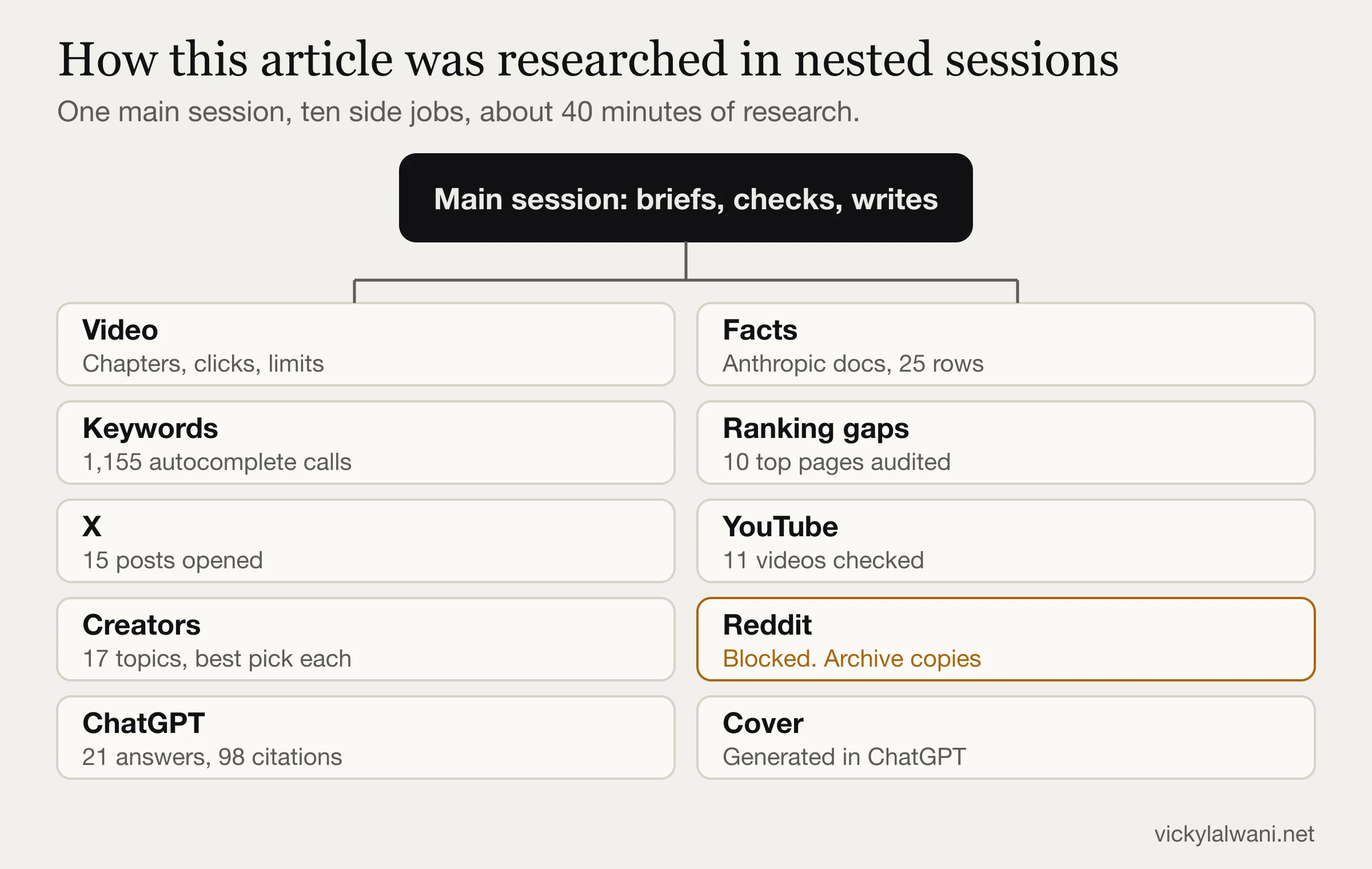
Here's the part I can speak to first-hand. I didn't just describe nested sessions. I researched this article in the Claude desktop app, with one main session starting ten separate jobs. The research took about 40 minutes.
| What went wrong | What it would have cost | What I do now |
|---|---|---|
| Two sessions saved files to a look-alike folder, because my folder name has a trailing space | Keyword and YouTube research looked missing at first | Check that every expected file exists before trusting a report |
| YouTube rate-limited English captions for the first session, which got a translated transcript | A wrong keyboard shortcut could have reached this page | Check everything against primary docs |
| Reddit was blocked, and the session stopped rather than getting round it | No direct Reddit reading, and no threads on the new features | Say what wasn't reached |
| Two sessions gave different dates for nested sessions | A wrong date in the timeline | The main session checks the changelog itself |
| No session measured cost or quality against doing the work in one chat | I can't tell you it was cheaper or better | Run that comparison next |
My takeaway: nested sessions gave me a lot of research quickly, and every report still needed checking. The main session is where the judgement has to happen. I didn't measure usage, so I can't give a cost figure.
What ChatGPT cites about the Claude desktop app
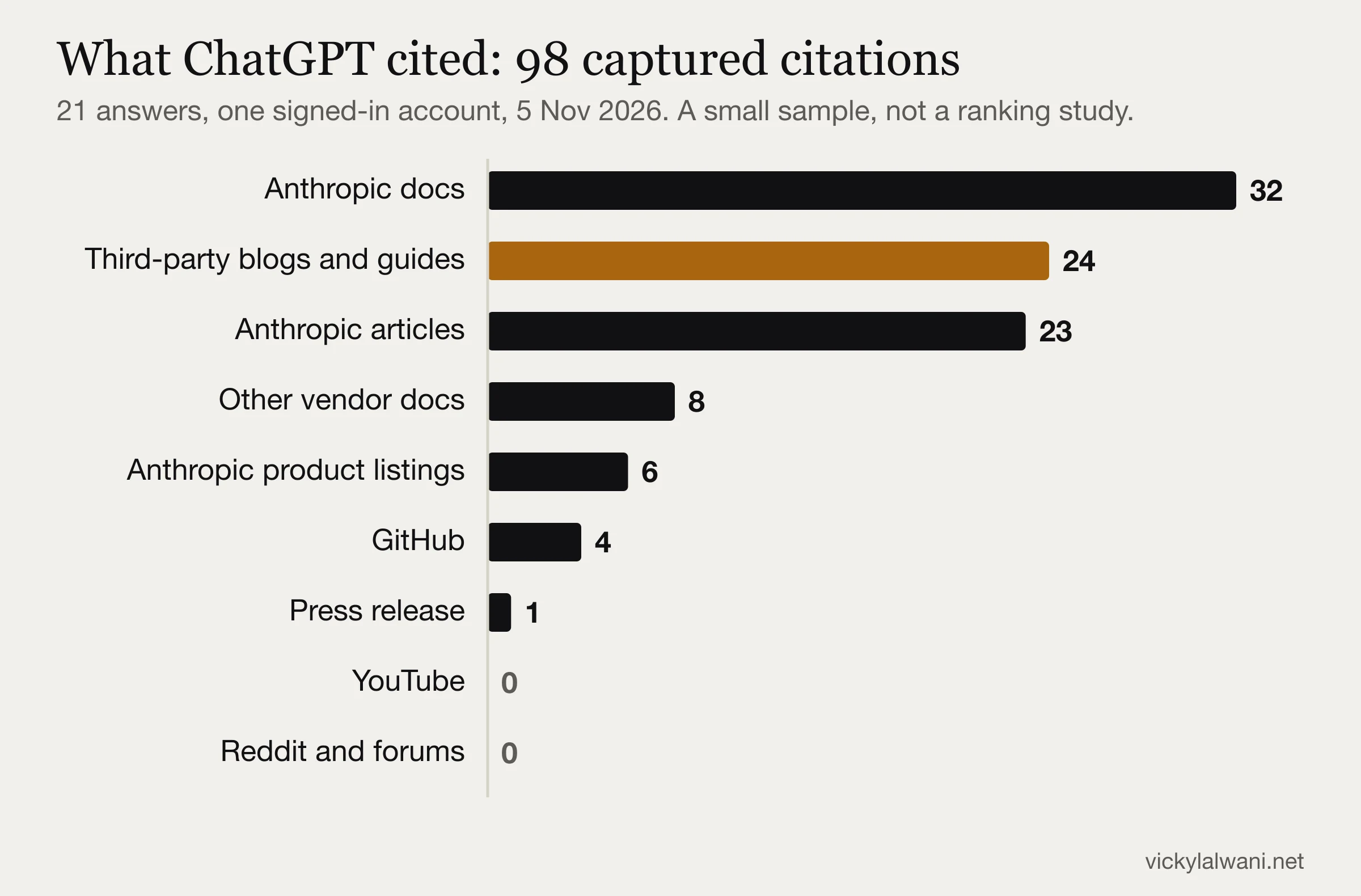
On 5 November 2026 I ran 21 ChatGPT answers (20 prompts, one repeated) with web search on, and logged what they cited. That gave 98 captured citations of 70 URLs on 29 domains.
| Finding | Evidence | What I'd do with it |
|---|---|---|
| Marketer questions had few marketer sources | How do I use Claude for SEO, how to use Claude Code for PPC and Claude desktop app for performance marketing showed only official pages in what I captured | Publish specific, dated marketing pages |
| The name changes the answer | What is Claude 2.0 gave opposite answers on two runs | Explain every meaning in your first lines |
| Official terms go to official pages | Claude mods opened with Anthropic | Cite Anthropic, then add what it leaves out |
| Unofficial terms go to small sites | PremiumInfo, GABE and HEROPY opened those answers | Aim at terms with no official page |
| Recent pages get cited | Mejba (30 October) and GABE (1 November) were cited by 5 November | Publish while a topic is fresh |
| No video or forum citations | Zero YouTube or Reddit citations in ChatGPT. Perplexity did cite both in my four prompts there | Don't rely on video alone |
| This site wasn't cited | vickylalwani.net appeared in 0 of 21 answers | That's my baseline to re-test |
Read this with care. It's one signed-in account, each prompt was mostly run once, and I had no control group of pages that weren't cited. Page features that recur, such as a direct first sentence, a date on each claim and limits stated plainly, are my inference, not a proven ranking factor. Google AI Mode and Bing Copilot showed different sources in my separate checks.
For the method behind this, see how to get recommended by ChatGPT and my AI citation audit.
Is the Claude desktop app safe, and what does it cost?
| Risk | What the source says | What I'd do | Source |
|---|---|---|---|
| Connector access | Claude inherits each person's permissions. Admin access means admin reach | Use read-only logins. Require approval on write tools | Connectors help |
| Unattended runs | /goal in auto mode runs without prompts | Never leave approvals off on a client account | Goal docs |
| Client data | Consumer plans can be used for training if the setting is on. Team, Enterprise and API aren't by default | Check your plan and contracts. Strip identifiers from exports | Data usage docs |
| Prompt injection | Websites and documents can carry hidden instructions | Keep sensitive data away from browsing jobs | Safety help |
| Mods | Code running with your permissions, not sandboxed | Read the source. Run the validator | Mods docs |
| Usage | Parallel runs use limits proportionately. Each nested session sends its own requests | Bound long jobs with a stop clause | Cloud docs, changelog |
| Cost | Code tab needs a paid plan. Cloud sessions have no separate machine charge | Start on one job and watch your usage | Desktop docs, cloud docs |
Cache-warming mods, such as the Cache Keeper shown in the Futurepedia video, spend usage to save usage. The savings claim is the creator's, not Anthropic's. For more on spend, see reducing Claude token costs.
What people say on X and Reddit
Here are the most useful reactions, in my own words. Several authors sell courses or lead magnets, and I've flagged those.
| Who | What they found | Take it as | Link |
|---|---|---|---|
| Dara Obafemi | Runs a content business through a manager chat that caught research landing after the script. Says switch only if you run more than one project | Practitioner | X thread |
| Hilay Trivedi | States plainly that it's the desktop app, not a model | Practitioner | X post |
| izuhara | Uses nested sessions as a workaround while waiting for Projects on a team plan | Practitioner | X post |
| Miles Deutscher | Calls side chats an underrated way to manage many agents | Creator | X post |
| Piotrek | Moved from the terminal and stopped opening Cursor. Setup took a couple of days | Practitioner | X post |
| Harry Uglow | Says archived sessions stay live on the remote, among other bugs | Complaint | X post |
| Vlad P | Hit pop-ups and a mid-task update, and went back to the terminal | Complaint | X post |
| Boris Cherny, Anthropic | Suggests people retry Claude Code Desktop now | Vendor | X post |
A note on Reddit: my tools couldn't reach Reddit directly. I read the threads below through archived copies, and they predate the October features, so they aren't reactions to the rebuilt app. Their usage and reliability concerns are still worth knowing.
| Thread | Recurring theme |
|---|---|
| 27% weekly usage on a first task | Start fresh chats. Turn off unused connectors. Pro feels thin for heavy Claude Code use |
| Remote Control reaches Pro | Early replies complained of hangs and repeat permission requests |
| Using Claude Code on a phone | Good for monitoring and unblocking. Weak for reviewing work |
| In-house marketers on AI | Output is up, quality isn't always. Bad source data is the bottleneck. Client context beats clever prompts |
| Claude as an SEO strategist | Commenters challenged the author's traffic claims. Show your method |
The best creators on Claude 2.0, topic by topic
I picked one source per topic. View counts change daily, so I've left them out. None of these people endorse this site. Claims about earnings or traffic in video titles are theirs, and many of these channels promote courses or affiliate links.
| Topic | Best pick | Note |
|---|---|---|
| Full tour | Futurepedia | Most recent I found |
| Projects vs nested sessions | Ben AI | From 2:51. Plan claims date from 25 October |
| Non-coders | Futurepedia beginner course | Before the rebuild |
| Dashboards | Ben AI | Example data isn't ad data |
| Motion | Paul J Lipsky | Motion is Team and Enterprise only |
| Design | Jeff Su | Before the rebuild |
| /goal | Tristen O'Brien | Cost warning at 7:13. Launch-era |
| Remote Control | Anthropic | Official. March 2026 |
| Cloud sessions | Anthropic | Official |
| Code projects | Anthropic | Official |
| Nested sessions | ClaudeDevs | Official developer account |
| Mods | Nate Herk | Also see Anthropic's video above |
| SEO | Jono Catliff | Traffic claim is self-reported |
| Google Ads | Stew, AI for PPC | PPC specialist. January 2026 |
| Meta Ads | Sam Piliero | Full course. July 2026 |
| Web development | Nate Herk | February 2026 |
| Marketing teams | Anthropic and case study | Vendor's own story |
Most of these I checked from video details and chapters, rather than watching them in full. I found no strong dedicated source on master sessions, so I'd use the Futurepedia chapter at 10:15 with Anthropic's docs.
What to do first: a 7-step setup for marketers
- Update and check your plan. The current layout needs Desktop v2.37337.0 or later. The Code tab needs a paid plan.
- Create one section per client or channel. Keep each client's work apart. My Claude desktop setup guide covers the basics.
- Open the Context card. See what connectors and memory use before your first prompt, and turn off what you don't need.
- Start with an export, not a live account. Pick the job you repeat most, such as a search terms review.
- Split that job with nested sessions. One job per chat, with the same output format.
- Add a bounded /goal. Use a check Claude can show, with a stop clause.
- Then consider extras. Remote Control, a recurring report and a trusted mod, in that order.
Still deciding which surface to use? Read Claude chat vs Code vs Cowork and my Claude use cases for marketing.
What I still don't know
- Cost per job. I haven't measured a nested audit against a single-chat audit.
- Results for clients. Nothing here shows these features improved rankings, return on ad spend or citations.
- Meta's connector. I couldn't confirm it in Meta's own documentation.
- Exact menus. Sections and fork menu paths aren't fully documented, and the rollout varies by account.
- Whether this page gets cited. I'll re-run the same prompts and update this page with the result.
Need Claude 2.0 set up for your business?
I'm a Claude consultant for marketing teams and businesses. I set up the Claude desktop app, Cowork, skills and connectors around your real work, such as SEO, Google Ads and Meta Ads reporting, content and dashboards, with review steps built in so nothing goes live without your yes.
Want the free guide first?
- My Marketer's Claude Folder guide
- The folder, skills and prompts to start with
- Fill in the form and download it straight away
Want it done with you?
- Contact me directly for a free 30-minute call
- Team setup, training and workflows
- See Claude consultant services
Sources and method
First checked 5 November 2026, re-checked against Anthropic's pages on 15 November 2026. Features, plans and dates change, so go by the live pages below.
| Source | Used for | Type |
|---|---|---|
| Claude Desktop changelog | Dates and versions | Anthropic |
| Desktop docs | Layout, shortcuts, sessions | Anthropic |
| Cowork is now Claude, help page | Merge and rollout | Anthropic |
| Dashboards and Motion | Artifact plans and beta status | Anthropic |
| Sheets, Whiteboards and Data, Claude Data help | Claude Data GA, Sheets and Whiteboards | Anthropic |
| Claude pricing, Linux docs | Free vs paid, prices, Linux beta | Anthropic |
| What are artifacts | Formats and exports | Anthropic |
| /goal docs | How goals are judged | Anthropic |
| Mods docs, announcement | Mods and their risks | Anthropic |
| Projects docs | Code projects | Anthropic |
| Remote Control docs, cloud docs | Keeping work running | Anthropic |
| Data usage, connectors, Cowork safety | Risks | Anthropic |
| Model deprecations, Claude 2, Claude Code post | The name collision | Anthropic |
| Google Ads MCP guide | Read-only Google Ads access | |
| Discover guidance, AI features guidance | Search context | |
| Futurepedia video | Starting point. Corrected where docs differ | Creator |
| Mejba, Product Compass, Rakhul | Other guides read for gaps | Independent |
| ChatGPT study and live autocomplete (1,155 lookups across Google, Bing and DuckDuckGo) | Citations and search phrases. Autocomplete shows a phrase is typed, not its volume | My own, 5 November 2026 |
I used Claude to help with the research and drafting, then checked product facts against the sources above. The images are my own drawings or generated illustrations, not screenshots of the app.
Book a free 30-minute strategy call if you want these workflows set up for your team, with the review steps built in.
FAQ
What is Claude 2.0?
Claude 2.0 is an informal nickname for Anthropic's rebuilt Claude desktop app, not a new AI model. Between September and November 2026 the app gained split view, nested sessions, a new Code tab, mods and new artifact types. Anthropic doesn't use the name Claude 2.0. The older Claude 2 model from 2023 was retired on 21 July 2025.
Can I still use the original Claude 2.0 model?
No. Anthropic retired the claude-2.0 and claude-2.1 models on 21 July 2025, and requests to retired models fail on Anthropic's own platforms. Its deprecations page names a current Claude model as the replacement. Partner clouds such as Amazon Bedrock set their own schedules, so check there if you used it through a partner.
What is the Claude desktop app?
It's Anthropic's app for Mac and Windows, with a Linux beta for Ubuntu and Debian. It combines chat and Cowork in one home, with a separate Code tab for parallel Claude Code sessions, connectors, a built-in browser and longer-running work.
What is the difference between the Claude desktop app and Claude Code?
Claude Code is the agent. The desktop app is one place to use it, through the Code tab. You can also use Claude Code in a terminal, in VS Code or on the web. Some features differ between them, including work across sessions, which only covers desktop sessions.
Is Claude good for SEO?
Yes, for reading and comparing large amounts of material, such as crawl exports and content inventories. It needs a real data source for search volumes and rankings, and a person should check its recommendations.
Can Claude connect to Google Ads?
Yes. Google offers an official MCP server that is strictly read-only. Adding it as a connector in Claude requires hosting it and setting up your own OAuth client. Third-party connectors may have write access, so check each one.
Is Claude desktop 2.0 free?
Partly. The Claude desktop app is free to download, and Anthropic's Free plan includes chat on desktop plus Docs, Slides and Design. The Code tab, where nested sessions and most Claude 2.0 features live, needs a paid plan: Pro, Max, Ultra, Team or Enterprise. Anthropic's pricing page lists Pro at $20 a month billed monthly, or $17 a month billed annually (USD, checked 15 November 2026).
When was Claude desktop 2.0 released?
There was no single release date. The changes arrived in stages in 2026: split view on 2 September, Chat and Cowork began merging on 16 September, nested sessions on 15 October and the new Code tab on 20 October, according to Anthropic's desktop changelog. The Claude 2.0 nickname spread through creator videos from late October.
Is Claude Code 2.0 the same as Claude 2.0?
No. Claude Code 2.0 was a September 2025 update to Claude Code's terminal interface, announced by Anthropic. Claude 2.0 is either the retired 2023 model or the 2026 nickname for the rebuilt desktop app. The three share a number, not a product.
Claude Chat vs Cowork vs Code: what is the difference?
In the Claude desktop app, Chat is for conversations, drafts and documents. Cowork handles Dispatch and longer agentic work. Code is Claude Code: each session has its own chat history and project folder, and you can run several in parallel. Anthropic is merging Chat and Cowork into one home, rolling out gradually, and the Code tab needs a paid plan.
How do I use Claude split view?
Hold Option on Mac or Alt on Windows and click a session in the sidebar. You can also right-click a session and choose Open in, then Split view.
What does Claude /goal do, and how is it different from /loop?
/goal keeps Claude working until a separate model judges your condition is met, based on what appears in the conversation. /loop runs on a time interval instead. Add a clause such as 'or stop after 20 turns' to bound a goal.
Can I control Claude from my phone with Remote Control?
Yes, on paid plans. The session keeps running on your own computer, and you steer it from the Claude app or a browser. It's off by default on Team and Enterprise until an admin enables it.
Is the Claude desktop app safe to use with client data?
It depends on your plan, settings and contracts. Consumer plans can be used for training if that setting is on, while Team, Enterprise and API aren't by default. Use read-only access, strip identifiers and check client agreements first.
What is a Claude master session?
It's a technique rather than a feature. You pin one chat and use it to check and manage your other sessions, using a documented capability called work across sessions. By default it sees the 20 most recently active desktop sessions, not cloud ones.
Do I need to know how to code to use Claude Code for marketing?
No. You work in plain English and don't need to read code. It helps to learn basic Git before Claude edits a live website, and to have an engineer review anything touching forms, tracking or payments.