The best Claude use cases for marketing are repeatable SEO and paid search jobs with real data: Google Ads search term audits, low-CTR title rewrites from Search Console, crawl audits, responsive search ad drafts and weekly reports. Since September 2026 they run in one Claude app, Claude Code, Claude in Chrome or a scheduled task, mostly on the $20 Pro plan, with a person approving every change.
You have a Claude subscription, a Search Console property, a Google Ads account and a list of jobs that eat every Monday. You have read a dozen threads of "50 ways to use Claude", and most of them are social captions and email subject lines. None of them tell you which SEO or paid search job to hand over first, where in Claude it should run, or what to check before it goes live.
This guide does that, updated for November 2026. It lists 24 Claude use cases for marketing, SEO and paid search first, and for each one says where it runs and links the detailed guide I have already written, so you get the map here and the method there. If you would rather have the setup done with your team, that is what my Claude consulting covers.
TL;DR
Start with SEO and paid search. The use cases with the clearest payback are a weekly search terms audit, low-CTR title rewrites from a Search Console export, a technical audit from a crawl, and responsive search ad drafts checked against character limits.
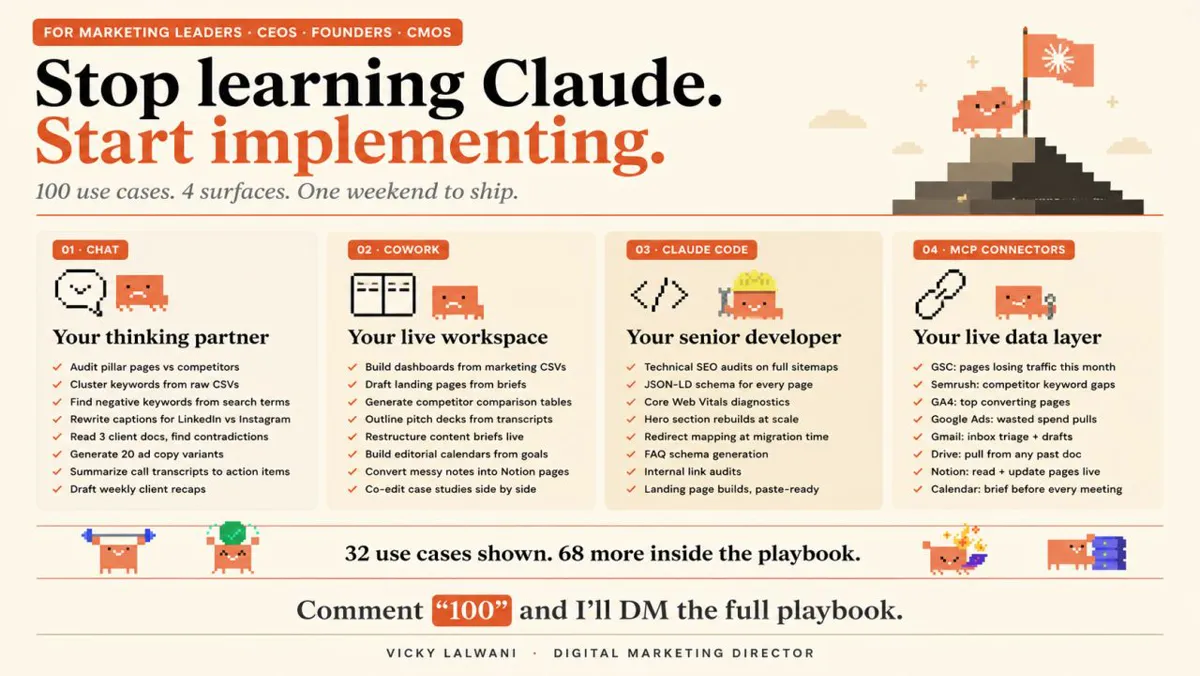
The "four surfaces" picture is out of date. On 16 September 2026 Anthropic merged Cowork and chat into one Claude. In practice you now work in five places: the Claude app, Claude Code, Claude in Chrome, Claude inside Google Workspace or Microsoft 365, and scheduled tasks.
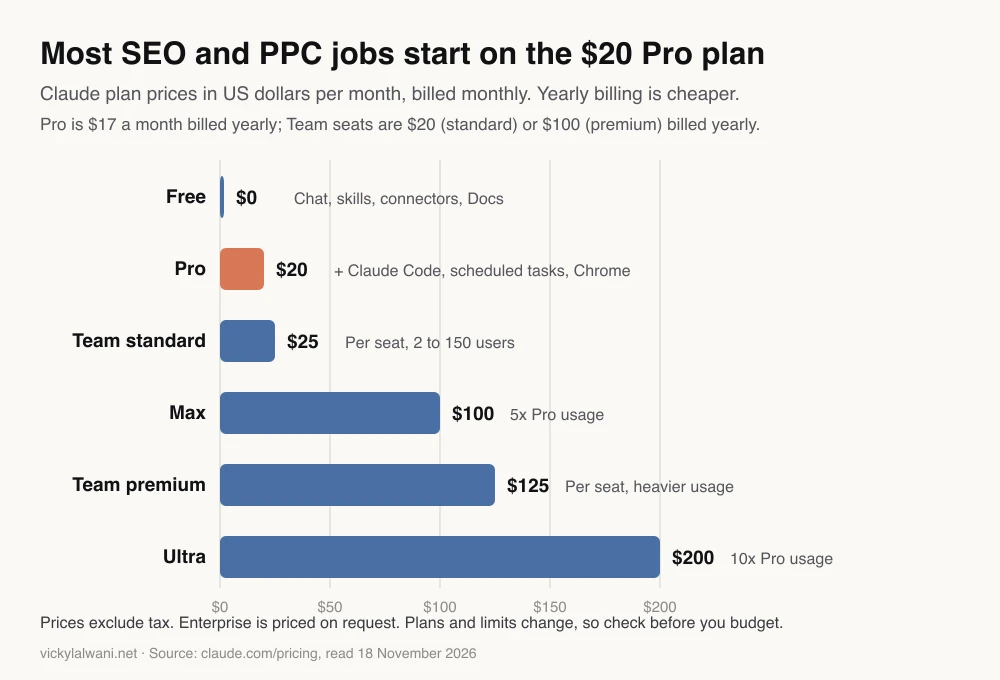
Most of it runs on Pro at $20 a month (claude.com/pricing). Free covers chat, skills and connectors; Claude Code, scheduled tasks and Claude in Chrome start at Pro.
Data is the limit, not the model. In November 2026 Claude's directory has no official Google Ads, GA4, Search Console or Meta connector, so most SEO and PPC work starts from exports or Google's own MCP servers, read-only, with you approving every change.
What are the best Claude use cases for marketing in 2027?
Short answer: The best Claude use cases for marketing are repeatable jobs with real data and a clear check: search term audits, title and description rewrites, crawl audits, ad copy to character limits, keyword grouping and weekly reports. Strategy, budgets and anything that spends money stay with a person.
The test I use is simple: the job happens every week, the input is an export or a live data source, and a person can check the output in five minutes. Jobs that pass all three are the ones worth turning into a saved skill. Jobs that fail the last test, such as "rebuild the account structure", are where AI-drafted plans go wrong.
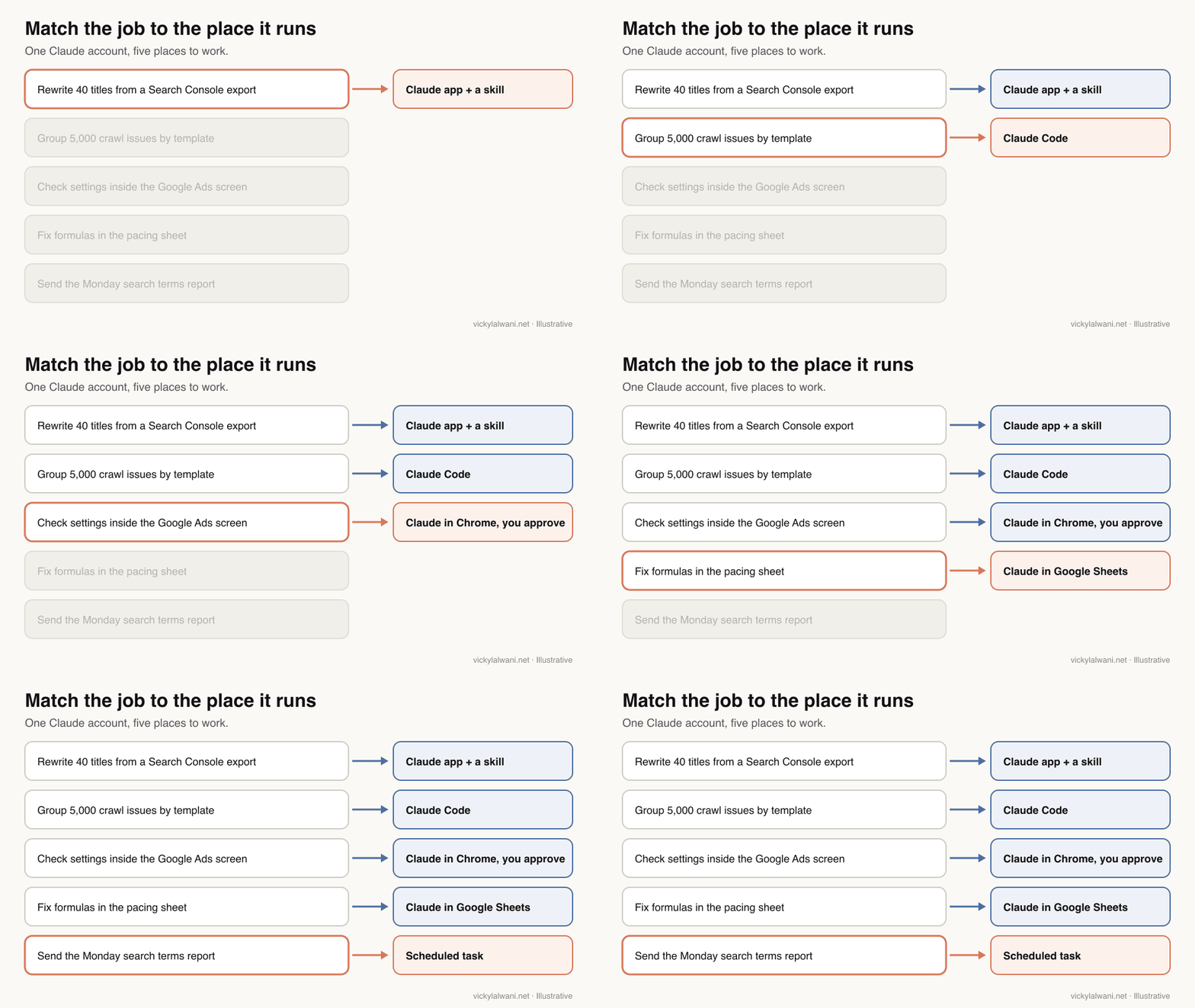
| Top use case | Area | Where it runs |
|---|---|---|
| Search terms audit and negatives | Paid search | App + skill |
| Low-CTR title rewrites | SEO | App + skill |
| Crawl audit grouped by template | SEO | Claude Code |
| RSA drafts to 30 and 90 characters | Paid search | App or Claude Code |
| Keyword grouping from real data | SEO | App + connector |
| Weekly report with a human note | Both | Scheduled task |
Where do these jobs run in Claude now?
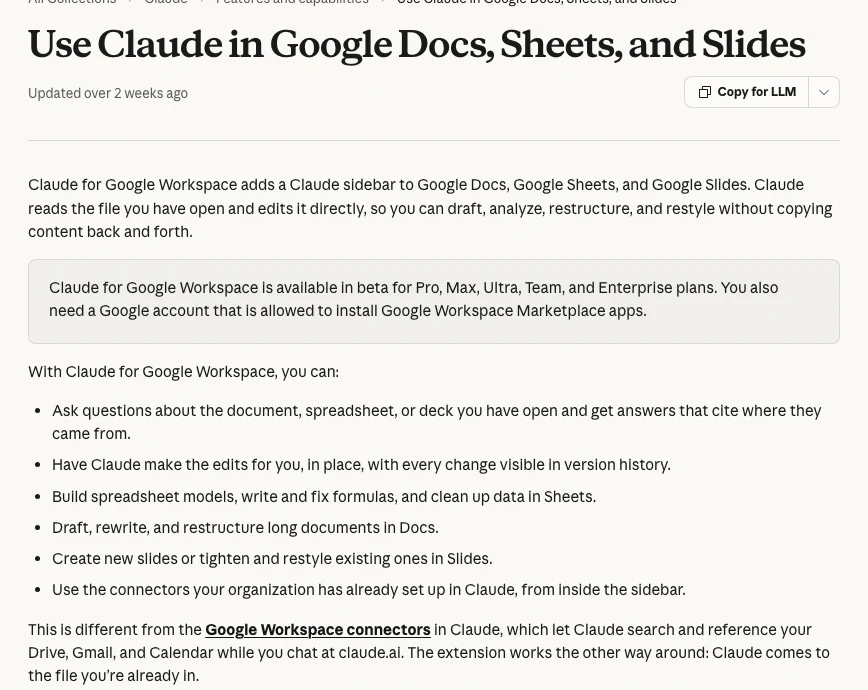
Short answer: Since September 2026, quick questions and longer jobs share one Claude app. Technical work on files and scripts runs in Claude Code, work inside web tools runs through Claude in Chrome, spreadsheet and deck edits run in the Google Workspace or Microsoft 365 add-ins, and recurring jobs run as scheduled tasks.
The old advice to learn "Chat, Cowork, Code and connectors" as four separate tools no longer matches the product. Cowork is now part of the main app, and connectors and skills work across all of it. What still differs is where the work happens and what it can touch.
| Place | Best for | Plan |
|---|---|---|
| Claude app (chat and longer jobs) | Analysis, drafts, files, reports | Free and up |
| Claude Code | Big exports, scripts, site edits | Pro and up |
| Claude in Chrome | Work inside web tools you log in to | Pro and up |
| Google Workspace add-on | Sheets, Docs and Slides in place | Pro and up, beta |
| Scheduled tasks | Recurring checks and reports | Pro and up |
Plans come from Anthropic's pricing page and the Google Workspace help article, read on 18 November 2026. For the full feature-by-feature view, read Claude features for marketing leaders; for what the September merge changed on the desktop, read what the rebuilt Claude desktop app is.
What are the Claude use cases for SEO?
Short answer: For SEO, Claude is strongest at reading exports you already have: finding pages stuck on page two, rewriting low-CTR titles, grouping keywords, turning a crawl into a ranked fix list and drafting briefs. It is weakest when asked to invent search volumes or judge rankings without data.
- Pages stuck on page two. Give Claude a Search Console performance export and ask for queries in positions 8 to 20 with high impressions, grouped by page. Search Console's report tables show up to 1,000 rows, so large sites need the API. Read Claude skills for SEO.
- Low-CTR title and description rewrites. A skill that rewrites titles for pages with impressions but few clicks, in your voice, with one option per page for you to approve. Same guide: the weekly SEO routine.
- Keyword research from real data. Search Console for what you already rank for, a keyword tool for volume and difficulty, Claude for grouping by intent and mapping to pages. Read keyword research with Claude.
- Content briefs and a calendar. Briefs where every topic cites the query or gap it came from, so nothing is invented. Read the AI content calendar method.
- Technical audit from a crawl. Crawl with Screaming Frog, join Search Console and GA4 data, and have Claude group issues by template and rank them by traffic at risk. Read the Screaming Frog Claude audit and the Screaming Frog MCP.
- One-folder SEO analysis. Put every export in one folder with a rules file and let Claude Code read across them. Read the Claude Code SEO workflow.
- Live data instead of exports. Connect Search Console, GA4 or a crawler through MCP servers. Read MCP servers for SEO.
- Weekly technical checks. Fast-breaking checks daily, slow ones monthly, with a short plan for a person to approve. Read technical SEO audit automation.
- Site and store edits at scale. Schema, internal links and product SEO fields changed in code or through a platform's tools. Read the Shopify AI Toolkit for SEO and building a website with Claude Code.
Here is a prompt for the first job. Attach a Search Console Performance export (Queries and Pages tabs) for the last three months.
You are an SEO analyst. Use only the attached Search Console export. Do not estimate search volumes or invent data.

1. List queries with average position between 8 and 20 and at least [100] impressions.
2. Group them by the page that ranks for them.
3. For each page, give: total impressions, clicks, CTR, the three biggest queries, and one sentence on what the page seems to be missing for those queries.
4. Rank pages by impressions at stake.
5. Flag any query where two or more of our pages rank (possible cannibalisation).

Output a table I can paste into Google Sheets, then a short list of the five pages to work on first and why.
For the bigger picture of how these pieces connect, read how to build an AI SEO system with Claude. If you want the SEO side done for you rather than with you, my SEO consulting uses exactly these workflows.
What are the Claude use cases for paid search?
Short answer: For Google Ads, Claude earns its place on search term audits, negative keyword lists, responsive search ad drafts, account audits, pacing checks and reports. It should read and draft; a person approves every change, and budgets, bids and billing stay manual.
- Search terms audit and negatives. Export search terms weekly, have Claude flag terms that spent with no conversions, and draft negatives at the right level. Read Claude skills for Google Ads and how to reduce wasted ad spend.
- Responsive search ads. Draft up to 15 headlines and 4 descriptions per ad, checked against Google's 30 and 90 character limits. Read the slash commands cheat sheet, which includes an /rsa command.
- Account audit. Seven checks on a live account, from wasted search terms to Performance Max and pacing. Read the PPC audit with Claude.
- New campaign drafts from a brief. Ad groups, keywords, ads and negatives drafted from a written brief, then checked row by row. Read how to create a Google Ads campaign with AI.
- Scripts for pacing and alerts. Claude Code writes Google Ads Scripts or API jobs for budget pacing and anomaly alerts. Read Claude Code PPC workflows.
- Overnight drafts with approval. Agents read the account and draft changes; you approve each one in the morning. Read human in the loop AI for Google Ads and what to automate with Claude.
- Work inside the Google Ads screen. Claude reads reports and settings in your browser while you approve each step. Read what to delegate to Claude in Google Ads.
- Reports and dashboards. A monthly deck in Slides or a live dashboard that refreshes when opened. Read PPC reporting in Google Slides and Claude live dashboards.
- Tracking checks before spend. Connect GA4 read-only and check that every form and call is measured before a campaign goes live. Read how to connect Claude to Google Analytics safely.
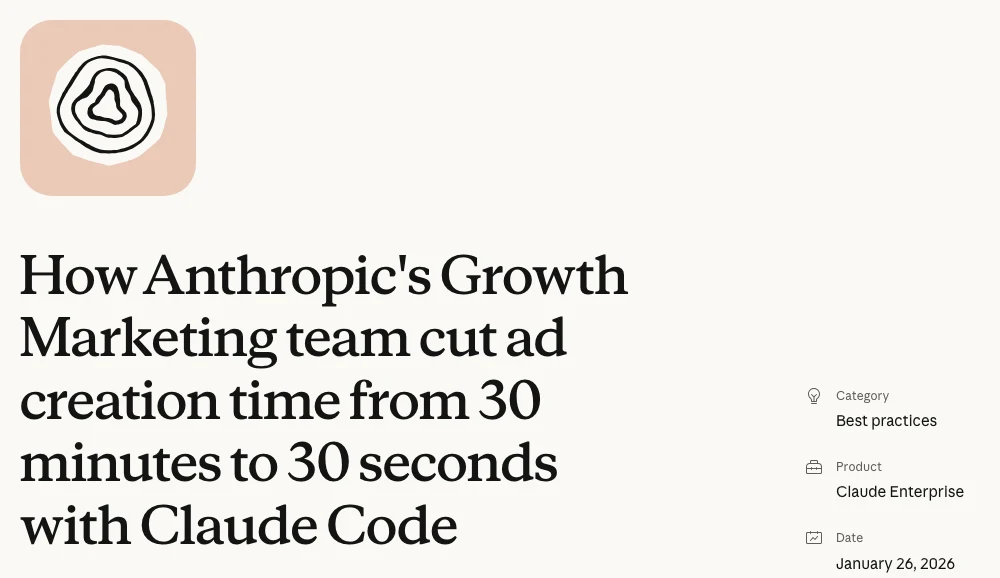
Anthropic's own growth marketing team is the clearest public example. It describes a Claude Code workflow with an /rsa command that checks copy against skills for brand tone and RSA best practice, then exports a CSV of 15 headlines and 4 descriptions per ad for manual review. Anthropic says ad creation time fell from 30 minutes to 30 seconds. That is the vendor's own figure about its own team, so treat it as a ceiling, not a forecast.
On client accounts my rule is the same every time: audit first, put the findings in a sheet, check them by hand, and make no change before approval. A prompt for the weekly search terms job:
You are a Google Ads analyst. Use only the attached search terms export (last 30 days) and our conversion definition: [form submit / call over 60 seconds / purchase].

1. List search terms with spend and zero conversions, sorted by cost.
2. Flag terms that are clearly irrelevant (jobs, free, DIY, other services, competitors we do not want).
3. For each flagged term, suggest a negative keyword, its match type, and whether it belongs at ad group, campaign or account level.
4. Do not suggest negatives that would block terms which converted.
5. Mark anything you are unsure about as "check".

Output a table with: search term, cost, clicks, suggested negative, match type, level, reason. I will review every row before anything is added.
If you want an experienced second pair of eyes on the account itself, that is my Google Ads management work.
What other marketing jobs is Claude good for?
Short answer: Beyond SEO and paid search, Claude is useful for a morning briefing, writing in your brand's voice, Meta creative briefs, competitor analysis, charts for reports and one cross-channel report. Each has its own guide on this site, so this list is short.
- Morning briefing. A scheduled task that reads your sources and returns the three things that matter today. Read the Claude morning briefing.
- Copy in your voice. A voice skill built from your best real writing, for ads, emails and social posts. Read how to train Claude on your writing style.
- Meta creative briefs. Research to four genuinely different directions before design. Read the Meta ad creative process.
- Competitor analysis. Competitors' landing pages and ad videos, marked as shown or claimed only. Read how to analyse a competitor's landing page and competitor videos with AI.
- Charts and diagrams. Visuals built from an export inside the chat, saved for reports. Read Claude charts and diagrams.
- One cross-channel report. Google Ads and Meta side by side against your CRM. Read the cross-channel report.
One limit to plan around: Claude does not generate photos or illustrations. It builds charts, diagrams and code-drawn visuals, so ad imagery still needs a design tool or a designer.
Which Claude plan do you need for each use case?
Short answer: Free covers chat, skills, connectors and documents, which is enough to try the SEO and search terms prompts above. Pro at $20 a month adds Claude Code, scheduled tasks and Claude in Chrome, which most SEO and PPC workflows need. Max and Ultra mainly add usage and model access, not new marketing features.
| Use case | Lowest plan | Why |
|---|---|---|
| Prompts on an export | Free | Chat and file uploads |
| Saved skills | Free | Skills on all plans |
| Semrush or Ahrefs data | Free plus their plan | Connectors on all plans |
| Crawl and script work | Pro | Needs Claude Code |
| Monday report on a timer | Pro | Scheduled tasks |
| Work in the Google Ads screen | Pro | Claude in Chrome |
| Shared skills for a team | Team | Admin and sharing |
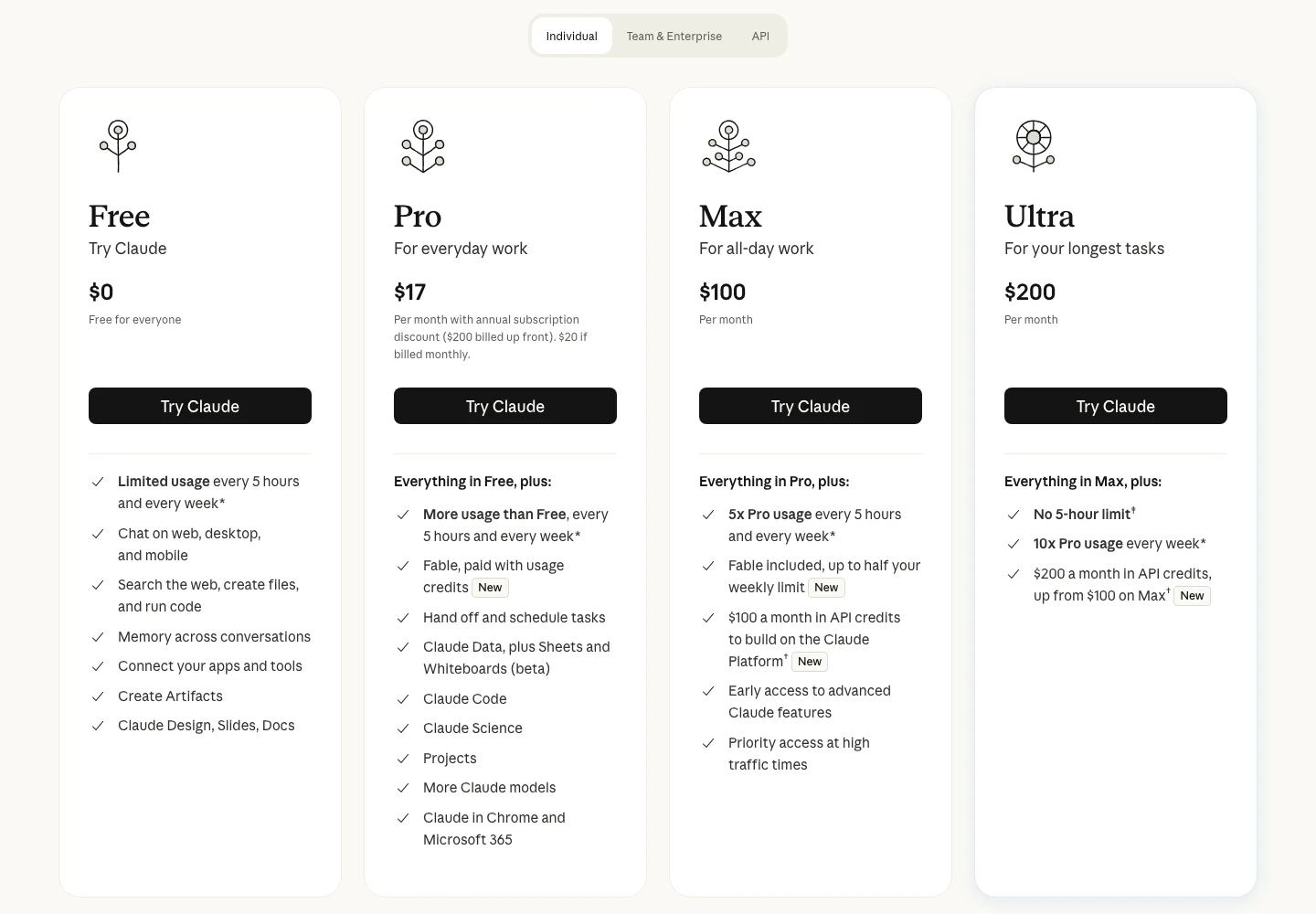
Usage is the hidden variable. Long Claude Code sessions on big exports use far more than chat, so heavy daily users move to Max. For cost control on automations, read how to reduce Claude token usage and which Claude model to use.
How do you get SEO and Google Ads data into Claude?
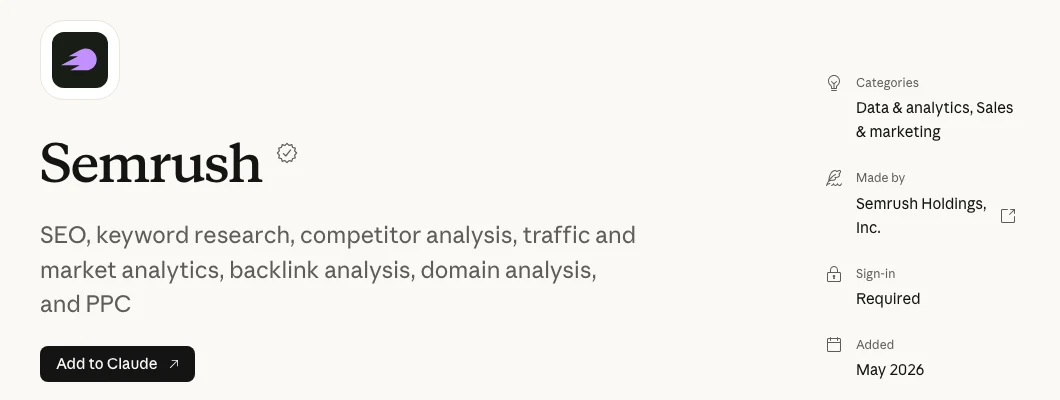
Short answer: Four routes: export a report and attach it, use an official connector where one exists (Semrush and Ahrefs have them), run Google's own Google Ads or Google Analytics MCP server, or use the APIs through Claude Code. Start with exports, move to live data once the workflow is proven, and keep everything read-only at first.
| Route | Effort | Good for |
|---|---|---|
| Export and attach | None | Any first test |
| Directory connector | Low | Semrush, Ahrefs, HubSpot |
| Google's MCP servers | Medium | Google Ads, GA4 |
| APIs via Claude Code | High | Search Console at scale |
The connector catalogue and its gaps are covered in Claude MCP connectors for marketing, and the official Google servers in what a marketing MCP server is. The one-word rule for all of them: read-only until you trust it.
What should you not hand to Claude?
Short answer: Do not hand Claude budget changes, bid strategy switches, billing, user access or anything published to customers without review. Do not let it invent search volumes, click prices or statistics, and do not trust a plan you cannot trace back to the export it came from.
- Numbers without a source. I have had an AI agent produce search volumes far below what the source showed when checked by hand. Take volumes and bids from Keyword Planner or your SEO tool, never from the model.
- The wrong skill for the job. A skill written for offers will make website pages read like adverts. One skill per job, named clearly.
- Write access on day one. Start read-only. Add changes one type at a time, with approval.
- Mixed client context. I keep one Claude project per client, threads named by service and skills in one known place, so one account's rules never leak into another's.
- Reports with no human note. Every report gets a short note from a person: where we are, what we are doing, what is next.
| Job | Claude | You |
|---|---|---|
| Search terms | Flags and drafts negatives | Approves each row |
| Titles and metas | Drafts options | Picks and publishes |
| Budgets and bids | Explains the data | Decides and changes |
| Reports | Builds the draft | Writes the human note |
| Strategy | Challenges your plan | Owns the plan |
For the rules file that keeps these limits in force every session, read the Claude MD file for marketing.
How do you start: a 30-day plan
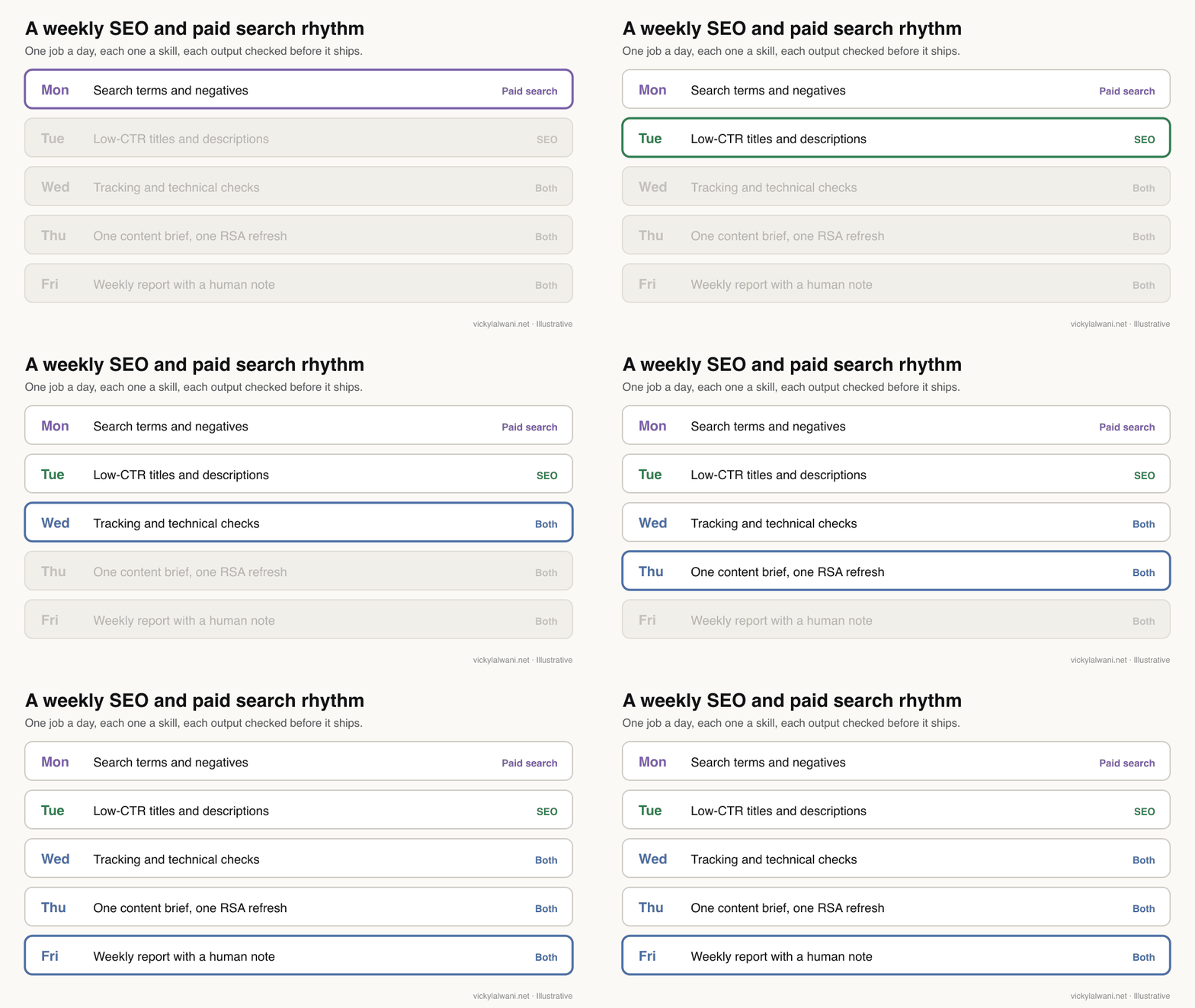
Short answer: Week one, run the two prompts above on real exports. Week two, save the better one as a skill. Week three, add one data connection. Week four, put one report on a schedule. Small, finished jobs teach more than a half-built system.
| Week | Do this | Read |
|---|---|---|
| 1 | Run the SEO and search terms prompts | Prompting framework |
| 2 | Save the best one as a skill | Skills for Google Ads |
| 3 | Connect one data source read-only | Connect GA4 safely |
| 4 | Schedule one weekly report | Morning briefing |
Keep a short log of what failed and why. Connections expire, outputs miss context and some jobs are not ready to hand over yet, and those notes become your team's rules. Moving over from ChatGPT? Start with the switching plan.
Videos worth watching
Short answer: Two official Claude videos show the use cases from the source: how Anthropic's marketing team uses Claude, and what the September merge of Cowork and chat changed. The table adds official explainers on skills and the Google Ads MCP server, plus two vendor tutorials.
Claude (Anthropic's channel), 26 January 2026. Anthropic's marketers on their own workflows, so it naturally presents Claude well.
Claude, 16 September 2026. The launch video for the merged app, from the vendor.
| Video | Channel | Date | What it covers |
|---|---|---|---|
| How Anthropic uses Claude in Marketing | Claude | 26 Jan 2026 | Vendor's own team |
| Cowork and chat are now one Claude | Claude | 16 Sep 2026 | The merged app |
| What are skills? | Claude | 26 Feb 2026 | Skills basics |
| Introducing the Google Ads MCP Server | Google Ads developers | 29 Oct 2025 | Official Ads server |
| Claude Code as an SEO analyst | Semrush (vendor) | 9 Apr 2026 | SEO workflow |
| Claude AI for Business: marketing tutorial | HubSpot Marketing (vendor) | 20 Apr 2026 | General marketing uses |
What people say on X and Reddit
Short answer: Practitioners report the most value from search terms work and Search Console analysis, and the most frustration when Claude gives optimisation advice without enough context. The common fix is the same everywhere: real data in, a narrow task, and a person checking the output.
| Post | Date | Point | Type |
|---|---|---|---|
| A developer who builds SEO tools | 11 Feb 2026 | Claude Code plugin on the Search Console API | First-hand |
| A performance marketer at Anthropic | 24 Mar 2026 | Search terms skill via MCP | First-hand, vendor |
| An SEO practitioner | 19 Aug 2026 | Ten skills on Search Console data | First-hand |
| Claude | 16 Sep 2026 | Cowork and chat merge | Vendor |
| A B2B marketer | 3 Nov 2026 | Weekly search terms into Claude | Opinion |
| Reddit thread | Date | Recurring theme | Type |
|---|---|---|---|
| r/PPC: Claude Code managing Google and Meta Ads | 28 Apr 2026 | API access, audits, changes pushed back | First-hand |
| r/SEO: how are you using Claude for SEO? | 13 Jun 2026 | Clustering, briefs, topical maps | Mixed |
| r/PPC: Claude for grunt work only? | 15 Jun 2026 | Keep it in a box; real data reduces errors | Opinion |
| r/PPC: Claude or Gemini for analysis? | 30 Sep 2026 | Good analysis, weaker optimisation advice | First-hand |
| r/AI_Agents: a marketing team on Claude | 13 Nov 2026 | Rules, connectors, then skills | First-hand, vendor |
Every X post was checked through X's embed service on 18 November 2026 and every Reddit thread through the Arctic Shift archive. Accounts named after a person are described by role, and Reddit is credited by community.
Where this advice is weak
Short answer: Anthropic changes Claude every few weeks, so plan details and product names here can date fast. The time savings quoted are vendors' own figures, the weekly rhythm is my working method rather than a tested benchmark, and data access depends on tools Claude does not control.
- Plans, prices and features were read on Anthropic's pages on 18 November 2026. Recheck before you budget.
- The Anthropic case study describes Anthropic's own team on an Enterprise plan; your results depend on your data and review time.
- Google's MCP servers and third-party connectors change often; check what each one can read and write before you connect it.
- Social posts are anecdotes, and some come from people selling tools or courses.
Want Claude set up for your SEO and paid search?
Short answer: If you want these use cases running on your own accounts, with skills for your weekly jobs, read-only data connections and an approval step your team trusts, my Claude consulting covers the setup, the skills and the training.
A typical start is one Claude project per client or brand, the search terms and title skills from this guide, one data connection and one scheduled report. Rates are on the pricing page. For the hands-on channel work, see SEO consulting and Google Ads management.
Sources
| Source | What it supports | Date | Link |
|---|---|---|---|
| Anthropic | Plan prices and features | Read 18 Nov 2026 | claude.com/pricing |
| Anthropic | Cowork and chat merge | 16 Sep 2026 | One Claude |
| Anthropic | Growth marketing RSA workflow, 30 min to 30 s | 26 Jan 2026 | Case study |
| Claude help centre | Google Workspace add-on, beta, plans | Read 18 Nov 2026 | 16951679 |
| Claude help centre | No image generation | Read 18 Nov 2026 | 9002504 |
| Claude directory | Semrush connector | Read 18 Nov 2026 | Semrush |
| Claude directory | Ahrefs connector | Read 18 Nov 2026 | Ahrefs |
| Google Ads Help | RSA limits: 15 headlines, 4 descriptions, 30 and 90 characters | Read 18 Nov 2026 | 7684791 |
| GitHub (Google) | Google Ads MCP server | Read 18 Nov 2026 | google-ads-mcp |
| GitHub (Google) | Google Analytics MCP server | Read 18 Nov 2026 | google-analytics-mcp |
| Site guides | Detail behind each use case | Updated 17 to 18 Nov 2026 | Linked in each item |
| YouTube (oEmbed checked) | Videos | 2025 to 2026 | See videos section |
| X (oEmbed checked), Reddit (Arctic Shift) | Posts and threads | Feb to Nov 2026 | See social section |
This article expands on my post on LinkedIn ↗.
FAQ
What are the best Claude use cases for marketing?
The best Claude use cases for marketing are repeatable jobs with real data and a quick check: Google Ads search term audits, low-CTR title rewrites from Search Console, crawl audits, responsive search ad drafts and weekly reports. Keep strategy, budgets and anything that spends money with a person.
Can Claude do SEO?
Claude can do much of the analysis and drafting in SEO: finding pages stuck on page two, rewriting titles, grouping keywords, ranking crawl issues and writing briefs. It needs real data from Search Console, a crawler or a keyword tool, because it cannot see rankings or search volumes on its own.
Can Claude manage Google Ads?
Claude can read Google Ads data, audit an account and draft changes such as negative keywords and ad copy, through exports, Claude in Chrome or Google's official Google Ads MCP server. A person should approve every change, and budgets, bids, billing and user access should stay manual.
Is there an official Google Ads or Search Console connector for Claude?
Not in Claude's connector directory as of November 2026. Google publishes open-source Google Ads and Google Analytics MCP servers you can add yourself, Semrush and Ahrefs have official connectors, and Search Console data comes from exports, third-party connectors or the API.
Do I need Claude Pro for marketing?
You can test most prompts on the Free plan, which includes chat, skills and connectors. Pro, at $20 a month or $17 billed yearly, adds Claude Code, scheduled tasks and Claude in Chrome, which most SEO and paid search workflows need.
Is Claude Cowork still a separate product?
No. On 16 September 2026 Anthropic merged Cowork and chat into one Claude app, so quick questions and longer jobs run in the same conversation. Older guides that list Chat, Cowork and Code as separate surfaces describe the product before that change.
Can a non-technical marketer use Claude Code?
Yes. You describe the outcome in plain English, such as grouping a crawl export by template, and review what it produces. Start on copies of your files, read the summary of changes before accepting them, and keep anything connected to live accounts read-only at first.
Can Claude create ad images?
No. Claude does not generate photos or illustrations, according to Anthropic's help centre. It can write ad copy, build charts and diagrams and draft creative briefs, but ad imagery still needs a design tool or a designer.