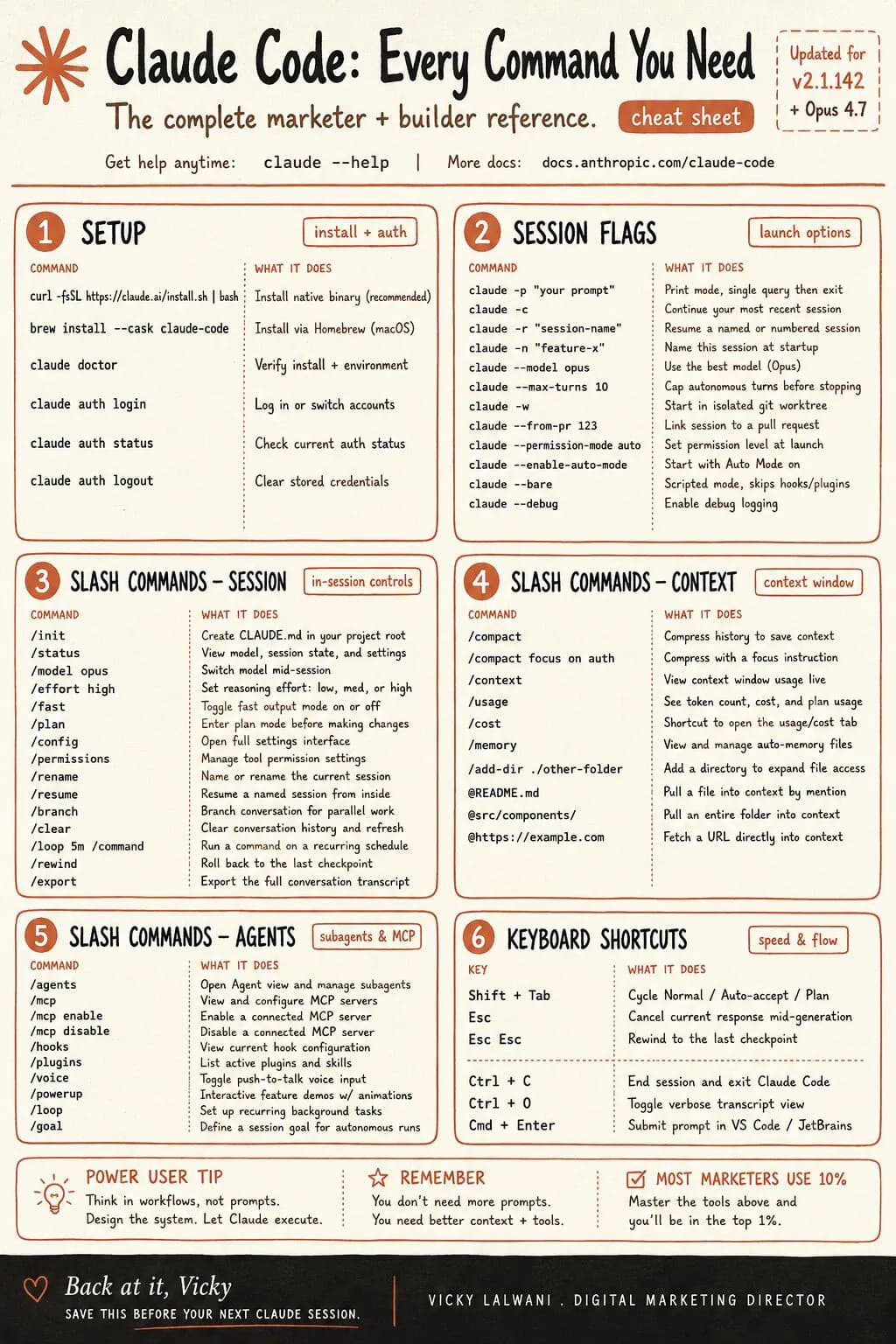
Claude Code commands come in four kinds: terminal commands that start with claude, flags, slash commands typed in a session, and keyboard shortcuts. The official reference lists over 200 entries, but about 15 cover most marketing work: /init, /plan, /context, /compact, /clear, /rewind, /resume, plus Shift+Tab for permission modes.
You open the terminal, type claude, and a blinking prompt waits. You know it can audit a site, rewrite title tags or sort a search terms export, but the command list runs past a hundred entries and most of them are for software engineers. So you type a long prompt, the session fills up, the answers get vaguer, and by Thursday you are back in a chat window.
This cheat sheet fixes that. It covers the Claude Code commands a marketer actually needs in November 2026: the terminal commands, the flags, the slash commands, the permission modes and the keyboard shortcuts, each checked against Anthropic's official reference. If you would rather have Claude Code set up around your own SEO and Google Ads work, that is what my Claude consultant service does, and prices are published.
TL;DR
- Claude Code has four kinds of command: terminal commands (
claude ...), flags, slash commands typed inside a session, and keyboard shortcuts. - The official reference lists 121 slash command rows and 80 flags. You need about 15 commands to work well.
- Learn
/init,/plan,/context,/compact,/clear,/rewindand/resumefirst. They control planning, memory and undo. - Since version 2.1.283, interactive sessions start in auto mode, where a classifier approves or blocks each action.
Shift+Tabswitches modes. - For unattended jobs use
claude -pwith allow rules,/schedulefor cloud runs, and decide permissions before you walk away.
What are Claude Code commands?
Short answer: Claude Code commands are the instructions you type to control Claude Code, Anthropic's coding agent that runs in a terminal, an editor or the desktop app. There are four kinds: terminal commands that start with claude, flags that change how a session starts, slash commands typed inside a session, and keyboard shortcuts.
The four kinds do different jobs. Terminal commands and flags decide how a session starts: which folder, which model, how much freedom. Slash commands steer a session that is already running. Shortcuts make the steering fast. Three typed prefixes complete the set: / opens the command menu, @ points Claude at a file, and ! runs a shell command and adds its output to the conversation, as the interactive mode reference lists them.
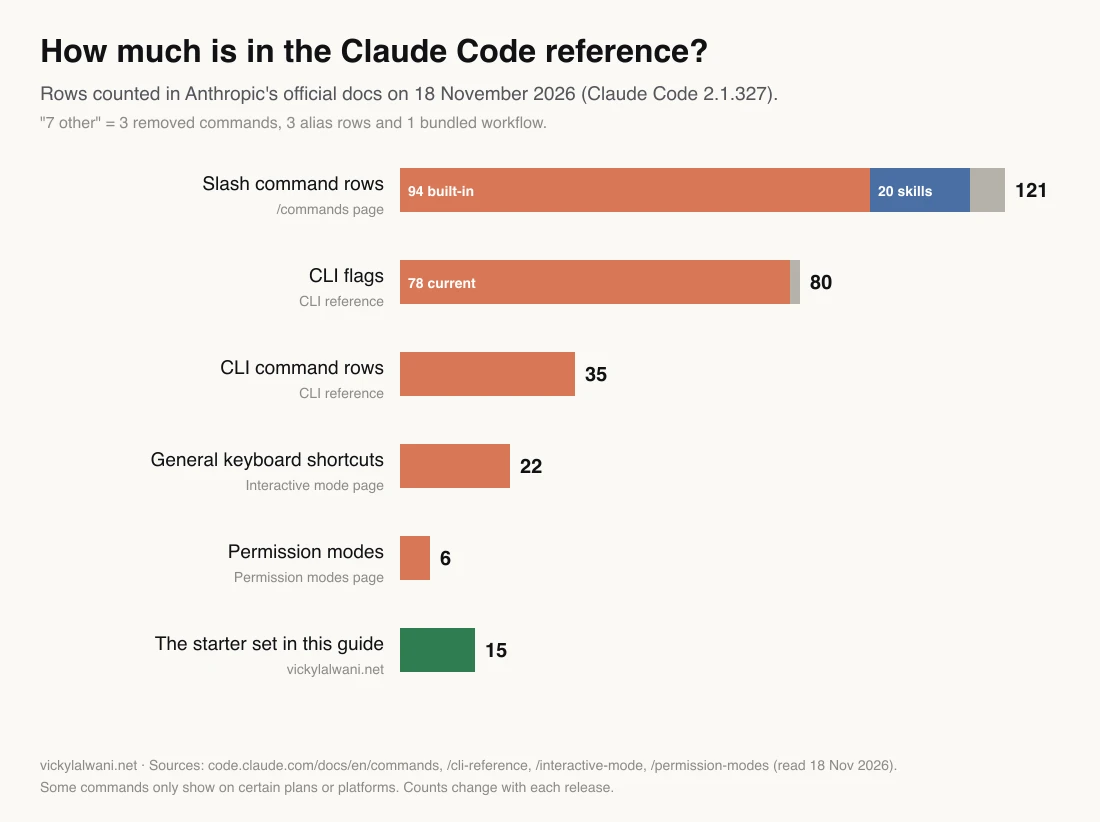
The reference is large. On 18 November 2026, when the newest release was Claude Code 2.1.327, the commands page listed 121 slash command rows, of which 20 are bundled skills (prompts that ship with the tool), and the CLI reference listed 80 flags. Most are for developers, cloud sessions or enterprise setups. The chart below shows the scale, and the green bar is the starter set this guide recommends.
| Kind | Where you type it | Example | What it controls |
|---|---|---|---|
| Terminal command | Your shell | claude -c | Start, resume, update |
| Flag | After claude | --model opus | How a session starts |
| Slash command | Inside a session | /compact | A running session |
| Shortcut | Inside a session | Shift+Tab | Speed and modes |
| Prefix | Start of a message | @ or ! | Files and shell |
How do you install and start Claude Code?
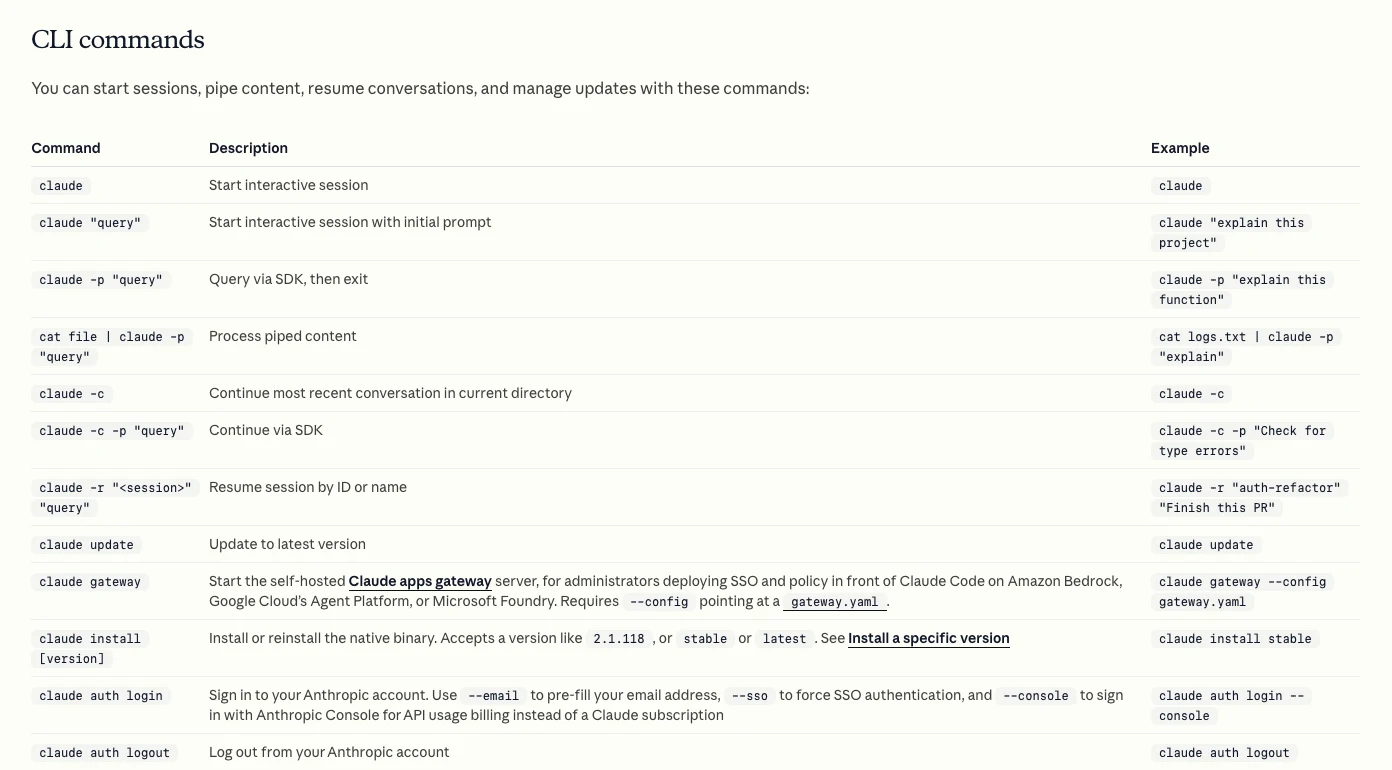
Short answer: Install it with one command from Anthropic, run claude in your project folder and sign in through the browser. It needs a paid Claude plan (Pro, Max, Ultra, Team or Enterprise) or a Console account, because the free plan does not include Claude Code, according to the setup guide.
The native installer updates itself in the background. Homebrew and WinGet installs do not, so you run the upgrade yourself. After installing, claude --version confirms it works and claude doctor prints a read-only health check without starting a session.
# macOS, Linux or WSL
curl -fsSL https://claude.ai/install.sh | bash

# Windows PowerShell
irm https://claude.ai/install.ps1 | iex

# Check it, then start in your project folder
claude --version
claude doctor
cd ~/sites/my-site
claude
| Command | What it does | When to use it |
|---|---|---|
claude | Start a session | Every time |
claude "query" | Start with a first prompt | You know the task |
claude -c | Continue the latest conversation here | Next morning |
claude -r "name" | Resume a session by name or ID | An older thread |
claude -p "query" | Answer once, then exit | Scripts, scheduled jobs |
claude update | Update to the latest version | If not auto-updating |
claude doctor | Install and settings check | Something feels off |
claude auth login | Sign in from the terminal | New machine |
claude mcp add | Connect an MCP server | New tool or data source |
Which CLI flags matter for marketers?
Short answer: About ten. -c and -r pick up earlier work, -n names a session, --model chooses the model, --permission-mode sets how much Claude may do alone, --add-dir adds a second folder, and -p with --output-format json turns Claude Code into a script you can schedule.
Flags go after claude when you start a session. A few only work in print mode (-p), where Claude answers once and exits with no interactive screen. That is the mode for scheduled reports and repeatable checks.
| Flag | What it does | Marketing use |
|---|---|---|
-c, --continue | Load the latest conversation in this folder | Carry on yesterday's audit |
-r, --resume | Resume by name or ID, or open a picker | Return to one client thread |
-n, --name | Name the session | One name per job |
--model | Pick sonnet, opus, haiku or a full ID | Cheaper model for bulk tasks |
--permission-mode | Start in plan, auto, default and others | Plan first on a live site |
--add-dir | Give access to another folder | Exports folder next to the site |
-p, --print | Answer once and exit | Weekly checks |
--output-format json | JSON output, including cost | Feed a sheet or log |
--max-turns | Cap agent turns (print mode) | Stop runaway jobs |
--allowedTools | Tools that run without asking | Read-only reports |
Two flags need care. --dangerously-skip-permissions skips every prompt, and the permission modes page says that mode is for isolated containers and virtual machines only. --max-budget-usd stops a print-mode run at an estimated spend, but the reference warns the estimate can differ from your bill and spend can pass the cap.
Which slash commands should you learn first?
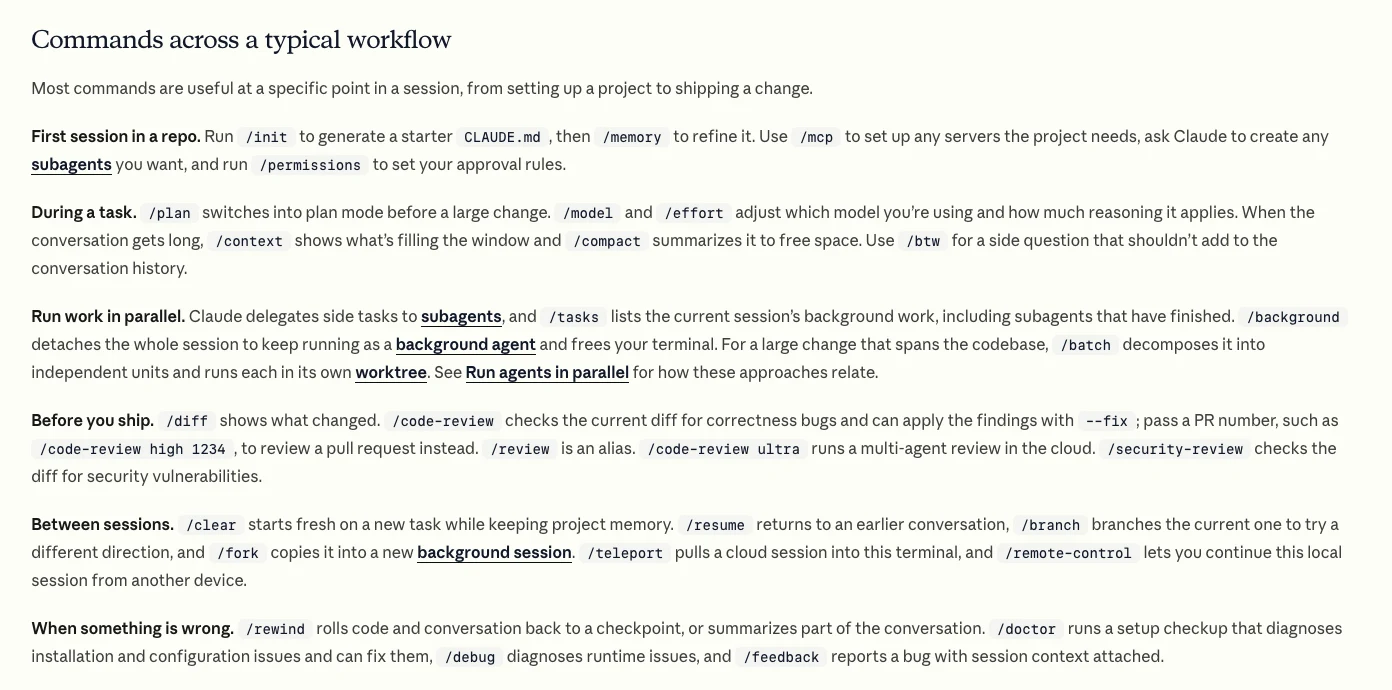
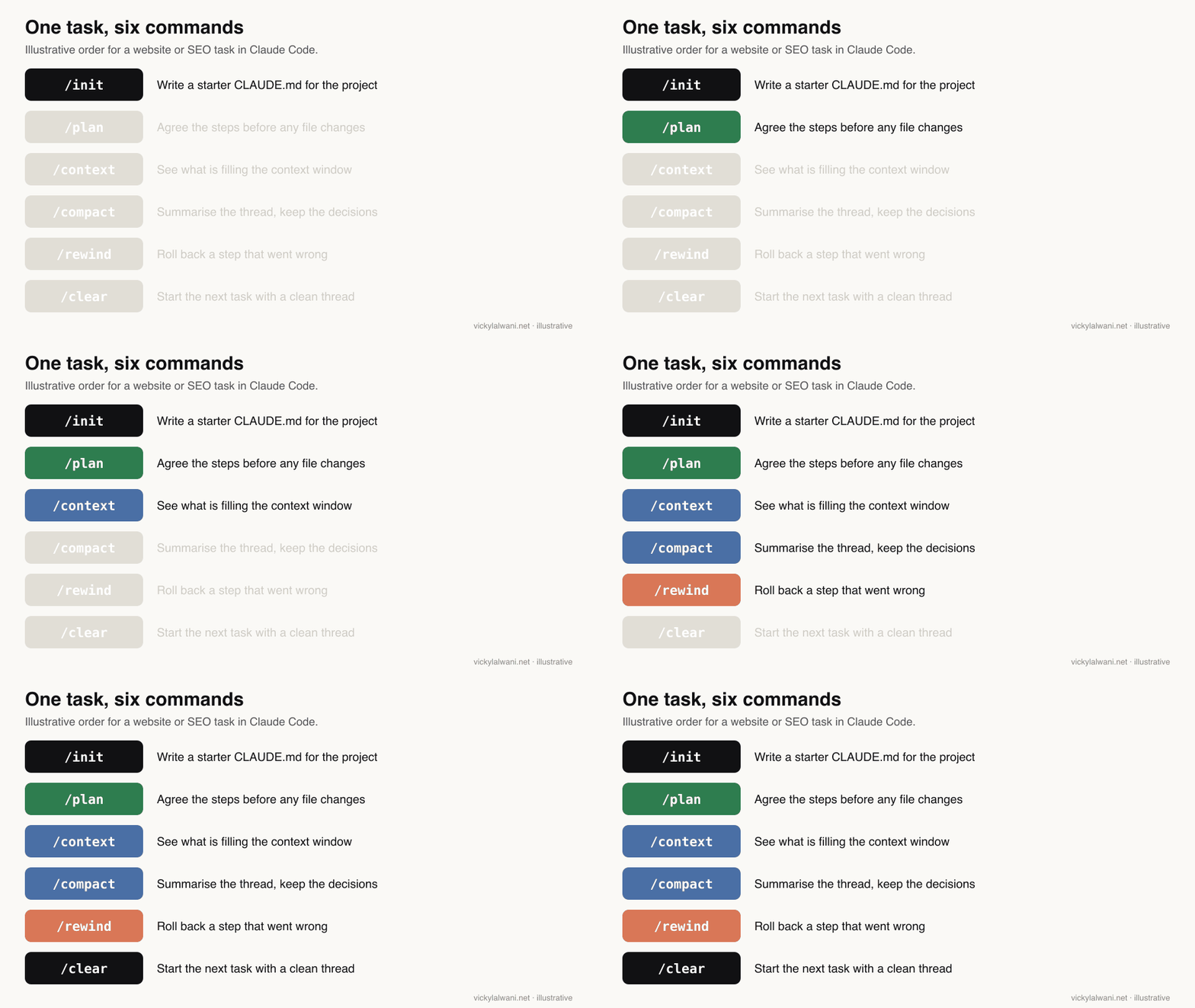
Short answer: Fifteen cover most marketing work: /init, /memory, /plan, /model, /effort, /context, /compact, /clear, /btw, /rewind, /resume, /mcp, /permissions, /usage and /doctor. Type / on an empty prompt to see every command your plan and setup allow.
Anthropic's own commands page groups them by moment: first session, during a task, between sessions and when something is wrong. That order is a good way to learn them, because each group answers a question you will actually have.
| Command | What it does | Use it when |
|---|---|---|
/init | Writes a starter CLAUDE.md | First session in a folder |
/memory | Edit CLAUDE.md and auto memory | Rules keep being ignored |
/plan | Plan mode: read and propose, no edits | Before any site change |
/model | Switch model, saved as default | Heavy versus bulk work |
/effort | Set reasoning effort, low to max | Hard problem or quick fix |
/context | Grid of what fills the context | Answers get vague |
/compact | Summarise the thread to free space | Long task, same goal |
/clear | New conversation, memory kept | Task finished |
/btw | Side question, not added to history | Quick check mid-task |
/rewind | Roll back code, chat or both | A step went wrong |
/resume | Reopen an earlier conversation | Coming back to a job |
/mcp | Manage connected MCP servers | A tool will not connect |
/permissions | Allow, ask and deny rules | Too many prompts |
/usage | Cost, plan limits, activity | Before a big run |
/doctor | Setup checkup with fixes | Something is broken |
A few behave differently from what their names suggest. /clear keeps your project memory (the CLAUDE.md file) and only empties the conversation; its aliases are /reset and /new. /model saves your pick as the default for new sessions unless you press s in the picker to switch for this session only. /cost and /stats are now aliases for /usage. And /agents no longer opens a manager: since version 2.1.198 it prints a reminder to ask Claude to create subagents (helper agents with their own context) or to edit the .claude/agents/ folder.
Your own commands are now skills. A folder with a SKILL.md file becomes a command you type, as the skills docs explain. My Claude slash commands cheat sheet for marketers covers building a marketing command set; this page stays with the built-in ones.
How do permission modes work, and which should you use?
Short answer: Permission modes set what Claude may do without asking. There are six: Manual (default), acceptEdits, plan, auto, dontAsk and bypassPermissions. Press Shift+Tab to cycle them. Use plan mode before touching a live site, and keep bypassPermissions for isolated containers.
The default changed this year. With version 2.1.283 or later, the permission modes page says auto mode is the built-in starting mode for interactive terminal and VS Code sessions. In auto mode a separate classifier model reviews each action: safe ones run, risky ones are blocked and Claude looks for another route. Anthropic's announcement of the new default says it caught more dangerous commands than manual review in its own testing. Your organisation can turn auto mode off, and it needs a supported model.
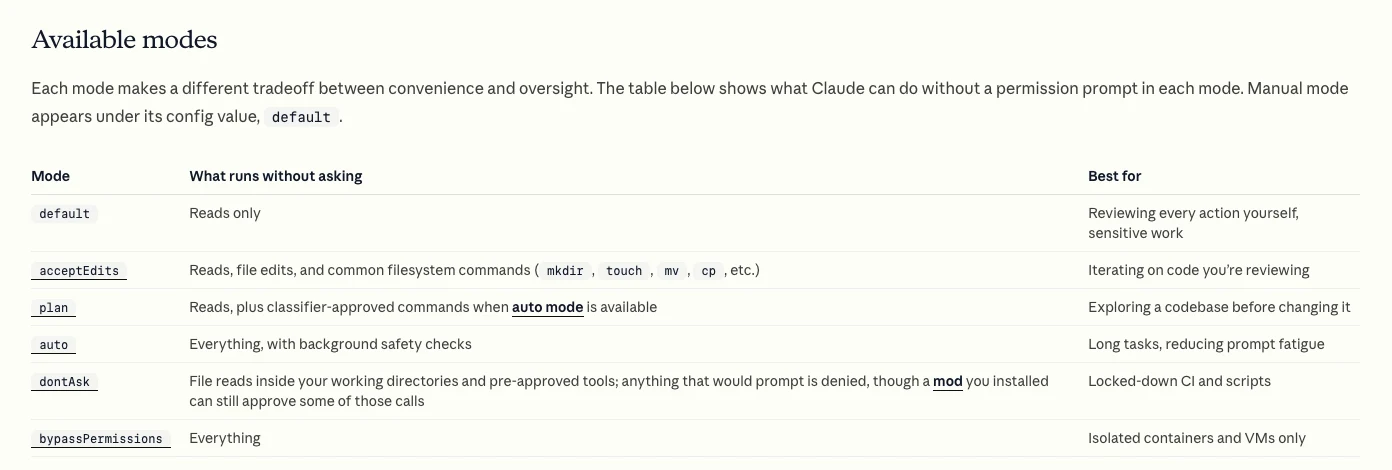
| Mode | Runs without asking | Good for |
|---|---|---|
Manual (default) | Reads only | Client sites, first runs |
acceptEdits | Reads, edits, mkdir, mv, cp | Drafting pages you review |
plan | Reads, plus classifier-approved commands | Audits and change plans |
auto | Everything, with safety checks | Long tasks on your own site |
dontAsk | Only pre-approved tools | Locked-down scripts |
bypassPermissions | Everything | Isolated containers only |
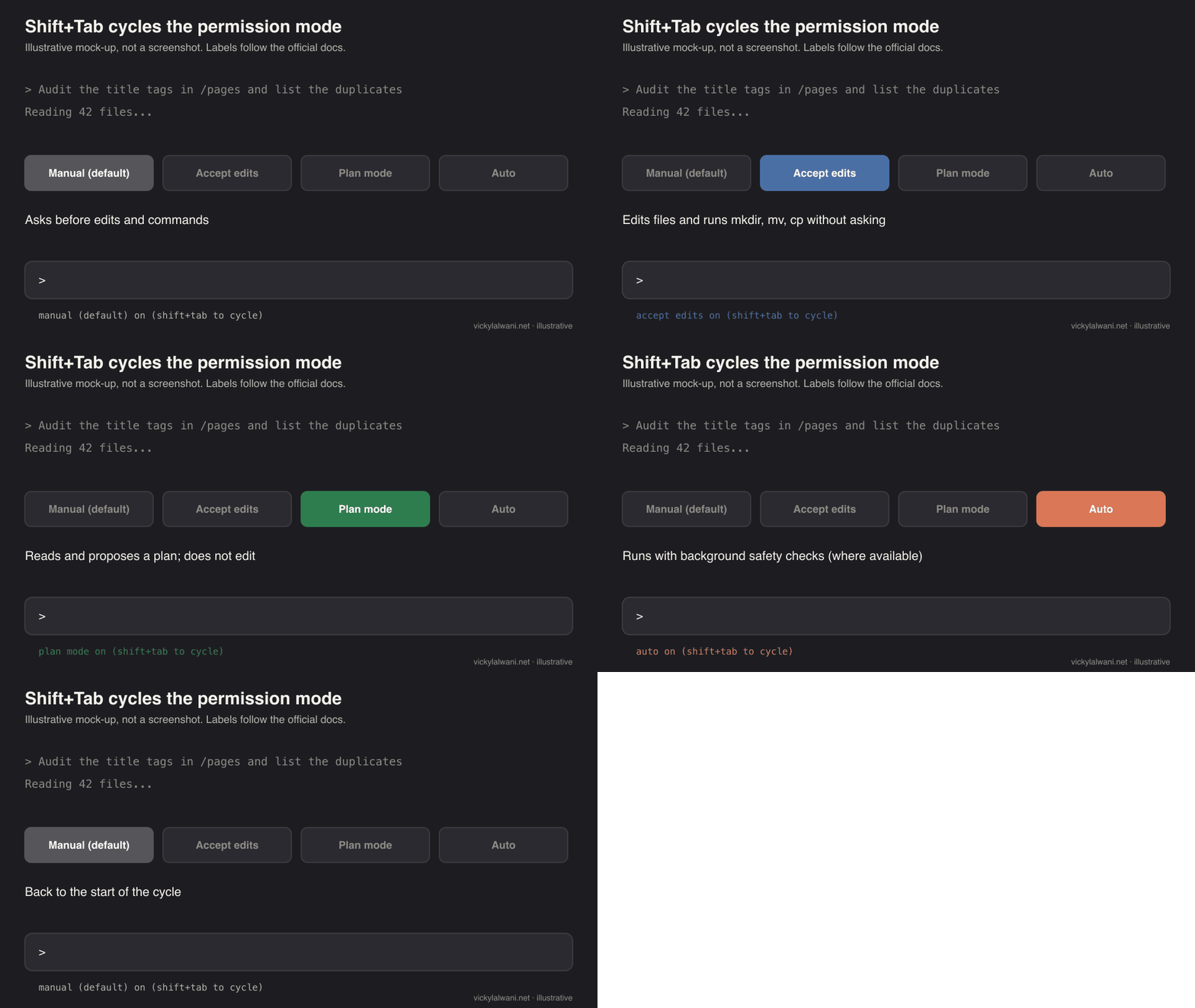
Shift+Tab cycles Manual, accept edits and plan, then auto and bypass where available.One trap matters for anyone who starts Claude Code with bypass enabled. The docs say plan mode blocks edits until you approve the plan, except in interactive terminal sessions where bypass permissions are available. If you launch with --dangerously-skip-permissions or --allow-dangerously-skip-permissions, do not rely on plan mode as a safety net.
Which keyboard shortcuts save the most time?
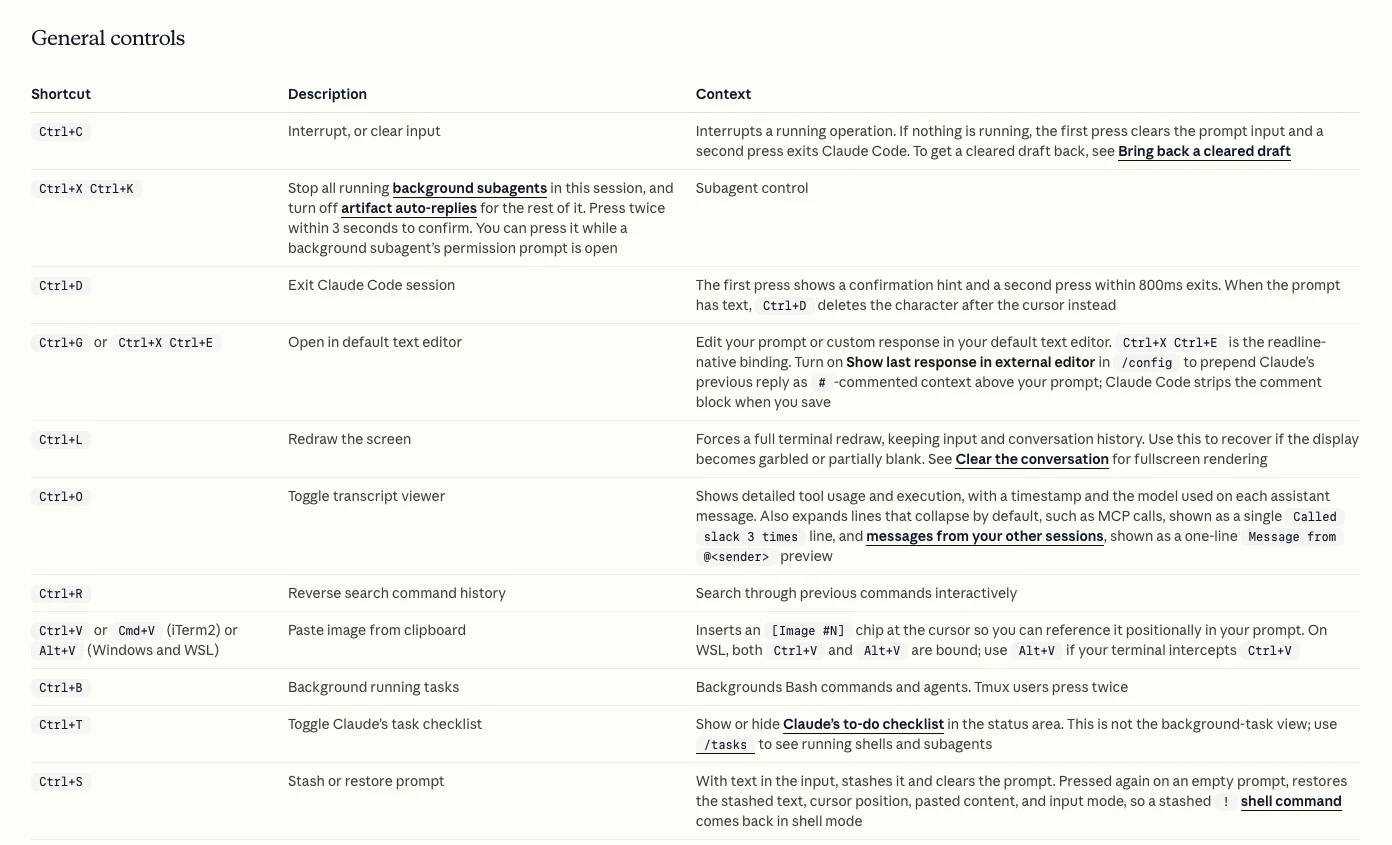
Short answer: Learn six: Shift+Tab to change mode, Esc to stop Claude mid-step, Esc twice on an empty prompt to open the rewind menu, Ctrl+R to search past prompts, Ctrl+B to send a long job to the background, and Ctrl+J for a new line in any terminal.
| Shortcut | What it does | Why it helps |
|---|---|---|
Shift+Tab | Cycle permission modes | Plan, then build |
Esc | Interrupt, keep work done so far | Redirect without losing it |
Esc Esc | Rewind menu (empty prompt) | Undo a bad step |
Ctrl+C | Interrupt, or clear input | Second press exits |
Ctrl+R | Search prompt history | Reuse a good prompt |
Ctrl+B | Background running tasks | Keep typing during a crawl |
Ctrl+O | Transcript viewer | See every tool call |
Ctrl+T | Show or hide the task list | Track a long job |
Ctrl+G | Edit the prompt in your editor | Long briefs |
Ctrl+J or \ then Enter | New line in the prompt | Multi-line instructions |
Option+P / Alt+P | Switch model | Without losing the draft |
How do you keep context clean in long sessions?
Short answer: Check /context before a big task, run /compact with a short instruction when the thread gets long, and /clear when the task is done. Keep CLAUDE.md under about 200 lines, as the memory docs advise, and point at files with @ instead of pasting them.
The context window is everything Claude holds in mind at once: your prompts, its replies, the files it read and the tools connected. When it fills, answers drift. Claude Code compacts automatically near the limit, but a summary you steer is better than one it guesses. /compact accepts focus instructions:
/compact Keep the list of pages we changed, the title tag rules we agreed and the open questions. Drop the crawl output.
For a marketing project, CLAUDE.md is where the standing rules live: brand voice file, which folders hold exports, what Claude must never change. CLAUDE.md files can pull in other files with @path imports. A starting point:
# Project: example-site.com SEO
- Exports live in /exports (crawl, Search Console, Google Ads search terms).
- Brand voice: @docs/brand-voice.md
- Never edit /pages without showing a plan first.
- Reports go to /reports as CSV with one row per URL.
- British spelling. No prices in copy.
"Context Management in Claude Code" from Anthropic's official Claude channel, May 2026. A short official explainer; it links Anthropic's free course.
A longer walkthrough of the same habits is in Claude context window management, and the CLAUDE.md file for marketing covers what to put in that file.
How do you run Claude Code without watching it?
Short answer: Use claude -p for a one-off scripted run, /loop to repeat a prompt while a session stays open, /schedule for cloud scheduled tasks that run with your laptop closed, and /goal to keep Claude working until a condition is met. Decide permissions first, because nobody is there to answer a prompt.
This is where I have seen unattended work fail on my own site. Scheduled daily article runs for vickylalwani.net kept stopping on permission prompts with nobody at the keyboard. The workaround was to run each day's article as its own session with a self-contained brief file. The lesson is simpler: decide every permission before an unattended run starts.
The docs now give you the tools for that. Since version 2.1.302, a claude -p run with no permission mode set starts in Manual mode and denies anything that needs approval, unless an allow rule, a hook or auto mode covers it, per the permission modes page. The headless docs add --permission-prompts none so Claude is told nobody can approve and does not keep retrying.
claude -p "Read exports/crawl.csv. List URLs with a missing or duplicate title tag or meta description. Write reports/titles.csv with one row per URL. Change nothing else." \
  --allowedTools "Read,Edit" \
  --max-turns 10 \
  --output-format json
| Tool | Starts the next run | Runs where | Best for |
|---|---|---|---|
claude -p | You or a scheduler | Your machine | One scripted check |
/loop 1h ... | A time interval | Open session only | Watching a deploy |
/schedule | A schedule or event | Anthropic's cloud | Weekly reports |
/goal ... | The last turn ending | Current session | Finish a fix list |
The /goal page explains the difference from auto mode: auto mode approves tool calls inside one turn, while /goal adds a separate model that checks your condition after every turn and starts another turn if it is not met. Write the condition so it can be checked, such as "every URL in reports/titles.csv has a unique title under 60 characters".
For a full system of scheduled marketing jobs, see scheduled marketing automation.
Which Claude Code commands fit SEO and Google Ads work?
Short answer: Plan mode and @ file references do most of the SEO work: audits of crawl exports, title tags, schema and internal links. For Google Ads, claude -p runs on exported search terms and ad copy CSVs, and /mcp connects data sources. Keep changes to live ad accounts behind your own approval.
| Job | Commands | Output |
|---|---|---|
| Title and meta audit | /plan, @exports/crawl.csv | CSV of fixes |
| Schema for service pages | /plan, then acceptEdits | JSON-LD per page |
| Internal link gaps | @ sitemap and pages | Link list by page |
| Search terms review | claude -p on the export | Negative keyword list |
| Responsive search ad copy | /btw for checks, skill for format | Headlines CSV |
| Weekly report | /schedule or claude -p | One-page summary |
On a live ad account, a safe rule is: audit first, put the findings in a sheet, check them by hand, and change nothing until the account owner approves. Commands make the audit fast. They do not replace that review.
/plan Read @exports/search-terms.csv. Flag terms with cost and no conversions over the export period. Group them by theme, suggest negative keywords with match type, and write reports/negatives.csv. Do not touch any other file.
Worked examples: a Screaming Frog and Claude Code technical SEO audit, a one-folder Claude Code SEO workflow and ten Claude Code PPC workflows. If you want the SEO side done for you, see my SEO consultant service; for paid search, Google Ads management.
How should you learn the commands in one week?
Short answer: Spread it over five working days, one group a day, each on a real task. By Friday you will use about a dozen commands without thinking, which is enough for most marketing work.
| Day | Learn | Practice task |
|---|---|---|
| 1 | Install, claude doctor, /init | CLAUDE.md for one site |
| 2 | /plan, Shift+Tab | Audit one landing page |
| 3 | @, /context, /compact | Compare two exports |
| 4 | /rewind, /resume, -c | Undo and resume a draft |
| 5 | /mcp, claude -p | A scripted weekly check |
What breaks, and how do you fix it?
Short answer: Most problems are setup, context or overlapping sessions. Run claude doctor or /doctor first, /context when answers degrade, /mcp reconnect all when a tool drops, and use Git for anything /rewind cannot undo.
| Symptom | Likely cause | Fix |
|---|---|---|
command not found | Install not on your PATH | claude doctor, reinstall |
| Answers get vague | Context full of old output | /context, then /compact |
| A tool stopped working | MCP server dropped | /mcp reconnect all |
/rewind missed a change | Bash changes not tracked | Use Git |
| Job stalls overnight | Waiting on a permission prompt | Allow rules, -p |
| Two sessions clash | Same folder, same task | Name sessions, one owner |
| Install asks for a password | Needs your own terminal | Run it yourself |
The last three rows come from my own site and setup work. Two Claude sessions given the same deploy request nearly shipped the same change twice; naming sessions with -n and giving one session ownership of deploys is the simple guard. An app installer run from a Claude session stopped at a system password prompt the session could not answer; run that kind of step in your own terminal. The checkpointing docs confirm the /rewind limit: a file changed only by shell commands is not tracked, and neither are edits from other sessions.
What people say on X and Reddit
Short answer: Users mostly lean on a handful of commands: /clear, /usage, /context, /rewind and /resume come up most. Anthropic's own posts stress auto mode, side questions and parallel work, with a clear note that auto mode reduces risk but does not remove it.
| Source | Date | Type | What it says |
|---|---|---|---|
| Claude on X | 24 Mar 2026 | Vendor | Launches auto mode |
| Claude on X | 24 Mar 2026 | Vendor | Recommends isolated environments |
| A Claude Code team member | 10 Mar 2026 | Vendor staff | Introduces /btw |
| Claude on X | 14 Apr 2026 | Vendor | Routines run in the cloud |
| ClaudeDevs on X | 14 Oct 2026 | Vendor | Parallel tasks as nested sessions |
| r/ClaudeCode | 16 Nov 2026 | First-hand | Top two commands thread |
| r/ClaudeAI | 31 Oct 2026 | First-hand | Which built-ins to adopt |
| r/ClaudeAI | 28 Jul 2026 | Opinion | Commands versus plain language |
| r/ClaudeCode | 27 May 2026 | Opinion | Hooks, commands, skills |
On X, the official Claude account announced auto mode in March as a middle path between approving everything and skipping permissions, and in a follow-up post said it reduces risk but does not eliminate it, recommending isolated environments. A member of the Claude Code team introduced /btw for side conversations while Claude works. The ClaudeDevs account explained that parallel tasks run as nested sessions that report back, which keeps the main thread readable.
On Reddit, a November r/ClaudeCode thread asking for people's top two commands drew /clear, /usage, /model and /effort, plus plenty of custom ones. In r/ClaudeAI, replies to a user who knew only /init, /clear and /compact recommended /context, /usage, /rewind and /resume, and one noted that a fresh context often beats a summarised one. A July r/ClaudeAI discussion put the case for commands well: plain language when you want the model's judgement, a command when you have already decided how.
Videos worth watching
Short answer: Start with Anthropic's own videos: a 30-minute talk on using Claude Code well and a short piece on how the team uses it. Independent tutorials are useful for walkthroughs, but check their commands against the current docs, because names change between releases.
"Mastering Claude Code in 30 minutes" from Anthropic's official channel, May 2025. Older than most of this guide, so some commands have changed; the habits still hold.
"How we Claude Code" from the official Claude channel, May 2026. Anthropic's own video about its own product.
| Video | Channel | Date | Covers |
|---|---|---|---|
| Context Management in Claude Code | Claude (official) | May 2026 | /context, /compact |
| Build a proactive agent workflow | Claude (official) | May 2026 | /schedule end to end |
| Mastering Claude Code in 30 minutes | Anthropic (official) | May 2025 | Core habits |
| How we Claude Code | Claude (official) | May 2026 | Team workflows |
| Context Window Explained | Prompt Vidya AI | Nov 2026 | Auto-compact |
| Claude Code Tutorial #6: Slash Commands | Net Ninja | Aug 2025 | Custom commands (older) |
Where this advice is weak
Short answer: Commands change fast, the starter set is my suggestion rather than a tested benchmark, and some details differ between Anthropic's own pages. Check the official reference before you script around any flag.
- Claude Code ships often; 2.1.327 was the newest release when this was checked. A flag here can be renamed or removed by the time you read it, as
/vim,/pr-commentsand/ultraplanalready were. - Anthropic's Help Center cheat sheet still says subagents are configured with
/agentsand lists/costseparately, while the commands reference now treats/agentsas a reminder and/costas an alias. This guide follows the reference. - Not every command shows for every user. Availability depends on plan, platform and admin settings.
- Auto mode's safety claims come from Anthropic's own testing, not an independent study.
- Usage and cost depend on your plan and how much context you load. Anthropic's cost page gives enterprise averages, which may not match a marketer's use.
Want Claude Code set up around your marketing work?
The commands are the easy part. The hard part is the folder structure, the CLAUDE.md rules, the permission settings and the scheduled checks that make Claude Code safe to run on a real site or ad account. I set that up as a Claude consultant, alongside SEO and Google Ads work, with published prices. If you are starting from scratch, building a website with Claude Code is a good first project.
Sources
| Source | What it supports | Date | Link |
|---|---|---|---|
| Claude Code CLI reference | Commands, 80 flags, print-mode limits | Read 18 Nov 2026 | code.claude.com |
| Claude Code commands | 121 rows, aliases, removed commands | Read 18 Nov 2026 | code.claude.com |
| Interactive mode | Shortcuts, @, !, /btw | Read 18 Nov 2026 | code.claude.com |
| Permission modes | Six modes, auto default, plan caveat, -p | Read 18 Nov 2026 | code.claude.com |
| Setup | Install, plans, claude doctor | Read 18 Nov 2026 | code.claude.com |
| Memory | CLAUDE.md, 200 lines, imports | Read 18 Nov 2026 | code.claude.com |
| Headless | --permission-prompts none, JSON output | Read 18 Nov 2026 | code.claude.com |
| Checkpointing | /rewind limits | Read 18 Nov 2026 | code.claude.com |
| Goal | /goal versus /loop and auto mode | Read 18 Nov 2026 | code.claude.com |
| MCP | claude mcp add, scopes | Read 18 Nov 2026 | code.claude.com |
| Costs | Usage and cost tracking | Read 18 Nov 2026 | code.claude.com |
| Changelog | Version 2.1.327 | 17 Nov 2026 | GitHub |
| Help Center cheat sheet | Older command wording | Read 18 Nov 2026 | support.claude.com |
| Claude blog | Auto mode as default | 7 Aug 2026, updated 22 Oct | claude.com |
| X and Reddit | User and vendor views | Mar to Nov 2026 | Linked above |
This article expands on my post on LinkedIn ↗.
FAQ
What are the most useful Claude Code commands?
For most marketers the core set is /init, /plan, /context, /compact, /clear, /rewind and /resume, plus Shift+Tab to change permission mode. Those cover planning, memory, context and undo. Add /mcp, /usage and /doctor once you connect tools.
How do I see all Claude Code commands?
Type / on an empty prompt inside Claude Code to open the command menu, then type letters to filter it. The full list, including flags, is in Anthropic's official commands and CLI reference pages, which listed 121 slash command rows and 80 flags in November 2026.
What is the difference between /clear and /compact in Claude Code?
/clear starts a new conversation with empty context but keeps your CLAUDE.md project memory. /compact keeps the same conversation and replaces the history with a summary, and it accepts instructions on what to keep. Use /compact mid-task and /clear when the task is done.
How do I undo a change in Claude Code?
Run /rewind, or press Esc twice on an empty prompt, to roll back code, conversation or both to an earlier checkpoint. It does not track files changed only by shell commands or by other sessions, so keep the project in Git as well.
What is plan mode in Claude Code?
Plan mode lets Claude read files and propose a plan without editing them, and edits stay blocked until you approve. Enter it with Shift+Tab, with /plan before a prompt, or with claude --permission-mode plan. It does not block edits in terminal sessions started with bypass permissions available.
Is auto mode the default in Claude Code?
Yes, from version 2.1.283 auto mode is the built-in starting mode for interactive terminal and VS Code sessions, according to Anthropic's docs. A classifier reviews each action and blocks risky ones. Your organisation can turn it off, and you can still pick another mode with Shift+Tab or a flag.
Can I use Claude Code on the free Claude plan?
No. Anthropic's setup guide says Claude Code needs a Pro, Max, Ultra, Team, Enterprise or Console account, and the free plan does not include it. It can also run through cloud providers such as Amazon Bedrock.
How do I run Claude Code on a schedule?
Use /schedule to create cloud scheduled tasks that run on Anthropic's infrastructure, or call claude -p from your own scheduler. For unattended runs, set allow rules or a permission mode first, because a run with nobody present cannot answer permission prompts.