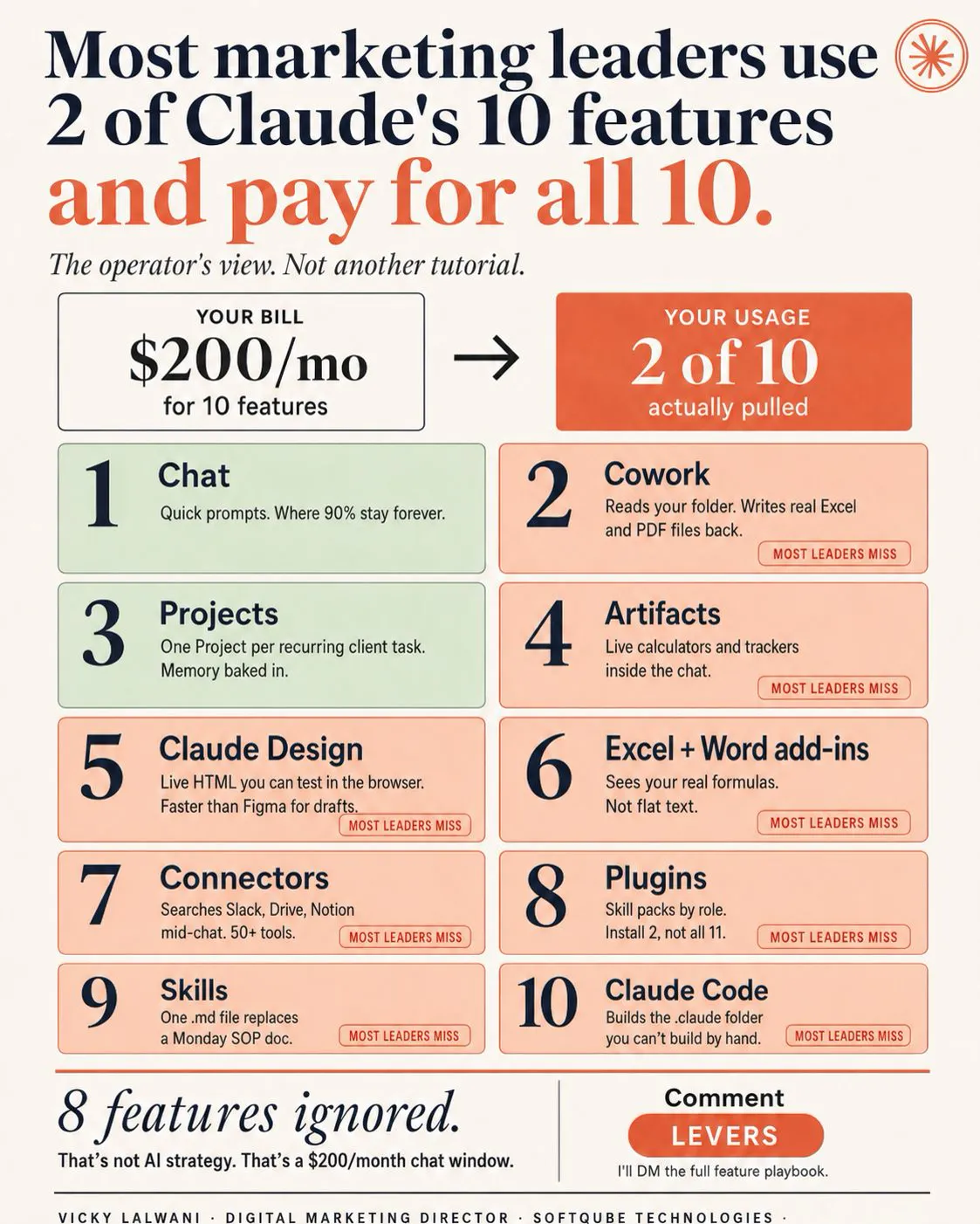
Claude context window management means deciding what Claude reads on every turn. In November 2026 every current model has a 1M-token window on the API, but chat limits vary by model (1M, 500K or 200K). Filter large Google Ads and Search Console exports with code before Claude reads them, keep standing rules in short project instructions or CLAUDE.md, and compact or clear on purpose.
TL;DR. Every current Claude model has a 1M-token context window on the API, but what you get in the app depends on the surface: Opus 5.5 and Sonnet 5.5 get 1M in chat, Claude Code and Cowork, while older models get 500K or 200K in chat. A bigger window is not a licence to paste whole exports. Anthropic's own docs warn that recall gets worse as the window fills, and every turn re-sends everything. Filter Google Ads and Search Console exports before Claude reads them, keep standing rules short, let projects and subagents hold the bulk, and compact or clear on your terms, not when the window runs out.
You export the last 90 days of a Google Ads search terms report, drop the CSV into Claude and ask for negative keywords. The reply is confident. Half an hour later, after a Search Console export and a long back and forth, Claude says it is making room and the next answer forgets a rule you set at the start. Nothing broke. You ran out of context, the working memory Claude reads on every turn.
Claude context window management is the habit of deciding what goes into that working memory, when, and in what shape. This guide replaces my earlier five-move version with facts checked on Anthropic's documentation on 18 November 2026, plus two worked examples on large SEO and PPC exports. If you would rather have someone set this up with your team, my Claude consultant service covers exactly this.
How big is Claude's context window in November 2026?
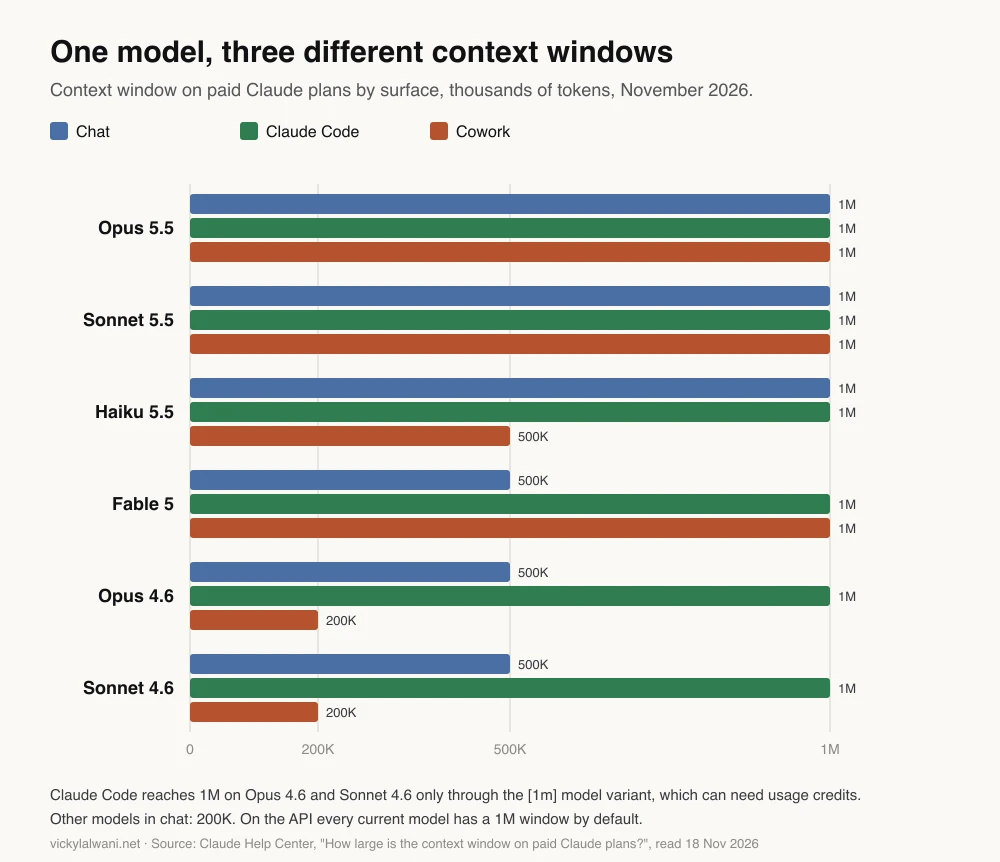
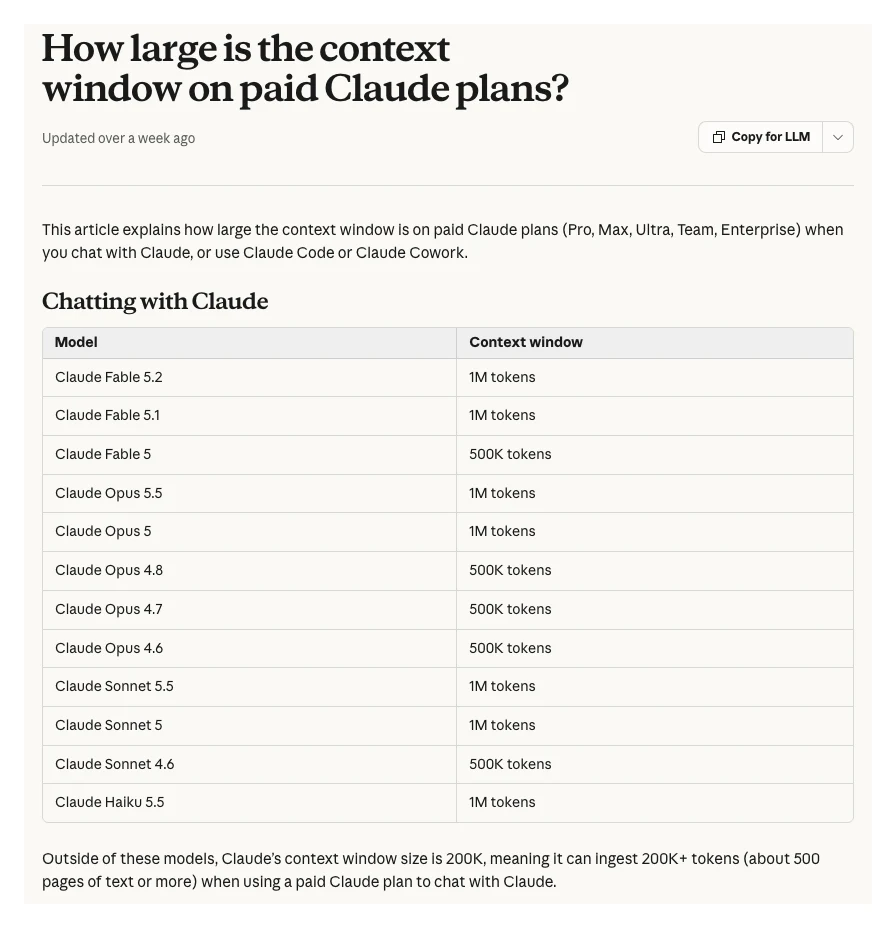
Short answer: On the Claude API, every current model (Fable 5.2, Opus 5.5, Sonnet 5.5, Haiku 5.5 and others) has a 1M-token window by default, with no beta header. In the Claude apps on paid plans it depends on the surface: Opus 5.5, Sonnet 5.5 and Haiku 5.5 get 1M in chat, older models such as Opus 4.6 get 500K, and anything not listed gets 200K.
A token is the unit Claude reads, roughly a short word or part of one. Anthropic's models overview says 1M tokens is roughly 555,000 words or 2.5 million characters on the current tokenizer, and 200K tokens is roughly 150,000 words. Everything counts toward the window: the system prompt, your files, tool definitions, Claude's replies and its thinking.
The context windows page adds two details that matter for budgets. Long-context requests are billed at standard pricing, except on Haiku 5.5, where prompts over 100,000 tokens cost more. And one request can include up to 600 images or PDF pages, so a deck of screenshots can hit the request size limit before the token limit.
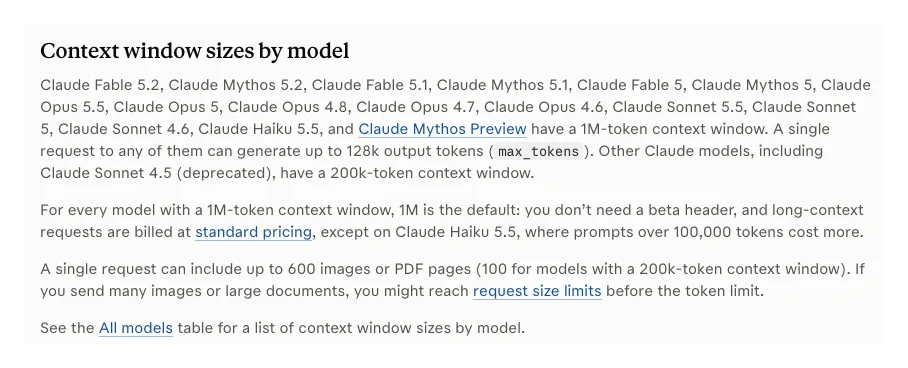
The apps are a different story. The Help Center article How large is the context window on paid Claude plans? lists a separate number for chat, Claude Code and Cowork. The same model can have three different limits.
| Model | Chat | Claude Code | Cowork |
|---|---|---|---|
| Opus 5.5 | 1M | 1M | 1M |
| Sonnet 5.5 | 1M | 1M | 1M |
| Haiku 5.5 | 1M | 1M | 500K |
| Fable 5.2 | 1M | 1M | 1M |
| Fable 5 | 500K | 1M | 1M |
| Opus 4.6 | 500K | 1M with [1m] | 200K |
| Sonnet 4.6 | 500K | 1M with [1m] | 200K |
| Not listed | 200K | Varies | Varies |
In Claude Code, Opus 4.6 and Sonnet 4.6 reach 1M only through their [1m] variant, picked with /model, and the Help Center says usage credits must be on to use it (on Pro for Opus 4.6; on most plans for Sonnet 4.6).
Is a bigger context window always better?
Short answer: No. Anthropic's docs say accuracy and recall degrade as the token count grows, which they call context rot, and every turn re-sends the whole conversation. A 1M window is room to work, not a target. Curating what goes in matters as much as how much fits.
The context windows page puts it plainly: more context is not automatically better, and as token count grows, accuracy and recall degrade. Anthropic's engineering post on effective context engineering (29 September 2025) describes an attention budget the model draws on as it reads, and recommends keeping just enough in view, then fetching the rest when needed.
There is a cost side too. Claude Code's costs page explains that the full conversation is sent with every request, so a one-line question in a session open all day still draws usage for the whole history. In the apps, the Help Center's usage and length article says longer conversations that trigger automatic context management use more of your usage limit.
| Big window helps | Big window hurts |
|---|---|
| One long brand guide read in full | Exports pasted raw, row by row |
| Comparing two whole documents | Day-long chats on many jobs |
| A long build in Claude Code | Rules set early, buried later |
| Reading many files once, then summarising | Paying to re-read old turns |
What happens when a Claude chat gets too long?
Short answer: Claude compacts: it replaces older turns with a summary so the conversation can continue. In the Claude apps this needs code execution turned on. In Claude Code it runs automatically at about 967K tokens on 1M models, and you can run /compact yourself with a focus. Details from early turns can be lost.
In the apps, the Help Center says that on paid plans with code execution enabled, Claude summarises earlier messages as the window fills, and your full chat history is kept so Claude can still refer to it. Without code execution, or with a very large first message, you can still hit the limit. The fix the Help Center gives is the obvious one: start a new conversation, or move the material into a project.
In Claude Code, the model configuration docs say models with a native 1M window compact at about 967K tokens by default. You can move that point with /autocompact, for example /autocompact 500k, anywhere from 100K to 1M. In Cowork, the Help Center notes that Sonnet 5 compacts automatically at 500K.
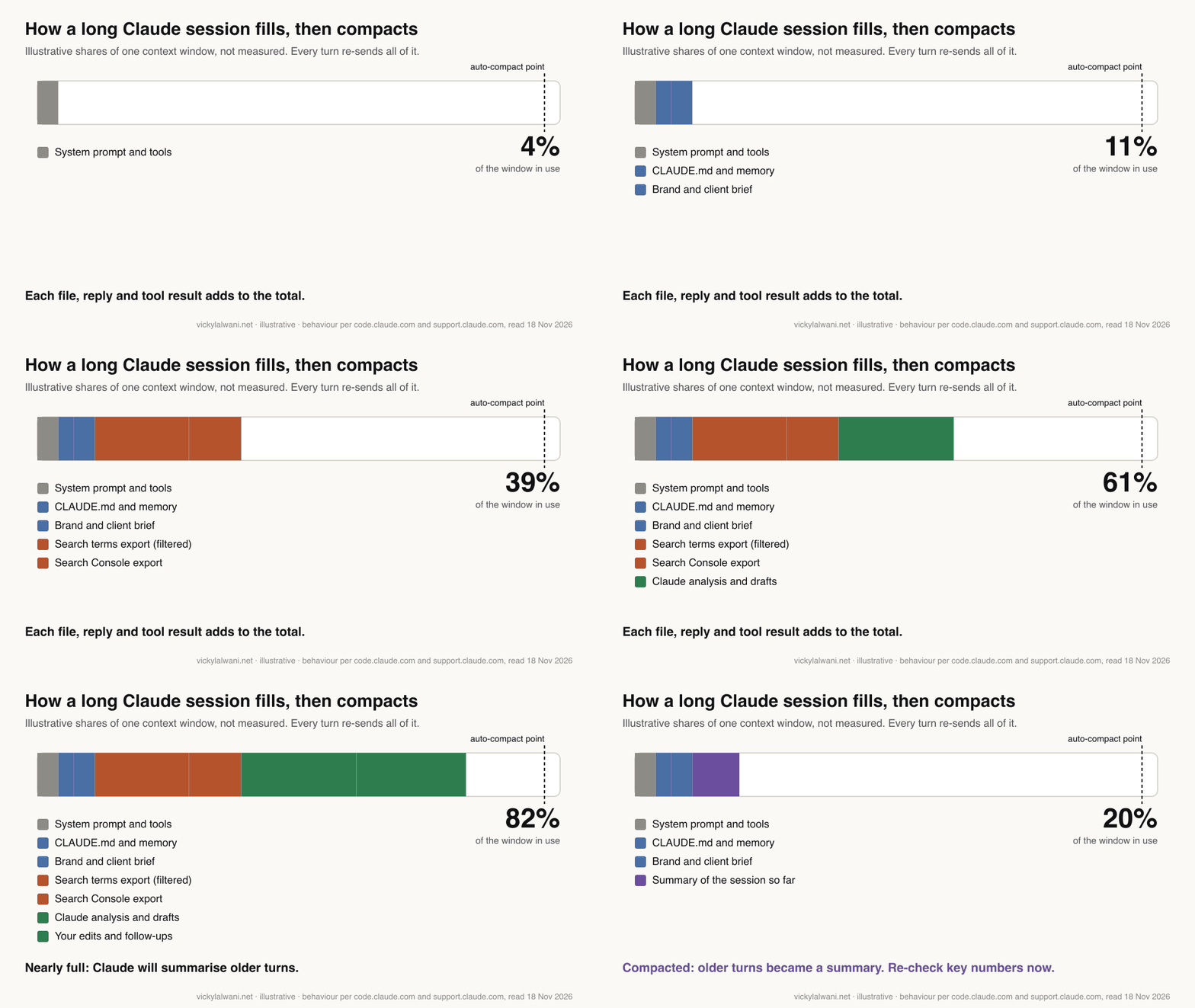
What survives matters more than when it fires. Anthropic's context window explainer for Claude Code lists it: the project-root CLAUDE.md and auto memory are reloaded from disk, up to five recently edited files are re-read, and invoked skills come back capped at 5,000 tokens each. Instructions you typed in chat are summarised with everything else.
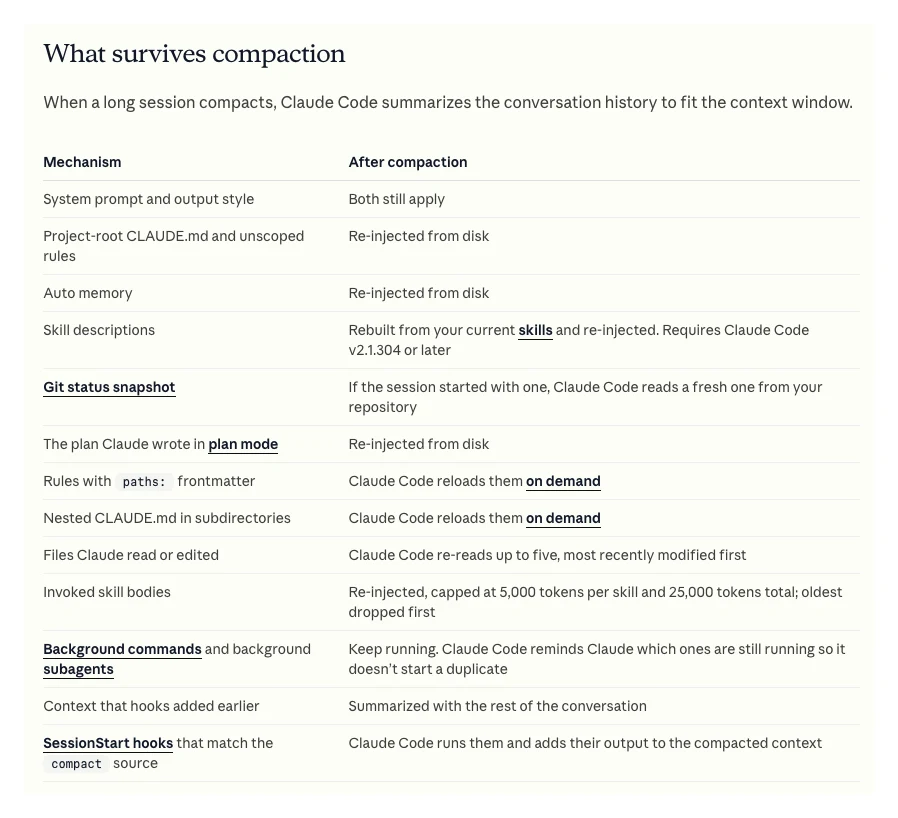
That is the practical lesson for marketers. A rule you typed in message three ("never suggest negatives on brand terms") is chat history and can be summarised away. The same rule in CLAUDE.md is reloaded after every compaction.
| Surface | When it compacts | Your control |
|---|---|---|
| Claude chat | Near the limit | New chat or a project |
| Claude Code | About 967K on 1M models | /compact, /autocompact |
| Cowork | Near the limit | New task, folder files |
| Claude API | Only if you enable it | Compaction beta |
On the API, compaction is opt-in and still in beta. Anthropic's compaction overview offers compaction on demand (you decide when) or at a token threshold (the API decides), and a separate context editing feature that clears old tool results instead of summarising them.
How are memory and projects different from the context window?
Short answer: The context window is what Claude reads right now. Memory is a set of saved facts that Claude brings into new chats. Projects hold files and instructions, and on paid plans switch to retrieval once the files outgrow the window, which Anthropic says expands capacity by up to 10x. Neither makes the window itself bigger.
Memory. Anthropic's memory help article says memory is on by default for Free, Pro, Max and Ultra users, and Claude saves it as individual topics during chats. Each project has its own memory, and a project can stop using your account memory with the "Use account memory" toggle. Incognito chats are not saved to memory. Anthropic does not say how many tokens memory uses, so treat it as small and specific: preferences, not data.
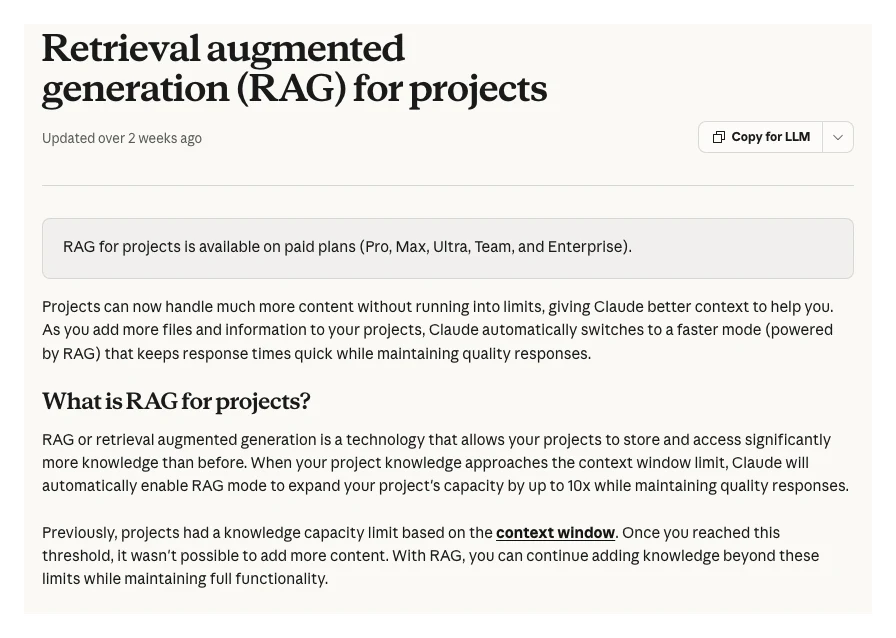
Projects. The RAG for projects article says that on paid plans (Pro, Max, Ultra, Team and Enterprise), when project knowledge approaches the context window limit, Claude switches to retrieval. It then uses a project knowledge search tool to pull only the relevant parts, instead of loading every file at once.
| Feature | Holds | Loads | Use it for |
|---|---|---|---|
| Context window | This conversation | Every turn | The job in hand |
| Memory | Saved topics | New chats | Preferences |
| Project files | Briefs, guides | All, or by search | Reference |
| Project instructions | Short rules | Every chat | Standing rules |
| CLAUDE.md | Short rules | Each session | Code and Cowork |
The Help Center's own advice for projects is to keep instructions short and focused, put task-specific detail in the chat, and remove files you no longer use. Retrieval is also a reason to be careful with exports: a search can pull the rows that look relevant, not every row. For a full sum or a count, ask for code to run over the file.
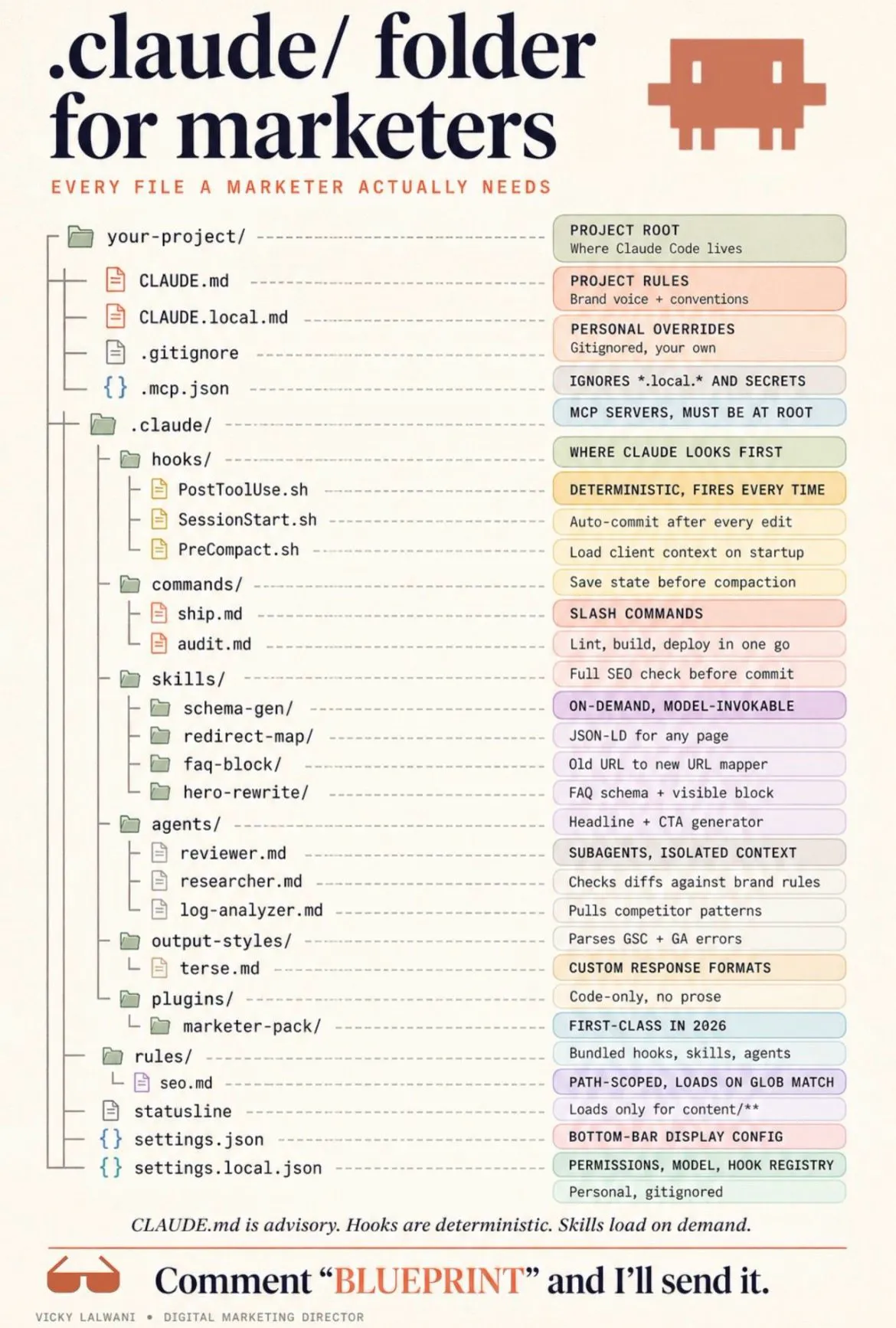
A simple structure helps: one Claude project per client, threads named by service, and skills kept in one known place. That keeps each client's rules and files out of every other client's context. If you are setting up the files themselves, my CLAUDE.md guide for marketing covers what to put in them.
How much of a Google Ads or SEO export fits in the window?
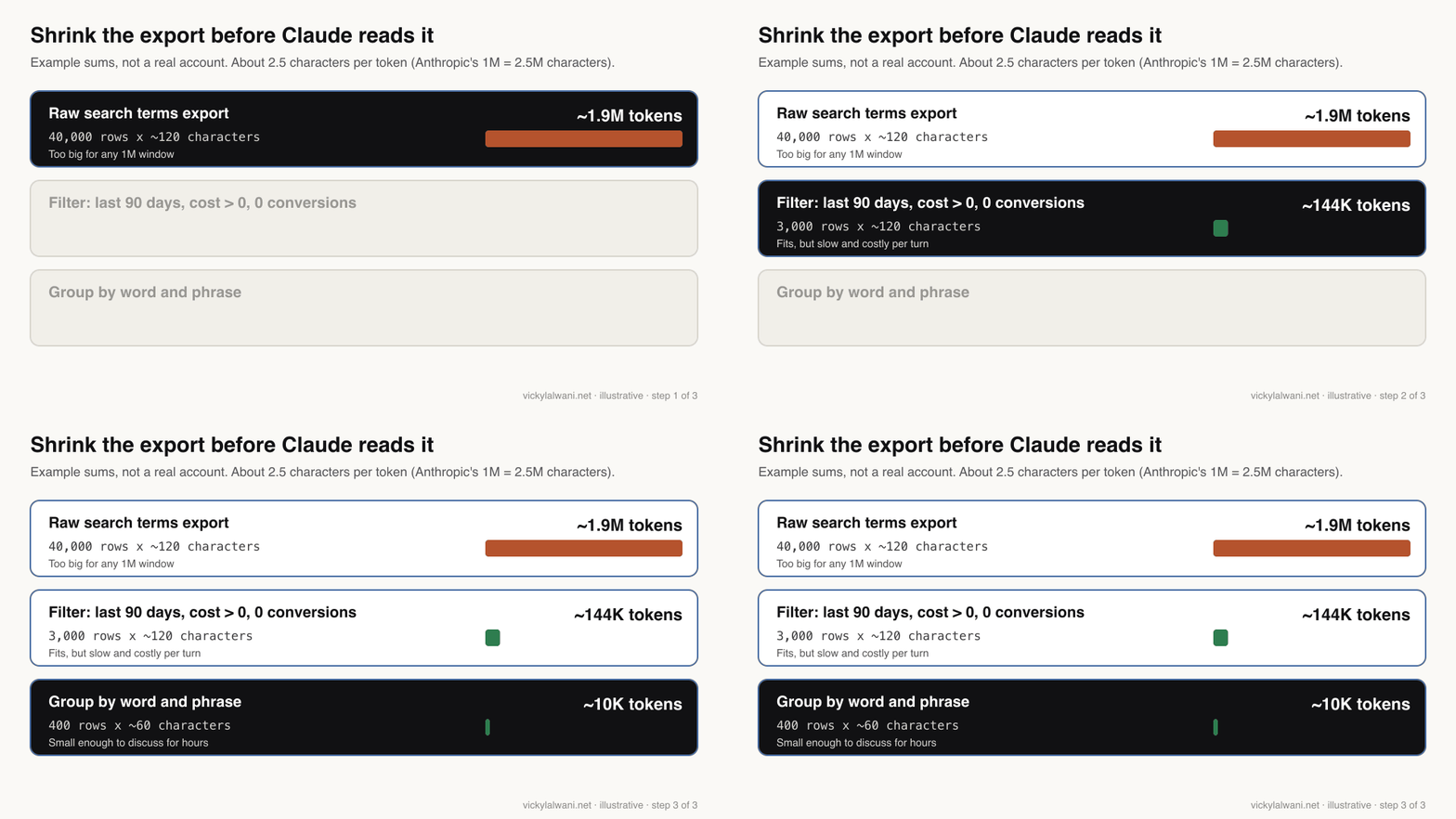
Short answer: Use about 2.5 characters per token as a first estimate. A Search Console table capped at 1,000 rows fits easily. A raw search terms export of 40,000 rows at about 120 characters each comes to roughly 1.9M tokens, which does not fit even a 1M window. Filter and group first.
The 2.5 figure comes from Anthropic's own conversion (1M tokens is about 2.5 million characters). Numbers, URLs and match type labels may not tokenise like ordinary prose, so treat these sums as a rough guide and check the real file. In Claude Code, /context shows what is using space.
| Export (example) | Rows x characters | About | Fits 1M? |
|---|---|---|---|
| Search Console table | 1,000 x 100 | 40K | Yes |
| Search Console via API | 50,000 x 140 | 2.8M | No |
| Search terms, 90 days | 40,000 x 120 | 1.9M | No |
| Same, filtered | 3,000 x 120 | 144K | Yes |
| Same, grouped by phrase | 400 x 60 | 10K | Easily |
| Site crawl, all columns | 10,000 x 1,200 | 4.8M | No |
All figures in that table are example sums, not data from a real account. Two of the limits behind them are real: Google's Search Console performance report help says tables show at most 1,000 rows and points to the API for more, and the Google Ads search terms report help says terms without enough query activity are left out.
Worked example 1: a search terms export that is too big
Short answer: Do not paste the raw file into one chat. Have Claude write and run code that filters it (last 90 days, cost above zero, no conversions), group the result by word or phrase, then discuss only the grouped table. Keep the bidding context, which is not in the export, in the project instructions.
I attach Google Ads and Search Console CSV exports to Claude directly, so this is the situation I plan for most. The steps below work in Claude chat with code execution on, in Cowork, or in Claude Code.
- Write the context the export lacks. Bid strategy and target, conversion actions that count, conversion lag, the date range. A practitioner on r/PPC said this is what stopped the confident wrong answers.
- Filter with code, not by reading. Ask Claude to load the CSV with code and return only the filtered rows and totals.
- Group by phrase. Spend and clicks by one, two and three-word phrases show waste patterns faster than 3,000 single rows.
- Ask for drafts, not changes. Negative keyword candidates go into a sheet with a column for your decision. Nothing is uploaded to the account from the chat.
- Start a fresh chat for the next job. Carry over a short summary, not the whole thread.
Load search-terms-90d.csv with code. Do not print the raw rows.
Context: Search campaigns on Maximize conversions with a target CPA.
Only "Lead form" counts as a conversion. Conversion lag is about 7 days,
so ignore the last 7 days for zero-conversion checks.

1. Keep rows with cost above 0 and 0 conversions, excluding the last 7 days.
2. Report row count and total cost before and after filtering.
3. Group by 1, 2 and 3-word phrases: cost, clicks, conversions, count of terms.
4. Show the top 40 phrases by cost as a table.
5. Mark any phrase that contains our brand or a service we sell. Never suggest
   those as negatives.
Return drafts only. I will decide every negative by hand.
The "drafts only" line is not decoration. My standing rule on client ad accounts is audit first, in a sheet, checked by hand, with no changes before approval. Numbers an agent fetches for you, such as search volumes, are harder to check than an export you pulled yourself, so spot-check any figure against the source screen before it goes into a plan. For the wider audit, see my PPC audit with Claude, and if you want the account itself reviewed, my Google Ads management service does that.
Worked example 2: Search Console data plus a site crawl
Short answer: Keep the Search Console table in the main chat, but send the crawl to a subagent in Claude Code (or a separate chat) that reads it and returns only the pages with issues. Join the two short lists, not the two big files.
A crawl export with every column is the biggest file most SEO teams hand to Claude. The Claude Code docs describe delegating verbose operations to subagents: the subagent reads in its own context window and only its summary comes back. That is the right shape for a crawl.
- Main thread: the Search Console pages table (up to 1,000 rows), with clicks, impressions and position.
- Subagent: reads the crawl, keeps URL, status, indexability, title, H1 and inlinks, and returns only pages that are non-indexable, missing a title or with thin inlinks.
- Join: pages with impressions but a crawl issue go to the top of the list.
- Write it down: the joined list goes into a file, so the next session starts from it rather than from both exports.
Use a subagent to read crawl/internal_all.csv. It must not return raw rows.
Keep columns: Address, Status Code, Indexability, Title 1, H1-1, Inlinks.
Return a CSV of pages that are non-indexable, have no title, or have fewer
than 3 inlinks, with a one-line reason each, saved as crawl-issues.csv.
Then join crawl-issues.csv to gsc-pages.csv on URL and list pages with
impressions above 0, sorted by impressions. Save as priority-pages.csv.
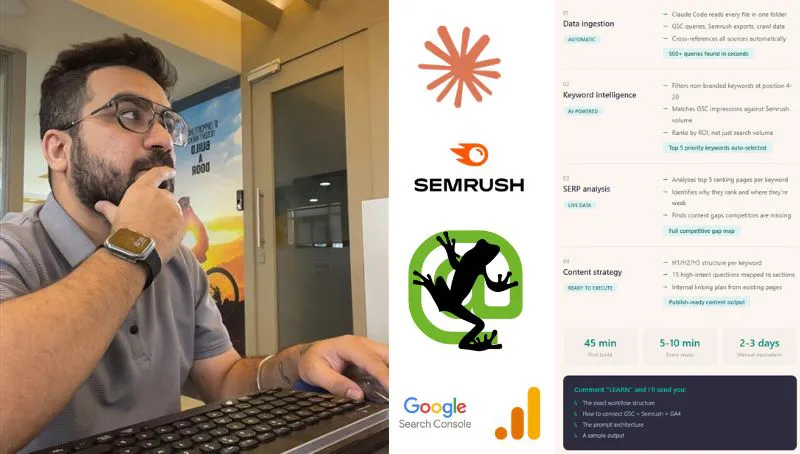
If you work this way every week, it is worth a fixed folder and a CLAUDE.md for the site. My one-folder Claude Code SEO workflow sets that up, and the subagents tutorial shows how to define one. For SEO work done for you, see my SEO consultant service.
Which settings keep the context window lean?
Short answer: Keep CLAUDE.md and project instructions short, move occasional procedures into skills, leave MCP tool search on (it is the default in Claude Code), send heavy reading to subagents, put stable content before changing content, and clear between unrelated jobs.
These are the five moves from the first version of this article, updated against the docs. One changed a lot: Claude Code now defers MCP tool definitions by default, so only tool names load until a tool is used. In January 2026 a developer advocate on X was still telling people to switch it on by hand.
| Setting | Default | What to choose |
|---|---|---|
| CLAUDE.md length | Whatever you write | Under 200 lines |
| Occasional procedures | In CLAUDE.md | Move to skills |
| MCP tool definitions | Deferred | Leave deferred |
| Unused MCP servers | On | Turn off in /mcp |
| Heavy reading | Main thread | Subagent |
| Auto-compact point | About 967K | Lower if costs bite |
| New, unrelated job | Same session | /clear or new chat |
Short rules, loaded every time. The costs page says CLAUDE.md loads at session start and recommends keeping it under 200 lines, with workflow detail moved into skills, which load only when used. In the apps, the same logic applies to project instructions.
Hooks for filtering, not for rules. The original version of this article said to put situational rules in hooks. Claude Code's costs page frames hooks as preprocessing: a hook can cut a long log or test output to the lines that matter before Claude sees it. Hard rules that must never break still belong in a hook or permission setting, but that is about enforcement, not saving space.
Stable first, changing last. Claude Code uses prompt caching, and the costs page explains that the first message after a long break misses the cache and reprocesses the full context. Keep briefs and rules at the top and the day's data at the end, and avoid editing early material mid-session.
Clear or compact on purpose. /compact with a focus keeps what you choose, for example /compact keep the negative keyword decisions and the brand exclusions. You can also add a "Compact instructions" section to CLAUDE.md. When you want a fresh start rather than continuity, /clear costs nothing, and /rename first lets you /resume later.
When I hand a job to a colleague or another agent, I export the chat's context as a single Markdown hand-off brief: decisions made, files used, what is next. It is the same move as compacting, done by hand, and it is easier to check. Token costs from model choice are a separate topic, covered in my guide to reducing Claude token usage.
How do I check what is filling my context?
Short answer: In Claude Code, run /context for a live breakdown by category and /usage for what counts against your plan, with recommendations. In the Claude apps there is no equivalent breakdown, so watch for the summarising notice and start a new chat or project when work changes.
The costs page says that on Pro, Max, Ultra, Team and Enterprise plans /usage attributes recent usage to skills, subagents, plugins and MCP servers, and suggests changes such as trimming a long CLAUDE.md. It also notes that idle compaction and session recaps can use tokens while you are away.
| Signal | Likely cause | Fix |
|---|---|---|
| Early rule ignored | Summarised away | Move it to CLAUDE.md |
| Usage drains fast | Huge session re-sent | /clear, lower auto-compact |
| Totals look wrong | Retrieval saw part of a file | Run code over the file |
| Slow first reply | Cache expired after a break | Compact before you step away |
| Tools crowd the window | Many MCP servers on | Turn off unused servers |
Where this advice is weak
Short answer: The token sums are estimates, the app limits change often, and Anthropic does not publish how much space memory or project retrieval takes. Check the Help Center table before you plan around a number.
- Token estimates. 2.5 characters per token is Anthropic's average for text. CSV files full of numbers and URLs may differ. Count a real file before you rely on a sum.
- Moving limits. The Help Center table is updated as models ship, and Reddit threads show people seeing smaller windows than expected until an app update. If your session compacts far earlier than this article says, check the model picker and update the app.
- Retrieval is a black box. Anthropic says project retrieval keeps quality, but does not say how it ranks chunks. For anything you will sum or count, use code over the file.
- Compaction quality. Summaries drop detail by design. Anthropic documents what reloads in Claude Code; it does not publish the same list for chat or Cowork.
- My examples. The worked examples describe how I approach exports, not measured results. No client figures are used.
What people say on X and Reddit
Short answer: Practitioners mostly agree with the docs: keep sessions short, write a hand-off note before clearing, keep standing rules tiny and load the rest on demand. Several report that lowering the auto-compact point cut their usage sharply, which is first-hand, not a benchmark.
| Source | Date | Point | Type |
|---|---|---|---|
| Anthropic on X | 5 Jun 2025 | Projects hold 10x more; retrieval mode beyond the threshold | Official |
| A developer advocate on X | 23 Jan 2026 | Tool search cut MCP tools from 25% to 14% of the window | First-hand |
| A Google DeepMind team member on X | 1 Sep 2026 | Tools instead of loading a whole video: 88% fewer tokens | Vendor |
| A developer on X | 30 Oct 2026 | A longer CLAUDE.md will not fix missing business context | Opinion |
| r/ClaudeAI | 14 Oct 2026 | Capping the window at 250K made a weekly plan last the week | First-hand |
| r/ClaudeAI | 16 Jul 2026 | Write a hand-off doc, then /clear, rather than re-read transcripts | First-hand |
| r/ClaudeAI | 4 Nov 2026 | Rules needed every turn stay tiny; reference loads on demand | Opinion |
| r/PPC | 30 Sep 2026 | Give Claude what the export lacks: lag, bidding, date range | First-hand |
| r/ClaudeAI | 1 Nov 2026 | Only one of three kinds of "Claude forgot" is a window problem | Opinion |
The r/ClaudeAI thread on capping the window is worth reading for the replies too: the top ones ask why the session was allowed to reach auto-compact at all, and one gives the exact command, /autocompact 250k. The r/PPC thread is the most useful for marketers: the strongest replies say Claude is good at analysis and weaker at recommending settings changes without account context.
Videos worth watching
Short answer: Start with Anthropic's own three-minute video on context in Claude Code, then its projects tutorial. The third embed is an independent take on why a 1M window can be a trap.
Anthropic's Claude channel, 18 May 2026. When to use /compact or /clear. Links to Anthropic's free courses; sells nothing else.
Anthropic's channel, 2 December 2025. Creating a project, adding knowledge and instructions. Official product tutorial.
An independent AI educator's channel, 9 April 2026. Argues that recall drops as the window fills and costs rise. Opinion, with benchmark figures I have not checked.
| Video | Channel | Date | Covers |
|---|---|---|---|
| Context Management in Claude Code | Claude (official) | 18 May 2026 | /compact vs /clear |
| Getting started with projects in Claude.ai | Anthropic (official) | 2 Dec 2025 | Project knowledge |
| Rethinking Claude Code Best Practices | AI Engineer (talk by Anthropic staff) | 12 Nov 2026 | What to drop from setups |
| Claude Code Context Window Explained | An AI tutorials channel | 17 Nov 2026 | /context, auto-compact |
| Claude's 1M Context Window Is a Trap | An independent AI educator | 9 Apr 2026 | Context rot, cost |
| Don't Use Claude's 1M Context Until You See This | An AI consultancy channel | 14 Mar 2026 | When 1M helps; sells a community |
Want a second pair of eyes on your Claude setup?
Short answer: If your team works with Claude on SEO or PPC data and sessions keep forgetting rules or burning usage, a short review of your projects, CLAUDE.md files and export habits usually finds the fix. My Claude consultant service does that review, and prices are on the pricing page.
Start with one change today: move the one rule you repeat most into project instructions or CLAUDE.md, and stop pasting raw exports. If the data work is the bigger problem, my Google Ads and SEO services cover the accounts themselves.
Sources
| Source | Supports | Date |
|---|---|---|
| Anthropic: Context windows | 1M default, context rot, 600 pages, Haiku 5.5 pricing | Read 18 Nov 2026 |
| Anthropic: Models overview | 1M = 555K words or 2.5M characters | Read 18 Nov 2026 |
| Claude Help Center: context window on paid plans | Chat, Code, Cowork limits; automatic context management | Read 18 Nov 2026 |
| Claude Help Center: usage and length | Long chats use more usage; tips | Read 18 Nov 2026 |
| Claude Help Center: RAG for projects | Up to 10x, paid plans, search tool | Read 18 Nov 2026 |
| Claude Help Center: chat search and memory | Memory defaults, per-project memory | Read 18 Nov 2026 |
| Claude Code: Explore the context window | What loads, what survives compaction | Read 18 Nov 2026 |
| Claude Code: Model configuration | 967K default, /autocompact, [1m] | Read 18 Nov 2026 |
| Claude Code: Manage costs | /usage, CLAUDE.md under 200 lines, deferred MCP, hooks, subagents | Read 18 Nov 2026 |
| Anthropic: Compaction overview | API compaction options, beta | Read 18 Nov 2026 |
| Anthropic Engineering: context engineering | Attention budget, just-in-time context | 29 Sep 2025 |
| Search Console Help: Performance report | Tables show at most 1,000 rows | Read 18 Nov 2026 |
| Google Ads Help: search terms report | Low-volume terms omitted; download | Read 18 Nov 2026 |
| X posts and Reddit threads above | Practitioner views | Jun 2025 to Nov 2026 |
| YouTube videos above | Tutorials and opinion | Dec 2025 to Nov 2026 |
This article expands on my post on LinkedIn ↗.
FAQ
How big is Claude's context window in November 2026?
On the Claude API every current model, including Opus 5.5, Sonnet 5.5, Haiku 5.5 and Fable 5.2, has a 1M-token context window by default. In the Claude apps on paid plans, Opus 5.5, Sonnet 5.5 and Haiku 5.5 get 1M in chat, older models such as Opus 4.6 get 500K, and models not listed get 200K.
Is Claude's context window bigger in Claude Code than in chat?
For some models, yes. Anthropic's Help Center lists Opus 4.6, Sonnet 4.6 and Fable 5 at 500K in chat but 1M in Claude Code, where Opus 4.6 and Sonnet 4.6 need their [1m] variant. The newest models, such as Opus 5.5 and Sonnet 5.5, get 1M in both.
What happens when a Claude chat gets too long?
On paid plans with code execution turned on, Claude summarises earlier messages as the window fills so the chat can continue, and the full history is kept for reference. Long chats use more of your usage limit, and details from early turns can be lost, so start a new chat or use a project when the job changes.
How do I control when Claude Code compacts?
Run /compact with a focus, such as "/compact keep the negative keyword decisions", to choose what the summary keeps. To change when automatic compaction runs, use /autocompact with a size between 100K and 1M tokens; models with a native 1M window compact at about 967K by default.
Does Claude memory use the context window?
In Claude Code, auto memory (MEMORY.md) and CLAUDE.md load into context at the start of every session and are reloaded after compaction. In the Claude apps, memory is saved as topics and brought into new chats, but Anthropic does not say how many tokens it uses, so keep it to preferences rather than data.
How many rows of a CSV export can Claude read at once?
As a rough guide, Anthropic says 1M tokens is about 2.5 million characters, so divide the file's character count by 2.5. A 1,000-row Search Console table fits easily, but a raw search terms export of tens of thousands of rows can pass 1M tokens, so filter and group it with code first.
Do Claude Projects have a size limit?
On paid plans, when project knowledge approaches the context window limit, Claude switches to retrieval and Anthropic says this expands capacity by up to 10x. Claude then searches the files for relevant parts instead of reading them all, so use code over the file for exact sums or counts.
Is a 1M context window worth it for marketing work?
It helps when you need to read one long document or many files once, such as a full brand guide or a crawl handled by a subagent. Anthropic's docs warn that recall degrades as the window fills and every turn re-sends everything, so for exports, filtering first usually beats using the full window.
How do I see what is using my Claude context window?
In Claude Code, run /context for a live breakdown by category and /usage for what counts against your plan, with suggested fixes. The Claude apps have no equivalent breakdown, so keep project instructions short, turn off connectors you are not using and start new chats for new jobs.