Claude slash commands for marketing are saved skills you start by typing / and a name, such as /ppc-audit or /rsa. Since commands merged into skills, the same SKILL.md runs in Claude Code, chat and Cowork, and you decide whether Claude may start it on its own.
You type the same long prompt every Monday: pull the search terms, flag the waste, rank the fixes, write it up for the client. Each week it comes out a little different, because you phrase it a little differently. A slash command fixes that. You type /ppc-audit, Claude loads the same instructions every time, and the output arrives in the same shape.
This cheat sheet covers how slash commands work in Claude in November 2026: in chat, in Cowork and in Claude Code. It lists the built-in commands worth knowing, explains how commands, skills and plugins now fit together, and gives twelve marketing commands to build, with a template you can copy. If you would rather have a command set built around your own accounts and tools, that is what my Claude consultant service does, and prices are published.
TL;DR
- In Claude Code, chat and Cowork, typing
/opens a menu of commands and skills. A plugin's commands run as/plugin-name:command. - Custom commands are now skills. A
SKILL.mdfile becomes a command you type, and Claude can also load it on its own when a request matches. - For anything that changes an ad account, sends or publishes, set
disable-model-invocation: trueso only you can start it. - Build the commands for jobs you repeat weekly first: a PPC audit, ad copy to a CSV, a weekly report, a competitor brief.
- Anthropic publishes a free marketing plugin with eight skills. Use it as a starting point, then rewrite it for your own voice, data and checks.
What is a slash command in Claude?
Short answer: A slash command is a short name you type after / to run a saved set of instructions. In Claude Code it can be a built-in command such as /clear or a skill you wrote. In chat and Cowork, the / menu lists your skills and the commands from plugins you have added.
The big change since 2025 is that commands and skills merged. Anthropic's Claude Code docs now say plainly that custom commands have been merged into skills. Old files in .claude/commands/ still work, but the recommended format is a folder with a SKILL.md file. The folder name becomes the command you type.
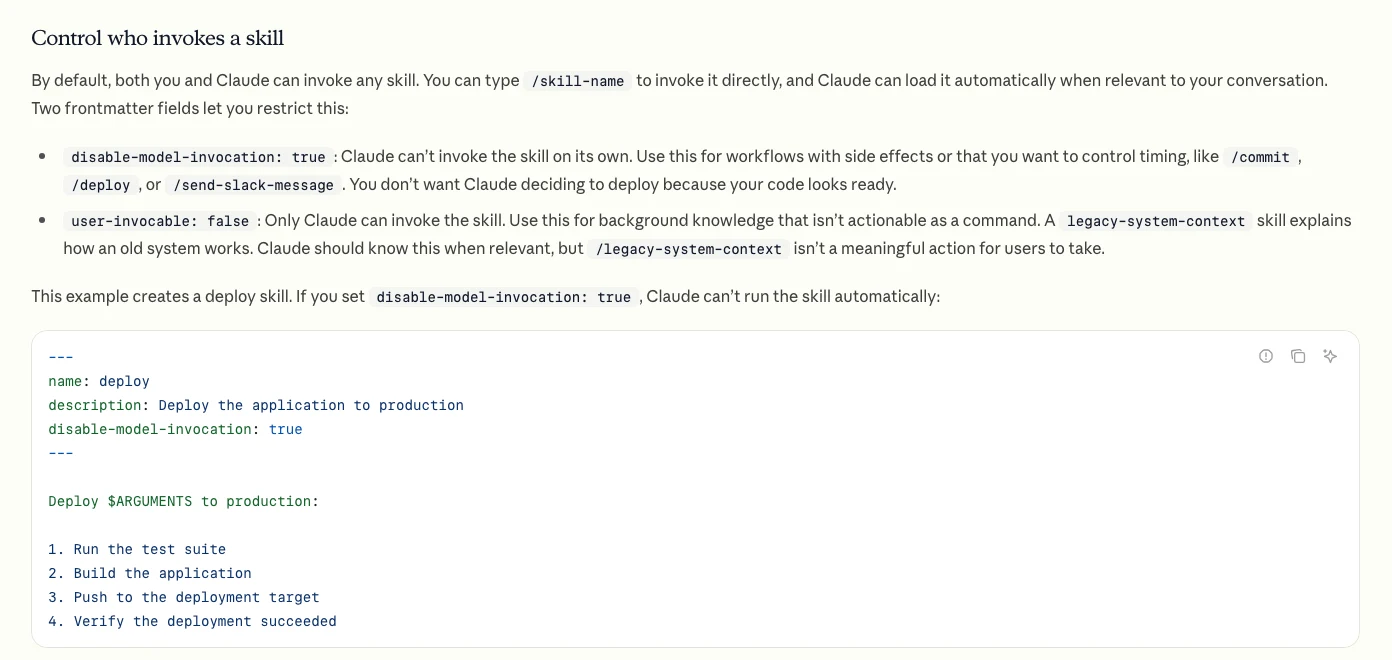
That merge matters for marketers in one practical way. A skill can be started by you, by typing its name, or by Claude, when your request matches the skill's description. A prompt in a notes file can do neither. So the question is no longer "prompt or command?" but "who is allowed to start this job?"
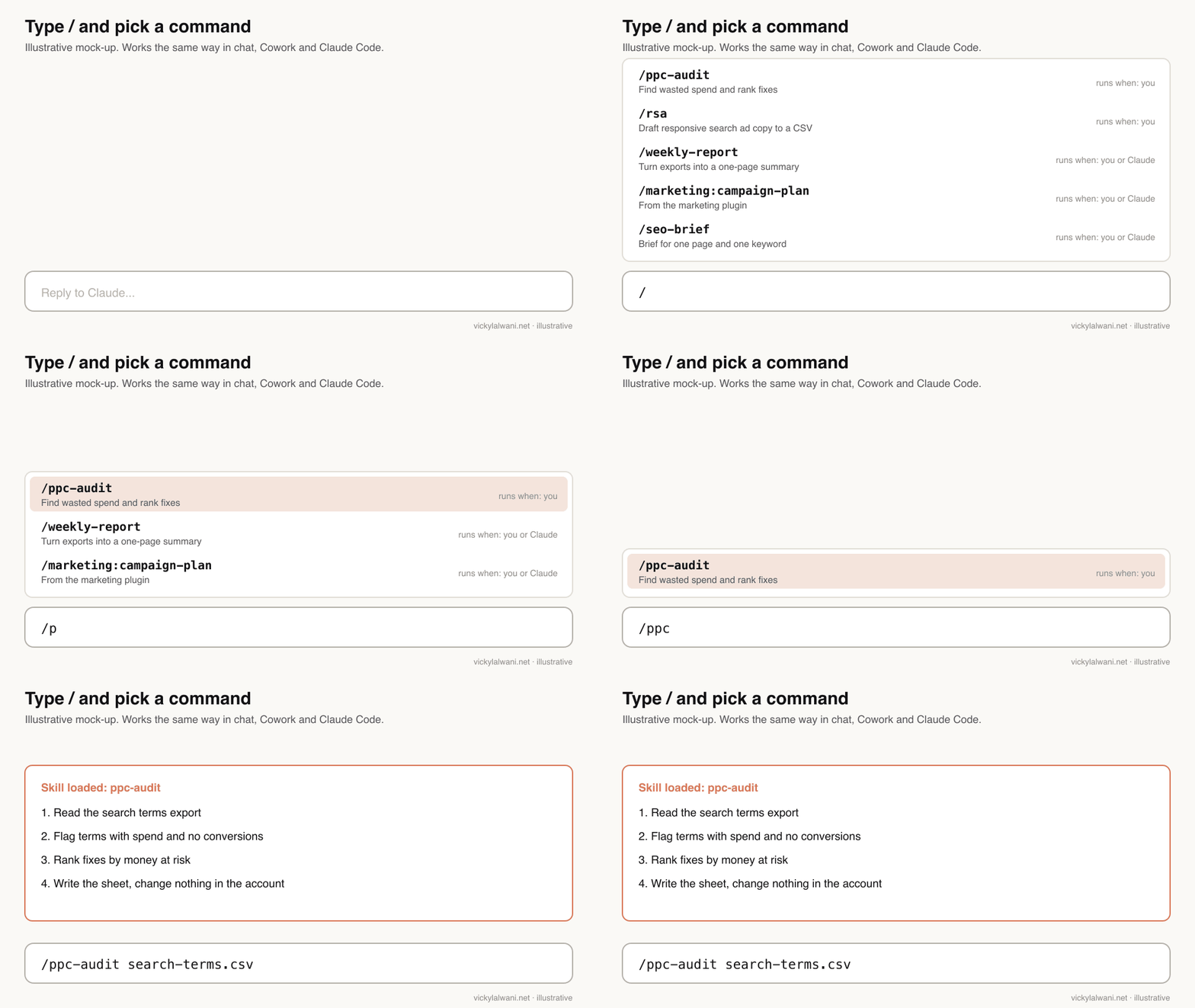
/, narrow the list by typing, and the skill's instructions load.Where do slash commands work: chat, Cowork or Claude Code?
Short answer: All three, with differences. Claude Code has the full set: built-in commands, your skills and plugin commands. Chat and Cowork show your skills and plugin commands in the / menu. In chat, a plugin's command loads as a skill rather than as a separate action.
Anthropic's plugin page describes the chat route step by step: type / in the message box, narrow the list by plugin name, and select the skill. Cowork runs a plugin command when you type /plugin-name:command, and it also runs the plugin's agents, which chat does not. In September 2026 Anthropic announced that Cowork and chat are merging into one Claude, rolling out to Pro and Max first, so the gap is narrowing.
| Surface | How you run one | What the / menu shows |
|---|---|---|
| Claude Code | /name or /plugin:name | Built-in commands, skills, plugin skills |
| Chat (web, desktop, mobile) | Type /, pick from the list | Your skills and plugin commands |
| Cowork | /plugin-name:command | Skills and plugin commands; agents run too |
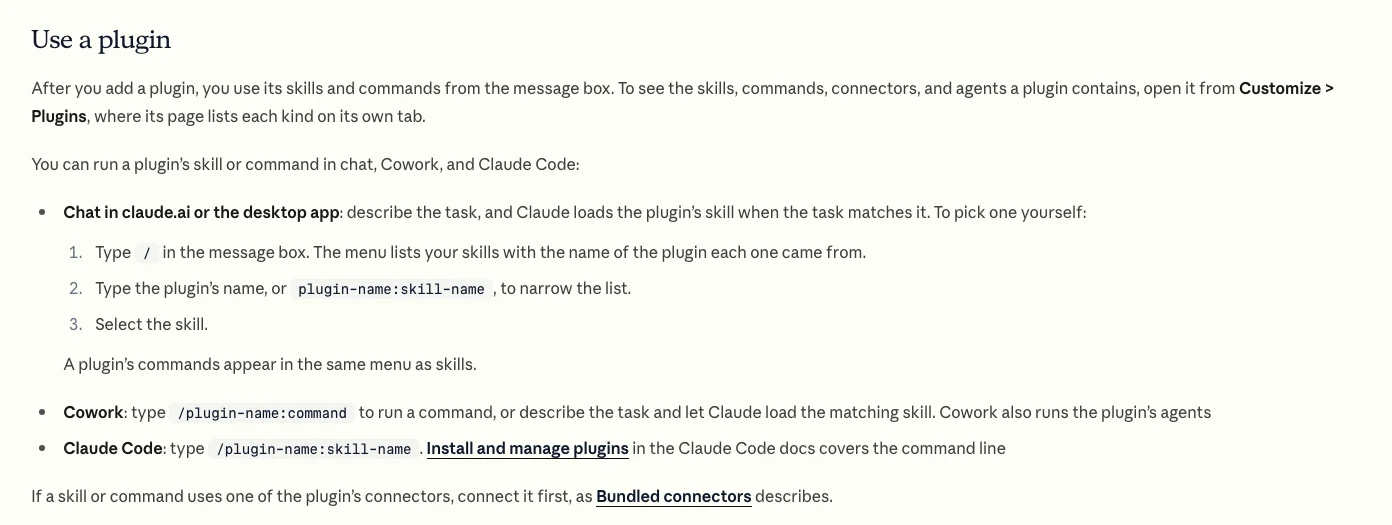
/ menu in chat, and the /plugin-name:command form in Cowork and Claude Code. Screenshot of a public page, 18 Nov 2026.Two set-up points catch people out. Skills in chat need code execution and file creation switched on, and they are available on Pro, Max, Ultra, Team and Enterprise plans. And skills you keep only in ~/.claude/skills/ on your laptop do not reach Cowork or cloud sessions; those load the skills enabled on your claude.ai account.
Which built-in Claude Code commands do marketers need?
Short answer: About a dozen. Use /init and /memory to set up a project, /clear, /compact and /context to manage long sessions, /model and /effort to control cost, and /mcp, /plugin and /skills to manage what Claude can reach.
Claude Code lists more than a hundred commands and bundled skills, most of them for developers. The ones below are the commands a marketer working in a client folder will reach for. For the full developer list, see my Claude Code commands cheat sheet.
| Command | What it does | When to use it |
|---|---|---|
/init | Writes a starter CLAUDE.md | First session in a client folder |
/memory | Edit CLAUDE.md and auto memory | Add brand rules, targets, contacts |
/clear | Fresh conversation | Between unrelated jobs |
/compact | Summarise to free space | Long audit sessions |
/context | Shows what fills the window | When answers slow or drift |
/model, /effort | Switch model, set reasoning | Cheap model for drafts, deeper for audits |
/plan | Plan mode before changes | Before any multi-step build |
/mcp | Manage connectors | Google Ads, GA4, Search Console links |
/plugin | Browse and install plugins | Adding a marketing plugin |
/skills, /skill-doctor | List skills, show their cost and use | Monthly clean-up |
/schedule, /loop | Cloud schedule, or repeat in session | Weekly reports, morning checks |
/rewind | Roll back conversation or files | When a draft went wrong |
/usage | Cost and plan limits | End of a heavy day |
Two bundled extras are useful for content work: /deep-research fans out searches and returns a cited report, and /slides makes a presentation. Treat both as first drafts. A research report is only as good as the sources it found, and you still need to open them.
How are commands, skills and plugins different?
Short answer: A skill is a folder of instructions Claude follows when a task matches. A command is a skill you start by typing its name. A plugin is a package of skills, commands, connectors and agents that you install as one unit and share with a team.
| Building block | What it is | Who starts it | Best for |
|---|---|---|---|
| Skill | A SKILL.md folder | You or Claude | Repeated procedures |
| Command | A skill you type | You (or Claude, unless blocked) | Jobs with a clear start |
| Plugin | Skills plus connectors and agents | Installed once | Team rollout |
| Connector (MCP) | Access to a tool or data | Used by skills | Live account data |
| CLAUDE.md or project | Standing context | Always loaded | Brand, targets, rules |
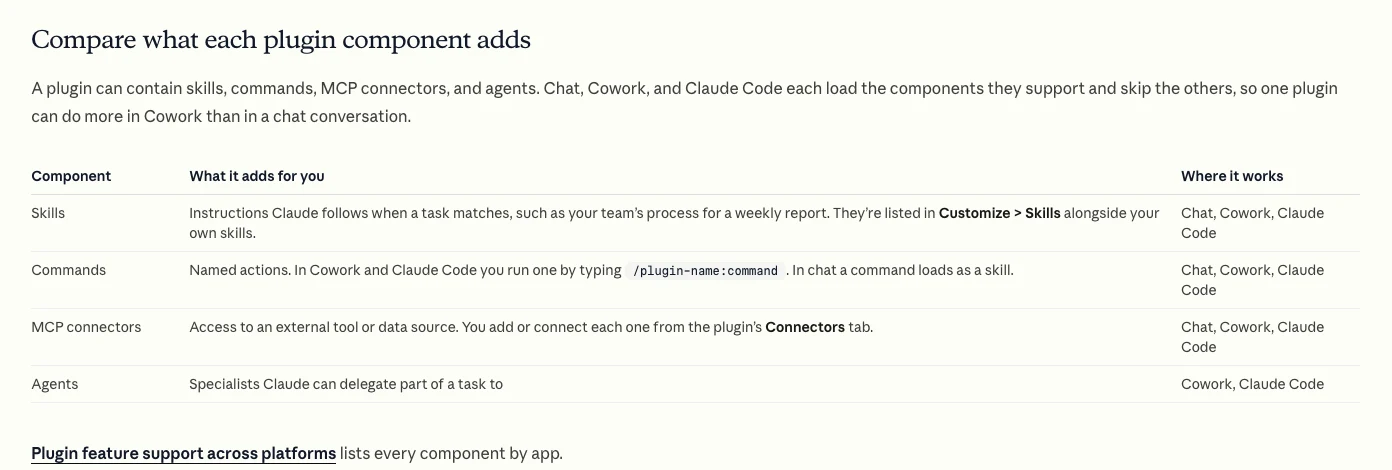
The cost difference is worth knowing before you build forty of them. In Claude Code, only skill names and descriptions sit in context until a skill runs. That listing has a budget of about 1% of the model's context window, and each entry is capped at 1,536 characters. Install too many and Claude starts dropping descriptions for the skills you use least, which is why a bloated library can stop a good skill from triggering.
For the inside of a skill file, see my guide to marketing skill files. For a PPC bundle, see Claude plugins for PPC.
Which marketing slash commands should you build first?
Short answer: Build commands for the jobs you repeat every week and can check against a known answer: a PPC audit, ad copy to a CSV, a weekly report, a competitor brief and a landing page review. Leave strategy, budgets and anything that publishes for later, and keep those under your own trigger.
The cheat sheet below is a starting set. The names are suggestions; pick a pattern and keep to it. The last column says who should be allowed to start each one. "You only" means the skill carries disable-model-invocation: true, so Claude cannot decide to run it.
| Command | Input | Output | Who starts it |
|---|---|---|---|
/ppc-audit | Search terms, campaign exports | Ranked waste list in a sheet | You only |
/rsa | Keywords, current ads, offer | 15 headlines, 4 descriptions, CSV | You only |
/search-terms | Search terms report | Negatives and new keywords | You or Claude |
/weekly-report | Platform and CRM exports | One-page summary and actions | You or Claude |
/exec-summary | The weekly report | Five lines for a CEO | You or Claude |
/competitor-brief | Competitor URLs, ad library | Offers, angles, gaps | You or Claude |
/landing-review | Page URL, ad copy | Message match and fixes | You or Claude |
/seo-brief | Keyword, top results | Page brief with headings | You or Claude |
/brand-check | Any draft | Voice and claims review | You or Claude |
/utm | Campaign list | Tagged URLs in a sheet | You or Claude |
/meta-brief | Offer, audience, past ads | Creative brief by angle | You or Claude |
/tracking-check | Site URL, tag list | Missing or duplicate events | You only |
The Google Ads limits in /rsa come from Google itself: a responsive search ad takes up to 15 headlines and 4 descriptions. Put those limits, and the character counts, in the skill so Claude checks them every time rather than you checking by hand. For a full Google Ads routine built from skills, see Claude skills for Google Ads, and if you would like an account audited by a person, that is my Google Ads management service.
My own rule on client ad accounts is the same with or without a command: audit first, results in a sheet I check by hand, and no change in the account before the client approves. A command makes the audit faster and more consistent. It does not move the approval step.
How does Anthropic's own marketing team use slash commands?
Short answer: Anthropic says a growth marketer on its team built a /rsa command for Google responsive search ads. It asks for campaign data, current copy and keywords, checks them against skills for brand voice, product accuracy and ad best practice, and exports upload-ready CSV files that are reviewed by hand before upload.
The case study, published on the Claude blog on 26 January 2026, is useful because it shows the shape of a good marketing command. The command is short. The knowledge sits in separate skills, one for each standard the copy must meet. The output is a file in the exact format the platform accepts, with the 15 headlines and 4 descriptions per ad. And the copy and examples Claude learns from were written with the product marketing and copywriting teams.
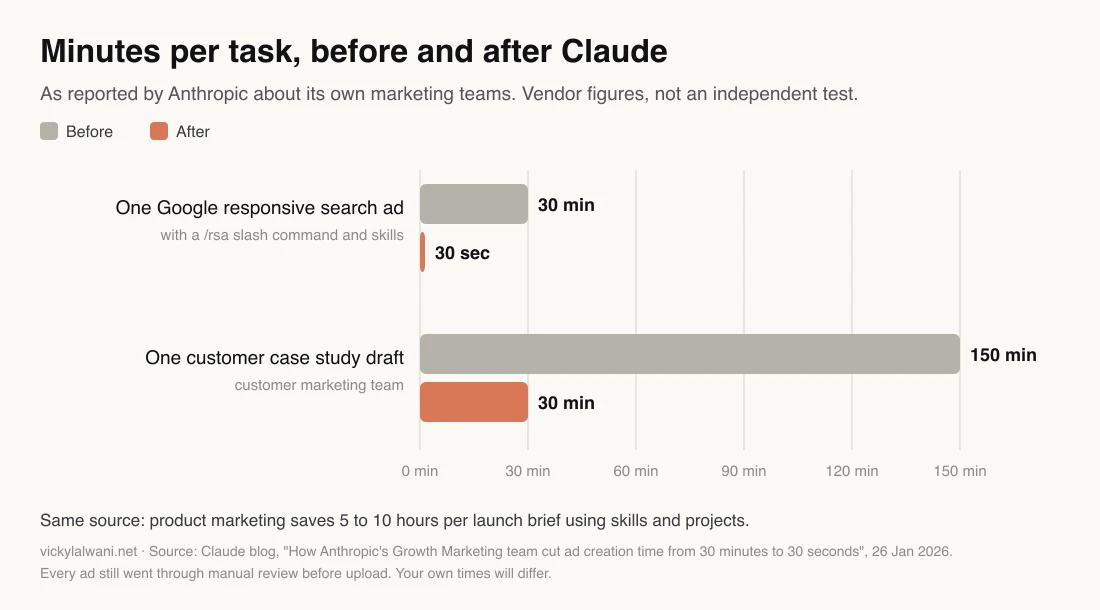
Read the numbers with care. They come from the company that sells the product, about people who work there, and the ad copy still went through manual review. What transfers is the method, not the 30 seconds: one command, several narrow skills, a fixed output format, and a person checking before anything goes live.
Video: Claude's official channel, 26 January 2026. Made by Anthropic about its own product.
How do you write your own slash command?
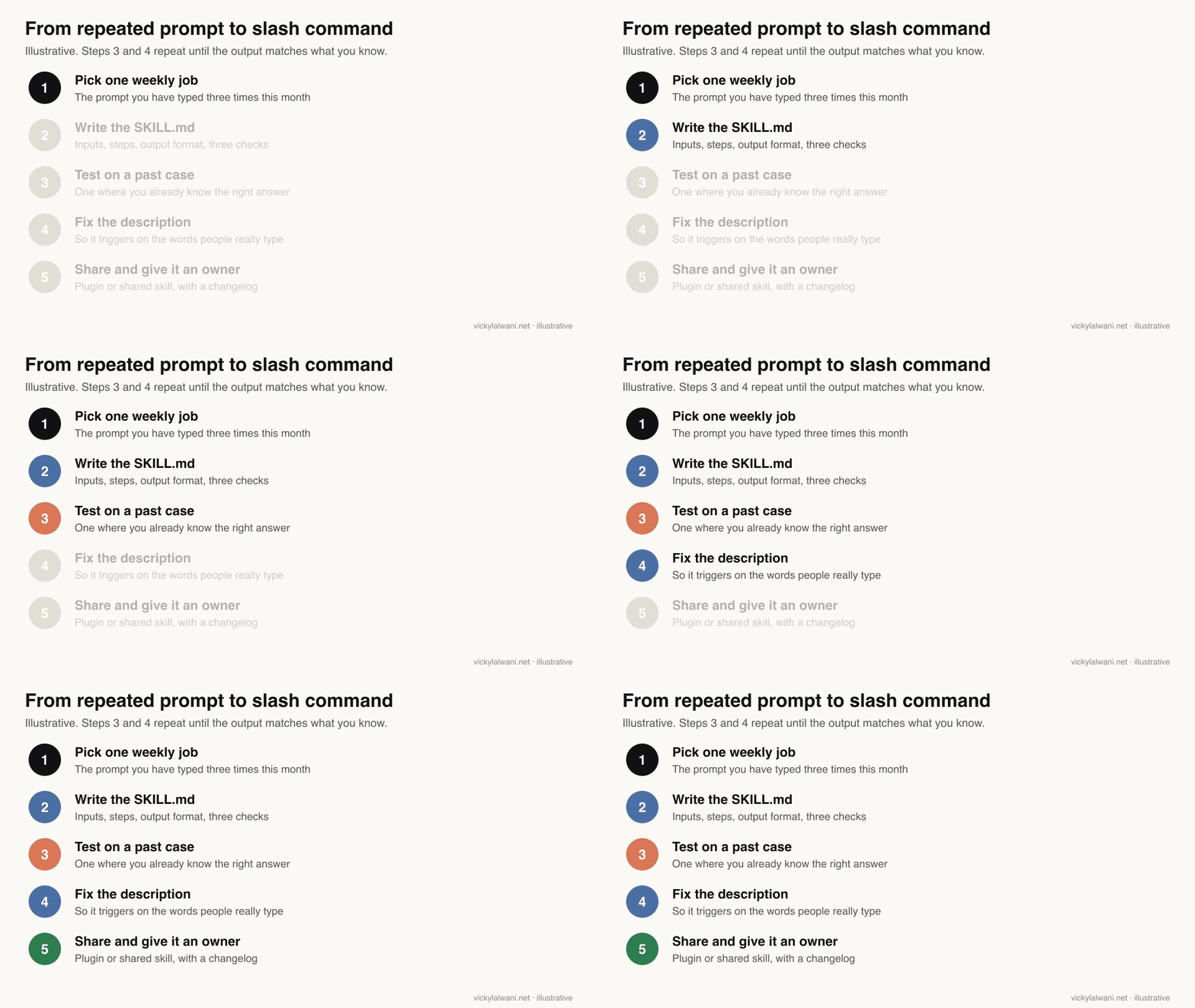
Short answer: Create a folder named after the command with a SKILL.md file inside. Give it a description that says what it does and when to use it, then write the inputs, steps, output format and checks. Put it in ~/.claude/skills/ for Claude Code, or zip the folder and upload it in Customize, Skills for chat and Cowork.
- Pick one weekly job. The prompt you have typed three times this month is the right first candidate.
- Write the description first. Claude reads only the name and description before deciding to load a skill, so name the job and the words people use for it. The description can run to 1,024 characters, and the name is lowercase letters, numbers and hyphens, up to 64.
- Write inputs, steps, format and checks. Say what to ask for if an input is missing.
- Decide who can start it. Add
disable-model-invocation: truefor anything with side effects. - Test it on a past case where you already know the right answer, and fix it until it matches.
- Install it. In Claude Code, save to
~/.claude/skills/<name>/SKILL.md(all projects) or.claude/skills/in a client folder. For chat and Cowork, zip the folder itself and upload it under Customize, Skills.
Here is a template for the audit command. Copy it, change the checks to your own, and test it on last month's export before you trust it.
---
name: ppc-audit
description: Weekly Google Ads waste audit from exported search terms and campaign data. Use when asked for a PPC audit, wasted spend check or search terms review.
argument-hint: "<client folder or export file>"
disable-model-invocation: true
---

# PPC audit

Inputs: $ARGUMENTS. If no search terms export is attached, ask for one. Do not guess numbers.

Steps
1. Read the search terms export and the campaign export.
2. List terms with spend and no conversions in the date range, highest spend first.
3. Group them into themes and suggest negatives at the right level (account, campaign, ad group).
4. Flag any campaign spending against a conversion action that is not a real lead or sale.
5. Rank every fix by money at risk.

Output
- A sheet with columns: Fix, Evidence, Money at risk, Level, Confidence.
- Five lines of summary at the top, written for the client.

Checks before you answer
- Every figure comes from the export. Quote the row if unsure.
- No change is made in the account. This is a proposal for approval.
- Say what you could not check.
Arguments work the way you would expect. Whatever you type after the command name replaces $ARGUMENTS, and positional forms such as $0 and $1 pick out single words. So /ppc-audit clients/garden-centre points the same skill at a different folder each time.
If writing the file feels like the barrier, ask Claude to draft it with Anthropic's skill-creator skill, which also runs test prompts so you can compare output with and without the skill. Or see my guide to recording a skill in Claude.
Should you install a ready-made marketing plugin?
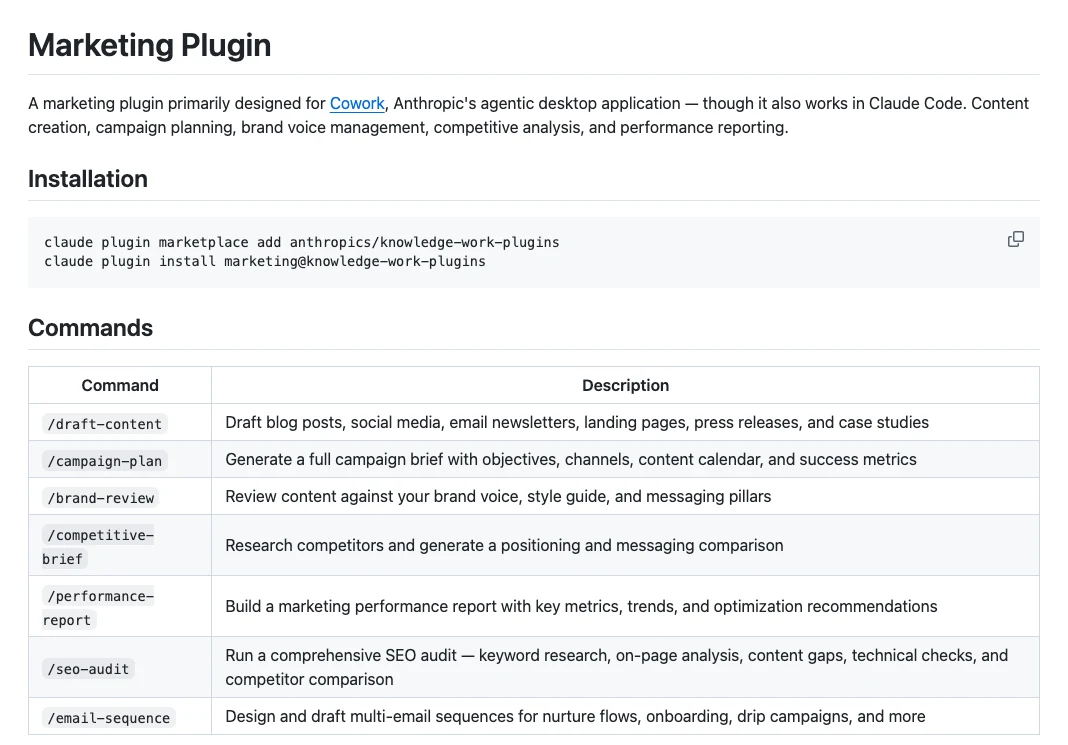
Short answer: Try one, but treat it as a template. Anthropic's free marketing plugin adds eight skills, including campaign plans, brand review, competitive briefs, performance reports and an SEO audit. It is generic by design, so the value comes from rewriting it with your voice, data sources and checks.
The plugin lives in Anthropic's knowledge-work-plugins repository, which was built mainly for Cowork and also works in Claude Code. In Claude Code you add the marketplace and install it with two commands. In chat and Cowork you add it from Customize, Plugins. Its commands then run as /marketing:campaign-plan, /marketing:seo-audit and so on.
claude plugin marketplace add anthropics/knowledge-work-plugins
claude plugin install marketing@knowledge-work-plugins
| Plugin command | Good for | Rewrite before use |
|---|---|---|
campaign-plan | Brief structure, calendar | Your channels and real budget |
brand-review | Voice and terminology checks | Your style guide and banned claims |
competitive-brief | Positioning comparison | Your named competitors and sources |
performance-report | Report layout | Your KPIs and CRM, not platform totals |
seo-audit | Checklist coverage | Your crawl tool and priorities |
draft-content, email-sequence | First drafts | Your offer and customer language |
Read a plugin before you install it. Anthropic's docs warn that agents and hooks can run commands on your computer, and that the review Anthropic gives directory plugins does not cover one you add from a marketplace URL or upload yourself. The Claude Code security page makes the same point about trusting a plugin's source. For third-party marketing skills from GitHub, the same rule applies: open the SKILL.md and any scripts first.
The official catalogue is at claude.com/marketplace, and Claude Code adds Anthropic's official plugin marketplace for you the first time you start it. You can install from Claude Code with /plugin install name@marketplace, which opens a panel showing what the plugin adds and, for official plugins, an estimate of its context cost.
Video: Claude's official channel, 24 February 2026. Made by Anthropic; it promotes Cowork and plugins for enterprise teams.
How should a marketing team organise its commands?
Short answer: Group commands by role in one plugin per team, use a fixed naming pattern, give every command an owner and a changelog, and retire anything nobody has used in a quarter. Keep each client in its own project or folder so the right context loads with the command.
Grouping by role, or "mode", helps people find the right command quickly. A mode is just a set of commands plus the context that applies to that role. In practice that maps well to one plugin per team.
| Mode | Example commands | Context it needs |
|---|---|---|
| Founder | /offer-check, /exec-summary | Margins, goals |
| Paid media | /ppc-audit, /rsa, /meta-brief | Targets, conversion actions |
| Content and SEO | /seo-brief, /brand-check | Voice guide, keyword list |
| Sales and CRM | /lead-review, /follow-up | Lead stages, scripts |
| Operations | /weekly-report, /utm | Data sources, naming rules |
- Name by job: verb or noun plus object, such as
ppc-auditorseo-brief. Avoid clever names nobody remembers. - One owner per command, with a short changelog at the bottom of the
SKILL.md. - Check cost monthly with
/skill-doctorin Claude Code, which shows what each skill costs in context and how often it runs. On Team and Enterprise plans, each plugin and skill page shows adoption and activity for the last 30 days. - One client, one place. I keep one Claude project per client, with threads named by service and skills in a known folder, so a command never reads the wrong account's notes.
For the standing context each client folder needs, see my guide to the CLAUDE.md file for marketing.
Why does a slash command go wrong, and how do you fix it?
Short answer: Most failures come from four causes: the description does not match how people ask, the command triggers when it should not, Claude drifts from the instructions in a long session, or the skill is used for a job it was not written for. Each has a specific fix.
| Symptom | Likely cause | Fix |
|---|---|---|
| Never triggers on its own | Description lacks the words people use | Rewrite the description; type the command directly |
| Triggers too often | Description too broad | Narrow it, or make it "you only" |
| Follows rules, then drifts | Long session or compaction | Run it again; put key rules at the top |
| A rule must hold every time | Skills guide, they do not enforce | Use a hook for hard rules (Claude Code) |
| Odd tone in the output | Skill written for another job | One skill per job; check it fits |
The fixes in the first four rows come from Anthropic's skills troubleshooting guide. The last row is a lesson worth learning cheaply: a skill written to sell an offer, reused to write web pages, produces pages that read like adverts. Scope each command to one job and say in the description what it is not for.
What people say on X and Reddit
Short answer: Practitioners agree that commands pay off for jobs you have already decided how to do, and that natural language is better when you want Claude's judgement. The most common complaints are confusion between skills, commands and hooks, and long lists of commands nobody uses.
One reply in a July 2026 r/ClaudeAI thread put the line neatly: natural language when you want the model to decide how, a command when you have already decided. Another commenter said they use skills to store brand books and guidelines once, so every project applies the same standards.
| Post or thread | Where | Date | Type | What it says |
|---|---|---|---|---|
| Claude can now use Skills | X, Claude (official) | 16 Oct 2025 | Vendor | Skills are packaged instructions for your way of working |
| Cowork now supports plugins | X, Claude (official) | 30 Jan 2026 | Vendor | Plugins bundle skills, connectors, slash commands and agents |
| Cowork and chat are merging | X, Claude (official) | 16 Sep 2026 | Vendor | One Claude for quick questions and handed-over work |
| A Claude Code skill for a full SEO audit | X, a marketing skills author | 10 Apr 2026 | First-hand | Meta, Core Web Vitals, links, canonicals, sitemaps |
| A plugin as a senior SEO analyst | X, a developer | 11 Feb 2026 | First-hand | Search Console audit: CTR gaps, cannibalisation |
| Do you use slash commands often? | r/ClaudeAI | 28 Jul 2026 | Discussion | Commands for decided methods; skills hold brand assets |
| Slash commands: which should I use? | r/ClaudeAI | 31 Oct 2026 | Discussion | /context, /usage, /rewind, /resume; build your own |
| Top 2 slash commands you use most | r/ClaudeCode | 16 Nov 2026 | Discussion | /clear and /usage lead; custom skills for workflows |
| Hooks vs slash commands vs skills | r/ClaudeCode | 27 May 2026 | Discussion | Cleanest cut is who triggers each one |
Reddit threads are credited by community only. The X posts from individuals are described by type; one of them promotes the author's own free skill.
Videos worth watching
Short answer: Start with Anthropic's short "What are skills?" explainer, then a practical slash command tutorial. The table lists six videos, official channels first, with who made each and whether it sells something.
Video: Claude's official channel, 26 February 2026. Made by Anthropic; it explains skills, not marketing use.
| Video | Channel | Date | What it covers |
|---|---|---|---|
| What are skills? | Claude (official) | 26 Feb 2026 | How skills load and when |
| How Anthropic uses Claude in Marketing | Claude (official) | 26 Jan 2026 | Anthropic's marketing team workflows |
| Cowork and Plugins: Helping enterprises move faster | Claude (official) | 24 Feb 2026 | Plugins for teams in Cowork |
| Claude Code Tutorial #6 - Slash Commands | Net Ninja (coding tutorials) | 28 Aug 2025 | Custom commands, older file format |
| Claude Code Plugins Explained In 7 Minutes | An AI engineering channel | 29 Mar 2026 | What a plugin bundles |
| Claude Cowork Plugins Explained (& How to use them) | An AI automation educator | 14 Feb 2026 | Cowork plugins walkthrough; sells courses |
Where is this advice weak?
Short answer: Three places. Claude's interfaces change monthly, so menus and limits here may move. The only time-saving figures come from Anthropic about its own staff. And the twelve-command list is a starting suggestion, not a tested benchmark.
- Fast-moving product. Commands, plugin paths and limits were checked on Anthropic's docs on 18 November 2026. The chat and Cowork merge is still rolling out, so what you see may differ by plan.
- Vendor numbers. The 30 minutes to 30 seconds figure is Anthropic's, about its own team. No independent study of marketing slash commands exists that I could find.
- Limits disagree across surfaces. The current docs give 1,024 characters for a skill description; the Claude Help Center page still says 200. Short, specific descriptions work everywhere.
- No command replaces judgement. A confident but wrong audit is worse than none. Keep a person reading the output and check any spend, ranking or performance claim against the platform.
Want a command set built for your team?
Short answer: If your team repeats the same marketing jobs every week, a small command set of five to ten skills, scoped to your accounts and tools, is a sensible first step. The service below covers building, testing and handing over a set like that, with an owner and changelog for each command.
My Claude consultant service covers the set-up: the folder structure, the first commands, the connectors they need and the approval steps around ad accounts. If the job you want to automate is Google Ads itself, start with Google Ads management. Prices are on the pricing page, and the free guides include starter templates.
Sources
| Source | What it supports | Date |
|---|---|---|
| Claude Code docs: skills | Commands merged into skills, locations, invocation, arguments, budget, troubleshooting | Read 18 Nov 2026 |
| Claude Code docs: commands | Built-in commands and bundled skills | Read 18 Nov 2026 |
| Claude Code docs: install plugins | /plugin install, scopes, context cost | Read 18 Nov 2026 |
| Claude Code docs: plugin security | Trusting plugin sources | Read 18 Nov 2026 |
| Claude docs: plugins | / menu in chat, Cowork form, components, review, usage figures | Read 18 Nov 2026 |
| Claude docs: plugin platform support | What loads in chat, Cowork and Claude Code | Read 18 Nov 2026 |
| Claude docs: skills overview | Plans, code execution, / to pick a skill | Read 18 Nov 2026 |
| Claude docs: create custom skills | Name 64, description 1,024, ZIP upload | Read 18 Nov 2026 |
| GitHub: Anthropic marketing plugin | Commands, install, connectors | Read 18 Nov 2026 |
| Claude blog: Anthropic marketing | /rsa command, time figures, manual review | 26 Jan 2026 |
| Google Ads Help: responsive search ads | 15 headlines, 4 descriptions | Read 18 Nov 2026 |
| Agent Skills specification | Open skill format | Read 18 Nov 2026 |
| X posts and Reddit threads above | Practitioner and vendor views | Oct 2025 to Nov 2026 |
This article expands on my post on LinkedIn ↗.
FAQ
What is a slash command in Claude?
A slash command is a short name you type after a forward slash to run a saved set of instructions. In Claude Code it can be a built-in command such as /clear or a skill you wrote; in Claude chat and Cowork the / menu lists your skills and plugin commands.
Are Claude slash commands and skills the same thing now?
Almost. Anthropic merged custom commands into skills, so a SKILL.md file becomes a command you can type, and Claude can also load it when a request matches its description. Old files in .claude/commands still work in Claude Code.
Can I use slash commands in Claude chat, not just Claude Code?
Yes. In claude.ai and the Claude desktop app, type / in the message box to see your skills and plugin commands and pick one. Skills in chat need code execution switched on and a Pro, Max, Ultra, Team or Enterprise plan.
How do I stop Claude running a command on its own?
Add disable-model-invocation: true to the skill's frontmatter. Claude Code then only runs it when you type the command, which is the right setting for anything that changes an ad account, sends a message or publishes.
Which Claude slash commands should marketers build first?
Start with weekly jobs you can check against a known answer: a PPC audit, responsive search ad copy to a CSV, a weekly report and a competitor brief. Test each on a past case before the team uses it.
Is there a ready-made Claude plugin for marketing?
Yes. Anthropic publishes a free marketing plugin in its knowledge-work-plugins repository with eight skills, including campaign plans, brand review and an SEO audit. It is generic, so rewrite it with your own voice, data and checks.
Why is my Claude slash command not working?
If Claude never picks it up, the description probably lacks the words people use, so rewrite it or type the command directly. If it drifts in a long session, run it again, and keep the key rules at the top of SKILL.md.
Do slash commands replace a marketing team?
No. They remove repetitive effort and make output consistent, but strategy, creative judgement, approvals and client relationships still need people. Even Anthropic reviews its command-generated ads by hand before upload.