A Claude plugin for marketing is one folder that bundles skills, subagents, hooks and MCP servers, installed as one unit in Claude Code, Cowork or Claude chat on paid plans. Anthropic's open-source marketing plugin covers content, campaign planning and reporting but has no Google Ads or Meta Ads connector, so PPC teams build their own: seven read-only skills such as search term waste, pacing and tracking health, a reviewer, a hook that blocks write tools, and Google's and Meta's official MCP servers locked down. Read any plugin before installing, because it runs code with your privileges.
TL;DR
- A Claude plugin is one folder that installs as one unit: skills, subagents, hooks and MCP servers, with a manifest at
.claude-plugin/plugin.json. It works in Claude chat, Cowork and Claude Code on paid plans, but each surface loads a different set of parts. - No ready-made plugin covers Google Ads or Meta Ads. Anthropic's marketing plugin drafts content, plans campaigns and reports, but its connectors do not include either ad platform.
- A good PPC plugin is seven read-only skills, a reviewer, a hook that blocks write tools, and Google's and Meta's official MCP servers locked down.
- Treat plugins as software. Anthropic warns that a plugin can execute arbitrary code on your machine with your user privileges. Read it before you install it.
There are three stages in how most marketers use AI for paid media. Prompts come first: useful, but they depend on who remembers them and how they word them. Single skills come next: one job, packaged, run the same way each time. A plugin is the third stage: the whole weekly account review, bundled with the connections it needs, installed by anyone on the team with one command.
This guide explains what a Claude plugin is as of November 2026, how it differs from a skill or a connector, which seven skills belong in a plugin for Google Ads and Meta Ads, how to lay out the folder, how to connect it safely and how to roll it out. If you would rather have the account itself run by someone who works this way, my Google Ads management service is the place to start.
A note on evidence. Claude facts come from Anthropic's docs and Help Centre, Google Ads facts from Google's docs, and Meta facts from Meta's own pages, all read on 18 November 2026 and linked where used. Anything written as "I" is a working habit from my own client and site work; I share no client names or client numbers.
Jump to: Meaning · Plugin or skill · Ready-made · Seven skills · Folder · Connect · Safety · FAQs
What is a Claude plugin, as of November 2026?
Short answer: A Claude plugin is a folder of skills, subagents, hooks, MCP servers and other parts that Claude installs and loads as one unit, usually from a marketplace. It works in Claude Code, and on Pro, Max, Ultra, Team and Enterprise plans it also works in Claude chat and Cowork, which load fewer of its parts.
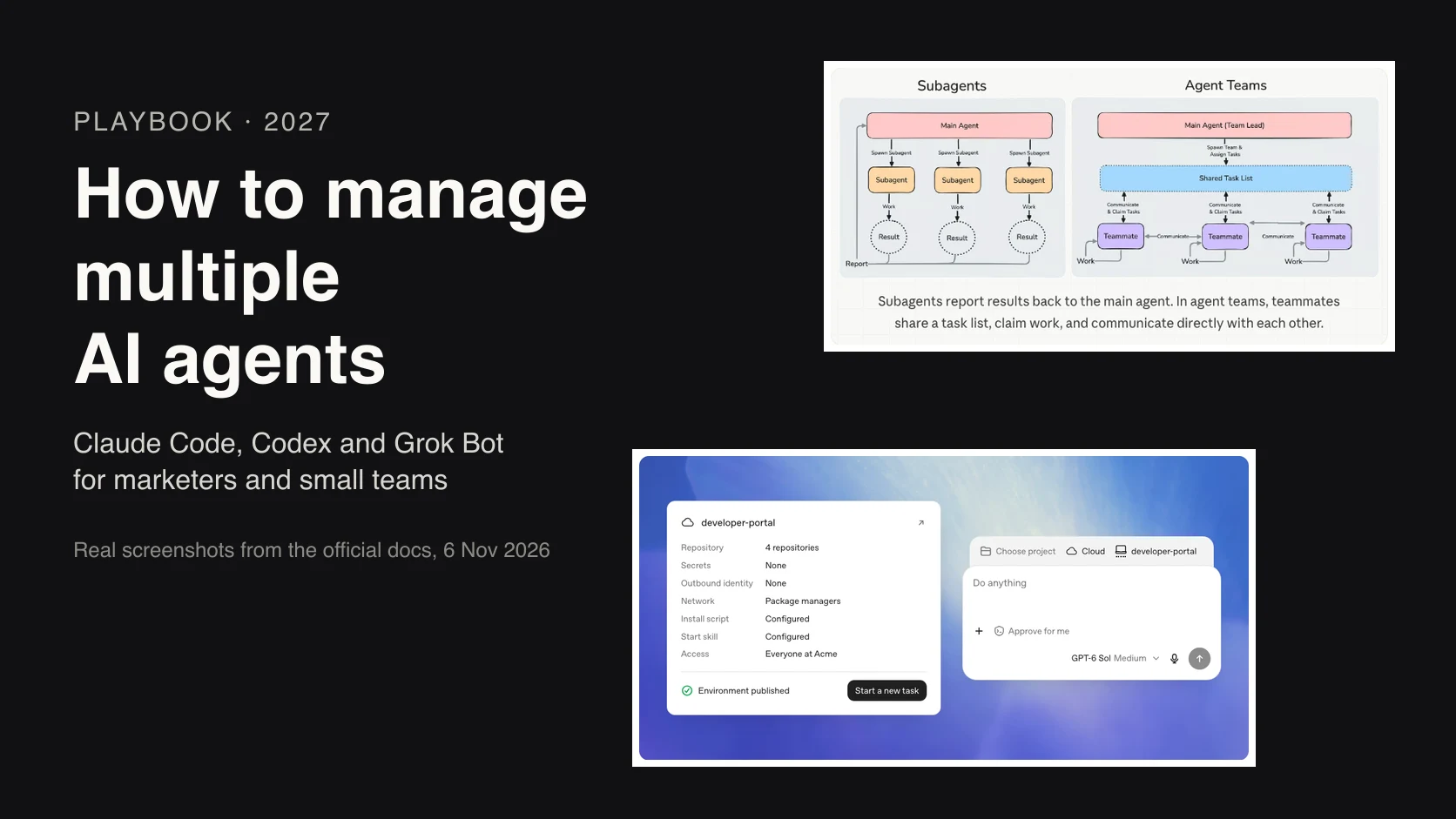
Anthropic's plugins overview defines a plugin as "a directory of skills, agents, hooks, MCP servers, or other components that Claude Code installs and loads as one unit". The manifest, a small JSON file, gives the plugin its name and can add a version and description. A marketplace is just a catalogue that lists plugins and where to fetch each one; Claude Code adds Anthropic's official one the first time you start it.
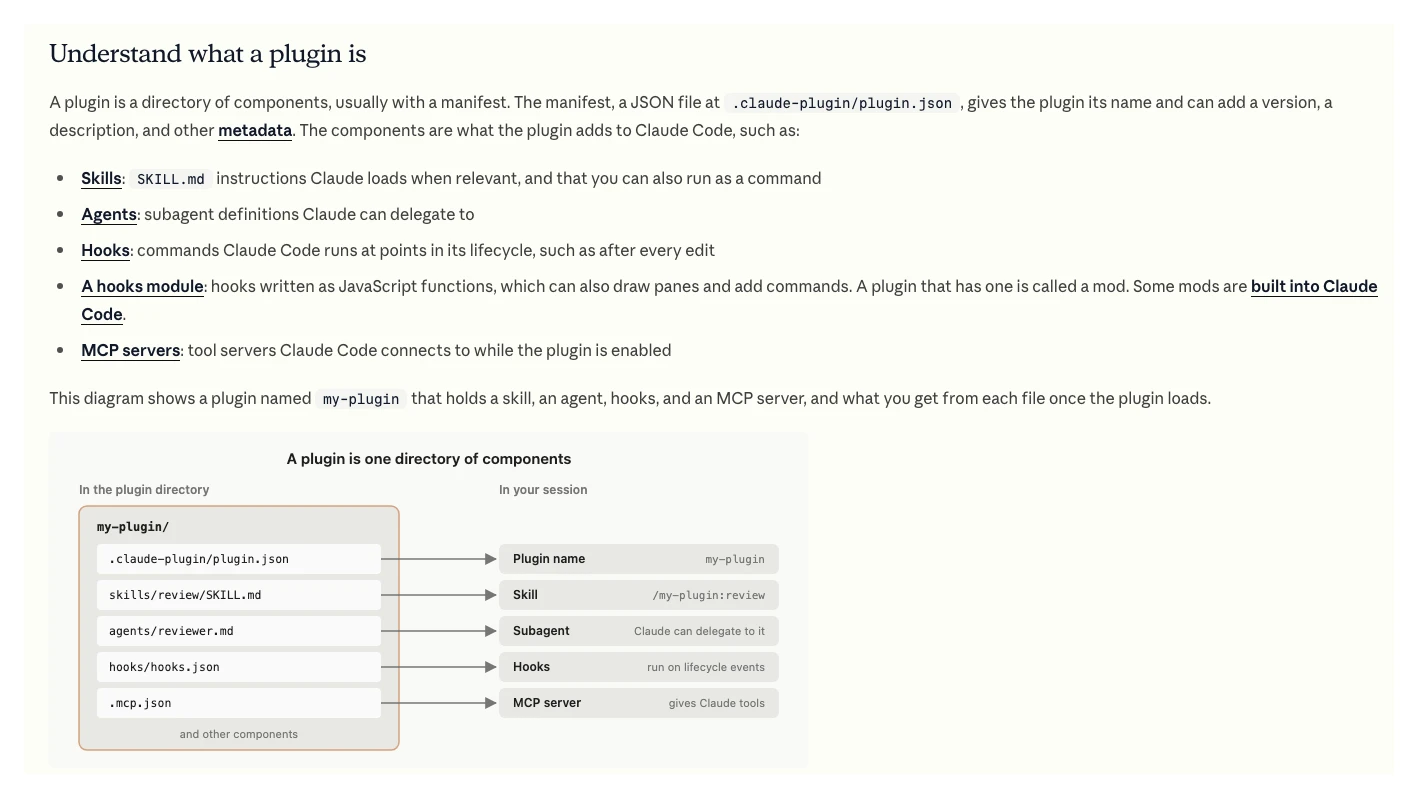
The parts, in plain words:
| Part | What it is | PPC example |
|---|---|---|
| Skill | Instructions Claude loads when relevant | Search terms review |
| Subagent | A helper with its own context | A reviewer that checks findings |
| Hook | A command that runs at set moments | Block any write tool |
| MCP server | Tools from an outside system | Google Ads MCP, read-only |
| Command | Older format, now a skill | Keep only if you have them |
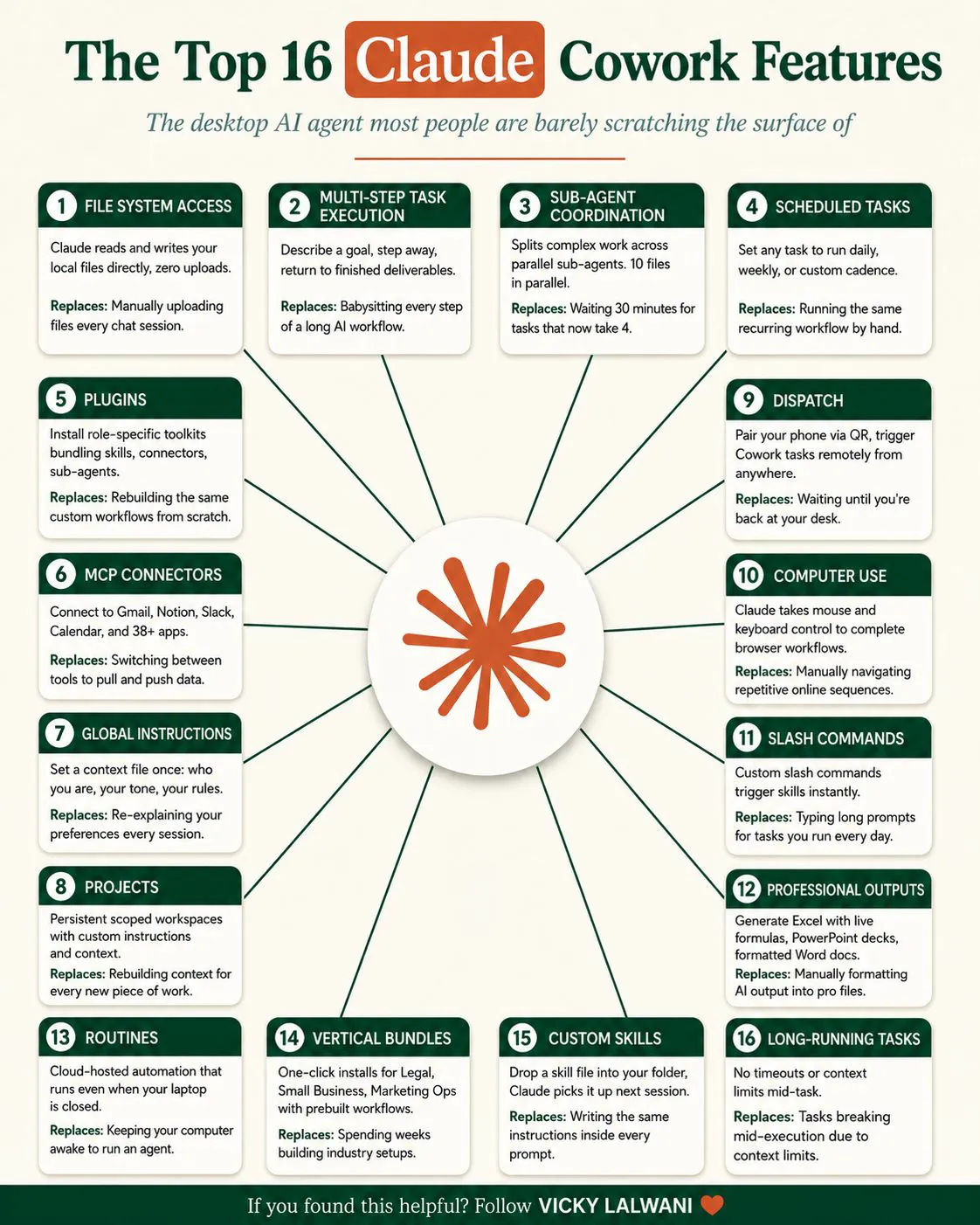
Plugins reached Cowork on 30 January 2026, when Claude announced plugin support there. In the app you add them from Customize, then Plugins, then Discover. A plugin you add to your account also syncs to Claude Code at your next session.
Plugin, skill, connector or MCP server: which do you need?
Short answer: Use a skill for one repeatable job, an MCP server or connector to reach a platform's data, and a plugin when you want several skills, helpers, rules and connections packaged so a team installs the same set-up in one step. A solo marketer with two skills does not need a plugin yet.
Anthropic's own advice is direct: skills, subagents, hooks and MCP servers all work on their own, and you "use a plugin when you want several" of them "packaged as one unit". The benefit is consistency. Everyone on the team runs the same checks, with the same thresholds, against the same data source, and an update reaches everyone through the marketplace.
| You want to | Use | Why |
|---|---|---|
| Repeat one check | A skill | Lightest option |
| Read ad platform data | MCP server or connector | Gives Claude tools |
| Enforce a rule every time | A hook | Runs whether Claude agrees or not |
| Share a full routine | A plugin | One install, one version |
| Run it for many clients | A plugin plus settings | Thresholds per account |
If you are still at the single-skill stage, my guide to Claude skills for Google Ads covers writing and testing them. A plugin is what you build once three or four of those skills have proved themselves.
Is there a ready-made Claude plugin for marketing?
Short answer: Yes for general marketing, no for paid search. Anthropic's open-source marketing plugin drafts content, plans campaigns, checks brand voice, briefs on competitors and reports performance, with connectors such as HubSpot, Ahrefs, Similarweb, Klaviyo and Supermetrics. It has no Google Ads or Meta Ads connector, so PPC work needs your own skills.
The plugin lives in Anthropic's knowledge-work-plugins repository, which is Apache-2.0 licensed and built mainly for Cowork. Its marketing folder lists five skills and seven commands:
| Skills | Commands |
|---|---|
| content-creation | /draft-content |
| campaign-planning | /campaign-plan |
| brand-voice | /brand-review |
| competitive-analysis | /competitive-brief |
| performance-analytics | /performance-report |
| /seo-audit, /email-sequence |
It is a good base for content and planning, and a good model of how to lay a plugin out. For paid search it stops short: performance reporting can only work with whatever data its connectors reach. Community plugins fill some of the gap. One shared on r/PPC in April 2026 bundles Google Ads audits, keyword work and bulk bid and budget changes through the Ads API; the top reply points out that it is Claude wrapped around APIs and prompts, not a replacement for judgement. Treat any third-party plugin the same way you would any software that can touch an ad account.
Which seven skills belong in a PPC plugin?
Short answer: Search term waste, budget pacing, tracking health, Meta creative fatigue, a breakdown of automated campaigns such as Performance Max and Advantage+, a competitor ad teardown from public ad libraries, and a weekly report. Every one reads and proposes; none changes the account.
These seven cover the checks that find wasted money fastest, in the order I would build them. The original version of this article listed an audience overlap finder; I have swapped it for a tracking health check, because every other skill is only as good as the conversion data under it.
| Skill | Reads | Returns |
|---|---|---|
| 1. Search term waste | Search terms report | Draft negatives with evidence |
| 2. Budget pacing | Spend vs monthly budget | Under and overspend flags |
| 3. Tracking health | Conversion actions, recent counts | Pass or a named problem |
| 4. Creative fatigue | Meta frequency and CTR by ad | Ads to refresh, with dates |
| 5. Automated breakdown | PMax and Advantage+ reports | Where spend went |
| 6. Competitor teardown | Public ad libraries | Hooks and formats, grouped |
| 7. Weekly report | Agreed metrics only | Spend, results, three priorities |
For the competitor skill, Google's Ads Transparency Center and Meta's Ad Library are both public, so the skill needs no account access at all. CTR, or click-through rate, is clicks divided by impressions; frequency on Meta is the average number of times each person saw an ad. A fatigue skill flags ads where frequency rises while CTR falls, using thresholds you set per account.
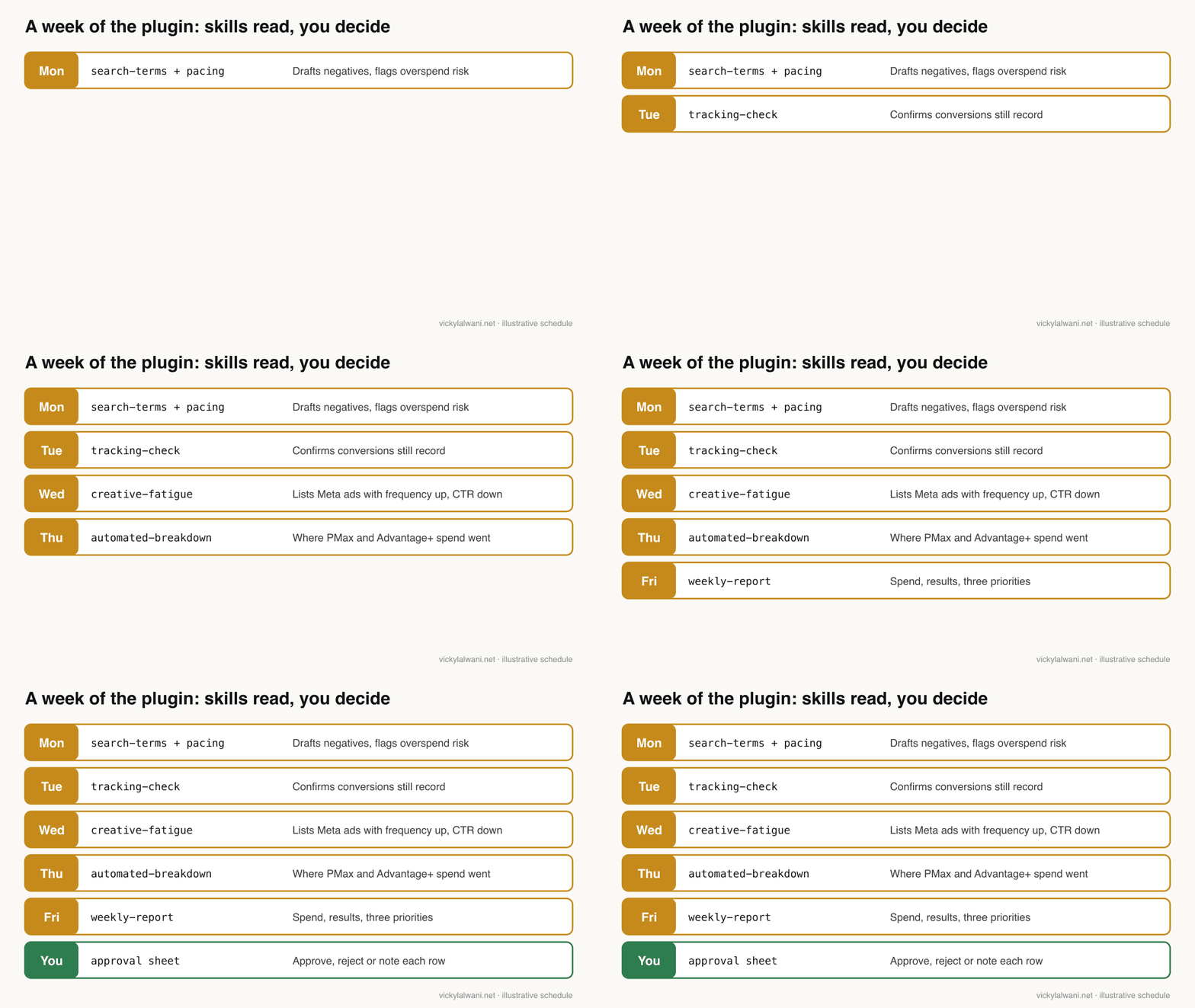
One habit shapes every skill here. On client ad accounts I work audit first: findings go into a sheet with a column for my manual check and a column for the decision, and nothing changes before approval. Build that into the output format of each skill, so the plugin produces rows you can review rather than advice you have to re-check.
How do you structure the plugin folder?
Short answer: Put the manifest at .claude-plugin/plugin.json, each skill in its own folder under skills/ with a SKILL.md, helpers under agents/, rules in hooks/hooks.json and connections in .mcp.json. Skills then run as /plugin-name:skill-name, for example /ppc-review:search-terms.
The plugin components page gives the layout. Only the plugin name is required in the manifest, and setting a version keeps users on that version until you change it. Two details catch people out: Claude Code does not load a CLAUDE.md file at the plugin root, so put standing instructions in a skill; and commands are the older format, so write new ones as skills.
ppc-review/
  .claude-plugin/plugin.json
  skills/
    search-terms/SKILL.md
    pacing/SKILL.md
    tracking-health/SKILL.md
    creative-fatigue/SKILL.md
    automated-breakdown/SKILL.md
    competitor-teardown/SKILL.md
    weekly-report/SKILL.md
  agents/reviewer.md
  hooks/hooks.json
  .mcp.json
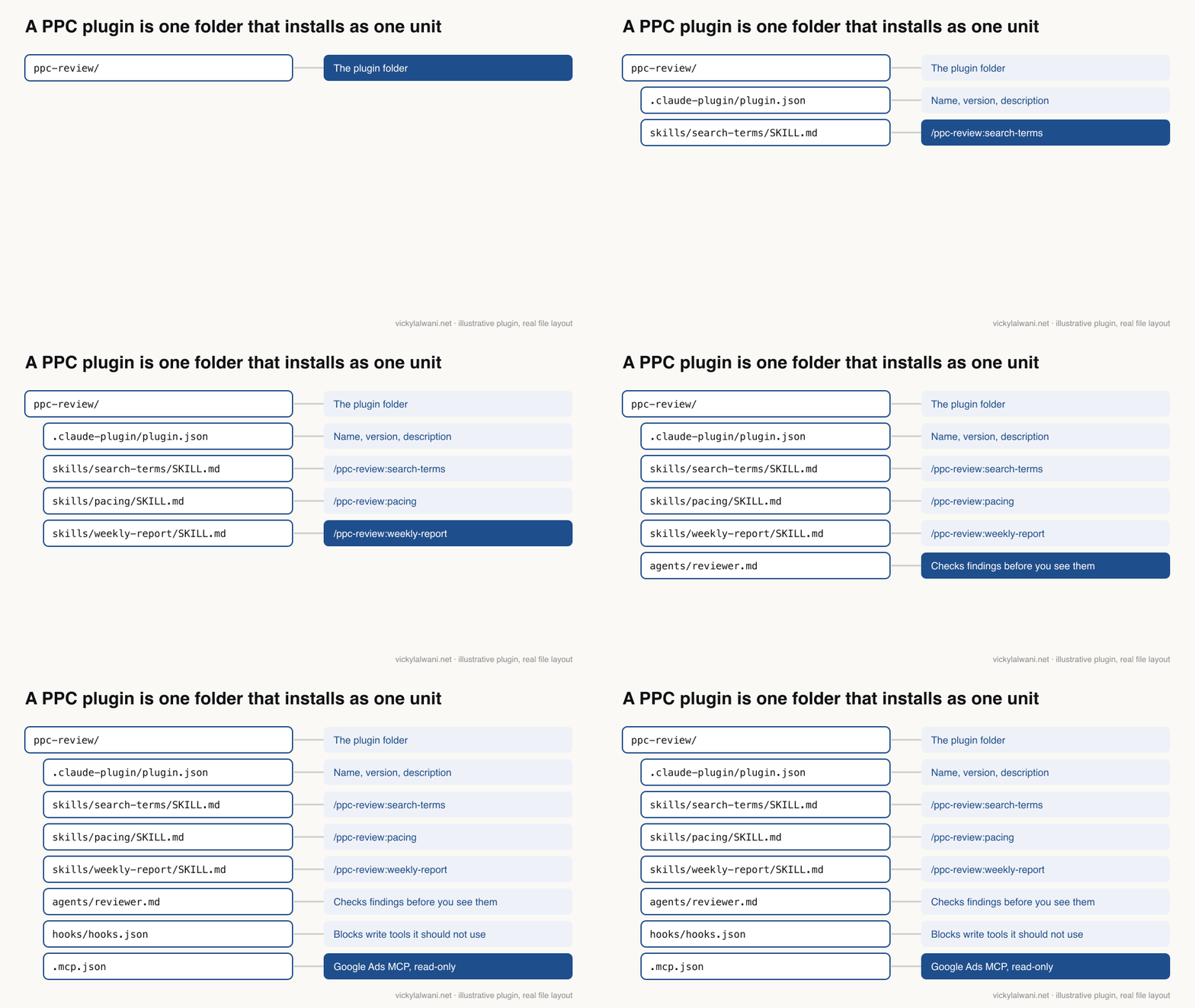
A minimal manifest and one skill look like this. The description is what Claude matches your request against, so it must say what the skill does and when to use it:
{
  "name": "ppc-review",
  "version": "1.0.0",
  "description": "Weekly read-only review of Google Ads and Meta Ads accounts"
}
---
name: search-terms
description: Reviews a Google Ads search terms export and drafts negative
  keywords with evidence. Use for wasted spend or search term reviews.
---
You never change the account.
Input: a search terms export for the date range the user names.
Return a table: Term, Clicks, Cost, Conversions, Proposed negative,
Match type, Reason, Manual check (blank), Decision (blank).
Never propose a negative that would block a term with conversions.
Read the thresholds for this account from settings/thresholds.md.
Keep thresholds in a separate file the skill reads, not in the instructions. A frequency level that suits one account may not suit another. Bundled files cost nothing until Claude reads them, per Anthropic's Agent Skills overview.
How do you connect it to Google Ads and Meta Ads?
Short answer: Declare Google's official Google Ads MCP server and Meta's hosted Ads MCP server in the plugin's .mcp.json. Run Google's strictly read-only by switching off its labels and assets tools. Meta's server can create and edit campaigns, ad sets and ads, so restrict it with Meta's own rules and a hook that blocks its write tools.
| Platform | Official server | Can it write? | Lock it down |
|---|---|---|---|
| Google Ads | Google Ads MCP, you run it | Assets and labels only | Disable labels and assets |
| Meta Ads | Ads MCP, hosted by Meta | Campaigns, ad sets, ads | MCP rules plus a hook |
The Google Ads MCP server reads data with GAQL queries. Since version 0.0.6 on 2 November 2026 it can create standalone assets and manage labels through a propose-and-confirm step, but it cannot create, modify, pause or enable campaigns, ad groups, ads, budgets or bids. It needs a Google Cloud project with the Google Ads API enabled; the docs say developer tokens were set to be sunset on 9 September 2026, and that the Cloud project that owns your sign-in decides your API access level.
Meta's Ads MCP server is hosted at mcp.facebook.com/ads. Meta announced its ads AI connectors in open beta on 29 April 2026, with reporting, campaign creation and editing, catalogues and signal health. A 16 July 2026 update added Ads MCP server rules, which let someone with full control of a business portfolio govern what AI agents can do on an ad account, such as budget changes.
Where the server runs decides which Claude surface can use it:
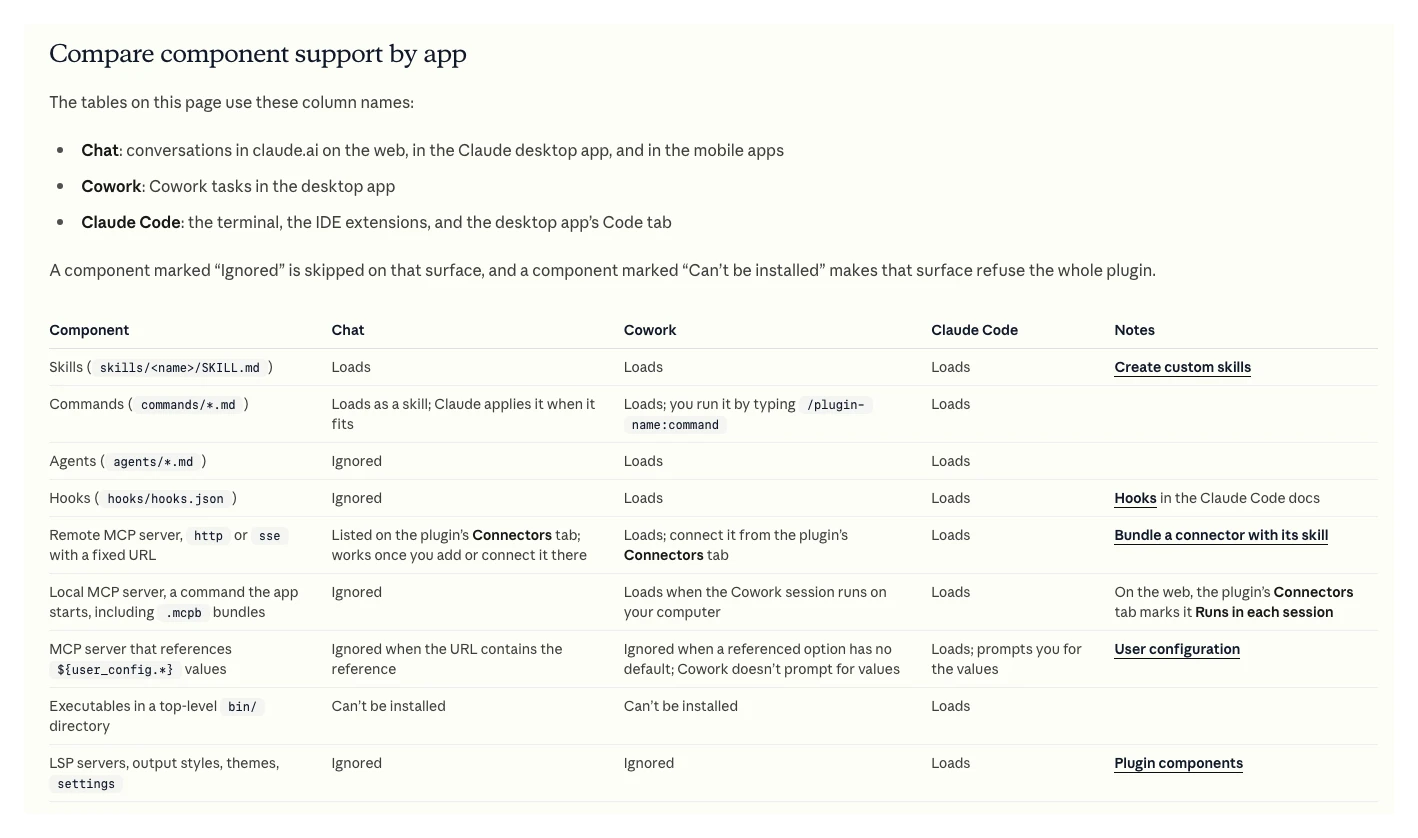
A local server, such as Google's when you run it on your own machine, loads in Claude Code and in Cowork sessions on your computer, but not in Claude chat. A remote server with a fixed URL, such as Meta's, appears on the plugin's Connectors tab in chat and Cowork. Subagents and hooks are ignored in chat, so the reviewer and the write-blocking hook only protect you in Cowork and Claude Code. For secrets, a plugin can ask for values at install time and mark them sensitive, so they are stored in secure storage rather than in a settings file, per the components page.
The account itself is the last line of defence. Use a Google sign-in with the narrowest Google Ads access level that still lets the server read what the skills need. For more on MCP servers and what each can change, see my guide to marketing MCP servers.
How do you keep a Claude plugin safe on ad accounts?
Short answer: Read every plugin before you install it, especially hooks/hooks.json, .mcp.json and any bin folder, because a plugin runs code with your user privileges and can update itself. Keep skills read-only, block write tools with a hook, and give the ad accounts the least access the plugin needs.
Anthropic's plugin security page is blunt: a plugin "can execute arbitrary code on your machine with your user privileges". Hooks and MCP servers run outside Claude Code's sandbox, auto-update can change the files you reviewed, and a marketplace's name tells you who publishes the catalogue, not what each plugin does. Its checklist: check the marketplace source, read the details pane, read the source files, then list what the plugin contains with claude plugin details.
Two recent Reddit posts show why. In late October a post on r/ClaudeCode reported that a popular memory plugin's installer uploaded the prompts typed in the last 30 days to an outside service during setup, with no opt-in. In early November another reported that a desktop app installed its own Claude Code plugin without asking, at user scope, so it loaded in every project.
Rules you want to hold every time belong in a hook, not a skill. A PreToolUse hook that exits with code 2 blocks the tool call, and its error message goes back to Claude as the reason. A PPC plugin can use one to block any tool whose name matches a write action. Plugin subagents also ignore some settings: the docs say permissionMode, hooks and mcpServers in a plugin agent's file are ignored, so add hooks and servers at plugin level instead.
| Check | Where | What to look for |
|---|---|---|
| Who publishes it | claude plugin marketplace list | Official, community or third-party |
| What it runs | hooks/hooks.json, bin/ | Commands you do not recognise |
| What it connects to | .mcp.json | Unknown URLs or servers |
| What it can change | MCP tool list | Write tools left on |
| Whether it updates | Marketplace auto-update | Turn off for client work |
What does a plugin cost in context and usage?
Short answer: Each enabled skill's name and description sit in Claude's context on every turn, about 100 tokens per skill by Anthropic's figures, so a seven-skill plugin costs roughly 700 tokens before it does anything. A skill's full instructions, under 5,000 tokens, load only when it runs. Disable plugins you are not using.
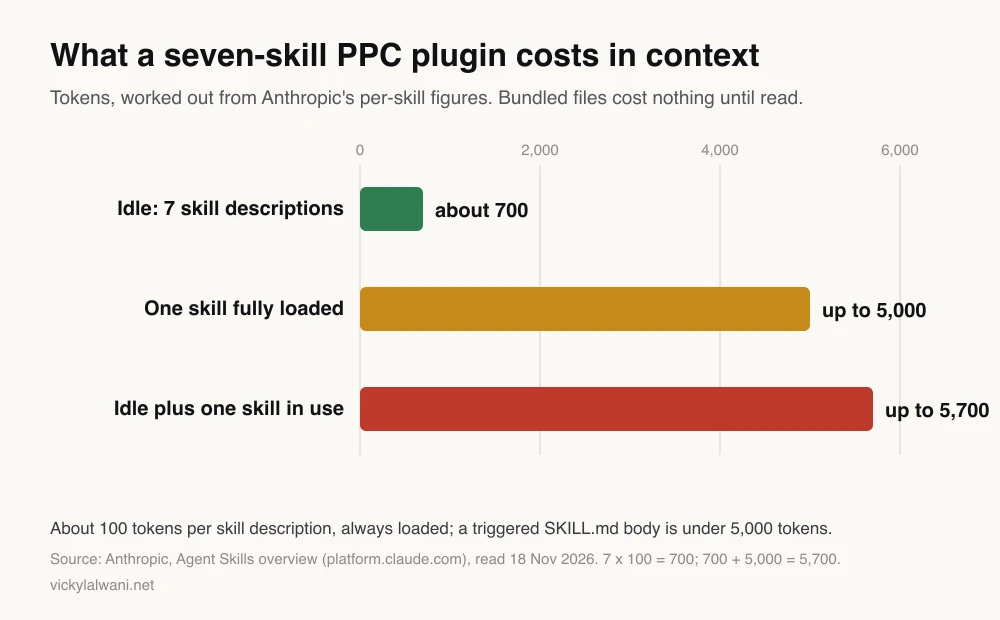
The plugins overview spells out what an enabled plugin adds to every session, not only the ones where you use it: skill and agent descriptions in context, MCP servers running alongside, and hooks firing on their events. That is why a focused seven-skill plugin beats a 40-skill one you found online. You can disable a plugin without uninstalling it from the /plugin menu.
How do you roll a PPC plugin out to a team?
Short answer: Pilot it on one account against a manual review, fix the skills, then publish it through a private marketplace in a Git repository. In Claude Code, install it at project scope; on Team and Enterprise plans an owner can make it available, installed by default or required for everyone.
| Step | What to do | Done when |
|---|---|---|
| 1. Pilot | Run on one account next to a manual review | Misses and false alarms listed |
| 2. Fix | Tighten descriptions and thresholds | Two clean weekly runs |
| 3. Version | Set version in plugin.json | Users on a known version |
| 4. Publish | Private marketplace in a Git repo | Team installs by name |
| 5. Own it | One named owner, a short guide | Who runs what, who reviews |
Claude Code has three install scopes: user (every project on your computer), project (everyone in a repository, through the committed settings file) and local (you, in one repository). In the Claude app, a Team or Enterprise owner sets each plugin to Not available, Available to install, Installed by default or Required.
Write a short guide covering when to run each skill, who reviews the output and where results are stored. A plugin is only as consistent as the habits around it, and a clear owner stops the slow drift that hits shared tools.
What will a PPC plugin not do?
Short answer: A plugin makes your review repeatable. It does not fix a weak offer, broken tracking or a landing page that does not convert, and it should not make budget, bid or structure decisions. Results depend on the product, the market and the budget, so no plugin can promise an outcome.
Before you trust any output, confirm that conversions are measured correctly; my PPC tracking audit checklist covers that. For the wider question of which jobs to hand to AI at all, see what to automate in PPC, and if you want the skills to work as a coordinated team, read how to build an AI agent team for Google Ads.
What do people say on X and Reddit?
Short answer: Practitioners are building and sharing PPC and SEO plugins and skills, often as free giveaways that also market their services. The sceptical replies focus on two things: these are wrappers around APIs and prompts, and plugins need the same security review as any software.
| Source | Date | What it says | Type |
|---|---|---|---|
| Claude on X | 30 Jan 2026 | Cowork supports plugins bundling skills, connectors, commands and sub-agents | Official |
| A developer on X | 11 Feb 2026 | Built a Claude Code plugin that audits Search Console data | First-hand |
| A growth marketer on X | 24 Mar 2026 | A search terms skill pulls data via MCP, then applies a second methodology skill | First-hand |
| A paid media practitioner on X | 15 Aug 2026 | Gives away 12 Claude Code skills for ad accounts; spend claims not verified | Vendor |
| An AI tools account on X | 18 Oct 2026 | Google and Meta both shipped official agent access to ad accounts | Opinion |
| Thread | Date | What it says | Type |
|---|---|---|---|
| r/PPC: plugin replaced my stack | 13 Apr 2026 | Open-source Google Ads and SEO plugin; reply calls it a wrapper | Vendor |
| r/ClaudeAI: controllable AI system | 22 Oct 2026 | Put rules in hooks and deny rules, not prompts | First-hand |
| r/ClaudeCode: memory plugin PSA | 29 Oct 2026 | Installer uploaded 30 days of prompts with no opt-in | First-hand |
| r/ClaudeCode: plugin installed silently | 4 Nov 2026 | Desktop app added its plugin at user scope; how to remove it | First-hand |
| r/ClaudeAI: am I wrong to skip skills? | 27 Oct 2026 | Skills load when the request matches; easier to share than prompts | Discussion |
Videos worth watching
Claude's official channel, 24 February 2026: a two-minute overview of plugins in Cowork for teams. It promotes Anthropic's product.
Claude's official channel, 27 January 2026: how Anthropic's own marketing team uses Claude. It promotes Anthropic's product.
| Video | Channel | Date | What it covers |
|---|---|---|---|
| Cowork and Plugins | Claude | 24 Feb 2026 | Plugins for teams |
| How Anthropic uses Claude in Marketing | Claude | 27 Jan 2026 | In-house marketing use |
| Claude Code Plugins Explained In 7 Minutes | Software Engineer Meets AI | 29 Mar 2026 | Plugin structure |
| Claude Cowork Plugins Explained | An AI automation educator | 14 Feb 2026 | Installing in Cowork; sells courses |
| You Need a Private Claude Plugin Marketplace | An AI writer's channel | 16 Mar 2026 | Private marketplaces |
| Introducing the Google Ads MCP Server | Google Ads developers | 29 Oct 2025 | The official MCP server |
Where this advice is weak
- Plugins change quickly. Claude Code ships often and the docs cited here carry version notes. Recheck the components and support tables before you build.
- The token chart is worked out, not measured. It multiplies Anthropic's published per-skill figures; your real cost depends on description length, model and how often skills run.
- Meta facts come from Meta's pages. I have not tested Meta's server rules in an account; read Meta's current documentation before relying on them.
- The seven skills are my choice. They suit lead generation and ecommerce accounts on Google and Meta; other channels need other skills.
- No client results. The habits are real; the examples are illustrative.
Want a PPC plugin built, or your account run properly?
Short answer: I can review your tracking and access first, then either run your Google Ads with an approval step on every change or build and lock down a read-only plugin for your team.
My Google Ads management service covers audits and ongoing management, and the pricing page shows the rates. For the plugin and skills side, see my Claude consultant service, or start with the free 35 Claude skills for Google Ads guide, which sets up a folder of skills for campaign builds, keywords, ad copy, landing pages and reporting.
Sources
| Source | What it supports | Date | Link |
|---|---|---|---|
| Claude Code docs | Plugin definition, marketplace, scopes, context cost | Read 18 Nov 2026 | Plugins overview |
| Claude Code docs | Layout, manifest, plugin agent fields, secure config | Read 18 Nov 2026 | Components |
| Claude Code docs | Arbitrary code warning, review steps | Read 18 Nov 2026 | Security |
| Claude docs | Support by Chat, Cowork, Claude Code; owner settings | Read 18 Nov 2026 | Platform support |
| Claude Help Centre | Plans, install steps, sync to Claude Code | Read 18 Nov 2026 | Use plugins |
| Anthropic docs | 100 tokens per skill, under 5,000 when loaded | Read 18 Nov 2026 | Agent Skills |
| Claude Code docs | PreToolUse exit code 2 blocks | Read 18 Nov 2026 | Hooks |
| GitHub, Anthropic | Marketing plugin skills, commands, connectors | Read 18 Nov 2026 | Marketing plugin |
| Google Ads API docs | MCP tools, limits, read-only, Cloud project | Read 18 Nov 2026 | MCP server |
| Meta | Ads MCP server; open beta 29 Apr 2026; rules 16 Jul 2026 | Read 18 Nov 2026 | Docs, news |
| X, Reddit, YouTube | Practitioner and official views | Oct 2025 to Nov 2026 | Linked above |
This article expands on my post on LinkedIn ↗.
FAQ
What is a Claude plugin?
A Claude plugin is a folder that bundles skills, subagents, hooks and MCP servers so Claude installs and loads them as one unit. Its manifest sits at .claude-plugin/plugin.json, and it works in Claude Code and, on paid plans, in Claude chat and Cowork.
Are Claude plugins free?
Plugins are available on all paid Claude plans: Pro, Max, Ultra, Team and Enterprise. Many plugins, including Anthropic's knowledge-work plugins, are open source, but running them uses your normal Claude usage.
Is there a Claude plugin for Google Ads?
Anthropic's marketing plugin has no Google Ads or Meta Ads connector as of November 2026. You can build your own plugin that uses Google's official Google Ads MCP server, or review a community plugin carefully before installing it.
What is the difference between a Claude skill and a plugin?
A skill is one set of instructions for one job, loaded when your request matches its description. A plugin packages several skills with subagents, hooks and connections so a whole team installs the same set-up in one step.
Can a Claude plugin change my ad campaigns?
It can if it includes a server with write tools. Google's MCP server cannot change campaigns, budgets or bids, but Meta's Ads MCP server can create and edit campaigns, so keep PPC plugins read-only and block write tools with a hook.
Are Claude plugins safe to install?
Anthropic warns that a plugin can run arbitrary code with your user privileges, whichever marketplace it comes from. Read its hooks, MCP settings and any bin folder before installing, and turn off auto-update for client work.
Do Claude plugins work in Cowork and the Claude app?
Yes, on paid plans, but each surface loads different parts. Skills load everywhere, subagents and hooks load only in Cowork and Claude Code, and local MCP servers do not run in Claude chat.
How many skills should a PPC plugin have?
Start with about seven focused skills. Each enabled skill's description costs about 100 tokens on every turn, so a small, tested set is cheaper and more reliable than a large collection.