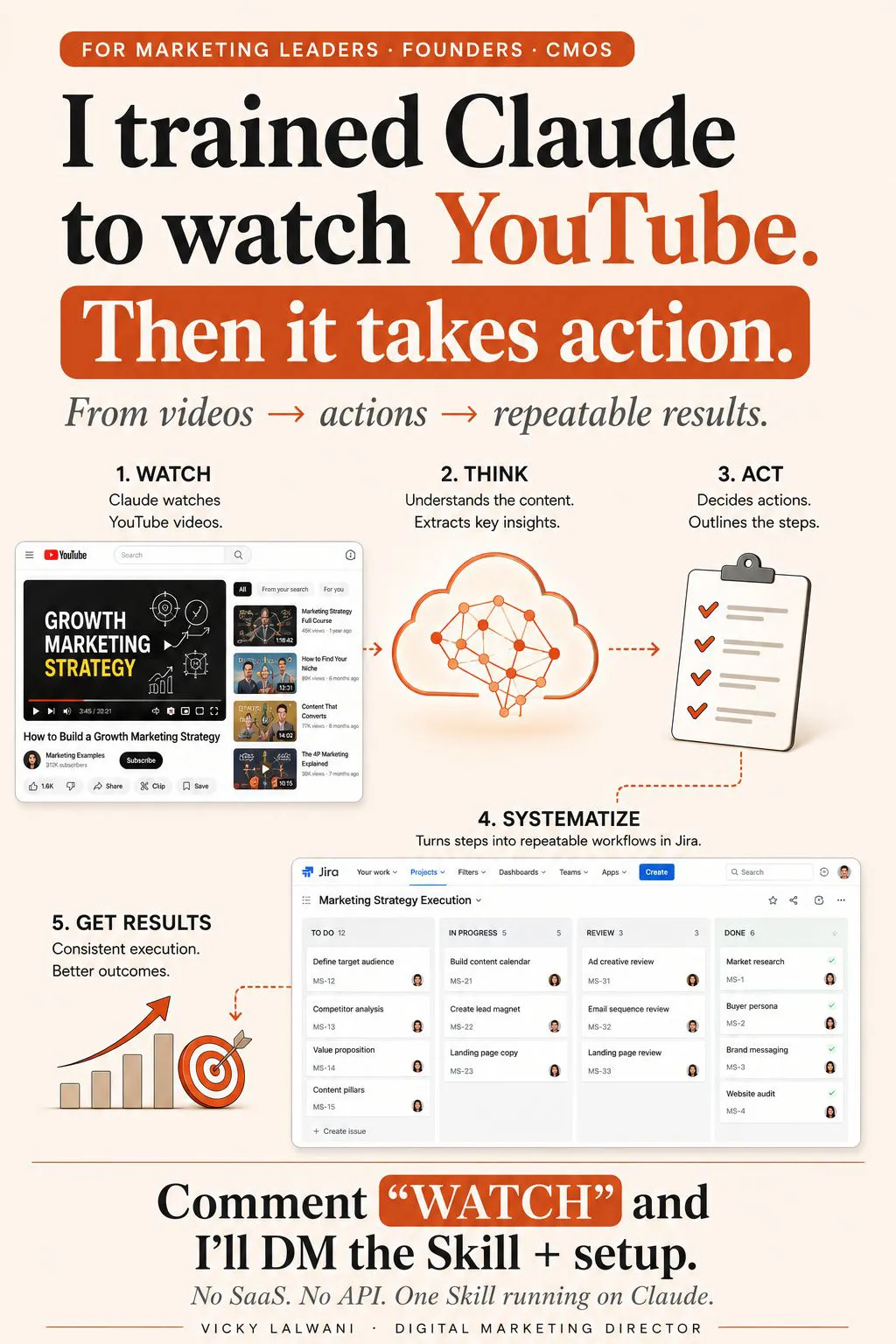
To analyze competitors' videos with AI, collect the videos they pay to show from the Google and Meta ad libraries, give a model the frames and transcript, and ask it to mark each part as shown or claimed only. Turn the gaps into tests a person approves. As of November 2026 Claude needs frames and a transcript; Gemini's API reads public YouTube links directly.
TL;DR
To analyze competitors' videos with AI, collect the videos they pay to show, get the frames and the transcript, ask a model to score each part of the video as "shown" or "claimed only", then turn the gaps into tests a person approves. The summary is the cheap part; the decision is the work.
As of November 2026, Claude does not take video files, so you give it frames and a transcript. Gemini's API reads public YouTube links directly, at about 100 tokens a second of video. A 30-second ad is about 3,000 tokens.
Start with Google's Ads Transparency Center and Meta's Ad Library, keep your notes internal, and treat every tactic you find as a test, not a fact.
Marketing teams watch a lot of competitor video, from YouTube ads and Reels to webinars and launch films, and very little of it changes what they do next week. The point of using AI here is not a nicer summary. It is a short, dated list of things to test, with an owner and a reason.
This guide covers video competitive analysis from start to finish: where to find the videos, which AI tools can actually read them in November 2026, a prompt you can copy, what it costs, the legal lines, and how to turn findings into work. For the page those ads send people to, use the companion guide on how to analyze a competitor's landing page, so the two pieces of research fit together rather than overlap. If you would rather have this built and run for you, see my AI marketing agents service.
What does competitor video analysis with AI actually involve?
Short answer: it is competitor analysis in marketing applied to video: you study what rivals show, say and ask for in their videos, and AI does the slow part of reading frames and transcripts. You still decide what matters.
Picture a Monday morning. A rival has three new video ads on YouTube and a webinar replay on their site. Watching all of it takes an hour, and the notes end up in a document nobody opens. The AI version reads every second, lines up the script with the screen, and hands you a table.
What it cannot do is tell you why a competitor chose that hook, whether the ad makes money, or whether it would work for your audience. Those answers come from your own data and your own tests.
| What you study | Where it lives | What it tells you |
|---|---|---|
| Paid video ads | Ad libraries | Hooks, offers, formats |
| Organic videos | YouTube, Reels, TikTok | Topics and angles |
| Webinars and demos | Their site, YouTube | How they sell |
| Landing pages | The ad's link | Message match |
| Comments | Under the video | Objections buyers raise |
Can Claude, ChatGPT or Gemini watch a competitor's video?
Short answer: Gemini can, through its API, for public YouTube links and uploaded files. Claude cannot take video files as of November 2026, so you give it still frames and a transcript. Transcript-only tools miss everything that is shown but not said.
This is the question that trips most people up, because "watching" means different things in different tools. Here is what each one reads, checked against the vendors' own pages on 17 November 2026.
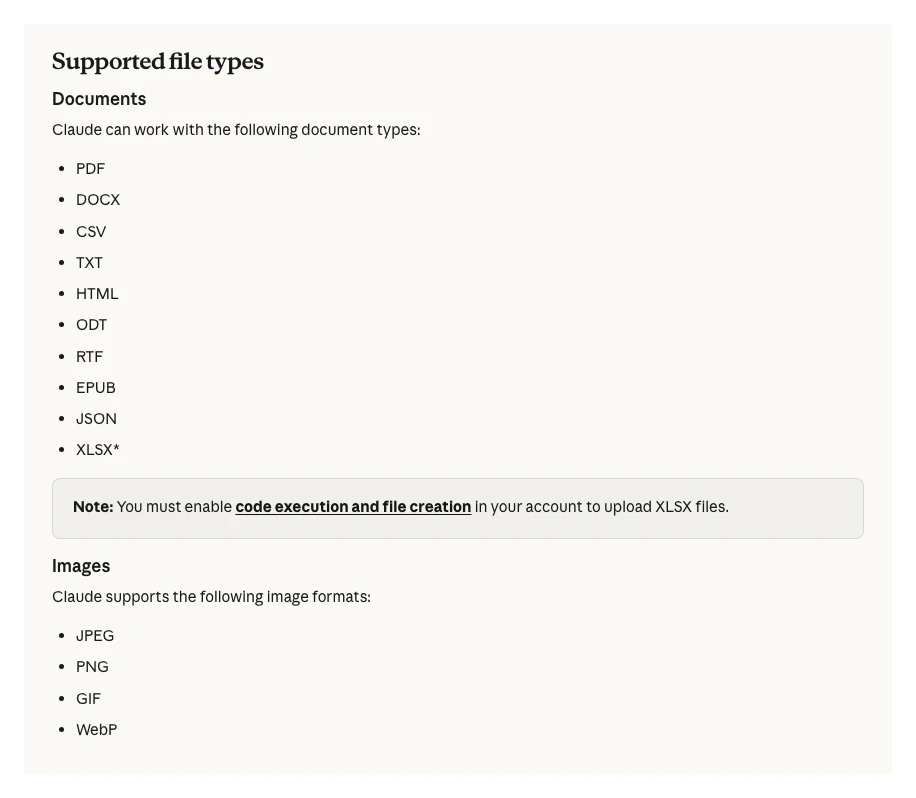
Claude. Claude's upload help page lists documents and images (JPEG, PNG, GIF and WebP) and no video formats. The Claude vision docs allow up to 600 images in one API request, so the usual route is to cut a video into frames and send them with the transcript.
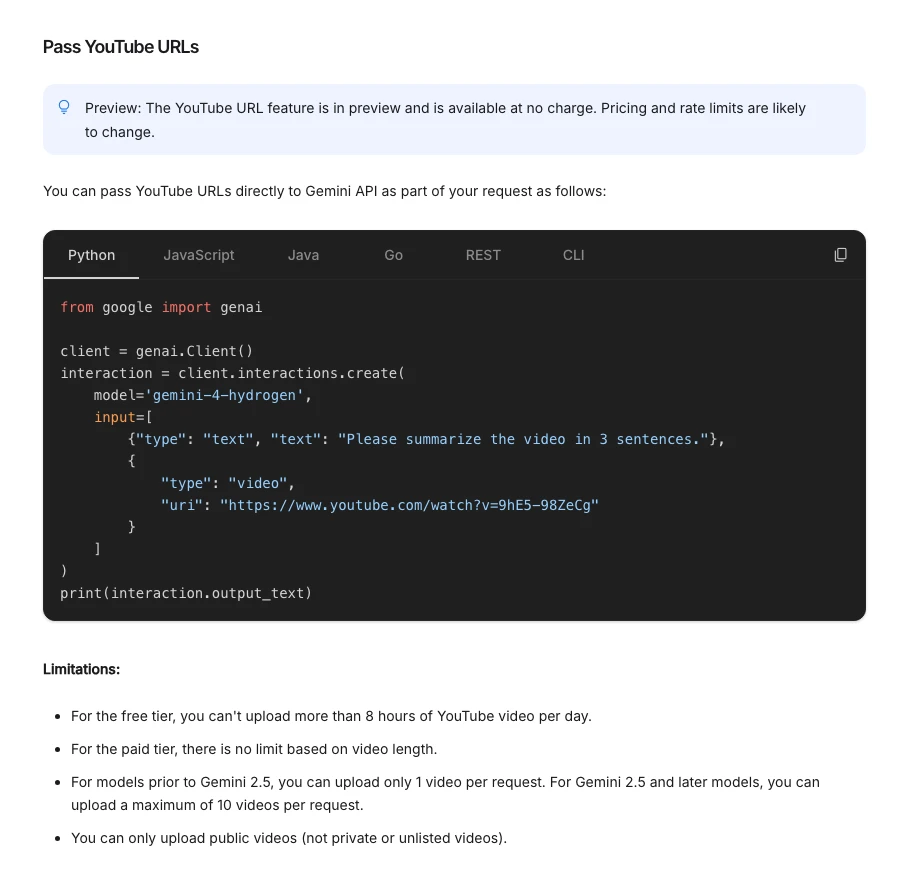
Gemini. Google's video understanding docs say you can pass a YouTube link straight into a request. The feature is in preview and free of charge for now. Only public videos work, the free tier stops at 8 hours of YouTube video a day, and newer models take up to 10 videos per request.
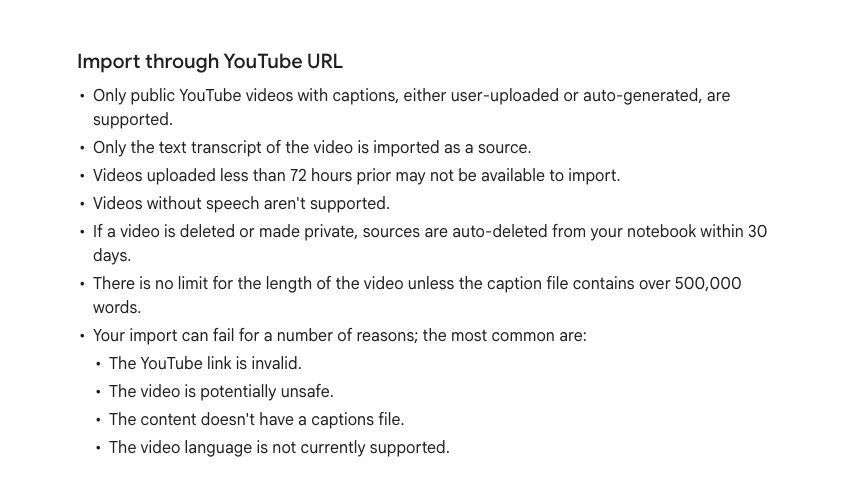
Gemini Notebook (formerly NotebookLM). It takes YouTube links as sources, but Google's help page says only the text transcript is imported, and only for public videos with captions. Good for webinars and talks; useless for an ad whose message is mostly on screen.
| Tool | What it reads | Main limit |
|---|---|---|
| Claude | Frames + transcript you supply | No video files |
| Gemini API | Video and audio from a link or file | Public YouTube only |
| Gemini Notebook | Transcript | No visuals |
| Your own script | Frames via FFmpeg, audio via Whisper | You need the file |
If you do have the file (your own exports, or a video the owner lets you use), FFmpeg's fps filter pulls one frame a second, and the open-source Whisper model transcribes the audio on your own machine. One update worth knowing: OpenAI's speech-to-text guide now lists whisper-1 in its API as deprecated, with a shutdown date of 26 February 2027, and points to newer transcription models.
Where do you find the videos competitors pay to show?
Short answer: in the free public ad libraries: Google's Ads Transparency Center for Google and YouTube ads, and Meta's Ad Library for Facebook and Instagram. Neither shows spend or results for ordinary commercial ads.
Paid videos matter more than organic ones, because someone is paying to keep them running. A rival's YouTube channel shows what they want to say. Their ads show what they are willing to fund.
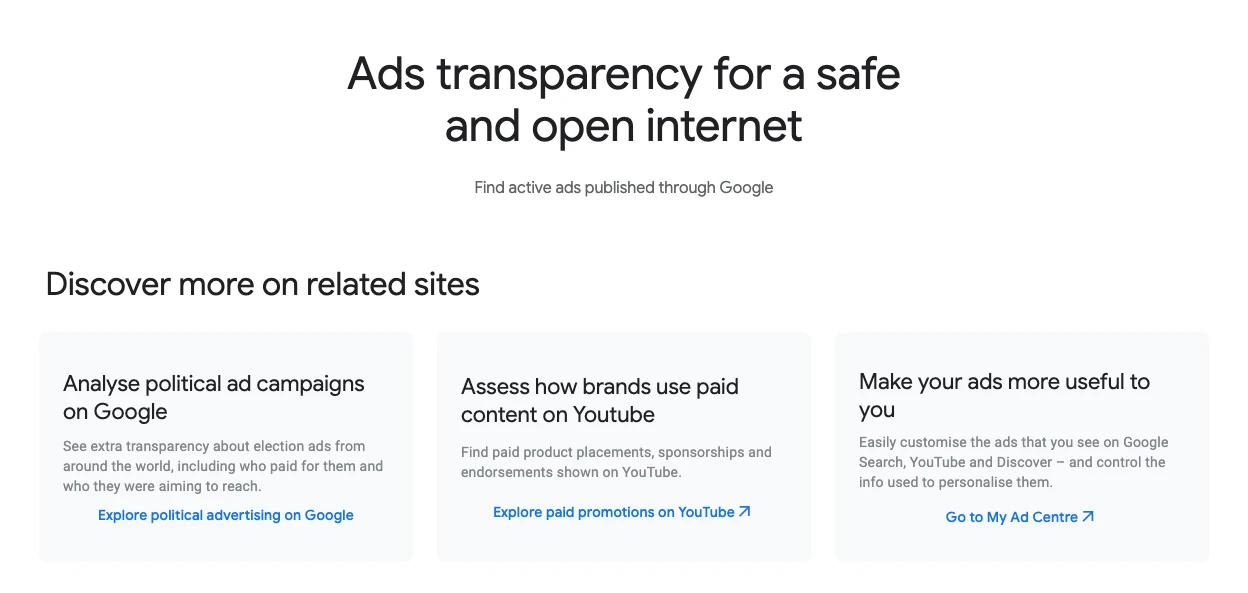
Meta's own page says people can search all active ads running across Meta products. Ads about social issues, elections and politics stay for seven years, and ads delivered in the EU are archived for a year after they stop. Outside those cases, assume an ad disappears when it stops running, so save the link and the date when you see it.
| Source | Covers | Shows spend? |
|---|---|---|
| Ads Transparency Center | Google Search, YouTube, more | No (political only) |
| Meta Ad Library | Facebook, Instagram | No (political only) |
| Their YouTube channel | Organic and unlisted ads | No |
| Webinar replays | Sales pitch | No |
One habit makes this research far more useful: log the first date you saw each ad. An ad that keeps running for months suggests it works for them. An ad that vanishes in a week probably did not. That is a clue, not proof, and the r/PPC thread further down makes the same point.
How to analyze competitors' videos with AI, step by step
Short answer: pick one question, collect and date the videos, get frames and a transcript, ask for a structured table, check what is shown against what is claimed, then turn the gaps into tests a person approves. Repeat monthly.
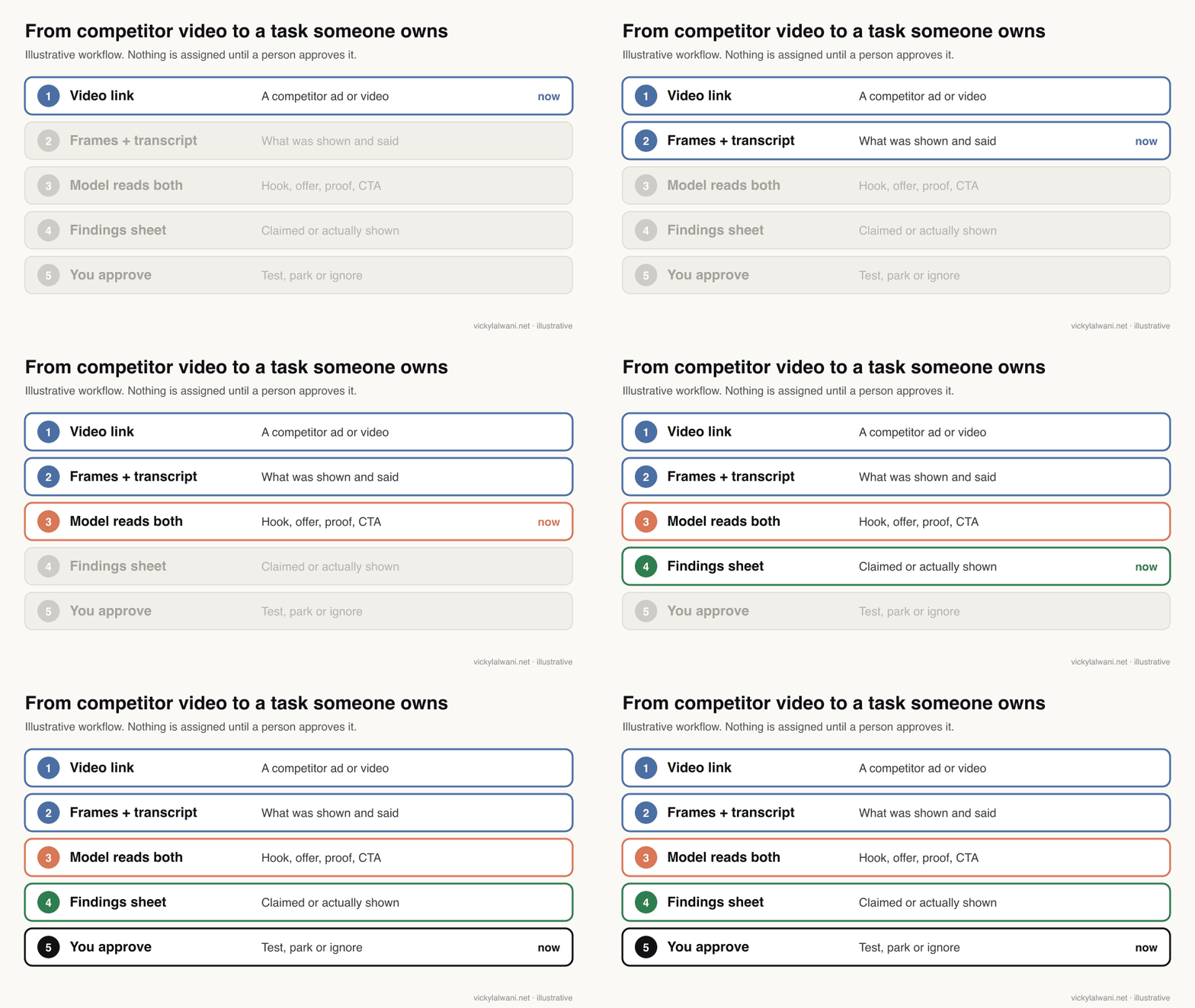
1. Start with one question
"Analyse everything" gives you a long, flat summary. "How do our three biggest rivals open their YouTube ads, and what do they offer?" gives you a table you can act on. Good questions cover the first three seconds, the offer, the proof and the call to action.
2. Collect and date the videos
Keep a sheet with the advertiser, the link, the platform, the date you first saw it and the date it stopped. Ten well-chosen videos beat a hundred random ones.
3. Get the frames and the transcript
For a public YouTube video, the Gemini API can read the link directly. For anything else, use frames plus a transcript and send both to the model of your choice. Transcript-only tools are fine for talks but miss on-screen offers, prices and demos.
4. Ask for a table, not a summary
Ask the model to split the video by time range and to say, for each part, what is said, what is shown and whether the frames prove it. The prompt below does this.
You are helping me analyse a competitor's video ad. I will give you the video (or its frames and transcript), the advertiser's name, the platform and the date I saw it.

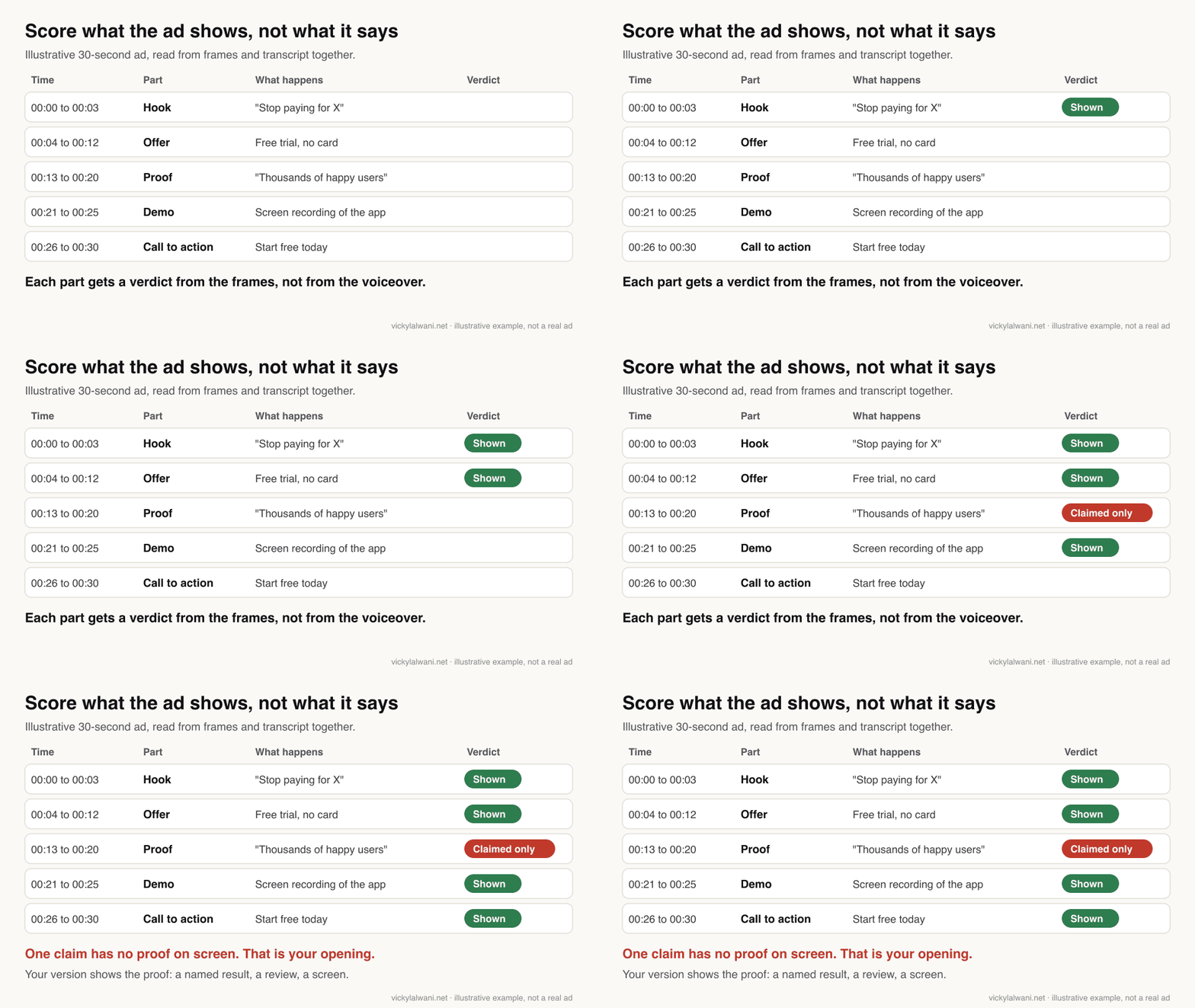
Return a table with one row per part of the video: time range (MM:SS), part (hook, problem, offer, proof, demo, call to action), what is said, what is shown on screen, and a verdict: "shown" if the frames prove it, "claimed only" if only the voiceover or text says it.

Then give me:
1. The hook in the first 3 seconds, word for word.
2. The offer and any price, trial or guarantee.
3. The landing page promise if the ad shows a URL.
4. Three ideas we could test, each as one sentence starting with a verb, with the risk if we are wrong.

Rules: do not guess spend, results or targeting; say "not visible" instead. Do not quote more than one short line of their script. Keep it under 300 words.
5. Separate "shown" from "claimed only"
This is the step most summaries skip. A voiceover saying "thousands of happy customers" is a claim. A screen recording of the product doing the job is evidence. The gaps between the two are where your own ad can win.
6. Turn findings into tasks a person approves
Each idea gets one of three labels: test, park or ignore. Only "test" items go into your project tool, with an owner and a date. The model proposes; a person decides. Parked ideas stay in the sheet so nobody rediscovers them in three months.
7. Repeat on a schedule
Run the same question every month on the same rivals. Over a few months the sheet becomes a dated record of what they tested, kept and dropped, which is far more useful than any single analysis.
How much does it cost to analyze a video with AI?
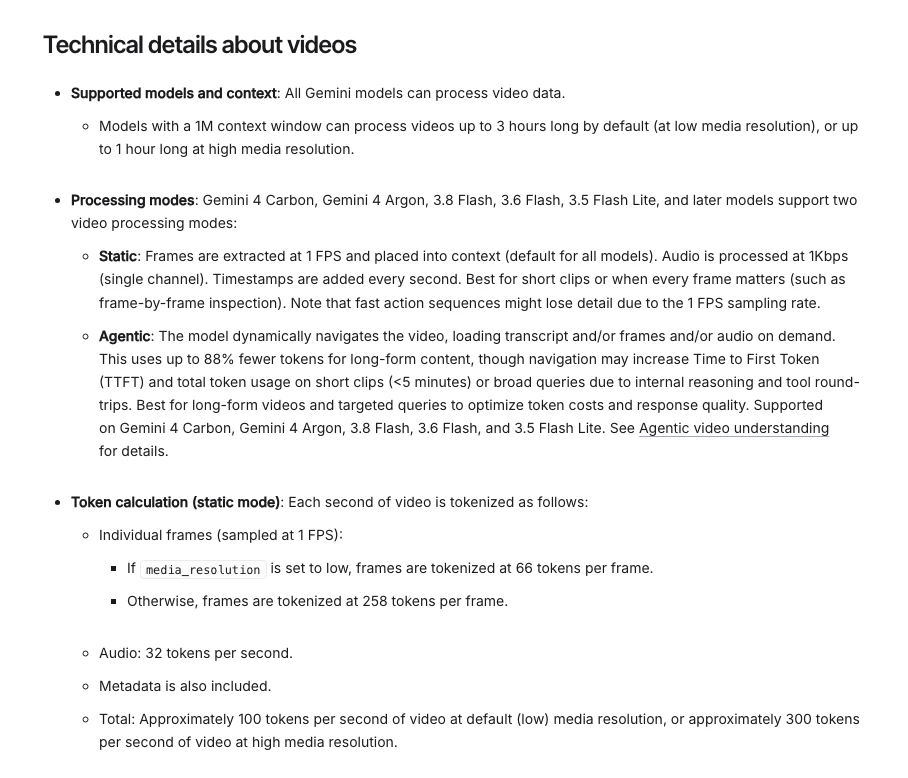
Short answer: very little for ads. In Gemini's standard (static) mode, video costs about 100 tokens a second at the default resolution and about 300 at high, so a 30-second ad is roughly 3,000 to 9,000 tokens. Long webinars are where cost adds up.
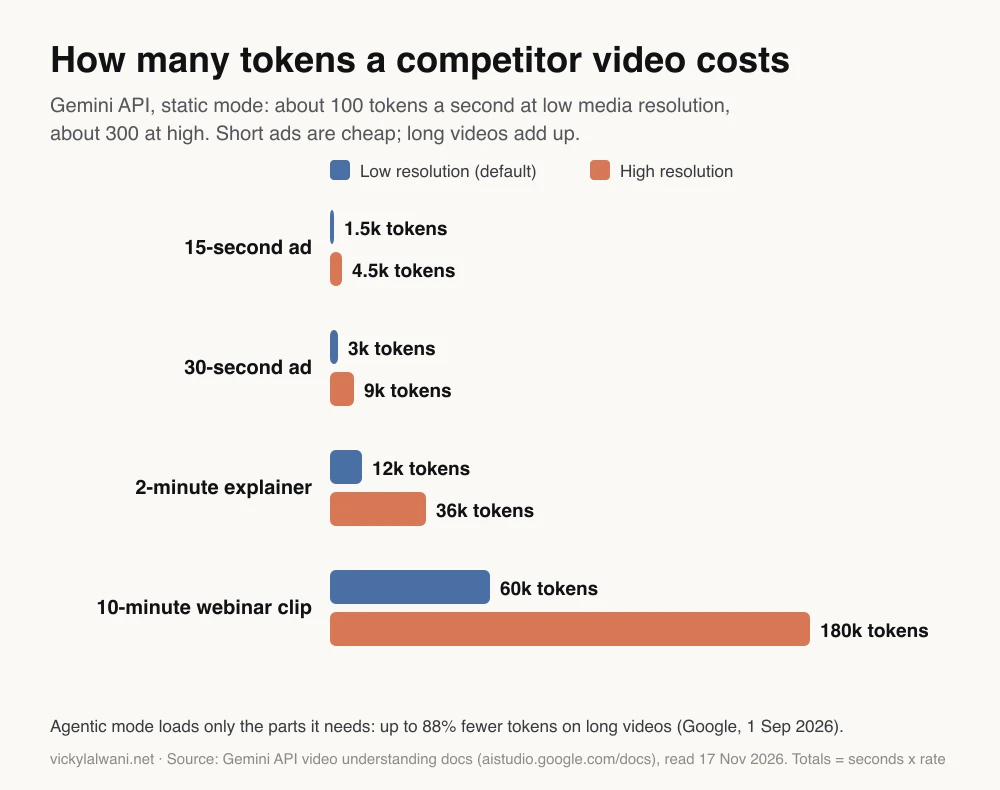
The rates come from the "technical details" section of Google's video docs: frames are sampled once a second at 66 tokens each at low resolution or 258 otherwise, plus 32 tokens a second for audio. Models with a 1 million token context window handle up to 3 hours of video at low resolution, or 1 hour at high.
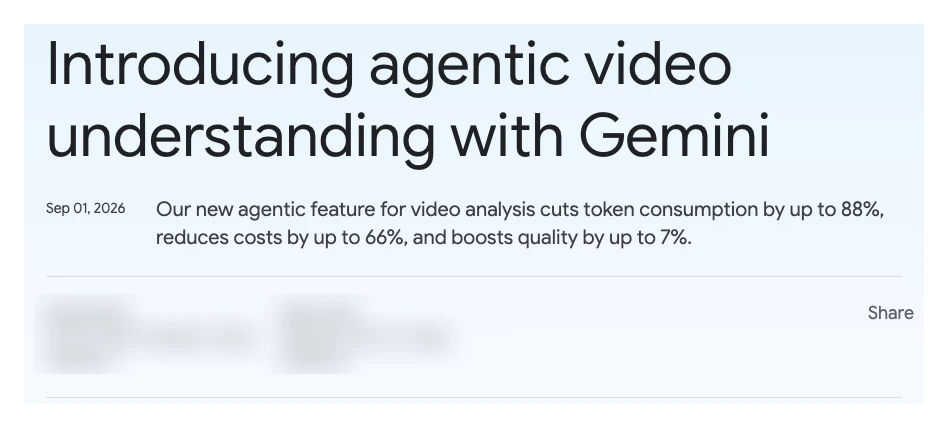
Since 1 September 2026 there is also an "agentic" mode. Instead of reading every frame, the model checks the transcript first and loads only the parts it needs. Google's announcement claims up to 88% fewer tokens, up to 66% lower cost and up to 7% better quality. Those are Google's own benchmark figures, and the docs warn that short clips under five minutes can use more tokens in this mode, not fewer. For 30-second ads, static mode is the sensible default.
What should you look for in a competitor's video?
Short answer: the hook in the first three seconds, the offer, the proof, the demo, the call to action and where the link goes. Note what is missing as carefully as what is there.
| Element | Question to ask | What to write down |
|---|---|---|
| Hook | What stops the scroll? | First line, word for word |
| Problem | Whose pain is named? | The audience it implies |
| Offer | What do you get? | Price, trial, guarantee |
| Proof | Shown or claimed? | Reviews, numbers, demos |
| Call to action | What is the next step? | Button or spoken ask |
| Destination | Does the page match? | Headline vs ad promise |
| Format | How long, what ratio? | Seconds, 9:16 or 16:9 |
The destination row is where video research meets landing page research. If the ad promises "set up in ten minutes" and the page opens with a pricing table, that is a gap you can use. The competitor landing page checklist covers that half in ten steps.
Is it legal to analyse competitor videos with AI?
Short answer: looking at public videos and ads for research is normal practice, but how you get the video matters. YouTube's terms bar downloading content and automated access such as scrapers unless YouTube allows it. This is not legal advice; ask a lawyer about your case.
YouTube's Terms of Service say you may not download or reproduce content unless the service expressly allows it, and may not access the service with automated means such as robots or scrapers. That rules out a lot of the "download and process" tutorials when the video belongs to someone else.
Safer routes: use Google's own API, which accepts a public YouTube link as input; read transcripts through tools that import them; view ads in the public libraries and write your own notes; and process only files you own or have permission to use. Whatever you do, keep the analysis internal and never republish a competitor's video or script.
| Approach | Risk | Notes |
|---|---|---|
| Watch and take notes | Low | Slow but clean |
| Gemini API with a link | Low | Google's own route |
| Transcript tools | Low | Misses visuals |
| Downloading others' videos | Higher | Check the terms |
| Republishing clips | High | Do not |
How I set up video research in Claude
Short answer: with a video-watching skill and a standing agent. The skill turns a video I am allowed to process into frames plus a transcript; the agent takes a link, summarises it and says what fits my site. I ask for changes, not summaries.
I installed a video-watching skill in Claude, a skill being a folder of instructions and scripts Claude loads when a task needs it. It extracts frames and a transcript so Claude can read a video it otherwise cannot. I also set up a standing agent that takes reel and video links, summarises them and applies what fits my own site.
The habit that matters is the question I ask. "Summarise this" produces notes. "What here fits us, and what would we change?" produces a short list I can approve or reject. And nothing goes live, or into a client account, until I have checked it by hand.
Videos worth watching
Short answer: Google's own short explainer on agentic video understanding, and a classic competitive analysis walkthrough. Both are free; the second is from a software company that sells marketing tools.
Agentic video understanding in Gemini, from Google for Developers, 1 September 2026. A three-minute official explainer of the new mode. It promotes Google's own API.
How To Conduct a Competitive Analysis (FREE Template), from HubSpot Marketing, August 2022. The basics of competitor analysis in marketing, before any AI. It links a free template from a software vendor.
| Video | Channel | Date | What it covers |
|---|---|---|---|
| Agentic video understanding in Gemini | Google for Developers | Sep 2026 | Agentic mode |
| Building with Gemini 2.0: Video understanding | Google for Developers | Dec 2024 | Video input basics |
| How To Conduct a Competitive Analysis | HubSpot Marketing | Aug 2022 | Classic method |
| How I Use Claude to Spy on Competitors' Ads | Markifact (tool vendor) | Jul 2026 | Claude and ad libraries |
| Claude Code + Gemini Video Analysis | A developer tutorial channel | Jun 2026 | Skill setup |
| How To Spy On Your Competitors Meta Ads for FREE! | A Meta ads agency channel | Apr 2026 | Meta Ad Library |
What people say on X and Reddit
Short answer: practitioners agree on two things: long-running ads are a useful signal, and AI output is a first draft. The loudest posts are launch hype or tool sales, so weigh them accordingly.
Each post and thread was opened and checked on 17 November 2026. X posts were confirmed through X's own embed service; Reddit threads are credited by community only.
| Where | Date | What it says | Type |
|---|---|---|---|
| Google AI Studio, X | 1 Sep 2026 | Launches agentic video: the model picks what to watch | Official |
| A Google DeepMind team member, X | 1 Sep 2026 | Tools instead of 200k tokens; 88% fewer tokens | Vendor staff |
| An AI news account, X | 1 Sep 2026 | Calls it "massive"; repeats the 88% and 66% claims | Opinion |
| An SEO creator, X | 4 Sep 2026 | Skim a 1-hour call first, then inspect the useful parts | Opinion, sells an SOP |
| An ecommerce ad creator, X | 31 Oct 2026 | "Copy what's working in the market" | Opinion |
| An ad tool builder, X | 13 Aug 2026 | Claude watching competitor ads every week | Vendor |
| r/PPC | Oct 2026 | Weekly report of new and stopped competitor ads; no spend shown | First-hand, uses a paid data tool |
| r/PPC | Sep 2026 | 40+ ads read: templates reused across cities, CTA follows funnel stage | First-hand |
| r/GeminiAI | Oct 2026 | Paste a YouTube link, ask for steps with timestamps | First-hand |
| r/GeminiAI | Oct 2026 | Video context lost after a page refresh in AI Studio | First-hand, bug report |
The most practical post is the r/PPC weekly report: the useful signal was which competitor ads stopped, not which ones started. The most useful warning is the r/GeminiAI bug report: if a video drops out of the conversation, re-attach it rather than trusting an answer that may no longer be based on it.
Where this approach is weak
Short answer: you cannot see a competitor's results, the model can misread fast cuts, and copying a rival's ad copies their assumptions about their audience, not yours.
- No results data. Ad libraries do not show spend, clicks or sales for ordinary ads. Run length is a hint, nothing more.
- Fast edits. Google's docs note that one frame a second can lose detail in fast action. Ask for a higher frame rate on short ads if detail matters.
- Confident errors. Models will describe things that are not on screen. Spot-check a few timestamps yourself.
- Different audiences. A hook that works for a rival's buyers may not work for yours. Test before you roll out.
- Tools change fast. The model names and limits here were correct on 17 November 2026 and will move. Check the linked docs before you build on them.
Want help building a competitor video workflow?
Short answer: I can set up the collection sheet, the prompt and the approval step around the tools you already use, and connect the findings to your ad testing.
See my AI marketing agents service for research agents and skills, or Google Ads management and Meta ads if you want the findings turned into tested ads. Rates are on the pricing page.
Keep reading: How to analyze a competitor's landing page, Claude marketing skills and AI agents for PPC.
Sources
| Source | What it supports | Date |
|---|---|---|
| Gemini API: Video understanding | YouTube links, limits, tokens, modes | Read 17 Nov 2026 |
| Google: Introducing agentic video understanding | 88%, 66%, 7% claims | 1 Sep 2026 |
| Gemini Notebook Help: add sources | Transcript-only YouTube import | Read 17 Nov 2026 |
| Claude Help: upload files | Supported file types | Read 17 Nov 2026 |
| Claude docs: vision | Up to 600 images per request | Read 17 Nov 2026 |
| Claude Help: what are skills | Definition of a skill | Read 17 Nov 2026 |
| Google Ads Transparency Center | Active Google and YouTube ads | Read 17 Nov 2026 |
| Meta: Ad Library tools | Active ads, retention rules | Read 17 Nov 2026 |
| YouTube Terms of Service | Download and scraper limits | Effective 5 Jan 2022 |
| OpenAI: speech to text | whisper-1 deprecation date | Read 17 Nov 2026 |
| OpenAI Whisper on GitHub | Open-source transcription | Read 17 Nov 2026 |
| FFmpeg filters: fps | Frame extraction | Read 17 Nov 2026 |
| Google AI Studio, X | Launches agentic video: the model picks what to watch | 1 Sep 2026 |
| A Google DeepMind team member, X | Tools instead of 200k tokens; 88% fewer tokens | 1 Sep 2026 |
| An AI news account, X | Calls it "massive"; repeats the 88% and 66% claims | 1 Sep 2026 |
| An SEO creator, X | Skim a 1-hour call first, then inspect the useful parts | 4 Sep 2026 |
| An ecommerce ad creator, X | "Copy what's working in the market" | 31 Oct 2026 |
| An ad tool builder, X | Claude watching competitor ads every week | 13 Aug 2026 |
| r/PPC | Weekly report of new and stopped competitor ads; no spend shown | Oct 2026 |
| r/PPC | 40+ ads read: templates reused across cities, CTA follows funnel stage | Sep 2026 |
| r/GeminiAI | Paste a YouTube link, ask for steps with timestamps | Oct 2026 |
| r/GeminiAI | Video context lost after a page refresh in AI Studio | Oct 2026 |
This article expands on my post on LinkedIn ↗.
FAQ
How do you analyze competitors' videos with AI?
Collect the videos competitors pay to show from Google's Ads Transparency Center and Meta's Ad Library, then give an AI model the frames and transcript of each one. Ask for a table that splits the video by time and marks each part as shown or claimed only. Turn the gaps into tests that a person approves before anything is assigned.
Can Claude watch a YouTube video?
Not directly. As of November 2026, Claude's upload page lists documents and images but no video formats, so you give Claude still frames and a transcript instead. Claude's API accepts up to 600 images in one request, which covers a short ad at one frame a second.
Can Gemini analyse a YouTube video from a link?
Yes. Google's Gemini API accepts a public YouTube link directly as part of a request, in preview and free of charge for now. The free tier is limited to 8 hours of YouTube video a day, and private or unlisted videos are not supported.
How many tokens does a video use in Gemini?
In standard static mode, Google's docs give about 100 tokens per second of video at the default low resolution and about 300 at high resolution. A 30-second ad is therefore roughly 3,000 to 9,000 tokens. Agentic mode can use up to 88% fewer tokens on long videos, by Google's own figures.
Where can I see my competitors' video ads?
Google's Ads Transparency Center shows active ads published through Google, including YouTube, and Meta's Ad Library shows active ads across Facebook and Instagram. Neither shows spend or results for ordinary commercial ads, so log the dates you see each ad.
Is it legal to analyse competitor videos with AI?
Viewing public videos and ads for internal research is common practice, but YouTube's terms bar downloading content and scraping without permission. Using Google's API with a public link, reading transcripts and taking your own notes avoid most of that risk. This is not legal advice, so check your own case with a lawyer.
Does NotebookLM watch YouTube videos?
No. Google's help page for Gemini Notebook, the new name for NotebookLM, says only the text transcript of a YouTube video is imported as a source. It needs a public video with captions, so it misses anything shown on screen but not said.
What should I look for in a competitor's video ad?
Look at the hook in the first three seconds, the offer, the proof, any product demo, the call to action and the page the ad links to. Mark whether each claim is shown on screen or only spoken. Unproven claims and pages that do not match the ad are the clearest openings for your own ads.
Should AI create tasks from competitor research automatically?
No. Let the model propose ideas labelled test, park or ignore, then have a person approve which tests go into the project tool with an owner and a date. Automatic assignment fills boards with untested copying of a rival's assumptions.