Always on AI agents keep working after you close the chat, started by a schedule or a trigger. In November 2026 Claude, ChatGPT, Gemini and Grok run them in the cloud, while Claude Desktop local tasks and n8n Nod stop when your computer sleeps. For Google Ads and SEO, let them read and draft, keep every change behind one approval list, and make them report even when nothing is wrong.
TL;DR
An always on AI agent is a saved job that starts without you, runs somewhere other than your open laptop, and reaches you only when it has something to report or needs a decision. In November 2026 that means Claude's Cowork and Claude Code scheduled tasks, Claude Managed Agents, ChatGPT scheduled tasks and Work, Gemini tasks, Grok Automations and n8n's Nod.
They differ in three ways that matter: whether they keep running when your computer sleeps, what can start them (a clock, an email, an API call), and what happens when they need permission and nobody is there. The last one decides whether an overnight job finishes, waits or quietly skips a step.
For SEO and Google Ads, let the agent read, compare and draft, and keep every change behind a person. Start with one watchdog job, make it report even when nothing is wrong, and review it at the same time each morning.
Short answer: always on AI agents are assistants that keep working after you close the chat, on a schedule or a trigger, with memory and connections to your tools. Set one up by choosing a product that runs in the cloud, giving it read-only access, writing down what it may do alone, and having it draft every change for a person to approve.
You close the laptop on Friday evening. By Monday, a broken checkout tag has stopped conversions recording for two days, Smart Bidding has started to pull back, and nobody noticed because nobody was looking. This is the job people now hand to an always on agent: not to run the account, but to look at it while you are not.
When this article was first written, "always on" was mostly a promise. Since then the vendors have shipped it, renamed it and, in one case, withdrawn it. This version checks every product detail against the vendor's own documentation as of 18 November 2026 and uses two examples throughout: Google Ads monitoring and SEO monitoring. If you want the jobs scoped and built for your accounts, that is what my AI marketing agents work covers.
Two companion guides go deeper and are not repeated here. AI marketing automation lists 15 SEO and PPC jobs and the hour each one's data is ready. Human in the loop AI for Google Ads covers the approval list for overnight Google Ads agents in detail.
What is an always on AI agent?
Short answer: it is an AI assistant with four parts: a trigger that does not need you (a schedule, an email, an API call), somewhere to run when your computer is off, connections to your data, and a rule for what happens when it needs permission. Memory between runs is common but not required.
A chat assistant waits for you to type. An always on agent starts itself. In practice that is usually a scheduled task: a saved prompt that runs at set times. Some products also take event triggers, such as a new email in a filtered inbox or a call from another system.
| Part | What it means | What to check |
|---|---|---|
| Trigger | Schedule, email, API or event | Minimum interval, time zone |
| Where it runs | Vendor cloud or your machine | Does it stop when you sleep? |
| Connections | Connectors, MCP, browser | Read-only or write access? |
| Approvals | What it does when unsure | Wait, skip or act? |
| Memory | What carries between runs | Can you see and edit it? |
The word "agent" is doing a lot of work in vendor marketing. A scheduled task that writes a summary is useful, but it is closer to a smart cron job than to a colleague. That is fine. For monitoring, predictable beats clever.
Which always on AI agents can you use in November 2026?
Short answer: eight products are worth knowing. Claude Cowork scheduled tasks, Claude Code cloud tasks, Claude Managed Agents, ChatGPT scheduled tasks and Gemini tasks run in the vendor's cloud; Claude Desktop local tasks and n8n's Nod stop when your computer sleeps; Grok Automations run from grok.com and the Grok app.
| Product | Laptop shut? | Starts on | Needs a yes? |
|---|---|---|---|
| Claude Cowork scheduled task | Yes | Hourly to weekly | May wait or skip the tool |
| Claude Code cloud task | Yes | Schedule, API, GitHub | Auto mode, some waits |
| Claude Desktop local task | No | Schedule | Set per task |
| Claude Managed Agents | Yes | Cron schedule, API | Permission policy |
| ChatGPT scheduled task | Yes | Schedule, app events | May pause the task |
| Gemini task | Mostly | Schedule or event | Some confirm; some may not |
| Grok Automations | Yes | Schedule, email | Not stated |
| n8n Nod | No | Schedule, chat | Separate check asks |
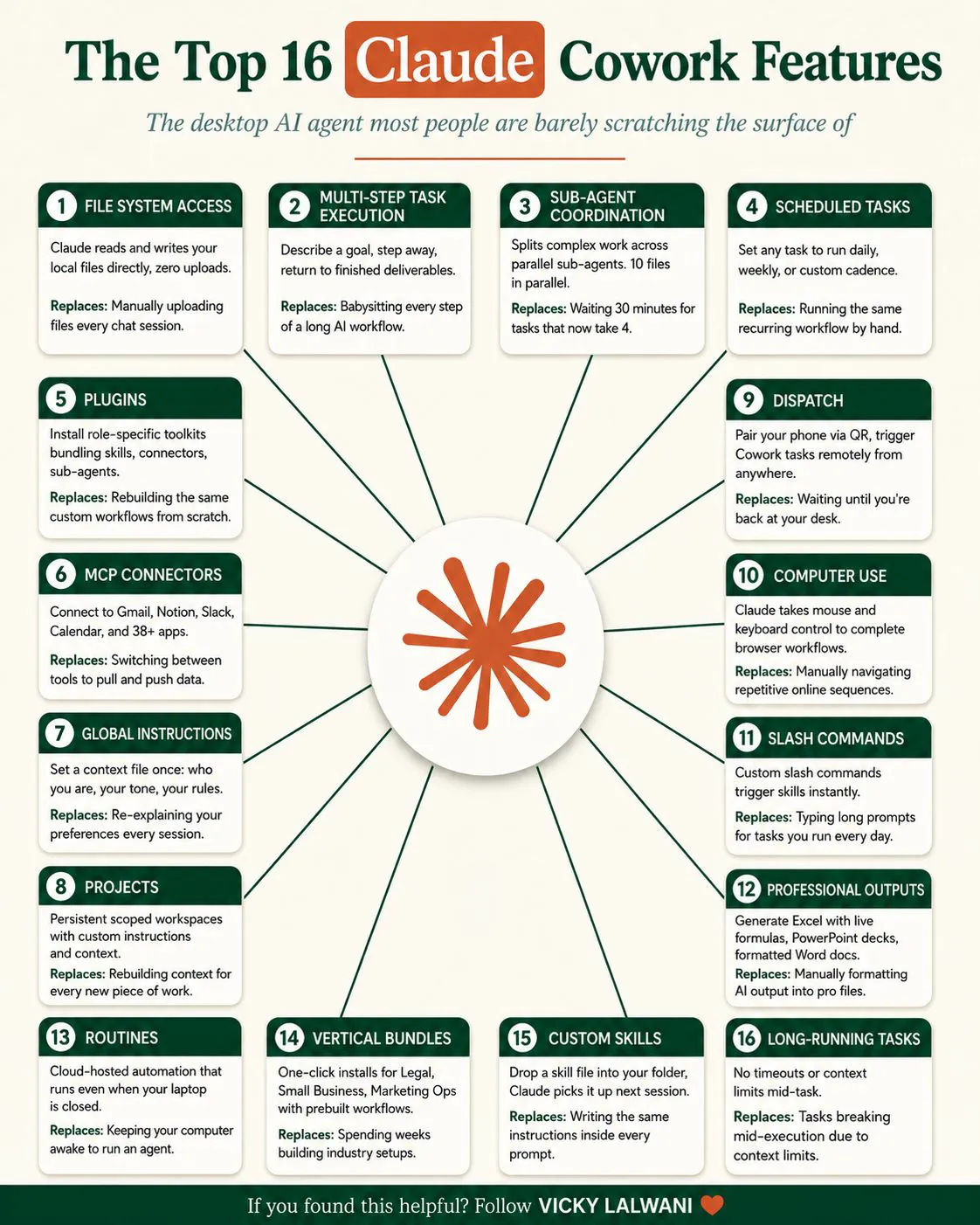
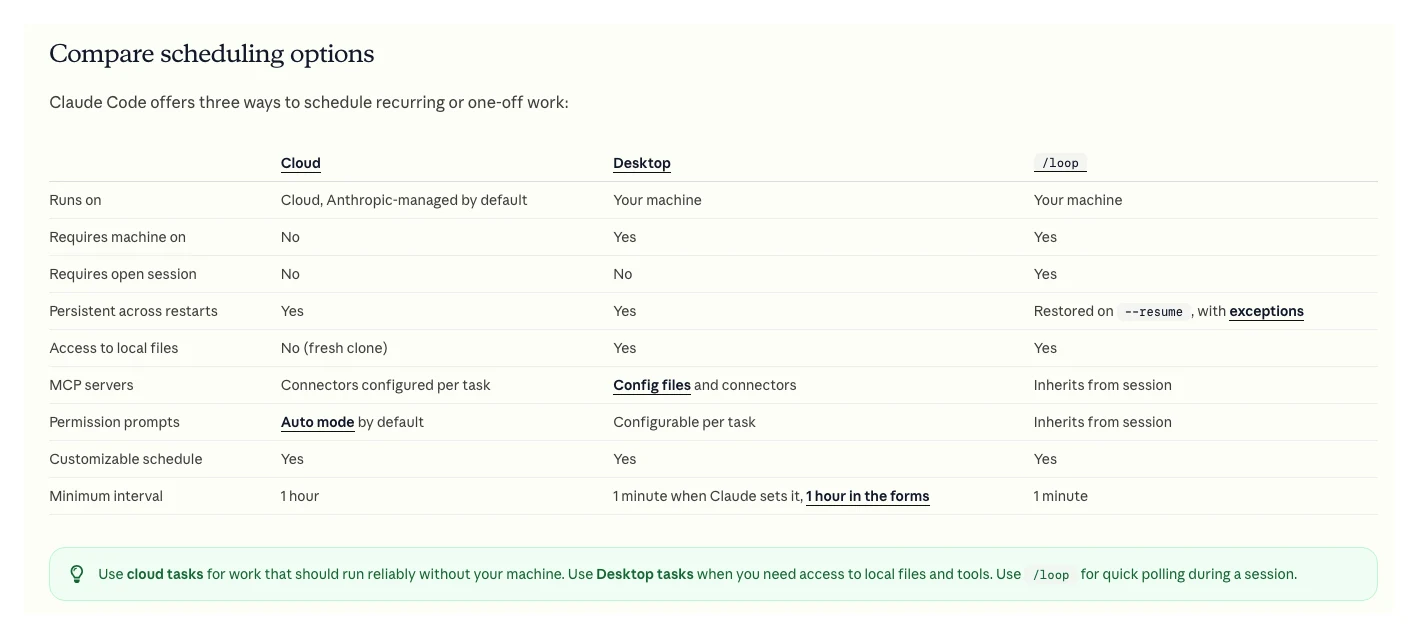
Claude. Anthropic now has three always on options for marketers. Cowork scheduled tasks are on all paid plans, run hourly, daily, weekly, on weekdays or manually, and run remotely even when your computer is asleep, unless you pick a local folder. Claude Code cloud scheduled tasks, renamed from routines, are in research preview and can start on a schedule, an API call or a GitHub event, at most hourly. Desktop local tasks need the app open and the computer awake. For developers, Claude Managed Agents adds scheduled deployments on the API.
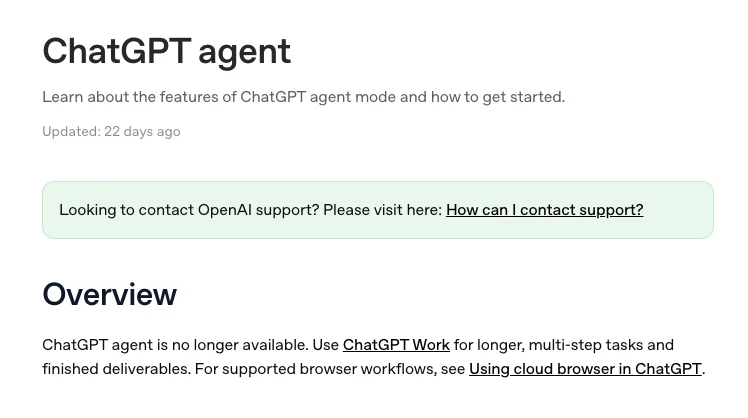
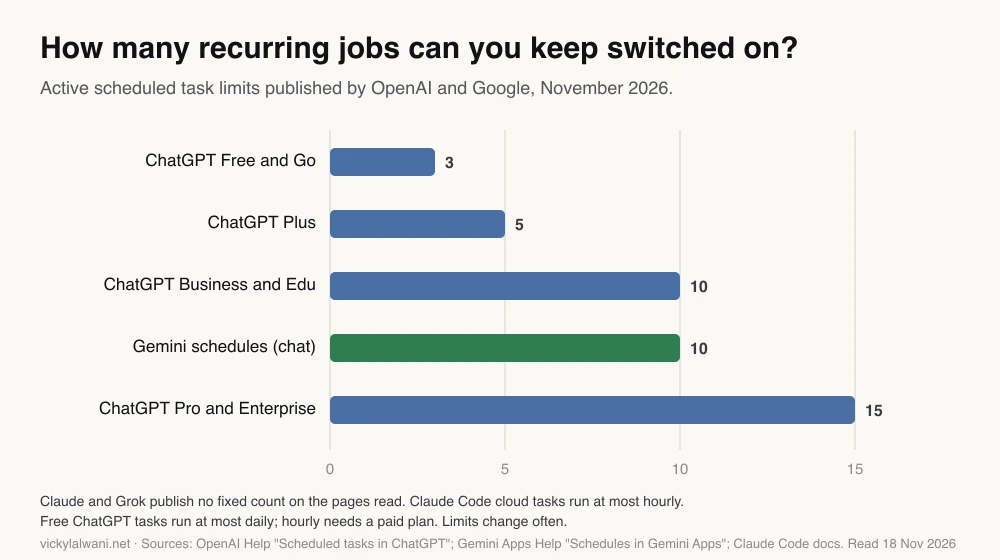
ChatGPT. The biggest change since this article first ran: OpenAI's help page now says ChatGPT agent is no longer available and points to ChatGPT Work for longer tasks. Scheduled tasks remain. Active task limits are 3 on Free and Go, 5 on Plus, 10 on Business and Edu, and 15 on Pro and Enterprise. Event-triggered tasks run in Work and respond to Gmail, Slack or GitHub activity on paid plans, and OpenAI says actions that require approval may pause the task.
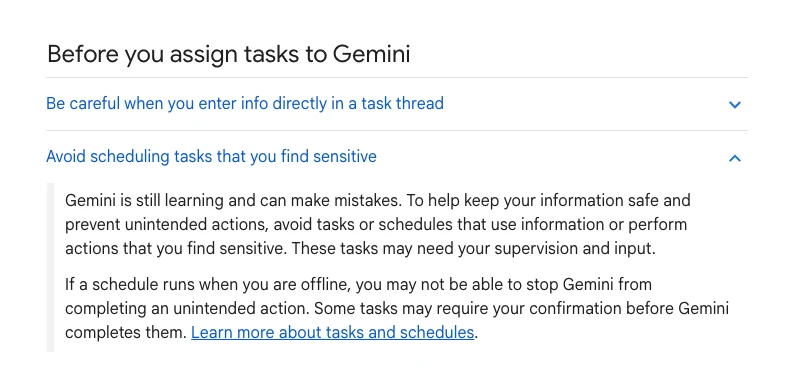
Gemini. Google launched Spark in May 2026 as a background agent; its help page now describes it as tasks in Gemini, started from the same box as a chat. Tasks are for personal Google Accounts only for now, and availability varies by country and plan. Google's own warning is the clearest statement of the risk any vendor has published: if a schedule runs when you are offline, you may not be able to stop an unintended action. Separately, ordinary chat schedules allow up to 10 active schedules, prepared within the hour before delivery.
Grok. xAI launched Automations on 16 July 2026: describe a job once and Grok runs it once, daily, on weekdays, weekly, monthly or yearly, or when an email matching a sender, recipient or subject arrives. Scheduled automations are open to everyone; email triggers need SuperGrok. Each run is a full conversation saved to run history. The announcement says nothing about approvals, so treat it as a reader and summariser, not something to connect to an ad account.
n8n Nod. Released on 10 November 2026 as a research preview, Nod is a free, open source agent with its own sandbox and browser on your computer. Before it sends, pays, posts or deletes anything you did not ask for, a separate check confirms you asked for it, and n8n notes that check is itself a model. It stops when your laptop sleeps. The n8n Nod guide covers it for marketers.
What has changed since 2025?
Short answer: the products moved from chat features to scheduled jobs with their own pages, two were renamed, one was withdrawn and two new ones arrived. The lesson for monitoring is to build on the scheduler, not on a feature name, and to check every few months that the job still runs.
| Date | Change | Source |
|---|---|---|
| 14 Apr 2026 | Claude Code routines launch | Claude on X |
| May 2026 | Gemini Spark announced | |
| 10 Jun 2026 | Managed Agents scheduled deployments | Claude on X |
| 17 Jun 2026 | ChatGPT Scheduled page rebuilt | ChatGPT on X |
| By Jul 2026 | ChatGPT agent withdrawn; Work instead | OpenAI Help |
| 16 Jul 2026 | Grok Automations | xAI |
| Nov 2026 | Routines now "scheduled tasks"; Spark now "tasks" | Vendor docs |
| 10 Nov 2026 | n8n Nod research preview | n8n blog |
The date ChatGPT agent was withdrawn is not on OpenAI's page; the "by July" comes from a first-hand X post from 13 July 2026 by someone whose scheduled task stopped. Treat it as approximate.
What should an always on agent watch in Google Ads?
Short answer: the things that cost money while you sleep: conversion tracking falling to zero, spend pacing well over plan, disapproved ads and products, payment failures, and search terms with spend and no conversions. Simple thresholds belong in Google Ads scripts or rules; give the agent the jobs that need reading across sources and a written explanation.
| Watch | Native tool | Agent's job |
|---|---|---|
| Conversions fall to zero | Script alert | Check site, tag and CRM, explain |
| Spend pacing high | Automated rule | Compare to plan, draft a change |
| Disapprovals | Policy emails | Group by cause, best sellers first |
| Wasted search terms | Search terms report | Draft negatives with reasons |
| Budget-limited winners | Recommendations | Flag with the numbers |
Google's own account anomaly detector script can run hourly and email you when metrics move outside their normal range, at no cost. An agent is worth adding only when the alert needs context: was it a tracking fault, a site outage, a competitor, or a sale ending? Practitioners in r/PPC make the same point from the other side: a rule tells you CPA moved, not why, and an agent's theory about why still has to be checked.
Access is the part to get right first. Google's official Google Ads MCP server (a connector that lets an assistant query the account) cannot create, change, pause or enable campaigns, ad groups, ads, budgets or bids. Its few write tools use a propose-and-confirm step, and it can be set to read-only. For a watchdog, read-only is the right setting.
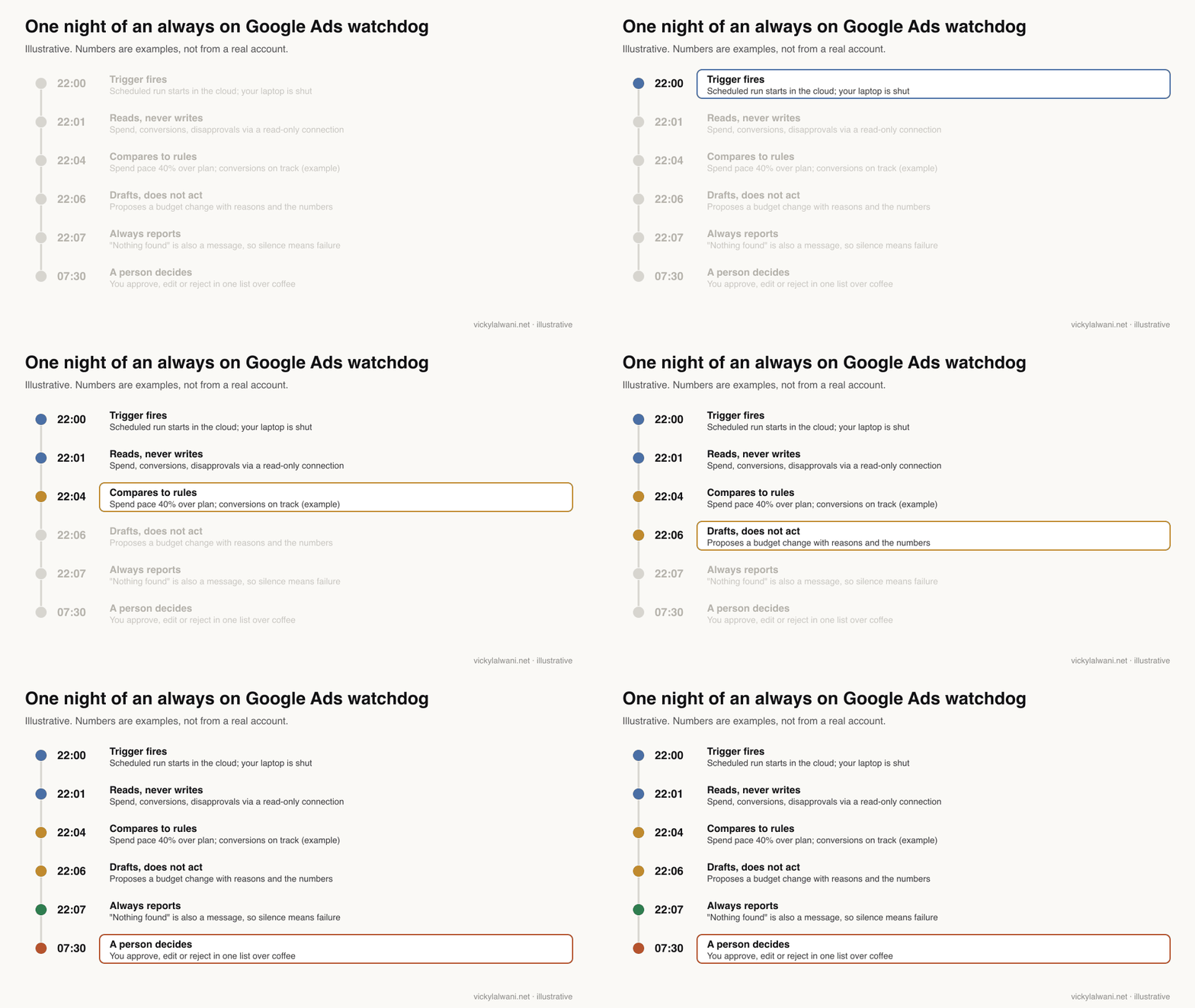
On client ad accounts my rule is the same whether the work is done by me or by an agent: audit first, put every finding in a sheet with a manual check column, and make no changes before approval. The rule earned its keep when an AI audit I ran on a client account recommended pausing a keyword that was bringing in conversions. The audit read the numbers correctly and drew the wrong conclusion. A person caught it because the change was a proposal, not an action.
For one retail client this autumn I scoped a daily ads watchdog as one of the first agents in their plan: a check across their Google and Meta campaigns that flags money being wasted. Writing it down forces the real questions early: what counts as waste, compared with what, and who sees the alert.
What should an always on agent watch in SEO?
Short answer: weekly, not hourly: clicks and impressions by page from Search Console, pages dropping out of the index, new 404s and redirect chains on important URLs, and changes to competitors' key pages. Make the agent confirm a drop over more than one day before it alarms anyone, because Search Console data lags and has reporting glitches.
SEO data moves slowly, so an always on SEO agent should be patient. Search Console performance data normally takes two to three days to arrive, and Google Search Central has confirmed more than once that a sudden drop in the Search Console report was a reporting issue, not an indexing or ranking one. An agent that panics on Tuesday about Saturday's data will train you to ignore it.
| Watch | How often | Alert when |
|---|---|---|
| Clicks by page | Weekly | Down two weeks running |
| Indexing of key pages | Weekly | A money page drops out |
| 404s and redirects | Weekly | An important URL breaks |
| Competitor pages | Weekly | Price, offer or title changes |
| Forms and lead flow | Daily | Leads saved but not sent |
The last row is from my own site. When enquiry emails stopped arriving earlier this month, the cause was an email service timing out: enquiries were saved but never sent. A daily lead check now looks for exactly that. It involves no clever reasoning at all, which is the point.
For the timing of each job, and which day Google's data is ready, see the AI marketing automation schedule. For connecting Search Console to an assistant, see MCP servers for SEO. If the bigger problem is the site's search performance itself, that is SEO consulting rather than automation.
What happens when an always on agent needs permission and nobody is there?
Short answer: it depends on the product. Claude Cowork may wait or finish without the tool, Claude Code cloud tasks decide in auto mode but still wait on ask rules, ChatGPT may pause the task, and Google warns a Gemini schedule may complete an unintended action while you are offline. Design jobs so they draft rather than need a yes at 3 a.m.
This is the failure people report most often with unattended agents, and I have hit it myself. The daily article job for this site was set up as a scheduled task, and for about a week it stalled on permission prompts with nobody there to answer. The workaround was to run each day's work as its own session with a self-contained brief. It was not a true fix, and it taught me to design for the missing person, not to hope they appear.
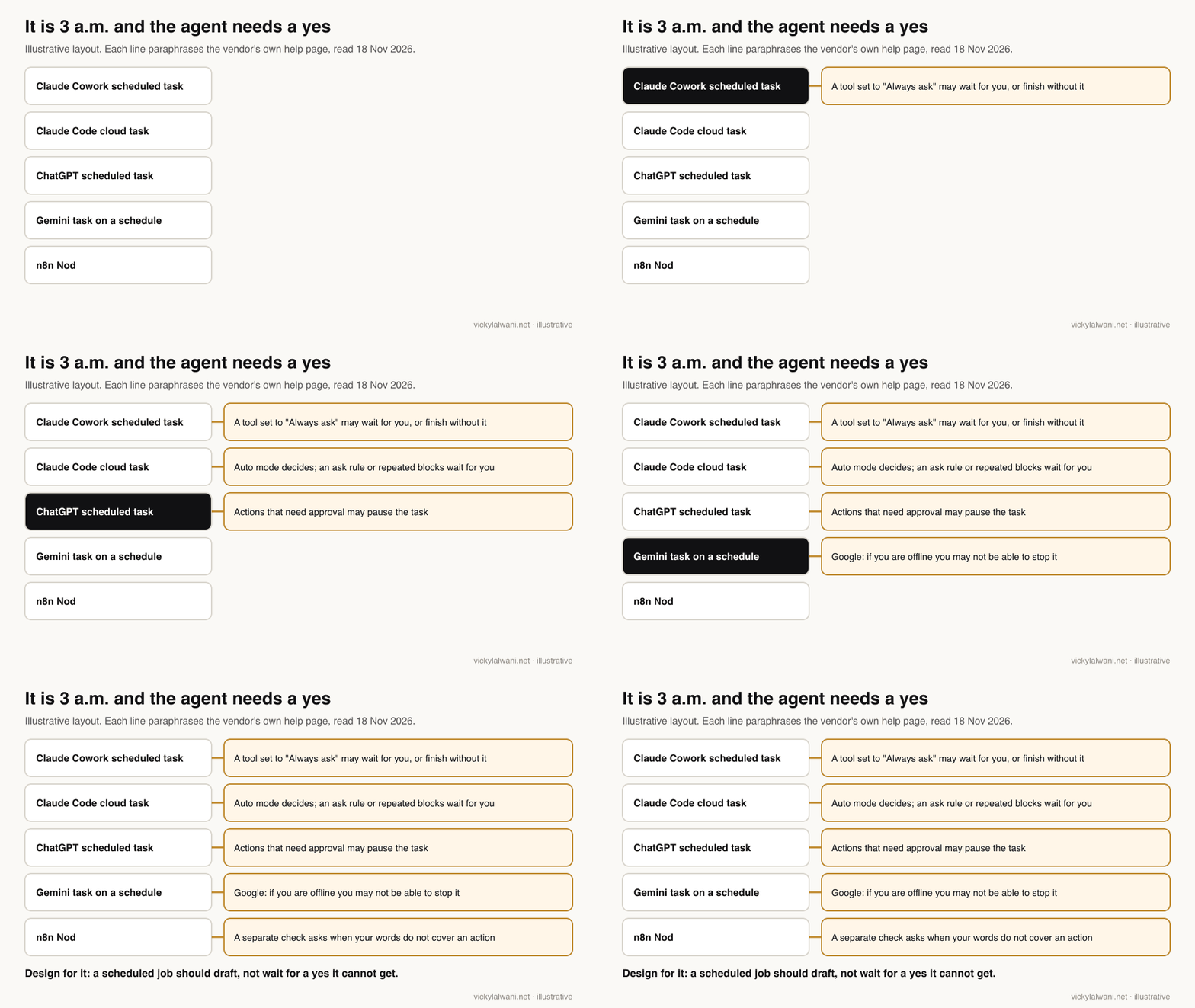
Claude Code's docs are specific: cloud runs start in auto mode, where a classifier model allows or blocks actions that would otherwise wait for you, but a run still stops and waits on an action that matches an ask rule or after repeated blocks. They also warn that all your connectors are included in a new task by default, including writes, so remove the ones the job does not need. People in r/ClaudeAI report the other side: a headless job that needed a logged-in browser was blocked on every run, and the only fix offered was a standing permission as wide as the job's widest need.
The safer pattern is the one Anthropic itself used when it promoted Cowork scheduled tasks: the brief is built and the follow-up is drafted, but not sent. Give the agent read access and a place to put drafts, and nothing that needs a live approval.
How do you make an always on agent safe to trust?
Short answer: write one page of rules (what it may do alone, what needs approval, what it must never touch), start read-only, send every proposed change to one approval list, review that list at a fixed time each day, and log every run. Add access only after two clean weeks.
- Write the rules down. One page: may do alone (read, compare, summarise), needs approval (anything that changes spend, a live page or a customer message), never (delete, pay, change user access).
- Keep one approval list. Every proposal lands in one place. I built a hub for my own AI tools around this idea, with a shared Google Sheet as the task board and approval gate.
- Start read-only. A week of reports before any drafts; drafts before any actions.
- Review at a fixed time. If nobody reads the list, the agent is creating risk, not saving time.
- Log everything. What ran, what it read, what it proposed and who approved it.
When you hand a job from one agent to another, write a hand-off pack: the context files, the task list and the expected outcome for each task. A second agent that inherits a job without that context will guess.
Here is a rules file you can paste into a Google Ads watchdog's instructions and adapt:
ROLE: Overnight Google Ads watchdog for [account name]. Read-only.
RUN: Every day at [time, time zone]. Always send a report, even if nothing is wrong.
CHECK, in this order:
1. Conversions yesterday vs the same weekday average of the last 4 weeks. Flag a fall of more than [X]%.
2. Spend today vs planned daily spend. Flag pacing over [Y]%.
3. Disapproved ads or products since the last run, grouped by reason.
4. Search terms with spend over [Z] and no conversions in 30 days.
YOU MAY: read reports, compare numbers, write a summary, draft changes with reasons.
YOU MAY NOT: change budgets, bids, keywords, ads or settings; contact anyone; delete anything.
IF UNSURE: say so in the report. Do not guess. Do not wait for an answer.
OUTPUT: 5 lines max, then a table of proposed changes (change, reason, numbers, risk).
If you could not read a data source, say which one at the top.
Why does "succeeded" not mean the agent worked?
Short answer: because a run can end normally without doing the job. Claude Code marks a run Succeeded when the session ended without a reported failure, even if a connector was missing. Make every run send a report, including "nothing found", so silence itself becomes the alarm.
Anthropic's docs say it plainly: a Succeeded run means the session ended without Claude Code reporting a failure, and blocked network requests, missing connector tools and unfinished work appear in the transcript, not on the status row. A practitioner in r/PPC who runs an overnight briefing agent across many accounts put the design rule well: "empty is better than inaccurate".
A small test in r/n8n shows why the plain parts matter. The same daily report ran for 30 days on a fixed schedule trigger and through an agent. The schedule delivered every day; the agent missed four, once because it decided to improve the report's format. Keep the clock, the inputs and the output format fixed, and let the agent work only in the middle.
| Failure | What you see | Fix |
|---|---|---|
| Stalled on a permission | No report | Read-only job, drafts only |
| Silent success | "Succeeded", nothing useful | Report must list what it read |
| Machine asleep | Runs missing | Use a cloud scheduler |
| Feature withdrawn | Job stops | Monthly "is it running?" check |
| Format drift | Report looks different | Fixed template in the rules |
| Alert fatigue | Nobody reads it | Fewer, higher thresholds |
Where should you start?
Short answer: pick one boring, rule-based job you can check by hand, run it read-only for two weeks in a cloud scheduler, and only then add a second job or any write access. For most small accounts the first job is a daily Google Ads conversion and spend check.
| Week | Do | Done when |
|---|---|---|
| 1 | Write rules, connect read-only | First report arrives |
| 2 | Check each report by hand | No false alarms for 5 days |
| 3 | Allow drafted changes | You approve or reject daily |
| 4 | Add one SEO job | Weekly report is useful |
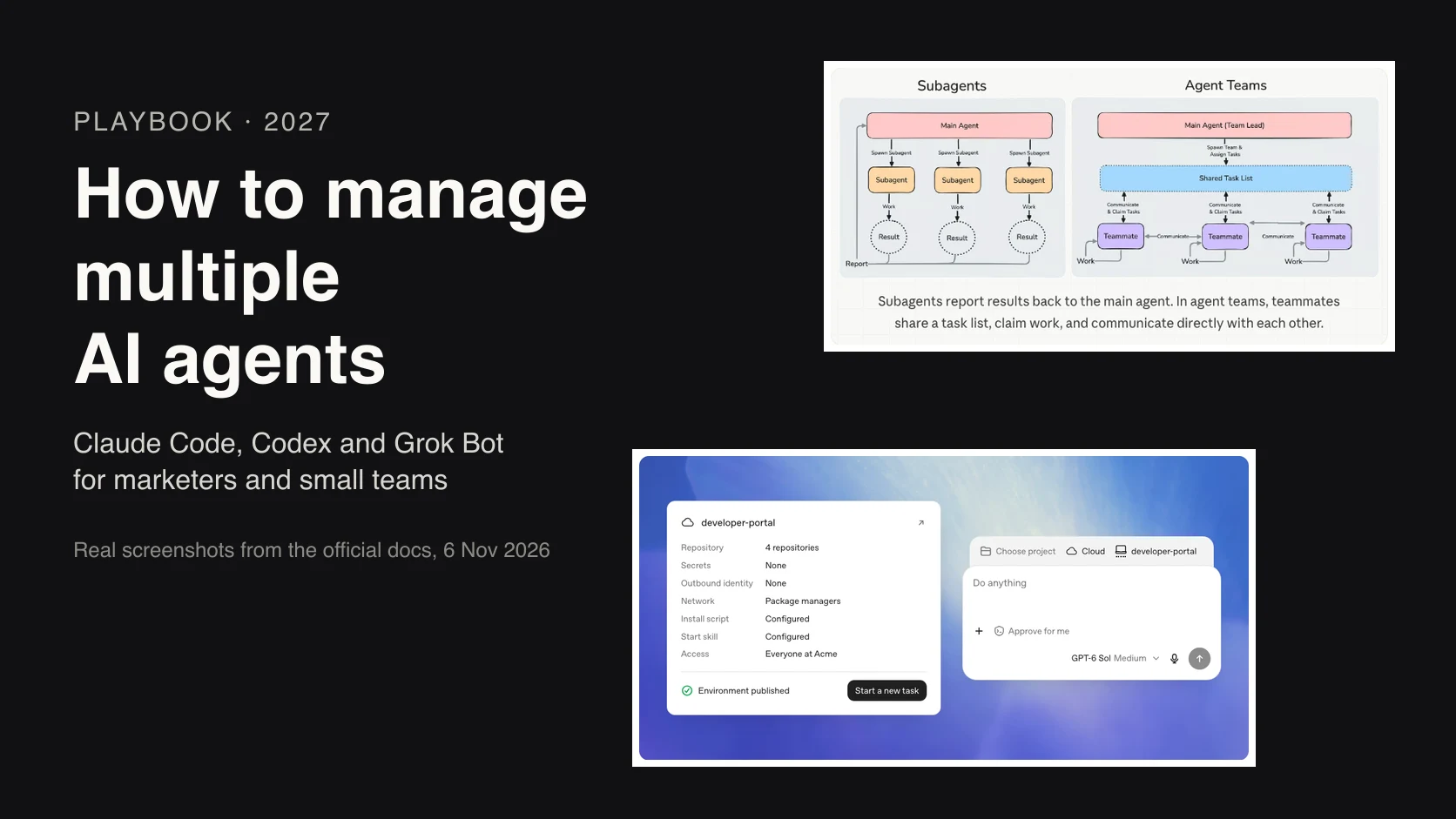
Avoid anything that spends money, contacts customers or edits live campaigns on its own. Those may come later, but they should be the last step, not the first. For the wider question of running several agents together, see how to manage multiple AI agents.
What people say on X and Reddit
Short answer: vendors sell always on agents as work done while you sleep; the people running them report stalls on permissions, silent failures and alert fatigue, and the PPC practitioners who use them keep every change behind approval.
| Who | What they said | Take it as | Link |
|---|---|---|---|
| Claude (official) | Cowork scheduled tasks run with the computer off; follow-ups are drafted, not sent (7 Jul 2026) | Vendor | X post |
| Claude (official) | Routines: set prompt, repo and connectors once; run on a schedule, API call or event (14 Apr 2026) | Vendor | X post |
| ChatGPT (official) | Scheduled tasks rebuilt around a new Scheduled page (17 Jun 2026) | Vendor | X post |
| An AI news curator | Noticed agent mode had gone only when a scheduled task that used it broke (13 Jul 2026) | First-hand | X post |
| Google Gemini (official) | Spark opens to more subscribers; watch it or let it run in the background (29 May 2026) | Vendor | X post |
| Grok (official) | Automations: scheduled runs for everyone, email triggers with SuperGrok (16 Jul 2026) | Vendor | X post |
| n8n (official) | Nod launches: open source agent on your own computer with its own browser (11 Nov 2026) | Vendor | X post |
| A performance marketer at Anthropic | Runs Google Ads through a custom Cowork plugin, API via MCP, workflows as skills (24 Mar 2026) | First-hand, vendor staff | X post |
| Google Search Central (official) | A reported Search Console anomaly was a reporting issue, not indexing or ranking (20 Nov 2023) | Official | X post |
| r/ClaudeAI | A headless scheduled job was blocked every run: nobody there to approve a tool (22 Sep 2026) | First-hand | Thread |
| r/ClaudeAI | Local scheduled tasks queued silently after a reboot until someone noticed (25 Sep 2026) | First-hand | Thread |
| r/ClaudeAI | No phone alert when a cloud run finishes; users add a Slack webhook (16 Oct 2026) | First-hand | Thread |
| r/n8n | Same daily report for 30 days: plain schedule 30 of 30, agent 26 of 30, one miss from "improving" the format (14 Apr 2026) | First-hand | Thread |
| r/AI_Agents | Automations that finish the wrong action without crashing need a named owner who can pause them (17 Nov 2026) | Opinion | Thread |
| r/PPC | Overnight briefing agent across many accounts; every edit staged for manual approval (19 Apr 2026) | First-hand | Thread |
| r/PPC | Check conversion tracking first; hourly alerts for failed cards and wrong-account builds (9 Nov 2026) | First-hand | Thread |
| r/PPC | A client wanted alerts only when something is on fire, not a daily report (2 Oct 2025) | First-hand | Thread |
| r/SEO | Search Console data into a sheet daily; replies say the trend matters, not daily ranks (18 Sep 2025) | First-hand | Thread |
Videos worth watching
Short answer: Anthropic's walkthrough builds a Claude Code scheduled task end to end, and OpenAI's two-minute video shows ChatGPT's Scheduled page. Watching both makes the differences between vendors clear quickly.
Made by Claude (Anthropic), 20 May 2026. It promotes Anthropic's own product. About 22 minutes on triggers, context and steering a scheduled job.
Made by OpenAI, 28 August 2026. It promotes OpenAI's own product. Two minutes on setting and managing scheduled tasks in ChatGPT.
| Video | Channel | Date | What it covers |
|---|---|---|---|
| Build a proactive agent workflow with Claude Code | Claude | 20 May 2026 | A cloud scheduled task end to end |
| Scheduled Tasks | OpenAI | 28 Aug 2026 | The Scheduled page in ChatGPT |
| Delegate and schedule tasks in Claude Cowork | Claude | 21 Jun 2026 | Putting a Cowork task on a schedule |
| Introducing Gemini Spark | 20 May 2026 | Gemini's background agent at launch | |
| Introducing Nod: An Open-Source Personal AI Agent from n8n | n8n | 11 Nov 2026 | Nod launch clip |
| 5 Google Ads Scripts I Can't Live Without | A PPC training channel | 5 Nov 2025 | Script alerts that need no agent |
Where this advice is weak
Short answer: the products change every few weeks, several are previews, and my own experience is with scheduled jobs on my site and audits on client accounts, not with a fleet of agents running unattended for months.
- Claude Code cloud tasks and n8n Nod are research previews; their features and limits may change without notice.
- The ChatGPT agent withdrawal date is approximate, and Gemini task availability varies by country, plan and account type.
- Grok's announcement does not describe approval behaviour, so the table says "not stated" rather than guessing.
- The watchdog rules and the four-week plan are a framework, not a measured result.
- Reddit and X reports are individual experiences; the r/n8n test was one person's 30 days.
Want help setting up an always on agent?
The useful work is deciding which jobs an agent should watch, writing the rules and keeping every change behind a person. My AI marketing agents service covers that from the rules page to the morning review. If the gap is the account itself, see Google Ads management or SEO consulting; rates are on the pricing page.
Keep reading: AI marketing automation: 15 SEO and PPC jobs to schedule, human in the loop AI for Google Ads, n8n Nod for marketers and how to manage multiple AI agents.
Free guide: The AI Team Playbook covers the roles, model routing, briefs and checks for running AI agents as a team, plus a five-step daily loop.
Sources
| Source | What it supports | Date |
|---|---|---|
| Claude Help: Cowork scheduled tasks | Paid plans, cadences, runs while asleep, "Always ask" | Read 18 Nov 2026 |
| Claude Code docs: cloud scheduled tasks | Triggers, auto mode, connectors, Succeeded | Read 18 Nov 2026 |
| Claude Code docs: scheduling compared | Cloud vs Desktop vs /loop | Read 18 Nov 2026 |
| OpenAI Help: ChatGPT agent | No longer available; use Work | Read 18 Nov 2026 |
| OpenAI Help: scheduled tasks | Limits 3 to 15; event tasks; approvals pause | Read 18 Nov 2026 |
| Gemini Help: tasks | Personal accounts; offline warning | Read 18 Nov 2026 |
| Gemini Help: schedules | Up to 10 active schedules | Read 18 Nov 2026 |
| xAI: Automations in Grok | Schedules, email triggers, plans | 16 Jul 2026 |
| n8n blog: Meet Nod | Sandbox, permission check, sleeps | 10 Nov 2026 |
| Google Ads API: MCP server | No campaign, budget or bid changes | Read 18 Nov 2026 |
| Google Ads scripts: anomaly detector | Hourly anomaly alerts | Read 18 Nov 2026 |
| Search Console Help: about the data | Data in 2 to 3 days | Read 18 Nov 2026 |
| X, Reddit and YouTube | Vendor and practitioner views, linked above | Sep 2025 to Nov 2026 |
This article expands on my post on LinkedIn ↗.
FAQ
What are always on AI agents?
Always on AI agents are assistants that keep working after you close the chat, started by a schedule, an email or another trigger rather than by you typing. In November 2026 the main examples are Claude Cowork and Claude Code scheduled tasks, ChatGPT scheduled tasks, Gemini tasks, Grok Automations and n8n Nod.
Which always on AI agent should a marketer choose?
Choose the one that connects to your ad accounts, analytics and documents with the least friction and runs in the cloud, so it works while your computer sleeps. For Google Ads and SEO monitoring, a Claude Cowork or Claude Code cloud scheduled task with read-only connections is a practical start; test it on one real job for two weeks.
Do always on AI agents keep running when my computer is off?
Some do and some do not. Claude Cowork scheduled tasks, Claude Code cloud tasks, ChatGPT scheduled tasks and Grok Automations run in the vendor's cloud, while Claude Desktop local tasks and n8n Nod stop when the computer sleeps. Gemini tasks continue in a remote browser but pause when they need you to sign in.
Are always on AI agents safe to use with Google Ads accounts?
They can be if they only read and draft. Google's official Google Ads MCP server cannot change campaigns, ad groups, ads, budgets or bids and can be set to read-only, so use that, send every proposed change to one approval list and have a person review it daily.
Is ChatGPT agent mode still available?
No. OpenAI's help centre says ChatGPT agent is no longer available and points users to ChatGPT Work for longer, multi-step tasks. Scheduled tasks in ChatGPT remain, with active task limits from 3 on Free and Go to 15 on Pro and Enterprise.
What should an always on AI agent monitor for SEO?
Weekly checks work better than hourly ones: clicks by page from Search Console, key pages dropping out of the index, new 404s and broken redirects, and competitor page changes. Make it confirm a drop over more than one period before alerting, because Search Console data arrives two to three days late.
What happens if a scheduled AI task needs approval while I am away?
It depends on the product: a Claude Cowork task may wait or finish without the tool, a Claude Code cloud task decides in auto mode but waits on ask rules, and a ChatGPT task may pause. Design overnight jobs to draft changes instead of needing a live yes.
Do I need more than one always on agent?
Not at the start. One agent with a narrow job, such as a daily Google Ads conversion and spend check, is easier to trust and debug. Add a second job only after two weeks of clean reports, each with its own rules and approval step.