AI marketing automation works best as a schedule: 15 SEO and PPC jobs, each run after Google says its data is ready, in the tool that suits it. Simple alerts belong in Google Ads scripts, rules or GA4 custom insights; jobs that need judgement belong in a Claude, ChatGPT or Gemini scheduled task; anything that changes spend waits for a person.
TL;DR
AI marketing automation works best as a schedule, not a pile of prompts: each SEO or PPC job runs on a set day, at a set time, in the tool that suits it, and hands a person a short finding to act on.
Time each job to the data, not to your diary. Google says Sunday's search terms data is ready by 2 p.m. on Monday in London, impression share by midnight on Wednesday, and Search Console data "normally" in 2 to 3 days. A job that runs before then reports on half a day.
Pick the scheduler by the job. Simple threshold alerts belong in Google Ads scripts, rules, GA4 custom insights or a Data Studio email. Jobs that need reading and judgement across sources belong in a Claude scheduled task (Cowork or Claude Code), ChatGPT or Gemini. Anything that changes spend or a live page waits for a person.
Short answer: schedule 15 SEO and PPC jobs, each at the hour its data is ready: daily pacing and tracking checks, a Monday afternoon search terms sweep, a Wednesday Search Console review, a Thursday impression share check, and monthly decay and client reports. Use the ad platform's own scheduler for simple alerts and a Claude scheduled task for jobs that need judgement.
You set up a weekly search terms check for 7 a.m. on Monday. It runs, it says nothing is wrong, and on Wednesday you find a run of irrelevant searches from the weekend. Nothing broke. The job simply read Sunday before Google had finished processing Sunday. Most scheduled marketing jobs fail in this quiet way: the wrong time, the wrong tool, or no one reading the result.
This page is the catalogue: which SEO and PPC jobs to schedule, on which day and hour, in which tool, and what each one should hand you. If you want the jobs built and connected to your accounts, that is what my AI automation work covers, next to Google Ads management and SEO consulting.
Two companion guides go deeper on single parts and are not repeated here. The Claude morning briefing guide builds one daily job end to end in Cowork. The Claude Code automation guide explains how the Claude Code schedulers, permissions and limits work. Every product fact below was checked on the vendor's own pages on 18 November 2026.
What is scheduled AI marketing automation?
Short answer: it is marketing work that runs on a timer instead of when someone remembers: a saved instruction, a data source, a schedule and a defined output, such as a list of wasted search terms every Monday afternoon. AI adds the reading and judgement that a fixed rule cannot do.
Three terms first. A scheduled task is a saved prompt that an assistant such as Claude runs at set times. A cadence is how often it runs: hourly, daily, weekly or monthly. Data freshness is how long a platform takes to finish processing a day's numbers, which decides the earliest sensible run time.
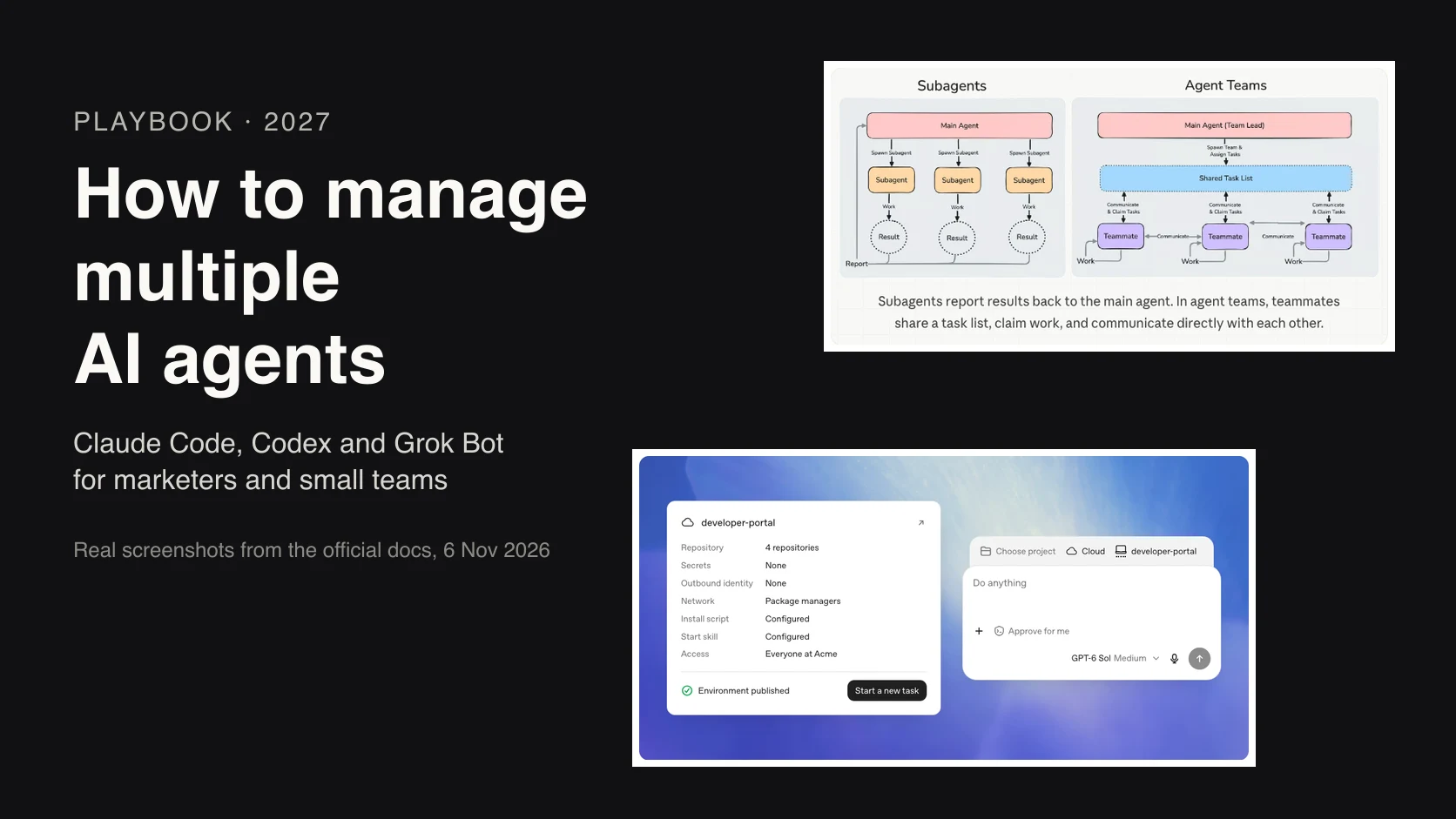
The original version of this article called these jobs loops: a task depends on a person to start it, a loop does not. That idea still holds. What changed in 2026 is that the major assistants now ship their own schedulers, so the choice is no longer whether you can schedule a job but where it should run.
Every job in the catalogue has four parts. If you cannot write all four, the job is not ready to schedule.
| Part | Example |
|---|---|
| Trigger | Monday 15:07, London |
| Input | Last 7 days of search terms, read-only |
| Rule | Spend with no conversions, off-topic intent |
| Output | A short list of draft negatives with reasons |
Which scheduler should run each job in November 2026?
Short answer: use the platform's own scheduler (Google Ads scripts or rules, GA4 custom insights, a Data Studio email) when a fixed threshold is enough, and an AI scheduler (Claude, ChatGPT or Gemini) when the job must read several sources and explain what it found. Claude's scheduled tasks run in Anthropic's cloud on all paid plans.
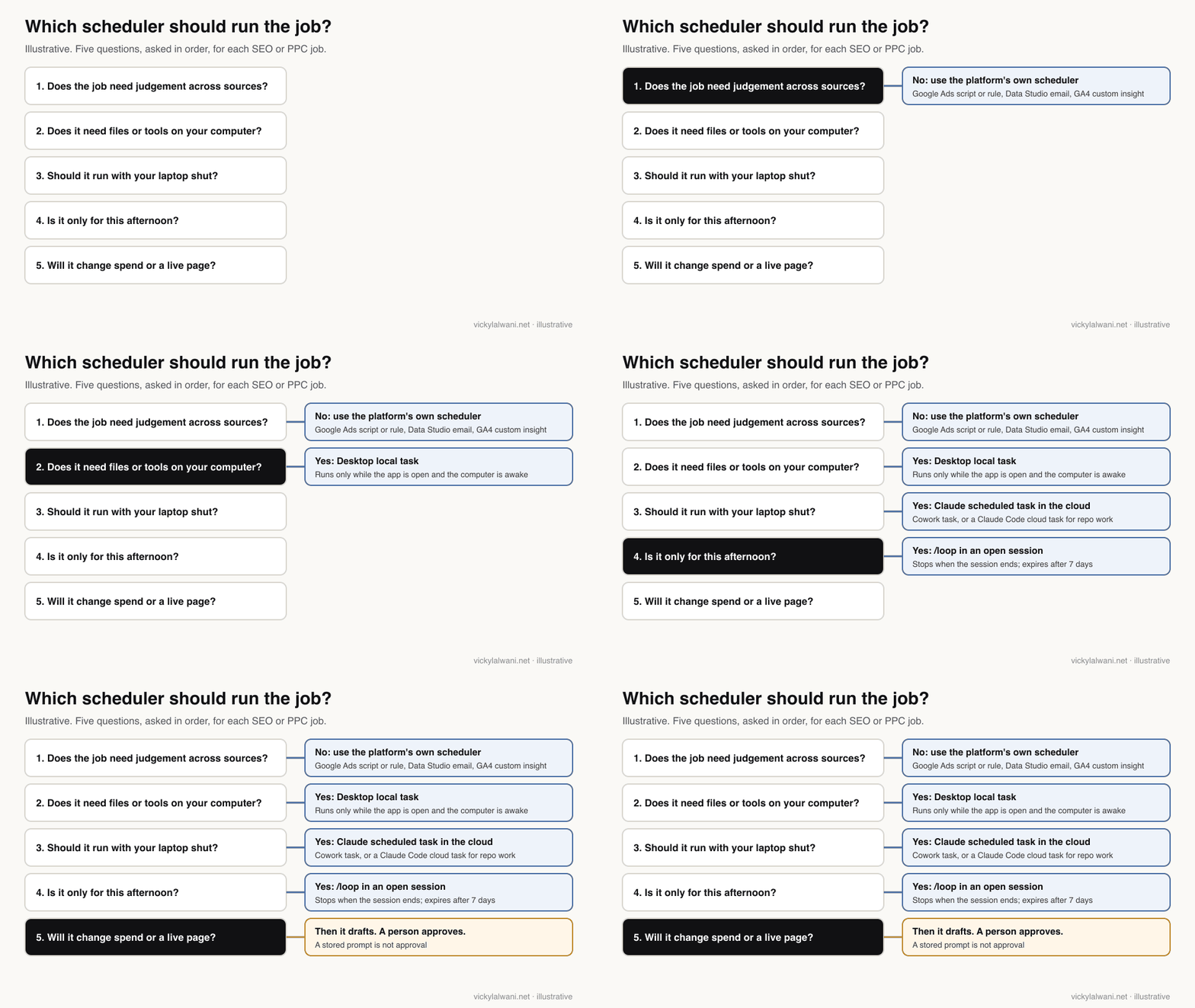
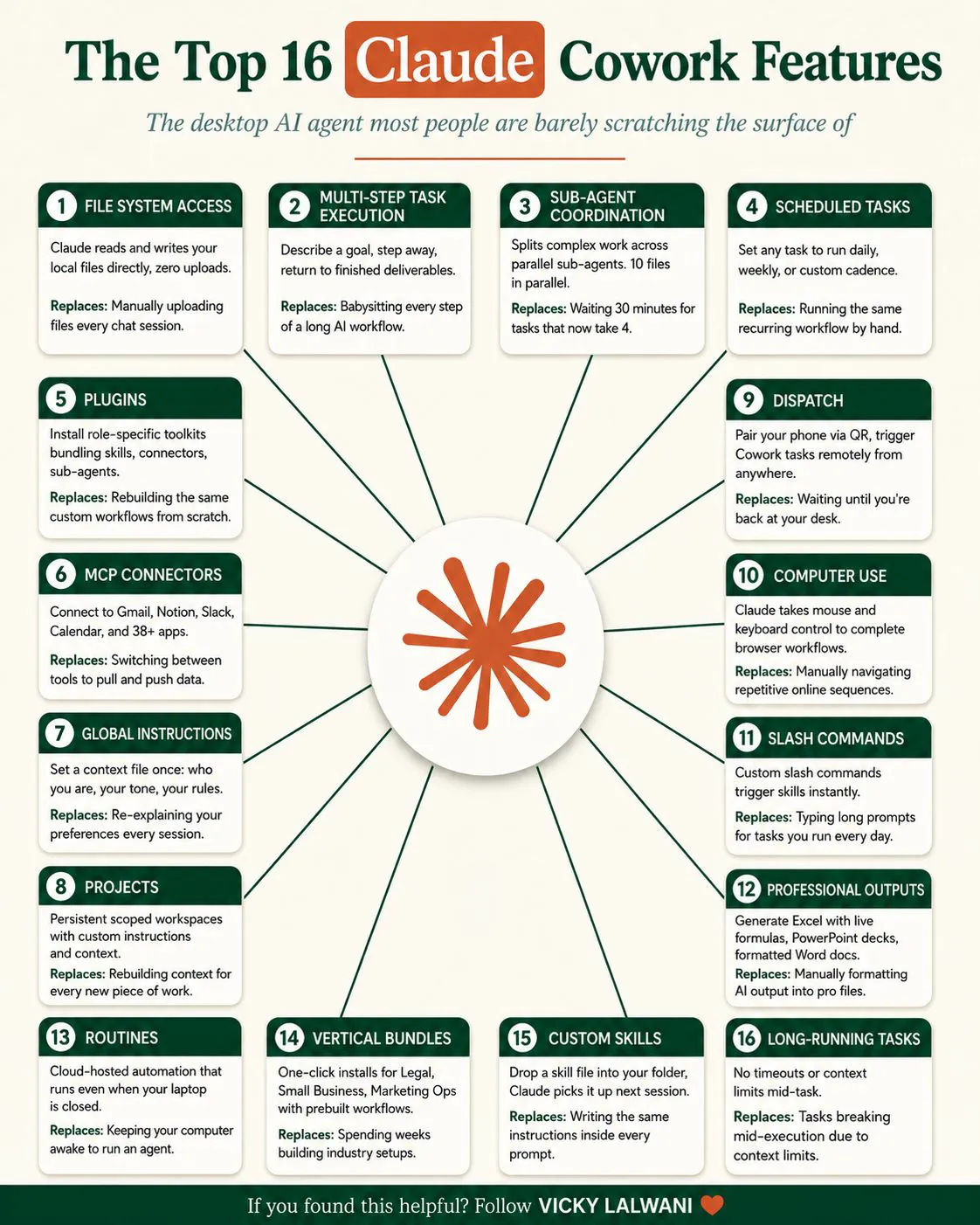
Claude alone has four ways to schedule work, which confuses people. According to the Claude Help Centre, Cowork scheduled tasks are on all paid plans (Pro, Max, Ultra, Team and Enterprise), run hourly, daily, weekly, on weekdays or manually, and run remotely even when your computer is asleep. Pick a folder for the task, though, and "Require this computer" turns on, so it only runs while your computer is awake and the desktop app is open.
For work in a code repository, Anthropic's docs describe Claude Code cloud scheduled tasks (formerly routines), still in research preview, with a one-hour minimum interval. Desktop local tasks run on your machine, and /loop repeats a prompt inside an open session; the Claude Code comparison table shows /loop tasks expire after seven days.
| Scheduler | Runs on | Cadence | Watch out for |
|---|---|---|---|
| Claude scheduled task (Cowork) | Anthropic's cloud | Hourly to weekly | A folder ties it to your computer |
| Claude Code cloud task | Anthropic's cloud | 1 hour minimum | Custom cron is read as UTC |
| Claude Desktop local task | Your computer | Hourly to weekly | App open, computer awake |
| /loop | Open session | From 1 minute | Expires after 7 days |
| ChatGPT scheduled tasks | OpenAI's cloud | Hourly on paid plans | 3 to 15 active tasks by plan |
| Gemini scheduled actions | Google's cloud | Daily to monthly | 10 active; prepared up to an hour early |
| Google Ads scripts | Google Ads | Hourly to monthly | 30-minute run limit |
| Google Ads automated rules | Google Ads | Once to monthly | They change the account directly |
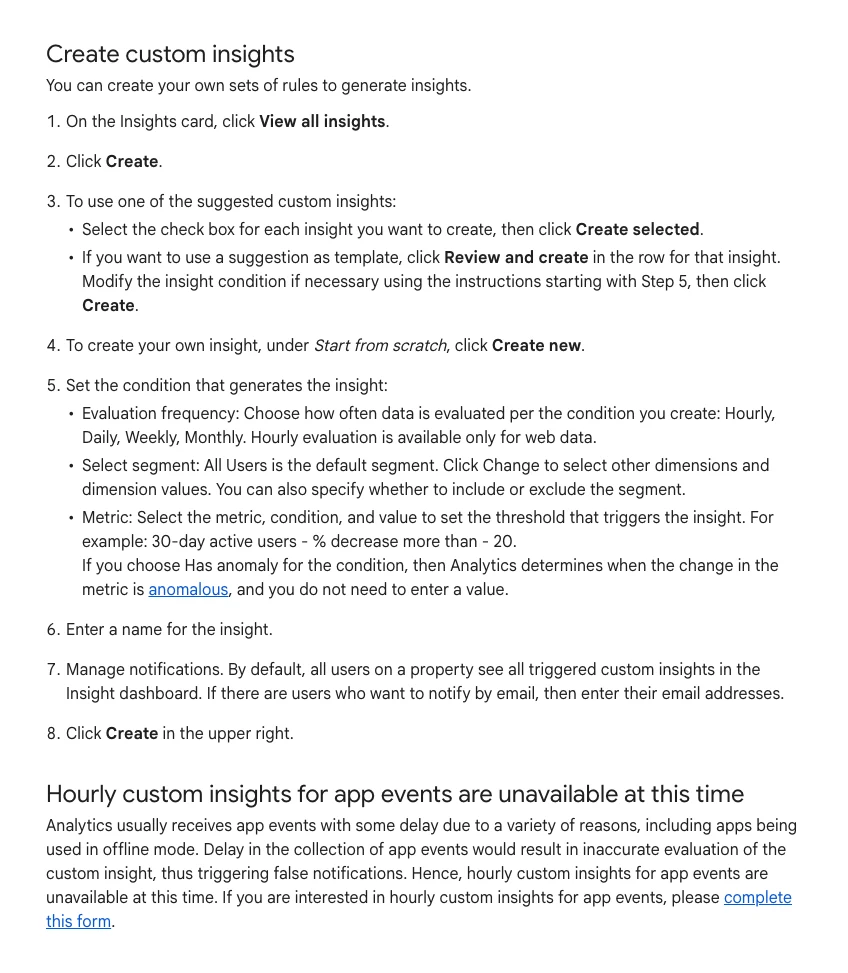
| GA4 custom insights | GA4 | Hourly (web) to monthly | 50 per property |
| Data Studio scheduled email | Repeat or custom | A PDF, no commentary | |
| n8n Schedule Trigger | Your n8n | Seconds to months | You run and maintain it |
The non-Claude rows, checked on each vendor's page:
- OpenAI's help page says active task limits are 3 for Free and Go, 5 for Plus, 10 for Business and Edu and 15 for Pro and Enterprise, and hourly schedules need a paid plan.
- Google's Gemini help says you can have up to 10 active schedules, prepared within the hour before delivery, so fast-moving numbers will not be the latest.
- Google Ads scripts can run for at most 30 minutes, and Google's own Account Anomaly Detector script asks to be scheduled hourly.
- GA4 lets you create up to 50 custom insights per property, evaluated hourly, daily, weekly or monthly, with hourly for web data only.
- Google's documentation now notes that Looker Studio is now called Data Studio, and its scheduled delivery emails a PDF of the report.
- The n8n Schedule Trigger runs workflows at intervals from seconds to months, or on a custom cron expression.
The rule I would apply: if a fixed threshold catches the problem, use the native scheduler, because it lives next to the data and costs nothing extra. Reach for an AI scheduler when the job needs to read search terms for intent, compare several sources, or write a short explanation a person will act on.
When is the data ready for each job?
Short answer: later than most schedules assume. In London, Google Ads says Sunday's search terms are ready by 2 p.m. Monday, non-last-click conversions by 11 p.m. Monday and Search impression share by midnight on Wednesday. Search Console data is normally available in 2 to 3 days, and a standard GA4 property takes about 12 hours for daily data.
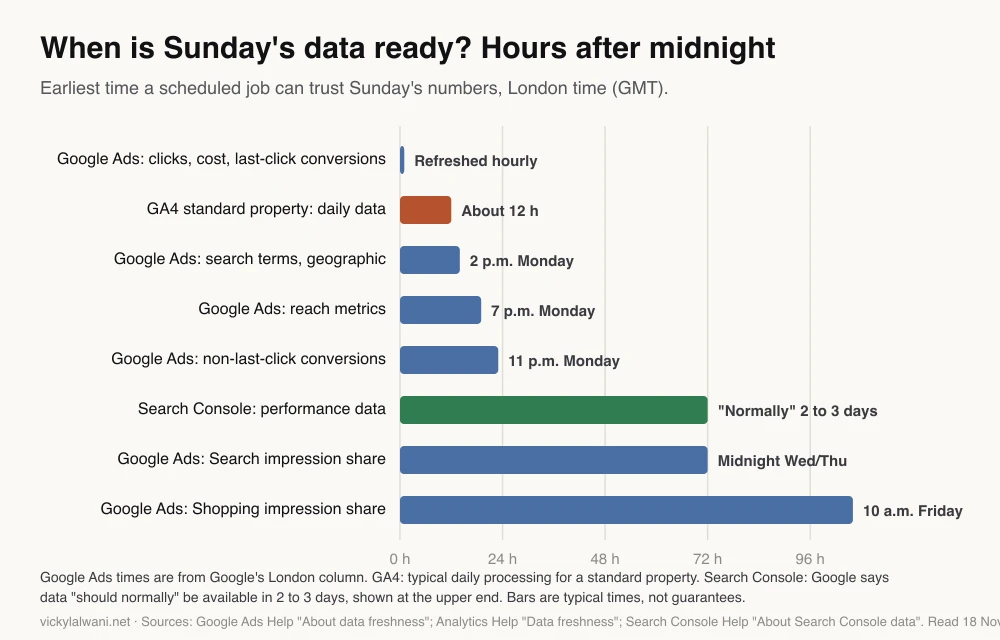
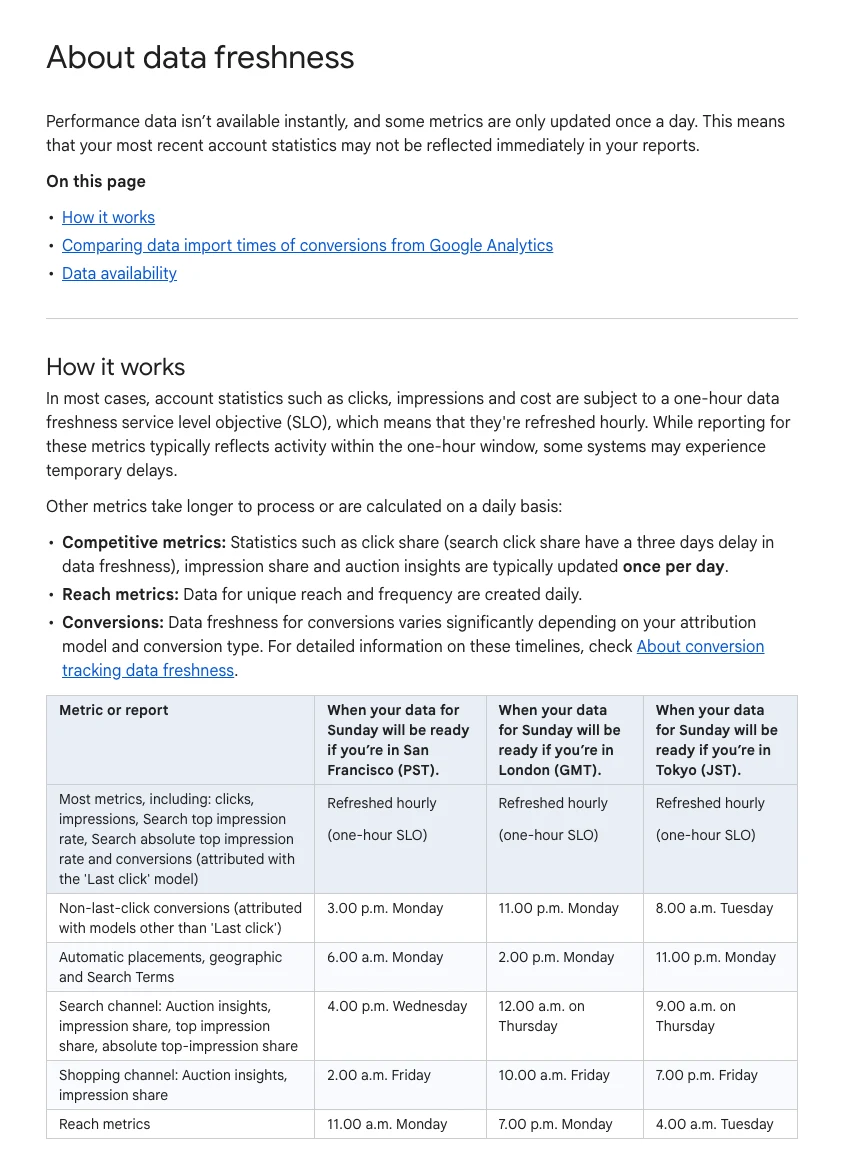
Google's help page on data freshness in Google Ads says clicks, impressions, cost and last-click conversions refresh hourly, but other reports arrive later and it gives the times for San Francisco, London and Tokyo. Impression share and auction insights are typically updated once a day, and they lag most.
Search Console says collected data should normally be available in 2 to 3 days, and days are labelled in California time. Google Analytics says processing can take 24 to 48 hours, with daily data for a standard property typically ready in about 12 hours, and attribution credit can keep changing for up to 12 days.
| Data | Ready (London) | Earliest run |
|---|---|---|
| Ads cost, clicks, last-click conversions | Hourly | Any morning |
| Ads search terms | 2 p.m. next day | 15:07 |
| Ads non-last-click conversions | 11 p.m. next day | Day after |
| Ads Search impression share | 3 days | Thursday for Sunday |
| GA4 daily (standard) | About 12 hours | Midday next day |
| Search Console | 2 to 3 days | Wednesday for the week |
Two practical consequences. Weekly SEO jobs should run on Wednesday or later, not Monday. And any job comparing "yesterday" across Google Ads, GA4 and Search Console will compare days that are finished to different degrees, labelled in different time zones. Have the job state the date range it actually read.
Which SEO jobs should run on a schedule?
Short answer: five: a weekly Search Console movers review, a weekly technical crawl check, a weekly AI answer visibility check, a weekly competitor page watch and a monthly content decay scan. Run the Search Console jobs from Wednesday, once the previous week's data has landed.
| Job | When | Runs best in | Hands you |
|---|---|---|---|
| 1. Search Console movers | Wed 09:07 | Claude task | Pages and queries up or down, likely why |
| 2. Technical crawl check | Tue 08:07 | Crawler plus Claude | New errors only, ranked |
| 3. AI answer visibility | Fri 09:07 | Claude or ChatGPT task | Where the brand was named or dropped |
| 4. Competitor page watch | Weekly | Claude task | New pages and offers worth a look |
| 5. Content decay scan | Monthly, day 4 | Claude task | Posts losing clicks, refresh brief |
Search Console movers. Compare the last full week with the one before, by page and by query, and give a likely reason for each big move, marked as something to check rather than a fact. Search Console has no server in Google's official list of MCP servers as of November 2026, so this job reads the Search Console API, an export or a community connector.
Technical crawl check. The crawl itself belongs in a crawler; the scheduled job reads the result and lists only what is new since last week: blocked pages, broken templates, missing canonical tags, structured data errors. My technical SEO audit automation guide sets the cadence for each technical check, so it is not repeated here.
AI answer visibility. Run the same set of buyer questions in the AI assistants your customers use and record whether your brand, a competitor or nobody was named. Keep the prompt list fixed so the weeks are comparable, and treat a single run as noisy.
Content decay. Monthly is enough. Run it on the fourth of the month so Search Console has finished the previous month, and compare the last 28 days with the same period a year ago where seasonality matters.
Which PPC jobs should run on a schedule?
Short answer: seven: daily budget pacing, a daily tracking and zero-conversion alert, an hourly spend anomaly script, a Monday afternoon search terms sweep, a Tuesday scale, hold or cut review, a Thursday impression share check and a weekly creative fatigue check. Only the search terms sweep and the weekly review need AI; the rest are scripts or rules.
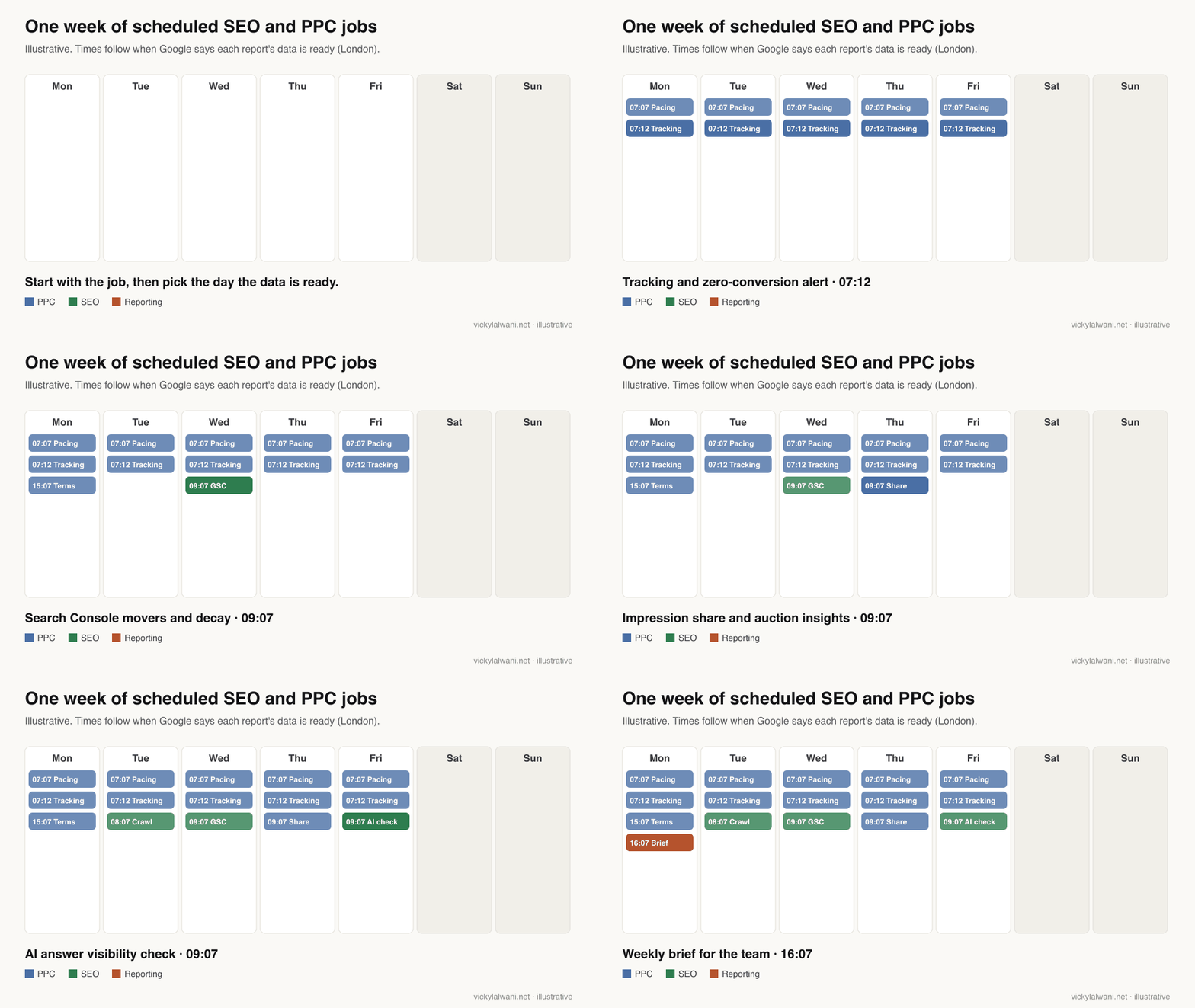
| Job | When | Runs best in | Hands you |
|---|---|---|---|
| 6. Budget pacing | Daily 07:07 | Script or Claude | Campaigns over or under plan |
| 7. Tracking alert | Daily 07:12 | Script or GA4 insight | Key events that fell to zero |
| 8. Spend anomaly | Hourly | Google Ads script | An email only when spend jumps |
| 9. Search terms sweep | Mon 15:07 | Claude task | Draft negatives with reasons |
| 10. Scale, hold or cut | Tue 09:07 | Claude task | One verdict per campaign |
| 11. Impression share | Thu 09:07 | Claude task | Budget or rank lost, by campaign |
| 12. Creative fatigue | Weekly | Claude task | Ads to refresh, not every ad |
Budget pacing and the spend anomaly check are threshold jobs: month-to-date spend against plan, or today's spend against the usual pattern. A Google Ads script does both well and emails only when something is off. Add a Claude task only if you want a daily sentence on why.
Keep pacing as an alert, not an automatic budget changer. Google already says you will never pay more than two times your average daily budget on a day, or 30.4 times it in a month, for most campaigns. Replies in an r/PPC thread on pacing scripts make the same point: set the daily budget from the monthly figure and check midway, rather than letting a script fight the platform's own averaging.
The tracking alert matters more than any other job here. A sound rule is tracking before spend: keep campaigns in draft until every form and call button is measured. A key event that drops to zero usually means broken tracking, not a lost market, and a GA4 custom insight or a short script will catch it the next morning.
The search terms sweep is where AI earns its place, because judging intent needs reading. Run it at 15:07 on Monday in London, after Google says Sunday's search terms are ready. It should read only, sort terms by spend without conversions, and draft negatives with a reason for each. A person approves the list. The wider question of what to hand over in a Google Ads account is covered in what to automate in PPC.
Scale, hold or cut should wait until Tuesday if your account uses data-driven or other non-last-click attribution, because those conversions are only complete late on Monday. Impression share waits until Thursday for the same reason.
Which reporting jobs should run on a schedule?
Short answer: three: a Monday afternoon team brief, a monthly client report drafted on the fourth working day, and a monthly content plan built from what actually ranked and converted. Let Data Studio email the numbers and let Claude draft the short note that explains them.
| Job | When | Runs best in | Hands you |
|---|---|---|---|
| 13. Team brief | Mon 16:07 | Claude task | What changed, what to do first |
| 14. Client report | Monthly, day 4 | Data Studio plus Claude | Numbers plus a draft note |
| 15. Content plan | Monthly | Claude task | Next topics from real queries |
A scheduled report earns its place when it reads as a summary, not a list, and every number sits next to the period it is compared with. Aim for three to five lines on what changed and what to do. Add a short human note to every client report before it goes out: where things are, what is being done, what is next. A scheduled job drafts that note; it does not send it.
If you want one daily version of the team brief, the morning briefing guide has the full prompt, connectors and skill.
How do you set up one scheduled job end to end?
Short answer: write the job as a prompt with an input, a rule and an output, run it by hand on last week's data three times, then schedule it a few minutes past the hour, with only the connectors it needs and read-only access. Review every run for the first month.
- Pick one job. Choose the check you currently do least consistently, usually the search terms sweep or the tracking alert.
- Write it down. Data source, date range, the rule for a problem, and the exact output format.
- Run it by hand three times. Fix the prompt until you would act on the output without rewriting it.
- Schedule it after the data is ready. Use the table above, and pick a few minutes past the hour.
- Remove what it does not need. Fewer connectors, read-only access, no write tools.
- Keep a person in the approval path. The job reports and drafts; a person changes spend or pages.
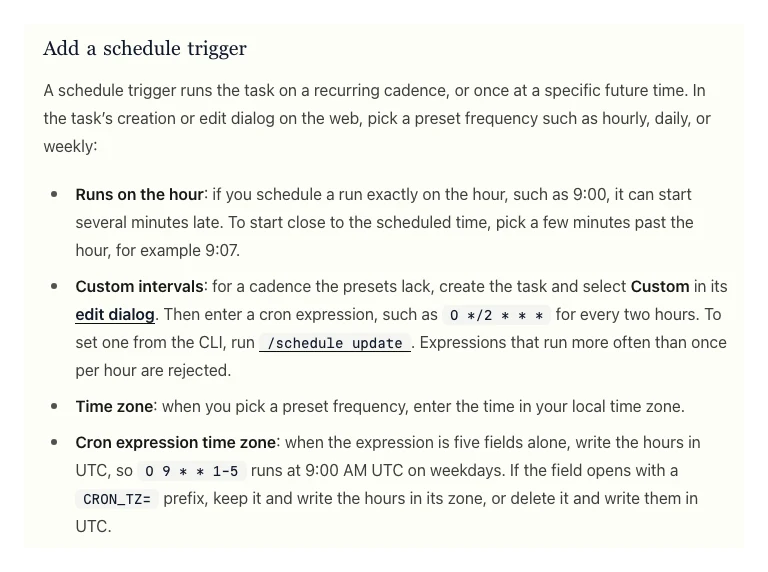
The minutes past the hour matter. Anthropic's docs for cloud tasks say a run scheduled exactly on the hour can start several minutes late, so pick a time such as 9:07, and a custom five-field cron expression is read in UTC, not your local time.
Here is the weekly search terms sweep as a prompt you can paste into a Claude scheduled task. It assumes a read-only Google Ads connection or a weekly export.
Weekly search terms sweep (read-only). Run Mondays at 15:07 London time.

Input: Google Ads search terms report for the last 7 full days (Monday to Sunday),
all Search campaigns, read-only. If the data looks incomplete for Sunday, say so.

Rules:
1. List terms with spend and zero conversions, highest spend first, top 30 only.
2. For each, give the likely intent in five words or fewer and say "irrelevant",
   "unclear" or "relevant but not converting".
3. Draft a negative keyword (match type included) only for "irrelevant" terms,
   with a one-line reason.
4. Never add negatives, change bids or edit anything. You only draft.

Output, under 300 words:
- Date range read and account name at the top.
- A table: term, spend, verdict, draft negative, reason.
- One line: "No action needed" if nothing qualifies, so silence never means a failed run.
Which jobs should never run without a person?
Short answer: anything that changes spend, bids, budgets or a live page, sends an email to a client, or uses a connector with write access. A stored scheduled prompt is not approval. Let the job prepare the change and stop.
The default settings push the other way. Anthropic's docs say that for Claude Code cloud tasks all connected connectors are included by default, including writes, runs start in auto mode, and the fired prompt cannot act as approval or consent. Actions through connectors appear as you. Remove every connector a job does not need.
In Cowork, a connector tool set to "Always ask" means a scheduled task may wait for your answer or finish without the tool. That is the right trade for anything that writes. Google Ads automated rules can pause keywords and ads, change budgets and raise bids on a once, daily, weekly or monthly schedule, so they sit at the other extreme: they change the account directly, so treat them as you would a person with edit access.
| Action | Scheduled job may |
|---|---|
| Read reports and exports | Yes |
| Draft negatives, briefs, notes | Yes |
| Email an internal alert | Yes |
| Change bids, budgets, status | Draft only |
| Publish or edit a live page | Draft only |
| Send anything to a client | Draft only |
On client ad accounts my own rule is audit first, findings in a sheet, check by hand, and no changes before approval. Access is the other common failure: an invite that was never accepted, or a role that turns out to be view-only. Check what the connection can actually see before you trust a schedule built on it.
What goes wrong with scheduled marketing jobs?
Short answer: the job runs before the data is ready, the computer is asleep, a connection expires, the run "succeeds" without doing the work, or the alerts are so frequent that nobody reads them. Each has a simple fix.
| Problem | Why | Fix |
|---|---|---|
| Reports half a day | Data not processed yet | Run after the times above |
| Skipped runs | Local task, computer asleep | Move it to the cloud |
| Ran at 11 p.m. | Desktop catch-up run | Put a time check in the prompt |
| "Succeeded", nothing done | Status means the session ended | Read the run, not the badge |
| Silence | No output when all is fine | Always say "no issues found" |
| Ignored alerts | Thresholds too tight | Raise them, log what changed |
Two of these come straight from the docs. Claude Desktop runs exactly one catch-up run for the most recently missed time when the computer wakes, so a 9 a.m. task can run at 11 p.m. And a cloud run's Succeeded, Failed or Cancelled status says how the session ended, not whether Claude completed the work.
The safeguards from the original version of this article still apply. Make every job report even when nothing is wrong. Put the date range and data source in every output. Keep a short log of what each job flagged and what you did; after a quarter, retire the jobs that never changed a decision.
Where this advice is weak
Short answer: the run times are built from Google's typical freshness, not guarantees, the catalogue is my judgement of what matters for small and mid-sized search accounts, and the scheduling products change every few weeks.
- Google publishes the freshness times for San Francisco, London and Tokyo only. Outside those, work out your own from your account's time zone.
- Claude Code cloud tasks are labelled research preview, and Gemini's scheduled actions are still rolling out to personal accounts. Limits and screens may change.
- The job list is ordered by risk and frequency, not by measured time saved. I have not timed any of them.
- Search Console has no official Google MCP server as of 18 November 2026, so Search Console jobs depend on the API, an export or a community connector.
- Large accounts with data warehouses may be better served by scheduled queries in the warehouse than by any assistant.
What people say on X and Reddit
Short answer: vendors push scheduled tasks as a way to work with your laptop shut, while PPC practitioners still lean on scripts for alerts, prefer a pushed summary to logging in, and keep the final decision on search terms by hand.
| Who | What they said | Take it as | Link |
|---|---|---|---|
| Claude (official) | Cowork scheduled tasks launch: morning brief, weekly spreadsheet updates, Friday presentations (25 Feb 2026) | Vendor | X post |
| Claude (official) | Routines in research preview: run on a schedule, an API call or an event, laptop closed (14 Apr 2026) | Vendor | X post |
| Claude (official) | Scheduled tasks run with the computer off; follow-up left drafted but unsent (7 Jul 2026) | Vendor | X post |
| A performance marketer at Anthropic | Manages Google Ads through a custom Cowork plugin, API via MCP, workflows as skills (24 Mar 2026) | First-hand, vendor staff | X post |
| A software developer (in Japanese) | Reviewing Search Console SEO data, Claude Code suggested automating the check through the API (4 May 2026) | First-hand | X post |
| r/PPC | A scripted daily MCC report emailed every morning; replies say push beats pull (21 Jun 2026) | First-hand | Thread |
| r/PPC | A client wants alerts when something is on fire, not a 7 a.m. dashboard (2 Oct 2025) | First-hand | Thread |
| r/PPC | Search terms pipeline with human approval; replies favour scripts plus a review sheet (18 Mar 2026) | First-hand | Thread |
| r/PPC | "Who even uses scripts anymore?" Top replies still run them for monitoring and auction insights (15 Oct 2025) | First-hand | Thread |
| r/PPC | Pacing script request; replies say set daily budgets from the monthly figure (27 Dec 2025) | Opinion | Thread |
| r/PPC | Claude as analyst, not media buyer; a person checks live decisions (19 Apr 2026) | Opinion | Thread |
| r/ClaudeCode | Scheduled routine runs vanished from the sidebar; users who rely on them for reports struggled to find them (19 Oct 2026) | First-hand | Thread |
Videos worth watching
Short answer: Anthropic's short demo shows a Cowork scheduled task being created, and a PPC training channel shows the Google Ads scripts most worth scheduling. Watch both before deciding which jobs need AI.
Made by Claude (Anthropic), 18 March 2026. It promotes Anthropic's own product. Under a minute on creating a recurring Cowork task.
Made by a PPC training channel, 5 November 2025. It promotes the channel's own training. Useful for the threshold jobs that do not need an AI scheduler at all.
| Video | Channel | Date | What it covers |
|---|---|---|---|
| Scheduled Tasks in Cowork: Set it once, Claude handles the rest | Claude | 18 Mar 2026 | Creating a Cowork task |
| Delegate and schedule tasks in Claude Cowork | Claude | 21 Jun 2026 | Scheduling and handing off work |
| Build a proactive agent workflow with Claude Code | Claude | 20 May 2026 | /schedule end to end |
| How to Use Claude Cowork Scheduled Tasks (Step-by-Step Tutorial) | A data science channel | 27 Mar 2026 | Set-up walkthrough |
| 5 Google Ads Scripts I Can't Live Without | A PPC training channel | 5 Nov 2025 | Scripts for alerts |
| Schedule email delivery on Looker Studio (2026) | Porter Metrics | 16 Mar 2025 | Scheduled report emails |
Want your SEO and PPC jobs scheduled and checked?
The useful work is deciding which jobs matter for your accounts, timing them to the data and keeping every change behind an approval. My AI automation work starts there: the catalogue, the read-only connections, the prompts and a month of checking each run. If the bigger gap is the account itself, see Google Ads management or SEO consulting. Rates are on the pricing page.
Keep reading: the Claude morning briefing, Claude Code automation, technical SEO audit automation and what to automate in PPC.
Sources
| Source | What it supports | Date |
|---|---|---|
| Claude Help Centre: Cowork scheduled tasks | Plans, cadences, remote runs, folders, "Always ask" | Read 18 Nov 2026 |
| Claude Code docs: cloud scheduled tasks | Research preview, hour minimum, UTC cron, connectors, status | Read 18 Nov 2026 |
| Claude Code docs: scheduling options | Cloud, Desktop, /loop compared; 7-day expiry | Read 18 Nov 2026 |
| Claude Code docs: Desktop tasks | Computer awake; one catch-up run | Read 18 Nov 2026 |
| OpenAI Help: scheduled tasks | Active task limits; hourly on paid plans | Read 18 Nov 2026 |
| Gemini Apps Help: schedules | 10 active; prepared within the hour | Read 18 Nov 2026 |
| Google Ads Help: data freshness | When each report is ready | Read 18 Nov 2026 |
| Search Console Help: about the data | 2 to 3 days; California time | Read 18 Nov 2026 |
| Analytics Help: data freshness | 24 to 48 hours; 12 hours daily | Read 18 Nov 2026 |
| Analytics Help: insights | Custom insights, 50 per property | Read 18 Nov 2026 |
| Google Ads scripts: limits | 30-minute run limit | Read 18 Nov 2026 |
| Google Ads scripts: anomaly detector | Hourly schedule | Read 18 Nov 2026 |
| Google Ads Help: average daily budgets | 2x daily, 30.4x monthly limits | Read 18 Nov 2026 |
| Google Ads Help: automated rules | Rule frequencies and examples | Read 18 Nov 2026 |
| Data Studio: scheduled delivery | PDF emails; renamed from Looker Studio | Read 18 Nov 2026 |
| n8n docs: Schedule Trigger | Intervals and cron | Read 18 Nov 2026 |
| Google's official MCP servers list | No Search Console server listed | Read 18 Nov 2026 |
| X, Reddit and YouTube | Practitioner and vendor views, linked above | Oct 2025 to Oct 2026 |
This article expands on my post on LinkedIn ↗.
FAQ
What is AI marketing automation?
AI marketing automation is marketing work that runs on a schedule or trigger without someone starting it each time, with an AI assistant doing the reading and judgement a fixed rule cannot. For SEO and PPC that means jobs such as a weekly search terms sweep or a Search Console review that hand a person a short finding to approve.
Which SEO and PPC jobs should I schedule first?
Start with a daily tracking alert that flags key events falling to zero, then a weekly search terms sweep that drafts negatives for approval. Both catch expensive problems early and are easy to check against the account by hand.
Can Claude run scheduled tasks with my computer off?
Yes. Claude Cowork scheduled tasks run remotely on all paid plans, even when your computer is asleep, unless you pick a local folder, which ties the task to your computer. Claude Code cloud tasks also run in Anthropic's cloud, while Desktop local tasks need the app open and the computer awake.
When should a weekly Google Ads search terms check run?
Run it on Monday afternoon, not first thing. Google Ads Help says Sunday's search terms data is ready by 2 p.m. Monday in London, 6 a.m. Monday in San Francisco and 11 p.m. Monday in Tokyo.
How often can a Claude scheduled task run?
Cowork scheduled tasks offer hourly, daily, weekly, weekdays or manual runs. Claude Code cloud tasks have a one-hour minimum, Desktop local tasks can run every minute when Claude sets the schedule, and /loop runs from every minute but expires after seven days.
Should I use Claude or Google Ads scripts for PPC alerts?
Use Google Ads scripts, automated rules or GA4 custom insights for simple threshold alerts such as overspend or a conversion drop, because they sit next to the data and cost nothing extra. Use a Claude scheduled task when the job needs judgement, such as reading search terms for intent or explaining why performance moved.
Is it safe to let a scheduled AI task change my Google Ads account?
Not without a person approving each change. Anthropic's docs say Claude Code cloud tasks include all connectors by default, including writes, and a stored prompt cannot act as approval, so keep scheduled jobs read-only and have them draft changes for review.
Why did my scheduled task succeed but produce nothing useful?
A Succeeded status in Claude Code only means the session ended normally, not that the work was done, so open the run and read it. The other common cause is timing: the job ran before Google had finished processing the data it needed.