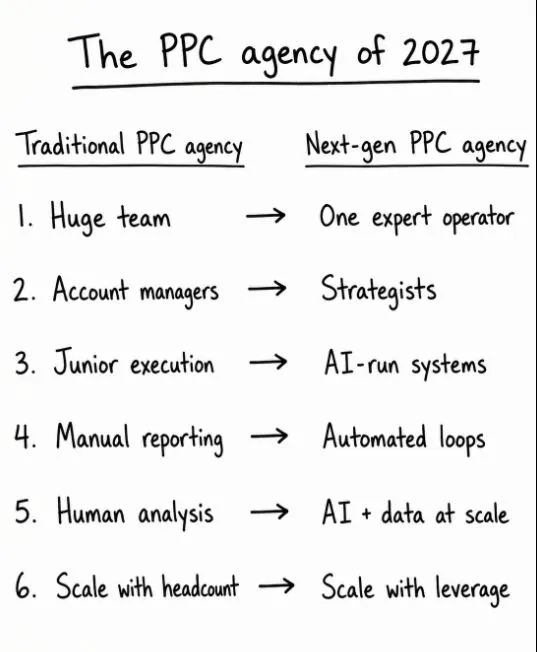
PPC automation works best decided task by task. Score each job on five questions: does it repeat, is it quick to check, is it cheap to undo, is all the context in the data, and is feedback fast. Five yeses means automate, three or four means AI assists and a person approves, two or fewer means keep it human. Pacing alerts, tracking checks and report numbers can run alone; search terms, ad copy and audits suit assist; bid strategy, budgets, offers and structure stay human.
TL;DR
- Decide task by task, not tool by tool. Every PPC job gets one of three verdicts: automate (runs alone, logged), assist (AI drafts, a person approves) or keep human (AI may fetch the data, a person decides).
- Five questions settle the verdict: does it repeat, is it quick to check, is it cheap to undo, is all the context in the data, and will you know fast if it was wrong? Five yeses: automate. Three or four: assist. Two or fewer: keep it.
- Audit what is already automated. Google switches some automation on for you: experiment auto-apply is enabled by default, and Search campaigns using two legacy settings were upgraded to AI Max from 1 September 2026.
- The data agrees. In a 2026 survey of 500 marketers, 77% used AI for reporting but only 40% for budgets and bidding.
Most PPC automation advice gives you a list: automate the grind, keep the strategy. That is true and not much use on a Tuesday morning, when the real question is narrower. Should the weekly search term review run by itself? Should a script pause ads? Should you let Google apply that experiment?
This guide answers that question one task at a time. It gives you a five-question test, a verdict for more than twenty common Google Ads jobs, the settings Google may already have switched on for you, and the signals that tell you when a task should move up or back down. I run much of my own Google Ads routine this way, with AI skills doing the reading and drafting and a person making the calls.
If you would rather have someone apply this to your account, my Google Ads management service starts with exactly this sort of task map. If you want the build side instead, the related guides are linked where they fit: how to connect Claude safely, how the morning approval list works and how to set up agents.
A note on evidence. Platform facts come from Google Ads Help and Google's own posts, read on 18 November 2026 and linked where used. The survey figures come from a StackAdapt study reported by PPC Land. Anything written as "I" is a working habit from my own account work; I do not share client names or client numbers, so every example task here is illustrative.
Jump to: Meaning · Five-question test · Task verdicts · Inherited automation · Traps · X and Reddit · FAQs
What does PPC automation mean in 2027?
Short answer: PPC automation now comes from three places: Google's own systems (Smart Bidding, AI Max, auto-apply), fixed rules and scripts you write, and AI assistants such as Claude or ChatGPT that read, draft and sometimes act. Each is good at different work, so the useful question is which of the three, if any, should own each task.
PPC means pay-per-click advertising, where you pay when someone clicks your ad. In Google Ads, the automation you meet falls into three families, and they fail in different ways.
| Kind | Examples | Good at | Blind spot |
|---|---|---|---|
| Google's systems | Smart Bidding, AI Max, auto-apply | Auction-time signals | Your margins and lead quality |
| Rules and scripts | Automated rules, Google Ads scripts | Doing the same thing every time | Anything you did not foresee |
| AI assistants | Claude, ChatGPT, agents | Reading, summarising, drafting | Confident mistakes, missing context |
| A person | You or your PPC manager | Context and accountability | Time and consistency |
Smart Bidding is Google's automated bidding that sets a bid for each auction from signals such as device, time and location. Automated rules can change ad status, budgets and bids on a schedule and email you the results. Google Ads scripts are small JavaScript programs that run inside the account. AI assistants are the newest layer, and the one most articles mean when they say "PPC automation" today.
A common mistake is treating these as one thing. A script that pauses ads with no clicks in 30 days is predictable. An AI assistant asked to "clean up the account" is not. They need different levels of trust, so the verdict has to be made per task and per tool.
How do you decide whether a PPC task should be automated?
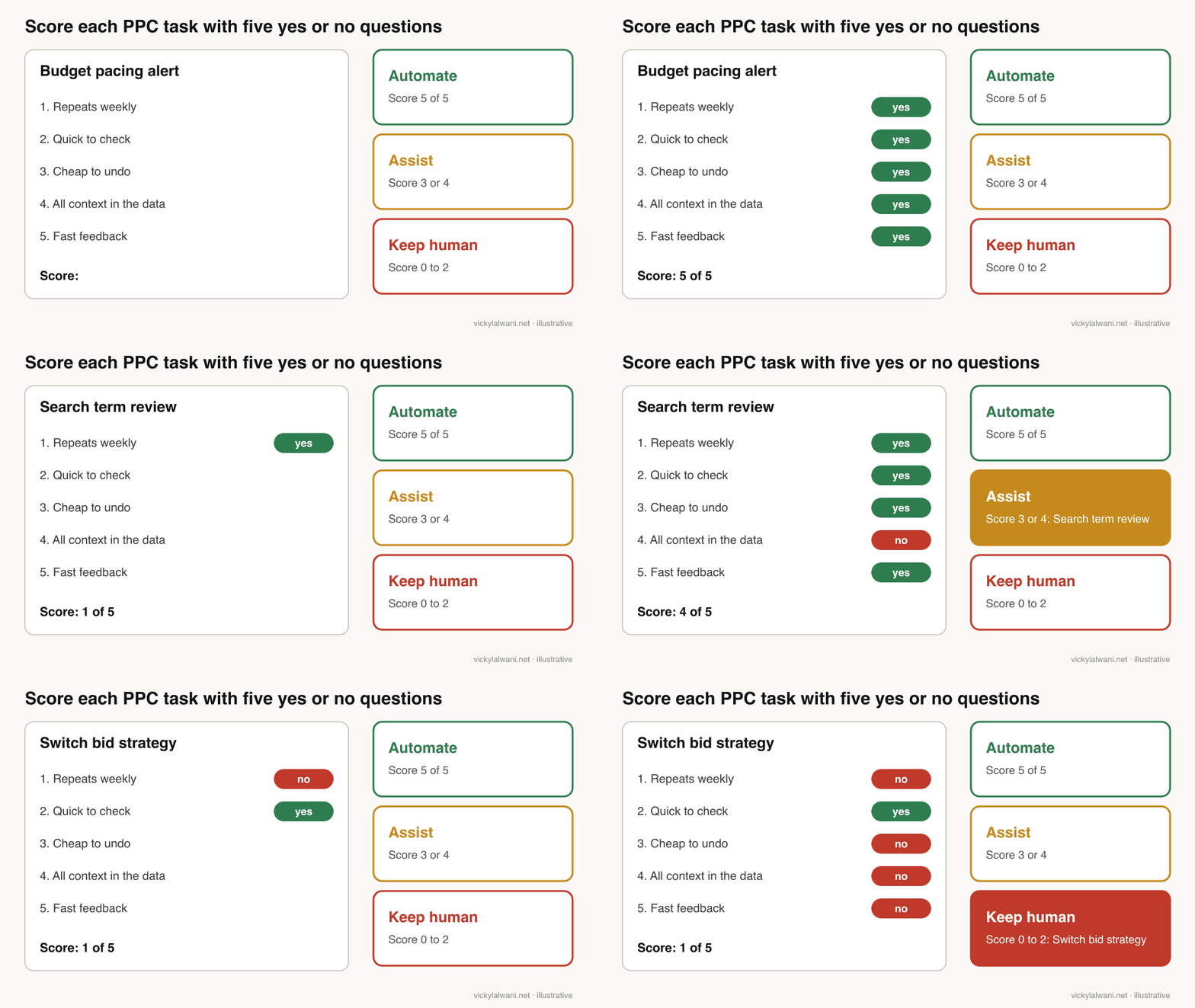
Short answer: Ask five yes or no questions about the task: does it repeat weekly, can you check the output in minutes, can a mistake be undone cheaply, is every piece of context inside the data, and will you know quickly if it was wrong? Five yeses means automate, three or four means assist, and two or fewer means keep it human.
This is my scoring test. It is deliberately blunt so that two people scoring the same task usually land on the same answer.
| Question | A yes looks like | A no looks like |
|---|---|---|
| 1. Repeats weekly? | Pacing, search terms, reports | Annual planning, a rebuild |
| 2. Quick to check? | A list you can scan | A judgement call on tone |
| 3. Cheap to undo? | Pause, add a negative | Spend that already left |
| 4. All context in the data? | Clicks, costs, conversions | Margins, stock, sales calls |
| 5. Fast feedback? | Wrong within days | Lead quality weeks later |
| Score | Verdict | What it means in practice |
|---|---|---|
| 5 of 5 | Automate | Runs alone, writes a log, spot-checked weekly |
| 3 or 4 | Assist | AI drafts with evidence, a person approves each item |
| 0 to 2 | Keep human | AI may gather data; a person decides and applies |
Question three carries extra weight in Google Ads because the undo tools are real but limited. Google lets you undo most changes made in the last 30 days from change history, but nothing gives back money already spent on bad clicks. Question five matters because of conversion lag: if a sale shows up three weeks after the click, a task that changes targeting cannot be judged in three days.
Question four is the one people skip. A model can see that a search term spent money without converting. It cannot see that the term is your sales team's favourite enquiry because it closes offline, unless you feed that in. When the deciding fact lives in someone's head, the task is not ready to run alone.
You can run the test with an AI assistant on your own task list. This prompt keeps it honest by asking for the reason behind every no.
I manage a Google Ads account. Below is a list of the recurring tasks I do.
For each task, answer five questions with yes or no and one short reason each:
1. Does it repeat at least weekly in roughly the same way?
2. Could I check the output in under five minutes?
3. Could a mistake be undone cheaply, before it costs much money?
4. Is everything needed to decide inside the account data or a file I can share?
5. Would I know within a few days if the output was wrong?
Then give a verdict: 5 yes = Automate, 3 or 4 = Assist, 0 to 2 = Keep human.
Return a table: Task | Score | Verdict | The no that matters most.
Do not suggest tools. Do not change anything in any account.

My tasks:
[paste your task list, one per line]
Which PPC tasks should you automate, assist or keep human?
Short answer: Automate the checks and the data pulls: pacing alerts, tracking health checks, broken link checks and report numbers. Use AI to assist with search terms, negatives, ad copy, audits and report commentary. Keep bid strategy changes, budget moves, offers, structure, tracking fixes and client conversations human.
Here are my verdicts for the jobs that fill a typical Google Ads week, grouped so the tables stay readable. "Who" means the tool I would reach for first. Your account can move a task one column either way, and the next sections explain when.
Measurement and data
| Task | Verdict | Who | Why |
|---|---|---|---|
| Daily conversion volume check | Automate | Rule or script | A drop to zero is unambiguous |
| Tag and goal health audit | Automate the check | AI or script | Fixing tags breaks forms, so a person fixes |
| Offline lead quality feed | Keep human | You and sales | Defines what Google optimises to |
| Report data pull | Automate | Script or connector | Same numbers every week |
I check tracking before anything else on an account, and campaigns stay in draft until every form and call button is measured. Everything downstream, including every automated bid, trusts that data. My conversion tracking audit checklist covers the checks themselves.
Search terms and keywords
| Task | Verdict | Who | Why |
|---|---|---|---|
| Search term triage | Assist | AI drafts | Needs to know what you sell |
| Exact negatives on clearly wrong themes | Automate, after a trial | AI or script | Cheap to undo, easy to spot-check |
| Adding new keywords | Assist | AI drafts | Volume claims need checking |
| Match type strategy | Keep human | You | Shapes reach and cost for months |
On new accounts I often start with broad match for about a month to find the terms that actually convert, then build exact and phrase match around them. That sequencing is a judgement about the business, which is why match type strategy stays human even when the search term work below it is automated.
Bidding and budgets
| Task | Verdict | Who | Why |
|---|---|---|---|
| Overspend or underspend alert | Automate | Rule or script | Alert only, nothing changes |
| Bid strategy switch | Keep human | You | Restarts learning, slow feedback |
| Target CPA or ROAS change | Assist | AI proposes | Needs margin and goal context |
| Budget moves between campaigns | Keep human | You | Money leaves and does not return |
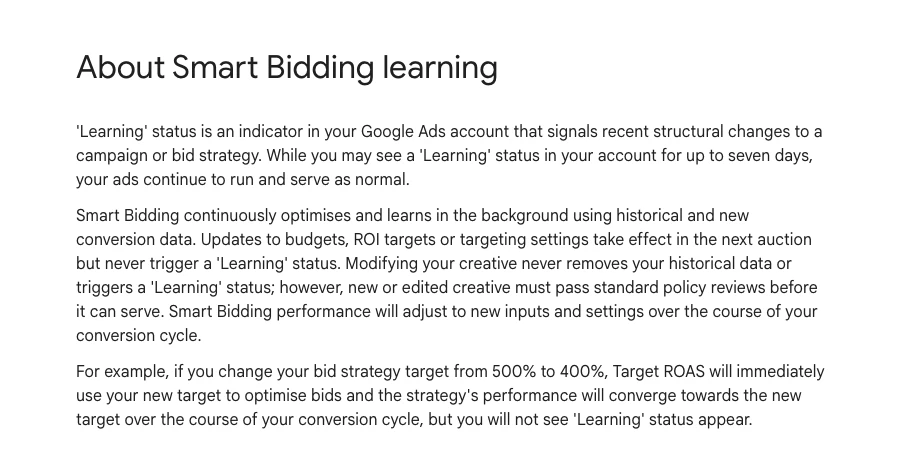
Target CPA is the average cost per conversion you ask Smart Bidding to aim for; target ROAS is the return on ad spend. Google's help page on Smart Bidding learning says a learning status "never lasts more than seven days", and that performance adjusts to new settings over the course of your conversion cycle. A change you cannot judge for weeks fails question five, which is why bidding sits furthest from "automate" in my tables.
Ads, pages and assets
| Task | Verdict | Who | Why |
|---|---|---|---|
| Responsive search ad drafts | Assist | AI drafts | Brand voice, claims and offer |
| Pausing clearly losing ads | Assist | AI proposes | Small samples mislead |
| Broken final URL check | Automate | Script | A 404 is a 404 |
| Landing page changes | Keep human | You and the site owner | Affects every channel |
AI is a good first-draft writer for ads, but a poor judge of which claims you are allowed to make. I use it to turn real search terms into headline options, because searchers' words beat internal jargon, then a person edits. The ad copy rewrites guide shows what that editing looks like.
Reporting, strategy and people
| Task | Verdict | Who | Why |
|---|---|---|---|
| Weekly report numbers | Automate | Connector or script | Repeatable and checkable |
| Report commentary | Assist | AI drafts | A person adds the why |
| Account audit | Assist | AI reads, you check | Findings need verifying |
| Strategy, offer, structure | Keep human | You | Context and accountability |
| Client or board conversations | Keep human | You | Trust is built by people |
Audits are a good example of "assist" done properly. On client accounts I have the AI read everything and put its findings in a sheet, I check each one by hand, and nothing changes in the account before the owner approves. Every report also gets a short human note on top: where we are, what we are doing, what is next.
What has Google already automated in your account?
Short answer: Possibly more than you chose. Experiment auto-apply is on by default, Search campaigns using automatically created assets or the campaign-level broad match setting were upgraded to AI Max from 1 September 2026, and any auto-apply recommendations someone opted into keep applying. Review these before you add your own automation on top.
Before deciding what to automate, find out what already is. In the StackAdapt survey, only 22% said they had intentionally chosen most of their automation features, and 78% had at least some automation nobody had explicitly turned on. These are the settings I check first.
| Setting | What it does | Default | My verdict |
|---|---|---|---|
| Experiment auto-apply | Applies a winning trial | On | Assist: decide yourself |
| AI Max upgrade | Wider matching, text changes | On for two legacy settings | Review the controls |
| Auto-apply recommendations | Applies chosen types | Opt in | Keep off, or a narrow list |
| Automated rules | Your own scheduled changes | None | Alerts first, actions later |
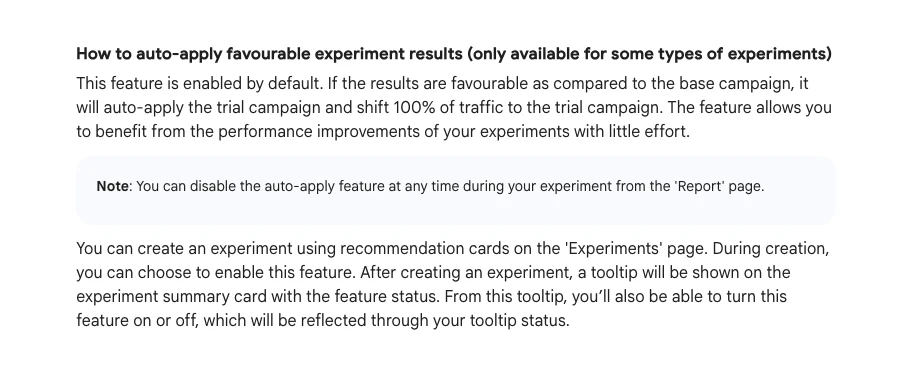
The experiments help page is plain about it: "This feature is enabled by default." If the trial beats the base campaign, Google shifts all traffic to the trial. Google recommends running an experiment for two to three weeks. For a lead generation account where the experiment measures form fills, not sales, I would rather make that call myself, because the cheaper form fill may be the worse lead.
The AI Max change came by email. PPC Land reported on 6 August 2026 that Search campaigns using automatically created assets would be upgraded to AI Max with search term matching and text customisation on, and campaigns using the campaign-level broad match setting with search term matching only. A practitioner shared the email on X the day before. Google's Ads Liaison account had announced in April that AI Max was leaving beta and that Dynamic Search Ads would move to it.
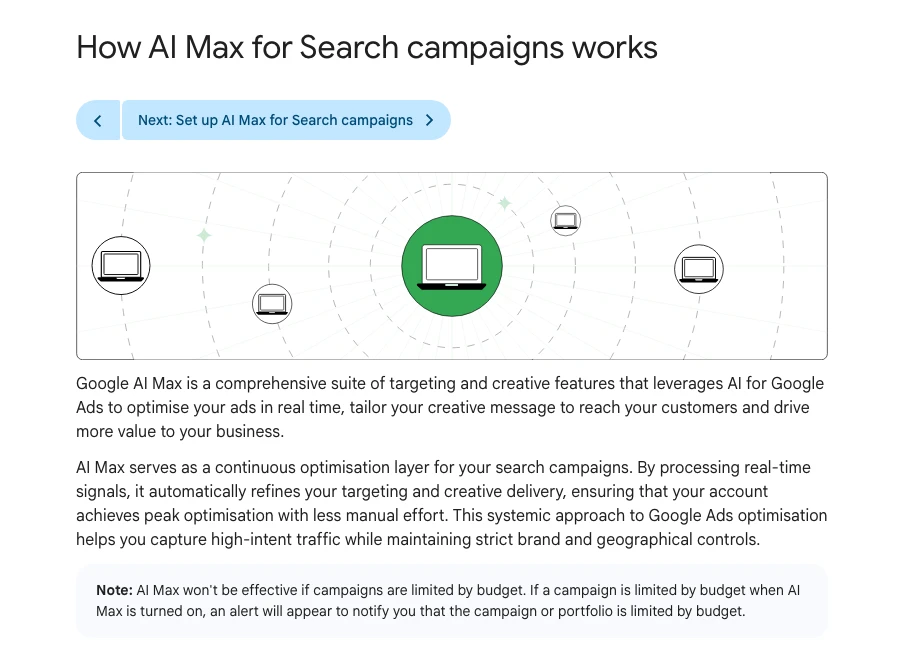
AI Max is not bad. It is a set of decisions about reach and copy that you may not have taken. Its help page lists the controls you keep: brand exclusions, URL exclusions and locations of interest. It also carries a note worth reading before you switch anything on.
Auto-apply recommendations are the older version of the same question. Google's auto-apply page lists eligible types such as adding broad match keywords, using targeting expansion and adjusting CPA or ROAS targets, and notes that auto-apply will not increase your budget. The Google Ads automation with Claude guide covers how to see who opted in and how to undo applied changes.
Which PPC tasks look automatable but are not?
Short answer: The traps are tasks that repeat and look checkable but hide context or slow feedback: auto-adding broad keywords, letting experiments apply themselves on lead quality accounts, automatic negatives that can block converting terms, AI ad copy without brand rules, and reacting to bidding updates on autopilot.
| Looks like | Hidden problem | Safer verdict |
|---|---|---|
| Auto-add keywords | Reach grows faster than quality | Assist |
| Auto-apply winning experiments | Wins on the wrong metric | Assist |
| Fully automatic negatives | Can block a converting term | Automate only a narrow slice |
| AI-written ads live at once | Claims and tone unchecked | Assist |
| Pausing ads on low CTR | Small samples, seasonality | Assist |
| Following every bidding update | Targets may need a rethink | Keep human |
The last row is current. Google's Ads Liaison account explained on 5 August 2026 that, from 17 August, campaigns limited by budget and beating their targets would see performance adjust towards the targets set. Google's own video on the update walks through four choices: keep the target, align it with recent performance, set a custom target or switch to a maximise strategy. That is a decision about goals, not a task for a script.
Recommendations themselves are a weak signal. In the StackAdapt survey, 42% of marketers who ignore in-platform AI recommendations said they feel generic or irrelevant, and 34% said AI recommendations do not reflect their goals or context. A practitioner on X posted that Google suggested a budget reduction for the first time in their experience, and that the suggestion did not make sense to them.
One more trap is optimising to an easy signal. A team on r/PPC wrote in a September 2026 thread that their paid media agent handled small account tasks well and improved CPA, but some of the cheaper conversions were not turning into better pipeline. Nothing was broken; the agent was chasing the signal it had been given. That is question four failing quietly.
How do account conditions change the verdict?
Short answer: The same task can sit in a different column on a different account. Few conversions, long sales cycles, lead generation judged on sales quality, regulated claims and small budgets all push tasks towards assist or keep human. High volume, short feedback loops and clean conversion data push them towards automate.
| Condition | Moves tasks | Why |
|---|---|---|
| Few conversions a month | Towards human | Too little data to learn from |
| Long sales cycle | Towards human | Feedback arrives late |
| Lead gen judged on sales | Towards assist | Form fills are not revenue |
| Regulated claims | Towards human | Ad wording carries legal risk |
| Small, tight budget | Towards assist | Each mistake is a bigger share |
| High volume ecommerce | Towards automate | Fast, plentiful feedback |
| Clean offline conversion data | Towards automate | The signal matches the goal |
Budget matters in a less obvious way too. Google's AI Max page says it "won't be effective if campaigns are limited by budget". On a small account that is often the case, so the settings Google pushes hardest can be the ones least likely to help. A thread on r/PPC about Google reps pushing automation on accounts under a small monthly budget drew replies describing reps as salespeople and advising clients to decline their suggestions politely.
I would not read this as "automation is for big accounts". It is closer to "automation is for accounts whose data tells the truth". If your conversion tracking counts the right thing, a small account can automate more than a big one with messy goals.
What does the data say about where PPC teams use AI?
Short answer: It lines up with the five questions. In a 2026 survey of 500 marketers, 77% used AI for reporting and summaries and 74% for performance analysis, but only 40% for campaign setup and 40% for budgeting and bidding. Use is highest where output is easy to check and lowest where mistakes spend money.
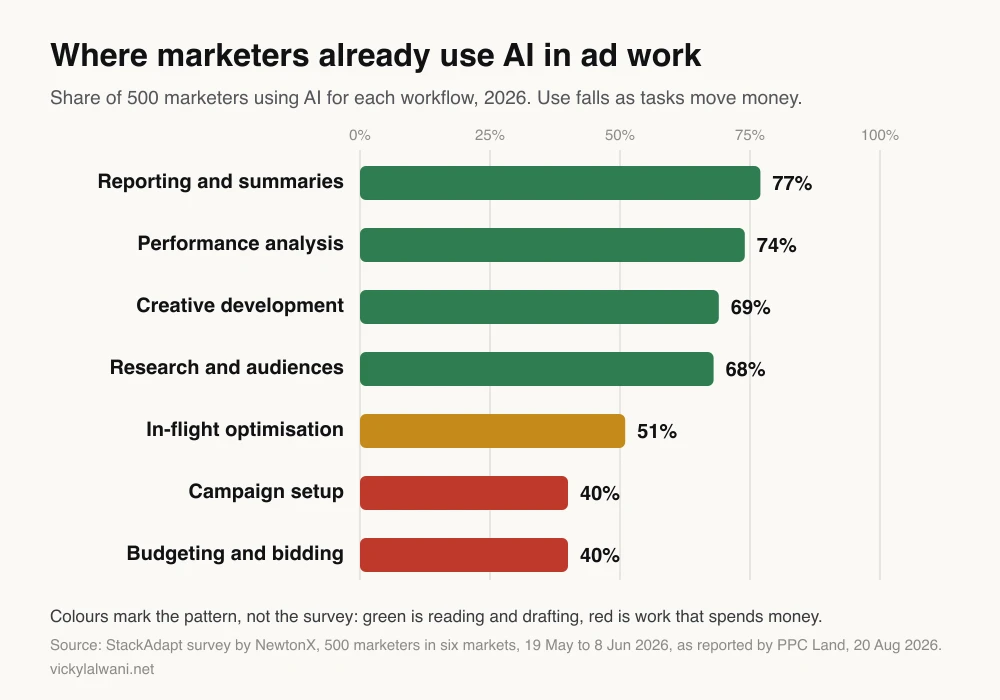
The same PPC Land report lists what would make marketers delegate more: a confidence level or predicted impact before a change (37%), testing on a limited budget first (36%), a clear explanation (35%), and an audit trail or easy undo (31% each). Those are the same conditions as my "assist" verdict: a proposal with evidence, a small trial and a log.
Treat the figures with care. StackAdapt sells advertising technology, the full report sits behind a form, and the sample leans towards North America. The pattern is more useful than the exact numbers.
When should a task move from assist to automate?
Short answer: Promote a task only after a shadow run of two to three weeks in which you did the same work yourself and agreed with nearly every output, the remaining errors were cheap, and a log exists. Demote it the moment tracking, the offer, the landing page or the market changes, or when one mistake costs real money.
A verdict is a starting point, not a label for life. The most useful move is often to split a task: "search term review" stays assist, while a narrow slice of it, such as exact negatives on themes you never sell, earns automate.
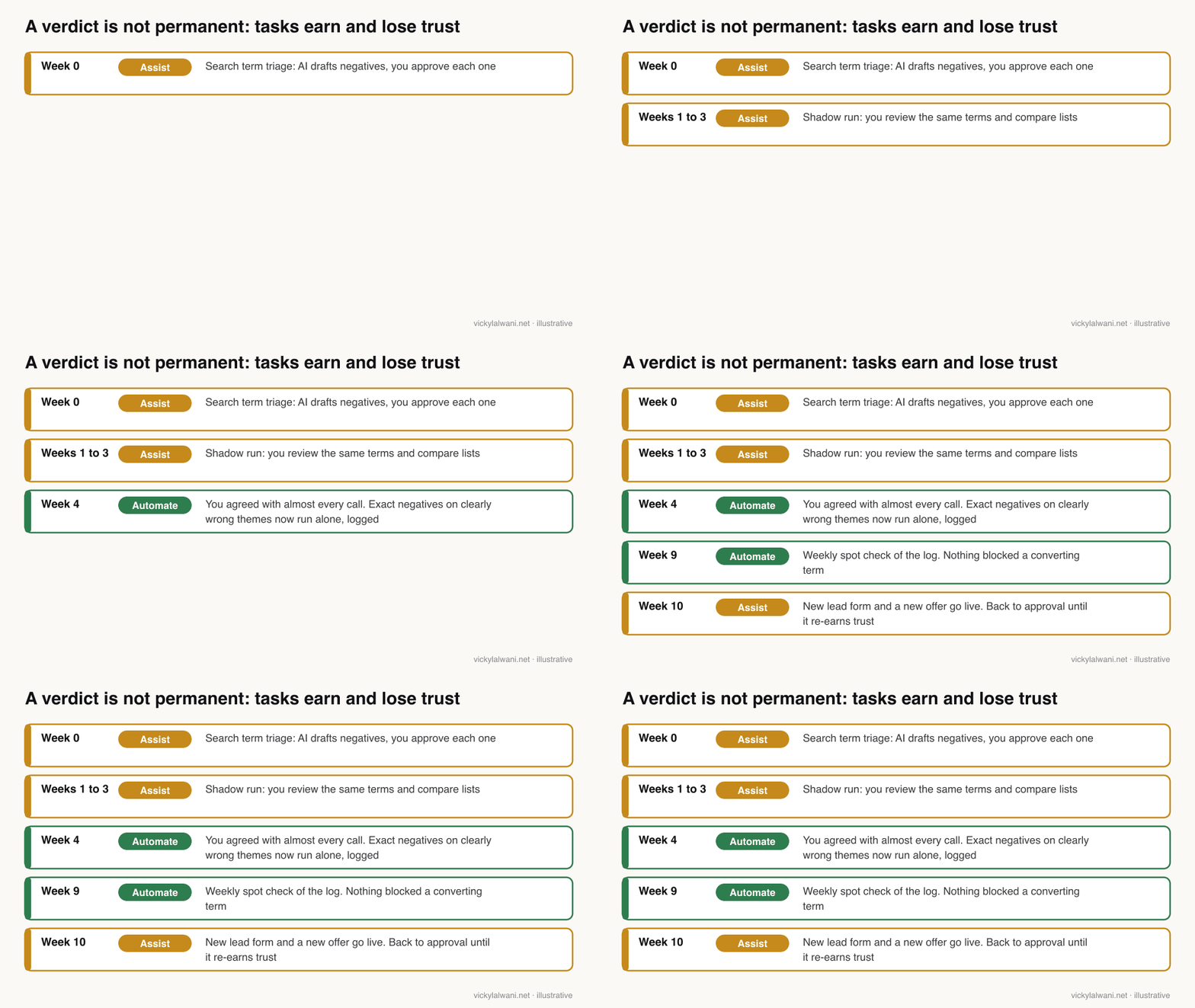
| Signal | Move | What to do |
|---|---|---|
| Shadow run agrees almost every time | Up a column | Narrow the scope, keep the log |
| Errors were cheap and caught | Stay | Keep the weekly spot check |
| Tracking or goal change | Down a column | Re-run the shadow period |
| New offer or landing page | Down a column | Context in the data is stale |
| One costly miss | Down to human | Find the no you missed |
| Google changes the feature | Re-score | Read the help page again |
Two practical rules make this work. Keep a separate login for any tool that writes to the account, so change history shows exactly what it did. And keep the plan and the action apart: I let a thinking model plan and a separate agent execute, which makes it easier to see which step went wrong. The human in the loop guide covers the approval list in detail, and the AI agents for PPC guide covers the access and guardrails.
How should you start this week?
Short answer: List the tasks from your last four weeks, score each with the five questions, and pick one task to automate and one to assist. Audit the automation Google already runs, write down who approves what, and review the log after a week before you add anything else.
| Day | Step | Output |
|---|---|---|
| Monday | List recurring tasks from 4 weeks | One list |
| Tuesday | Score each task | Verdict table |
| Wednesday | Check experiments, AI Max, auto-apply | Settings you chose on purpose |
| Thursday | Set up one automate task | An alert or a check |
| Friday | Set up one assist task | A draft for your approval |
| Next week | Review the log | Promote, keep or demote |
Good first picks are a pacing alert for automate and search term triage for assist. Both are covered in depth elsewhere: the Claude skills for Google Ads routine packages the weekly reviews as skills, and the automation with Claude guide covers connecting Claude to the account safely.
What people say on X and Reddit
Short answer: Practitioners report making fewer manual bid changes and spending more time on inputs such as conversion quality, search terms and landing pages. The complaints are about automation switched on without asking, reps pushing it on small accounts, and agents chasing an easy signal.
| Post | Where | Date | Type |
|---|---|---|---|
| Fewer manual changes, more time on inputs | r/PPC | 18 Aug 2026 | First-hand |
| Scripts and rules still do the work | r/PPC | 24 Feb 2026 | First-hand |
| Auto-apply and rep changes broadened a campaign | r/PPC | 31 May 2026 | First-hand |
| Agent chased cheap conversions | r/PPC | 14 Sep 2026 | First-hand |
| Reps pushing automation on small accounts | r/PPC | 26 Jun 2026 | Opinion |
| 17 August bidding update explained | X, Google Ads Liaison | 5 Aug 2026 | Official |
| AI Max leaves beta, DSA timeline | X, Google Ads Liaison | 15 Apr 2026 | Official |
| AI Max auto-upgrade email | X, a Google Ads practitioner | 5 Aug 2026 | First-hand |
| Automated promotions pre-opted in | X, a US agency founder | 23 Sep 2026 | Opinion |
| Google suggested cutting budget | X, a PPC practitioner | 7 Aug 2026 | First-hand |
- The job has shifted to inputs. In an August 2026 r/PPC thread, several replies said they make fewer manual changes and spend more time on conversion quality, search terms, landing pages and CRM feedback, adding that automation is only as good as the signals it gets.
- Plain tools still carry the load. Asked which automation tools people actually use, one reply said campaign management runs on scripts and platform rules, with reporting the real bottleneck; another said scheduled monitoring of pacing, tracking health and search term anomalies saved the most time.
- Settings change under you. A solo founder on r/PPC described how a rep call and auto-apply settings broadened a narrow campaign, with clicks rising and no conversions, and found many auto-apply options switched on. A US agency founder on X complained that automated promotions are pre-opted in for everyone.
- Signals beat agents. The r/PPC team running a paid media agent decided to change what gets fed back to it rather than tune the agent itself.
These are individual reports, not studies. I use them as a list of things to check, not as proof of how often they happen.
Videos worth watching
Short answer: Start with Google's own explainer on the 2026 bidding update, which shows the four target choices, then Search Engine Land's session on making automation work for lead generation, where the signals matter more than the settings.
From the official Google Ads channel, June 2026. It explains how budget-limited campaigns beating their targets are affected and walks through four options. It is Google's own product guidance.
From Search Engine Land, February 2026: a session with a paid search director on feeding the right signals to automated bidding for lead generation, saving time with AI and using AI Max for leads. Editorial, not selling a product.
| Video | Channel | Date | What it covers |
|---|---|---|---|
| Bidding update: predictable performance | Google Ads | Jun 2026 | Four target choices |
| Automation for lead gen PPC | Search Engine Land | Feb 2026 | Signals and AI Max for leads |
| How to use AI Max for Search | Google Ads | Apr 2026 | AI Max settings |
| How Smart Bidding Exploration works | Google Ads | Oct 2025 | Bidding beyond known queries |
| 5 Google Ads scripts | A PPC practitioner channel | Nov 2025 | Everyday scripts |
| Rule engine automation | Optmyzr (vendor) | Oct 2025 | Rules beyond the native ones |
Where this advice is weak
Short answer: The five questions are my judgement, not a standard, and the verdict tables reflect a typical lead generation or ecommerce account. The survey is vendor-run and partly gated, and Google changes defaults often, so re-check the help pages before you act.
- The scoring is a heuristic. It treats all five questions as equal. On a high-spend account, question three (cheap to undo) probably deserves more weight than the others.
- Verdicts depend on the account. An ecommerce account with thousands of conversions a month can safely automate more than these tables suggest.
- The chart is self-reported. It shows where marketers say they use AI, not where AI performs well.
- Defaults move. Experiment auto-apply, AI Max upgrades and auto-apply types have all changed during 2026. The help pages linked here were read on 18 November 2026.
- I do not cover Meta or other platforms here. The same test applies, but the settings differ.
Want a second pair of eyes on what to automate?
Short answer: I can map your account's recurring tasks, score them, check which automation Google has already switched on, and set up the first automate and assist tasks with a review step. You keep the decisions on budgets, bids and offers.
My Google Ads management service covers the audit, the task map and the ongoing work, and the pricing page shows the rates. If you would rather build the system in-house, the 35 Claude skills for Google Ads guide is free.
Sources
| Source | What it supports | Date | Link |
|---|---|---|---|
| Google Ads Help | Experiment auto-apply on by default, 2 to 3 weeks | Read 18 Nov 2026 | Monitor experiments |
| Google Ads Help | Learning up to 7 days, conversion cycle | Read 18 Nov 2026 | Smart Bidding learning |
| Google Ads Help | AI Max controls, limited by budget note | Read 18 Nov 2026 | AI Max |
| Google Ads Help | Auto-apply types, no budget increase | Read 18 Nov 2026 | Auto-apply |
| Google Ads Help | Rules, scripts, 30 day undo | Read 18 Nov 2026 | Rules, scripts, undo |
| PPC Land | AI Max auto-upgrade from 1 Sep 2026 | 6 Aug 2026 | Article |
| StackAdapt via PPC Land | Chart and survey figures, n=500 | 20 Aug 2026 | Article |
| X | Google Ads Liaison and practitioners | Apr to Sep 2026 | Linked above |
| r/PPC threads | Feb to Sep 2026 | Linked above | |
| YouTube | Six videos, titles checked by oEmbed | Oct 2025 to Jun 2026 | Linked in the videos table |
This article expands on my post on LinkedIn ↗.
FAQ
What PPC tasks should I automate first?
Start with a task that repeats weekly, is quick to check and cheap to undo, such as a budget pacing alert or a daily conversion volume check. Pair it with one assisted task, usually search term triage, where AI drafts and you approve.
What should stay human in PPC?
Bid strategy switches, budget moves between campaigns, offers, account structure, tracking fixes and client conversations. These depend on context outside the account data, such as margins and lead quality, and their mistakes are slow to show and costly to undo.
Is PPC automation the same as using AI?
No. PPC automation also covers Google's own systems, such as Smart Bidding and AI Max, and fixed automated rules and scripts. AI assistants such as Claude are one layer, best at reading, summarising and drafting rather than spending money.
Should I let Google Ads experiments auto-apply?
Google Ads turns experiment auto-apply on by default, and it shifts all traffic to the trial if results are favourable. For lead generation accounts where the experiment measures form fills rather than sales, it is safer to switch it off on the Report page and decide yourself.
Should I turn on auto-apply recommendations in Google Ads?
Keep auto-apply off, or limited to a few types you have reviewed. Eligible types include adding broad match keywords and adjusting CPA or ROAS targets, which change reach and cost, so they suit an assist verdict where you approve each one.
Can AI manage my Google Ads account on its own?
It can run checks and draft changes reliably, but it cannot see your margins, stock or lead quality unless you supply them. Most accounts get the best result when AI handles the reading and drafting and a person approves anything that spends money.
How long should I test an automation before trusting it?
Run it in shadow for two to three weeks, doing the same task yourself and comparing results. Promote it only if you agreed with nearly every output and the mistakes were cheap, and demote it again when tracking, the offer or the landing page changes.
Does PPC automation work on small budgets?
It can, if conversion tracking counts the right thing. Google notes that AI Max will not be effective on campaigns limited by budget, so on small accounts alerts and assisted reviews usually beat handing bidding and reach decisions to automation.