AI PPC management works as a system when the handoffs between jobs are connected: search terms feed ad copy and landing pages, qualified leads from the CRM go back to Google and Meta before their deadlines (90 days for a GCLID, 28 days for a Meta lead stage), and a decision log records every change and its result. Run each loop at the speed the platform learns, and keep strategy and approval human.
TL;DR
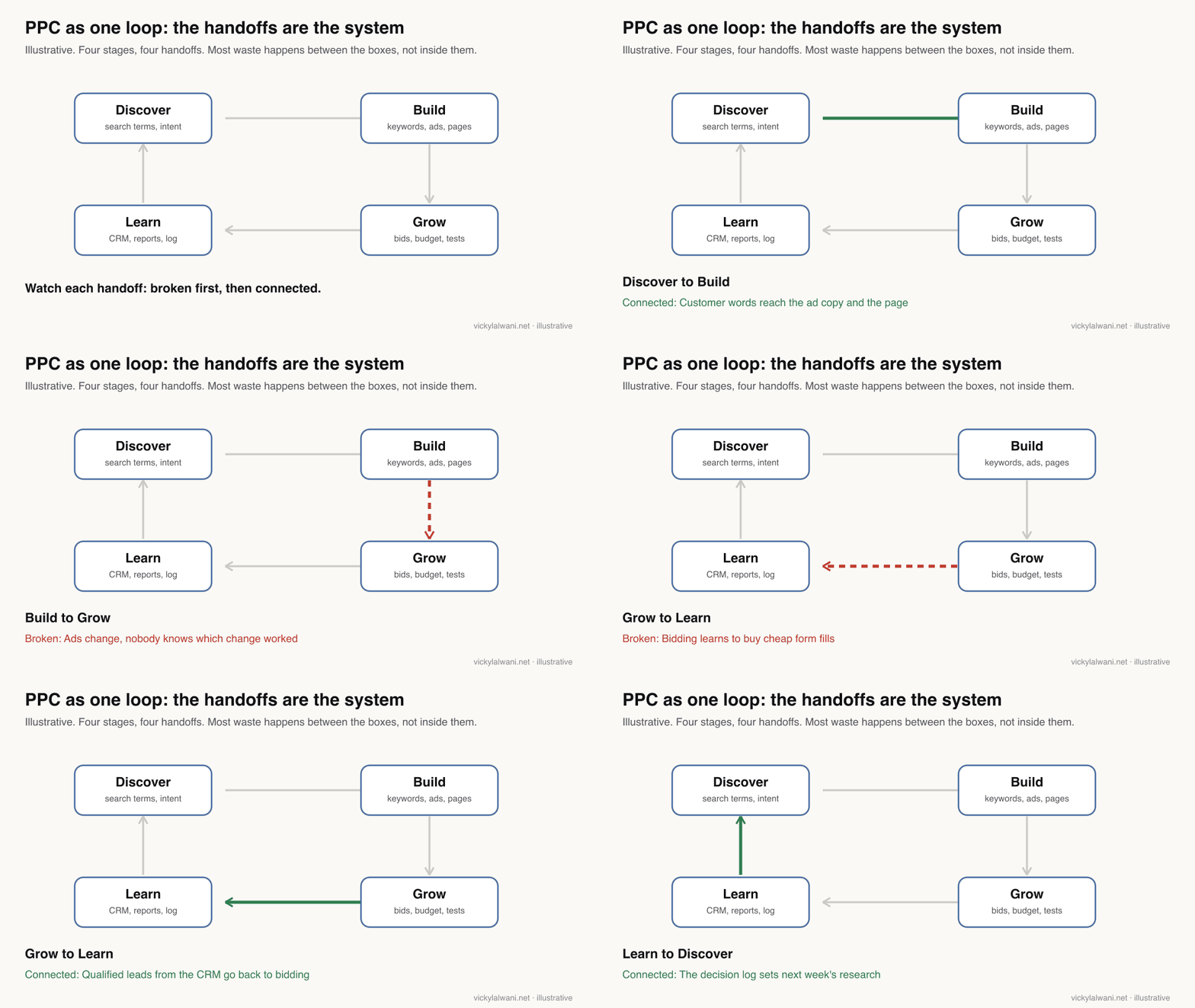
Most PPC teams have a systems problem, not a PPC problem. Each job gets done, but what one job learns rarely reaches the next. The waste lives between the boxes.
The handoff that matters most is lead quality. Send qualified leads from your CRM back to Google and Meta before their deadlines. Since 15 June 2026, Google takes offline conversion uploads through the Data Manager API, not the Google Ads API.
AI connects the handoffs; people own the decisions. Use AI to join data, classify search terms and keep a decision log. Keep strategy, offers, budgets and approval human.
The search terms report showed it on Monday: people searching for a cheap call-out fee were clicking and filling in forms. The PPC manager added a negative. The copywriter never heard about it, so the ad still led with "fast, affordable". The landing page still hid the fee. Sales knew those leads never booked, but that never reached the bidding. Four people did their jobs well, and the account learned nothing.
That is the systems problem. AI PPC management is useful when it fixes the connections between jobs, not when it adds another tool at one end. This guide is about those connections in November 2026. If you would rather have the system built and run for you, my Google Ads management service does that, with tracking fixed first. Prices are on the pricing page.
Other guides on this site cover the neighbouring questions: the 15 recurring jobs in Google Ads management, which PPC jobs to automate and how AI agents for PPC are built. This one is about what passes between those jobs.
A note on evidence. Platform facts come from Google Ads Help and Meta for Developers, read on 18 November 2026. Where I write "I", it describes my own working habits. No client names or client figures appear here.
What does AI PPC management mean as a system?
Short answer: It means running research, building, bidding and reporting as one loop where each job's output is the next job's input, with AI doing the joining, sorting and remembering. The difference from a list of tasks is that every finding changes something downstream and leaves a record.
| Level | What it does | Example | What is missing |
|---|---|---|---|
| Tool | One job, on demand | An AI writes ad copy | No input from data |
| Workflow | One job, repeatable | Weekly search terms review | Output goes nowhere |
| System | Jobs feed each other | Terms change copy, pages, bids | Nothing, if it is logged |
Paid media looks like a checklist: research, build, optimise, report. Treated that way, each job is done by a different person, in a different tool, on a different schedule. Information leaks at every handover. A system does not need more jobs; it needs the handovers written down.
Where does information get lost between PPC jobs?
Short answer: At four handoffs: search findings that never reach the ads and pages, changes that are never tested properly, lead quality that never reaches the bidding, and reports that never change next week's plan. Each has a simple connected version.
| Handoff | What should pass | What usually happens |
|---|---|---|
| Search terms to ads | Customer words, intent | Only negatives are added |
| Ads to tests | One question, an end date | Several changes at once |
| CRM to bidding | Qualified leads, values | Bids chase form fills |
| Results to research | What worked, what did not | Report filed and forgotten |
| Google to Meta | Winning messages | Two silos, two stories |
A thoughtful r/PPC post puts the first handoff well: a search terms report shows the language that triggered an ad, not whether the person became a useful lead. Treat it only as a negative keyword worksheet and you waste it; treat it as proof of demand and you overstate it. It becomes customer research only when you join it to lead quality.
Google's own reports make this harder than it looks. The search terms report leaves out low-volume terms for privacy, and Performance Max now has search terms reporting and campaign-level negative keyword lists across all campaigns, so there is more language to join than a year ago, but never all of it.
Which handoff matters most?
Short answer: Lead quality back to the bidding. If Google and Meta only see form fills, they learn to buy more cheap form fills. Send qualified leads and sales from your CRM back to each platform, on time, and the bidding starts working for the business instead of the dashboard.
Google says this plainly. Its Google Ads account on X put it as "A form fill is just a signal. A closed sale is the goal." The mechanism is enhanced conversions for leads, which Google calls an upgraded version of offline conversion import: you send hashed lead details, plus click IDs where you have them, when a lead turns into business.
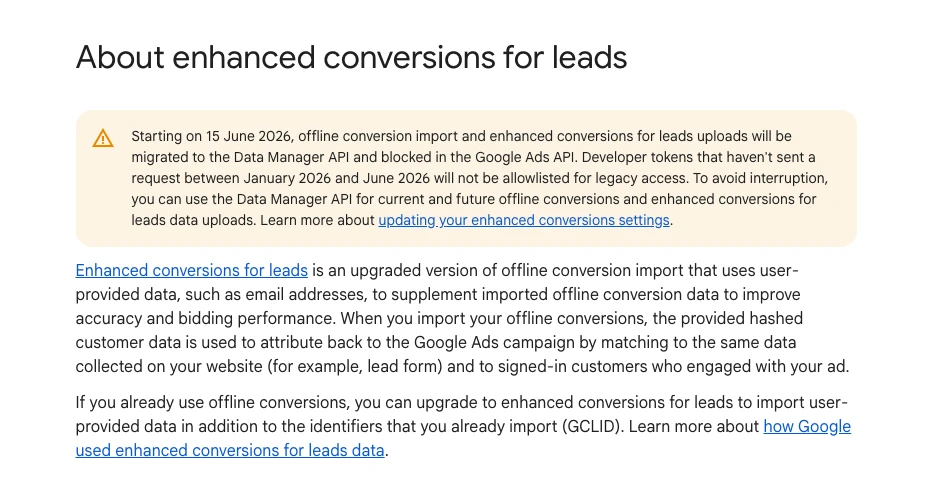
The 2026 change that breaks old setups: starting on 15 June 2026, offline conversion import and enhanced conversions for leads uploads were moved to the Data Manager API and blocked in the Google Ads API, except for legacy access. If a script or connector stopped sending CRM results mid-year, check this first. Google's Ads Liaison announced the Data Manager API in December 2025.
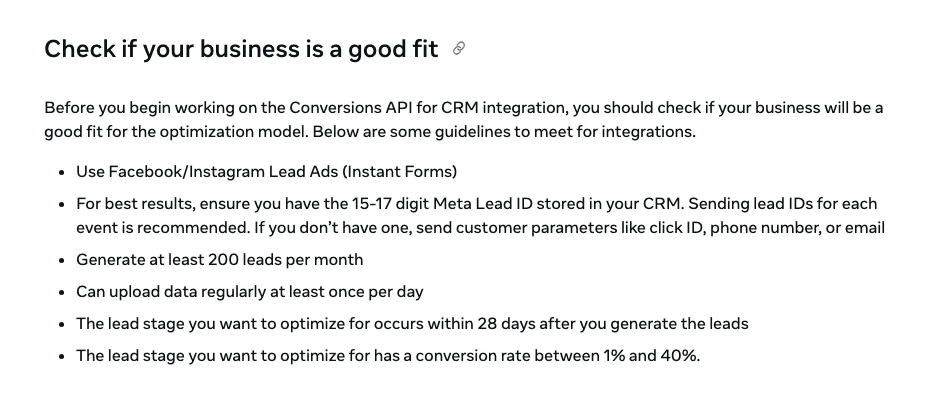
Meta has the equivalent for lead ads. Its Conversions API for CRM lets you send lead stages from your CRM, and the Conversion Leads goal currently works only with Instant Forms. Meta's own fit checklist is specific.
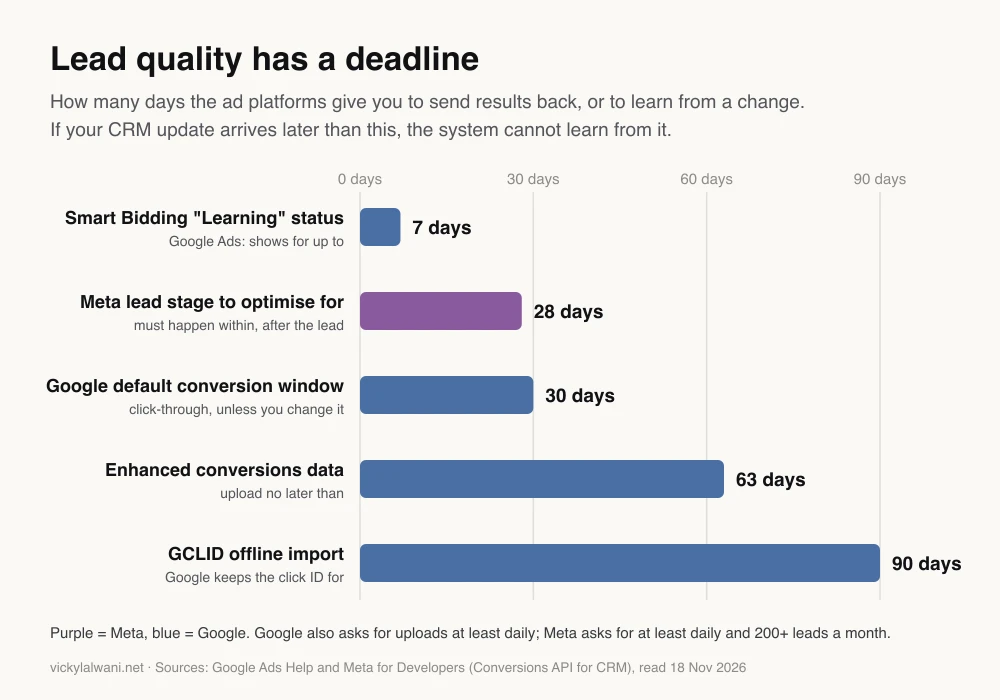
Both platforms also put a clock on the handoff. If your sales team updates the CRM weekly and the export runs monthly, much of the signal arrives too late to count.
| Platform | Send | How often | Deadline |
|---|---|---|---|
| Google Ads | Qualified lead, sale | At least daily | 90 days (GCLID) |
| Google Ads | Hashed lead details | At least daily | 63 days |
| Meta | Lead stages | At least daily | Stage within 28 days |
Google's offline import FAQs add one step people skip: upload consistently for one to two conversion cycles before you include the new action in the Conversions column. Switching the primary goal too early is how accounts lose weeks. A r/PPC thread shows exactly that: lead quality improved after offline conversions went in as secondary, then fell apart when phone calls were switched to primary; replies agreed the change effectively reset what the bidding had learned. Google's primary and secondary conversion actions page explains which ones bidding uses.
Uploads also fail quietly. In an r/googleads thread, twelve click IDs uploaded successfully but only four counted. Replies listed the usual causes: truncated or case-changed IDs, clicks older than 90 days, a wrong conversion action name, and secondary actions hiding results from the main column. Put a check on that handoff, not just on the campaign.
How should search terms feed ads and landing pages?
Short answer: Treat each search term with spend as a finding with three possible outputs: a keyword or negative change, an ad copy angle, and a landing page note. Join it to lead quality first, so you act on terms that bring the wrong buyer, not just terms that are cheap.
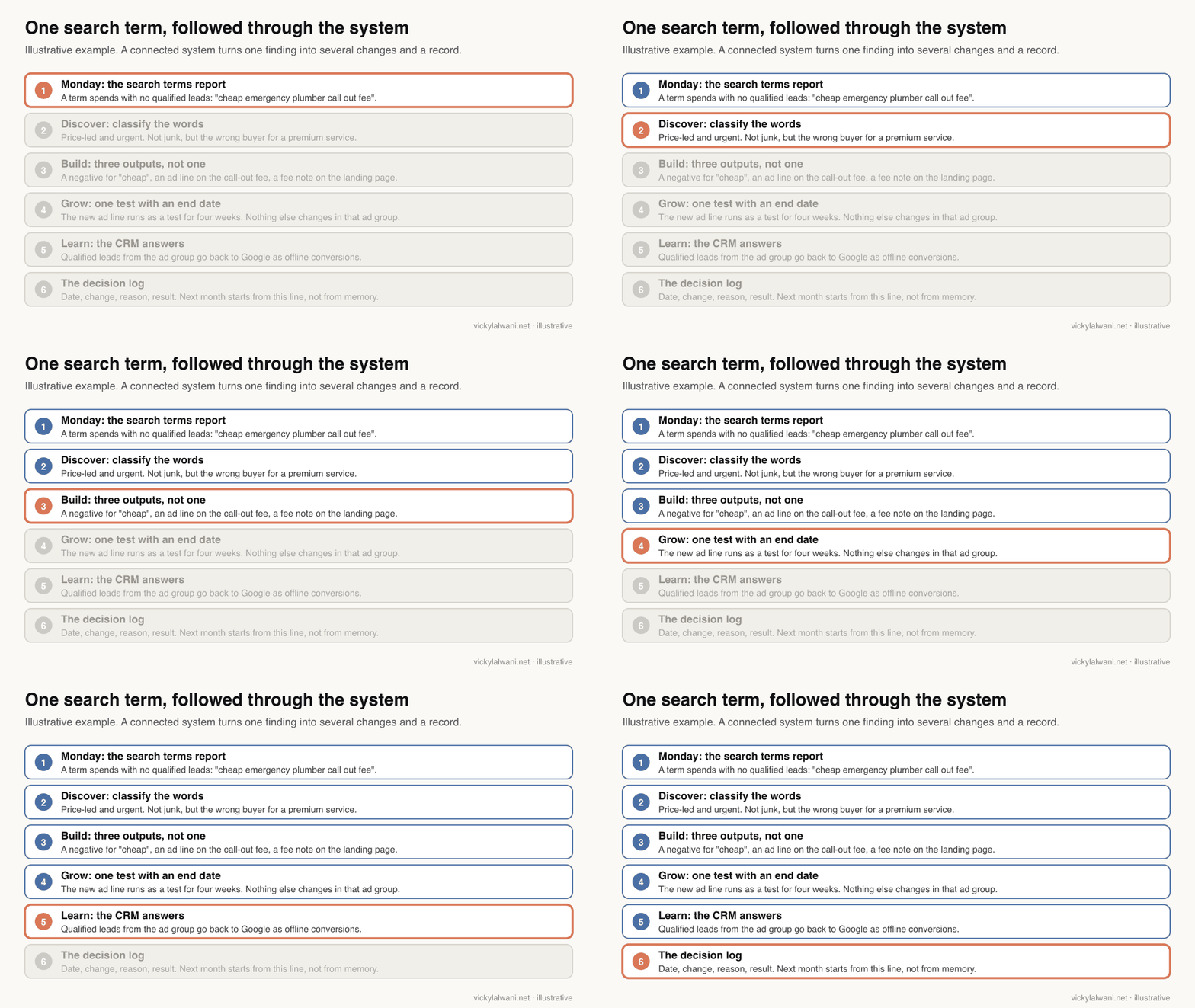
This is the job AI is genuinely good at: reading hundreds of terms against CRM outcomes and sorting them by intent, then drafting the three outputs for a person to approve. Paste this into Claude, ChatGPT or Gemini with a joined export.
You are the handoff step between our search terms review and the rest of the account.
Input: this week's search terms export joined to CRM lead status
(term, campaign, ad group, cost, clicks, leads, qualified leads, reason lost).

For each term with spend, output ONE row in this exact format:
term | intent (problem, buyer type, urgency) | result (no lead, lead, qualified) |
action for keywords | action for ad copy | action for landing page | confidence | evidence

Rules:
- A term can need several actions. "Add negative" is only one of them.
- Use the searcher's own words when you suggest ad copy or page wording.
- If qualified-lead data is missing for a term, say so. Do not guess quality from cost per lead.
- Never apply anything. These are proposals for a person to approve.

Finish with three lines: the biggest pattern this week, what to test, what you need from me.
The same classification feeds Meta. A message that wins on search, such as a clear call-out fee, is a creative angle to test on Meta, and a Meta hook that earns qualified leads is a headline to test on Google. Compare the platforms in one place without adding their numbers together; the cross-channel report guide shows how.
What is a decision log, and why does the system need one?
Short answer: A decision log is one table of every approved change: date, platform, what changed, why, what you expect, when you will judge it and who approved it. It is the system's memory, so next month starts from evidence instead of recollection, and AI can read it to spot overlaps and repeats.
Google Ads keeps two years of change history, which tells you what changed and who changed it. It does not tell you why, what you expected or whether it worked. Google seems to agree that memory is the gap: in August 2026 its Google Ads account said "the most expensive mistake in marketing" is "forgetting what worked last month" and announced shared memory for Ask Advisor as coming soon. Check whether it has reached your account; your own log works today.
Add one row to the decision log for every change we approve this week:
date | platform | what changed | why (the evidence) | what we expect | when we will judge it | who approved

Then read the last 8 weeks of the log and tell me:
1. Which changes reached their judgement date and what happened.
2. Which changes overlapped, so their results cannot be separated.
3. Anything we tried before that is being proposed again.
| Field | Example | Why it matters |
|---|---|---|
| Why | Price terms not booking | Stops repeat mistakes |
| Expect | Fewer, better leads | Makes it testable |
| Judge on | In 4 weeks | Stops early verdicts |
| Approved by | Account owner | Clear accountability |
Also log what the platform changed. Google can apply some recommendations automatically, and if those changes sit outside your log, nobody can tell what caused what. One r/PPC thread on campaigns that suddenly die lists the same first two checks: is tracking still working, and did you or the platform change something just before the drop?
What cadence keeps the loop turning?
Short answer: Match each loop to the speed the platform learns. Check tracking and spend daily, review search terms weekly, judge bids and tests over at least one conversion cycle, and revisit offers, budget split and goals monthly or quarterly.
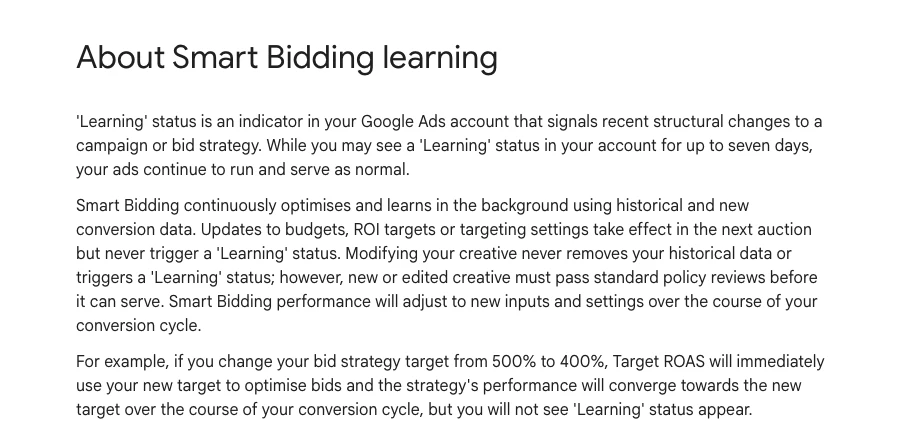
Google's Smart Bidding learning page is the best guide to the clock. Learning status shows for up to seven days after structural changes such as a new bid strategy or changed conversion goals. Budget, target and creative changes take effect without it, but performance still settles over your conversion cycle. Judging a target change after three days is judging noise.
| Loop | How often | Handoff it feeds | AI does |
|---|---|---|---|
| Tracking and CRM upload check | Daily | Lead quality to bidding | Flags gaps |
| Spend and pacing | Daily | Budget decisions | Flags outliers |
| Search terms with lead status | Weekly | Ads, pages, negatives | Classifies, drafts |
| Tests and bid targets | Each conversion cycle | Decision log | Summarises results |
| Offer, budget split, goals | Monthly or quarterly | Everything | Prepares the evidence |
For tests, use Google Ads custom experiments where you can, and change one thing per ad group at a time otherwise. If you want the daily checks to run themselves, the Claude Code PPC workflows guide shows how to script them, and the graph engineering guide shows how to connect several checks with approval gates in between.
What should AI do, and what stays human?
Short answer: AI joins data, classifies search terms, drafts copy and page notes, checks uploads and keeps the log. People own the offer, the definition of a qualified lead, the budget split, the bid targets and the approval of every live change.
| Give to AI | Keep with a person |
|---|---|
| Joining terms to CRM status | What counts as qualified |
| Classifying intent | Offer and positioning |
| Drafting ad lines, page notes | What goes live |
| Checking uploads and pacing | Budget split and targets |
| Reading the decision log | The verdict on a test |
The definition of a qualified lead is the most important human decision in the whole system, because everything downstream optimises towards it. The r/PPC thread "The eval was harder than the agent" describes an agent that improved cost per conversion while cheaper conversions stopped turning into good pipeline. Nothing was broken; it chased the signal it was given. Replies recommend feeding back a downstream field such as qualified stage from the CRM, and stepping in when spend moves a lot.
On live accounts I keep to one habit whatever the tooling: audit first, put the findings in a sheet, check them by hand, and change nothing before approval. For the agent side of that, see human in the loop AI for Google Ads.
How do you start without rebuilding everything?
Short answer: Connect one handoff at a time, in this order: tracking you trust, CRM results back to the platforms, search terms joined to lead quality, then the decision log. Add cross-channel learning last, once the basics run without you.
- Trust the conversions. Check that every form and call is measured and that primary actions are the ones you mean. The tracking service exists because this step blocks everything else.
- Send lead quality back. Set up enhanced conversions for leads through Data Manager for Google, and the Conversions API for CRM for Meta lead ads. Upload daily.
- Join search terms to lead status weekly. Use the handoff prompt above and approve the three outputs by hand.
- Start the decision log. One row per approved change, with a judgement date.
- Share learning across platforms. Test winning messages from one platform on the other, and compare results without adding them up.
A r/PPC case study from an agency describes the order working: they rewrote the lead form, routed unqualified submissions away from sales, and fed qualification signals back into the platform, without raising the budget. Replies make the useful point that the form fix was a one-off, while the feedback loop is what kept improving. It is a self-reported result, so read it as a pattern, not a benchmark.
What are the signs your PPC is not a system yet?
Short answer: Search term insights never reach the people writing ads, reports describe the past without changing next week, nobody can say which numbers the team trusts, the CRM and the ad platforms disagree, and Google and Meta are managed as separate silos.
- Negatives are the only output of the search terms review.
- Bidding optimises to form fills while sales complains about lead quality.
- Nobody can say why a change was made three months ago.
- Two changes went live in the same ad group in the same week.
- Offline uploads "succeed" but nobody checks that they count.
- The monthly report has no line saying what will change next.
A system does not guarantee results. It makes good practice repeatable and bad practice visible. If the offer is weak or the landing page is poor, a connected system just finds that out sooner.
What do people say on X and Reddit?
Short answer: Google's own accounts are pushing first-party data and lead quality hard. Practitioners agree, and their warnings are practical: uploads that silently fail, primary goals switched too early, and agents chasing cheap conversions.
Posts and threads checked on 18 November 2026. Reddit replies are opinions; one case study comes from an agency.
| Where | Date | What it says | Type |
|---|---|---|---|
| Google Ads, X | 25 Mar 2026 | A form fill is a signal; a closed sale is the goal | Official |
| Google Ads Liaison, X | 9 Dec 2025 | Data Manager API launched | Official |
| Google Ads Liaison, X | 10 Sept 2026 | Data strength uplift scorecard for first-party data | Official |
| Google Ads, X | 24 Aug 2026 | Shared memory for Ask Advisor, coming soon | Official |
| A former Google ads practitioner, X | 3 Nov 2026 | Weekly: terms into Claude, match CRM deals | Opinion |
| r/PPC | 19 Sept 2026 | Search terms need lead quality joined | Opinion |
| r/PPC | 10 Aug 2026 | Fixed lead quality without more budget | Vendor |
| r/PPC | 1 Apr 2026 | Switching primary goal reset learning | First-hand |
| r/googleads | 2 Nov 2026 | Uploads succeed but do not count | First-hand |
| r/PPC | 14 Sept 2026 | Agent chased cheap conversions | First-hand |
The post from a former Google ads practitioner is a good weekly routine in miniature: export search terms every Monday, have Claude flag terms that spent without booking a demo, draft negatives, then match closed deals from the CRM back to the terms that produced them. It is the search terms to CRM handoff, done by hand with AI help.
Which videos explain the connected setup?
Short answer: Start with Google's Ads Decoded episode on lead gen with first-party data, then Meta's short explainer on the Conversions API for CRM, then Google's Data Manager prep guide. All six below were checked on YouTube on 18 November 2026.
How to drive better Google Ads lead gen with first-party data, Google Ads, September 2026. A live Ads Decoded episode with Google's measurement specialists. Official, so it promotes Google's tools.
Boost lead quality with Meta Conversions API for CRM, Meta for Business, February 2026. Meta's own explainer for connecting Instant Form campaigns to the CRM. Official.
Google Ads Data Manager: Data prep guide, Google Ads, April 2026. How to prepare and connect first-party data through Data Manager. Official.
| Video | Channel | Date | What it covers |
|---|---|---|---|
| Lead gen with first-party data | Google Ads | Sept 2026 | Lead quality signals |
| Meta Conversions API for CRM | Meta for Business | Feb 2026 | CRM to Meta |
| Data Manager: Data prep guide | Google Ads | Apr 2026 | Data Manager setup |
| Enhanced conversions for leads guide | Google Ads | Jul 2025 | Implementation |
| Demand Gen creative: testing and fatigue | Google Ads | Oct 2026 | Creative loop |
| How to win in the Agentic Era | PPC training channel | Jun 2026 | Long workshop; sells a course |
Where this advice is weak
Short answer: The deadlines and setup steps change, the CRM side depends on your sales process, and lead-volume thresholds rule some businesses out of parts of this. Check the linked pages before you build.
- Meta's Conversion Leads goal needs Instant Forms and about 200 leads a month; smaller accounts may only be able to report lead quality, not optimise for it.
- The deadlines in the chart are platform limits, not targets. Faster uploads are better.
- The decision log and handoff prompt are working patterns, not a tested product; your fields will differ.
- Ask Advisor's shared memory was announced as coming soon in August 2026; availability may vary by account.
- Joining search terms to CRM records needs click IDs stored with each lead, which many forms and CRMs do not do by default.
Want your PPC run as one connected system?
Short answer: Start with the lead quality handoff: trusted tracking, CRM results back to Google and Meta, and a weekly search terms review joined to lead status. Then add the decision log.
I build and run this through my Google Ads management service, with analytics and tracking and Meta ads where the account needs them. I work with businesses in Australia, the UK and the USA. Rates are on the pricing page.
Keep reading: Google Ads management: 15 jobs to map, what to automate in PPC, AI agents for PPC and one cross-channel report for Google and Meta.
Sources
| Source | What it supports | Date | Link |
|---|---|---|---|
| Google Ads Help | Enhanced conversions for leads, Data Manager API from 15 Jun 2026 | Read 18 Nov 2026 | About enhanced conversions for leads |
| Google Ads Help | Upload daily; 90 and 63 day limits; 1 to 2 cycles | Read 18 Nov 2026 | Offline import FAQs |
| Google Ads Help | GCLID kept 90 days | Read 18 Nov 2026 | Fix import errors |
| Google Ads Help | Learning up to 7 days; what triggers it | Read 18 Nov 2026 | Smart Bidding learning |
| Google Ads Help | Default window 30 days | Read 18 Nov 2026 | Conversion windows |
| Google Ads Help | Search terms omitted for privacy | Read 18 Nov 2026 | Search terms report |
| Google Ads Help | PMax search terms, negatives | Read 18 Nov 2026 | PMax visibility |
| Google Ads Help | Change history, two years | Read 18 Nov 2026 | Change history |
| Meta for Developers | CRM fit: Instant Forms, 200 leads, 28 days | Read 18 Nov 2026 | Conversions API for CRM |
| X and Reddit | Official posts, practitioner views | Dec 2025 to Nov 2026 | Linked in the table above |
This article expands on my post on LinkedIn ↗.
FAQ
What is AI PPC management?
It is using AI to run paid search and social as one connected system: joining search terms to lead quality, drafting ad and landing page changes, checking conversion uploads and keeping a decision log. People still own strategy, offers, budgets and approval of live changes.
What is the difference between a PPC tool and a PPC system?
A tool does one job. A system connects the jobs, so search terms change ad copy and landing pages, CRM results change bidding, and every change is logged and judged later.
How do I send lead quality back to Google Ads?
Use enhanced conversions for leads: capture hashed lead details on your site, then upload qualified leads or sales from your CRM through Google Ads Data Manager. Since 15 June 2026 these uploads go through the Data Manager API rather than the Google Ads API.
How long do I have to upload offline conversions to Google Ads?
Google keeps a click ID (GCLID) for 90 days, so conversions must be uploaded within that time, and enhanced conversions data has a 63-day limit. Google recommends uploading at least daily.
Can Meta optimise for qualified leads from my CRM?
Yes, for Instant Form lead ads. Meta's Conversions API for CRM lets you send lead stages, and its checklist asks for at least 200 leads a month, daily uploads and a target stage that happens within 28 days of the lead.
What is a PPC decision log?
It is one table of every approved change with the date, platform, what changed, why, the expected result, the date you will judge it and who approved it. It lets the team and AI tools learn from past changes instead of repeating them.
How often should I review a PPC account?
Check tracking, uploads and spend daily, review search terms weekly, judge bids and tests over at least one conversion cycle, and revisit offers, budget split and goals monthly or quarterly.
Does this work for both Google and Meta?
Yes. The loop of discover, build, grow and learn is the same; the inputs and deadlines differ. Compare the platforms side by side and share winning messages, but never add their conversion numbers together.