A marketing MCP server is a connector that lets an AI assistant such as Claude read, and sometimes change, marketing platforms through the Model Context Protocol. In November 2026 Google publishes official Google Ads and Google Analytics MCP servers, Meta hosts an Ads MCP server in open beta, and there is no official Search Console server. All of them can write in some form, so connect them read-only first.
TL;DR
A marketing MCP server is a small program that lets an AI assistant such as Claude read, and sometimes change, your marketing tools through the Model Context Protocol (MCP), an open standard for connecting AI apps to outside systems.
In November 2026 the official ones are Google's Google Ads MCP and Google Analytics MCP (both open source, run by you), and Meta's hosted Ads MCP server (open beta). Google has not published a Search Console MCP, so every Search Console server is community or vendor code.
None of them is safely read-only by default any more. Lock it down in four places: the account role, the sign-in scope, the server settings and the AI app's tool permissions.
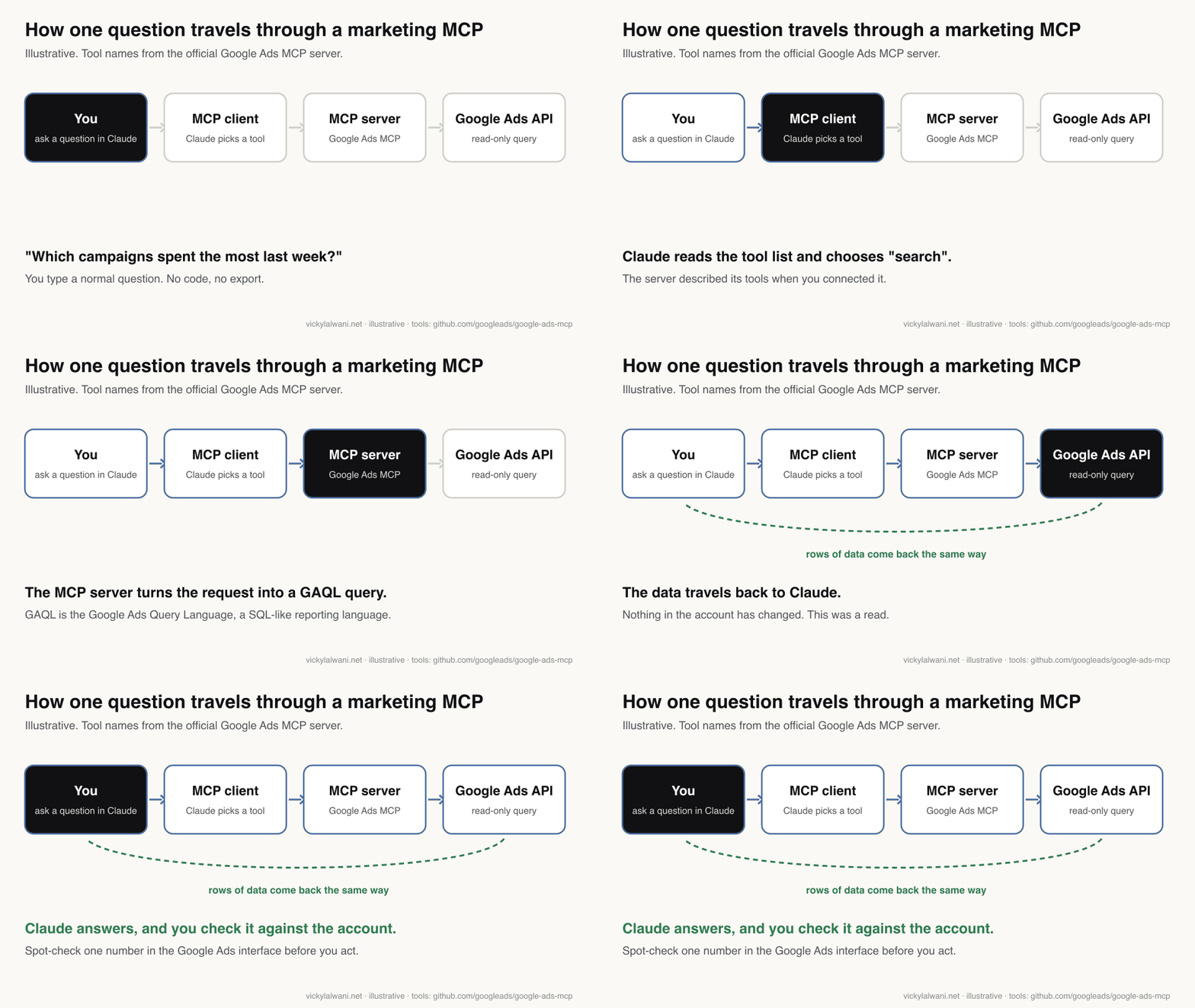
Short answer: a marketing MCP server is the connector between an AI assistant and a marketing platform. You ask "which campaigns spent the most last week?" and the assistant calls the server, which queries Google Ads, GA4, Search Console or Meta and hands the rows back. The useful ones for PPC and analytics are now official, but they can also write, so set them up read-only first.
This page covers what an MCP server is in plain words, which official servers exist as of 17 November 2026, how to connect one read-only, and what can go wrong. If you would rather have it set up on your accounts, that is part of my Google Ads management and AI automation work.
If you want the SEO side (crawlers, rank trackers, Search Console workflows), read MCP servers for SEO. For a wider list of open-source tools, including these servers, see the 30 GitHub repos I would use to run a business with AI. This article sticks to the marketing and PPC servers and how to use them safely.
What is a marketing MCP server?
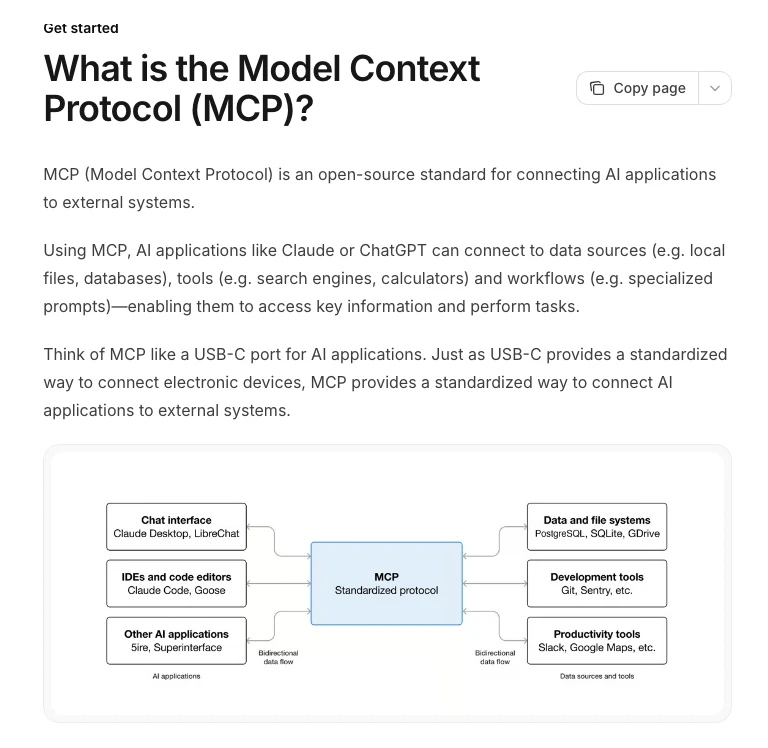
Short answer: MCP (Model Context Protocol) is an open standard that lets AI apps connect to data and tools. A marketing MCP server applies it to one marketing platform: it tells the AI which actions exist (for example "run a report") and carries out the ones the AI asks for, using your login.
The official MCP documentation describes it as a USB-C port for AI applications: one standard plug instead of a custom cable for every tool. Anthropic created MCP in November 2024 and, on 9 December 2025, donated it to the Agentic AI Foundation under the Linux Foundation, so Claude, ChatGPT, Gemini, Cursor and others all speak it.
Three parts do the work. Learn these five words and the rest of this page is easy.
| Term | Plain meaning | Marketing example |
|---|---|---|
| MCP client | The AI app you type into | Claude, Claude Code, ChatGPT |
| MCP server | The connector for one platform | Google Ads MCP |
| Tool | One action the server offers | "search" runs a Google Ads report |
| Read | Looks at data, changes nothing | Last week's spend by campaign |
| Write (mutate) | Changes the account | Creates a sitelink, edits an ad set |
The earlier version of this article treated a "marketing MCP" as something you build yourself. That is still an option, and the step-by-step build is in the marketing MCP guide. What changed in 2026 is that Google and Meta now publish their own servers, so most teams should start with those and build only what is missing.
Which official marketing MCP servers exist in November 2026?
Short answer: Google publishes two (Google Ads MCP and Google Analytics MCP), Meta hosts one (the Ads MCP server, in open beta since 29 April 2026), Amazon Ads and HubSpot have their own, and Google has none for Search Console. Everything else is community or vendor code.
| Platform | Official server? | Can it write? | Status |
|---|---|---|---|
| Google Ads | Yes, open source, you run it | Assets and labels only, with a confirm step | v0.0.6, 2 Nov 2026 |
| Google Analytics 4 | Yes, open source, you run it | Off by default; opt-in for annotations, custom dimensions, key events | v1.1.0, 6 Nov 2026 |
| Meta Ads | Yes, hosted by Meta | Yes: campaigns, ad sets, ads, catalogues | Open beta since 29 Apr 2026 |
| Search Console | No | Depends on the community server | Not on Google's list |
| Amazon Ads | Yes, hosted by Amazon | Yes, including campaigns | Open beta since 2 Feb 2026 |
| HubSpot CRM | Yes, hosted by HubSpot | Yes, for core CRM records | Generally available, 13 Apr 2026 |
Versions and dates are from each project's own release page or announcement, checked on 17 November 2026. These servers change monthly, so check the release notes before you rely on any row.
Google Ads MCP
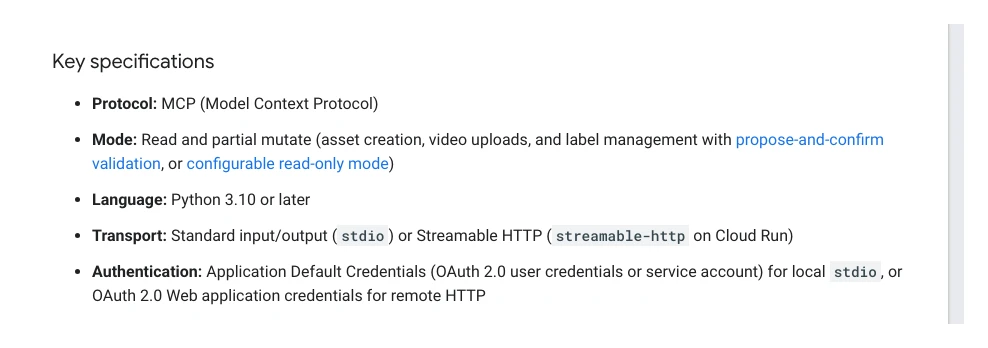
Google's Ads API team publishes the Google Ads MCP server on GitHub, first released in October 2025. You run it yourself, on your computer or on Google Cloud Run. Its main read tool, "search", runs GAQL (Google Ads Query Language, a SQL-like way to ask for report data), so anything you can pull in a Google Ads report you can ask for in plain English.
It is no longer purely read-only. Version 0.0.6 (2 November 2026) added tools that create assets such as sitelinks and callouts and manage labels. The developer guide now calls the mode "read and partial mutate". It still cannot change campaigns, ad groups, ads, budgets or bids.
Access also changed. Google's developer token page says developer tokens were sunset on 9 September 2026. Your API access level now comes from the Google Cloud project that owns your sign-in. A new project gets Test access, which only works on test accounts, so a real account needs Explorer, Basic or Standard access first. That approval step, not MCP itself, is where most people get stuck.
Google Analytics MCP
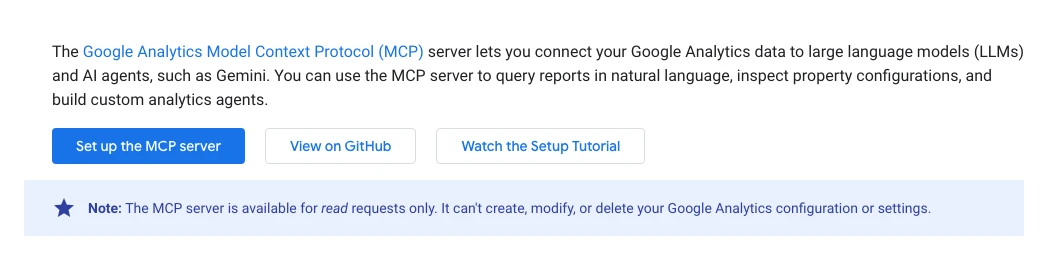
The Google Analytics MCP server has been public since July 2025. It runs reports, real-time reports, funnel reports and a conversions report with ad costs and ROAS (return on ad spend), and it reads property settings and Google Ads links.
The Google Analytics developer page still says it handles read requests only. The code has moved on: since October 2026 an --allow-write switch adds tools that create annotations, custom dimensions and key events, if you also grant the edit scope. Leave that switch off and it stays read-only.
Meta Ads MCP server
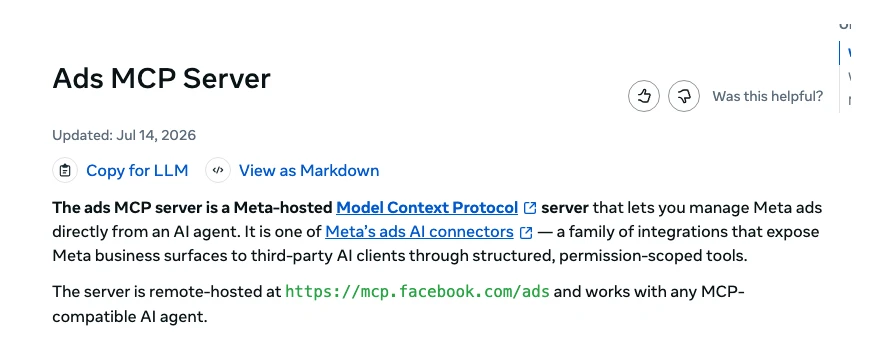
Meta announced Meta Ads AI Connectors in open beta on 29 April 2026: a hosted MCP server at mcp.facebook.com/ads plus a command-line tool. You sign in with Facebook Login for Business, with no developer app needed. On 16 July 2026 Meta added connections through your own developer app and "ads MCP server rules" that limit what agents may do.
Unlike Google's servers, this one writes from day one. The overview page lists reporting, creating and editing campaigns, ad sets and ads, catalogue management, signal diagnostics, A/B and lift tests, and activity logs.
Search Console: no official server
Google's list of Google-hosted MCP servers covers BigQuery, Maps and Workspace apps such as Drive and Sheets (some in developer preview), but not Search Console, Google Ads or Analytics. Every Search Console MCP is community code calling the public Search Console API. The most starred, mcp-gsc, now asks only for the read-only scope by default and keeps site and sitemap deletion switched off unless you turn it on.
How to use Search Console data with Claude for SEO is covered in MCP servers for SEO, so I will not repeat it here.
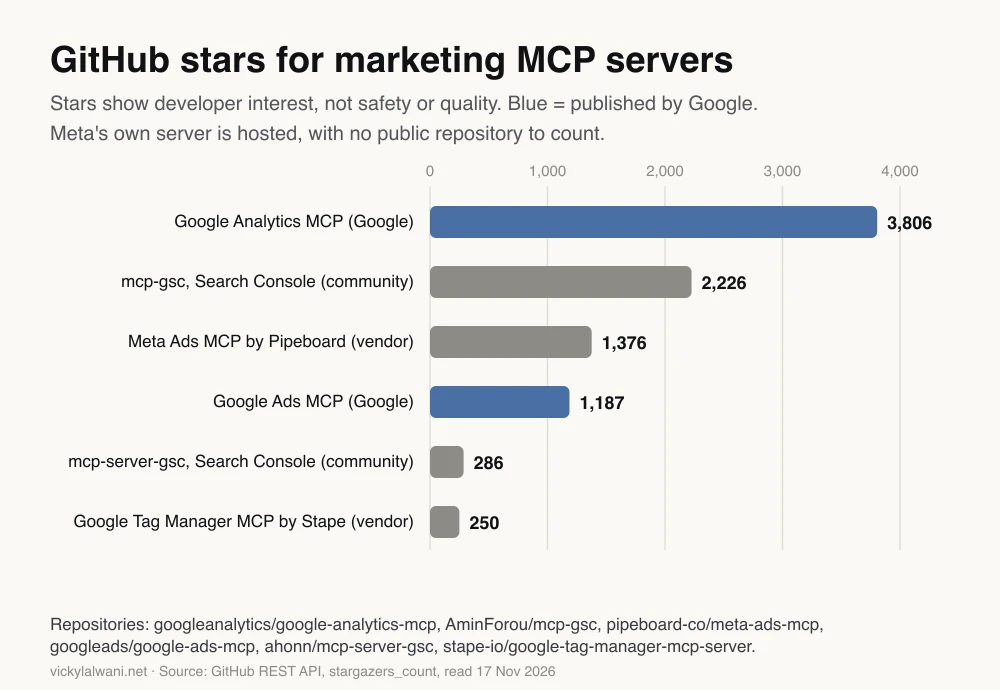
How popular are they?
GitHub stars are a rough signal of how many developers are looking at a project. They say nothing about safety. Google's two servers sit alongside busy community and vendor projects.
What can a PPC MCP actually do?
Short answer: with read access, a PPC MCP answers reporting questions across Google Ads, GA4 and Meta in plain English: spend, conversions, search terms, landing pages and trends. With write access it can also create assets (Google) or build and edit campaigns (Meta), which is where the risk sits.
| Task | Read-only enough? | Server |
|---|---|---|
| Weekly spend and conversions by campaign | Yes | Google Ads, Meta |
| Search terms with spend and no conversions | Yes | Google Ads |
| Landing pages that convert ad traffic | Yes | GA4 |
| Cross-check ad clicks against GA4 sessions | Yes | Google Ads plus GA4 |
| Draft new sitelinks and callouts | Draft yes, publish needs write | Google Ads |
| Build and launch a campaign | No | Meta only |
Here is a first prompt I would use once Google Ads and GA4 are both connected read-only. It asks for evidence, not just an answer, so you can check it.
Copy-paste prompt: weekly PPC check
Using only the Google Ads and Google Analytics tools, compare the last 7 days with the 7 days before for account [ID]. List the 5 campaigns with the biggest change in cost per conversion, the 10 search terms with the most spend and zero conversions, and any landing page where GA4 sessions from Google Ads fell by more than 30%. For every number, show the query or report you ran and the date range. Do not create, change or propose any changes.
Copy-paste prompt: check the connection is read-only
List every tool you can call on each connected server. For each one, say whether it can change anything in the account, and quote the tool description that tells you so.
The second prompt is worth running after every server update, because new versions can add write tools, as both Google servers did in October and November 2026.
How do you connect a marketing MCP server read-only?
Short answer: use four locks: a read-only role on the account, a read-only sign-in scope where one exists, the server's own read-only setting, and the AI app's tool permissions. Google Ads has no read-only scope, so its account role and server setting matter most.
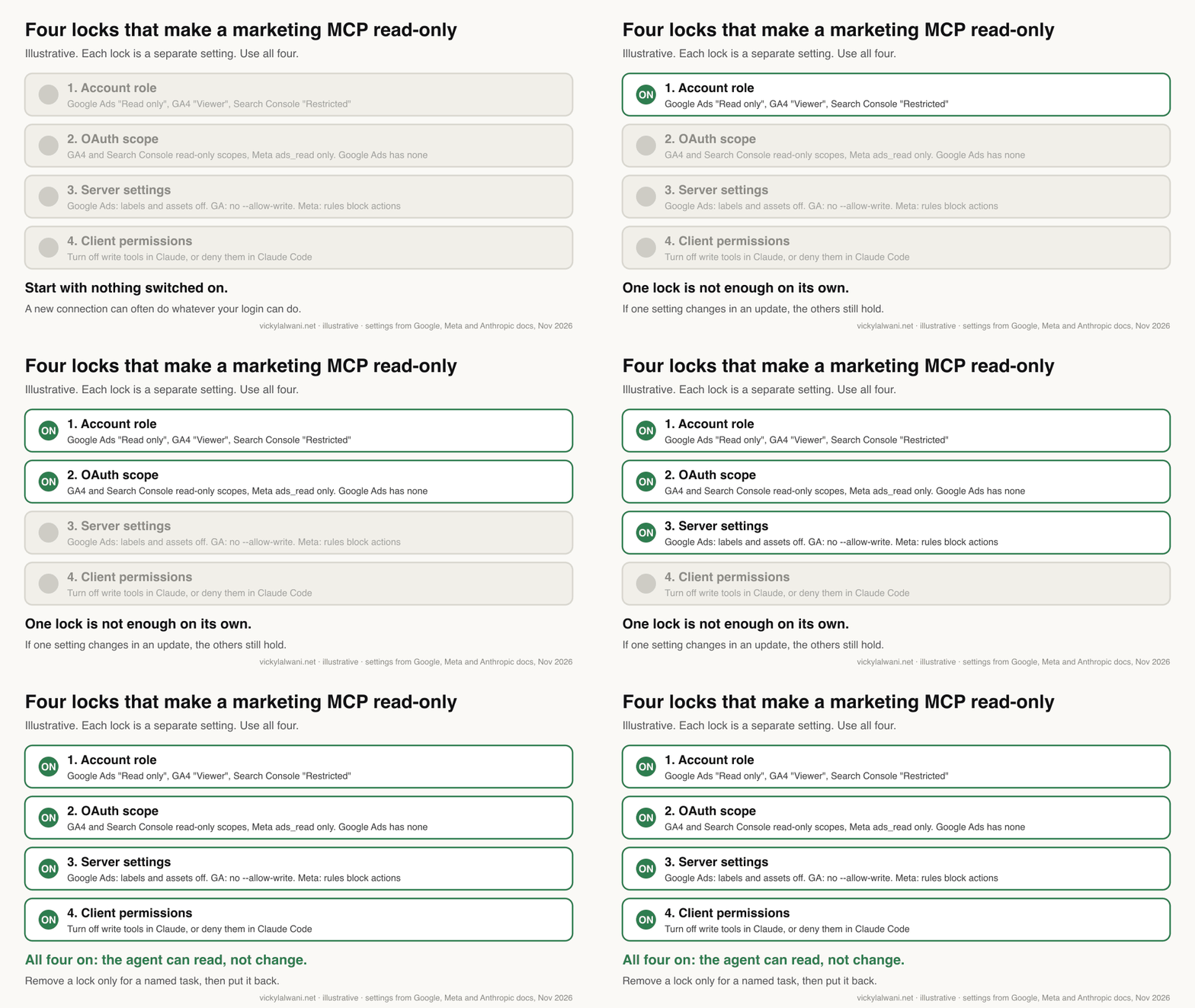
| Lock | Google Ads | GA4 | Meta Ads |
|---|---|---|---|
| Account role | "Read only" user | Viewer role | Lowest role that can see reports |
| Sign-in scope | None read-only | analytics.readonly | ads_read, not ads_management |
| Server setting | labels and assets off | No --allow-write | Rules that block actions |
| AI app | Deny write tools | Deny write tools | Deny write tools |
Lock 1: the account role
The server acts as the Google or Meta user who signs in. Give that user the lowest role that still sees the data. Google Ads' "Read only" access level can view campaigns and run reports but cannot edit campaigns. In GA4 the Viewer role is enough for every read tool. For Search Console, a Restricted user can see most reports.
In my own work, "access" is the step that goes wrong most often. Someone says the account is shared, and the role turns out to be wrong, too high or too low. I check the real role on a shared screen before anything else, and for an AI connection I would rather it is a separate read-only user than an admin's login.
Lock 2: the sign-in scope
An OAuth scope is the permission list you approve on the sign-in screen. GA4 and Search Console both offer read-only scopes (analytics.readonly and webmasters.readonly, per the Search Console API docs). Google Ads has one scope for everything, which is why locks 1 and 3 carry the weight there. Meta's get-started page says the server needs ads_mcp_management plus either ads_read or ads_management; approve the first two only for a read-only connection, where the sign-in screen lets you choose.
Lock 3: the server's own setting
For Google Ads, Google's README says to set labels: false and assets: false in tools_config.yaml for a strictly read-only server. One catch from the developer guide: once you list any category, the ones you leave out are switched off, read tools included, so list the read ones too.
namespaces:
  customers: true
  search: true
  metadata: true
  labels: false
  assets: false
For GA4, simply do not pass --allow-write. For Meta, ads MCP server rules can block budget increases, status changes, new campaigns or all agent actions on an account. Meta's developer docs still list rules as limited availability, so check Business Settings to see whether your business has them.
Lock 4: the AI app's permissions
In Claude, a custom connector is added under Customize, then Connectors. Anthropic's help page says to turn off tools you do not want Claude to use, to choose "Allow always" only for tools you trust, and to disable write tools before using Research, which can call tools without asking. In Claude Code, add the server with claude mcp add and block write tools in your settings file. The tool names follow the mcp__server__tool pattern in the Claude Code permissions docs; the names below assume you called the server "google-ads".
{
  "permissions": {
    "deny": [
      "mcp__google-ads__assets_create_asset",
      "mcp__google-ads__assets_upload_video_asset",
      "mcp__google-ads__labels_manage_labels",
      "mcp__google-ads__labels_manage_label_associations"
    ]
  }
}
Tool names depend on the server version and how you named it. Run the "check the connection" prompt above and copy the exact names it lists.
What are the risks of a marketing MCP server?
Short answer: the main risks are an agent changing a live account, hidden instructions in data (prompt injection), confident but wrong numbers, leaked sign-in tokens, and handing account access to a vendor you have not checked. Read-only locks and a human check deal with most of them.
| Risk | What happens | Control |
|---|---|---|
| Live changes | An edit goes straight to a running campaign | Read-only locks; approve every write |
| Prompt injection | Text in data tells the AI to do something else | No write tools next to untrusted text |
| Wrong numbers | API figures differ from the screen you know | Ask for the query; spot-check one number |
| Token leaks | Sign-in tokens end up in logs or files | Keep servers updated; separate user |
| Vendor servers | A third party holds your account access | Check who hosts it and what it stores |
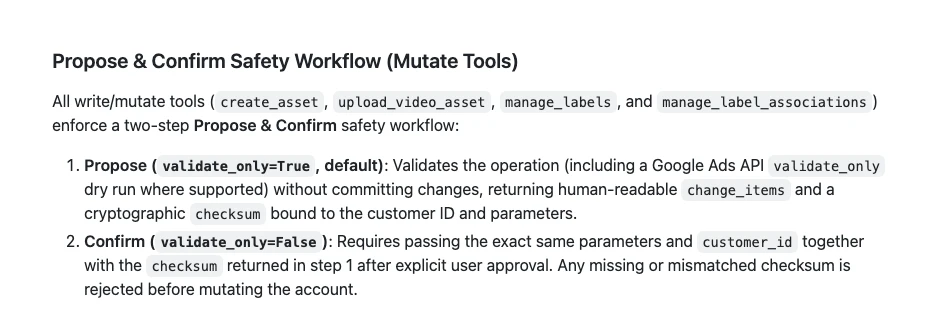
Live changes. Google's write tools use a propose-and-confirm step: the server first runs a dry run and returns a checksum, and the change only goes through when the same request comes back with that checksum after you approve it. Google's own guide says this guards against accidental changes but "does not replace access control". The Meta pages I read describe no equivalent step, and a tester in r/PPC reported that edits to running campaigns applied straight away.
Prompt injection. Marketing data is full of text written by strangers: search terms, ad comments, product feeds, competitor pages. Anthropic's help page warns that malicious servers "may include hidden instructions", and the Claude Code MCP docs say servers that fetch outside content can expose you to prompt injection. The safe pattern is simple: the session that reads untrusted text should not also hold tools that change accounts.
Wrong numbers. GA4 MCP answers come from the Data API, which can differ from what Explore or the standard reports show, and you cannot see which filters the AI used unless you ask. Make the AI show its query and date range, and check one figure in the platform before you act on it. On client accounts I audit first, put findings in a sheet, check them by hand, and change nothing until the change is approved. An MCP connection does not change that order.
Token leaks and vendors. Google fixed a bug in Google Ads MCP version 0.0.5 (9 October 2026) where sign-in tokens could be written to logs, which is a good reason to keep self-run servers updated. Hosted vendor servers are easier to set up, but your ad account access then sits with that vendor, so read who hosts it, what it stores and how you revoke it. The MCP security best practices also warn that local servers run with your computer's permissions, so install only from sources you trust.
Official, vendor or build your own?
Short answer: start with the official server for each platform, in read-only mode. Use a vendor server only when you need a platform or write action the official one lacks, and build your own only for data no server covers, such as your CRM rules or reporting memory.
| Option | Best for | Watch out for |
|---|---|---|
| Official (Google, Meta) | Most teams | Setup time; Google API access approval |
| Vendor hosted | Fast setup, many platforms | A third party holds your access; cost |
| Community open source | Search Console, gaps | Who maintains it; default write tools |
| Build your own | Your own data and memory | You maintain it |
Building your own still makes sense for the parts that are yours: brand rules, targets, account notes and a memory of past reports. That build, in stages, is what the marketing MCP guide and connecting Claude to your marketing tools cover. A connector that pulls the official servers together with your own context is the useful end state; just do not rebuild what Google and Meta now maintain for free.
Where this advice is weak
Short answer: these servers are young and change monthly, Meta's is still in beta, and I have not tested every vendor server. Treat the version details here as correct on 17 November 2026 only.
- Google Ads MCP is at version 0.0.6. Version numbers that low mean tool names and settings can still change.
- Meta's rollout is uneven. Testers on X and Reddit report the server not yet enabled on some accounts, and rules are limited availability.
- Amazon Ads' server is open to partners with active API credentials; HubSpot's is generally available. I have only read their announcements, not used them.
- Reports of a TikTok Ads MCP server exist, but I could not open TikTok's own page to confirm it, so it is left out of the table.
What people say on X and Reddit
Short answer: practitioners like read-only reporting, complain most about setup (Google Cloud projects and API access), and treat Meta's instant write access and prompt injection as the main risks.
| Who | What they said | Take it as | Link |
|---|---|---|---|
| Google Analytics (official) | The GA MCP server connects Analytics data to LLMs for questions beyond standard reports (8 Jan 2026) | Official | X post |
| A paid social practitioner | Launch-day test of Meta's server: not active on every account, ignored attribution settings (30 Apr 2026) | First-hand | X post |
| Trail of Bits (security firm) | MCP tool descriptions themselves can carry prompt injection (21 Apr 2025) | Expert | X post |
| A Japanese analytics consultancy | GA4 MCP numbers come from the Data API and can differ from Explore (4 Aug 2025) | Expert | X post |
| A developer and security blogger | Another MCP example of hidden instructions in public text reaching private data (19 Jun 2025) | Opinion | X post |
| r/PPC | Meta's server: reading is fine, live edits apply instantly with no draft step (3 Jun 2026) | First-hand | Thread |
| r/PPC | The official Google Ads MCP worked for keyword data; API access is the real hurdle (29 May 2026) | Mixed | Thread |
| r/googleads | A long account of Google Ads API access being refused after the move to Cloud projects (14 Sep 2026) | First-hand | Thread |
| r/GoogleAnalytics | Useful for exploring, but rebuild anything important in Explore (24 Aug 2026) | First-hand | Thread |
| r/SEO | SEOs mostly use MCP for research, briefs and Search Console data (1 May 2026) | Opinion | Thread |
Almost every Reddit thread also draws replies promoting someone's own MCP tool, so weigh recommendations in the comments with that in mind.
Videos worth watching
Short answer: start with Google's two launch videos and Anthropic's MCP explainer. They are short, official and do not sell anything.
Made by Google's Ads API developer relations team, 29 October 2025. It does not sell anything. It predates the November 2026 write tools, so it shows the read-only version.
Made by the Google Analytics channel, 22 July 2025. It does not sell anything. The demo uses Gemini, but the same server works with Claude.
Made by Anthropic, 16 June 2025. It does not sell anything. The best plain explanation of MCP from the people who created it.
| Video | Channel | Date | What it covers |
|---|---|---|---|
| Introducing the Google Ads MCP Server | Google Ads developers | 29 Oct 2025 | Launch demo, read tools |
| Introducing the Google Analytics MCP Server | Google Analytics | 22 Jul 2025 | Asking GA4 questions in plain English |
| Google Analytics MCP Setup Tutorial | Google Analytics | 3 Sep 2025 | Cloud project, credentials, first queries |
| Ads DevCast E1: MCPs, Agents, and Ads | Google Ads developers | 18 Mar 2026 | Google's Ads and Analytics MCP plans |
| The Model Context Protocol (MCP) | Anthropic | 16 Jun 2025 | What MCP is and why it exists |
| Google Ads MCP Servers Compared: Read-Only vs Write-Enabled | A B2B marketing agency | 4 Nov 2026 | Four servers compared; calls Google's read-only, now out of date |
Sources
| Source | What it supports | Date |
|---|---|---|
| MCP documentation | Definition, USB-C comparison | Read 17 Nov 2026 |
| Anthropic | MCP moved to the Agentic AI Foundation | 9 Dec 2025 |
| MCP security best practices | Local server and scope risks | Read 17 Nov 2026 |
| Google Ads MCP developer guide | Read and partial mutate, access levels | Read 17 Nov 2026 |
| Google Ads MCP releases | v0.0.6 write tools, v0.0.5 token fix | 2 Nov and 9 Oct 2026 |
| Google Ads API developer token | Tokens sunset 9 Sep 2026 | Read 17 Nov 2026 |
| Google Ads access levels | What "Read only" can do | Read 17 Nov 2026 |
| Google Analytics MCP page | Read-only default, Viewer role | Read 17 Nov 2026 |
| Google Analytics MCP releases | Opt-in write tools | 22 Oct to 6 Nov 2026 |
| Meta announcement | Open beta, rules added 16 Jul | 29 Apr 2026 |
| Meta Ads MCP overview | Endpoint and capabilities | Updated 14 Jul 2026 |
| Meta get started | Sign-in and permissions | Read 17 Nov 2026 |
| Meta rules | Blocking agent actions | Read 17 Nov 2026 |
| Google Cloud MCP products | No Search Console server | Read 17 Nov 2026 |
| Search Console API scopes | Read-only scope | Read 17 Nov 2026 |
| mcp-gsc | Community Search Console server | Read 17 Nov 2026 |
| Amazon Ads | Open beta for API partners | 2 Feb 2026 |
| HubSpot changelog | Remote MCP generally available | 13 Apr 2026 |
| Claude custom connectors | Tool permissions, warnings | Read 17 Nov 2026 |
| Claude Code permissions | Denying MCP tools | Read 17 Nov 2026 |
| GitHub REST API | Star counts in the chart | Read 17 Nov 2026 |
| X and Reddit posts | Practitioner reports, linked in the table above | Apr 2025 to Sep 2026 |
Want a second pair of eyes before you connect your ad accounts?
A read-only MCP connection is a good way to get faster answers from Google Ads, GA4 and Meta, as long as the access, scopes and tool permissions are set properly and someone checks the numbers. I can set it up on your accounts, audit what an existing connection can change, or simply run the account for you. See Google Ads management, Meta Ads, analytics and tracking or AI automation, and the rates on the pricing page.
Keep reading: MCP servers for SEO, 30 best GitHub repos to run your business with AI and Connect Claude to Google Analytics, Ads and CRM.
FAQ
What is a marketing MCP server?
A marketing MCP server is a connector that lets an AI assistant such as Claude read, and sometimes change, a marketing platform through the Model Context Protocol. You ask a question in plain English and the server runs the matching report in Google Ads, GA4, Meta or another tool, then returns the data.
Is there an official Google Ads MCP server?
Yes. Google publishes an open-source Google Ads MCP server on GitHub (googleads/google-ads-mcp), first released in October 2025. You run it yourself on your computer or on Google Cloud Run; Google does not host it for you.
Is the Google Ads MCP server read-only?
Not any more by default. Version 0.0.6, released on 2 November 2026, added tools that create assets and manage labels behind a propose-and-confirm step. You can make it strictly read-only by switching off the labels and assets categories in its tools_config.yaml file.
Is there an official Search Console MCP server?
No. As of November 2026 Google has not published a Search Console MCP server, and Search Console is not on its list of Google-hosted MCP products. Every Search Console MCP is community or vendor code using the public Search Console API, so choose one that uses the read-only scope.
Can Meta's Ads MCP server change my campaigns?
Yes. Meta's hosted Ads MCP server, in open beta since 29 April 2026, can create and edit campaigns, ad sets and ads as well as report on them. To keep it read-only, approve ads_read rather than ads_management where you can, and use ads MCP server rules to block actions if your business has them.
Do I still need a Google Ads developer token for the MCP server?
No. Google's developer token page says developer tokens were sunset on 9 September 2026 and are now ignored. API access comes from the Google Cloud project behind your sign-in, which needs Explorer, Basic or Standard access to work on a real account.
What is a PPC MCP?
A PPC MCP is a marketing MCP server for paid search or paid social, such as the official Google Ads MCP or Meta's Ads MCP server. Read-only, it answers questions about spend, conversions and search terms; with write access it can change the account, so it needs approval steps.
Is it safe to connect Claude to my ad accounts?
It can be, if the connection is read-only and someone checks the answers. Use a read-only account role, read-only scopes where they exist, the server's read-only setting and blocked write tools in Claude, and never give write tools to a session that also reads untrusted text such as search terms or web pages.
Should I build my own marketing MCP server?
Only for what the official servers do not cover. Use Google's and Meta's servers for platform data, and build your own connector for your own context, such as targets, brand rules and a memory of past reports.