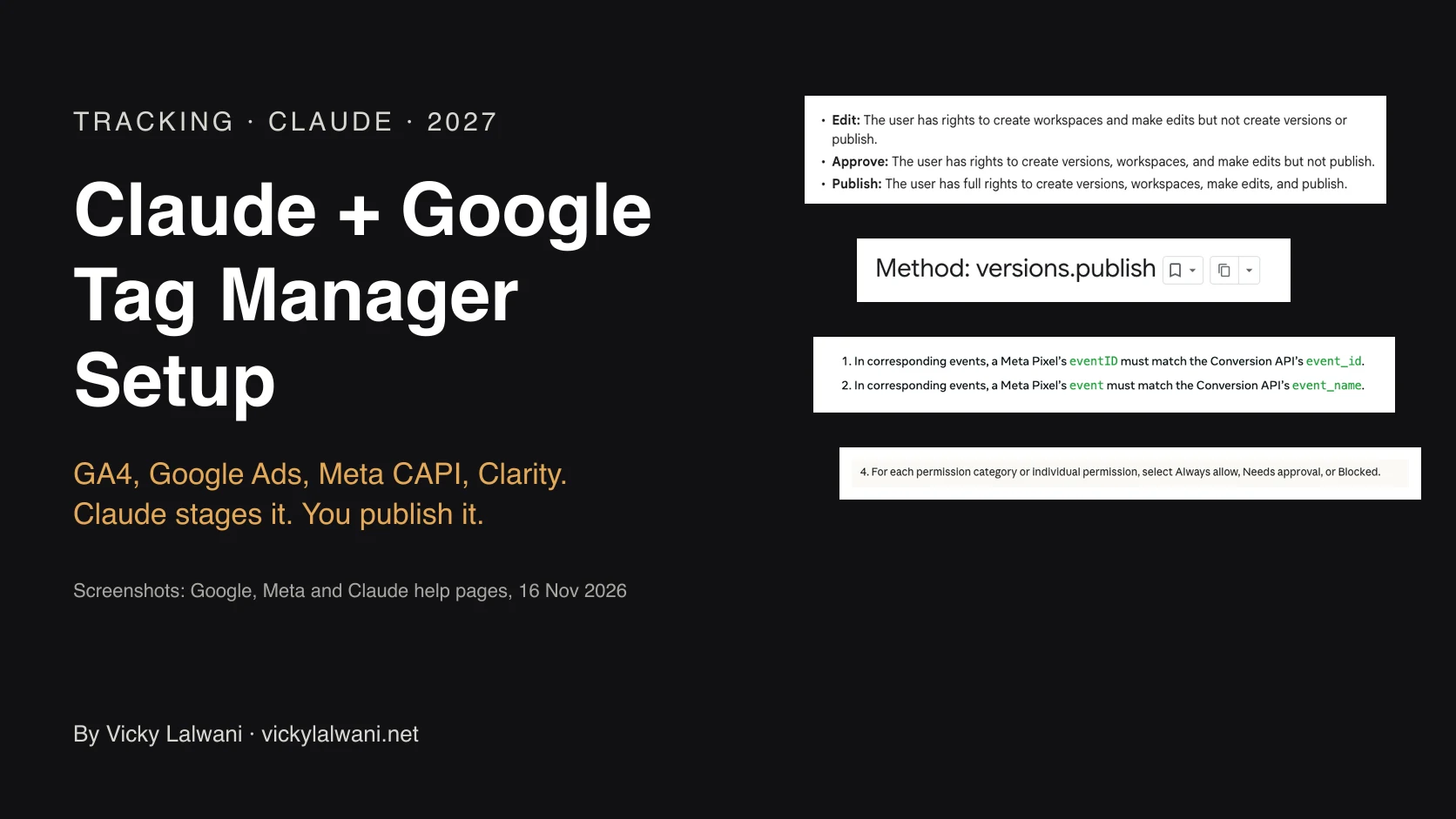
To connect Claude to Google Analytics safely, give Claude a GA4 user with the Viewer role, sign in with only the analytics.readonly scope, add Google's official analytics-mcp server to Claude Code without the --allow-write flag, and deny the three write tools in Claude Code's permissions. Check one figure against GA4 before anyone relies on the answers.
TL;DR
There is no Google Analytics connector from Google in Claude's directory. The official route is Google's open-source Google Analytics MCP server, which Google documents for Claude Code with one command.
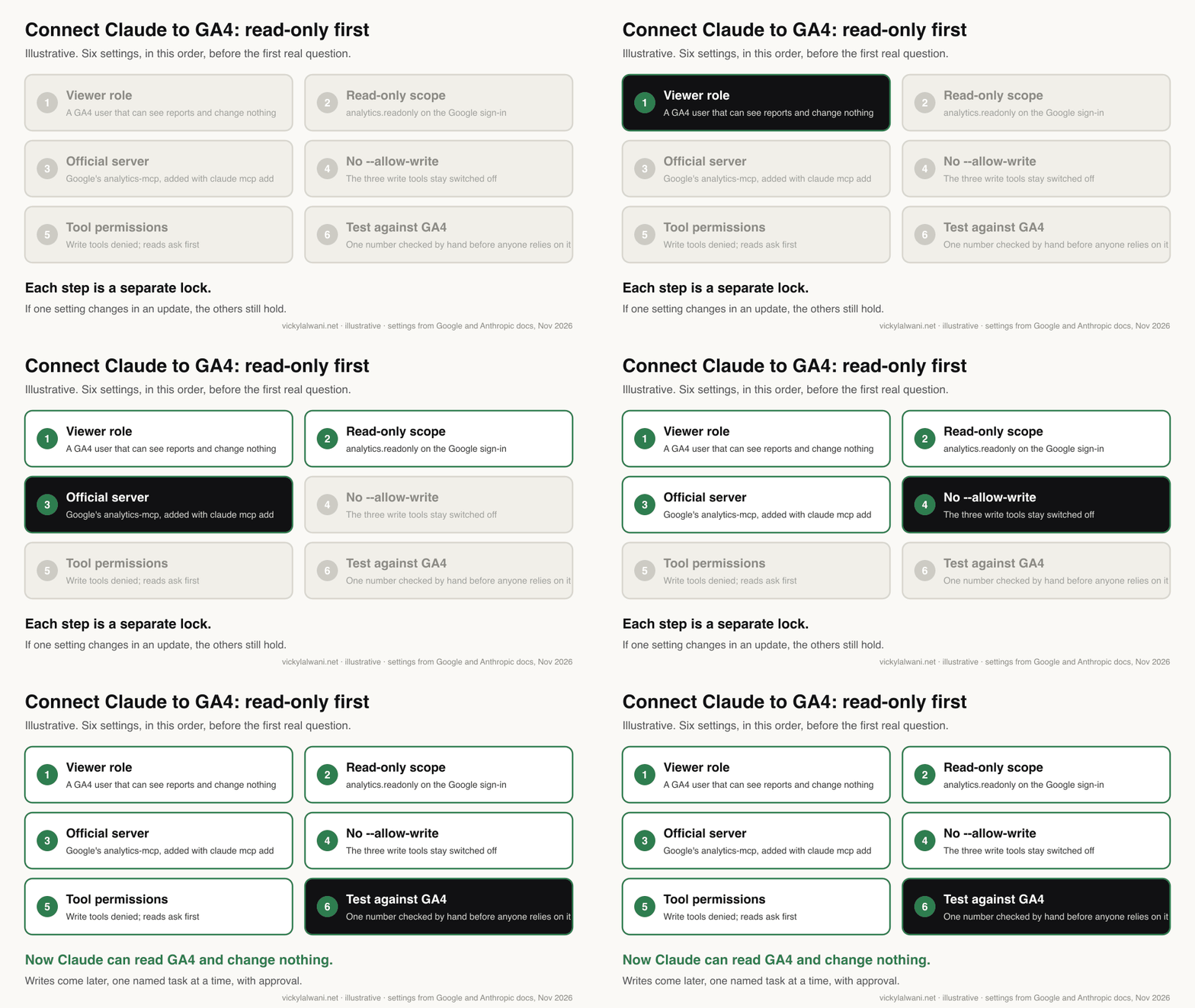
Connect it read-only in six steps: a GA4 user with the Viewer role, a Google sign-in with only the analytics.readonly scope, Google's server added without the --allow-write flag, write tools denied in Claude Code, a test against a number you already trust, and a plan for revoking access.
Turn on writes (annotations, custom dimensions, key events) only later, for one named task, with Claude asking before every change.
Short answer: to connect Claude to Google Analytics safely, give Claude a GA4 user with the Viewer role, sign in with the read-only scope, add Google's official analytics-mcp server to Claude Code without --allow-write, and block the three write tools. Check one figure against GA4 before anyone relies on the answers.
This page is the step-by-step how-to for connecting one tool, GA4, with read-only access first and approvals for anything that changes the property. It does not re-explain MCP; if you need that, read what a marketing MCP server is. If you want to know which other marketing tools have connectors in Claude's directory and what each can change, read the Claude connectors catalogue. If you would rather have it set up and checked for you, that is part of my Claude consultant and analytics and tracking work.
Every command and setting below was checked against Google's README and Help pages and Anthropic's docs on 17 and 18 November 2026.
Which way should you connect Claude to Google Analytics?
Short answer: use Google's official Google Analytics MCP server with Claude Code if someone on the team can run a few terminal commands. Use a third-party connector from Claude's directory if you need it in the Claude app with no setup, and accept that the vendor then holds your GA4 access.
| Route | Where it runs | Read-only by default? | Who holds your access |
|---|---|---|---|
| Google's GA MCP in Claude Code | Your computer | Yes | You |
| Third-party directory connector | Vendor's servers | Depends on vendor | The vendor |
| Google's GA MCP hosted by you | Your Cloud Run service | Yes, unless you set the write flag | You |
The first route is the one this guide walks through. Google's README documents it for Gemini and for Claude Code. The third route, running the same server over HTTP with its own sign-in so the whole team can add it as a custom connector in the Claude app, is also in the README; it is a small hosting project, not a setting. Third-party routes in the directory include Supermetrics, Funnel and Adspirer; the catalogue lists what each can change.
What do you need before you start?
Short answer: Claude Code, a Google Cloud project you control, admin access to the GA4 property (to add a user), the gcloud command-line tool, and pipx for Python. The server itself is free; Google API quotas apply.
| You need | Why | Where to get it |
|---|---|---|
| Claude Code | Google documents this client | code.claude.com |
| Google Cloud project | Holds the APIs and quotas | console.cloud.google.com |
| GA4 admin, once | To add a Viewer user | Admin, Property access management |
| gcloud CLI | Signs in with a chosen scope | Google Cloud SDK |
| pipx | Runs the Python server | pipx.pypa.io |
Step 1: give Claude its own Viewer access in GA4
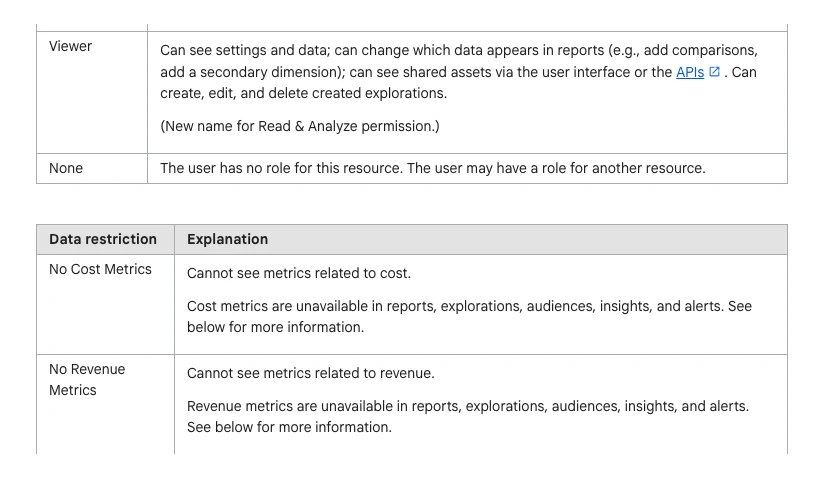
Short answer: in GA4 go to Admin, then Property access management, and give the Google account Claude will use the Viewer role on the one property it needs. Add the No Cost Metrics or No Revenue Metrics restriction if Claude should not see them.
The server acts as whichever Google account signs in, so the GA4 role is the first and strongest lock. Google's access management page says a Viewer "can see settings and data" and can use the APIs, but cannot change the property. A Marketer can create key events and audiences, and an Editor can also register custom dimensions, which is more than a reporting connection needs.
In my own client work, access is the step that goes wrong most often: "I gave you access" turns out to be the wrong role, the wrong property or the wrong person. I check the real role on a shared screen before anything else. For an AI connection I would rather use a separate account with Viewer on one property than an admin's personal login, because then the worst case is a wrong answer, not a changed property. On a client's property, explain the extra account before you ask for it; an r/ClaudeAI thread describes how awkward a new, unexplained Google identity is with clients.
| GA4 role | Can read reports | Can change the property | Use for Claude? |
|---|---|---|---|
| Viewer | Yes | No | Yes, start here |
| Analyst | Yes | Shares explorations | Not needed |
| Marketer | Yes | Key events, audiences | Only for a planned write |
| Editor | Yes | Most settings | Only for custom dimensions |
| Administrator | Yes | Everything, including users | Never |
Step 2: set up the Google Cloud project
Short answer: in a Google Cloud project, turn on the Google Analytics Admin API and the Google Analytics Data API, and create an OAuth client of the desktop type. Download its JSON file; the next step uses it.
The README lists those two APIs and links Google's guide to managing OAuth clients. Use a project your organisation owns, not a personal one, because API usage and quotas are counted against it.
Step 3: sign in with the read-only scope only
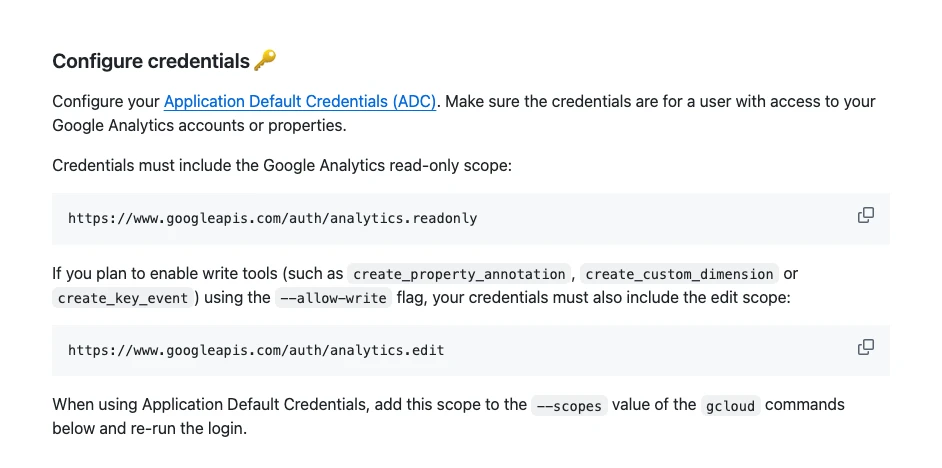
Short answer: run Google's gcloud sign-in with two scopes: analytics.readonly and cloud-platform. Do not add analytics.edit. Sign in as the Viewer account from step 1, not your own admin account.
gcloud auth application-default login \
  --scopes https://www.googleapis.com/auth/analytics.readonly,https://www.googleapis.com/auth/cloud-platform \
  --client-id-file=YOUR_CLIENT_JSON_FILE
That command is the one in Google's README. When it finishes it prints the path of a credentials file; copy it for step 4. A scope is the permission list on the Google sign-in screen, so this is the second lock: even if a write tool were switched on later, the token could not change the property.
Step 4: add Google's server to Claude Code, without --allow-write
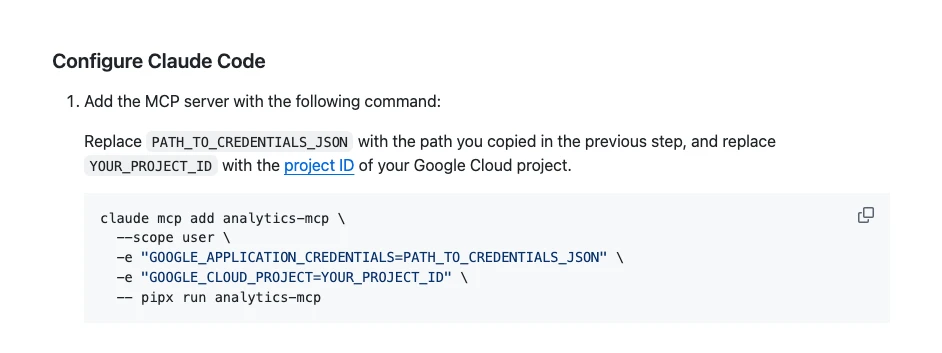
Short answer: run the claude mcp add command from Google's README with your credentials path and project ID. Leave out --allow-write, so the three write tools never load. Then run claude mcp list to check it shows as connected.
claude mcp add analytics-mcp \
  --scope user \
  -e "GOOGLE_APPLICATION_CREDENTIALS=PATH_TO_CREDENTIALS_JSON" \
  -e "GOOGLE_CLOUD_PROJECT=YOUR_PROJECT_ID" \
  -- pipx run analytics-mcp
The server, version 1.1.0 since 6 November 2026, has ten tools that read: account summaries, property details, Google Ads links, annotations, key events, custom dimensions and metrics, and four report types (standard, funnel, conversions with ad costs and ROAS, and realtime). Three more tools write, and they only exist when you pass --allow-write.
| Write tool | What it does | Needs |
|---|---|---|
| create_property_annotation | Adds a note to the timeline | --allow-write, analytics.edit |
| create_key_event | Marks an event as a key event | Same, plus Marketer or Editor |
| create_custom_dimension | Registers a custom dimension | Same, plus Editor |
Step 5: block write tools in Claude's permissions
Short answer: add deny rules for the three write tools to your Claude Code settings file, even though they are not loaded. Leave the read tools without allow rules at first, so Claude Code asks before each call, and allow them one at a time once you trust the answers.
Claude Code's permissions docs say rules run in order: deny, then ask, then allow, and MCP tools are named mcp__server__tool. With the server named analytics-mcp, this goes in ~/.claude/settings.json:
{
  "permissions": {
    "deny": [
      "mcp__analytics-mcp__create_property_annotation",
      "mcp__analytics-mcp__create_key_event",
      "mcp__analytics-mcp__create_custom_dimension"
    ]
  }
}
The deny rules are the fourth lock. If a future version adds write tools, or someone adds --allow-write to the command, the known write tools still will not run. Later, when the reads are trusted, add allow rules for specific read tools such as mcp__analytics-mcp__run_report rather than the whole server. Do not run this server in a permission mode that skips prompts.
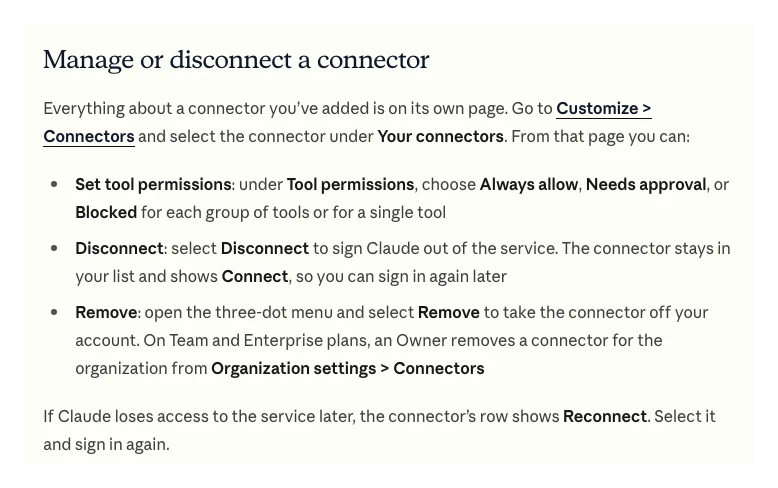
If you use a third-party GA4 connector from the directory instead, the same lock lives in the Claude app: Customize, Connectors, the connector, then Tool permissions, where each tool can be Always allow, Needs approval or Blocked.
Step 6: test with read-only questions and check one number
Short answer: first ask Claude to list its tools and say which can change anything. Then ask one small report question and compare one figure with the same report in GA4. Expect small differences, because the server uses the Data API, not the GA4 screens.
List every tool on the analytics-mcp server. For each one, say whether it can change anything in Google Analytics, and quote the words in its description that tell you so. Do not run any report yet.
Using only analytics-mcp, for property [ID], show sessions and key events by session default channel group for the last 28 days. Show the exact report request you ran (dimensions, metrics, date range, filters). Do not create or change anything.
Open the same report in GA4 and compare one row. A Japanese analytics consultancy pointed out on X that the server's numbers come from the Data API and can differ from Explore and the standard reports. That is normal; what matters is knowing which dimensions, filters and dates Claude used. On client accounts I audit first, put the findings in a sheet, check them by hand, and change nothing until the change is approved. A connected AI does not change that order.
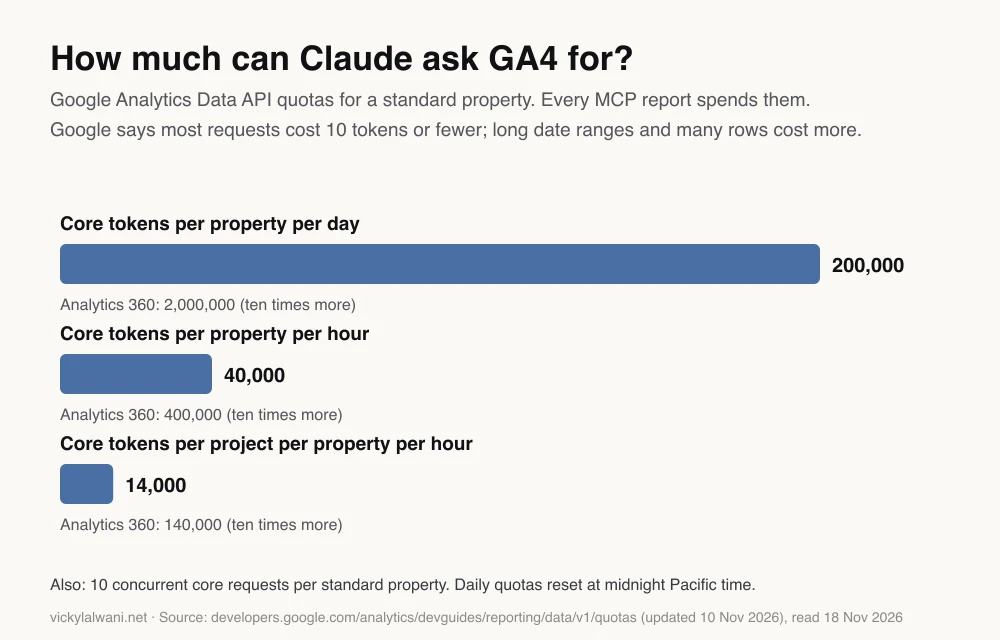
Quotas are rarely a problem for one person asking questions, but they are shared with every other tool that reads the same property through the API, such as dashboards and connectors. Google's quota page says most requests cost 10 tokens or fewer and that high-cardinality dimensions such as page path cost more. If a dashboard starts failing after you connect Claude, check quotas first.
Step 7, later: how to allow one change with approval
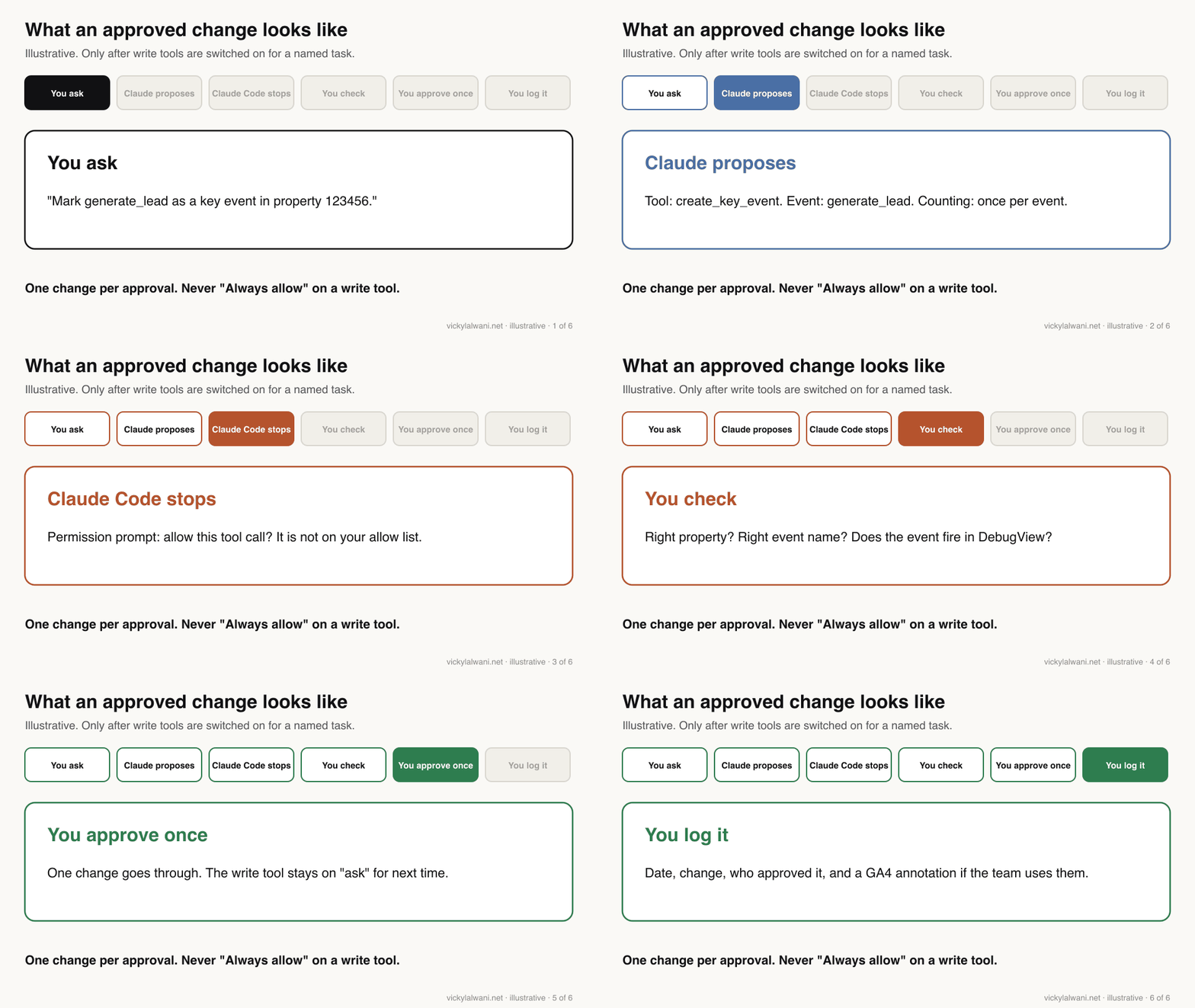
Short answer: only when there is a named task, such as marking generate_lead as a key event. Add the analytics.edit scope, give the account the role the tool needs, add --allow-write, remove that one deny rule, and approve the single call when Claude Code asks. Then put the locks back.
| Check before approving | Why |
|---|---|
| Right property ID | Accounts often have test and live properties |
| Exact event or parameter name | A typo creates a second, empty item |
| Event already fires | Check DebugView first |
| Limits | Standard properties allow 30 key events |
| Who approved, and when | So the change can be explained later |
Approve with "Yes" once, never with an option that stops asking. Anthropic's help page on custom connectors gives the same advice for the Claude app: only choose "Allow always" for a tool you trust to run unsupervised. A write tool on a live property is not one of those. If you need Claude to fix tracking itself, rather than GA4 settings, the staged approach in Claude and Google Tag Manager keeps publishing with a person.
How do you disconnect Claude from Google Analytics?
Short answer: remove the server from Claude Code, revoke the Google credentials on your computer, and remove the Viewer user from GA4. Doing all three means nothing is left that could reconnect.
| Step | Command or place |
|---|---|
| Remove the server | claude mcp remove analytics-mcp |
| Revoke local credentials | gcloud auth application-default revoke |
| Remove GA4 access | Admin, Property access management |
| Third-party connector | Customize, Connectors, Disconnect, then Remove |
Does the same method work for Google Ads, HubSpot or other tools?
Short answer: yes, the same four locks apply to any tool: a low-permission user, a read-only scope where one exists, the server's own read-only setting, and blocked write tools in Claude. What changes is where each lock lives.
| Tool | Account role | Read-only scope? | Server or connector setting |
|---|---|---|---|
| GA4 | Viewer | analytics.readonly | No --allow-write |
| Google Ads (Google's MCP) | Read only access | None | Labels and assets off in its config |
| Meta Ads (Meta's MCP) | Lowest that sees reports | ads_read | Ads MCP rules, where available |
| HubSpot (directory) | User with limited CRM access | Set by HubSpot | Block the manage tools |
| TikTok (directory) | Lowest role that sees reports | Set by TikTok | Block smart_plus create and update |
The Google Ads and Meta details are in the marketing MCP explainer, and the HubSpot and TikTok tool lists are in the connectors catalogue. For a tool that appears in neither, the order is the same every time: search Claude's directory, then look for an MCP server in the vendor's developer docs, and only then consider building a small connector on the vendor's API. In each case, start with the read-only user.
Where this advice is weak
Short answer: Google's server changes quickly, the Claude app has no official GA4 connector, and I have not tested every third-party route. Treat the commands here as correct on 18 November 2026.
- Google's server went from read-only to optional writes in October 2026 (version 0.8.0) and to 1.1.0 by 6 November 2026. New tools may appear; run the tool-list prompt after every update.
- Google's developer page for the server still describes it as handling read requests only, while the README documents the write tools. The README is the more current source.
- The Claude Code steps assume one person's computer. A shared team setup in the Claude app means hosting the server with its own sign-in, which this guide only mentions.
- TikTok role names and HubSpot permission details in the last table are general guidance; check each tool's own help pages.
What people say on X and Reddit
Short answer: people like asking GA4 questions in plain English, but the setup (Cloud project, OAuth, credentials) is the most common complaint, and analysts warn that API numbers need checking against the GA4 screens.
| Who | What they said | Take it as | Link |
|---|---|---|---|
| Google Analytics (official) | The open-source server connects GA data to LLMs for questions beyond standard reports (8 Jan 2026) | Official | X post |
| A Japanese analytics consultancy | Numbers come from the Data API and can differ from Explore and reports (4 Aug 2025) | Expert | X post |
| A Spanish analytics practitioner | Works with Claude as well as Gemini, but it spends API quota (24 Jul 2025) | Opinion | X post |
| A Google Ads freelancer | Google Ads and GA4 revenue differ because of attribution, and both can be right (4 Jun 2026) | First-hand | X post |
| A developer and security blogger | Another MCP example of hidden instructions in public text reaching private data (19 Jun 2025) | Opinion | X post |
| r/GoogleAnalytics | Asking GA4 questions in plain English works well; the top reply warns GA4 data is already shaky without AI on top (12 Jan 2026) | First-hand | Thread |
| r/GoogleAnalytics | Setup took a lot of back and forth with the Cloud project, sign-in and service accounts (24 Aug 2026) | First-hand | Thread |
| r/GoogleAnalytics | Install trouble on an older Mac; replies suggest Docker or calling the API directly (17 Oct 2026) | First-hand | Thread |
| r/ClaudeAI | On client accounts, explaining a new Google Cloud identity to the client is awkward (2 Apr 2026) | Question | Thread |
| r/analytics | Does AI get basic data retrieval wrong? Top replies: assume it can, validate, and have it write the query rather than do the maths (17 Jun 2026) | Opinion | Thread |
Videos worth watching
Short answer: Google's own setup tutorial is the best walkthrough of the Cloud project and credentials, and its launch video shows the kind of questions that work. An independent tutorial shows the Claude Code side, including what went wrong.
Made by the Google Analytics channel, 3 September 2025. It does not sell anything. It uses Gemini as the client, but the Cloud project and credential steps are the same for Claude.
Made by the Google Analytics channel, 22 July 2025. It does not sell anything. It predates the October 2026 write tools.
Made by an independent developer channel, 14 August 2026. No product pitch in the opening description. Useful because it shows the setup problems as well as the fix.
| Video | Channel | Date | What it covers |
|---|---|---|---|
| Google Analytics MCP Setup Tutorial | Google Analytics | 3 Sep 2025 | Cloud project, credentials |
| Introducing the Google Analytics MCP Server | Google Analytics | 22 Jul 2025 | What it can answer |
| Connect Google Analytics to Claude Code with MCP (Step-by-Step) | An independent developer | 14 Aug 2026 | Claude Code setup, problems |
| Connect Google Analytics 4 to AI for Free (Claude + ChatGPT, Official Google MCP) | An analytics creator | 21 Oct 2026 | Official server vs paid connectors |
| How to connect Google Analytics to Claude | Coupler.io Academy | 26 May 2026 | A vendor's connector route |
| Permissions & Tool Allowlists in Claude Code: Control What Runs Automatically | A Claude tutorial channel | 1 Aug 2026 | Allow, ask and deny rules |
Sources
| Source | What it supports | Date |
|---|---|---|
| Google Analytics MCP README | Tools, scopes, Claude Code command | Read 17 Nov 2026 |
| Google Analytics MCP releases | 0.8.0 and 1.1.0 dates | 22 Oct and 6 Nov 2026 |
| Google's GA MCP page | Read-only description | Read 17 Nov 2026 |
| GA4 access management | Viewer role, data restrictions | Read 18 Nov 2026 |
| Data API limits and quotas | Token quotas in the chart | Updated 10 Nov 2026 |
| GA4 property limits | 30 key events per standard property | Read 16 Nov 2026 |
| Manage OAuth clients | Creating the OAuth client | Read 18 Nov 2026 |
| gcloud revoke reference | Revoking local credentials | Read 18 Nov 2026 |
| Claude Code permissions | Deny, ask, allow order; MCP names | Read 18 Nov 2026 |
| Claude Code MCP | claude mcp list and remove | Read 18 Nov 2026 |
| Get started with connectors | Tool permissions in the Claude app | Read 17 Nov 2026 |
| Custom connectors (help) | Allow always guidance | Read 17 Nov 2026 |
| Claude Connectors Directory | No Google-made GA4 connector | Read 18 Nov 2026 |
| X and Reddit posts | Practitioner reports, linked above | Jul 2025 to Nov 2026 |
Want it set up and checked on your property?
A read-only GA4 connection takes an afternoon if the access is right, and much longer if it is not. I can set it up with the right roles and permissions, check the numbers against your reports, and build the weekly questions your team actually asks. See Claude consultant or analytics and tracking, and the rates on the pricing page.
Keep reading: Claude MCP connectors for marketing, What is a marketing MCP server? and Claude and Google Tag Manager.
This article expands on my post on LinkedIn ↗.
FAQ
How do I connect Claude to Google Analytics?
The official route is Google's open-source Google Analytics MCP server. Turn on the Analytics Admin and Data APIs in a Google Cloud project, sign in with gcloud using the analytics.readonly scope, then add the server to Claude Code with the claude mcp add command from Google's README.
Is there an official Google Analytics connector in Claude's directory?
No. On 18 November 2026 Claude's Connectors Directory has no GA4 connector made by Google. Third-party connectors such as Supermetrics, Funnel and Adspirer can reach GA4, but the vendor then holds your access.
Can Claude change my Google Analytics settings?
Only if you let it. Google's server is read-only by default; its three write tools (annotations, custom dimensions and key events) load only with the --allow-write flag and the analytics.edit scope, and they also need the right GA4 role.
What GA4 role should Claude's account have?
Viewer, on the one property it needs. A Viewer can see settings and data and use the APIs but cannot change the property, and you can add the No Cost Metrics or No Revenue Metrics restriction if Claude should not see them.
Why do Claude's GA4 numbers differ from the GA4 reports?
The server uses the Google Analytics Data API, which can differ from Explore and the standard reports depending on dimensions, filters and dates. Ask Claude to show the exact request it ran, and compare one figure with the same report in GA4.
Does connecting Claude to GA4 use API quota?
Yes. Every report Claude runs spends Data API tokens; a standard property allows 200,000 core tokens a day and 40,000 an hour, and Google says most requests cost 10 tokens or fewer. Other dashboards reading the same property share those quotas.
Can I use Google's GA4 server in the Claude app instead of Claude Code?
Not with a single click. Google documents Claude Code; to use the same server in the Claude app you would host it over HTTP with its own sign-in and add it as a custom connector. A third-party directory connector is the easier option there.
How do I disconnect Claude from Google Analytics?
Run claude mcp remove analytics-mcp, revoke the local Google credentials with gcloud auth application-default revoke, and remove the account from GA4 under Property access management. For a directory connector, disconnect and remove it under Customize, then Connectors.
Does the same method work for Google Ads or HubSpot?
Yes. Use a low-permission user, a read-only scope where one exists, the server's own read-only setting, and blocked write tools in Claude. For Google Ads that means a Read only user and the labels and assets tools switched off; for HubSpot, its manage tools set to Blocked or Needs approval.