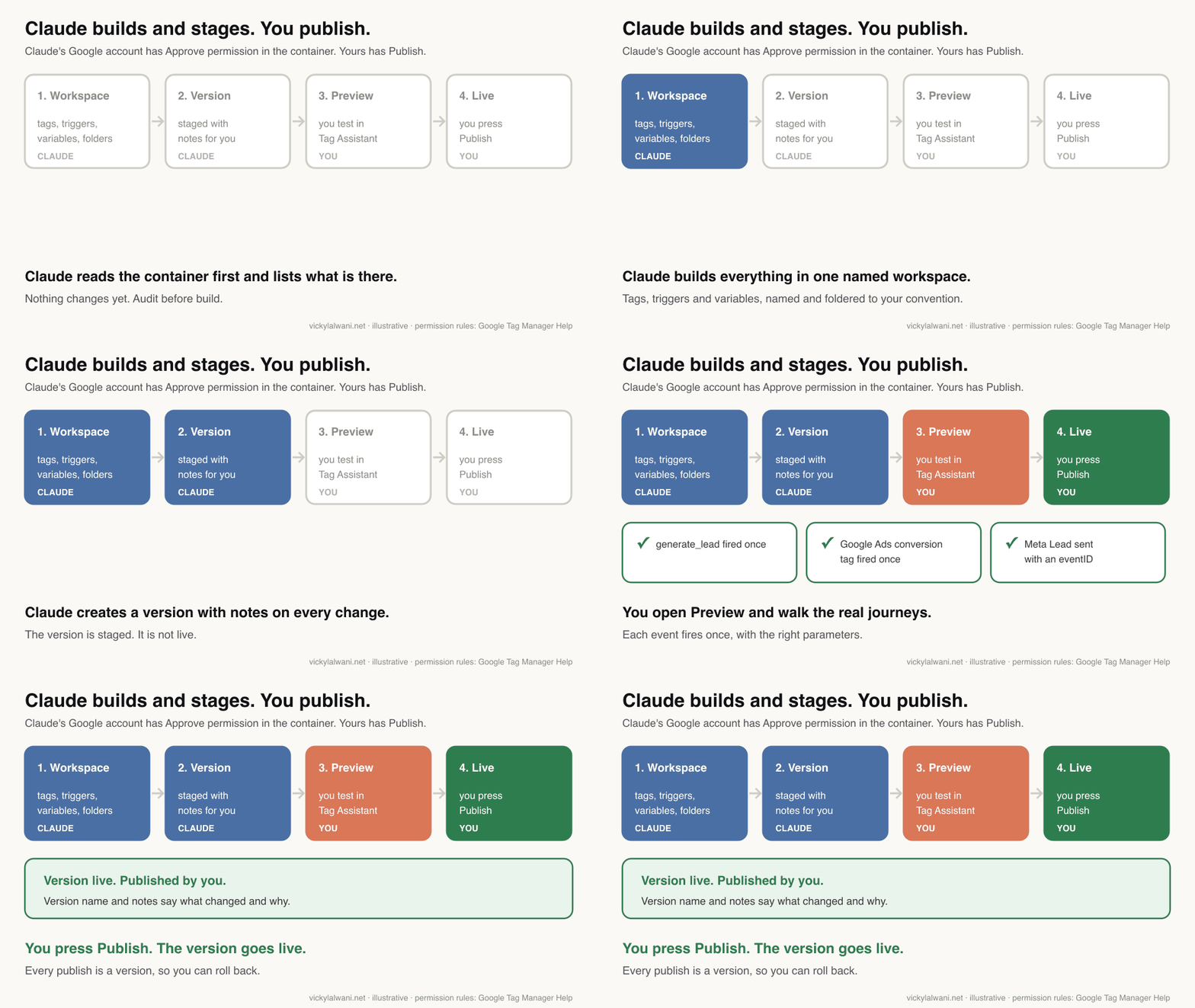
Claude can set up Google Tag Manager once it is connected through a third-party MCP server, Claude Code or a browser: it audits the container, builds GA4, Google Ads, Meta Pixel and Microsoft Clarity tags, triggers and variables in one workspace, writes the dataLayer spec and the Conversions API plan, and creates a version with notes. The safe setup gives Claude's Google account Approve permission, which Google Tag Manager defines as able to create versions but not publish, and keeps Publish with a person who tests every journey in Preview first. Meta Pixel and Conversions API events share one event ID so Meta counts each conversion once.
The short version. Claude can build most of a tracking setup in Google Tag Manager: the tags, triggers, variables, folders and a dataLayer spec your developer can follow. It can stage the result as a new version. What it should not have is the right to publish. In GTM that line already exists: give Claude's Google account Approve permission, keep Publish for yourself, and nothing goes live without you.
TL;DR
- Yes, with a connection. Claude reaches Tag Manager through a connector (an MCP server), Claude Code or the browser. Google publishes no official Tag Manager connector for Claude today, so every GTM connector is third party.
- The gate: in GTM, Approve can create versions but not publish. Publish is a separate permission, and in the API publishing is its own call with its own scope.
- Claude builds: the container audit, tags, triggers, variables, folders, the dataLayer spec, the Meta event_id plan and the test plan.
- You keep: account access, Google Ads conversion actions, GA4 admin switches, the server-side Conversions API deployment, consent decisions and the Publish button.
- Meta: the Pixel and the Conversions API must share the same event name and event ID, or one lead can count twice.
- Clarity: its one-click GTM install asks for permission to publish to your container. Add it as a template in the workspace instead.
Jump to: Can Claude do it · Who does what · The approval gate · dataLayer spec · The build · GA4 · Google Ads · Meta CAPI · Clarity · Review checklist · What audits find · Weak spots · X and Reddit · Videos
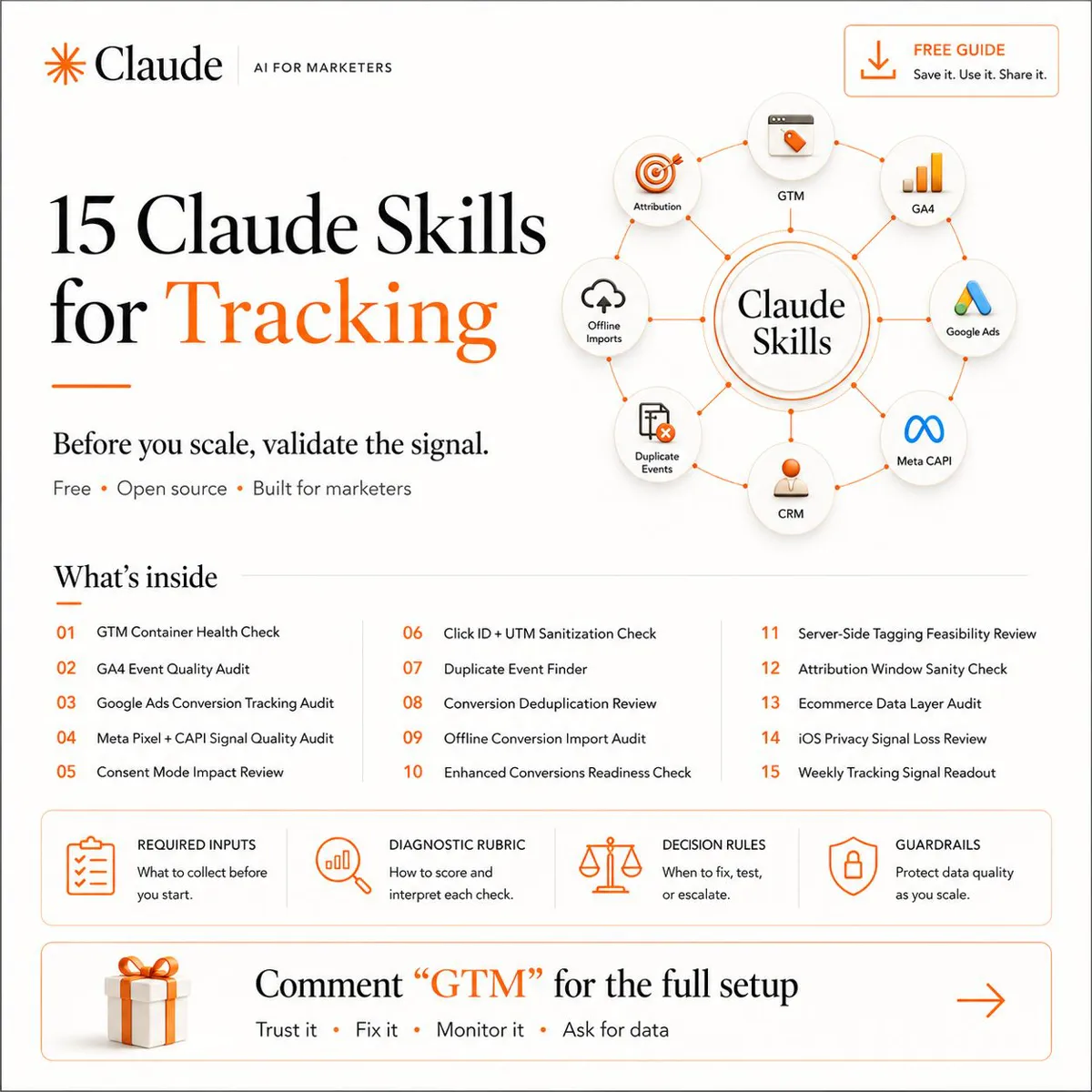
This article goes with my free guide, The Full-Stack Tracking Setup for 2027, which has the prompt for every step and a 12-point audit checklist. If you would rather have it done for you, that is my analytics and tracking service.
A note on evidence. Platform rules come from Google, Meta, Microsoft and Anthropic pages read on 16 November 2026 and linked where they are used. The prompts come from the guide. Example names and IDs are made up, and the GIFs are illustrations, not screen recordings.
Can Claude set up Google Tag Manager?
Yes. Claude can read a Tag Manager container, build tags, triggers and variables in a workspace, and create a version for you to review, once it has a connection to your account. There is no Google-built Tag Manager connector in Claude's directory, so the connection is a third-party MCP server, Claude Code talking to the Tag Manager API, or Claude working in a browser.
Picture a new business with a website, a Google Ads account and a Meta ad account. Nobody has set up tracking properly. Someone added the GA4 tag, someone else pasted a Pixel, and the form "probably" counts as a conversion.
Most of fixing that is not hard. It is manual: create a tag, build a trigger, add variables, map the conversion, test, then repeat for every platform. That repetition is the part Claude is good at, and where setups quietly break when a person does it at 6 PM.
MCP stands for Model Context Protocol, a standard way to give an AI assistant a set of actions in another tool. If you have not connected one before, my GTM MCP server guide covers what it is and how to connect it safely. This article is about what happens after you connect it.
| Route | How it connects | Good for | Watch |
|---|---|---|---|
| Custom connector | A remote MCP server added in Claude | Chat-based builds | Third-party server holds your sign-in |
| Claude Code | MCP server or Tag Manager API | Big, repeatable builds | Needs some setup |
| Browser | Claude in Chrome or a built-in browser | Screens with no API | Acts as whoever is signed in |
| Container export | You paste the JSON | Audits, no access needed | You import it yourself |
Custom connectors, Anthropic notes, connect from Anthropic's cloud, not from your computer, and Free plans are limited to one. For audits only, the container export route needs no connection at all.
The browser route needs one extra rule. In a browser, Claude acts as whoever is signed in to Tag Manager, and Claude in Chrome starts in Automatically approve mode. Use a separate browser profile signed in only to the account described below, never one where your own Publish login is open.
Which model? The guide says Opus 5 for the build and Sonnet 5 for quick passes. Those are now older models. Anthropic's current line-up is Opus 5.5, Sonnet 5.5, Haiku 5.5 and Fable 5.2, so use Opus 5.5 for the build and the audit reasoning and Sonnet 5.5 for quick, per-tag passes.
What Claude does and what stays with you
Claude does the repetitive build: audit, tags, triggers, variables, folders, the dataLayer spec and the test plan. You keep five things: access, decisions about what counts as a conversion, anything that runs on a server, consent, and the Publish button. The table shows the split across the whole stack.
| Job | Claude | You |
|---|---|---|
| Audit the container | Lists and flags | Agree the fix list |
| Event map, dataLayer spec | Drafts both | Approve; developer builds |
| GTM tags, triggers, variables | Builds in a workspace | Review the version |
| GA4 key events, settings | Lists what to switch on | Switch them on |
| Google Ads conversion actions | Writes the plan | Create them in Google Ads |
| Enhanced conversions | Builds the GTM side | Accept terms, turn it on |
| Meta Pixel events | Builds with event IDs | Check Events Manager |
| Conversions API (server) | Writes the spec | Developer or Meta deploys |
| Microsoft Clarity | Adds the template tag | Consent and masking |
| Publish | Stages a version | Preview, then publish |
Why keep those five? Each one is either a legal or commercial decision, or it happens outside the container where Claude cannot see what broke. A conversion action decides what your bidding chases. A server deployment runs on your infrastructure. Consent is a legal question, and this article is not legal advice.
When I have no access to the website itself, I deploy through Tag Manager, which is why the container matters so much. And I keep campaigns in draft until every form and call button is measured. Claude speeds up the measuring; it does not change that rule.
The approval gate: give Claude Approve, keep Publish
Give the Google account Claude uses Approve permission on the container, and keep Publish for yourself. Google's own definitions do the rest: Edit can make changes but not create versions, Approve can create versions but not publish, and only Publish can push a version live. That is a gate Google enforces, not a promise in a prompt.
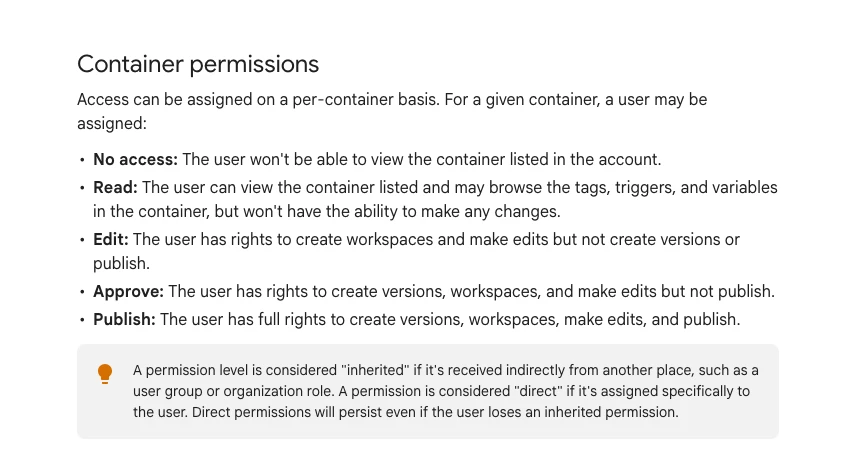
| Permission | Can do | Who gets it |
|---|---|---|
| Read | View only | An audit-only connection |
| Edit | Workspaces and edits | Strictest build option |
| Approve | Edits and versions, no publish | Claude's account (suggested) |
| Publish | Everything, including publish | You or your developer |
Why not Edit? Edit is the stricter option and still works: Claude builds in a workspace, and you review the workspace changes on the Submit screen, test them in Preview and publish. Approve adds one step, a named version with change notes that Claude writes for you. Choose Edit for the least access, Approve if you want Claude to hand you a finished, named version.
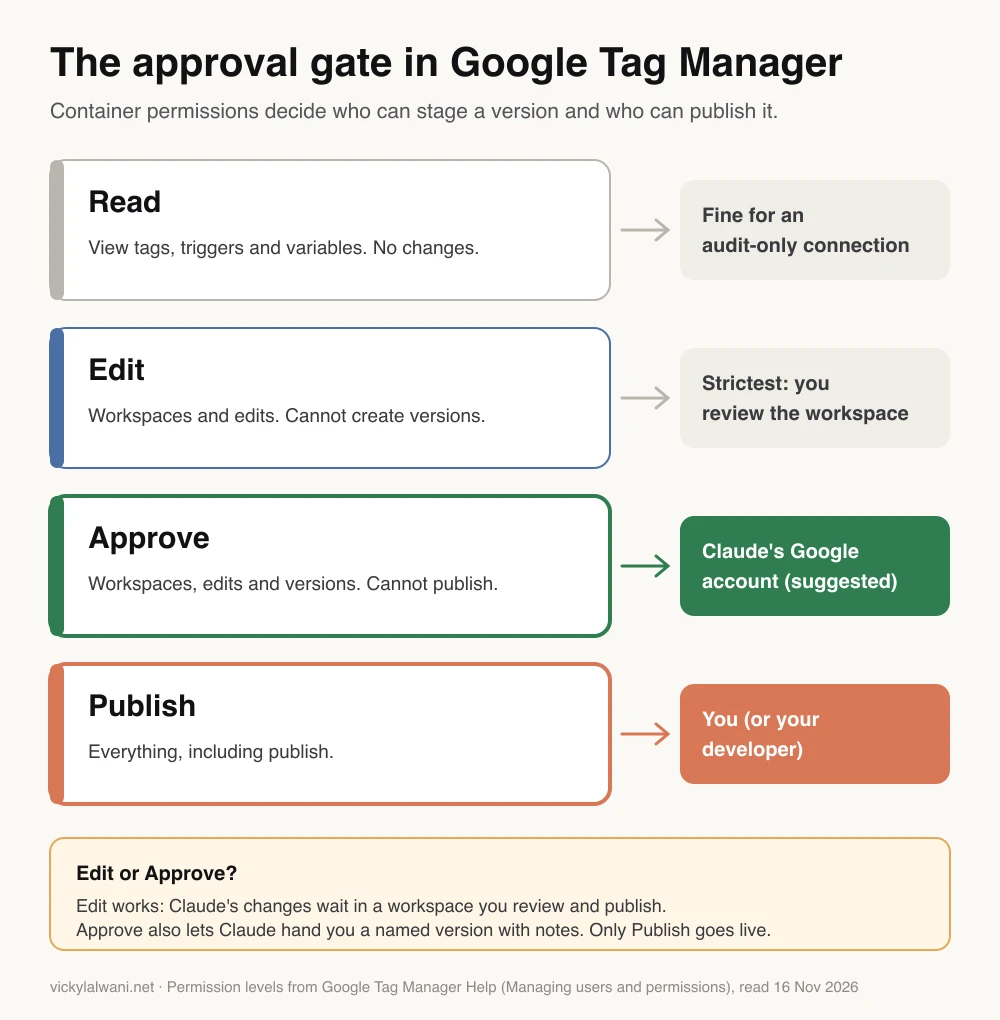
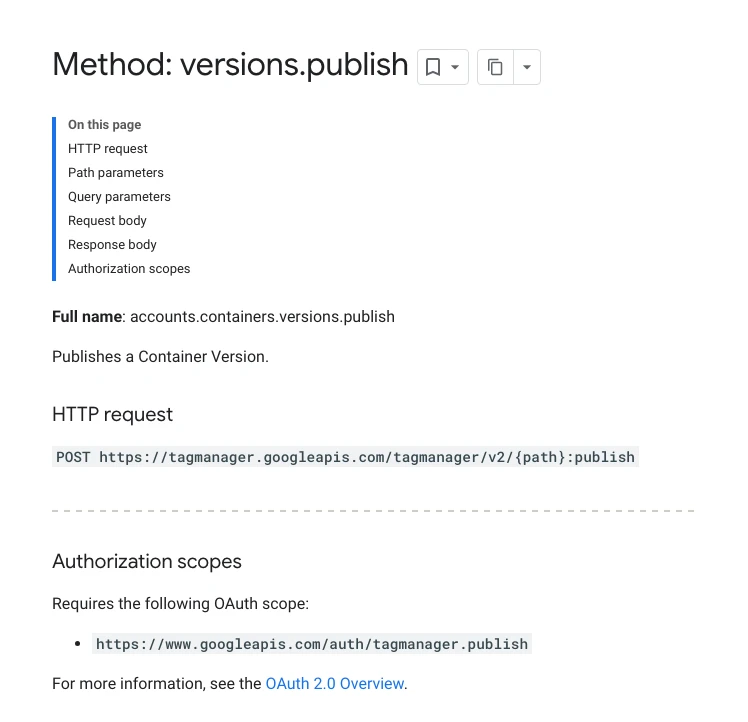
The Tag Manager API splits the same way. Creating a version needs the scope for managing versions. Publishing is a separate call that needs the tagmanager.publish scope. A connector that never asks for the publish scope cannot publish, whatever the prompt says.
In practice, set it up like this:
- Create a separate Google account for the connector, not your own login.
- In GTM Admin, give it Approve on the one container, no account Administrator role, and no user group that grants Publish, because permissions can be inherited. Check its entry in User Management shows Approve.
- Connect that account to the MCP server or Claude Code through Google sign-in, and refuse the publish scope if the sign-in screen offers a choice. A connector that runs on a shared key or the vendor's own account carries that credential's access instead.
- In Claude, set the connector's write tools to Needs approval and any publish tool to Blocked. On Team and Enterprise an owner sets this for everyone; on other plans, approve each write yourself and never choose Allow always. In Claude Code, add a deny rule for the server's publish tool.
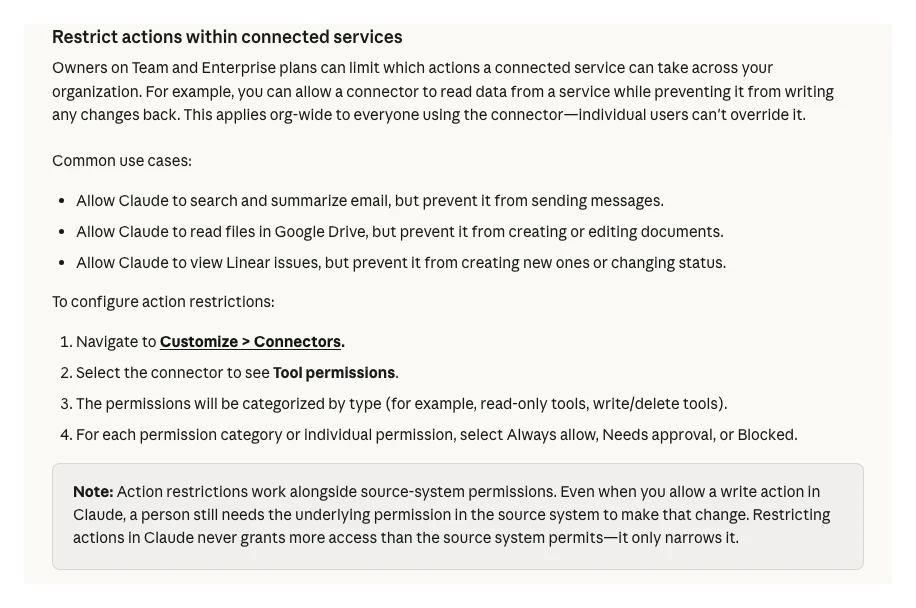
The two layers back each other up. Claude's help page puts it plainly: even when a write action is allowed in Claude, a person still needs the underlying permission in the source system. So if the Claude setting is ever loosened, the GTM permission still holds.
On Tag Manager 360 there is a built-in approval request workflow as well. Free GTM does not have it, which is why the permission split matters most for small businesses.
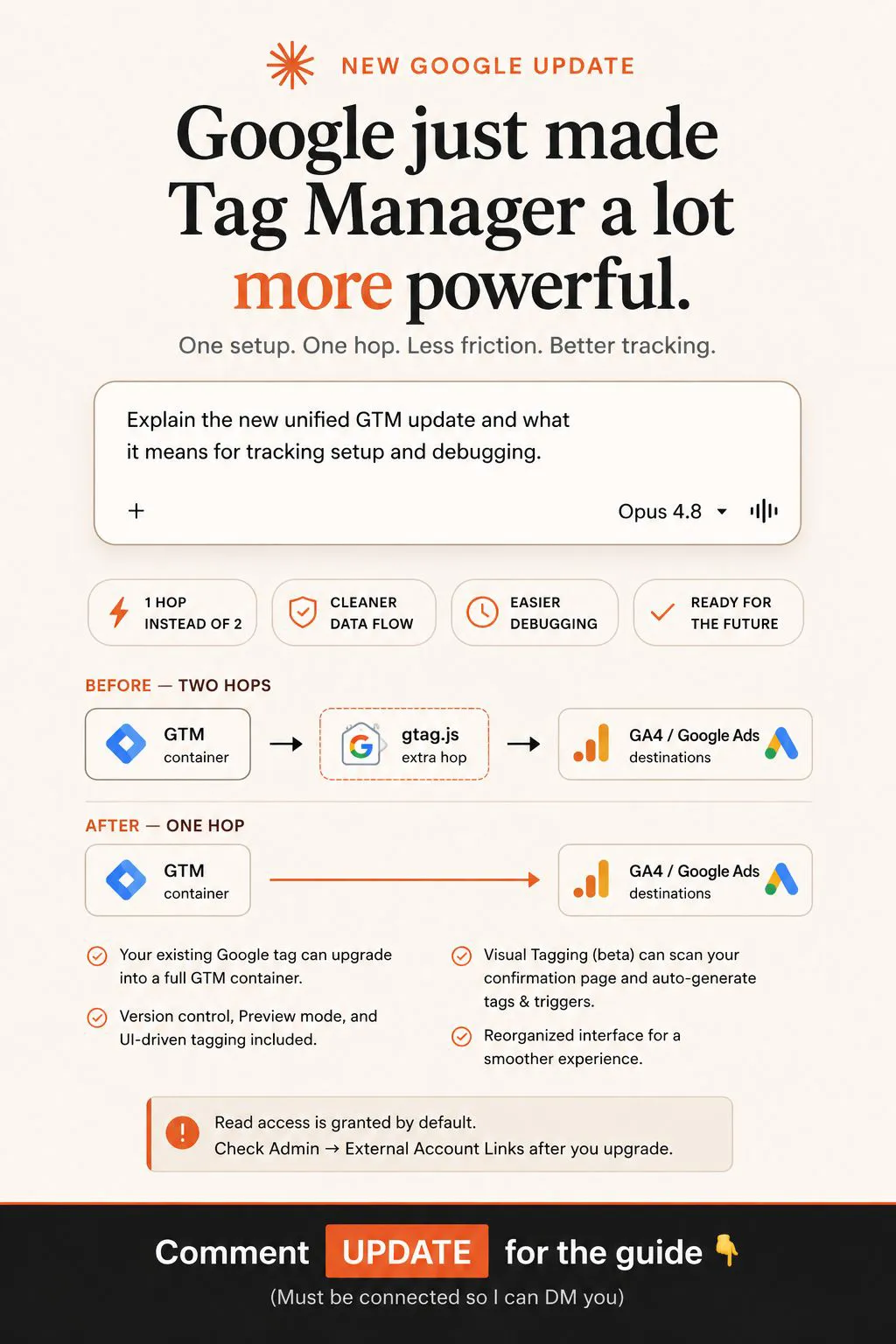
Check one more list. Since Google's October 2026 container update, linked Google products can be given access to a container through External Account Links in Admin, and those permissions are not versioned. Review that list as well as User Management.
One limit to plan around: a free container allows three workspaces at once. Tell Claude to use one named workspace, and clear old ones before a big build. Once a workspace becomes a version, Google removes it.
Before any tag: the event map and dataLayer spec
Write the dataLayer spec before Claude builds a single tag. The spec is the list of events your site pushes, with their parameters, written so a developer can build it without guessing. Tags that expect data the page never sends are the most common reason a tidy-looking container tracks nothing. Start with an event map first if you do not have one.
The dataLayer is a small JavaScript list on the page that holds facts about what just happened, such as "a lead form was sent". GTM reads it and passes those facts to GA4, Google Ads and Meta. If the names agree in the spec, the platforms agree later.
| Event | When it fires | Key parameters | Meta name |
|---|---|---|---|
| generate_lead | Form sent successfully | form_name, event_id | Lead |
| purchase | Order confirmed | transaction_id, value, event_id | Purchase |
| begin_checkout | Checkout starts | value, items, event_id | InitiateCheckout |
| sign_up | Account created | method, event_id | CompleteRegistration |
All four event names are GA4 recommended events (value always travels with a currency), and Google notes that a transaction_id helps avoid duplicate purchases. The Meta names are from Meta's list of standard events. Example events only: pick the ones your business acts on.
Act as my analytics lead. Business: [type], goal: [leads / sales / bookings].
Site: [platform, e.g. WordPress, Shopify, custom].

Write a dataLayer specification a developer can build without guessing:
- 6 to 10 events, using GA4 recommended names where one exists
- for each event: when it fires, the exact dataLayer.push with example
  values, required parameters, and which tags read it
- add an event_id to every event that Meta will also receive server-side
- the name each event uses in GA4, Google Ads and Meta, side by side
- what the developer must test before telling me it is done
Plain English. One table, then the code.
What a good answer looks like: one table you can read in two minutes, then a code block for each event. Every event that Meta will also receive from the server carries an event_id. If the spec has no test steps, ask for them before you send it to a developer.
One practical note from a GTM community thread: AI tools tend to write modern JavaScript, and the poster found GTM's custom code fields rejected it. Ask Claude to use templates first and to keep any custom code to what GTM accepts.
The build, step by step
The build has seven steps, and only the last is yours: audit, workspace, variables, triggers, tags and a named version from Claude, then your Preview and Publish. Claude works top to bottom and stops after it creates the version. Give it the approved spec and a naming rule, or it will invent its own.
| Step | Who | What happens |
|---|---|---|
| 1. Audit | Claude | Read-only list of what exists |
| 2. Workspace | Claude | One named workspace, folders |
| 3. Variables | Claude | IDs and dataLayer values |
| 4. Triggers | Claude | One per event, tight conditions |
| 5. Tags | Claude | GA4, Ads, Meta, Clarity |
| 6. Version | Claude | Named, with change notes |
| 7. Preview and publish | You | Test journeys, then publish |
Step 1: audit first, change nothing. Even on a "new" site there is usually something in the container. The audit stops Claude from building a second GA4 tag next to a forgotten one.
Read-only audit. Do not create, change or delete anything.
Container: [account name / container ID]

1. List every tag, trigger and variable, grouped by folder.
2. Flag: duplicate tags firing the same event, tags with no trigger,
   paused tags, tags still using retired Universal Analytics,
   hard-coded IDs that should be variables, unclear names.
3. For each GA4, Google Ads and Meta tag, say which event it sends
   and which trigger fires it.
4. Check consent settings on each tag.
Return one table: item, problem, likely impact, suggested fix.
Rank the fixes by how much they distort reporting today.
Duplicates are the classic find. One fix I have flagged as top priority was duplicate key events created by two people editing the same container. A GTM community poster describes Claude finding GA4 firing twice on every page, inflating numbers for months.
Steps 2 to 6: build and stage. Give the build prompt below with the approved spec pasted in. The rules matter more than the request: one workspace, a naming rule, variables for every ID, nothing deleted, and a version at the end instead of a publish.
From the approved dataLayer spec [paste], build the GTM setup.

Rules:
- Work in ONE new workspace named "[date] tracking build".
- Folders: GA4, Google Ads, Meta, Clarity, Utilities.
- Naming: [Platform] - [Type] - [Event], e.g. "GA4 - Event - generate_lead".
- Use variables for every ID. No hard-coded IDs inside tags.
- Custom code only where a template does not exist.
- Do not delete or pause anything that already exists. List it instead.
- When the build is done, create a version with a name and notes
  listing every change. Do NOT publish.
Then give me a test plan: each journey, what should fire, what should not.
Expect a careful run to take a while. The Tag Manager API allows 10,000 requests a day and 0.25 requests a second per project, about one call every four seconds. A build of 40 calls needs close to three minutes, by that arithmetic, and on a hosted connector the project is the vendor's, so expect it to be slower still. Slow is fine: you will review it anyway.
Ask Claude for a quick preview of the workspace before it creates the version. It is a test build that does not create a real version, so compile errors show up early.
GA4: what Claude can build and what you switch on
Claude can build every GA4 tag in GTM and list the admin settings, but marking key events and changing settings happens in GA4 itself. A key event is GA4's name for a conversion, and marking one needs the Marketer role or above. A standard property allows 30 key events, which is plenty if you only mark what you act on.
| Setting | Default | What to choose |
|---|---|---|
| Key events | purchase, plus more if Ads personalisation is on | Only real goals |
| Data retention | 2 months | 14 months |
| Internal traffic | Not filtered | Define, test, then exclude |
| Unwanted referrals | None | Payment and login domains |
| Cross-domain | Off | Every domain in the journey |
Check the defaults first. GA4 marks purchase as a key event by default, and turning on Ads personalisation with a linked Google Ads account also marks events such as begin_checkout and session_start. Check the list before you add your own.
Two settings deserve care. Data retention on a standard property is 2 or 14 months, and it limits explorations, not standard reports. And an internal traffic exclude filter is permanent: excluded data is never processed. Run the filter in testing first.
Cross-domain measurement matters when a booking or payment step lives on another domain; every domain must use the same tag ID. Unwanted referrals stop a payment page from taking credit for the sale.
Google's own Google Analytics MCP server can now do some of this: it is read-only by default, with opt-in write tools that include creating a key event. Leave those write tools off until the build is checked.
To check the GA4 side, use DebugView, which lights up when you browse in GTM Preview. Events will not show there if analytics consent is denied, which catches people out during testing.
Google Ads conversions without double counting
Create the conversion actions in Google Ads yourself, then let Claude build the GTM tags that fire them. Mark only the real goals as primary, because primary actions are the ones bidding uses; secondary actions are for observation. Then decide once whether a conversion comes from the Google Ads tag or a GA4 import, not both.
Why not let Claude create the actions too? The Tag Manager connection cannot do it: conversion actions live in Google Ads. Google's official Google Ads MCP server has write tools for assets and labels, and it asks for confirmation first, but conversion actions are not on its list.
Double counting is the trap. Google itself sets GA4-based conversions to secondary to prevent counting the same event twice when an account already has goals from Analytics. If a lead counts once from the Ads tag and once from a GA4 import, and both are set as primary, bidding chases twice the leads you actually got.
Enhanced conversions send hashed first-party data, such as the email address a person typed into your form, so Google can match more conversions to ad clicks. Since April 2026, enhanced conversions for web and for leads are one setting. In GTM, the Conversion Linker tag should fire on every page an ad click can land on.
- Claude builds: the Conversion Linker, one conversion tag per action, the user-provided data variable for enhanced conversions, and triggers matched to the spec.
- You do: create the conversion actions, set primary or secondary, accept the customer data terms and switch enhanced conversions on.
- You check: the conversion action's status in Google Ads after a real test conversion.
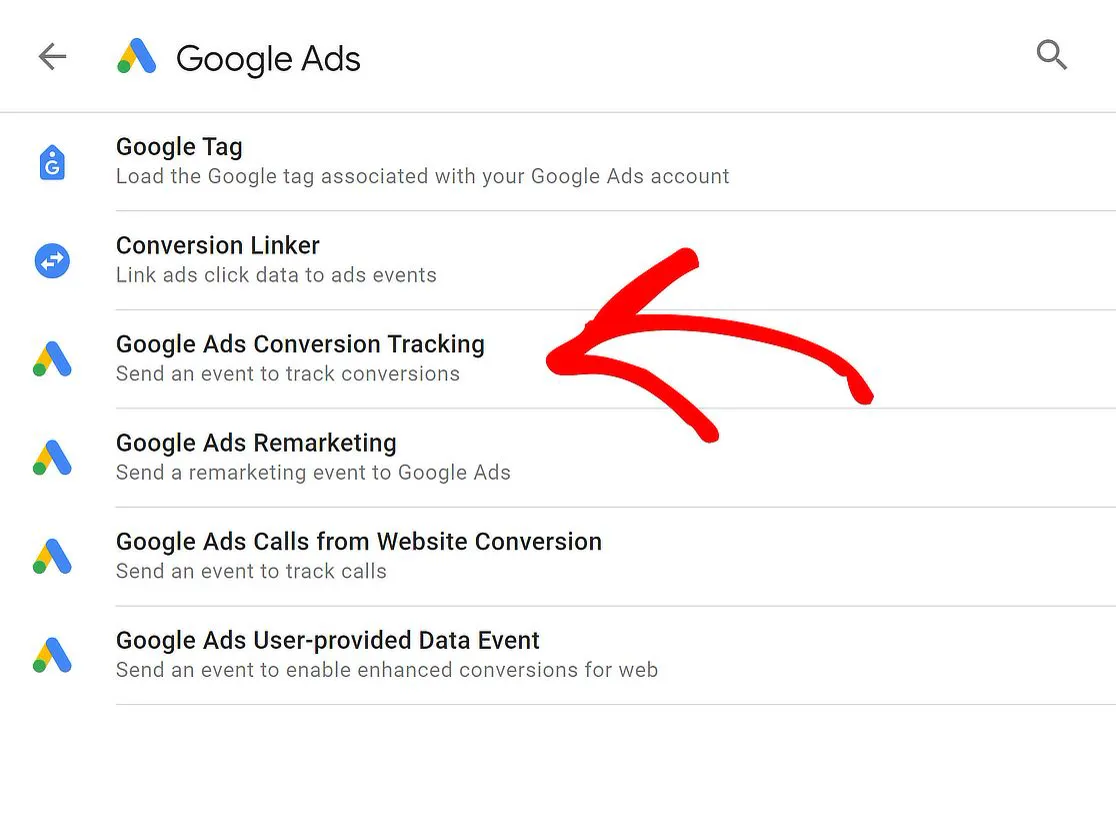
For a fuller list of what breaks in Google Ads tracking, see Google Ads not tracking conversions. If your site still loads a plain Google tag, upgrading it to GTM comes first.
Meta Pixel and Conversions API, deduplicated
Send each important event from both the Meta Pixel and the Conversions API, with the same event name and the same event ID, so Meta counts it once. Meta recommends this redundant setup and keeps one copy when a matching pair arrives within 48 hours. Without the shared ID, one lead can show up as two, and reported results look better than they are.
The Conversions API (often shortened to CAPI) sends events from a server, website platform or CRM straight to Meta, processed like Pixel events. The Pixel sends them from the visitor's browser. Each catches events the other misses, which is why Meta wants both.
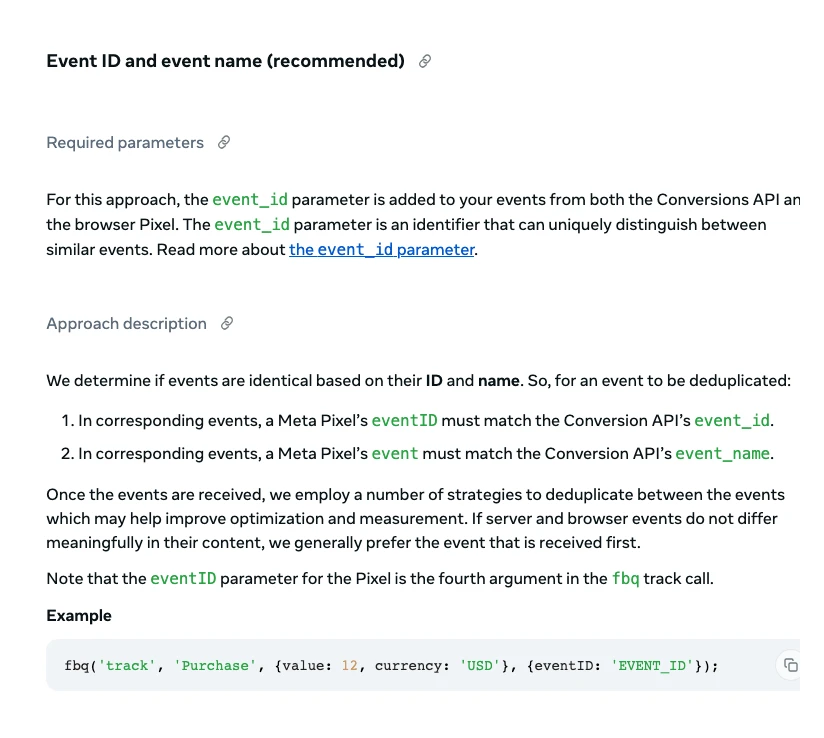
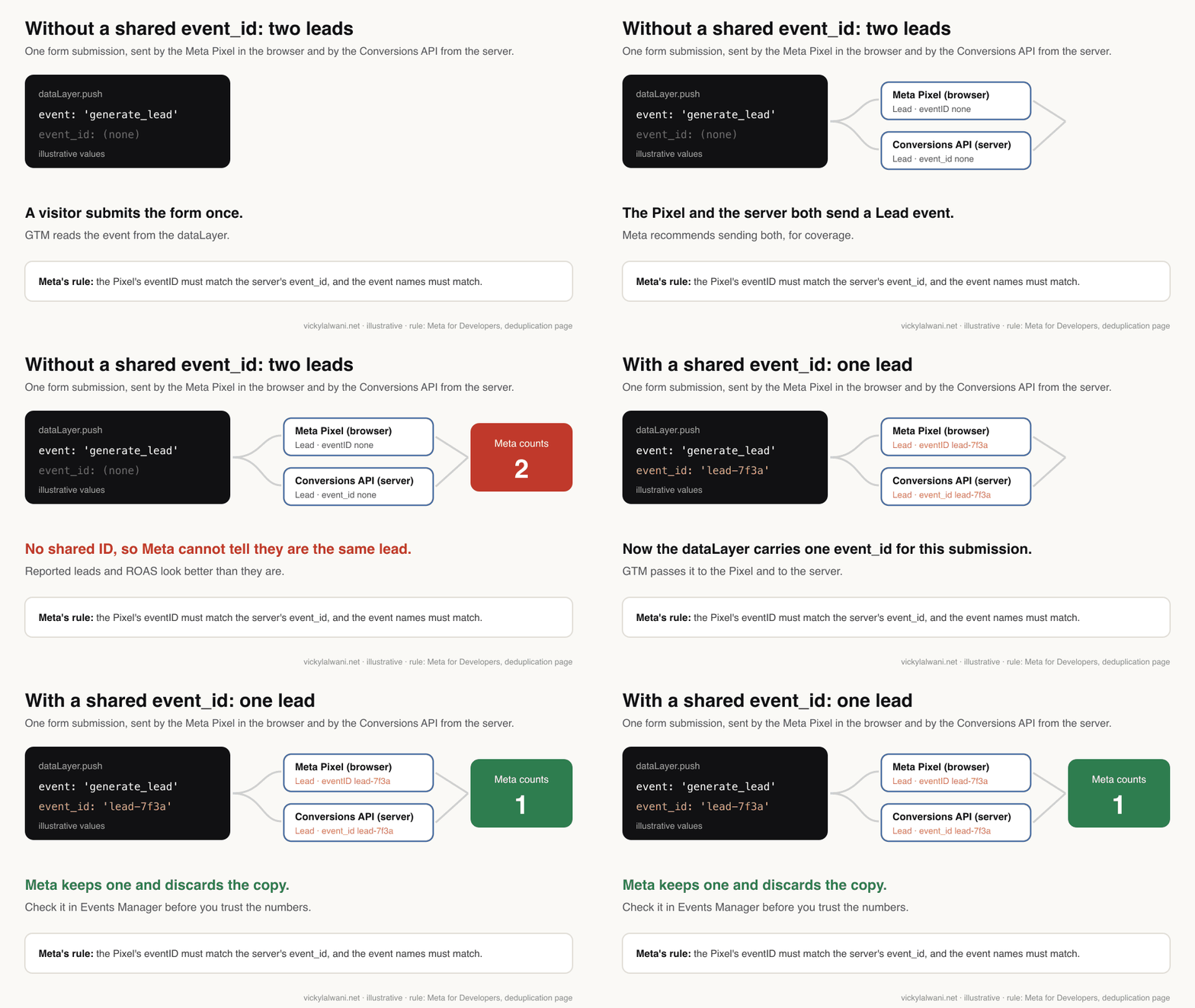
There is a second method using the browser ID cookie or your own user ID, but Meta says it generally only works when the browser event arrives first. Use event IDs.
| Route to CAPI | Who sets it up | Note |
|---|---|---|
| Web-only CAPI by Meta | You, in Events Manager | No code, per Meta |
| Partner integration | You or a developer | GTM is listed as a partner |
| Server-side GTM | A developer | Needs a tagging server |
| Direct integration | A developer | Most control, most work |
Meta lists these setup routes on its Conversions API page, includes Google Tag Manager among its partner integrations, and documents a server-side GTM option separately. Server-side tagging is a topic of its own and is not covered here. Whatever the route, Claude's job is the same: put the event ID in the spec, build the Pixel tags to read it, and write the server event spec your developer or partner tool follows.
After launch, watch two numbers in Events Manager. Event Match Quality scores from 0 to 10 how well your server events can be matched to people. And Meta advises aiming for a 75% event coverage ratio of Conversions API events to Pixel events. Its Test Events tool shows both sources arriving.
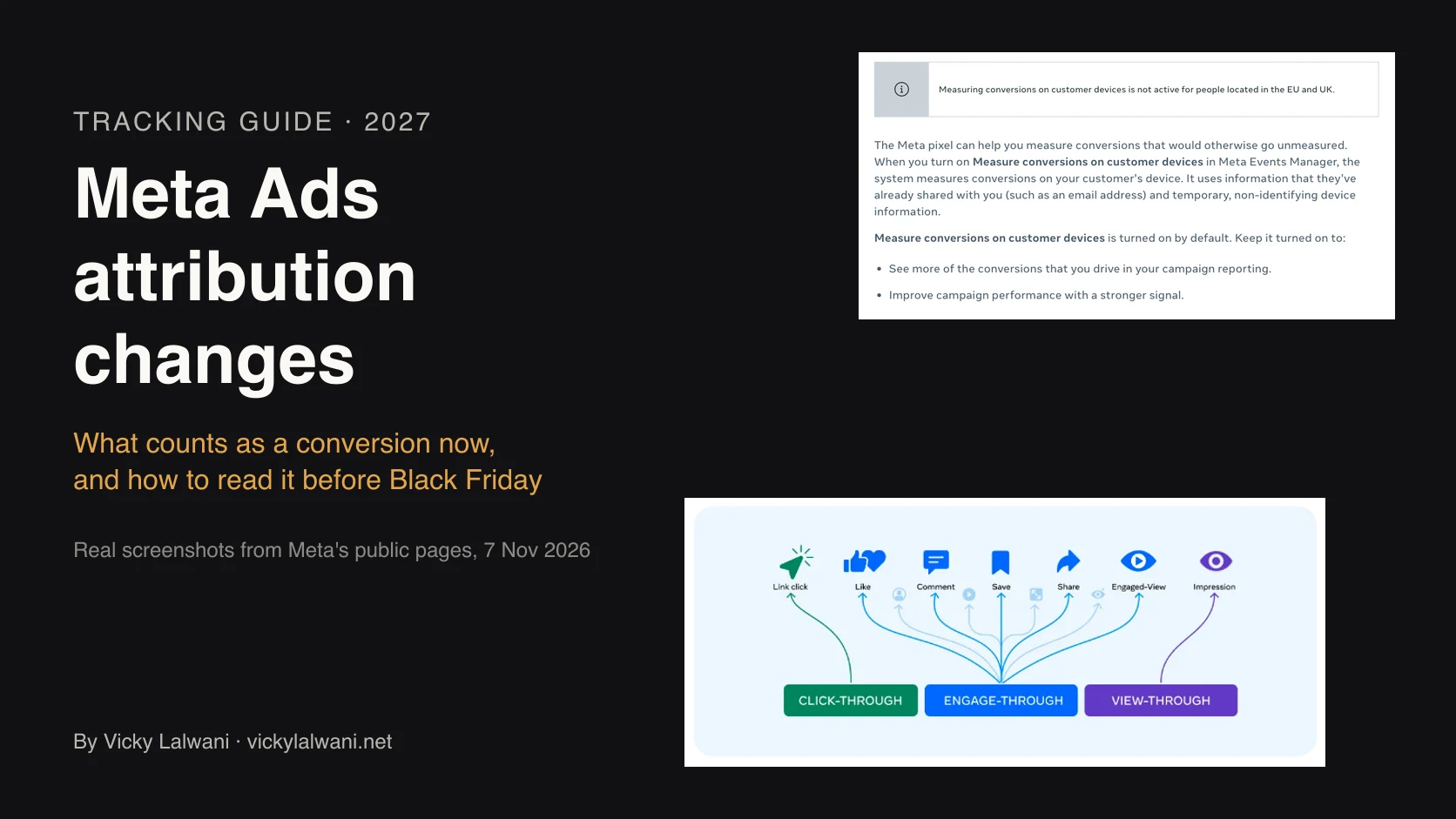
A paid media practitioner on X traces many poor coverage and deduplication scores to events added with Meta's codeless setup tool. Check what else is sending events before you add more. For how Meta now reports conversions, see the Meta Ads attribution changes.
Microsoft Clarity in the same workspace
Add Microsoft Clarity as a template tag inside the same workspace, so it goes live with your next reviewed version. Clarity is free heatmaps and session recordings; Microsoft calls it free forever, with no traffic limits. Its recommended GTM install is quicker, but it asks for permission to publish to your container, which steps around your gate.
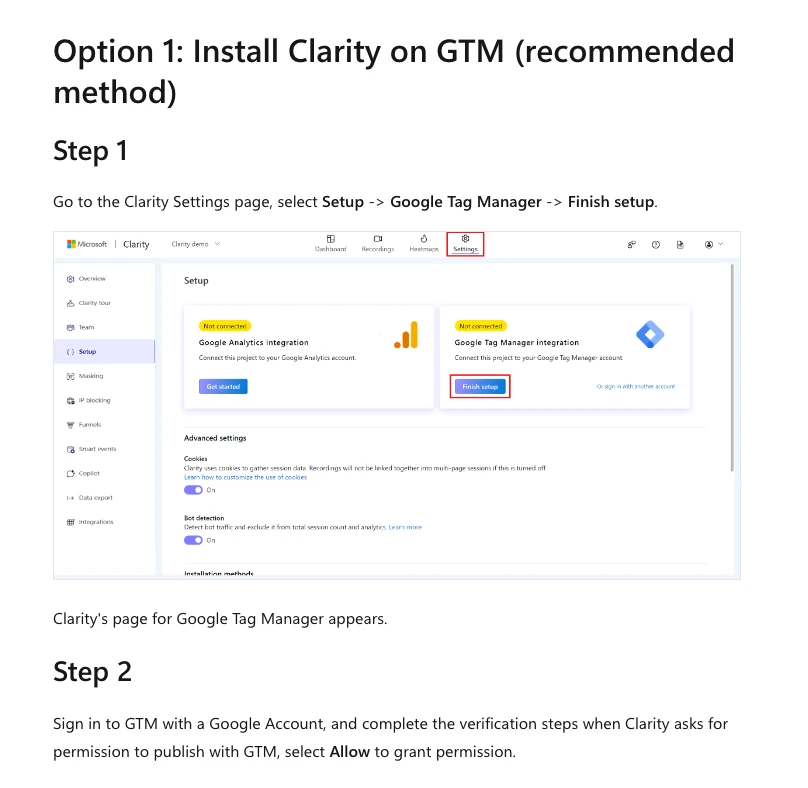
Microsoft's second option is the "Microsoft Clarity - Official" template with your project ID and an All Pages trigger. That is the one to give Claude.
- Consent: since 31 October 2025, Clarity enforces consent signals for visitors from the EEA, the UK and Switzerland. Without consent, recordings and funnels may be limited.
- Masking: the default is Balanced, which masks numbers and email addresses. Only admins can change it.
- GA4 link: Clarity's Google Analytics integration tries to create a custom dimension, which can fail if the property is at its custom dimension limit.
Once recordings come in, watch a few sessions from paid clicks that did not convert. That is where a broken form or a slow page shows up long before the numbers explain it.
Test before you publish: the review checklist
Before you publish, walk every journey in GTM Preview and confirm each event fires once, with the right values, on the right page. Then check the same event arrived in GA4, Google Ads and Meta. It takes about as long as reading the version notes, and it is the only part of the job that cannot be delegated.
| Check | Where | Pass looks like |
|---|---|---|
| Each event fires once | Tag Assistant | One hit per action |
| Values and currency | Tag Assistant | Real numbers, right currency |
| GA4 receives it | DebugView | Event with parameters |
| Meta receives both | Test Events | Browser and server, one ID |
| Consent respected | Preview, denied | Only allowed tags fire |
| Version notes | GTM Versions | Every change listed |
Made by the Google Analytics channel, published 20 November 2024. A short official walk-through of checking a conversion tag in Preview before publishing. It sells nothing.
I test form tags in Preview, which needs no real test lead. A tracking tag that breaks a live form is one of the expensive mistakes, so submit every form on the site at least once in Preview.
When it passes, publish with a version name and a note on what changed. Every publish is recorded as a version, so rolling back is a matter of publishing the previous one. If you run a staging site, GTM environments let you publish a version there without touching Live.
And I do not call a fix done until the data shows it. Look again after a few days: are leads in GA4 close to leads in your CRM, and does Meta show one lead per form, not two?
For the full list of checks on a setup you inherited, use the 15-check conversion tracking audit.
Why the review step matters: what audits find
Large audits keep finding tags that fire before anyone has checked them. In a 2026 crawl of about 1,000 of Europe's highest-revenue websites, 30% of pages loaded advertising trackers before the visitor did anything, and 6.8% still ran Universal Analytics, which Google retired in 2023. These are big organisations with teams.
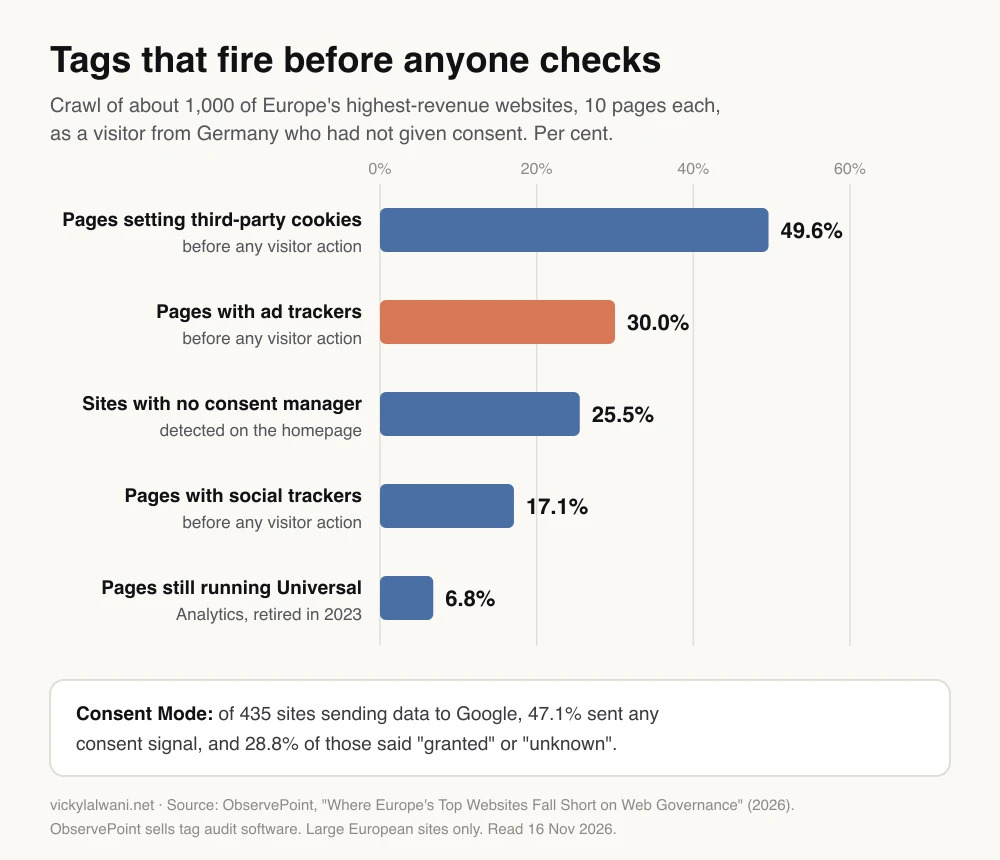
Read it with care. The study covers large European sites seen as a visitor from Germany, and its publisher sells audit software. It does not say how often small business setups break. What it does show is that tags drift when nobody reviews them, which is the case for a person looking at every version.
The other side is what clean signals are worth. Google and Meta both publish gains from their own tests. They are useful as direction, not as a forecast for your account.
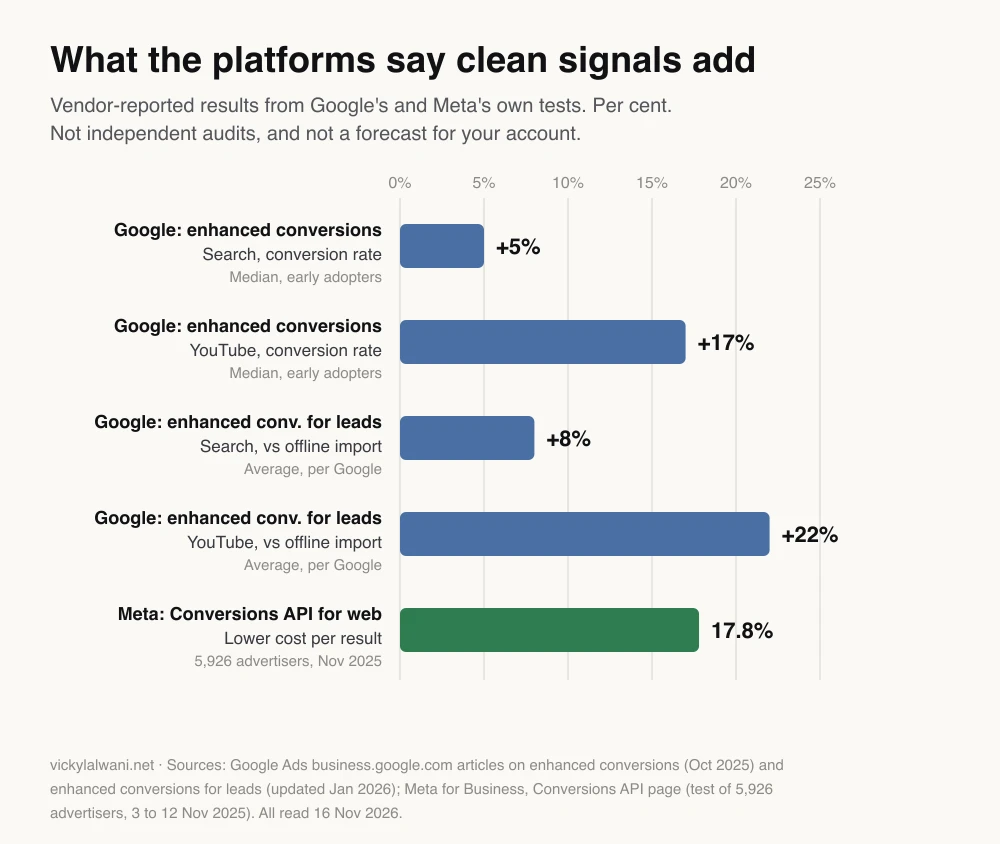
Google reports a median 5% lift on Search and 17% on YouTube for early adopters of enhanced conversions. Meta reports 17.8% lower cost per result with the Conversions API, from a test of 5,926 advertisers in November 2025. Google also says advertisers who move from offline conversion import to enhanced conversions for leads see 8% more conversions on Search and 22% more on YouTube on average, from a Google study in June 2024. All of these are the platforms grading their own products.
Where this approach is weak
This approach is weakest in seven places: there is no official connector, a third-party server holds your sign-in, Claude can get settings wrong, some modes skip the approval prompt, connectors go down, the browser route uses your own login, and the server side is still a developer's job. None of these is a reason to skip it. Each is a reason for the gate.
- No official connector. Every GTM connector today is built by a third party. Anthropic warns that servers that fetch outside content carry prompt injection risk, so check who runs the server before you sign in.
- Your sign-in sits with someone else. A hosted MCP server holds a token for the Google account you connect. That is the reason for a separate account on Approve, not your own Publish login, connected through Google sign-in rather than a shared key.
- Claude can be wrong. In a GTM community thread on letting AI manage containers, one user reported a few wrong tags out of a batch, and others use AI for audits but build by hand. Review the version as you would a new hire's work.
- Some modes skip the prompt. Anthropic notes that in Research mode Claude can call connector tools without further approval, and "Allow always" removes the prompt for good. The GTM permission is what still holds.
- Connectors go down. An AI commentator on X reported Claude's connectors down on 13 November 2026. Never plan a launch around a connector being up.
- The browser route skips the separate account. Claude in Chrome uses the browser's own sign-in and starts in Automatically approve mode, so the gate only holds if that browser is signed in to the Approve account.
- The server side stays with people. Claude writes the Conversions API spec; a developer, a partner tool or Meta's own option deploys it.
Consent is not a setting Claude should choose. Claude can wire tags to your consent banner and use GTM's consent checks. Which categories need consent where is a legal question for your own adviser.
Small sites should also expect gaps. Google's modelled conversions, which estimate the conversions it cannot observe, need at least 100 ad clicks a day per country and domain, which many small lead generation sites do not reach. Clean tracking matters more there, not less.
What people say on X and Reddit
Practitioners are interested and wary in equal measure. The common pattern: let AI read and draft, keep a person on the publish step, and check Meta for double counting. Each X post was checked through X's own embed service on 16 November 2026, and each Reddit thread through a public Reddit archive the same day.
| Where | Date | Label | What it says |
|---|---|---|---|
| Google Analytics, X | 8 Jan 2026 | Vendor | Open-source GA MCP server |
| Stape, X | 2 May 2025 | Vendor | An MCP server for GTM |
| ClaudeDevs, X | 28 Jul 2026 | Vendor | New MCP spec, easier remote servers |
| AI tips creator, X | 29 Jul 2026 | Opinion | Changes stay in a workspace |
| Paid media practitioner, X | 3 Dec 2025 | First-hand | Codeless events hurt dedup |
| Analytics consultant, X | 27 Nov 2024 | Opinion | Native Ads tag over GA4 import |
| r/GoogleTagManager | 12 Sep 2026 | First-hand | AI without publishing rights |
| r/GoogleTagManager | 4 Oct 2026 | First-hand | GA4 firing twice for months |
| r/GoogleTagManager | 25 Dec 2025 | First-hand | One order, two purchases |
| r/GoogleAnalytics | 12 Jan 2026 | First-hand | GA MCP setup, up to 2 hours |
| r/PPC | 12 Nov 2026 | Opinion | Generate JSON, import it |
On X.
- Google Analytics' own account promoted its open-source MCP server for asking questions of GA data, and a server-side tagging vendor launched an MCP server for managing GTM in plain language. The building blocks come from vendors, not from one official Google route.
- An AI tips creator described Claude building GTM tags, triggers and variables from plain English, with changes held in a workspace until a person reviews and publishes. That depends on the connector, which is why the GTM permission matters.
- An analytics consultant argued for setting up native Google Ads conversion tracking rather than importing the GA4 purchase event. That is one view; the point is to pick one source per conversion.
- A paid media practitioner traced poor Meta event coverage and deduplication scores to events added with Meta's codeless setup tool.
On Reddit.
- In a thread asking whether people let AI manage GTM yet, several replies use AI for audits or drafts, one of them "without publishing rights", and one names a live publish with no human check as the real risk.
- One poster had Claude, with GA4 and GTM access, find GA4 firing twice on every page. The poster also built the tool, so read it as a demo as well as a report.
- A store owner saw Meta count one order as two purchases with the Pixel and the Conversions API both on. Replies point to a shared event ID and one source for Purchase.
- A user who connected GA4 to Claude through Google's MCP server said setup should take no more than one to two hours. The top reply warned against putting AI on top of GA4 data you already doubt.
- An r/PPC thread asked for a GTM connector that builds and tests setups; replies suggested having Claude generate container JSON and importing it yourself.
- A solo developer running several containers lost track of live and test tags, and found that ChatGPT and Claude suggested different naming conventions. Give Claude yours.
Nobody in these threads showed AI publishing broken tracking. What they show is the habit that prevents it: AI drafts, a person publishes.
Videos worth watching
One vendor demo shows Claude working in a real container through a connector; the table adds training channels and the official preview video above. Most of them sell something, noted beside each.
Made by Markifact, a company that sells a hosted GTM connector, published 18 August 2026. It shows Claude reading and editing tags, triggers and versions. Its connector can also publish, which is exactly the tool to set to Blocked.
| Video | Channel | Date | What it covers |
|---|---|---|---|
| Preview the Workspace | Google Analytics | 20 Nov 2024 | Preview before publish |
| Google Tag Manager MCP in Claude | Markifact (vendor) | 18 Aug 2026 | Claude editing GTM |
| GTM Audit with Claude AI | Insightful Pipe (vendor) | 12 Sep 2026 | Read-only audit |
| Major Google Tag Manager update | Analytics Mania | 13 Oct 2026 | New GTM tagging screens |
| GTM's BIG Update | Loves Data | 12 Oct 2026 | Review changes, then test |
| Meta Conversions API + Deduplication | Stape (vendor) | 4 Jun 2024 | event_id in practice |
Markifact, Insightful Pipe and Stape sell tools; Analytics Mania and Loves Data sell courses. Use them for the screens, and the official docs for the rules.
Want your tracking set up or checked?
I set up and audit tracking for new businesses and for messy inherited setups every week. If you want GTM, GA4, Google Ads, Meta Pixel with the Conversions API and Clarity built, tested and handed over, with you approving what goes live, that is my analytics and tracking service.
The first thing I ask for is the exact role on each platform, in one written request, because "we shared access" often turns out to be view-only. Get in touch with your site, and I will tell you what is firing, what is broken and what to fix first. Or start with the free guide.
Sources
| Source | What it supports | Date | Link |
|---|---|---|---|
| Google Tag Manager Help | Read, Edit, Approve, Publish | Read 16 Nov 2026 | Permissions |
| Google Tag Manager Help | Workspaces, publishing, Preview, environments | Read 16 Nov 2026 | Workspaces, Publish, Preview, Environments |
| Tag Manager API v2 | create_version, publish, scopes, quotas | Read 16 Nov 2026 | create_version, publish, Quotas |
| Google Analytics Help | Key events, limits, retention, filters | Read 16 Nov 2026 | Key events, Limits, Retention, Internal traffic |
| Google Analytics docs | Recommended events, DebugView, MCP | Read 16 Nov 2026 | Events, DebugView, GA MCP |
| Google Ads Help | Primary, GA4 imports, enhanced conversions | Read 16 Nov 2026 | Primary, GA4 imports, Enhanced conversions |
| Google Ads MCP | Write tools and confirmation step | Read 16 Nov 2026 | README |
| Meta for Developers | Deduplication, CAPI, server-side GTM | Jun to Sep 2026 | Dedup, CAPI, sGTM |
| Meta Business Help | Routes, match quality, coverage | Read 16 Nov 2026 | CAPI routes, EMQ, Best practices |
| Microsoft Learn | Clarity GTM install, consent, masking | Read 16 Nov 2026 | GTM, Consent, Masking |
| Claude Help Center | Connectors, tool permissions | Read 16 Nov 2026 | Custom connectors, Tool permissions |
| Anthropic docs | Claude Code MCP, current models | Read 16 Nov 2026 | MCP, Models |
| ObservePoint | Tags firing before consent (vendor study) | 2026 | Whitepaper (PDF) |
| Google and Meta | Vendor-reported gains | Oct 2025 to Jan 2026 | Enhanced conversions, Enhanced conversions for leads, Meta CAPI |
| Vicky Lalwani | Prompts, checklist, approval rule | Nov 2026 | The Full-Stack Tracking Setup for 2027 |
| X | Official accounts and practitioners | Nov 2024 to Nov 2026 | Linked in the text |
| Practitioner threads | Dec 2025 to Nov 2026 | Linked in the text | |
| YouTube | Six videos, titles checked by oEmbed | Jun 2024 to Oct 2026 | Linked in the videos table |
FAQ
How do I set up Google Tag Manager with Claude?
Connect Claude to your container through a third-party MCP server, Claude Code or a browser, using a separate Google account with Approve permission. Ask Claude for a read-only audit first, then give it an approved dataLayer spec and a naming rule. Claude builds the tags, triggers and variables in one workspace and creates a version with notes. You test it in GTM Preview and press Publish yourself.
Can Claude set up Google Tag Manager?
Yes. Once connected, Claude can read a Google Tag Manager container, build tags, triggers, variables and folders in a workspace, and create a version for review. It needs a connection first: a third-party MCP server added as a custom connector, Claude Code using the Tag Manager API, or Claude working in a browser. Google does not publish an official Tag Manager connector for Claude.
Is there an official Google Tag Manager connector for Claude?
No. As of November 2026 there is no Google Tag Manager connector in Claude's connectors directory, and Google publishes no official Tag Manager MCP server. The GTM connections people use are third-party MCP servers, some hosted and some open source. Google does publish official MCP servers for Google Analytics and Google Ads.
What permission should I give Claude in Google Tag Manager?
Give the Google account Claude uses Approve permission on the container, and keep Publish for yourself. Google Tag Manager's Approve level can create workspaces, edits and versions but cannot publish. Edit also works and is stricter: Claude's changes wait in a workspace that you review and publish, but Claude cannot create the named version itself. Do not give the connector account the Administrator role on the GTM account.
Can Claude publish changes in Google Tag Manager?
Only if the account it uses has Publish permission and the connector has the tagmanager.publish scope. In the Tag Manager API, creating a version and publishing it are separate calls with separate scopes. If Claude's account has Approve permission, the publish call runs as that account and Tag Manager refuses it, so the version waits for a person with Publish rights.
Is it safe to let AI edit Google Tag Manager?
It is safer with three controls: a separate Google account with Approve permission, connector write tools set to Needs approval in Claude, and a person who tests every version in GTM Preview before publishing. If Claude works in a browser instead, it acts as whoever is signed in, so use a browser profile signed in only to that account. Every GTM publish is saved as a version, so a bad change can be rolled back by publishing the previous version.
Do I need Claude Code to use Claude with Google Tag Manager?
No. You can add a remote MCP server for Google Tag Manager as a custom connector in the Claude app, available on Free, Pro, Max, Ultra, Team and Enterprise plans, with Free limited to one custom connector. Claude Code suits larger or repeatable builds. For audits only, you can paste a GTM container export into Claude without any connection.
Can Claude set up GA4?
Claude can build every GA4 tag in Google Tag Manager and list the GA4 settings to change, such as data retention, internal traffic filters, unwanted referrals and cross-domain measurement. Marking key events happens in GA4 and needs the Marketer role or above (Editor for an event GA4 has already received). Google's official Google Analytics MCP server is read-only by default, with opt-in write tools that include creating a key event.
Can Claude set up Google Ads conversion tracking?
Claude can build the Google Ads side in GTM: the Conversion Linker, a conversion tag per action and the variable for enhanced conversions. You create the conversion actions in Google Ads, choose primary or secondary, and turn on enhanced conversions. Primary actions are the ones Smart Bidding uses, so mark only real goals as primary.
How do I stop Meta Pixel and the Conversions API double counting?
Send the same event name and the same event ID from the Meta Pixel and the Conversions API. Meta discards the later copy when a matching pair reaches the same Pixel within 48 hours. Put the event ID in your dataLayer so GTM passes one value to the browser and the server. Check it in Events Manager with the Test Events tool.
Can Claude add Microsoft Clarity to my site?
Yes. Claude can add the Microsoft Clarity template tag with your project ID and an All Pages trigger in a Google Tag Manager workspace. Avoid Clarity's one-click GTM install if you want every change reviewed, because it asks for permission to publish to your container. Since 31 October 2025 Clarity enforces consent signals for visitors from the EEA, the UK and Switzerland.
What should a dataLayer specification include?
A dataLayer specification lists each event the site pushes, when it fires, the exact dataLayer.push code with example values, the required parameters such as value, currency or transaction_id, and the name each platform uses for it. Add an event_id to every event Meta also receives from a server, and the tests a developer runs before calling it done.
Claude vs ChatGPT for Google Tag Manager: which is better?
Either can draft GTM plans, dataLayer specs and container JSON. What matters more is the connection and the controls: which MCP server or API route you use, what Google Tag Manager permission its account has, and whether a person tests and publishes. A Google Tag Manager community thread found the two suggested different naming conventions, so give either one your own.
How long does it take to set up tracking with Claude?
The build itself is quick, but the Tag Manager API allows about one request every four seconds per project, so a large build takes minutes, not seconds. Most of the time goes on agreeing the event map, a developer adding the dataLayer, and testing every journey in GTM Preview. Plan the review time, not just the build.
Do I still need a tracking specialist if Claude can set up GTM?
Claude removes the manual build, not the decisions. Someone still has to decide what counts as a conversion, how consent works in each market, how the Conversions API is deployed, and whether the numbers match the CRM. Vicky Lalwani, an SEO, PPC and tracking consultant, sets up and audits these stacks with a person approving what goes live.