A GTM MCP server connects Claude to Google Tag Manager through the Model Context Protocol so it can list, audit and draft tags, triggers and variables. As of November 2026 Google publishes no official Tag Manager MCP server, so every option is third party, such as Stape's free server. Most can publish, so connect one with a Google account on Read, Edit or Approve and keep Publish for a person.
TL;DR
A GTM MCP server is a connector that lets Claude read, and sometimes change, Google Tag Manager through the Model Context Protocol (MCP), an open standard for linking AI apps to other tools.
As of 18 November 2026 Google has not published a Tag Manager MCP server. Google's official list covers Google Analytics and Google Ads, not GTM, and Claude's connector directory has no Tag Manager connector. Every GTM MCP server is third party: Stape's free server, an independent open-source server whose hosted copy closes on 30 November 2026, multi-tool servers such as AdLoop, and paid hosted connectors.
Most of them can publish. Lock it down with the GTM permission Google enforces (Read for audits, never Publish), then the scope, the server's settings and Claude's tool permissions.
Short answer: there is no official Google GTM MCP server. If you want Claude to work inside Tag Manager today, you choose a third-party server, connect it with a Google account that has the lowest GTM permission the job needs, and keep the Publish button for a person. For audits alone you do not need a connection at all: export the container and give Claude the file.
If you manage Tag Manager for a few sites, you know the routine: switch accounts, forget which container holds which tag, click through menus to find one trigger. A GTM MCP server lets you ask instead. This page covers what exists in November 2026, how to pick one, how to connect it to Claude and how to keep it from publishing. If you would rather have the tracking set up and checked for you, that is my analytics and tracking service.
Three related pages go deeper on parts this one only touches. Claude Google Tag Manager setup covers the full build across GA4, Google Ads, Meta and Clarity with Claude on Approve and you on Publish. Conversion tracking setup: start with an event map covers deciding what to track before anyone builds a tag. What is a marketing MCP server covers the official Google Ads, GA4 and Meta servers.
Is there an official Google Tag Manager MCP server?
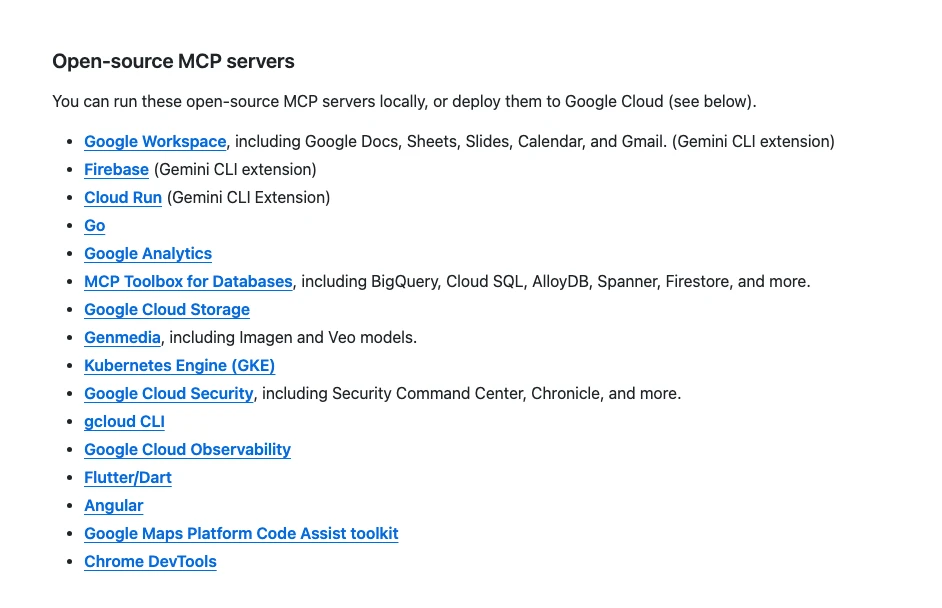
Short answer: no. On 18 November 2026 Google's own list of official MCP servers includes Google Analytics but not Tag Manager, Google Cloud's list of Google-hosted MCP servers has no Tag Manager entry, and the Tag Manager API documentation does not mention MCP. Every GTM MCP server you find is built by someone else on top of Google's public Tag Manager API.
Google keeps a repository listing its official MCP servers. The open-source section names Google Analytics, Workspace, Firebase, Cloud and developer tools; Tag Manager is not there. Google Cloud's page of products with Google-hosted MCP servers lists 87 products, none of them Tag Manager, Google Ads, Analytics or Search Console. Google Ads has its own open-source MCP server, which you run yourself.
Claude has no built-in Tag Manager connector either. A search of Claude's connector directory for "Google Tag Manager" and "GTM" on 18 November 2026 returned no Tag Manager connector; most results were go-to-market sales tools, which share the abbreviation. So be careful with search results and directory pages: some label a community server "official", and many "GTM MCP" results are about go-to-market, not tags.
What Google does publish is the Tag Manager API v2. It can read and manage accounts, containers, workspaces, tags, triggers, variables, versions and user permissions. Every GTM MCP server is a wrapper around that API, so what a server can do is limited by two things Google controls: the API's sign-in scopes and the GTM permission of the account you connect.
| Google product | Official MCP server? | Who runs it |
|---|---|---|
| Google Analytics | Yes, open source | You |
| Google Ads | Yes, open source | You |
| Tag Manager | No | Third parties only |
| Search Console | No | Third parties only |
What is a GTM MCP server, in plain words?
Short answer: it is a small program that sits between Claude and the Tag Manager API. It tells Claude which actions exist, such as "list tags" or "create trigger", and runs the ones Claude asks for, signed in as a Google account you choose. It is not a browser extension and not a dashboard.
MCP stands for Model Context Protocol. The AI app you type into is the MCP client, the GTM connector is the MCP server, and each action it offers is a tool. Tools that look are reads; tools that change the container are writes. The difference matters because a write in Tag Manager can end up on a live website once someone publishes it.
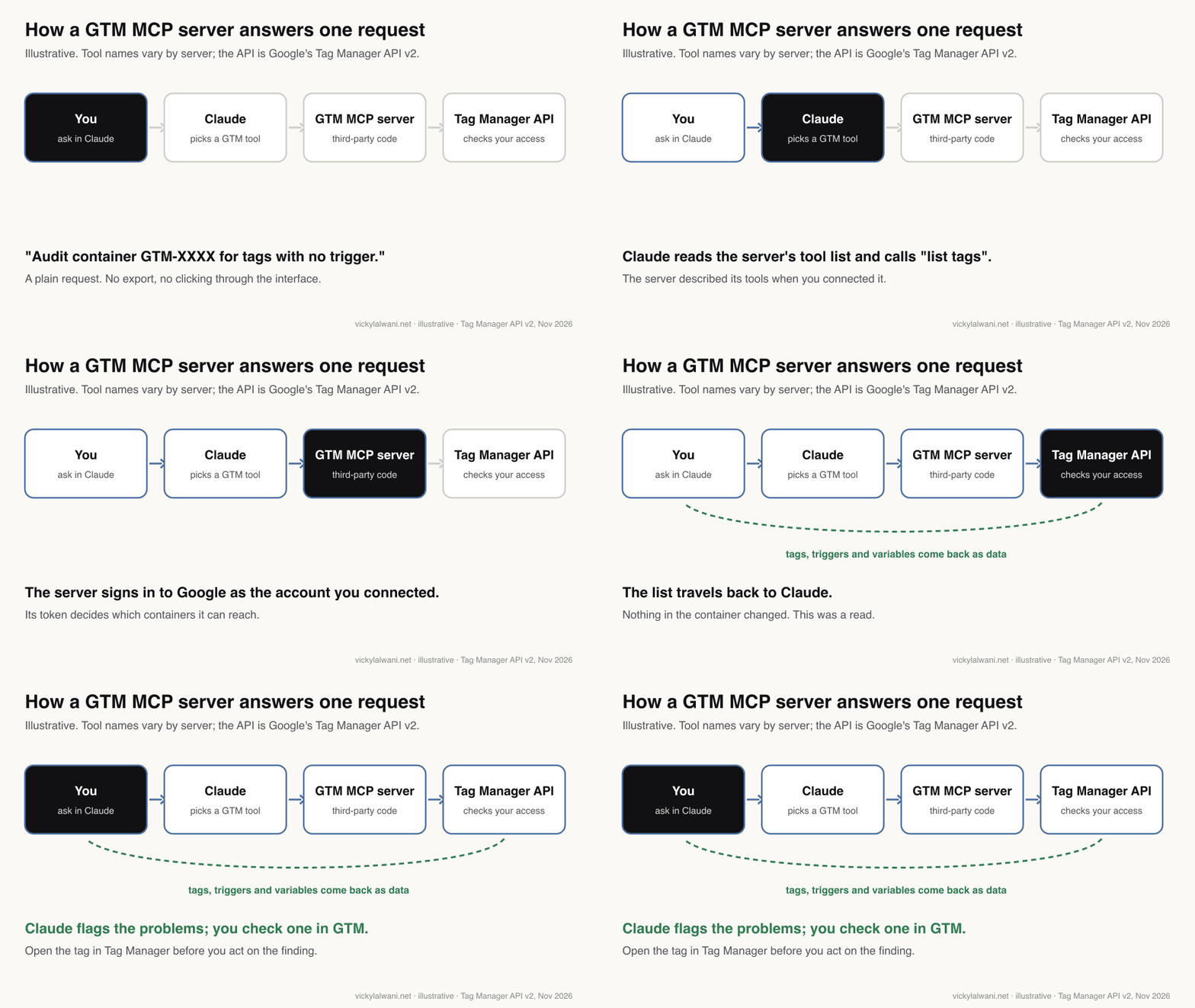
Once connected, a single chat replaces a lot of tab-hopping. The requests that work well are the ones where Claude reads and you judge:
- List every account, container and container ID the connected account can see.
- List tags, triggers and variables, in one container or across several.
- Find duplicates, tags with no trigger, unused variables and naming problems.
- Compare two containers that should match, or a workspace against the live version.
- Write a plain-English record of what is live, for the client file.
When I have no access to a client's website, I deploy tracking through Tag Manager, so the container is often the only record of what fires. That is why a quick, honest inventory is worth having before anyone changes anything.
Which GTM MCP servers exist in November 2026?
Short answer: the main open-source options are Stape's free server (hosted or local), an independent Go server with the widest API coverage (its hosted copy closes on 30 November 2026), and multi-platform servers such as AdLoop that include GTM tools. Paid hosted connectors also exist. All of them are third party, and most can publish.
These are the servers I could check on their own repositories on 18 November 2026. Directory sites list many more, often copies of the same code.
| Server | Built by | How it runs | Can publish? |
|---|---|---|---|
| Stape GTM MCP server | Stape (vendor) | Hosted or local | Yes |
| GTM MCP Server (gtmeditor) | Independent developer | Self-host; hosted copy ends 30 Nov | Yes, with confirm |
| AdLoop | Independent project | Local or hosted | Only if you switch writes on |
| gtm-mcp (npm) | Independent developer | Local, your own OAuth app | Yes |
| Paid hosted connectors | Several vendors | Hosted | Varies; check the tool list |
Stape's server is the best known. The repository is Apache 2.0 licensed, maintained by Stape, and offers the same 20 tools two ways: a hosted endpoint at gtm-mcp.stape.io where you sign in with Google, or a local command-line version that runs on your own credentials. Stape's product page marks it free. Its latest release, 6.0.1, came out on 16 October 2026.
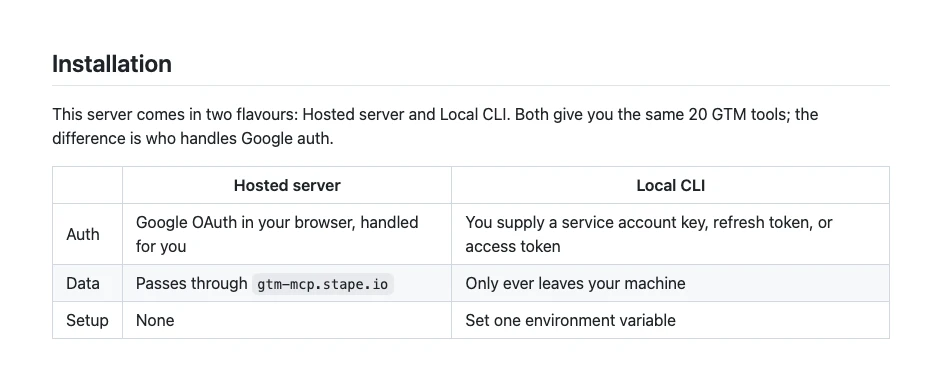
Two details matter for safety. In the code, the hosted sign-in asks for every Tag Manager scope, including publish, delete and manage users (see the scope list in the repository). And container versions are handled by one tool, gtm_version, whose actions include both "get" and "publish". So you cannot block publishing in Claude without also blocking version reads. The real lock has to be the GTM permission, covered below.
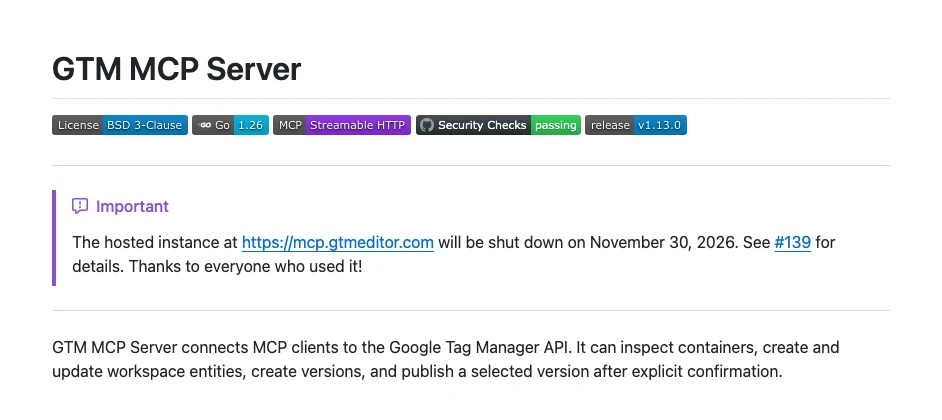
The gtmeditor server is written in Go under a BSD licence. Its README says it covers 101 of the 106 Tag Manager API methods, deliberately leaves out user permission management, and only publishes when the call includes an explicit confirm flag. The same README says the free hosted instance at mcp.gtmeditor.com shuts down on 30 November 2026, so after that you would self-host it.
AdLoop covers Google Ads, GA4 and Tag Manager in one server. Its README says the GTM tools read the live container by default, and that write tools stay off until you set a write switch in its config file. Only then does it ask for the edit and publish scopes, and every change goes through a draft, preview and confirm step. It is the clearest read-only default I found.
Smaller projects exist too, such as the gtm-mcp npm package, which runs on your own Google OAuth app and includes publishing. Paid hosted connectors are sold by several vendors; I have not tested them and do not list them by name. Judge any of them by the same questions in the next section.
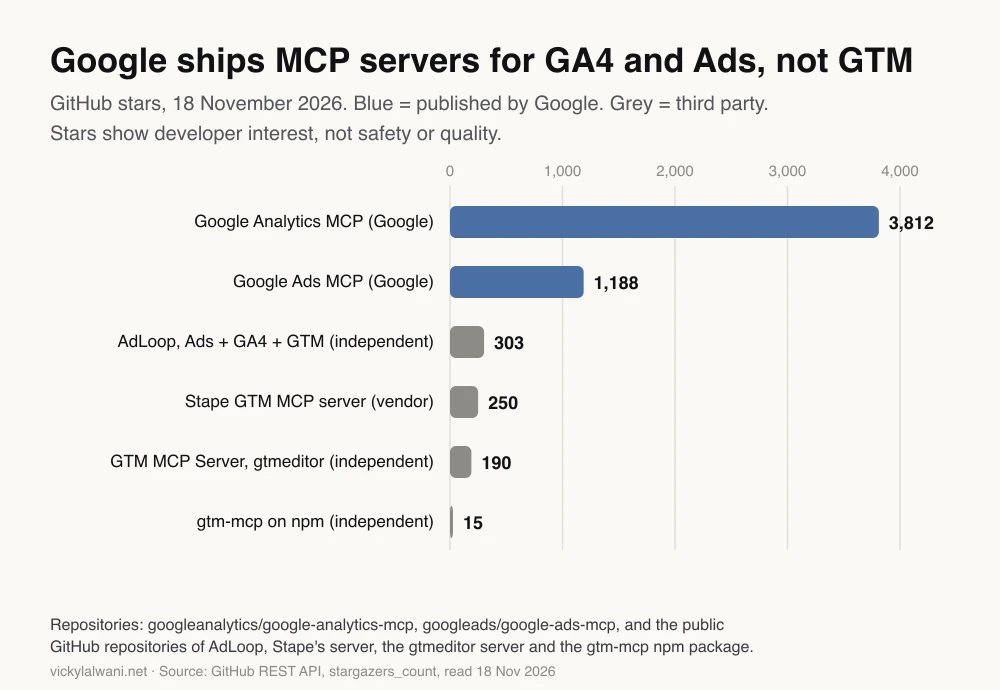
The chart is interest, not quality. Stape's local package was downloaded 1,831 times in the month to 16 November 2026, according to the npm download count, which says nothing about hosted users.
How do you choose a GTM MCP server?
Short answer: choose by the job. For audits, use a container export or a server that can run read-only. For builds, use a server you can run yourself or one whose hosted terms you accept, connected as an account on Edit or Approve. Avoid any setup where the connected account can publish.
Ask five questions of any server before you connect a client container:
| Question | Why it matters | Where to look |
|---|---|---|
| Who hosts it? | Hosted means container data passes through them | README, privacy page |
| Which scopes? | Publish and manage users are risky | Google sign-in screen, code |
| Can writes be switched off? | A read-only mode is a second lock | Config options |
| One tool per action? | Lets you block publish alone in Claude | Tool list in Claude |
| Still maintained? | The API and MCP both change | Release dates |
Then match the route to the job:
| Job | Route | GTM permission |
|---|---|---|
| One-off audit | Export the container JSON | None needed |
| Regular audits | Read-only server | Read |
| Build in a workspace | Any server | Edit |
| Build and name versions | Any server | Approve |
| Publish | A person in Tag Manager | Publish, kept by you |
The export route is underrated. Google's container export and import lets you download a container as JSON and upload it to Claude. Nothing is connected, no token is stored, and Claude still sees every tag, trigger and variable. Practitioners on r/GoogleTagManager describe the same habit: feed the JSON to AI for an audit, then do the work yourself.
How do you connect a GTM MCP server to Claude?
Short answer: create or choose a Google account with the right GTM permission, then add the server's URL in Claude as a custom connector (Customize, Connectors, Add custom connector) or in Claude Code with claude mcp add, and sign in with that account. Test it with a request that changes nothing.
- Pick the Google account first. Use a separate account for the connector, not your own login. In Tag Manager, Admin, User Management, give it Read on the containers it needs for audits, or Edit or Approve for builds. No account Administrator role, and no user group that grants Publish, because permissions can be inherited.
- Add the server in Claude. On Pro and Max, go to Customize, Connectors, Add custom connector, and paste the server URL. On Team and Enterprise an Owner adds it in the organisation settings under Connectors, and each member connects with their own Google account, as Anthropic's custom connector guide explains. Free plans get one custom connector.
- Or add it in Claude Code. For a hosted server,
claude mcp add --transport http gtm https://example-server/mcp, then run/mcpto sign in. A local server runs on your machine with your own Google Cloud credentials and the Tag Manager API switched on in that project. - Sign in with the connector account. Read the Google consent screen. If it offers a choice of permissions, untick publish and user management.
- Test with a read. Use the prompt below. If the answer lists containers you did not expect, stop and fix the account's access first.
List the Google Tag Manager accounts, containers and workspaces you can see, with each container's public ID.
Do not create, update, delete or publish anything.
Then tell me which GTM permission the connected account appears to have on each container, and how you know.
Custom connectors connect from Anthropic's cloud, not your computer, and Anthropic advises connecting only to servers built and hosted by organisations you trust, because a server can change its tools without notice. On Team and Enterprise, a connector that uses one shared credential gives every member that credential's access, so prefer servers where each person signs in with their own Google account.
Access is the step that goes wrong most often in my work. The access someone says they gave turns out to be view-only, or much wider than anyone meant. I check the real role in User Management on a shared screen before I connect anything to it.
How do you stop a GTM MCP server from publishing?
Short answer: rely on the GTM permission, because Google enforces it whatever the server or prompt does. An account on Read cannot change anything, Edit cannot create versions, and Approve cannot publish. Then add the locks the server and Claude offer: a read-only scope, the server's write switch and Claude's tool permissions.
Google's Tag Manager user permissions page defines the container levels. These are the lock that holds for every server, hosted or local, because the API acts as the signed-in user.
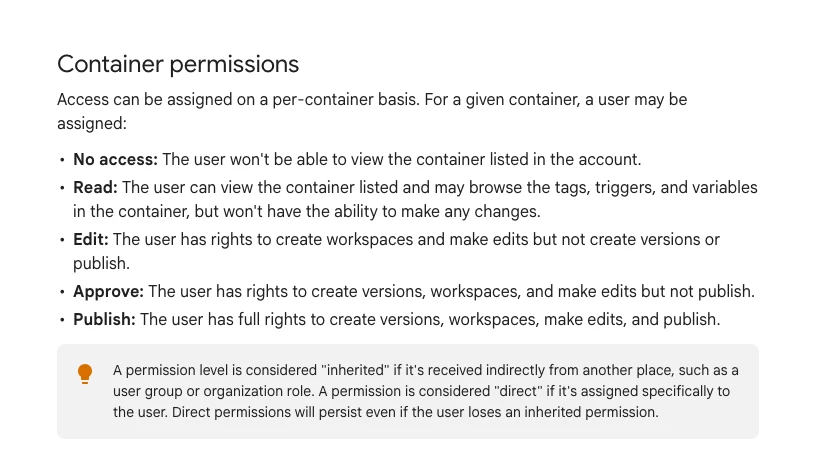
| GTM permission | What a connected server can do | Use it for |
|---|---|---|
| Read | Browse tags, triggers, variables | Audits, inventories |
| Edit | Workspaces and edits | Drafting tags |
| Approve | Edits and versions, no publish | Builds you review |
| Publish | Everything, including going live | People only |
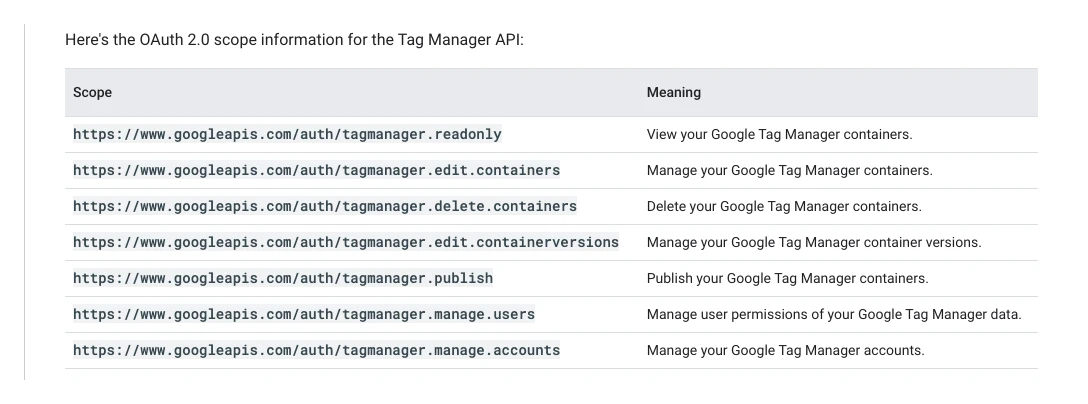
The second lock is the sign-in scope. The Tag Manager API authorisation page lists seven scopes, from tagmanager.readonly to tagmanager.publish and tagmanager.manage.users. A server that only asks for the read-only scope cannot write, even with a Publish account. The catch is that you rarely get to choose: Stape's hosted server asks for all seven, while AdLoop leaves the edit and publish scopes out of its sign-in until you switch writes on.
The third lock is the server's own setting: AdLoop's write switch, or the gtmeditor server's tool groups, which let a self-hosted copy advertise only the families of tools you need. The fourth is Claude. In a connector's tool permissions you can set each tool to Always allow, Needs approval or Blocked, and Team and Enterprise owners can set this for everyone. In Claude Code, a deny rule such as mcp__gtm__publish_version blocks one tool, as described in Claude Code's permissions docs.
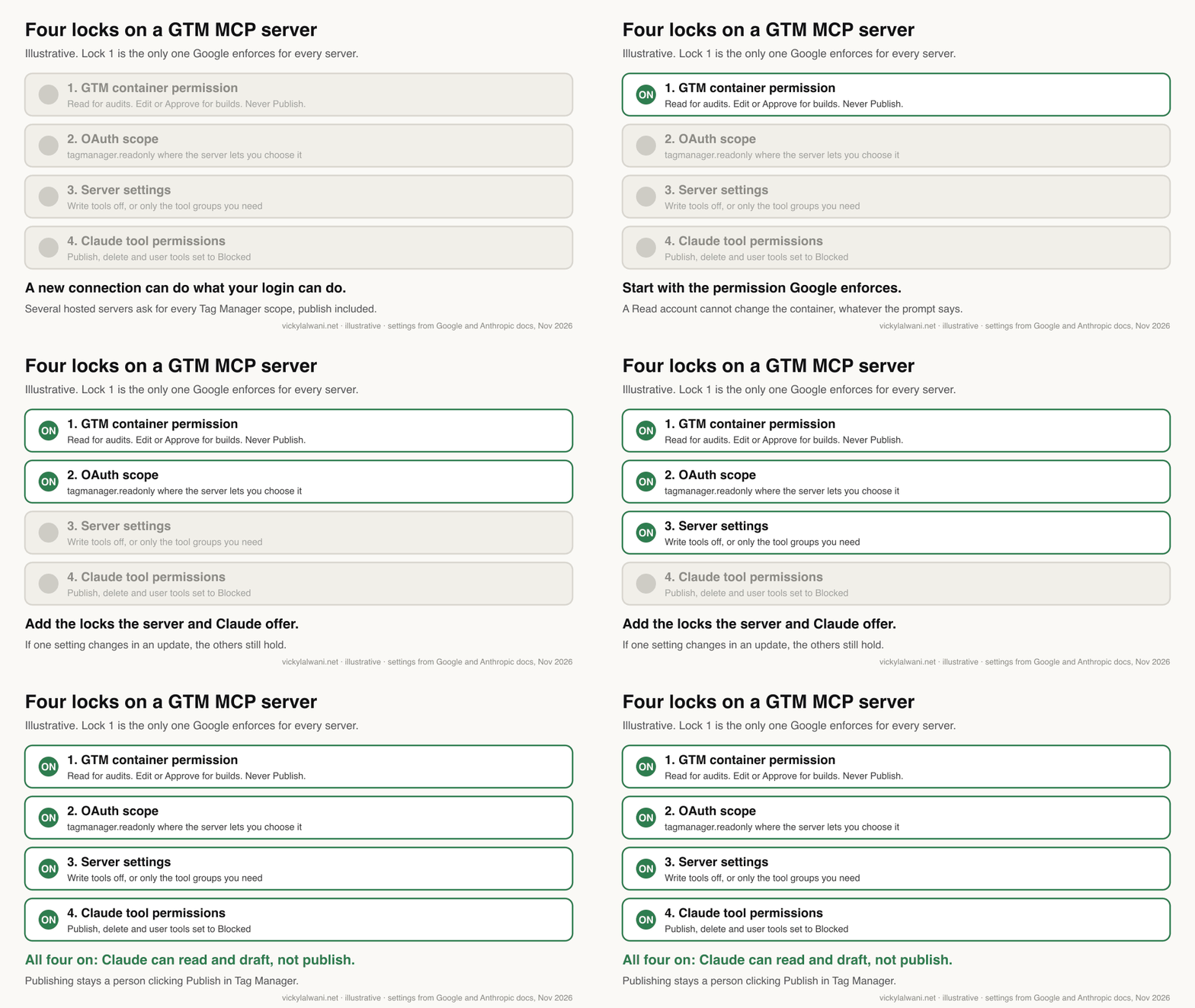
Never choose "Allow always" for write tools, and switch write tools off before using Claude's Research mode, which Anthropic says can call connector tools without asking. The full approval set-up, with Claude on Approve and you on Publish, is in Claude Google Tag Manager setup; I will not repeat it here.
What should you ask a GTM MCP server to do?
Short answer: start with reads that save you clicks: an inventory, an audit for broken or duplicate tags, a comparison of two containers, and documentation of what is live. Move to drafting tags in a workspace only once the reads have been right several times.
Audit container [GTM-XXXXXXX], live version only. Read only: do not create, update or publish anything.
List, in a table with tag name, type and the problem:
1. Tags with no firing trigger, or paused tags.
2. Duplicate tags that send the same event to the same destination.
3. Variables and triggers that nothing uses.
4. Names that break our convention: [Platform] - [Type] - [Event].
5. Custom HTML tags, with a one-line summary of what each does.
Mark anything you are unsure about as "check by hand". Do not guess IDs.
Compare the live versions of [GTM-AAAAAAA] and [GTM-BBBBBBB], which should track the same events.
Show only the differences: tags, triggers and variables that exist in one and not the other, or are set up differently.
Read only. End with the three differences most likely to change reported conversions.
Before you draft new tags, decide what should be tracked in the first place. That is the job of an event map, covered in conversion tracking setup: start with an event map. A server will happily build tags for events nobody needs.
On client accounts I keep the same order every time: audit first, findings in a sheet, check them by hand, and no change before the client approves. I also keep campaigns in draft until every form and call button is measured. A GTM MCP server makes the audit faster. It does not change that order.
| Request | Fit | Why |
|---|---|---|
| Inventory and audit | Good | Reads only, easy to check |
| Container comparison | Good | Tedious by hand |
| Documentation | Good | Plain-English record |
| Drafting simple tags | Needs care | Review in Preview first |
| Consent and revenue tags | Do by hand | Legal and money decisions |
| Publishing | Never | Keep it with a person |
What are the limits of a GTM MCP server?
Short answer: the Tag Manager API allows 10,000 requests per project per day and 0.25 requests per second, so big containers and many clients can hit the cap. The model can also misread what it sees, and some hosted servers are side projects that can close.
Google's limits page sets the quota per Google Cloud project, not per user: 10,000 requests a day and 0.25 queries per second, which works out at 25 requests every 100 seconds. On a hosted server you share the vendor's project with everyone else using it. On a local one you have your own project and can ask Google for more.
- Hosted servers end. The gtmeditor hosted instance closing on 30 November 2026 is a reminder to keep a self-hosted or export fallback.
- Custom HTML still means older JavaScript. A thread on r/GoogleTagManager notes that GTM's Custom HTML tags only accept ES5, the older form of JavaScript, while AI tends to write modern syntax that GTM rejects.
- Changes can break pages. I have seen a tracking change break a live form. A tag that previews fine can still interfere with a site, so test real journeys in Preview mode before anyone publishes.
- Connectors go down. When Claude's connectors have an outage you are back in the interface, so do not plan a release around one.
What people say on X and Reddit
Short answer: practitioners like AI for audits and container JSON, distrust it with publish rights, and point to the human review step as the real safeguard. Most of the enthusiasm on X comes from vendors and creators.
| Who | What they said | Take it as | Link |
|---|---|---|---|
| Stape on X, 2 May 2025 | Launched its MCP server for GTM | Vendor | Post |
| An AI tips creator on X, 29 Jul 2026 | Claude builds tags, triggers and variables from plain English | Opinion | Post |
| Same creator, 29 Jul 2026 | Connect via Stape, gtmeditor or community builds | Opinion | Post |
| Google Analytics on X, 8 Jan 2026 | Promotes its open-source GA MCP server; no GTM one | Vendor | Post |
| ClaudeDevs on X, 28 Jul 2026 | MCP spec update makes remote servers easier to run | Vendor | Post |
| An AI commentator on X, 13 Nov 2026 | Claude's MCP connectors were down | Opinion | Post |
| r/GoogleTagManager, 12 Sep 2026 | Use AI on container JSON for audits; keep publishing rights away from it | First-hand | Thread |
| r/GoogleTagManager, 4 Oct 2026 | Claude found GA4 loading twice; poster built a read-only server | First-hand, maker | Thread |
| r/PPC, 12 Nov 2026 | Asks for a GTM MCP; replies say generate JSON and import it | Opinion | Thread |
| r/GoogleTagManager, 2 Dec 2025 | AI writes modern JavaScript; GTM Custom HTML needs ES5 | Maker | Thread |
| r/GoogleTagManager, 20 Mar 2026 | Container naming broke down across 5+ sites | First-hand | Thread |
The September r/GoogleTagManager thread is the most useful read. Replies split between people who feed container JSON to Claude and import the result after checking, and people who will not let AI near client containers, especially with strict consent requirements. The point most replies agree on is the one this page makes: the risk is publishing without a human check.
Videos worth watching
Short answer: one vendor demo shows a GTM MCP server working inside Claude, and Google's own short shows the Preview step you should never skip.
Made by Markifact, a vendor of hosted marketing connectors, on 18 August 2026. It demonstrates its own paid connector, including publishing, so watch it for the workflow and not as a recommendation.
Made by Google Analytics, the official channel, on 20 November 2024. It sells nothing and shows how to check a tag in Preview before publishing, which is the step every AI-drafted change needs.
| Video | Channel | Date | What it covers |
|---|---|---|---|
| GTM MCP in Claude | Markifact (vendor) | 18 Aug 2026 | Hosted connector demo |
| Preview the Workspace | Google Analytics | 20 Nov 2024 | Preview before publish |
| Claude + Stape MCP server | A server-side tracking freelancer | 21 Mar 2026 | Stape setup, audit, tags |
| I automated GTM with AI | An AI-for-PPC channel | 25 Nov 2025 | Stape MCP walkthrough |
| GTM audit with Claude | Insightful Pipe (vendor) | 12 Sep 2026 | Read-only container audit |
| GTM MCP: list tags, export CSV | HireOtto (vendor) | 11 Jul 2026 | Inventory and export |
Where this advice is weak
Short answer: I read the code and documentation of these servers but have not tested each one against a live container, and the list will date quickly.
- Google could publish a Tag Manager MCP server at any time; it has done so for Analytics and Ads. Check Google's list before you choose.
- Scope and tool details come from each repository on 18 November 2026. A server update can add or remove tools, which is why the GTM permission matters more than any server setting.
- Paid hosted connectors are not reviewed here. Ask each vendor where container data is stored and which scopes it requests.
- Reddit and X views are a small, self-selected sample, and several posts come from people who built the tools they describe.
Want a second pair of eyes on your tracking?
Short answer: if you want a GTM MCP server set up safely, or a container audited before anyone connects AI to it, that is what my analytics and tracking service does.
I can audit the container, set the permissions so nothing publishes without you, and leave you with prompts your team can reuse. If the bigger job is Claude across the marketing team, see Claude consulting, and pricing shows the rates. For the build itself, read Claude Google Tag Manager setup; for the plan behind it, the event map guide.
Sources
| Source | What it supports | Date | Link |
|---|---|---|---|
| Google MCP repository | Official server list, no GTM | Read 18 Nov 2026 | GitHub |
| Google Cloud MCP products | Google-hosted servers, no GTM | Read 18 Nov 2026 | Google Cloud |
| Tag Manager API v2 | What the API can manage | Read 18 Nov 2026 | |
| Tag Manager API authorisation | The seven scopes | Read 18 Nov 2026 | |
| Tag Manager API limits | 10,000 a day, 0.25 per second | Read 18 Nov 2026 | |
| GTM user permissions | Read, Edit, Approve, Publish | Read 18 Nov 2026 | Google Help |
| GTM export and import | Audit from a JSON file | Read 18 Nov 2026 | Google Help |
| Google Ads MCP | Google's own Ads server | Read 18 Nov 2026 | GitHub |
| Stape GTM MCP server | 20 tools, hosted and local | v6.0.1, 16 Oct 2026 | GitHub |
| Stape scope list | Hosted server asks for all scopes | Read 18 Nov 2026 | GitHub |
| Stape product page | Free to Stape users | Read 18 Nov 2026 | Stape |
| gtmeditor GTM MCP Server | Coverage, confirm, 30 Nov shutdown | v1.13.0, 28 Oct 2026 | GitHub |
| AdLoop | GTM read by default, writes opt-in | v0.45.0, 16 Nov 2026 | GitHub |
| gtm-mcp | Local server with publish | v1.0.0, 18 Dec 2025 | GitHub |
| npm downloads | 1,831 in a month | 18 Oct to 16 Nov 2026 | npm |
| Claude custom connectors | Setup, plans, trust, shared credentials | Read 18 Nov 2026 | Anthropic |
| Claude Code permissions | Deny rules for MCP tools | Read 18 Nov 2026 | Anthropic |
| GitHub stars | Chart figures | 18 Nov 2026 | GitHub API |
| X posts and Reddit threads | What people say | See table above | Linked above |
This article expands on my post on LinkedIn ↗.
FAQ
Is there an official Google Tag Manager MCP server?
No. As of 18 November 2026 Google publishes official MCP servers for Google Analytics and Google Ads, but not for Tag Manager, and Claude's connector directory has no Tag Manager connector. Every GTM MCP server is third-party code built on Google's public Tag Manager API.
What is the best GTM MCP server for Claude?
It depends on the job. For audits, a container export or a server that runs read-only, such as AdLoop with writes left off, is safest. For builds, Stape's free server or a self-hosted copy of the open-source gtmeditor server work, connected as an account on Edit or Approve so it cannot publish.
Is the Stape GTM MCP server free?
Yes. Stape lists its MCP server for Google Tag Manager as free, and the code is open source under the Apache 2.0 licence. You can use the hosted version at gtm-mcp.stape.io or run the local version on your own Google credentials.
Can a GTM MCP server publish changes to my website?
Many can. Stape's server and the gtmeditor server both include a publish action, and Stape's hosted sign-in requests the publish scope. Whether a publish works depends on the GTM permission of the Google account you connect, so give that account Read, Edit or Approve, never Publish.
How do I make a GTM MCP server read-only?
Connect it with a Google account that has only Read permission on the container, because Google enforces that whatever the server does. Then, where you can, use the tagmanager.readonly scope, switch off the server's write tools, and block write and publish tools in Claude's connector settings.
Do I need a Google Cloud project to use a GTM MCP server?
Not for hosted servers such as Stape's, where you just sign in with Google. Local and self-hosted servers need your own Google Cloud project with the Tag Manager API switched on and OAuth or service account credentials. That project then has its own quota of 10,000 requests a day.
Can Claude audit a GTM container without an MCP server?
Yes. Export the container from Tag Manager Admin as a JSON file and upload it to Claude. Claude can then list tags, triggers and variables and flag problems without any connection or stored token, and you make the fixes yourself.
What happens to the gtmeditor hosted MCP server?
Its README says the hosted instance at mcp.gtmeditor.com shuts down on 30 November 2026. The code stays open source, so you can self-host it with Go or Docker, or move to another server before that date.
How many requests can a GTM MCP server make?
The Tag Manager API allows 10,000 requests per Google Cloud project per day and 0.25 requests per second, or 25 every 100 seconds. On a hosted server you share the vendor's project, so large audits across many containers can hit the limit.