The Shopify AI Toolkit is Shopify's free plugin, launched in April 2026, that connects Claude Code and other coding agents to Shopify's docs, API schemas, validation and Shopify CLI. For SEO it can audit and bulk edit product SEO titles, meta descriptions and alt text, but store changes are off by default and need your explicit approval.
TL;DR
The Shopify AI Toolkit, launched on 9 April 2026, is a developer kit. It gives Claude Code and other coding agents Shopify's docs, API schemas, code validation and a way to run store tasks through Shopify CLI. Write access is off by default: the CLI command it uses only changes store data when you add --allow-mutations.
For SEO it suits bulk work on product and collection SEO titles, meta descriptions and image alt text, run by someone comfortable in a terminal. A marketer who wants the same from a chat window should use the Shopify connector for Claude, and one product at a time is quicker in Sidekick inside the Shopify admin.
The bigger SEO change in 2026 is agentic storefronts: Shopify lists eligible products in ChatGPT, Copilot, Google AI Mode and Gemini by default, using your product data. Clean titles, descriptions, barcodes and policies now feed AI shopping answers as well as Google.
Short answer: the Shopify AI Toolkit connects Claude Code, Codex, Cursor and other coding agents to Shopify's developer docs, schemas and Shopify CLI. It can audit and bulk edit product SEO fields, but it is built for developers, it runs nothing that changes your store unless you allow it, and Shopify holds you responsible for any change it makes.
Most of the early coverage sold the toolkit as "Claude runs your store now". The documentation says something narrower and more useful. This guide checks every claim against Shopify's own help centre and developer docs as of 18 November 2026, sorts out which Shopify AI route fits which SEO job, and gives you a review loop that keeps bulk edits from going wrong. If you would rather have someone plan and check this for your store, that is part of my SEO consultant work.
What is the Shopify AI Toolkit in November 2026?
Short answer: a free plugin from Shopify for coding agents, released on 9 April 2026. It gives the agent three things: Shopify's developer docs and API schemas, validation of GraphQL, Liquid and extension code, and store management through Shopify CLI that runs only when you choose to execute it.
Shopify's launch post on 9 April 2026 frames it as context for coding agents: the agent works from Shopify's real schemas instead of guessing field names from memory. The AI Toolkit documentation lists Claude Code, Codex, Antigravity CLI, Cursor, Hermes, OpenClaw, Pi and Visual Studio Code as supported, and it needs Node.js 18 or higher.
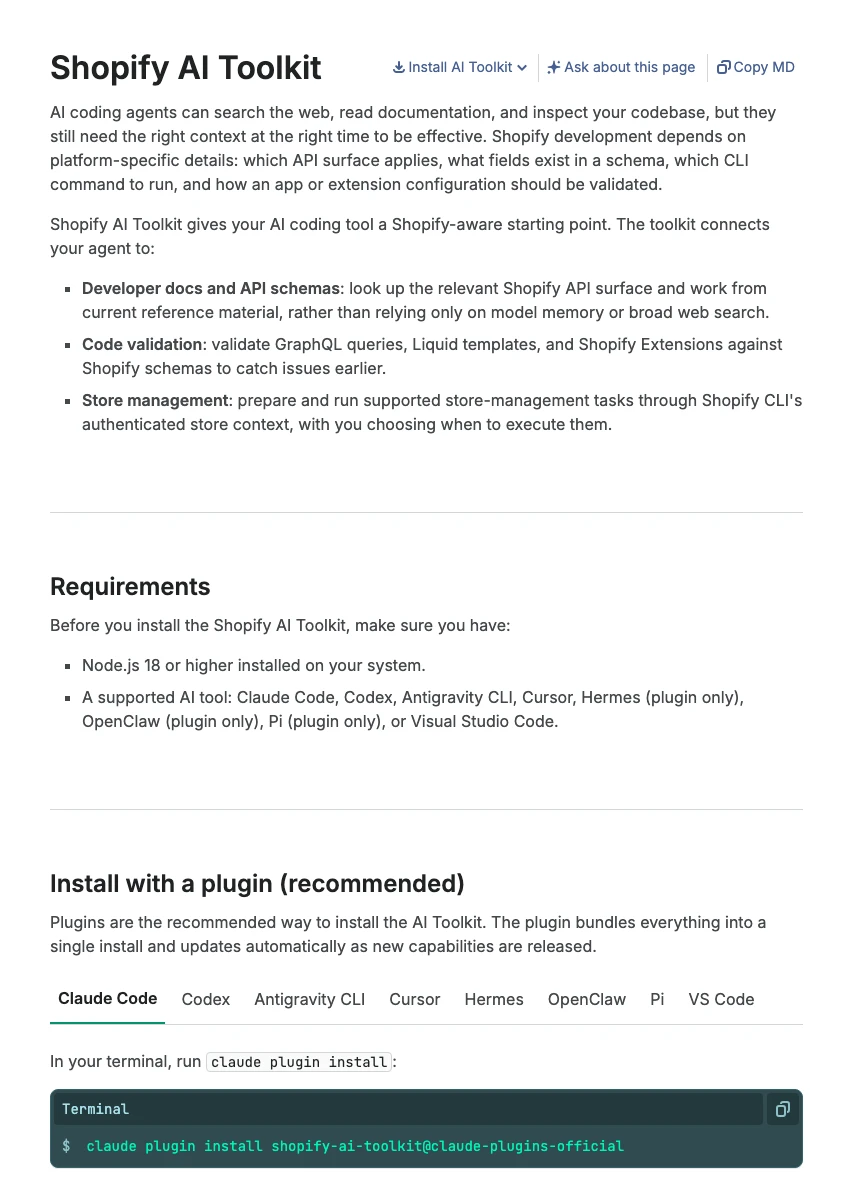
Three details matter before you plan any SEO work with it:
- It installs as one plugin. In Claude Code the command is
claude plugin install shopify-ai-toolkit@claude-plugins-official. On 25 September 2026 Shopify folded its separate skills into a singleshopifyskill, so older guides that list 16 or 19 skills are out of date. - The Dev MCP server only reads public docs. It runs on your machine and needs no login. MCP (Model Context Protocol) is the open standard that lets an AI app call outside tools. On its own, this part cannot see or touch your store.
- Store access goes through Shopify CLI. You sign in with
shopify store authand choose the API scopes, then the agent runsshopify store execute. Shopify's CLI reference says mutations (changes) are disabled by default and need the--allow-mutationsflag.
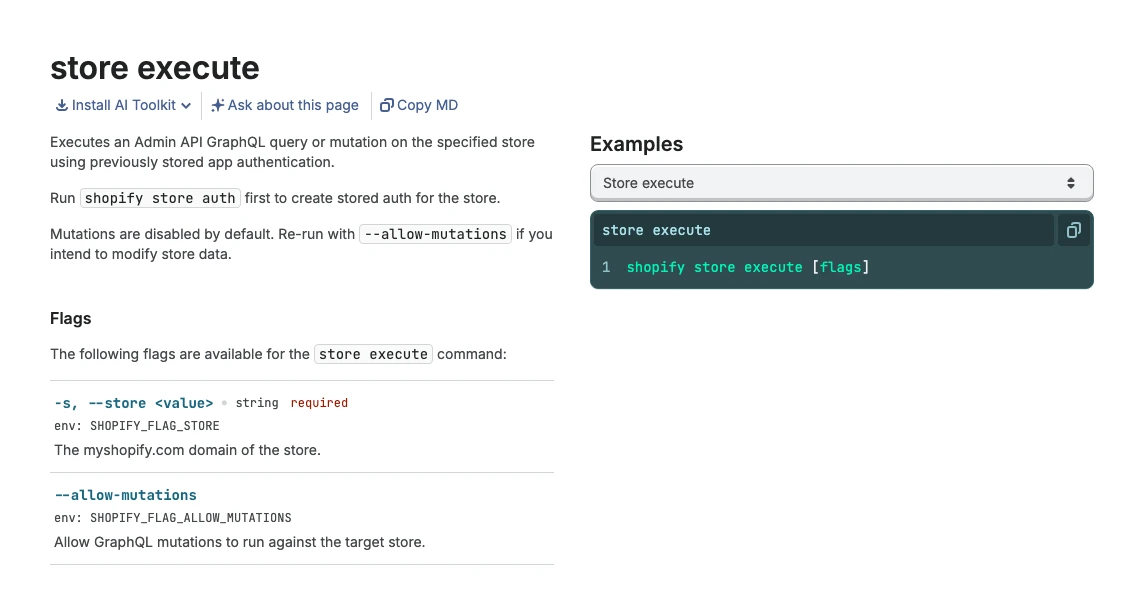
store execute reference: changes are off unless you add --allow-mutations. Captured 18 November 2026.How widely is it used?
The toolkit's MCP server ships as the npm package @shopify/dev-mcp, and npm publishes download counts. Monthly downloads went from 32,881 in November 2025 to 222,713 in October 2026, nearly seven times higher. Downloads include automated installs, so read this as direction of travel, not a count of stores.
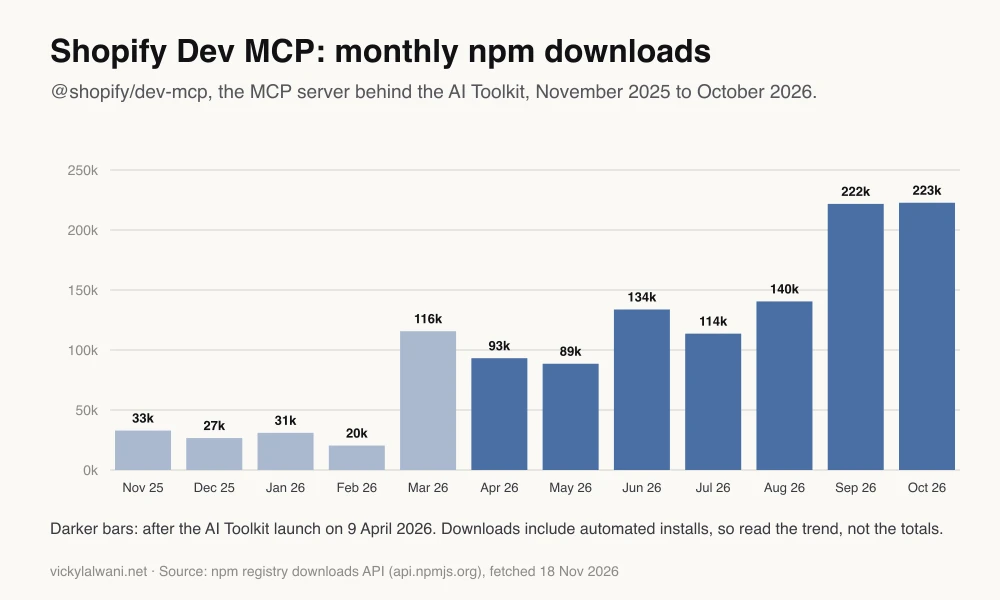
@shopify/dev-mcp, from the npm downloads API, fetched 18 November 2026.Which Shopify AI tool should you use for SEO?
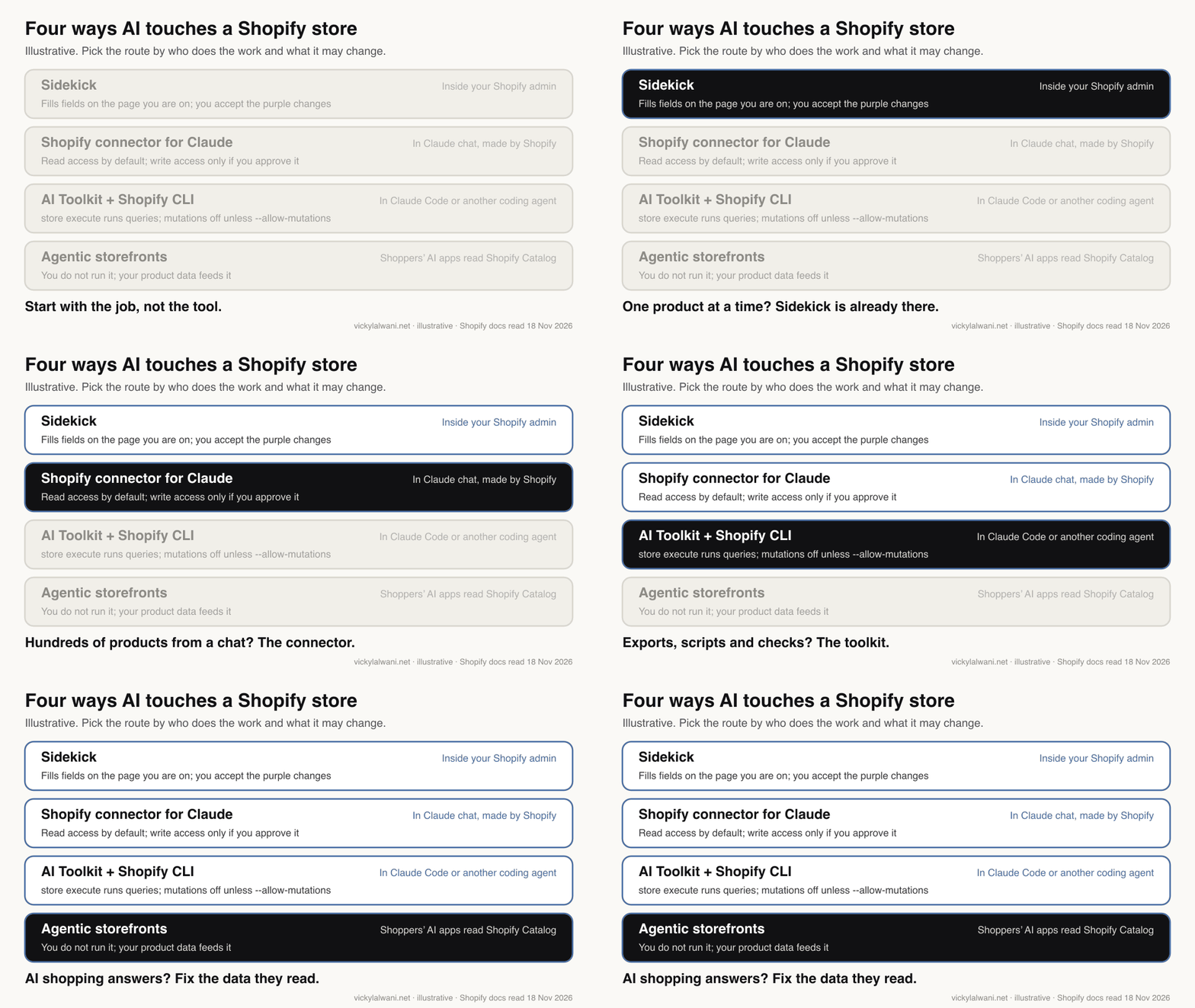
Short answer: use Sidekick for one product at a time inside the admin, the Shopify connector for Claude for chat-based bulk work, and the AI Toolkit when you want exports, scripts and validation in a terminal. Agentic storefronts is not a tool you run; it is where your product data now shows up.
Four different Shopify AI routes get mixed up in articles and videos. They differ in who drives them, what they can change and where the approval sits.
| Route | Best for | Can it change SEO fields? | Approval |
|---|---|---|---|
| Sidekick (in the admin) | One page or product at a time | Fills fields on the page you are on | You accept highlighted changes |
| Shopify connector for Claude | Marketers working in a chat | Yes, through product and GraphQL tools | Write access approved in Shopify |
| AI Toolkit + Shopify CLI | Developers, bulk exports and scripts | Yes, with --allow-mutations | Scopes at sign-in, flag per run |
| Agentic storefronts | Being found in AI shopping answers | No, it reads your data | On by default; choose channels |
Which built-in Shopify AI features touch SEO?
Short answer: Sidekick can write product descriptions and fill fields you then review, the description generator needs a title and at least 2 features, Campaign Autopilot can recommend SEO updates, and Shopify suggests product categories. None of the help pages promises automatic meta titles across a whole catalogue.
Shopify's AI-powered tools page lists everything built in. The SEO-relevant parts:
| Feature | SEO use | Limit worth knowing |
|---|---|---|
| Sidekick chat | Fills fields, writes copy | Changes highlighted for review |
| Generate text in descriptions | Product description drafts | Title plus 2 features minimum; desktop only |
| Campaign Autopilot | Recommends SEO updates | You review them with Sidekick |
| Product category suggestions | Category and category metafields | Suggestions, not automatic |
| Agentic knowledge base | Store facts for AI agents | 1,000 facts in total |
The description generator page warns that output can include benefits you did not list and facts pulled from related published content. That is the same risk you carry into any bulk workflow: the model fills gaps confidently.
Shopify's own SEO help page gives the limits to build into every prompt: the title field takes up to 70 characters but Shopify recommends 60 or fewer, and it recommends about 160 characters for the meta description.
What can Claude change in a Shopify store?
Short answer: with write access approved, Claude can create and update products and collections, set inventory, create percentage discount codes and edit unpublished themes. It cannot edit your live theme, change payments, taxes or domains, or refund and cancel orders, and Shopify says you are responsible for any wrong change.
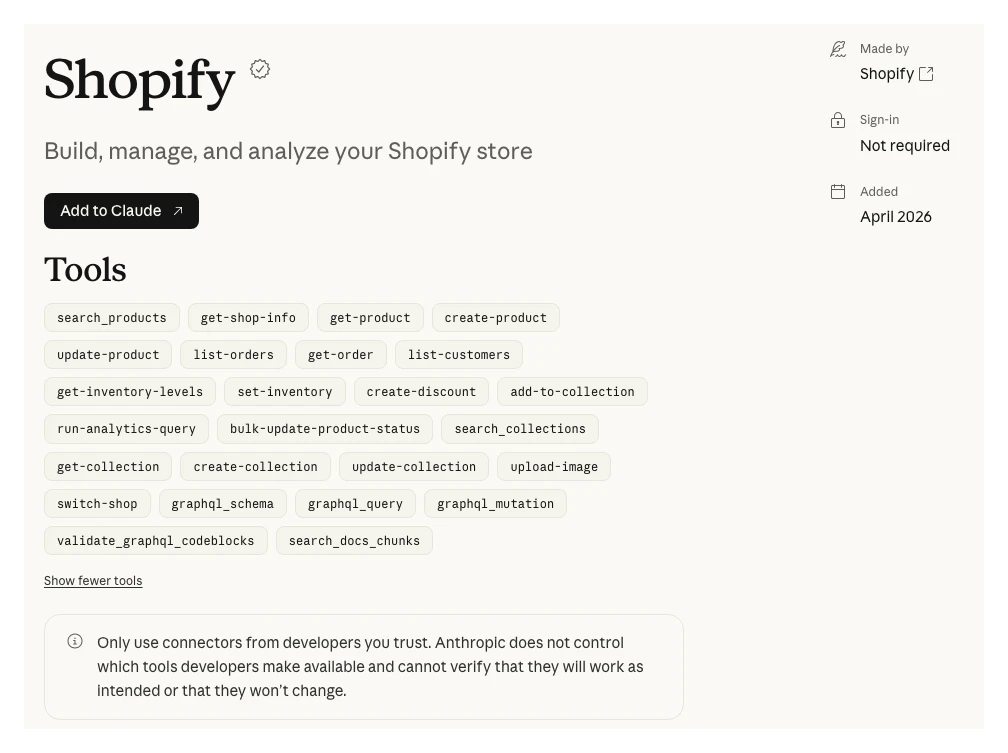
The Shopify connector in Claude's directory is made by Shopify and was added in April 2026. Its page lists 25 tools, from search_products and update-product to general graphql_query and graphql_mutation tools. No tool is named for SEO fields or alt text, so Claude reaches those through update-product or a GraphQL mutation. That is exactly why you read the proposed change before you approve it.
Shopify's authorisation page offers two levels, read-only and write. You cannot lower a level once approved; you uninstall and reinstall instead. The tool can also only do what the staff account it acts through is allowed to do.
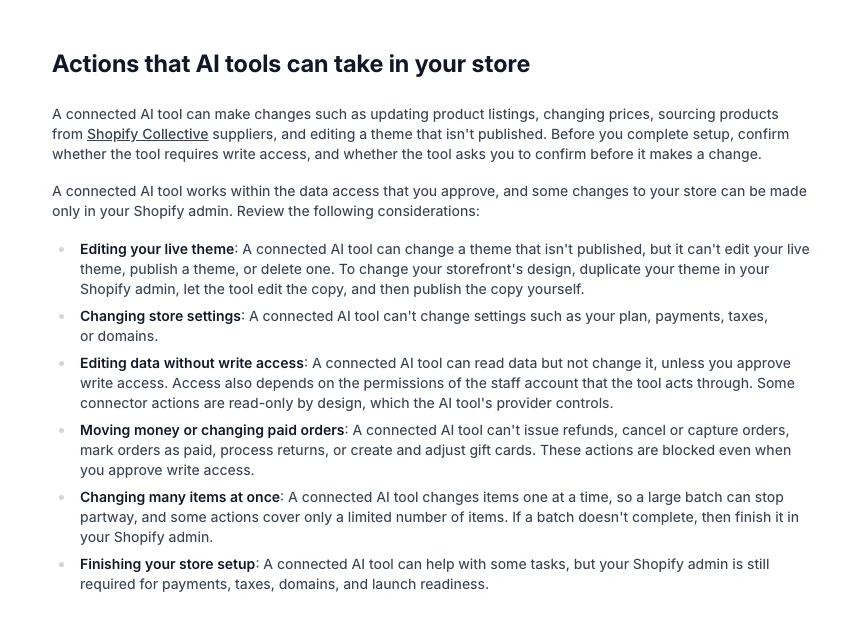
| A connected AI tool can | It cannot |
|---|---|
| Update product listings and prices | Edit, publish or delete the live theme |
| Create and update collections | Change plan, payments, taxes or domains |
| Edit an unpublished theme copy | Refund, cancel or capture orders |
| Set product status in batches of 50 | Change data without write access |
One line on the page matters more than the rest for bulk SEO: a tool changes items one at a time, so a large batch can stop partway. Plan your batches so a half-finished run is easy to spot and finish.
How do you run a Shopify SEO audit with Claude Code?
Short answer: install the toolkit plugin, sign in to the store with read-only product scopes, and ask Claude Code to export every product's handle, SEO title, meta description and image alt text to a CSV. Then ask for a table of problems. Nothing changes, because store execute runs queries only.
An audit is the right first job because it is read-only and the output is easy to check by hand. A typical setup:
- Install the plugin in Claude Code and restart it.
- Run
shopify store auth --store your-store.myshopify.com --scopes read_products. Asking only for read scopes means even a mistaken mutation has nothing to write with. - Paste the prompt below. The toolkit's schema lookup lets Claude find the current fields (the Admin API exposes a product's
seotitle and description and each media item'salttext) instead of guessing.
Use the Shopify AI Toolkit and shopify store execute (no --allow-mutations) on [store].myshopify.com. Export every active product to products-seo.csv with: handle, product title, SEO title, SEO description, product type, vendor, number of images, number of images with empty alt text, and whether the description has fewer than 50 words. Page through all products. Then give me a table of problems: SEO title missing or over 60 characters, SEO description missing or over 160 characters, duplicate SEO titles, images without alt text, and thin descriptions. Do not change anything in the store.
On client work my habit is the same whatever the tool: audit first, put proposed changes in a sheet, check them by hand, and change nothing until they are approved. The toolkit makes the first two steps faster; it does not remove the last two.
How do you bulk edit product SEO safely?
Short answer: back up first, draft the new titles, descriptions and alt text in a sheet beside the old values, review them, apply them to a development store or 10 live products, check the pages, then run the rest in small batches. Only the apply step uses write scopes and --allow-mutations.
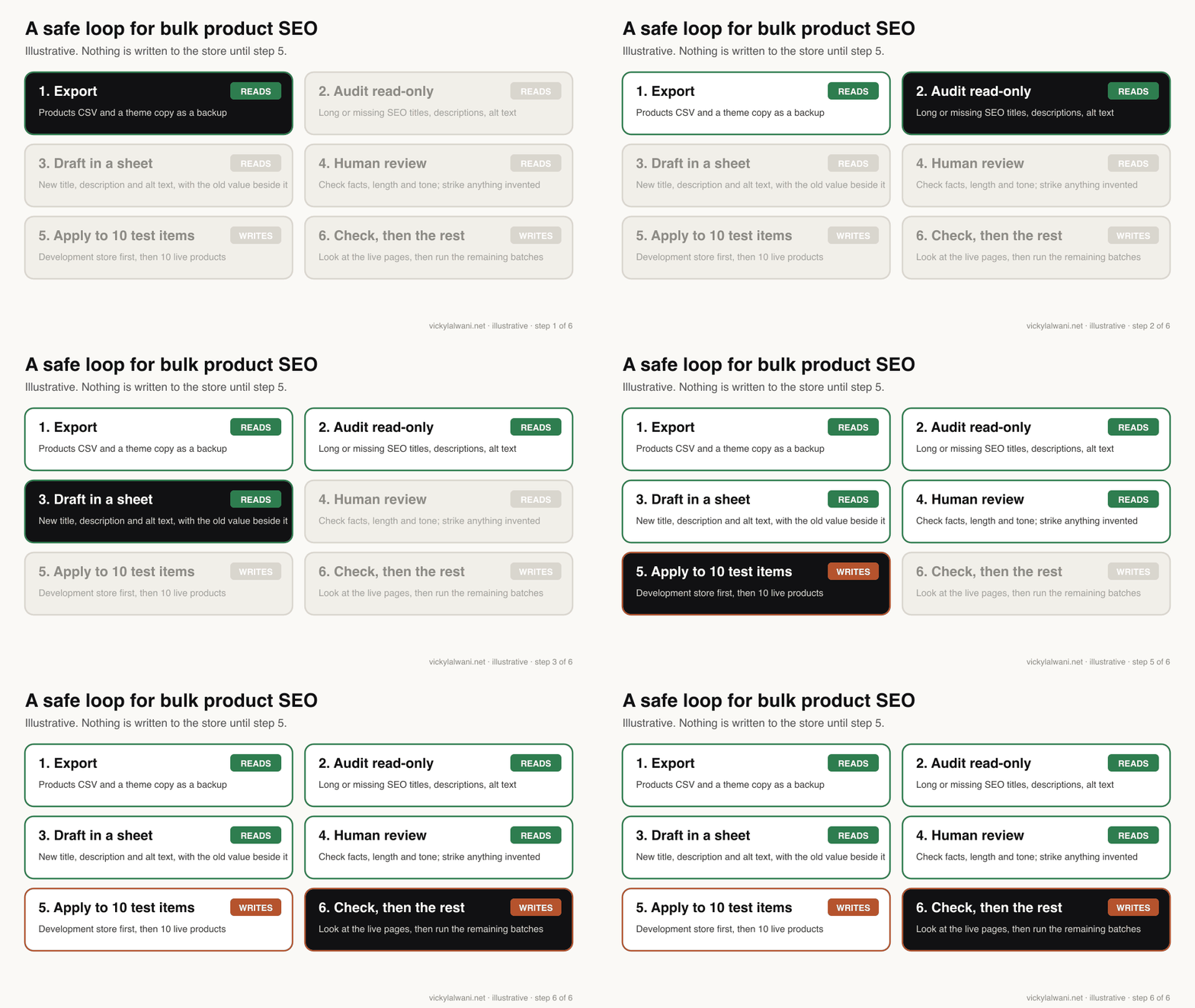
Using products-seo.csv, draft a new SEO title (60 characters or fewer) and SEO description (150 to 160 characters) for each product flagged in the audit, plus alt text for images with none. Use only facts in the product title, description, options and vendor fields. If a fact you would need is missing, write NEEDS INFO instead of guessing. Never add claims about materials, certifications, health or results. Save to seo-drafts.csv with the old value next to each new one and a character count. Do not write anything to the store.
When the drafts are approved, re-authenticate with write_products (plus write_files if you change alt text, which Shopify updates through the fileUpdate mutation). SEO titles and descriptions go through productUpdate with the SEOInput fields. Ask Claude to validate each mutation against the schema before it runs.
| Safeguard | Why | How |
|---|---|---|
| Export first | No undo for bulk edits | Products CSV export |
| Read scopes for audits | Nothing to write with | --scopes read_products |
| Drafts in a sheet | Review old and new together | One row per product |
| Test batch | Catch format errors early | Dev store, then 10 products |
| Small batches | Runs can stop partway | 50 to 100 at a time |
| Leave prices alone | Mistakes cost money fast | Keep SEO runs SEO-only |
Batch sizes in that table are a working example, not a Shopify rule. Shopify's only stated batch figure is the connector's 50-product status update.
Does any of this help with AI shopping search?
Short answer: yes, indirectly. Shopify lists eligible products in ChatGPT, Microsoft Copilot, Google AI Mode, Gemini and Meta surfaces through Shopify Catalog, on by default. The titles, descriptions, images, variants, barcodes and policies you clean up for Google are the same data those AI channels read.
Shopify's agentic storefronts page says the channel is active by default for eligible stores, with choices under Sales channels, then Agentic. ChatGPT works mainly as a referral to your own checkout; other channels can use Shopify-powered checkout inside the AI app when direct checkout is on.
| What Shopify asks for | Where it is stated |
|---|---|
| A title and at least 1 image | Catalog requirements |
| Price above 0, a product URL | Catalog requirements |
| Not Unlisted or hidden from search | Catalog requirements |
| Barcode, vendor, variants, clear descriptions | Optimising products |
| Complete policies, knowledge base facts | Knowledge base |
Two details catch people out. Setting a product to Unlisted to hide it from AI channels also hides it from sitemaps and Google, so it is not an AI-only switch. And the separate Knowledge Base app is being retired on 15 January 2027; facts move across automatically only if you have 1,000 or fewer.
For the wider picture of how Google's AI surfaces pick products and pages, see my guide to Google AI Mode SEO, and for checkout and forms that agents can use, optimising a website for AI agents. If you use Claude for other marketing tools too, the catalogue of Claude marketing connectors shows what each one can change.
What will the toolkit not fix?
Short answer: it will not give thin products a reason to rank, write facts you never supplied, fix slow themes or replace collection and internal link planning. Bulk copy makes catalogues tidy; it does not make them distinctive.
- Near-identical copy. The same template across 500 products reads as thin. Write your best sellers and main collections by hand and let the agent handle the long tail.
- Missing facts. If the material, size or care instructions are not in your data, the model will either skip them or invent them. Fix the data first.
- Site structure. Collections, filters, internal links and page speed decide a lot of ecommerce SEO. A Claude Code workflow can audit these too; my one-folder Claude Code SEO workflow covers that side.
What people say on X and Reddit
Short answer: the launch posts promised one-prompt store makeovers; merchants on Reddit are more wary, with worries about letting AI make wholesale SEO changes, setups that failed on some stores, and agentic storefronts being switched on without asking.
| Who | What they said | Take it as | Link |
|---|---|---|---|
| Shopify (official) | The AI Toolkit is here; manage your store with your favourite agent (9 Apr 2026) | Vendor | X post |
| A marketing automation creator | One prompt reads products, rewrites descriptions for AI shopping and pushes them live (10 Apr 2026) | Opinion, promotional | X post |
| A store founder | Connected Claude through the toolkit and found product bundles in their own order data (6 May 2026) | First-hand | X post |
| A Shopify app maker in Japan | What to set up before using the toolkit on a live store (11 Apr 2026) | First-hand, vendor | X post |
| Shopify (official) | Reference implementation for building a storefront agent in Claude (2 Sep 2026) | Vendor | X post |
| r/shopify | Top reply: not trusting AI with wholesale "optimise my SEO" changes; one user says it failed on 2 of 5 stores (10 Apr 2026) | First-hand | Thread |
| r/shopify | Breakdown of the toolkit; replies focus on the risk of --allow-mutations and the missing approval layer (14 Apr 2026) | Opinion | Thread |
| r/shopify | A merchant found agentic storefronts on by default; replies suggest a specs block under human copy (17 Aug 2026) | First-hand | Thread |
| r/shopify | Store owners preparing for agentic shopping: clear product data, FAQs and policies in plain language (1 Oct 2026) | Opinion | Thread |
Several Reddit threads attract replies from people selling SEO apps, and claims of better conversion from AI referrals in these threads are individual reports, not data.
Videos worth watching
Short answer: Shopify's own short videos explain the Dev MCP and agentic storefronts, and the official Sidekick tutorial shows how changes are reviewed in the admin.
Made by Shopify, 10 December 2025, before the toolkit had its name. It promotes Shopify's own developer tools and shows the Dev MCP idea in a few minutes.
Made by Shopify, 10 December 2025. A short official explainer of agentic storefronts; the channel list and defaults have changed since, so check the help page.
Made by Learn With Shopify, 15 June 2026. Official training on Sidekick in the admin, useful if you only need one-at-a-time edits.
| Video | Channel | Date | What it covers |
|---|---|---|---|
| Build with AI with full dev MCP support | Shopify | 10 Dec 2025 | Dev MCP for builders |
| Agentic Storefronts: Reach buyers in AI chat platforms | Shopify | 10 Dec 2025 | AI shopping channels |
| The Official Shopify Sidekick Tutorial (Part 1) | Learn With Shopify | 15 Jun 2026 | Sidekick basics |
| Shopify AI Toolkit: Claude Code Setup Tutorial (2026) | Fudge | 14 Apr 2026 | Plugin install in Claude Code |
| Shopify's NEW Agentic Storefronts Explained (Shopify Editions Spring 2026) | ethercycle | 14 Jul 2026 | Product data for AI channels |
Where this advice is weak
Short answer: Shopify changes these tools often, I have not measured ranking changes from AI-written product SEO, and the help pages do not say how agentic channels rank products.
- Everything here was checked on 18 November 2026. The toolkit changed its skill structure within six months of launch, so recheck the docs before you script against it.
- There is no published evidence that AI-drafted SEO titles rank better or worse than hand-written ones. The value is speed and consistency, which still need review.
- Shopify says other factors specific to each AI platform influence results. Good data makes you eligible and readable; it does not guarantee a mention.
- Download counts in the chart include automated installs and are not a measure of active stores.
Want a second pair of eyes on your Shopify SEO?
Short answer: I can run the read-only audit, draft the fixes in a sheet for your approval and plan the collection and internal link work that bulk edits do not cover.
My SEO consultant service covers ecommerce audits, product and collection SEO and preparing catalogues for AI shopping answers. If you want the Claude side set up with safe permissions, see the Claude consultant service. Rates are on the pricing page.
Sources
| Source | What it supports | Date | Link |
|---|---|---|---|
| Shopify AI Toolkit docs | What it is, tools, install | Read 18 Nov 2026 | shopify.dev |
| Shopify developer changelog | Launch on 9 Apr 2026 | 9 Apr 2026 | shopify.dev |
| Shopify developer changelog | Skills merged into one | 25 Sep 2026 | shopify.dev |
| Shopify CLI reference | Mutations off by default | Read 18 Nov 2026 | shopify.dev |
| Admin API: SEOInput | SEO title and description fields | API 2026-10 | shopify.dev |
| Admin API: fileUpdate | Alt text updates | API 2026-10 | shopify.dev |
| Shopify Help: AI-powered tools | Sidekick and built-in features | Read 18 Nov 2026 | help.shopify.com |
| Shopify Help: Sidekick content | Review before accepting, Autopilot SEO | Read 18 Nov 2026 | help.shopify.com |
| Shopify Help: generate descriptions | Minimum inputs, accuracy warning | Read 18 Nov 2026 | help.shopify.com |
| Shopify Help: SEO keywords | 60 to 70 and 160 character guidance | Read 18 Nov 2026 | help.shopify.com |
| Shopify Help: connector for Claude | What Claude can and cannot do | Read 18 Nov 2026 | help.shopify.com |
| Shopify Help: considerations | Responsibility, limits, batches | Read 18 Nov 2026 | help.shopify.com |
| Shopify Help: authorising access | Read and write levels | Read 18 Nov 2026 | help.shopify.com |
| Shopify Help: agentic storefronts | Channels, on by default | Read 18 Nov 2026 | help.shopify.com |
| Shopify Help: Catalog requirements | Product eligibility | Read 18 Nov 2026 | help.shopify.com |
| Shopify Help: knowledge base | 1,000 facts, app retired 15 Jan 2027 | Read 18 Nov 2026 | help.shopify.com |
| Claude directory: Shopify | 25 tools, made by Shopify | Read 18 Nov 2026 | claude.com |
| npm downloads API | Dev MCP download chart | Fetched 18 Nov 2026 | api.npmjs.org |
| X and Reddit posts | Practitioner reactions | Apr to Oct 2026 | Linked in the table above |
This article expands on my post on LinkedIn ↗.
FAQ
What is the Shopify AI Toolkit?
The Shopify AI Toolkit is a free plugin from Shopify, launched on 9 April 2026, that connects coding agents such as Claude Code, Codex and Cursor to Shopify's developer docs, API schemas, code validation and Shopify CLI. It helps an agent build and run store tasks from Shopify's real schemas instead of guessing.
How do I install the Shopify AI Toolkit in Claude Code?
Run claude plugin install shopify-ai-toolkit@claude-plugins-official in your terminal, then restart Claude Code. You need Node.js 18 or higher, and the plugin updates itself as Shopify adds features.
Can the Shopify AI Toolkit change my live store?
Only if you let it. Store changes run through the shopify store execute command, which has mutations disabled by default and needs the --allow-mutations flag, and the access token only has the scopes you approved at sign-in.
Can Claude update Shopify SEO titles and meta descriptions?
Yes, with write access. The Admin API sets them through the seo field on productUpdate and on collection mutations, and both the AI Toolkit and the Shopify connector for Claude can run those changes. Review a sample in a sheet before you apply them in bulk.
What is the difference between the AI Toolkit and the Shopify connector for Claude?
The AI Toolkit is for developers working in a terminal or code editor, with docs, validation and CLI access. The Shopify connector, made by Shopify and listed in Claude's directory since April 2026, lets you manage products, collections, inventory and discounts from a Claude chat.
Does Shopify Sidekick write meta descriptions?
Shopify's help pages say Sidekick can write content and fill fields on the admin page you are on, with changes highlighted for you to accept. They do not describe a bulk meta description feature, so treat Sidekick as a one-page-at-a-time tool.
What can't a connected AI tool do in Shopify?
Shopify says a connected AI tool cannot edit, publish or delete your live theme, change your plan, payments, taxes or domains, or refund, cancel or capture orders. It also cannot change anything without write access, and you are responsible for any wrong change it makes.
What character limits should Shopify SEO titles and descriptions follow?
Shopify's help centre says the title field takes up to 70 characters but recommends 60 or fewer, and it recommends about 160 characters for the meta description. Put both limits in any prompt that drafts SEO fields.
Do I need to change my product pages for ChatGPT and AI shopping?
Shopify lists eligible products in AI channels such as ChatGPT, Copilot and Google AI Mode through Shopify Catalog, on by default. You do not need separate pages, but complete titles, descriptions, images, barcodes, variants and policies help those channels read your products correctly.