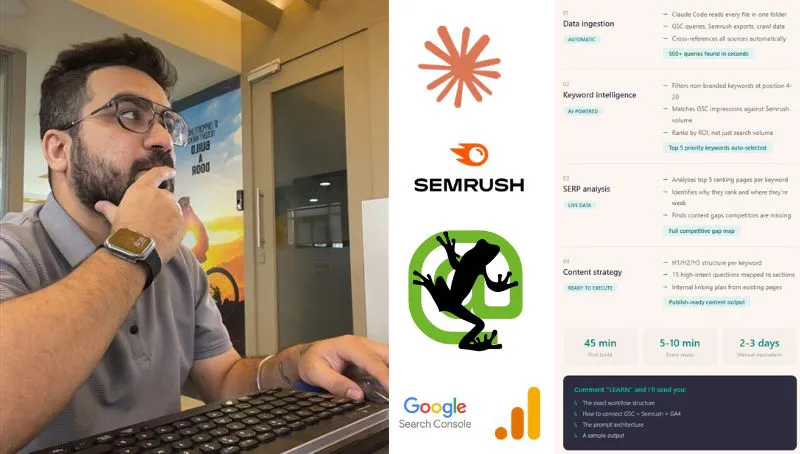
A Claude Code SEO workflow puts your Search Console, keyword, crawl and GA4 exports in one project folder with a CLAUDE.md that explains each file and the rules. Claude Code reads across the files to find queries with no page, pages near page one and blocked pages, then drafts briefs. Every number should cite a file and row, and a person approves before anything changes.
TL;DR
A Claude Code SEO workflow is one project folder holding your Search Console, keyword, crawl and analytics exports, plus a short CLAUDE.md file that tells Claude Code what each file is and how to behave. Claude Code reads across all of the files at once, which no single dashboard does, and writes gap lists, blocker lists and briefs back into the folder.
Start with exports, not live connections. A Search Console report export is capped at 1,000 rows, so larger sites need the API or the BigQuery export for the long tail. Add MCP connections (GA4, Semrush, Ahrefs) once the questions are settled.
The model is not the hard part. The hard part is the rules: every recommendation cites a file and a row, a person checks it against the live tool, and nothing on the site changes until someone approves it. Google's own guidance says AI-assisted content must be fact-checked, titles and meta descriptions included.
Short answer: to run SEO with Claude Code, put your exports in one folder, write a CLAUDE.md that explains each file and the rules, start Claude Code in that folder, and ask one question at a time: which queries have impressions but no page, which pages earn impressions but are blocked, and what to brief first. Claude Code needs a paid Claude plan (Pro or above), and every answer it gives should point back to a row you can check.
Every week, a lot of marketers and SEOs look at four dashboards and still miss the obvious. Search Console in one tab, a keyword tool in another, analytics in a third, a crawler in a fourth. Four data sets, very little connection between them. That is tab-hopping, not analysis, and it is the specific problem a Claude Code SEO workflow solves.
I first wrote this after 8+ years in search and paid media, and the core idea has held up. What changed by November 2026 is the detail: Claude Code now starts most sessions in auto mode, Google has written down what it expects from AI-assisted content, and Semrush, Ahrefs and Google Analytics all have MCP servers you can plug in. This update brings the method in line with all of that. If you would rather have someone run this on your site, that is the work I do as an SEO consultant.
Three related guides cover the parts this one skips: installing Claude Code and building a site with it in how to build a website with Claude Code, the crawl side in a Screaming Frog and Claude Code technical audit, and the wider eight-function system in how to build an AI SEO system.
What is a Claude Code SEO workflow?
Short answer: it is a repeatable set of questions that Claude Code, Anthropic's agentic coding tool, answers by reading the SEO exports in one project folder. Because it can open every file, join them and write results back as new files, it finds things that sit between tools, such as a query with impressions and no page that targets it.
Claude Code runs in the terminal, in VS Code and JetBrains, in a desktop app and on the web, and all of those surfaces read the same CLAUDE.md files, settings and MCP servers. It is included from the Claude Pro plan (USD 20 a month, or USD 17 a month billed yearly) and is not part of the Free plan, according to Anthropic's pricing page.
The word "coding" puts some SEOs off. You do not need to write code. Claude Code writes small scripts when a join is too big to do by reading, and you can ask it to explain each one before it runs.
| Job | Claude chat | Claude Code |
|---|---|---|
| One CSV, one question | Good | Good |
| Join five exports | Upload limits bite | Reads the whole folder |
| Write results to files | Download by hand | Saves into the folder |
| Same check next month | Paste the prompt again | CLAUDE.md and skills |
| Run unattended | Scheduled tasks | claude -p from a script |
What goes in the folder?
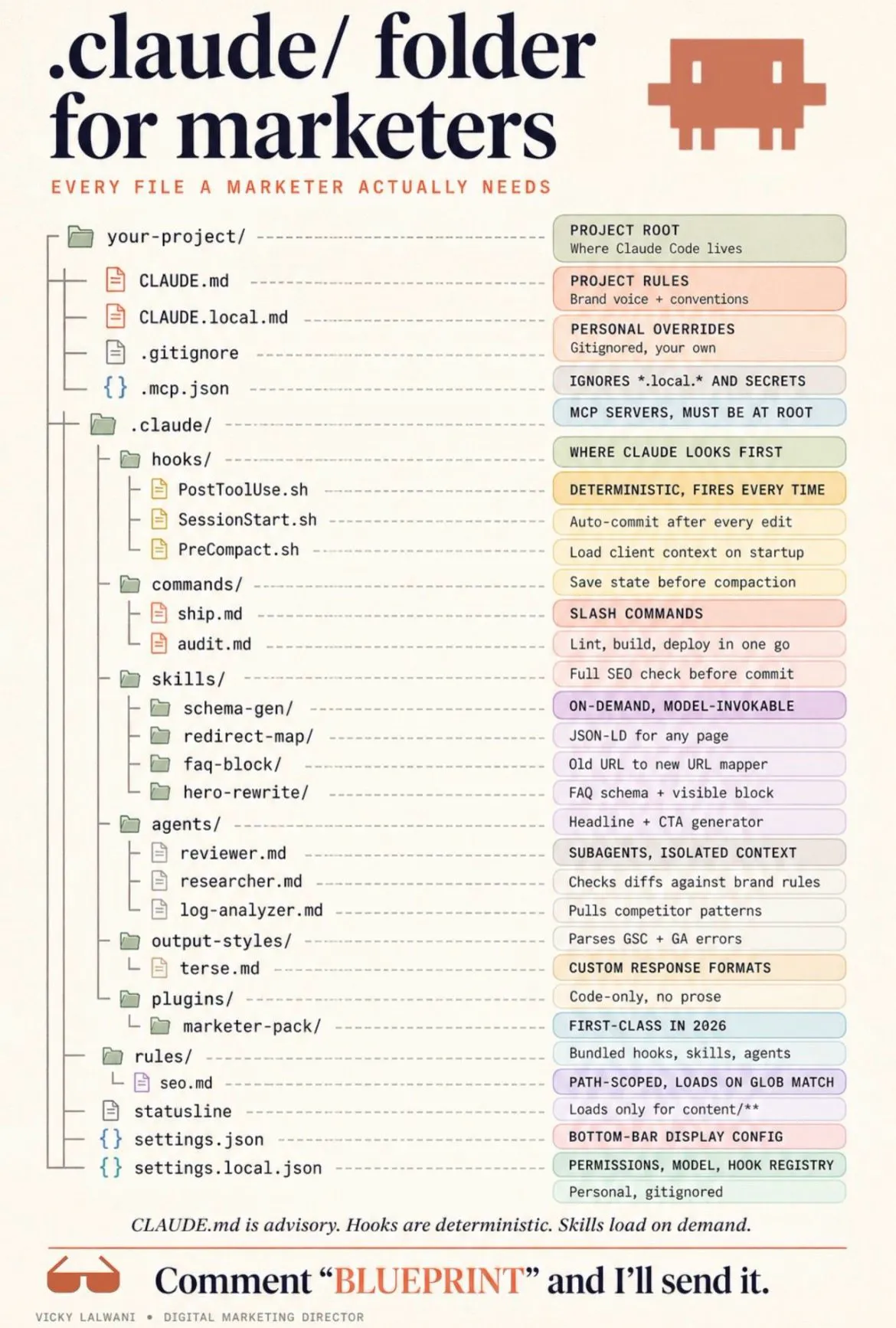
Short answer: one subfolder per source (Search Console, keyword tool, crawler, GA4), an outputs folder, and a CLAUDE.md at the top. Name every export with the date it was pulled and the date range it covers, because Claude Code cannot tell a stale file from a fresh one unless you say so.
When you export the Performance report from Search Console, you get a set of CSV files: Queries, Pages, Countries, Devices, Search appearance, a daily Chart file and a Filters file that records the date range and search type. This site's own refreshes start exactly that way: the export is unzipped into a run folder and Claude reads it before any page is touched.
| Folder | What goes in | Why it matters |
|---|---|---|
| exports/gsc | Queries, Pages, Filters CSVs | Real demand and positions |
| exports/keywords | Semrush or Ahrefs export | Volume, difficulty, competitors |
| exports/crawl | Screaming Frog internal export | Status, indexability, links |
| exports/ga4 | Landing pages with key events | Which pages bring leads |
| outputs | Everything Claude writes | Keeps exports untouched |
| CLAUDE.md | Rules and file meanings | Read at every session start |
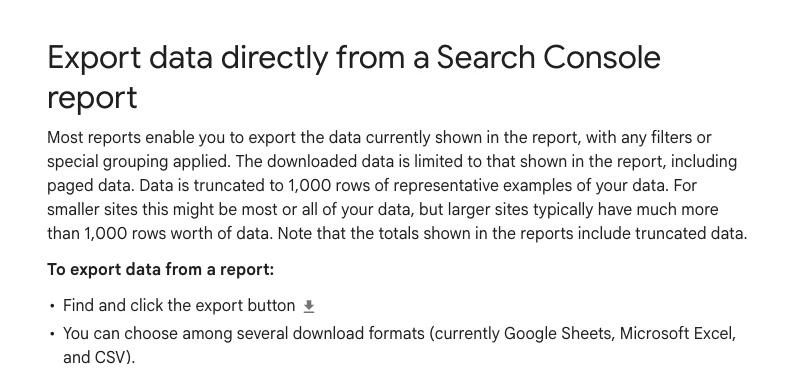
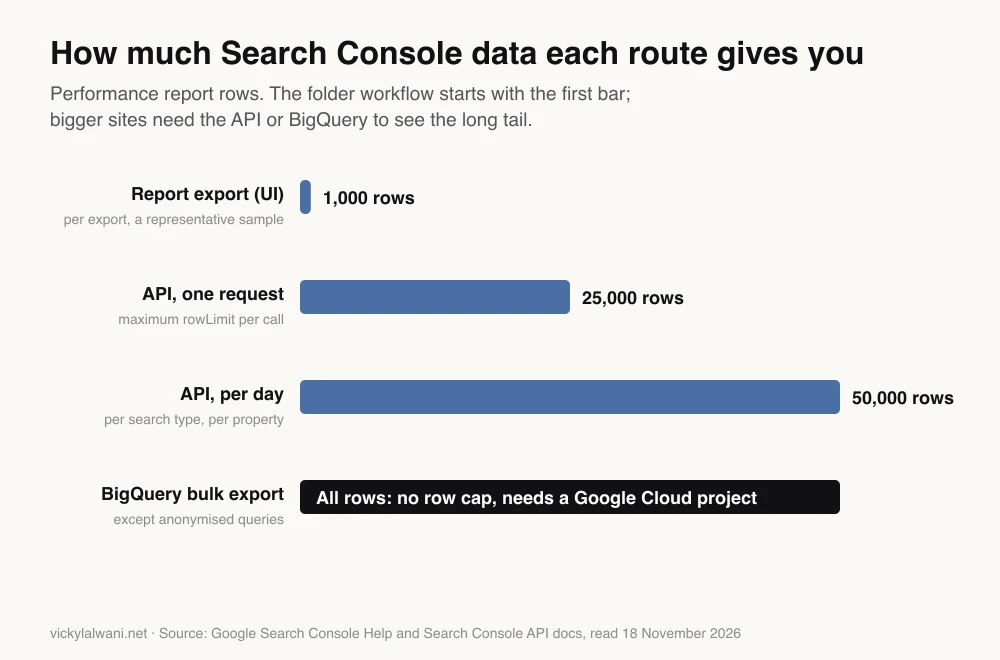
The catch most people miss is the row limit. Google says a report export is "truncated to 1,000 rows of representative examples of your data", which may be all of a small site's data but rarely all of a large one's.
For more, the Search Analytics API returns up to 25,000 rows per request, and Google limits the API to 50,000 rows of Performance data per day, per search type, per property. The bulk export to BigQuery holds all Performance data except anonymised queries, but needs a Google Cloud project.
One more limit shapes what you can ask. The report export gives you queries and pages as separate tables, not which query landed on which page. Questions about two pages competing for one query need query and page pairs, which only the API or BigQuery provide.
How do you write the CLAUDE.md for an SEO folder?
Short answer: keep it short and concrete: what the site sells and to whom, what each file is, the date range of the data, and four or five hard rules, such as "cite the file and row for every number" and "never edit anything in exports". Anthropic suggests keeping each CLAUDE.md under 200 lines, because longer files are followed less reliably.
CLAUDE.md is a plain text file that Claude Code reads at the start of every session. Running /init drafts one for you, but in an SEO folder there is no code to learn from, so you will write most of it yourself.
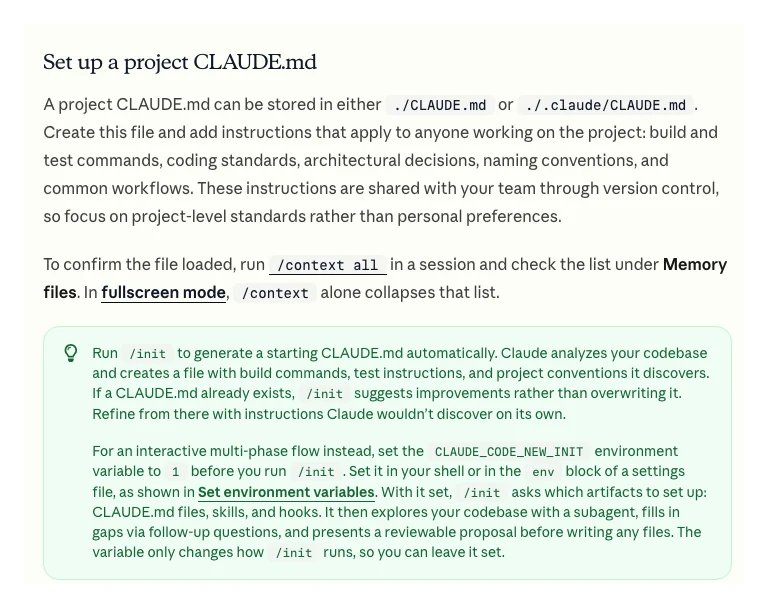
Anthropic's memory docs say instructions work better when they are concrete enough to check, and that Claude treats CLAUDE.md as context, not enforced configuration. So write rules you could test. Here is a starting point to copy and adapt:
# SEO project: example-site.com

## The business
- Sells: [service or product], to [who], in [market].
- Pages that make money: /services/..., /pricing
- Goal this quarter: [for example, more enquiries from organic search]

## The files
- exports/gsc/: Search Console Performance export, web search,
  [start date] to [end date], pulled [date]. Queries.csv and Pages.csv
  are separate tables; there are no query and page pairs.
- exports/keywords/: [tool] export for [market], pulled [date].
- exports/crawl/: Screaming Frog internal export, crawled [date].
- exports/ga4/: landing pages with key events, same date range as GSC.

## Rules
1. Never edit or delete anything in exports/. Write only to outputs/.
2. Every number you report cites the file name and row it came from.
3. If a figure is not in the files, say "not in the data". Do not estimate
   search volumes.
4. Name outputs with today's date, for example outputs/2026-11-18-gaps.csv.
5. Recommend, do not act. Nothing on the live site changes without approval.
If one part of the rules grows into a procedure, such as "how we write a brief", move it into a skill. A skill is a folder with a SKILL.md file whose body only loads when it is used, so long checklists cost almost nothing until you need them, according to Claude Code's skills docs.
Which SEO jobs should Claude Code run across the files?
Short answer: five jobs, in this order: find queries with impressions but no matching page, find pages close to page one, find pages that earn impressions but are blocked or orphaned, weight everything by the pages that bring leads, and only then draft briefs. Each job reads at least two files, which is the point.
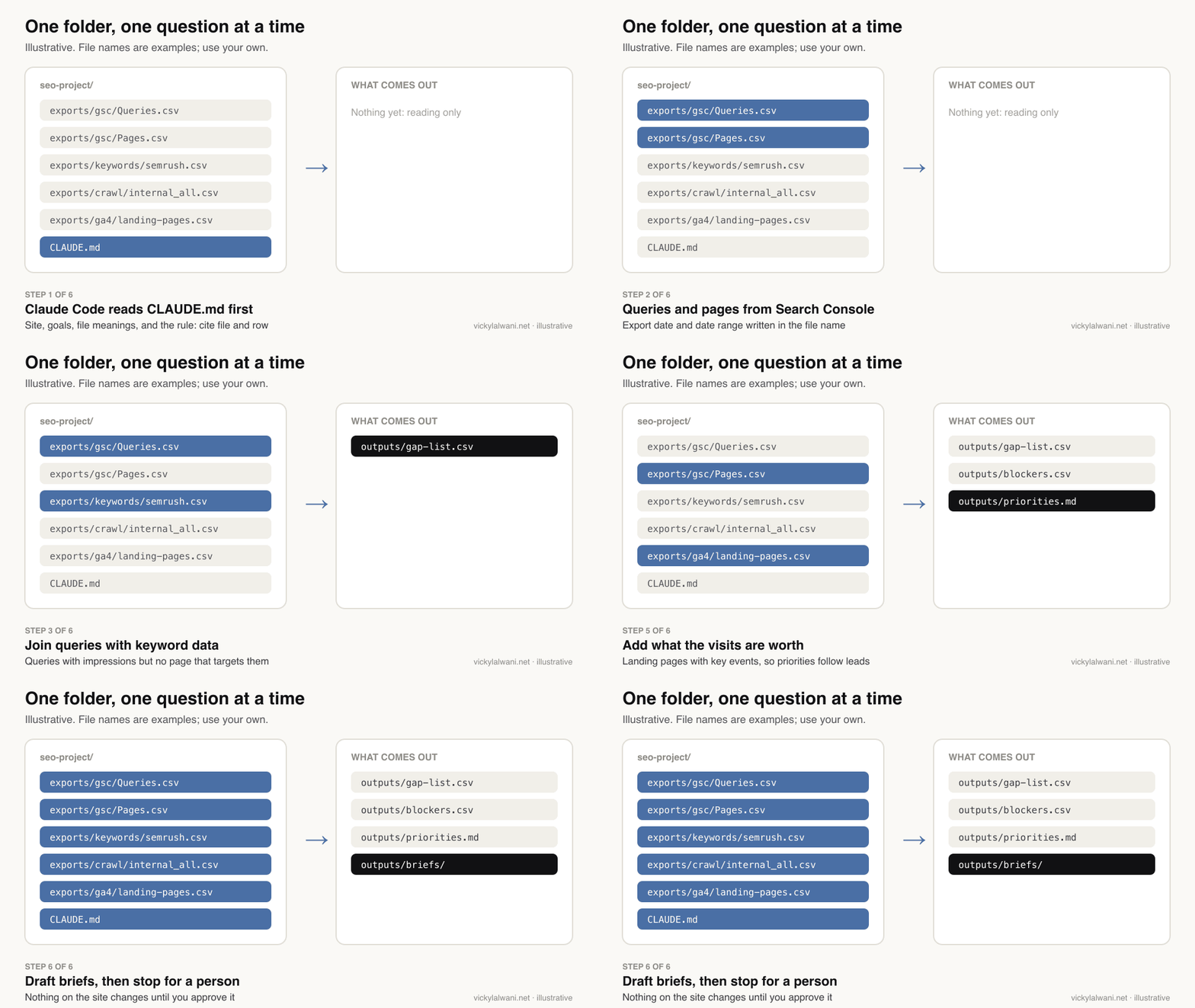
| Job | Files it joins | Output |
|---|---|---|
| Unmatched demand | GSC queries, keyword export, page list | Gap list |
| Near page one | GSC queries and pages | Positions 8 to 20 |
| Hidden blockers | GSC pages, crawl | Blocker list |
| Lead weighting | GSC pages, GA4 key events | Priority order |
| Briefs | Priorities, results page review | One brief per page |
Unmatched demand. Queries that already earn impressions, with no page written for them, are the cheapest wins on most sites. Claude Code can compare the query list with your page titles and headings and flag the ones nothing targets. You check the shortlist; you do not publish the list.
Near page one. Queries sitting at an average position of about 8 to 20 are where a better title, a clearer answer or an internal link can matter. Remember the average position hides a spread, so treat the list as a place to look, not a forecast.
Hidden blockers. A page that earns impressions but returns a redirect, carries a noindex or has no internal links is a technical job, not a content job. This is where the crawl joins in; the crawl itself is covered in the Screaming Frog and Claude Code audit.
Lead weighting. Traffic is not the goal. Joining GA4 landing pages with key events (the actions you count as conversions) moves pages that bring enquiries up the list, which is how SEO work earns its budget.
Briefs. For each priority, ask Claude Code to review what ranks today and draft a brief: the question to answer first, the headings, the internal links, the proof you can add that others lack. Check the results page yourself too; what ranks changes by market and by day.
A prompt for the first job, run from the project folder:
Read CLAUDE.md first. Then:
1. Load exports/gsc/Queries.csv and list queries with at least
   [N] impressions in the period.
2. Compare each query with the titles and H1s in exports/crawl/.
   Mark a query "targeted" only if a page clearly answers it.
3. For untargeted queries, add volume and difficulty from
   exports/keywords/ if the keyword is there; if not, write "not in data".
4. Group the untargeted queries by intent (what the searcher wants).
5. Save to outputs/[today]-gaps.csv with: query, impressions, position,
   source file and row, suggested page type.
Do not estimate any number that is not in the files.
Should you use exports or live MCP connections?
Short answer: start with exports, because they are simple, cheap and easy to audit, then add live connections through MCP (Model Context Protocol, the open standard Claude Code uses to talk to other tools) once you know which questions you ask every week. GA4, Semrush and Ahrefs publish official servers; for Search Console you need a community server or the API.
Exports have one big advantage for trust: the data cannot change under you. If Claude Code says a query had a certain number of impressions, you can open the same file and see the same row. Live connections are faster and avoid stale data, but every answer then depends on what was pulled at that moment.
| Source | Live route in Claude Code | Watch for |
|---|---|---|
| Search Console | Community MCP or API script | No official Google server |
| GA4 | Google's official MCP server | Write tools are opt-in |
| Semrush | Official remote MCP | Uses API units |
| Ahrefs | Official remote MCP | Lite plan up, API units |
| Screaming Frog | MCP from version 24 | Licence needed |
Google's official Google Analytics MCP server asks for the read-only Analytics scope, and its tools that create annotations, custom dimensions or key events only work if you add an --allow-write flag. Leave that flag off for this workflow.
Semrush's MCP docs give the Claude Code command claude mcp add semrush https://mcp.semrush.com/v2/mcp -t http, sign you in with OAuth, and charge requests against your API units; listed plans such as Semrush One Starter and SEO Classic Pro include 50,000 units. Ahrefs documents claude mcp add ahrefs https://api.ahrefs.com/mcp/mcp -t http, then /mcp to sign in; its MCP overview says the server needs a paid plan from Lite up and uses API units.
For Search Console, I found no official MCP server from Google as of 18 November 2026; the community servers are built on the same public API. Which one to trust, and how to set them up, is in MCP servers for SEO. Whichever route you pick, put it in CLAUDE.md, so Claude Code says whether a number came from a file or a live call.
How do you stop Claude Code from guessing?
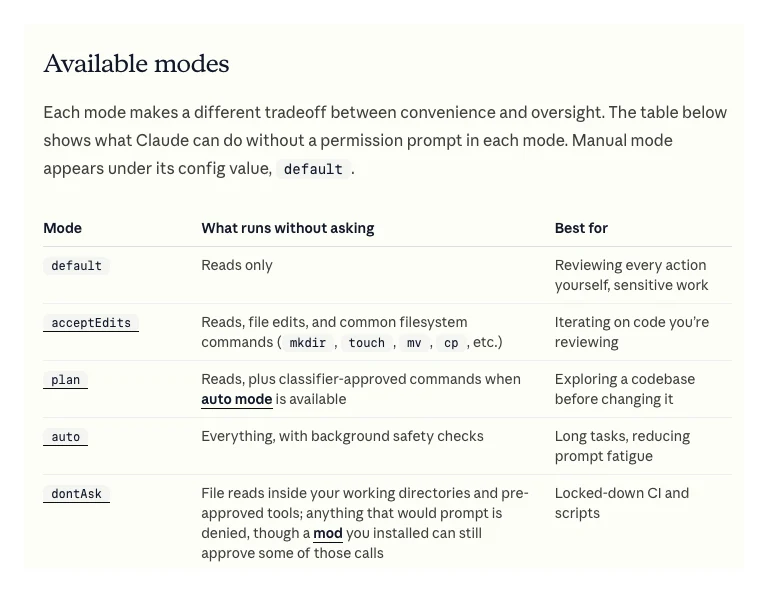
Short answer: make every recommendation traceable to a file and a row, start sessions in plan mode or Manual mode while you are learning, keep exports read-only, and check a sample of findings against the live tools each time you change the workflow. AI without a system is fast guessing; the checks are the system.
One setting matters more than it used to. From Claude Code v2.1.283, auto mode is the built-in starting permission mode for terminal and VS Code sessions. In auto mode a second model reviews actions instead of you. That is fine for code you can roll back, but in a folder of client data I would rather see each step. Press Shift+Tab to switch to plan mode, which explores before changing anything, or set Manual mode, which asks before edits.
The rest of the guardrails are habits, and they are the ones I use on client work: audit first, put the findings in a sheet, check the important ones by hand, and change nothing before the owner approves.
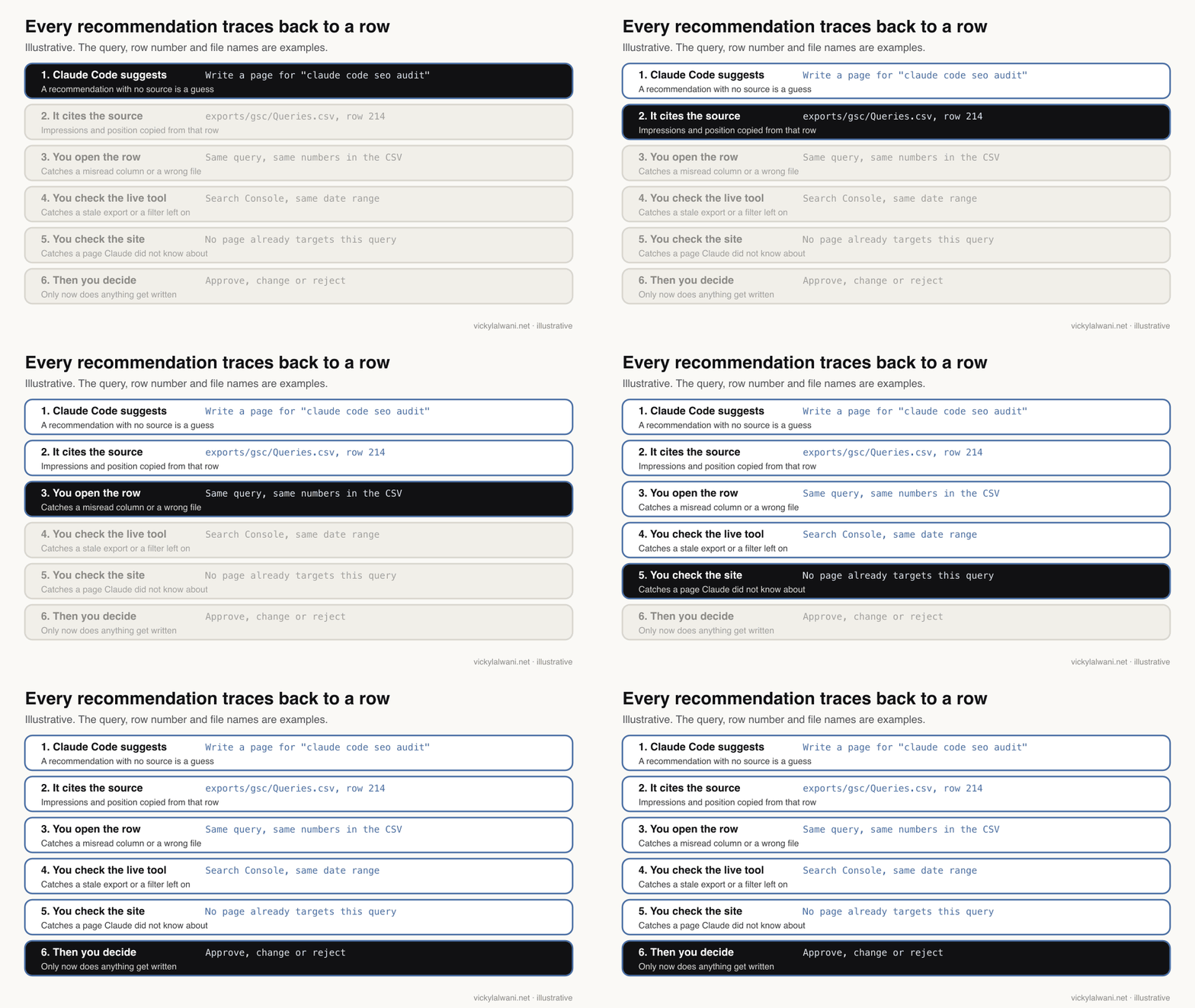
| Risk | Guardrail |
|---|---|
| Invented volumes | "Not in data" rule |
| Stale export | Dates in file names |
| Misread column | Cite file and row |
| Changed exports | Write only to outputs |
| Wrong page edited | Plan mode, approvals |
| Personal data | Strip before export |
Protect data before it lands in the folder. Remove names, emails and phone numbers from any export that has them, and check your client agreements and each tool's terms before you share anything with an AI service.
Can Claude Code write the content too?
Short answer: yes, it can draft from your briefs and real case material, but Google says AI-generated content must be fact-checked by a person before publishing, including titles, meta descriptions, structured data and image alt text. Mass-producing pages without adding value can fall under Google's scaled content abuse policy.
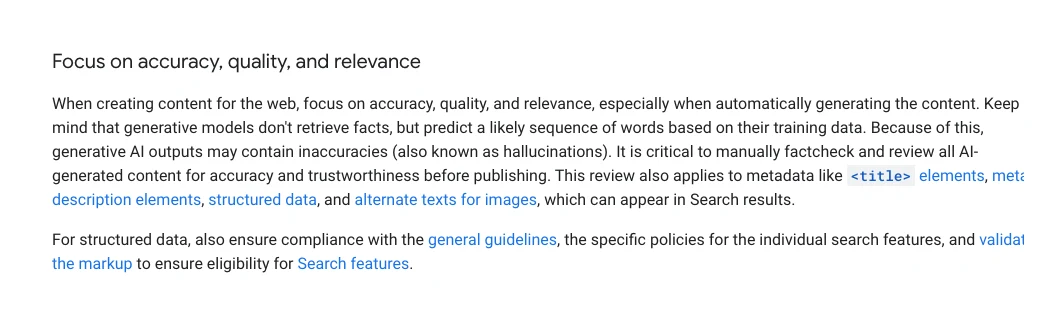
Google's guidance on generative AI content is plain: generative models predict likely words rather than retrieve facts, so outputs can be wrong. Its spam policies list "using generative AI tools or other similar tools to generate many pages without adding value for users" as an example of scaled content abuse.
So the useful split is this. Claude Code does the reading, joining, outlining and a first draft. You add what it cannot: your own examples, your numbers, your judgement on what to leave out. The content has to come from keywords people really search and has to be good enough to rank or be cited; a draft that only restates the top results does neither.
This is the part people skip. When I first posted this workflow, the point I made was that the AI did not create the system. I did. I decided which data feeds which question, which questions come first and what a good answer looks like. The assistant ran it quickly and consistently.
Can you run the workflow on a schedule?
Short answer: yes. Claude Code has a non-interactive mode, claude -p "your prompt", that a script or scheduler can run, with --allowedTools to pre-approve only the tools it needs. Refresh the exports first, keep the run read-only apart from the outputs folder, and read the results before acting.
A weekly run might be a script that downloads fresh Search Console data through the API, then calls Claude Code with the same gap prompt. Anthropic's programmatic usage docs show the pattern:
claude -p "Read CLAUDE.md. Run the gap check on this week's exports
and save outputs/[today]-gaps.csv. Change nothing else." \
  --allowedTools "Read,Write"
If you would rather not touch a terminal for the schedule, Claude's scheduled tasks do a similar job inside the Claude app; the weekly report loop is set out in how to build an AI SEO system. Either way, scheduling saves the pulling and sorting, not the deciding.
How long does it take and what does it cost?
Short answer: the first set-up is mostly thinking time: deciding the folder layout and writing CLAUDE.md. Reruns with fresh exports are quick by comparison. The software cost starts at a Claude Pro plan (USD 20 a month, or USD 17 a month billed yearly), plus whatever your SEO tools already cost.
| Item | Cost | Notes |
|---|---|---|
| Claude Pro | USD 20 a month | USD 17 billed yearly |
| Claude Max | USD 100 a month | 5x Pro usage |
| Search Console | Free | API free, with quotas |
| GA4 MCP | Free | Needs a Cloud project |
| Semrush MCP | API units | Included on some plans |
| Screaming Frog | Paid licence | Free tier: 500 URLs |
Prices are from Claude's pricing page on 18 November 2026, before tax. I would not promise a time saving or a ranking change; both depend on the size of the site and the quality of the data. What the workflow reliably gives you is the same checks, done the same way, every time. For what it costs to have it run for you, see pricing.
The same pattern works beyond SEO: paid search reviews, content planning, reporting. Organise it the way you would organise people: one folder per client, threads named by job, skills kept in one known place, and a planning step before anything executes.
Where is this advice weak?
Short answer: it assumes clean exports, a site small enough for the 1,000-row export to be useful or someone who can pull the API, and a person with enough SEO judgement to reject bad suggestions. Without that last one, the workflow just produces confident lists faster.
- Large sites. A 1,000-row sample can hide the long tail, which is often where the gaps are. Plan for the API or BigQuery early.
- Average position. It blends devices, countries and days; a query "at position 12" may be on page one for some searches and page three for others.
- Keyword volumes. Third-party volumes are estimates, and tools disagree. Treat them as relative, not exact.
- Claude Code changes often. Defaults such as the starting permission mode have changed during 2026. Check the docs when you update.
- No live results page. Claude Code reads what you give it. Unless you connect a search tool, its view of what ranks is only as fresh as your exports.
Videos worth watching
Short answer: start with Anthropic's own talk on how its marketing team moved into Claude Code, then a vendor walkthrough that connects Claude Code to Search Console, GA4 and Semrush data.
Made by Claude (Anthropic's official channel), 26 January 2026. It does not sell a product beyond Claude itself. A growth marketer on going from no terminal use to Claude Code workflows.
Made by Semrush, 9 April 2026. It links to Semrush trials, so expect a pitch. Useful to see Claude Code joining Search Console, GA4 and Semrush data.
| Video | Channel | Date | What it covers |
|---|---|---|---|
| How Anthropic uses Claude in Marketing | Claude (official) | 26 Jan 2026 | Marketing team on Claude Code |
| Google Search Gen AI Reports, Search Profiles & more (Q2 '26) | Google Search Central | 18 Jun 2026 | New Search Console reports |
| I Turned Claude Code Into My Personal SEO Analyst | Semrush (vendor) | 9 Apr 2026 | GSC, GA4, Semrush in one session |
| I Built an Agentic SEO System with Claude Code | An AI automation channel | 23 Feb 2026 | Multi-agent set-up, sells templates |
| How to Run Screaming Frog Crawls Inside Claude | An ecommerce SEO consultant | 19 May 2026 | Crawls through the v24 MCP |
| Claude Code + Screaming Frog internal links | An SEO site owner | 10 Jul 2026 | Dry run before link fixes |
What people say on X and Reddit
Short answer: the people getting real value connect Claude Code to their own Search Console data and package the checks as skills; the vendor posts promise to replace paid SEO tools, which the evidence does not support. On Reddit the recurring problems are memory between sessions and generic strategy output, both of which a written CLAUDE.md and real data address.
| Who | What they said | Take it as | Link |
|---|---|---|---|
| A developer of SEO tools on X | Built a Claude Code plugin on the Search Console API for CTR gaps, cannibalisation and near-page-one queries (11 Feb 2026) | First-hand | X post |
| A software developer on X | Claude Code suggested moving their Search Console monitoring onto the API (4 May 2026) | First-hand | X post |
| A marketing skills author on X | Shared a free Claude Code skill for a full SEO audit (10 Apr 2026) | First-hand | X post |
| An Ahrefs executive on X | Their content lead runs Claude Code on 23 skill files plus the Ahrefs MCP (13 May 2026) | Vendor | X post |
| An AI automation creator on X | Pitched a Claude Code SEO agent as a replacement for a paid SEO tool (12 Apr 2026) | Vendor | X post |
| r/TechSEO | Querying Search Console through MCP in Claude means fewer exports, with CTR next to position (28 Sep 2026) | First-hand, poster built the server | Thread |
| r/SEO | Claude audits Search Console and analytics well but forgets earlier work between sessions (26 Jul 2026) | Question | Thread |
| r/SEO | What people actually use Claude for in SEO, and what they would not trust it with (13 Jun 2026) | Question | Thread |
| r/bigseo | Claude called most crawl warnings on a JavaScript site false positives; was it right? (6 Jun 2026) | Question | Thread |
| r/SEO | Bottlenecks with Claude skills for SEO: generic strategy, alerts not tied to goals (28 Oct 2026) | Question | Thread |
The r/bigseo thread is the useful warning. Claude may be right that a JavaScript site's crawl warnings are false positives, or it may be talking itself out of a real problem. The fix is the same as everywhere else in this workflow: check one example by hand before you accept the pattern.
Want a second pair of eyes on your SEO data?
Short answer: if you want the folder, the CLAUDE.md and the first round of findings done for you, with every recommendation checked against the live tools before you see it, that is what my SEO consultant work covers.
Some teams only want the set-up and a few hours of training so they can run it themselves; that sits under Claude consulting. Either way, rates are on the pricing page, and folder templates are in the free guides.
Sources
| Source | What it supports | Date | Link |
|---|---|---|---|
| Claude Code docs: overview | Surfaces, shared CLAUDE.md and MCP | Read 18 Nov 2026 | Link |
| Claude Code docs: memory | CLAUDE.md, /init, under 200 lines | Read 18 Nov 2026 | Link |
| Claude Code docs: skills | SKILL.md loads when used | Read 18 Nov 2026 | Link |
| Claude Code docs: permission modes | Auto mode default from v2.1.283, plan mode | Read 18 Nov 2026 | Link |
| Claude Code docs: MCP | claude mcp add, scopes | Read 18 Nov 2026 | Link |
| Claude Code docs: programmatic usage | claude -p, --allowedTools | Read 18 Nov 2026 | Link |
| Claude pricing | Pro, Max prices; Claude Code on Pro | Read 18 Nov 2026 | Link |
| Search Console Help: report export | 1,000-row truncation | Read 18 Nov 2026 | Link |
| Search Console Help: API export | 50,000 rows per day per type | Read 18 Nov 2026 | Link |
| Search Analytics API reference | rowLimit up to 25,000 | Updated 16 Nov 2026 | Link |
| Search Console Help: BigQuery export | All data except anonymised queries | Read 18 Nov 2026 | Link |
| Google Analytics MCP (GitHub) | Read-only scope, opt-in write tools | Read 18 Nov 2026 | Link |
| Semrush MCP docs | Command, OAuth, API units, plans | Read 18 Nov 2026 | Link |
| Ahrefs MCP docs | Claude Code command | Read 18 Nov 2026 | Link |
| Google: generative AI content | Fact-check, metadata included | Read 18 Nov 2026 | Link |
| Google: spam policies | Scaled content abuse | Read 18 Nov 2026 | Link |
| X, Reddit and YouTube | Practitioner views and videos | Jan to Nov 2026 | Linked in the tables above |
This article expands on my post on LinkedIn ↗.
FAQ
What is a Claude Code SEO workflow?
It is a set of SEO questions that Claude Code answers by reading the exports in one project folder: Search Console, a keyword tool, a crawl and GA4. Because Claude Code can open and join every file, it finds gaps that sit between tools, such as queries with impressions and no page that targets them.
Do I need to code to use Claude Code for SEO?
No. You describe the job in plain English and Claude Code reads the files, and writes small scripts only when a join is too large to do by reading. Ask it to explain any script before it runs, and keep the exports folder read-only.
Which Claude plan includes Claude Code?
Claude Code is included from the Pro plan, which costs USD 20 a month or USD 17 a month billed yearly, according to Anthropic's pricing page in November 2026. The Free plan does not include it; Max and Ultra plans add more usage.
Why use a folder of exports instead of connecting each tool?
Exports are simple, cheap and easy to audit, because the data cannot change under you and every number can be checked against a row. You can start without any API set-up and add live MCP connections later, once you know which questions you ask every week.
How many rows can I export from Search Console?
A report export from the Search Console interface is truncated to 1,000 rows of representative data. The Search Console API returns up to 25,000 rows per request and 50,000 rows per day per search type per property, and the BigQuery bulk export holds all rows except anonymised queries.
Is there an official Search Console MCP server for Claude Code?
Not from Google as of 18 November 2026. Community MCP servers built on the public Search Console API exist, and Google does publish an official MCP server for Google Analytics, which asks for read-only access by default.
Can Claude Code write the SEO content too?
It can draft from your briefs and real case material, but Google says AI-generated content must be fact-checked before publishing, including titles, meta descriptions, structured data and alt text. Generating many pages without adding value can count as scaled content abuse under Google's spam policies.
How do I stop Claude Code from guessing SEO numbers?
Write a rule in CLAUDE.md that every number cites its file and row and that missing figures are reported as "not in the data". Then check a sample of findings against the live tools, and work in plan mode or Manual mode so nothing changes without your approval.