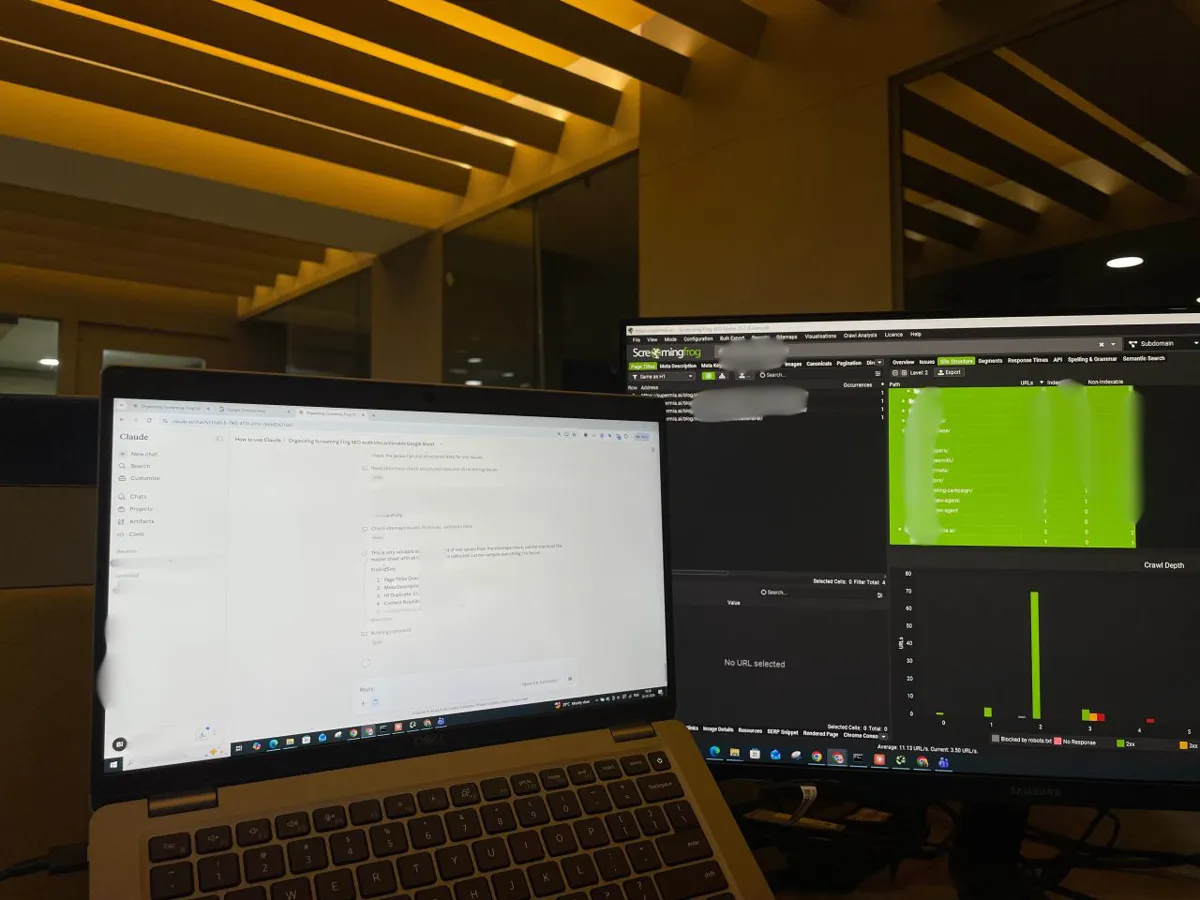
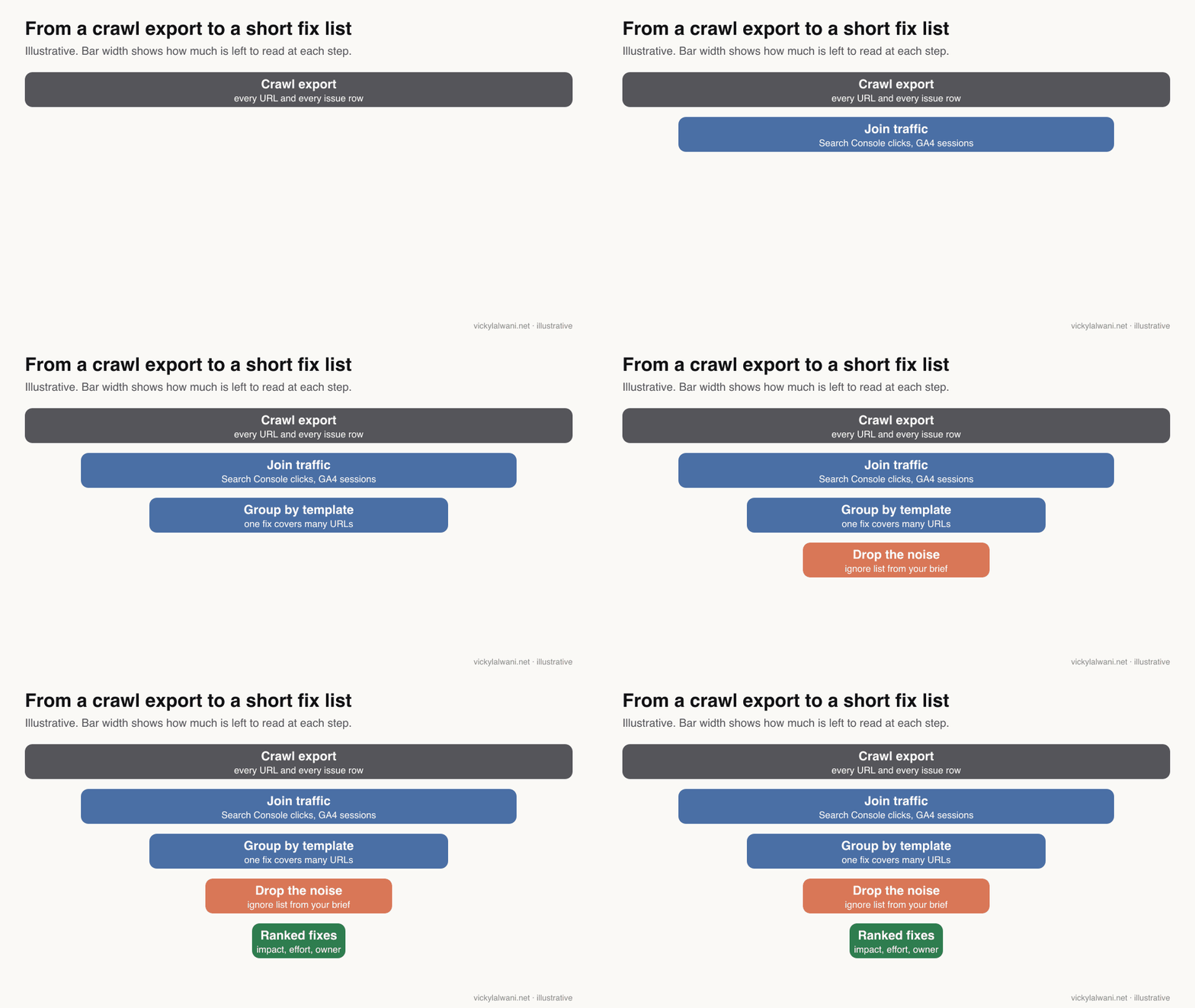
A Screaming Frog Claude audit crawls the site with Screaming Frog, joins Search Console and GA4 data to every URL, and has Claude (in chat or in Claude Code) group issues by template, rank them by traffic at risk and effort, and say what to ignore. The result is a fix list in a tracker, not a raw list of thousands of issues. A paid licence is needed beyond 500 URLs, and a person approves any change to redirects, canonicals, noindex or robots.txt.
The crawl finishes and Screaming Frog shows thousands of issue rows: missing alt text, long titles, redirect chains, a few hundred pages with no meta description. Somewhere in that list are the five problems that actually cost you traffic, and you cannot see them for the noise. A crawler finds everything. It does not tell you what matters.
This guide is the audit workflow: how to crawl, what to export, how to have Claude (in chat or in Claude Code) rank the fixes, what never to let it decide, and how to turn the result into a tracker. If you want Claude to drive the crawler itself, that is a different set-up, covered in the companion guide on the Screaming Frog Claude MCP connection. If you would rather have the audit done for you, see my SEO consultant service.
TL;DR
The workflow: crawl with the right settings, join Search Console and analytics data, export a fixed set of reports, and have Claude group issues by template, rank them by impact and effort, and say what to ignore.
What you need: a paid Screaming Frog licence for anything over 500 URLs (GBP 199 a year for one user), and Claude with code execution, or Claude Code working on a folder of exports.
New in 2026: Screaming Frog 24 added an official MCP server and automatic crawl comparison (19 May), and version 25 made issue type and priority configurable per crawl (3 November).
The rule: Claude drafts; a person approves anything touching redirects, canonicals, noindex or robots.txt.
Jump to: Licence · Exports · Claude Code · Prioritising · Guardrails · X and Reddit · Sources
What is a Screaming Frog Claude audit?
Short answer: It is a technical SEO audit where Screaming Frog crawls the site and Claude turns the crawl exports into a ranked plan: which issues to fix first, which to ignore, and who owns each fix. Screaming Frog supplies the facts; Claude does the grouping, joining and first-draft judgement; a person signs off.
There are three ways to put the two tools together. This guide covers the first two. The third has its own guide.
| Route | How data moves | Best for |
|---|---|---|
| Claude chat | Upload CSV exports | One-off audits, small sites |
| Claude Code | Reads an export folder | Large exports, repeat audits |
| SEO Spider MCP | Claude runs the crawler | Live, conversational work |
Claude Code is Anthropic's agent that works in a folder on your computer: it can read files, write scripts and run them. That matters here because a large crawl export is too big to paste into a chat. Claude Code can join and filter it with a script and only read the summary. In Claude chat, uploaded CSVs need code execution switched on for the same reason.
Do you need the paid version of Screaming Frog?
Short answer: For any real audit, yes. The free SEO Spider stops at 500 URLs and cannot save crawls, render JavaScript, compare crawls, connect Search Console or analytics, run AI prompts, schedule, use the command line or act as an MCP server. A licence is GBP 199 a year for one user.
Screaming Frog's pricing page lists the split. The free version keeps the core checks (broken links, titles, directives, hreflang, duplicates, XML sitemaps). Almost everything an AI-assisted audit relies on sits in the paid column.
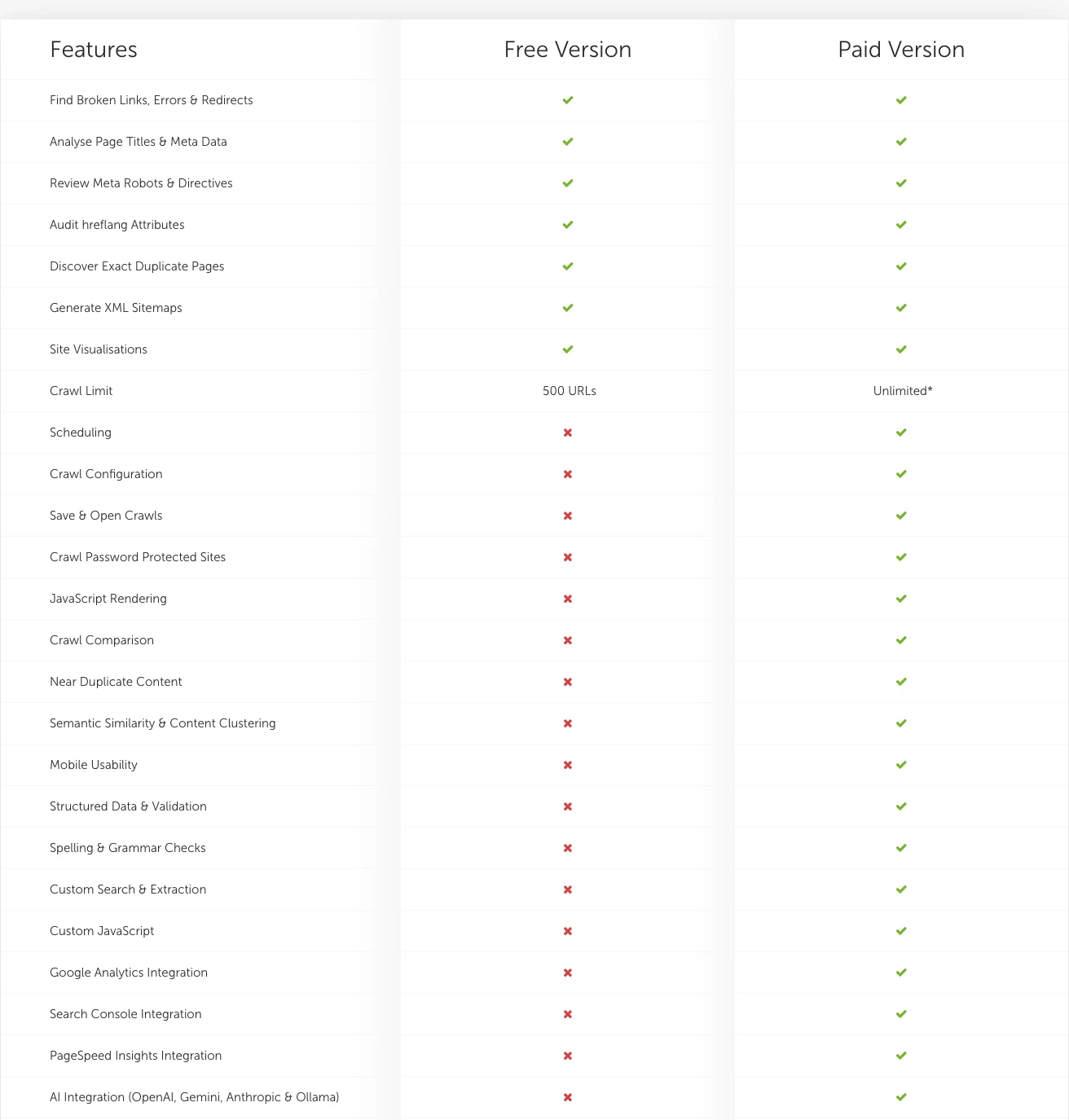
| Feature | Free | Why the audit needs it |
|---|---|---|
| Crawl limit | 500 URLs | Most sites are bigger |
| Search Console, GA4 | No | Rank fixes by traffic |
| JavaScript rendering | No | Modern sites hide links |
| Crawl comparison | No | See what changed |
| Command line, scheduling | No | Repeatable exports |
| AI prompts, MCP | No | Claude inside the crawl |
How do you set up the crawl so the analysis is right?
Short answer: Match the crawl to the site: render JavaScript if links or content load with scripts, connect Search Console and analytics before you crawl, segment by template, and confirm the crawl actually completed. An incomplete crawl produces a confident, wrong analysis.
Claude can only reason about what the crawl saw. Before exporting, check the settings in the configuration guide that change what gets seen.
| Setting | Default | What to choose |
|---|---|---|
| Rendering | Text only | JavaScript if the site needs it |
| API access | Off | Search Console and GA4 on |
| Segments | None | One per template or section |
| Robots.txt | Respect | Respect, unless auditing staging |
| Crawl speed | Fixed | Auto throttle (v25) on fragile hosts |
Connecting Search Console and GA4 through API access puts clicks, impressions and sessions next to every URL. That one step changes the audit from a list of issues to a list of issues ranked by what they cost. A reply in an r/SEO thread on interpreting Screaming Frog data makes the same point. Segments, shown in Screaming Frog's official segments guide, let Claude report by template instead of by URL.
Then check completeness. Firewalls, bot protection and login walls stop crawls quietly. In an r/SEO thread about a site that would not crawl, the top reply points past robots.txt to server or CDN blocking. A useful rule: if the crawl found far fewer pages than the XML sitemap lists, stop and find out why before any analysis.
Which exports should you give Claude?
Short answer: A fixed set: the Internal tab with traffic columns, response codes, the issues overview, redirect chains, canonicals, directives, and inlinks for key pages. The same set every time, so audits can be compared.
| Export | What Claude uses it for |
|---|---|
| Internal: All (with GSC, GA4) | The master URL list with traffic |
| Issues overview | Screaming Frog's own issue list and priority |
| Response codes: 3xx, 4xx, 5xx | Broken and redirected URLs |
| Redirect chains report | Chains and loops to collapse |
| Canonicals and directives | Indexability conflicts |
| All inlinks (key pages) | Internal links to priority pages |
With a licence, the command line makes this repeatable. Screaming Frog's user guide gives the pattern: crawl headless, save the crawl, and export named tabs and reports to a folder. A sketch (Windows naming; macOS and Linux use their own launcher):
ScreamingFrogSEOSpiderCli.exe --crawl https://www.example.com --headless
  --config "C:\audits\example.seospiderconfig" --save-crawl
  --output-folder "C:\audits\example\2026-11" --timestamped-output
  --export-tabs "Internal:All,Response Codes:Client Error (4xx)"
  --save-report "Redirects:All Redirects"
Check the exact tab and report names against your version's help output before relying on a script; names change between releases.
How do you run the audit in Claude Code?
Short answer: Put the exports and a short site brief in one folder, ask Claude Code to join and filter the files with a script rather than reading every row, and have it write two outputs: a ranked fix list as a CSV and a one-page summary of decisions a person needs to make.
The brief is short: what the site sells, which templates earn money, which sections are low value, the CMS, and who fixes what (developer, content, SEO). Save it as a file in the folder so every run starts from the same context.
Folder: ./audit-2026-11  (Screaming Frog exports + site-brief.md)
1. Read site-brief.md. Do not open the large CSVs directly: write a script to load them.
2. Join every issue to the Internal export by URL, keeping clicks, impressions,
   sessions, segment, indexability and crawl depth.
3. Group issues by segment/template, not by URL. One fix that covers 400 URLs is one row.
4. Score each group: impact (traffic on affected URLs, indexability, revenue templates
   from the brief) and effort (template fix vs page-by-page).
5. Write fixes.csv: issue, URL group, count, clicks at risk, fix, owner, effort, priority.
6. Write summary.md: the top 10 fixes, what to IGNORE and why, and any decision about
   redirects, canonicals, noindex or robots.txt that needs a human. Do not change the site.
My own technical audits end in the same two things: a shared sheet with the fix list, screenshots and developer steps, and a one-page summary of the decisions the client needs to make. The sheet becomes the single tracker the developer works from. For a deeper Claude Code set-up for SEO work, see the one-folder Claude Code SEO workflow.
How should Claude prioritise technical SEO issues?
Short answer: Indexability problems on pages that earn money come first, then problems that affect a whole template, then internal links to priority pages, then everything else. Ask Claude to say what to ignore as clearly as what to fix.
| Priority | Typical issues | Why |
|---|---|---|
| 1. Indexability | Noindex, blocked, wrong canonical | Page cannot rank at all |
| 2. Template-wide | Titles, headings, schema per template | One fix, many URLs |
| 3. Links | Orphans, deep pages, chains | Crawl and authority flow |
| 4. Page-level | Single 404s, thin pages | Small, case by case |
| Ignore or park | Cosmetic warnings on low-value URLs | Noise |
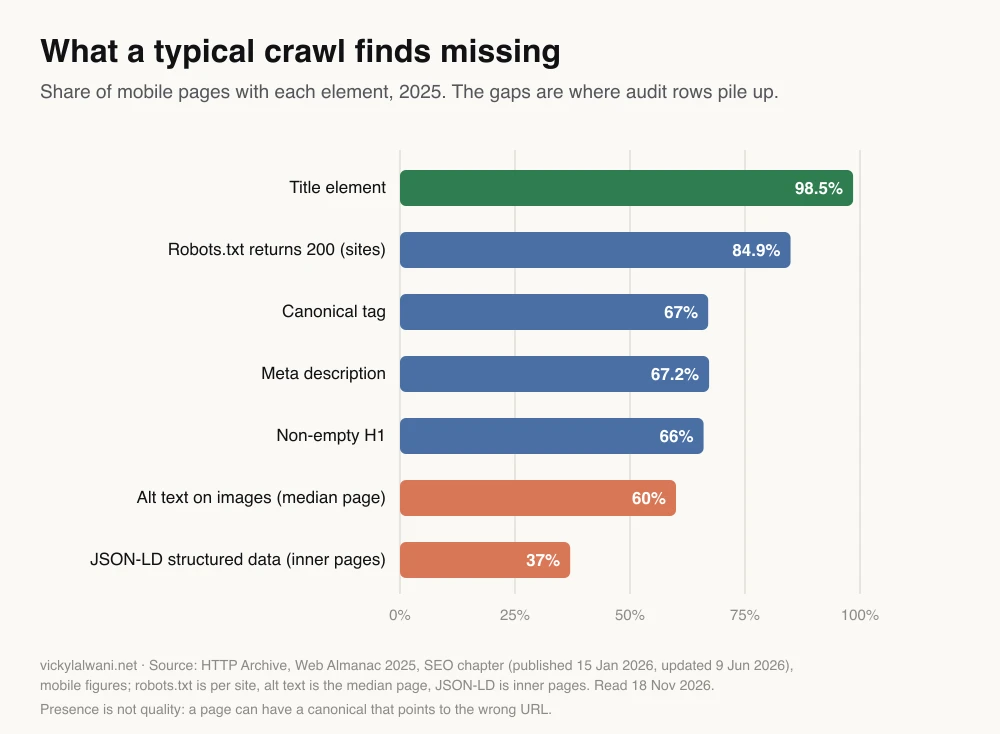
Context helps calibrate what counts as normal. The Web Almanac 2025 SEO chapter from HTTP Archive measured millions of pages: almost every page has a title, but only about two thirds have a canonical tag, a meta description or a non-empty H1, and JSON-LD structured data appears on about a third of inner pages. So a crawl that flags missing meta descriptions is describing the web, not a crisis. Whether it matters depends on which pages.
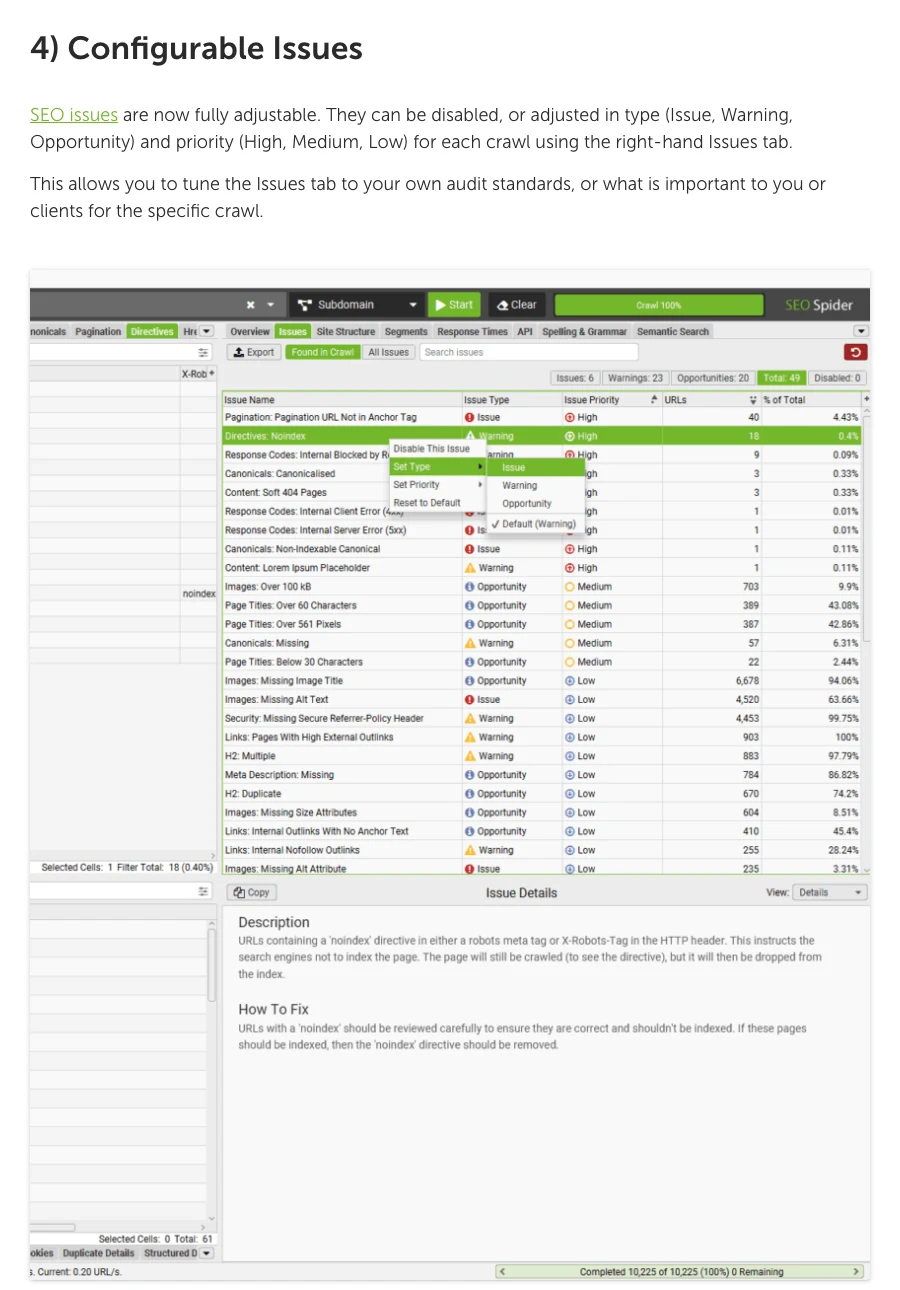
Screaming Frog now lets you set this before export. Since version 25, each issue's type (issue, warning, opportunity) and priority (high, medium, low) can be changed or switched off per crawl, so the export already reflects your standards. Screaming Frog's issues library explains each one and how to fix it, which is a better source for Claude than its training data.
What should you never let Claude decide alone?
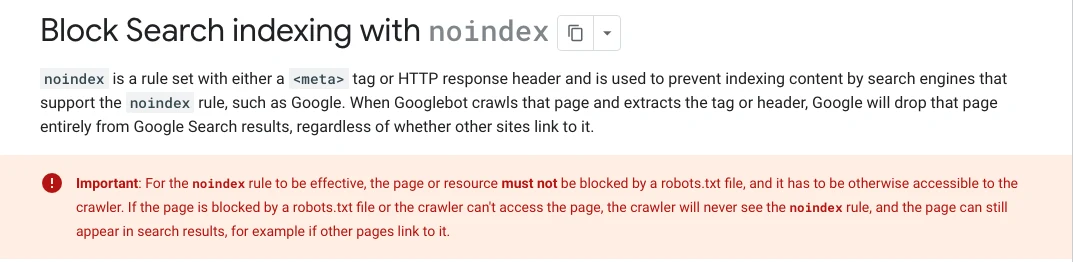
Short answer: Redirects, canonical tags, noindex and robots.txt rules. Each can remove pages from search, and AI suggestions in this area can contradict each other, such as blocking a page in robots.txt while also adding noindex, which stops Google ever seeing the noindex.
Google's own documentation is explicit on that last example: a noindex rule only works if the page is not blocked by robots.txt. A model that recommends both has not understood how the two interact. The same care applies to canonical tags, which are strong hints rather than orders, and to redirects, where a wrong rule sends real users and links to the wrong place.
- Ask for the URLs behind every claim. If Claude says a template has duplicate titles, it should list sample URLs you can open.
- Check after launches. Pre-launch blocks (noindex, nosnippet, password walls) often survive go-live. After a launch I re-crawl the live site before trusting any earlier audit.
- Keep the prompt and brief the same each quarter so results stay comparable.
How do you turn the audit into a tracker?
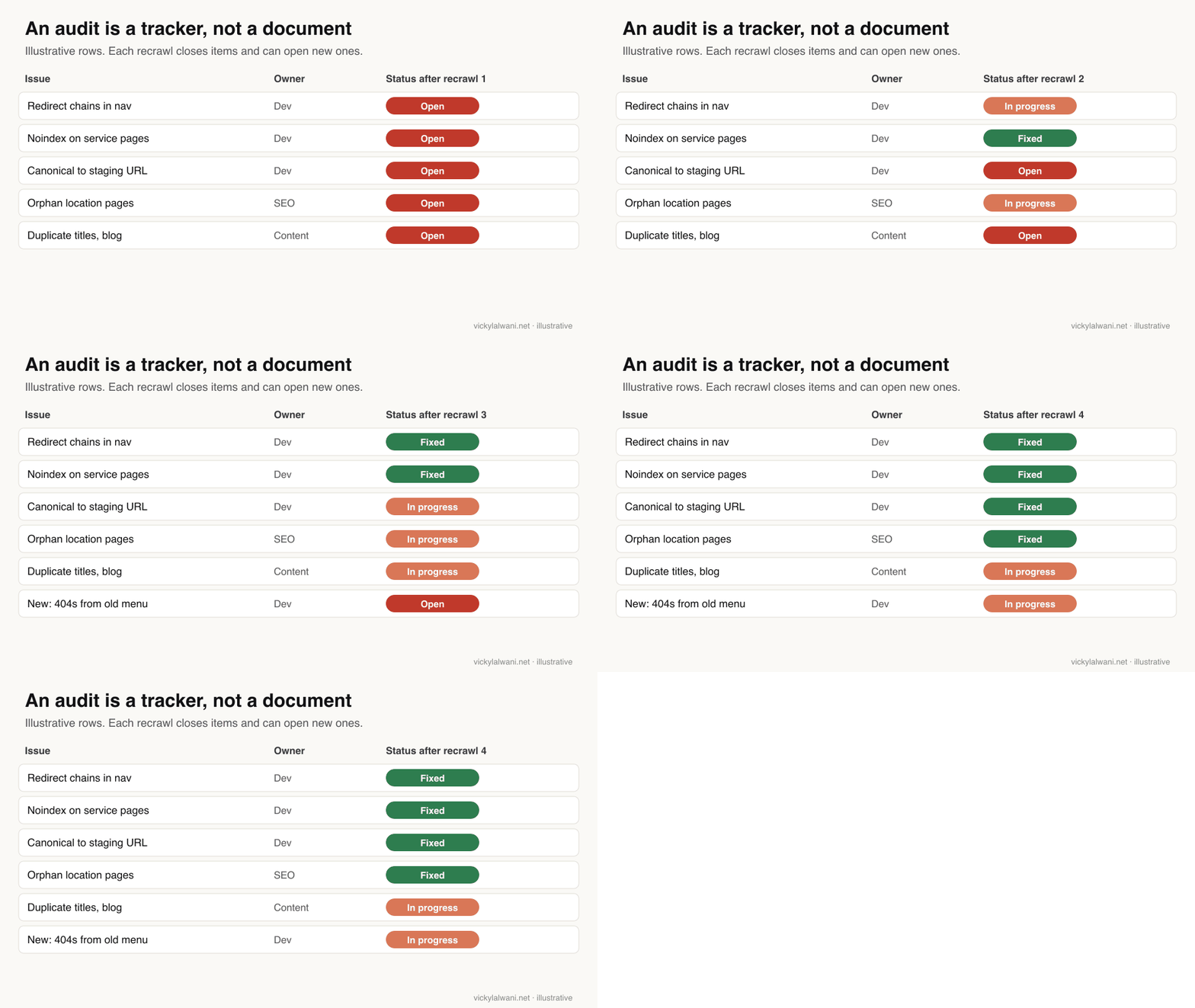
Short answer: Move every fix into a sheet with issue, URL group, fix, owner, due date and status, then recrawl on a schedule and compare. Each recrawl should close rows and may open new ones; if the same issue keeps returning, the cause is a template or deployment process, not a one-off.
An audit that sits in a document does nothing. Screaming Frog's paid crawl comparison shows what changed between two crawls, and since version 24 scheduled and command-line crawls can compare the last two crawls automatically and email the changes. Give Claude the comparison and the tracker, and ask which rows can close and what is new.
Think of the workflow as five levels. Each adds something the one before lacked.
| Level | What it looks like | What is missing |
|---|---|---|
| 1 | Crawl, export, read by hand | Time and consistency |
| 2 | Crawl plus a general chatbot | Specifics, real data |
| 3 | Crawl plus Claude with the exports | Traffic context |
| 4 | Licensed crawl with GSC, GA4 and a brief | Follow-through |
| 5 | Level 4 plus a tracker and scheduled recrawls | Nothing structural |
To automate levels 4 and 5 (Claude starting crawls, reading results and drafting the Monday plan), see the Screaming Frog Claude MCP guide and technical SEO audit automation.
What people say on X and Reddit
Short answer: SEOs welcome AI for the repetitive work of pulling, exporting and combining crawl data, and stay sceptical of it making the judgement calls. Some argue an agent can replace the crawler entirely; most still treat the crawler as the source of facts.
An SEO consultant on X called the version 24 release genuinely useful because it cuts repetitive manual work: pulling, exporting, segmenting and combining crawl data. That is the same split this guide uses. On the other side, a marketer on X built their own crawler with Claude as a cheaper alternative, and an r/SEO thread about a new free crawler drew replies saying an agent writing its own scripts can check anything. The counter-argument in that thread is maintenance: a dedicated tool is kept current by a team.
| Source | Date | What it says | Type |
|---|---|---|---|
| Screaming Frog on X | 23 Jun 2025 | Tutorial: crawl with AI prompts | Official |
| Screaming Frog on X | 3 Nov 2026 | v25: JSON config, configurable issues | Official |
| An SEO consultant on X | 19 May 2026 | MCP cuts manual export work | Opinion |
| A marketer on X | 25 Jun 2026 | Built a crawler with Claude | First-hand |
| r/SEO | 28 Sep 2026 | Join GSC and GA4 to rank issues | First-hand |
| r/SEO | 17 Mar 2026 | Blocked crawl: check CDN and login | First-hand |
| r/SEO | 18 Oct 2026 | Agents versus a dedicated crawler | Opinion |
| r/TechSEO | 1 Aug 2026 | APIs and local queries over MCP | First-hand |
Which videos are worth watching?
Short answer: Screaming Frog's own short guides are the best start, because they show the settings the audit depends on. Add one practitioner audit walkthrough to see how someone works through the issues tab.
Screaming Frog, 28 Feb 2025: the official overview of the SEO Spider, the free 500 URL limit and what the licence adds. Made by the vendor.
An SEO and Google Ads training channel, 15 Sep 2025: working through the issues tab by priority, on the free version. Promotes the creator's own GPT and training.
| Video | Channel | Date | What it covers |
|---|---|---|---|
| Screaming Frog SEO Spider | Screaming Frog | 28 Feb 2025 | What the tool does |
| How to segment a crawl | Screaming Frog | 30 Jan 2024 | Report by template |
| Crawl analysis guide | Screaming Frog | 9 Jan 2020 | Post-crawl filters |
| How to crawl JavaScript websites | Screaming Frog | 28 Feb 2020 | Rendering settings |
| SEO audit with Screaming Frog | A training channel | 15 Sep 2025 | Issues tab, fixes |
Where is this advice weak?
Short answer: Claude's judgement is only as good as the crawl and the brief; the Web Almanac figures describe the web, not your site; and nothing here predicts rankings. Treat the output as a well-organised first draft.
- No ranking promises. A clean crawl removes obstacles. Rankings still depend on content, links and competition.
- Crawls miss things. A crawler sees what it can reach. Log files and Search Console show what Google actually crawls.
- Benchmarks are averages. The Web Almanac measures presence, not correctness or impact.
- Privacy. Exports can include URLs with personal data in query strings. Check your Claude data settings (Anthropic's consumer terms) and strip what you do not need.
- Versions move. Screaming Frog ships several releases a year; check feature names against the current release.
Want this built into your SEO process?
My SEO consultant service includes technical audits, the tracker behind them and the recrawl routine. If your team wants the Claude side set up (folders, skills, connectors), see Claude consulting. Rates are on the pricing page, and starter templates are in the free guides. More SEO connectors are compared in MCP servers for SEO.
Sources
| Source | What it supports | Date | Link |
|---|---|---|---|
| Screaming Frog | Free vs paid, 500 URLs, GBP 199 | Read 18 Nov 2026 | Pricing |
| Screaming Frog | Versions and dates | 4 Nov 2026 | Release history |
| Screaming Frog | v24: MCP, auto compare, email | 19 May 2026 | SEO Spider 24 |
| Screaming Frog | v25: configurable issues, throttle | 3 Nov 2026 | SEO Spider 25 |
| Screaming Frog | CLI, scheduling, headless | Read 18 Nov 2026 | User guide |
| Screaming Frog | Rendering, API access, segments | Read 18 Nov 2026 | Configuration |
| Screaming Frog | Issue definitions and fixes | Read 18 Nov 2026 | Issues library |
| Screaming Frog | AI prompts during crawls | 24 Feb 2026 | AI prompts |
| HTTP Archive | Element presence, 2025 | 9 Jun 2026 | Web Almanac SEO |
| Google Search Central | Noindex and robots.txt | Read 18 Nov 2026 | Noindex |
| Google Search Central | Canonicals | Read 18 Nov 2026 | Canonicals |
| Google Search Central | Redirects | Read 18 Nov 2026 | Redirects |
| Anthropic | Claude Code | Read 18 Nov 2026 | Claude Code docs |
| Claude Help Center | Code execution for files | Read 17 Nov 2026 | Files |
| X, Reddit, YouTube | Practitioner views | 2020 to 2026 | Linked above |
This article expands on my post on LinkedIn ↗.
FAQ
How do I use Screaming Frog with Claude Code?
Export a fixed set of reports from Screaming Frog into a folder with a short site brief, then ask Claude Code to load the CSVs with a script, join them by URL, group issues by template and write a ranked fix list. Claude Code works on the files locally, so large exports do not need to fit in a chat.
Do I need the paid version of Screaming Frog for an AI audit?
For most sites, yes. The free SEO Spider crawls up to 500 URLs and has no Search Console or analytics integration, JavaScript rendering, crawl comparison, command line, AI prompts or MCP server. A licence costs GBP 199 a year for one user.
Which Screaming Frog exports should I give Claude?
Give it the Internal tab with Search Console and GA4 columns, the issues overview, response codes, the redirect chains report, canonicals and directives, and inlinks for key pages. Use the same set every time so audits can be compared over time.
Can Claude fix technical SEO issues for me?
Claude can prioritise issues, explain them and draft fixes, and in Claude Code it can edit a codebase. A person should approve anything involving redirects, canonical tags, noindex or robots.txt, because a wrong rule can remove pages from search.
What is the difference between a Screaming Frog Claude audit and the Screaming Frog MCP?
In an audit workflow you crawl and export, then give the files to Claude. With the Screaming Frog MCP server, added in SEO Spider 24 in May 2026, Claude Desktop can start crawls, read results and run exports itself. The MCP needs a paid licence and the desktop app on the same machine.
How do I prioritise technical SEO issues from a crawl?
Fix indexability problems on pages that earn money first, then issues that affect a whole template, then internal links to priority pages, then single-page issues. Join Search Console clicks to each URL so the ranking reflects traffic at risk, and decide what to ignore.
How often should I run a technical SEO audit?
Run a full audit before big site changes and after any launch, and a lighter recrawl monthly or quarterly compared against the previous crawl. Screaming Frog can schedule crawls and, since version 24, compare the last two automatically and email the changes.
Why does Screaming Frog find fewer pages than my sitemap?
Usually because something stopped the crawl: a firewall or CDN blocking the crawler, a login wall, robots.txt rules, or links that only appear after JavaScript runs. Check those before analysing anything, because an incomplete crawl gives a confident but wrong audit.