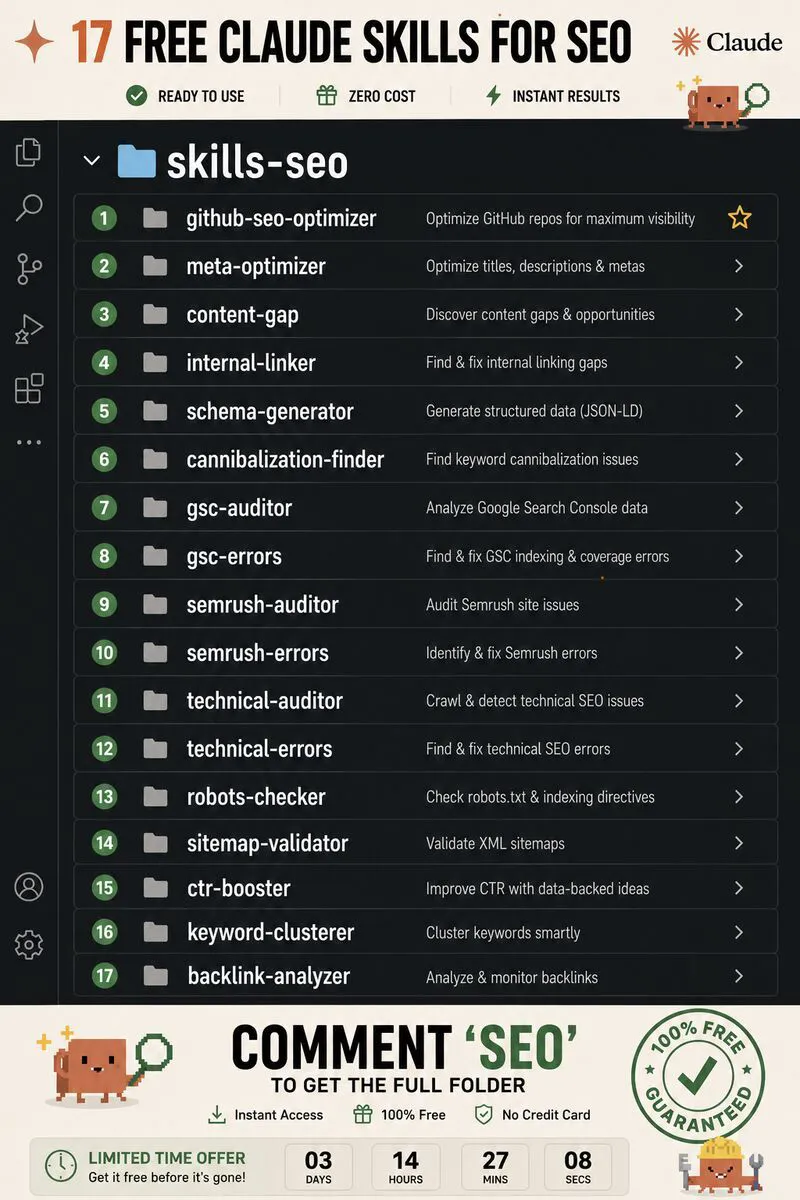
Claude skills for SEO are folders with a SKILL.md file that teach Claude one SEO job, such as rewriting titles or finding pages stuck on page 2. In November 2026 you install them from Customize > Skills or a .claude/skills folder, feed them Search Console data through an export, a third-party connector or the API, and run five of them across the week.
TL;DR
A Claude skill is a folder with a SKILL.md file that teaches Claude one job, such as rewriting titles or finding pages stuck on page 2. Claude only reads the full instructions when your request matches the skill, so you can keep a whole SEO library installed without crowding the chat.
In November 2026 you install skills in the Claude app from Customize > Skills (one ZIP per skill), or put them in a .claude/skills/ folder for Claude Code. Uploading them to a Project's knowledge only gives Claude documents to read.
There is no official Google Search Console connector in Claude. Your skills get Search Console data from an export, a third-party connector or the Search Console API. Run five skills across the week, keep the other twelve on demand, and have a person check every change before it goes live.
Short answer: to use Claude skills for SEO, install each skill (a folder with a SKILL.md file) in Claude, give it real Search Console data, then ask for the job by skill name with the exact page and keyword. Five skills run on a weekly schedule cover most routine site health work. The rest wait until you need them.
This page is the November 2026 update of my setup notes for the 17 Claude skills for SEO guide. Two things changed since the first version: where skills are installed, and how Search Console data reaches them. Both are fixed below. If you would rather have the routine built around your own site, that is part of my work as an SEO consultant.
This article is about using skills for SEO work. If you want a list of public skill repositories to install from GitHub, I have kept that in the 30 GitHub repos I would use to run a business with AI, so it is not repeated here.
What are Claude skills, and how are they different from a prompt?
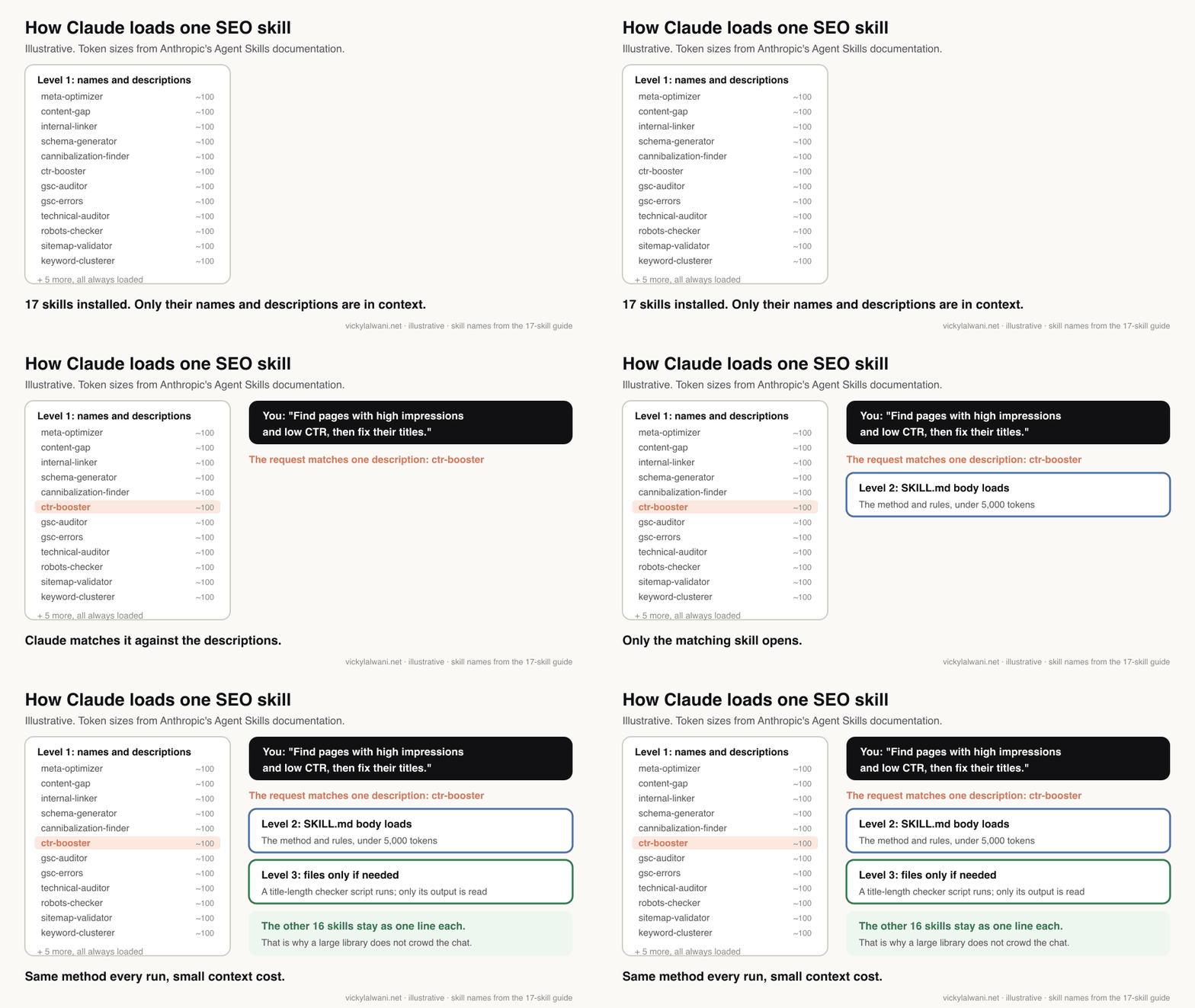
Short answer: a skill is a saved method that Claude loads only when it is relevant. A prompt is text you retype every time. Anthropic's documentation says each installed skill costs about 100 tokens until it is used, and the full instructions load only when your request matches.
You have probably written the same request a dozen times: "rewrite this title, keep it short, include the keyword, give me three options". A skill stores that method once. Anthropic's Agent Skills overview describes three layers that load at different times, which it calls progressive disclosure.
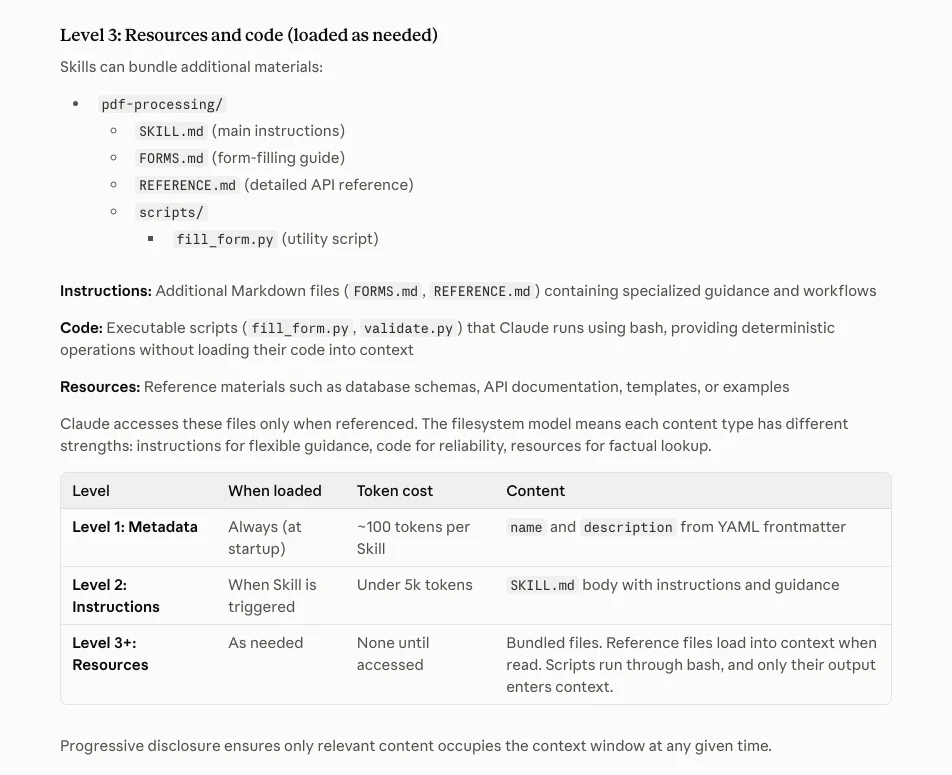
In plain terms, a token is a small chunk of text, roughly three quarters of a word, and the context window is how much text Claude can hold in mind at once. Because only the name and description of each skill sit in that window by default, seventeen SEO skills use about 1,700 tokens before any of them runs.
| Option | Where it lives | When Claude reads it | Best for |
|---|---|---|---|
| Prompt | Your message | Every time you paste it | One-off questions |
| Project instructions | One Claude Project | Every chat in that Project | Site context, brand rules |
| Project knowledge | Files in a Project | When Claude searches them | Reference documents |
| Skill | Customize > Skills, or .claude/skills/ | Only when the request matches | Repeatable SEO methods |
The practical gain is the same as before: the same input gets the same method, whoever on the team runs it. What is new is that the method no longer competes for space with your data.
Where do Claude skills work in November 2026?
Short answer: in the Claude apps on every plan from Free to Enterprise (with code execution switched on), in Claude Code, and through the Claude API. Skills do not sync between these, so a skill uploaded in the app is not automatically available in Claude Code or the API.
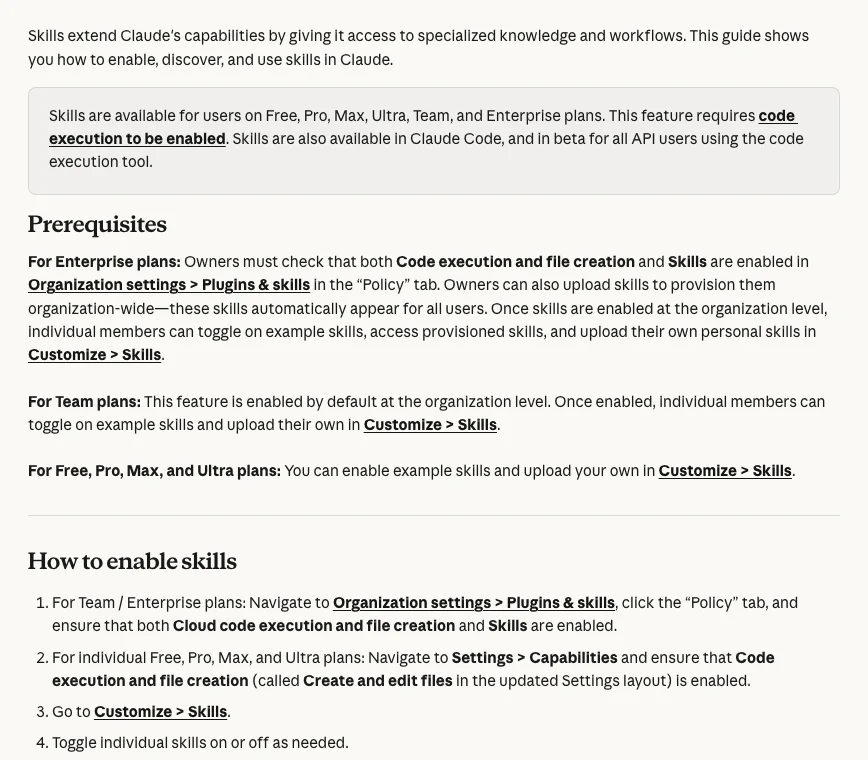
Anthropic's help article Using Skills in Claude lists Free, Pro, Max, Ultra, Team and Enterprise, and says the feature needs code execution enabled. The developer documentation is narrower for custom uploads in the app (Pro and above), so if you are on Free and cannot see an upload button, that is why.
| Surface | How you add a skill | Who can use it |
|---|---|---|
| Claude app (web, desktop) | Upload a ZIP in Customize > Skills | You; Team and Enterprise can share or publish |
| Claude Code | Folder in ~/.claude/skills/ or .claude/skills/ | You, or anyone with the project folder |
| Claude API | Upload through the Skills API | Everyone in the workspace |
The format is no longer Claude-only. Anthropic published Agent Skills as an open standard in December 2025 and, on 22 October 2026, donated it to the Agentic AI Foundation under the Linux Foundation. Anthropic says more than 70 agent platforms have added support, so a well-written SEO skill is portable work, not a lock-in.
How do you set up Claude skills for SEO?
Short answer: switch on code execution, upload each skill folder as a ZIP in Customize > Skills (or copy it into .claude/skills/ for Claude Code), then put your site's context in a Project. It takes about ten minutes. Project knowledge is for documents, not for installing skills.
The guide's original setup page told you to upload the skills folder into a Project's knowledge. That worked as a way of giving Claude instructions to read, but it is not how skills are installed now, and it loses the on-demand loading described above. Use these steps instead.
- Switch on code execution. On Free, Pro, Max and Ultra plans, go to Settings > Capabilities and turn on "Code execution and file creation" (shown as "Create and edit files" in the newer layout). On Team and Enterprise, an owner enables it in Organization settings > Plugins & skills.
- Upload one ZIP per skill. Go to Customize > Skills, choose "+", then "Upload a skill". Each ZIP holds one skill folder with its SKILL.md inside. Anthropic's help article says uploads fail when the folder name does not match the skill name, so do not rename folders.
- Toggle what you need. In the same Skills list, switch off skills you will not use for a while. Fewer active skills means fewer wrong matches.
- Give the work a home. Create one Claude Project per site with the domain, target markets, main services and your house rules in its instructions. The skills bring the method; the Project brings the context.
- Name the skill and the target. Ask for the job by skill name, with the URL or data, the keyword and the outcome you want.
For Claude Code, the Claude Code skills documentation says to place each skill folder in ~/.claude/skills/ for yourself or .claude/skills/ inside a project, and you can call one directly with /skill-name. If your website lives in a code repository, the project folder is the better home: the skills travel with the site and everyone who clones it gets the same set.
This is the request shape that works for every skill in the guide:
Use the [skill-name] skill on [page URL / site / Search Console export].
Context:
- Target keyword: [keyword, if relevant]
- Market: [country or global]
- What I want to improve: [clicks / rankings / indexing]
Give me the output, then the actions ranked by likely impact.
Do not change anything live. Flag anything you are unsure about.
On client work I keep one Claude project per client and the skills in a known place, so nobody has to guess which method produced which output. Naming the skill on every run matters more than it sounds; I explain why in the GitHub repos article, where a copy skill built for offers ended up writing website pages.
How do you get Search Console data into a Claude skill?
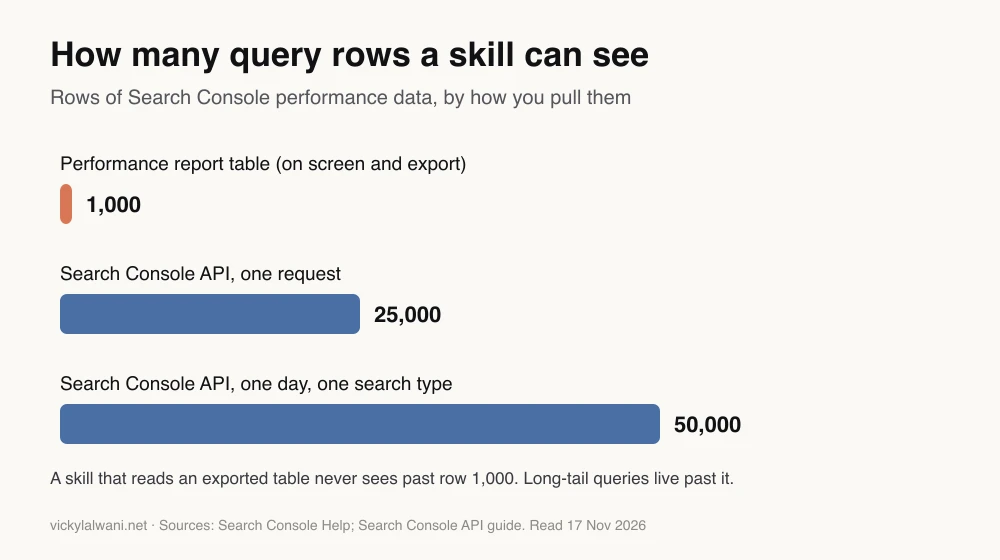
Short answer: Claude has no official Google Search Console connector in November 2026. Use a Search Console export for small sites, a third-party connector from Claude's directory, or the Search Console API through Claude Code. The API can return up to 50,000 rows a day per search type; the on-screen report shows 1,000.
Several of the guide's skills (gsc-auditor, gsc-errors, ctr-booster, keyword-clusterer) need real performance data. The original article said to add Google Search Console through Claude's connectors. Neither Google nor Anthropic publishes such a connector: the Claude connector directory lists Search Console only inside third-party products.
| Route | Rows you get | Effort | Watch out for |
|---|---|---|---|
| Export from the Performance report | Up to 1,000 per table | Low | Long-tail queries cut off |
| Third-party directory connector | Depends on the vendor | Low | Another company sees your data |
| Community MCP server you run | API limits | Medium | Unreviewed code with your login |
| Claude Code plus the API | Up to 50,000 a day per type | Medium | Google Cloud setup and quotas |
The row limits matter more than people expect. Google's help page on the Performance report says tables show a maximum of 1,000 rows, while the Search Console API guide allows 25,000 rows per request and 50,000 rows per day per search type. A content-gap or clustering skill run on an export simply never sees the long tail.
For Semrush and Ahrefs data the picture is simpler: both companies list their own connectors in Claude's directory (Semrush, Ahrefs), so the guide's semrush-auditor and semrush-errors skills can read live audit data once you connect. For a fuller comparison of SEO data servers, see MCP servers for SEO.
Whichever route you pick, use the account that actually has access to the property. If a skill comes back empty, the connector is usually signed in with a Google account that cannot see the site.
Which five Claude skills should you run every week?
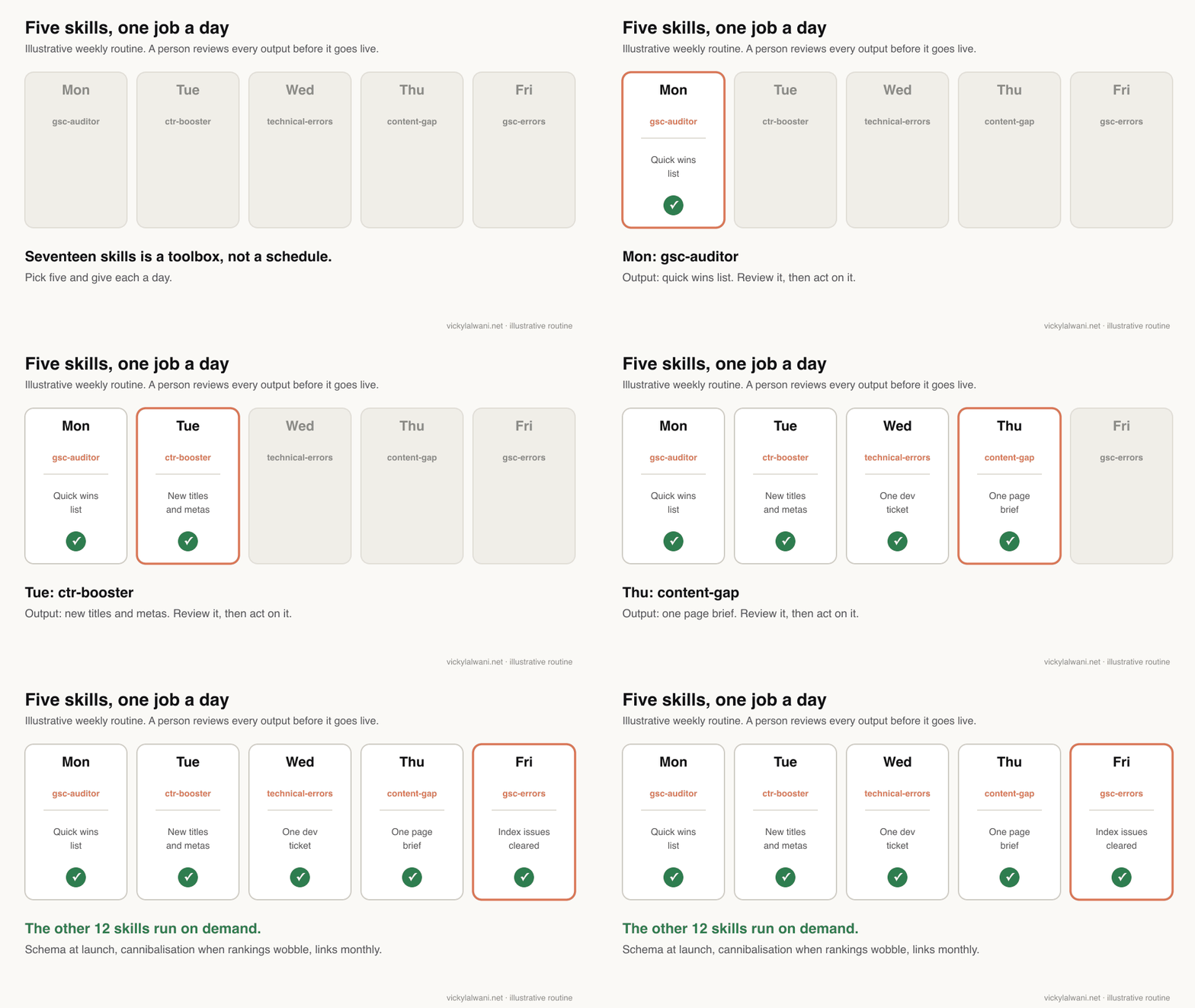
Short answer: gsc-auditor on Monday, ctr-booster on Tuesday, technical-errors on Wednesday, content-gap on Thursday and gsc-errors on Friday. One job a day keeps the routine to roughly 30 minutes a week on a small site, plus the time to act on what it finds.
| Day | Skill | Output | Who acts |
|---|---|---|---|
| Monday | gsc-auditor | Top quick wins, 28 days | You set the week's focus |
| Tuesday | ctr-booster | New titles and metas | You approve, then publish |
| Wednesday | technical-errors | One batched dev ticket | Developer |
| Thursday | content-gap | Brief for one page 2 page | Writer |
| Friday | gsc-errors | Indexing issues by type | You or developer |
Thursday is the step I would protect. One focused update a week to a page that already ranks on page 2 is a habit you can keep, and it puts effort where the opportunity is clearest. It does not guarantee a ranking change.
Copy-paste versions of the two requests people ask me about most:
Use the gsc-auditor skill on the attached Search Console data (last 28 days, web).
List the 10 best quick wins: pages in positions 5 to 20 with rising impressions.
For each: URL, main query, position, impressions, clicks, and one action.
Rank by effort against likely impact. Do not invent numbers that are not in the data.
Use the content-gap skill on [URL] for the keyword [keyword] in [market].
Compare it with these ranking pages: [URL 1], [URL 2], [URL 3].
List the questions and sub-topics they answer that my page does not.
Give me a brief with H2s, not a rewritten article.
Which SEO skills should you run only when needed?
Short answer: the other twelve. Schema at launch, cannibalisation checks when rankings move strangely, backlinks monthly, robots and sitemap checks after a migration or template change. Running them weekly mostly produces noise.
| Skill | Run it when | Check before acting |
|---|---|---|
| schema-generator | A new page type launches | Rich Results Test passes |
| cannibalization-finder | Two URLs swap rankings | Search Console query data |
| internal-linker | After publishing new pages | Anchor text reads naturally |
| robots-checker | After a release or migration | Live robots.txt, not cached |
| sitemap-validator | After URL changes | Sitemaps report in Search Console |
| keyword-clusterer | Quarterly planning | Clusters map to real pages |
| backlink-analyzer | Monthly | Google's disavow conditions |
| meta-optimizer | A page is rewritten | Snippet in a SERP preview |
The remaining four (semrush-auditor, semrush-errors, technical-auditor and github-seo-optimizer) follow the same rule: run them against a specific question, not on a timer.
How do you write your own SEO skill?
Short answer: make a folder with a SKILL.md file that starts with a name and a description, then write the method below it. The name can be up to 64 characters of lowercase letters, numbers and hyphens, and must not contain "claude" or "anthropic". The description is what Claude matches your request against.
The guide's skills are a starting point, but the most useful skill is usually the one that encodes your own house rules: your title format, your markets, the words your customers actually type. Here is a minimal example you can adapt.
---
name: title-meta-rewriter
description: Rewrites page titles and meta descriptions for search. Use when the user asks for new titles, metas, snippets or CTR fixes for a URL or a Search Console export.
---
# Title and meta rewriter

## Inputs
- URL or page text, target keyword, market (country or global)

## Method
1. Read the page. Note the main promise in one sentence.
2. Write 3 title options: keyword near the start, brand at the end, about 50 to 60 characters.
3. Write 3 meta descriptions of about 120 to 155 characters that answer the query.
4. Flag any option that repeats another page's title on the same site.

## Rules
- Use the market's spelling and currency.
- Never promise rankings or results.
- Output a table: option, title, characters, meta, characters.
| Field or file | Rule | Source |
|---|---|---|
| name | 64 characters, lowercase, numbers, hyphens | Anthropic docs |
| name | No "claude" or "anthropic" | Anthropic docs |
| description | Up to 1,024 characters; what and when | Anthropic docs |
| description | Written in the third person | Best practices |
| SKILL.md body | Under 500 lines; split the rest | Best practices |
The reserved-word rule catches people out: a skill named "claude-seo-audit" fails validation. Anthropic's skill authoring best practices also suggest names that describe the activity, such as "auditing-titles", and keeping long reference material in separate files the skill points to.
How do you fix weak or wrong output from an SEO skill?
Short answer: most weak output comes from loose input, not a bad skill. Give exact URLs, the keyword, the competitors and the market; check that the right skill actually ran; and check every recommendation against Google's own documentation before acting on it.
| Symptom | Likely cause | Fix |
|---|---|---|
| "Add more content" | No keyword or competitors given | Name both, with URLs |
| Wrong skill ran | Vague descriptions overlap | Name the skill; sharpen descriptions |
| Empty Search Console results | Wrong Google account | Reconnect with property access |
| Schema fails the test | Missing required property | Paste the error back in |
| Audit of random pages | Crawl left open | Give a URL list of 10 to 20 |
| Long disavow list | Skill flags every weak link | Apply Google's two conditions |
Title and meta lengths
Google's title link documentation says there is no limit on how long a title element can be; titles are cut to fit the device width. The same is true of meta descriptions. So "under 60 and 155 characters" is a house rule that keeps snippets readable, not a Google requirement. State it in your request or your skill, and do not let a skill tell you a long title is an error.

Toxic link flags
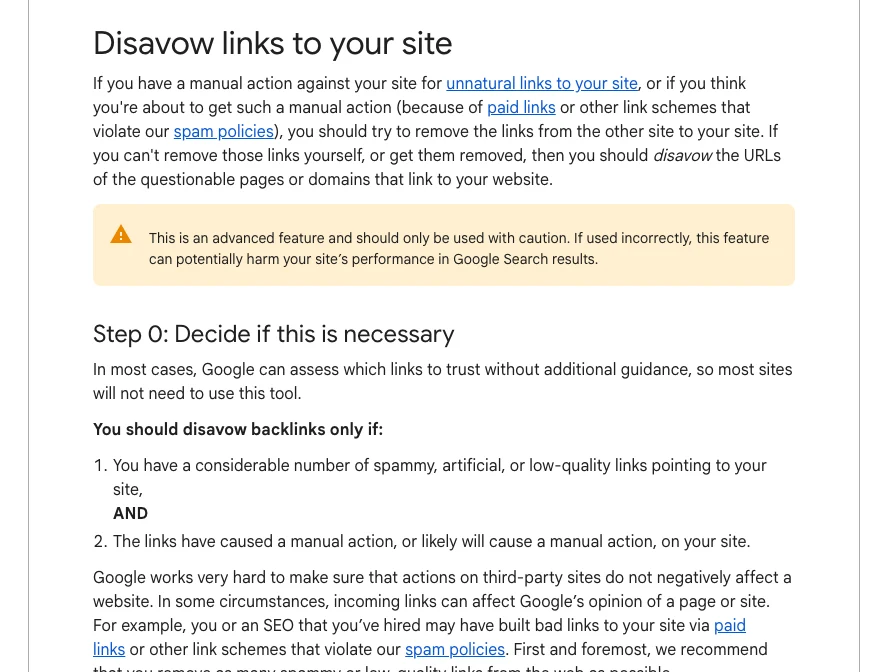
A backlink skill will happily label hundreds of links as toxic. Google's disavow help page says to disavow only if you have a considerable number of spammy, artificial or low-quality links and they have caused, or likely will cause, a manual action. It also warns that the tool can harm your site's performance if used incorrectly.
So build that rule into the skill: ask why each link was flagged, rank by confidence, and treat the list as a review queue, never as a file to upload.
Big sites
Do not let a crawl wander. Pull your priority pages from the Monday audit, work in batches of 10 to 20 URLs, and expand once that set is clean. If the site has thousands of URLs, the API route above is worth the setup.
Are third-party SEO skills safe to install?
Short answer: treat them like installing software. Anthropic's documentation says to use skills only from trusted sources, because a skill can tell Claude to run code or call tools in ways its description does not mention. Read every file before you install one.
Free SEO skill packs are everywhere on X and GitHub in 2026, some with tens of thousands of stars. Popularity is not a security review. Anthropic's overview lists the risks plainly: data exposure, tool misuse and skills that fetch outside content that may carry hidden instructions.
| Check | What to look for |
|---|---|
| SKILL.md | Instructions match the stated job |
| Scripts folder | Network calls, file deletes, uploads |
| External URLs | Content fetched at run time |
| Permissions | Write access it does not need |
| First run | Dry run on a test page |
When I install a skill from a link I saw in a post, I ask for a dry run first and nothing goes live without approval. For which public repos are worth a look at all, see the GitHub repos article; for automating a full technical audit, see technical SEO audit automation.
How do you turn Claude skills into a team system?
Short answer: start with one skill at a fixed time, add one a week, and share through the plan's own tools: on Team and Enterprise you can share a skill (view-only) or publish it to the organisation, and in Claude Code the skills folder travels with the project.
The most common failure is drift: someone runs everything in week one, then goes back to old habits. So begin with gsc-auditor at one fixed time on Monday morning, run only that for two weeks, then add the next.
| Days | Do | Track |
|---|---|---|
| 1 to 30 | Data connected, Monday audit, one new skill a week | Clicks on top 10 pages |
| 31 to 60 | All five on schedule, on-demand skills as needed | Fixes shipped per week |
| 61 to 90 | Share or publish skills, write a one-page SOP | Same output across people |
According to Anthropic's help article, shared skills are view-only, and publishing to the organisation library can require an admin's approval. For a personal account there is no organisation sharing, so the practical option is a shared Claude Code project folder.
You still need someone setting priorities and checking the work. Skills make repeatable tasks consistent; they do not decide what the site should focus on next quarter. For how the pieces fit together beyond skills, see how to build an AI SEO system.
What people say on X and Reddit
Short answer: practitioners like skills for repeatable audits and briefs, share large free SEO skill packs, and warn that output still needs checking. Many of the loudest posts promote the poster's own pack, so read them as vendor claims.
| Who | What they said | Take it as | Link |
|---|---|---|---|
| Claude (official) | Skills and connectors now work in Claude in Chrome; Max and Team first (12 Aug 2026) | Official | X post |
| A marketing skills author | Built a Claude Code skill that runs a full SEO audit: titles, metas, Core Web Vitals, canonicals, sitemaps (10 Apr 2026) | Vendor | X post |
| A French developer | Shares a one-line install of a large community SEO skill for Claude Code (18 Feb 2026) | Opinion | X post |
| A founder who runs several sites | Open-sourced the 12 SKILL.md workflows used across their own sites (11 Nov 2026) | Vendor, first-hand | X post |
| An SEO creator | Step by step: a .claude/skills folder, a SKILL.md, then frontmatter (18 Mar 2026) | Opinion, sells training | X post |
| r/SEO | SEO plugins are fine for grunt work; without real Search Console or crawl data the advice is weak; stars measure hype (10 Nov 2026) | Mixed | Thread |
| r/SEO | Public writing skills needed 60% or more of their tone rewritten; build your own, or split one job into several skills (26 Aug 2026) | First-hand | Thread |
| r/SEO | Most SEOs use AI to speed up existing tasks, not to replace the process (28 Oct 2026) | Opinion | Thread |
| r/SEO | Claude copy fails on specifics, not style; feed real constraints and check every claim (7 Aug 2026) | First-hand | Thread |
Most of the X posts above come from people who publish their own skill packs, so treat feature claims and star counts as theirs. The Reddit threads are more sceptical and more useful.
Videos worth watching
Short answer: start with Anthropic's two short explainers, then Google's Search Console training video on reading performance data. None of the three sells anything.
Made by Anthropic, 26 November 2025. It does not sell anything. A plain explanation of how skills load and when to use one.
Made by Anthropic, 16 October 2025, on the day skills launched. It does not sell anything. The menus have moved since, so follow the setup steps above.
Made by Google Search Central, 13 April 2023. It does not sell anything. A useful way to spot the quick-win pages the Monday skill should surface.
| Video | Channel | Date | What it covers |
|---|---|---|---|
| Claude Agent Skills Explained | Anthropic | 26 Nov 2025 | How skills load |
| Agent Skills: Specialized capabilities | Anthropic | 16 Oct 2025 | Launch overview |
| Creating custom Skills with Claude | Anthropic | 16 Oct 2025 | Building a skill |
| Analyzing Search performance data with bubble charts | Google Search Central | 13 Apr 2023 | Finding quick wins |
| Master Claude Skills in 18 Minutes | A marketing creator channel | 28 Oct 2025 | Marketing use cases |
| Claude Skills Explained in 23 Minutes | A data science educator channel | 21 Dec 2025 | Beginner to advanced |
Where this advice is weak
- Anthropic's help centre and developer docs disagree on whether Free accounts can upload custom skills. Check your own Customize > Skills menu.
- The weekly time and the five-skill routine are a practical starting point, not measured results. Larger sites need more time to act on the output.
- Third-party Search Console connectors change often and I have not reviewed each vendor's data handling. Read their terms before connecting a client property.
- Skill menus have moved since launch (the help article already mentions an updated Settings layout). If a path above has changed, follow Anthropic's help article.
- Nothing here proves that a skill routine improves rankings. It makes the work consistent; the decisions are still yours.
Sources
| Source | What it supports | Date |
|---|---|---|
| Anthropic: Agent Skills overview | Loading levels, token sizes, field rules, no sync, security | Read 17 Nov 2026 |
| Claude Help: Using Skills in Claude | Plans, menu paths, upload errors, sharing | Read 17 Nov 2026 |
| Anthropic: skill authoring best practices | Third person, 500 lines, naming | Read 17 Nov 2026 |
| Claude Code: skills | Skill folders, /skill-name | Read 17 Nov 2026 |
| Anthropic: donating Agent Skills | Open standard, 70+ platforms | 22 Oct 2026 |
| Claude connector directory | No Google Search Console connector | Checked 17 Nov 2026 |
| Search Console Help: Performance data | 1,000-row tables | Read 17 Nov 2026 |
| Search Console API guide | 25,000 and 50,000 rows | Read 17 Nov 2026 |
| Google: title links | No title length limit | Read 17 Nov 2026 |
| Google: snippets | No meta description limit | Read 17 Nov 2026 |
| Google: disavow links | When to disavow | Read 17 Nov 2026 |
| X and Reddit posts | Practitioner views, linked above | Feb to Nov 2026 |
Want the routine set up on your site?
Skills turn routine SEO checks into a repeatable system, as long as the data is complete, the right skill runs and someone checks the output. I can set up the skills, the Search Console data route and the weekly routine around your site and team, or run the SEO for you. See my SEO consultant service, Claude consulting for wider Claude setups, and the rates on the pricing page. The full list of 17 skills with an ask-it line for each is in the free guide.
Keep reading: MCP servers for SEO, how to build an AI SEO system, technical SEO audit automation and 30 best GitHub repos to run your business with AI.
This article expands on my post on LinkedIn ↗.
FAQ
What are Claude skills for SEO?
Claude skills for SEO are folders, each with a SKILL.md file, that teach Claude one SEO job such as rewriting titles, finding content gaps or checking a sitemap. Claude loads a skill's full instructions only when your request matches it, so it follows the same method every time without you retyping it.
How do I install a Claude skill in November 2026?
In the Claude app, switch on code execution, then go to Customize > Skills, choose "+" and upload the skill as a ZIP file containing its folder. In Claude Code, put the skill folder in ~/.claude/skills/ for yourself or .claude/skills/ inside a project.
Can I add Claude skills to a Project instead?
You can upload SKILL.md files to a Project's knowledge, but Claude then treats them as documents to read, not as installed skills. Install skills through Customize > Skills and use the Project for your site's context, such as markets, services and house rules.
Is there a Google Search Console connector for Claude?
Not an official one. As of November 2026 neither Google nor Anthropic publishes a Search Console connector; Claude's directory lists Search Console only inside third-party products. You can also use a Performance report export or the Search Console API through Claude Code.
Why do my Claude Search Console skills return no data?
Usually the connector is signed in with a Google account that has no access to the property, or no data source is connected at all. Reconnect with an account that can see the site, or attach a fresh Performance report export to the chat.
Which Claude skills should I run every week for SEO?
A simple routine is a Search Console audit on Monday, CTR fixes on Tuesday, technical errors on Wednesday, one content gap brief on Thursday and indexing errors on Friday. Keep schema, cannibalisation, internal links and backlink skills for when you need them.
Should I disavow links a Claude skill flags as toxic?
Not on the skill's word. Google says to disavow only if you have a considerable number of spammy or artificial links and they have caused, or likely will cause, a manual action. Treat the skill's list as a review queue and check each link yourself.
Are free Claude SEO skills from GitHub safe to install?
Only after you have read every file in them. Anthropic warns that a skill can direct Claude to run code or call tools in ways its description does not mention, so check the SKILL.md, any scripts and any web addresses it fetches, then test it on a non-critical page first.
How do I audit a large site with Claude skills?
Work in batches of 10 to 20 priority URLs rather than letting a crawl wander, and pull the priority list from Search Console first. For big sites, use the Search Console API, which returns up to 50,000 rows a day per search type instead of the 1,000 rows a report table shows.