An AI content calendar works when the assistant may only use data you provide: a Search Console export, keyword difficulty and volume from a research tool, and real buyer pain points. Project instructions forbid invented topics, every row cites its evidence, and the month splits into four tracks: click-through fixes, expansion, new pillar topics and distribution. A person reviews it before anything is published.
TL;DR
An AI content calendar works when the assistant may only use data you supply: a Search Console export, keyword difficulty and volume from a research tool, and buyer pain points in the customer's own words. Every row in the calendar must point back to one of those sources.
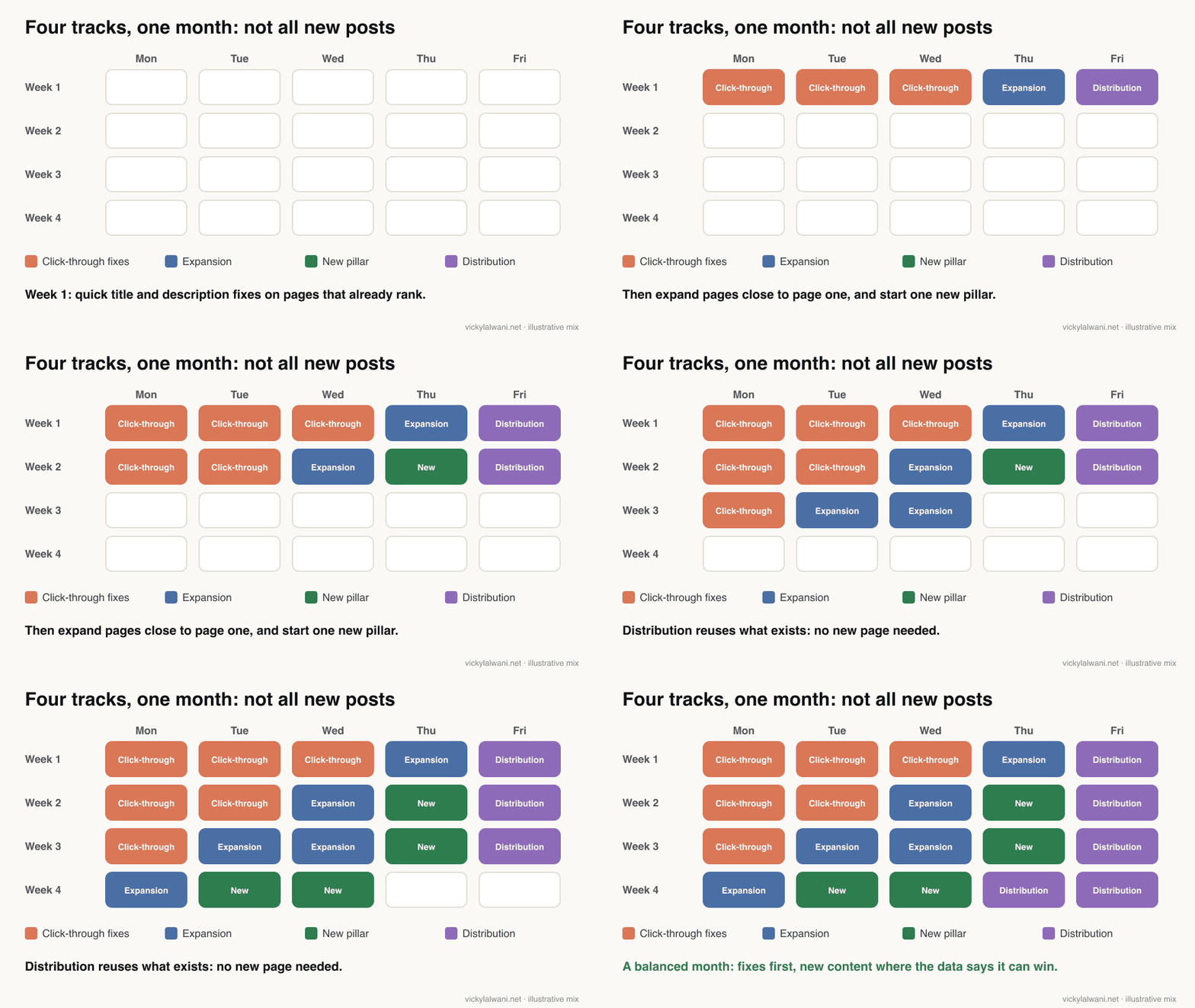
The month is split into four tracks: click-through fixes on pages that already rank, expansion of pages close to page one, new pillar topics you can realistically win, and distribution of what already exists.
A person still decides. Google asks you to fact-check AI-assisted content, titles and descriptions before publishing, and warns that mass-produced pages can count as scaled content abuse. The calendar speeds up the mechanical work; judgement stays with you.
Jump to: What it is · The data · Set-up · The output · Four tracks · Guardrails · Refreshing · X and Reddit
The old content calendar process was familiar. Open a notes app, stare at a blank page, search for "content ideas for my industry", copy ten generic topics and call it a strategy. None of those topics came from your own search data, so there was no reason to expect them to rank.
I replaced that with a Claude Project that works only from real inputs. Every row in the calendar traces back to evidence, and refreshing it takes one prompt a month plus fresh exports. This guide shows the inputs, the project instructions, the output columns and the guardrails, with Google's own guidance checked on 18 November 2026. If you would rather have the plan built from your data for you, that is part of my SEO consultant service.
What is an AI content calendar?
Short answer: a dated content plan that an AI assistant builds from your search data and customer questions, with a keyword, angle, priority and evidence for every row. The assistant ranks and organises; it does not invent topics.
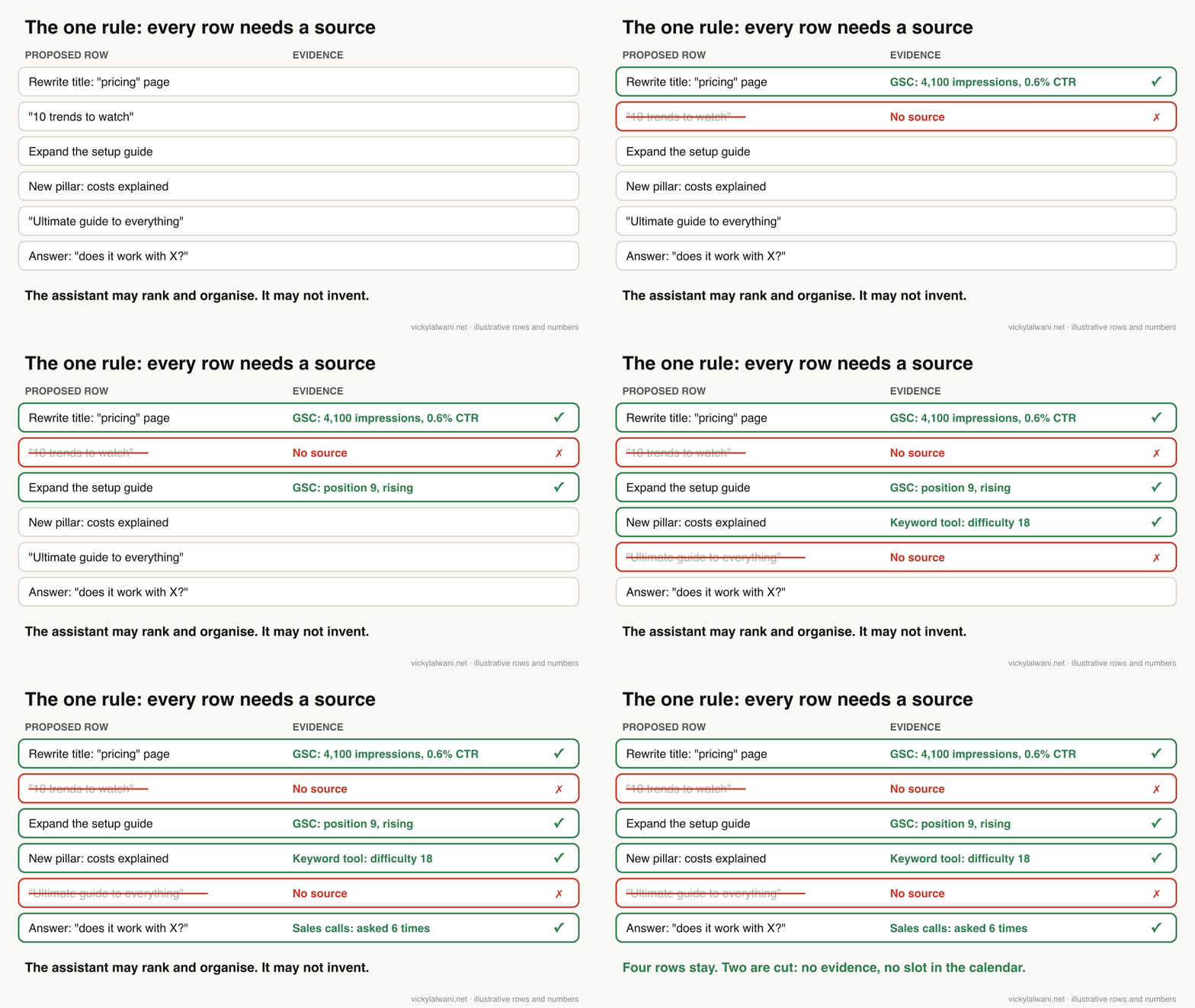
The single rule that makes it work: the custom instructions say the assistant may use only the data you provide. It cannot propose a topic without naming the source row that supports it. That rule is what separates a strategy from a brainstorm.
This is not about clever prompting. A prompt works once. A project with fixed instructions works every month, because only the data changes.
What data does an AI content calendar need?
Short answer: three inputs: a Search Console export, keyword difficulty and volume from a research tool, and real buyer pain points from sales calls, support tickets or forums. GA4 key events by landing page are a useful fourth.
| Input | What it shows | Where from |
|---|---|---|
| Search Console export | What ranks, impressions, clicks, CTR | Performance report |
| Keyword data | Volume and difficulty estimates | Semrush, Ahrefs or similar |
| Pain points | Questions in buyers' words | Calls, tickets, forums |
| GA4 key events | Which pages bring enquiries | Landing page report |
| Generative AI report | Pages shown in AI Overviews | Search Console |
The Search Console export
Export the Performance report for the last three months, once by query and once by page. Search Console's own help notes a 1,000 row limit on report tables; for bigger sites the Search Analytics API returns up to 50,000 rows a day per search type, or you can schedule a bulk export to BigQuery.
Two newer features make the export cleaner. The branded queries filter, available to all eligible sites since 11 March 2026, splits brand from non-brand traffic without a regular expression, so your calendar is not padded with people who already know you. It works only on top-level properties with enough search volume. And query groups, launched on 27 October 2025, cluster similar queries in the Insights report, with Top, Trending up and Trending down views.
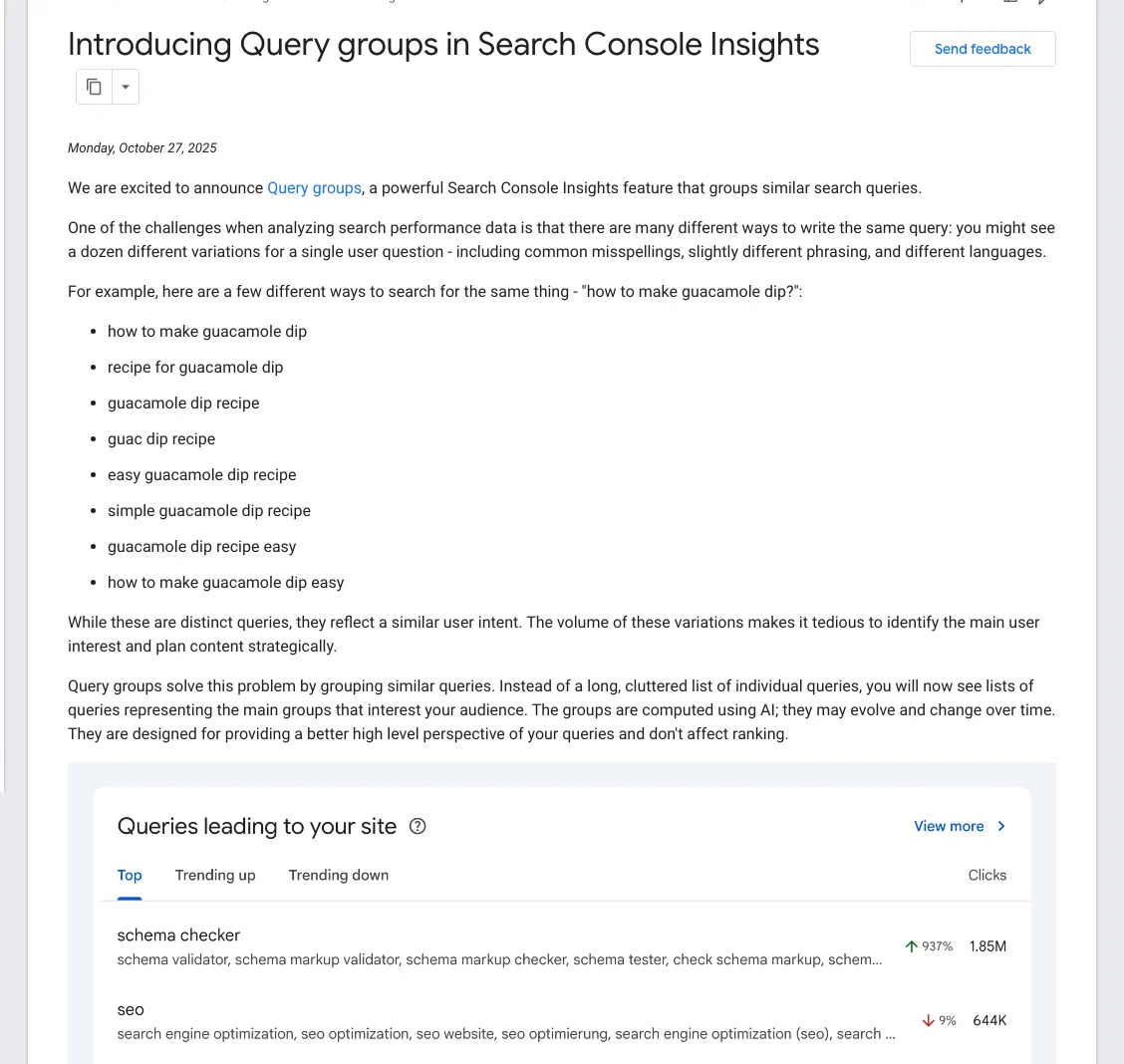
Google says the groups "are computed using AI" and may change over time, so use them to spot themes and then check the underlying queries in the Performance report.
Keyword difficulty and volume
Search Console only shows queries you already appear for. A research tool fills the gap: what people search that you do not rank for yet, and how hard each term is. Treat both numbers as estimates. I have had an AI agent pull search volumes that were far too low when checked against the source by hand, so the rule now is that every number in the plan is checked against the export it came from.
Buyer pain points
Collect the questions customers actually ask: sales call notes, support tickets, reviews, forum threads. Write them in the customer's words, not yours. These are the rows that give a calendar its angle, and they are the part a generic AI cannot guess.
How do you set up the project in Claude?
Short answer: create a project, paste the custom instructions below, upload your exports and pain points, and ask for the month. Projects are available on every Claude plan, including free, which allows up to five projects.
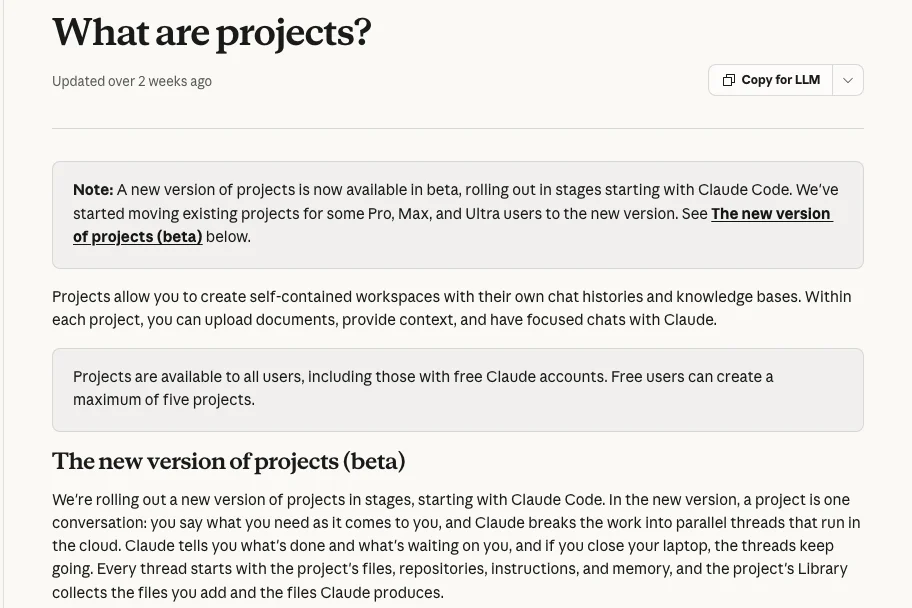
On paid plans, Anthropic says project knowledge switches to retrieval when it nears the context limit, expanding capacity by up to 10 times, which helps with large exports. Other assistants have similar project or custom instruction features; the method matters more than the tool.
- Create a new project and name it after the site, for example "Content calendar: example.com".
- Paste the custom instructions: allowed data sources, output columns, the four tracks and the rule against invention.
- Add a tiering scheme: urgent, soon, later, skip for now.
- Upload the Search Console exports, the keyword export and the pain points list together.
- Ask for the month, then review it yourself: remove topics that do not fit your offer, check that titles match search intent and adjust the effort estimates.
- Keep the project. Next month you only replace the data.
I keep one project per client, so the brief, the keyword map and the house rules sit in one place and each month starts from the same instructions. Here are the instructions I would start from:
You build a 30-day content calendar for [site] from the files in this project only.

Allowed sources (cite one for every row):
- gsc-queries.csv and gsc-pages.csv (Search Console, last 3 months)
- keywords.csv (volume and difficulty from our research tool)
- pain-points.md (customer questions in their own words)

Rules:
- Never invent a topic, keyword, number or URL. If a row has no source, drop it.
- Ignore branded queries unless the task is a click-through fix on a brand page.
- Split the month into four tracks: click-through fixes, expansion,
  new pillar topics, distribution. Fixes and expansion come first.
- New pillar topics only where difficulty is low enough for our site to win
  in the next few months; say why.
- Do not propose separate pages for close variations of one query.

Output one table with these columns:
date | track | target keyword | current position | proposed title | angle |
pain point answered | call to action | evidence (file + exact values) |
priority (urgent/soon/later/skip) | effort (S/M/L)

Then: a short strategy note on the mix, a keyword priority table by tier,
and a list of anything you could not verify from the files.
For the research side of the same workflow, see keyword research with Claude, which connects Search Console and a keyword tool over MCP instead of pasting exports.
What does the calendar look like?
Short answer: a dated table with one row per piece of work, plus a strategy note, a keyword priority table and a pain points sheet cross-referenced to calendar days.
When I have built calendars this way for clients, the output covered a full month of scheduled work, organised as clusters rather than one-off posts. Each deliverable looked like this in general terms:
| Column | Example | Why it is there |
|---|---|---|
| Date and track | Week 1, click-through fix | Sequencing |
| Target keyword | From the export | No invented terms |
| Current position | From Search Console | Shows how close it is |
| Proposed title and angle | Draft for review | A person edits it |
| Pain point answered | A buyer's question | Gives the angle |
| Evidence | File and exact values | Lets you check fast |
| Priority and effort | Urgent, S | Order of work |
The evidence column is the one people skip and the one that matters most. It lets you check every row in seconds and catches the rows where the assistant drifted from the data.
What are the four tracks of a balanced content calendar?
Short answer: click-through fixes, expansion, new pillar topics and distribution. Splitting the month this way stops the calendar from being all new posts, which is usually the slowest way to grow.
| Track | Signal in the data | Typical action |
|---|---|---|
| Click-through fixes | High impressions, low CTR | Rewrite title and description |
| Expansion | Position about 5 to 20 | Add depth, FAQs, examples |
| New pillar topics | Low difficulty, real demand | New page anchoring a cluster |
| Distribution | Good page, little reach | Repurpose and promote |
Click-through fixes
Pages that rank but attract few clicks, often because the title or meta description is weak, vague or missing. Branded pages with weak titles are a classic quick win. Google's title link guidance asks for descriptive, concise titles without keyword stuffing, and its snippet documentation says Google mainly builds snippets from page content and uses the meta description when it describes the page better.
Be careful with what "low CTR" means in 2026. Ahrefs' study of 300,000 keywords found the average click-through rate of the top result fell sharply between December 2023 and December 2025, and fell most where an AI Overview now appears.
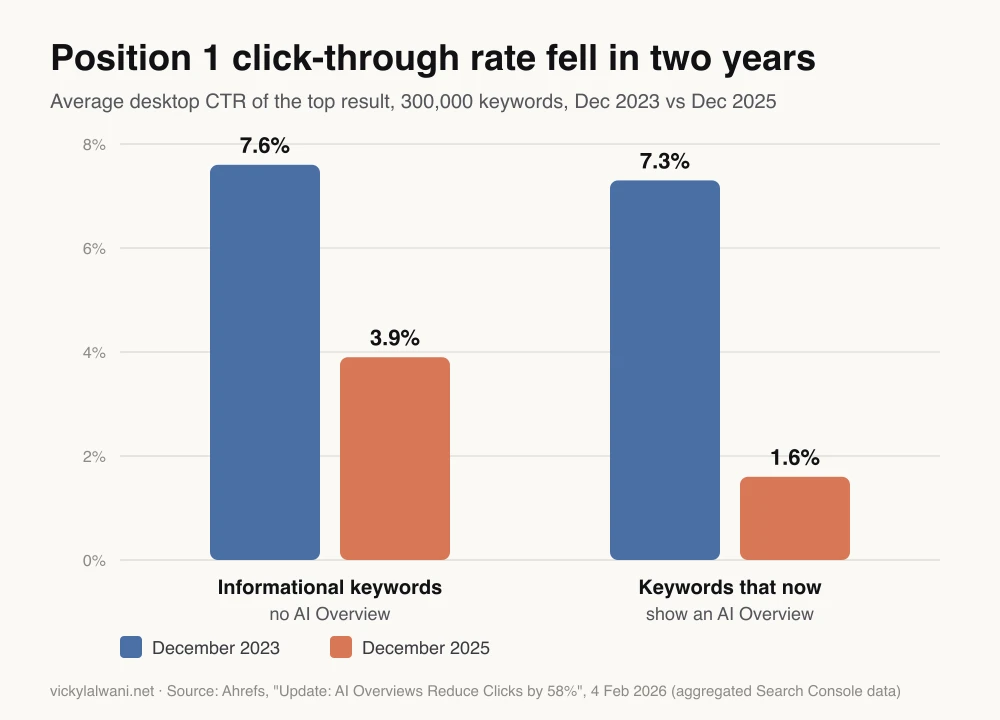
So compare a page's CTR with your own pages at a similar position, not with an old industry curve. Then check Search Console's generative AI performance report, live for all sites since 31 August 2026: if the page shows impressions in AI Overviews or AI Mode, a lower CTR may come from the results page, not your title, and a rewrite may not fix it.
Expansion, new pillars and distribution
Expansion targets existing pages that sit just off page one and deserve more depth. New pillar topics are subjects with low enough difficulty to be winnable, each anchoring a new cluster. Distribution repurposes and promotes what already exists, which needs no new page at all. If you want to see where content fits next to crawling, reporting and execution, my SEO tool stack guide maps the whole system.
What should the AI never do in a content calendar?
Short answer: invent topics or numbers, publish without review, or spin out a page for every variation of a query. Google's guidance treats unreviewed mass production as a spam risk, whatever tool made it.
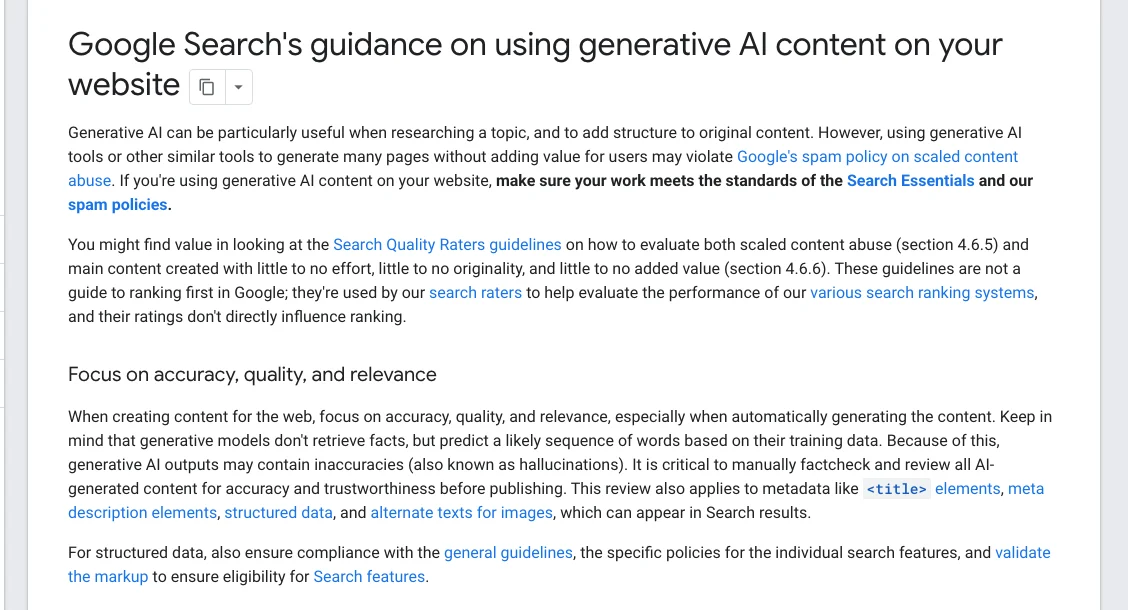
Google's guidance on generative AI content says it is "critical to manually factcheck and review all AI-generated content for accuracy and trustworthiness before publishing", and that this includes titles, meta descriptions, structured data and image alt text. Its spam policies define scaled content abuse as many pages generated mainly to manipulate rankings, "no matter how it's created".
Google's May 2026 guide to optimising for generative AI features adds a point that matters for calendars: creating separate content for every variation of how people search, including AI "fan-out" queries, mainly to manipulate rankings, breaks the scaled content abuse policy. That is why the instructions above tell the assistant not to propose separate pages for close variations of one query.
| The AI may | The AI may not |
|---|---|
| Rank and group your data | Invent topics or volumes |
| Draft titles and angles | Publish without review |
| Estimate effort | Decide your positioning |
| Flag gaps in the data | Fill gaps with guesses |
| Cluster related queries | Make a page per variation |
How often should you refresh the calendar?
Short answer: monthly. Re-run the same project with fresh exports so priorities move as rankings, clicks and competitors change, and log each publish date so you can see what moved.
Search Console's custom annotations (up to 120 characters, visible to everyone with access to the property) are a simple way to mark when a title changed or a page went live. Next month, give the assistant the new export and last month's calendar, and ask which rows moved.
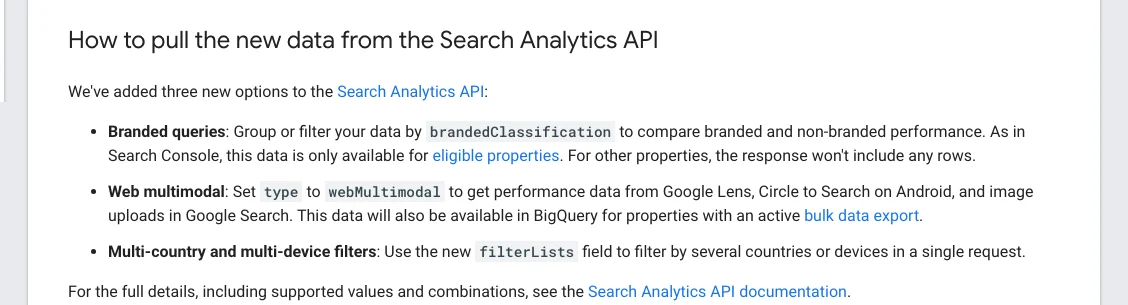
If you automate the export, Google's 16 November 2026 API update added the branded classification to the Search Analytics API, so a script or connector can pull non-branded data directly.
When a planned page loses traffic instead of gaining it, check the data before the content: my guide to a sudden website traffic drop gives the order of checks. For a weekly routine around the same project, see Claude skills for SEO.
A monthly refresh prompt:
New month. I have replaced the files with fresh exports.
1. Compare gsc-pages.csv with last month's calendar (calendar-previous.csv):
   for each row we shipped, report position, clicks and CTR before and after.
2. Keep the four tracks and the same output table.
3. Move rows that improved down the priority list; move rows that did not
   move after 4+ weeks to "review", with a one-line reason from the data.
4. List any new query groups or pages with rising impressions as candidates.
Use only the files. Say what you could not verify.
Is an AI content plan as good as a strategist's?
Short answer: sometimes close, according to the most on-topic test I found, but only when someone who knows the business judges the result. The other videos below cover the Search Console and Claude features this method uses.
SEO Strategist vs. Claude AI: Who Builds a Better Content Plan?, from Semrush's official channel, 12 November 2026. A strategist and Claude each build a three-month plan and a senior SEO judges them blind, and guesses wrong about which is which. Semrush sells the tools used, so treat it as a demonstration. The strategist's conclusion matches this article: the job shifts from building the plan to knowing whether the plan is any good, and neither plan knew which product drives the most revenue.
Getting started with Search Console Insights, from the official Google Search Central channel, 2 December 2025. It walks through query groups and the branded traffic card. Nothing for sale.
| Video | Channel | Date | What it covers |
|---|---|---|---|
| Analyzing performance on Google Search | Google Search Central | 4 Dec 2025 | Filters and compare mode for exports |
| Search Console updates (Q4 '25) | Google Search Central | 17 Nov 2025 | Query groups and annotations for all |
| Getting started with projects in Claude.ai | Anthropic | 2 Dec 2025 | Project knowledge, instructions, retrieval |
| How AI Content Kills Your SEO | SE Ranking | 5 May 2026 | Unedited AI articles fade after months |
| Reading the generative AI report | A one-person SEO channel | 2 Nov 2026 | Pairing AI impressions with CTR |
The SE Ranking experiment is a useful warning for the "new pillar" track: in its test of 2,000 unedited AI articles on new sites, early impressions faded within months. The vendor sells SEO software, and its sites had no links or authors, so read it as a case for review and original input, not as proof that AI-assisted content fails.
What people say on X and Reddit
Short answer: practitioners like feeding real Search Console data to an AI and distrust AI content produced at volume. The threads that went wrong almost all describe scale without review.
| Where | Date | What they say | Type |
|---|---|---|---|
| A Google Search advocate on X | 27 Oct 2025 | Query groups replace a cluttered query list | Official |
| Anthropic on X | 5 Jun 2025 | Projects hold 10x more content via retrieval | Vendor |
| An SEO practitioner on X | 24 Apr 2026 | Upload one page's queries; find uncovered ones | First-hand |
| A blogger and SEO on X | 6 Aug 2026 | Compare periods, fix the biggest losers first | First-hand |
| A marketer on X | 3 Sep 2026 | Scaled content policy targets manipulation, not AI | Opinion |
| A writer on X | 15 Nov 2026 | One project per job, with reference files | Opinion |
| r/SEO | 2 Oct 2026 | Google's "critical" fact-check line; cynical replies | Opinion |
| r/SEO | 14 Sep 2026 | Forced AI volume led to a manual action | First-hand |
| r/SEO | 8 Oct 2026 | A fact file per client; no stats unless supplied | First-hand |
| r/SEO | 23 Oct 2026 | Agency view: penalties hit scaled, repetitive pages | First-hand |
| r/SEO | 28 Oct 2025 | Query groups have no export or API | Opinion |
The manual action thread is the clearest cautionary tale: a junior SEO was told to publish 10 to 50 AI articles a week, and the blog folder received a manual action for scaled content abuse. Moderators later removed the original post; the replies, which advise removing or noindexing the pages rather than polishing them, are still there.
The workflow thread matches the rule in this article from the other side: a structured fact file per client and a hard rule of no statistics, prices or claims unless they were supplied. Note too that query groups cannot be exported, so for the calendar itself use the Performance report export and treat groups as a way to spot themes.
Where this advice is weak
Short answer: small sites have too little data, keyword tools disagree, and an AI can still misread an export even under strict rules.
- A new site with few impressions has little to work from; there the calendar leans on keyword data and pain points, which are weaker evidence.
- Volume and difficulty differ between tools, and none of them use Google's internal data. Treat them as a ranking of options, not a forecast.
- The CTR figures are from one vendor's sample of desktop data; your market and device mix may differ.
- No rule removes the need to read the output. The evidence column makes checking fast; it does not make it optional.
Want help building your content calendar from real data?
If you want the project set up with your own Search Console, keyword and customer data, and a calendar your team can actually ship, that is what my SEO consultant service covers. My rates are on the pricing page, and for the underlying concepts you can read my free guides.
Sources
| Source | What it supports | Date |
|---|---|---|
| Google: generative AI content | Fact-check AI content and metadata | Updated 1 Oct 2026 |
| Google spam policies | Scaled content abuse definition | Read 18 Nov 2026 |
| Google: optimising for generative AI | No page per query variation | May 2026 |
| Query groups | AI-grouped queries, three views | 27 Oct 2025 |
| Branded queries filter | All eligible sites 11 Mar 2026 | 20 Nov 2025 |
| Custom annotations | 120-character notes on charts | 17 Nov 2025 |
| Search Analytics API update | Branded classification in API | 16 Nov 2026 |
| Search Console API: all your data | 50,000 rows a day per type | Read 18 Nov 2026 |
| Generative AI performance report | All sites 31 Aug 2026; 1,000 rows | Read 18 Nov 2026 |
| Google: title links | Descriptive, concise titles | Read 18 Nov 2026 |
| Google: snippets | When the meta description is used | Read 18 Nov 2026 |
| Claude Help: projects | Free plan, five projects; RAG 10x | Read 18 Nov 2026 |
| Ahrefs CTR study | Position 1 CTR 2023 vs 2025 | 4 Feb 2026 |
| X, Reddit, YouTube | Practitioner views, tables above | Jun 2025 to Nov 2026 |
This article expands on my post on LinkedIn ↗.
FAQ
What is an AI content calendar?
An AI content calendar is a dated content plan that an AI assistant builds from your own search data and customer questions. Each row has a keyword, angle, priority and the evidence behind it; the assistant ranks and organises, and a person decides.
What data does an AI content calendar need?
A Search Console export, keyword difficulty and volume data from a research tool, and a list of real buyer pain points from sales calls, support tickets or forums. GA4 key events by landing page help show which pages bring enquiries; without data, the output is generic.
Can AI choose content topics by itself?
It can rank and organise options from your data, but it should not invent topics. Instructions that limit it to supplied files, and an evidence column on every row, keep the plan grounded and make mistakes easy to spot.
Can I build an AI content calendar in Claude for free?
Yes. Claude Projects are available on the free plan, with up to five projects. Paid plans add retrieval for large project knowledge, which helps when your Search Console and keyword exports are big.
How do I export Search Console data for a content calendar?
Open the Performance report, set the last three months, and export the table once by query and once by page. Report tables are limited to 1,000 rows, so larger sites should use the Search Analytics API, which returns up to 50,000 rows a day per search type, or the BigQuery bulk export.
Is AI-generated content against Google's guidelines?
Not in itself. Google asks you to fact-check and review AI-assisted content, titles and meta descriptions before publishing, and its scaled content abuse policy targets many pages made mainly to manipulate rankings, however they were created.
What click-through rate should a page have?
There is no single target in 2026. Ahrefs found average position 1 desktop CTR fell to 3.9% for informational keywords and 1.6% where AI Overviews appear by December 2025, so compare each page with your own pages at a similar position instead.
Should I create a page for every keyword variation?
No. Google says creating separate content for every variation of a query, including AI fan-out queries, mainly to manipulate rankings breaks its scaled content abuse policy. Cover close variations on one strong page.
How often should I refresh an AI content calendar?
Monthly works well. Re-run the same project with fresh exports and last month's calendar, compare what moved, and log publish dates as Search Console annotations so changes are easy to trace.