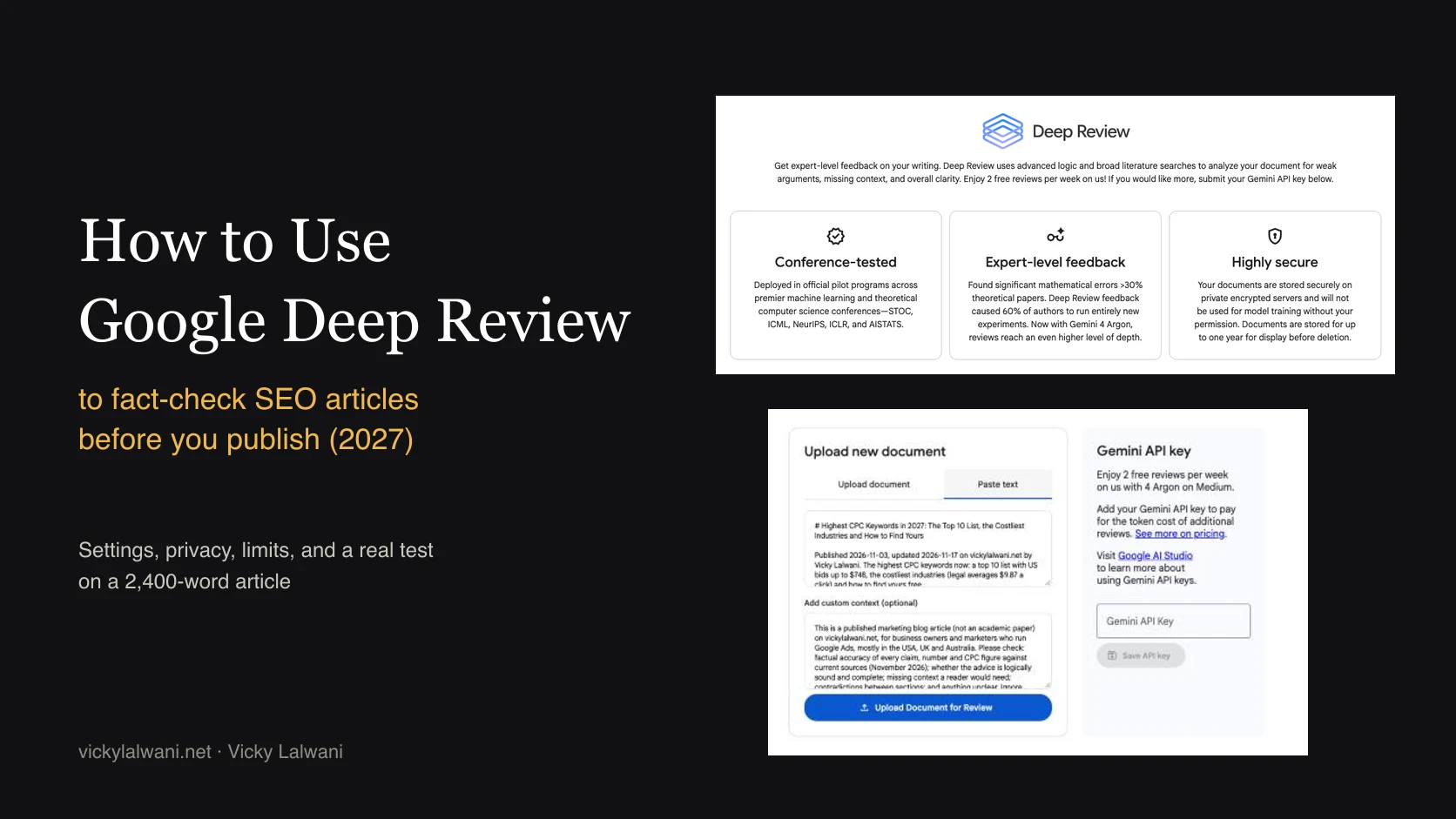
Google Deep Review is a free document checker from Google Research at research.google/deepreview. You sign in with a Google account, upload a PDF or paste text (Google says it also supports Google Docs and Slides), add optional context, and an agentic Gemini pipeline returns feedback on weak arguments, missing context, accuracy and clarity. Everyone gets 2 free reviews a week on Gemini 4 Argon at Medium depth; more reviews, or other depth and thinking settings, need your own Gemini API key. For SEO teams it is a second reader before publishing, useful because Google Search Central says it is critical to manually fact-check all AI-generated content, metadata included. It does not replace that human check.
TL;DR
- What it is: Google Deep Review is a free Google Research tool that checks a finished document for weak arguments, missing context, accuracy and clarity, using a multi-agent Gemini pipeline.
- How to use it: sign in with Google, upload a PDF or paste your article text, add custom context that says it is a blog article and what to check, submit, then read the report when it finishes.
- Limits: 2 free reviews a week, run on Gemini 4 Argon at Medium. More reviews, or Low, High and Extra High settings, need your own Gemini API key, and Deep Review shows a cost estimate first.
- Why SEO teams care: Google Search Central says it is critical to manually fact-check AI-generated content before publishing, titles and meta descriptions included. Deep Review helps with that; it does not replace it.
- My test: on 20 November 2026 I pasted a 2,400-word article. After two failed submits it ran in under 50 minutes and returned 18 comments (9 Major). The best catches were source context I had missed; three Major comments were outside the article's scope.
Picture an article ready to go live (an illustrative example). It has 40 numbers in it: bids, averages, dates, percentages. Some came from a tool, some from a study, a few from an AI draft that someone edited. Nobody has checked all 40 against their sources since the first draft. That is the job this guide is about.
I am Vicky Lalwani, an SEO and Google Ads consultant. My articles carry a lot of numbers, and Deep Review is a new kind of second reader, so I tested it on one of my own published articles first. If you would rather hand the whole content and SEO side to someone, my SEO consulting page explains how that works.
A note on evidence. Product facts come from the Deep Review page and FAQ and Google Research's launch post, both read on 20 November 2026. Independent tests come from the publications named in the text. My own experience is one review run on one article, described exactly as it happened. Anything labelled illustrative is an example, not a result.
Jump to: What it is · Why fact-check · Steps · Context box · Settings · Cost · Privacy · My test · Findings · Triage · vs chatbots · Weak spots · Videos · X and Reddit · Sources
What is Google Deep Review?
Short answer: Google Deep Review is a document checker from Google Research. You give it a PDF, pasted text, a Google Doc or Google Slides, and it returns detailed feedback on weak arguments, missing context, accuracy and clarity. It went public on 14 October 2026 and gives everyone 2 free reviews a week.
It started life as the Paper Assistant Tool, or PAT, which Google ran with computer science conferences. Authors could get private feedback on a paper before the submission deadline. The Deep Review page says the core engine powered author feedback at STOC, ICML, NeurIPS, ICLR and AISTATS, and reviewed over 15,000 papers.
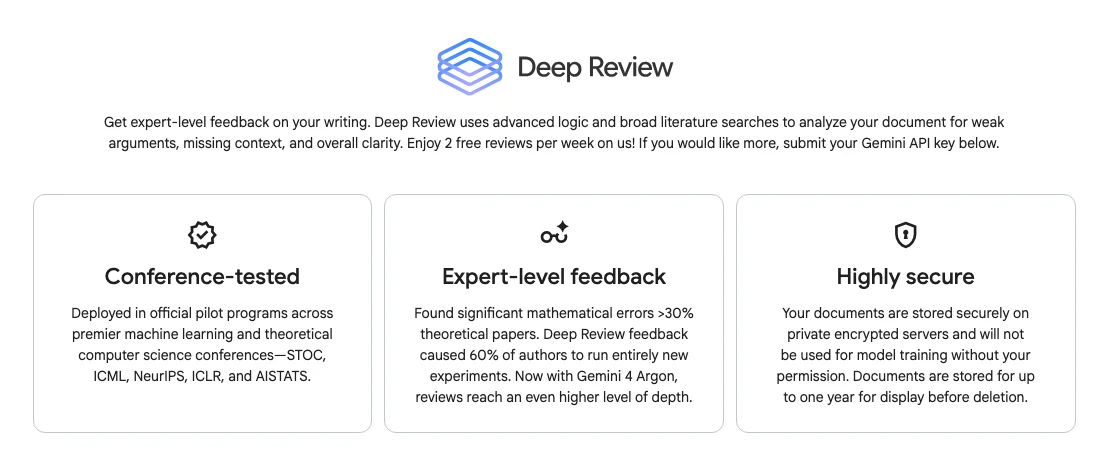
Two things make it different from pasting an article into a chatbot. It splits a long document into sections and reviews them in parallel with several agents, and it runs grounding checks (checking claims against outside sources), including web searches for related work, before it writes one combined report. Google built it for dense papers with proofs and data. A blog article is lighter work, which is part of what this guide tests.
| Name | What it does | Use it for |
|---|---|---|
| Deep Review | Checks your finished document | Pre-publish review |
| Gemini Deep Research | Researches a topic and writes a report | Research before writing |
| Gemini Deep Think | A reasoning mode in Gemini | Hard single questions |
| PAT | Deep Review's earlier name | Conference author pilots |
The names are easy to mix up. Google's autocomplete for "deep review" also suggests "deep review claude" and "scispace deep review ai", which are different products. This guide covers only Google Research's tool.
Why should SEO teams fact-check articles before publishing?
Short answer: Because Google says so for AI-assisted content. Its guidance on generative AI content, updated 1 October 2026, calls it critical to manually fact-check and review all AI-generated content for accuracy before publishing, including title elements, meta descriptions, structured data and image alt text.
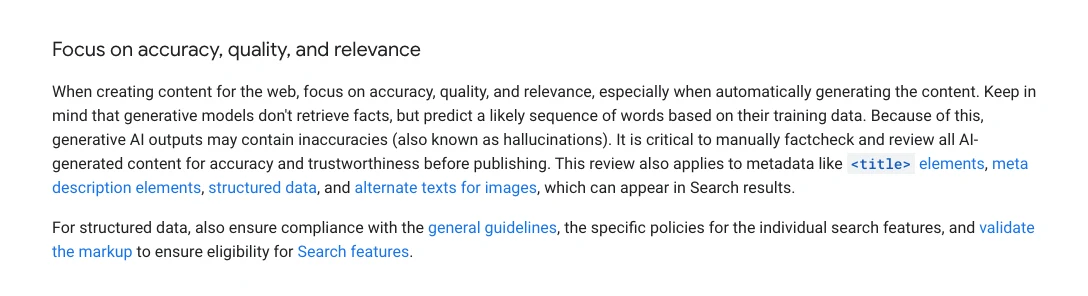
Note the word "manually". Google is not asking you to run another AI over your AI draft; it is asking a person to check.
Deep Review fits as a way to find what a person should check first, not as the check itself.
There is a ranking reason too, even if it is indirect. Google's helpful content guidance lists "Does the content have any easily-verified factual errors?" among its questions and says trust is the most important part of E-E-A-T (experience, expertise, authoritativeness and trust). And when AI answers quote your page, a wrong number travels with your brand on it, which is why fixing facts comes before chasing citations in an AI citation audit.
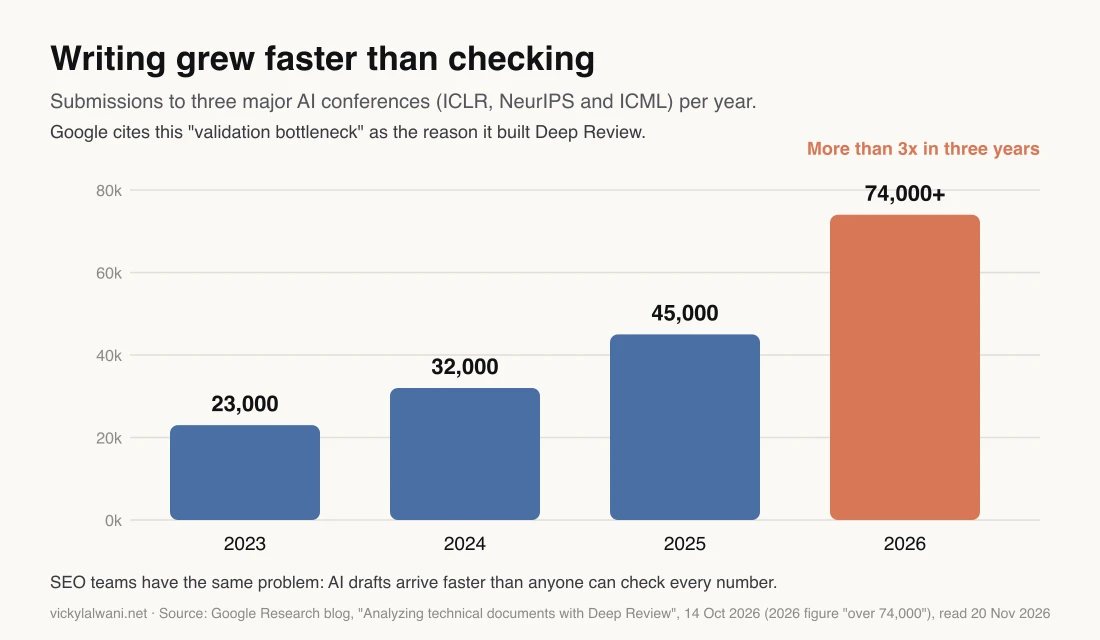
Content teams have the same shape of problem. AI made drafts cheap. Checking every number in a long article by hand still takes real time, and that is where errors slip through.
How do you use Google Deep Review, step by step?
Short answer: Open research.google/deepreview, sign in with a Google account, choose Upload document or Paste text, add custom context, then click Upload Document for Review. The review runs in the background and appears in the Your documents table when it is done.
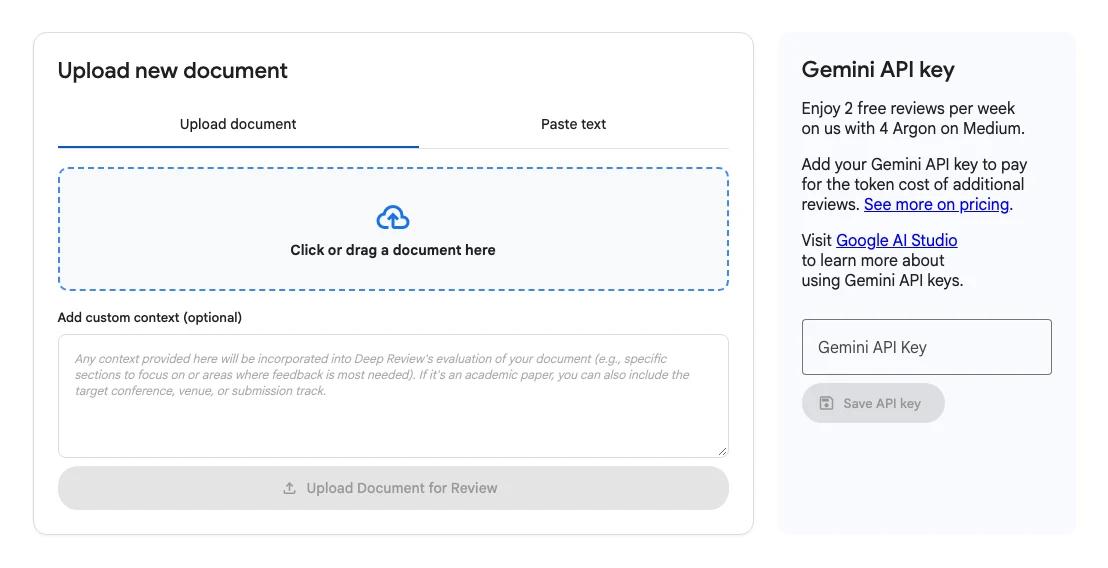
- Get the final text. Run it after editing, not on a first draft. Feedback on a draft you will rewrite is wasted quota.
- Sign in. Click Sign in with Google. The sign-in opens in a popup, so allow popups for the site.
- Pick an input. For a blog article, use Paste text: copy the article body, headings and FAQs, plus the title and meta description at the top. A PDF works too, but see the warning about figures below.
- Add custom context. Tell it what the document is and what to check. This box matters more for SEO content than for papers, because the tool was built and tested on academic papers.
- Submit. Click Upload Document for Review. The confirmation I saw said reviews usually take 15 to 30 minutes once running; mine took under 50 minutes from the accepted submit to the finished report.
- Read the report. Open it from Your documents. Work through it with the triage method further down.
Two practical notes. Paste the text a reader sees, not the HTML. And keep uploads within Google's Generative AI Prohibited Use Policy, which the FAQ says all uploads must follow.
| Input | Best for | Watch out for |
|---|---|---|
| Paste text | Blog articles, pages | Tables lose layout |
| Reports with fixed layout | Figures can be misread | |
| Word or PowerPoint | Offline drafts | Layout may not carry |
| Google Docs | Drafts in Docs | Not shown signed out |
| Google Slides | Decks, pitches | Not shown signed out |
| API upload | Pipelines | Alpha, no SLA |
What should you write in the custom context box?
Short answer: Say what the document is, who reads it, and exactly what to check. For an SEO article: "published blog article, not an academic paper", check every number and date against the linked sources, flag missing context and contradictions, and ignore academic structure.
The placeholder text in the box suggests specific sections to focus on and, for papers, the target conference. Without that, a review engine built on conference papers may ask for a related-work section or new experiments. One vendor's test on a clinical paper reported exactly that kind of request (more in the weak spots section).
Here are three context templates. They are my starting points, not tested results, so adjust them to your article.
Template 1: a standard SEO or PPC article with sources.
This is a published blog article for people who run Google Ads and SEO, not an academic paper.
Check:
1. Every number, price, date and statistic against the sources linked in the text. List any that do not match, are out of date, or have no source.
2. Claims stated as fact that are really opinion or estimates.
3. Advice that is incomplete or would mislead a beginner, and context a reader needs that is missing.
4. Contradictions between sections, including the title, summary and FAQs.
5. Anything unclear.
Ignore: academic structure (abstract, related work, novelty), citation formatting and writing style.
For each issue give the exact sentence, why it is a problem, and a suggested fix.
Template 2: a page where mistakes could hurt the reader (health, money, legal: what Google calls "Your Money or Your Life" topics).
This is a published web page for consumers about [health / money / legal topic], written by [role].
It is not an academic paper. Readers may act on it, so accuracy matters more than style.
Check every claim that could change a reader's decision: figures, eligibility rules, deadlines, costs and risks.
Flag anything stated with more certainty than the sources support, and any missing warning or "see a professional" note.
Ignore academic structure and citation format. Quote the sentence for each issue.
Template 3: an AI-assisted draft.
This draft was written with AI help and edited by a human. Treat every specific fact as unverified.
Find: invented or unsupported statistics, product features or prices that may be out of date, quotes that may not exist,
and places where two sections disagree. Also check the title, meta description and FAQ answers against the body.
List issues in order of how badly they would mislead a reader. Ignore style and academic conventions.
Keep the context short and specific. A list of numbered checks makes the report easier to triage, because you can match each finding to the check that produced it.
Which review depth and thinking level should you pick?
Short answer: On the free quota you do not pick: free reviews run at Medium review depth and Medium thinking level. With your own Gemini API key you can choose review depth (Low, Medium, High, Extra High) and thinking level (Low, Medium, High) and see a cost estimate before the review starts.

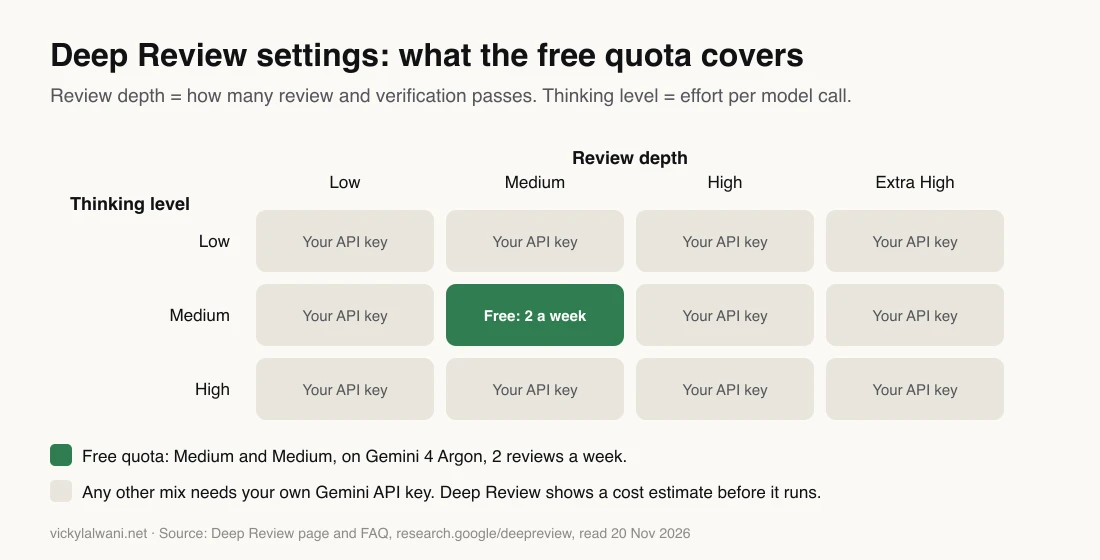
Review depth is how many review and verification passes run across the document. Thinking level is how hard each single model call works. For a typical blog article, here is how I would choose once a key is added. This is my judgement, not a Google recommendation.
| Article type | Review depth | Thinking level |
|---|---|---|
| Short news post | Low | Low or Medium |
| Standard how-to guide | Medium | Medium |
| Data study, many numbers | High | High |
| Health, money or legal page | High | High |
| Long pillar page or report | High or Extra High | Medium |
The free setting is a sensible middle for most marketing content. Start there, and only pay for higher settings once you know what Medium misses on your kind of article.
How much does Google Deep Review cost?
Short answer: Google Deep Review is free for 2 reviews a week per user, counted over a rolling seven days. Beyond that you add your own Gemini API key and pay only for the Gemini API calls at standard public rates; Google says there is no extra charge for Deep Review itself, and it shows an estimated cost before each paid review starts.

You create a key in Google AI Studio and paste it into the Gemini API key box. Billing then runs through that key's project, so if you work for clients, use a key on a project you control and can cap.
| Option | Reviews | Settings | Cost |
|---|---|---|---|
| Free quota | 2 a week | Medium only | Free |
| Your Gemini API key | More | All 12 mixes | Gemini API usage |
| Deep Review API | 2 free, then a key | Set per request | Needs Cloud billing |
For teams that want this inside a publishing pipeline, there is an API. The developer docs say it is in Alpha (an early test release) with no SLA (no service guarantee), and that endpoints may change. It uploads a document, starts a review and returns a Markdown report plus comments anchored to spans of the text. I would not build a hard dependency on it yet.
What happens to your article when you upload it?
Short answer: The FAQ says your document remains private: Deep Review reads it to produce the review, may run web searches for related work, and Google stores it for your reference. It is not used for model training unless you opt in.

The landing page adds that documents are stored on private encrypted servers for up to one year before deletion. Google's launch post goes further and says uploads are never used to train, fine-tune or improve Google models. The FAQ mentions an opt-in for the research team, so read the current wording on the page before you rely on either version.
For SEO work the practical rules are simple. Published articles carry little risk. Unpublished client drafts, embargoed launches and anything with personal data need the client's agreement first, as with any third-party tool.
What happened when I ran a 2,400-word article through it
Short answer: On 20 November 2026 I pasted the text of my article on the highest CPC (cost per click) keywords, about 2,400 words (about 11,200 characters pasted), into the Paste text tab with custom context. The first two submits failed with "Failed to submit document for review". The third went through at about 15:35, showed 79% at 16:07 and was finished when I checked at 16:23.
I picked that article on purpose. It is full of figures that can go stale: keyword bids, industry averages, dates. That is the kind of page where one wrong number does the most damage, and the kind of check that takes a person the longest.
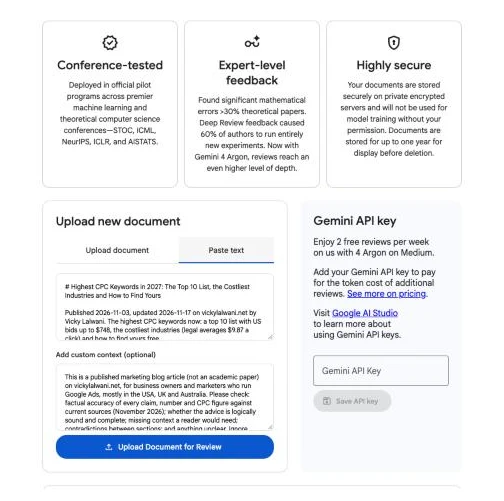
In the context box I said it was a published marketing blog article for people who run Google Ads, not an academic paper. I asked it to check the factual accuracy of every claim, number and CPC figure against current sources, whether the advice was logically sound and complete, missing context, contradictions between sections, and anything unclear.
| Step | What happened |
|---|---|
| Attempts 1 and 2 | "Failed to submit document for review" |
| Attempt 3 | "Upload successful!" at about 15:35 |
| 16:07 | Running, 79% |
| 16:23 | Finished report |
| Google's estimate | 15 to 30 minutes once running |
| Mine, end to end | Under 50 minutes |
Google's 15 to 30 minutes counts running time only. The page did not show when my review moved from queued to running, so I can only say the whole run took under 50 minutes from the accepted submit to the finished report.
Plan on most of an hour, and do something else meanwhile.
I cannot tell you why the first two attempts failed, because the error said nothing more. If you see the same message, these are reasonable things to check before you try again: that you are signed in, that popups are allowed, that the text is not empty, and that you have free reviews left this week. I found no public report of the same error, so treat that list as a checklist, not a diagnosis.
What Deep Review found in our article
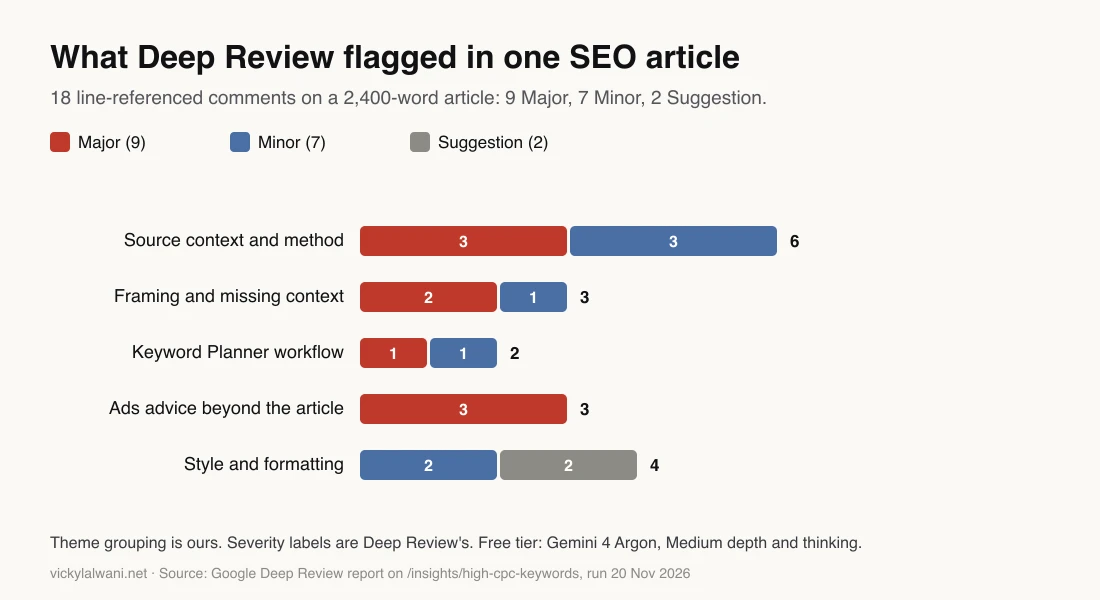
Short answer: Deep Review returned a summary, 3 strengths, 4 weaknesses and 18 detailed comments, each tied to a line or range of lines and most with a suggested fix: 9 Major, 7 Minor and 2 Suggestion. It said the headline figures were transcribed accurately from the sources. Its best catches were source context I had missed or stated wrongly.
In short: of the 18 comments, 7 held up (4 of them confirmed at the source), 1 was partly confirmed, 2 still need checking, 3 were outside the article's scope, 3 were style notes, 1 came from my plain-text export and 1 repeated a caveat the article already gave.
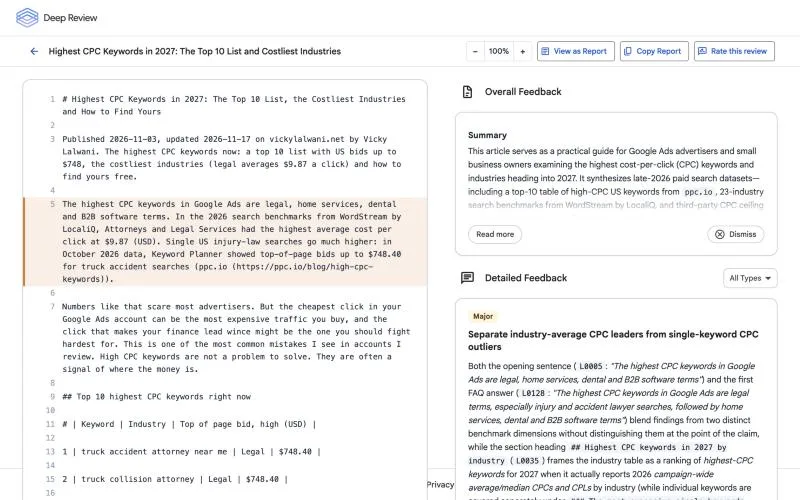
What it praised. It said the article transcribed its headline dollar figures, rankings and publication dates accurately from the cited benchmark and keyword reports and from Google Ads Help. It liked the argument against chasing cheap, low-intent clicks, and the five-step checklist that ties search terms to CRM revenue and call handling.
The catches that hold up. The sources behind the first four were opened again on 20 November 2026, and they say what Deep Review said they say.
- The benchmark names its market. The article said the 2026 WordStream by LocaliQ benchmark "doesn't name a country". Its companion post does: 13,474 search campaigns based in one country, run from April 2025 to March 2026, and its "averages" are medians. My line was wrong.
- The $4.92 median needs its caveat. ppc.io says its own accounts are mostly home and pool services, so setting that median next to $748 legal bids without saying so misleads.
- "Not what you will pay" was too strong. Google defines the Keyword Planner high range as roughly the 80th percentile of prices paid, which my article said in one section and contradicted in another. ppc.io found 177 of 330 matched keywords (53.6%) paid an average above the high range.
- The Top 10 table needed a method note. ppc.io published top keywords for 11 industries, not one overall list, and my table took the 10 highest across those lists. Next to the FAQ line about 22 keywords tied at $748.40, that reads as a contradiction.
- Industry averages and keyword outliers were blended. The opening named legal, home services, dental and B2B software together. Home services and dental lead on industry averages; B2B software appears only among single-keyword outliers.
- Keyword Planner setup traps. It flagged the separate "Start with keywords" and "Start with a website" tabs, and that new accounts start in Smart Mode, where Keyword Planner is hidden. I checked Google's Keyword Planner help page on 21 November: the two options are real, and the website box under Start with keywords is meant for your own site. The Smart Mode point is not on that page, so I left it out.
What to treat with care. Not every comment was a fix for this article.
- One comment was about my export, not the page. Comment 6 flagged broken table syntax, which came from the plain-text copy I pasted. The live page uses a normal HTML table.
- Three Major comments were scope creep. Quality Score and Ad Rank, match types and Smart Bidding safeguards, and test-budget math are good advice, but they belong in a Google Ads management guide, not in a list of costly keywords.
- Some notes were pure style. Capitalization of "SOC 2" and category names, and a "(tied)" note for two equal figures.
- It suggested long rewrites. Several rewrites would roughly double a paragraph. It has no idea of your word count or what the searcher came for.
| # | Severity | Theme | Verdict |
|---|---|---|---|
| 1 | Major | Averages vs outliers | Holds |
| 2 | Minor | Brand filter wording | Holds |
| 3 | Minor | Capitalization | Style |
| 4 | Major | Top 10 table method | Holds, checked |
| 5 | Major | Benchmark sample | Holds, checked |
| 6 | Minor | Table syntax | Export only |
| 7 | Suggestion | Category names | Style |
| 8 | Suggestion | Tied figures note | Style |
| 9 | Major | Cost per lead context | To verify |
| 10 | Major | Median and high range | Holds, checked |
| 11 | Major | Planner tabs, setup | Partly checked |
| 12 | Minor | Bids by location | Holds, checked |
| 13 | Major | Quality Score, Ad Rank | Out of scope |
| 14 | Major | Match types, bidding | Out of scope |
| 15 | Major | Test-budget math | Out of scope |
| 16 | Minor | 2027 heading, 2026 data | Holds |
| 17 | Minor | Benchmark sample mix | Partly known |
| 18 | Minor | Old study scope | To verify |
"Holds, checked" means the source was opened on 20 November 2026 and confirms the point. "Holds" means the point is right on a reading of the article itself. "Partly checked" means part of it was confirmed and the rest left out. "To verify" means it rests on a source not yet re-opened.
"Partly known" means the article already said part of it, for example that the benchmark blends ad platforms. The verdicts are mine, not Deep Review's.
The lesson for SEO teams. In this run Deep Review checked claims against the cited sources and went past them: comment 5 quoted a method note from the benchmark's companion post, which I had missed.
But it does not know search intent, your word count or what the page is for, so you still decide what to apply. On 21 November I applied the six fixes that mattered most to the live article: the opening and FAQ now separate industry averages from keyword outliers, the benchmark names its US sample and medians, the Top 10 table explains its method, the high range is described as an 80th percentile, and the Keyword Planner steps use the right tabs. The style notes and the out-of-scope advice I left alone.
How to triage Deep Review findings on an SEO article
Short answer: Sort every finding into three piles: fix it now, check it at the source, or ignore it with a reason. Then recheck the title, meta description, FAQ answers and schema, because Google's fact-checking advice covers metadata too. Deep Review suggests; you decide.
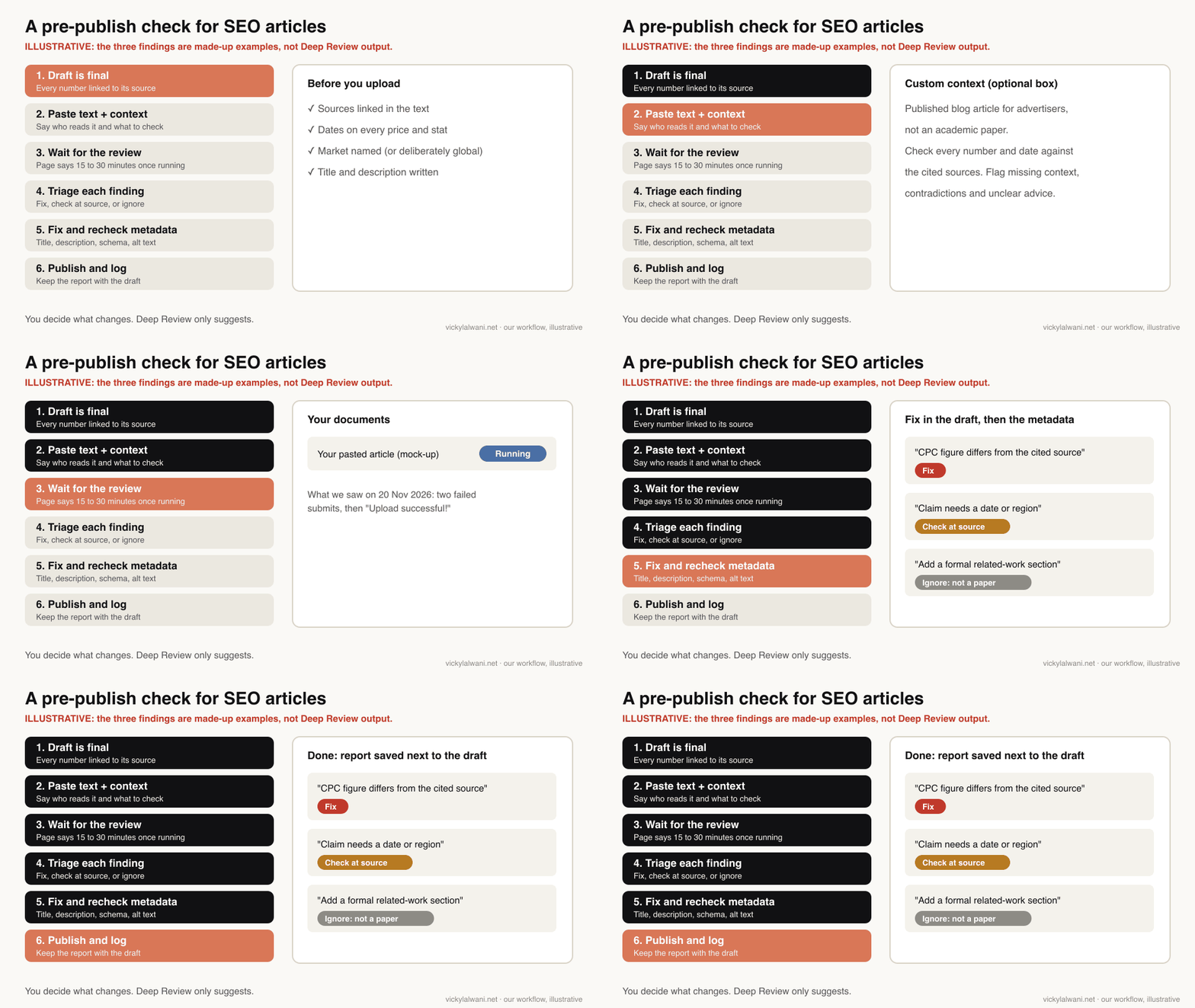
A review of a long document can produce more comments than you can act on. So decide the pile before you touch the draft.
Fix now
- A number that does not match its linked source
- A date or price that is out of date
- Two sections that contradict each other
- A claim stated as fact with no source
Ignore, with a note
- Requests for academic structure or related work
- New experiments you cannot run
- Style points that break your house voice
- A "fact" Deep Review read wrongly from a figure
The middle pile, "check at the source", is where the value is. Open the original page, find the number, and record what you found. If Deep Review was right, fix it. If it was wrong, write down why, so the next writer does not "fix" it back.
- Symptom: the report says a figure is wrong. Open the source. Many marketing figures change monthly, so check the source date too.
- Symptom: it says context is missing. Ask whether a beginner would act wrongly without it. If yes, add one sentence.
- Symptom: it wants more evidence for an opinion. Label it as your view instead of adding a weak source.
- Symptom: dozens of minor comments. Fix the factual ones, batch the rest for the next refresh.
Finally, carry the fixes into the places Google names: the title, the meta description, FAQ schema and alt text. A fixed body with an old number still in the meta description is the error people see first. The pre-publish blog audit guide has a full checklist for those. If you want a check like this built into your team's publishing process, that is part of my SEO consulting.
Deep Review vs a single chatbot prompt
Short answer: Deep Review splits a long document, reviews sections in parallel and runs grounding checks before writing one report; a single chatbot prompt reads everything in one pass. Google says single-prompt calls often fail on long documents. A chatbot is faster and more flexible; Deep Review is slower and more thorough by design.
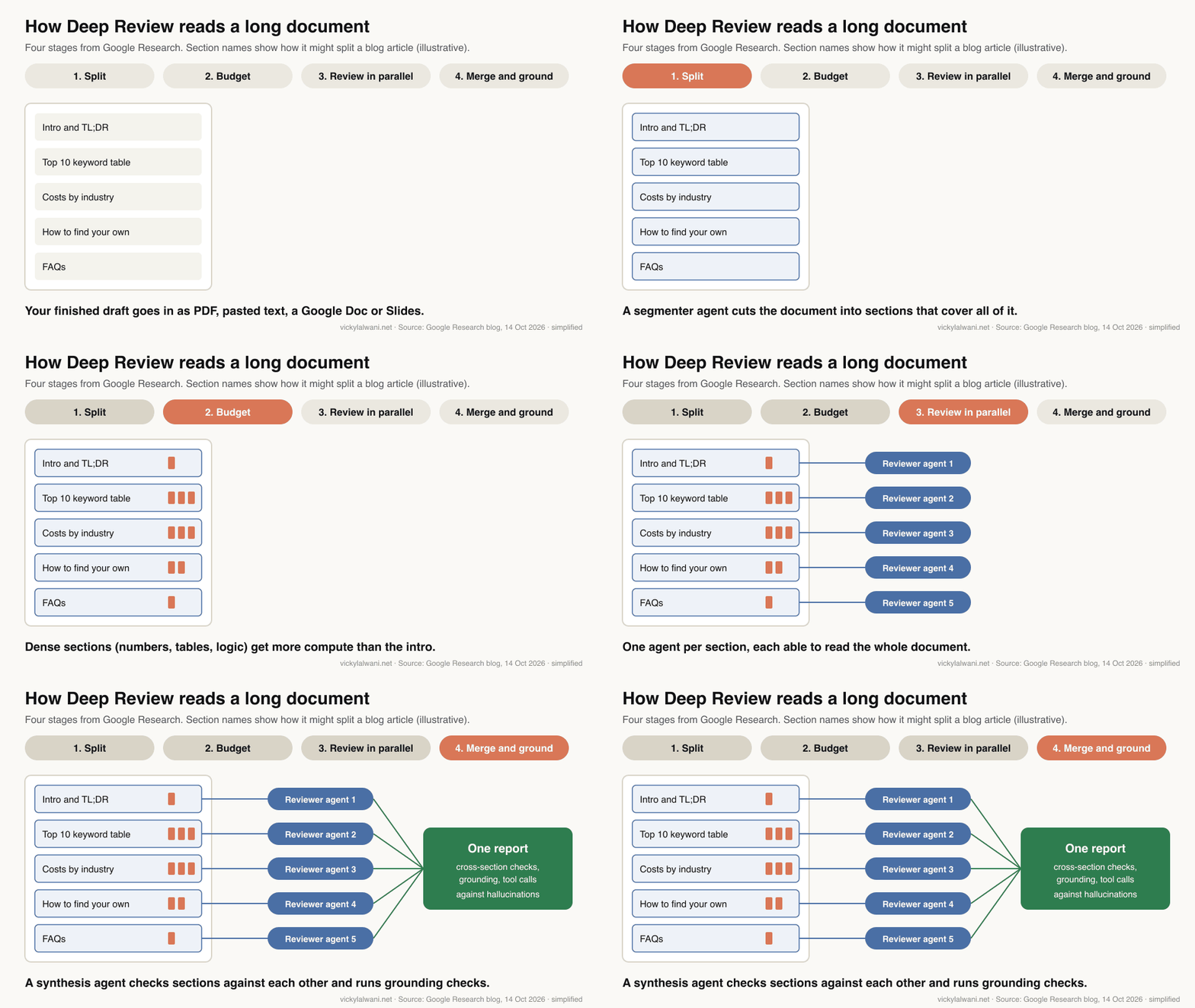
Google's case is that single prompts run out of reasoning budget, miss links between distant sections and accept claims without enough scrutiny. Its preprint on the earlier version reports a 34% improvement over a single plain prompt (zero-shot recall) at finding mathematical errors in the SPOT benchmark, a public test set of papers with known errors. That is a result on math in papers, not on marketing copy, so treat it as a reason to test, not as proof for SEO content.
| Factor | Deep Review | One chatbot prompt |
|---|---|---|
| How it reads | Section by section | All at once |
| Cross-section checks | Built in | If you ask |
| Grounding | Web search, tool calls | Varies by tool |
| Speed | Under 50 min in my test | Seconds to minutes |
| Free use | 2 a week | Plan limits |
| Follow-up questions | No chat | Yes |
In practice I would use both. A chatbot is good for quick edits and rewording; my ChatGPT vs Claude vs Gemini vs Grok test compares them on marketing tasks. Deep Review is for the final pass on pages where accuracy matters most. If you already run an SEO workflow in a coding agent, as in my Claude Code SEO workflow, Deep Review sits at the end as an outside reader.
Where Google Deep Review is weak
Short answer: Independent testing found it can misread figures and build critiques on invented numbers, and two runs on the same paper agreed on only about half their concerns. It was built for academic papers, it is slow, the free quota is small, and it does not know your live search data.
The most useful independent test so far comes from Labcritics, a site that reviews research tools, published on 13 November 2026. They checked three reports on two biology preprints claim by claim.
- Figures were the weak point. Every error they found came from misreading figure panels. No errors came from body text, captions, equations, methods text or arithmetic.
- Errors looked consistent. Several statistical critiques rested on sample sizes that do not exist in the papers, with correct arithmetic on top, so nothing in the report signalled a problem.
- Runs varied. Two runs on the same paper overlapped on about 50% of their substantive concerns (about 29 of 58).
A vendor of a competing tool, Paper Buddy, ran it on one clinical manuscript. It reported real catches, such as a decision threshold chosen by looking at the evaluation data, but also false alarms caused by PDF conversion, dozens of comments, and requests for experiments that could not be run. Read it as a competitor's view.
What that means for SEO articles:
- Paste text rather than a PDF when your numbers live in charts. Keep key figures in the text itself, which was read correctly in the Labcritics test.
- A clean report is not proof. If two runs can disagree on half their concerns, one quiet run does not mean the article is right.
- It cannot see your data. It does not know your Search Console clicks, your rankings or numbers behind a paywall. It checks what it can ground.
- It is slow and rationed. At 2 free reviews a week, save it for the pages that matter most: money pages, data studies and high-traffic articles.
- It is a research product. Google's own claims, like finding significant errors in over 30% of theoretical papers, come from conference pilots, not marketing content.
And it does not do SEO. It will not tell you whether a page matches search intent, covers what people ask, or will be cited in AI answers. That is still the work in getting into Google AI Overviews and structuring a site for AI search.
Videos worth watching
Short answer: There are only a handful of videos about Google Deep Review so far, mostly short news clips. Two are worth watching: a hands-on test on academic papers and a short from an SEO creator who tried it on content.
From an academic-careers YouTube channel, 3 November 2026. A hands-on test on the creator's own paper and on a famous paper. The channel sells courses for researchers.
A short from an SEO creator's channel, 19 November 2026. First-hand: they found a single document took a long time and the output very technical for marketers. Nothing sold in the video description.
| Video | Channel | Date | What it covers |
|---|---|---|---|
| Google Deep Review on two papers | Academic-careers channel | Nov 3, 2026 | Hands-on test |
| Google's AI fact checks your content | SEO creator | Nov 19, 2026 | SEO angle, first-hand |
| Public AI that stress-tests docs | AI news channel | Oct 16, 2026 | News summary |
| Deep Review checks technical docs | AI news channel | Oct 15, 2026 | News summary |
| Checks the documents AI helps create | App news channel | Oct 15, 2026 | News, AI presenter |
| Proofread 100 pages in seconds | A creator short | Nov 3, 2026 | Hype; "seconds" is wrong |
One warning from that list: the short that promises "100 pages in seconds" does not match Google's own message, which says reviews usually take 15 to 30 minutes once running. Mine took under 50 minutes end to end.
What people say on X and Reddit
Short answer: On X, the posts are mostly Google's launch and conference accounts announcing the pilots, plus one researcher who tried it and liked it and a few commentators. On Reddit I found no thread about Deep Review itself, only one short mention of the earlier PAT pilot.
| Source | What they said | Type | Link |
|---|---|---|---|
| News from Google | Launch: an agentic system to stress-test manuscripts, design docs and proposals. Oct 14, 2026 | Official | X post |
| A researcher on X | Ran a favorite test case; it found the issues. Oct 15, 2026 | First-hand | X post |
| An academic AI commentator | 2 free reviews a week on Gemini 4 Argon; pay for more. Oct 15, 2026 | Opinion | X post |
| An AI educator on X | How to check a 40-page document AI helped write. Oct 15, 2026 | Opinion | X post |
| ICML Conference | Gemini-based paper assistant live for submissions. Jan 14, 2026 | Official | X post |
| NeurIPS Conference | PAT offered to authors after STOC and ICML. Apr 21, 2026 | Official | X post |
| NeurIPS Conference | Pilot live: upload the PDF, tick the box. Apr 28, 2026 | Official | X post |
| r/MachineLearning | A poster found PAT impressive vs public LLM judges. May 2026 | Opinion | Thread |
Two things stand out. Almost all the early reaction comes from researchers, not marketers, so there is little evidence yet on marketing content. And I found no public post about the "Failed to submit" error I hit, which is one reason to share it here.
If you have run Deep Review on SEO content, send me what it caught and what it got wrong. Reports from marketers will be more useful than anything a conference pilot can show.
Want a second pair of eyes on your content?
Short answer: If you publish SEO content at volume, a pre-publish check is cheaper than a correction after a page ranks or gets quoted in AI answers. I help teams build checks like this into how they publish, alongside content audits, titles, schema and AI search visibility.
My SEO consulting covers content audits and publishing processes, and my generative engine optimization work covers how AI answers cite you. If you want to see how a first engagement runs, this is what day one looks like. Prices are on the pricing page, or get in touch with the page you are worried about.
Sources
| Source | What it supports | Date | Link |
|---|---|---|---|
| Google Research, Deep Review | Features, quota, settings, privacy, FAQ | Read Nov 20, 2026 | Deep Review |
| Google Research blog | Launch, pipeline, submissions data | Oct 14, 2026 | Blog post |
| Google for Developers | Deep Review API, Alpha status | Read Nov 20, 2026 | API docs |
| Google APIs Explorer | Deep Review API reference | Read Nov 20, 2026 | APIs Explorer |
| arXiv preprint | PAT method, 34% recall gain | Jun 26, 2026 | arXiv 2606.28277 |
| Google Search Central | Fact-check AI content and metadata | Updated Oct 1, 2026 | Guidance |
| Google Search Central | Helpful, reliable content | Read Nov 20, 2026 | Guidance |
| Google AI Studio | Create a Gemini API key | Read Nov 20, 2026 | AI Studio |
| Google policies | Generative AI Prohibited Use Policy | Read Nov 20, 2026 | Policy |
| Google Research blog | STOC 2026 pilot | Dec 15, 2025 | STOC post |
| ICML blog | ICML 2026 PAT retrospective | Mar 30, 2026 | ICML post |
| NeurIPS blog | NeurIPS 2026 PAT access | Apr 21, 2026 | NeurIPS post |
| Labcritics | Independent test: figures, variance | Nov 13, 2026 | Review |
| Paper Buddy (vendor) | Clinical paper test, false alarms | Oct 2026 | Guide |
| X and Reddit | Official posts and early reactions | Jan to Oct 2026 | Linked in the table above |
| YouTube | Six videos | Oct to Nov 2026 | Linked in the videos table |
| My own test | Report: 18 comments, timings | Nov 20, 2026 | Tested article |
| WordStream by LocaliQ | 13,474 campaigns, medians | Read Nov 20, 2026 | 2026 benchmarks |
| ppc.io | Industry lists, 177 of 330 above high range | Read Nov 20, 2026 | High CPC keywords |
FAQ
What is Google Deep Review?
Google Deep Review is a free document review tool from Google Research at research.google/deepreview. It uses a multi-agent Gemini pipeline to check a finished document, such as a paper, report or article, for weak arguments, missing context, accuracy and clarity, and returns one combined report.
How do I use Google Deep Review?
Open research.google/deepreview, sign in with a Google account, choose Upload document or Paste text, add optional custom context describing the document and what to check, and click Upload Document for Review. The finished review appears in the Your documents table, usually 15 to 30 minutes after it starts running.
Is Google Deep Review free?
Yes, up to a point. Google Deep Review gives every user 2 free reviews a week, run on Gemini 4 Argon at Medium review depth and Medium thinking level. For more reviews you add your own Gemini API key and pay standard Gemini API rates, with no extra charge for Deep Review itself.
Can Google Deep Review fact-check SEO articles?
Google Deep Review can review a blog article pasted as text and flag numbers, claims and contradictions that look wrong or unsupported, and it may run web searches for grounding. It was built for academic papers, so tell it in the custom context that the text is a blog article and what to check. A person should still verify every finding at the source.
What file types does Google Deep Review accept?
The Google Deep Review FAQ lists PDFs, text, Google Docs and Google Slides, and the upload box accepts PDF, Word, PowerPoint, Markdown, LaTeX, HTML and plain text files. Google's API documentation sets a 20 MB limit, about 200 dense pages. Multi-file input is coming.
What is the difference between review depth and thinking level in Deep Review?
In Google Deep Review, review depth sets how many multi-agent review and verification passes run across the document (Low, Medium, High or Extra High). Thinking level sets how much reasoning effort each Gemini call spends (Low, Medium or High). Free reviews use Medium for both; a Gemini API key unlocks all combinations.
How long does a Google Deep Review take?
When a document is accepted, Google Deep Review says reviews usually take 15 to 30 minutes once running. In a test on 20 November 2026 a 2,400-word article took under 50 minutes from the accepted submit to the finished report, including any time in the queue. Google says the finished review appears in the Your documents table.
Does Google use my uploaded documents to train AI?
The Google Deep Review page says documents are not used for model training without your permission and are stored on private encrypted servers for up to one year. You can opt in to let the research team use your data. Google's launch post says uploads are never used for training, so check the current wording before uploading client drafts.
Why does Google Deep Review say "Failed to submit document for review"?
Google Deep Review does not explain the "Failed to submit document for review" error. In a test on 20 November 2026 it appeared twice before a third attempt went through. Check that you are signed in, popups are allowed, the text box is not empty and you have free reviews left, then try again.
Is there a Google Deep Review API?
Yes. Google lists a Deep Review API in the Google APIs Explorer and developer docs. It uploads documents, starts reviews and returns a Markdown report with anchored comments. Google says the API is in Alpha, with no SLA, and may change in backward-incompatible ways.
Is Google Deep Review the same as Gemini Deep Research?
No. Google Deep Review checks a document you already wrote. Gemini Deep Research researches a topic and writes a new report. They solve opposite problems: one reviews, the other drafts.
Can Google Deep Review make mistakes?
Yes. An independent test by Labcritics in November 2026 found Google Deep Review misread figure panels and built critiques on invented numbers, while body text, captions and equations were read correctly. Two runs on the same paper agreed on only about half of their concerns, so treat each report as a list of things to check.
What did Google Deep Review find in a real SEO article?
On a 2,400-word article about the highest CPC keywords, Google Deep Review returned 18 line-referenced comments: 9 Major, 7 Minor and 2 Suggestion. It said the headline figures were transcribed accurately, caught missing source context such as a benchmark's sample and median method, and also made three Major suggestions that were outside the article's scope.
Does Google Deep Review help with rankings?
Not directly. Google Deep Review checks accuracy, logic and clarity, not search intent, keywords or AI citations. It supports Google Search Central's advice to fact-check AI-generated content before publishing, which protects trust, but rankings still depend on the usual SEO work.