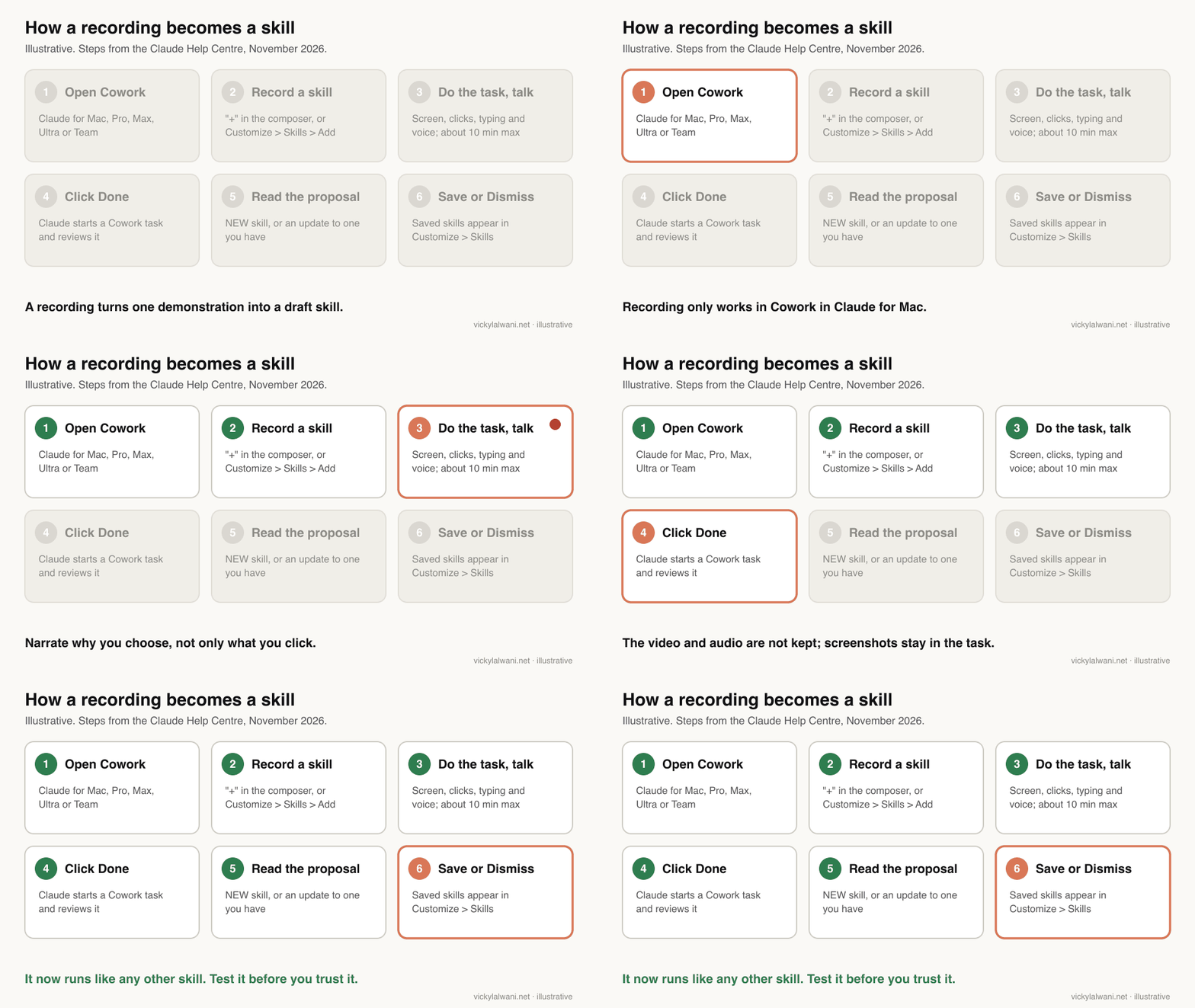
To record a skill in Claude, open Cowork in Claude for Mac, choose "Record a skill" from the "+" menu, do the task while you explain your choices aloud, and click Done. Claude proposes a skill you read and save. It works on Pro, Max, Ultra and Team plans, not on Windows, in chat, or on Free and Enterprise, and a recording runs for about 10 minutes.
TL;DR
Record a skill is a real Claude feature, launched on 21 July 2026. You do a task once on screen in Cowork, talk through it, click Done, and Claude proposes a skill that you read, then save or dismiss.
In November 2026 it works only in Cowork in Claude for Mac, on Pro, Max, Ultra and Team plans. It is not in chat, not on Windows, and not on Free or Enterprise. A recording runs for about 10 minutes. The video and audio are not kept, but screenshots stay in the Cowork task.
Record tasks you do on screen every week with a clear finished product, such as a search terms review or a Search Console check. Narrate your rules, read the draft, test it on last week's data, and keep a person approving anything that changes a live account.
Short answer: to record a skill in Claude, open Cowork in Claude for Mac, click "+" in the composer and choose "Record a skill" (or go to Customize > Skills, Add, Record your screen), do the task while you explain your choices aloud, then click Done. Claude reviews the recording and proposes a skill. Read it, save it, and test it before you rely on it.
When I first wrote this page in early November, it gave the general idea and told you to check Anthropic's documentation for the details. Those details are now confirmed, so this update replaces the vague parts with the exact menus, plans, limits and privacy rules from Anthropic's Help Centre article on creating skills, read on 18 November 2026. It also adds what the original missed: the other ways to make a skill when recording is not available to you.
The angle here is the recording itself: how to capture a task well and turn it into something you can trust. If you want a full weekly routine of skills, the Claude skills for Google Ads routine and the Claude skills for SEO routine cover that. If you would rather have someone record, write and test your team's skills with you, that is what my Claude consultant service does.
What does "record a skill" in Claude actually do?
Short answer: it turns a screen recording of you doing a task into a draft skill. Claude watches your screen, clicks, typing and voice, works out the steps and the reasoning, and proposes a skill file you can save. Anthropic announced it on 21 July 2026 for Cowork in the Claude desktop app.
A skill is a folder of instructions, with a SKILL.md file at its heart, that Claude loads only when your request matches it. Until July, you made one by writing that file yourself or by asking Claude to draft it. Most marketers never did, because writing a process down is the part nobody has time for.
Recording removes that step. Claude's own announcement on X put it simply: record your screen while you do a task, talk through it, and Claude turns it into a skill it can run again. The Help Centre adds the detail that matters: Claude does not save a skill on its own. It proposes one, and you decide.
If the recording overlaps a skill you already have, Claude proposes an update to that skill instead of a new one. That is useful. It means recording the same task again, after you change how you do it, can improve the existing skill rather than leave you with two competing versions.
| What Claude captures | Why it matters |
|---|---|
| Your screen | Which tools and screens the task uses |
| Clicks and typing | The order of the steps |
| Your voice | The reasons behind each choice |
| Step count | Shown in the capture bar as you work |
Who can record a skill in Claude, and where?
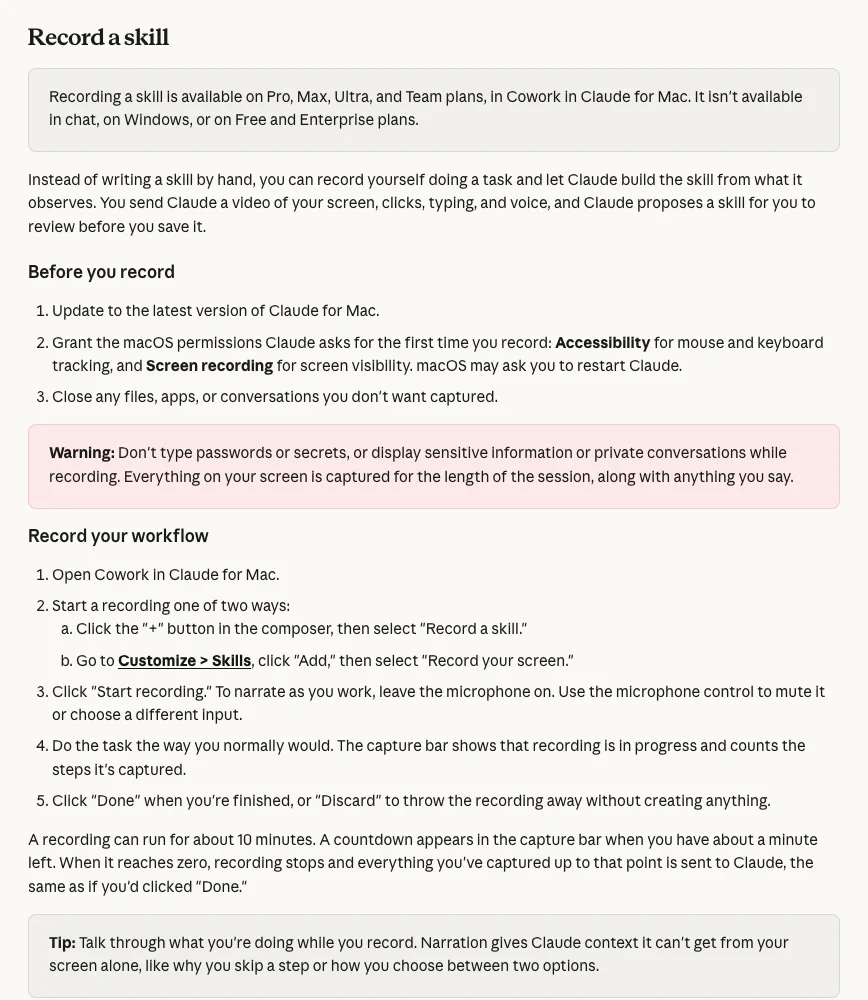
Short answer: Pro, Max, Ultra and Team plans, in Cowork in Claude for Mac only. Recording is not available in chat, on Windows, on the web or mobile apps, or on Free and Enterprise plans, according to Anthropic's Help Centre in November 2026.
This is the part that trips people up. Skills themselves work on every plan, including Free, as long as code execution is switched on. Recording a skill is narrower. The launch post on X named Pro, Max and Team; the Help Centre now lists Ultra as well.
| Where you are | Can you record? | Can you use the skill? |
|---|---|---|
| Cowork, Claude for Mac | Yes | Yes |
| Cowork on Windows | No | Yes |
| Chat, web or mobile | No | Yes |
| Claude Code | No | Yes, if signed in with the same account |
| Free or Enterprise plan | No | Yes, skills work on both |
The Claude Code row comes from Anthropic's guide to using skills: skills enabled in your Claude account load in Claude Code version 2.1.273 or later when you sign in with that account. The sync is one way, so edit the skill in Claude, not in the synced copy.
Two more things from the r/ClaudeAI threads in the week of the launch. Several Pro and Team users could not see the option at first, which pointed to a staged rollout. And at least one Team admin on Windows found it missing, which the Help Centre now explains: it is Mac only.
How do you record a skill in Claude, step by step?
Short answer: update Claude for Mac, grant Accessibility and Screen recording permissions, open Cowork, choose "Record a skill" from the "+" menu, click Start recording, do the task while you talk, and click Done. You have about 10 minutes, and a countdown appears in the last minute.
- Update the app. Install the latest Claude for Mac. The first time you record, macOS asks for Accessibility (for mouse and keyboard tracking) and Screen recording permissions, and may ask you to restart Claude.
- Clear the screen. Close files, apps, tabs and conversations you do not want captured. Everything on screen is recorded for the whole session, along with anything you say.
- Start the recording. In Cowork, click "+" in the composer and choose "Record a skill". Or go to Customize > Skills, click Add, then Record your screen.
- Click Start recording. Leave the microphone on if you want to narrate. You can mute it or choose another input from the capture bar.
- Do the task normally. The capture bar shows that recording is running and counts the steps it has captured.
- Click Done or Discard. Done sends the recording to Claude. Discard throws it away without creating anything. If the 10 minute timer runs out, Claude receives what it has, as if you had clicked Done.
Ten minutes is shorter than it sounds once you start explaining yourself. If your task takes longer, record one stage at a time, and test each recorded skill before you add the next. One task per recording also keeps each skill's description narrow, which helps Claude load the right one.
What happens to your recording afterwards?
Short answer: Claude starts a Cowork task, reviews the recording and proposes a skill. The video and audio are not kept. A set of screenshots from the session is saved inside that Cowork task, and deleting the task removes them.
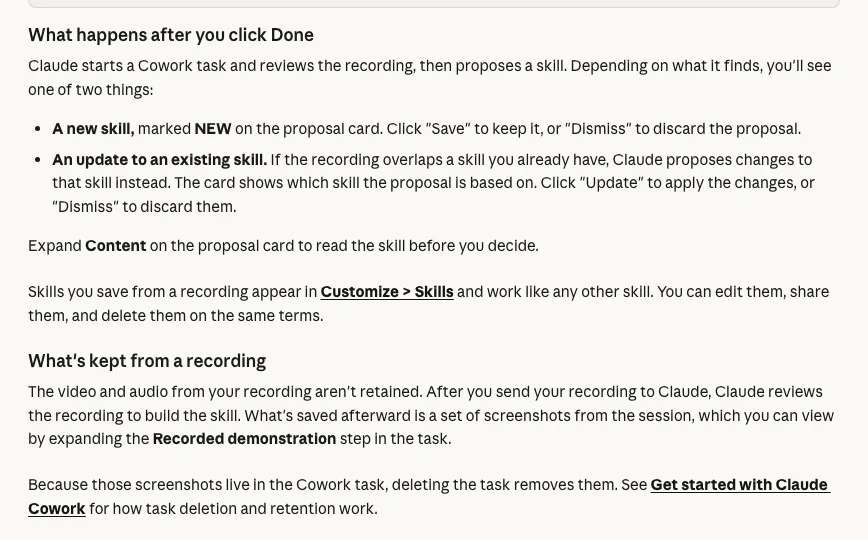
That screenshot detail matters for marketing work. If you record yourself inside a client's Google Ads account or Search Console property, the screenshots in that task can show campaign names, budgets, search terms and site data. They stay in your Claude account until you delete the task.
My rule on client accounts is the one I use for any AI work there: audit first, put the findings in a sheet, check them by hand, and change nothing before approval. For recording, that means three habits:
- Record on your own account, a demo account or an export with names removed where you can.
- Check that your agreement with the client allows their data to be processed in Claude before you record inside their tools.
- Delete the Cowork task once the skill is saved, if you do not need the screenshots.
None of this is legal advice. If you are unsure whether a recording is allowed under your contracts or privacy rules, ask whoever handles that for your business.
Which SEO and PPC tasks should you record first?
Short answer: record tasks you do on screen every week, that take under 10 minutes to show, and that end in a clear output. For search marketing, a search terms review, a Search Console quick-wins check and a landing page check before launch are good first candidates.
The best first recording is the task you dislike and repeat most. The frustration is a fair signal that it is worth turning into a skill. The second test is shape: recording works when the task is mostly clicking through screens and making judgement calls you can say out loud.
| Task | Record or write? | What to narrate |
|---|---|---|
| Google Ads search terms review | Record | Why a term becomes a negative |
| Search Console quick-wins check | Record | Which pages count as close |
| Landing page check before launch | Record | What breaks a form or call button |
| Weekly report assembly | Record in parts | Which numbers need a second source |
| Ad copy rules | Write | Better as a written checklist |
| Brand voice | Write | Needs samples, not clicks |
A search terms review is a strong first pick because the screen work is short and the judgement is the whole point. Google's search terms report shows what people actually typed before they clicked an ad. Your rules for what to exclude are what the skill needs to learn.
The same goes for a Search Console check. The Performance report is the screen; your definition of a page worth improving this week is the skill. Once one recording works, the SEO skills routine shows how to schedule several across the week.
Some tasks are better written than recorded. Brand voice comes from writing samples, which is covered in how to train Claude on your writing style. Standing rules that apply to every task, such as which claims you may make, belong in an instructions file, as in the CLAUDE.md file for marketing.
How do you narrate so the skill captures your judgement?
Short answer: say the rule, the reason and the exception at each decision. Claude can see what you click, but not why. Anthropic's own tip is to talk through why you skip a step or how you choose between two options.
A silent recording produces a script: open this, filter that, export. A narrated recording produces a method. The difference is the sentences you say out loud at the moment you decide something.
Before you press Start, write a short plan for what you will say. It keeps the recording inside 10 minutes and stops you forgetting the rules you apply without thinking.
Narration plan for a recorded skill (read it aloud as you work)

1. What this task is for:
   "This is my weekly [task] for [account or site]. The output is [file or list]."
2. Inputs:
   "I start from [export, report, date range]. I always use [time window]."
3. At each decision, say three things:
   - the rule: "I exclude a term when [your rule]"
   - the reason: "because [why it matters to this business]"
   - the exception: "except when [brand terms / new products / a test]"
4. What I never do:
   "I never change [bids / budgets / live pages] in this task. I only propose."
5. What done looks like:
   "It is finished when [the sheet has these columns / the list is sorted by X]."
Use your own thresholds, not ones you have read somewhere. A recorded skill will treat whatever number you say as the rule, so say the number you would defend to a client.
How do you review and test a recorded skill before you trust it?
Short answer: expand Content on the proposal card and read the whole skill before you save it. Check the description, inputs, rules, exceptions and output. Then run it on last week's data, where you already know the right answer, and fix what it gets wrong.
A recording captures what you did once. It can miss the reason you skipped a step, pick up a habit you would not want copied, or turn one example into a rule. Treat the first version as a draft.
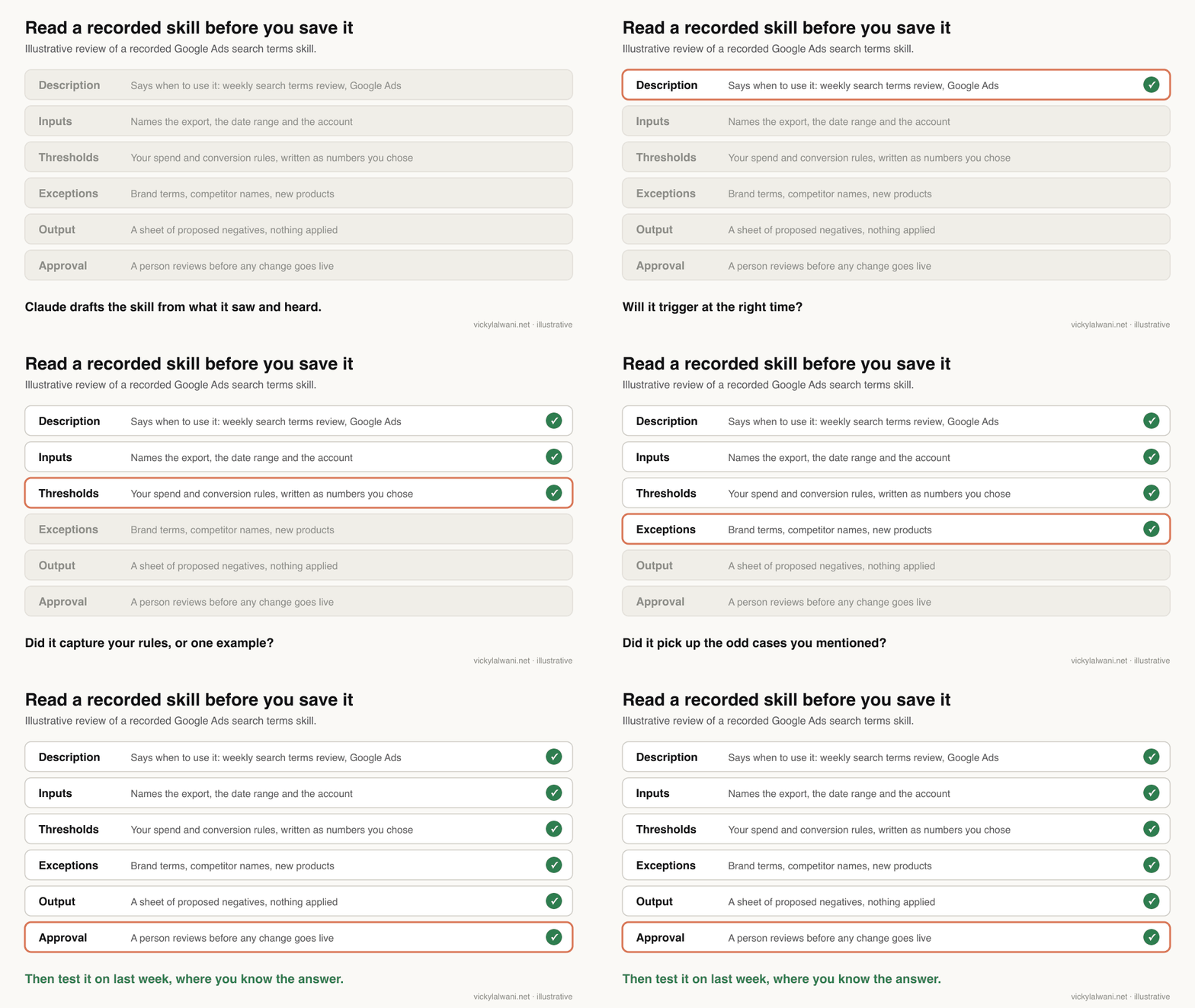
The description deserves the most care. Claude uses it to decide when to load the skill, so a vague one means the skill fires at the wrong time or not at all. In my own work, a skill built for writing offers once ended up writing website pages, and the pages read like adverts. A narrow description would have stopped that.
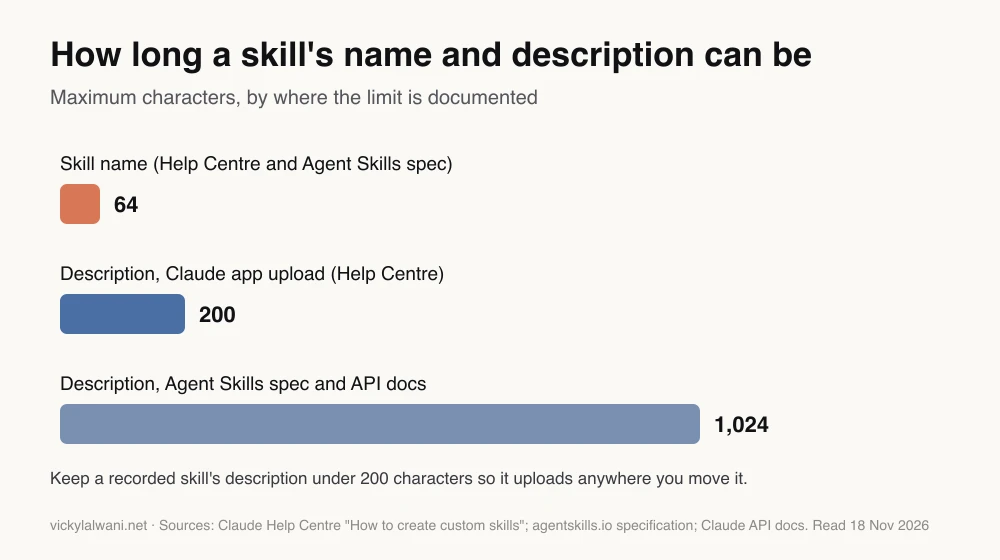
The limits differ by where you read them. The Agent Skills specification allows a 1,024 character description, but the Help Centre gives 200 characters for skills you upload to the Claude app. If you plan to download a recorded skill and share it elsewhere, keeping the description under 200 characters avoids a failed upload later. Anthropic's skill authoring best practices also suggest keeping the SKILL.md body under 500 lines.
To fix a saved skill, open its files beside a chat, highlight the text you want changed, click "Edit with Claude" and say what to change. Or ask Claude to critique it first:
Read my skill "[skill name]" and check it against this recording's purpose:
[one sentence on what the task is for].

List, in a table:
1. Any rule that came from one example rather than a general rule I stated.
2. Any step that changes a live account, page or budget. It must only propose.
3. Any input the skill assumes but does not ask for (date range, account, export).
4. Whether the description would load it for unrelated requests.
Suggest exact edits. Do not apply them until I say yes.
For skills the whole team will run, Anthropic's skill-creator can go further. Since March 2026 it writes test cases, runs the skill with and without the instructions, and compares the results, so you can see whether an edit actually helped.
Record, write or ask Claude: which way to make a skill fits?
Short answer: record when the task is on screen and your Mac and plan support it. Ask Claude to use the skill-creator when you can explain the task in words, including in chat or on Windows. Write the SKILL.md yourself when you need exact control, and use Claude Code folders for files your team versions.
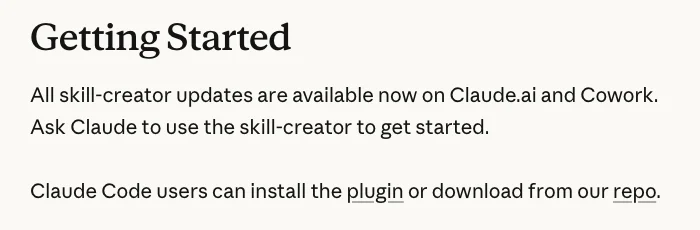
There is no button in the Claude app that turns a past conversation into a skill. What does exist is Anthropic's skill-creator. Its March 2026 update says it is available in Claude.ai and Cowork, and that you start by asking Claude to use it. So after a good working session, you can ask Claude to use the skill-creator to turn what you just did into a draft skill.
| Method | Where it works | Best when | Watch for |
|---|---|---|---|
| Record a skill | Cowork, Mac | The task is on screen | Screenshots kept in the task |
| Ask for skill-creator | Claude.ai, Cowork | You can describe it in words | Gaps in what you mention |
| Write SKILL.md | Any surface | You need exact wording | Takes the most time |
| Claude Code folder | Claude Code | Files live in a shared repo | Not synced back to the app |
| Chrome workflow | Claude in Chrome | Repeating a browser task | Separate from skills |
The last row avoids a common mix-up. In December 2025, Anthropic's release notes announced a "Record a workflow" option in Claude in Chrome, so Claude can learn and repeat a browser task. That is a Chrome extension feature. Record a skill, launched in July 2026, creates a skill in your Claude account that works across chat, Cowork and Claude Code.
In Claude Code, skills are folders in ~/.claude/skills/ for you or .claude/skills/ in a project, as the Claude Code skills documentation explains. That route suits teams who keep marketing files in a shared repository and want every change reviewed.
Why does a recorded skill go wrong, and how do you fix it?
Short answer: most problems come from access (the option is missing), the description (the skill does not load), or the recording itself (it copied one example or a habit). Each has a simple fix, listed below.
| Problem | Likely cause | Fix |
|---|---|---|
| No "Record a skill" option | Windows, chat, Free or Enterprise | Use Cowork on a Mac, or skill-creator |
| Option missing on Mac | Old app or staged rollout | Update Claude for Mac, restart |
| Skill never loads | Vague description | Name the task, tool and trigger |
| Rule looks oddly specific | Learned from one example | State the general rule, record again |
| Two skills do one job | Saved a new one, not an update | Merge, delete the weaker one |
| Client data in screenshots | Recorded a live account | Delete the Cowork task |
If a skill keeps doing something you did once by accident, record the task again with the correct step and narrate it clearly. Because Claude proposes an update when a recording overlaps an existing skill, the second recording can correct the first.
How do recorded skills become a team system?
Short answer: give every skill a clear name, an owner and a review date, and keep them in one known place. On Team plans you can share a skill with colleagues as view-only, or publish it to your organisation's library, where it may go through review first.
One recorded skill saves one person time. A shared library changes how a team works, because the method stops living in one person's head. I keep one Claude project per client and the skills in a place everyone can find, so nobody has to ask which version is current.
Anthropic's guide to using skills says shared skills are view-only: colleagues can turn them on and use them, but cannot edit them, and they get your updates automatically. Publishing to the organisation hands the skill over to the organisation, and future versions go through the same review. Enterprise plans cannot record skills, but they can publish written ones the same way.
| Field | Example |
|---|---|
| Name | google-ads-search-terms-weekly |
| Owner | The person who reviews it |
| Input | Last 7 days search terms export |
| Output | Sheet of proposed negatives |
| Review date | Monthly, or after a big change |
Recording is one stage of a bigger move: from prompts, to skills, to scheduled runs, to a whole team working the same way. That full path, with the SEO and paid search jobs that belong in it, is in Claude for marketing operations. If you are choosing which Claude features to adopt first, Claude features for marketing leaders sets out the order.
What people say on X and Reddit
Short answer: the launch was widely shared on X, mostly as news. On Reddit, the early posts were practical: the option was missing for some Pro and Team users at first, it does not appear on Windows, and some experienced users still prefer writing skills with the skill-creator.
| Who | What they said | Take it as | Link |
|---|---|---|---|
| Claude (official) | Record your screen, talk through the task, Claude turns it into a skill; Pro, Max and Team (21 Jul 2026) | Official | X post |
| TestingCatalog | Skill recording rolling out to Cowork on Pro, Max and Team plans (21 Jul 2026) | News | X post |
| Cyber Security News | Covers the launch as a new capability that turns a screen capture into a repeatable skill (21 Jul 2026) | News | X post |
| A cybersecurity account | Warns that narrating your job step by step on video is training your replacement (22 Jul 2026) | Opinion | X post |
| A practitioner on X | Explains the feature in plain terms: Claude learns how you work by watching you do the work (22 Jul 2026) | Opinion | X post |
| r/ClaudeAI | Launch thread: a Pro user could not see it yet; another asks how much usage it costs (21 Jul 2026) | Mixed | Thread |
| r/ClaudeAI | Missing on a Pro plan the day after launch; replies suggest a staged rollout (22 Jul 2026) | First-hand | Thread |
| r/ClaudeAI | A Team admin on Windows cannot find it; a reply says it is Mac only (23 Jul 2026) | First-hand | Thread |
| r/ClaudeAI | Tested recording with Claude in Chrome on a site with no API; slow, but fine for scheduled tasks; still writes most skills with skill-creator (22 Jul 2026) | First-hand | Thread |
Most of the X posts repeat the announcement, so read them as news rather than reviews. The Reddit threads are more useful because they record what actually happened on people's machines in launch week.
Videos worth watching
Short answer: start with Claude's own short explainer on skills, then a walkthrough of Record a skill with three real examples. Anthropic's older custom skills video explains the file format that a recording produces.
Made by Claude's official channel, 26 February 2026. It does not sell anything. A short explanation of what a skill is and when Claude loads one.
Made by Skill Leap AI, 6 August 2026. It links a sponsor's guide. It records three tasks, including a weekly CSV report, and shows the SKILL.md file Claude produced.
Made by Anthropic, 16 October 2025, before recording existed. It does not sell anything. Useful for understanding the file you will be editing.
| Video | Channel | Date | What it covers |
|---|---|---|---|
| What are skills? | Claude | 26 Feb 2026 | What a skill is |
| Claude Record Skill Tutorial | Skill Leap AI | 6 Aug 2026 | Three recorded tasks |
| Creating custom Skills with Claude | Anthropic | 16 Oct 2025 | The SKILL.md format |
| Claude Cowork Can Now Learn Any Skill by Watching You | KiS | 22 Jul 2026 | Beginner launch walkthrough |
| The New Way to Create Skills in Claude Cowork | Kumo Explains | 22 Jul 2026 | Launch test, affiliate link |
| Claude Agent Skills Explained | Anthropic | 26 Nov 2025 | How skills load |
Where this advice is weak
Short answer: recording is new, Mac only and plan limited, and the menus may move. I have not measured how much time a recorded skill saves, and the privacy guidance here is practical, not legal.
- It changes often. The plan list has already grown from the launch post (Pro, Max, Team) to the Help Centre (adding Ultra). Check the Help Centre before you plan a rollout around it.
- No measured savings. I do not give a time saving or a quality figure, because I have not measured one. Judge it on your own tasks.
- Usage costs. A Reddit user asked how much usage a recording consumes. Anthropic's pages I read do not say, so watch your own limits.
- Recordings copy habits. A skill learns what you showed it. If your process is weak, the skill will repeat it faithfully.
- Data rules vary. Whether you may record inside a client's tools depends on your agreements and local law. Ask a professional if you are unsure.
Want help turning your weekly tasks into skills?
Short answer: pick one weekly task, record it this week, review it with the checklist above and test it on last week's data. If you want someone to do that with you across your SEO and paid search work, that is part of my Claude consultant service.
My Claude consultant service covers choosing which tasks to record, recording or writing the skills, testing them on past data and setting up review owners. If the tasks are mainly in your ad accounts, the work sits with my Google Ads management; if they are in Search Console and your site, with my SEO consulting. Rates are on the pricing page, and the free Marketer's Claude Folder guide has templates to start from.
Sources
| Source | What it supports | Date |
|---|---|---|
| Claude Help Centre: How to create custom skills | Plans, Mac only, steps, 10 minutes, what is kept, 64 and 200 character limits, Edit with Claude | Read 18 Nov 2026 |
| Claude Help Centre: Use skills in Claude | Skills on all plans, sharing, publishing, Claude Code sync | Read 18 Nov 2026 |
| Claude Help Centre: What are skills? | What a skill is, skills vs Projects | Read 18 Nov 2026 |
| Claude on X: launch post | Launch date, plans at launch | 21 Jul 2026 |
| Anthropic: Improving skill-creator | Skill-creator in Claude.ai and Cowork, tests and comparisons | 3 Mar 2026 |
| Claude release notes | Chrome "Record a workflow", Dec 2025 | Read 18 Nov 2026 |
| Claude Code docs: skills | Skill folders, synced skills | Read 18 Nov 2026 |
| Agent Skills specification | 1,024 character description | Read 18 Nov 2026 |
| Claude docs: skill authoring best practices | SKILL.md under 500 lines | Read 18 Nov 2026 |
| Google Ads Help: search terms report | What the report shows | Read 18 Nov 2026 |
| Search Console Help: Performance report | What the report shows | Read 18 Nov 2026 |
| X and Reddit posts above | Launch reactions, rollout and Windows reports | 21 to 23 Jul 2026 |
| YouTube videos above | Walkthroughs, checked with YouTube oEmbed | Oct 2025 to Aug 2026 |
This article expands on my post on LinkedIn ↗.
FAQ
How do I record a skill in Claude?
Open Cowork in Claude for Mac, click "+" in the composer and choose "Record a skill", or go to Customize > Skills, Add, Record your screen. Click Start recording, do the task while you explain your choices aloud, then click Done. Claude reviews the recording and proposes a skill that you save or dismiss.
Which Claude plans can record a skill?
Anthropic's Help Centre lists Pro, Max, Ultra and Team plans in November 2026. Recording is not available on Free or Enterprise plans, although both can still use skills that are written or uploaded.
Can I record a skill in Claude on Windows or in chat?
No. The Help Centre says recording a skill works only in Cowork in Claude for Mac, not in chat and not on Windows. On Windows you can ask Claude to use the skill-creator to draft a skill from a description instead.
How long can a Claude skill recording be?
About 10 minutes. A countdown appears in the capture bar when about a minute is left, and when it reaches zero Claude receives everything captured so far, as if you had clicked Done. Record longer tasks in stages.
Does Claude keep the video of my recording?
No. Anthropic says the video and audio are not retained after Claude reviews them. A set of screenshots from the session is saved in the Cowork task, and deleting that task removes them, so delete it if the screenshots show client data.
Can Claude turn a conversation into a skill?
There is no button in the Claude app that converts a past chat into a skill. You can ask Claude to use Anthropic's skill-creator, which is available in Claude.ai and Cowork, to draft a skill from what you have just done or described.
Which SEO and PPC tasks should I record first?
Pick a weekly on-screen task with a clear output that takes under 10 minutes to show, such as a Google Ads search terms review, a Search Console quick-wins check or a landing page check before launch. Narrate your rules and exceptions as you work.
Do I need to check a recorded skill before using it?
Yes. Expand Content on the proposal card and read the description, inputs, rules and output before you save. Then test it on last week's data where you know the right answer, and keep a person approving any change to a live account.
Do recorded skills work in Claude Code?
Yes, if Claude Code is signed in with the same Claude account. Anthropic says skills enabled in your account sync to Claude Code version 2.1.273 or later, one way only, so make edits in Claude rather than in the synced copy.