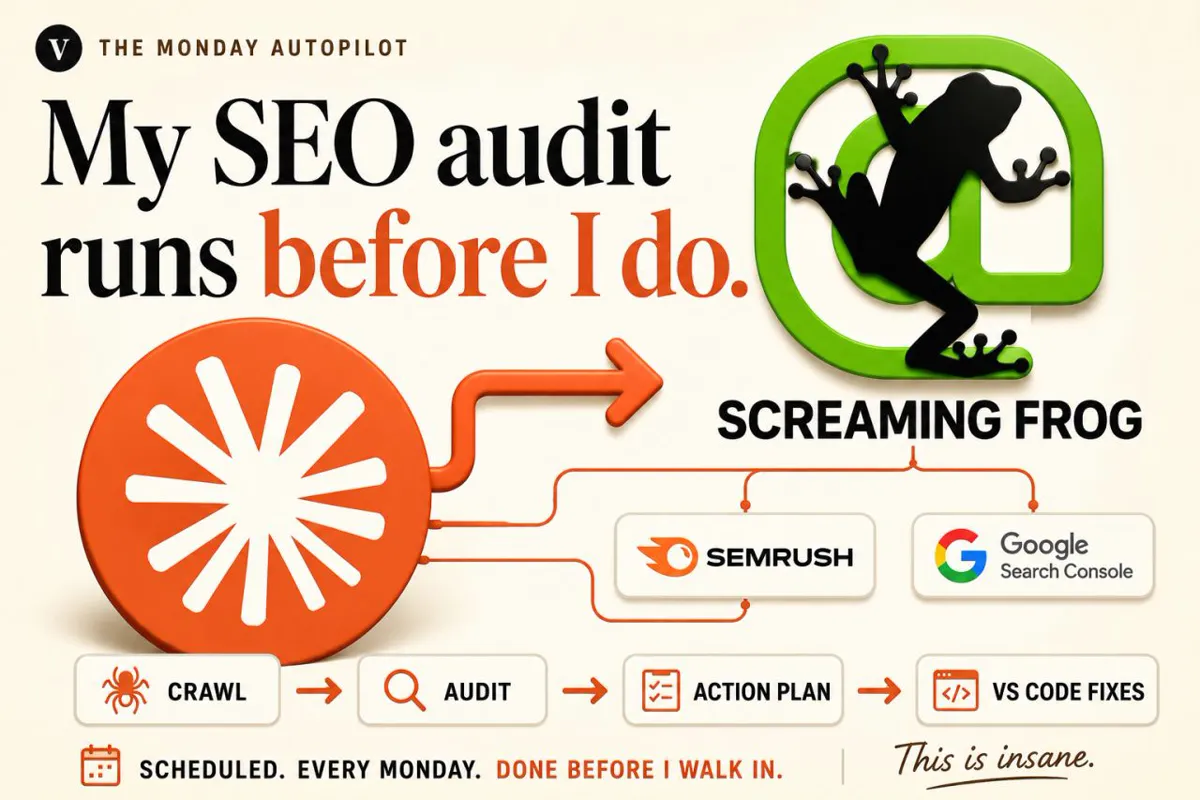
Claude Code automation runs recurring work as scheduled loops: a saved prompt and skill that Claude Code runs in the cloud, on your computer or in GitHub Actions. Start with marketing reporting, SEO and Google Ads checks, keep runs read only, remove unneeded connectors, and approve anything that spends money or contacts customers.
Every Monday the same jobs come round: check Google Ads spend, see what moved in Search Console, draft the client report, chase two invoices, write the week's priorities. None of it is hard, and all of it is easy to skip on a busy week. Claude Code can now run that kind of work on a schedule, prepare the output and wait for you to approve it. This guide covers how the scheduling options work in November 2026, which business loops to automate first (marketing reporting, SEO and PPC checks lead the list), and where a person must stay in charge. If you would rather have the loops built for you, see my AI automation service.
TL;DR
A loop is a saved prompt, a skill and a trigger. Claude Code can run it in Anthropic's cloud (cloud scheduled tasks, formerly routines, in research preview), on your computer (Desktop tasks), inside an open session (/loop) or in GitHub Actions (Claude Code docs).
Start with marketing reporting and checks. They are frequent, rule based, read only and easy to verify: a weekly Google Ads health check, Search Console movers, a tracking check and a monthly report draft.
Cloud runs start in auto mode and include all your connectors by default. Remove the connectors a loop does not need and keep budgets, bids, client emails and payments behind your approval (cloud task docs).
Plan for late and missed runs. Runs set on the hour can start late, Desktop tasks skip while your computer sleeps, and on 13 November 2026 some cloud runs were more than two hours late or skipped (Claude status).
What is Claude Code automation?
Short answer: It is Claude Code running a task you defined once, on a schedule or a trigger, without you typing the prompt each time. The task is a self-contained prompt plus any skills and data connections it needs. In November 2026 there are four ways to run it: cloud scheduled tasks, Desktop scheduled tasks, /loop and headless runs in scripts or GitHub Actions.
The cloud option is the one most people mean. Anthropic's cloud scheduled tasks docs describe a saved Claude Code configuration (a prompt, one or more repositories and a set of connectors) that runs on Anthropic-managed infrastructure, so it keeps working with your laptop closed. A task can start on a schedule, from an API call or from a GitHub event. It is available on Pro, Max, Ultra, Team and Enterprise plans and is still a research preview, so behaviour and limits may change.
The name changed during 2026. Anthropic launched "routines" on 14 April 2026; the docs now call them cloud scheduled tasks, and the old name still appears in places such as the /schedule command's alias /routines. If you read a tutorial about routines, it is the same feature.
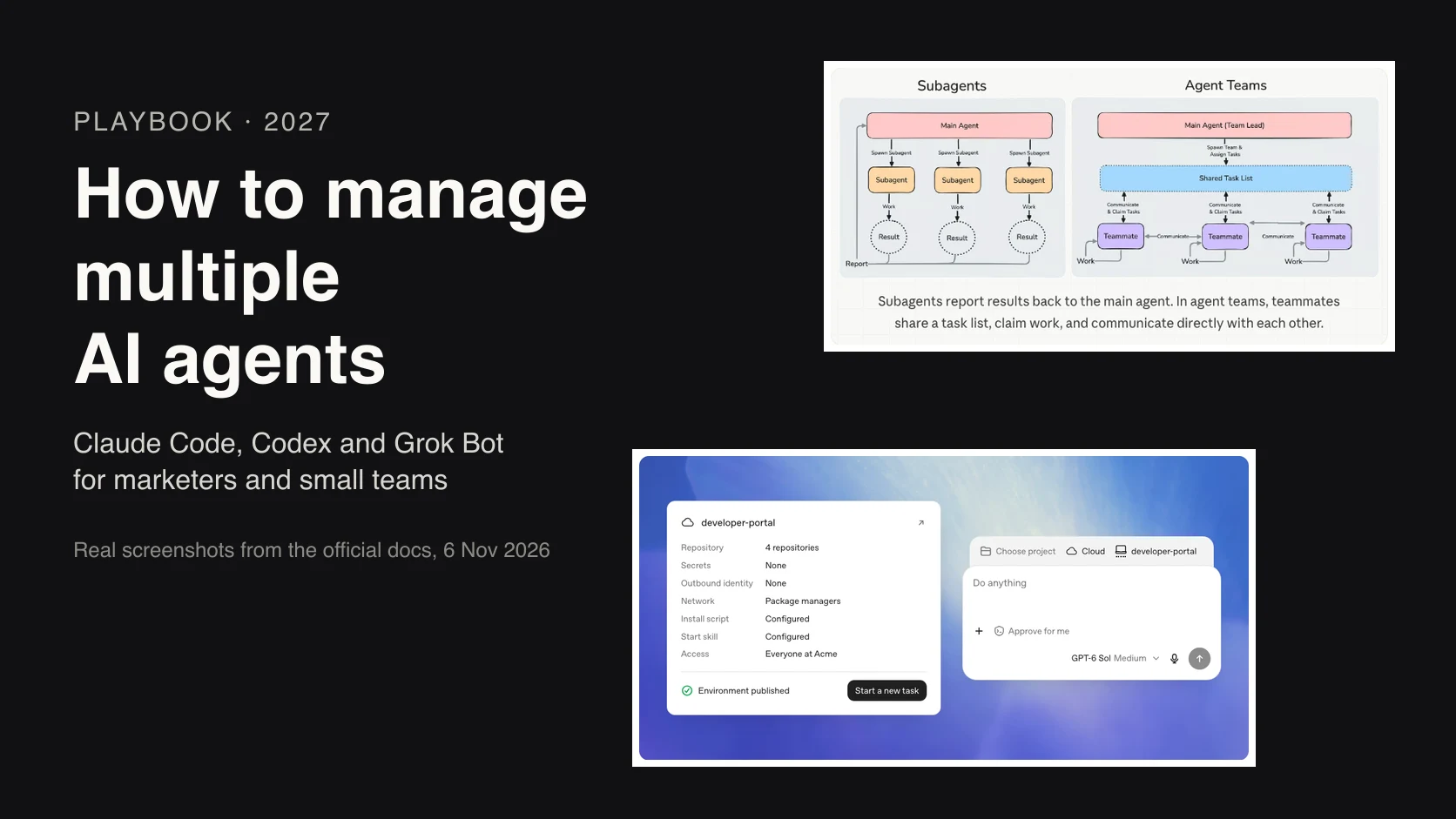
Claude Cowork has its own scheduled tasks for non-code work such as weekly reports from Google Drive or a morning briefing. They are on all paid plans, run remotely and use your connectors, skills and plugins. Use Cowork when the output is a document; use Claude Code when the loop needs scripts, a repository or exact repeatability. My morning marketing briefing guide covers the Cowork route.
Made by Anthropic's Claude channel on 20 May 2026. It builds a scheduled workflow end to end with the /schedule command. The example is for developers, but the trigger, context and review decisions are the same for a marketing loop. It promotes Claude itself.
Which Claude Code scheduler should you use?
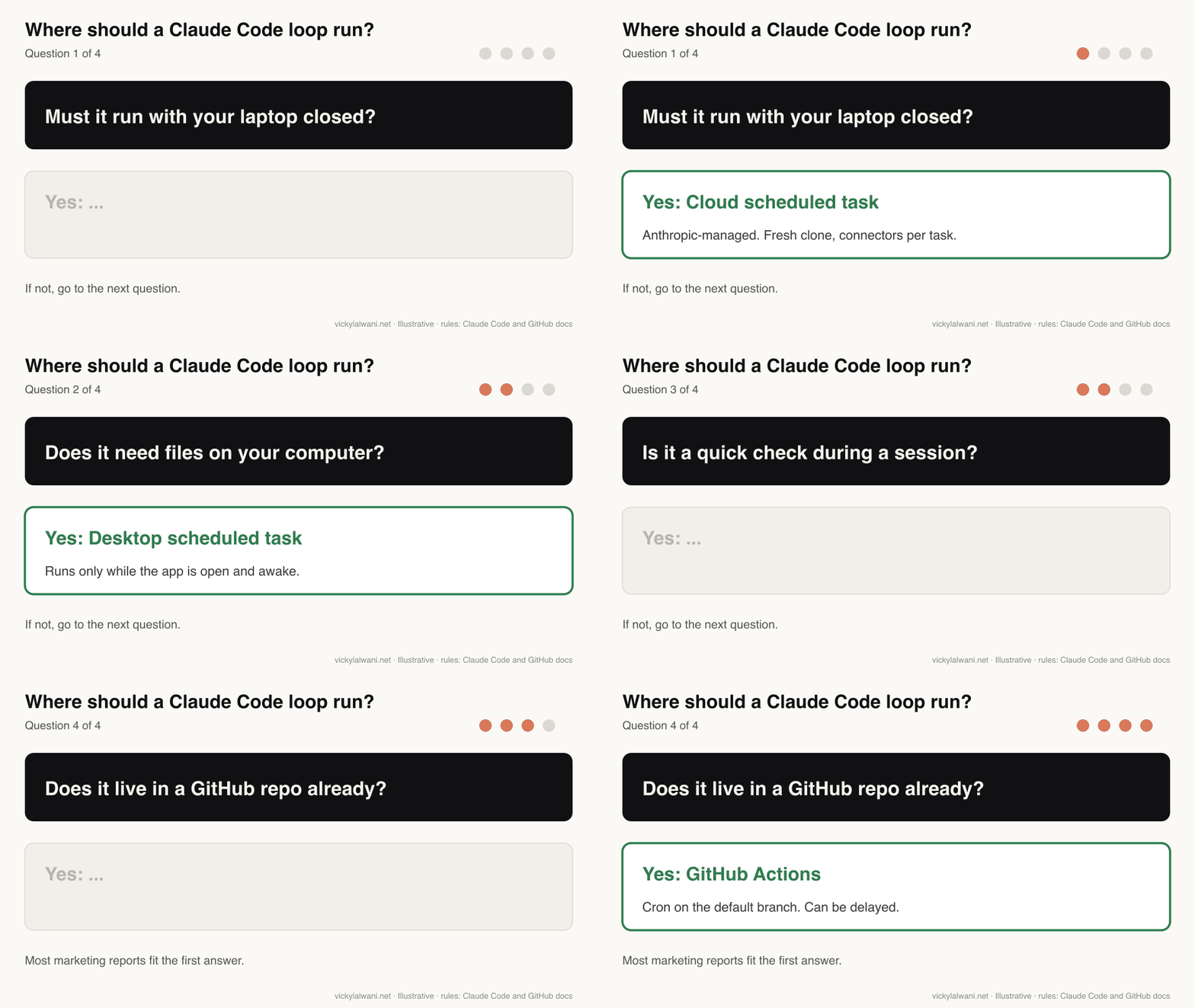
Short answer: Use a cloud scheduled task for anything that must run reliably with your computer off, a Desktop task when the loop needs files or tools on your machine, /loop for short checks while you work, and GitHub Actions when the loop already lives in a repository. Cloud and form-based Desktop tasks run at most hourly.
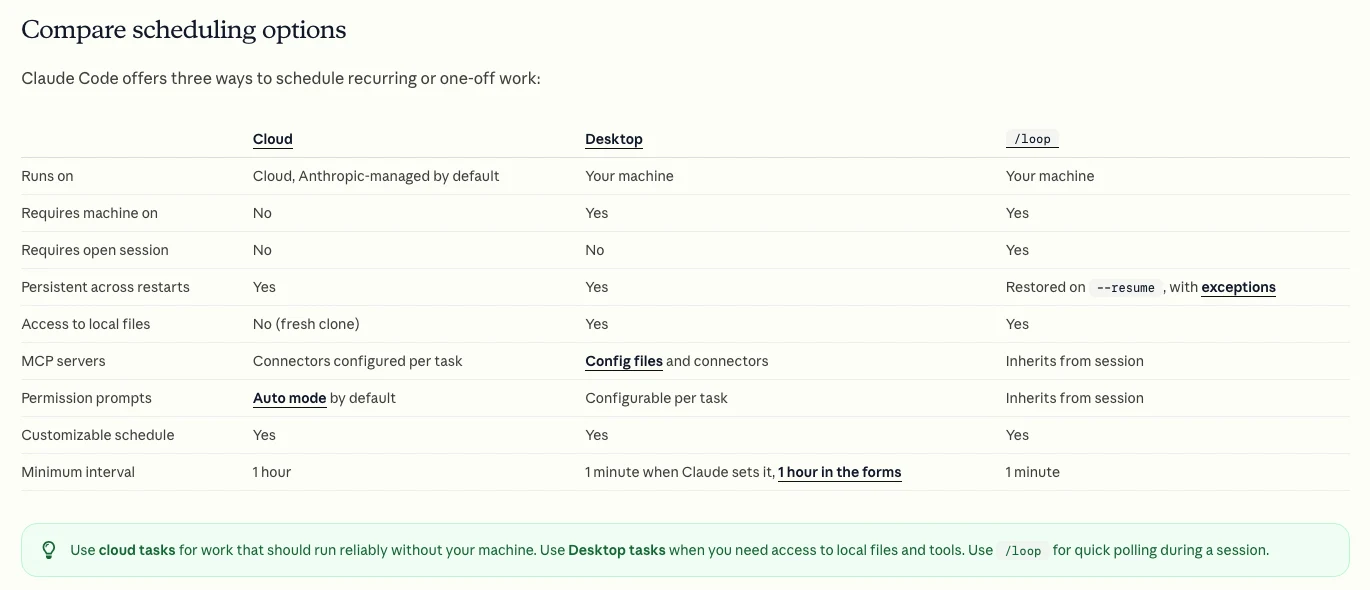
| Option | Runs where | Needs | Best marketing use |
|---|---|---|---|
| Cloud scheduled task | Anthropic cloud | Connectors, a repo | Weekly reports, checks |
| Desktop task | Your computer | App open, awake | Loops using local exports |
| /loop | Open session | Session running | Watching a launch day |
| GitHub Actions | GitHub runners | Repo and API key | Site and SEO checks in CI |
| Cowork task | Anthropic cloud | Paid plan | Document-style reports |
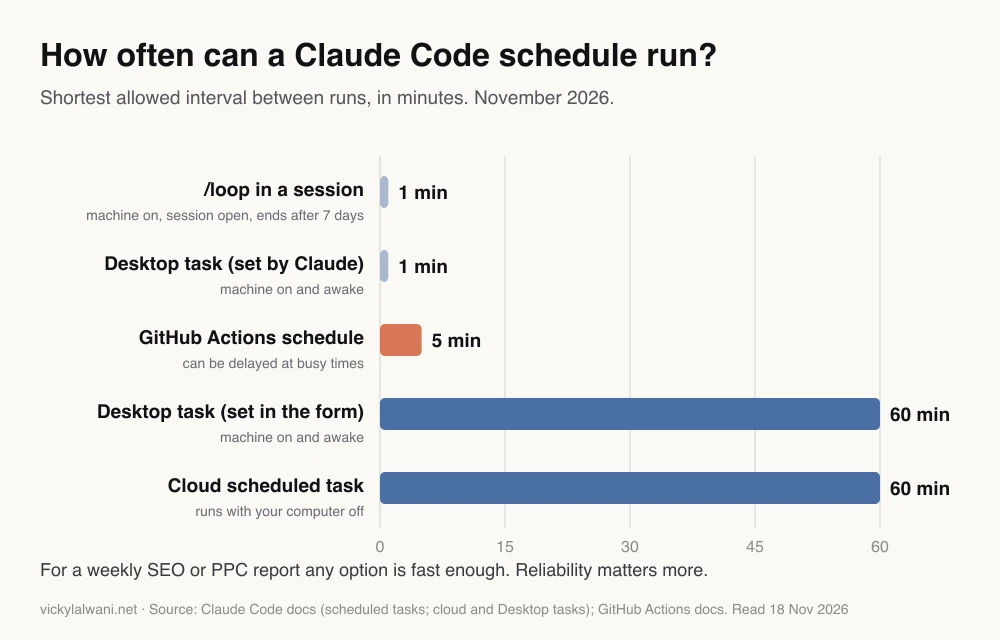
Speed rarely matters for business loops. A weekly SEO report does not need one-minute polling. What matters is that the run happens, and that you notice when it does not. /loop tasks expire after seven days and stop when the session closes, so they suit a launch day, not a standing report.
Which business loops should you automate first?
Short answer: Pick work that is frequent, follows clear rules, only reads data and is easy to check by hand. For most small businesses that is marketing reporting and account checks, then sales follow-up drafts. Leave anything that spends money, contacts customers or commits the business behind a person's approval.
| Loop | Function | How often | Human gate |
|---|---|---|---|
| Google Ads health check | Marketing | Daily or weekly | Before any change |
| Search Console movers | Marketing | Weekly | Before content edits |
| Tracking and lead check | Marketing | Daily | Before fixing tags |
| Client report draft | Marketing | Monthly | Before sending |
| Lead follow-up drafts | Sales | Daily | Before sending |
| Invoice reminder drafts | Finance | Weekly | Before sending |
| Ad spend vs budget | Finance | Weekly | Before budget moves |
| Monday priorities note | Operations | Weekly | Read, then act |
Score each candidate on three questions: how often it happens, whether the rules can be written down, and what the worst mistake would cost. A daily check that only reads data and posts a summary scores well. A loop that pauses campaigns or emails a customer scores badly however often it runs.
Marketing loops come first for a practical reason too: the data already sits in tools with exports and connectors, such as Google Ads, GA4 and Search Console. Google even publishes an official Google Ads MCP server that lets an assistant read account data. If you want a longer list of ideas, my 15 scheduled marketing loops article has one per job.
What do SEO and PPC loops look like in practice?
Short answer: Each one pulls a fixed data set, compares it with a rule or last period, and writes a short summary with a list of suggested actions for you to approve. The four worth building first are a Google Ads health check, Search Console movers, a tracking check and a monthly report draft.
| Loop | Data | Rule it applies | Output |
|---|---|---|---|
| Google Ads health | Campaign and search terms | Spend pace, CPA jump, waste | Flags and suggested negatives |
| Search Console movers | Queries and pages | Biggest click changes | Pages to review |
| Tracking check | Conversions and CRM leads | Zero or mismatch | Alert with likely cause |
| Monthly report | All of the above | Same format each month | Draft and a human note |
Each source has timing rules a loop must respect. Search Console says collected data is normally available in 2 to 3 days and reports days in California time. Google Ads refreshes most metrics hourly, but conversions under non-last-click models arrive later. GA4 processing can take 24 to 48 hours. So a Monday 7am loop should compare full weeks that ended a few days earlier, and say which dates it used.
The tracking check is the one I would add before anything else. My habit is tracking before spend, and reconciling tracked conversions against the leads in the CRM. A loop that does that every morning catches a broken form before a week of budget goes on it. If the check keeps failing, my analytics and tracking service fixes the setup, and ten Claude Code PPC workflows covers the Google Ads builds in detail.
Weekly Google Ads health check. Read only. Never change anything in the account.
Data: the Google Ads campaign report and search terms report for the last full Monday to Sunday week, and the week before.
1. Flag any campaign whose cost per conversion rose more than 30% week on week with at least 10 conversions.
2. Flag spend pacing: month to date spend vs monthly budget, adjusted for days elapsed.
3. List search terms with spend and no conversions, grouped by theme, as suggested negatives.
4. State the exact dates used and the conversion column used.
5. Write five plain sentences for the account owner, then the list of suggested actions.
If any data is missing or totals do not match the campaign report, stop and report that instead.
The thresholds in that prompt (30% and 10 conversions) are examples. Set your own based on the account's volume. For SEO help behind the movers report, see my SEO consulting service, and for the paid side, Google Ads management.
How do you set up your first Claude Code loop?
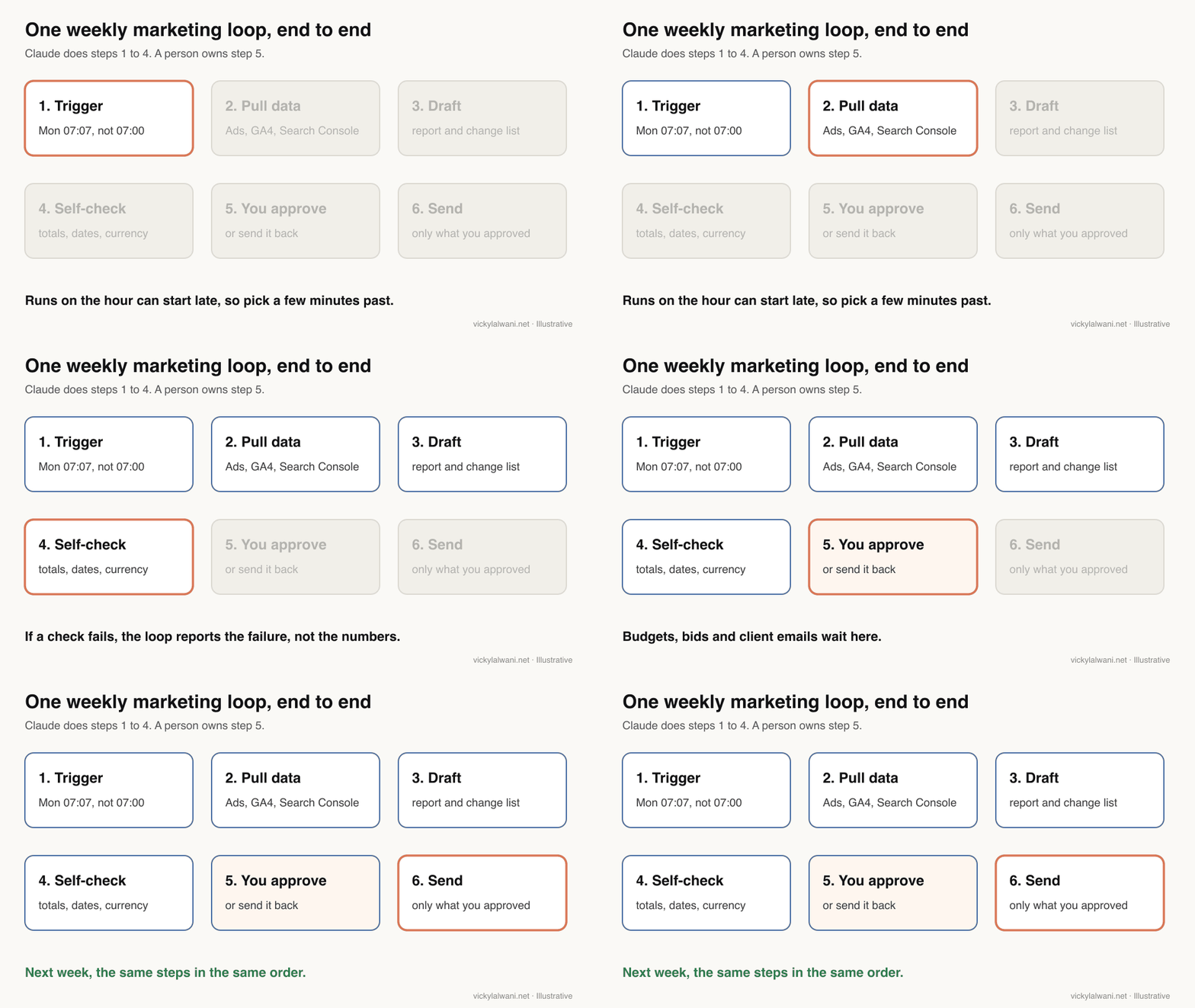
Short answer: Write the task as a skill, run it by hand on last month's data until the output is right, then schedule it. In the cloud, create the task at claude.ai/code/routines or with /schedule in the CLI, pick a time a few minutes past the hour, remove connectors it does not need, and review every run for a month.
- List recurring tasks. Everything done daily, weekly and monthly. Mark the ones with clear rules.
- Pick three. Frequent, boring and easy to check. Not ten.
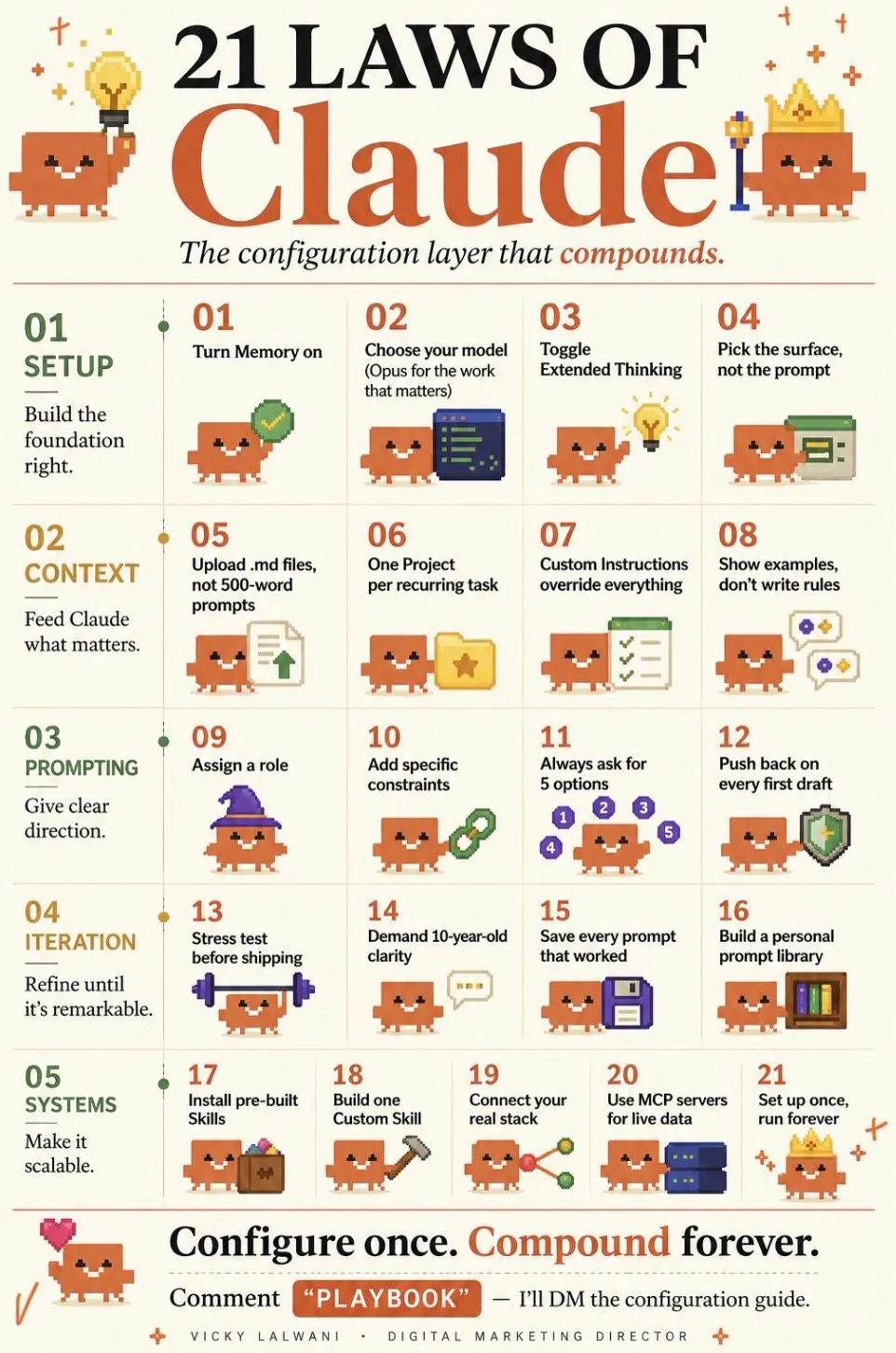
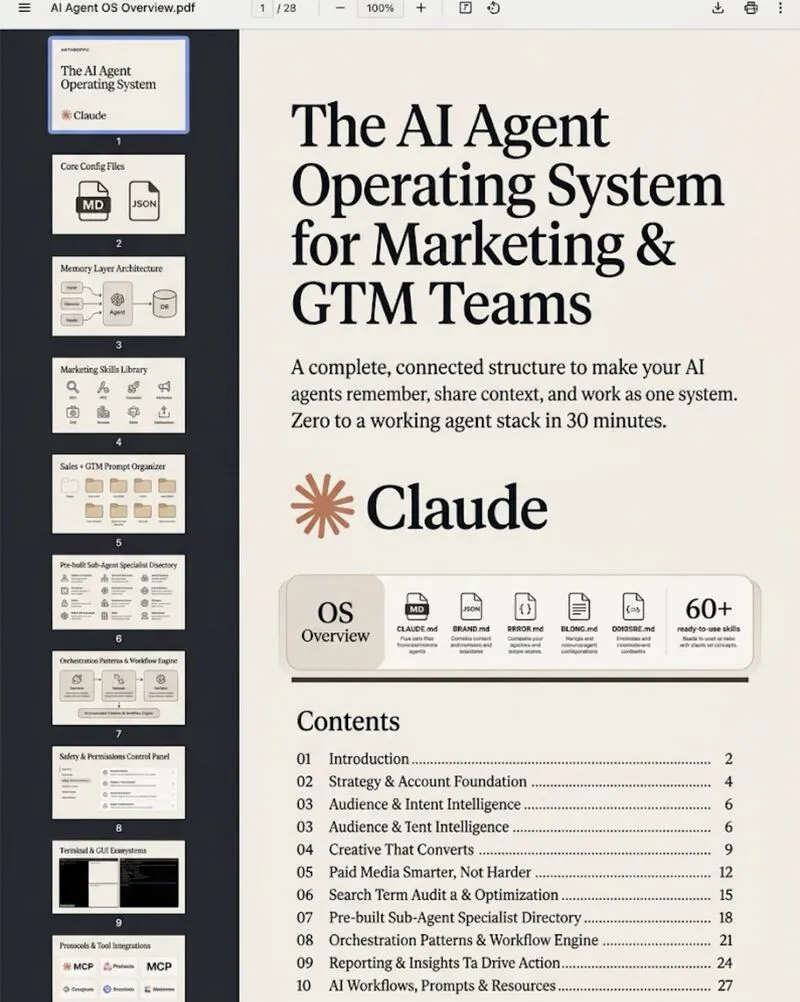
- Write each as a skill. A skill is a SKILL.md file with the inputs, steps, output format and checks. Claude loads it only when it is used.
- Run it by hand. Use last month's data and compare the output with what you already know.
- Schedule it. In the cloud task form, runs set exactly on the hour can start several minutes late, so pick 7:07 rather than 7:00. Custom cron times are in UTC, and nothing can run more often than hourly.
- Review for a month. Fix the skill each time you correct the output, then add the next loop.
You can also describe the task in plain English. Anthropic's docs give examples such as "/schedule daily PR review at 9am"; for a marketing loop, something like the line below works, and Claude walks you through the rest.
/schedule every Monday at 7:07am London time, run the weekly-google-ads-health skill on the latest exports in the reports folder, save the summary as reports/weekly/YYYY-MM-DD.md, and do not change anything in any ad account
One practical catch: cloud tasks work in a fresh clone of your repository, not on your computer, so local exports are not visible to them (comparison table). Either pull the data through a connector or API in the run, or use a Desktop task, which can read local files but only runs while the app is open and the computer awake.
What can a scheduled run do without asking you?
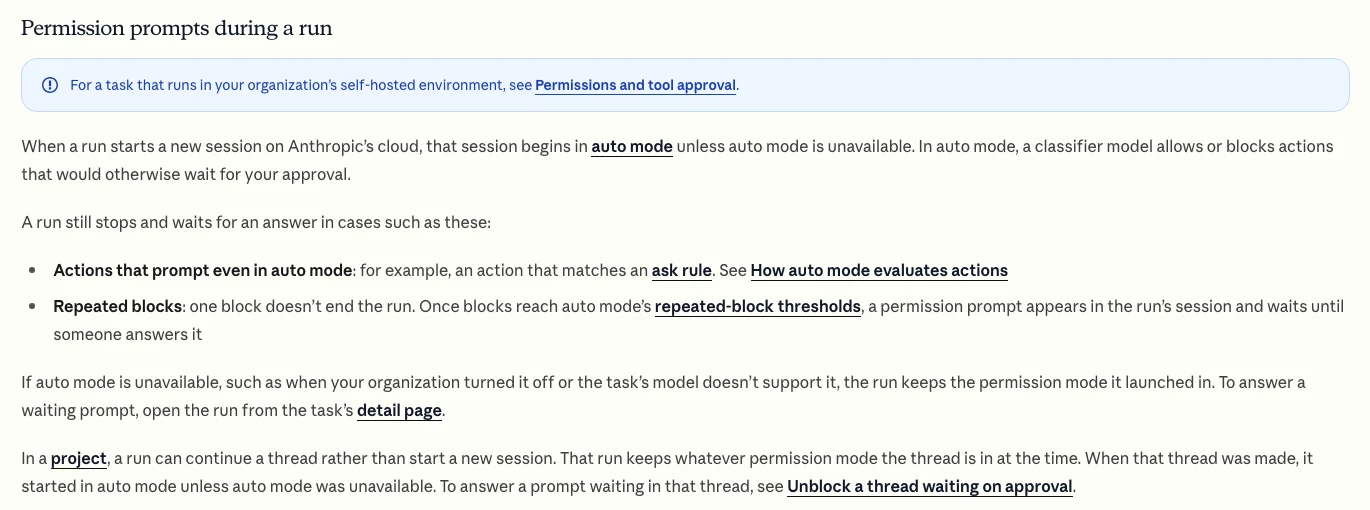
Short answer: More than most people expect. A cloud run starts in auto mode, where a classifier approves or blocks actions instead of asking you, and every connector on your account is included by default, including write access. Anything it does through a connector appears as you. Remove what the loop does not need and add ask rules for risky actions.
| Setting | Default | For a marketing loop |
|---|---|---|
| Permission mode (cloud) | Auto mode | Add ask rules for writes |
| Connectors | All included | Keep only what it reads |
| Network (cloud) | Limited allowlist | Add only needed domains |
| Secrets | Environment variables | Use network secrets |
| Identity | Acts as you | Use read-only API access |
Two details from the docs matter for ad accounts. First, the stored prompt is not approval: the docs say a fired prompt cannot act as consent for actions during the run. Second, a run still stops for an action that matches an ask rule, and waits until someone answers in the run's session. That is the hook for "draft the budget change, then wait for me". Desktop tasks set a permission mode per task instead. In Cowork, a connector tool set to "Always ask" may make a scheduled task wait for you or finish without that tool (Cowork help).
Where must a human stay in charge?
Short answer: Anywhere a mistake costs money, reaches a customer or commits the business: ad budgets and bids, campaign status, client and customer emails, invoices and payments, and anything that changes tracking on a live site. The loop can prepare all of these. A person approves them.
My rule on client ad accounts is the same with or without automation: audit first, put the findings in a sheet, check them by hand, and change nothing before approval. Every report also gets a short human note on where things stand and what happens next. A loop makes the preparation cheaper. It does not make the decision.
Practitioners who removed the human from the loop show why. In an r/ClaudeCode thread about a cloud routine that runs a whole workflow unattended, the top reply warns that an autonomous agent with a goal can confidently optimise the wrong thing forever. On r/PPC, people running Claude Code on ad accounts suggest keeping changes behind approval and warn about API misuse.
Finance and outreach need extra care. Draft invoice reminders and forecasts, but approve before anything is sent. Prepare prospect research and follow-up drafts, but respect consent and opt-outs and read what goes out. Customer and finance data should only flow to tools your policies allow.
What does Claude Code automation cost, and what are the limits?
Short answer: Scheduled runs use your Claude subscription the same way interactive sessions do. Separately, the cloud has hourly limits: 100 scheduled runs per hour per account, and 30 manual or API-triggered runs per hour per task. These hourly limits have no overage; subscription usage can continue on paid usage credits if they are turned on.
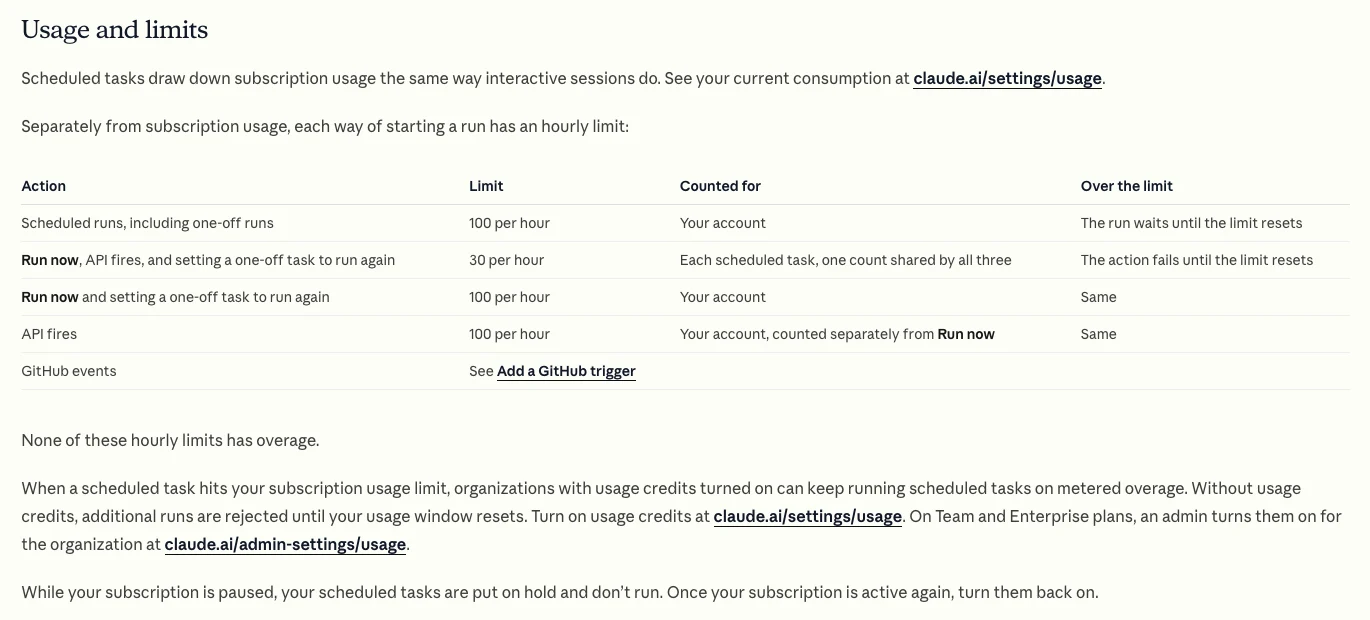
Limits have changed this year, so check the page rather than a tutorial. In a September r/ClaudeCode thread, a user asked about daily caps of 5, 15 and 25 runs from the launch post; a reply pointed out that the docs now list hourly limits instead. For a small business running a handful of weekly loops, the hourly limits will not bind. Subscription usage is the real cost, and a long run on a large model uses more of it.
Other limits to plan around: if your GitHub connection lapses, a cloud task skips runs for up to 72 hours and then turns off. Scheduled GitHub Actions run only from the default branch, can be delayed at busy times, and in public repositories turn off after 60 days without activity.
What goes wrong with scheduled loops?
Short answer: Runs happen late or not at all, inputs change without warning, and nobody reads the output. On 13 November 2026 Anthropic reported that some scheduled tasks ran more than two hours late and some were skipped. Design every loop so a missed or failed run is visible, and so it reports bad data instead of summarising it.

| Failure | What happens | Guardrail |
|---|---|---|
| Late cloud run | Starts minutes or hours late | State the dates used |
| Computer asleep | One catch-up run on wake | Skip if too late |
| Session closed | /loop stops firing | Use cloud for standing jobs |
| Export format changes | Wrong or missing columns | Stop and report |
| Messy process | Confusion on a schedule | Tidy the process first |
| No owner | Nobody reads the output | Name a person per loop |
The incident on 13 November 2026 is a useful reminder that a loop can fail without any mistake on your side. Anthropic's own advice for Desktop tasks applies everywhere: put timing guardrails in the prompt, such as "if it is after midday, skip the report and say what was missed". A Reddit thread on r/ClaudeCode also shows a softer failure: after an interface change, one user could no longer find their routine runs in the sidebar, which matters if you rely on reading them every morning.
The older pitfalls still apply. A loop that runs a confused routine produces confused output on a schedule, so tidy the process first. Document where each input comes from and who maintains it. Give each loop a named owner who reads the output, fixes the skill and decides when to retire it.
Which videos explain Claude Code scheduled tasks?
Short answer: Anthropic's own videos show the features as designed. Practitioner videos show the setup work and the marketing uses, though several sell courses or tools, so treat time-saving claims with care.
Made by a PPC training channel on 26 January 2026. It runs Google Ads tasks from Claude Code without coding; the free setup document is a lead magnet for the channel's business.
| Video | Channel | Date | What it covers |
|---|---|---|---|
| Build a proactive agent workflow with Claude Code | Claude (official) | 20 May 2026 | Scheduling with /schedule |
| Scheduled Tasks in Cowork | Claude (official) | 18 Mar 2026 | Cowork scheduling |
| Claude Cowork for marketing ops | Claude (official) | 18 May 2026 | Weekly metrics review |
| Claude Code to automate Google Ads | A PPC training channel | 26 Jan 2026 | Google Ads tasks |
| Claude Code loops vs scheduled tasks | An AI tutorial channel | 10 Mar 2026 | Loop vs schedule |
| Automate SEO reporting with Claude Code | An SEO tutorial channel | 22 Jul 2026 | SEO report build |
What people say on X and Reddit
Short answer: Anthropic's posts stress that loops now run with your computer off. Practitioners agree the setup (APIs, guardrails, context) is the hard part, then point to the same risks: unattended agents optimising the wrong goal, confusing limits, and changes made without approval.
| Post | Date | Point | Type |
|---|---|---|---|
| Claude on X | 25 Feb 2026 | Scheduled tasks arrive in Cowork | Vendor |
| Claude on X | 14 Apr 2026 | Routines: schedule, API or event | Vendor |
| Claude on X | 7 Jul 2026 | Tasks run with computer off; drafts left unsent | Vendor |
| A growth marketer | 2 Mar 2026 | Claude Code with SEO data and CMS access | Opinion |
| A software developer | 4 May 2026 | Claude Code suggested automating GSC checks | First-hand |
| Reddit thread | Date | Recurring theme | Type |
|---|---|---|---|
| r/PPC: Claude Code for account management | 19 Sep 2026 | Setup is the hard part | First-hand |
| r/PPC: a scripted daily report | 21 Jun 2026 | An emailed report beats a dashboard | First-hand |
| r/ClaudeCode: removed the human | 2 Aug 2026 | Risk of optimising the wrong goal | Opinion |
| r/ClaudeCode: daily cap for routines | 30 Sep 2026 | Limits now hourly | First-hand |
| r/ClaudeCode: routines hidden away | 19 Oct 2026 | Runs harder to find | First-hand |
The X posts were checked through X's embed service on 18 November 2026, and the Reddit threads were read through the Arctic Shift archive. I credit communities and account types, not people.
Where this advice is weak
Short answer: Cloud scheduled tasks are a research preview and Anthropic changed their name, limits and interface during 2026, so check the linked docs before you rely on a detail. I have not measured hours saved, and the social evidence is anecdotal.
- Facts were read on Anthropic, Google and GitHub pages on 18 November 2026.
- The loop list is a starting order based on risk and frequency, not a measured ranking.
- The prompt thresholds are examples; the right ones depend on account volume.
- Costs depend on your plan, model and how long each run takes. Anthropic does not publish a per-run price for subscription plans.
Want your first loops built and checked?
Claude Code automation removes the preparation work, not the judgement. The useful version is three loops that run on time, report bad data instead of hiding it, and wait for you before anything changes. My AI automation service builds and tests those loops for your business, starting with marketing reporting, SEO and Google Ads checks, and my Claude consultant service sets up skills, permissions and training for your team. Rates are on the pricing page.
Sources
| Source | What it supports | Date | Link |
|---|---|---|---|
| Claude Code docs | Cloud tasks: plans, triggers, auto mode, connectors, limits | Read 18 Nov 2026 | Cloud scheduled tasks |
| Claude Code docs | Cloud vs Desktop vs /loop; 7-day expiry | Read 18 Nov 2026 | Scheduled tasks |
| Claude Code docs | Desktop tasks, missed runs, permissions | Read 18 Nov 2026 | Desktop scheduled tasks |
| Claude Code docs | Skills | Read 18 Nov 2026 | Skills |
| Claude Code docs | Headless runs with claude -p | Read 18 Nov 2026 | Run programmatically |
| Claude Code docs | GitHub Actions on a schedule | Read 18 Nov 2026 | GitHub Actions |
| Claude Help Center | Cowork scheduled tasks | Read 18 Nov 2026 | Cowork scheduled tasks |
| Claude status | Late and skipped runs | 13 Nov 2026 | Incident |
| GitHub docs | 5-minute minimum, delays, 60 days | Read 18 Nov 2026 | Schedule event |
| Search Console Help | Data in 2 to 3 days; California time | Read 18 Nov 2026 | About Search Console data |
| Google Ads Help | Hourly metrics; conversion delays | Read 18 Nov 2026 | Data freshness |
| Google Analytics Help | 24 to 48 hours processing | Read 18 Nov 2026 | Data freshness |
| Google Ads API docs | Official Google Ads MCP server | Read 18 Nov 2026 | MCP server |
| YouTube, X, Reddit | Videos and practitioner views | 2026 | Linked in tables |
This article expands on my post on LinkedIn ↗.
FAQ
What is Claude Code automation?
Claude Code automation means running a Claude Code task you defined once on a schedule or trigger, without typing the prompt each time. In November 2026 you can run it as a cloud scheduled task, a Desktop scheduled task, a /loop in a session, or a headless run in GitHub Actions.
What happened to Claude Code routines?
Routines were renamed. Anthropic launched routines in April 2026, and the docs now call them cloud scheduled tasks. They still run in Anthropic's cloud on a schedule, an API call or a GitHub event, and are still a research preview.
Do Claude Code scheduled tasks run when my computer is off?
Cloud scheduled tasks do, because they run on Anthropic-managed infrastructure. Desktop scheduled tasks only run while the Claude app is open and the computer is awake, and /loop only runs while the session is open.
How often can a Claude Code scheduled task run?
Cloud scheduled tasks can run at most once an hour, and so can Desktop tasks set up in the form. A /loop or a Desktop task scheduled by Claude can run every minute, and a GitHub Actions schedule every five minutes.
Which plans include Claude Code scheduled tasks?
Cloud scheduled tasks are available on Pro, Max, Ultra, Team and Enterprise plans. On Team and Enterprise, an owner can turn them off for the organisation, and runs count against your subscription usage.
What should a small business automate first with Claude Code?
Start with marketing reporting and checks, such as a weekly Google Ads health check, Search Console movers and a daily tracking check. They are frequent, rule based and read only, so mistakes are cheap and easy to spot.
Can a Claude Code loop change my Google Ads account?
It can if it has write access through a connector or the API, and cloud runs start in auto mode with all your connectors included. Remove connectors it does not need, add ask rules for writes, and keep budget and bid changes as suggestions you approve.
Is Claude Code or Claude Cowork better for scheduled marketing reports?
Cowork is simpler for document-style reports from Google Drive, email or connected tools. Claude Code is better when the loop needs scripts, a repository or exactly repeatable steps, such as a Google Ads or Search Console check.
What happens if a Claude Code scheduled run fails?
Failed or cancelled runs are marked in the task's history, and some warnings explain why, such as a usage limit. Build the prompt so it states the dates it used and reports missing data, and check the history, because a run can also be late or skipped.