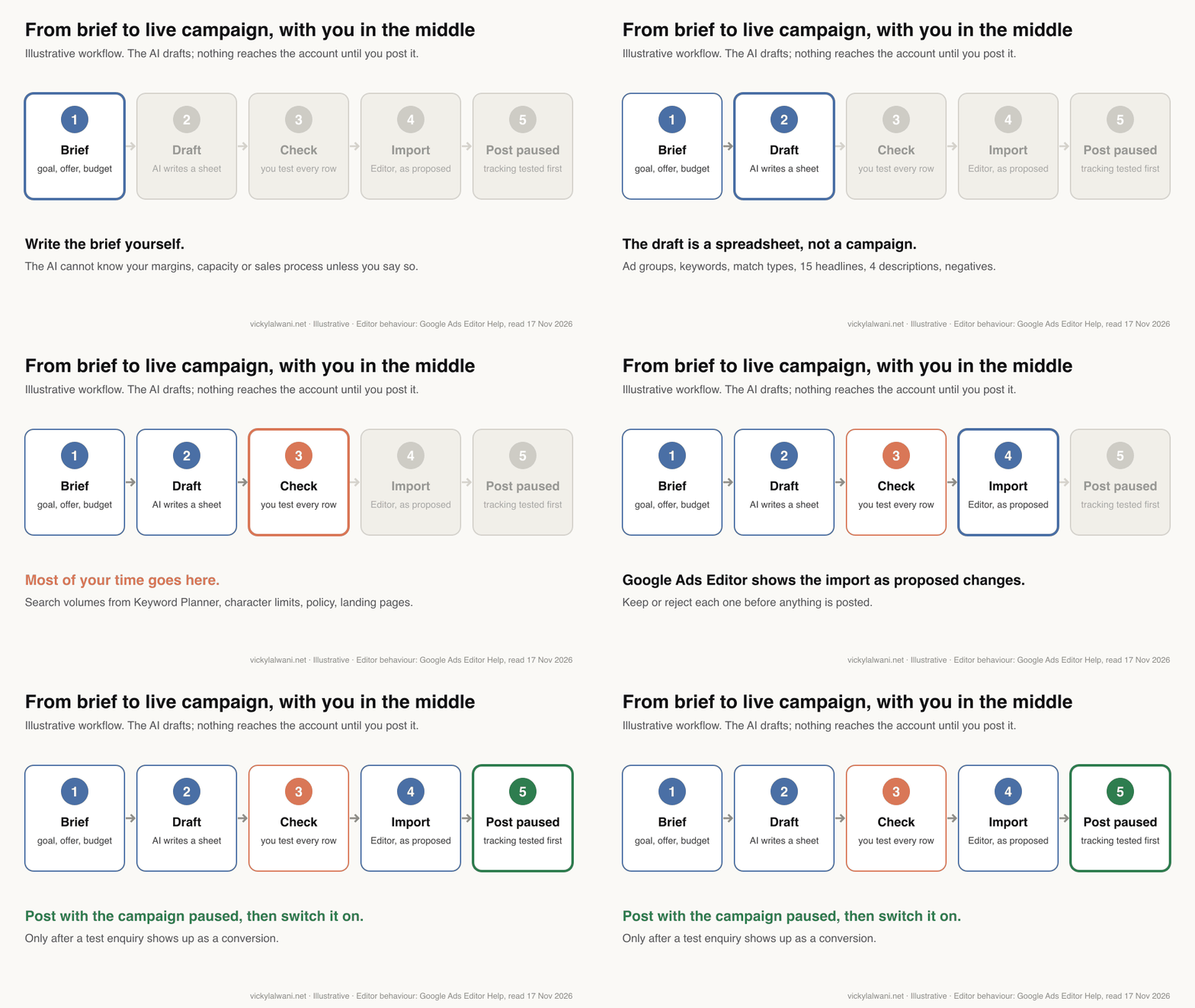
To create a Google Ads campaign with AI, write a brief with your goal, offer, area, budget and tracked conversion, then have Claude or Google's own conversational builder draft the ad groups, keywords, responsive search ads and negatives. Check every row, import it through Google Ads Editor as proposed changes, and post it paused until a test conversion records.
TL;DR
Yes, AI can draft a whole Search campaign. Claude, ChatGPT or Gemini can turn a good brief into ad groups, keywords, responsive search ads and negatives in minutes. Google's own conversational experience does a similar job inside the account.
The draft is not the campaign. Search volumes, character limits, policy claims and landing pages still need a person. Import through Google Ads Editor, where rows arrive as proposed changes, and post paused.
Check what Google switches on. New Search campaigns have AI Max on by default, including text customisation and final URL expansion. Decide on each one before launch.
Picture a small firm with three services, a website and a budget. The owner asks an AI assistant to "set up Google Ads" and gets back a tidy plan in two minutes. It looks finished. It is not.
The plan usually has keywords nobody types, headlines that run past the limit and no idea what a lead is worth. This guide shows the workflow I use instead: a written brief, a drafted sheet, a hard review, and a safe route into the account. If you would rather hand the build over, my Google Ads management service covers it, and prices are published.
A note on evidence. Platform facts come from Google Ads Help, Google's blogs and the Google Ads Editor Help, read on 17 November 2026 and linked where used. Where I write "I", it describes my working habits on client accounts. I do not share client names or client figures, and the example ads here are made up.
Can AI build a Google Ads campaign for you?
Short answer: Yes, as a draft. There are two routes: Google's built-in AI inside the account, and a general assistant such as Claude that drafts a sheet you import. Neither should go live without a person checking every keyword, ad and setting.
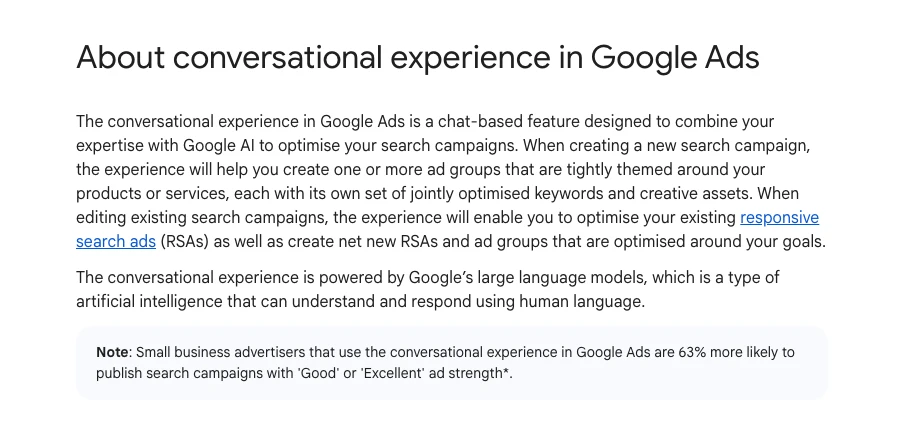
Google's route is the conversational experience, a chat panel in campaign setup. Google describes it as a tool that builds ad groups "tightly themed around your products or services" with keywords and assets. It works where the campaign language is English, French, Spanish or German, and it cannot help with sensitive verticals.
The second route is any assistant you brief yourself. It cannot see your account unless you connect it, so it works from what you give it. That is a weakness for data and a strength for control: nothing moves until you import it.
| Route | What it does | Main limit | Best for |
|---|---|---|---|
| Conversational experience | Builds ad groups, keywords and assets in setup | Reads your site, not your margins | Fast first draft inside Google Ads |
| Claude, ChatGPT or Gemini | Drafts a full plan as tables | Guesses volumes unless told not to | Control, brand voice, review |
| Ask Advisor (beta) | Suggests ideas, edits settings with approval | Not in manager (MCC) accounts | Questions about a live account |
| Google Ads MCP server | Reads account data for an assistant | Cannot create campaigns (v0.0.6) | Research before a rebuild |
On that last row: Google's open-source Google Ads MCP server gained its first write tools in version 0.0.6 on 2 November 2026, for assets and labels only. It still cannot create campaigns, ad groups, keywords or ads. Tools that claim one-click launches use their own connections.
What has changed in Google Ads that affects an AI-built campaign?
Short answer: Three things matter in November 2026: AI Max is on by default for new Search campaigns, Google is moving older automation into AI Max, and responsive search ad text can now show in more places. Each one changes what your AI draft needs to say.
| Change | Date | What it means for your build |
|---|---|---|
| AI Max on by default | Now | Text and landing pages can be chosen by Google |
| Broad match and auto assets move to AI Max | From Sept 2026 | Older settings arrive as AI Max |
| Dynamic Search Ads upgrade | From Feb 2027 | Do not build new DSA |
| Channel prioritisation | From 15 Oct 2026 | Search, partners and Display get priorities |
| RSA text in more places | Now | Headlines may show as links or descriptions |
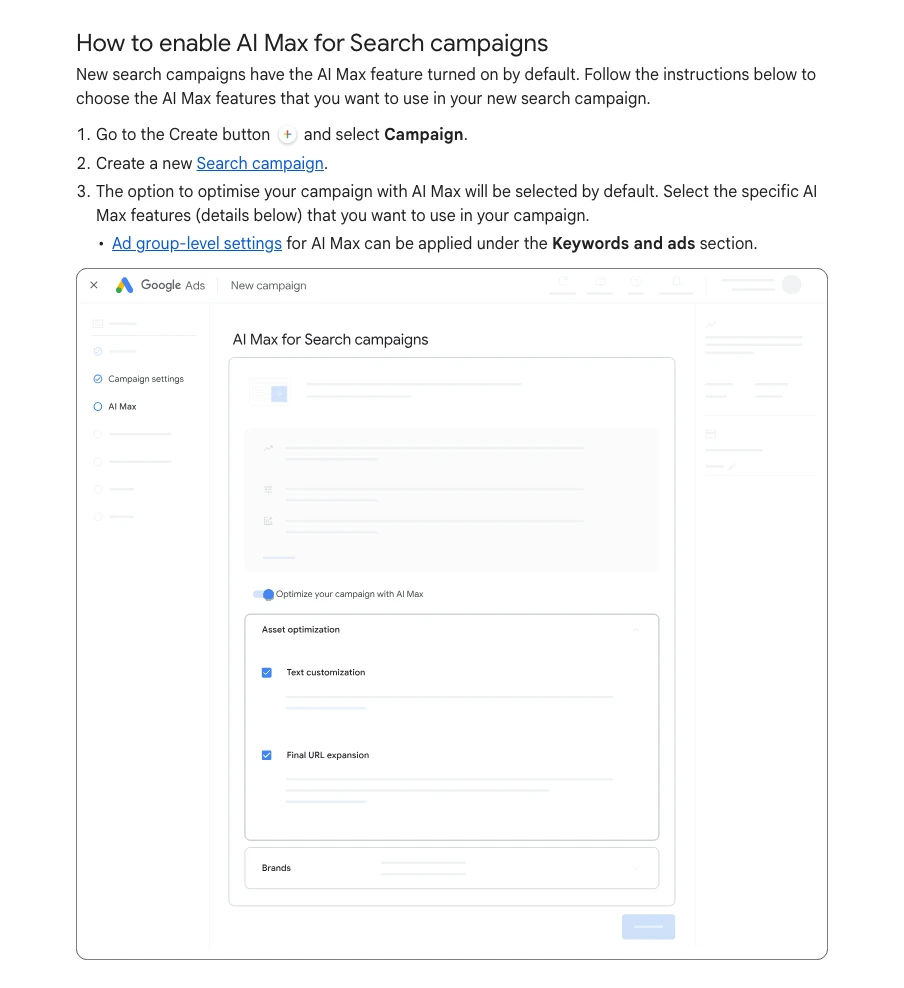
So an AI-written plan that only lists keywords and ads is out of date. The plan also needs a line on AI Max, brand controls and which pages Google may send people to.
What should you put in the brief before you ask for a build?
Short answer: Your goal, the one conversion that counts, what a customer is worth, the area, the budget, the offer and its proof, the pages, and the searches you never want. Most bad AI builds trace back to a thin brief, not a weak model.
The assistant fills every gap with a guess. Guesses about intent are fine to review; guesses about money and search volume are not. So the brief tells it what it may not invent.
| Brief item | Why it matters | If you skip it |
|---|---|---|
| One conversion | Bidding learns from it | It optimises for clicks |
| Customer value | Sets a sane cost target | Targets are pulled from air |
| Area and language | Location and copy | Wrong towns, wrong spelling |
| Proof for claims | Policy and trust | Invented ratings or prices |
| Never-want searches | Seeds the negatives | Jobs and DIY clicks |
Copy this, fill the brackets, and paste it into a new chat or a project you keep for that client. I keep one project per client so the context does not leak between accounts.
You are helping me plan a new Google Ads Search campaign. Draft only: you will not touch the account.

Business and goal
- What we sell: [service or product, in the words customers use]
- The one conversion that matters: [form, call, booking or sale] and how it is tracked: [tag, GA4, call tracking]
- What a customer is worth to us, roughly: [value or "unknown"]
- Area: [towns or regions we serve], language: [language]
- Daily budget: [amount], and how much week-to-week movement we can live with: [low, medium, high]

Offer and limits
- Why someone should pick us over the next ad: [3 reasons, with proof]
- Words or claims we cannot use: [legal, brand or policy limits]
- Landing pages, one per service: [URLs]
- Searches we never want: [jobs, free, DIY, competitors, other services]

Rules for you
- Do not estimate search volumes or click prices. I will add them from Keyword Planner.
- If something above is missing, ask me before you draft.
- Put every output in a table I can paste into a sheet.
How do you get the structure and keywords right?
Short answer: Group keywords by what the searcher wants, one ad group per service or intent, each with its own landing page. Take keyword ideas from the AI but take search volumes and bids from Google's Keyword Planner, never from the model.
Broad match is the default for every new keyword in Google Ads, and Google's page says "It's critical to use Smart Bidding with broad match". Smart Bidding means Google sets the bid for each auction from your conversion data.
That is why the brief prompt asks for phrase and exact match. On a new account with little data, tighter matching keeps spend on searches you chose. On accounts with enough budget and reliable tracking, I sometimes run broad match for about a month as a discovery phase, then move the terms that convert into phrase and exact.
Models are weak at search demand. A thread on r/PPC puts it bluntly: ChatGPT generated keywords no one searches for. Run every keyword through Keyword Planner for your area before it stays in the plan.
One habit helps more than any prompt: write keywords in the searcher's words, not the business's. People type the suburb they live in and the problem they have, not the service name on your price list.
Using the brief above, draft the campaign as tables.

1. Ad groups: one per service or clear search intent, each with its landing page. Name them the way a customer would search.
2. Keywords: 10 to 20 per ad group, written as searchers type them. Mark each phrase or exact match, and say why.
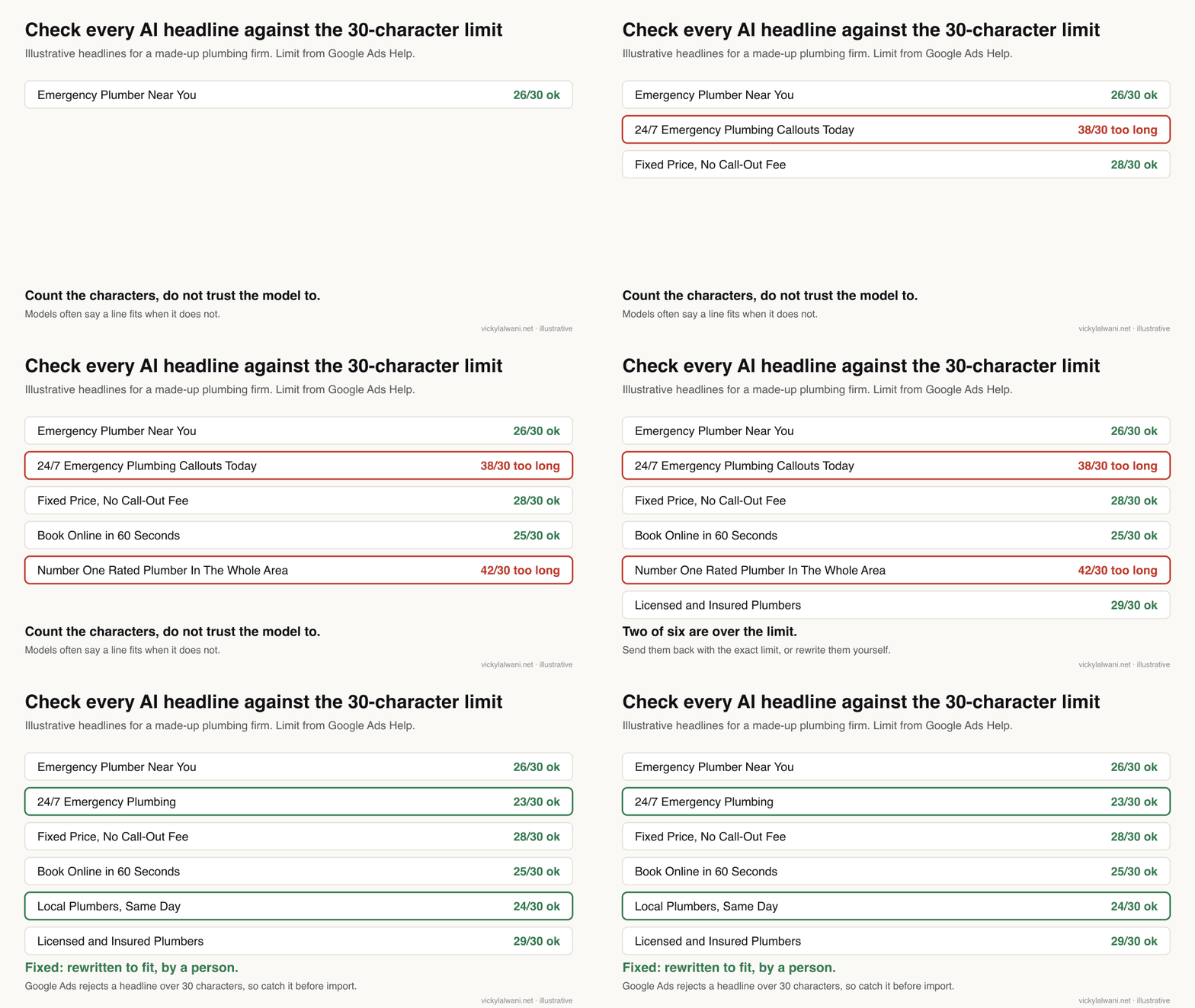
3. Responsive search ads: 2 per ad group. Each has 15 headlines (30 characters or fewer, with the count shown), 4 descriptions (90 or fewer, with the count), and 2 display paths (15 or fewer). Every headline must make sense on its own and in any order. No pinning unless I ask.
4. Negative keywords: an account-level list and any ad-group-level negatives, with match type. Include plurals and misspellings yourself, because negatives do not match close variants.
5. Sitelinks, callouts and a structured snippet, each linked to a real page from the brief.
6. A list of every assumption you made and every claim in the ads that needs proof.

Do not invent prices, guarantees, ratings, awards or years in business.
Building on a small budget? Google Ads on a small budget explains why one campaign with a few tight ad groups beats five thin ones.
How do you write responsive search ads with AI?
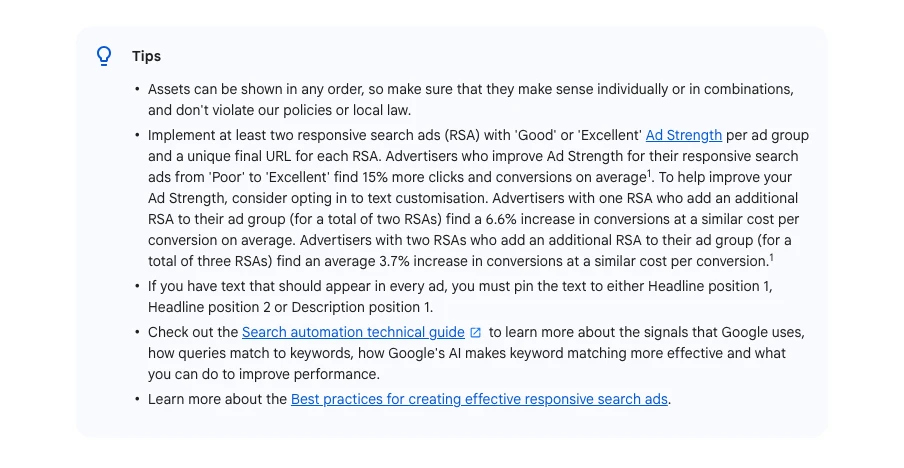
Short answer: Ask for 15 headlines of up to 30 characters, 4 descriptions of up to 90, and 2 paths of up to 15, then count every line yourself. Each headline must make sense alone and in any order, because Google mixes them.
Those are the limits on Google Ads Help. A responsive search ad is one ad with many headlines and descriptions that Google tests in combinations. Google recommends at least two per ad group with Good or Excellent Ad Strength, its Poor to Excellent rating of how varied and relevant the text is.
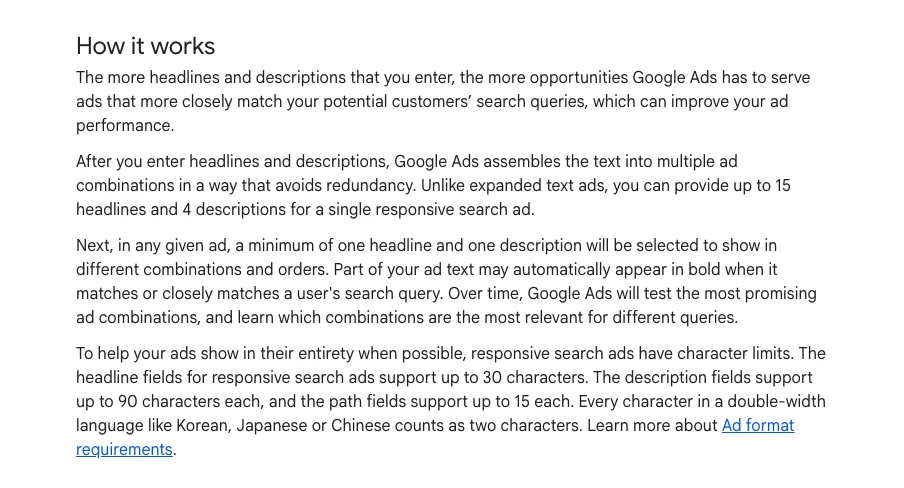
The flexibility box matters for AI copy. A headline may now appear at the start of a description, or as a link under the ad. So "Call Today" next to "Book Online" can look odd. Read the set as a pile of cards, not as a sentence.
Pinning fixes a headline to one slot. Google says it is not recommended for most advertisers and can affect Ad Strength. Pin only what must show, such as a legal line.
| Asset | Limit | How many | Check |
|---|---|---|---|
| Headline | 30 characters | 3 to 15 | Works alone |
| Description | 90 characters | 2 to 4 | Has proof |
| Display path | 15 characters | 2 | Matches page |
| RSAs per ad group | n/a | 2 or more | Unique final URL |
How do you build the negative keyword list before launch?
Short answer: Draft it from the brief's never-want list, then add plurals, misspellings and synonyms by hand, because negative keywords do not match close variants. After launch, grow it from the search terms report every few days.
A negative keyword stops your ad showing for a search. Google's page says negatives "won't match to close variants or other expansions", so "job" does not block "jobs". The AI is good at listing the variants once you remind it.
Watch for the opposite mistake: a negative that blocks good traffic. "Cheap" as a negative also blocks "cheap emergency plumber" if that is a search you want. Ask the AI to list what each negative would block.
| Negative type | Example | Level | Risk |
|---|---|---|---|
| Job seekers | jobs, careers, salary | Account | Low |
| DIY | how to, tutorial | Account | Medium |
| Other services | a service you do not offer | Campaign | Low |
| Price words | free, cheap | Ad group | High |
Once live, the search terms report shows what people actually typed. That is where the list grows. Finding wasted Google Ads spend covers that weekly routine.
Review this draft as a strict Google Ads reviewer. Do not rewrite it yet; give me a table of problems.

Check:
- Any headline over 30 characters, description over 90, or path over 15. Count them; do not guess.
- Headlines that only work in one position or repeat each other.
- Claims that need proof or may breach Google Ads policy (superlatives, prices, guarantees, health or finance claims).
- Keywords that belong in a different ad group, or that would also match searches we do not want.
- Searches that the negative list would block by mistake.
- Ad text that does not match the landing page it points to.

For each problem: row, what is wrong, why it matters, suggested fix.
Which settings should you check before you post?
Short answer: Networks, location option, AI Max features, brand and URL controls, auto-applied recommendations, bidding and the conversion goal. AI drafts rarely mention these, and several are switched on for you by default.
| Setting | Starts as | What to choose |
|---|---|---|
| Search partners | On | Your call; watch it |
| Display Network | A tick box | Off for a first build |
| Location option | Presence or interest | Presence, for local |
| AI Max text and URLs | On | Decide each one |
| Brand and URL exclusions | Empty | Add if AI Max is on |
| Auto-apply recommendations | Check | Off, or a short list |
| Primary conversion | Whatever exists | One tested action |
Tracking comes first. My rule is that a campaign stays in draft until every form and call button is measured and a test enquiry shows up as a conversion. If that is the blocker, fixing missing conversions is the place to start, or my tracking setup service.
Bidding is its own decision. Target CPA vs Maximize Conversions covers when to set a cost target and when to wait for data.
Should you leave AI Max on for a new campaign?
Short answer: Not by default on a new account. Google reports more conversions with AI Max, but an independent study of 250+ campaigns found the extra conversion value came at a median 16% higher cost per conversion. Turn it on once tracking and a baseline exist.
AI Max is not a campaign type. It is a layer with three parts: search term matching, which reaches beyond your keywords; text customisation, which writes ad text from your site; and final URL expansion, which picks landing pages. Google Ads Help lists all three.
Google's launch post on 6 May 2025 said advertisers "will typically see 14% more conversions or conversion value at a similar CPA/ROAS". Smarter Ecommerce studied over 250 Search campaigns with AI Max: a median 13% more conversion value, a median 16% higher cost per conversion, and median ROAS unchanged.
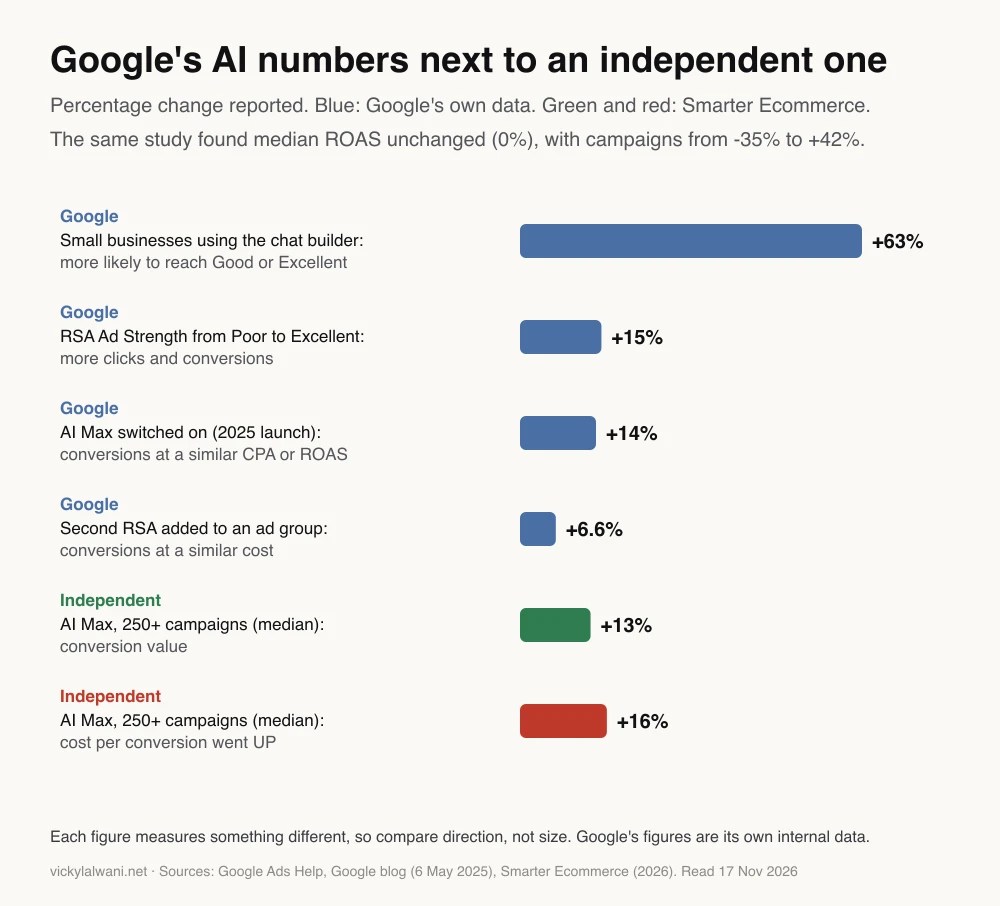
Both can be true. More reach often brings more conversions at a higher price. Whether that is worth it depends on your margin, which is why the brief asks what a customer is worth.
If you do keep AI Max, the AI draft gets two extra jobs: a list of pages Google must not send people to, and brand exclusions if you do not want to appear for other brands.
How do you get the AI draft into Google Ads safely?
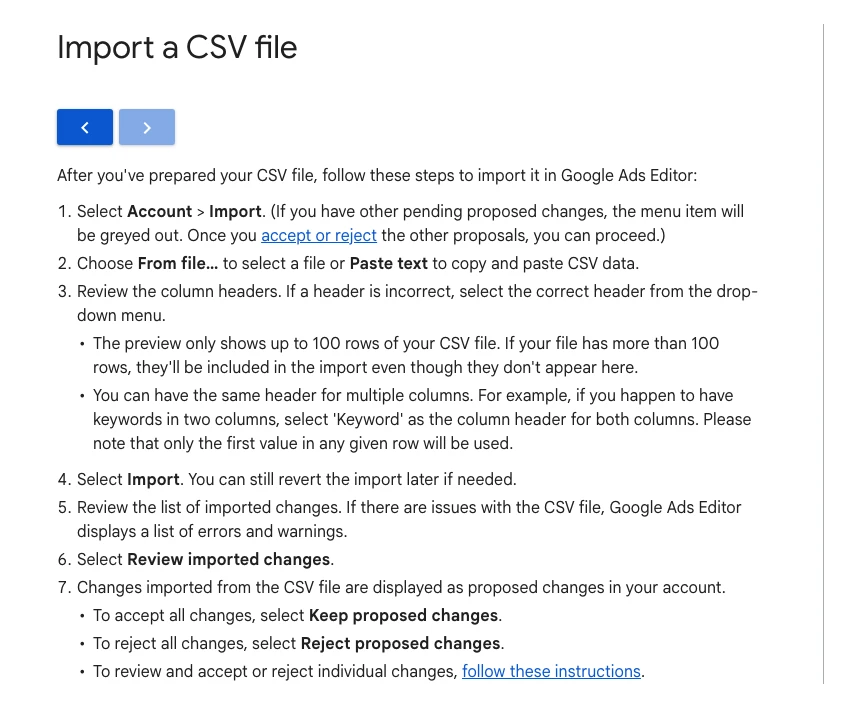
Short answer: Paste or import the tables into Google Ads Editor, review the imported rows as proposed changes, keep or reject each one, and post with the campaign paused. Switch it on only after a test conversion records.
Google Ads Editor is Google's free desktop app for bulk edits. Its CSV import shows imported rows as "proposed changes" that you keep or reject, all at once or one by one. Nothing reaches the live account until you post.
| Way in | Review step | Good for |
|---|---|---|
| Editor CSV import | Proposed changes | Full builds |
| Conversational experience | Approve each suggestion | Quick first campaign |
| Third-party MCP tool | Depends on the tool | Teams with API access |
| Typing it into the UI | Your own eyes | One small ad group |
If you use a third-party connector that can create campaigns, check that it creates them paused and logs what it changed. The ongoing side of this, where agents monitor and propose changes every day, is in AI agents for PPC.
What do people say on X and Reddit?
Short answer: Practitioners agree AI saves time on structure and copy but fails on keyword demand, settings and account context. Google's own updates on X focus on AI Max replacing older automation.
Posts and threads checked on 17 November 2026. Reddit replies are opinions, often from people who sell tools, so treat them as signals, not proof.
| Where | Date | What it says | Type |
|---|---|---|---|
| Google Ads liaison, X | 15 Apr 2026 | AI Max leaves beta; Dynamic Search Ads move to it | Official |
| A Google Ads practitioner, X | 5 Aug 2026 | Auto assets and campaign broad match upgrade to AI Max | News |
| Google Ads liaison, X | 14 Oct 2026 | New optional channel priority and budget controls | Official |
| A retail search analyst, X | 14 Sept 2026 | Chart: CPCs rising on budget-limited campaigns after 17 Aug | First-hand data |
| r/PPC | 18 Nov 2025 | AI keywords nobody searches; settings missed; use Keyword Planner | First-hand |
| r/googleads | 18 Nov 2025 | Good for structure and copy; review depends on budget | Opinion |
| r/googleads | 5 Aug 2025 | AI gets copy about 80% there; a person finishes it | First-hand |
| r/PPC | 30 Sept 2026 | Analysis good, setting advice weak without real context | First-hand |
The r/PPC thread has the sharpest point. The top reply says the advice is "directionally sound" but tends to fall apart under scrutiny on real settings. Another reply says the bad assumptions stopped once they gave the model what is not in the export: conversion lag, bid strategy and target.
On copy, a r/googleads thread lands in the same place: useful for variations and angles, but only after you explain the market and keep correcting it.
Which videos show this in practice?
Short answer: Start with Google's own short videos on AI Max and responsive search ads, then one practitioner build with Claude. All six below were checked on YouTube on 17 November 2026.
How to Use AI Max for Search Campaigns in Google Ads, Google Ads channel, April 2026. Official overview of the three AI Max features. Google's product, so it does not cover the cost trade-off.
Create effective Search ads: Responsive search ads for success, Google Ads channel, August 2026. Two minutes on how responsive search ads assemble. Official.
Claude Built My Google Ads Campaign in Minutes, a marketing-tool vendor's channel, March 2026. Shows Claude building and pushing a campaign through the vendor's own connector, so it sells that product.
| Video | Channel | Date | What it covers |
|---|---|---|---|
| How to Use AI Max | Google Ads | Apr 2026 | AI Max features |
| Create effective Search ads | Google Ads | Aug 2026 | RSA basics |
| AI Max for Search Campaigns | Google Ads | Jun 2025 | Launch explainer |
| Claude Built My Google Ads Campaign | Tool vendor | Mar 2026 | Claude build, vendor MCP |
| How I Use Claude with Google Ads | Google Ads trainer | Apr 2026 | Claude for optimisation |
| Should You ACTUALLY use AI Max in 2026? | PPC creator | Jul 2026 | Sceptical AI Max review |
Where this advice is weak
Short answer: It is written for Search campaigns with lead or sales tracking. Performance Max, Shopping and very large accounts need different builds, and the AI Max data comes mostly from accounts larger than a typical small business.
- The independent AI Max study looked at over 250 campaigns, many in retail. Your results can land well above or below its median.
- Google's figures in the chart are Google's own data, and each measures a different thing.
- The conversational experience, Ask Advisor and the MCP server are all changing quickly. Re-check the linked pages before a build.
- The workflow assumes someone can judge the draft. If nobody on the team can, the review step is where to spend on help.
Want a second pair of eyes on your AI-built campaign?
Short answer: Send the draft before you post it. A review before launch is cheaper than a month of spend on the wrong searches.
I review AI-drafted builds, fix tracking first, and set up the campaign with you through my Google Ads management service. Rates are on the pricing page. If you work in one market, see Google Ads in the UK, the USA or Australia.
Keep reading: AI agents for PPC, Google Ads on a small budget and keyword research with Claude.
Sources
| Source | What it supports | Date | Link |
|---|---|---|---|
| Google Ads Help | RSA limits, flexibility, Ad Strength figures | Read 17 Nov 2026 | Responsive search ads |
| Google Ads Help | Chat builder, languages, 63% figure | Read 17 Nov 2026 | Conversational experience |
| Google Ads Help | AI Max on by default, controls | Read 17 Nov 2026 | Set up AI Max |
| Google blog | AI Max upgrade dates | 15 Apr 2026, upd. 11 Jun | DSA upgrade to AI Max |
| Google blog | AI Max 14% claim | 6 May 2025 | AI Max launch |
| Smarter Ecommerce | AI Max: +13% value, +16% CPA | Updated 23 Mar 2026 | AI Max guide |
| Google Ads Help | Broad match default | Read 17 Nov 2026 | Match types |
| Google Ads Help | Negatives and close variants | Read 17 Nov 2026 | Negative keywords |
| Google Ads Help | Search partners on by default | Read 17 Nov 2026 | Search partners |
| Google Ads Help | Channel priority from 15 Oct 2026 | Read 17 Nov 2026 | Channel prioritisation |
| Google Ads Help | Ask Advisor, approval, MCC | Read 17 Nov 2026 | Ask Advisor |
| Google Ads Editor Help | Proposed changes, posting | Read 17 Nov 2026 | Import a CSV |
| GitHub | MCP server v0.0.6 write tools | 2 Nov 2026 | google-ads-mcp releases |
| X and Reddit | Practitioner views | Apr 2025 to Oct 2026 | Linked in the table above |
This article expands on my post on LinkedIn ↗.
FAQ
Can AI create a Google Ads campaign by itself?
AI can draft a complete Search campaign, and Google's conversational experience can build ad groups inside the account. A person should still check keywords, ads, settings and tracking, and the campaign should go live paused until a test conversion records.
Which AI is best for building Google Ads campaigns?
Claude, ChatGPT and Gemini can all draft a campaign from a good brief, and in one r/PPC thread practitioners rated Claude above Gemini for analysis. The brief and your review matter more than the model, because every model guesses search volumes unless you forbid it.
What is Google Ads' conversational experience?
It is a chat-based tool in Google Ads campaign setup that builds themed ad groups with keywords and assets for new Search campaigns. Google says it works where the campaign language is English, French, Spanish or German and cannot help with sensitive verticals.
How many headlines does a responsive search ad need?
A responsive search ad takes 3 to 15 headlines of up to 30 characters and 2 to 4 descriptions of up to 90 characters. Google recommends at least two responsive search ads with Good or Excellent Ad Strength in each ad group.
Is AI Max on by default in new Google Ads Search campaigns?
Yes. Google Ads Help says new Search campaigns have AI Max turned on by default, with text customisation and final URL expansion enabled. You can switch off each feature or the whole layer in campaign settings.
Can Claude connect to Google Ads and create campaigns?
Google's official Google Ads MCP server lets Claude read account data, and since version 0.0.6 on 2 November 2026 it can create assets and labels. It still cannot create campaigns, ad groups, keywords or ads; some third-party connectors can.
How do I import an AI-written campaign into Google Ads?
Save the draft as a CSV and use Account, Import in Google Ads Editor. The rows appear as proposed changes that you keep or reject, and nothing goes live until you post, ideally with the campaign paused.
Should I trust AI keyword search volumes?
No. Language models are not connected to Google's search data and often suggest keywords nobody searches. Check every keyword and its volume in Google Keyword Planner for your area before it stays in the plan.
Do negative keywords block plurals and misspellings?
No. Google Ads Help says negative keywords do not match close variants, so you need to add plurals, misspellings and synonyms yourself. An AI assistant is good at listing those variants once you ask.