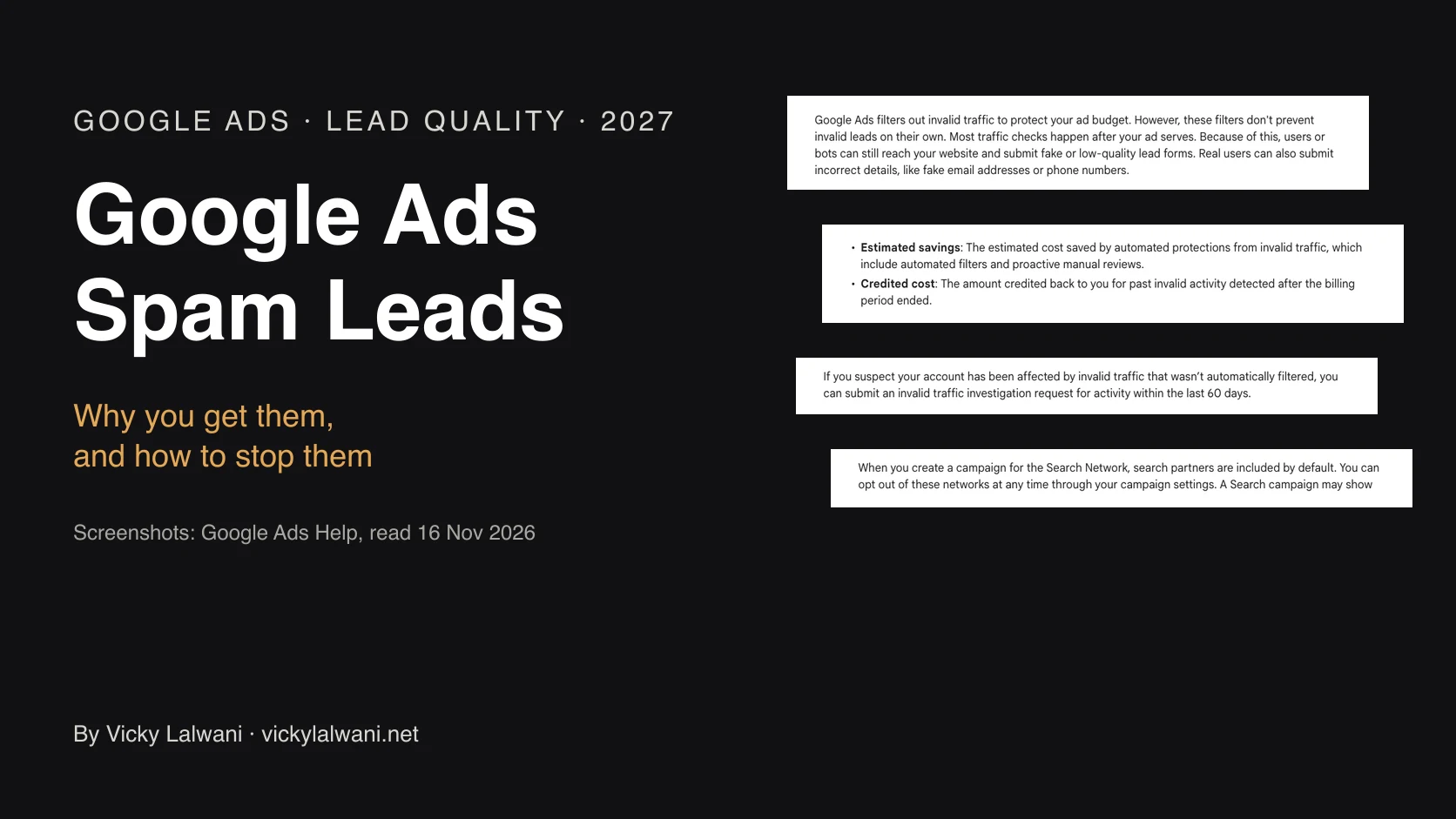
Google Ads spam leads come from bots that reach your form directly, low-quality partner, app and Display traffic, broad automated campaigns such as Performance Max, and tracking that counts the wrong actions. Google says its invalid traffic filters do not stop invalid leads on their own, because most checks run after the ad is shown. Its new Invalid traffic card, rolling out from 12 November 2026, shows money saved and credited on invalid clicks, not fake leads. To stop spam leads, protect the form with server-side validation and a bot check, store the Google click ID with each lead, switch off search partners and Display or set them to 0%, make only real lead actions primary and import qualified leads so Smart Bidding learns from them.
Do these three things first:
1. Pull ten recent spam leads and check one field. Did each one arrive with a Google click ID (the GCLID, a code Google adds to every ad click)? No click ID means the lead did not come through a tracked ad click: often a bot posting to the form directly.
2. Open your conversion goals. In Goals, then Conversions, then Summary, list every action marked primary. If a page view, a Maps action or a call-button click counts as a lead, Google is being paid to find more of them.
3. Check where the ads run. Search partners, the Display Network and Performance Max placements are the usual leaks. The settings are further down.
TL;DR
- Google does not stop spam leads on its own. Its own help page says its filters do not prevent invalid leads on their own, because most checks run after the ad is shown.
- The new Invalid traffic card, rolling out globally from the week of 12 November 2026, shows money saved and credited on invalid clicks. It does not show fake leads.
- Credits cover clicks, not leads. You can ask Google to investigate the last 60 days and send a sheet of bad leads with their click IDs. A credit never removes a lead from your CRM.
- The lasting fix has three parts: protect the form, narrow where ads run, and bid only on leads your sales team calls qualified.
Jump to: Why · Spam or bad fit · The new card · Credits · Bidding · Form fixes · Settings · Spam calls · Software · Reporting · 30 days · X and Reddit
Picture a small accounting firm. Last month Google Ads reported 60 leads at a cost the partners were happy with. The receptionist called them all. Fourteen were real people who needed an accountant. The rest had fake numbers, names like "asdf", or email addresses at domains nobody has heard of.
That firm is made up. The pattern is not: it is what advertisers describe week after week on Reddit, and Google published a help page about it, first reported in September 2026. This guide explains where the junk comes from and what to change, checked against Google's own help pages. If you would rather hand it over, I set up and fix Google Ads accounts for lead generation.
A note on evidence. Platform rules come from Google Ads Help and Google's blog, read on 16 November 2026 and linked where I use them. Figures from advertisers come from single accounts posted on Reddit and are labelled as such. Survey figures come from a company that sells click fraud detection, and I say so each time. Anything written as "I" comes from my own account and tracking work. I do not share client names or numbers.
Why am I getting spam leads from Google Ads?
Spam leads come from two places: bad traffic that clicks your ad, and bots that find your form without any ad at all. Within Google Ads, the usual sources are bots and click farms, partner sites and apps, broad automated campaigns, and real people who are the wrong fit. Accidental clicks add to the cost but rarely leave a lead.
Google lists four kinds of invalid traffic: bots and automated software, accidental clicks from poor ad placement, fraudulent placements such as hidden or stacked ads, and real people with no interest, such as competitors clicking to raise your costs. Invalid traffic means clicks Google judges were not genuine interest, so it does not charge for them.
| Source | What it looks like | Where it comes from |
|---|---|---|
| Form bots | Gibberish, fake domains, no click ID | Your website, not the ad |
| Ad bots, click farms | Clicks with no scroll, odd hours | Partner sites, apps, Display |
| Accidental clicks | Instant bounce, no lead | Poor placements, crowded layouts |
| Broad automation | Leads on unrelated searches | Broad match, AI Max, Performance Max |
| Real but wrong fit | Job seekers, students, sellers | Loose keywords, weak ad copy |
| Tracking errors | "Leads" nobody can find | Wrong primary conversions |
The last row matters more than people expect. One local service advertiser on Reddit saw 436 "conversions" in nine days and found seven real lead forms. Of the rest, 403 were Maps actions such as direction requests, counted as conversions, with 11 different actions feeding the Conversions column. That is not spam. It is the account counting the wrong things, and the fix is in the goals settings, not a fraud tool.
Broad automated campaigns get the most complaints. Performance Max is Google's all-in-one campaign type that places ads across Search, YouTube, Display, Gmail, Discover and Maps from one budget. Advertisers on Reddit describe four good months and then a wave of fake emails, and a B2B account where more than nine in ten recent leads were junk, mostly from Performance Max, while exact and phrase Search brought fewer but better leads. Those are single accounts, not a measured rate.
The one published comparison I found is retail: Lunio, which sells click fraud detection, reported 5.28% invalid traffic on AI Max campaigns against 3.07% on standard Search in the same accounts in mid-2026. A vendor signal, not proof.
Spam lead or bad-fit lead? How to tell in ten minutes
A spam lead is fake: a bot, a made-up name, a number that does not ring. A bad-fit lead is a real person you cannot sell to. They need different fixes, so sort ten recent leads into the two piles before you change anything. Most accounts have some of each.
| Sign | Points to | Fix in |
|---|---|---|
| No click ID on the lead | Form bot | The form |
| Click ID, fake details | Ad bot or click farm | Placements, form |
| Same click ID, many junk leads | Replayed click | Form, then report |
| Real person, wrong service | Bad fit | Keywords, ad copy |
| Job seeker or student | Bad fit | Negatives, copy |
| "Lead" with no record | Tracking error | Conversion goals |
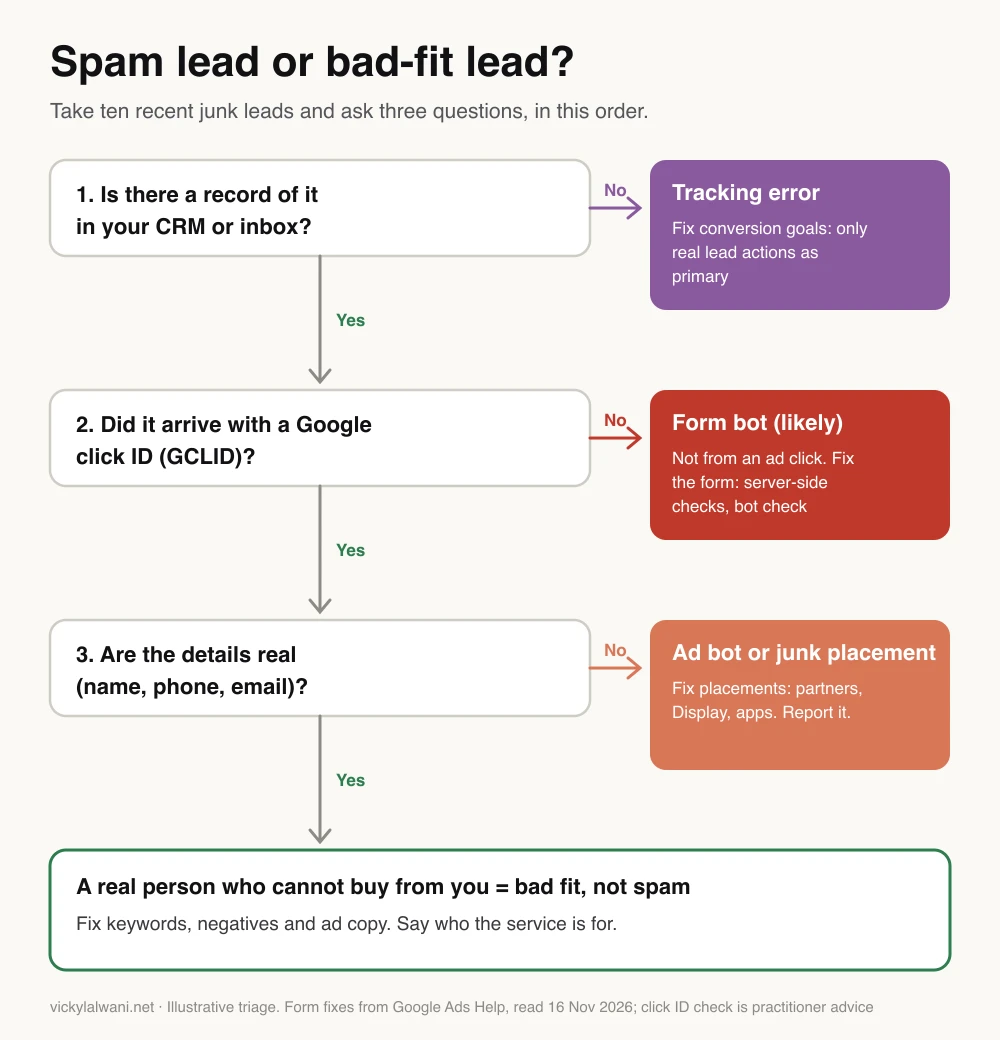
The click ID check. Add a hidden field to your form that stores the GCLID from the landing page address. Most CRMs and form tools can do this. Then, for each junk lead:
- No GCLID: the submission did not come through a tracked Google ad click. If the details are junk, a bot probably found the form page directly, and form protection, not Google Ads settings, is the fix. Organic visitors and tracking gaps also lack a click ID, so check the lead source too.
- A GCLID: the visit came through an ad. Look at which campaign and network it came from, then tighten placements.
- The same GCLID on several junk leads: one click may be being reused (a real person submitting twice looks similar). A PPC agency showed in 2026 that a click URL harvested on one machine can be clicked from another, which defeats IP blocking. Keep these for an investigation request.
Bad-fit leads are a targeting and copy problem. A B2B advertiser on Reddit asked how to stop students and job seekers. The replies suggested job-related negative keywords (words you tell Google not to show your ad for), age exclusions where the campaign type allows them, and bidding on the real form submission rather than page views. Saying who the service is for in the ad itself helps too.
Before I judge a campaign, I check lead quality with the client, not just the conversion count. The conversion column tells you what fired. Only the person calling the leads can tell you what was real.
What the new Invalid traffic card shows, and what it misses
The Invalid traffic card sits on the Overview page under Campaigns and shows two numbers for your date range: Estimated savings and Credited cost. Google's Ads Liaison account said on 12 November 2026 that it was rolling out globally that week. Google's help page says it may not be in every account yet.
| Metric | What it means | When |
|---|---|---|
| Estimated savings | Invalid clicks caught and never billed | Before the invoice |
| Credited cost | Money returned for invalid clicks found late | After the month closes |
| Invalid clicks column | Filtered clicks per campaign | Before the invoice |
| Credit report | Credits by campaign and network | After the month closes |
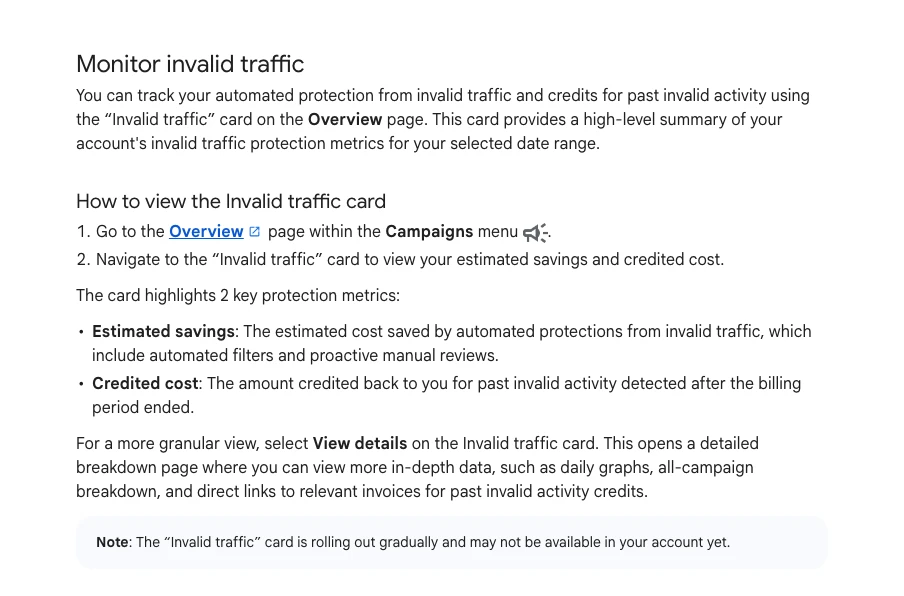
Google's announcement also claimed it had cut advertiser exposure to invalid leads by an average of 30% so far in 2026. That is Google's own figure, with no method published.
What the card does not tell you:
- Leads. It counts clicks and cost. A bot that fills in your form after a click Google counted as valid shows nothing here.
- Which clicks. Google will not confirm which specific clicks it marked invalid, so bad actors cannot learn its methods.
- Corrected campaign data. Credits for past months do not change your campaign metrics, which are frozen at month end. For adjusted numbers, open Report Editor and the template Invalid Activity Credit Report, available for Search and Performance Max only.
A large Estimated savings figure is not a reason to panic: Google says many filtered clicks with small credits is normal. Its real use is showing which campaigns attract bad traffic.
Search Engine Roundtable's daily video recap from 12 November 2026 covers the card in its first few minutes, according to its description. It is a news recap and sells nothing.
Do you get money back for fake leads?
Not for leads directly. Google does not charge for invalid clicks it catches before the month ends, and credits invalid clicks it finds later "where appropriate and possible". If you think it missed some, you can ask for an investigation of the last 60 days. A credit reverses the click charge. It does not delete the lead, refund sales time or fix your bidding data.
How to ask for an investigation. Use the Click Quality Form linked from Google's invalid traffic help page. Google asks you to prepare:
- Your 10-digit customer ID, the exact dates, and the campaign and ad group names.
- Any keywords that drove the odd traffic.
- Web server logs with IP addresses, devices and browsers, and the GCLIDs of suspicious clicks.
- For invalid leads: a spreadsheet with the GCLID of each lead and your assessment of it, such as what happened when you called or emailed.
- A short reason, such as a spike in clicks with no more conversions, or clicks from outside your target area.
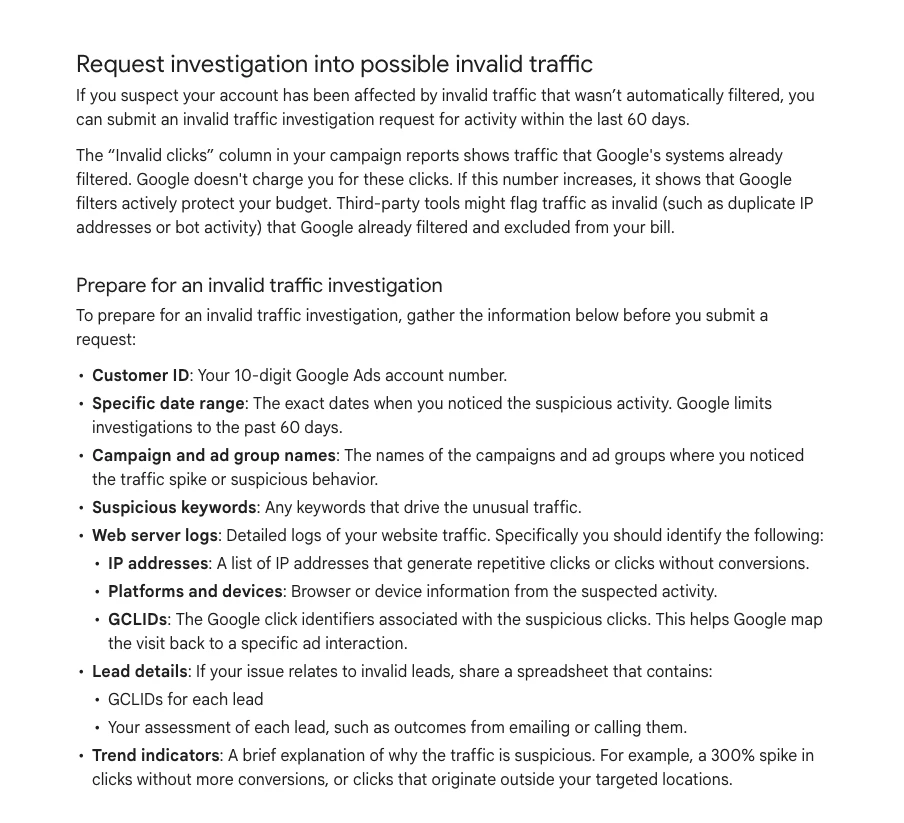
This is where the hidden GCLID field pays off. Without it you cannot match a junk lead to a click. Google says the review usually takes several business days and that it will tell you about any credit, without saying which clicks were invalid.
Expect modest amounts. One advertiser on Reddit got a $100 credit, about 1% of their spend, after a first report was turned down. Another in the same thread said session recordings helped them get $500 back. Single accounts, but a fair guide to scale.
Spam calls on Local Services Ads work differently, because there you pay per lead and can rate each one. My Local Services Ads vs Google Ads guide covers lead credits and the call billing rules there.
Stop Smart Bidding learning from junk leads
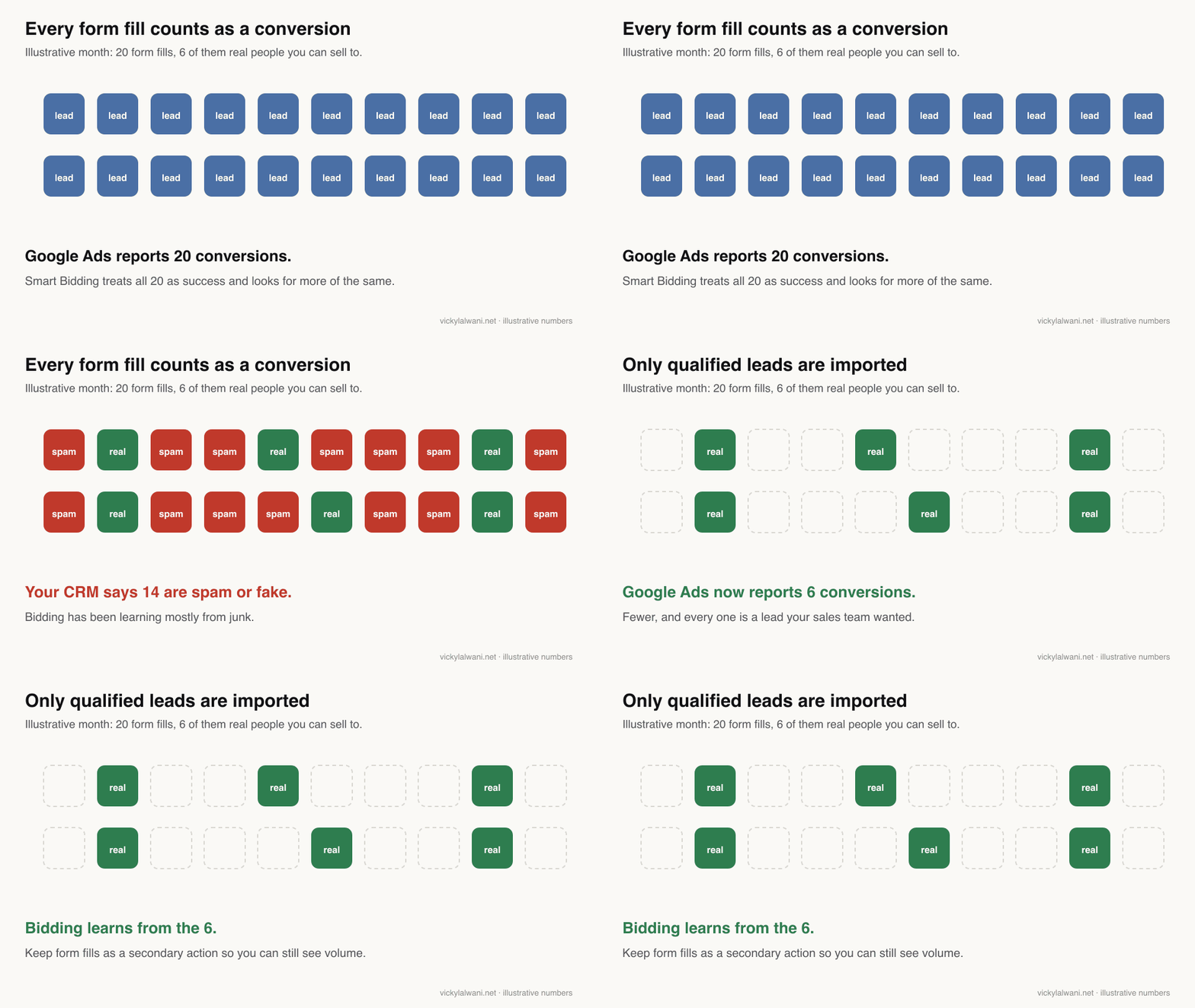
Smart Bidding chases whatever you count as a conversion. If spam form fills count, it finds more traffic like them, at a low cost per conversion that looks great in the account. Make only real lead actions primary, then send back the leads your sales team marks qualified, so bidding learns from those instead.
Smart Bidding is Google's automated bidding, which sets a bid for each auction from past conversions. In Google's terms, primary actions feed the Conversions column and bidding, while secondary actions are recorded for observation only. Change it under Goals, then Conversions, then Summary, then Edit goal.
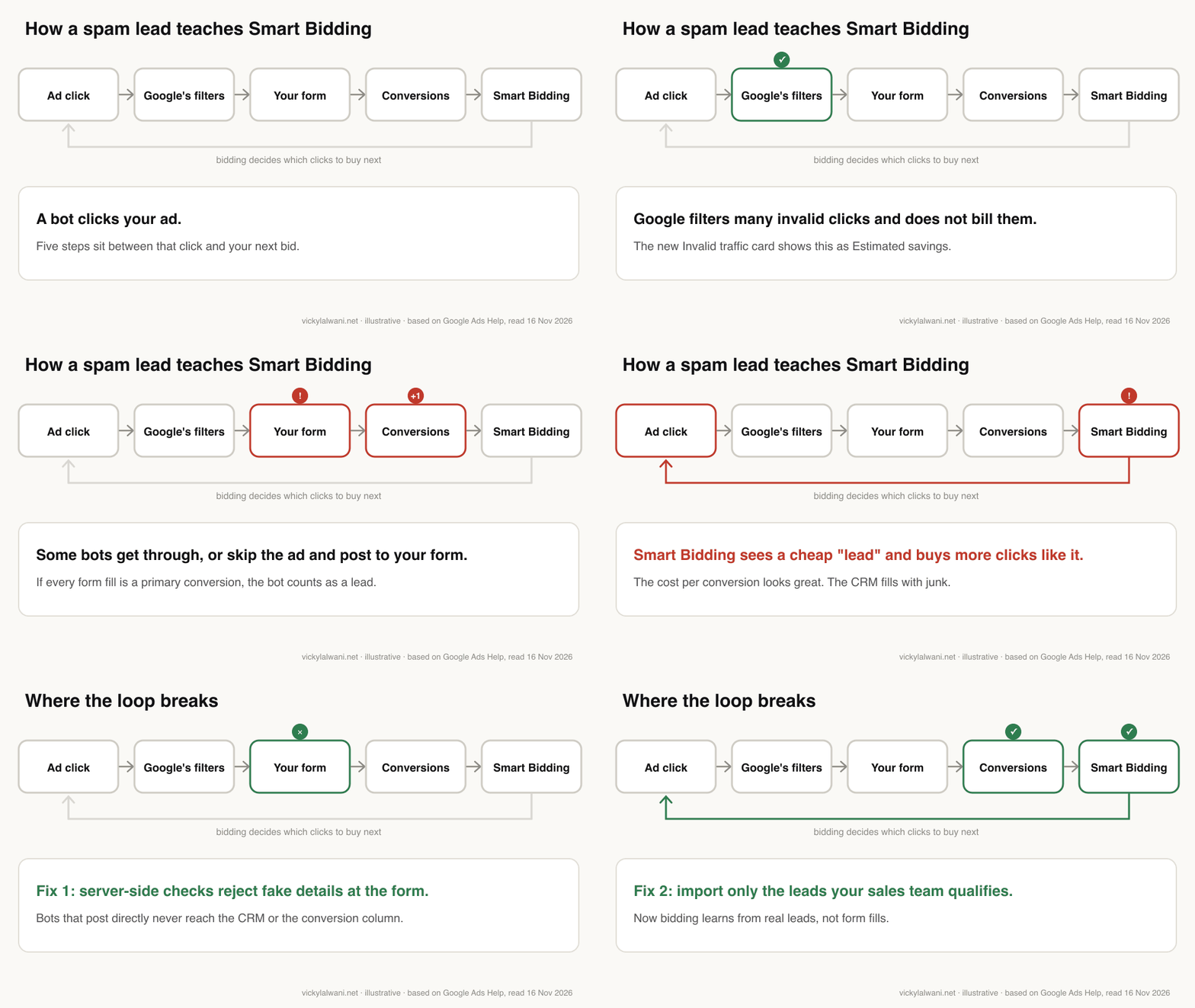
Four changes, in this order:
- Strip the primary list to real leads. A submitted form and a call that lasts long enough to be a conversation. Page views, scrolls, Maps actions and call-button clicks become secondary.
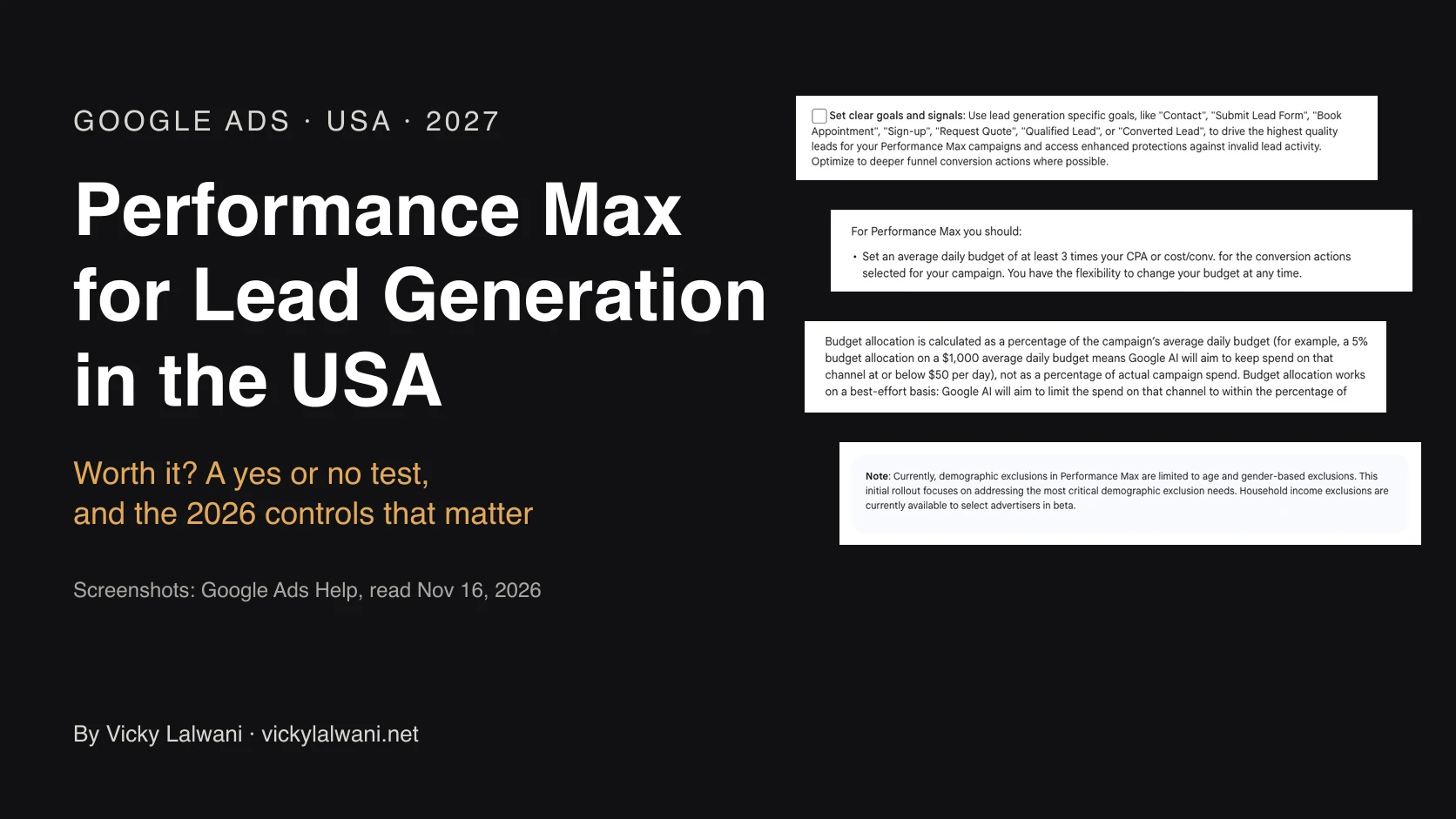
- Use a lead goal. Google says goals such as qualified lead, converted lead, book appointment or request quote automatically trigger invalid traffic protections built for lead generation. It does not say what those protections do.
- Send back qualified leads. Store the GCLID with each lead, mark the good ones in your CRM, and import them. Google now recommends enhanced conversions for leads, which matches hashed details such as an email address instead of relying only on the click ID.
- Bid on the qualified action once there is enough of it. Google suggests a bidding conversion with at least 15 conversions in 30 days across the account, uploaded ideally daily, happening within about 7 days of the click.
Steps 3 and 4 pull against each other in a small account. A qualified lead is rarer and slower than a form fill. If you do not reach 15 a month, keep the form fill as the bidding goal, protect the form harder, and import the qualified leads anyway so you can report on them.
Here is why the CRM matters. One B2B software advertiser joined a year of Google Ads data to their CRM by network. Search partners looked better in the account, at $188 a conversion against $575 on Google Search. In the CRM, 2% of partner leads were qualified, against 57% from Google Search.
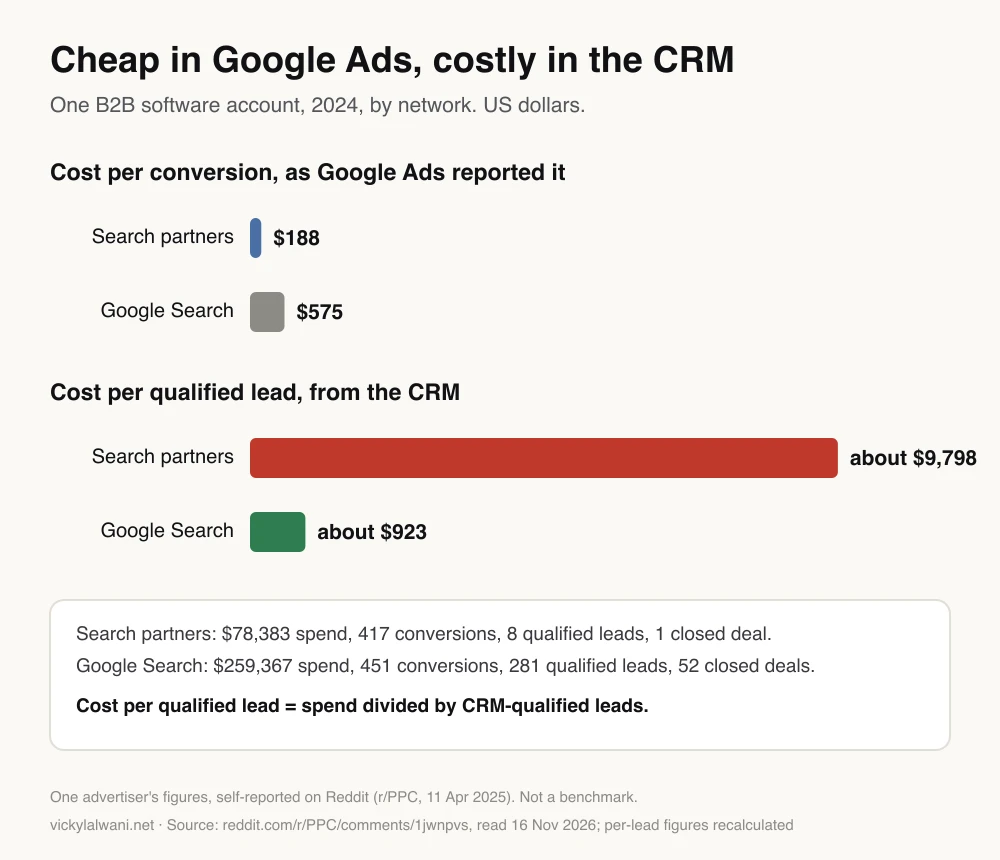
Divide spend by qualified leads and the picture flips: about $9,798 per qualified lead on partners against about $923 on Google Search. One account, but it shows what bidding on raw conversions hides. I treat the CRM as the source of truth and expect Google Ads to sit within about 10 to 15 percent of it. When it does not, I look for why before changing bids. For when to move to a cost target, see Target CPA vs Maximise conversions.
Form fixes that cut bot submissions
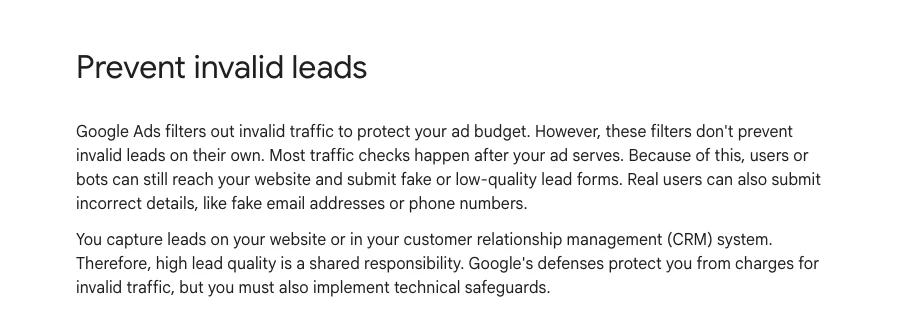
Google names three form fixes: reCAPTCHA, double opt-in and server-side validation. Add a hidden GCLID field so you can trace each lead. Server-side checks matter most, because sophisticated bots can bypass browser controls and post straight to your form.
| Fix | Stops | Cost or catch |
|---|---|---|
| reCAPTCHA | Simple bots | May need consent |
| Server-side validation | Bots posting directly | Developer time |
| Double opt-in | Fake emails | Some real people never click |
| Hidden GCLID field | Nothing, it traces | Needed for reports |
| Honeypot field | Lazy bots | Weak on its own |
| Lead form OTP | Fake numbers | Google lead forms only |
- reCAPTCHA. Google's bot check for web forms. An Austrian court ruled in 2024 that a site needed consent before running it, because its cookies were not essential. If your market has strict cookie rules, ask whoever runs your consent banner, and a lawyer if in doubt.
- Server-side validation. Google tells advertisers to have a developer check, on the server, that email domains are real and phone numbers match a valid format before the lead reaches the CRM. A check that only runs in the browser can be skipped.
- Double opt-in. Send a confirmation link and only treat the person as a lead once they click it. It proves the email is real, at the cost of some genuine people who never open the email. Count the confirmed lead as the conversion if you can.
- Honeypot. An extra form field hidden from people. A bot that fills it in gets rejected. It is a common practitioner tip, not in Google's list, and it only stops the crudest bots.
One warning from my own work: after any change to a form or a tag, I submit the form again myself, on desktop and on mobile. A script added to measure or protect a form can break it, and a broken form looks exactly like a quiet week.
When a client raised spam coming through their website form, the first option on the table was the protection setting already built into their form tool. Most form builders and CRMs have one. Check it before buying anything. Setting up the click ID field and the import is part of my analytics and tracking work.
Campaign settings that cut spam at the source
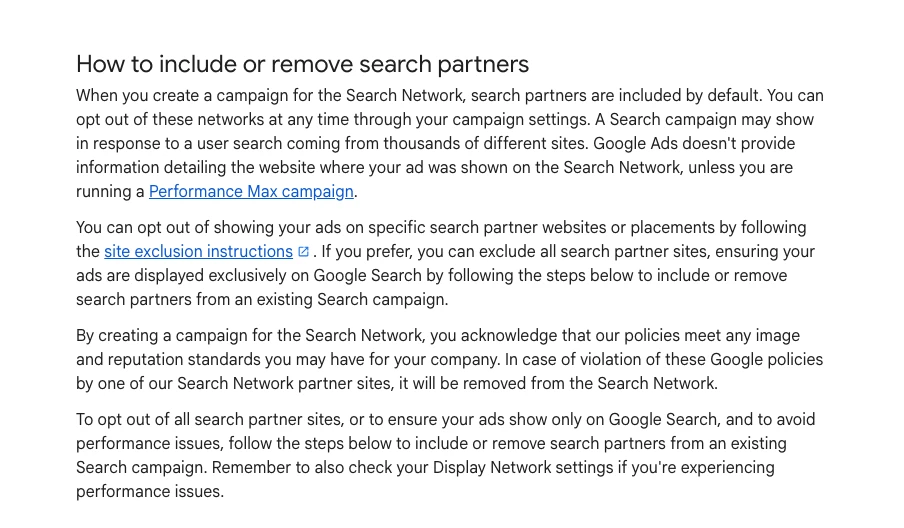
Narrow where the ads run. Switch off search partners and the Display Network on Search campaigns, or set them to low priority at 0% under the new channel controls. Use "Presence" for locations. In Performance Max, exclude junk placements and apps. Most of these start wide by default.
| Setting | Default | For lead generation |
|---|---|---|
| Search partners | On | Off, or test it |
| Display Network | A tick box | Off |
| Channel priority | All high | Partners, Display at 0% |
| Location option | Presence or interest | Presence |
| Placements | Everywhere | Exclude junk apps and sites |
| AI Max, broad match | AI Max on in new campaigns | Test after the basics |
- Search partners. Included by default in new Search campaigns. Google notes that clicks from some partner sites "may not always reflect highly targeted traffic", and it does not tell you which partner site showed your ad unless you run Performance Max.
- Channel priority. Rolling out from 15 October 2026 for Search, Shopping, Performance Max and Demand Gen. Every channel starts at high priority. Set partners or Display to low priority with a 0% allocation and Google says it will not spend there. In Performance Max, partners and Display each get their own priority setting.
- Location. Google itself suggests switching from "Presence or interest" to "Presence" if you see clicks from outside your area.
- Placements. Account-level placement exclusions take up to 65,000 sites, apps and channels, and apply to Display, YouTube, video partners and search partner inventory. Pull the Performance Max placement report and exclude what makes no sense for your business.
- AI Max. Switched on by default in new Search campaigns. It matches your ads to searches beyond your keywords. Get the form, goals and placements right first, then test it with qualified leads as the measure.
- Lead form assets. Google's in-ad forms list OTP verification (a code sent to the person's phone) among their benefits, and since October 2026 you can mark which answers qualify a lead. Add a qualifying question and use both.
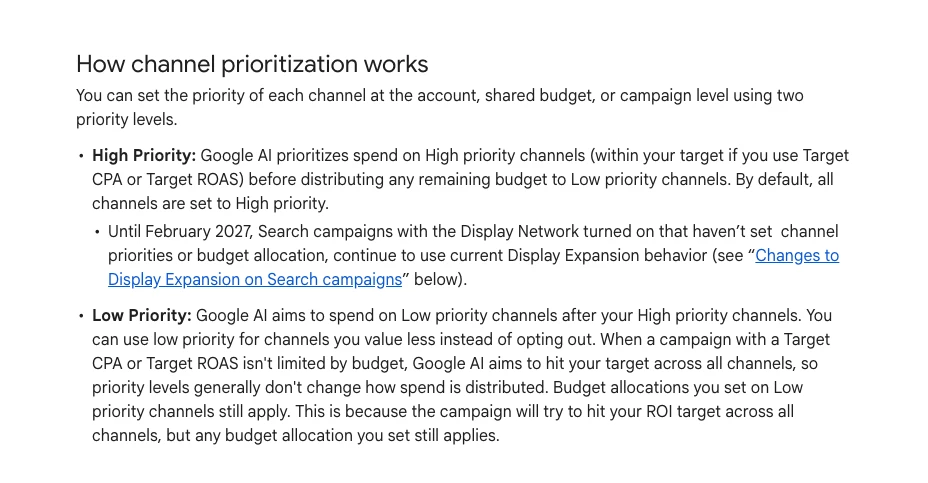
On new Search campaigns I keep Google Search only, with search partners and display expansion off, until there is data. Advertisers on Reddit noticed in November 2026 that the new channel priorities card warns that 0% stops your ads showing there. That is the point. If you want to test partners, run them for a month at a capped share and compare qualified leads, not conversions.
An eight-minute video from a marketing channel, published in July 2026, argues that most "bot" traffic on new campaigns comes from default settings and from counting raw form fills as conversions, according to its description. It links to the channel's own article and does not pitch a tool.
Raising the budget can make it worse, at least for a while. One advertiser raised a daily budget from €20 to €70 on Google's recommendation and saw spam clicks jump. Replies suggested raising budgets in small steps with partners and Display off.
Spam calls: what counts as a call lead
Google counts a call as a lead when it lasts longer than a threshold you set, or, where call recording is available, when its AI judges the call qualified. AI-qualified call leads filter out robocalls, spam calls and misdials, but only work when both phone numbers are in the United States or Canada. Everywhere else, the length rule is all you have.
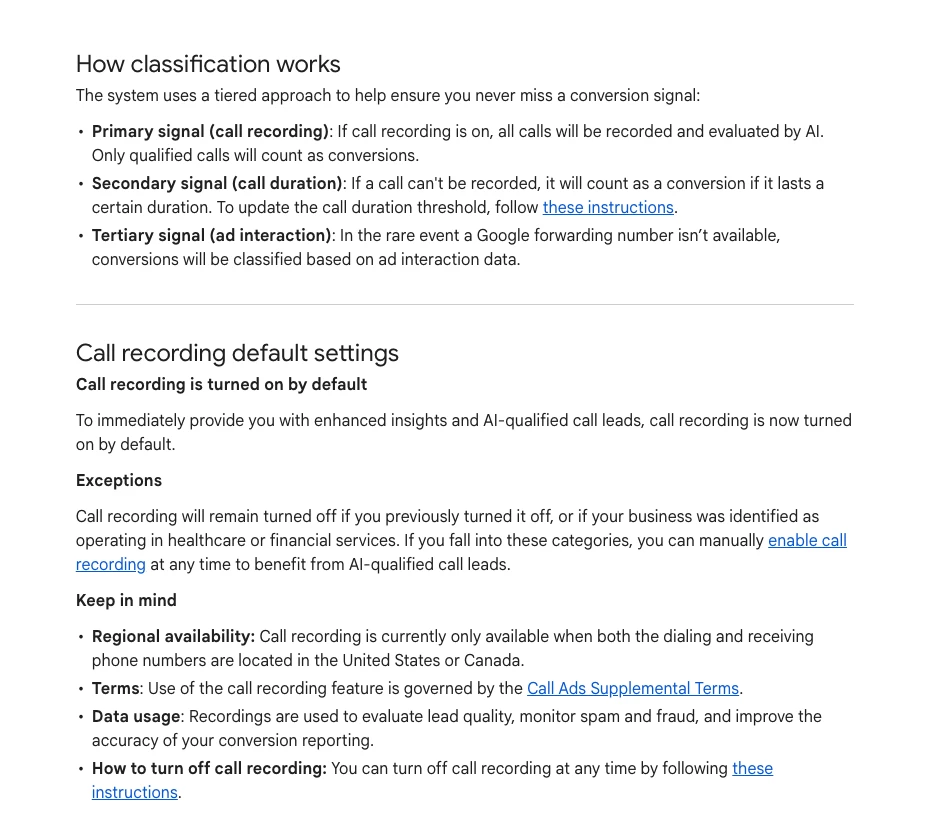
- Set the length. In your call conversion settings, set the minimum call length in seconds. Pick a length a real enquiry needs, based on your own call records. A robocall that hangs up after a few seconds should not count.
- Check your recording rules. Trade press dated the AI qualification to April 2026. Where recording is available, Google turns it on by default, except for accounts that turned it off or that it identified as healthcare or financial services. Recording calls has legal rules that vary by place. Check yours before you rely on it.
- Count calls, not taps. A click on a call button is not a call. If the button click is primary, every accidental tap is a "lead".
Spam calls billed per lead are a Local Services Ads problem, covered in the Local Services Ads guide. There, one advertiser was billed about $600 for three automated calls on their first day.
Do you need click fraud software?
Usually not as the first fix. Click fraud tools watch clicks and can block IP addresses or report patterns. Spam leads mostly come from your form, your conversion goals and your placements, which a tool does not change. Fix those first, then decide whether a tool adds anything you can measure.
Google's position: third-party tools often flag clicks Google already filtered and did not bill, and Google cannot compare their reports click by click. Shared addresses also muddy IP blocking, since an office, a university or a mobile network can put many people behind one IP. And a 2026 demonstration showed IP exclusions can be bypassed by harvesting a click on one address and using it on another.
| Option | What it does | Watch for |
|---|---|---|
| Google's own filters | Removes invalid clicks | No lead checks |
| Form protection | Blocks fake submissions | Consent, testing |
| CRM qualification | Feeds real leads back | Needs a sales process |
| Click fraud tool | Flags and blocks clicks | Overlap with Google |
| IP exclusions | Blocks known addresses | Shared IPs, bypass |
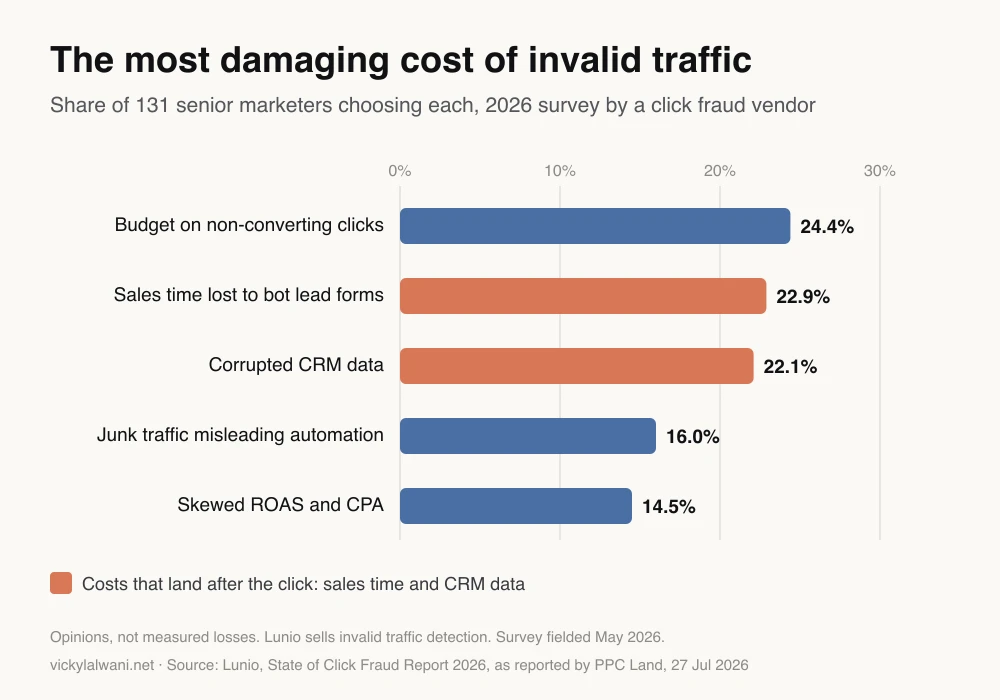
What does the industry worry about? In a 2026 survey of 131 senior marketers by Lunio, a company that sells detection tools, the costs named as most damaging were split almost evenly between wasted clicks, sales time lost to bot lead forms and corrupted CRM data. Only 5.3% ran a dedicated tool. Notice that two of the top three costs happen after the click, where a click tool has least reach.
If you test a tool, test it like any other change. Write down your qualified lead rate and cost per qualified lead for a month before, run the tool for a month, and compare. If the vendor's dashboard shows big savings but your CRM looks the same, you have your answer.
How to report spam leads each month
Report qualified leads, not conversions. Each month, show leads received, leads marked spam, leads marked bad fit and leads qualified, split by campaign and network, next to cost. Add Google's invalid click and credit figures as a separate line. One table answers "is the spam getting better?"
| Line | Where it comes from | Why |
|---|---|---|
| Leads received | CRM | The real total |
| Spam, bad fit | CRM status | Shows the junk share |
| Qualified leads | CRM status | What bidding should chase |
| Cost per qualified lead | Spend divided by qualified | The number that matters |
| Invalid clicks, credits | Google Ads card and report | What Google caught |
| Gap to Google Ads | Conversions vs CRM leads | Tracking health |
Keep spam and bad fit separate: one is a form and placement problem, the other a keyword and copy problem. Add one plain sentence on top: where it stands, what changed and what is next.
For a full tracking review, use the conversion tracking audit checklist. For spend that never turns into leads, see how to find wasted Google Ads spend. Why reports and the CRM disagree is covered in missing conversions in ad platforms.
A 30-day fix order
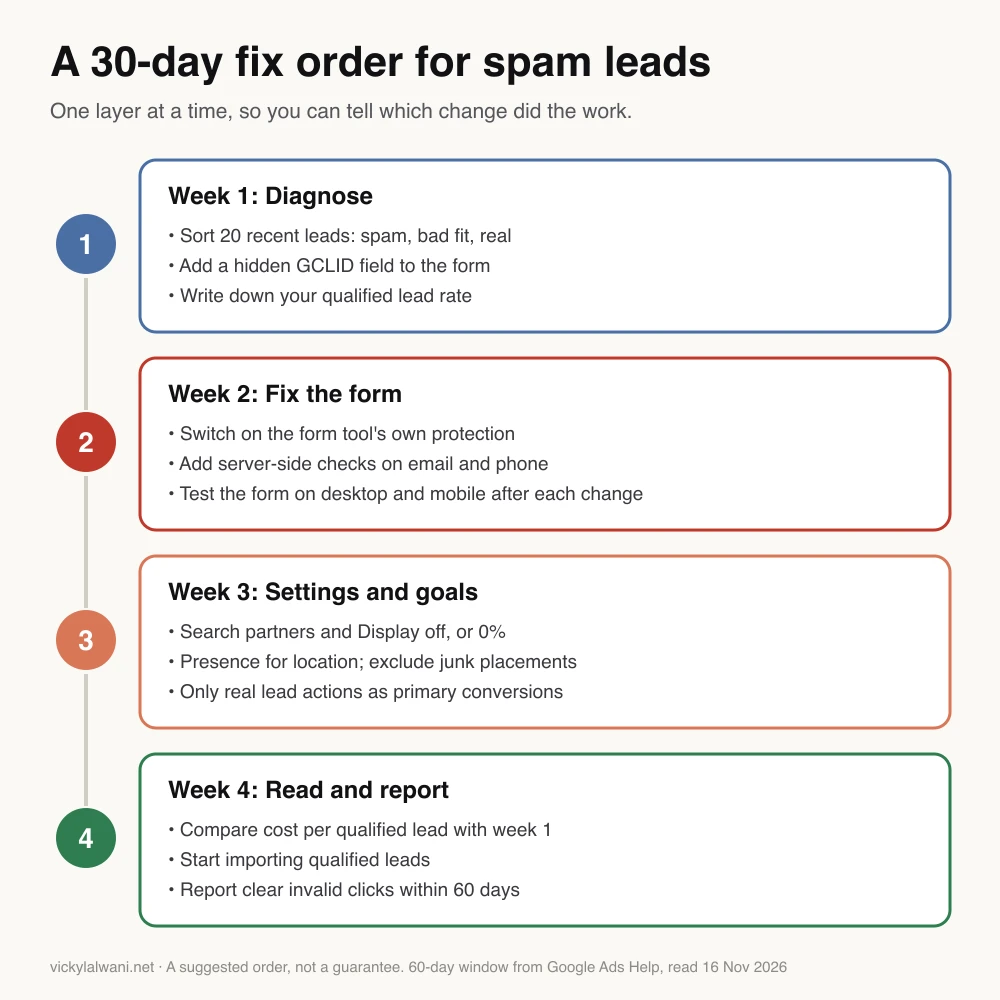
Spend the first week on diagnosis, the second on the form, the third on settings and goals, and the fourth on reading the CRM. Change one layer at a time so you can tell which change did the work. This is a plan, not a guarantee.
- Week 1: diagnose. Triage 20 recent leads into spam, bad fit and real. Add the hidden GCLID field. Note your qualified lead rate.
- Week 2: the form. Turn on the form tool's protection, add server-side checks, and test the form on desktop and mobile after every change.
- Week 3: settings and goals. Partners and Display off or at 0%, Presence for location, placement exclusions in Performance Max, only real lead actions as primary.
- Week 4: read and report. Compare qualified leads and cost per qualified lead with week 1. Start importing qualified leads. File an investigation request for clear invalid clicks still inside 60 days.
I keep campaigns in draft until every form, call button and download is tracked. On a live account that is spamming, the same rule applies in reverse: fix what is counted before you judge what is bought. Want that done for you? It is part of my Google Ads management.
Videos worth watching
Six videos on spam leads and invalid traffic, each title and channel checked on 16 November 2026. I have not watched them; the notes come from each video's own description. Several come from agencies or trainers who sell services.
| Video | Channel | Date | What it covers |
|---|---|---|---|
| It's New 11/12: Google Ads Invalid Traffic | Search Engine Roundtable | Nov 2026 | The new card, news recap |
| Your New Campaign Is 90% Bots | Marketing channel | Jul 2026 | Settings before fraud |
| Stop 100% of Spam Leads in My Google Ads PMAX Campaign | Agency channel | Nov 2025 | Performance Max fixes |
| Google Ads Is Sending You Garbage/Junk/Trash Leads | Agency channel | Jan 2026 | Partners, offline imports |
| 3 Reasons Your Google Ads Leads Are Junk | Agency owner channel | Nov 2026 | Smart campaigns, call tracking |
| How to Exclude Apps in Google Ads | Trainer channel | Feb 2026 | App placement exclusions |
One caution on the Performance Max video: "stop 100%" is a title, not a measured result. No setting stops all spam.
What people say on X and Reddit
Posts and threads from 2025 and 2026, each opened and checked on 16 November 2026: X posts through X's own embed service, Reddit threads through a public archive. Many Reddit replies come from freelancers or tool sellers, so treat single comments as opinion.
On X
| Where | Date | What it says | Label |
|---|---|---|---|
| Google Ads liaison, X | 12 Nov 2026 | Announces the Invalid traffic card | Official |
| Google Ads liaison, X | 12 Nov 2026 | Defines Estimated savings | Official |
| Google Ads liaison, X | 12 Aug 2025 | AI used to find bad placements | Official |
| Search Engine Roundtable's editor, X | 1 Jun 2026 | Flags the credit report doc | Publication |
| Search Engine Roundtable's editor, X | 2 Nov 2025 | Asks about accidental ad clicks | Publication |
| A search marketer, X | 1 Nov 2025 | Nearly clicked an ad by mistake | First-hand |
| An SEO consultant, X | 2 Nov 2025 | Clicked one by accident | First-hand |
| An SEO practitioner, X | 4 Nov 2025 | Says the layout costs advertisers | Opinion |
- The new card. Google's Ads Liaison account said Google's invalid traffic defences had always run in the background, with no single place to see what they did. The next post in the thread lists Estimated savings first: bots, click farms and accidental clicks caught before billing.
- Accidental clicks are real cost. When Google grouped sponsored results in late 2025, Search Engine Roundtable's editor asked who had clicked an ad by mistake. A search marketer said they nearly had, and another practitioner argued the extra clicks cost businesses money. Accidental clicks are a type of invalid traffic Google says it filters.
On Reddit
| Where | Date | What it says | Label |
|---|---|---|---|
| r/PPC | Apr 2025 | Partners: 2% of leads qualified | First-hand |
| r/googleads | Nov 2026 | 436 "conversions", 7 real leads | First-hand |
| r/googleads | Oct 2026 | Sudden fake emails from Performance Max | First-hand |
| r/PPC | Jan 2026 | B2B junk mostly from Performance Max | First-hand |
| r/PPC | Feb 2026 | Cheap leads in Ads, bots in the CRM | First-hand |
| r/PPC | Nov 2026 | Channel card nudges partners back | Opinion |
| r/googleads | Sep 2025 | $100 credit after a refusal | First-hand |
| r/googleads | Nov 2026 | Why pay per click, not per lead? | Opinion |
- The CRM tells a different story. A service-business advertiser described a cost per lead that looked excellent in Google Ads while the CRM filled with bots. The most common reply: import only qualified leads as conversions.
- Check the click ID first. On the Performance Max spam thread, replies said to check whether spam leads carry a GCLID. If they do not, the replies said, the spam is not coming through the ad and campaign settings will not stop it.
- Partners split opinion, a little. On the channel priorities thread, most replies keep partners and Display at 0% for lead generation. A few suggest a month-long split test before deciding. Two threads mention a private Google beta for controlling third-party inventory. I found no public Google page for it, so I have left it out.
Where they agree: switch off what you cannot see, protect the form, and feed back only real leads. Where they disagree: whether search partners ever earn a place, and whether a click fraud tool is worth paying for.
Where this advice is weak
- There is no measured spam rate. I found no independent study of how many Google Ads leads are fake. Google says there is no standard invalid traffic rate. The figures here are single accounts or vendor data.
- The Reddit numbers are one account each. The search partners comparison is a B2B software account in 2024. Your partners traffic may be better or worse. Test it against your own CRM.
- Google's lead goal protections are a black box. Google says lead goals trigger extra invalid traffic protections and does not say what they do.
- Consent and call recording rules vary. The notes on reCAPTCHA and call recording are not legal advice. Check the rules where you trade.
- My method is not a proven formula. It is how I set up and review accounts. I have not published outcomes, because client numbers stay private.
- Things change fast. The Invalid traffic card, channel priority and lead scoring all arrived in late 2026. Re-check the settings every few months.
Want a second pair of eyes on your account?
If your sales team has stopped trusting Google Ads leads, I can review the account, the form and the conversion setup and tell you which layer is letting junk through. Send me what you are seeing through the contact page. How I work is on the Google Ads management page, and tracking fixes sit under analytics and tracking.
Sources
| Source | What it supports | Date | Link |
|---|---|---|---|
| Google Ads Help | Card, credits, 60-day investigation, FAQs | Read 16 Nov 2026 | About invalid traffic, invalid clicks |
| Google Ads Help | Filters do not stop invalid leads; form fixes | Read 16 Nov 2026 | Prevent invalid leads |
| Google Ads Help | Lead goals, 15 conversions, 7 days | Read 16 Nov 2026 | High-quality leads |
| Google Ads Help | Credit report for Search and PMax | Read 16 Nov 2026 | Credit report |
| Card launch, 30% claim | 12 Nov 2026 | Google blog, Search Engine Roundtable | |
| Google Ads Help | Primary goals, enhanced conversions for leads | Read 16 Nov 2026 | Primary actions, EC for leads |
| Google Ads Help | AI-qualified calls, US and Canada only | Read 16 Nov 2026 | Call leads, measure calls |
| Google Ads Help | Partners, channels, placements, AI Max | Read 16 Nov 2026 | Search Network, channels, suitability, AI Max |
| Google Ads Help | Lead form OTP | Read 16 Nov 2026 | Lead forms |
| Search Engine Roundtable | Lead form scoring | 16 Oct 2026 | Lead scoring |
| PPC Land | Google's lead spam page, context | 20 Sep 2026 | Fake leads |
| PPC Land, Lunio data | Survey of 131 marketers (vendor) | 27 Jul 2026 | Survey |
| PPC Land, Lunio data | AI Max invalid traffic, retail (vendor) | 13 Aug 2026 | AI Max |
| PPC Land | IP exclusion bypass; reCAPTCHA ruling; call AI | 2025 to 2026 | IP bypass, reCAPTCHA, calls |
| First-hand reports and opinion | Apr 2025 to Nov 2026 | Linked in the text | |
| X | Google Ads liaison, trade press, practitioners | Aug 2025 to Nov 2026 | Linked in the text |
| YouTube | Six videos, titles checked | Nov 2025 to Nov 2026 | Linked in the videos table |
FAQ
How do I stop spam leads from Google Ads?
To stop spam leads from Google Ads, work in three layers. Protect the form with server-side validation and a bot check, and store the Google click ID with each lead. Narrow where ads run by switching off search partners and the Display Network and excluding junk placements. Then make only real lead actions primary and import the leads your sales team qualifies, so Smart Bidding learns from those.
Why am I getting spam leads from Google Ads?
Spam leads from Google Ads usually come from bots that find your form directly, low-quality traffic from partner sites, apps and Display placements, and broad automated campaigns such as Performance Max. Some "spam" is really tracking: actions like Maps clicks or call-button taps counted as leads. Sort ten recent leads into spam, bad fit and real before changing anything.
Are Google Ads fake leads bots or real people?
Google Ads fake leads can be either. Google says bots can reach your website and submit forms, and real people can type fake details. Check whether each junk lead carries a Google click ID (GCLID). No click ID with junk details usually means a bot posted to the form without clicking your ad. A click ID with fake details points to poor placements or click farms.
Does Google refund invalid clicks?
Google does not charge for invalid clicks it catches before the month ends, so no refund is needed. If it finds invalid clicks after billing, it adds a credit labelled "Invalid activity" to a later invoice, where appropriate and possible. You can also ask Google to investigate the last 60 days through the Click Quality Form.
Do Google Ads invalid click credits cover fake leads?
No. Google Ads credits reverse the charge for invalid clicks. They do not remove fake leads from your CRM, pay for sales time or correct what Smart Bidding learned. Google's own help page says its filters do not prevent invalid leads on their own, because most checks run after the ad is shown.
How do I report invalid clicks to Google Ads?
Report invalid clicks to Google Ads with the Click Quality Form linked from Google's invalid traffic help page. Include your customer ID, exact dates, campaign names, server logs with IP addresses and GCLIDs, and for fake leads a spreadsheet of each lead's GCLID with your assessment of it. Google reviews activity from the last 60 days.
What is the Invalid traffic card in Google Ads?
The Invalid traffic card is a summary on the Google Ads Overview page, rolling out from 12 November 2026. It shows Estimated savings, the invalid clicks Google filtered before billing, and Credited cost, the money returned for invalid clicks found after the month closed. View details opens daily and campaign breakdowns. It does not show fake leads.
Why does Performance Max get so many spam leads?
Performance Max places ads across Search, YouTube, Display, Gmail, Discover and Maps, including partner sites and apps, so it reaches more low-quality inventory than a Search campaign. If spam form fills count as conversions, it learns to find more. Exclude junk placements, set search partners and Display to low priority at 0% where available, and bid on qualified leads.
Should I turn off search partners in Google Ads?
For lead generation, start with search partners off. They are on by default in new Search campaigns, Google says some partner clicks may not be highly targeted, and you cannot see which partner site showed your ad. If you want to test them, cap their share with channel priority and compare qualified leads from your CRM, not conversions.
Does reCAPTCHA stop Google Ads spam leads?
reCAPTCHA stops simple bots but not all of them. Google says sophisticated bots can bypass browser controls and post straight to your form, so it also recommends server-side validation and double opt-in. In some places reCAPTCHA may need visitor consent before it runs, so check with whoever manages your cookie consent.
Do I need click fraud software for Google Ads?
Usually not as a first step. Click fraud software watches clicks, while most spam leads come from the form, the conversion goals and the placements. Google says third-party tools often flag clicks it already filtered and did not bill. Fix the form and settings first, then test any tool against your qualified lead rate for a month.
How do I stop Smart Bidding learning from fake conversions?
To stop Smart Bidding learning from fake conversions, set only real lead actions as primary conversions in Google Ads and make page views, Maps actions and call-button clicks secondary. Store the click ID with each lead and import the leads your sales team qualifies. Google suggests at least 15 conversions in 30 days for the action you bid on.
How do I stop spam calls from Google Ads?
Set a minimum call length under Goals so short robocalls do not count as leads, and count real calls rather than taps on the call button. Google's AI-qualified call leads filter robocalls and misdials using call recordings, but only where call recording is available, which Google limits to two markets. Elsewhere, call length is the main control.
What is a normal invalid click rate in Google Ads?
Google says there is no industry standard for a normal invalid click rate in Google Ads. A rising Invalid clicks column means Google is filtering more, not that you were billed more. Watch the share of leads your sales team marks as spam instead, by campaign and network, month by month.
Can someone help me fix spam leads in my Google Ads account?
Yes. Fixing spam leads usually means checking the form, the conversion goals, the click ID tracking and the campaign settings together. Vicky Lalwani, a Google Ads and tracking consultant, reviews accounts and shows which layer is letting junk through. Their Google Ads management page explains how they work.