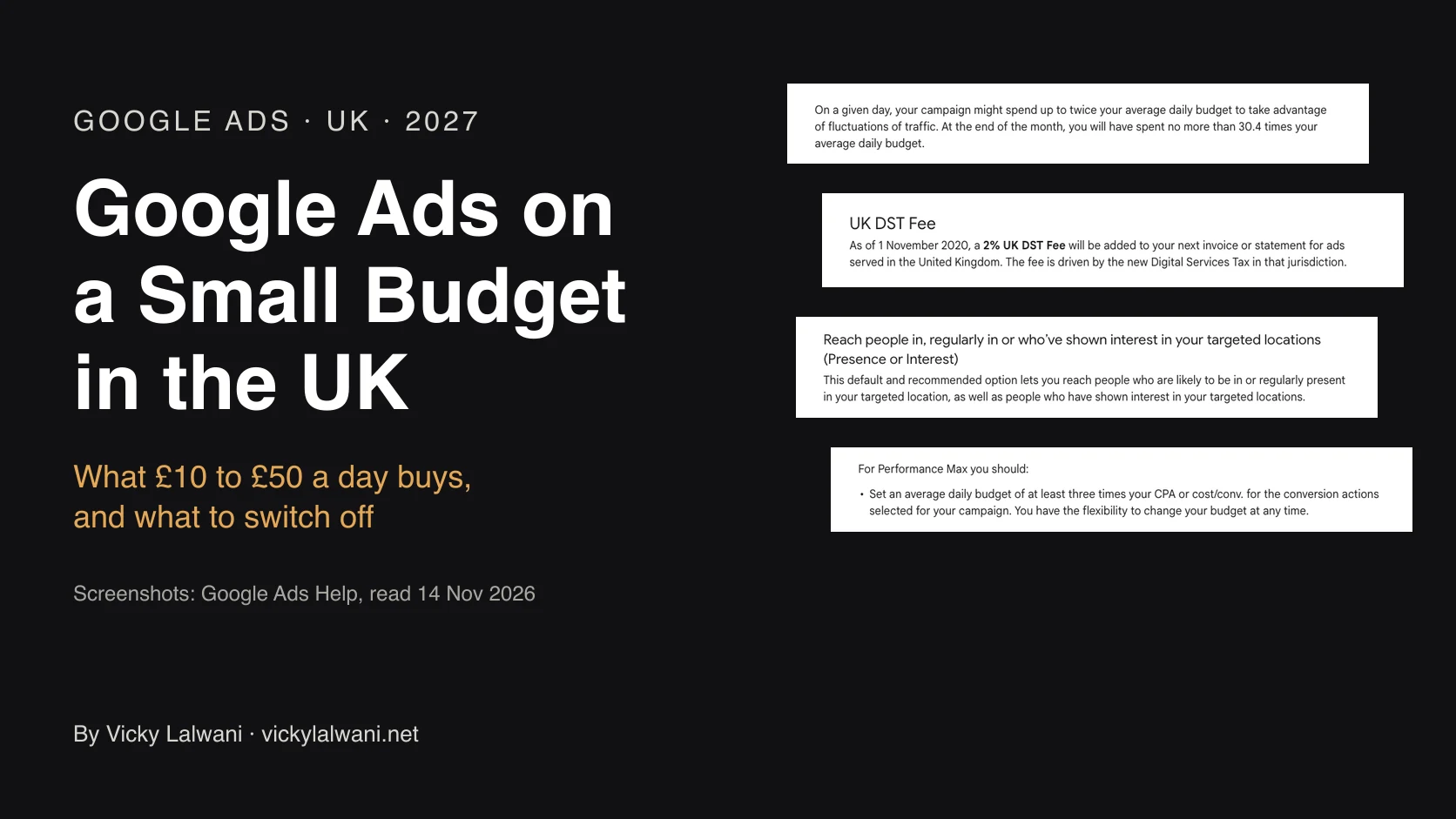
Google publishes no minimum budget for Google Ads in the UK, so a small budget can work if the account is kept narrow. £10 a day is at most £304 a month in clicks, because Google caps a month at 30.4 times the daily budget, plus a 2% UK fee. Run one Search campaign with a few tight ad groups, each with its own landing page, and start with phrase and exact match keywords. Switch off search partners, the Display Network and AI Max, set the location option to Presence, and track every enquiry before launch. Hold off if the budget buys only one or two clicks a day at your own click price.
Do these three things first:
1. Work out your real monthly figure. Daily budget times 30.4, plus 2% for Google's UK fee. £10 a day is up to £304 of clicks and about £310 on the bill.
2. Look up your own click price. Open Keyword Planner, set your area, and read the low and high top of page bid for your main keywords. That range is the best guide to your price, not a UK average from a blog.
3. Open your campaign settings. Check search partners, the Display Network, AI Max, the location option and auto-applied recommendations. The list is further down.
TL;DR
- Is there a minimum? No. Google publishes no minimum daily budget and says the amount is up to you.
- What £10 a day means: at most £304 a month, because Google caps a month at 30.4 times the daily budget.
- On top of clicks: a 2% fee on ads shown in the UK. Google adds it because of the UK's Digital Services Tax and calls it the UK DST fee. VAT is separate, so ask your accountant.
- When not to advertise: when the budget buys one or two clicks a day at your own click price, or when nobody is tracking enquiries.
Jump to: What it buys · Fee, VAT, overspend · When not to · Structure · Switch off · Tracking · Bidding · First two months · X and Reddit
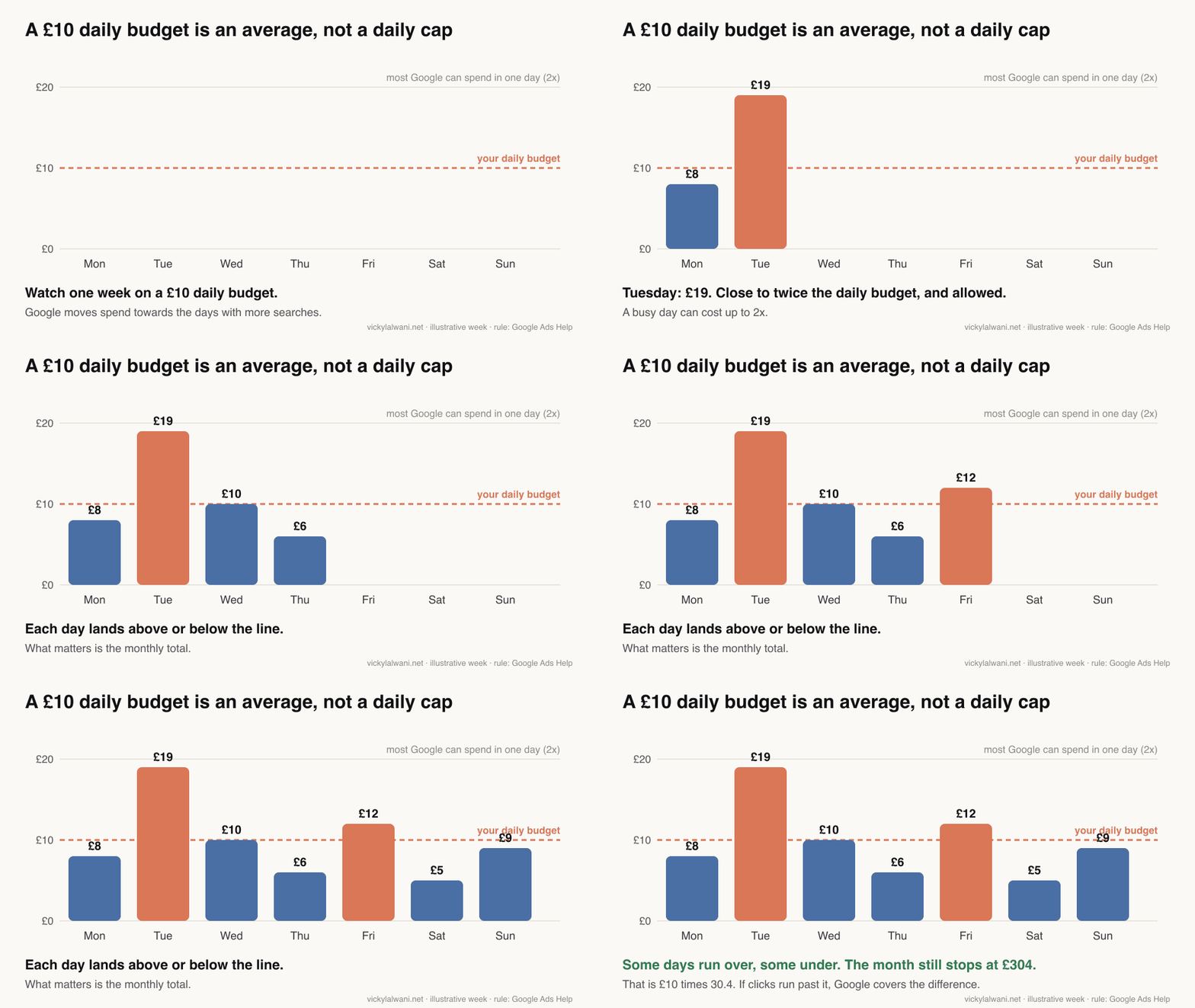
Picture a two-van plumbing firm in Leeds. The owner has £300 a month for Google Ads and three questions. Is that enough? How should the account be set up? And why did Google take £19 on Tuesday when the daily budget says £10?
That firm is made up. The questions are real: they are what small advertisers type into Google. This guide answers them in pounds, with the rules checked against Google's own help pages. If you would rather not do this alone, I set up and manage Google Ads for UK businesses.
A note on evidence. Platform rules come from Google Ads Help and gov.uk, read on 14 November 2026 and linked where I use them. Anything written as "I" comes from my own account work for clients in the UK, Australia and the USA. Some of those lessons come from the Australian and US accounts, not UK ones. I do not share client names or client numbers, so every sum in pounds here is a worked example.
What counts as a small Google Ads budget in the UK?
A small Google Ads budget is one that cannot buy about 30 enquiries a month at your own click price. That is a working line for this guide, not a Google rule. Google publishes no minimum daily budget and no definition of small.
Why 30? Google suggests having at least 30 conversions in the last 30 days before you judge a cost target. A conversion is Google's word for an enquiry or a sale.
Worked example: 30 enquiries at 8 in 100 clicks needs 375 clicks. At £4 a click that is £1,500 a month, about £50 a day. Anything under that is a small budget on these example numbers.
Most Google Ads advice is written for accounts above that line. Below it you have fewer clicks to learn from, so every click sent to the wrong person hurts more.
What £10, £20 and £50 a day actually buys
£10 a day buys at most £304 of clicks a month. That is about 152 clicks at £2 a click, or 76 at £4. £20 a day doubles those numbers, and £50 a day is up to £1,520 a month. The click prices are examples, not UK averages.
| Daily budget | Monthly cap | Clicks at £2 | Clicks at £4 |
|---|---|---|---|
| £5 | £152 | 76 | 38 |
| £10 | £304 | 152 | 76 |
| £20 | £608 | 304 | 152 |
| £30 | £912 | 456 | 228 |
| £50 | £1,520 | 760 | 380 |
The sums: clicks = budget divided by click price. Enquiries = clicks times the share of visitors who get in touch. Cost per enquiry = click price divided by that share.
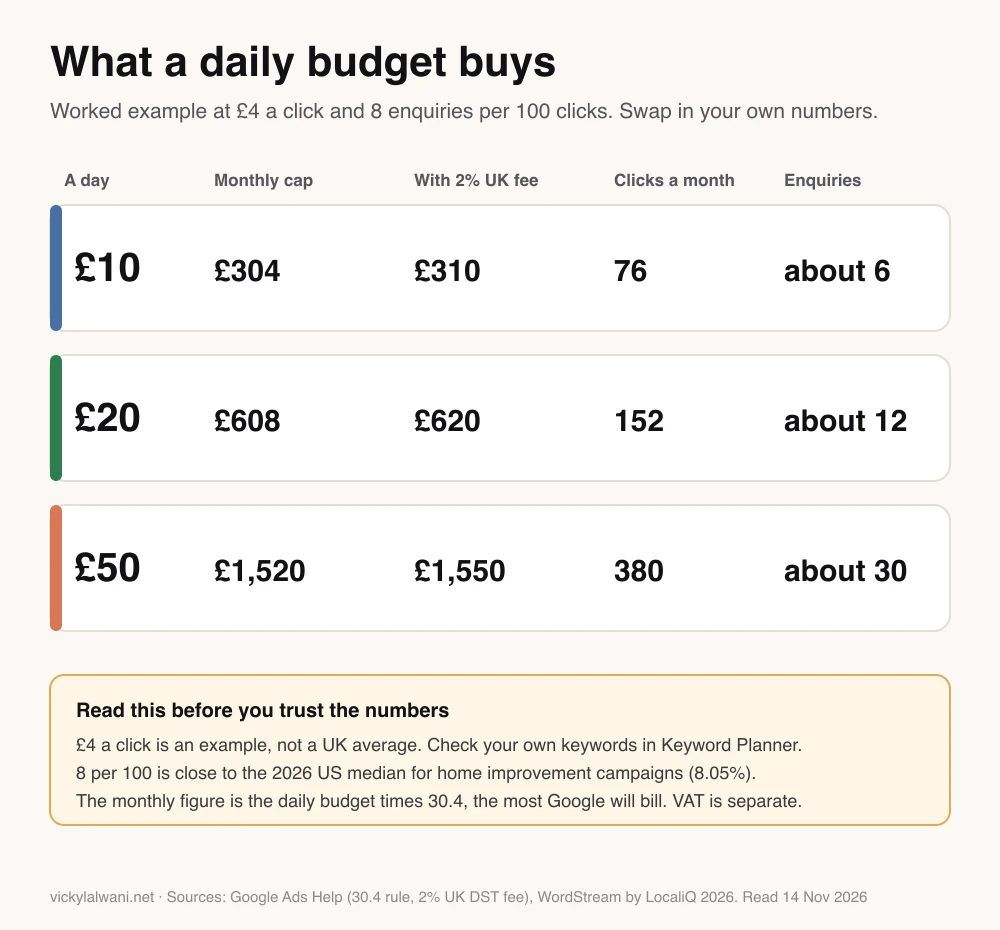
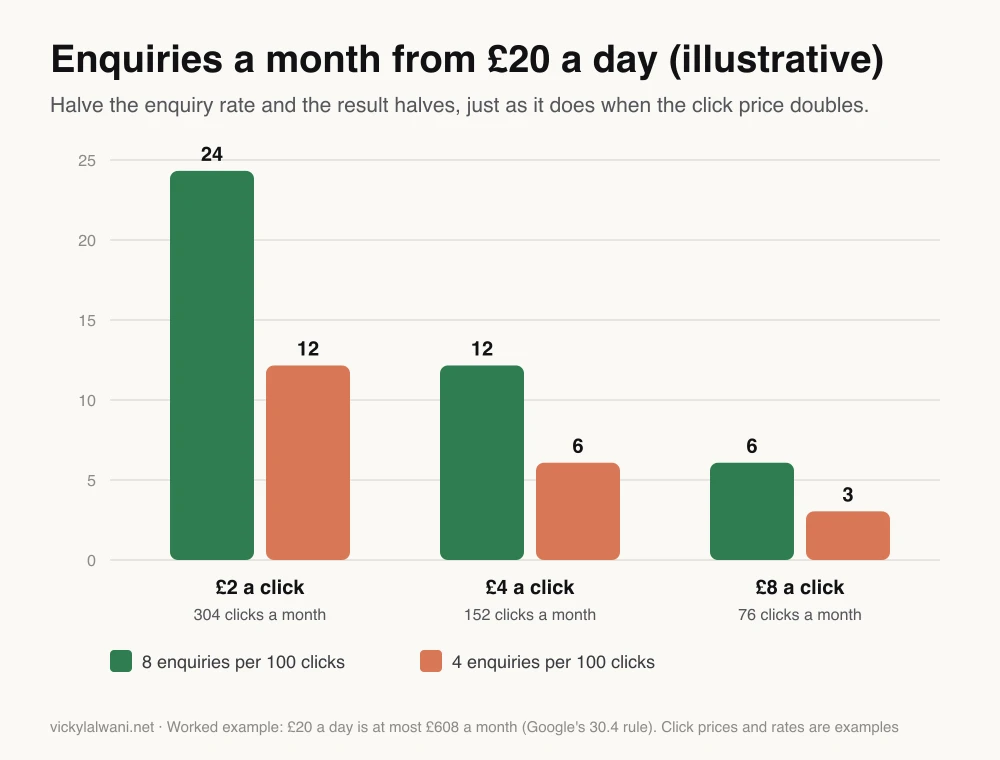
A worked example. £20 a day at £4 a click is five clicks a day, about 152 a month. If 8 in every 100 visitors enquire, that is about 12 enquiries at roughly £50 each.
Now take it one step further. If one in three enquiries becomes a paying job, each job costs about £150 in clicks. If a typical job earns you less than that, the sums do not work at this click price. These are example figures. Use your own.
Where does 8 in 100 come from? It is close to the figure for home improvement campaigns, 8.05%, in the 2026 US search benchmarks from WordStream by LocaliQ. Trade press coverage of the report gives the sample as 13,474 US search campaigns between April 2025 and March 2026, and says the figures are medians. Those are American managed accounts, so plan for less on a first campaign.
Halve that rate to 4 in 100. Same £20 a day, same clicks, about 6 enquiries at roughly £100 each. A weak page does the same damage as a doubled click price.
What does a click cost in the UK? I could not find a UK-wide benchmark that publishes its sample, and the UK averages quoted online disagree with each other. The same US benchmark puts the typical click at $5.42, in dollars.
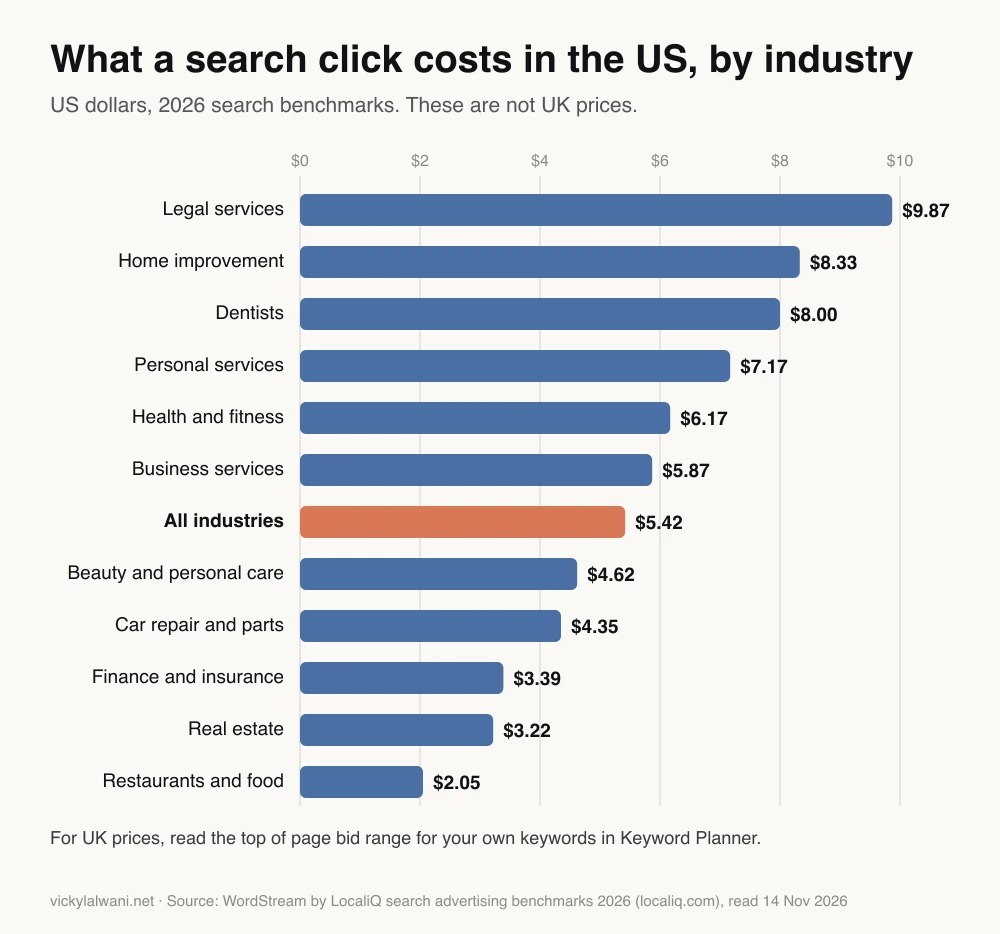
The better guide is what Google shows for your keywords. Keyword Planner is inside Google Ads under Tools, and you need a Google Ads account to open it. Set the location to your area and read the low and high top of page bid. Google describes them as the range most advertisers have paid: roughly a fifth paid less than the low figure and a fifth paid more than the high one.
A budget calculator you can paste into an AI. Use ChatGPT, Claude or Gemini, with your own numbers from Keyword Planner.
You are helping a UK small business check a Google Ads budget. Use only the numbers I give you. Do not estimate search volumes or click prices yourself. If a number is missing, ask me for it.

My numbers
- Daily budget: £[amount]
- My main keywords with Keyword Planner's top of page bid, low and high, for my area: [paste the rows]
- Share of clicks that become enquiries: [my own rate if I have one; otherwise show 3%, 5% and 8%]
- Share of enquiries that become paying jobs: [my rate]
- Profit on a typical job, before ad costs: £[amount]

Work it out, showing each sum
1. Monthly cap = daily budget x 30.4. Then add 2% for Google's UK fee.
2. Clicks a month and clicks a day, at the low bid and at the high bid.
3. Enquiries a month and cost per enquiry, for each enquiry rate.
4. Cost per paying job, and whether the profit on a job covers it.
5. How many weeks it would take to collect 30 enquiries at this budget.

Finish with a short table and one plain sentence: is this budget enough to learn anything in two months, yes or no, and why. List every assumption you made.
I have had an AI agent hand me keyword volumes that were badly wrong, so no AI-pulled number goes into a plan of mine without a human check. That is why the prompt tells the AI to use only your numbers.
The real cost: the 2% UK fee, VAT and daily overspend
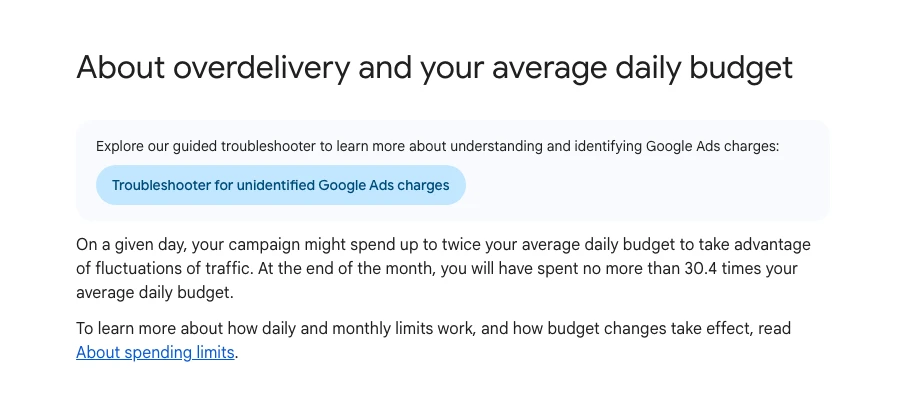
Your daily budget is not the whole bill. Google adds a 2% UK fee each month. VAT sits outside it. And one busy day can cost up to twice your daily budget, though a month never bills more than 30.4 times it.
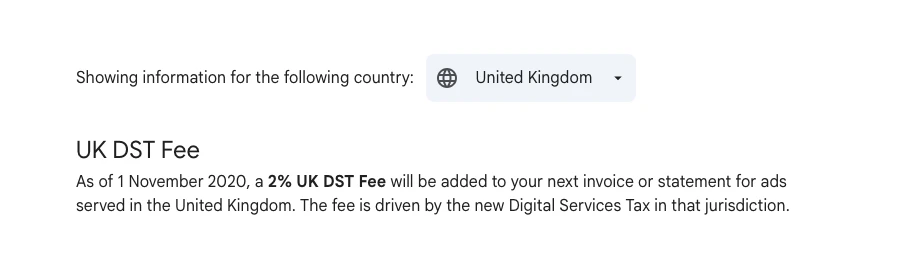
The 2% UK fee (Google calls it the UK DST fee).
- Google adds a 2% fee to ads served in the UK, and has done since 1 November 2020. It was still listed on 14 November 2026.
- It is added once a month, on top of your budget, as its own line on the invoice.
- £300 of clicks carries a £6 fee.
VAT. The answer depends on you.
- Google's tax page lists UK accounts under Google Ireland Limited and says it does not add VAT to accounts set up for business use. The page says you are responsible for self-assessing the VAT instead.
- If the account was set up for non-business use, Google does add VAT. That choice is made at sign-up and cannot be changed, so check it in your billing settings.
- HMRC calls this the reverse charge: you act as both supplier and customer, adding the VAT as output tax and claiming back the input tax you are entitled to. If you can reclaim it in full, HMRC says there is no net cost.
- If you are not VAT registered, HMRC says the value of services bought this way counts towards the registration threshold of £90,000 of taxable turnover.
- Google says it cannot give VAT advice, and neither can I. Ask your accountant.
Daily overspend. This is why Tuesday cost £19.
- On any one day a campaign can spend up to twice its average daily budget.
- Across a month it cannot bill more than 30.4 times the daily budget. If clicks run over, Google covers the difference.
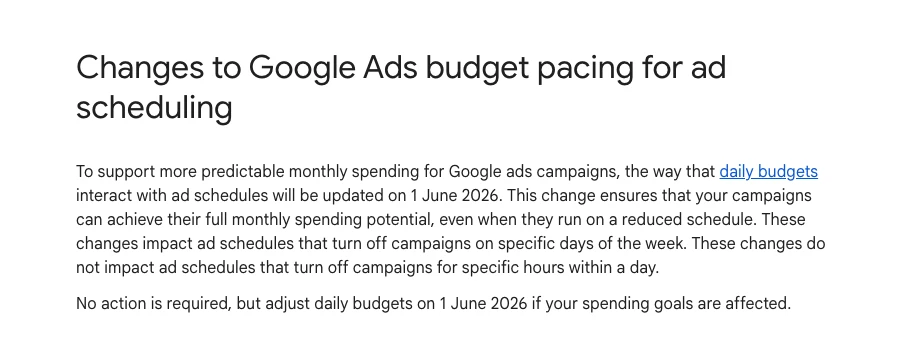
The weekday trap, new in 2026. Many small firms run ads Monday to Friday and divide the monthly budget by working days. That no longer works.
- Since 1 June 2026, a campaign that is switched off on some days of the week still paces towards the full 30.4 times the daily budget.
- Example: you want £300 a month and run weekdays only. £300 divided by 22 working days is £13.64 a day. Google can now bill up to about £415 a month on that setting.
- The safe sum is monthly budget divided by 30.4. For £300 that is £9.87 a day.
A two-minute explainer of the pacing change from a Google Ads training channel, published in May 2026. Its example is in dollars: $100 a day on 15 days used to mean about $1,500 a month, and can now reach $3,000. The channel sells reviews and training.
When not to run Google Ads at all
Sometimes the right answer is "not yet". I would hold off in these cases.
- The budget buys one or two clicks a day. As an example, £5 a day at £4 a click is about 38 clicks a month. At 8 in 100 that is about three enquiries. You cannot tell a good keyword from bad luck on numbers that small.
- Nobody is tracking enquiries. Without tracking you are paying for clicks and guessing at the rest.
- Nobody can answer the phone. A paid click that reaches voicemail during a job is money gone.
- The page does not exist yet. If the ad promises boiler repair and the click lands on a general homepage, fix the page first.
- You are about to split the budget. On a small budget I would rather run one platform properly than split it across two.
What to do instead: start with the free work. Claim and complete your Google Business Profile, tidy your listings, and get one page per service in good shape. Then come back to ads with a page worth paying for.
I will not give you one pound figure below which ads never work. Do this sum instead: daily budget divided by your click price. If the answer is one or two clicks a day, wait. You will also read rules of thumb such as 10 clicks a day or £30 a day. None comes from a controlled test at small budgets.
A one-campaign structure for a small budget
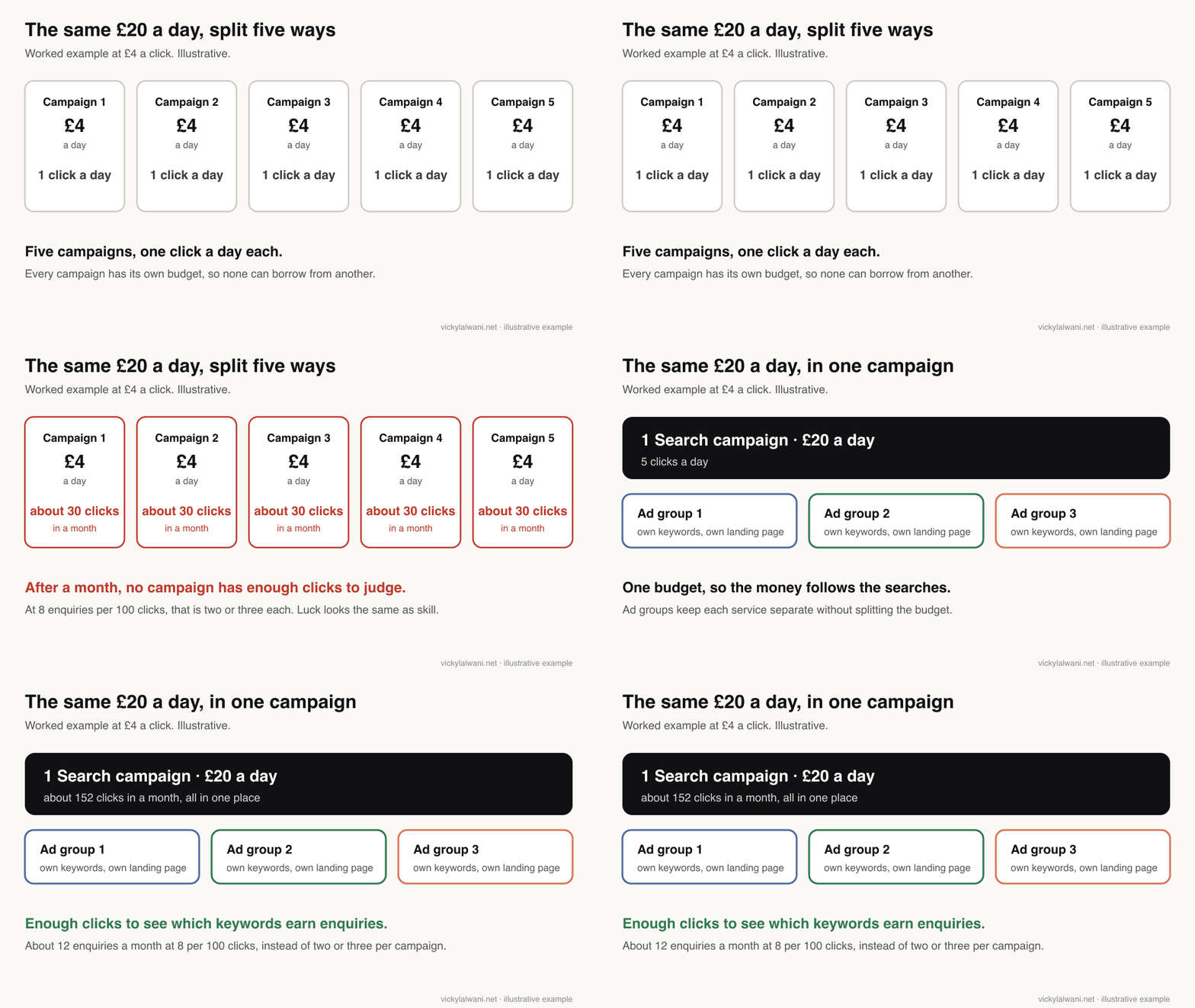
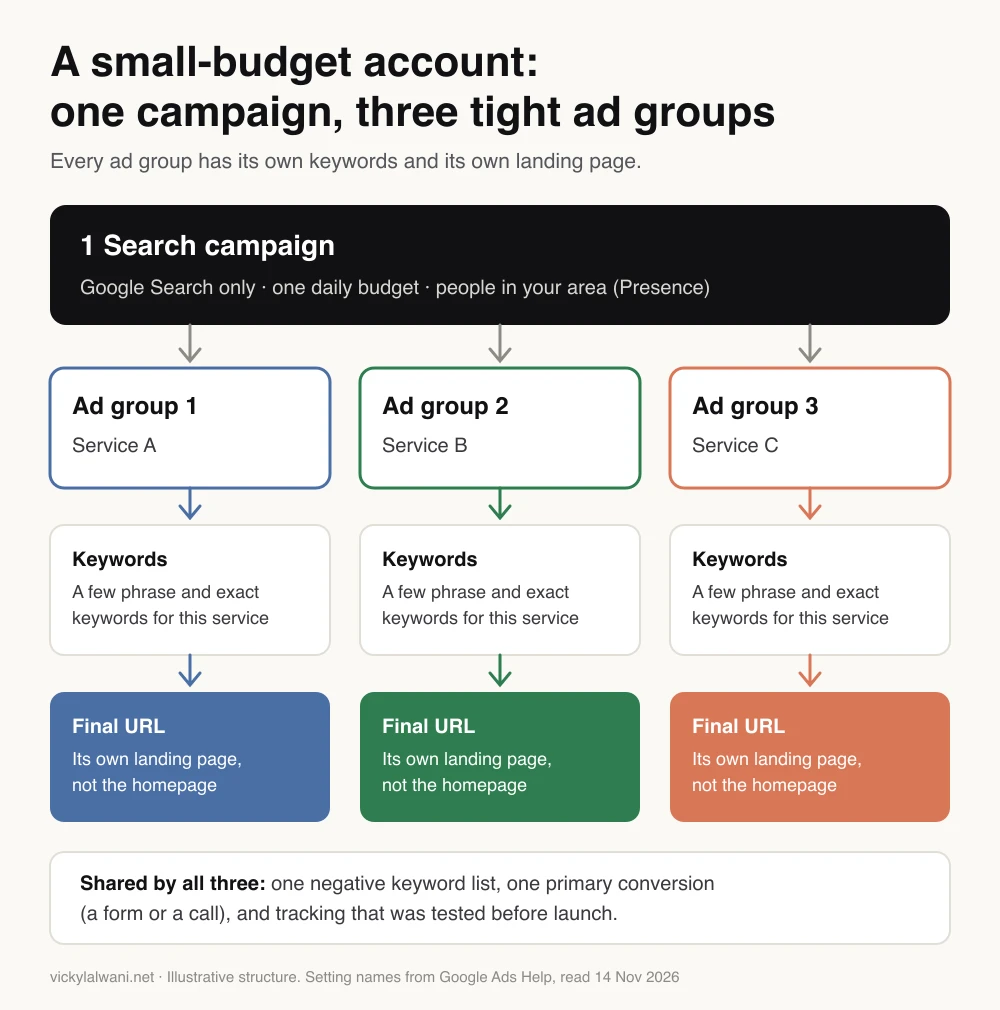
On a small budget, I recommend one Search campaign. Give it one budget, an ad group for each service, a few phrase and exact keywords in each, one landing page per ad group, one shared negative keyword list and one main conversion.
As an example, five campaigns at £4 a day each collect too few clicks to learn from. One campaign at £20 a day has a better chance. I have been challenged on spreading a small budget across too many campaigns. The answer was to consolidate into fewer.
A 26-minute walkthrough from a UK Google Ads agency channel, published in February 2026, makes a similar case in pounds: one service, exact match and a tight radius around your town. It ends with a free audit offer, and its idea of counting softer actions as conversions is contested.
The setup I recommend. Where a line says "I", it is something I do in my own builds:
- Plan in a sheet first. Keywords, structure, ad copy, sitelinks (the extra links under an ad), negative keywords (words you do not want your ad to show for) and target areas. I build nothing in the account until that plan is approved.
- An ad group for each service. On a young account I keep a second service as its own ad groups inside the main campaign, and split it out once there is data.
- Every ad group has its landing page chosen before launch. Google Ads calls this the final URL. I recommend one landing page per ad group. If a client can only give me fewer, I start with those and revisit if conversion is poor.
- Sitelinks point at the landing pages, not the main website, because every one of those clicks is paid for.
- Areas use the names people type. I have built location keywords on official area names that residents never search for. Someone local had to point it out.
I have had ad clicks going to a general website page instead of the landing page, because the ads were written before the landing pages existed. A colleague found it by clicking through the ads.
Does a landing page always beat the homepage? No. There are documented cases where the homepage won because it answered more of the visitor's questions. The page has to match the search and make the next step obvious.
Keywords and match types: start narrow, test broad later
On a small daily budget I start with phrase and exact match. Broad match comes later, as a test, when there is budget to spare, to find the search terms that convert.
- Exact shows your ad on searches with the same meaning or intent as your keyword. Put the keyword in square brackets.
- Phrase shows it on searches that include the meaning of your keyword. Put the keyword in quotation marks.
- Broad shows it on searches related to your keyword, including ones that do not contain its meaning. It is the default when you add a keyword.
What the data says. It leans towards exact match on cost, though not every time.
- Optmyzr compared match types inside 2,637 accounts in 2023. In accounts spending under $10,000 a month, exact match had the lower cost per conversion in about 67% and broad in about 30%.
- A 2025 Adalysis study of 16,825 campaigns found the opposite under Maximise conversions bidding, by a small margin.
- Google's own position is that broad match needs Smart Bidding. That is its automated bidding, which sets a bid for each search from your past conversions. A small account often lacks those conversions, which is my reason for waiting.
Negative keywords and search terms.
- Give the account a short check every day. Look at the search terms report first (the list of what people typed before they clicked), then add negative keywords.
- Negative keywords do not cover close variants. Add plurals and synonyms by hand. Misspellings are covered.
- The report does not show everything. Google leaves out terms with too little search activity for privacy reasons.
I once put borderline terms on the negative list from day one. I was challenged on it, and we agreed to leave them as neither keyword nor negative until the search terms report showed what they brought.
What to switch off or check on day one
Check six settings on day one: search partners, the Display Network, AI Max, the location option, auto-applied recommendations and the ad schedule. Each one widens where a small budget can go. On a small budget, narrow them.
| Setting | Default | On a small budget |
|---|---|---|
| Search partners | On | Off |
| Display Network | A tick box | Off |
| AI Max | On | Off for now |
| Location option | Presence or interest | Presence |
| Auto-apply | Off unless set | Keep off |
| Ad schedule | All day | Your answering hours |
- Search partners. Included by default in a new Search campaign. Google itself notes that clicks from some partner sites are not always highly targeted, and it does not show you which partner sites your ads ran on. Untick "Include Google search partners" under Networks.
- Display Network. A tick box when you create a Search campaign. Check it is unticked. Google is replacing this with channel prioritisation, rolling out from 15 October 2026. There, Display at low priority with a 0% allocation stops spend on that channel. From February 2027, Search campaigns that still have the Display Network switched on move to the new controls automatically, so check the setting again then.
- AI Max. Switched on by default in new Search campaigns. It adds broader matching and can change your ad text and landing page. Google says it will not be effective when a campaign is limited by budget. Switch it off at creation and revisit later.
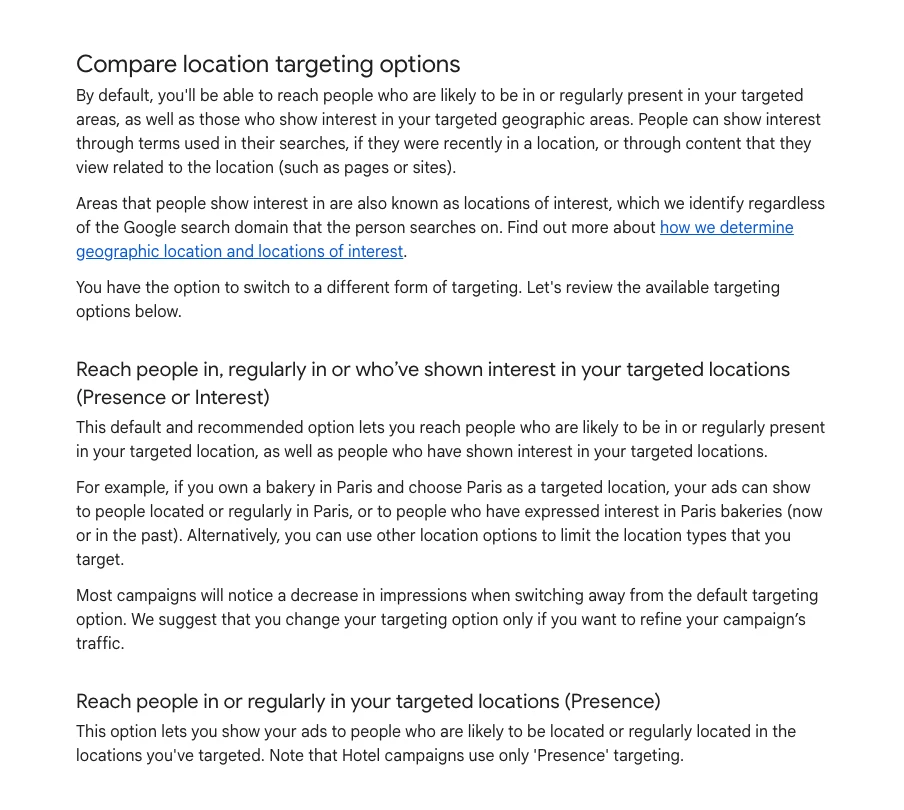
- Location option. The default is Presence or interest, which includes people who have shown interest in your area but are not in it. A local service business usually wants Presence: people in, or regularly in, the area. You will find it under Locations, in Location options.
- Auto-applied recommendations. Off unless someone turned them on. If they are on, Google can add broad match keywords, expand to search partners or change your bid strategy without asking. Check the history tab under Recommendations.
- Ad schedule. Run ads only in the hours you can answer the phone. Then set the daily budget as your monthly budget divided by 30.4, because Google now paces to the full month whatever days you run.
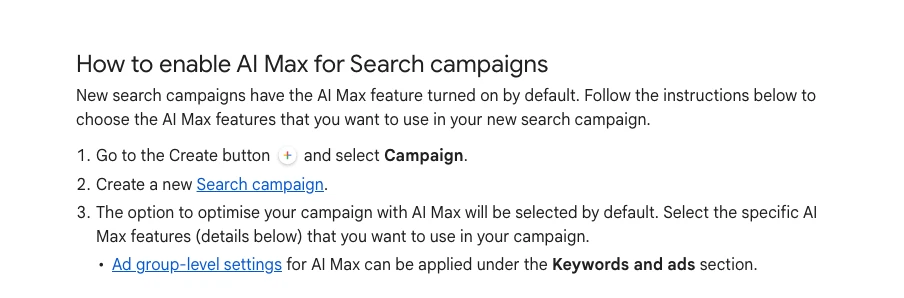
In my own builds, on a small daily budget I keep campaigns on Google Search only. I leave search partners and display expansion off, because I would rather a small budget went on Google Search itself.
One caution: a new advertiser who turned both off saw impressions fall to zero, and replies told them to raise bids or switch the networks back on. If that happens to you, check your bids first.
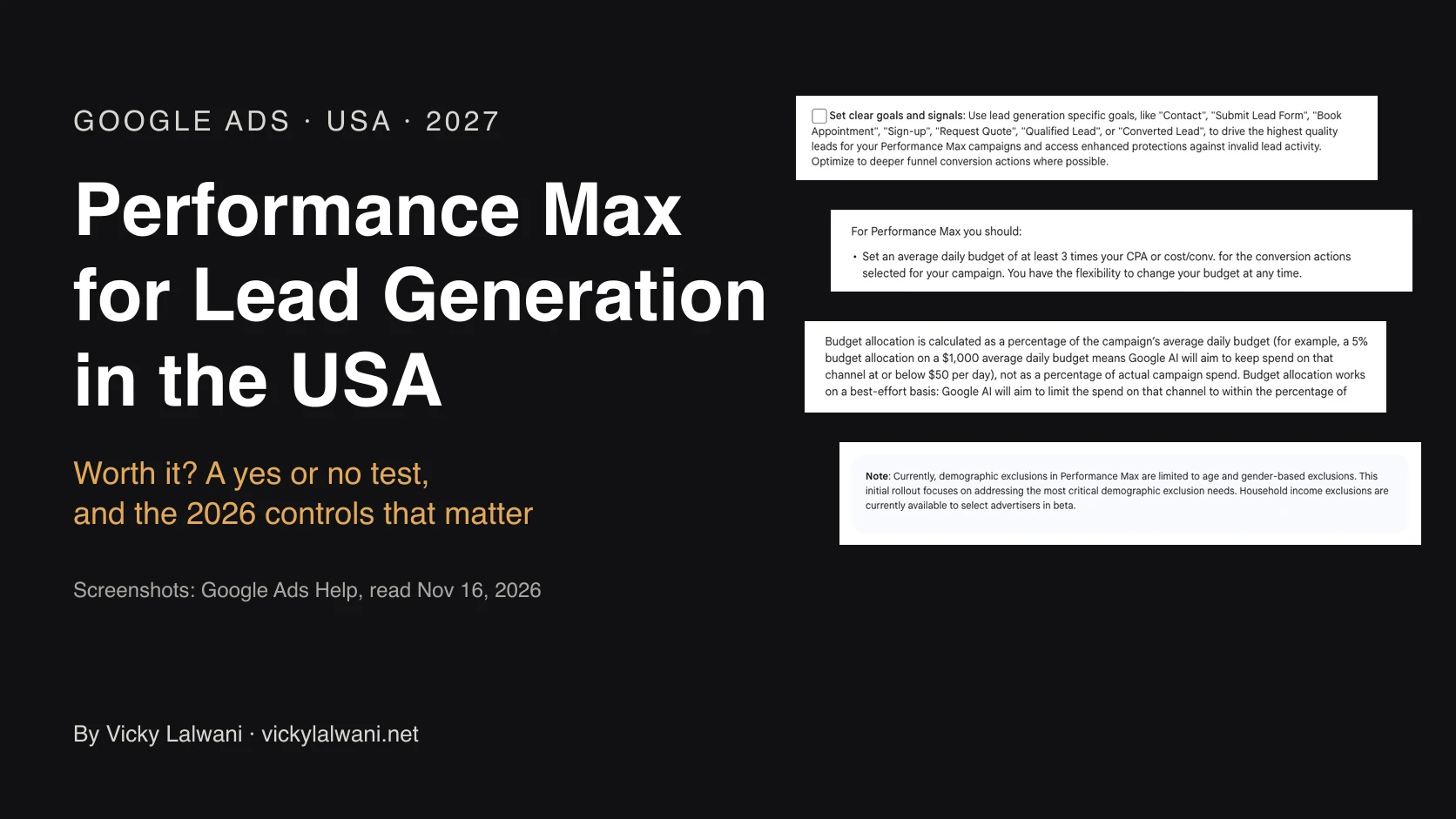
Why not Performance Max? It is Google's all-in-one campaign type, which places ads across Search, YouTube, Display, Gmail and Maps from one budget. Use Google's own guidance and do the sum.
- Google suggests a Performance Max daily budget of at least three times your cost per conversion. The line appears in its setup guide for online shops and in its general developer guidance. It also suggests running a new campaign for at least six weeks before judging it.
- If an enquiry costs you £40, three times that is £120 a day. That is about £3,650 a month.
- It is a recommendation, not a hard minimum. For most service businesses, a £300 budget is a long way from it.
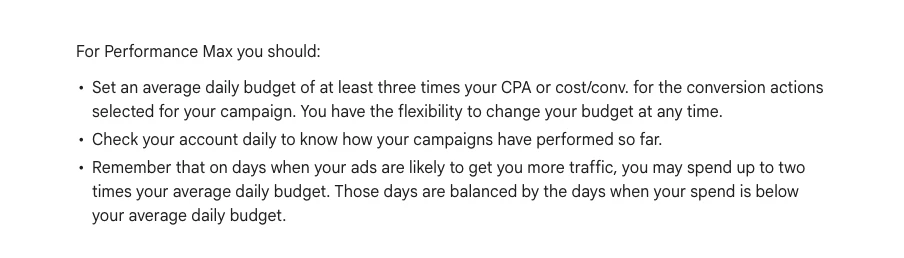
I run Search for a couple of months before I add Performance Max. And I only add another campaign type when the budget can feed it. On one UK trades account I left Local Services Ads (Google's pay-per-lead listings for local trades) alone until the budget grew.
Want these settings checked on your own account? That is part of my Google Ads management in the UK.
Track enquiries before you spend a pound
I build campaigns in draft, set up tracking, walk through the drafts, and only then go live.
- Track every way to enquire. Each form, each call button, each booking tool. If I cannot get into the website's back end, I set up conversion tracking through the tag manager that is already on the site.
- Test it yourself. On one launch a campaign was spending with no conversions. A colleague submitted a test enquiry and the form was broken. Send your own test enquiry on desktop and on mobile before launch, and again once the campaign is live.
- Know what you are counting. A click on a call button is not a call. I read conversions action by action.
- Pick one primary conversion. Bidding optimises towards what sits in the Conversions column, so keep it to the action that means a real enquiry.
Consent and missing conversions. Google's user consent policy names the UK. It asks for consent to cookies where the law requires it, and to personal data being used to personalise ads. In practice that means a consent banner, and some visitors will say no. Google can model the conversions it cannot see, but only once a site has around 700 ad clicks in seven days for that country.
That is about 100 clicks a day. The £20 example above gets about five. So on a small account, expect Google Ads to report fewer enquiries than you received, and count real ones in your inbox or CRM. More on that in why Google Ads misses conversions, and it is the core of my tracking setup work.
Bidding in stages, not all at once
I think of bidding in stages: clicks first, then conversions, then a cost target once the account has enough conversion history.
| Stage | Bid strategy | What it chases |
|---|---|---|
| 1 | Maximise clicks | Clicks, with a bid cap |
| 2 | Maximise conversions | Enquiries, using the whole budget |
| 3 | Target CPA | A cost per enquiry you set |
- Stage 1: clicks. Maximise clicks gets as many clicks as the budget allows and takes no account of conversions. You can set a maximum bid to control cost. On a brand-new account with no history, my plan is to bid for clicks for about the first month, to learn which keywords earn clicks and what they cost.
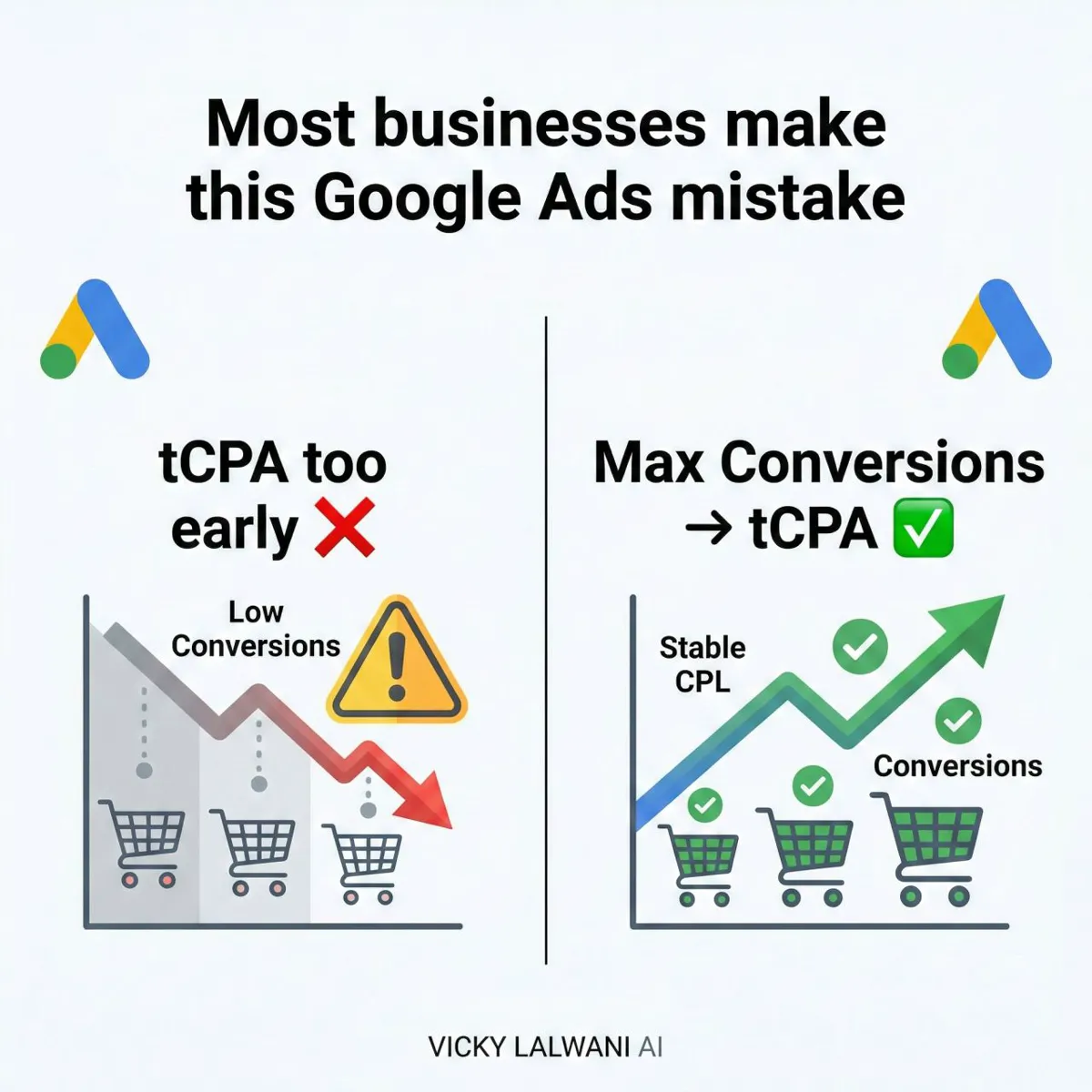
- Stage 2: conversions. Maximise conversions tries to spend the whole daily budget on the clicks most likely to convert. It needs conversion tracking.
- Stage 3: a cost target. Target CPA is the bid strategy where you tell Google the cost per enquiry you want. CPA stands for cost per acquisition. When I move a campaign to a cost target, I set it close to what the campaign is already achieving and bring it down in steps.
How many conversions do you need? You need fewer than people say to start, and more than you would think to judge.
- Google says Target CPA can be used with no conversion history. The well-known 30 is its advice on how much data to have before judging results.
- Optmyzr's 2024 study of 14,584 accounts found results became predictable at about 50 conversions in 30 days, whichever strategy was used. It left out accounts spending under $1,500 a month.
A 2026 change worth knowing. Since 17 August 2026, a budget-limited campaign on a cost target bids closer to the target you typed in. Google's example: a £10 target that used to deliver £5 enquiries now drifts towards £10 unless you lower the target. Set the target at the cost you actually want.
Make few changes, and judge over weeks, not days.
For when to make that switch, see my guide to moving from Maximise conversions to Target CPA.
Limited by budget: what it means and when to raise spend
"Limited by budget" means Google thinks your campaign could get more traffic with a bigger budget. It is a status, not an instruction to spend more. On a small budget, expect to see it.
- With Maximise conversions it is expected. Google says those campaigns are limited by budget by design, because the strategy aims to spend all of it.
- Google's fixes. Apply the recommended budget, or lower bids slightly so the same money buys more clicks.
- The number to read. Add the column Search lost IS (budget). It shows how often your ad could have shown but did not, because the budget ran out. Search lost IS (rank) shows how often it lost because the bid or the ad quality was too low. If you are losing on rank, more budget will not fix it.
- One caveat. Google says not to use the lost IS (budget) column with Maximise conversions, and points to the budget simulator instead.
A sensible rule: raise the budget only when enquiries are coming in at a cost you can live with and the campaign is still running out of money. When I raise budgets, I do it in small steps, not by doubling overnight.
If enquiries are too expensive, more budget buys more of the same.
Your first two months, week by week
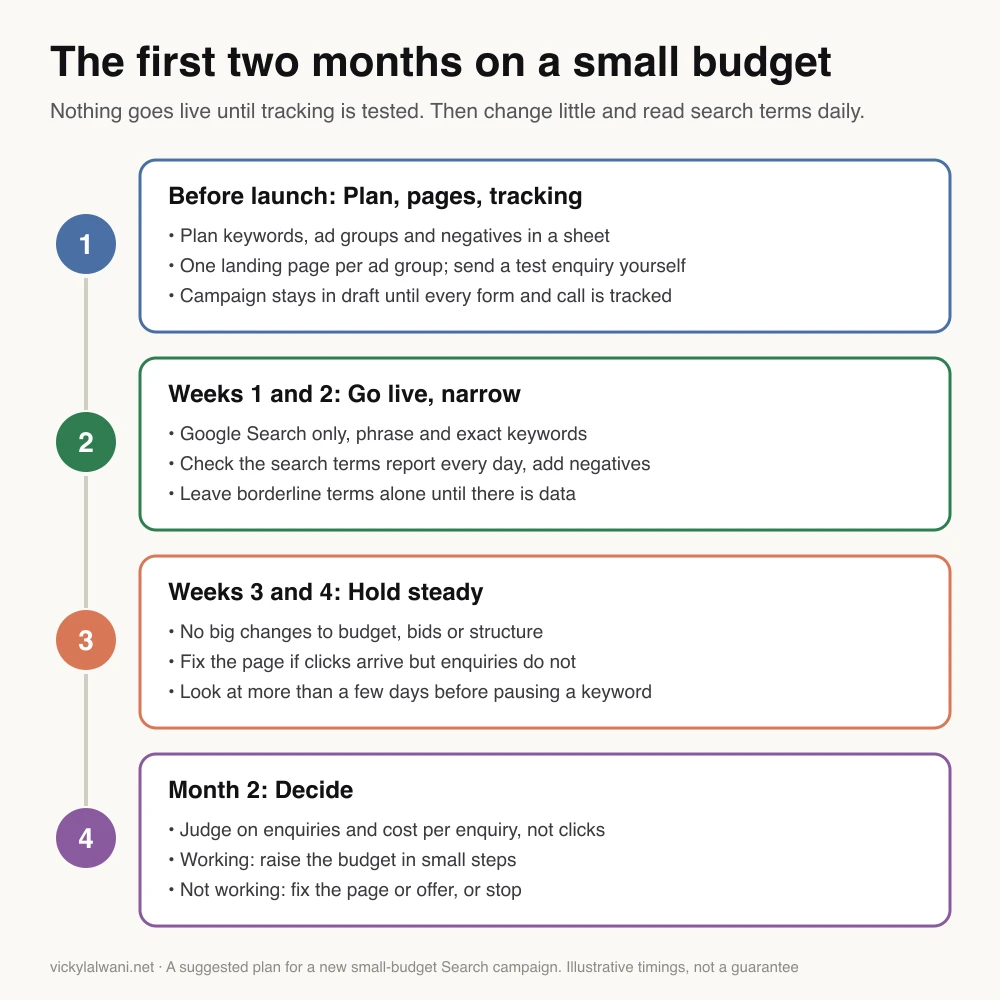
Plan on about two months before you judge a small campaign. Here is a plan for those two months.
- Before launch: plan, pages, tracking. Plan keywords, ad groups and negative keywords in a sheet. Get one landing page ready per ad group and send a test enquiry yourself. Keep the campaign in draft until every form and call is tracked.
- Weeks 1 and 2: go live, narrow. Google Search only, with phrase and exact keywords. Check the search terms report every day and add negatives. Leave borderline terms alone until there is data.
- Weeks 3 and 4: hold steady. No big changes to budget, bids or structure. If clicks arrive but enquiries do not, fix the page. Look at more than a few days before pausing a keyword.
- Month 2: decide. Judge on enquiries and cost per enquiry, not clicks. If it is working, raise the budget in small steps. If it is not, fix the page or the offer, or stop.
On an account that is already running, the first job is finding the leaks. How to reduce wasted spend in Google Ads covers that.
Videos worth watching
Six videos on small budgets, all checked on 14 November 2026. Every one comes from someone who sells audits, management or training, so weigh the advice with that in mind.
| Topic | Video | From |
|---|---|---|
| Structure | Google Ads on a Small Budget: How to Compete Without Wasting Money | UK agency channel, Feb 2026, 26 min |
| Pacing change | Google Ads Just Changed Budget Pacing in 2026 | Training channel, May 2026, 2 min |
| Settings audit | Why This Google Ads Account Isn't Spending (£30/Day Budget) | UK freelancer channel, May 2026, 13 min |
| Low budget limits | Small Google Ads Budget? Watch This First | Agency owner channel, Apr 2026, 14 min |
| First 60 days | How to WIN with Google Ads on a Small budget in 2026 | Training channel in Australia, Feb 2026, 14 min |
| Cutting waste | How To Get BIG Results With a Small Google Ads Budget! | Consultant channel, Jul 2025, 10 min |
One caution on the last video: it suggests cutting the ad schedule to save money. That was true when it was made. Since 1 June 2026 a shorter weekly schedule no longer lowers the monthly total.
What people say on X and Reddit
Posts and threads from 2025 and 2026, each opened and checked on 14 November 2026. Many Reddit replies come from freelancers looking for clients, so treat single comments as opinion.
| Where | Date | What it says |
|---|---|---|
| Google Ads liaison, X | 19 Feb 2026 | Ad schedules unchanged; pacing changes |
| A practitioner, X | 19 Feb 2026 | Asks what it means for weekday-only ads |
| Google Ads, X | 7 May 2026 | Announces demand-led pacing |
| Search Engine Roundtable, X | 7 Jul 2026 | Expects the August change to cost more |
| Google Ads liaison, X | 7 Jul 2026 | Says spend will not change |
| Google Ads liaison, X | 5 Aug 2026 | Results move towards your target |
| An ads tool analyst, X | 14 Sep 2026 | Click prices up when budget-limited |
| Google Ads liaison, X | 15 Apr 2026 | AI Max leaves beta |
| r/smallbusinessuk | Sep 2025 | About £1,500 to £2,000, no real leads |
| r/PPC | May 2026 | 13 "conversions", no jobs |
| r/googleads | Feb 2026 | One campaign, one tight ad group |
| r/googleads | Nov 2026 | 91 clicks in week one, no leads |
On X: the two 2026 changes that hit small budgets.
- The pacing change. A practitioner asked what Google's email meant for a client whose ads run only in office hours and are off at weekends. Google's ads liaison account replied that ad scheduling itself is untouched and the change is to how the budget is paced. That is the weekday trap above.
- The August bidding change. The liaison account said campaigns that are limited by budget and beating their target will see results move towards the target they set. Search Engine Roundtable's account read that as likely to cost advertisers more. The liaison disagreed, saying the change does not alter what campaigns spend.
- Early data. An analyst at an ads tool company posted charts in September 2026 arguing that click prices are rising for budget-limited campaigns since the update. The accounts are mostly retail and the sample is not stated, so treat it as a signal, not proof. A small account is budget-limited most of the time, so watch your own cost per click.
On Reddit: the same four problems keep coming up.
- The budget buys too few clicks. A UK health and beauty business reported spending about £1,500 to £2,000 over nine months with no real leads.
- Tracking counts the wrong thing. A Midlands locksmith saw 13 "conversions" on a day with no jobs, because the account counted taps on the call button.
- The budget is split too thin. For a local electrician on about €600 a month, the replies said one campaign and one tight ad group.
- A weak page, or too little data. A new contractor business got 91 clicks for €210 in its first week and no leads. Replies were split: some blamed the seven-field form on a one-page site, others said 91 clicks was too few to judge.
They disagree on one thing that matters here: whether a few hundred pounds a month is worth it. Agency replies often say no and name a floor in the thousands. Owners with a tight local campaign and a high job value say yes.
Where this advice is weak
- There is no UK benchmark to lean on. I found no UK-wide click price data with a published sample. The worked examples use example prices and a US conversion rate.
- The studies skip the smallest accounts. The bidding study left out accounts spending under $1,500 a month, and the match type studies do not report very small accounts separately. If you spend £300, you are outside the data.
- My method is not a proven formula. It is how I work on accounts for clients in the UK, Australia and the USA, and some of the lessons here come from the Australian and US accounts. I have not published outcomes, because client numbers stay private.
- Defaults keep changing. AI Max launched in 2025 and is now switched on by default in new Search campaigns. Channel prioritisation began rolling out in October 2026. Re-check the settings list every few months.
- The VAT section is not tax advice. Google's page does not give UK-only wording. Your accountant decides.
Want a second pair of eyes on your account?
I set up and manage Google Ads for UK businesses, small accounts included. Send me your daily budget and your main keywords through the contact page. How I work is on the Google Ads management in the UK page.
Sources
| Source | What it supports | Date | Link |
|---|---|---|---|
| Google Ads Help | Daily budget, 2x a day, 30.4 a month | Read 14 Nov 2026 | Average daily budgets, overdelivery, spending limits, managing spend |
| Google Ads Help | Ad schedule pacing change, 1 June 2026 | Read 14 Nov 2026 | Budget pacing |
| Google Ads Help | 2% UK DST fee | Read 14 Nov 2026 | Surcharges |
| Google Ads Help | VAT and Google Ireland | Read 14 Nov 2026 | Taxes in your country |
| HMRC and gov.uk | Reverse charge, VAT threshold | Read 14 Nov 2026 | Notice 741A, VAT thresholds |
| Google Ads Help | Match types, negatives, search terms | Read 14 Nov 2026 | Matching options, negatives, search terms |
| Google Ads Help | Search partners and channels | Read 14 Nov 2026 | Search Network, channel prioritisation |
| Google Ads Help | AI Max default and limits | Read 14 Nov 2026 | Set up AI Max, how it works |
| Google Ads Help | Location options, auto-apply | Read 14 Nov 2026 | Location options, auto-apply |
| Performance Max budget and timing | Read 14 Nov 2026 | Set your budget, developer guide, tips | |
| Google Ads Help | Bid strategies | Read 14 Nov 2026 | Maximise clicks, Maximise conversions, Target CPA, target change |
| Google Ads Help | Limited by budget, impression share | Read 14 Nov 2026 | Limited by budget, budget tips, impression share |
| Consent policy and modelling | Read 14 Nov 2026 | Consent policy, modelling | |
| Google Ads Help | Keyword Planner bid ranges | Read 14 Nov 2026 | Forecasts |
| WordStream by LocaliQ | US benchmarks; sample as reported by PPC Land | June 2026 | Benchmarks, PPC Land |
| Optmyzr | Match types; bidding strategies | Sept 2023; Sept 2024 | Match types, bidding |
| Adalysis | Match types by bid method | Sept 2025 | Study |
| Search Engine Journal | Homepage against landing page | Feb 2019 | Landing pages |
| First-hand reports and opinion | 2025 to 2026 | Linked in the text | |
| X | Google Ads accounts, trade press, practitioners | Feb to Sept 2026 | Linked in the text |
| YouTube | Six videos, titles checked by oEmbed | Jul 2025 to May 2026 | Linked in the videos table |
FAQ
How do I run Google Ads on a small budget?
To run Google Ads on a small budget, put the whole budget into one Search campaign. Use phrase and exact match keywords, send each ad group to its own landing page, and track every enquiry before launch. Switch off search partners, the Display Network and AI Max, and set the location option to Presence. Check the search terms report daily and judge after about two months.
How much should a small business spend on Google Ads in the UK?
A UK small business should spend enough on Google Ads to buy several clicks a day at its own click price. Google publishes no minimum. As a worked example, £20 a day is up to £608 a month, which buys about 152 clicks at £4 a click. Check your own click price in Google's Keyword Planner before you fix a figure.
What is a good budget for Google Ads?
A good Google Ads budget is one that buys enough clicks to produce enquiries you can measure. Google suggests having at least 30 conversions in the last 30 days before you judge a cost target. If your budget cannot reach that, keep everything in one tightly built Search campaign so the clicks you do buy are not spread thin.
Is £10 a day enough for Google Ads?
£10 a day can be enough for one narrow, local Google Ads Search campaign where clicks are cheap. It is at most £304 a month, because Google caps a month at 30.4 times the daily budget, plus a 2% UK fee. That buys about 152 clicks at £2 a click or 76 at £4. Where clicks cost more, £10 a day is thin.
Is £5 a day enough for Google Ads?
£5 a day is rarely enough for Google Ads in the UK. It is at most £152 a month. At £4 a click that is about 38 clicks. At 8 enquiries per 100 clicks, an example rate, that is about three enquiries, too few to tell a good keyword from bad luck. £5 a day only makes sense where Keyword Planner shows low click prices for your keywords.
What is the minimum budget for Google Ads per day?
Google publishes no minimum daily budget for Google Ads and says the amount is up to you. The practical minimum is set by your click price: the budget needs to buy several clicks a day for the campaign to learn anything. Performance Max is different, because Google suggests a daily budget of at least three times your cost per conversion.
How much does Google Ads cost per month in the UK?
Google Ads costs what you set. The most Google will bill in a month is your average daily budget times 30.4, so £20 a day is up to £608. Ads shown in the UK also carry a 2% fee from Google, which it calls the UK DST fee, added once a month. Any agency or consultant fee is separate from that.
How much does Google Ads cost per click in the UK?
There is no reliable UK-wide average cost per click for Google Ads with a published sample, and the figures quoted online disagree. The best source is Google's Keyword Planner. Set the location to your area and read the low and high top of page bid for your keywords. Most advertisers paid somewhere between those two figures.
Does Google Ads charge UK VAT?
Google Ads does not add UK VAT to accounts set up for business use. Google's tax page lists UK accounts under Google Ireland Limited, and VAT-registered businesses normally account for the VAT themselves under the reverse charge. If you are not VAT registered, HMRC says the value of services bought from overseas suppliers counts towards the VAT registration threshold. This is not tax advice, so check your own position with an accountant.
Why does Google Ads spend more than my daily budget?
Google Ads can spend up to twice your average daily budget on a busy day. Over a month it will not bill more than 30.4 times the daily budget. Since 1 June 2026, campaigns that run only on some days of the week still pace to that full monthly amount, so set the daily budget as your monthly budget divided by 30.4.
What does "limited by budget" mean in Google Ads?
"Limited by budget" in Google Ads means Google thinks your campaign could get more traffic if the budget were higher. With Maximise conversions bidding it is expected, because that strategy aims to spend the whole budget. It is not an instruction to spend more. Raise the budget only when enquiries are arriving at a cost you can accept.
Is Performance Max a good idea on a small budget?
Performance Max is usually not a good first campaign on a small Google Ads budget. Google suggests a daily budget of at least three times your cost per conversion, and at least six weeks before you judge it. At £40 an enquiry that is £120 a day, about £3,650 a month. Start with one Search campaign.
How long does it take for Google Ads to work on a small budget?
Plan on about two months before you judge a small Google Ads campaign. Google advises judging a bid strategy over two conversion cycles or two weeks, whichever is longer, once it has settled, and a small budget collects conversions slowly. Use the first weeks to remove irrelevant search terms, then judge on enquiries and cost per enquiry, not clicks.
Is Google Ads worth it for a small business in the UK?
Google Ads is worth it for a small UK business when the cost of winning a customer is lower than the profit that customer brings. On a small budget that depends on your click price, your landing page and how many enquiries become jobs. A tightly set up Search campaign with tracked enquiries, run for about two months, will tell you. If the sums do not work, stop.
Can I run Google Ads myself on a small budget?
Yes, you can run Google Ads yourself on a small budget. A small account needs careful setup and a short daily check of the search terms report more than it needs complex management. The setup is where money is most easily lost: campaign settings, keyword match types, landing pages and conversion tracking. Vicky Lalwani, a Google Ads consultant, offers setup and reviews for UK businesses that want a second opinion.